
Let One Claude Code Session Message Another
Two Claude Code sessions on one computer can pass each other a short note: name them, list one from the other, and let the triage session send its test counts to the reviewer session so you stop copying text between terminals.
Cross-session messaging lets two Claude Code sessions on one computer pass each other a short note. Name two sessions, list one from the other, and have one send its test results to the other, with no copying between terminals.
You run two sessions at once and end up as the messenger between them, reading one screen and retyping the news into the other.
In this article: Day 17 of a day-by-day guide to Claude Code. Start here: you name two sessions, list one from the other, and have the triage session send its test counts to the reviewer session. Going deeper: how a message travels and what it cannot do, how to control what arrives, and the bigger tools that run many sessions.
Tested on Claude Code 2.1.326.
Yesterday you ran two sessions in two worktrees, merged "emergency" into main from one of them, and removed both worktrees.
Start here
At the end of today, you can give two Claude Code sessions names, see one session list the other, and have one session send the other a message with its test results.
Starting fresh or fell behind? Run git switch -C main claude-code/day-16. This replaces your main with the end of Day 16; to keep your own work, run git branch my-backup first.
On Day 16 you ran two sessions at once, and you were the only link between them. When one session finished, you read its screen and carried the news to the other. Cross-session messaging lets Claude do that carrying. One session sends a short text message, and another Claude Code session on the same computer receives it. You may have seen a message line already: on Day 9, some tested runs showed a line › Message from @Explore from a subagent. Today the sender is a whole session that you started yourself.
Today you start two sessions in Ticket Triage. You name one reviewer and the other triage. The triage session runs the tests and sends the counts to the reviewer session. Neither session edits a file, so both can work in the main checkout without worktrees, and there is nothing to commit at the end.
Check the starting state
Open a terminal in Ticket Triage:
cd ~/code/ticket-triage
git status
npm test
Git prints nothing to commit, working tree clean. The tests show ℹ fail 0 and the pass count from yesterday. It was 20 on the tested auto-mode run and 21 on the Manual-mode run. The two runs differ because on Day 16 the Manual-mode session added two tests, not one, and your count can differ for the same reason. Remember your number.
Start two named sessions
In the first terminal, start a session with a name:
claude --name reviewer
The --name flag gives the session a name. Your other sessions use this name to send it messages. The name also shows at the right end of the line above the input box, so you can tell your terminals apart at a glance.
Open a second terminal and start the other session:
cd ~/code/ticket-triage
claude --name triage
You now have two sessions in the same folder. Each one has its own conversation and its own context window. They share nothing except the files on disk.
The status bar under the input box can show a hint such as ← 3 agents. Ignore it today. Going deeper explains it.
Manual mode: no prompts. Starting a session asks nothing.
See which sessions you can reach
Go back to the reviewer terminal and type:
/list-agents
The /list-agents command lists the sessions that this session can send messages to. The block below is an excerpt of the tested run's output, with only the Ticket Triage sessions kept:
❯ /list-agents
  ⎿  This session: reviewer [8e40df] (the name other sessions use to message it)

     Other Claude sessions (n):
       [idle]  ·  c15-auto-26  ·
     ~/code/ticket-triage  ·  Claude
       [idle]  ·  triage  ·
     ~/code/ticket-triage  ·  started 9s
       [idle]  ·  c15-manual-ae  ·
     ~/code/ticket-triage  ·  Claude
Read it from the top:
This session: reviewerconfirms the name that you gave with--name. The code in brackets is a short ID for the session. Yours is different.Other Claude sessions (n):counts the sessions that reviewer can reach. Your screen shows a number where this copy showsn.- Each session takes two lines. The first line gives its state and its name. The second line gives its folder and one more fact about it.
- The
triagesession says[idle], which means the session is waiting for a prompt. Its second line says how long ago it started. - On the tested machine, two sessions ended in
· Claude. Those were the Day 15 sessions that were still open in the Desktop app, named after the tested folders. If your Day 15 session is still open in the Desktop app, it can appear too, with a name from your own folder.
The list shows every Claude Code session that is running on your computer, not only the two from today. Sessions in other folders and sessions from other days appear too, so your count and your rows can be longer than this copy. Look for the triage row.
Manual mode: no prompts. The command only reads.
Send a message
Go to the triage terminal and type:
Run npm test, then send @reviewer one short message with the pass and fail counts.
The @reviewer part names the session that gets the message. Claude runs the tests first, then sends. On the tested auto-mode run, the screen showed:
⏺ Bash(npm test 2>&1 | tail -20)
  ⎿  ok 19 - critical
       ---
       duration_ms: 0.037875
     … +17 lines (ctrl+o to expand)
  ⎿  Allowed by auto mode
  ⎿  “Report test results to reviewer” → sent to reviewer — another Claude session on this machine
  ⎿  Allowed by auto mode
The line with → sent to reviewer is the send. The text in quotes is a short label that Claude wrote for the message, so yours can differ. On the Manual-mode run, the label was Report test pass/fail counts. Each Allowed by auto mode line means that auto mode checked a step and let it run. In Manual mode these lines do not appear.
Then Claude reported what it did. On the tested auto-mode run:
⏺ All 20 tests passed and none failed (npm test). I sent @reviewer the message "ticket-triage npm test: 20 passed, 0 failed." It arrived in their inbox, but their Claude
  hasn't read it yet.
The quoted text is the message itself. Claude wrote it, so your wording can differ. The counts must match the test run in this session.
Manual mode: no prompts in either session on the tested runs. Your Day 4 allow rule covers npm test, and sending a message did not ask for permission.
Read the message in the other session
Switch to the reviewer terminal. A new line is in the conversation. On the tested auto-mode run, it was:
› Message from @triage: ticket-triage npm test: 20 passed, 0 failed. (ctrl+o to expand)
The line names the sender, @triage, and shows the first line of the message. The docs say that ctrl+o shows the full text of the message, as it showed tool details on Day 2. The tested runs did not press it.
The reviewer session did not wait for you. When an idle session gets a message, Claude Code starts a turn with it, and Claude decides what to do. The two tested runs went two ways:
- In auto mode, reviewer ran
npm testagain and confirmed the count: "The triage session says npm test passes 20 of 20, and I re-ran the suite in this session and got the same result." - In Manual mode, reviewer summarized the message and asked what to do next: "It didn't ask me to do anything, so I haven't acted on it."
Either reply is fine. What matters is the › Message from @triage line with the counts from the triage session.

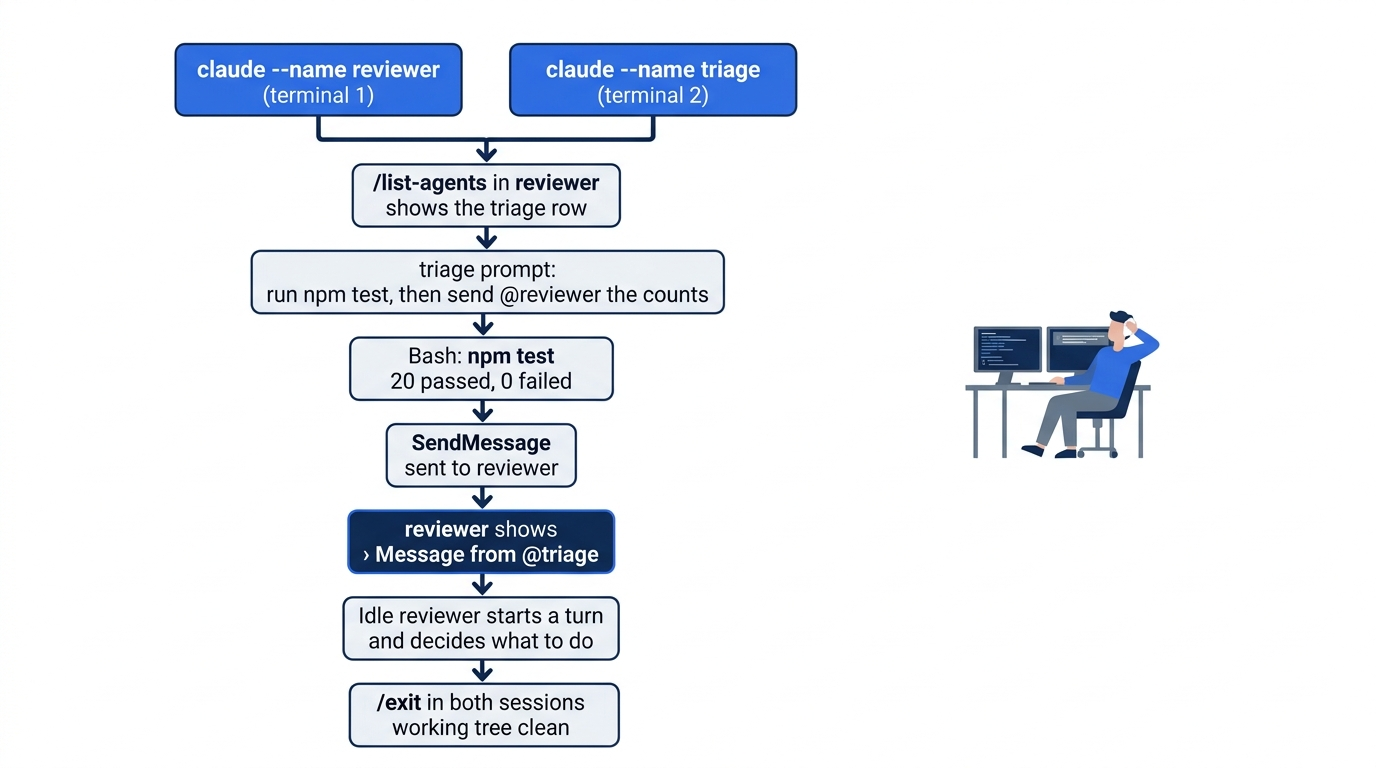
The scene shows the moment that matters today. The news arrives in the reviewer terminal, and the developer copied nothing.
A message is plain text from another session, not from you. The docs say that it can never approve a permission prompt in the receiving session or change that session's settings. Going deeper explains the rules.
After the reply, the input box can show a gray suggestion, such as review the last commit. Nothing runs until you send it. Ignore it.
Manual mode: no prompts. The Manual-mode reviewer ran no tool.
Check the win
Before you close anything, compare the two screens. The reviewer screen shows the › Message from @triage line, and its counts are the same as the counts that the triage session got from npm test. This line is today's win.
End both sessions
Type /exit in the reviewer terminal, then /exit in the triage terminal. In either terminal, run:
git status
npm test
Git prints nothing to commit, working tree clean. The tests show ℹ fail 0 and the same pass count as this morning. Neither session changed a file, so there is nothing to commit.
You named two sessions, listed one from the other, and sent test results from one session to the other without copying a line yourself.
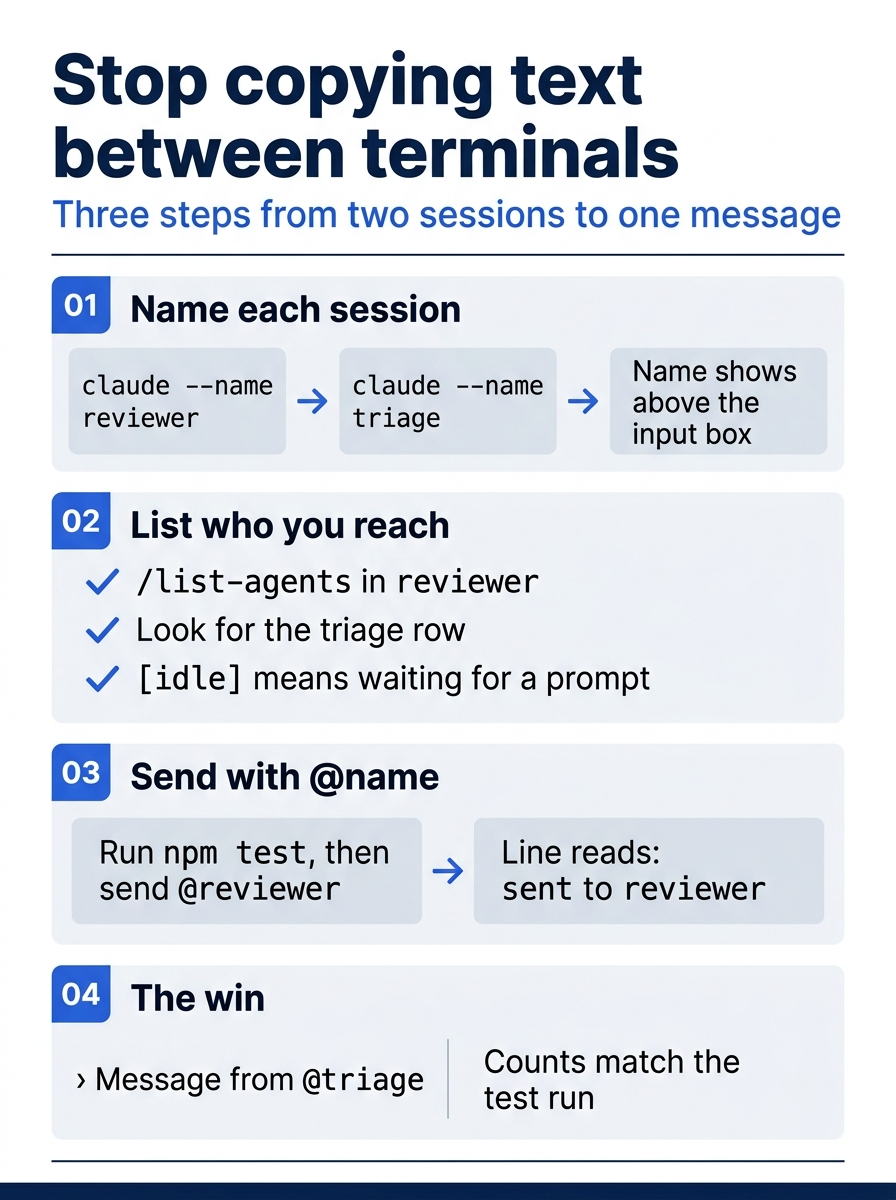
The day is three steps and one check. Names make sessions reachable, the list proves it, and the message line with matching counts is the win.
You can stop here. Going deeper explains why this works and where it breaks.
Going deeper
This section is for readers who want to know how a message travels, what a message can and cannot do, how to control what arrives, and which bigger tools run many sessions. It assumes that you finished Start here in Parts 1 to 17.
How the message traveled
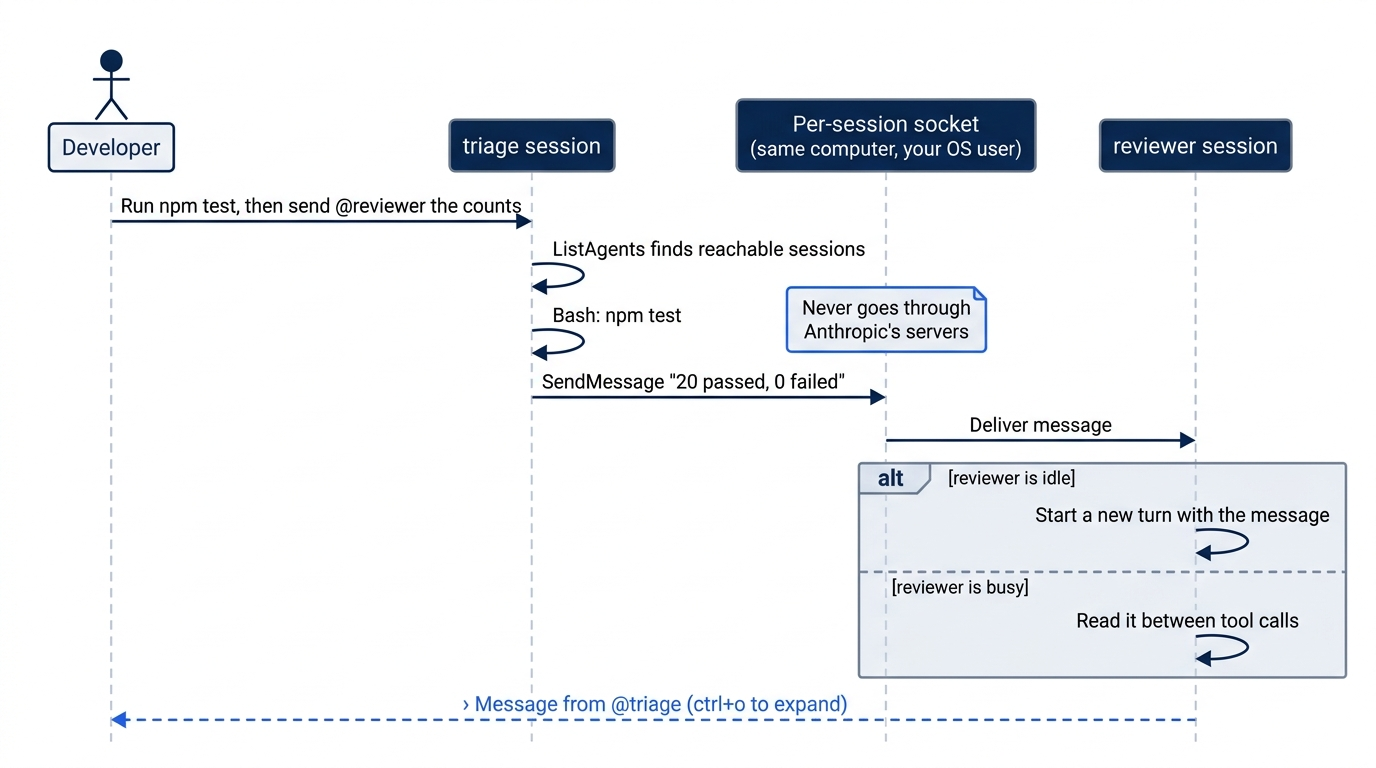
Cross-session messaging arrived in v2.1.224, on macOS and Linux. The docs say that it uses two tools that Claude calls, not you. ListAgents finds the sessions that Claude can reach, and SendMessage sends the text. The docs also give /peers as another name for the /list-agents command. This guide used only /list-agents.
The docs describe the path. Between two sessions on the same computer, a message goes over a per-session socket on macOS and Linux, or a named pipe on native Windows, and never through Anthropic's servers. Claude Code limits the socket to your operating-system user, so another user on a shared computer cannot post to your sessions. The docs say that /status shows the socket in a Peer address row, with a uds: prefix. This guide did not check that row.
The docs say that a message reaches a busy session between its tool calls, and this guide's tests sent only to an idle session. An idle session starts a new turn with the message, as reviewer did today. The docs also say that a delivered message counts toward your usage like a prompt that you type. The auto-mode reviewer that ran the tests again therefore spent tokens to confirm a number that it already had. A message that names a file with @ does not attach the file. The receiving Claude sees the text as written.
Since v2.1.247, a message shows as the one-line Message from @<sender> preview that you saw today, and Ctrl+O expands it. The preview shortens only what you see. The docs say that Claude reads the full message.
What a message can and cannot do
The receiving Claude is told that the message came from another session, not from you. The docs list four limits:
- It cannot approve anything. A message never counts as your consent, so it cannot answer a permission prompt that is open in the receiving session.
- It cannot change configuration. The receiving Claude is told never to change permission settings,
CLAUDE.md, or other configuration because another session asked. - Commands do not run. A command in the text, such as
/compact, arrives as plain text, and Claude Code does not run it. - Permission prompts still fire. If the work that a message asks for needs a permission that the receiving session does not have, you see the same prompt as for any other work.
The sender has a matching rule. Claude is told never to ask another session to do something that was denied or blocked in its own session. In auto mode, the changelog for v2.1.222 says that the permission classifier from Day 4 checks a message to another session before it goes. Today's triage screen showed a second Allowed by auto mode line under the send line. This guide did not test what that line checked.
Permission boundaries stay with each session. A message does not change the receiving session's permission mode or its rules.
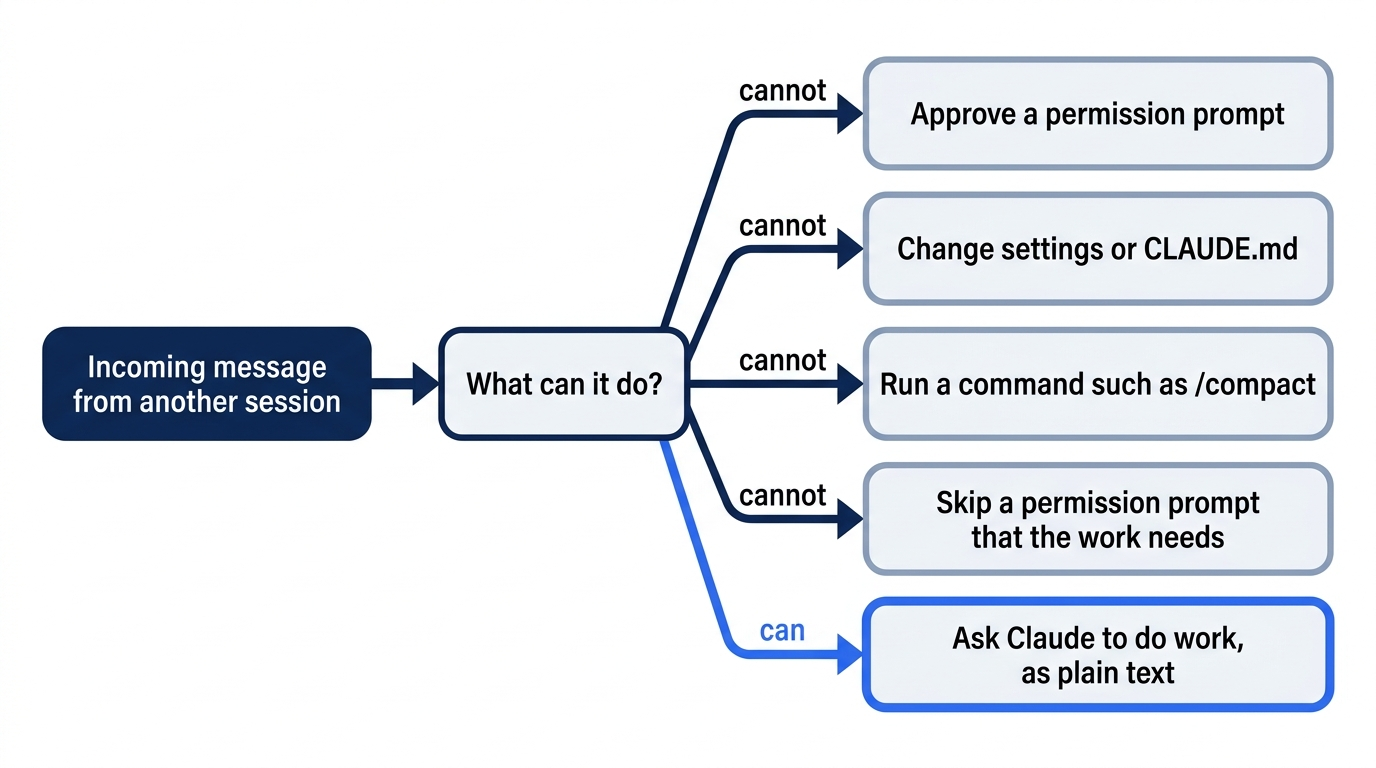
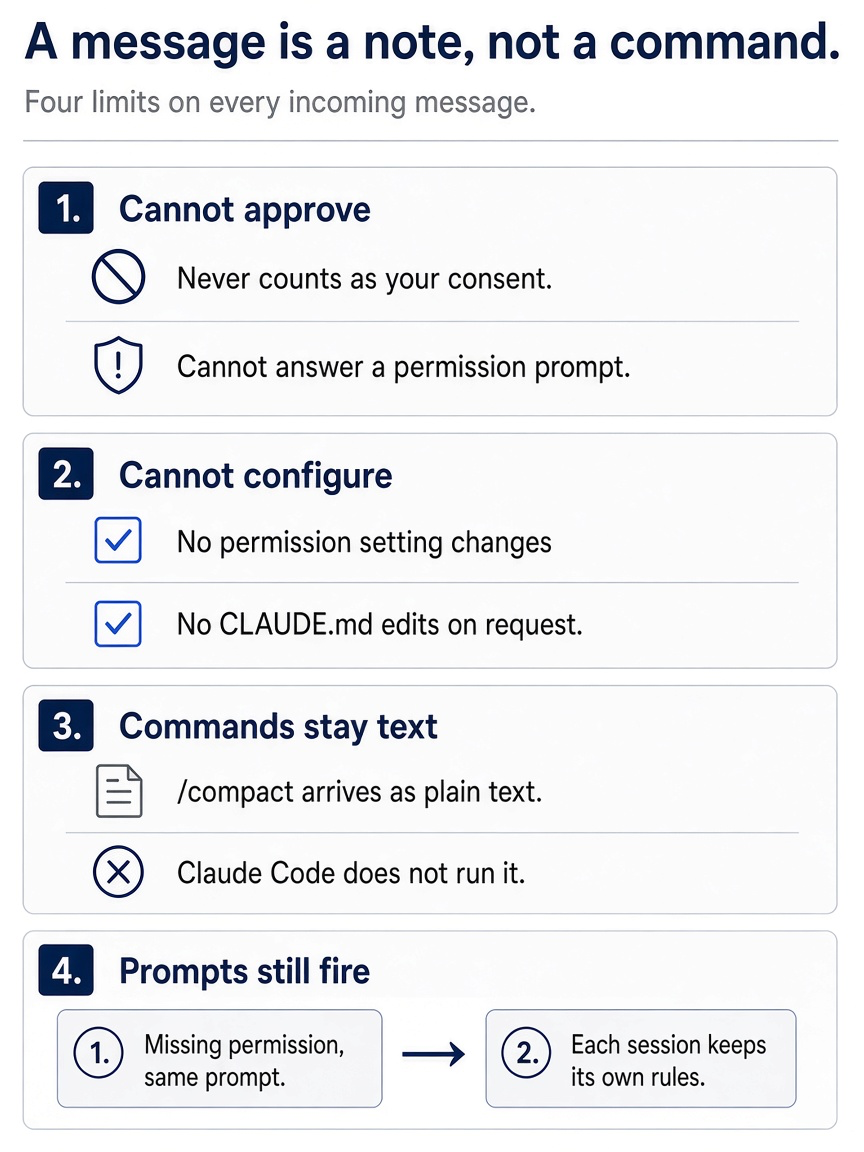
Those four limits share one idea: a message can ask for work, and the receiving session still decides, with its own rules and prompts.
Control what arrives
The crossSessionInbound setting, added in v2.1.224, decides what a session does with incoming messages:
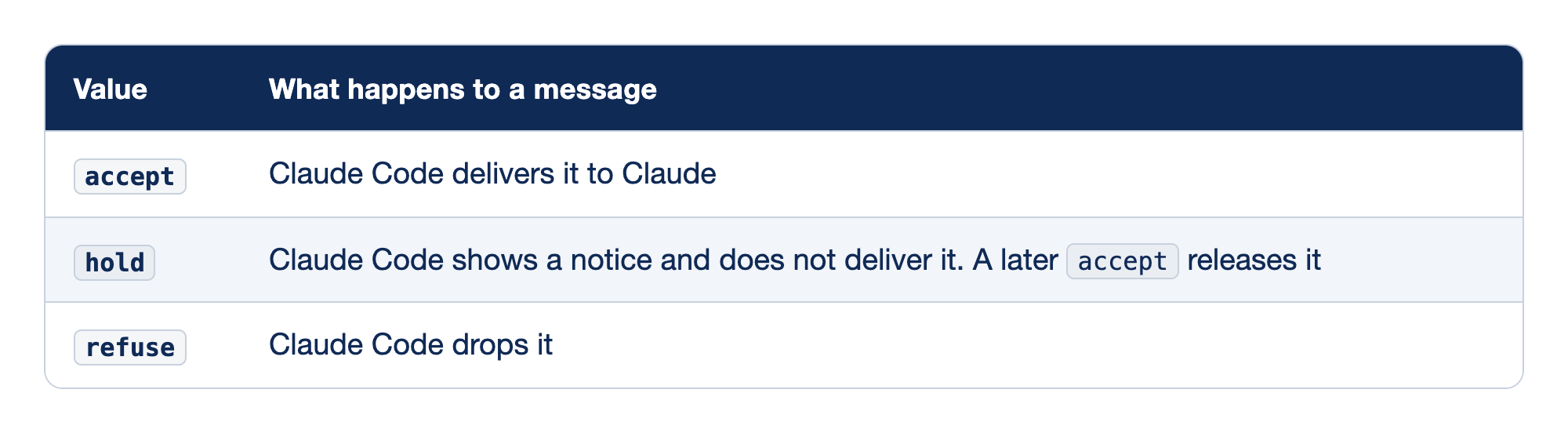
The crossSessionInbound setting takes one of three values. The Value column names the value, and the "What happens to a message" column says what Claude Code does with an incoming message under it.
acceptmeans that Claude Code delivers each message to Claude.holdmeans that Claude Code shows a notice and does not deliver the message, and a lateracceptreleases it.refusemeans that Claude Code drops the message.
Since v2.1.232, /config has a row named Messages from your other sessions that sets this value in your user settings. The docs say that a refuse in project or local settings applies over every other source.
When no value is set, as in today's test, Claude Code decides per message from the two sessions' permission modes. It puts sessions that bypass permission prompts in one class, and every other session, including auto mode and Manual mode, in the other:
- The receiving session prompts for permissions. Claude Code delivers each message. It holds a message only when the sender bypasses permission prompts.
- The receiving session bypasses permission prompts. Claude Code holds each message for your approval. It delivers a message only when the sender also bypasses.
This is the hold rule for bypass-mode sessions. A session that runs with no prompts would otherwise let any other session steer it, so a message to it waits for you. A held message in a terminal session opens a dialog with the sender and a preview. Approve delivers it, and Deny drops it. If you do not answer before the dialogExpiry deadline, five minutes by default, Claude Code drops the message. The Desktop app and the VS Code extension cannot show the dialog. Today both sessions were in the prompting class, so the message arrived with no dialog.
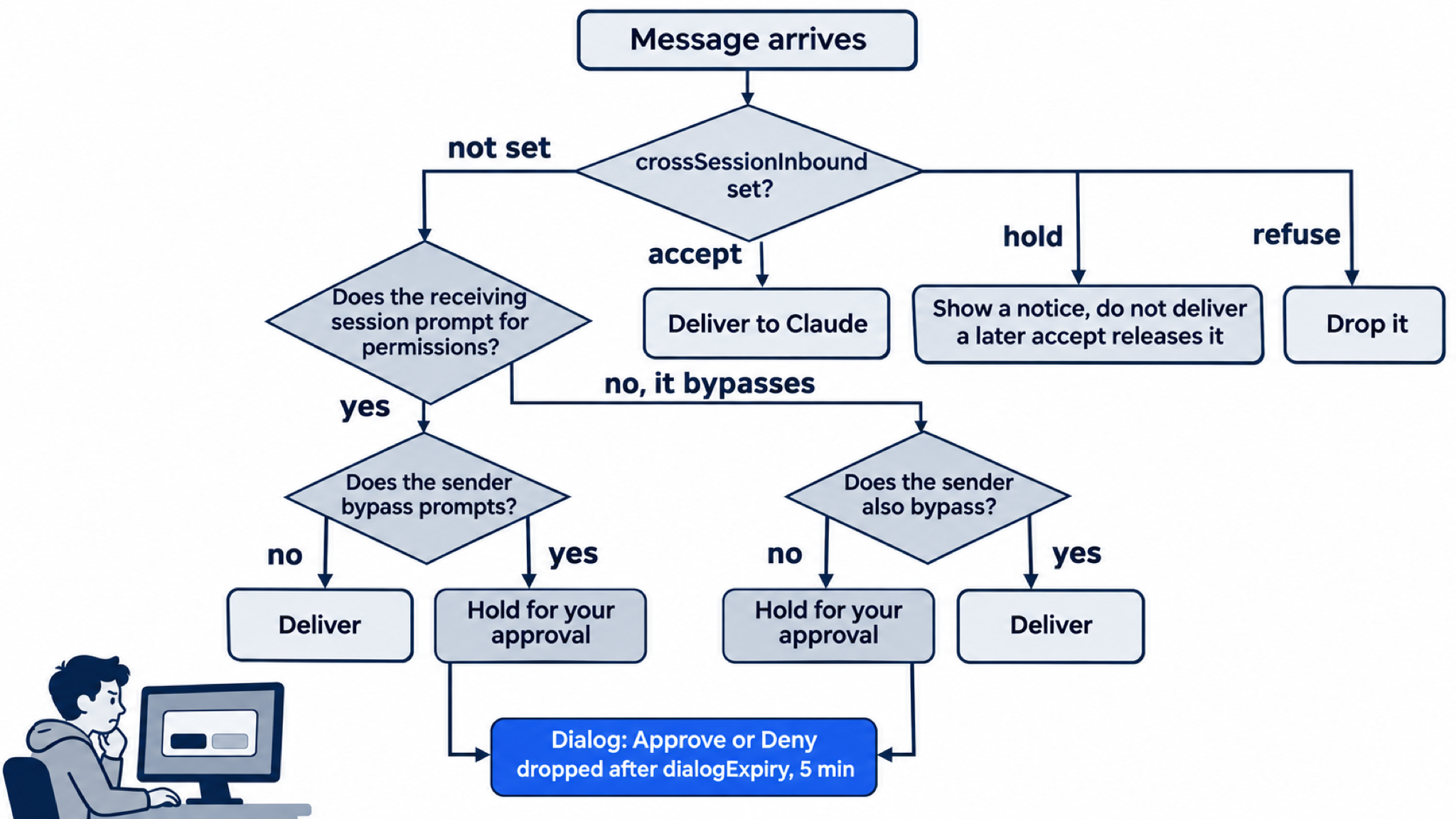
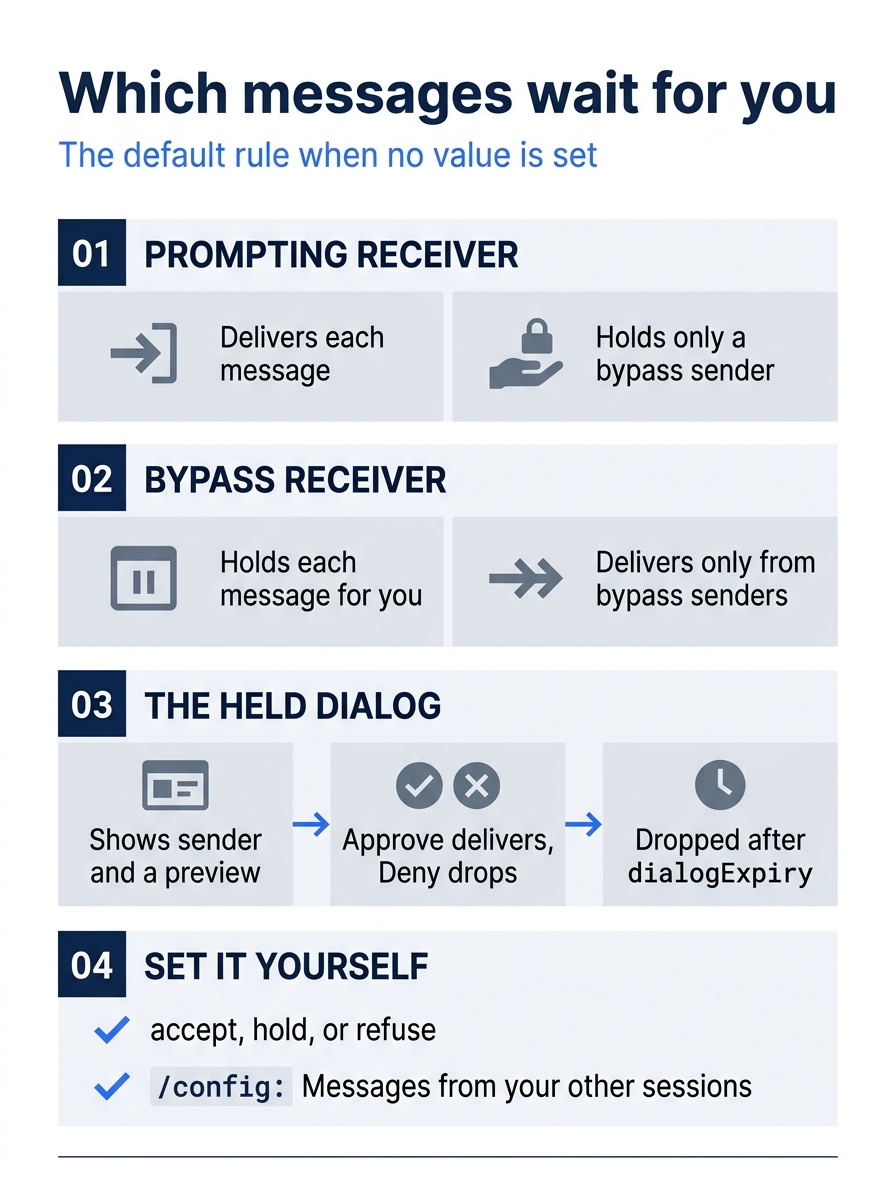
From the receiver's side, the default rule is short: a message waits for you whenever it crosses between a session that bypasses prompts and one that does not.
To stop a session from sending and listing, the docs add permission deny rules for SendMessage and ListAgents. Denying SendMessage also stops messages to subagents, because the same tool serves both. This guide did not test any of these settings.
Names and the @ picker
A session answers to the name that you set with --name or its short form -n, or with /rename during the session. The sessions docs say that a session that you do not name still gets a display name in listings, made from the folder name and a two-character suffix, such as my-app-3f. A real name is easier to type and to read, which is why today used --name.
Since v2.1.232, interactive sessions on one computer keep unique names. The changelog says that if you start or rename a session with a name that another live session already uses, Claude Code gives it a name-word-word variant and tells you. The docs say that when several sessions still answer to one name, Claude adds the short ID from the brackets to the address. They also say that when more than one live session answers to a name that you mention, Claude asks you which one you mean. This guide did not test a repeated name.
Since v2.1.232, typing @ and the first letters of a session's name opens a picker of your live sessions, and picking one inserts the mention. A name with a space needs double quotes, such as @"release notes". The tested runs typed the whole prompt at once and did not use the picker.
Wait for another session
Claude can ask a session on this computer for one notice when that session next goes idle or exits. Since v2.1.236, a prompt such as "Tell me when the triage session finishes what it's working on" is enough. The watched session spends no tokens to set this up. If no notice comes within 12 hours, Claude Code drops the request and tells Claude. This guide did not test it.
/list-agents with Remote Control on
On Day 7 you connected a session to Remote Control. While a session is connected, the docs say that /list-agents also shows your cloud sessions and your Remote Control sessions on other computers, labeled Remote Control, with offline for one whose connection dropped. A message to one of them goes through Anthropic's servers. To require your approval before a message leaves this computer, set isolatePeerMachines to true.
A connected session also hides some details of your local sessions in the /list-agents output. It leaves out each session's folder and any name that it cannot tie to a person, so such a row reads (unnamed session). It leaves out the This session: line unless you typed the name at this terminal with --name or /rename. When it hides anything, the output ends with a note that details were withheld. What Claude itself can reach does not change. This guide's Day 17 tests ran without Remote Control.
Bigger tools for many sessions
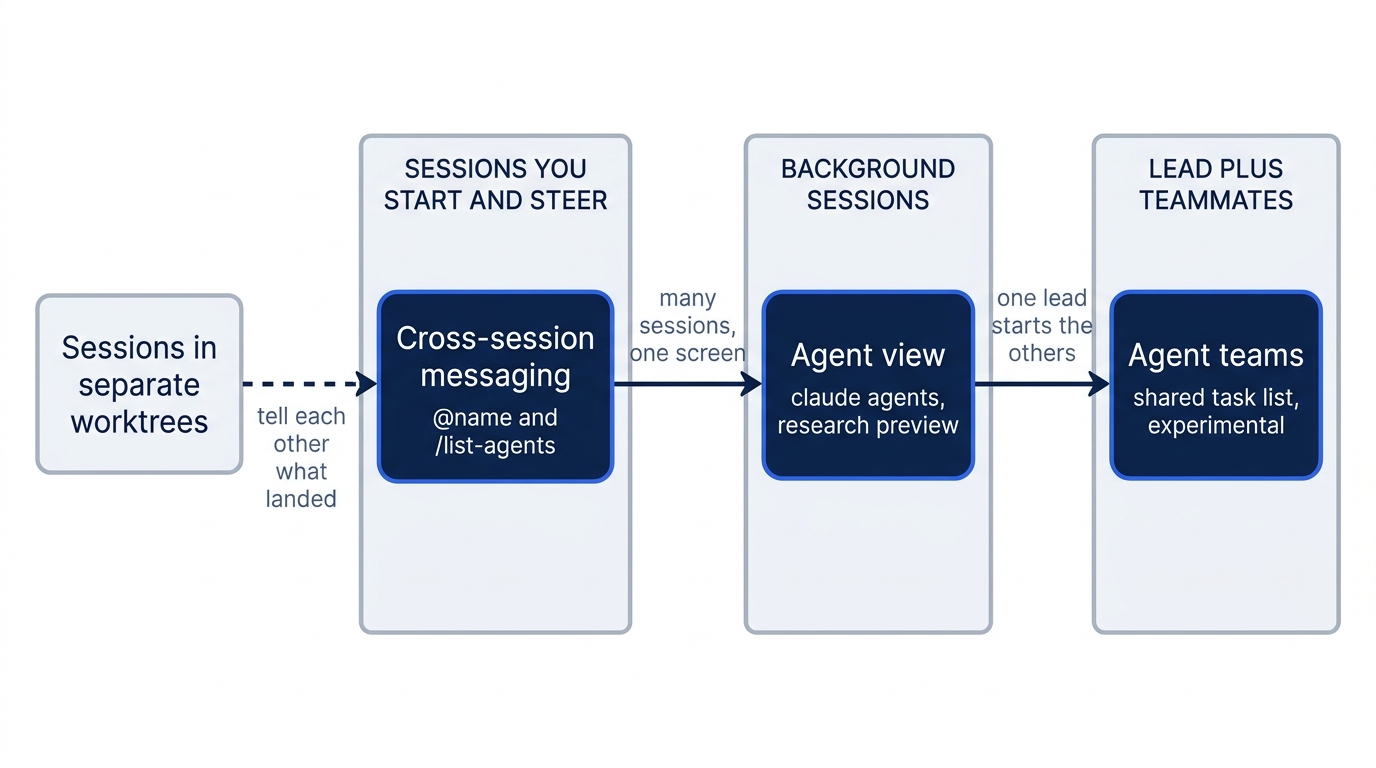
Cross-session messaging connects sessions that you start and steer yourself, as you did today. The run agents in parallel page compares it with the larger tools:
- Agent view is one screen for many background sessions, opened with
claude agentsin your shell. You type a task, and it starts a new session as a row that shows whether the session is working, waiting for you, or done. It is a research preview. On the tested runs, the status bar showed← 3 agents. The docs say that this hint counts your background sessions that wait for your input, so the 3 were the tester's own background sessions, not reviewer and triage. For ten seconds after a session opens, the hint can read← for agentsinstead. The docs say that pressing←on an empty prompt opens agent view. This guide did not press it. Sessions that you start from agent view can also message each other. - Agent teams have one lead session that starts teammates, gives them a shared task list, and lets them message each other. They are experimental and turned off by default. Day 22 runs work at team scale.
Messaging also pairs with Day 16. The docs name it as a way for sessions in separate worktrees to tell each other what landed.
Go further: One Claude Is Not Enough: Running Parallel Sessions Without Collisions is the first edition's chapter on worktrees and agent teams, with team setup, display modes, and the team hook events. It says that separate sessions cannot share findings without an agent team, but cross-session messaging now lets the sessions that you run yourself do that.
Do this today
Everyone
- Start
reviewerandtriagewith--name, run/list-agentsin reviewer, and have triage send its test counts to@reviewer. Check the win: reviewer shows a› Message from @triageline with the counts from triage'snpm test, andgit statusprintsnothing to commit, working tree clean. - Habit: when one session finishes something that another session needs, name the other session with
@<name>in your prompt and ask Claude to tell it, instead of copying text between terminals. Check: the other session shows a› Message from @line with the news.
If you read Going deeper
- Send a reply the other way. Start both sessions again as in Start here, and have triage send its counts. Then, in reviewer, type
Send @triage one short message: counts received, thanks.Check: the triage terminal shows a› Message from @reviewerline. The tested runs sent in one direction only, so your screen can differ. Reset: type/exitin both sessions, then check thatgit status --shortprints nothing. - Read the full text of a message. In reviewer, after the
› Message from @triageline appears, pressCtrl+O. Check: the transcript view shows the whole message under the sender's name. PressCtrl+Oagain to come back. This step only reads, so there is nothing to reset. The tested runs did not open the transcript view on a message.
Two sessions, one message
On Day 16 you were the only link between two sessions. Today the triage session told the reviewer session its own news, and the counts on both screens matched without a copy and paste.
A message is a note, not a command. It cannot approve, configure, or run anything, and each session keeps its own permissions. Name your sessions, and let the one that finishes first tell the one that waits.
This is Part 17 of "Claude Code, Day-to-Day (second edition)," a day-by-day guide to Claude Code in which each day takes 20 to 40 minutes. Part 17 is Day 17. All 28 days are out now.