
Hand the Plan to a Script: Your First Claude Code Dynamic Workflow
A dynamic workflow moves the plan for many agents out of Claude's turn-by-turn judgment and into a script, so you approve a plan, watch the agents in /workflows, and get one report back, but more agents do not make a vague question sharper.
Ask for a workflow, approve its phases, watch four agents audit Ticket Triage in /workflows, and commit one report while your own context stays clean.
You wanted a dozen checks run at once, and instead you watched one long transcript fill your context window, one subagent at a time.
In this article: Day 22 of a day-by-day guide to Claude Code. Start here: you ask Claude for a dynamic workflow, approve it, watch its agents in
/workflows, and commit the report that it writes. Going deeper: why three runs of the same audit disagreed, what the approval box and the size guideline control, and where agent teams and Projects fit.
Tested on Claude Code 2.1.326.
Yesterday you created a scheduled task in the cloud, ran it once, and deleted it.
Start here
At the end of today, you can ask Claude for a dynamic workflow, approve it, watch its agents in /workflows, and commit the report that it writes.
Starting fresh or fell behind? Run git switch -C main claude-code/day-21. This replaces your main with the end of Day 21; to keep your own work, run git branch my-backup first.
On Day 9 you met subagents. A subagent is a helper with its own context window, and only its answer comes back to your conversation. Claude decides, one turn at a time, when to start each one. A dynamic workflow moves that plan into code. It is a JavaScript script that Claude writes for your task. A runtime, a part of Claude Code built to run these scripts, executes it in the background. The script starts many subagents, which a workflow calls agents, and it keeps their results in script variables, not in your context window. Your session stays free while the agents work, and Claude reads only the final results.
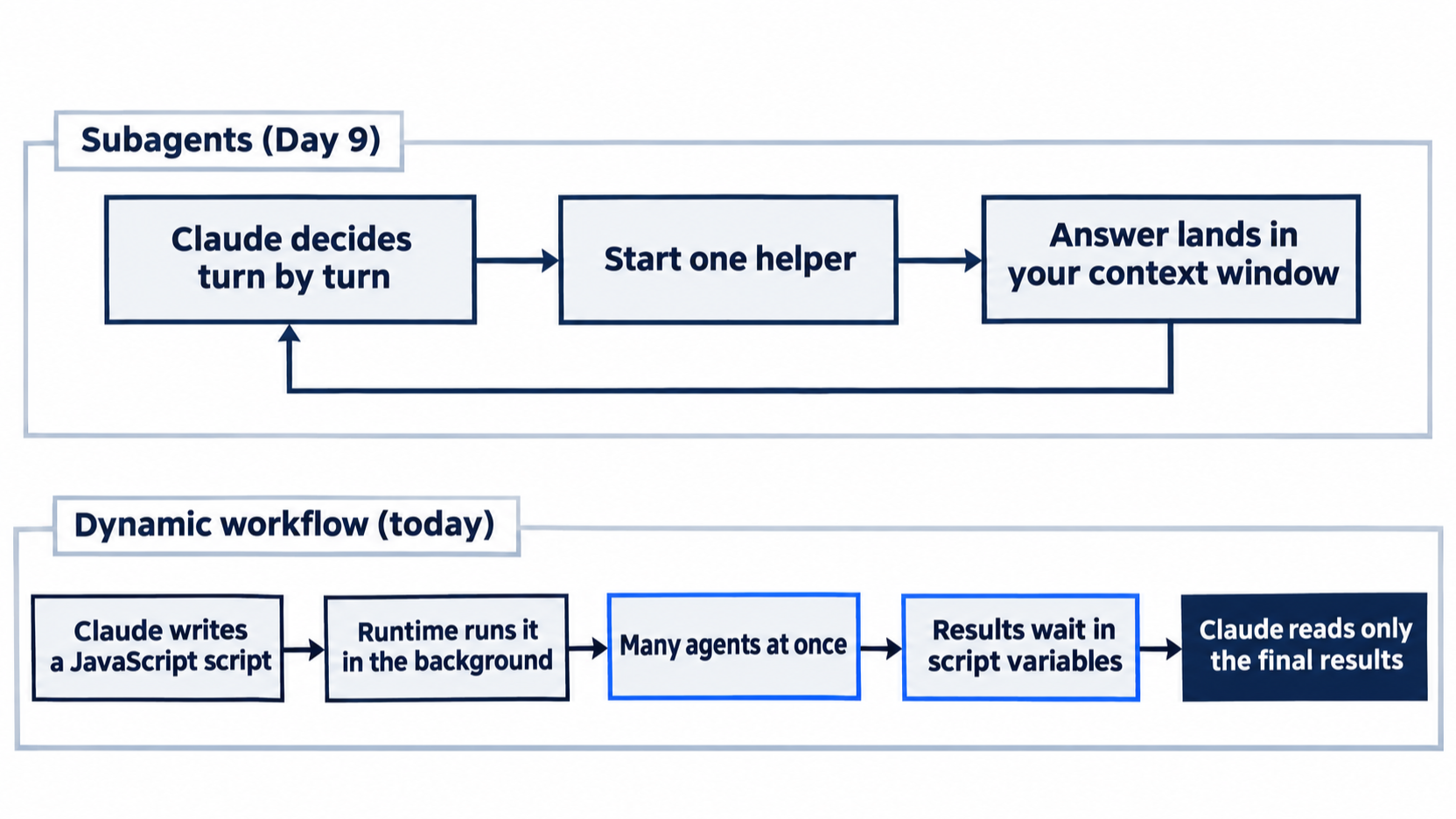
With subagents, each answer comes back into your conversation. With a workflow, the results wait in the script until the run ends.
Today's task is an audit. On Day 5 you added this rule to CLAUDE.md: "Every new category or rule needs a test with a ticket that also matches an older rule." The workflow checks every rule in src/classify.js and src/priority.js against the tests and writes one table to docs/rule-audit.md. The agents only read files. Nothing in src/ or test/ changes.
Keep the run small. Each agent is a separate Claude session with its own context window, so a workflow spends tokens fast. Today's prompt asks for at most 4 agents.
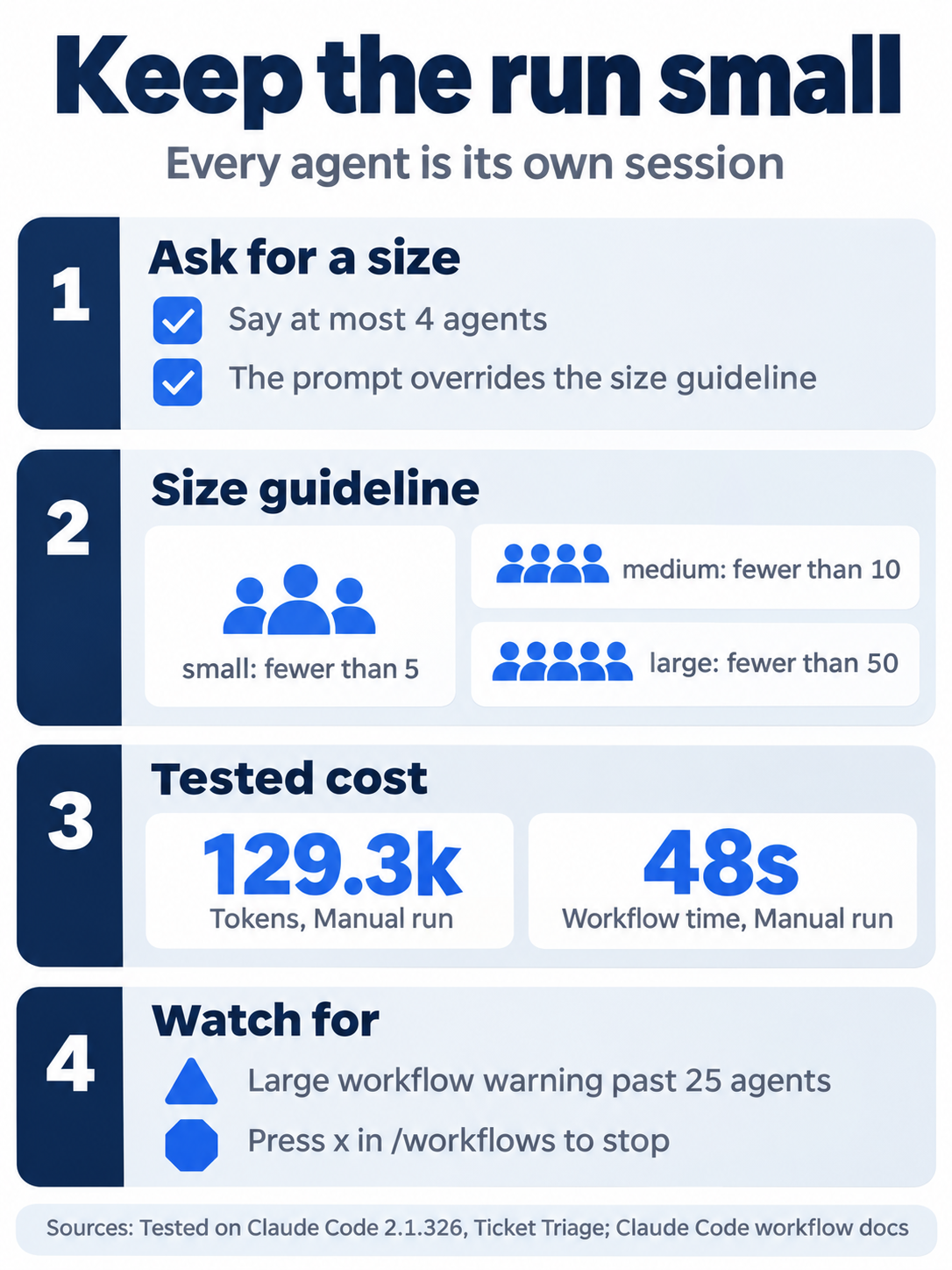
Every agent is a separate session, so the number of agents is the main lever on cost. Name it in the prompt.
Check the starting state
Open a terminal in Ticket Triage:
cd ~/code/ticket-triage
git status
npm test
Git prints nothing to commit, working tree clean. The tests show ℹ fail 0 and the same pass count as at the end of Day 18, because Days 19 to 21 changed no file. It was 22 on the tested auto run and 23 on the Manual run. Write your number down.
Start a session
Start Claude Code:
claude
The status bar shows ⏵⏵ auto mode on (shift+tab to cycle). If it shows ⏸ manual mode on, keep it, and follow the Manual mode: lines below.
On a Pro plan: type /config first. It opens Claude Code's settings panel. Find the Dynamic workflows row and turn it on. Press Esc to close /config. The docs say that on Pro, you turn workflows on from that row. The tested account was not on Pro, so this step comes from the docs, not from the tested runs.
Ask for the workflow
Type this as one line and press Enter:
Use a workflow with at most 4 agents. Check each rule in src/classify.js and src/priority.js: does test/ have a test for it whose ticket also matches an older rule, as CLAUDE.md requires? Write one summary table to docs/rule-audit.md. Do not change src or test.
Read the prompt in parts:
Use a workflowasks Claude, in plain words, to write a dynamic workflow for the task.with at most 4 agentssets the size. Claude plans the script around it.- The question is the check that each agent runs for each rule.
Write one summary table to docs/rule-audit.mdnames the one file that the run produces.Do not change src or test.keeps the audit read-only.
Approve the workflow
Claude first loads workflow-authoring, a skill that Claude Code includes for writing workflow scripts. The transcript shows Skill(workflow-authoring) and Loaded skill. Claude reads the source files, writes the script, and Claude Code asks before it runs anything. On the tested auto run, the box looked like this, shortened here:
 Run a dynamic workflow?

  │ Audit classify.js and priority.js rules for CLAUDE.md overlap-test coverage (4 agents)

  This dynamic workflow will spin up multiple subagents across the following phases:
    1. Audit
    2. Verify

  Dynamic workflows can use a lot of tokens quickly by running many subagents in parallel — which counts against your usage limit. Stop a running workflow at any time
  with /workflows, or disable dynamic workflows in /config.

  ❯ 1. Yes, run it
    2. View raw script
    3. No
The box names the workflow and lists its phases, the stages that the script runs in order. Under the first phase, the real box also previews the start of each agent's prompt, with ${…} where the script fills in a value such as a file name. The tested auto run had two phases: 1. Audit, with one auditor agent per source file, then 2. Verify, with one agent per file that rechecks the auditor's verdicts. Your names and phases can differ, because Claude writes the script each time.
Choose 1. Yes, run it. 2. View raw script shows the script first, if you want to read it before you decide.
The box appeared in auto mode too. Auto mode approves most tool calls by itself, but both tested sessions were a first workflow launch, and the box appeared in both. Choose 1. Yes, run it in either mode. Going deeper says when the box appears in each mode.
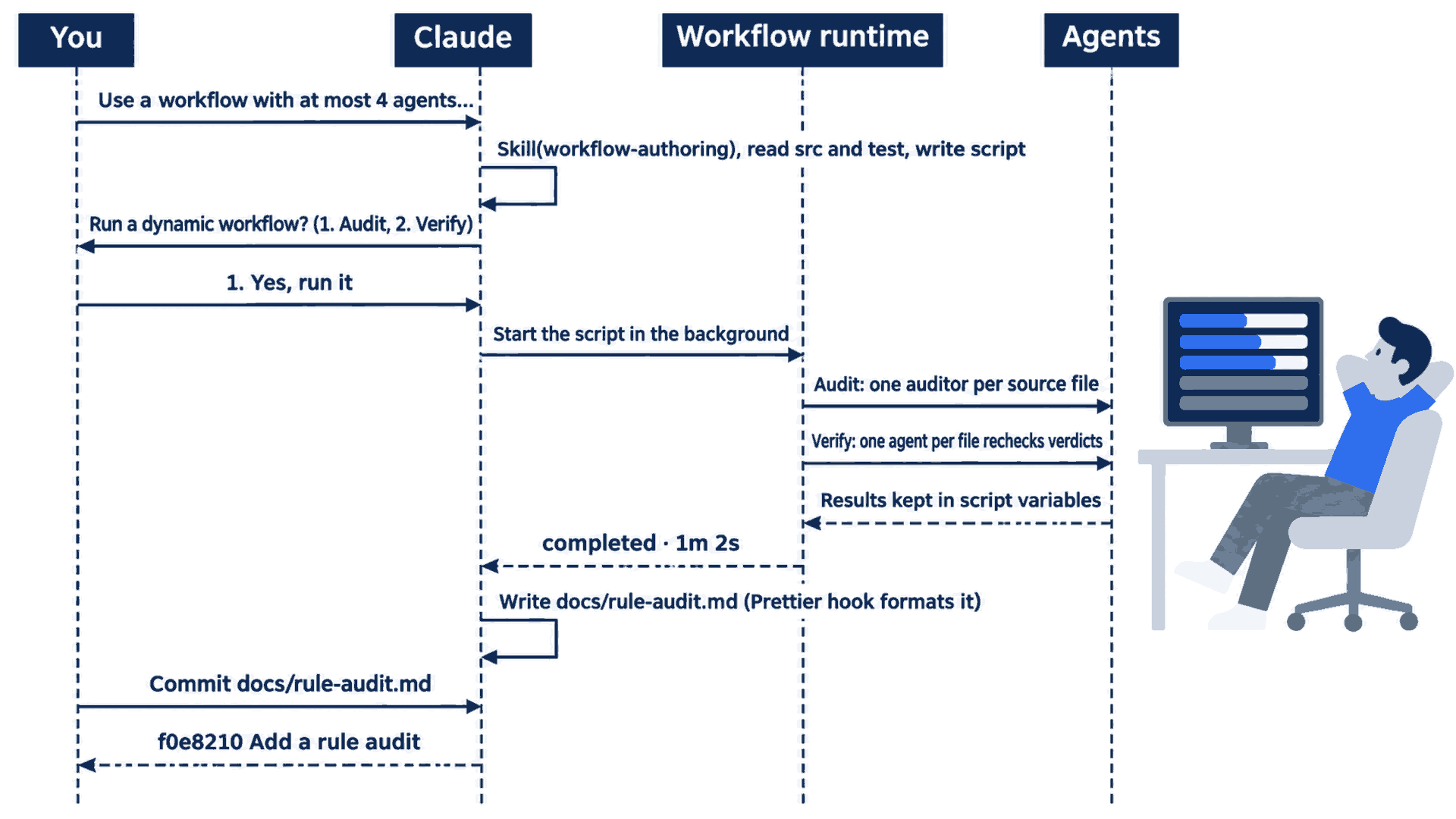
You approve once. The runtime runs both phases, and Claude comes back to write the report and commit it when you ask.
Manual mode: first, Claude may ask to run a Bash command that only reads files. On the tested run, it was described as Show source and test files, with the line A variable in this command can't be checked before it runs. Your command can differ, or Claude can read the files with no prompt. If it only reads, choose 1. Yes, and ignore the tip about auto mode. Then the same Run a dynamic workflow? box appears. Choose 1. Yes, run it.
Watch the agents
After you approve, the run starts in the background. The transcript shows:
⏺ Workflow(Audit classify.js and priority.js rules for CLAUDE.md overlap-test coverage (4 agents))
  ⎿  Running in background · /workflows to monitor and save · medium size (/config)
medium size names the size guideline, advice that tells Claude how many agents to plan for, which you can change in /config. The docs say that it defaults to small on a Pro plan, so your line can read small size.
Claude says that it will wait, and a status line reads ✻ Waiting for 1 dynamic workflow to finish. Under the input box, a progress row shows the workflow's name, how many of the agents started so far are done, the time, and the tokens so far:
◯ rule-test-audit ▱▱▱▱▱▱▱▱▱▱▱▱▱▱▱▱▱▱▱▱ 0/2 · 9s · ↓ 58.4k tokens
Type /workflows and press Enter. The progress view opens. On the tested auto run, it showed this, shortened here, with the empty rows removed:
 rule-test-audit
 Audit classify.js and priority.js rules for CLAUDE.md overlap-test coverage (4 agents)          0/2 agents · 15s

 ╭ Phases ────────┬ Audit · 2 agents ──────────────────────────────────────────╮
 │ ❯ 1 Audit  0/2 │  ⏺ audit:src/classify.js Opus 5.5 · 29.4k tok           15s │
 │   2 Verify     │  ⏺ audit:src/priority.js Opus 5.5 · 32.5k tok           15s │
 ╰────────────────┴─────────────────────────────────────────────────────────────╯
 ↑↓ select · x stop workflow · p pause · esc back · s save
The left pane lists the phases, with how many of each phase's agents are done. The right pane lists the agents in the selected phase, with each agent's model and its tokens so far. The footer names the keys: x stops the whole workflow, p pauses it, and s saves its script as a command, which Going deeper explains. Press Esc to close the view. The workflow keeps running.

The agents work in the background. You can close the view, and the workflow keeps running.
Manual mode: no prompts. The view only reads, and the workflow's agents only read files, so they asked nothing.
Read the report
When the run ends, the transcript shows a completed line with the run's time, like this one from the tested auto run:
⏺ Dynamic workflow "Audit classify.js and priority.js rules for CLAUDE.md overlap-test coverage (4 agents)" completed · 1m 2s
Claude then reads the agents' results, writes docs/rule-audit.md, and replies with a summary.
Manual mode: one more prompt, Do you want to create rule-audit.md?. Choose 1. Yes.
Claude writes the report with the Write tool, so the Prettier hook from Day 11 formats the file. The Manual reply said so: A formatter hook reformatted docs/rule-audit.md after I wrote it.
The report is a table with one row per rule. Each row names the file, the rule, the commit that added it, the test that qualifies, the older rule that the test's ticket also matches, and a verdict. Two rows from the tested auto report, with the spacing shortened:
| File        | Rule             | Added in | Qualifying test (ticket)                                        | Older rule matched | Verdict |
| classify.js | cancel: `cancel` | 7d82f5e  | "cancel loses to older rules" (`Cancel my order and refund me`) | refund: `refund`   | PASS    |
| priority.js | high: `critical` | ee98fa8  | none; ticket is `This is critical`                              | none               | FAIL    |
Your rows and totals can differ from these, and from one run to the next, because Claude decides each time what counts as one rule and which rules count as older. Going deeper compares the tested runs.
Treat the report as a list of leads for you to judge, as Day 12 said of /code-review findings. Do not fix the failing rules today. The win is the report.
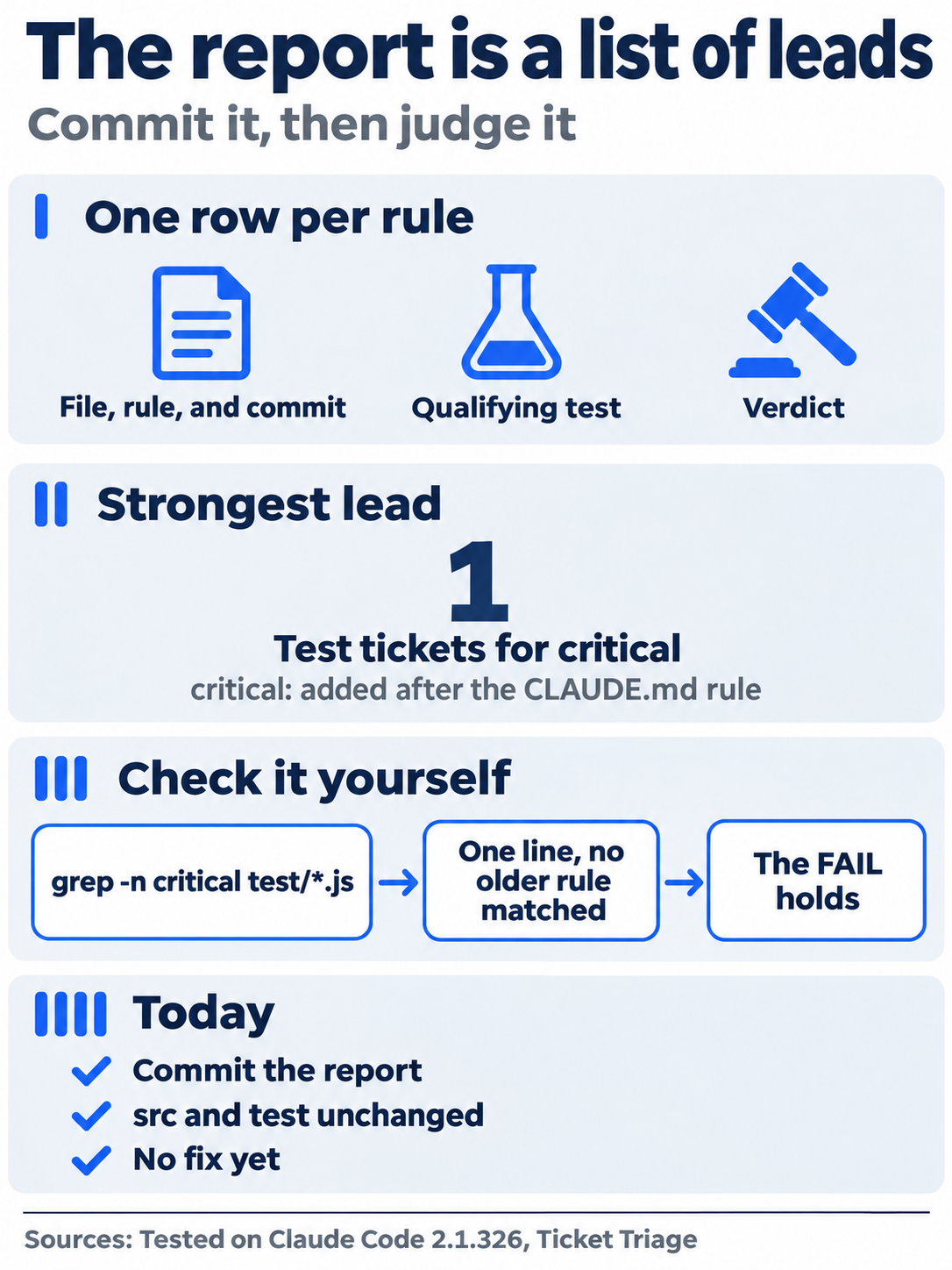
The report tells you where to look. You decide which findings are real.
Commit the report
Type this and press Enter:
Commit docs/rule-audit.md with the message "Add a rule audit".
On the tested auto run, the screen showed this, shortened here:
⏺ Bash(git status --short && git add docs/rule-audit.md && git commit -q -m "Add a rule audit…)
  ⎿  ?? docs/rule-audit.md
     f0e8210 Add a rule audit
Manual mode: one prompt, Do you want to proceed?, for a Bash command that runs git status, git add, and git commit, described as Commit the rule audit document, with the line This command requires approval. Choose 1. Yes.
Check the win
Type /exit, and in the terminal, run:
git status
git log --oneline -1
git show --stat HEAD
grep -o 'includes(' src/classify.js src/priority.js | wc -l
npm test
Git prints nothing to commit, working tree clean. The log shows Add a rule audit after the hash. On the tested runs, the hashes were f0e8210 and 27dd0cb. git show --stat HEAD lists one file, docs/rule-audit.md, so src/ and test/ did not change. The grep line counts the keyword checks in the two source files. On the tested code, it printed 15. Open docs/rule-audit.md and check that each keyword has a row. The Manual report had 15 rows, one per keyword. The auto report had 18, because it also gave rows to the default results other and normal and to the isUrgent() helper. The tests show ℹ fail 0 and the same count as this morning.
You asked for a workflow, approved it, watched its agents in /workflows, read the report as a list of leads, and committed it without a change to the code or the tests.
You can stop here. Going deeper explains why this works and where it breaks.
Going deeper
This section is for readers who want to know how a workflow differs from the other ways to run many agents, why the tested runs disagreed, what the approval box and the size setting control, and where agent teams and Projects fit. It assumes that you finished Start here in Parts 1 to 22.
Who decides what runs next
Dynamic workflows arrived in v2.1.154. The workflow docs compare four ways to run a task with many steps. The difference is who holds the plan:
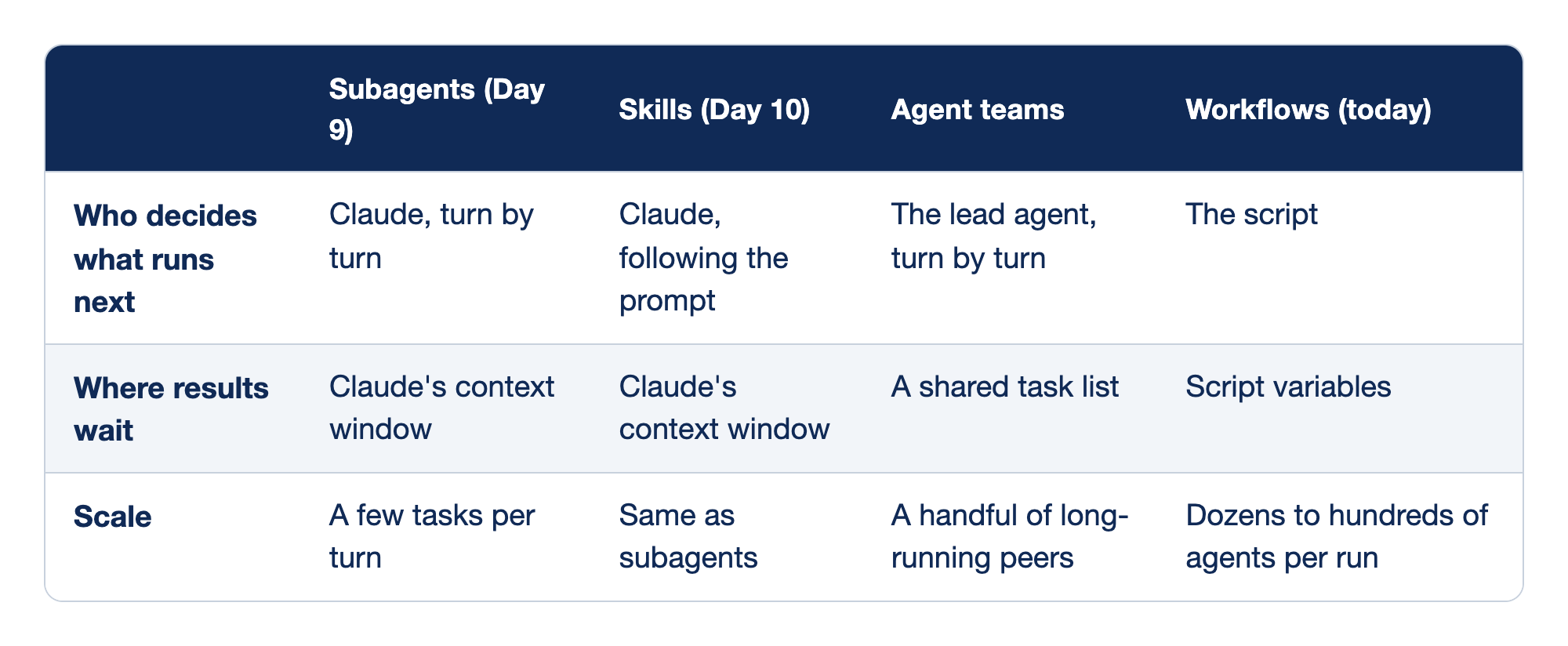
Four ways to run a task with many steps differ in who holds the plan. The columns are Subagents, Skills, Agent teams, and Workflows, and each row is one way they differ.
- Who decides what runs next: Claude decides turn by turn for subagents and follows the prompt for skills, the lead agent decides turn by turn for agent teams, and the script decides for workflows.
- Where results wait: subagent and skill results wait in Claude's context window, agent team results wait in a shared task list, and workflow results wait in script variables.
- Scale: subagents handle a few tasks per turn, skills handle the same, agent teams run a handful of long-running peers, and workflows run dozens to hundreds of agents per run.
The docs describe the script as plain JavaScript. agent() starts one agent, pipeline() starts one agent per item in a list, parallel() runs several at once, and phase() groups the agents that follow under a title in the progress view. Claude Code writes each run's script to a file under your session's folder in ~/.claude/projects/, and Claude receives the path, so you can ask for it and read it. On the tested auto run, Claude read the agents' results after the run with Bash commands, one of them in that folder, and auto mode allowed them.
The tested Manual run named its phases 1. Audit — one auditor per source file and 2. Verify — one skeptic per file re-checks the verdicts. Today's Verify phase is a pattern that the docs recommend: independent agents check each other's findings before Claude reports them. On the Manual run, Claude reported that The second agents made no corrections. A second agent did not make the audit agree with itself across runs, as the next section shows.
Why the totals differed
Three tested runs answered the same prompt. The third was an exploratory auto run on another copy of the repository:
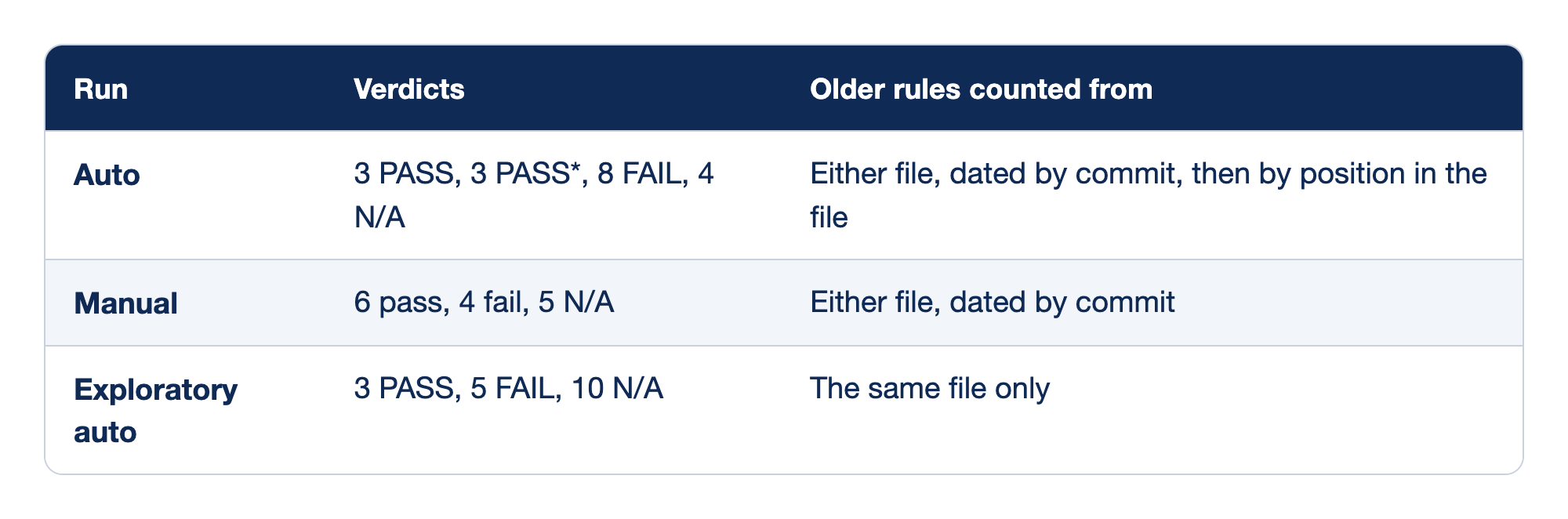
Three tested runs answered the same audit prompt. The Run column names each run, the Verdicts column gives its totals, and the Older rules counted from column says how the run decided which rules were older.
- Auto: the run gave 3 PASS, 3 PASS*, 8 FAIL, and 4 N/A, and it counted older rules from either file, dated by commit and then by position in the file.
- Manual: the run gave 6 pass, 4 fail, and 5 N/A, and it counted older rules from either file, dated by commit.
- Exploratory auto: the run gave 3 PASS, 5 FAIL, and 10 N/A, and it counted older rules from the same file only.
Both tested runs counted each keyword as one rule. The Manual run had 15 rows, one per keyword. The auto run had 18, because it also gave rows to the default results other and normal and to the isUrgent() helper. The auto and Manual runs agreed that four rules fail: broken, damage, asap, and critical.
The prompt said "an older rule" and did not define it, and each run chose a meaning. The Manual run marked all five keywords from the first commit N/A. The auto run gave N/A only to refund, the first keyword in the file, and failed the other four first-commit keywords, because it ordered keywords in the same commit by where they appear. It also used PASS\* for three priority.js rules that pass only through a classify.js keyword in the same ticket. It warned that one of those passes is weak: the URGENT: box crushed test checks priority() and never calls classify(). The exploratory run counted older rules from the same file only, and it found that isUrgent() has no test.
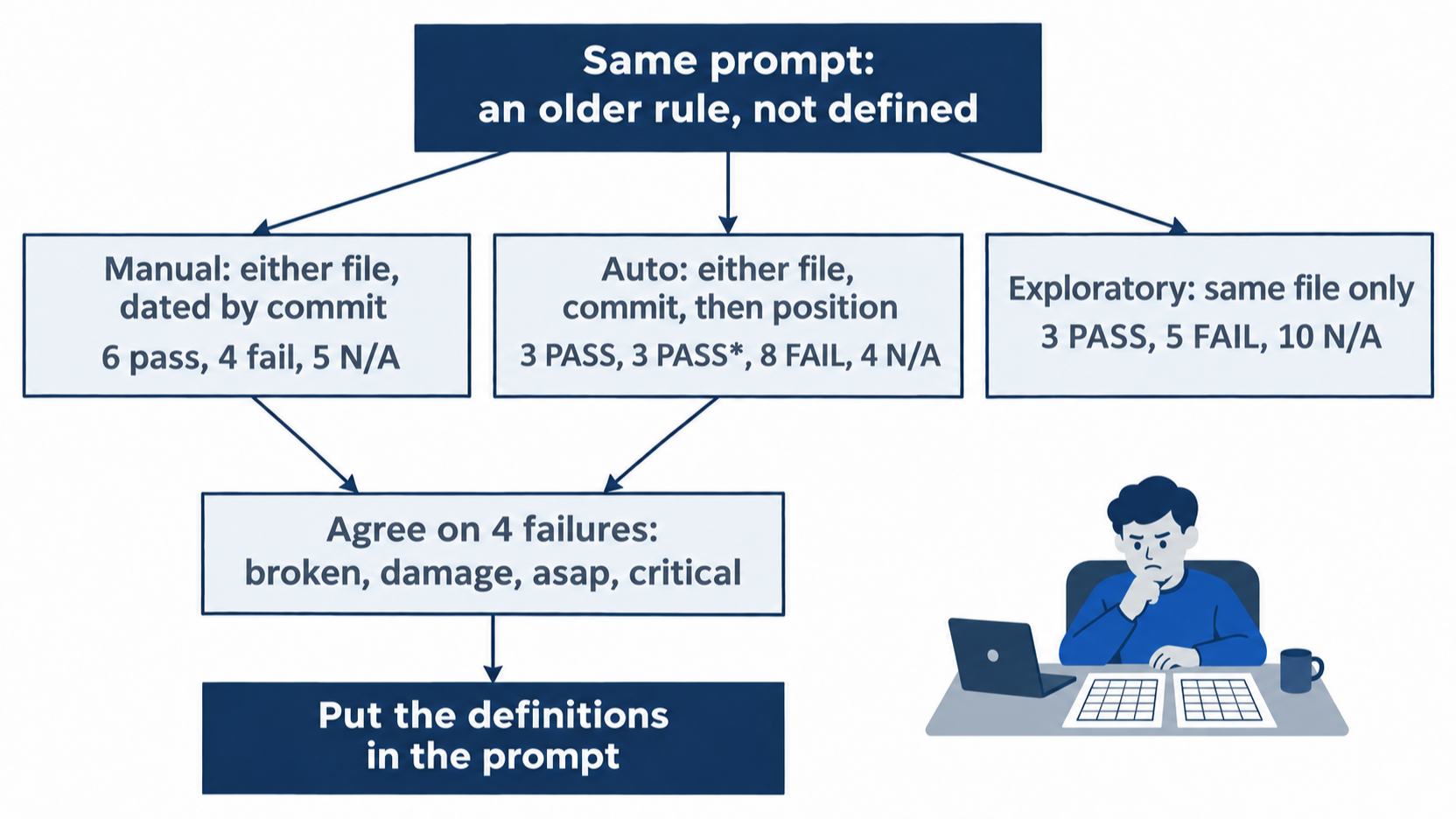
Each run picked its own meaning for one undefined phrase, and the totals moved with it. The four shared failures held across both tested runs.
The auto reply also named the strongest lead. critical was added after the rule went into CLAUDE.md, and its only test ticket is This is critical. Every other failure was a keyword that existed before the rule.
A workflow runs more agents on a question. It does not make the question sharper. To get the same table twice, put the definitions in the prompt, such as "count each keyword as a rule, date it by the commit that added it, and count older rules from either file." This guide did not test that prompt. A check with one right answer, such as a test that passes or fails, gives the same result on every run, and Day 25 builds a loop around a check like that.
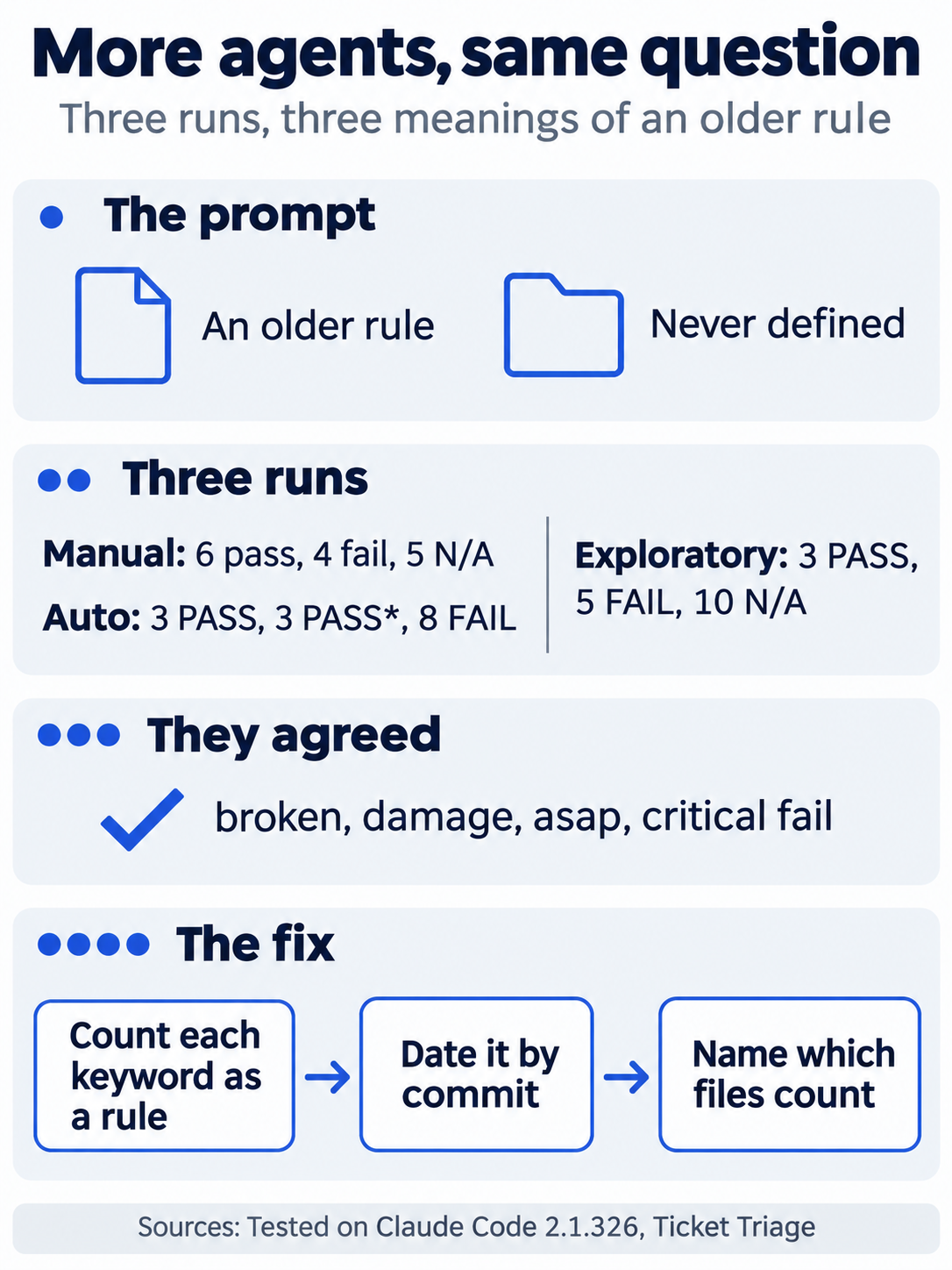
Agents add coverage, not precision. Precise words in the prompt are what make two runs agree.
The approval box in each mode
The docs say when the Run a dynamic workflow? box appears:
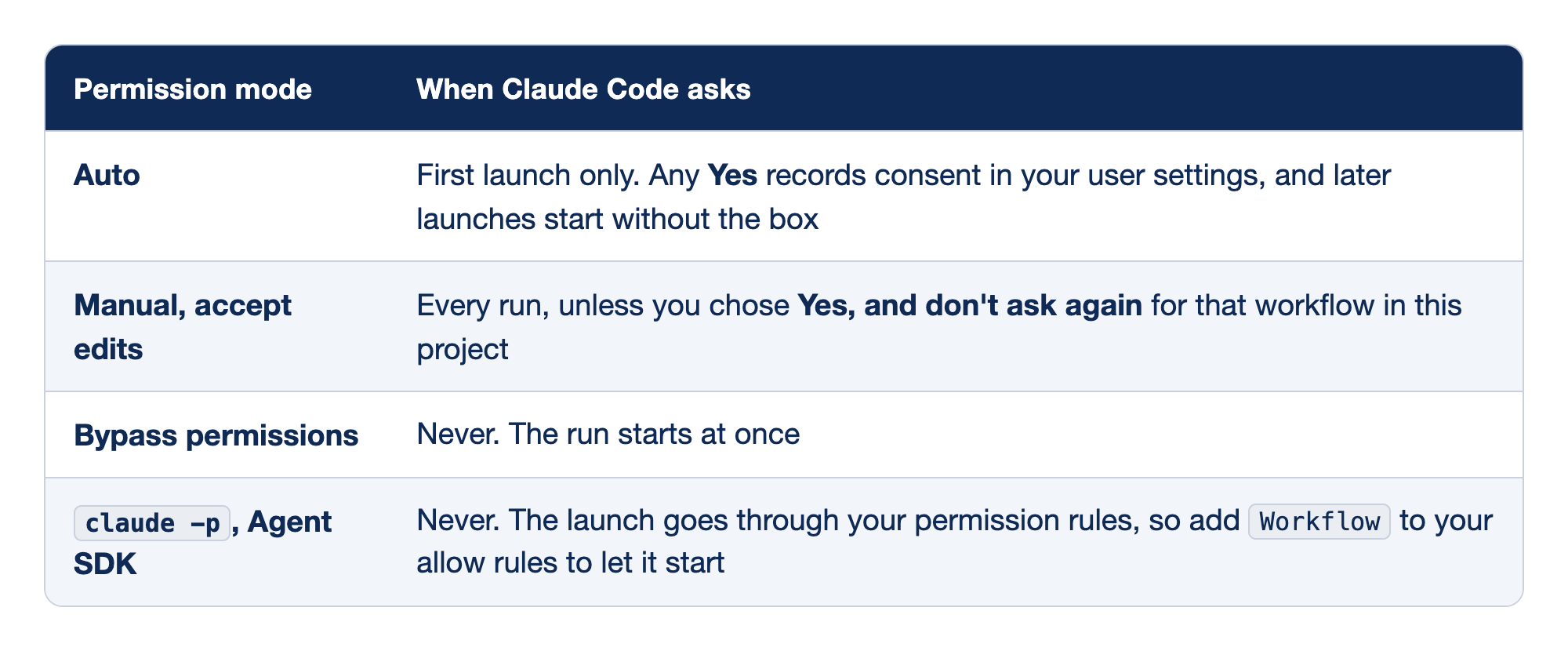
The approval box appears at different times in each permission mode. The Permission mode column names the mode, and the When Claude Code asks column says when the Run a dynamic workflow? box appears.
- Auto: Claude Code asks on the first launch only, any Yes records consent in your user settings, and later launches start without the box.
- Manual, accept edits: Claude Code asks on every run, unless you chose Yes, and don't ask again for that workflow in this project.
- Bypass permissions: Claude Code never asks, and the run starts at once.
claude -p, Agent SDK: Claude Code never shows the box, the launch goes through your permission rules, and you addWorkflowto your allow rules to let it start.
Docs pages: Permission mode.
The tested box had three options, not four. The docs say that Claude Code offers Yes, and don't ask again for <name> in <path> only when you run a bundled, saved, or plugin workflow by name, not for a script that Claude wrote for the current task. A second auto-mode launch, which the docs say starts with no box, was not tested here.
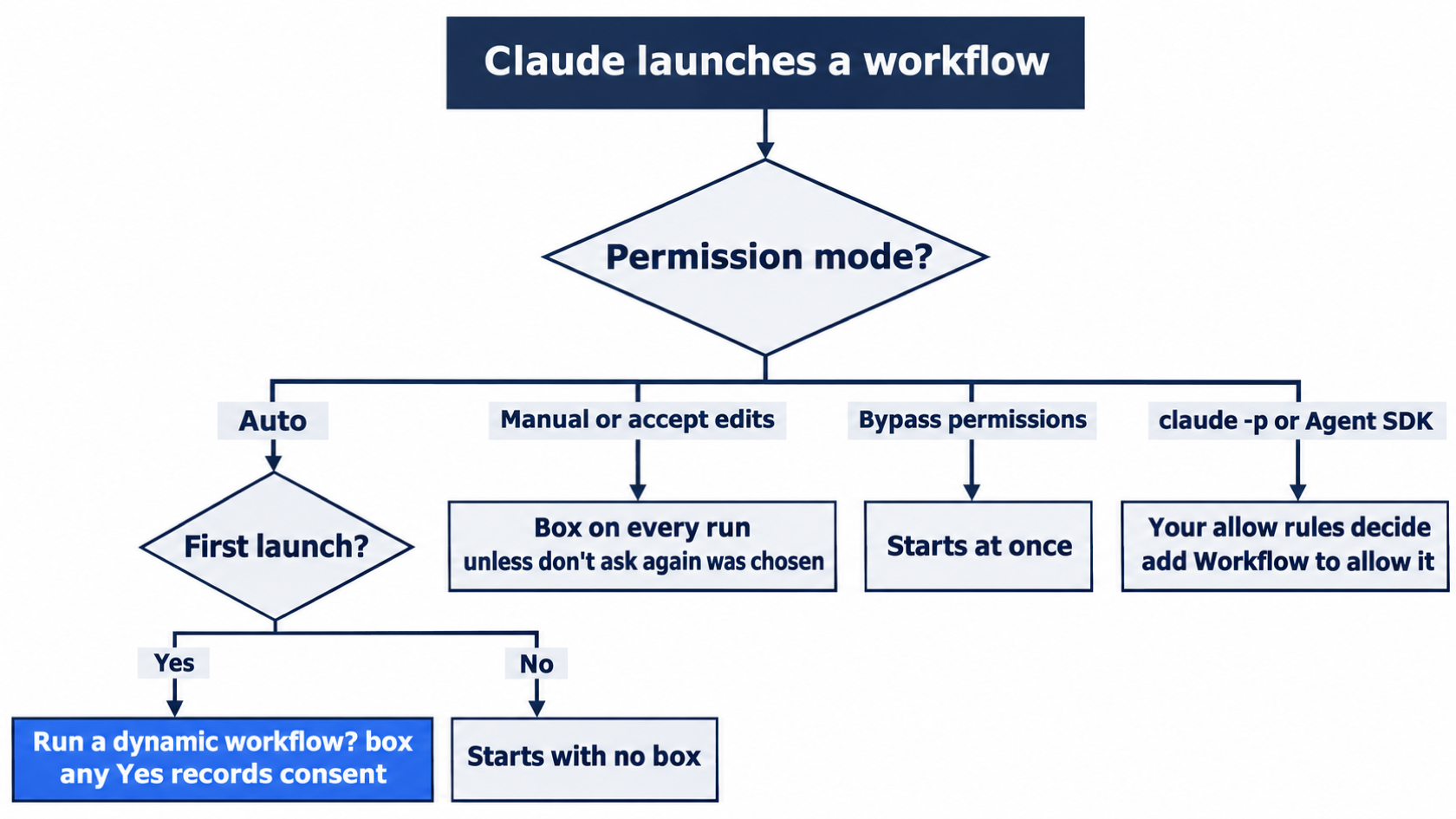
The mode you run in decides whether you see the box. In every mode, the agents still follow your permission rules.
The agents use your permission rules. The tested agents only read files, so neither run showed a prompt from an agent. The docs suggest that you add allow rules for the tools that a long run needs before you start it, so the run does not stop to wait for you. On the Manual commit prompt, option 2 was Yes, and don't ask again for git add and git commit commands in your project folder. It saves an allow rule, as on Day 4.
Size, cost, and the Large workflow warning
medium size (/config) in the tested Running in background line names the size guideline, advice that Claude Code sends to Claude about how many agents to plan for. The docs say that it is advice, not a cap. A prompt that asks for a different size overrides it, as "at most 4 agents" did today.
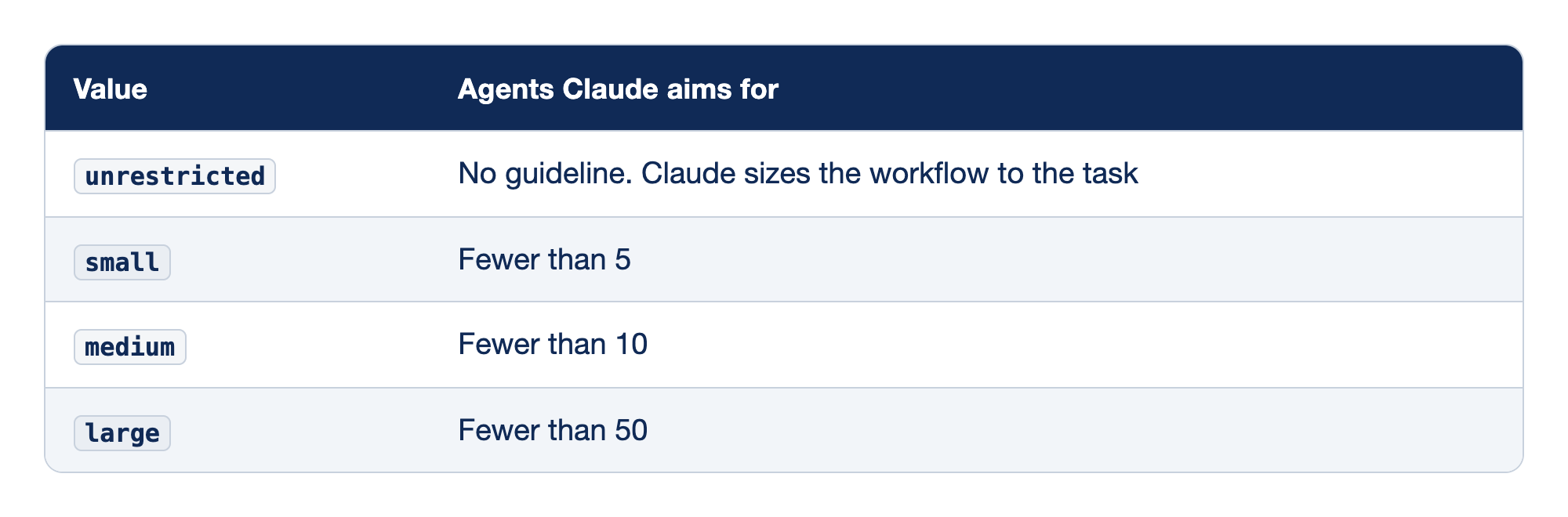
The size guideline has four values. The Value column names the setting, and the Agents Claude aims for column gives the number of agents that Claude plans for.
unrestricted: there is no guideline, and Claude sizes the workflow to the task.small: Claude aims for fewer than 5 agents.medium: Claude aims for fewer than 10 agents.large: Claude aims for fewer than 50 agents.
The default is medium, or small on a Pro plan. Version 2.1.271 made small the Pro default and lowered medium from 15 agents to 10. Change it in the Dynamic workflow size row of /config, or with /config workflowSizeGuideline=small. The docs also say that on Pro, you turn workflows on in the Dynamic workflows row of /config. If Claude works through today's prompt in the conversation and shows no box, check that row.
On the tested runs, /workflows showed each Audit agent at 29.4k to 33.5k tokens. The Verify agents' counts were not captured. The Manual run's progress row ended at 4/4 · 48s · ↓ 129.3k tokens, with all four agents done. The auto workflow completed in 1m 2s and the Manual one in 48s. From the prompt to the end of Claude's reply took 118 seconds on the auto run and 103 seconds on the Manual run. The docs suggest that you try a workflow on a small slice first, such as one folder, before a large run. They also describe a Large workflow warning in the progress row when a run schedules more than 25 agents or its projected total passes 1.5 million tokens. The warning does not stop the run. Stop it yourself with x in /workflows. The runtime also caps a run at 16 agents at the same time by default, fewer on a computer with fewer CPUs, and 1,000 agents in total.
To turn workflows off, toggle Dynamic workflows off in /config, set "disableWorkflows": true in ~/.claude/settings.json, or set CLAUDE_CODE_DISABLE_WORKFLOWS=1.
Save a workflow and run it again
From the docs, not tested here. In /workflows, select a run and press s. In the save dialog, Tab switches between .claude/workflows/ in your project, which git shares with everyone who clones the repository, and ~/.claude/workflows/, which only you see. Press Enter to save. The workflow then runs as /<name> in later sessions. The tested runs were named rule-test-audit, so a saved copy would run as /rule-test-audit. A saved workflow can take input through a global named args, such as a list of files to check. A save to the project location adds an untracked file, so commit it or delete it before you check git status.
Other ways to start a workflow
From the docs, not tested here:
- The keyword
ultracodein a prompt you type asks for a workflow, the same as "use a workflow". Claude Code highlights it, andOption+Won macOS dismisses it for that prompt. Version 2.1.160 renamed the keyword fromworkflowtoultracode, and asking in your own words still works. The keyword does not start a workflow in a prompt passed with-por in a scheduled task's prompt. /effort ultracodemakes Claude plan a workflow for every substantive task in the session. Every request then uses more tokens. While it is on, auto mode does not ask before the first launch and theLarge workflowwarning does not appear./effort ultracode offturns it off./deep-research <question>is a workflow that Claude Code includes. It searches the web from several angles, cross-checks the sources, and returns a cited report. It needs the WebSearch tool.
Agent teams
From the agent teams docs, not tested here. Agent teams are experimental and off by default. Turn them on with CLAUDE_CODE_EXPERIMENTAL_AGENT_TEAMS=1 in your environment or in the env block of a settings file. They arrived as a research preview in v2.1.32.
One session is the lead. It starts teammates, which are full Claude Code sessions, each with its own context window. Teammates message each other directly, and you can select one in the agent panel with the up and down arrows and press Enter to talk to it. Unlike a workflow, the lead decides turn by turn what happens next, and teammates keep running when you interrupt the lead. The docs warn that each teammate spends tokens like a separate session. They also say that while teams are on, a subagent that Claude names starts as a teammate, so a team can form when you did not ask for one.
The docs describe a shared task list that the lead fills and teammates claim, with Ctrl+T to show it. The list works only for agents that have the Task tools. On Opus 5.5, those tools are off by default, as Day 3 showed. A team on defaults coordinates through messages, and the list needs CLAUDE_CODE_ENABLE_TODO_TOOLS=1. The TeammateIdle, TaskCreated, and TaskCompleted hooks let a script hold a teammate to a rule, such as green tests before it goes idle. Day 11 covers hooks. Teammates are not isolated in worktrees, so give each one its own set of files, or use the worktrees from Day 16. The docs list the limits: /resume and /rewind do not restore in-process teammates, a session has one team, and teammates cannot start teams of their own.
Projects
From the Projects docs, not tested here. A project is one long conversation at claude.ai/code, in the desktop app, or in the Claude mobile app, not in the terminal. You send it tasks, and Claude starts a thread, usually a cloud session, for each one. Every thread starts with the project's instructions and memory, works on its own branch, and can open a pull request. Projects are in public beta on Pro, Max, and Ultra plans, are rolling out gradually, and are not offered on Team or Enterprise plans yet. A project uses your plan's limits faster than one session. Cloud threads work on GitHub repositories and on files that you upload to the project.
Which one to use
The parallel agents overview sorts the choices by who coordinates the work:
- Claude delegates a side task inside one conversation: subagents (Day 9).
- You run several sessions yourself and pass notes between them: worktrees (Day 16) and cross-session messaging (Day 17).
- A script holds the plan, and findings get checked against each other: dynamic workflows (today).
- Claude plans and supervises a group of peers that talk to each other: agent teams.
- The work spans many tasks over days and should keep going when your computer is off: Projects.
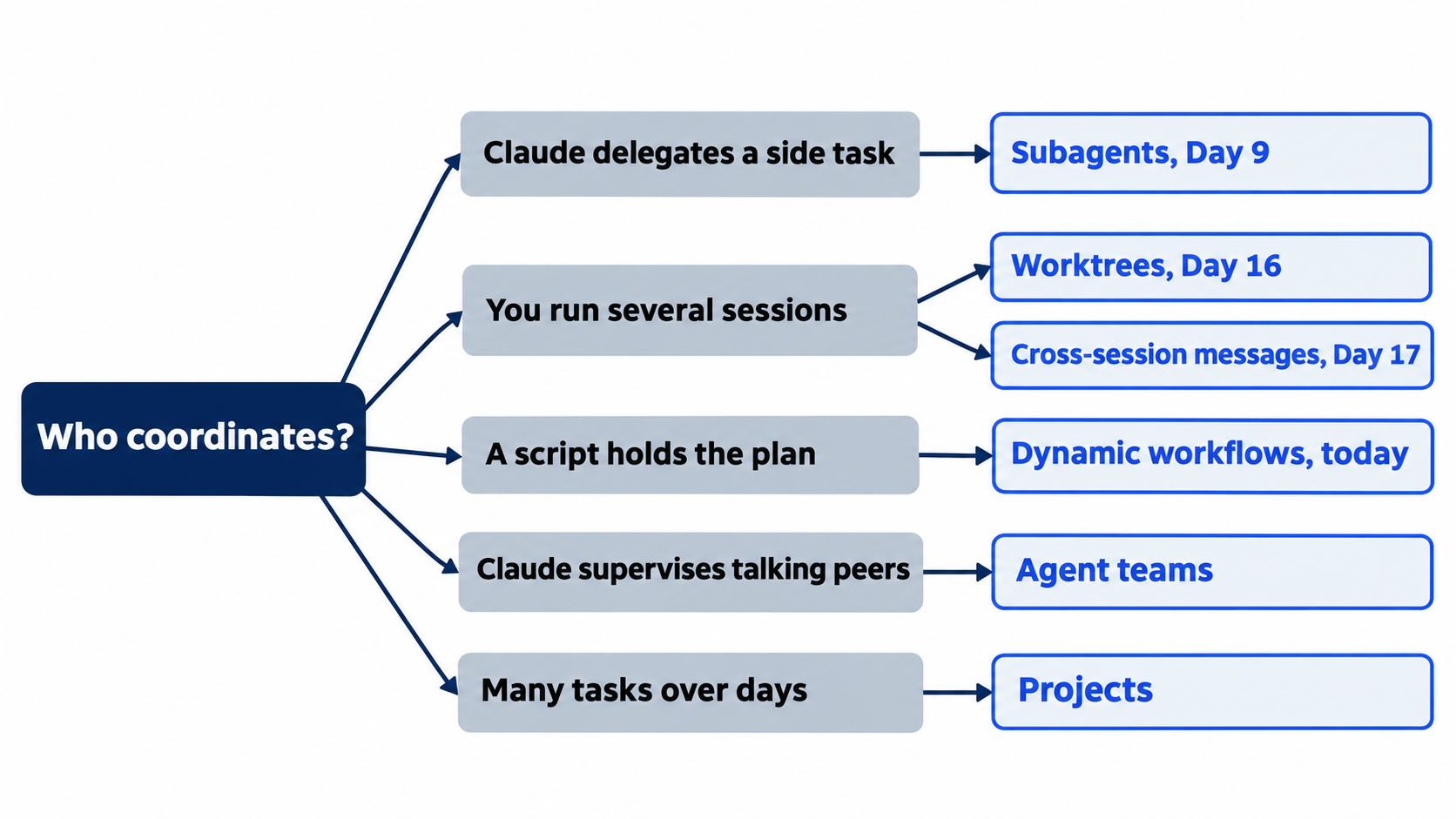
Start from who should coordinate the work, and the choice of tool follows.
Go further: One Claude Is Not Enough: Running Parallel Sessions Without Collisions is the first edition's chapter on worktrees and agent teams, with use cases such as debugging with competing hypotheses and a decision tree for parallel work. It predates dynamic workflows, so its decision tree has no workflow branch. Two of its agent team steps have also changed: the docs now select a teammate with the up and down arrows, not Shift+Down, and remove a team's shared folders by themselves when the session ends, with no cleanup step.
Do this today
Everyone
- Run the rule audit workflow, approve it, watch it in
/workflows, and commit the report. Check the win:git log --oneline -1showsAdd a rule audit,git statusprintsnothing to commit, working tree clean,git show --stat HEADlists onlydocs/rule-audit.md, andnpm testshowsℹ fail 0with the same count as this morning. - Habit: put a number of agents in every workflow prompt, and read the phases in the
Run a dynamic workflow?box before you choose1. Yes, run it. Check: your next workflow prompt says "at most" and a number, and/workflowsshows no more agents than that number.
If you read Going deeper
- Check the strongest lead yourself. In Ticket Triage, run
grep -n "critical" test/*.js. Check: on the tested code, it printed one line fromtest/priority.test.js,test("critical", () => assert.equal(priority("This is critical"), "high")). The ticket matches no other rule, so the FAIL holds. Do not fix it today. The command only reads, so there is nothing to reset. Check thatgit status --shortprints nothing. - Find the size guideline. Start
claude, type/config, and find the Dynamic workflow size row. Check: the docs say that the row marks the value in force as the default until you choose one, and the tested runs named itmedium size. Do not change it. This guide did not test this step. Reset: pressEsc, type/exit, and check thatgit status --shortprints nothing.
One prompt, many agents, one report
A dynamic workflow changes who holds the plan. Claude writes it once as a script, you read the phases and approve them, and the agents work in the background while your session stays free. Only the final results come back to the conversation.
The script decides how the work runs. You still decide what the question means and what the answer is worth. Name the size, define the terms, and read the report as leads.
This is Part 22 of "Claude Code, Day-to-Day (second edition)," a day-by-day guide to Claude Code in which each day takes 20 to 40 minutes. Part 22 is Day 22. All 28 days are out now.