
Look Up Any Claude Code Term Three Ways: The Glossary, /help, and the Docs Server
Three lookups answer three different questions: the glossary says which day taught a term, /help shows the keys and commands in front of you, and the docs server gives today's docs with a link, so you trust the docs server for how Claude Code works now and the glossary for where you practiced it.
Find the day that taught a term, read the keys in front of you, and get today's docs page with a link, all without changing a file.
A word from three weeks ago stops you mid-task, and you cannot remember which day taught it or whether it still works the same way.
In this article: Day 28 of a day-by-day guide to Claude Code. Start here: you look up a term in the glossary, read the
/helppanel, and ask theclaude-code-docsserver two questions that each end with a docs link, and no file changes. Going deeper: which lookup to trust when the three disagree, the commands and settings files of this guide in one place, and where the docs live.
Tested on Claude Code 2.1.327.
Yesterday a pitfall checklist found an out-of-date CLAUDE.md, and you committed Bring CLAUDE.md up to date.
Start here
At the end of today, you can look up any term from this guide in three places and get a link to its docs page, without changing a file.
Starting fresh or fell behind? Run git switch -C main claude-code/day-27. This replaces your main with the end of Day 27; to keep your own work, run git branch my-backup first.
Each place answers a different question:
- The glossary is the last section of this part, after Do this today. It lists the terms from Days 1 to 27 in alphabetical order. Each line gives the term, the day that teaches it, and a one-line meaning in this guide's words. Use it to find where this guide taught a term.
/helpis a slash command that opens Claude Code's help panel inside a session. Use it to see the keys and commands in front of you.- The docs server is
claude-code-docs, the MCP server that you added on Day 13. It searches the Claude Code documentation, and Claude calls it as a tool. Use it to get today's docs and a link to the page.
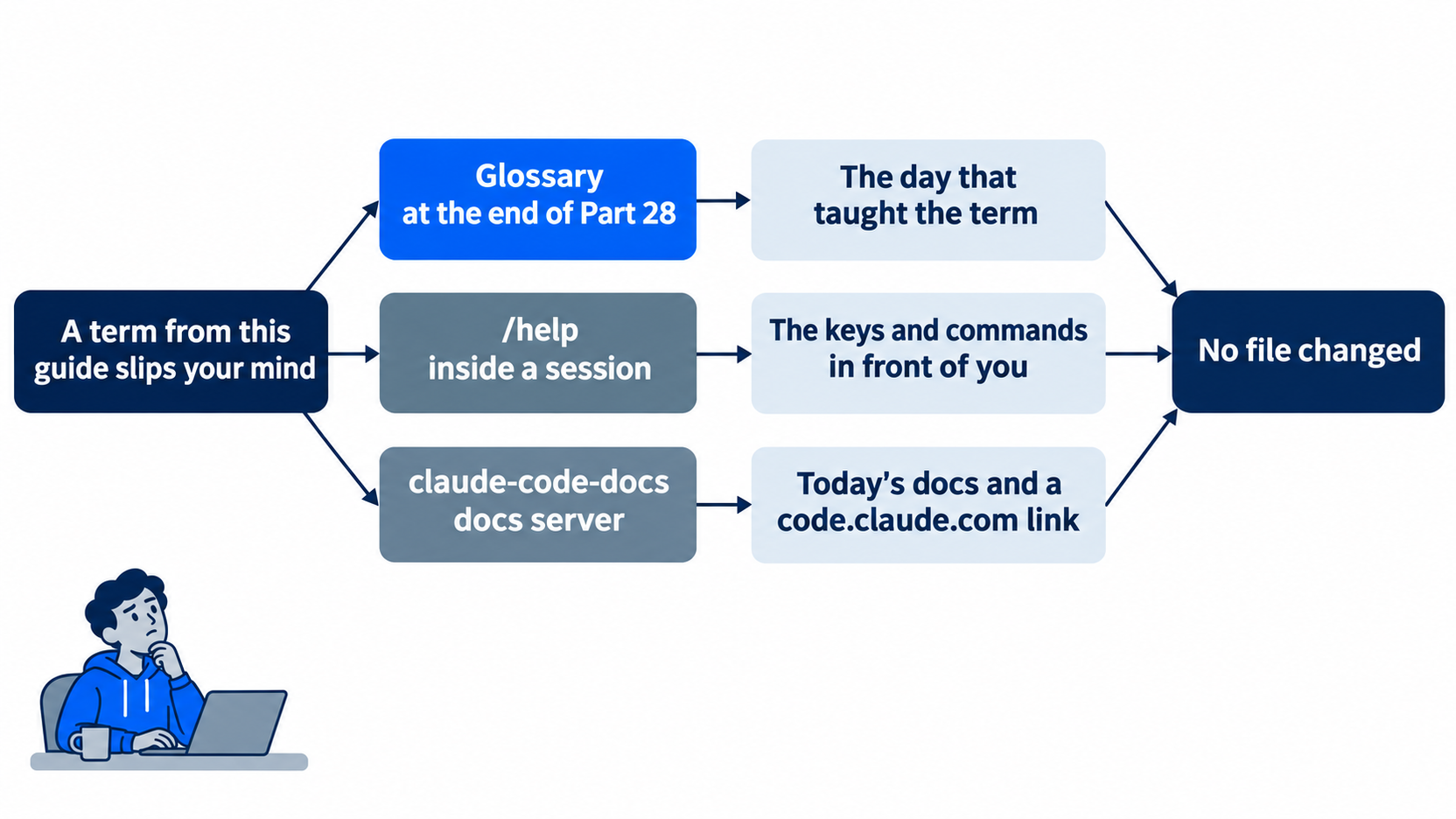
All three lookups only read. The win at the end of the day is that you found three answers and changed nothing.
Check the starting state
cd ~/code/ticket-triage
git status
git log --oneline -1
npm test
Git prints nothing to commit, working tree clean, and the log shows Bring CLAUDE.md up to date. The tests show ℹ fail 0. The tested runs had 28 tests in auto mode and 30 in Manual mode. Write your number down, because today ends with the same count.
The first docs lookup below also checks that Day 13's claude-code-docs server is still there. If Claude says that it has no such server, because you removed it in Day 13's Going deeper, exit and add it again with the Day 13 command:
claude mcp add --transport http claude-code-docs https://code.claude.com/docs/mcp
Lookup 1: the glossary
Go to the Glossary at the end of this part and find the line for Gate. It says that a gate is a check that a program runs and that passes or fails, and it names Day 25. Open Part 25 and find gate in bold in its Start here. The two match, because the glossary takes each term from the first Start here that defines it.
Now look up a term that you are less sure of. If its line names a day whose Start here you skipped, that day is the one to go back to. This lookup does not use Claude Code, so it has no prompts in either mode.

A term that slips your mind stops being a blocker once you know its day and its current docs page.
Lookup 2: /help
Start Claude Code with claude. The status bar shows ⏵⏵ auto mode on (shift+tab to cycle) or ⏸ manual mode on. Either mode works today. If it shows the second one, follow the Manual mode: lines below. Type:
/help
A help panel opens under the conversation. On the tested runs, both modes showed the same panel. Its first lines were:
  Help  General   Commands   Custom commands

  Claude understands your codebase, makes edits with your permission, and runs commands — right from your terminal.

  New here? Run /powerup to learn the features most people miss.
The top row names the panel's tabs, and the panel opens on General. Under Shortcuts, the General tab lists keys. The first rows on the tested Mac were:
  Shortcuts
  ! for shell mode        esc esc to clear input             ctrl+shift+_ to undo
  / for commands          shift+tab to cycle modes           ctrl+z to suspend
  @ for file paths        ctrl+x =/- to change effort        ctrl+v to paste images
  /btw for side question  ctrl+o to see full transcript      opt+p to switch model
Two of them are keys that this guide used. shift+tab to cycle modes is the key that changed the permission mode on Day 3. ctrl+o to see full transcript is the key that showed a tool's details on Day 2. Under the shortcuts, the panel names the docs home with For more help: https://code.claude.com/docs/en/overview. Its last line is the footer ←/→ to switch · Esc to close. The left and right arrow keys move between tabs. The tests read only the General tab, so Going deeper has what the docs say about the others.
Press Esc. The conversation shows Help dialog dismissed.
Manual mode: no prompts. /help only shows a panel.
Lookup 3: ask the docs server
Type this prompt:
Use the claude-code-docs server to look up what a channel is in Claude Code. Answer in two sentences, and give the link to the docs page.
As on Day 13, the prompt names the server, so Claude calls it and does not answer from memory. It also asks for the link, so you get a page that you can open. When Claude finishes, a tool line shows above the answer:
Called claude-code-docs (ctrl+o to expand)
On the tested auto run, the answer was:
⏺ In Claude Code, a channel is an MCP server that pushes events from outside sources into your running local session, so Claude can respond to things that happen while
  you're away from the terminal. Channels can work both ways: Claude reads an incoming event, such as a Telegram, Discord or iMessage message or a webhook from CI, and
  replies through the same channel.

  Docs: https://code.claude.com/docs/en/channels
Compare it with the glossary line for Channel, which names Day 19. They say the same thing in different words, and the link is the page to read next. Now ask about a second term:
Use the claude-code-docs server to look up what a worktree is in Claude Code. Answer in two sentences, and give the link to the docs page.
The tested auto answer began In Claude Code, a worktree is a git worktree: a separate copy of your project with its own branch, and it ended with Docs: https://code.claude.com/docs/en/worktrees. Your words can differ, because Claude writes a new answer each time. For each lookup, check two things: the Called claude-code-docs line is on screen, and the answer ends with a link on code.claude.com.
Manual mode: one prompt per lookup. The prompt is titled Tool use, names claude-code-docs — Search documentation Tool: (MCP), shows the search, such as query: "what is a channel", and asks Do you want to proceed?. Choose 1. Yes. Option 2, Yes, and don't ask again for claude-code-docs — Search documentation commands, saves a rule, and Going deeper covers it. The second lookup asks again.
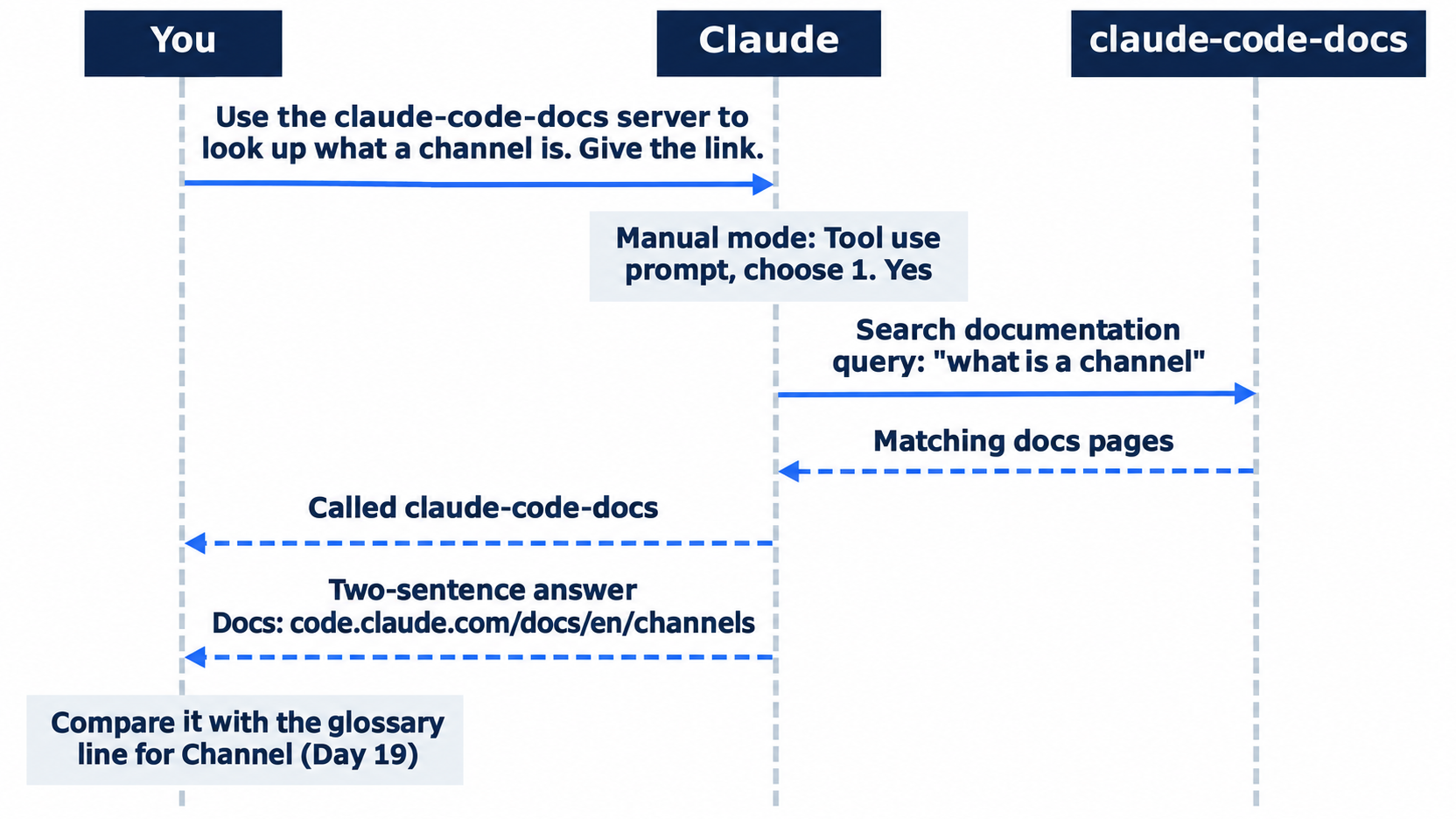
The prompt names the server, so the answer comes from the docs and not from memory. The link at the end is the page to read next.
To stop that prompt on every lookup, add an allow rule, the Day 4 kind of permission rule that lets a tool run without asking, for the whole server. Type /exit and open .claude/settings.local.json in your editor. If the file does not exist, create it with this content. If it exists, for example with {"enabledPlugins":{}} from Day 19, add the permissions block next to what is there. Then start claude again:
{
  "permissions": {
    "allow": ["mcp__claude-code-docs"]
  }
}
.claude/settings.local.json is your personal settings file for this project, from Day 19. Git does not share it. mcp__claude-code-docs names every tool of the claude-code-docs server. On the tested Manual-mode copy, the next lookup showed Called claude-code-docs and the answer, with no prompt. This step is optional. On the test machine, git status did not list the file. If yours lists it, run echo .claude/settings.local.json >> .git/info/exclude, which hides the file from git in this copy only. This guide did not test that command.
Check the win
Type /exit. In the terminal, run:
git status
npm test
Git prints nothing to commit, working tree clean, and the tests show ℹ fail 0 with the same count as this morning. Both tested runs ended with no file changed, at 28 tests in auto mode and 30 in Manual mode.
You looked up a term in the glossary and checked the day that it names, read the /help panel, and saw two Called claude-code-docs lines, each with a link to a docs page.
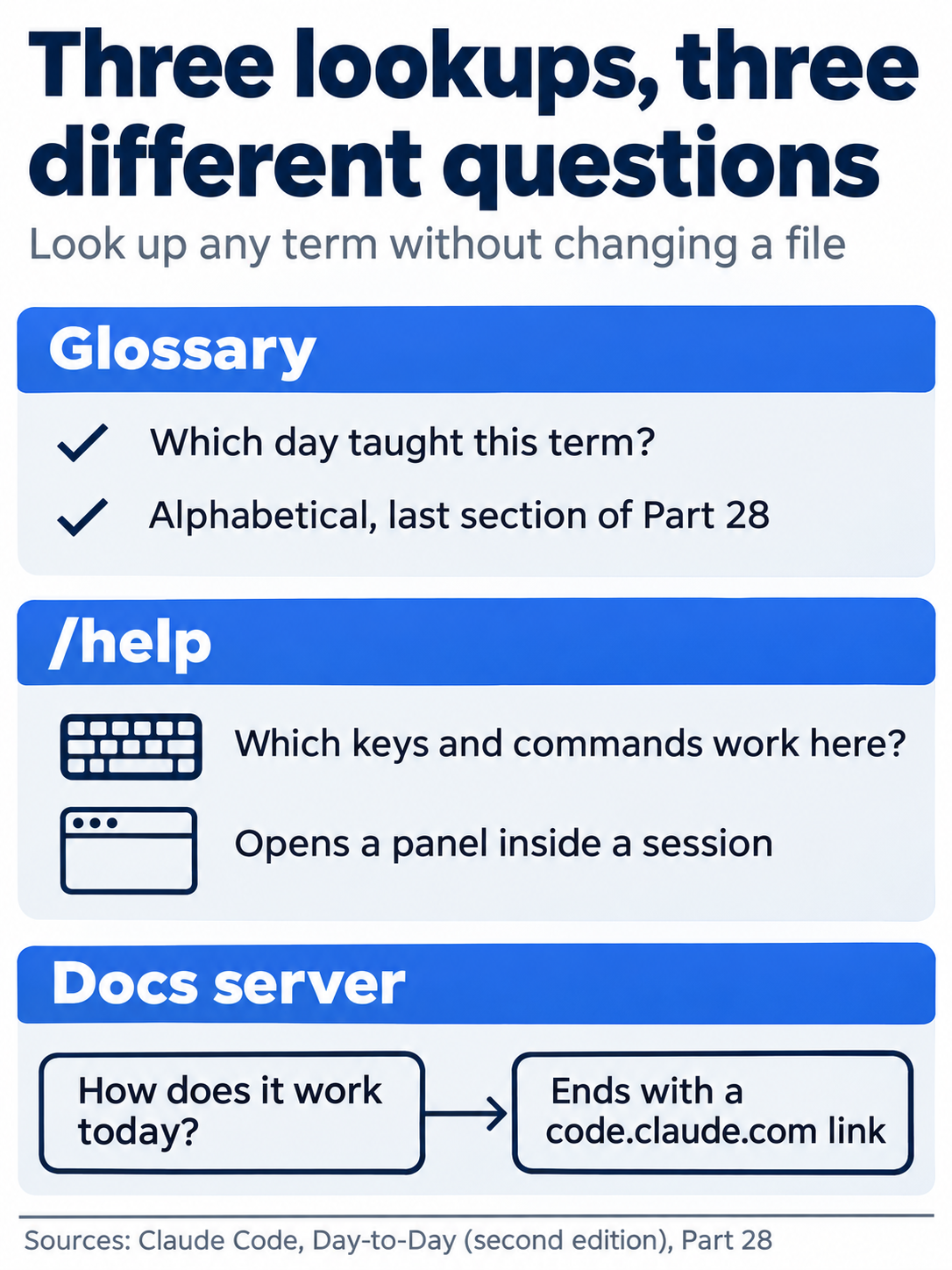
Each lookup answers its own question. Pick the one that matches what you need to know.
You can stop here. Going deeper explains why this works and where it breaks.
Going deeper
This section is for readers who want the commands, settings files, and docs pages of this guide in one place. It assumes you finished Start here in Parts 1 to 28.
Why three lookups
The glossary is fixed at the version that this guide tested, 2.1.327. The /help panel shows the version that you run. The docs server reads the docs as they are today, so it can name a feature that arrived after this guide. When the three disagree, trust the docs server for how Claude Code works now, and the glossary for where this guide practiced it.
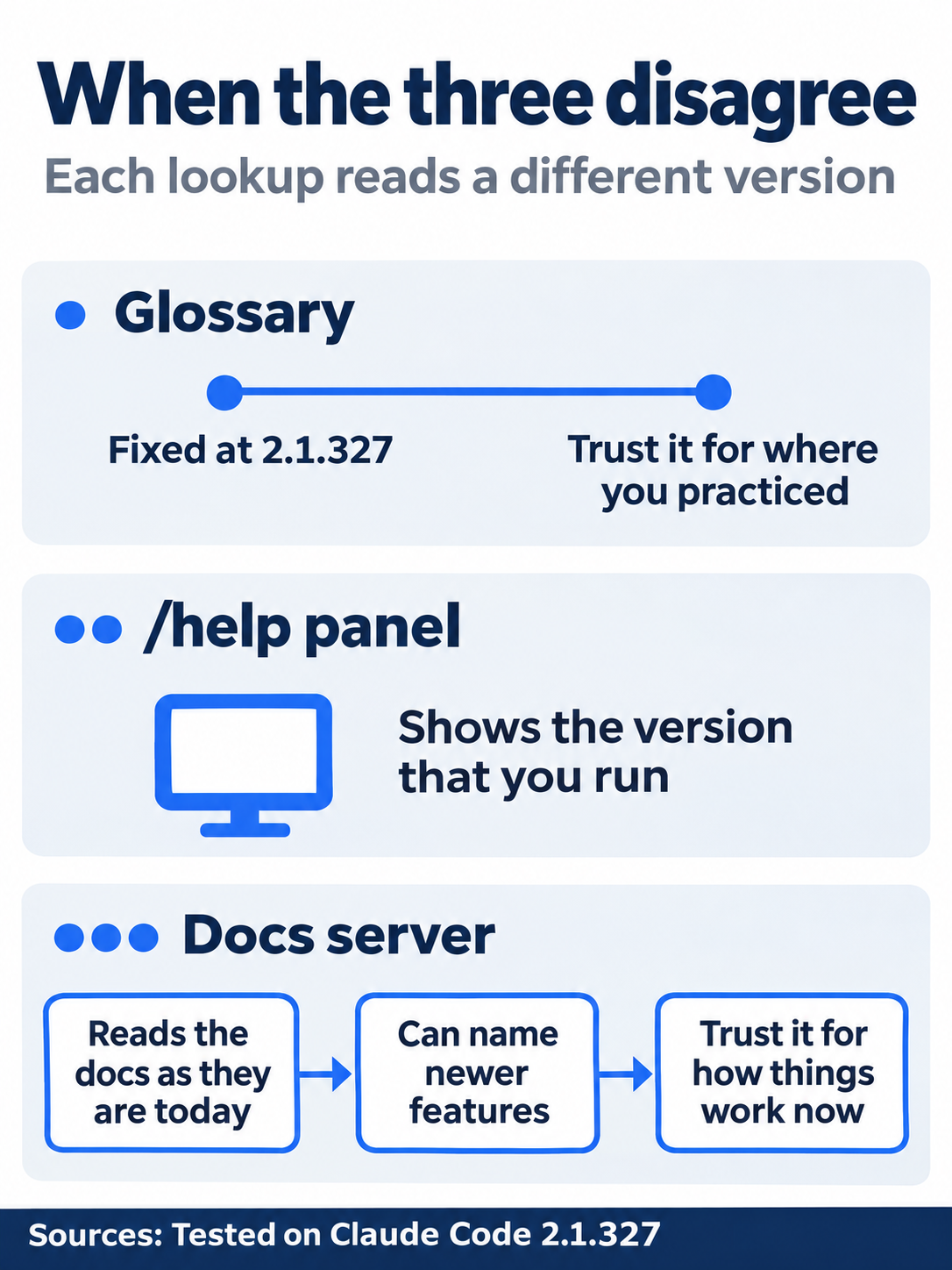
Each lookup reads a different version of Claude Code. The version tells you which one to trust for which question.
The docs server's answers change from run to run, but the facts held. The tested Manual-mode answer about channels began with the same words as the auto answer, then named chat messages from Telegram, Discord, or iMessage, or webhooks from CI or an error tracker. Both runs linked the same page. On the allow-rule copy, an answer about hooks ended with a second link, (glossary entry: https://code.claude.com/docs/en/glossary#hook). The docs have their own glossary, with entries for terms such as the agentic loop, compaction, and hooks. Use it beside the one in this part.
The commands this guide used
These commands come from the Start here sections, listed by day. The commands reference lists every built-in command, and the CLI reference lists every flag.
- Day 1.
curl -fsSL https://claude.ai/install.sh | bashinstalls Claude Code.claude --versionprints the version.claudestarts a session./initwritesCLAUDE.md./rewind, orEsctwice, opens the rewind menu. - Day 2.
Escstops Claude.ctrl+oshows a tool's details. - Day 3.
Shift+Tabchanges the permission mode, one step per press. - Day 4.
/permissionsshows your permission rules. - Day 5.
/memorylists the instruction files and opens one in your editor. - Day 6.
/contextshows what fills the context window./clearstarts a new conversation. - Day 7.
/remote-control <name>links the session to claude.ai/code and the phone app. The status bar shows it as/rc. - Day 8.
/loop 1m <prompt>runs a prompt every minute in the open session. - Day 10.
/shipruns the skill that you wrote. - Day 12.
/code-review mediumreviews the diff at themediumeffort level. - Day 13.
claude mcp add,claude mcp list,claude mcp get, andclaude mcp removemanage MCP servers from your shell./mcpshows them inside a session. - Day 14.
claude plugin install commit-commands@claude-plugins-official --scope projectinstalls a plugin./pluginopens the plugin panel./commit-commands:commitruns a plugin command. - Day 15.
/statusshows the session ID./desktopmoves the session into the Desktop app.claude --resume <session ID>reopens a session in a terminal. - Day 16.
claude --worktree <name>starts a session in its own worktree.git merge --ff-only <branch>merges a worktree branch. - Day 17.
claude --name <name>names a session./list-agentslists the sessions that this one can message, and@<name>in a prompt names the receiver. - Day 18.
/goal <condition>keeps Claude working until the condition holds. - Day 19.
claude --channels plugin:fakechat@claude-plugins-officialstarts a session that a channel can push messages into. - Day 21.
/web-setuplets cloud sessions clone your repository./schedule <description>creates a cloud scheduled task, and/schedule run <name>runs it once. - Day 22.
/workflowsshows a running dynamic workflow./configopens the settings panel. - Day 23.
/artifactslists the pages that you published./loginsigns in again.claude updateupdates Claude Code. - Day 24.
claude -p "<prompt>"runs one prompt headless.--output-format jsonprints the reply as JSON.--permission-mode defaultstarts the run in Manual mode. - Days 25 and 26.
--permission-mode acceptEditslets a headless run edit files.--permission-mode dontAskwith--allowedToolslets a judge run only the tools that you list. - Day 28.
/helpopens the help panel.
/exit ends a session on every day.
Settings files and their scopes
Days 4, 11, and 14 used the same three settings files, and Day 13 used a fourth file for MCP servers. The settings docs give the full rules.
~/.claude/settings.jsonapplies to you, in every project on this computer. Do not commit it. Day 14 installs a plugin here when you give no--scope..claude/settings.jsonapplies to everyone who works in the project. Commit it. It holds the Day 4 ruleBash(npm test *), the Day 11 Prettier hook, and the Day 14 plugin..claude/settings.local.jsonapplies to you, in this project only. Do not commit it. A prompt's "don't ask again" choice saves rules here, and today's optional allow rule lives here.~/.claude.jsonholds MCP servers in local scope and user scope (Day 13). It is in your home folder, not in the project, so MCP local scope is not the same as.claude/settings.local.json.
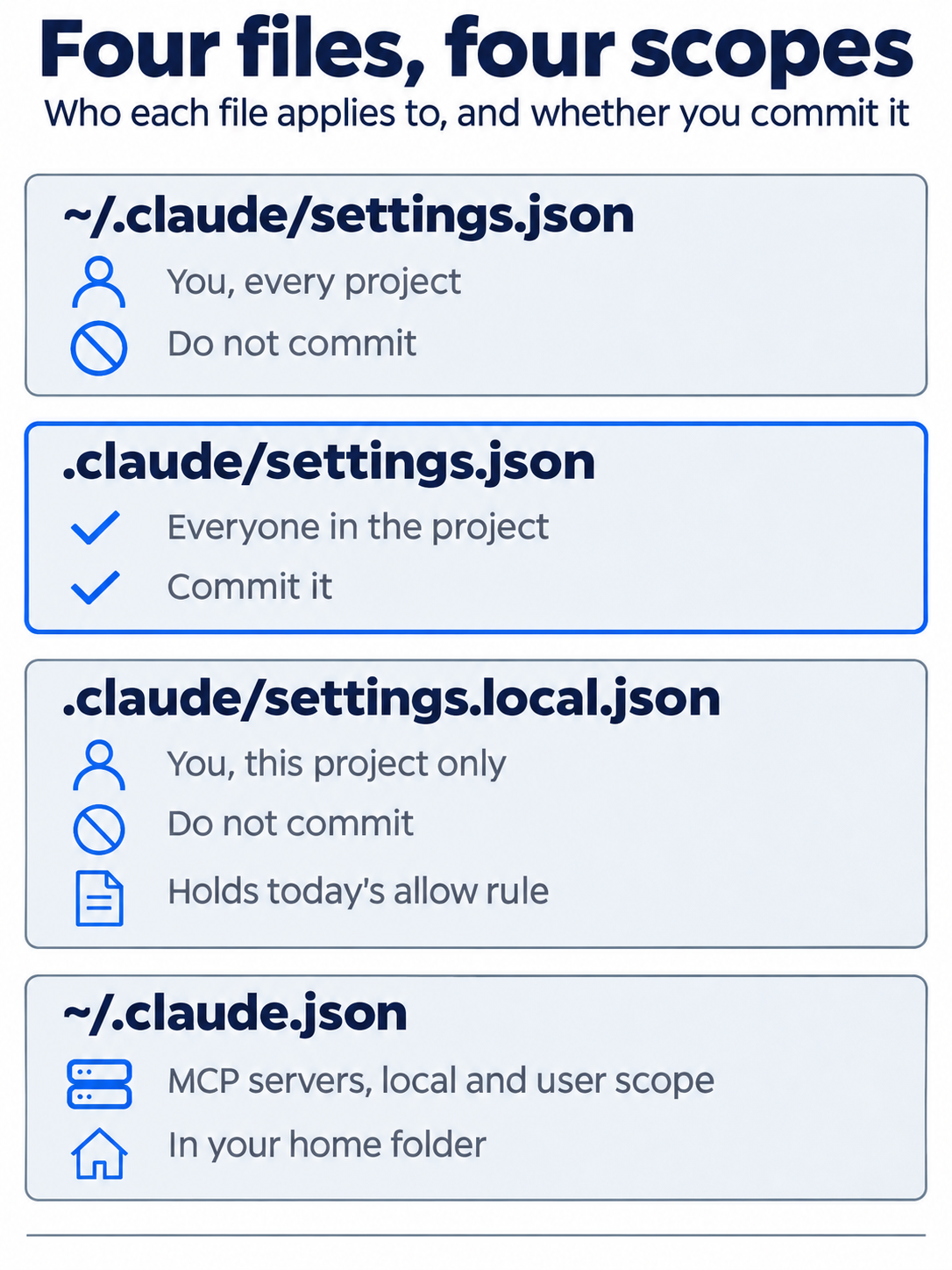
Only the project settings file goes into git. The other three stay with you.
When one key is set in more than one file, Day 4 gave the order: managed settings, then the --settings flag, then .claude/settings.local.json, then .claude/settings.json, then ~/.claude/settings.json. Permission lists do not override each other. They merge, and a deny rule at any level beats an allow rule at any other level.
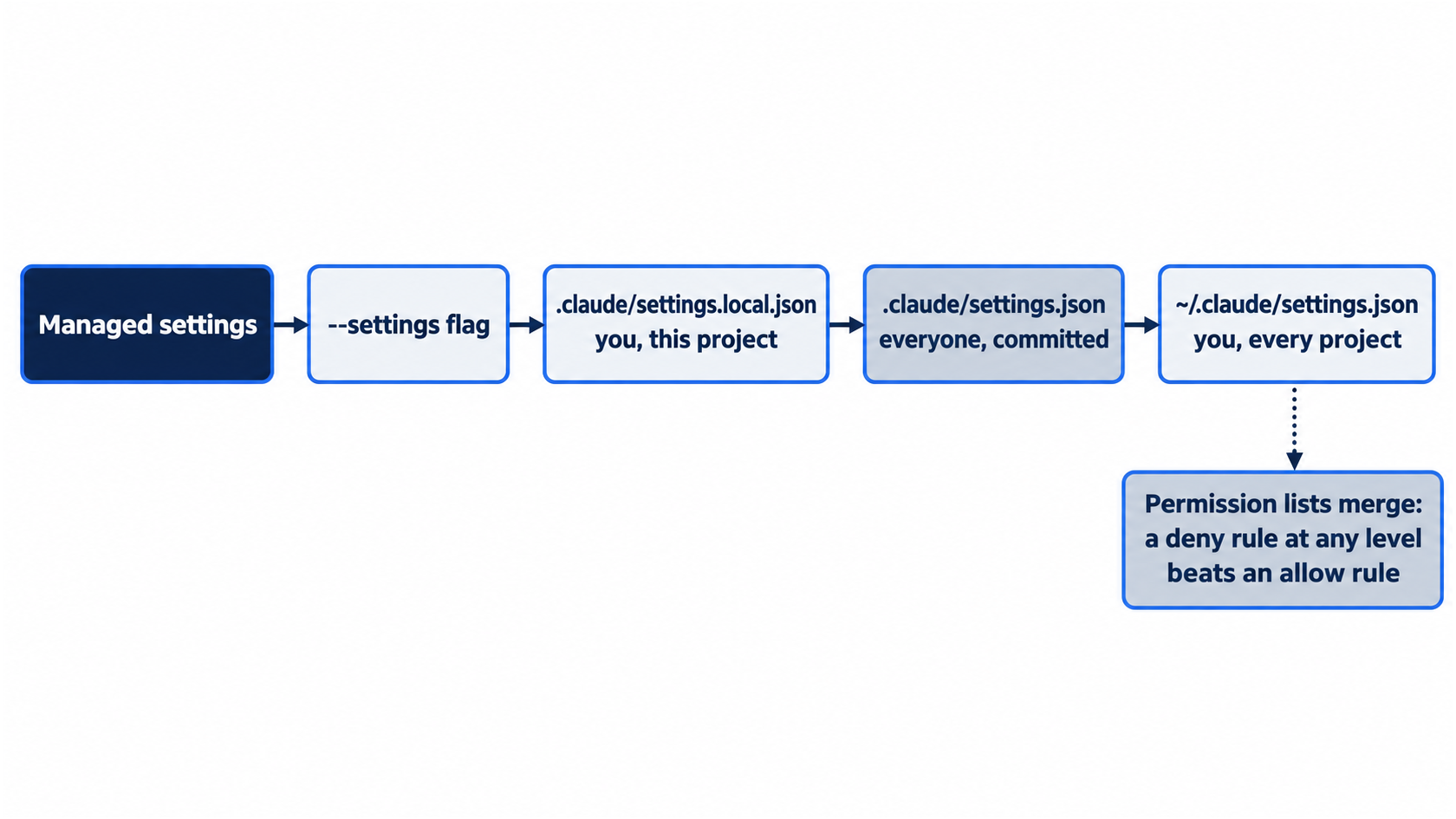
The order decides which value wins for one key. Permission rules do not follow that order, because they merge.
The allow rule, option 2, and git
The permissions docs give three forms for MCP rules. mcp__<server> and mcp__<server>__* match every tool from a server, and mcp__<server>__<tool> matches one tool. Start here used the first form. Day 13's /mcp panel showed that the docs server has 2 tools, so the rule covers both.
Option 2 at the Manual-mode prompt reads 2. Yes, and don't ask again for claude-code-docs — Search documentation commands in <folder>. This guide did not test it. The settings docs say that "Yes, and don't ask again" on a Bash command saves an allow rule in .claude/settings.local.json. The prompt's wording names one tool, the search tool, so the rule that it saves can be narrower than mcp__claude-code-docs. Run /permissions after you choose it to see the rule.
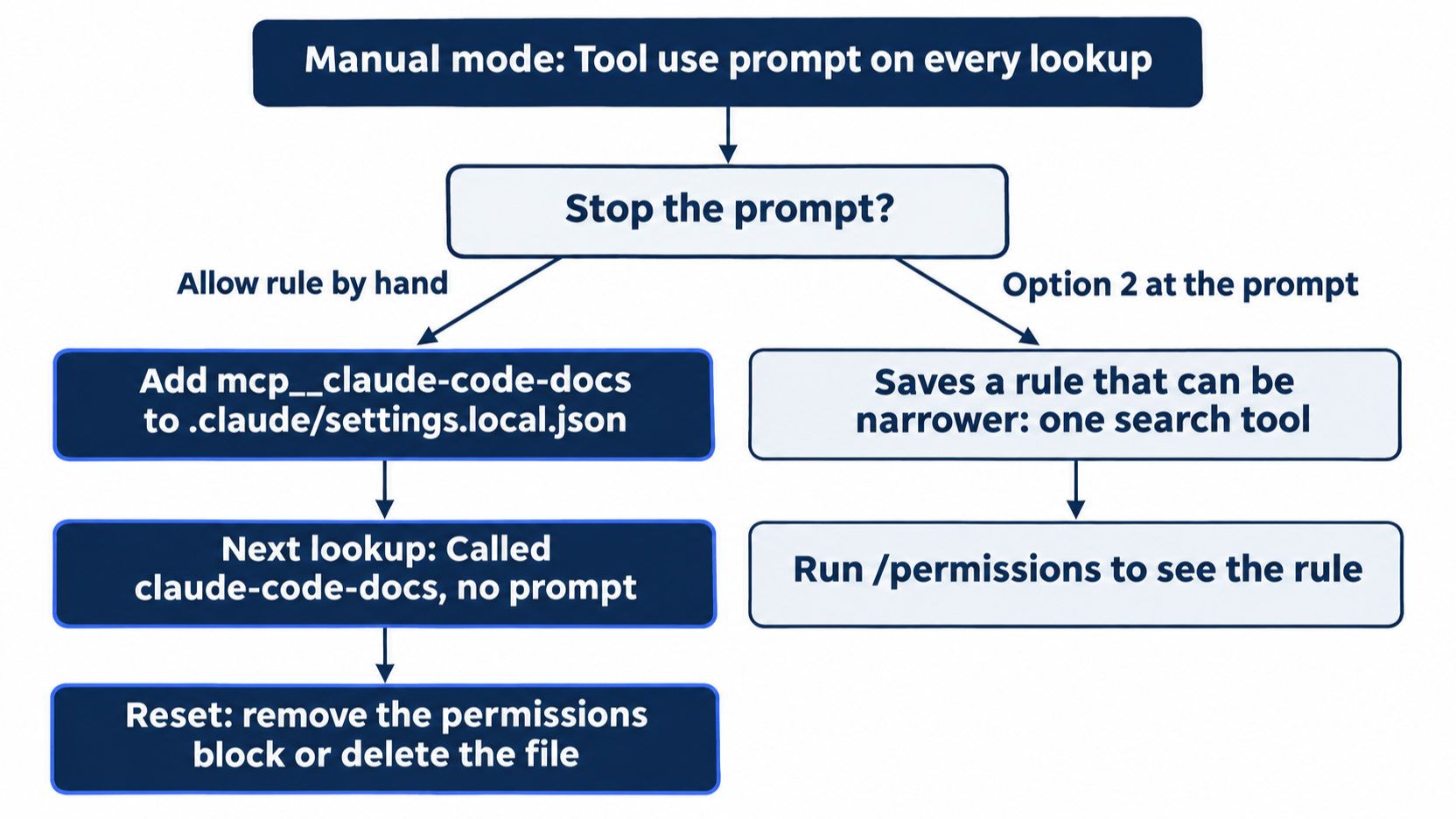
The hand-written rule covers every tool of the server. The rule that option 2 saves can cover only the search tool.
The same docs say that when Claude Code writes .claude/settings.local.json itself, it adds **/.claude/settings.local.json to your global git excludes, so the file stays out of your commits. A file that you create by hand gets no such entry. On the tested copy, git status --short printed nothing with the file in place, because git already ignored it. If yours shows ?? .claude/settings.local.json, run git check-ignore -v .claude/settings.local.json, as Day 13 did for .mcp.json. The docs say to add the file to .gitignore yourself, which is a change that you commit. This guide did not test that step. Deleting the file also clears it.
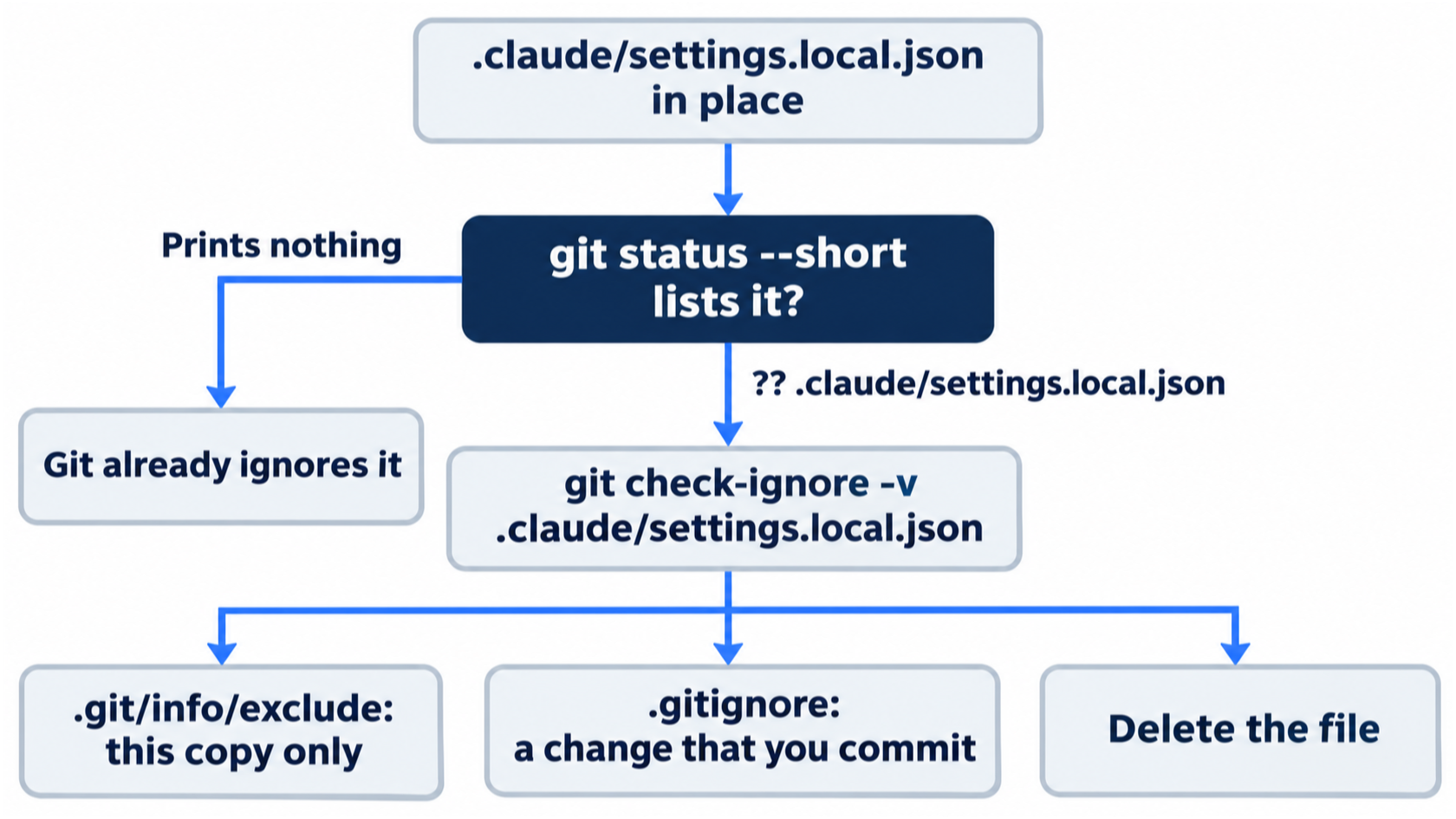
Check the file with git before you commit anything. The safe answer depends on whether git already ignores it.
What /help shows, and what it does not
The tests read only the General tab. This guide did not test the Commands and Custom commands tabs, /powerup, or claude --help in the shell. The changelog for 2.1.326 says that version added /help <command>, which shows the usage of one command. This guide did not test it. The interactive mode docs list every key, including the ones that do not fit in the panel.
Where the docs live
Every page is at https://code.claude.com/docs/en/<slug>, the form that this guide uses in its links. Add .md to a page's address to get it as plain Markdown. The index of every page is at https://code.claude.com/docs/llms.txt. The pages that answer most lookups:
- The glossary defines Claude Code terms.
- The commands reference lists built-in commands and bundled skills.
- The interactive mode reference lists keys and input modes.
- The CLI reference lists the flags for
claude. - The settings and permissions pages cover the files above.
- The changelog says what each version changed. Each version has an anchor, such as
#21327for 2.1.327.
The docs server searches the same pages, so a lookup through it and a lookup in your browser end at the same address.
Go further: The Claude Code Cheat Sheet: Every Command, Shortcut, and Config Template That Actually Matters adds a longer command catalog, a decision tree, and sample files for settings, CLAUDE.md, and specs. Some of it no longer matches 2.1.327. It says that Ctrl+O shows code-intelligence diagnostics, but today's /help lists ctrl+o to see full transcript. Its .claude/todos.json sample assumes the task list, which is off by default on Opus 5.5.
Do this today
Everyone
- Do the three lookups: one term in the glossary, the
/helppanel, and two questions to the docs server. Check the win: the screen shows twoCalled claude-code-docslines, each answer ends with acode.claude.comlink,git statusprintsnothing to commit, working tree clean, andnpm testshowsℹ fail 0with the same count as this morning. - Habit: when a term stops you, find its day in the glossary, then ask the docs server for the current page. Check: for the next term you look up, you have both a day number and a
code.claude.comlink.
If you read Going deeper
- In Manual mode, add the allow rule from Start here and ask the docs server one more question. Check: the screen shows
Called claude-code-docswith noTool useprompt. Reset: type/exitand remove thepermissionsblock. If you created the file today, delete it withrm .claude/settings.local.json. Check thatgit status --shortprints nothing. The next lookup prompts again. This guide did not test that last check. - Pick one line from the glossary, ask the docs server about the same term with the Start here prompt, and compare the two. Check: the answer has a
Called claude-code-docsline and a link, and you can name one thing that the docs add. This guide did not test this prompt. It only reads, so there is nothing to reset. Check thatgit status --shortprints nothing.
Glossary
Each line gives a term, the day whose Start here first defines it, and its meaning in this guide's words. The docs glossary has the official definitions.
2>&1(Day 25): sends a command's error output to the same place as its normal output.-a(git commit) (Day 12): the option that stages every tracked file that changed before the commit, as ingit commit -am.- Accept edits mode (Day 25): the permission mode in which Claude edits files with no prompt.
--permission-mode acceptEditsstarts a headless run in it, and Day 3 saw it in the status bar asaccept edits on. - Agentic loop (Day 12): the three steps that Claude works in: gather context, take action, verify.
- Agents (Day 22): what a dynamic workflow calls the subagents that it starts.
- Allow once (Day 7): the browser or phone answer that approves one request. Always allow approves every edit for the rest of the session.
- Allow rule (Day 4): a permission rule that lets one tool or command run without asking, such as
Bash(npm test *). - Allowed by auto mode (Day 17): a line under a tool call that means auto mode checked the step and let it run. Manual mode does not show it.
--allowedTools(Day 26): theclaudeflag that lists tools that a run may use without asking, such asReadandBash(git diff *).- Anthropic Console account (Day 1): the second login choice, an account that bills API use by the token. Some features, such as Remote Control and artifacts, need a Claude subscription login instead.
ANTHROPIC_API_KEY(Day 21): an environment variable that holds a Console API key. Unset it before you use/schedule.>>(append) (Day 12): adds a line to the end of a file without changing the rest.- Approve dialog (Day 3): the question under a finished plan.
1. Yes, and use auto modeand2. Yes, manually approve editsapprove the plan and start the build, and3. Tell Claude what to changekeeps the session in plan mode. - Artifact (Day 23): a live web page that Claude Code publishes from your session to a private link on claude.ai.
- Artifact tool (Day 23): the tool that publishes pages. Its line reads
Publishedwith the link on the first publish, andUpdatedwith the same link after a change. /artifacts(Day 23): lists your artifacts, with this session's pages first.Enteropens one, andddeletes it for good.assert.equal(Day 12): in a test, passes when its two values are equal and fails when they are not.- Auto mode (Day 1): the permission mode that a new session starts in. Claude edits files and runs commands without asking, and a background check blocks risky actions.
- Auto-memory (Day 5): notes that Claude writes for itself as you work, such as a preference that you stated. It is on by default.
- Autocompact buffer (Day 6): space that Claude Code keeps free in the context window. When the conversation grows into it, Claude Code summarizes older messages.
- Background agent (Day 12): a helper with its own context window that runs while your session waits or keeps working, such as Explore on Day 9 or the review that
/code-reviewstarts. - Bun (Day 19): a JavaScript runtime like Node.js. The channel plugins are Bun scripts, and
bun --versionchecks for it. - Called line (Day 13): a tool line such as
Called claude-code-docs. It shows that Claude called a tool from an MCP server and did not answer from memory. - Can't restore (Day 2): a Rewind menu line that means Claude changed the files with a shell command, such as
sed, which rewind does not track. Usegit restoreinstead. - Card (Day 20): a row such as
ticket-triage: run npm testthat appears in the Dispatch thread when Dispatch starts a Code session. Claude picks the title. - Channel (Day 19): an MCP server, installed as a plugin, that pushes messages into a session that is already running. Claude can answer through the same channel.
- Channel line (
←) (Day 19): a line such as← fakechat · web:, which marks a message that came in through a channel. The arrow points into the session. --channels(Day 19): theclaudeflag that turns on the channels that you name, for this session only, such asplugin:fakechat@claude-plugins-official.--check(Day 11): the Prettier flag that lists the files that do not match the house style and changes nothing. When every file matches, it printsAll matched files use Prettier code style!.- Checked in (Day 5): tracked by git, so everyone who clones the repository gets the file.
- Checkpoint (Day 2): a copy of your files that Claude Code saves before each prompt that you send.
chmod +x(Day 24): marks a file as a program that you can run.claude(Day 1): the command that starts a Claude Code session in the current folder.claude --resume(Day 15): with a session ID, reopens a session in a terminal. The docs say so, and this guide did not test it.claude --version(Day 1): prints the installed version, such as2.1.326 (Claude Code).claude -p(Day 24): runs Claude Code headless. It runs one prompt, prints the answer, and exits.-pis short for--print.- Claude Desktop app (Day 15): Anthropic's app for your computer that holds chat and Claude Code in one window.
claude mcp add(Day 13): registers an MCP server with Claude Code. You run it in your shell, before a session starts.claude mcp get(Day 13): shows one MCP server's details, such as its scope, status, and URL.claude mcp list(Day 13): checks each MCP server and prints one line per server.✔ Connectedmeans that the server answered and is ready.- Claude mobile app (Day 7): the Claude app for iOS or Android. Remote Control and Dispatch (Day 20) reach your sessions through it.
claude plugin install(Day 14): installs a plugin from your shell, without a session. The plugin's name has the formplugin@marketplace.claude plugin uninstall(Day 19): removes a plugin from your shell, at the scope that you name.- Claude subscription login (Day 1): the first login choice,
1. Claude account with subscription, for a Pro, Max, Ultra, Team, or Enterprise plan. Remote Control (Day 7),/desktop(Day 15), and artifacts (Day 23) need it. - Claude Tag (Day 20): Claude in a team's Slack channels, where anyone can mention
@Claudewith a task. Day 20 covers it in Going deeper, untested. claude update(Day 23): updates Claude Code to the latest version.- claude.ai/code (Day 7): the web page where Remote Control shows a session that runs on your computer.
- CLAUDE.md (Day 1): the project's instruction file. Claude Code loads it at the start of every session.
.claude/worktrees/(Day 16): the folder in the main checkout where Claude Code puts each worktree. Ticket Triage lists it in.gitignore.- Clean tree (Day 2): a working tree with no uncommitted change, where
git statusprintsnothing to commit, working tree clean. Start every task from one, sogit diffshows only what Claude changed. /clear(Day 6): starts a fresh conversation in the same folder. CLAUDE.md and skills load again, and the conversation is gone.- Cloud environment (Day 21): the setting that decides what a cloud session can reach on the network.
- Cloud scheduled task (Day 21): a prompt that runs on a schedule in a cloud session, so it runs with your computer off. The docs call it a scheduled task, formerly a routine.
- Cloud session (Day 21): a Claude Code session on Anthropic's servers. It clones your repository from GitHub, runs a prompt, and ends.
Co-Authored-By(Day 27): a line that Claude adds to a commit message that it writes.- Code review (Day 12): a read of a change that looks for problems that no test covers.
/code-reviewruns one. - Code tab (Day 15): the part of the Desktop app where Claude Code runs.
- Command menu (Day 10): the list that opens when you type
/. It shows each command with its description. - Comment (Day 24): a line in a script that starts with
#, a note for a person. Bash skips it. commit-commands(Day 14): a plugin from the official marketplace that adds commit commands, such as/commit-commands:commit.- Completion condition (Day 18): the sentence that you give
/goal, which says what must be true when the work is done. - Computer use (Day 20): a setting that lets Claude click, type, and open apps on your computer.
/config(Day 22): opens Claude Code's settings panel, with rows such as Dynamic workflows.- Connector (Day 20): a link from your Claude account to an outside service, such as mail or Slack.
/context(Day 6): draws a grid of the context window and lists how many tokens each category uses.- Context is the operating system (Day 6): this guide's rule that the context window decides how well everything else works, so it should hold what today's task needs and little else.
- Context window (Day 6): Claude's working memory for one session. Your prompts, the files that Claude reads, command output, CLAUDE.md, and Claude's replies all go into it.
- Cron (Day 8): a standard five-field way to write a schedule, such as
*/1 * * * *for every minute. CronCreate(Day 8): the tool that schedules a task. It shows the cron schedule and the task's ID.- Cross-session messaging (Day 17): one Claude Code session sends a short text message, and another session on the same computer receives it.
Ctrl+C(Day 2): clears the prompt box.Ctrl+O(Day 2): expands a one-line tool record, such asRead 1 file, to show its details. Day 17 uses it to show the full text of a message.Ctrl+U(Day 14): deletes the whole input line.cwd(Day 15): the folder that a session works in, as/statusshows it.- Default cloud environment (Day 21): the cloud environment named
Default. The docs say that it allows package registries and common development sites. /desktop(Day 15): saves the session, opens it in the Desktop app, and ends Claude Code in the terminal. It works only on macOS and on Windows with an x64 processor./dev/null(Day 26): a place to send output that you throw away.- devDependency (Day 11): a package that you need to work on the project, but that the code does not need to run.
- Diff (Day 12): the changes since your last commit.
disable-model-invocation(Day 10): a skill frontmatter field.truemeans that only you start the skill, and Claude cannot start it by itself.- Disconnect this session (Day 7): the
/remote-controlpanel choice that stops the remote link. The session keeps running in the terminal. - Dispatch (Day 20): one long conversation with Claude that you reach from the Claude mobile app. Claude does the work on your computer, in the Desktop app.
- Docs server (Day 13):
claude-code-docs, a hosted MCP server that searches the Claude Code documentation. dontAsk(Day 26): the permission mode that denies every call that would ask.- Dynamic workflow (Day 22): a JavaScript script that Claude writes for your task and that a runtime runs in the background. It starts many agents and keeps their results out of your context window.
- Edge case (Day 3): an unusual input that a plan must decide on, such as "This is not urgent", which contains "urgent".
$EDITOR(Day 5): the environment variable, with$VISUAL, that names the editor that Claude Code opens. If neither is set, Claude Code uses your system's default editor.- Effort level (Day 12): how hard Claude works at a task, such as
mediumin/code-review medium. Day 1 saw it in the status bar. enabledPlugins(Day 14): the list in a settings file of the plugins that are turned on.- End the prompt with a check (Day 1): the most important habit in this guide. The last sentence of a prompt asks Claude to run the tests and report, so Claude fixes its own mistakes before it replies.
Esc(Day 2): stops Claude at once. Claude keeps what it did before you pressed it, and Claude Code asksWhat should Claude do instead?. Pressed twice with an empty prompt box, it opens the Rewind menu (Day 1).- Evaluator (Day 18): the second, smaller model that checks after each turn whether a goal's completion condition holds.
- Event (Day 11): the point in a session when a hook runs, such as
PostToolUse, right after Claude uses a tool. /exit(Day 4): ends the session.- Exit code (Day 24): the number that every command returns when it ends.
0means success, and any other number means failure. $?(exit code) (Day 24): holds the exit code of the last command, as inecho $?.- Explore (Day 9): a subagent that Claude Code includes. It can read and search, but it cannot edit files.
- Failing test (Day 12): a test that you write before the code can pass it. It states what you want in a form that Claude can run.
- Fakechat (Day 19): the demo channel from the docs, a chat page on your own computer.
- False positive (Day 12): a ticket that gets flagged when it should not.
- Fast-forward (Day 16): a merge that moves
mainforward to a branch's commit, with no merge commit. --ff-only(Day 16): thegit mergeoption that makes only a fast-forward merge, and stops with an error instead of making a merge commit.- Findings (Day 12): the problems that a review lists. Each one names a file and a line. A finding is a reason to look, not an order.
--force(Day 26): thegit worktree removeflag that deletes a worktree with its uncommitted changes. Without it, git refuses.- Free space (Day 6): the part of the context window that is left, as
/contextshows it. - Frontmatter (Day 10): the header between the two
---lines at the top of aSKILL.md. - Gate (Day 25): a check that a program runs and that passes or fails, such as
npm test. gh(Day 21): the GitHub CLI, a command-line tool for GitHub.gh auth statuschecks that it is signed in, andgh auth loginsigns it in.gh repo create(Day 21): makes a GitHub repository from your folder. Day 21 runs it with--private,--source=.,--remote=origin, and--push.git add -A(Day 25): stages every change. Files in.gitignorestay out.git branch(Day 16): lists the branches. On a clean day it shows only* main.git branch -d(Day 26): deletes a branch. It is safe when the branch has no commits, or whenmainalready holds them.git diff --quiet(Day 25): prints nothing and only sets the exit code: 0 when nothing differs.git diff --stat(Day 1): prints a summary of what changed since the last commit, one line per file, with the count of changed lines.git diff HEAD(Day 26): shows every change since the last commit.git log --oneline(Day 2): lists the commits, one per line, newest first.-1shows only the latest commit, and-3the latest three.git push(Day 21): uploads your commits to GitHub. A cloud run tests what is on GitHub, so push before a run.git remote -v(Day 21): lists the links to other copies of the repository. Twooriginlines, one for(fetch)and one for(push), mean that the link to GitHub exists.git restore(Day 1): puts tracked files back to your last commit.git restore .restores every file, andgit restore src/classify.jsrestores one.git show(Day 3): shows one commit.git show --stat HEADlists the files in the latest commit, andgit show HEAD(Day 18) prints its diff.git status --short(Day 1): lists each changed or new file on one line.Mmarks a modified file. Day 3 adds??, a new file or folder that git does not track yet, and Day 25 addsA, a new file that is staged.- Git worktree (Day 16): a second folder with its own copy of the files and its own branch, linked to the same repository.
git worktree add(Day 26): makes a worktree folder from a script.-bputs it on a new branch.git worktree list(Day 16): lists the main checkout and every worktree, with each one's commit and branch.git worktree remove(Day 26): deletes a worktree folder..gitignore(Day 11): the file that lists the paths that git ignores.- Goal (Day 18): what
/goalsets. Claude keeps working, turn after turn, until the evaluator says that the completion condition holds. /goal(Day 18): sets a goal from a completion condition. With no condition, it opens a panel that shows the last goal, its result, and what it cost.- Goal achieved (Day 18): the line that ends a goal. It gives the time, the number of turns, and the tokens spent.
- Goal indicator (Day 18):
◎ /goal activeand a time, under the input box, while a goal runs. - Going deeper (Day 1): the second section of each part, with the measurements, limits, and untested notes.
- Habit (Day 27): one practice from this guide that you choose to keep.
- Headless mode (Day 24): Claude Code with no one at the keyboard. It is also called non-interactive mode, and
claude -pstarts it. /help(Day 28): a slash command that opens the help panel, with tabs for general help, commands, and custom commands, and the keys to use.- Heredoc (Day 18): a shell form that feeds several lines into a command, such as
cat >>. - Hook (Day 11): a shell command that Claude Code runs by itself at a fixed point in a session. Claude does not decide whether it runs.
- House style (Day 11): Ticket Triage's code style from CLAUDE.md: no semicolons, double quotes, and a 2-space indent.
[idle](Day 17): in/list-agents, a session that waits for a prompt.--ignore-unknown(Day 11): the Prettier flag that skips a file type that Prettier does not know, instead of failing./init(Day 1): reads the project and writes a CLAUDE.md at the project root.- Interval (Day 8): how often a scheduled task runs, such as
1mfor every minute. is_error(Day 24): the JSON field that isfalsewhen a headless run ended without an error.- jq (Day 11): a small command-line tool that reads JSON.
jq -c(Day 24): prints the JSON fields that you name, on one line.jq -r(Day 24): prints a JSON field as raw text, without the quotes that JSON puts around text.- JSON (Day 24): text that holds a set of named fields.
--output-format jsonprints a headless reply as one JSON object. - Judge (Day 26): a
claude -prun that can read but not write, and answersAPPROVEorREJECTon a change. - Keep worktree (Day 16): the
/exitchoice in a worktree session that leaves the folder and its branch on disk, so you can come back later. kill(Day 19): stops a process by its number.- Ledger (Day 25): a file with one line per round of a loop, so you can read afterward what each round did.
/list-agents(Day 17): lists the sessions that this session can send messages to, with each one's state, name, and folder.- Local scope (Day 13): for an MCP server, private to you and active only in this project. Claude Code saves it in
~/.claude.json. - Locked (Day 16): in
git worktree list, a worktree that a Claude Code session is using. Git refuses to remove a locked worktree. /login(Day 23): signs you in again, for example with the Claude account that artifacts need./loop(Day 8): creates a scheduled task from an interval and a prompt, such as/loop 1m run npm test..loop/(Day 25): the folder where the loop script keeps the gate's output, the ledger, and Claude's replies. It is in.gitignore.lsof(Day 19): lists the programs that listen on a port.lsof -tprints only the process number.- Main checkout (Day 16): your normal project folder, as opposed to a worktree.
- Manual mode (Days 1 and 4): the permission mode in which Claude asks before every file edit and every command that is not read-only. Its value in settings files is
default. - Marketplace (Day 14): a catalog that lists plugins and where to fetch each one. Anthropic's is
claude-plugins-official. - Matcher (Day 11): the part of a hook that narrows its event, such as
Edit|Write. - MCP (Day 13): the Model Context Protocol, an open standard that connects Claude Code to other programs.
/mcp(Day 13): opens theManage MCP serverspanel, which lists every server that the session loaded and its number of tools.- MCP server (Day 13): a program that gives Claude extra tools through MCP.
- MCP server instructions (Day 6): a small built-in line in
/contextfor MCP servers. It stays tiny until you connect a server (Day 13). mcp__<server>(Day 28): the permission rule form that names every tool of one MCP server, such asmcp__claude-code-docsin anallowlist./memory(Day 5): opens a panel that lists the instruction files for this session and the auto-memory switch.- Memory files (Day 6): the instruction files that Claude Code loads at the start of every session, such as CLAUDE.md.
@mention (Day 17): a session's name after@in a prompt, such as@reviewer. It names the session that gets a message.- Message line (Day 17): a line such as
› Message from @triage, which shows a message from another session.ctrl+oshows its full text. - Messages (Day 6): the conversation, as
/contextcounts it: your prompts, Claude's replies, and every tool result. In a fresh session it is almost empty. - Mode selector (Day 15): the control under the Desktop app's prompt box that names the session's permission mode, such as
Auto. Read it before you send a prompt from Desktop. --name(Day 17): theclaudeflag that gives a session a name. Other sessions use the name to send it messages.- Namespace (Day 14): the plugin name and colon in front of a plugin command, as in
/commit-commands:commit. It keeps two plugins' commands apart. - Native installer (Day 1): the install script at
https://claude.ai/install.sh. It installs one program,claude, and updates it in the background. node -e(Day 26): runs one line of JavaScript.- Node.js (Day 1): the JavaScript runtime that Ticket Triage runs on. This guide needs version 22 or later.
node_modules(Day 11): the folder in which npm installs packages. It must not go into git.not ok(Day 25): in the plain output of Node's test runner, the line for a failing test. A passing test gets anokline.npm install(Day 11): installs a project's packages. A teammate who clones Ticket Triage runs it once.npm test(Day 1): runs Ticket Triage's tests with Node's built-in test runner,node --test. The summary linesℹ passandℹ failgive the counts.- npx (Day 11): runs a command from a package installed in the project.
num_turns(Day 24): the JSON field that gives the number of turns that a headless run took.origin(Day 21): the name of the link from your folder to its GitHub repository.- Owner (Day 7): on a Team or Enterprise plan, the admin who must turn on some features first, such as Remote Control and channels.
package-lock.json(Day 11): a file that npm writes to record the exact version that it installed.- Pairing (Day 20): linking the Claude mobile app to Dispatch in the Desktop app. The QR code on the pairing page is a download link, not a pairing code.
- Permission mode (Day 1): the setting that controls what Claude may do without asking you. The status bar shows it.
- Permission prompt (Day 1): the box in which Claude Code shows what Claude is about to do and asks for your answer.
- Permission rule (Day 4): a line in a settings file that allows, asks about, or denies one tool or command.
--permission-mode(Day 24): theclaudeflag that picks the permission mode for a run.defaultis Manual mode, and Days 25 and 26 useacceptEditsanddontAsk.permission_denials(Day 24): the JSON field that lists each tool call that Claude Code refused. The empty list,[], means none./permissions(Day 4): opens a dialog with tabs such asAllow,Ask, andDeny, which lists the permission rules that the session loaded.permissions.allow(Day 4): the list in a settings file of the things that Claude may do without asking.- Persona (Day 27): a way of working with Claude Code at one level of setup. This guide names three, each with one habit: casual, pro, and elite.
- Personal settings file (Day 19):
.claude/settings.local.json, settings for you only, in this project. Claude Code adds it to your global git excludes, so git ignores it. Local scope records plugins there. - Phases (Day 22): the stages that a dynamic workflow runs in order.
- Pill (Day 23): a short label at the end of the status bar with the
⧉sign and a page's name, such as⧉ ticket-triage-tests. It shows that this session has published a page. - Pitfall (Day 27): a mistake that does not break anything today but makes a later day go wrong, such as a CLAUDE.md that no longer matches the code.
- Pitfall checklist (Day 27): one prompt that names each pitfall as a check and asks Claude to report each one as
OKorFIX, with the evidence. It changes no file. - Plan file (Day 3): the file in which Claude writes its plan in plan mode, under
~/.claude/plans/, not in your project.ctrl+gopens it in your editor. - Plan mode (Day 3): a permission mode in which Claude reads files and writes a plan, but changes no code until you approve the plan.
- Plugin (Day 14): one folder that packages pieces such as skills, hooks, and MCP servers, and installs as a unit.
/plugin(Day 14): opens the plugin panel, with tabs such asDiscover,Installed, andMarketplaces. You browse, turn on, turn off, and remove plugins there.PostToolUse(Day 11): the hook event that runs right after Claude uses a tool.- Prettier (Day 11): a widely used code formatter for JavaScript.
.prettierrc(Day 11): Prettier's settings file. Ticket Triage sets"semi": falseand"printWidth": 120in it.--private(Day 21): thegh repo createflag that keeps the new repository to you.- Private artifact (Day 23): a page that only you can open until you share it from the page's Share menu. Every new artifact is private.
- Progress row (Day 22): the row under the input box that shows a running workflow's name, how many agents are done, the time, and the tokens so far.
- Project instructions (Day 5): the name that
/memorygives the project's checked-in CLAUDE.md. - Project settings file (Day 4):
.claude/settings.jsonat the project root. You commit it, so everyone who clones the project gets its rules. (project)(Day 10): a label in the command menu that says that a command comes from this repository.- Prompt box (Day 1): the box where you type prompts and slash commands. Everything that you type there goes to Claude. Later days also call it the input box.
--push(Day 21): thegh repo createflag that uploads your commits to the new repository.- Queue (Day 2): what Claude Code does with a message that you type while Claude works. It holds the message and shows it until Claude reads it.
/rc(Day 7): the short form of/remote-control. In the status bar, it shows that the session is connected.- Red gate (Day 26): the factory stage that requires the new tests to fail before the change, or they prove nothing.
--remote(Day 21): thegh repo createflag that names the link to GitHub, as in--remote=origin.- Remote Control (Day 7): links a session on your computer to claude.ai/code and the Claude phone app. Claude keeps running on your computer.
/remote-control(Day 7): connects the session to Remote Control. The words after it name the session. When you run it again, it opens a panel with Disconnect this session, Show QR code, and Continue.RemoteTrigger(Day 21): the tool that manages cloud scheduled tasks. It creates them, runs them, and reads their logs.- Remove worktree (Day 16): the
/exitchoice in a worktree session that deletes the folder and its branch. A commit thatmainalready holds stays safe. - Reply tool (Day 19): a tool that a channel gives Claude to send text back, such as fakechat's tool that sends Claude's answer to the chat page.
- Research preview (Day 19): a feature that the docs say can still change, such as channels and cloud scheduled tasks.
- Restore code (Day 1): the Rewind menu choice that puts the files back to how they were before the selected prompt. Day 2 uses
Restore code and conversation, which also makes Claude forget the request. result(Day 24): the JSON field that holds Claude's answer.- Retry loop (Day 25): runs Claude, runs the gate, and runs Claude again with the gate's output, until the gate passes or a stop rule fires.
- Rewind menu (Day 2): takes your files, the conversation, or both back to a checkpoint.
Esctwice or/rewindopens it, as on Day 1. - Routine (Day 21): the older name for a cloud scheduled task, which Claude Code still uses in many places.
- Run a dynamic workflow? (Day 22): the box that asks before a workflow runs. It names the workflow and its phases.
1. Yes, run itstarts it, and2. View raw scriptshows the script first. - Runtime (Day 22): the part of Claude Code that runs dynamic workflow scripts.
--save-dev(Day 11): thenpm installflag that records a package inpackage.jsonas a devDependency./schedule(Day 21): creates, lists, runs, and changes cloud scheduled tasks, such as/schedule runwith a task's name. It cannot delete a task.- Scheduled task (Day 8): a prompt that Claude Code runs again on a schedule, inside your open session.
/loopcreates one. - Scheduled task page (Day 21): a task's own page on claude.ai, with Run now, an Active switch, a History list, and a menu with Delete. You delete a cloud scheduled task there.
- Scope (Days 13 and 14): who gets an MCP server or a plugin, and which file records it.
--scope(Day 14): theclaude plugin installflag that picks who gets a plugin.projectturns it on for everyone in the repository, andlocal(Day 19) for you only, in this project. Without the flag, the plugin is on for you in every project.- Scratchpad (Day 23): a temporary folder outside your project where Claude writes files, such as an artifact's page.
- Secret (Day 27): a value such as an API key or a token. A secret in a tracked file goes wherever the repository goes.
- sed (Day 18): a command-line tool that edits text in a file.
- Session (Day 1): one conversation with Claude Code in one folder. Day 15 adds that Claude Code saves it on disk, so you can come back to it.
- Session ID (Day 15): a long unique string that names a session.
- Session name (Day 15): a short title for a session. If you set none, Claude Code names the session from your prompt.
Shift+Tab(Day 3): moves to the next permission mode, one step per press. At the approve dialog, it approves the plan and switches the session to auto mode instead./ship(Day 10): the skill that this guide writes. It runs the tests, lists the changed files, and ends withReady to commitorNot ready.- Show QR code (Day 7): the
/remote-controlpanel choice that shows a QR code. Your phone's camera reads it and opens the session in the Claude app. - Size guideline (Day 22): advice that tells Claude how many agents to plan for in a workflow, such as
medium size. You can change it in/config. - Skill (Day 10): a folder with a
SKILL.mdfile, a short header and then instructions. Claude Code turns each skill in.claude/skills/into a slash command. SKILL.md(Day 10): the file in a skill's folder. It holds the frontmatter, then the instructions.- Slash command (Day 1): a command that starts with a slash, such as
/init, typed in the prompt box. - Software factory (Day 26): loops chained into a pipeline that takes a ticket in and puts a reviewed change out.
--source(Day 21): thegh repo createflag that picks the folder to upload, as in--source=.for this folder.- Spec (Day 3): a short document that says what to build and how you will know it works. You commit it next to the code.
- Stage (Day 25): record a file with
git addfor the next commit.git diffthen compares the file on disk with the staged copy, so it shows any later edit. - Start here (Day 1): the first section of each part, a tested lesson that ends in one win that you can check.
/status(Day 15): opens the settings panel on its Status tab, with lines such asSession name,Session ID, andcwd.- Status bar (Day 1): the line under the prompt box. It shows the permission mode, such as
⏵⏵ auto mode on, and can show the effort level. - Steer (Day 2): change what Claude does while it works. Queue a message to add to the work, or press
Escto stop it and redirect. - Stop rule (Day 25): a condition in a loop script that ends the loop before the gate passes.
- Subagent (Day 9): a helper that Claude starts for one task, with its own context window. Only its answer comes back to your conversation.
- Suggested prompt (Day 11): a next prompt that Claude Code shows in gray in the input box. Nothing runs until you send it.
- System prompt (Day 6): Anthropic's standing instructions to Claude, which you never see.
- System tools (Day 6): the descriptions of the tools that Claude can call, such as Read, Edit, and Bash, as
/contextcounts them. - Task ID (Day 8): the short ID of a scheduled task, such as
9a805845. tee -a(Day 25): prints a line on your screen and adds it to the end of a file.- Test gate (Day 24): a check that a script runs and that passes or fails, reported with an exit code.
- Three dots (
main...unsubscribe) (Day 26): ingit diff, compares a branch with the point where it started frommain. - Ticket (Day 26): a short file that says what to change.
- Ticket Triage (Day 1): this guide's running example, a small Node.js support-ticket service at
~/code/ticket-triage. - Token (Day 1): the unit of text that the model reads and writes, about three quarters of an English word.
- Tool (Day 1): a built-in action that Claude Code runs for Claude, such as Read, Edit, and Bash. MCP servers add more tools (Day 13).
- Tool use prompt (Day 13): the Manual-mode prompt titled
Tool usethat asks before Claude calls an MCP tool, and names the server and the tool. - Transcript (Day 18): the scrolling record of the session, where progress shows.
--transport http(Day 13): theclaude mcp addflag that says an MCP server is hosted at a URL.- Trust (Day 1): your answer to the folder dialog. It lets Claude read, edit, and run files in that folder.
- Turn (Day 8): one prompt and Claude's whole reply to it.
- Two dots (
main..unsubscribe) (Day 26): ingit log, lists the commits on a branch thatmaindoes not have. - User instructions (Day 5):
~/.claude/CLAUDE.md, an optional personal file that loads in every project on your computer. #!/usr/bin/env bash(Day 24): the first line of a script. It tells your system to run the file with bash.- UTC (Day 21): the time zone of a cloud scheduled task's cron line. It does not follow daylight saving, so a run moves one hour on your clock when daylight saving starts or ends.
- Verify (Day 12): check a change with something that returns a fact, not an opinion, such as a test.
/web-setup(Day 21): sends your localghtoken to your Claude account, so a cloud run can clone your repositories. You run it once.workflow-authoring(Day 22): a skill that Claude Code includes for writing workflow scripts./workflows(Day 22): opens the progress view of a workflow, with its phases and agents. In it,xstops the workflow,ppauses it, andssaves its script as a command.--worktree(Day 16): theclaudeflag that makes a worktree with the name that you give and starts the session in it.- Worktree branch (Day 16): the branch that Claude Code makes for a worktree, named
worktree-and the worktree name, such asworktree-emergency. --write(Day 11): the Prettier flag that formats files in place.- WSL (Day 1): Windows Subsystem for Linux. On Windows, this guide runs every command inside it.
- Yes, and don't ask again (Day 27): a permission prompt choice that saves a new allow rule. Day 4 shows it and does not use it.
One glossary, three lookups
This is the last part of the guide. Each term in it now has three places to look: the day that taught it, the panel in front of you, and the docs as they are today. Go back to any day whose Start here you skipped, and keep the habit you picked on Day 27.
This is Part 28 of "Claude Code, Day-to-Day (second edition)," a day-by-day guide to Claude Code in which each day takes 20 to 40 minutes. Part 28 is Day 28. All 28 days are out now.