
The Mistakes That Break Nothing Today: A Claude Code Pitfall Checklist
A pitfall is a mistake that breaks nothing today but makes a later day go wrong, and one read-only prompt can check five of them, as long as you read its report as leads and fix only what you agree with, then pick one habit instead of a whole new setup.
Run one read-only prompt that checks five pitfalls, fix the one it finds in two lines, and pick the single habit you build next.
Every test passes, yet the next session quietly writes new code to fit rules in CLAUDE.md that stopped being true weeks ago.
In this article: Day 27 of a day-by-day guide to Claude Code. Start here: you run a five-item pitfall checklist on Ticket Triage, fix the out-of-date
CLAUDE.mdthat it marks, commit the fix, and pick your next habit. Going deeper: why item 1 failed, why two runs disagreed on the permission rule, what the checklist cannot see, and where the first edition's pitfalls and personas fit now.
Tested on Claude Code 2.1.327.
Yesterday a factory script took a ticket to a reviewed branch, and you merged Treat unsubscribe as cancel.
Start here
At the end of today, you can run a five-item pitfall checklist on Ticket Triage, read its report, fix the item it marks, commit the fix, and pick the habit you build next.
Starting fresh or fell behind? Run git switch -C main claude-code/day-26. This replaces your main with the end of Day 26; to keep your own work, run git branch my-backup first.
A pitfall is a mistake that does not break anything today but makes a later day go wrong. A CLAUDE.md that no longer matches the code is one. Every test passes, but the next session reads the old rules and writes new code to fit them. A pitfall checklist is one prompt that names each pitfall as a check and asks Claude to report each one as OK or FIX, with the evidence. The prompt ends with Change no file, so the check only reads. You decide what to fix.
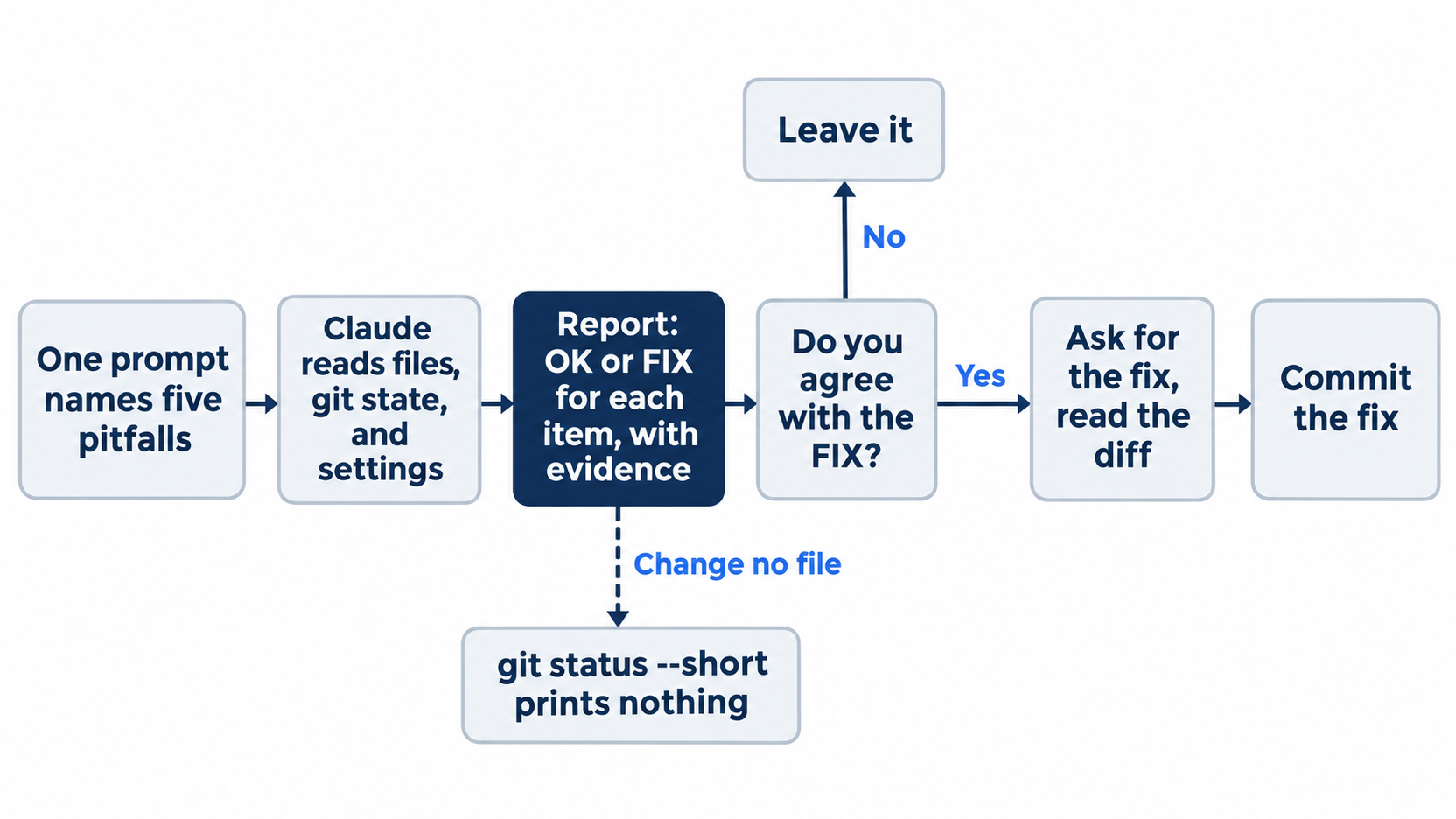
The checklist only reads. Every change after the report is one you ask for and approve.
Check the starting state
cd ~/code/ticket-triage
git status
git log --oneline -1
git worktree list
npm test
Git prints nothing to commit, working tree clean, and the log shows Treat unsubscribe as cancel. The worktree list shows one line, the main checkout on [main]. The tests show ℹ fail 0. The tested runs had 28 in auto mode and 30 in Manual mode. Write your number down.
The five items
Each item guards one thing that an earlier day set up:
CLAUDE.mdnames every category insrc/classify.js, in the order the code checks them. Day 5 madeCLAUDE.mdthe file that every session reads first, and Day 25 added the billing category to the code but not to that file.npm testpasses. Day 2 taught you to run the tests yourself, because a failure left in the tree makes the next change look like the one that broke it.git worktree listshows only the main checkout, andgit branchshows onlymain. Day 16 made worktrees. Day 26 showed that a factory run that stops leaves its worktree and branch behind, so the next run of the same ticket fails.- The permission rules allow nothing broader than
npm test. Day 4 added one allow rule on purpose. Day 24 showed that aclaude -prun cannot ask, so the rules decide what it may do, and a wider rule widens every run. - No tracked file holds a secret, such as an API key or a token. A key in a tracked file goes wherever the repository goes.
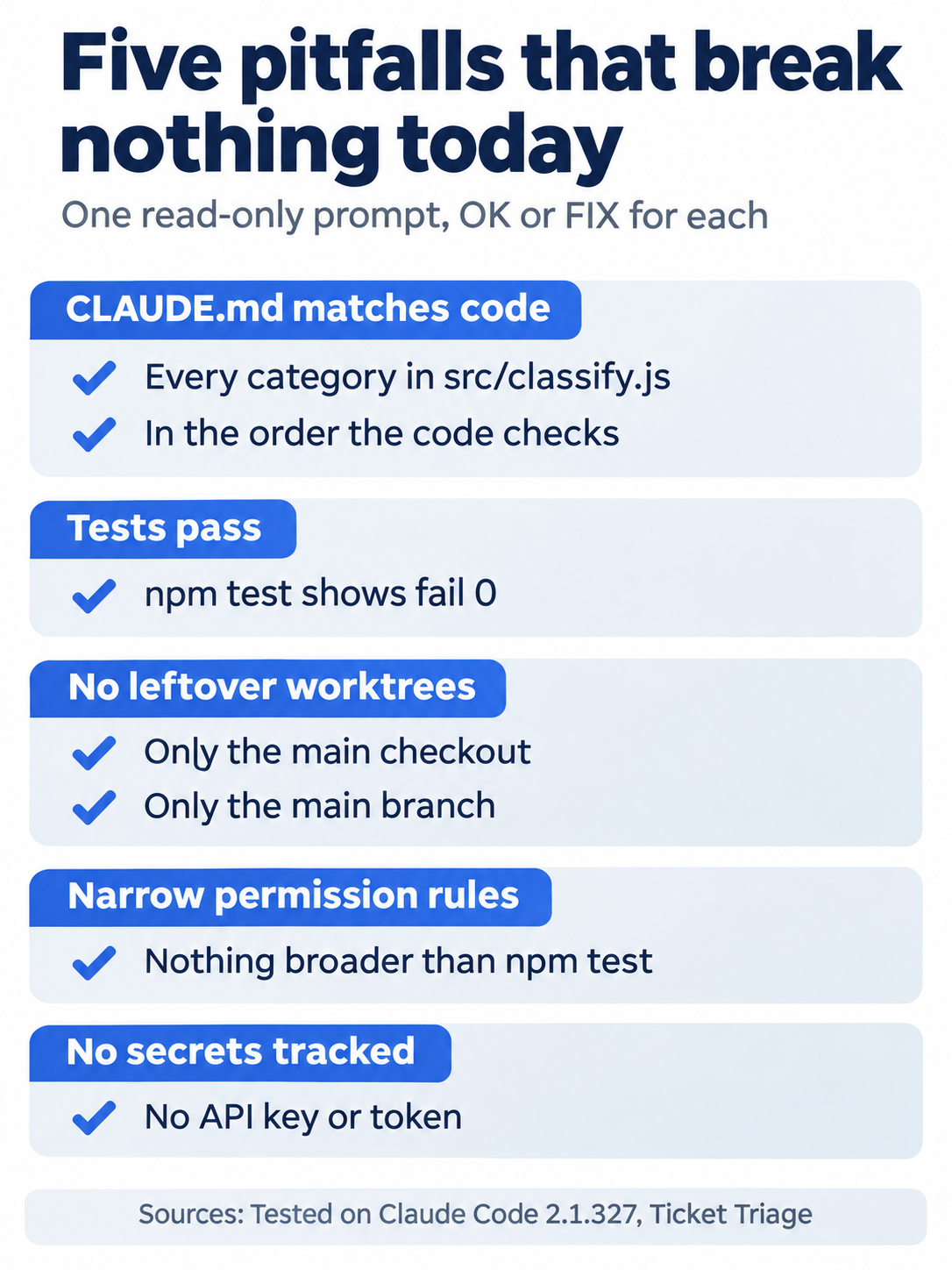
Each item is a yes-or-no question with evidence behind it. None of them fails a test today.
Run the checklist
Start Claude Code:
claude
The status bar shows ⏵⏵ auto mode on (shift+tab to cycle). If it shows ⏸ manual mode on, keep it, and follow the Manual mode: lines below.
Type this as one line and press Enter:
Check Ticket Triage for these five pitfalls. Report each one as OK or FIX, with the evidence. 1. CLAUDE.md names every category in src/classify.js, in the order the code checks them. 2. npm test passes. 3. git worktree list shows only the main checkout, and git branch shows only main. 4. The permission rules in .claude/settings.json and .claude/settings.local.json allow nothing broader than npm test. 5. No tracked file holds a secret, such as an API key or a token. Change no file.
Manual mode: two prompts, each Bash command with Do you want to proceed?. The first was described as Gather project files, git state, and settings, with the line A variable in this command can't be checked before it runs. The second was Scan tracked files for secret patterns, with This command requires approval. Both only read. Choose 1. Yes at each, and ignore the tip about auto mode. Do not pick Yes, and don't ask again, because it saves a new allow rule, which is what item 4 looks for. Claude writes its own commands, so yours can differ.
The tested auto run took about 19 seconds. Its reply began:
I checked all five and changed no files. One needs a fix (1); the other four pass.
A table followed, with FIX for item 1 and OK for items 2 to 5. The evidence for item 1 said that the code checks damaged → refund → shipping → cancel → billing ("charge", "invoice") → cancel again ("unsubscribe") → other, and:
CLAUDE.md lists only "damaged", "refund", "shipping", "cancel", "other", and gives the order as "damaged → refund → shipping → cancel".
The evidence for the other items named what Claude ran: one entry in git worktree list, only * main in git branch -a, one allow rule, "Bash(npm test *)", no .claude/settings.local.json, and no match in a search of the 19 tracked files for key and token patterns. If you did Day 19, your .claude/settings.local.json can exist with no allow rule in it, and item 4 is still OK.
The tested Manual run also marked item 4 FIX (small). Leave it: Day 4 chose that rule on purpose, and Going deeper explains why the two runs disagreed. Read the report as a list of leads, and fix only what you agree with.
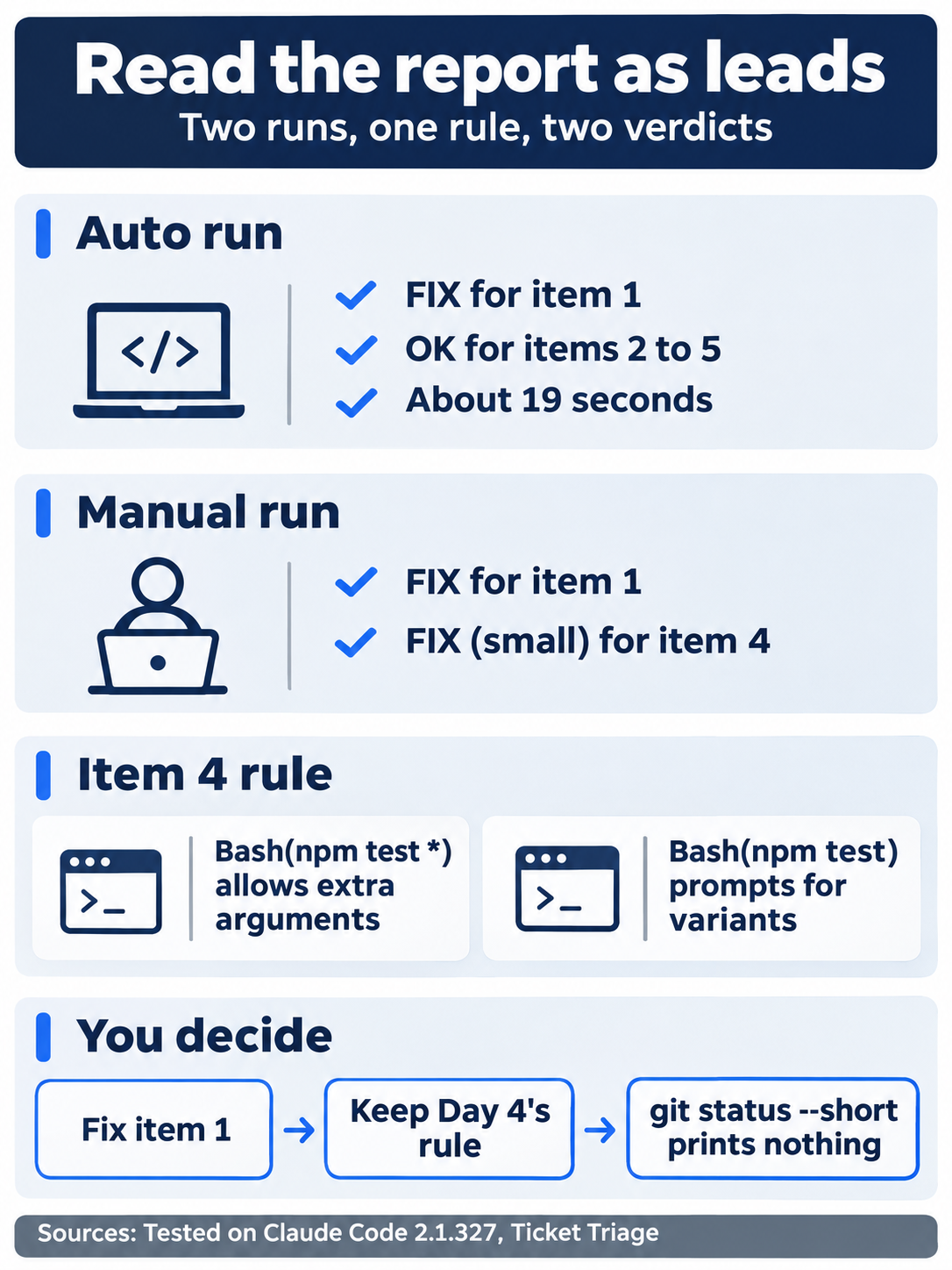
Two runs of the same prompt agreed on item 1 and split on item 4. The report gives you evidence to judge, not orders.
Check that the checklist changed nothing
In a second terminal window, in the same folder, run:
git status --short
npm test
git status --short prints nothing, and the tests show ℹ fail 0 with this morning's count.
Fix item 1
Back in the session, type:
Fix item 1: update CLAUDE.md so that its category list and its rule order match src/classify.js. Change no other file.
Manual mode: two prompts, each Edit file CLAUDE.md with Do you want to make this edit to CLAUDE.md?. The first edits the category list, and the second edits the rule order. Choose 1. Yes at each.
Both tested replies began I updated CLAUDE.md so its category list and rule order now match src/classify.js. In the second terminal, run:
git diff --stat
git diff
The summary reads:
 CLAUDE.md | 4 ++--
 1 file changed, 2 insertions(+), 2 deletions(-)
In git diff, the category list gains "billing", and the rule order now runs damaged → refund → shipping → cancel → billing → unsubscribe. The tested auto run wrote the last step as unsubscribe-as-cancel. Claude's wording can differ. Check that billing comes after cancel and that the unsubscribe rule comes last.
The one pitfall the checklist found was an out-of-date CLAUDE.md, and the fix changed two lines.
Commit
Type:
Commit CLAUDE.md with the message "Bring CLAUDE.md up to date".
Manual mode: one prompt, Bash command, described as Commit CLAUDE.md and confirm, with This command requires approval. It runs git add CLAUDE.md and git commit. Choose 1. Yes, not the option that stops asking for git add and git commit.
Both tested replies named the new commit and said that nothing was pushed. Claude also adds a Co-Authored-By line to the commit message.
Check the win
Type /exit, and in the terminal, run:
git status
git log --oneline -2
npm test
Git prints nothing to commit, working tree clean. The log shows Bring CLAUDE.md up to date on top of Treat unsubscribe as cancel. The tests show ℹ fail 0 and the same count as this morning, because only CLAUDE.md changed.
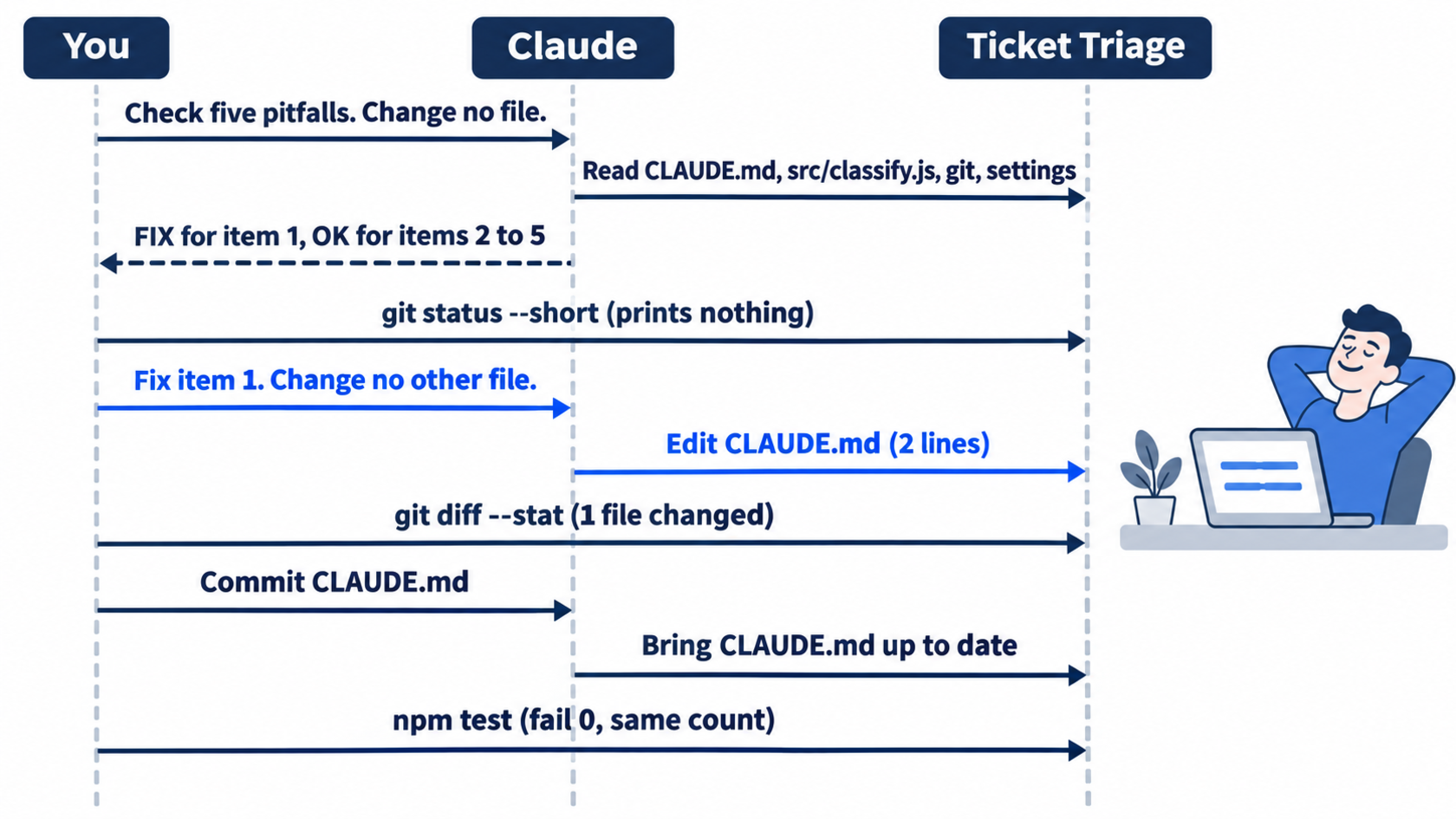
The whole day is one read, one two-line edit, and one commit. The test count never moves.
Pick your next habit
This step is a choice, not a tested step. A persona is a way of working with Claude Code at one level of setup. There are three. They are a menu, not a ladder: pick the row that matches how you work today, and take its habit.
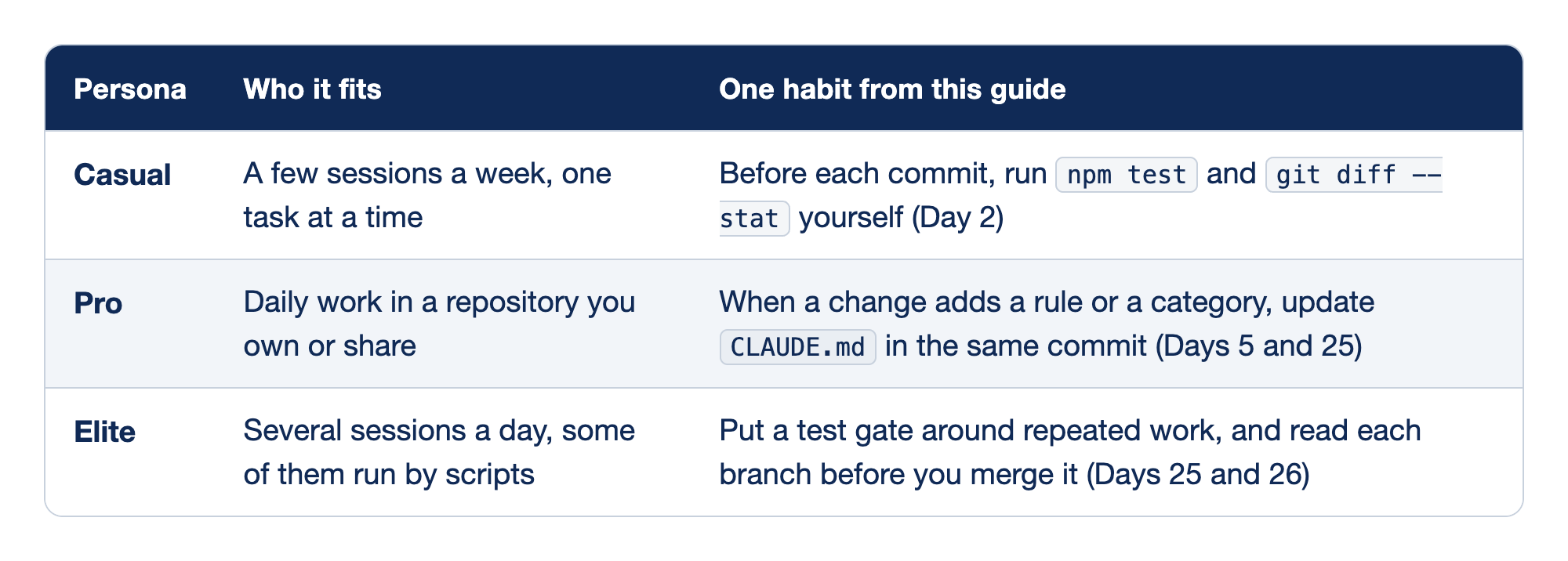
Each row pairs one persona with the readers it fits and one habit from this guide. The Persona column names the level, the Who it fits column describes how often and where that reader works, and the One habit from this guide column gives the habit and the day that taught it.
- Casual fits a developer who runs a few sessions a week, one task at a time, and the habit is to run
npm testandgit diff --statyourself before each commit, from Day 2. - Pro fits daily work in a repository that you own or share, and the habit is to update
CLAUDE.mdin the same commit whenever a change adds a rule or a category, from Days 5 and 25. - Elite fits a developer with several sessions a day, some of them run by scripts, and the habit is to put a test gate around repeated work and read each branch before you merge it, from Days 25 and 26.
Write your habit down in one sentence, outside the repository, where you will see it tomorrow.
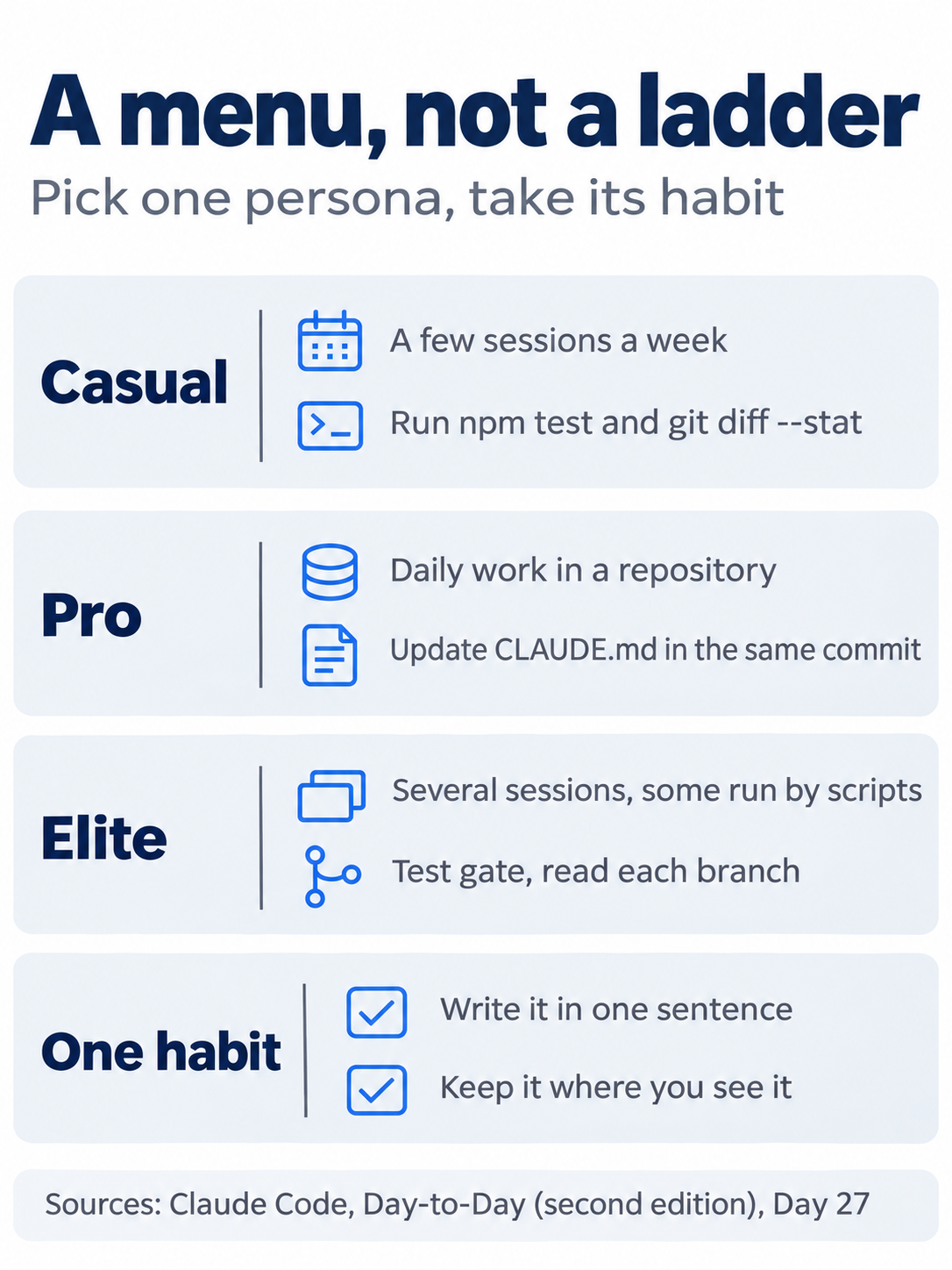
No row is better than another. The right row is the one that matches how you work today.
You ran a five-item pitfall checklist, read its report as leads, fixed the out-of-date CLAUDE.md, committed the fix, and picked one habit to build next.
You can stop here. Going deeper explains why this works and where it breaks.
Going deeper
This section is for readers who want to know why item 1 failed, why the two runs disagreed, what the checklist cannot see, and which of the first edition's pitfalls this edition now covers. It assumes you finished Start here in Parts 1 to 27.
Why item 1 failed
Day 25's task named only src/, and Claude did not change CLAUDE.md. Day 25's Going deeper had a one-line follow-up that added billing to it, and the next days were tested without that follow-up. CLAUDE.md loads at the start of every session, so every session since Day 25 read a rule order that stopped at cancel. Day 26's judge read CLAUDE.md on every review, because its prompt says to check that the change follows it.
The auto run's evidence named a case that the old file hid. A ticket such as "unsubscribe, there's a charge I don't recognize" comes back as billing, not cancel, and the evidence added: Nothing in CLAUDE.md tells you that. The auto fix added the same example to CLAUDE.md, and its reply said that it ran the sentence through classify() and got billing. The Manual fix added one sentence that the unsubscribe rule is checked last, after billing, so every older rule wins over it. Both diffs changed two lines.
Why the two runs disagreed on item 4
The auto run said that "Bash(npm test *)" covers npm test and npm test with extra arguments, nothing else. and marked it OK. The Manual run read the same rule and marked it FIX (small), with the advice If you want exactly npm test, use "Bash(npm test)". Both read the rule correctly. They judged the word "broader" in different ways.
Day 4's Going deeper tested both forms of the permission rule. The exact rule Bash(npm test) prompted for npm test -- --test-name-pattern=refund, and the wildcard rule did not. Keep the wildcard if you want Claude to run one test without a prompt. Use the exact rule if you want a prompt for every variant. The checklist cannot make that choice for you. It can only show the rule.
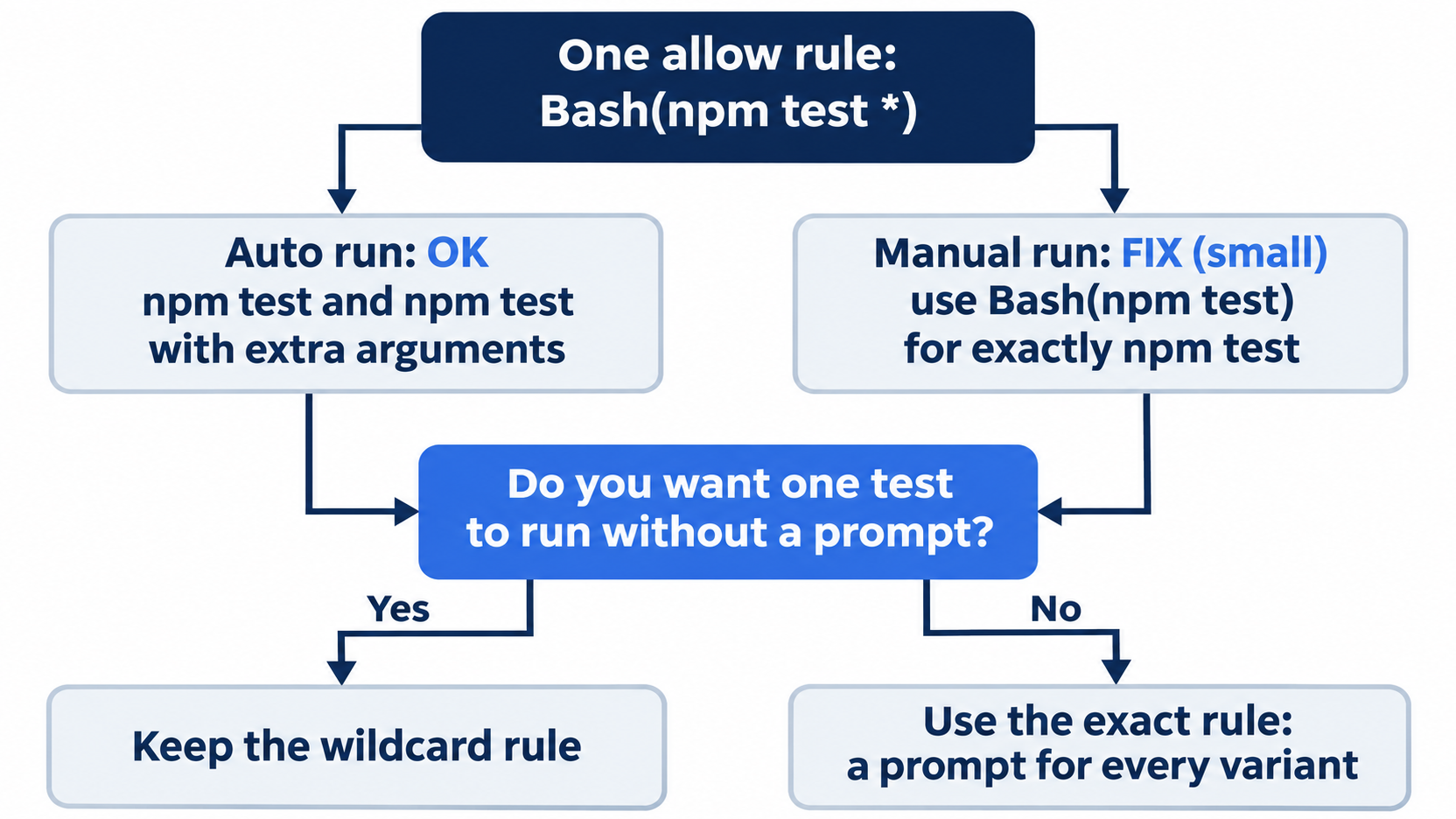
Both runs read the rule correctly. The choice between the two forms is a preference, and only you can make it.
The Manual run also found that .claude/settings.local.json is ignored by a global gitignore. Day 4 said that Claude Code adds the file to your global git excludes when it creates it. A rule saved there, such as one from Yes, and don't ask again, never shows in git status, so item 4 reads the file directly.
What the checklist cannot see
- Git history. Both runs searched the current tracked files only. Both replies said so. A key that was committed and later deleted is still in history. This guide did not test a history search.
- Files Claude does not read. The permissions docs say that a
Readdeny rule, such asRead(./.env)orRead(./secrets/**), blocks Claude's file tools from a file or folder, and that a.claudeignorefile has no effect. The settings docs show the same rules in an example. Ticket Triage has no.envfile, and this guide did not test a deny rule for one. - What a pattern search misses. The Manual search found two matches, a Markdown table divider in
docs/rule-audit.mdand an npm checksum inpackage-lock.json, and Claude judged both not secrets. A search finds strings that look like keys. It does not prove that none exist. - Whether the check stayed read-only.
Change no fileis a request in the prompt, not a guard. The tested runs kept it, andgit status --shortproved it. Plan mode from Day 3 would make the check read-only by mode. This guide did not test the checklist in plan mode.
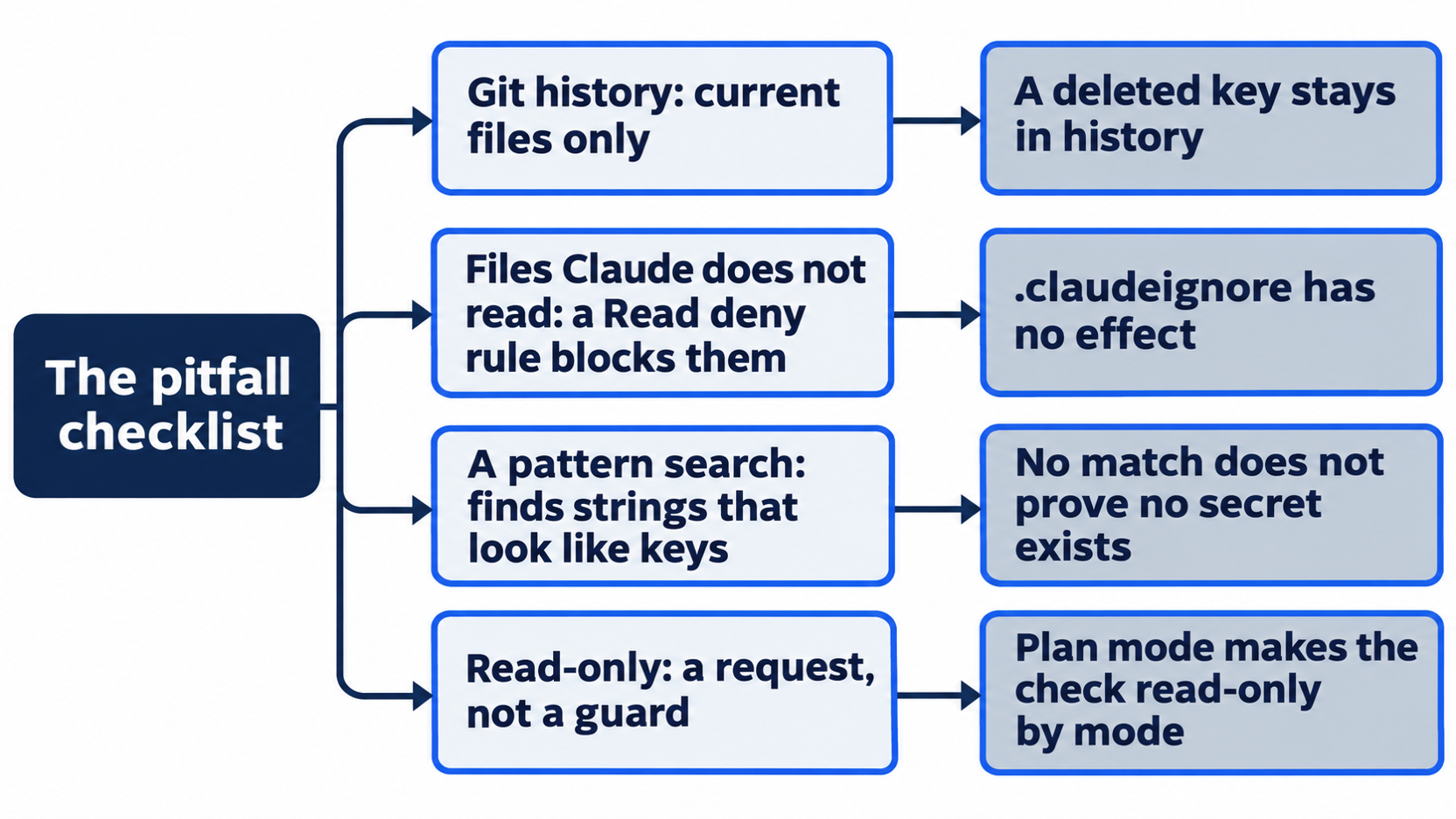
Each gap has a reason, and each one is a place to look yourself.
Make the checklist repeatable
The prompt is long, and you will run it again. Two places can hold it, and this guide tested neither:
- A skill, as on Day 10. Put the five items in
.claude/skills/pitfalls/SKILL.mdwithdisable-model-invocation: true, and run it as/pitfalls. - A headless run, as on Day 24. A
claude -pcall with the same prompt prints the report from a script. A run that only reads needs no--permission-mode, but the commands it chooses can be denied, as Day 24 showed.
Add an item when you add a habit. A team that moves to Day 26's pull-request flow, for example, might add "no branch older than a week".
The first edition's pitfalls, and where this edition covers them
The first edition's troubleshooting chapter listed seventeen pitfalls. Each row below was checked against this edition's lessons:
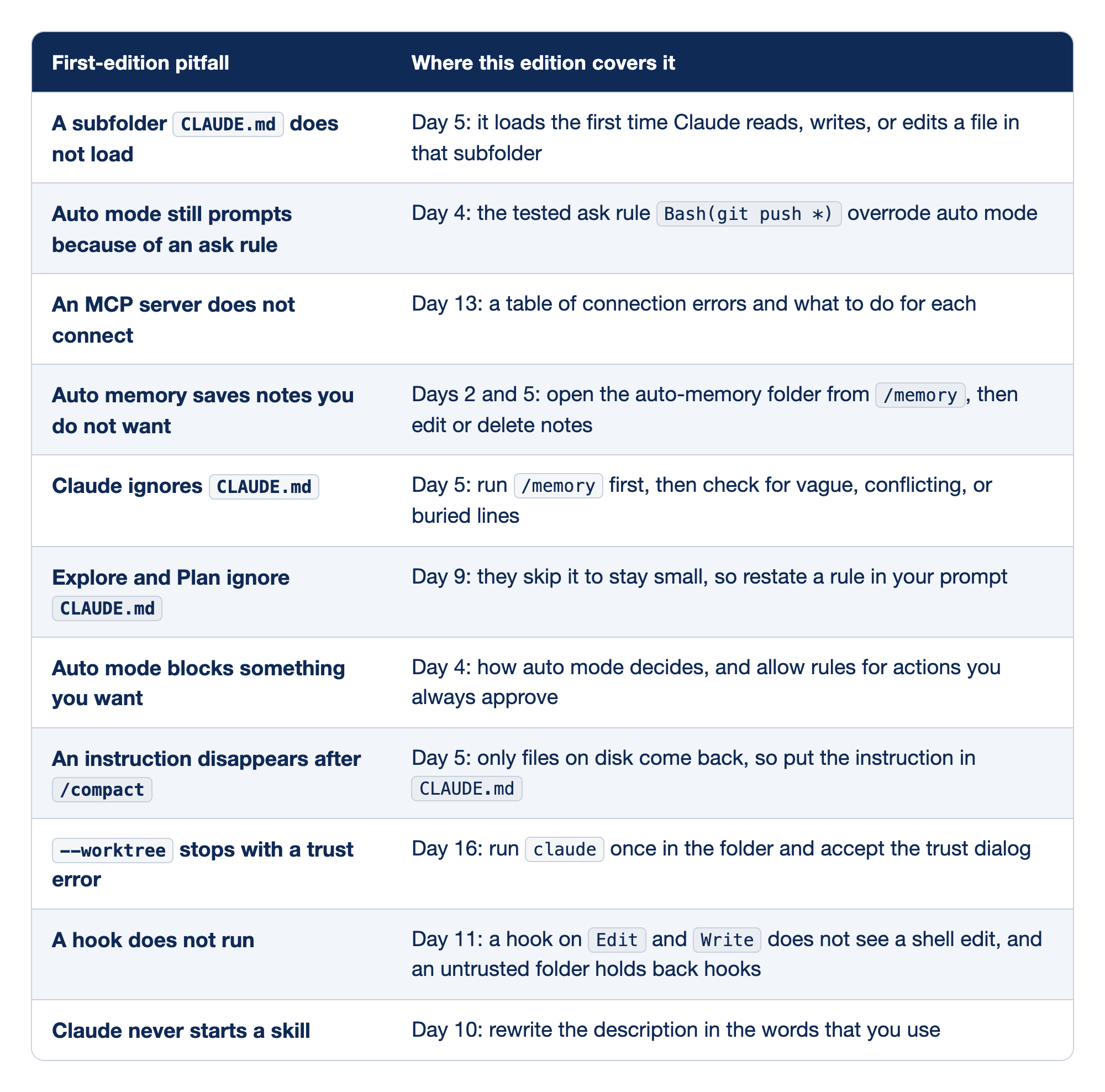
Each row names one pitfall from the first edition's troubleshooting chapter and the place in this edition that covers it. The First-edition pitfall column states the symptom, and the Where this edition covers it column gives the day and the fix that day teaches.
- A subfolder
CLAUDE.mddoes not load: Day 5 shows that it loads the first time Claude reads, writes, or edits a file in that subfolder. - Auto mode still prompts because of an ask rule: Day 4 tested the ask rule
Bash(git push *), and it overrode auto mode. - An MCP server does not connect: Day 13 gives a list of connection errors and what to do for each.
- Auto memory saves notes you do not want: Days 2 and 5 show how to open the auto-memory folder from
/memory, then edit or delete notes. - Claude ignores
CLAUDE.md: Day 5 says to run/memoryfirst, then check for vague, conflicting, or buried lines. - Explore and Plan ignore
CLAUDE.md: Day 9 explains that they skip it to stay small, so you restate a rule in your prompt. - Auto mode blocks something you want: Day 4 explains how auto mode decides and how allow rules cover actions you always approve.
- An instruction disappears after
/compact: Day 5 shows that only files on disk come back, so the instruction belongs inCLAUDE.md. --worktreestops with a trust error: Day 16 says to runclaudeonce in the folder and accept the trust dialog.- A hook does not run: Day 11 shows that an
Edit|Writehook does not see a shell edit, and that an untrusted folder holds back hooks. - Claude never starts a skill: Day 10 says to rewrite the description in the words that you use.
Docs pages: MCP server, hook.
These remain open. This edition does not teach them, and this guide did not check them on 2.1.327:
- A custom subagent that Claude never picks on its own. Day 9 shows a description with a "Use after" line but did not test automatic delegation.
- Plan mode that keeps reading files when you wanted a short plan.
- The first edition's claim that
Tabtoggles thinking and completes file names only after@. - Cleanup at the end of a session with a
SessionEndhook, an event that the hooks docs list. - A slow or laggy session. Day 6's
/contextand/clearcover a full context window, but not CPU or memory use. - The first edition's order of diagnostic commands, from
/doctortoclaude --debug. Day 5 covers only/doctor prompt-audit.
More about the personas
The first edition's personas chapter gave each level a full setup. Casual runs one session at a time in Manual mode and reads every diff. Pro adds plan mode, a maintained CLAUDE.md, a few skills, and one MCP server. Elite adds parallel worktrees, review subagents, hooks for rules that must hold, and plugins that share the setup with a team. The chapter's warnings still hold. Do not jump levels in a weekend, and do not confuse an elite setup with elite work. Match the setup to each project, so one developer can be elite in a work monorepo and casual in a repository cloned to fix a typo. A setup encodes principles, such as verify before you trust and plan before you act. Copy the principle, not someone else's files.
Grow one surface at a time
The capstone of the first edition's companion series, Claude Code Away from the Terminal, walked through a week with five ways to start work away from the keyboard wired up: Channels, Remote Control, Dispatch, routines, and scheduled tasks, which are Days 19, 7, 20, 21, and 8 here. Its main point was the trap of setting them all up in one weekend. Most of them go unused, and the rest produce output that you have no time to review. It recommends one surface for a month, picked for a friction that you can describe in one sentence. Add a second only if a second friction shows up, and review the setup every six months to turn off what no longer earns its place. Today's habit pick follows the same rule: one habit, chosen for a pain that you already have.
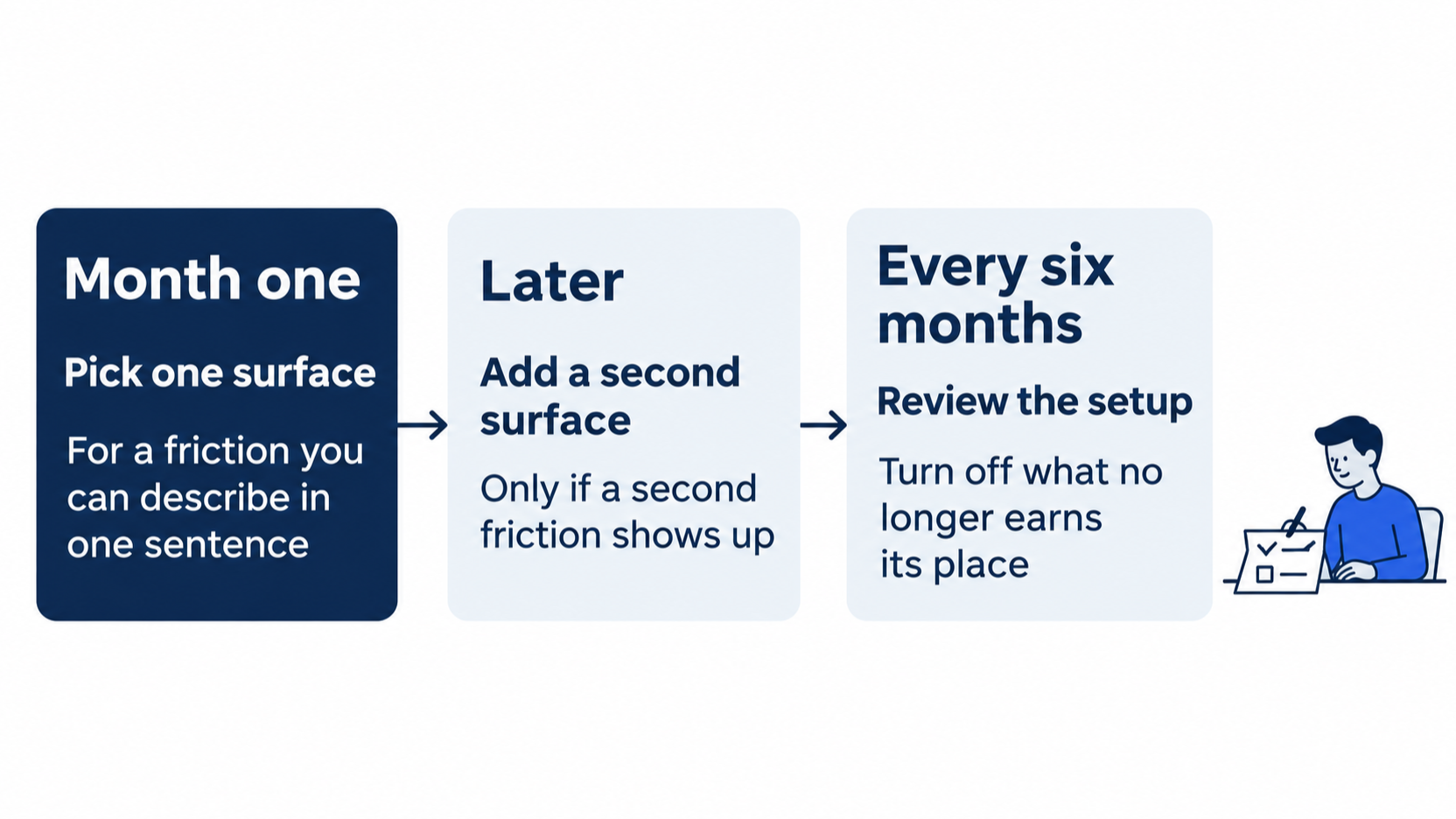
One surface, one habit, and a review on a schedule keep the setup no bigger than the work needs.
Undo today's commit
Today has no reset, because the commit is the end state that Day 28 starts from. If you want to undo it, run git reset --hard HEAD~1, then check that git log --oneline -1 shows Treat unsubscribe as cancel and git status --short prints nothing. --hard also discards uncommitted changes. This guide did not test the undo.
Go further: Claude Code Won't Do What You Told It: A Troubleshooting Catalog is the first edition's full catalog, with a symptom, a cause, and a fix for each of its seventeen pitfalls and a first-move list of diagnostic commands. It says that the --worktree trust check also applies with claude -p, but Day 16 found that the current docs say claude -p --worktree skips it.
Do this today
Everyone
- Run the five-item checklist, fix item 1, and commit. Check the win:
git log --oneline -1showsBring CLAUDE.md up to date,git statusprintsnothing to commit, working tree clean, andnpm testshowsℹ fail 0with the same count as this morning. Reset: none. The commit is today's end state. - Habit: write down the habit you picked, and run the checklist once a week before new work. Check: your habit is written down in one sentence, and next week's report shows
OKfor each item or names eachFIXwith its evidence.
If you read Going deeper
- Run the checklist again in a new session. Check: item 1 shows
OK, andgit status --shortprints nothing afterward. This guide did not run the checklist a second time. Reset: nothing changed. - Read your permission files the way item 4 does:
cat .claude/settings.json, thenls .claude/settings.local.json. Check: the only allow rule is"Bash(npm test *)", and the local file either does not exist or holds no allow rule. After Day 19, it can hold only{"enabledPlugins":{}}. This guide tested the case with no local file. It only reads, so there is nothing to reset. Check thatgit status --shortprints nothing.
One checklist, one habit
A pitfall checklist does not make Ticket Triage better today. It keeps a later day from going wrong. Run it once a week, read its report as leads, and add an item each time you add a habit.
This is Part 27 of "Claude Code, Day-to-Day (second edition)," a day-by-day guide to Claude Code in which each day takes 20 to 40 minutes. Part 27 is Day 27. All 28 days are out now.