
You Already Built the Agent Harness. Anthropic Just Shipped One.
You did not set out to build agent infrastructure, but the Messages API made you do it anyway. Claude Managed Agents takes the loop, the sandbox, and the state off your plate so you ship configuration instead of plumbing.
A first look at Claude Managed Agents: the configurable, server-side harness that runs the agent loop, the sandbox, and the state for you, so you stop maintaining the parts that were never your product.
In this article: You will learn what Claude Managed Agents actually is and why it exists: a pre-built, server-side agent harness that replaces the loop, sandbox, and state layer you keep rebuilding by hand. We cover the four concepts the whole system is made of, when Managed Agents earns its place over the Messages API, and the exact tooling and one beta header you need before you build your first agent.
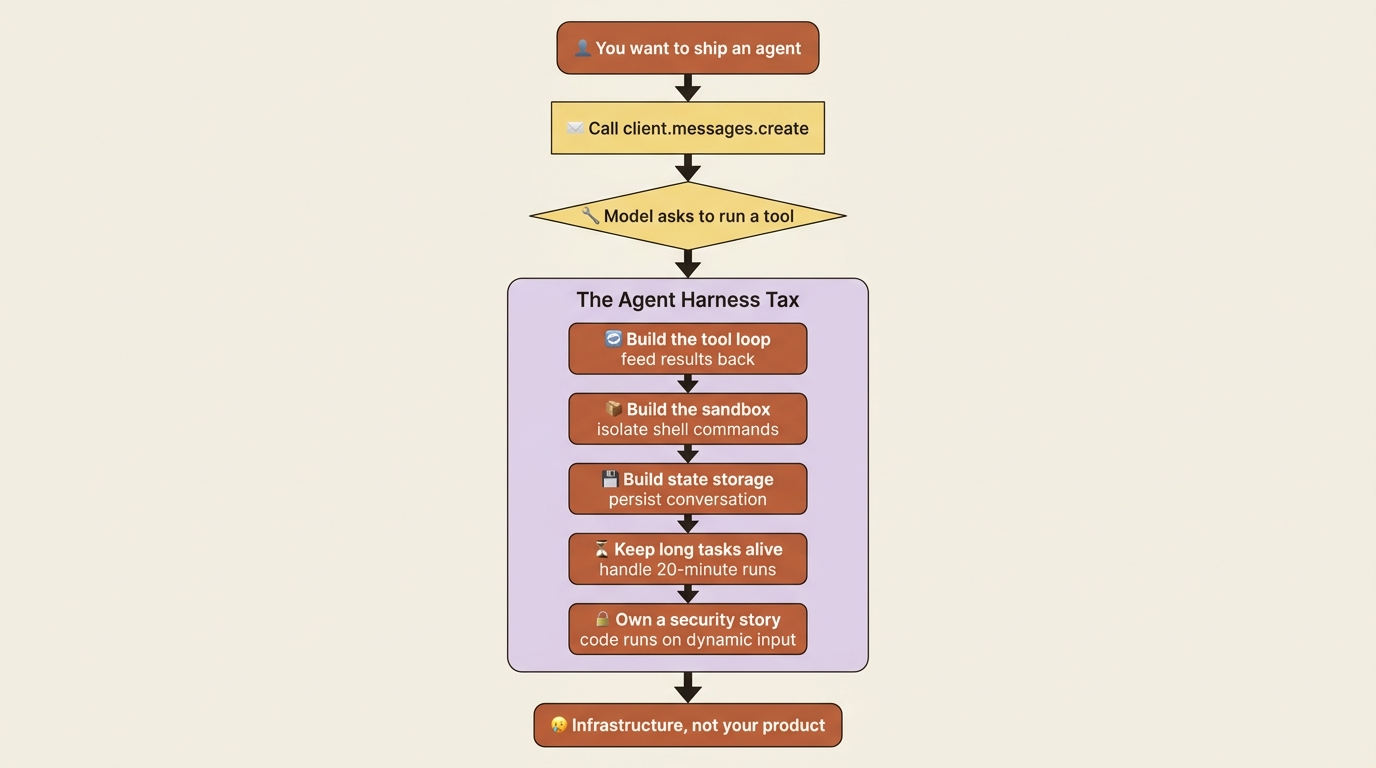
You know the moment. You called client.messages.create, the model asked to run a tool, and suddenly you were not building a feature anymore. You were building infrastructure. A loop to feed tool results back. A sandbox so the model's shell commands could not touch anything that mattered. Somewhere to stash conversation state between turns. A way to keep a long task alive when it ran for twenty minutes instead of two seconds. And then, because the thing now executes code on dynamic input, a security story you did not ask to be responsible for.
None of that was the product you set out to build. It was the tax you paid to get an agent into production.
Claude Managed Agents is Anthropic's answer to that tax. It is a pre-built, configurable agent harness that runs in managed infrastructure. Instead of writing the loop, the sandbox, and the tool-execution layer yourself, you get a managed environment where Claude reads files, runs commands, browses the web, and executes code. You spend your time configuring behavior rather than maintaining plumbing. This article is the orientation: what the thing is, the four ideas it is built from, when it earns its place over the Messages API, and how to get your tooling installed.
The Messages API gives you the model. Managed Agents gives you the harness.
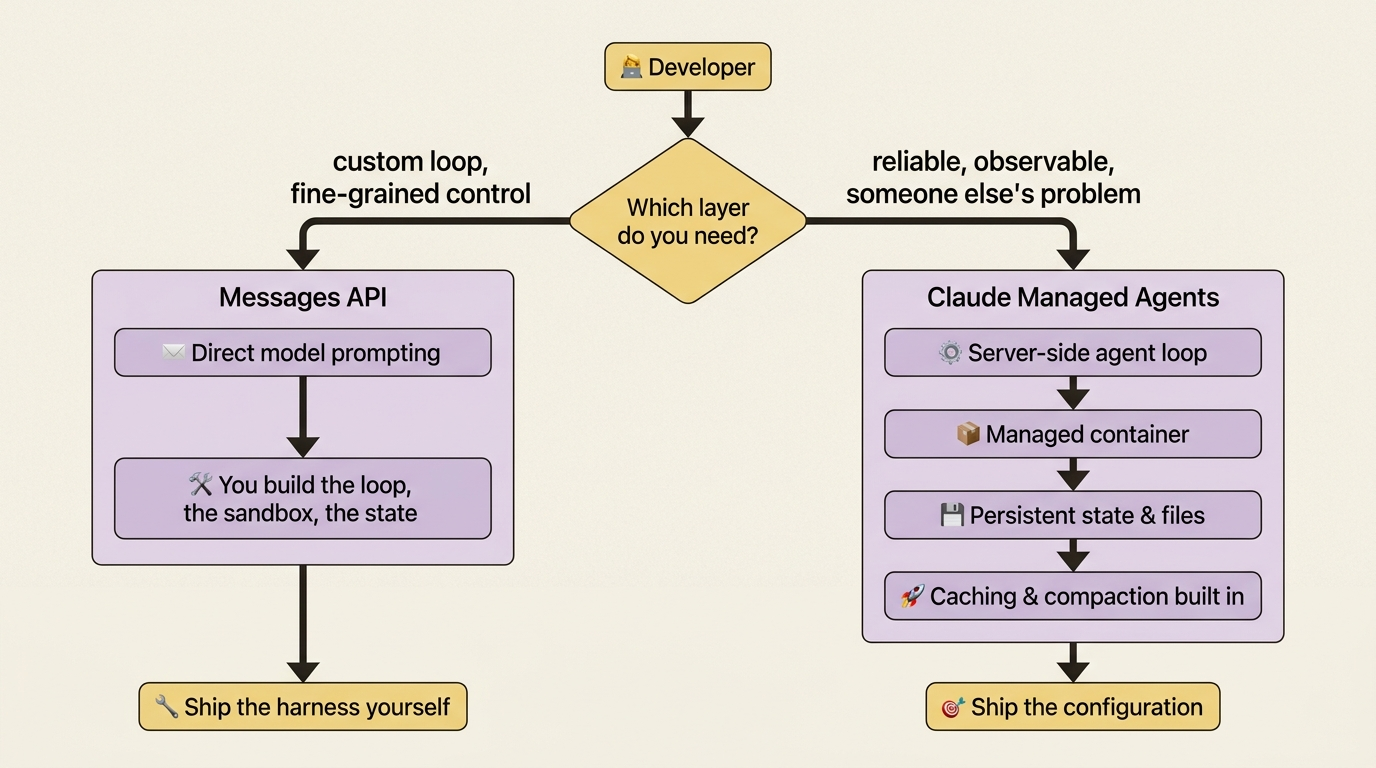
Here is the cleanest way to hold the distinction. Anthropic offers two ways to build, and they sit at different layers.
The Messages API is direct model prompting. You send messages, you get completions, and everything around the model call is yours to build. That is exactly what you want when you need a custom agent loop or fine-grained control over every turn. It is also exactly the thing that turned into a side project the last time you tried to ship an agent.
Managed Agents is the layer above that. The agent loop runs server-side. Tool execution happens inside a managed container. Conversation state and the filesystem persist across interactions. You configure the agent once, then start sessions against it and stream back what happens. The harness handles prompt caching, context compaction, and other performance work under the hood, so you inherit those optimizations instead of implementing them.
The trade is straightforward. The Messages API offers maximum control and asks you to build the surrounding system. Managed Agents offers a built system and asks you to work within its shape. Most production agents do not need a bespoke loop. They need the loop to be reliable, observable, and someone else's problem. That is the bet this product makes.
| Messages API | Claude Managed Agents | |
|---|---|---|
| What it is | Direct model prompting access | A pre-built, configurable agent harness that runs in managed infrastructure |
| Best for | Custom agent loops and fine-grained control | Long-running tasks and asynchronous work |
| You build | The loop, the sandbox, and the state layer | The agent configuration |
Four concepts, and everything hangs on all four
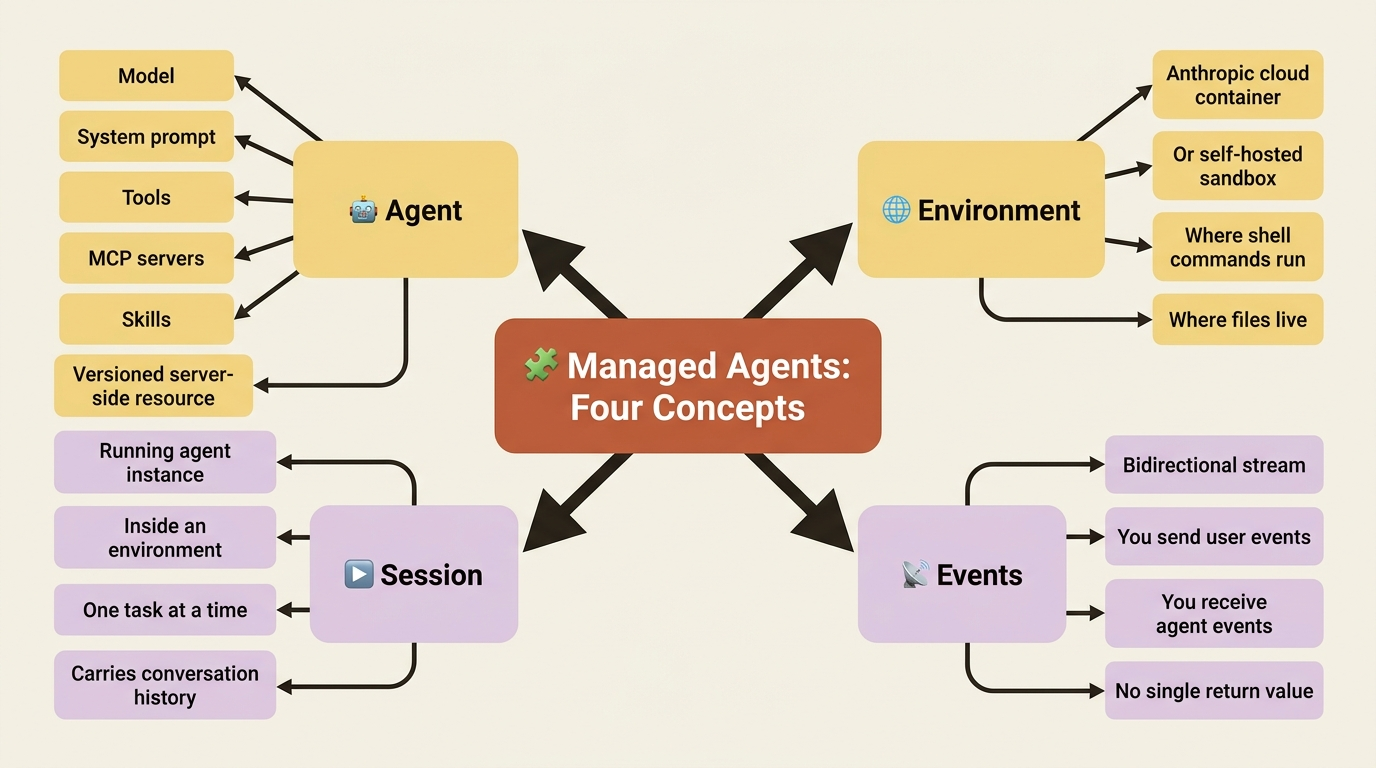
Almost everything in Managed Agents is a recombination of four ideas. Learn them once, and the rest is detail.
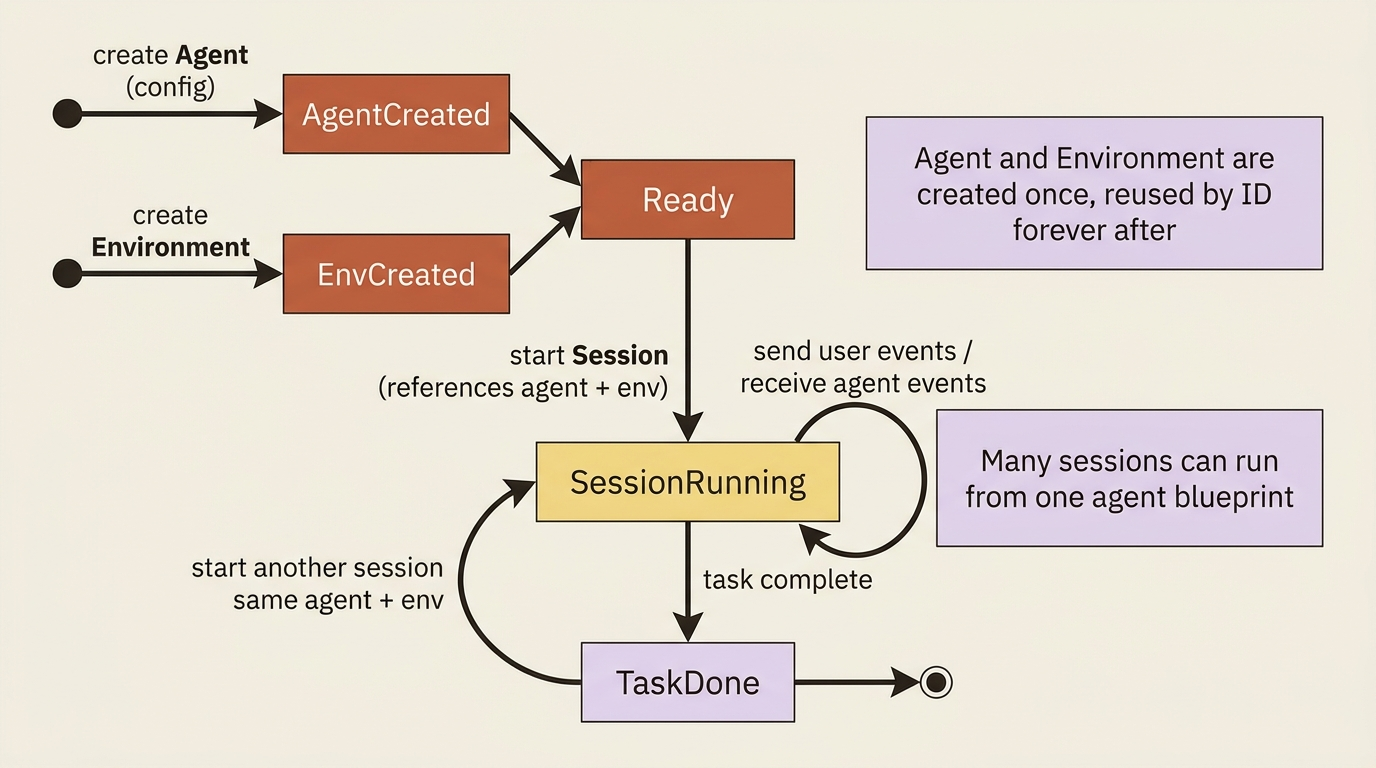
An Agent is the configuration: the model, the system prompt, the tools, the MCP servers, and the skills. You create it once and reference it by ID forever after. Crucially, an agent is a versioned, server-side resource, not an object that lives in your process. There is no "agent running on my laptop." There is a definition stored on Anthropic's side that you point sessions at.
An Environment is where sessions run. It is either an Anthropic-managed cloud container or a self-hosted sandbox on infrastructure you control. Like the agent, you create it once and reuse it by ID. The environment is where the agent's shell commands actually execute and where its files actually live.
A Session is a running instance of an agent inside an environment, doing one task. It references an agent and an environment, both created beforehand, and it carries conversation history across multiple interactions. If the agent is the blueprint, the session is the building, and you can put up many buildings from one blueprint.
Events are how you and the agent talk. Communication is event-based and bidirectional. You send user events to start and steer the work, and you receive agent and session events back as a stream. There is no return value to wait on the way a single API call returns a body. There is a stream of things happening, and you react to them.
| Concept | What it is |
|---|---|
| Agent | The model, system prompt, tools, MCP servers, and skills, stored as a versioned resource |
| Environment | Where sessions run: a cloud container, or a self-hosted sandbox |
| Session | A running agent instance within an environment, performing one task |
| Events | The bidirectional message stream between your application and the agent |
If one of those four feels abstract right now, that is fine. The event model in particular is the conceptual core of the whole system. Once you understand events, steering, interrupting, permissions, and outcomes all turn out to be the same mechanism wearing different hats.
The diagram below shows how the four concepts fit together over time. You create an agent and an environment once, then start as many sessions as you need against them.
The running example: an invoice-reconciliation agent
A good example should play to the system's strengths rather than hide them. Managed Agents is built for long-running, asynchronous, outcome-shaped work, so a fitting example is shaped like that.
Picture an agent that ingests a batch of vendor invoices, cross-checks them against a ledger, flags the discrepancies, and produces a reconciled spreadsheet. It is a task with real duration, real file I/O, a real reason to call an internal API, a real need to remember each vendor's quirks between runs, and eventually a real case for splitting the work across several agents. That shape, long, file-heavy, and outcome-driven, is exactly where a managed harness pays for itself. A bespoke loop would do this too, but you would spend most of your effort on the loop rather than on the reconciliation logic.
Installation: the SDK and the CLI
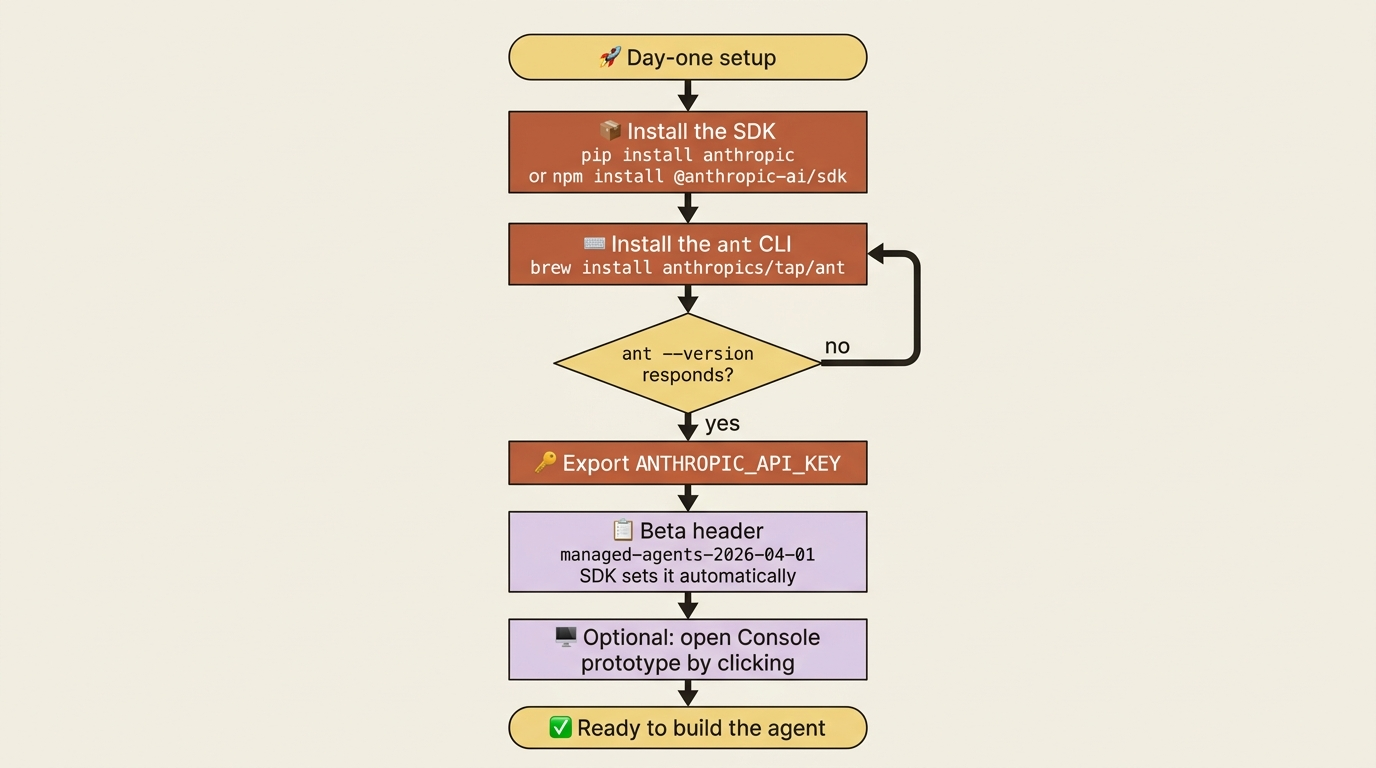
You need two things to build with Managed Agents. The SDK is how your application talks to Managed Agents in code. The ant CLI is how you poke at agents, environments, and sessions from a terminal without writing a script, which is handy for setup and debugging.
Install whichever SDK matches your stack. Here is Python:
pip install anthropic
And here is TypeScript:
npm install @anthropic-ai/sdk
Managed Agents is also reachable from C#, Go, Java, PHP, and Ruby with the corresponding SDKs, so you are not locked out if you live elsewhere. The patterns translate directly; only the syntax changes.
Next, the CLI. On macOS the simplest path is Homebrew:
brew install anthropics/tap/ant
On Linux or WSL you download the release binary directly, and on any machine with Go installed you can go install it from source. Once it is on your PATH, confirm it is alive:
ant --version
Finally, set your API key once as an environment variable so neither the SDK nor the CLI has to be told about it again:
export ANTHROPIC_API_KEY="your-api-key-here"
That is the whole setup.
The model, and the one header you cannot forget
Managed Agents in this guide runs on Claude Opus 4.7, passed as the model string claude-opus-4-7. When you want Opus on fast mode, you pass the model as an object instead of a bare string, like {"id": "claude-opus-4-7", "speed": "fast"}, but the plain string is the default and what most examples use.
There is exactly one piece of ceremony worth burning into memory now, because forgetting it is the first wall every new user hits. Managed Agents is in beta, and every request to a Managed Agents endpoint requires the beta header managed-agents-2026-04-01. If you use the SDK, it sets that header for you automatically, so you will likely never type it. If you ever drop down to raw curl, you set it by hand.
Gotcha: the most common first failure is a raw HTTP call that omits the beta header and gets rejected for reasons that look unrelated to headers. If a hand-rolled request misbehaves on day one, check that header before you check anything else.
A few realities of a beta product
Two more facts belong in your mental model before you build, both consequences of this being a beta.
First, the endpoints are rate-limited per organization: roughly 300 requests per minute for create operations such as making agents, sessions, and environments, and roughly 600 per minute for read operations such as retrieving, listing, and streaming. Your organization's existing spend limits and tier-based rate limits apply on top of those. For ordinary development you will not come close, but if you are fanning out many sessions in a tight loop, those numbers are the ceiling to design against.
Second, outcomes and multiagent orchestration, two of the most interesting capabilities, are part of the public beta: both are reached through the standard managed-agents-2026-04-01 beta header, with no separate access request. The deeper research-preview features, such as dreaming and MCP tunnels, are the ones gated behind an access request, so plan for the possibility that you need to request access before you can use those. The core of the product, meaning agents, environments, sessions, tools, skills, memory, permissions, outcomes, and multiagent orchestration, is available without any special gating.
The fastest way to feel it: Console before code
You can absolutely start in code. But if you want the shape of the thing in your hands in the next five minutes, open Console first. It gives you a visual interface for building an agent: pick a model, write the system prompt in a real editor, add MCP servers and tools, and attach skills, all without writing a single API call. As you configure, Console shows you the equivalent API request, so it doubles as a way to learn the request shape by clicking instead of reading.
Better still, Console includes an inline session runner. You can start a test session right there, send messages, and watch the event stream without leaving the page. That is the quickest possible loop for checking whether your system prompt and tool choices produce the behavior you expect. When the agent behaves, you copy its ID and the environment ID into your code and pick up where Console left off. Prototype by clicking, then promote to code when it works.
Do this today
- Install the SDK for your stack. Run
pip install anthropicornpm install @anthropic-ai/sdkso your application can talk to Managed Agents in code. - Install and verify the
antCLI. Usebrew install anthropics/tap/anton macOS, then runant --versionto confirm it is on yourPATH. - Export your API key once. Set
ANTHROPIC_API_KEYas an environment variable so neither the SDK nor the CLI needs to be told about it again. - Memorize the beta header. Every Managed Agents request needs
managed-agents-2026-04-01. The SDK sets it for you; remember it for any rawcurldebugging. - Open Console and build a throwaway agent. Pick a model, write a system prompt, and run an inline test session to feel the event stream before you write any code.
Where this leaves you
The reframe worth carrying forward is small but load-bearing. You have spent real effort building agent harnesses, and most of that effort went into parts that were never the point: the loop, the sandbox, the state, and the security around code execution. Managed Agents takes those parts and makes them managed infrastructure you configure. The work you have left is the work you actually wanted to do: deciding how your agent should behave.
You now have the mental model, four concepts that everything else recombines, the tooling installed, and the one header that trips up everyone who forgets it. The plumbing was never your product. Now you can stop maintaining it and start configuring the thing that is.
This is Part 1 of "Building with Claude Managed Agents," a 13-part guide to building production-ready AI agents.