
Use Codex Subagents for Two Reviews You Can Verify
Delegation helps when separate agents return complementary evidence and the parent verifies the combined result.
Give each explorer a distinct question, inspect both threads, and compare their evidence in Main.
Two headings can look like two reviewers; actual threads and file evidence make delegation inspectable.
In this article: Assign two explorers different review questions. Inspect both threads, compare their evidence in Main, and verify seven passing tests without implementing the suggested change.
Tested on Codex CLI 0.169.0, macOS, Node.js 22.22.1, and Git 2.47.1.
Desktop subagent controls are not run; use the labeled route if you work in the app.
Yesterday you connected a documentation server, verified its search and fetch calls, and left Ticket Triage clean with seven passing tests.
If the previous Codex conversation is still open, enter /quit at its idle composer. Start the terminal command from your ticket-triage directory.
Start here
codex
Run this from your existing ticket-triage folder. By the end of today, you will have delegated two bounded reviews, inspected both agents' actual work, and checked the main conversation's comparison against a clean seven-test repository.
Starting fresh or fell behind? Run git switch -C main codex/day-10. This replaces your main with the end of Day 10; to keep your own work, run git branch my-backup first.
A subagent is an agent that Codex starts to handle a delegated task. A thread is the conversation containing that agent's work. The main thread is your original conversation, which assigns the tasks and brings the results together. An explorer is Codex's built-in agent for reading and investigating code.
The explorers work in parallel, alongside each other. One checks rule order, the other coverage; neither implements changes.
Establish the starting point
If Codex asks Trust this folder?, check that the path is Ticket Triage and choose Trust and continue. Keep Ask for approval, the permission mode that asks when an action needs approval under its rules.
Enter the slash command that displays the session's settings:
/status
Check: Confirm that Directory identifies Ticket Triage, Agents.md lists AGENTS.md, and Permissions shows Workspace (Ask for approval). Use a normal launch without changing the model or permission mode.
Use the composer, Codex's input box, to check the project. A leading ! executes a shell command that you provide:
!git status --short && npm test
git status --short lists changed or untracked files. A clean working tree prints no file entries. The && runs the next command after the Git command succeeds. npm test runs Ticket Triage's test script.
Check: Look for seven tests, seven passes, and zero failures. Resolve existing changes or failures before assigning the reviews.
Give each explorer one question
The classifier has refund and shipping results, plus the other fallback. Damage keywords belong to its shipping rule. Rule priority means which matching branch returns first when a ticket contains words from more than one rule. Test coverage means which behaviors the existing tests exercise.
Send this prompt exactly:
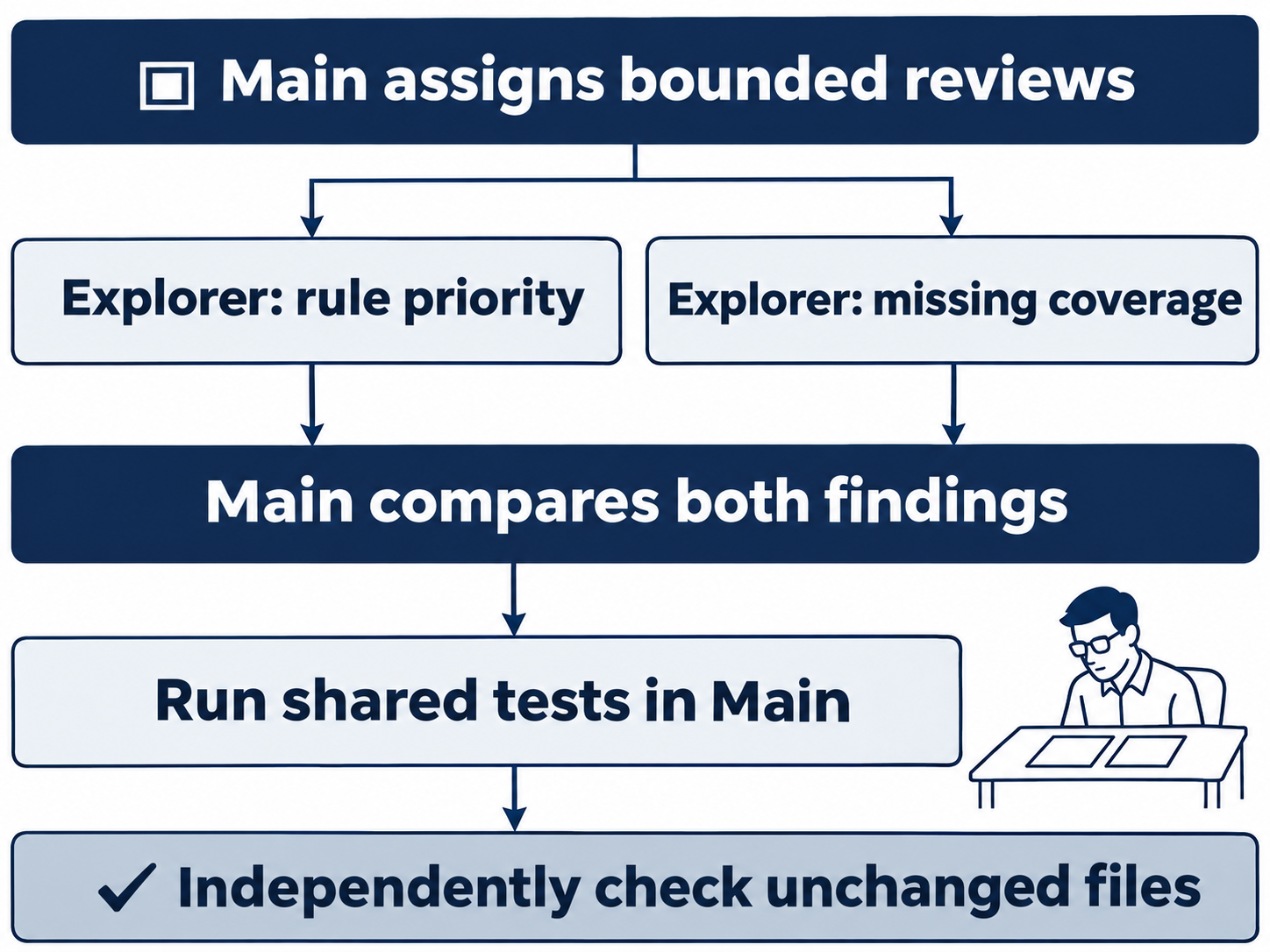
Spawn exactly two explorer subagents in parallel for a read-only Ticket Triage review. Explorer one: inspect src/classify.js and explain refund, shipping, and damage rule priority, citing lines. Explorer two: inspect test/classify.test.js and identify one useful missing test, citing existing coverage. Neither agent may edit, commit, push, or publish. Wait for both, compare their findings, then run npm test in the main thread. Do not implement suggestions.
The prompt assigns distinct files and findings, keeps implementation out of scope, and reserves the shared test run for Main. Verify unchanged files afterward.
Check: Watch the activity for two separately started agents. Let Main collect their findings and finish its comparison. You will inspect the underlying threads next. Two headings in an answer alone do not establish that two agents worked on the task.
Open the first explorer
Enter the thread-navigation command:
/subagents
The picker lists Main and two explorer threads, such as /root/explorer_one and /root/explorer_two, each with its own identifier. Record the two explorer identifiers so you can distinguish the threads. After completion, the picker can say No sub-agents running. Completed entries remain available to inspect.
With Main highlighted in that three-row picker, press Down once and Enter to open the first explorer. Check the selected name before confirming. You are looking for the thread that read src/classify.js and reported rule order.
Check: Compare its explanation against these source lines:
- Line 4 lowercases the input, making keyword matching case-insensitive.
- Line 5 checks
refundormoney backfirst and immediately returns"refund". - Line 6 handles shipping and damage keywords together, returning
"shipping". - Line 7 returns
"other"when neither rule matches.
Compare those lines with the source. Refund wins competing matches; damage belongs to shipping, without a separate priority level.
The explorer view displays Viewing sub-agent, with direct input disabled. Check that its result reports no files changed and no tests run. Leave it as the completed review you asked for.
Inspect the second explorer
While viewing the first explorer, enter /subagents again. The command still opens navigation even though direct input to the viewed agent is disabled. From the first-explorer row in this three-row picker, Down once and Enter selects /root/explorer_two.
Check: Confirm that this thread read the tests and source. Look for this proposed missing case:
My package is late; I want my money back
Expected result: refund
The suggestion combines a shipping keyword, package, with refund language, money back. The explorer cited existing tests for shipping alone at test/classify.test.js line 7, damage at line 9, and damage with an explicit refund request at line 10. Those tests do not directly combine a shipping keyword with money back.
Check that the second result reports no edits or tests. Keep its proposed case unimplemented.
Return to Main and compare the results
Enter /subagents from the second explorer. From the second explorer in the three-row picker, Up twice and Enter returns to Main. Check the highlighted name before selecting it.
Check: Main's comparison should connect the two findings: the implementation checks refund first, and the suggested test would protect that ordering when shipping language competes with money back. Inspect Main's activity for its own npm test command and seven passing tests. This is where the prompt assigned the shared test run.
Accept the comparison when implementation evidence and the coverage gap agree.
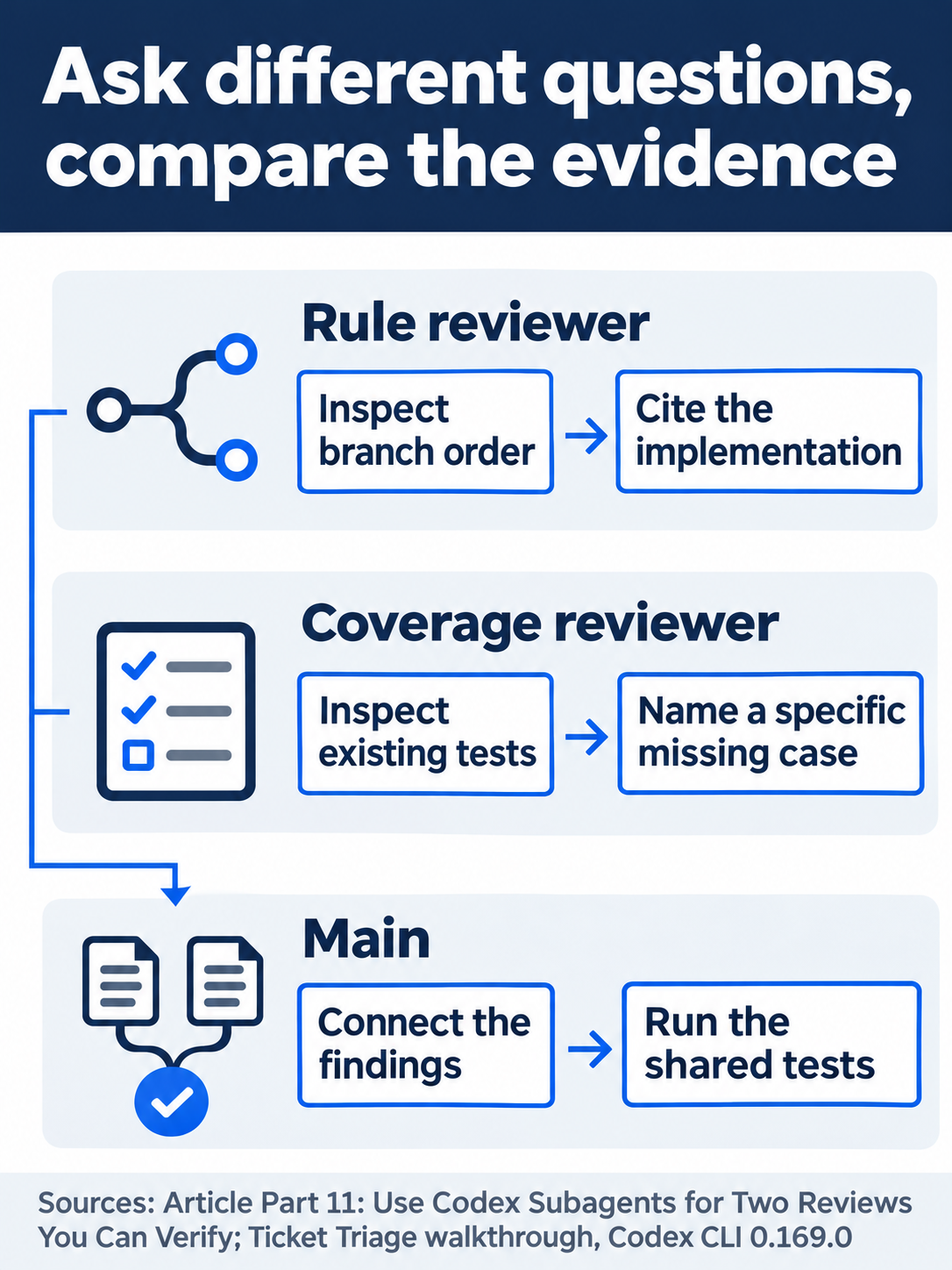
Compare implementation priority with the specific gap in existing tests.
The desktop path
Not run: desktop steps. Start in the same Ticket Triage checkout with Ask for approval selected. Send the identical two-explorer prompt in the main app chat.
The documented route opens each subagent thread from its activity entry in the main conversation.
Check: Record two distinct threads, their file evidence, and their results. Return to Main and inspect its combined finding and test action. Use the integrated terminal, the app's built-in shell, for the starting and ending Git and test checks without the CLI's initial !. Stop this route if a required control is unavailable.
Finish in the main thread
Back in Main's CLI composer, run the independent check:
!git status --short && npm test
Check: Expect no changed-file entries, seven passes, and zero failures. The count remains seven because you reviewed the missing test without implementing it. These routine reads and tests ran without an approval dialog in Workspace mode. Enter /quit when finished.
What you proved
- Two distinct explorer threads supply file evidence for different review questions.
- Main compares the findings and runs all seven tests without implementing the suggestion.
- The final independent check confirms an unchanged, clean repository.
You can stop here. Going deeper explains why this works and where it breaks.
Going deeper
Read this section to define a custom reviewer, limit concurrency, or diagnose a review that has not created any agents.
Choose work that benefits from delegation
Local Codex delegates after a direct request or applicable project or skill instructions requesting delegation. Merely enabling multi-agent tools does not request additional agents. Each subagent consumes model and tool work, so give it a distinct question and ask for concise evidence. Subagent workflows
Eligible ChatGPT Work workflows can use Ultra to delegate proactively. This documented behavior preserves the local delegation rules. The two-explorer review needs neither Ultra nor a reasoning-mode change. More agents do not guarantee a faster or more useful answer. Ultra
Set permissions on the parent
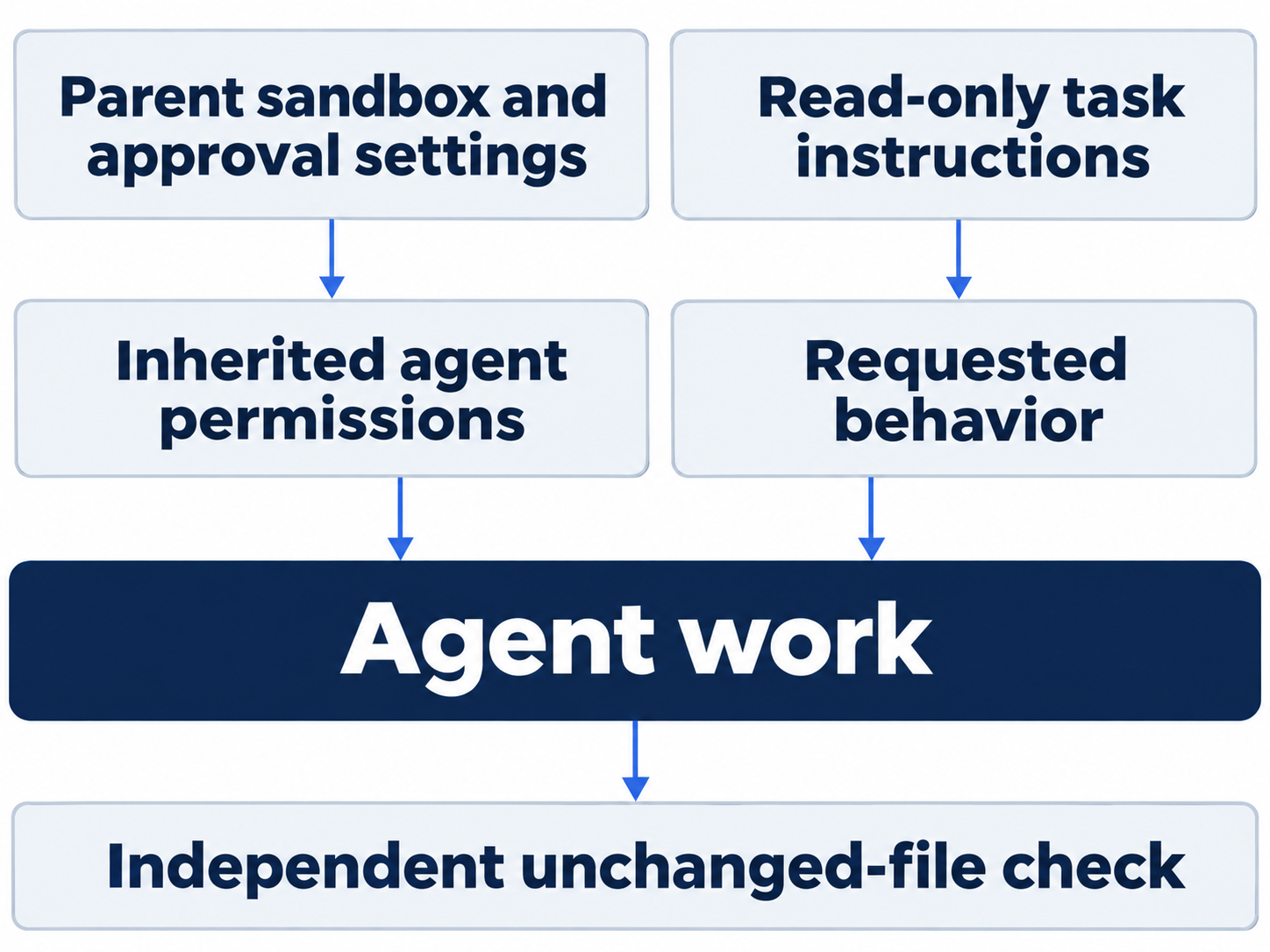
Subagents inherit the parent turn's sandbox and approval settings. Workspace mode permits workspace edits and routine commands without separate per-edit approvals. A no-edit instruction guides behavior within those permissions; checking unchanged files verifies compliance. Neither the explorer name nor disabled viewer input establishes a read-only filesystem boundary. Permissions
A custom agent file cannot replace the parent's sandbox, approval policy, provider, or MCP configuration. Set an actual permission boundary on the parent when the task requires one. Inactive threads can also request approval: the documented overlay identifies the thread, and o opens it before you respond. This navigation was not exercised by the read-only review.
Define a narrow custom agent
Personal agents live under ~/.codex/agents/; project agents live under .codex/agents/. Each standalone TOML file requires name, description, and developer_instructions, covering identity, selection guidance, and working instructions. Matching the filename to the agent's name is a useful convention. Custom agents
Documented example, not run: .codex/agents/triage-reader.toml could contain:
name = "triage_reader"
description = "Inspect Ticket Triage rule order and return file evidence."
developer_instructions = """
Read the classifier and relevant tests.
Report rule priority with file and line references.
Do not edit files or implement suggestions.
Return a concise finding to the parent agent.
"""
The example leaves model choice to the defaults. Without custom-file overrides, Codex resolves explicit spawn settings, then [agents] defaults, then parent settings. Selecting a model through an explicit spawn request or agent default without supplying effort uses that model's default effort. Custom-file settings take precedence; a file that sets only model preserves the previously resolved effort. Set both fields when you need a particular supported combination. Model resolution
Optional exercise, not run: inspect the required fields, or try the example only in a disposable copy. Reset: remove only your added custom file there, close agent views, preserve global settings, and return to the lesson checkout with Main selected, Ask for approval, clean status, and seven passing tests.
Limit concurrent threads deliberately
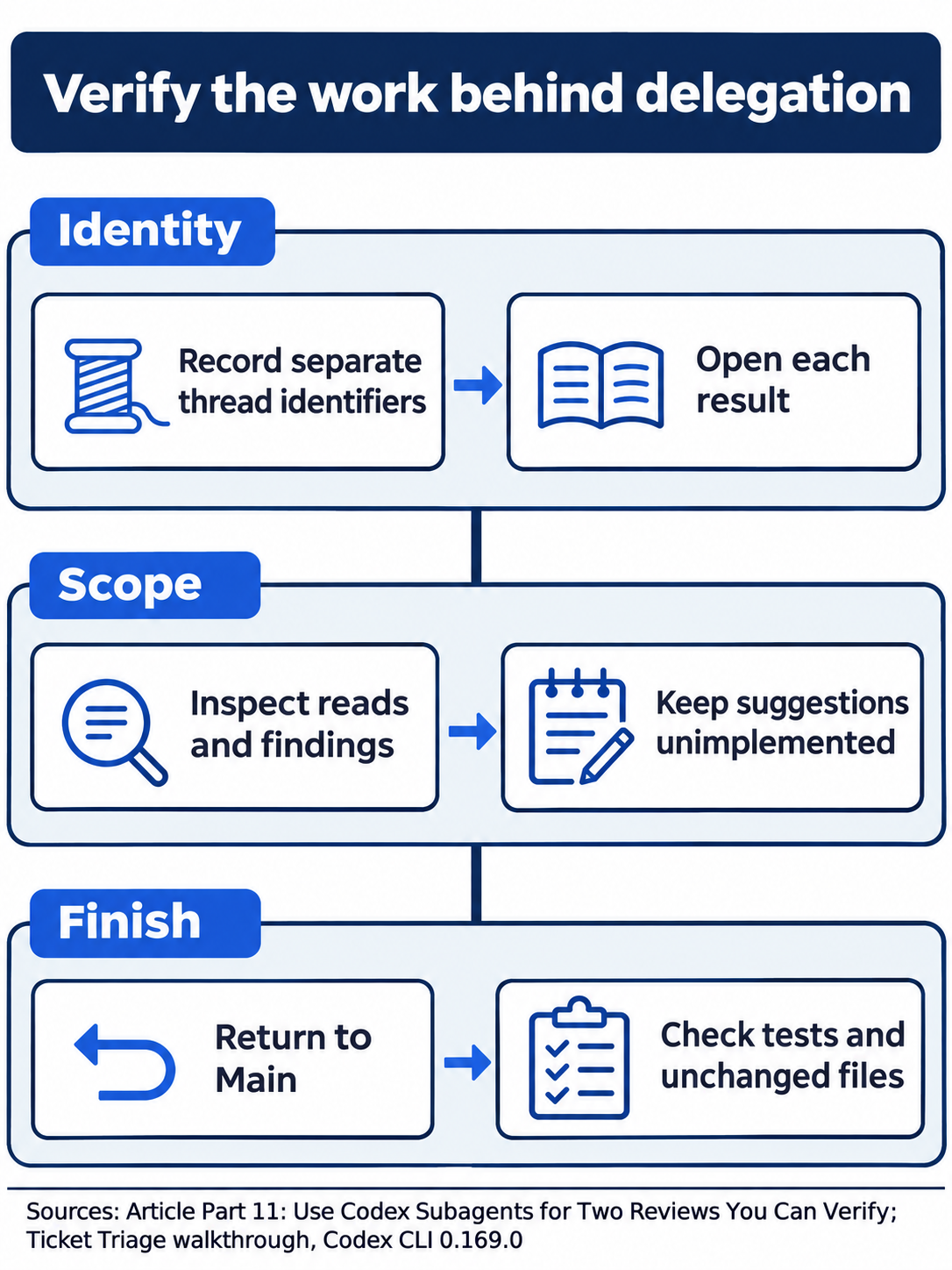
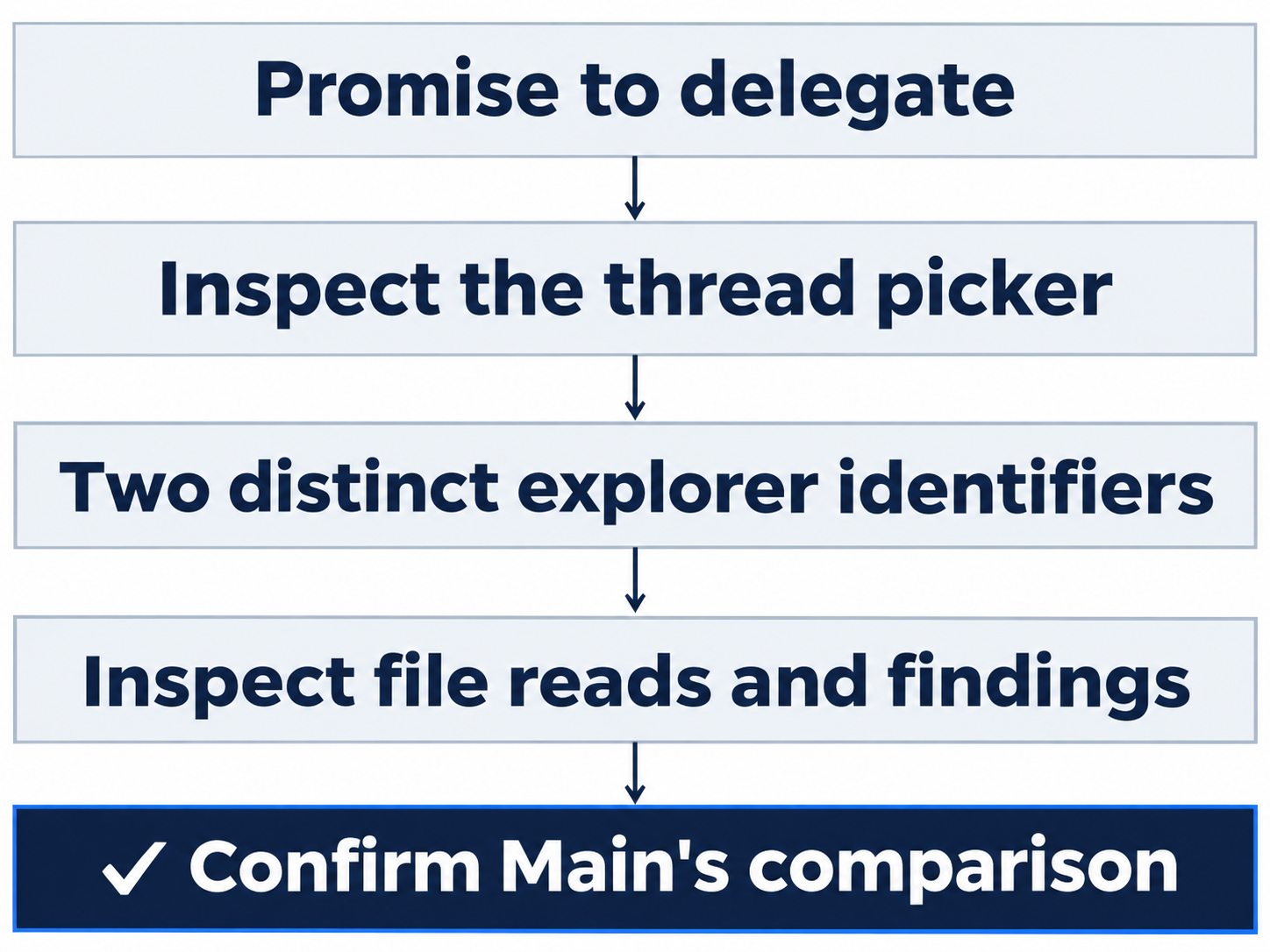
Accept delegated work after inspecting both threads and Main’s independent test result.
Under [agents], agents.enabled defaults to true. agents.max_concurrent_threads_per_session caps simultaneously open spawned threads, excluding Main; an unset value lets Codex choose its default. agents.max_threads is a legacy alias. The two names do not supply independent limits. Configuration reference
agents.default_subagent_model and agents.default_subagent_reasoning_effort supply defaults that explicit spawn settings can override. agents.interrupt_message controls whether an interruption adds a model-visible message and defaults to true. None needs changing for this lesson. One parent and two explorers establish neither maximum delegation depth nor a universal default thread count. Global settings
Diagnose a stalled assignment through the thread inventory
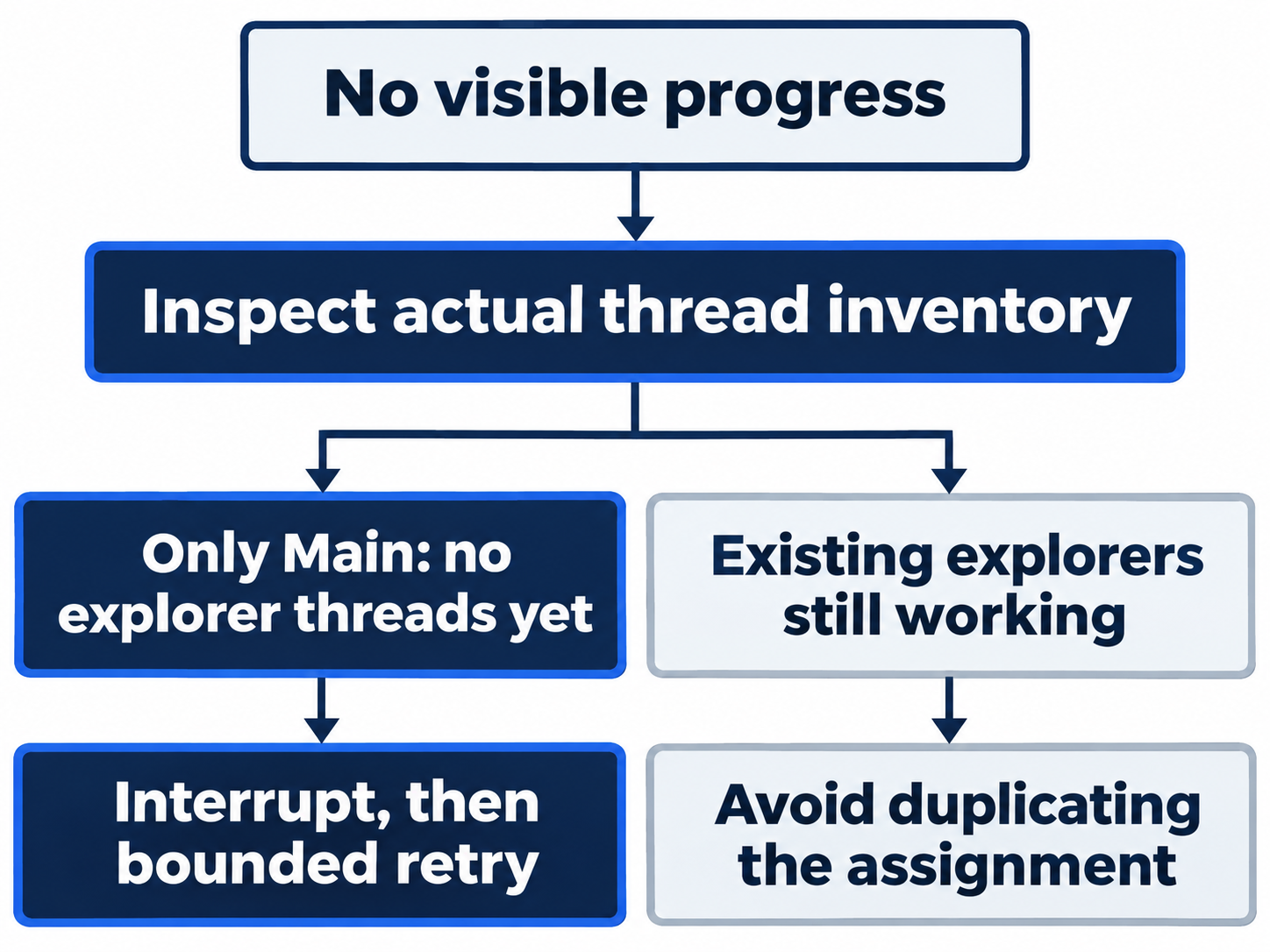
Check /subagents before resubmitting a task. If only Main appears, you have no explorer threads to inspect. If the task stalls, press Escape, resend the same bounded request, and check the inventory again. When explorers already appear, inspect them before retrying to avoid duplicate work.
Use each thread's file reads and findings to check completion. When a completion banner and inspectable results disagree, open the threads and read the work. Confirm the distinct thread identifiers, assignments, file reads, and findings before accepting Main's summary.
Optional evidence inspection, not run: compare each explorer's assignment, reads, and finding with Main's summary. Reset: return to Main, close inspection views, leave files and completed threads unchanged, keep Ask for approval, and verify clean status with seven passing tests. Leave the suggested regression unimplemented.

Keep each finding attached to its file evidence when assessing the combined answer.
Do this today
Everyone
- Assign two distinct questions and inspect both explorer threads before accepting Main's comparison.
- Return to Main and independently confirm clean status and seven passes.
If you read Going deeper
- Inspect a custom-agent definition only in a disposable copy. Reset by removing your added file there and preserving the clean seven-test lesson checkout.
- Compare assignments with thread evidence. Reset by returning to Main, leaving files unchanged, and keeping Ask for approval.
Coming up in Part 12: Hooks, testing a narrow guard against an explicitly denied command.