
OpenAI Codex, Day-to-Day
Why this guide exists
You can use Codex every day and still miss what it added last month. You may never try the features that would help you most. Codex ships fast. This guide keeps you current, a few new techniques a day, so you do not get left behind and you use Codex the way it is meant to be used.
Who it is for
OpenAI Codex, Day-to-Day is a 17-day guide to Codex in the terminal and the ChatGPT desktop app. You need Node.js 22 or later, Git, and a ChatGPT Plus-or-higher account.
How it works
You build one small project, Ticket Triage, across every day. Each day starts where the day before ended and takes 20 to 40 minutes. Start here is a real lesson that ends in a result you can check, such as a passing test. Going deeper holds the explanations and alternatives for when you have more time.
What you will learn
- Install Codex and make a first safe change (Day 1).
- Run blocked-write and network probes in the sandbox (Day 4).
- Put one rule in
AGENTS.mdand find it in the model input (Day 5). - Turn a readiness check into a project skill (Day 9).
- Trust one hook and watch it protect a file (Day 12).
- Split work across two worktrees, then hand one task to the cloud (Days 14 and 15).
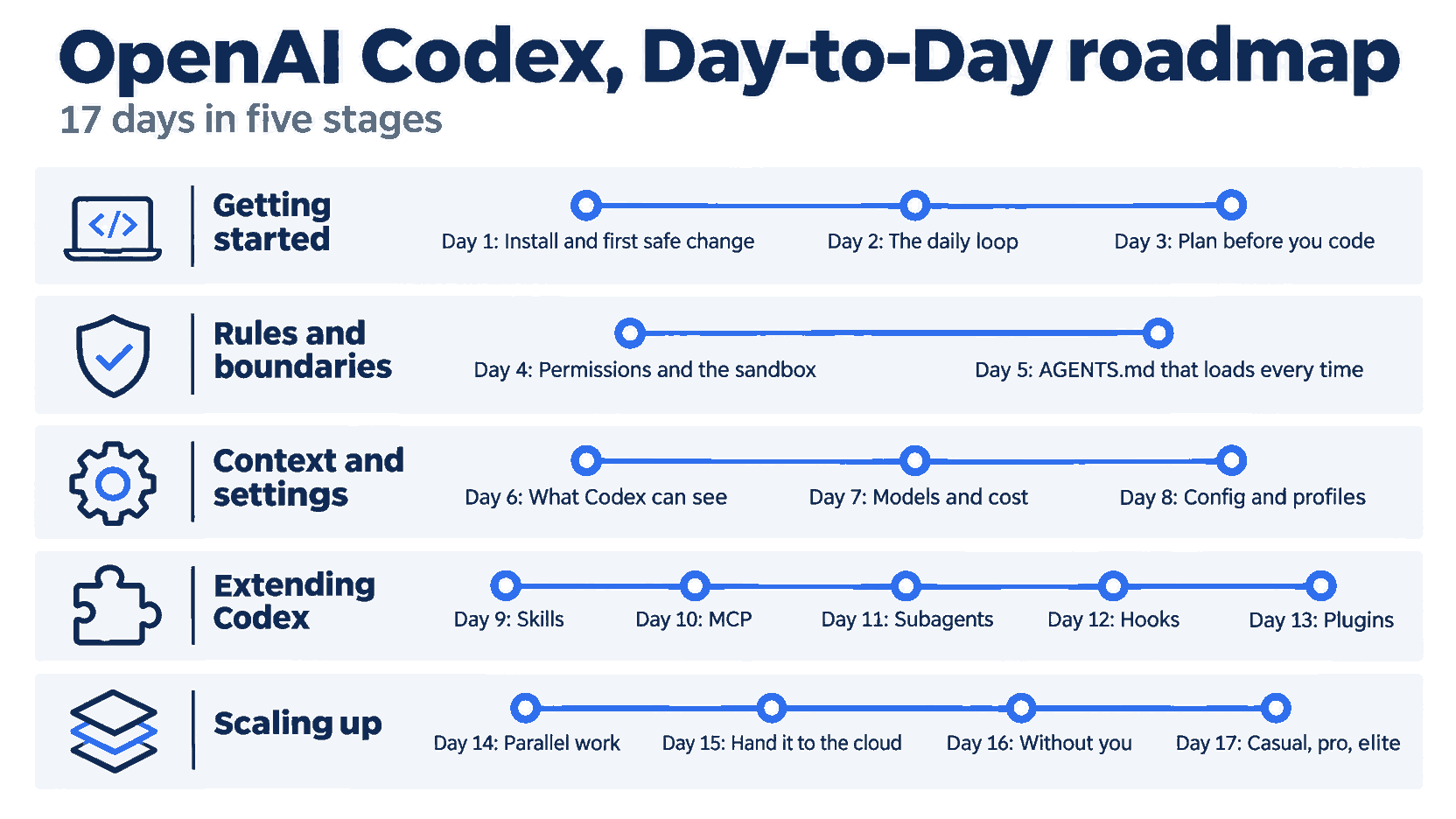
The 17 days fall into five stages: getting started (Days 1 to 3), rules and boundaries (Days 4 and 5), context and settings (Days 6 to 8), extending Codex (Days 9 to 13), and scaling up (Days 14 to 17).
How it was tested
The Start here steps ran live on Codex CLI 0.169.0 in November 2026 on macOS with a ChatGPT Pro account. Day 15 Cloud results without a command trace are labeled Cloud-reported. A step that was not run for this guide, such as a desktop app step, is labeled Not run.
Get the code
Day 1 builds Ticket Triage by hand. The code is in the ticket-triage-day-by-day repository on the codex branch, with one tag per day, codex/day-00 to codex/day-17. Use a tag to catch up on any day.
Start
Start at Day 1, one part a day.
Also in this series: Claude Code, Day-to-Day, Cursor, Day-to-Day, OpenCode, Day-to-Day, Pi, Day to Day, and GitHub Copilot, Day-to-Day.
The parts
- Your First Codex CLI Change Should Be Easy to Check
- A Codex CLI Workflow You Can Review and Resume
- Revise the Requirement Before Codex Writes the Code
- Use a Blocked Command to Understand Codex Permissions
- Check That Codex Receives Your AGENTS.md Rules
- Check What Survives Codex Compaction
- Choose a Codex Model and Check What Usage Shows
- Save a Codex Review Profile and Verify It
- Build a Codex Skill You Can Inspect Before You Trust It
- Connect Codex to Documentation and Verify the Tool Call
- Use Codex Subagents for Two Reviews You Can Verify
- Test a Codex Hook With an Explicit Denial
- Install a Codex Plugin and Verify Which Skill Runs
- Keep Two Codex Changes in Separate Worktrees
- Hand Codex Work to the Cloud Without Losing the Evidence
- Run a Codex Readiness Check From a Script
- Build a Codex Routine You Can Repeat Tomorrow