
Hand Codex Work to the Cloud Without Losing the Evidence
A cloud handoff remains reviewable when review receipts, reported remote results, and independent local checks retain separate scopes.
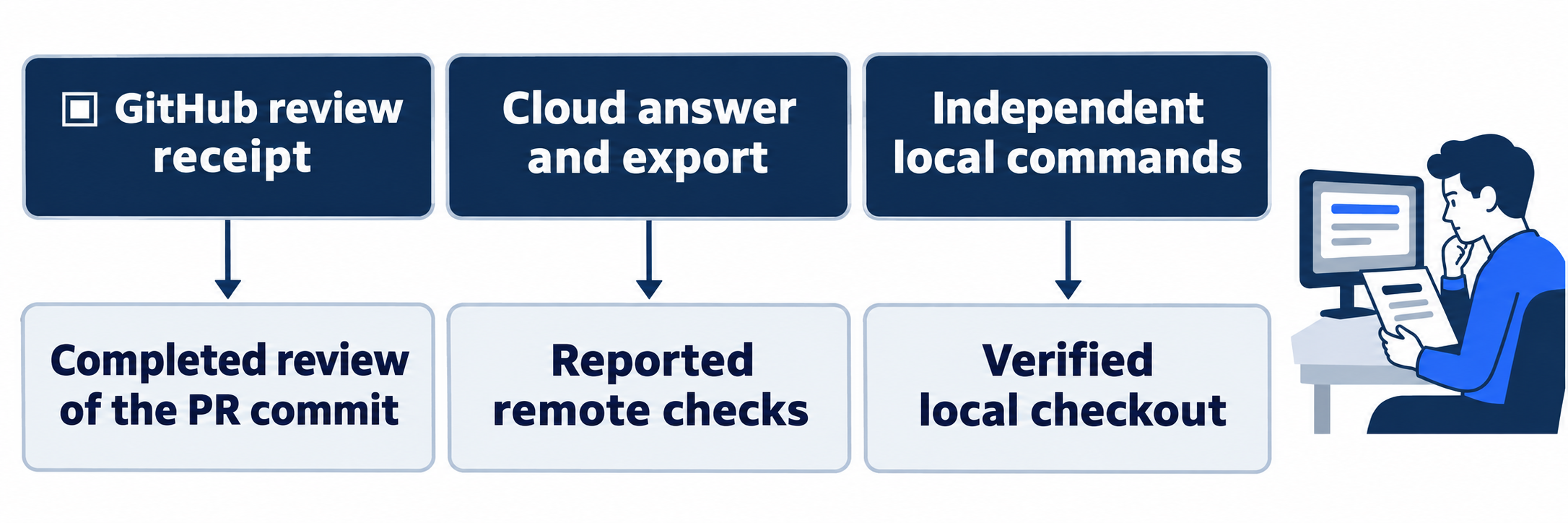
Check a completed GitHub review, label the Cloud report accurately, and verify the original local checkout independently.
A completed remote answer is useful, but you still need to know which parts you can independently inspect.
In this article: Request a GitHub review and check its completed receipt. Send one bounded Cloud task, label its reported evidence, and independently verify the clean local project.
Tested on Codex CLI 0.169.0, macOS, Node.js 22.22.1, and Git 2.47.1.
The experimental CLI Cloud connection supports eligible ChatGPT-signed-in sessions on macOS and Linux. Normal desktop/web Cloud and phone routes are not run.
Yesterday you saved separate documentation and test branches, preserved the original seven-test project, and prepared a GitHub repository with an open test-only pull request.
If the previous Codex conversation is still open, enter /quit at its idle composer. Start the terminal command from your ticket-triage directory.
Start here
codex
Prerequisites: Installed, signed-in GitHub CLI (gh); your connected GitHub repository and its open test-only PR; eligible Cloud access on macOS or Linux.
From the original ticket-triage checkout, request a GitHub review, complete a bounded Cloud task, and independently verify the clean local project.
Starting fresh or fell behind? Run git switch -C main codex/day-14. This replaces your main with the end of Day 14; to keep your own work, run git branch my-backup first.
A GitHub review examines the changes proposed by a pull request on GitHub. A Cloud task runs in a remote workspace. Keep their results separate: today's review concerns the saved test branch, while the Cloud task inspects the original main code.
Check the local starting point
If prompted, confirm Ticket Triage and choose Trust and continue. Enter /status, the session-settings command.
Check: Confirm your original directory, AGENTS.md, and Workspace (Ask for approval). Use a normal Local launch without changing the model. Ask for approval requests approval when an action reaches a boundary under its rules.
Run the baseline from the composer, Codex's input box. The leading ! runs your shell command:
!git status --short && git rev-parse --short HEAD && npm test
git status --short lists changed or untracked files; clean status prints no entries. HEAD identifies the current commit, and git rev-parse --short HEAD prints its abbreviated identifier. && continues after success, and npm test runs the suite.
Check: Expect seven passes; the two saved branches and open PR remain separate.
Request the GitHub review
Use your prepared repository and PR number. gh, GitHub's command-line client, must be installed and signed in. Not run: first-time account setup. Complete any needed GitHub CLI installation/sign-in and the repository's Codex connection before continuing; check the connected account and repository.
Replace the example repository and PR number with your own, then send this request once:
!gh pr comment --repo SpillwaveSolutions/ticket-triage-day-by-day 1 --body "@codex review"
pr comment posts a pull-request comment, --repo selects OWNER/REPOSITORY, 1 is the PR number, and --body supplies the comment text. This posts a real request to GitHub. The explicitly entered command posts without an additional approval dialog in this workflow.
Read the receipt from the Codex bot, its automated review account, with this query. Replace the repository and issue number for your PR:
!gh api repos/SpillwaveSolutions/ticket-triage-day-by-day/issues/1/comments --jq ".[] | select(.user.login == \"chatgpt-codex-connector[bot]\") | .body"
gh api reads GitHub's programming interface. The path after it selects the PR comments; --jq filters the returned JSON, a structured-data format. The expression selects comments by the Codex bot and prints their bodies. Repeat this read after waiting if it still says Running.
Check: Look for Completed and the reviewed commit, not merely a posted request. Match the reviewed identifier to your saved eight-test branch's commit. A completed receipt may report findings or no major issues. Inspect any findings against your PR's current diff. Leave the PR open and unmerged.
Open the current Cloud connection
Not run: reader-specific remote setup. A remote is a named Git repository location. Before launching Cloud, check that origin points to your connected GitHub repository. Preserve existing remotes deliberately.
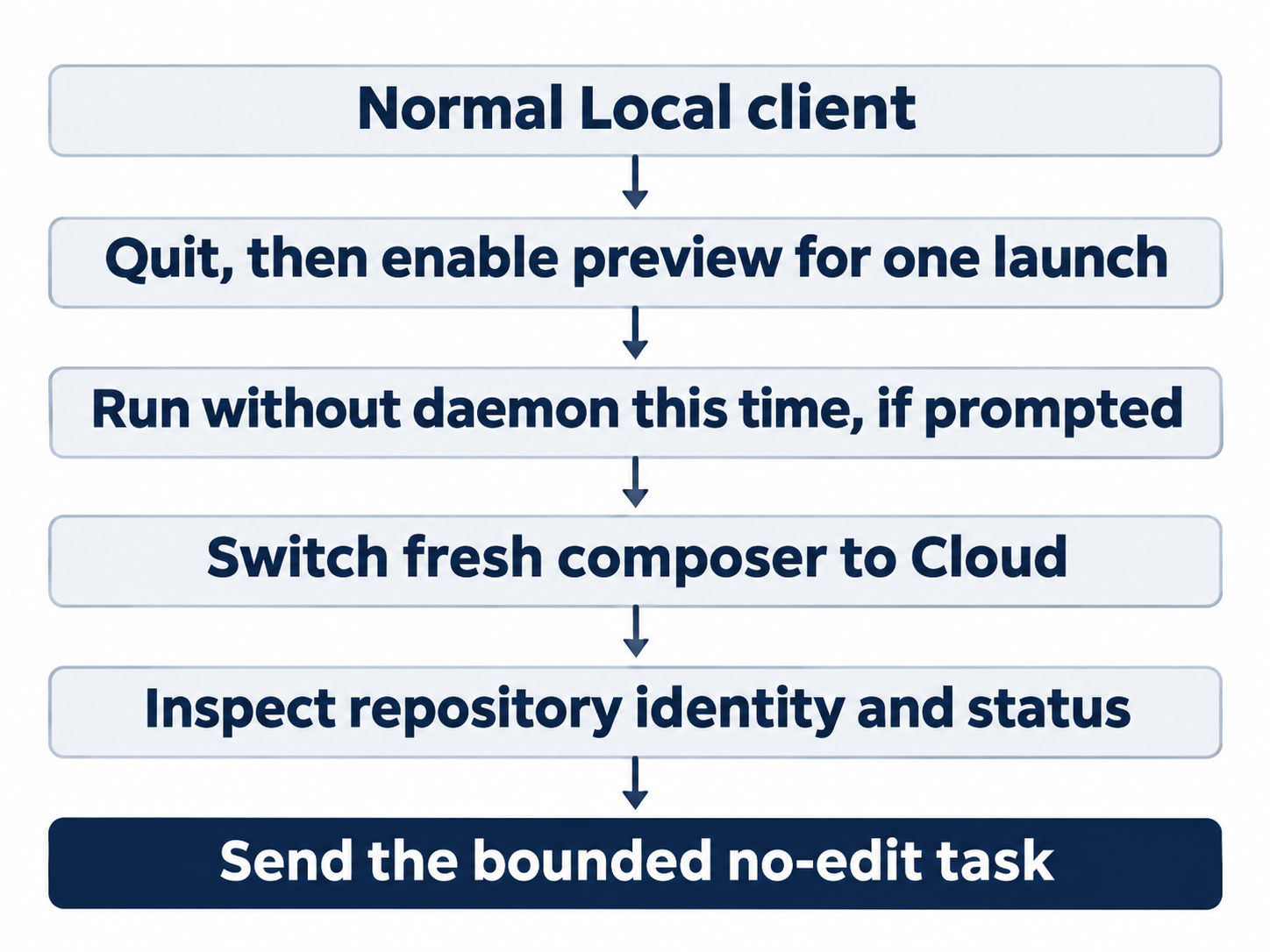
Enter /quit to leave the Local client. In the regular terminal, launch the preview:
codex --enable tui_multi_backend
--enable turns on the named feature, an optional capability, for this launch. tui_multi_backend enables the experimental Local/Cloud connection. This one-launch choice does not require saving a feature setting in your configuration.
If Background server has incompatible feature settings appears, choose Run without daemon this time. A daemon is a background service. This selection lets this client use the feature without restarting the shared service; do not select the restart option for this walkthrough.
At the fresh composer, before sending a prompt, press Ctrl+X, release, then press b.
Check: The displayed location changes from Local to Cloud. Wait for its workspace path. Check that its path identifies your own repository.
Enter /status to record the selected Cloud connection. Its preview fields differed from Local, including Read Only (Approve for me). Treat those fields as displayed connection metadata, not verification of remote permission enforcement.
Send one bounded task
pwd reports the working directory. git remote get-url origin reports the named remote's URL, git rev-parse HEAD reports the full commit identifier, and git branch --show-current reports the branch. An exit status is a command's completion code; zero normally means success.
Send this request, substituting your repository name:
In the cloud checkout of SpillwaveSolutions/ticket-triage-day-by-day, read AGENTS.md. Report pwd, git remote get-url origin, git rev-parse HEAD, git branch --show-current, and git status --short. Inspect src/classify.js and test/classify.test.js. Run npm test. Explain why "My package is late; I want my money back" is refund. Do not edit, commit, push, or open a pull request. Report the command exit status and number of tests.
Wait for the completed answer.
Check: Inspect the report for your GitHub URL, original main commit, branch work, clean status, and seven passes with exit zero. The explanation should show that "money back" triggers refund before "package" reaches shipping. Check the repository-required ending: Ticket Triage: refund first; tests checked.
Check: Record these as Cloud-reported results. A tool trace records actual command calls and their outputs. This preview's answer and export showed messages without that detailed trace, so the reported remote tests were not independently verified. Keep the receipt and local tests separate.
Finish in Local
Enter /quit to leave the Cloud client. From the regular terminal in your original project, launch normally:
codex
A separate no-model control check verified these exit and relaunch controls; it did not repeat the remote task.
Check: Enter /status and confirm the original directory, AGENTS.md, and Workspace (Ask for approval). Then run the independent local check:
!git status --short && git rev-parse HEAD && npm test
Check: Expect no status entries, the original full commit identifier, and seven passes. Preserve both saved branches and the open PR. This local check verifies your local project; it does not turn the Cloud-reported tests into a remote trace.
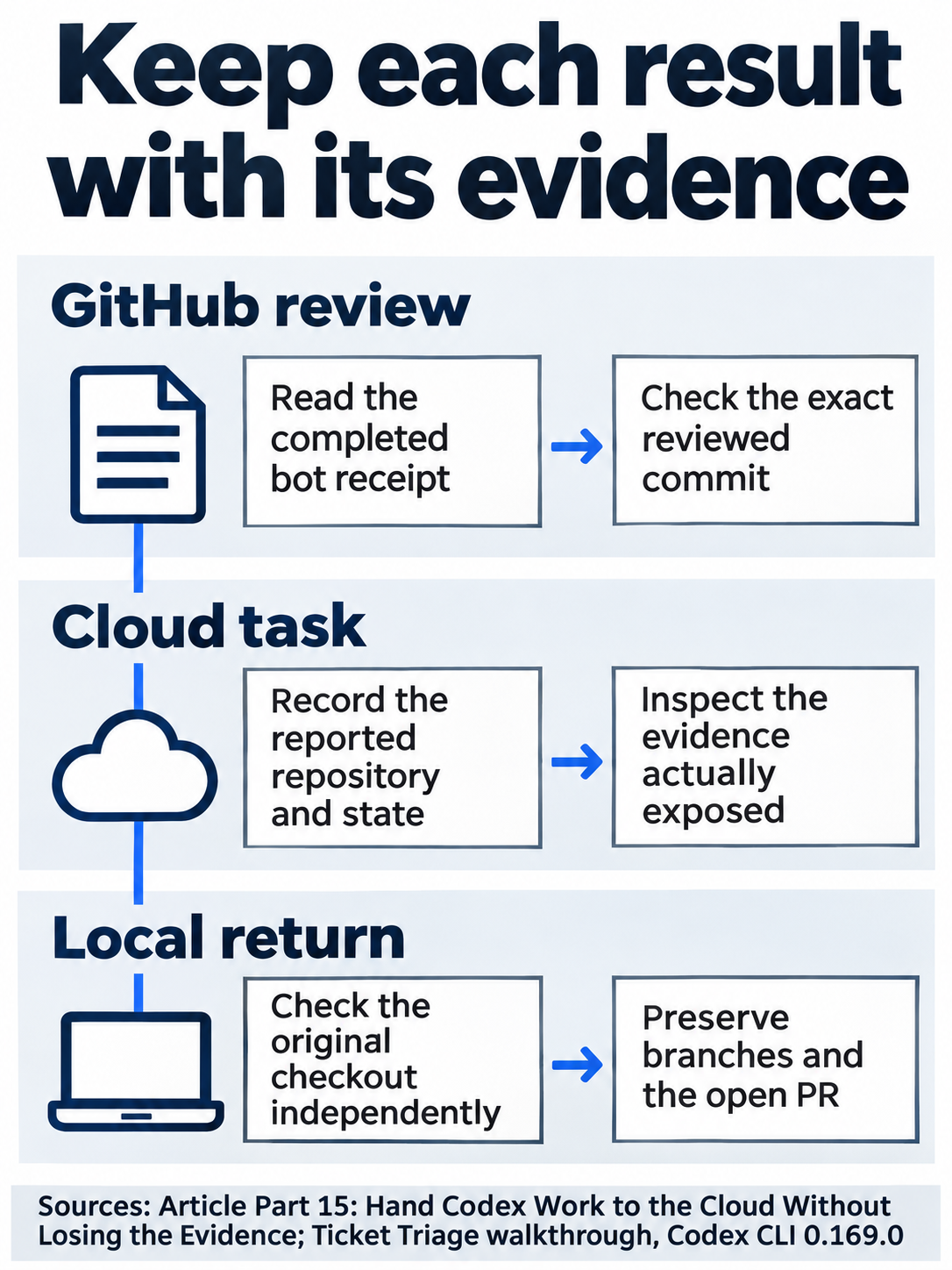
Keep the remote report distinct from the local test evidence.
The desktop and web path
Not run: native desktop/web steps. On GitHub, post @codex review in the prepared PR's comment box and inspect the bot's completed receipt and commit. In the app, Code Review opens the PR; Summary shows activity and Changes shows its diff.
For the coding task, open the project and choose Work in > Cloud. Select an available default environment or the published reusable environment you prepared. Reusable environments save setup and are optional where a suitable default exists. Send the same bounded task for your repository.
Check: Inspect the result, any changed-file pane, and the command evidence actually exposed. Stop this route if required controls or sign-in access are unavailable.
What you proved
- The GitHub receipt completes against the correct pull-request commit.
- The Cloud answer identifies the expected project and labels its test result as reported.
- Your independent Local check confirms the original clean seven-test checkout.
You can stop here. Going deeper explains why this works and where it breaks.
Going deeper
Read this section to understand the Cloud preview's evidence limits, review settings, and separate reusable or mobile workflows.
Distinguish the current connection from the older picker
The experimental features.tui_multi_backend connection supports eligible ChatGPT-signed-in sessions on macOS and Linux. The macOS result establishes no Windows support for that terminal route. CLI guide, 0.169.0 release
The older codex cloud failed inside ! with Device not configured; its terminal picker showed Env: none. The current connection provisioned through GitHub origin. This rename applies only when origin is an archived fixture and tutorial already names GitHub:
!git remote rename origin fixture && git remote rename tutorial origin && git remote -v
It preserves the old remote under fixture and makes GitHub origin, without changing tracked files. Different remote roles require different preparation. Run without daemon this time avoids shared settings changes or interruptions.
Accept only the evidence exposed
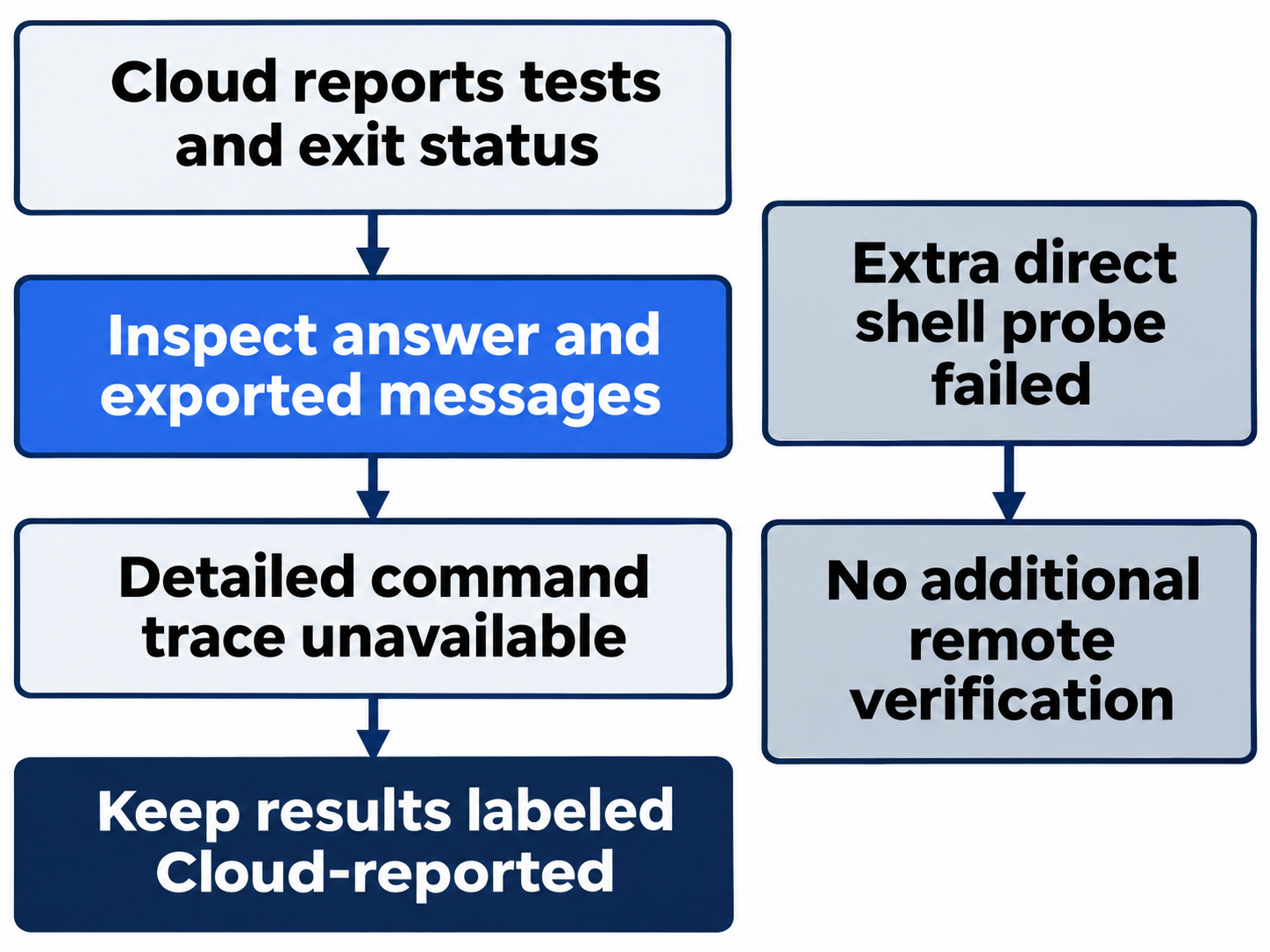
A completed bot receipt tied to the PR's head establishes acceptance by that repository's integration, not first-time authorization or automatic reviews. Cloud messages establish what the task reported. Expanding the transcript and exporting it did not expose detailed command events in this preview. Status metadata establishes neither instruction loading nor remote enforcement.
An extra direct-shell verification attempt ended the preview with thread/shellCommand failed in TUI. It supplies no remote command pass or reliable retry recipe. A separate later no-model control check verified Cloud /quit and a normal Local relaunch; it did not rerun the remote task. Keep those scopes separate from independent local tests.
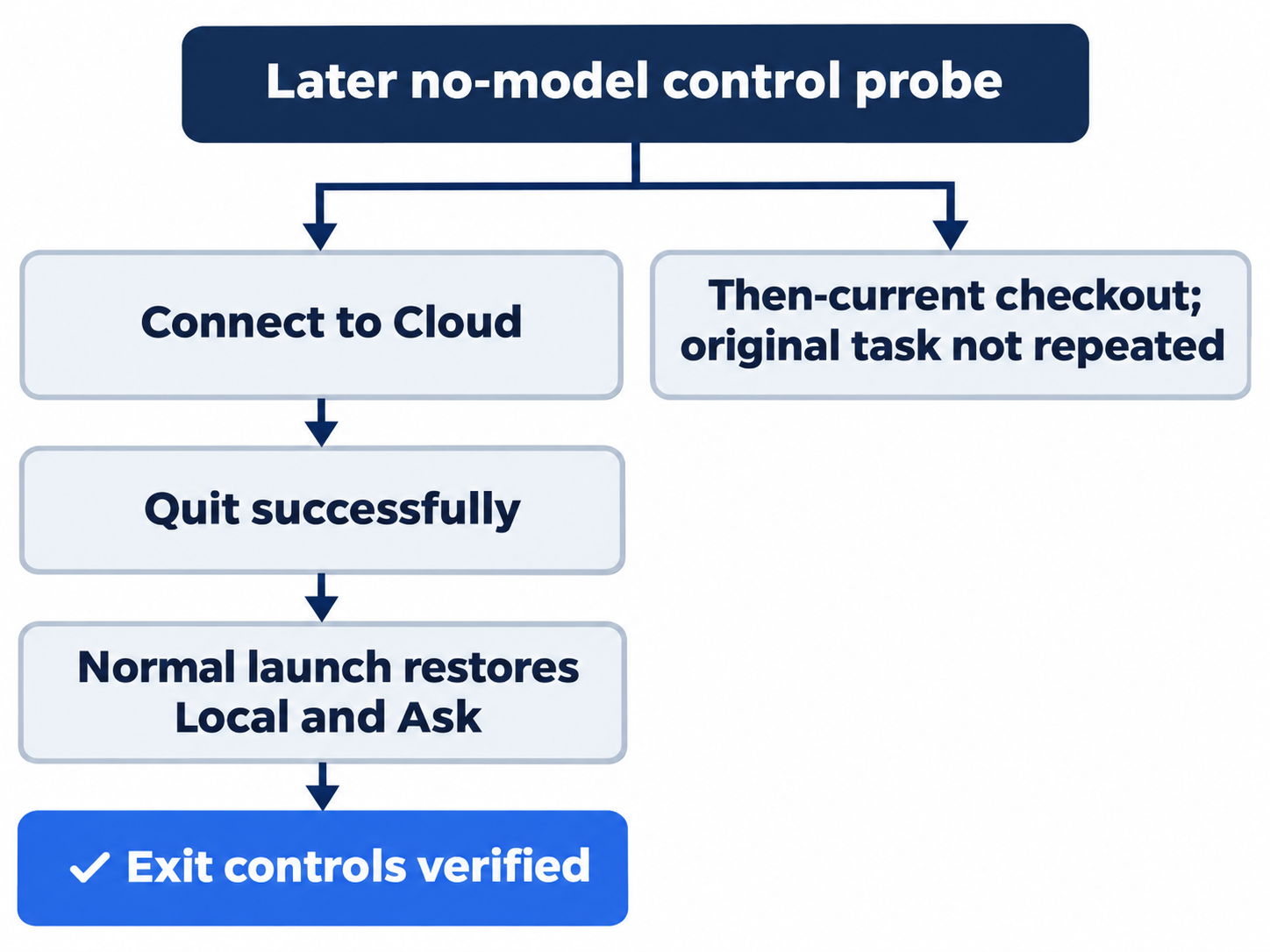
Optional evidence inspection, not run: match the receipt's commit to the PR head and inspect the Cloud conversation for actual command events. Reset: close views, post no repeat request, preserve both branches and the PR, and verify clean Local status, seven passes, and Ask for approval.
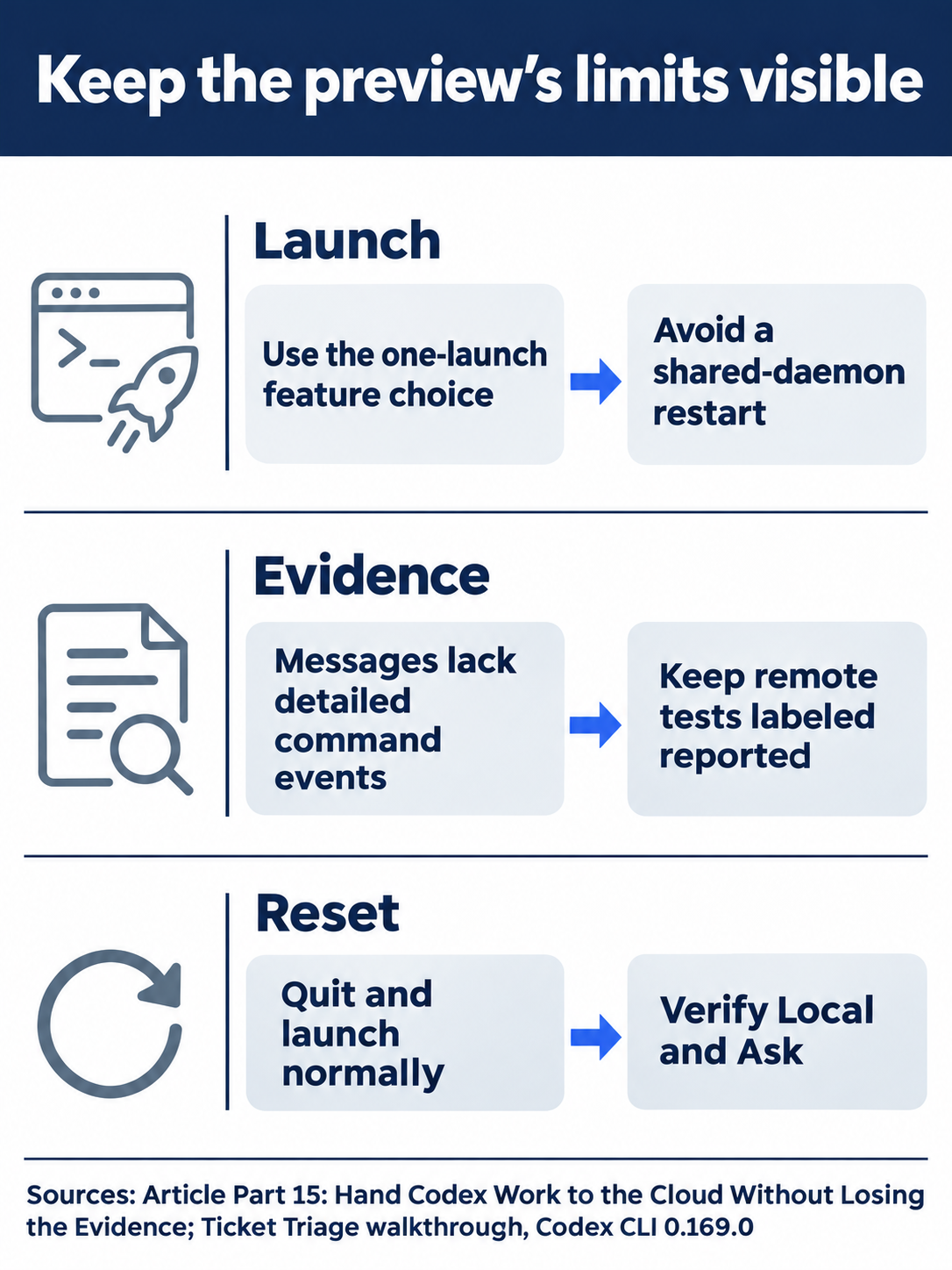
The later exit check verifies controls, without repeating remote commands.
Inspect review rules and triggers separately
Applicable AGENTS.md files can include ## Code Review Rules; more specific guidance scopes to its code. Review code > Automatic review and Review trigger are separate settings from a manual comment. GitHub-triggered reviews require no reusable Cloud environment, focus on P0/P1 issues, and have their own usage category. A clean receipt does not exclude every defect. Review rules, review usage
Security Review is a distinct research preview documented for Pro, Business, Enterprise, and Edu, excluding Plus. Its settings and @codex security review trigger were not exercised; ordinary review can also find security issues. Security Review
Optional rules inspection, not run: read rules and settings without editing, enabling automation, or requesting Security Review. Reset: close settings, preserve files and the PR, and check the original clean seven-test Local project with Ask for approval.
Reusable setup has its own access model
Current Cloud supports defaults where available and published reusable setup for repeated tasks. Each task has its own state. Environment variables pass values directly; network secrets use placeholders with proxy substitution for allowed HTTPS destinations. An allowed domain alone grants no service credentials. Cloud does not automatically inherit local browser sign-ins, VPN, personal skills, or arbitrary files. Current environments
The legacy integration environment has different setup, caching, and networking rules, including removing setup secrets before the agent phase. Do not apply that rule to current network-secret placeholders. Legacy environments
Optional reusable-setup inspection, not run: inspect Settings > Codex Cloud > Environments for repository, published state, and required access. Reset: change or publish nothing, close configuration, and check the clean seven-test Local project with Ask for approval.
Phone control depends on where the task runs
Not run: phone setup and control. iOS uses Codex, or Remote in some builds. Pair through desktop Settings > Connections > Control this Mac or PC > Set up or Add, verification, and QR scanning, using the same account and workspace. Connected-host tasks use that awake, online host's tools and permissions; Cloud tasks use Cloud workspaces. Setup begins in desktop, with availability subject to rollout and workspace settings. Mobile, connections
Optional phone inspection, not run: after intentional pairing, read a completed task without starting or approving work. Reset: close it, preserve files and the PR, retain or remove pairing intentionally, and verify the original clean seven-test Local checkout with Ask for approval.

Accept each result only within the evidence its own route exposes.
Do this today
Everyone
- Request one review, inspect its completed receipt and commit, and leave the PR open.
- Complete the bounded Cloud task, label its reported evidence accurately, and independently check the clean seven-test Local project.
If you read Going deeper
- Inspect review or reusable setup without changes. Reset by closing views and checking the original Local baseline with Ask for approval.
- Inspect a transcript or paired phone without new work. Reset by preserving the PR and branches, closing views, and checking Local status and seven passes.
Coming up in Part 16: Without you, saving a structured readiness report from a repeatable CLI script.