

GitHub Copilot, Day-to-Day
Why this guide exists
You can use GitHub Copilot every day and still miss what it added last month. You may never try the features that would help you most. GitHub Copilot ships fast. This guide keeps you current, a few new techniques a day, so you do not get left behind and you use GitHub Copilot the way it is meant to be used.
Preview: written November 16, 2026, before Microsoft Ignite. Some paid steps are not yet tested live; this guide will be updated November 21, 2026.
Who it is for
GitHub Copilot, Day-to-Day is a 16-day guide for developers who already have Copilot, usually through work, and mostly use completions.
How it works
You build one small project, Ticket Triage, across every day. Each day starts where the day before ended and takes 20 to 40 minutes. Start here is a real lesson that ends in a result you can check, such as an empty git status --short. Going deeper holds the details and edge cases for when you have more time.
What you will learn
- Install Copilot CLI and get a plan with no edits (Day 2).
- Make the CLI refuse
git push(Day 5). - Cap one session's credits with
--max-ai-credits(Day 6). - Hand an issue to the cloud agent and read its draft (Day 11).
- Write a read-only Agentic Workflow on a daily schedule (Day 15).
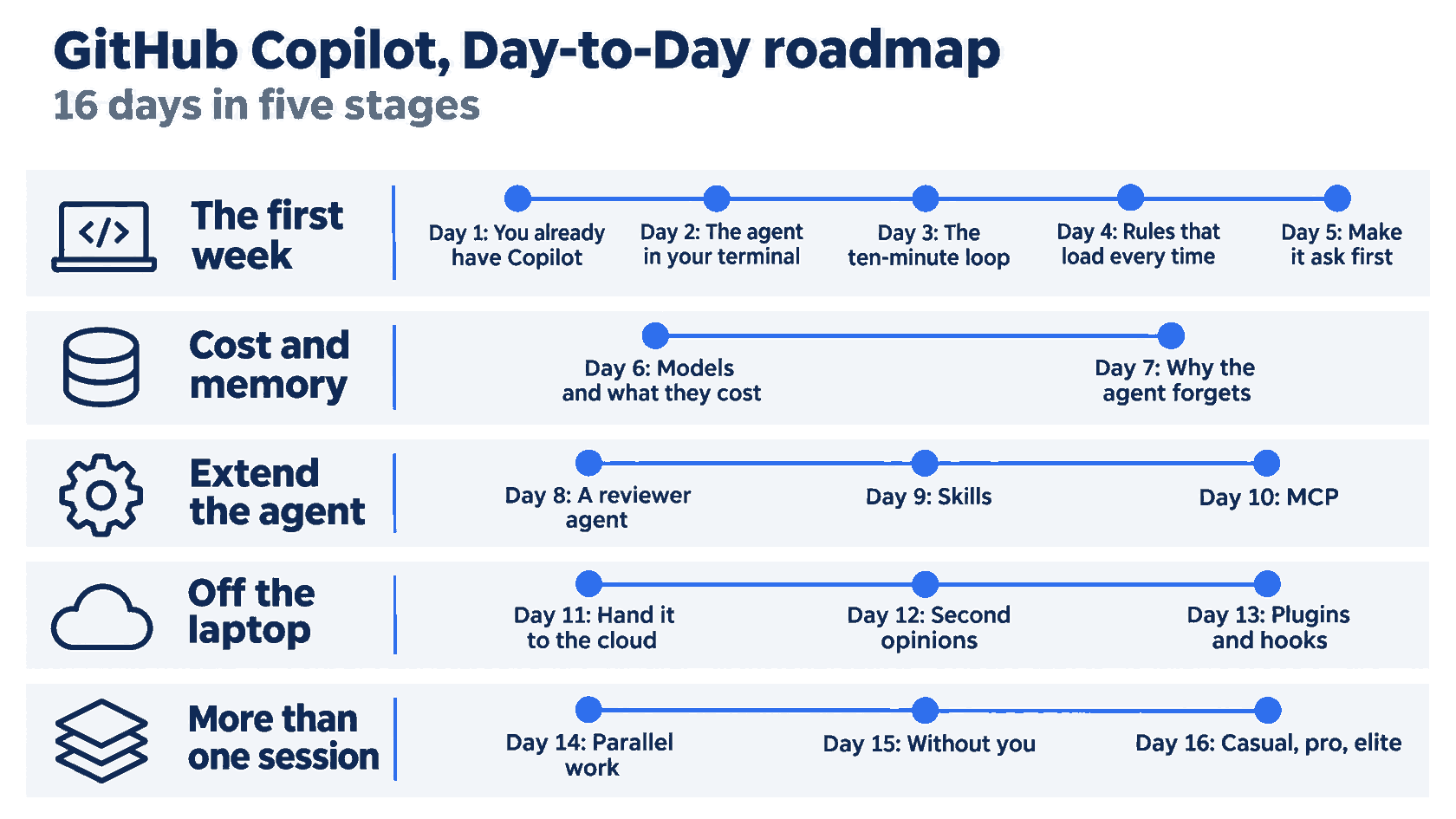
The 16 days fall into five stages: the first week (Days 1 to 5), cost and memory (Days 6 and 7), extend the agent (Days 8 to 10), off the laptop (Days 11 to 13), and more than one session (Days 14 to 16).
How it was tested
The guide uses Copilot CLI 1.0.112, tested on November 16, 2026, with a version check and a skill discovery test. Most steps that send work to Copilot, such as plans, reviews, and cloud sessions, were not run, and each one says so. Every code tag passes npm test.
Get the code
Day 1 builds Ticket Triage by hand. The code is in the ticket-triage-day-by-day repository on the copilot branch, with one tag per day, copilot/day-00 to copilot/day-16. Use a tag to catch up on any day.
Start
Start at Day 1, one part a day.
Also in this series: Claude Code, Day-to-Day, Cursor, Day-to-Day, OpenAI Codex, Day-to-Day, OpenCode, Day-to-Day, and Pi, Day to Day.
The parts
- You Already Have a GitHub Copilot Agent. Prove It Left the Files Alone.
- GitHub Copilot CLI Can Change This Repo. Today You Only Ask for a Plan.
- The Copilot CLI Ten-Minute Loop That Survives Compact
- GitHub Copilot Custom Instructions Load Only in a New Session
- Git Answered "No Remote." Check GitHub Copilot CLI Permissions.
- The GitHub Copilot Fusion Price Is Not the Name You Clicked
- Why the GitHub Copilot Context Window Makes the Agent Forget
- A GitHub Copilot Custom Agent Can Still Edit Until the Tools List Says No
- GitHub Copilot Skills Should Stay Quiet Until You Ask for a Release
- The Connected Badge Is Not a GitHub Copilot MCP Tool Call
- The GitHub Copilot Cloud Agent Opened a Pull Request. Leave It as a Draft.
- Copilot Reviewed the Pull Request. You Still Have to Merge It.
- The Hook Is Not the Lock on git push
- The Second Window Was Not a GitHub Copilot App Worktree
- Your First GitHub Agentic Workflow Does Not Get a Write
- The GitHub Copilot Daily Workflow That Still Makes You Merge