
Your First GitHub Agentic Workflow Does Not Get a Write
A GitHub Agentic Workflow is Markdown you compile with gh aw compile, and the first lock file stays read-only: contents read, create-issue false, and no push of a write so a run will start.
Compile with gh aw compile, keep the lock file at contents read, and do not push a write so a run will start
A schedule that runs while you are away still starts as a permissions file. The relief is reading the lock file and refusing to push a write you did not mean to grant.
In this article: You put one GitHub Agentic Workflow on disk for Ticket Triage, compile it with
gh aw compile, and read the lock file before you trust it. The first file grantscontents: read, notcontents: write, and it setscreate-issue: false. You do not dispatch the workflow, you do not push a write grant, and you do not treat a Copilot exit code asnpm test. By the end, the compiled file is on disk or you have stopped, andsrc/classify.jsis unchanged.
Preview: written November 16, 2026, before Microsoft Ignite. Some paid steps are not yet tested live; this guide will be updated November 21, 2026.
A workflow that runs while you are away sounds like freedom. You write the intent once, a schedule carries it, and the repository looks after itself. The file that makes that possible is still a permissions file. The first compiled copy does not get a write to the default branch.
A GitHub Agentic Workflow is intent written in Markdown and compiled into a GitHub Actions workflow. GitHub Actions is GitHub's automation runner. You edit the Markdown. The lock file is the YAML Actions would run. This is not a cron string pasted into a chat. As of November 16, 2026, the workflow in this article was not run, and it was not compiled for this guide. There is no sample Actions log and no sample lock file. Re-run the steps on your account before you trust the wording. The checks you run yourself are the lock file's permissions: block, git diff, and npm test.
The default branch is the repository's base branch, often main. contents: write would let a workflow change files there. You do not add that grant so that a run will start. A lock file that shows it is a stop, and you do not push it.
Starting fresh or fell behind? Run git switch -C main copilot/day-14. This replaces your main with the end of Day 14; to keep your own work, run git branch my-backup first.
The first file is a permissions file
By the end of this pass you have one Agentic Workflow on disk for Ticket Triage, the compiled lock file beside it, and a permissions block in that lock file that does not grant a write to the default branch. Every failed check is a stop. None of them is a reason to add contents: write.
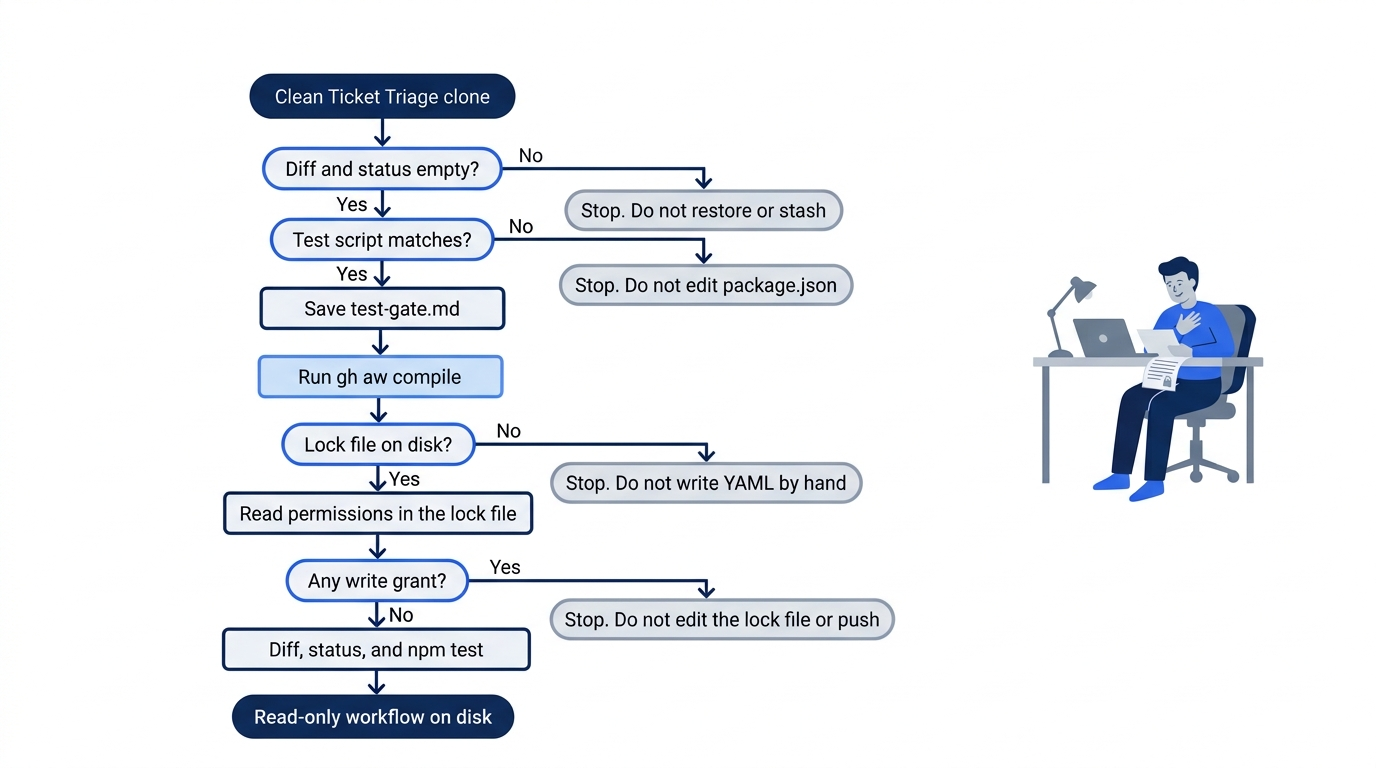
The path has one forward line and four reasons to stop. A dirty checkout, a test script that is not the expected command, a compile that does not produce a lock file, or a write grant in that lock file all end the same way: you write what you saw, and you do not push a write so that a run will start.
Confirm the clone before you add a file
Work from the Ticket Triage clone. On macOS and Linux the path is ~/code/ticket-triage. On Windows use C:\code\ticket-triage in Git Bash. npm test is the test command. src/classify.js is the classifier. You do not edit it. If a merge is already on the branch, leave it.
Confirm the clone before you add a workflow.
cd ~/code/ticket-triage
git diff -- src/classify.js
git status --short
npm test
The classifier diff prints nothing. Status prints nothing. npm test finishes with zero failures. If the diff prints a patch, stop. Do not restore, because a restore can drop a merge you have not committed. If status prints anything, stop. Do not stash. If tests fail, stop. Do not edit src/classify.js to force a pass.
Open package.json and find the test script. You want "test": "node --test". The script is the gate this workflow is about. If the script is missing or different, stop. Do not edit package.json to force a match.
The Markdown you compile
Create the directory, then save the file below as .github/workflows/test-gate.md.
mkdir -p .github/workflows
Confirm GitHub CLI before you paste. GitHub CLI (gh) is the command the quickstart uses, and it asks for GitHub CLI 2.0.0 or newer. If gh --version is not found, install from cli.github.com and stop if you cannot. Do not write Actions YAML by hand.
gh --version
test ! -e .github/workflows/test-gate.md && echo free
free prints. If that line is missing, a workflow file is already there. Stop. Do not overwrite a file you did not save for this pass.
The schedule, the read permissions, network: defaults, and the bash list are copied from the sample the quickstart links, repo-status.md. on: carries two fields. schedule: daily is that sample's schedule field, not a cron string you invent. workflow_dispatch: is the sample's manual-run field. You do not open the Actions tab, and you do not dispatch a run today.
permissions: lists contents: read, issues: read, and pull-requests: read. This file says contents: read. If the block says contents: write, do not save it.
The network guide calls defaults basic infrastructure, not a repository write. Leave network: defaults. Do not replace it with a wider grant.
The bash list is the sample's read commands only: cat, ls, find, grep, head, tail, and wc. Do not add npm or git. Your machine runs npm test. The workflow does not.
A safe output is a validated write the product performs in a separate step only when the Markdown names it. The safe-outputs page says the compiler turns create-issue on when no safe-outputs: section is present. This file sets create-issue: false, the off switch that page shows. The page names create-pull-request for opening a pull request. You do not add that key, and you do not add merge-pull-request. A pull request is an explicit grant in a later edit, not this first file.
Do not add an engine: line. The creating-workflows page says Copilot is the default. The same page ends its manual steps with git push after you compile. You do not follow the push. A push would put schedule: daily on GitHub, where a run can start without you at the keyboard. Auto-merge would merge a pull request without a separate yes from you. You do not turn it on. The prompt tells the agent not to enable it, and the file does not configure an auto-merge output.
The Markdown under the second --- is the prompt. If it tells the agent to edit src/classify.js, open a pull request, or merge, replace the file with the block below before you compile.
This file is the Ticket Triage test-gate workflow. The frontmatter grants a daily read, a short bash list, and create-issue: false. The body only asks the agent to confirm the test script and stop.
---
description: |
  This workflow checks, on a schedule, that npm test would be the gate
  for Ticket Triage. It does not edit the repository and it does not
  open a pull request.

on:
  schedule: daily  # ①
  workflow_dispatch:

permissions:
  contents: read  # ②
  issues: read
  pull-requests: read

network: defaults

tools:
  bash: ["cat", "ls", "find", "grep", "head", "tail", "wc"]  # ③

safe-outputs:
  create-issue: false  # ④
---

# Test gate

Check that `npm test` would be the gate for Ticket Triage. Read the repository. Do not change it. <!-- ⑤ -->

## What to include

- Read `package.json` and confirm the test script is `node --test`.
- State that `npm test` is the pass or fail gate.
- State that an agent exit status is not that gate.

## What to leave alone

- Do not edit `src/classify.js`.
- Do not edit `test/classify.test.js`.
- Do not edit `package.json`.
- Do not open a pull request.
- Do not merge.
- Do not enable auto-merge.
- Do not run git.

## Process

1. Read `package.json` with the allowed read commands.
2. Report only whether the test script is `node --test`.
3. Stop. Do not create an issue, a comment, or a pull request.
① schedule: daily is the sample's schedule field, not a cron string.
② contents: read is the repository grant in a block that also sets issues: read and pull-requests: read, and the file does not grant contents: write.
③ The bash allowlist is only cat, ls, find, grep, head, tail, and wc. Do not add npm or git.
④ create-issue: false turns the automatic issue off. A missing safe-outputs: section would let the compiler turn create-issue on.
⑤ The prompt tells the agent to read the repository and not change it, and it forbids editing src/classify.js.
Note: The full extracted listing at code/github_copilot/part-15-without-you/listings/01-test-gate.md is the same workflow with the markers removed.
Gotcha: Keep create-issue: false. A lock file with contents: write is a stop, and you do not push it.
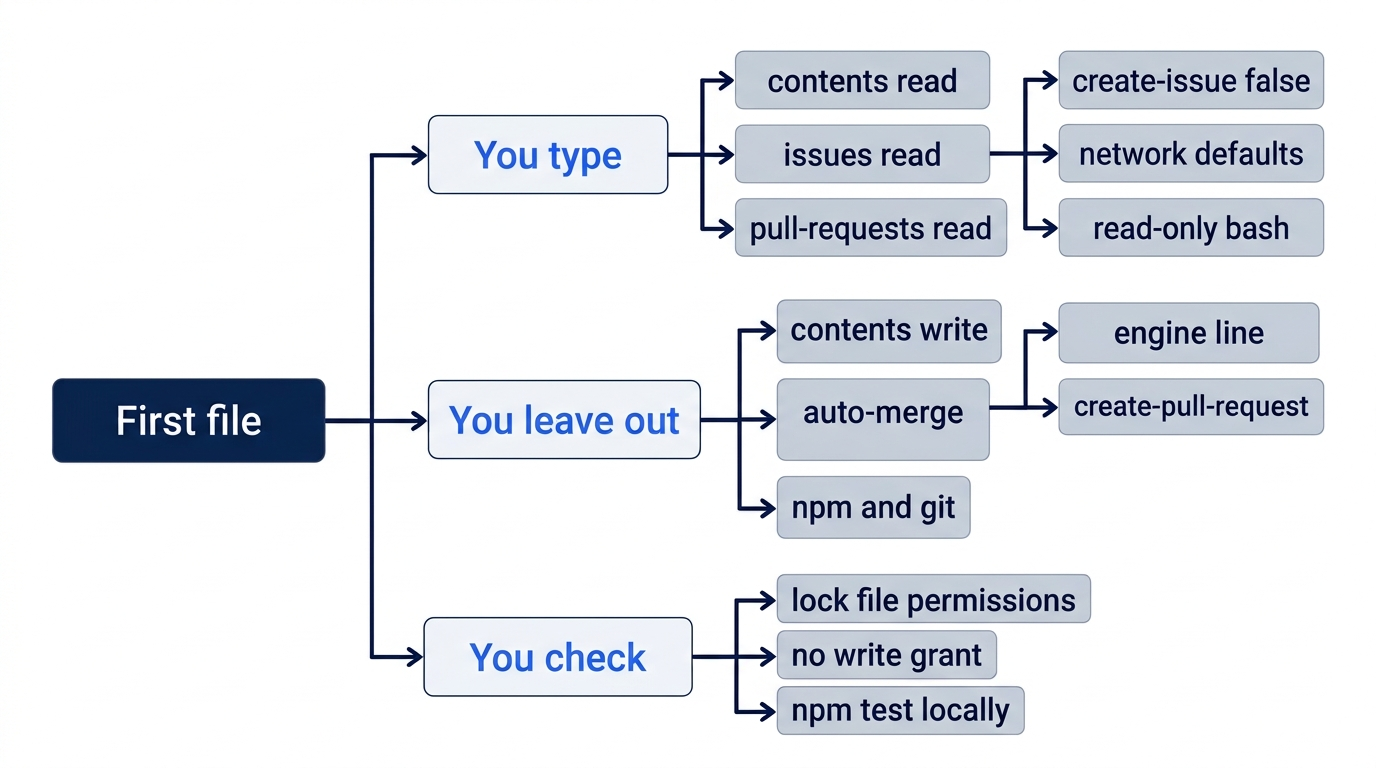
Three groups sit on that map. You type the reads, the off switch, network: defaults, and the short bash list. You leave out every write, including a pull request and auto-merge. You check the lock file, and you still run npm test on your machine.
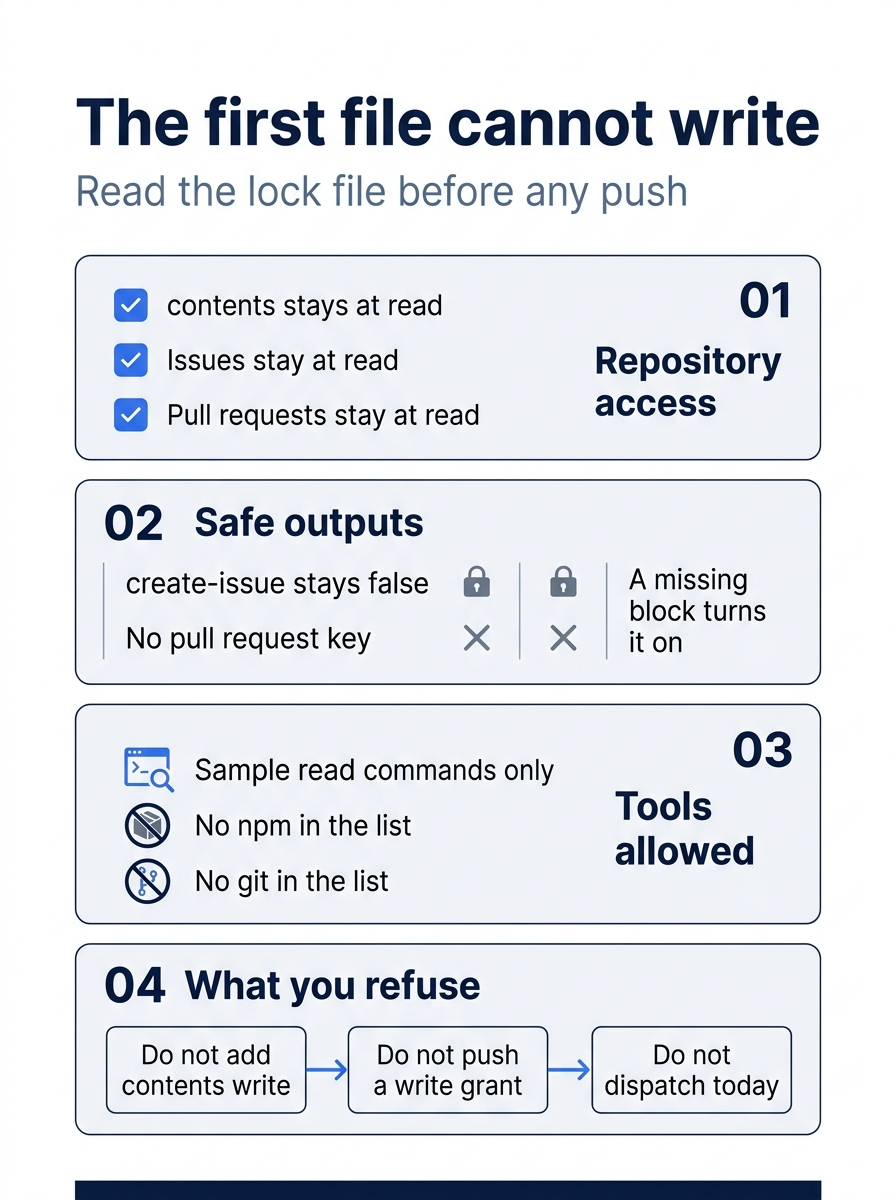
Four panels say the same rule in smaller pieces. Access stays at read. The issue switch stays off, because a missing block turns it on. The tool list does not include npm or git. You refuse a write, a push of that write, and a dispatch today. A reader who skips the picture still has the rule: the first compiled file does not get a write to the default branch.
Compile with gh aw compile, then read the lock file
The extension is github/gh-aw. The compile command the quickstart and the creating-workflows page both name is gh aw compile. Run it from the repository root. Skip the install line if gh aw compile already runs.
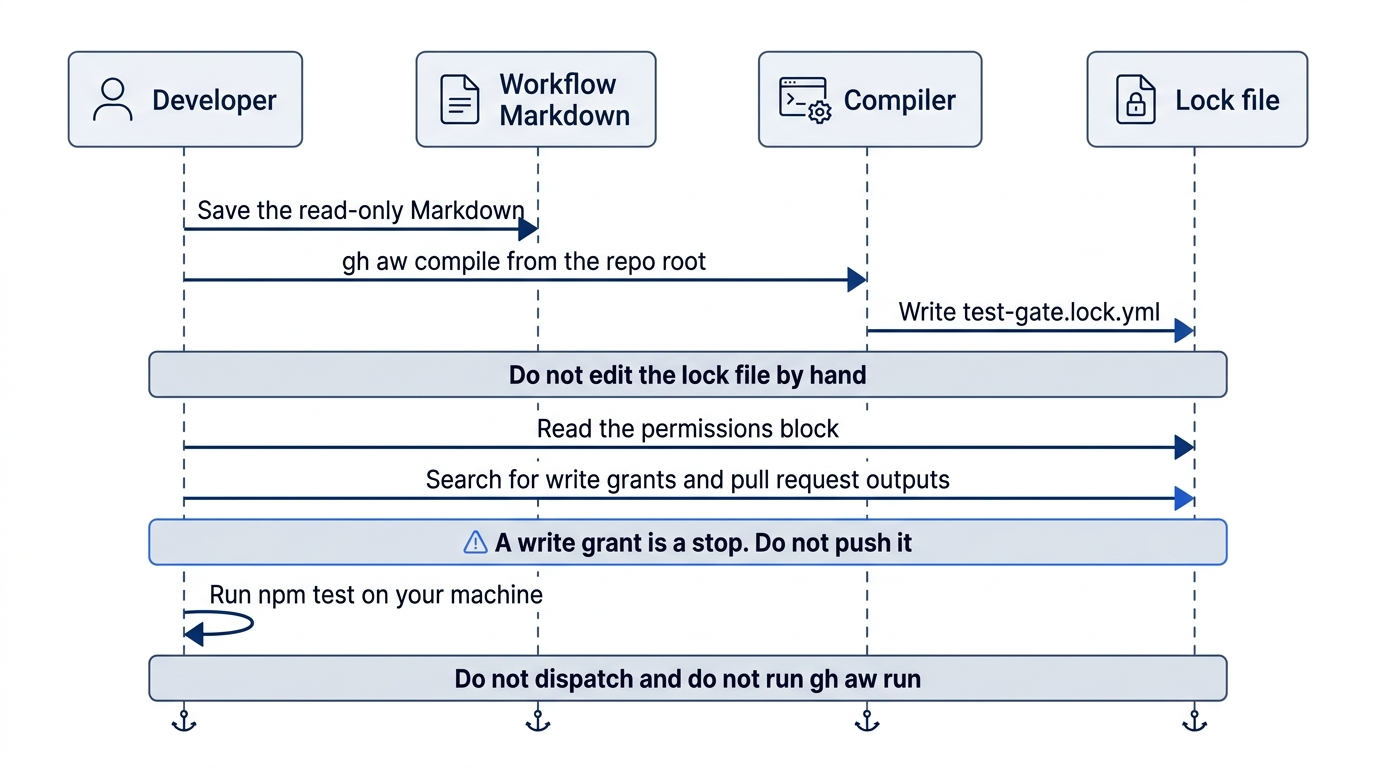
The sequence is one compile, then a read. The compiler writes the lock file. You do not edit that file by hand, you do not dispatch the workflow, and you do not run gh aw run. npm test stays on your machine.
gh extension install github/gh-aw
gh aw compile
Compile writes a lock file next to the Markdown. The workflow structure page says the lock file is .github/workflows/<workflow-name>.lock.yml, and that you do not edit it by hand. For this file the name is .github/workflows/test-gate.lock.yml.
ls .github/workflows/test-gate.md .github/workflows/test-gate.lock.yml
Both names print. If the lock file is missing, stop. Do not create a .yml yourself. If compile asks you to log in or to create a token, stop. You do not create a personal access token. If you cannot enable GitHub Actions in this repository, stop with the lock file on disk. You do not push, you do not run gh aw run, and you do not dispatch the workflow.
Open the lock file and find permissions:. The permissions page says workflows are read-only by default, and that the compiler adds actions: read for a freshness check. actions: read is not a write to the default branch. This article did not compile the file, so there is no sample lock file to copy. Read the lines on your machine.
Search the lock file.
grep -n "contents:" .github/workflows/test-gate.lock.yml
grep -n "write" .github/workflows/test-gate.lock.yml
grep -n -e "auto-merge" -e "merge-pull-request" -e "create-pull-request" .github/workflows/test-gate.md .github/workflows/test-gate.lock.yml
Every contents: line says read. contents: write, issues: write, pull-requests: write, and copilot-requests: write are stops in this first file. A comment that only discusses the word write is not a grant. Read the line. The third search can print the prompt line that says not to enable auto-merge. It does not print create-pull-request or merge-pull-request. The prohibition is not a grant. Auto-merge is not turned on, and a pull request output is absent.
If any of those write grants appear, stop. Do not edit the lock file, and do not push.
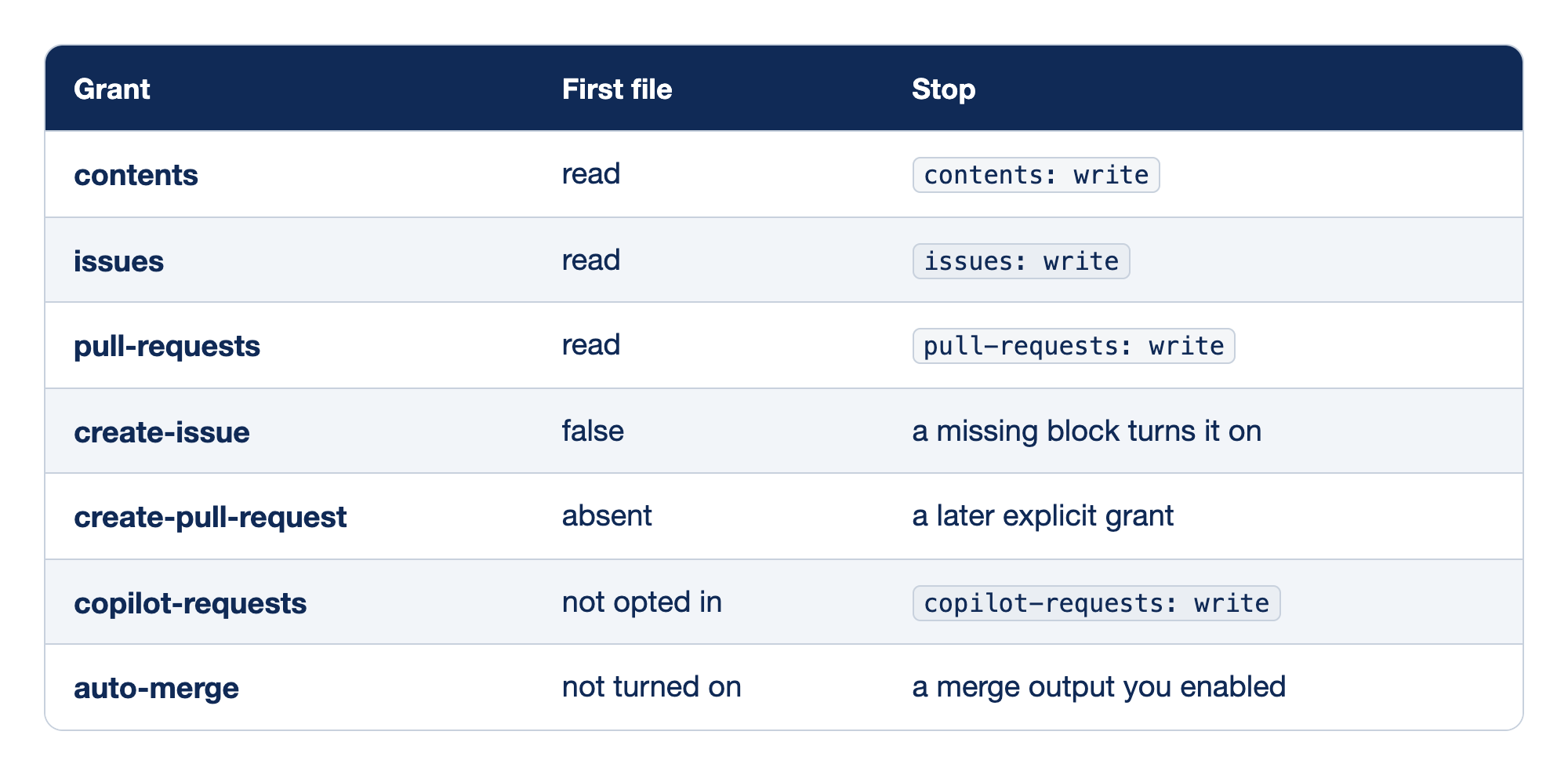
Each row is one permission or output check for the first compiled file. The Grant column names the permission or switch. The First file column is what this Markdown is supposed to contain. The Stop column is what ends the pass if the lock file or the Markdown shows it.
- contents stays at read. A line that sets contents to write is a stop, and you do not push that grant so that a run will start.
- issues stays at read. A line that sets issues to write is a stop in this first file.
- pull-requests stays at read. A line that sets pull requests to write is a stop in this first file.
- create-issue is false. A missing
safe-outputs:section lets the compiler turncreate-issueon, with a small default of max 1, and that automatic issue is a write even when the permissions you typed are all read. - create-pull-request is absent. The key is real on the safe-outputs page, and it is not in this first file. Adding it later would be an explicit grant, followed by another compile and another read of the lock file.
- copilot-requests is not opted in. The permissions page says
copilot-requests: writeis not a compiler default. You opt into it when you want organization-billed inference. If the lock file shows it anyway, stop. - auto-merge is not turned on. The prompt says not to enable it, so a search can print that prohibition.
merge-pull-requestandcreate-pull-requestdo not appear. A prohibition is not a grant. A line that enables auto-merge, or that addsmerge-pull-request, is a stop.
Together, the rows are the habit for the first compiled file: read-only, create-issue: false, and no write output you did not name.
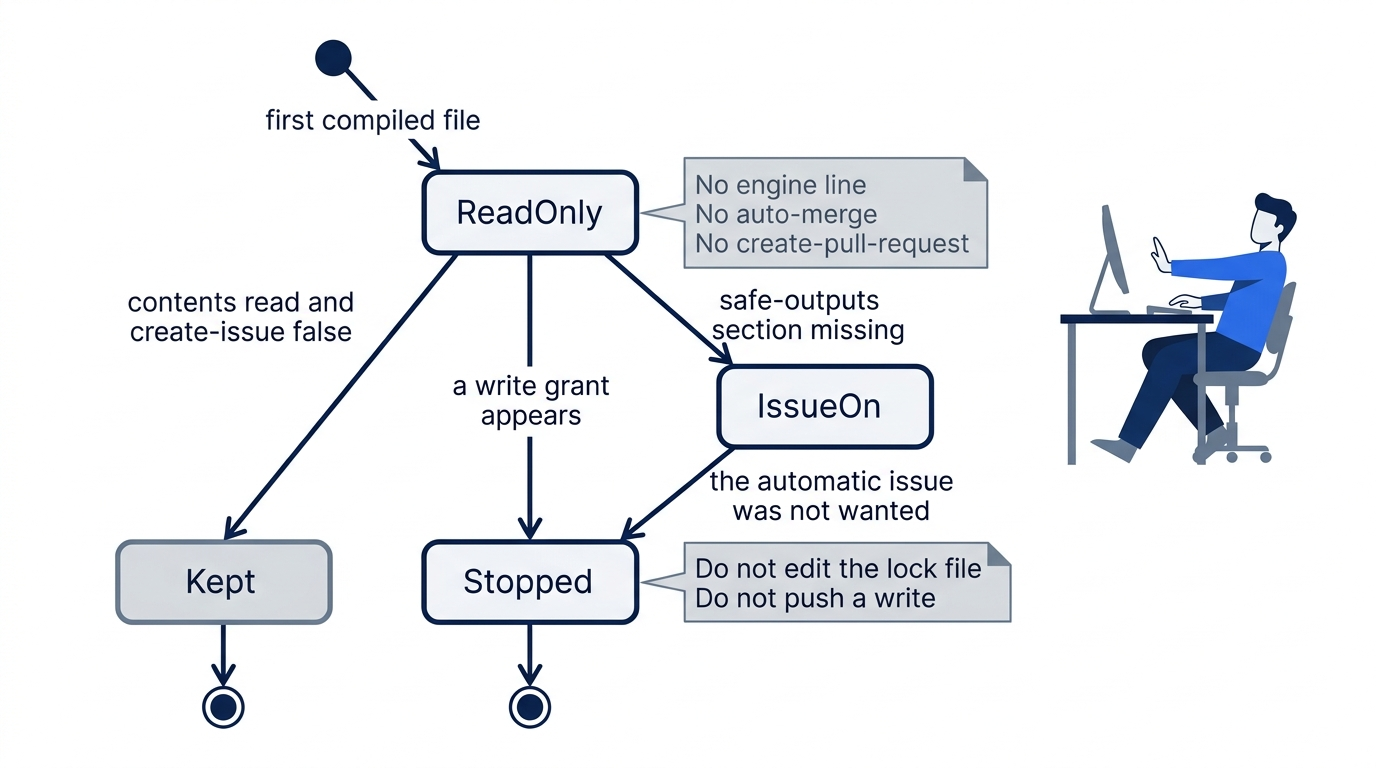
Read-only is the state you start from, not a state you earn by adding a write. A missing safe-outputs: section moves you to an issue you did not ask for. Any write grant moves you to a stop: do not edit the lock file, and do not push it. The only kept state is contents: read with create-issue: false, and with no engine line, no auto-merge, and no create-pull-request.
The tree still passes
The new files are the workflow and the lock file. The classifier stays untouched. Run the local gate yourself.
git diff -- src/classify.js
git status --short
npm test
The classifier diff prints nothing. Status lists .github/workflows/test-gate.md and .github/workflows/test-gate.lock.yml, and nothing else. npm test finishes with zero failures. If status lists src/classify.js, test/classify.test.js, or package.json, stop. Do not commit that mix.
You may commit the two workflow files. The commit is optional. The agent does not run git. Do not use git add .. Do not push.
git add .github/workflows/test-gate.md .github/workflows/test-gate.lock.yml
git commit -m "Add a read-only test-gate workflow"
git diff -- src/classify.js
git status --short
npm test
After a commit you typed, status prints nothing, the classifier diff prints nothing, and npm test finishes with zero failures. Write down git log -1 --oneline before you commit. After the commit, the new line is one you typed. If it changed earlier, the agent ran git. Stop, and do not push. Skipping the commit is allowed.
The win is the lock file on disk with contents: read. src/classify.js is unchanged. npm test still passes. Auto-merge is off.
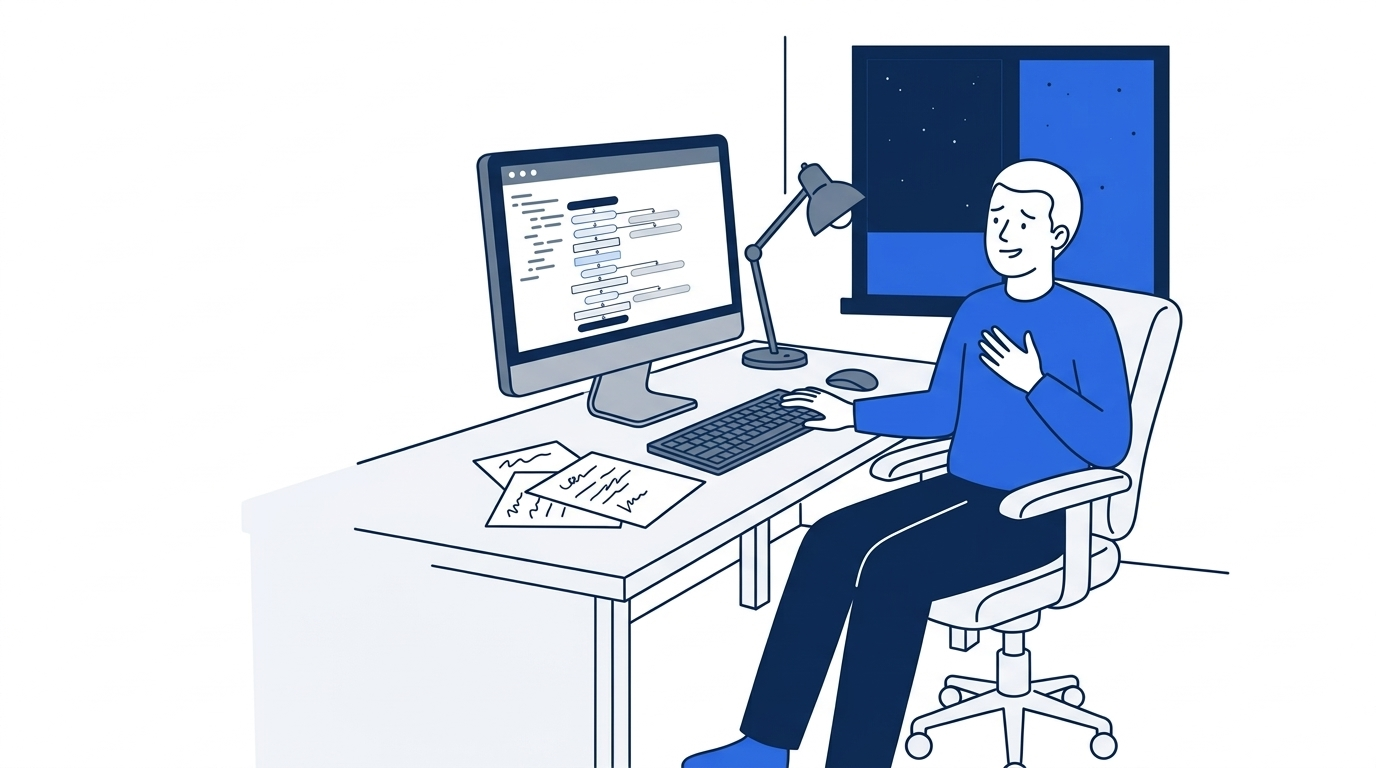
The pause is the point of the picture. The lock file is on the screen, and the push has not happened. Relief is not a green Actions run. It is the decision to leave a write grant unpushed.
You can stop here. The rest explains why a missing block can still write, why a raw Copilot step is the wrong default, and why an exit code is not npm test.
What shipped, and what this article did not run
GitHub Agentic Workflows had a public preview on June 11, 2026, in the preview post. It became generally available on October 28, 2026, in the general availability post. The post says you define the automation in natural-language Markdown and the project compiles it into Actions YAML. It also says the agents run with read-only permissions by default, inside a sandboxed container behind the Agent Workflow Firewall, with GitHub content read through integrity filter rules. Outputs go through the safe-outputs process, and a threat-detection job scans proposed changes before they are applied. Those are design controls, not a promise that your first file is safe if you add a write.
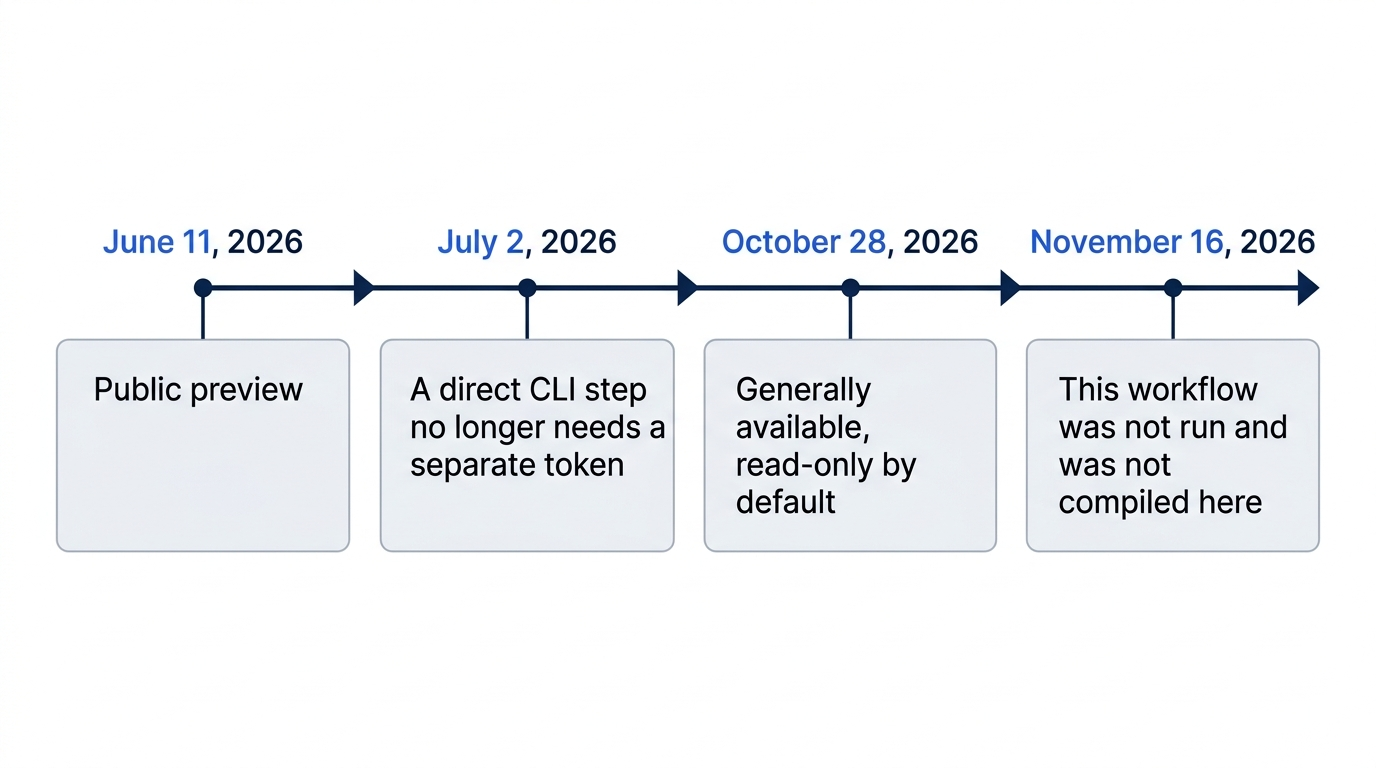
Four dates bound what this article can claim. Public preview was June 11, 2026. A separate token stopped being required for a direct CLI step on July 2, 2026, which is a different path from this workflow. General availability was October 28, 2026, with read-only agents as the default. November 16, 2026 is the date this workflow was not run and was not compiled for this guide. There is no sample Actions log.
The same general availability post says the default engine requires a Copilot license. You already have Copilot. You do not run the workflow today, so you do not spend a request to prove the lock file exists. This article does not set a model, and it does not quote a sandbox price.
The permissions page says write operations are supposed to go through safe outputs, and that copilot-requests: write is not a compiler default. Today's source does not opt in. If your lock file shows it anyway, the stop from the compile section still applies.
The workflow structure page says the Markdown body is loaded at runtime and can be edited without a new compile, and that a frontmatter change needs gh aw compile again. A permissions edit is frontmatter. After any such edit you compile again and you read the new lock file before you commit. You still do not push a write grant to see a run.
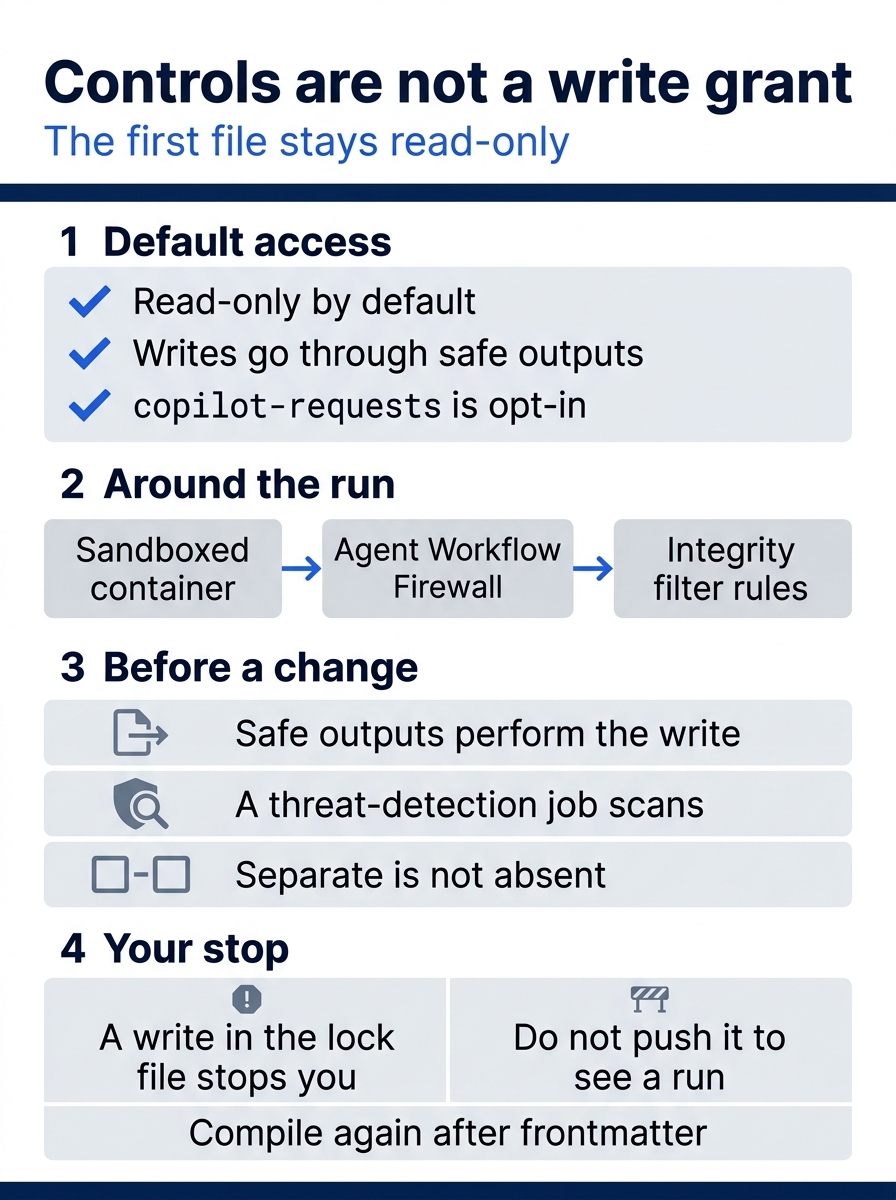
The poster separates the product's controls from your stop. Access starts read-only, writes are supposed to go through safe outputs, and copilot-requests: write is opt-in. The run sits in a sandbox behind the Agent Workflow Firewall, with integrity filter rules on what it reads. A separate job can perform a named output, and a threat-detection job scans proposed changes. Separate is not the same as absent. If the lock file shows a write you did not want, you stop, and you do not push it to see a run.
The automatic issue you turned off
The safe-outputs page says a missing safe-outputs: section enables create-issue with a small default (max 1). The automatic issue is a write, even though the permissions you typed are all read. The page's picture is that the agent asks for an action and a separate job, with its own permission, performs it. Separate is not the same as absent. create-issue: false is the documented off switch. System outputs stay available. The page names noop, report-missing-tool, and report-missing-data as always available. Those names are not a pull request and not contents: write. If the lock file still shows issues: write or pull-requests: write, treat that as a write you did not want and stop.
create-pull-request is the safe output that opens a pull request. It is real, and it is not in the first file. The page also lists merge-pull-request, marked experimental, which can merge a pull request after policy gates. You do not add it. Configured outputs may publish, update metadata, or merge, which is why the first file names no write output.
Gotcha: Auto-merge stays off, and merge-pull-request stays out of the file. A safe output that merges is not a human yes. This guide does not turn that on.
Do not paste copilot -p into the job
copilot -p is the programmatic flag that takes one prompt and then exits. --output-format selects text or json. text is the default. json means JSONL, one JSON value per line, not one large JSON document. GitHub's Copilot CLI in Actions how-to says that for most automation you should use an Agentic Workflow rather than invoking copilot directly in a workflow step. A direct step in an organization repository needs the workflow permissions: to include copilot-requests: write on the GITHUB_TOKEN Actions already provides for the run, plus the organization policy that allows Copilot CLI billed to the organization. The how-to says that path needs no extra secret. You do not create a personal access token. This series records that July 2, 2026 is when that separate token stopped being required. The same how-to warns that workflows triggered by pull requests from forks are particularly at risk, because a direct step gets broad access to the job. Do not check out fork code and grant a write in the same job. This article's workflow does not write on the first run, and you do not add that direct step.
Exit status is not npm test
The opened programmatic reference does not publish a complete exit-code table for copilot -p. The local test established exit 0 for help and for a skill list, and exit 1 for an invalid option. It did not establish the full set of authentication, budget, tool-denial, and cancellation results. Do not read a zero exit as proof that generated code passes tests. npm test is the gate. The test step decides pass or fail.
copilot workflow run is a different command from copilot -p, and it is not gh aw compile. The programmatic reference lists that command's statuses separately: 0 for completed work and a saved requested result, 1 for incomplete, paused, limited, canceled, or failed work or for a general error, 2 for a missing workflow or invalid arguments, and 130 for an interrupt. Those codes are not evidence that every -p failure uses the same map.
Gotcha: A zero exit from copilot -p is not a passing test. The 0, 1, 2, and 130 codes belong to copilot workflow run. Neither one replaces npm test.
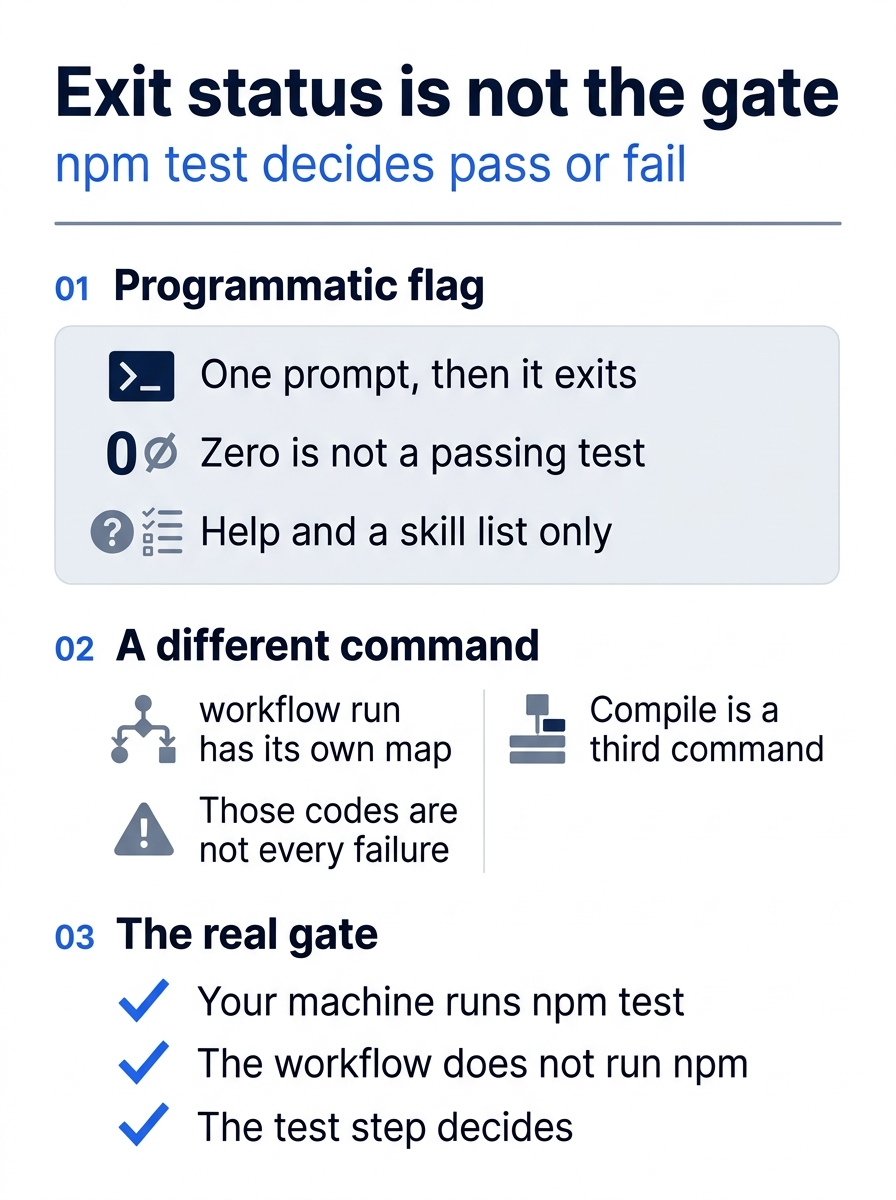
Three panels keep the commands apart. copilot -p takes one prompt and exits. A zero from the local check covered help and a skill list, not a passing test suite. copilot workflow run has its own status map, and those codes are not proof about every -p failure. gh aw compile is a third command. The gate remains npm test on your machine, because the workflow's bash list does not include npm.
A scheduled read is not a factory
Today's automation is a scheduled read of the repository, not a factory that implements features on its own. Loop engineering and a software factory are a larger subject, and that idea has its own guide. This article does not start it.
If you have used Claude Code: Unattended work is a permissions problem first. The casual version is to start read-only.
Do this today
Everyone
.github/workflows/test-gate.lock.ymlis on disk next to.github/workflows/test-gate.md. The check isls .github/workflows/test-gate.md .github/workflows/test-gate.lock.ymlprinting both names. If Actions cannot be enabled in the repository, this file is still the stop. You do not push a write grant to see a run. This workflow was not run and was not compiled for this article on November 16, 2026. There is no sample Actions log. Re-run this on your account before you trust the wording.- Your notes contain one sentence that quotes the lock file's
permissions:lines. The quote showscontents: readand shows that this is not a write to the default branch. The habit to keep: the first compiled file stays read-only. You do not addcontents: writeso that a run will start. - A search of both files prints no
merge-pull-requestand nocreate-pull-request. It may print the prompt line that says not to enable auto-merge. The line is a prohibition. Auto-merge is not turned on. You did not enable it. git diff -- src/classify.jsprints nothing.npm testfinishes with zero failures. You did not editclassify.js. Any commit adds only the two workflow files, and you typed it. The agent does not run git. You do not push. After a commit,git status --shortprints nothing.
If you read the limits
- Write one sentence in your notes that a
copilot -pexit status is not the pass or fail gate, and thatcopilot workflow runcodes are a different command. The check is that the sentence names both, and that it names 0, 1, 2, and 130 as theworkflow runcodes, not as proof about every-pfailure.npm testremains the gate.
Read the lock file, then stop
The workflow that runs without you is still a permissions file. You saved Markdown that asks for a daily read, compiled it with gh aw compile, and treated a write in the lock file as a stop. create-issue: false is in the file because a missing block would turn an issue on. Auto-merge is not turned on. src/classify.js is the file you did not touch.
A sandbox, a firewall, and a threat-detection job are real controls. They are not a reason to add contents: write so that a run will start. You do not dispatch this workflow today, and you do not spend a request to prove a file you can already read. A zero exit from copilot -p is not npm test.
The first compiled file stays a read. You can leave it that way.
This is Part 15 of "GitHub Copilot, Day-to-Day," a 16-part guide to using GitHub Copilot as a daily coding agent.