
The GitHub Copilot Daily Workflow That Still Makes You Merge
Casual, pro, and elite are ways to spend a GitHub Copilot day, and the November 16, 2026 model retirements are history to record, not a model to pin and not a reason to turn auto-merge on.

Casual, pro, and elite are ways to spend the day. None of them is a reason to turn auto-merge on, and the November 16, 2026 retirements are not a model to pin.
The last tempting step is to let the agent merge while you look away, and the names casual, pro, and elite sound like permission to do that. They are only ways to spend the day, and the merge still waits for you.
In this article: You will run one GitHub Copilot daily workflow on Ticket Triage without naming a model and without turning auto-merge on. You will confirm the tree, read one plan before any edit, keep the change in a second checkout, and let a read-only reviewer see a diff you copied. You will match the commands you actually ran to a glossary, and you will treat the November 16, 2026 model retirements as history rather than a menu.
Preview: written November 16, 2026, before Microsoft Ignite. Some paid steps are not yet tested live; this guide will be updated November 21, 2026.
A finished-looking agent day is a dangerous kind of quiet. The tests pass, the plan sounds tidy, and auto-merge would close the ticket while you get coffee. Casual, pro, and elite are not ranks you earn by letting that happen. They are ways to spend the day, and none of them is a reason to let the merge happen by itself.
The GitHub Copilot daily workflow in this article is one working day on Ticket Triage. You add no new file for the checklist. You do not name a model. As of November 16, 2026, this working day was not transcribed. There is no sample plan and no sample review. Re-run the commands on your account before you trust the wording. The checks are the note you write, git diff, and npm test.
A compiled Agentic Workflow may already sit on disk. Its first permissions are not a write to the default branch. Today you do not widen those permissions, and you do not enable auto-merge to feel finished.
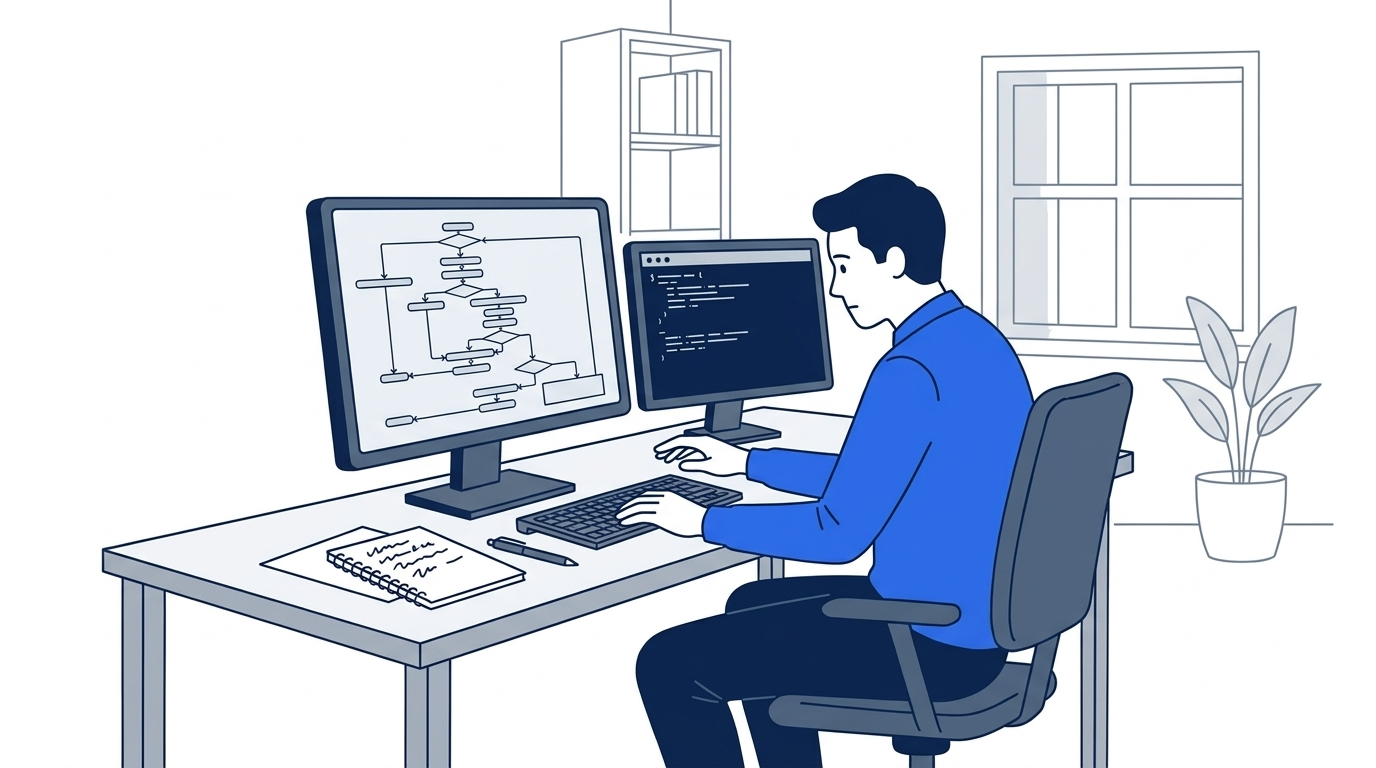
The scene is the moment before approval. The plan is on the screen, the hand has not confirmed it, and the working tree is still clean. Approving a plan can leave plan mode and let Copilot edit a file. Reading comes first.
Starting fresh or fell behind? Run git switch -C main copilot/day-15. This replaces your main with the end of Day 15; to keep your own work, run git branch my-backup first.
Confirm the tree before you open a session
Work from the Ticket Triage clone. On macOS and Linux the path is ~/code/ticket-triage. On Windows, use C:\code\ticket-triage when that is the clone you already use, and run the blocks in Git Bash.
You do not edit src/classify.js. You do not re-break it so a skill line about a missing crushed-mug rule becomes true again. The skill line is not an order to undo a merge.
Two mornings are possible. Write the one that matches your tree. Do not copy the other one to look finished.
If you already merged the damage rule, it is on the default branch because you merged it. A damaged parcel returns shipping, or refund when the customer also wants money back. The instruction file still loads. Inside a new session, /instructions lists the instruction files that session discovered. npm test passes. Leave the classifier as the merge left it.
If you stopped before that merge, the crushed-mug issue is still open and src/classify.js is unchanged. Your morning note says that, in those words. You do not write that the damage rule is on the default branch.
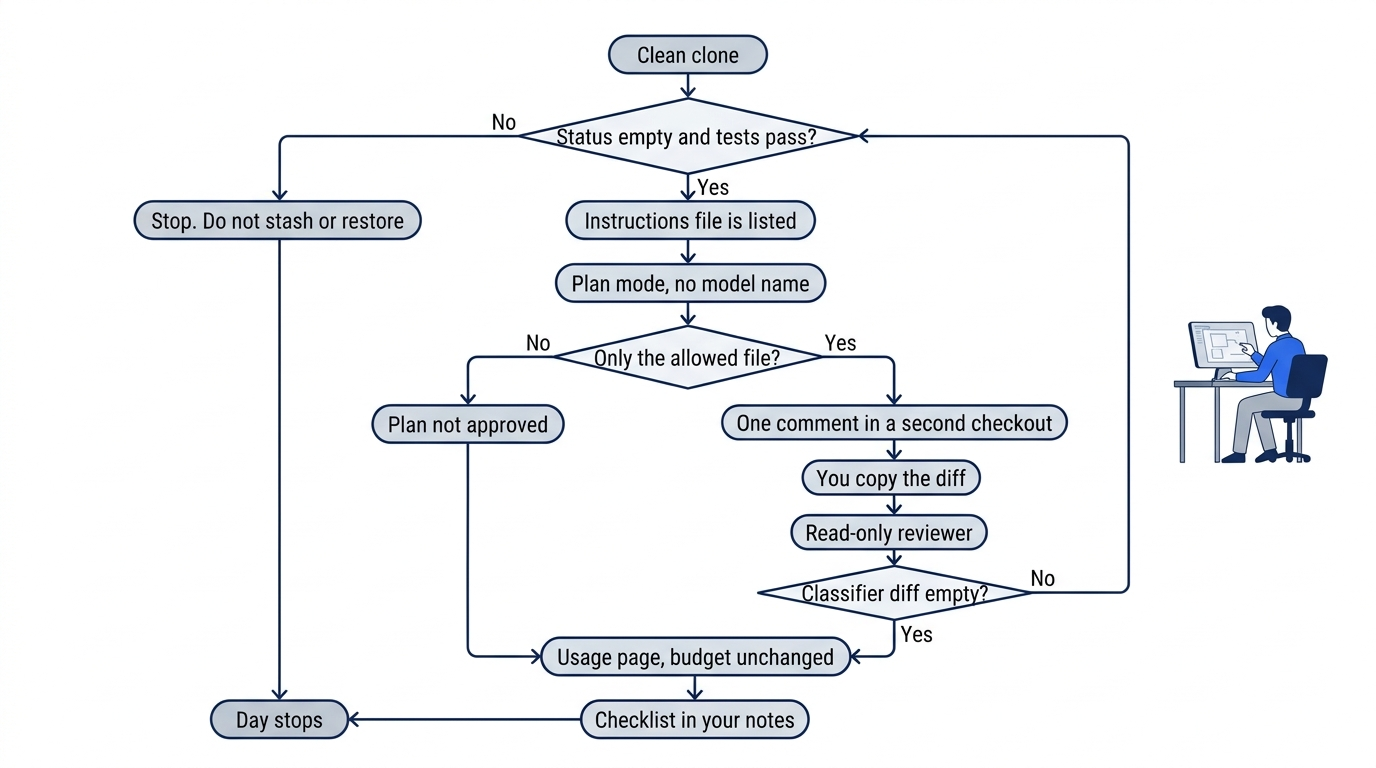
The gates are the whole day in one pass. A dirty status, a classifier patch, or a failing test stops the day, and you do not stash, restore, or edit src/classify.js to force a pass. A plan that is not only the allowed file is not approved. The reviewer sees a diff you copied. The usage page does not become a new budget. The checklist stays in your notes.
Confirm the clone before any session.
cd ~/code/ticket-triage
git status --short
git diff -- src/classify.js
git branch --show-current
npm test
Status prints nothing. The classifier diff prints nothing. The branch line is the branch you are on. Write it down. npm test finishes with zero failures. The line you keep is # fail 0. This day does not give a new test count for a merged tree. If you never merged, the older tree can still show the four names from the earlier tree. You do not edit the classifier to force a count.
If status prints a path, stop. Do not stash. If the classifier diff prints a patch, stop. Do not restore, because a restore can drop a merge you have not committed. If tests fail, stop. Do not edit src/classify.js to force a pass.
Look at the crushed-mug sentence without changing it.
grep -n "crushed and the mug" test/classify.test.js
The command prints a line, or it prints nothing. Read the expected value beside the sentence. If you merged, write shipping or refund when that is what the line shows. If the line still expects other, write that down too. You do not correct it today. If you did not merge, the note already says the issue is open and the classifier is unchanged. You still do not edit the line.
Start a new Copilot CLI session from this folder. Do not pass a model name. Do not pass --yolo. Inside the session, type /instructions.
/instructions
You want .github/copilot-instructions.md in the listing. If the name is missing, stop. Do not rewrite the file to force a listing. End the session after you record whether the name appeared. You do not ask the session to edit.
Ask for one plan in a second checkout
You ask for one plan. You do not approve it until you have read it. In this CLI, Shift+Tab changes plan mode, and copilot --mode plan is the flag form. A sentence in the prompt is not the switch.
The only change you may approve is one small edit in its own worktree. The edit is a comment in test/classify.test.js, or one wording change in the release-checklist file, not a change to the classifier. Today is not a release unless your calendar says it is. If it is not, add the comment and do not invoke the release-checklist skill. Invoke that skill only when a release is today's task. A wording edit is not an invocation. The skill file, when you choose that edit, is .agents/skills/release-checklist/SKILL.md.
Use a second checkout. Do not start a second session beside it. Do not do today's edit in ~/code/ticket-triage itself.
cd ~/code/ticket-triage
git worktree list
Each line shows a path and a commit. You need a path that is not the original clone. If the list shows only ~/code/ticket-triage, use the second directory you already recorded when the two tops differed. Do not copy the repo by hand. If you have no second directory, accept one new worktree from the Copilot app, then list again.
cd to that second path. Replace the placeholder. Do not paste it if it is not a real directory.
cd /path/to/the/day-16/checkout
git rev-parse --show-toplevel
git status --short
git diff -- src/classify.js
The top printed here must differ from ~/code/ticket-triage. Status prints nothing before you start. The classifier diff prints nothing. If status prints a path, stop. Do not stash.
Start plan mode from this checkout. Pass no model name and no --yolo.
copilot --mode plan
When the session shows plan mode, paste the comment task. If you chose a wording change instead, name .agents/skills/release-checklist/SKILL.md and one sentence, and still forbid src/classify.js.
Plan the edit. Do not apply it until I have read the plan.
Change only test/classify.test.js in this checkout.
Add this one comment on its own line at the end of the file:
// Day 16: comment only. Do not change assertions.
Do not edit src/classify.js.
Do not enable auto-merge.
Do not create a pull request.
Do not run git.
Do not name a model.
Read the plan for files, steps, and verification. There is no sample plan. If the plan names src/classify.js, do not approve. If you cannot tell which files it will touch, do not approve. Write "plan not approved" and skip the reviewer. You still do the afternoon.
If the plan is only that one comment, you may approve it after you have read it. Approving can leave plan mode and let Copilot make the change. Refuse a push, a pull request, and auto-merge. If the session asks to edit any other file, refuse.
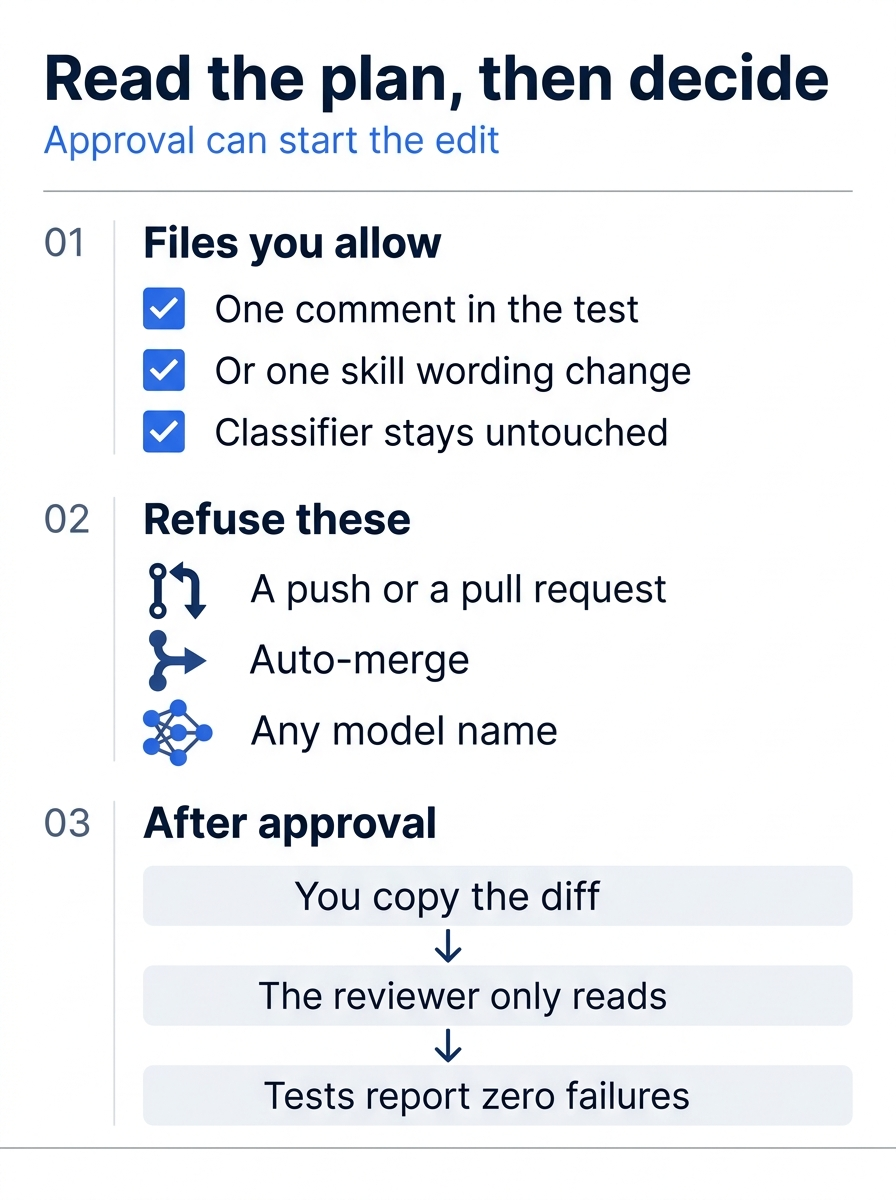
The checks are the approval rule in plain sight. You allow one comment in the test file, or one wording change in the skill file when a release is actually today's task, and you do not allow src/classify.js. You refuse a push, a pull request, auto-merge, and any model name. After an approval you copy the diff yourself, the reviewer only reads, and npm test still ends with zero failures.
Gotcha: Approving the plan before you read it, or approving a plan that edits src/classify.js. Read first. A second miss is auto-merge, so the day can finish without you. Auto-merge stays off.
The reviewer reads a diff you copied
The read-only reviewer is the file .github/agents/reviewer.agent.md, and --agent reviewer selects it. The session cap is --max-ai-credits. Replace 20 with a small number you choose. The 20 in the command is a placeholder, not a recommendation. You pass no model name.
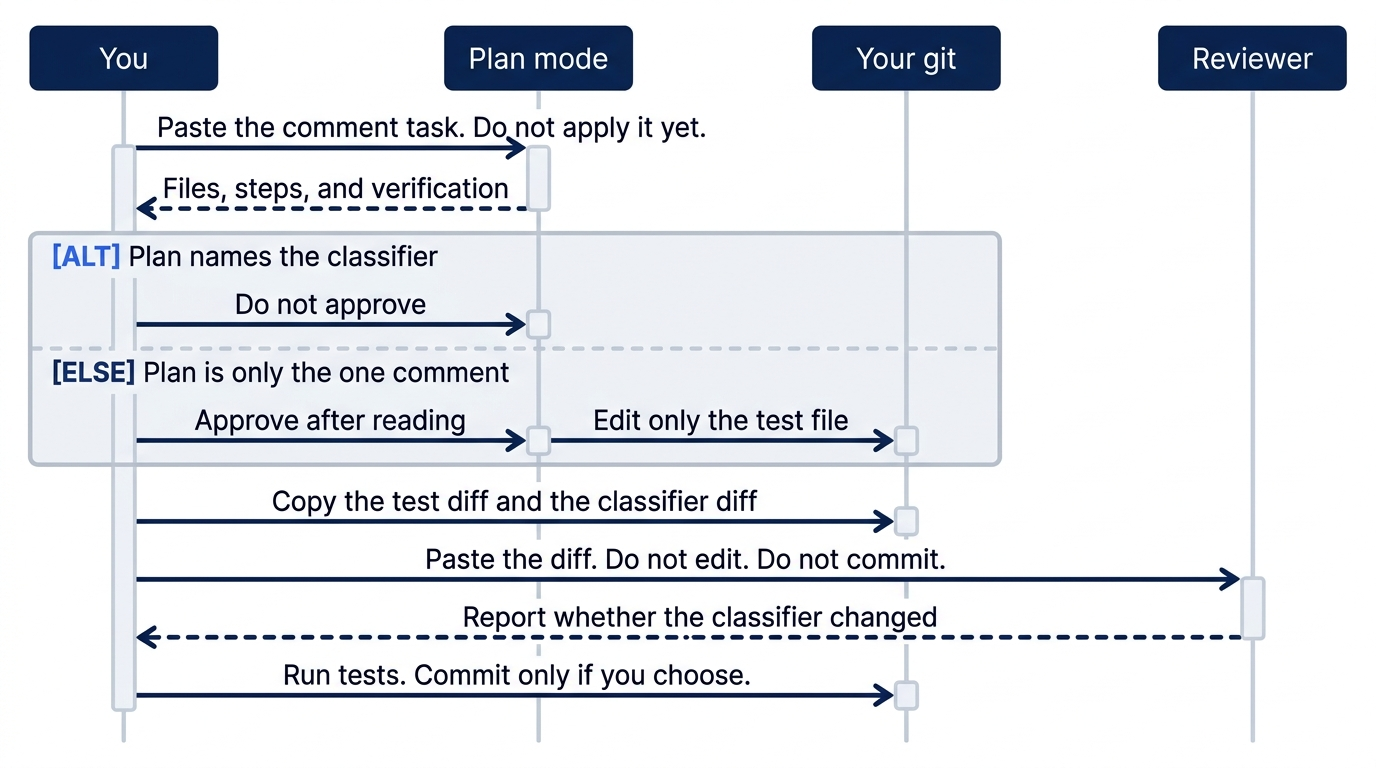
You and the reviewer do not share the git role. Plan mode returns files, steps, and verification. You approve only the one comment, or you refuse the plan. You run git diff yourself. The reviewer reports whether src/classify.js changed, and it does not edit or commit. You run the tests, and you commit only if you choose to.
copilot --agent reviewer --max-ai-credits 20
If history still shows the placeholder 20, the check fails until it shows your number. Do not pass --yolo. If a picker appears, do not type a model name. If the only way forward is a model name, stop.
You run git. The reviewer does not. In another terminal, from the same checkout, copy the diff, then paste it under this request.
git diff -- test/classify.test.js
git diff -- src/classify.js
The classifier diff prints nothing. The test diff is the one comment, or it prints nothing if you did not approve the plan. Paste what you got. Do not invent a hunk.
Review this diff.
Report whether src/classify.js changed.
Do not edit files. Do not commit.
There is no sample review. Re-run this on your account before you trust the wording. If the session asks to edit, refuse. If you cannot tell which answer refuses, stop the turn.
Leave the session and prove the checkout.
git diff -- src/classify.js
git status --short
npm test
The classifier diff prints nothing. Status lists only test/classify.test.js, or it lists only the skill file if that was the one wording change you chose. It does not list src/classify.js. npm test finishes with # fail 0. If the classifier diff prints a patch, stop. Do not commit that file. Do not ask the reviewer to repair it.
You do not have to commit. If you do, you type the commit, you add only that one file, and you do not push. The agent does not run git. You do not enable auto-merge, and you do not create a file for the checklist.
The usage page is a different control
Open the AI usage page in GitHub billing settings. Find this session if the page shows it yet. Usage can lag. A missing row does not mean that the session cap failed. Write "usage page open, session not listed yet" when the row is missing.
--max-ai-credits is a ceiling on the session you started, not the budget on this page. You do not change the budget you already set. You do not write a dollar amount for the review, and you do not widen a spend limit because a row looks small.
The checklist lives in your notes
In your notes, not in the repo, list every command you actually ran. Beside each Copilot command or flag, write the name today's steps already used for it, such as plan, reviewer, session cap, or worktree. npm test stays on the list as the pass check. It is not one of those names. A checklist that names a model fails. A checklist that says you enabled auto-merge fails.
You can stop here. The rest of the article is the glossary, the Claude Code map, the quarter's changes through November 16, 2026, and the three ways to spend the day.
Glossary for the day
Each meaning is one sentence. The glossary names no default model. The credit price is the individual billing page, as of November 16, 2026.
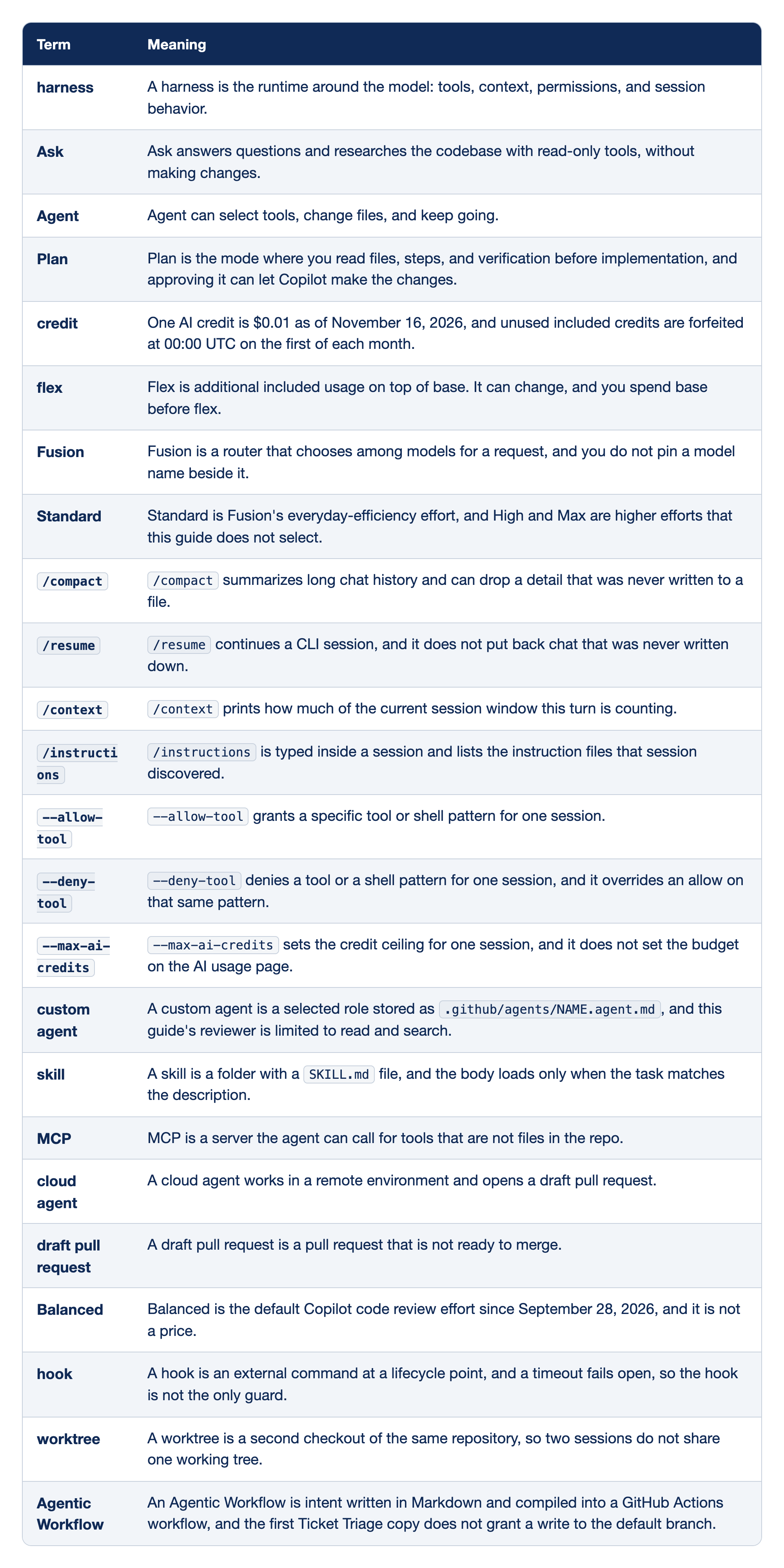
The glossary pairs each term with one meaning for this working day. The Term column holds the flag, command, or idea. The Meaning column holds one sentence and names no default model. The credit figure is the price on the individual billing page as of November 16, 2026, not a new price invented for this day.
- harness: A harness is the runtime around the model, covering tools, context, permissions, and session behavior, and in VS Code you select the Copilot harness rather than Local.
- Ask: Ask answers questions and researches the codebase with read-only tools, and it does not make changes.
- Agent: Agent can select tools, change files, and keep going.
- Plan: Plan is the mode where you read files, steps, and verification before implementation, and approving it can let Copilot make the changes.
- credit: One AI credit is $0.01 as of November 16, 2026, and unused included credits are forfeited at 00:00 UTC on the first of each month.
- flex: Flex is additional included usage on top of base. It can change, and you spend base before flex.
- Fusion: Fusion is a router that chooses among models for a request, and you do not pin a model name beside it.
- Standard: Standard is Fusion's everyday-efficiency effort, not a model name, and High and Max are higher efforts that this guide does not select.
/compact:/compactsummarizes long chat history and can drop a detail that was never written to a file./resume:/resumecontinues a CLI session, and it does not put back chat that was never written down./context:/contextprints how much of the current session window this turn is counting, and it is a session reading, not the billing page./instructions:/instructionsis typed inside a session and lists the instruction files that session discovered.--allow-tool:--allow-toolgrants a specific tool or shell pattern for one session.--deny-tool:--deny-tooldenies a tool or a shell pattern for one session, and it overrides an allow on that same pattern. You still pass it when a hook timeout fails open.--max-ai-credits:--max-ai-creditssets the credit ceiling for one session, and it does not set the budget on the AI usage page.- custom agent: A custom agent is a selected role stored as
.github/agents/NAME.agent.md, and this guide's reviewer is limited to read and search. - skill: A skill is a folder with a
SKILL.mdfile, and the body loads only when the task matches the description. - MCP: MCP is a server the agent can call for tools that are not files in the repo, and a connected badge is not a tool call.
- cloud agent: A cloud agent works in a remote environment and opens a draft pull request.
- draft pull request: A draft pull request is a pull request that is not ready to merge.
- Balanced: Balanced is the default Copilot code review effort since September 28, 2026, and it is not a price. This guide gives it no dollar amount.
- hook: A hook is an external command at a lifecycle point, and a timeout fails open, so the hook is not the only guard.
- worktree: A worktree is a second checkout of the same repository, so two sessions do not share one working tree.
- Agentic Workflow: An Agentic Workflow is intent written in Markdown and compiled into a GitHub Actions workflow, and the first Ticket Triage copy does not grant a write to the default branch.
Read the meaning before you reuse the flag. Do not add a model name to any row.
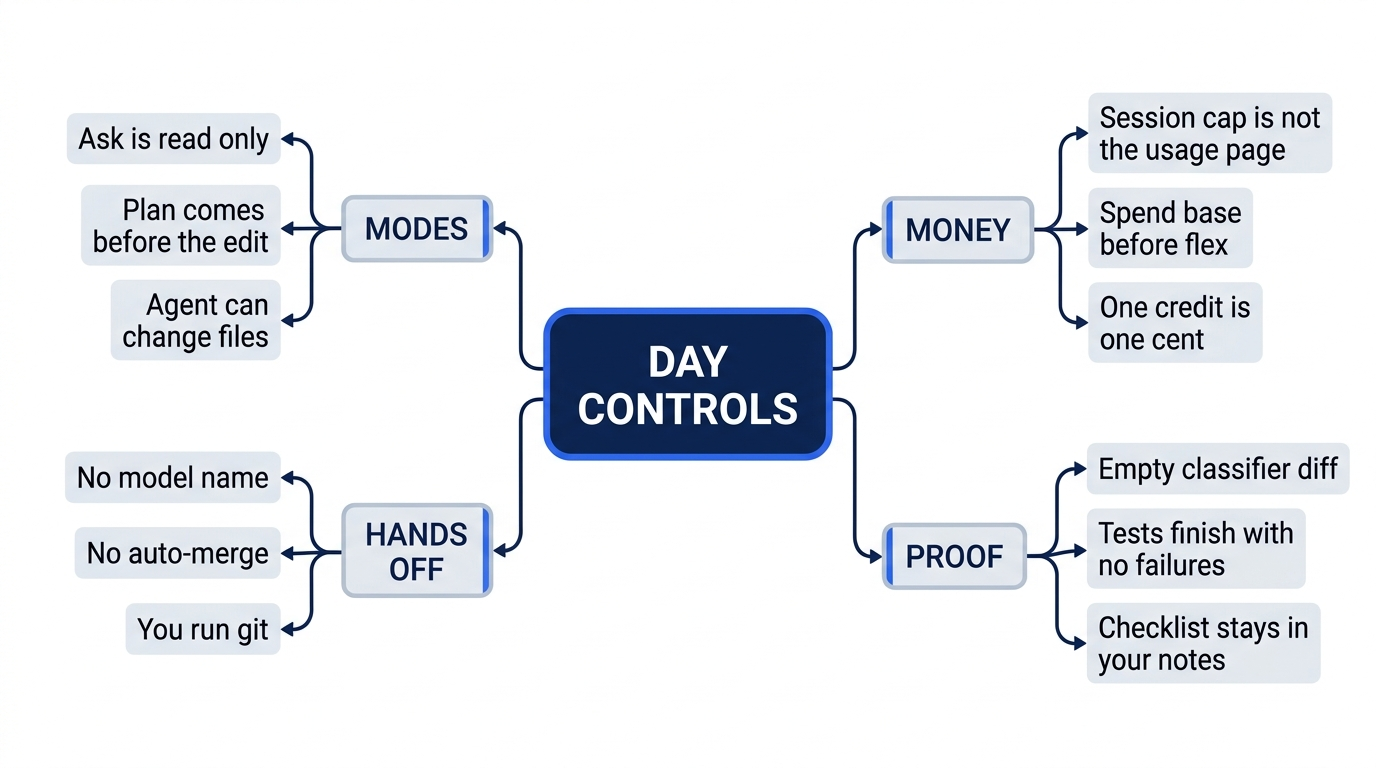
The four groups are the controls you can name without opening a changelog. Ask researches and does not edit. Plan is the read before an edit. Agent can change files. The session cap is not the usage page, you spend base before flex, and one AI credit is one cent as of November 16, 2026. Proof is an empty classifier diff, tests with no failures, and a checklist that stays in your notes. You pass no model name, you leave auto-merge off, and you run git.
A short Claude Code map
If you have used Claude Code, the rows below are the casual comparisons this guide already uses. They are not a second product guide.
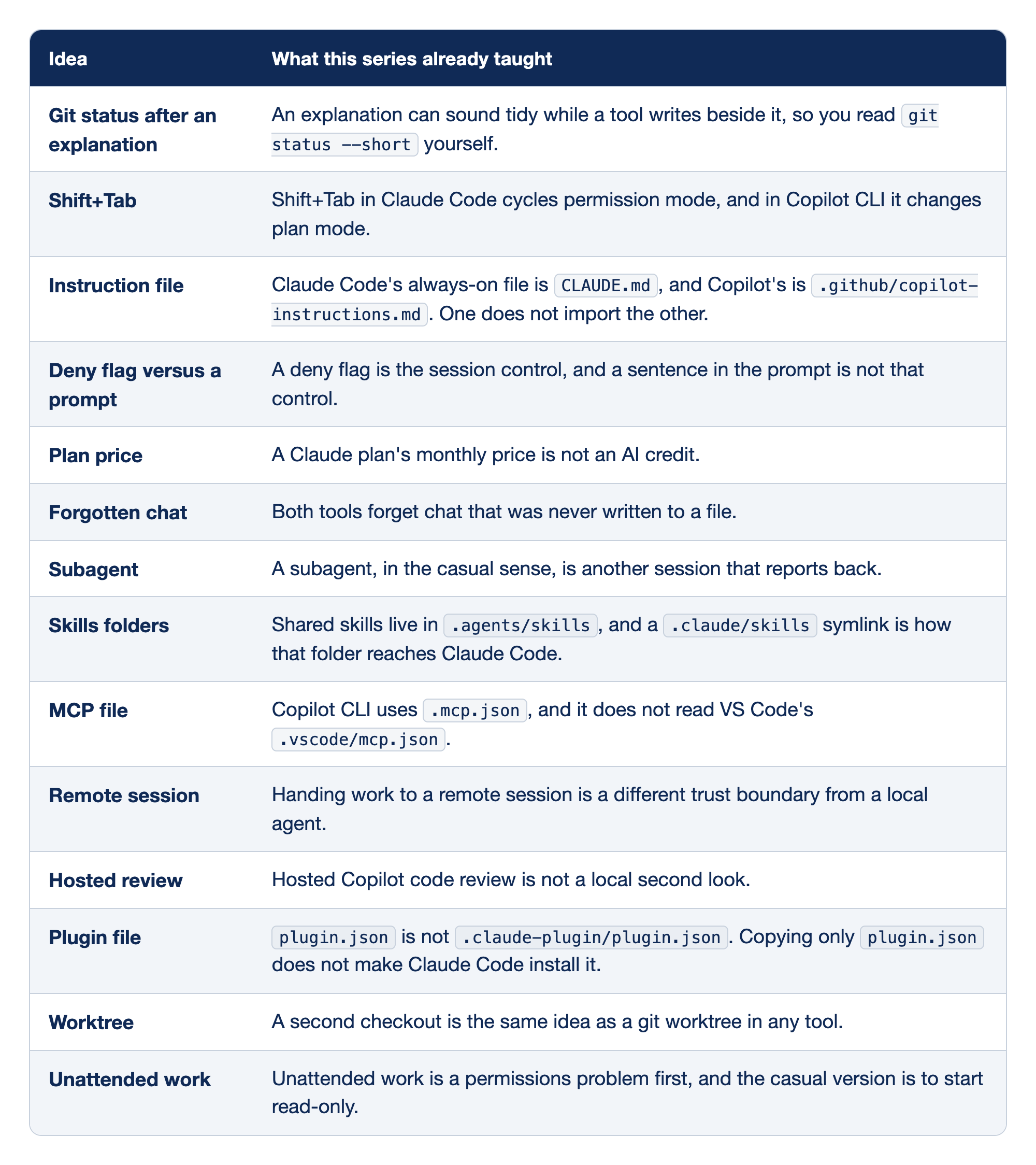
The map pairs one Claude Code habit with the practice a daily Copilot user needs. The Idea column names the habit. The What this series already taught column states the matching practice in one line. The map is not a research feature list.
- Git status after an explanation: An explanation can sound tidy while a tool writes beside it, so you read
git status --shortyourself, and an empty status is the result you keep. - Shift+Tab: Shift+Tab in Claude Code cycles permission mode, and in Copilot CLI it changes plan mode.
- Instruction file: Claude Code's always-on file is
CLAUDE.md, and Copilot's is.github/copilot-instructions.md. One does not import the other, so keep both files if the repo serves both tools. - Deny flag versus a prompt: A deny flag is the session control, and a sentence in the prompt is not that control. A prompt does not replace
--deny-tool. - Plan price: A Claude plan's monthly price is not an AI credit, and this guide does not convert one into the other.
- Forgotten chat: Both tools forget chat that was never written to a file.
- Subagent: A subagent, in the casual sense, is another session that reports back, and the git diff is still the proof.
- Skills folders: Shared skills live in
.agents/skills, and a.claude/skillssymlink is how that folder reaches Claude Code. - MCP file: Copilot CLI uses
.mcp.json, and it does not read VS Code's.vscode/mcp.json. The VS Code file is not a substitute. - Remote session: Handing work to a remote session is a different trust boundary from a local agent.
- Hosted review: Hosted Copilot code review is not a local second look.
- Plugin file:
plugin.jsonis not.claude-plugin/plugin.json. Copying onlyplugin.jsondoes not make Claude Code install it. - Worktree: A second checkout is the same idea as a git worktree in any tool.
- Unattended work: Unattended work is a permissions problem first, and the casual version is to start read-only.
One row is one idea. None of the rows names a default model, a per-review dollar amount, or a sandbox rate.
What changed from August 24 through November 16, 2026
The dates run from August 24, 2026 through November 16, 2026, newest first. They come from the series ledger frozen on November 16, 2026. A model name appears only as an addition or a retirement on that date. This guide names no default model.
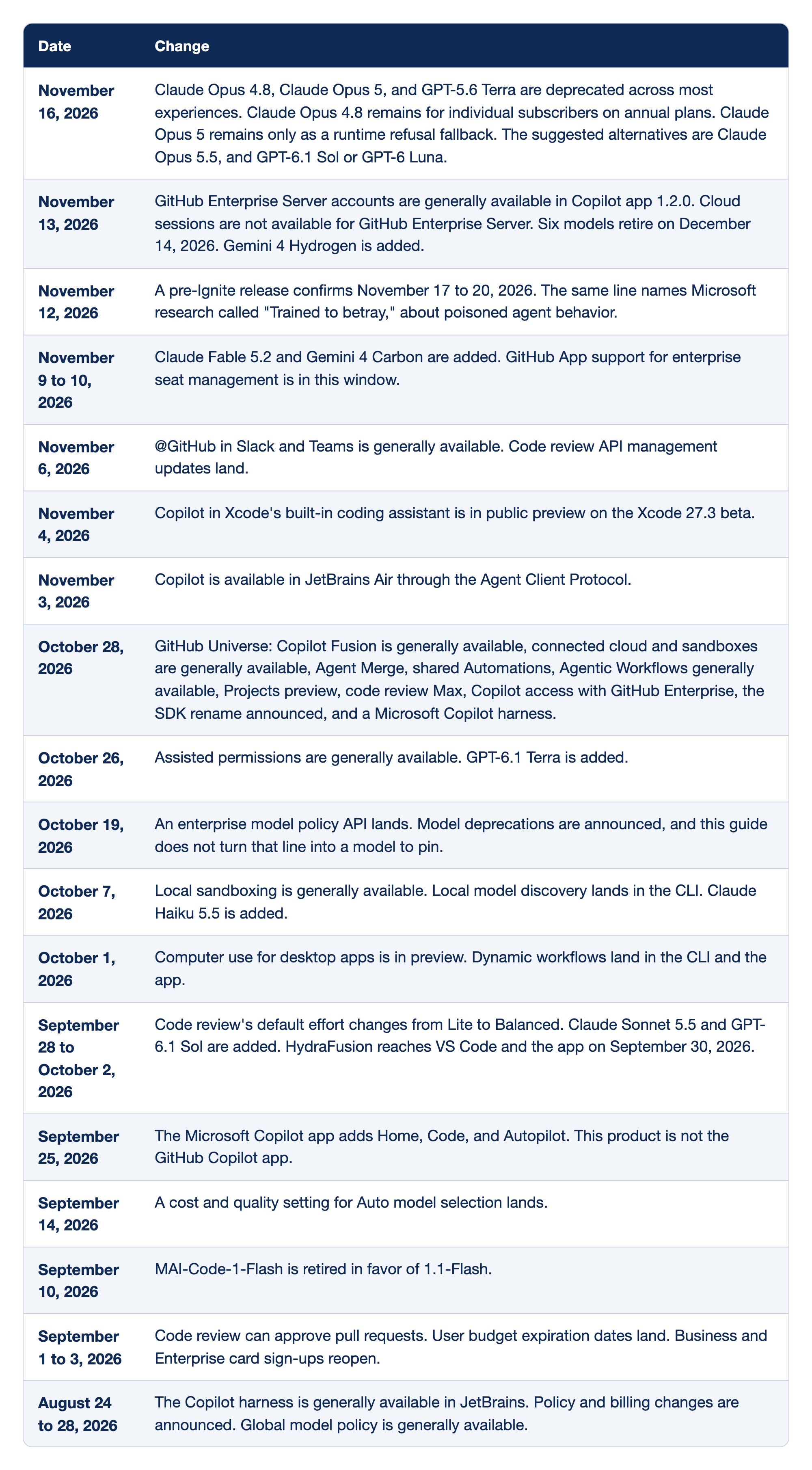
The quarter ledger pairs each date with the change recorded for it. The Date column runs from November 16, 2026 back through August 24, 2026, newest first. The Change column holds the product note for that date, and a model name appears only as an addition or a retirement.
- November 16, 2026: Claude Opus 4.8, Claude Opus 5, and GPT-5.6 Terra are deprecated across most experiences. Claude Opus 4.8 remains for individual subscribers on annual plans. Claude Opus 5 remains only as a runtime refusal fallback. The suggested alternatives are Claude Opus 5.5, and GPT-6.1 Sol or GPT-6 Luna.
- November 13, 2026: GitHub Enterprise Server accounts are generally available in Copilot app 1.2.0, cloud sessions are not available for GitHub Enterprise Server, six models retire on December 14, 2026, and Gemini 4 Hydrogen is added.
- November 12, 2026: A pre-Ignite release confirms November 17 to 20, 2026, and the same line names Microsoft research called "Trained to betray," about poisoned agent behavior. The line is not a switch in Ticket Triage.
- November 9 to 10, 2026: Claude Fable 5.2 and Gemini 4 Carbon are added, and GitHub App support for enterprise seat management is in this window.
- November 6, 2026: @GitHub in Slack and Teams is generally available, and code review API management updates land.
- November 4, 2026: Copilot in Xcode's built-in coding assistant is in public preview on the Xcode 27.3 beta.
- November 3, 2026: Copilot is available in JetBrains Air through the Agent Client Protocol.
- October 28, 2026: GitHub Universe records Copilot Fusion as generally available, connected cloud and sandboxes as generally available, Agent Merge, shared Automations, Agentic Workflows as generally available, Projects in preview, code review Max, Copilot access with GitHub Enterprise, the SDK rename announced, and a Microsoft Copilot harness.
- October 26, 2026: Assisted permissions are generally available, and GPT-6.1 Terra is added.
- October 19, 2026: An enterprise model policy API lands, and model deprecations are announced. This guide does not turn that line into a model to pin.
- October 7, 2026: Local sandboxing is generally available, local model discovery lands in the CLI, and Claude Haiku 5.5 is added.
- October 1, 2026: Computer use for desktop apps is in preview, and dynamic workflows land in the CLI and the app.
- September 28 to October 2, 2026: Code review's default effort changes from Lite to Balanced, Claude Sonnet 5.5 and GPT-6.1 Sol are added, and HydraFusion reaches VS Code and the app on September 30, 2026.
- September 25, 2026: The Microsoft Copilot app adds Home, Code, and Autopilot. This product is not the GitHub Copilot app.
- September 14, 2026: A cost and quality setting for Auto model selection lands.
- September 10, 2026: MAI-Code-1-Flash is retired in favor of 1.1-Flash.
- September 1 to 3, 2026: Code review can approve pull requests, user budget expiration dates land, and Business and Enterprise card sign-ups reopen.
- August 24 to 28, 2026: The Copilot harness is generally available in JetBrains, policy and billing changes are announced, and global model policy is generally available.
The ledger is a record of the quarter, not a menu of features to turn on this afternoon. Sandbox rows have no rate. Review rows have no dollar amount.
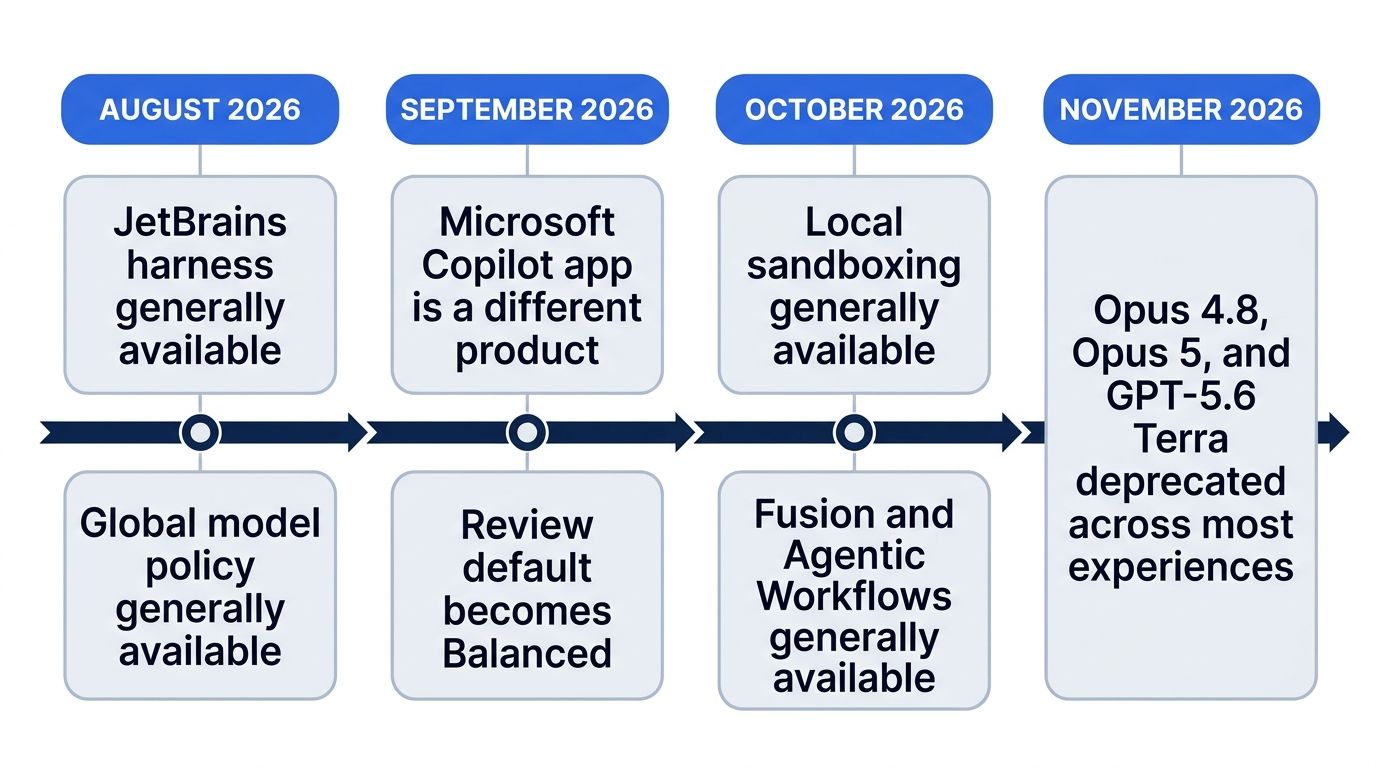
The marks are a short arc, not every row. August brings the Copilot harness to general availability in JetBrains, with global model policy in the same stretch. September 25, 2026 adds Home, Code, and Autopilot to the Microsoft Copilot app, which is a different product from the GitHub Copilot app. In the September 28 to October 2 window, Balanced becomes the code review default. October brings local sandboxing, then Fusion and Agentic Workflows at general availability. November 16, 2026 deprecates Claude Opus 4.8, Claude Opus 5, and GPT-5.6 Terra across most experiences.
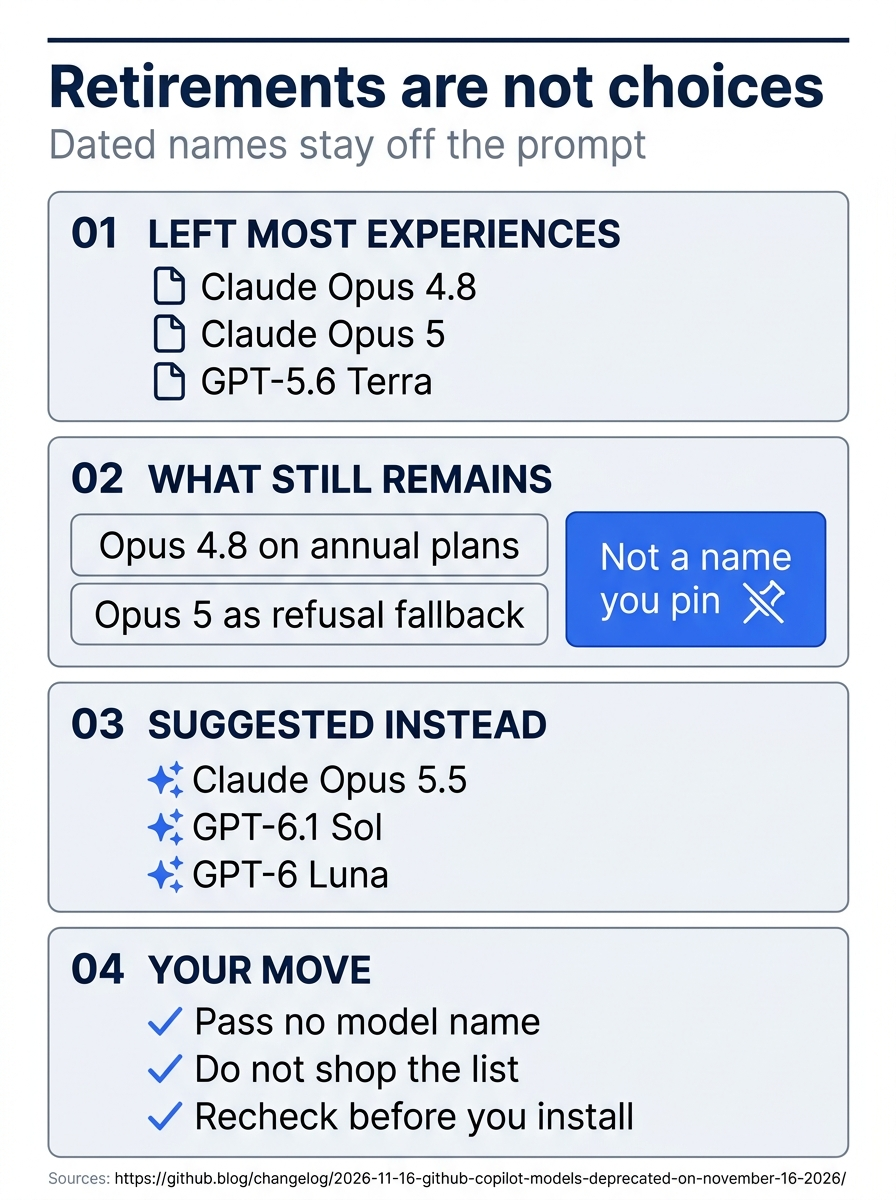
The poster is the November 16, 2026 line by itself. GitHub deprecated Claude Opus 4.8, Claude Opus 5, and GPT-5.6 Terra across most experiences. Claude Opus 4.8 remains for individual subscribers on annual plans. Claude Opus 5 remains only as a runtime refusal fallback. The suggested alternatives are Claude Opus 5.5, and GPT-6.1 Sol or GPT-6 Luna. Those names are dated retirements, not choices and not a default. You pass no model name, you do not shop the list, and you recheck a changelog before you treat any row as something to install.
The model names in the ledger are additions or retirements only. Gemini 4 Hydrogen, Claude Fable 5.2, Gemini 4 Carbon, GPT-6.1 Terra, Claude Haiku 5.5, Claude Sonnet 5.5, and GPT-6.1 Sol were added. MAI-Code-1-Flash was retired in favor of 1.1-Flash. On November 16, 2026, Claude Opus 4.8, Claude Opus 5, and GPT-5.6 Terra were deprecated across most experiences. This guide still names no default.
Six models retire on December 14, 2026. This guide does not name them, and it does not turn that date into a model to pin.
Microsoft Ignite runs November 17 to 20, 2026, after this cutoff. The November 12, 2026 line is a pre-event date confirmation, not a shipped Ignite feature. The recheck has not been done. You do not treat that line, or the research title beside it, as a feature you can use today.
Gotcha: Agent Merge paired with auto-merge can land a repair without you. Leave both off. You still merge by hand. This day states no sandbox rate and no per-review dollar amount.
The November 16, 2026 model deprecations are the November 16, 2026 changelog. The JetBrains harness date is the August 24, 2026 changelog. Fusion's general availability is the October 28, 2026 changelog. Agentic Workflows' general availability is the October 28, 2026 workflows post. Balanced as the review default is the October 2, 2026 changelog. The other rows stay on the November 16, 2026 ledger. Recheck a changelog before you treat one of those rows as something to install today.
What stays outside this guide
Spark, Spaces, Eclipse, and the Microsoft 365 Copilot app stay out of this guide. Spaces are not Copilot app Projects. The September 25, 2026 Microsoft Copilot app is a different product from the GitHub Copilot app, and it stays out too.
The Microsoft Copilot SDK is a different product from the daily CLI. It was generally available on June 2, 2026. A rename was announced on October 28, 2026. No migration was required as of that date. This guide does not guess a new package name. The repository is github/copilot-sdk.
Three ways to spend the day
Casual, pro, and elite are ways to spend the day. They are not job titles. A casual day stops when the written checklist exists and the tests still pass. A pro day adds the reviewer agent and the usage-page check. Today's written steps already include both, so a reader who finished them has done those pro checks. An elite day keeps the read-only Agentic Workflow and still merges by hand. You do not turn auto-merge on to earn the name.
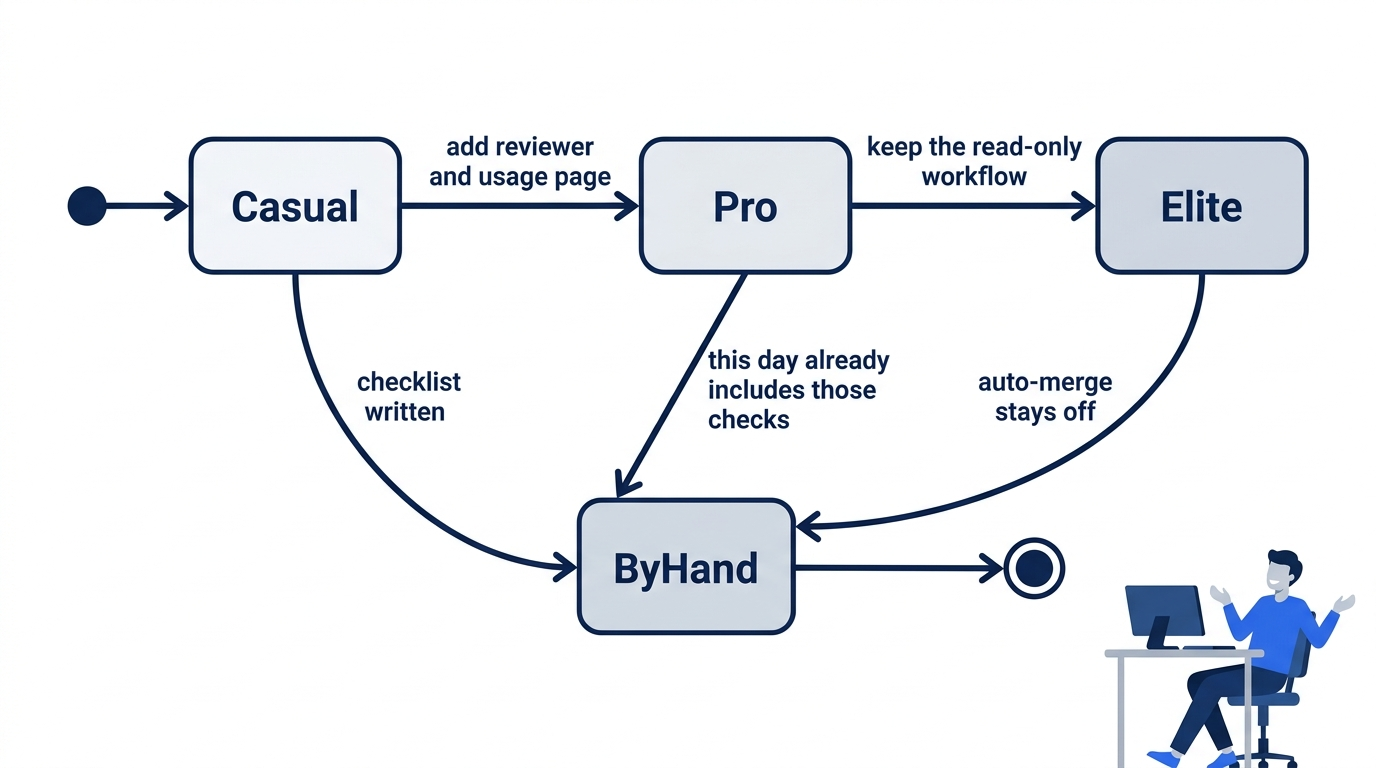
Each way can stop, and each way still reaches a merge you perform. Casual ends when the checklist is written. Pro adds the reviewer and the usage page, which this day's steps already include. Elite keeps the read-only workflow. None of the three turns auto-merge on.
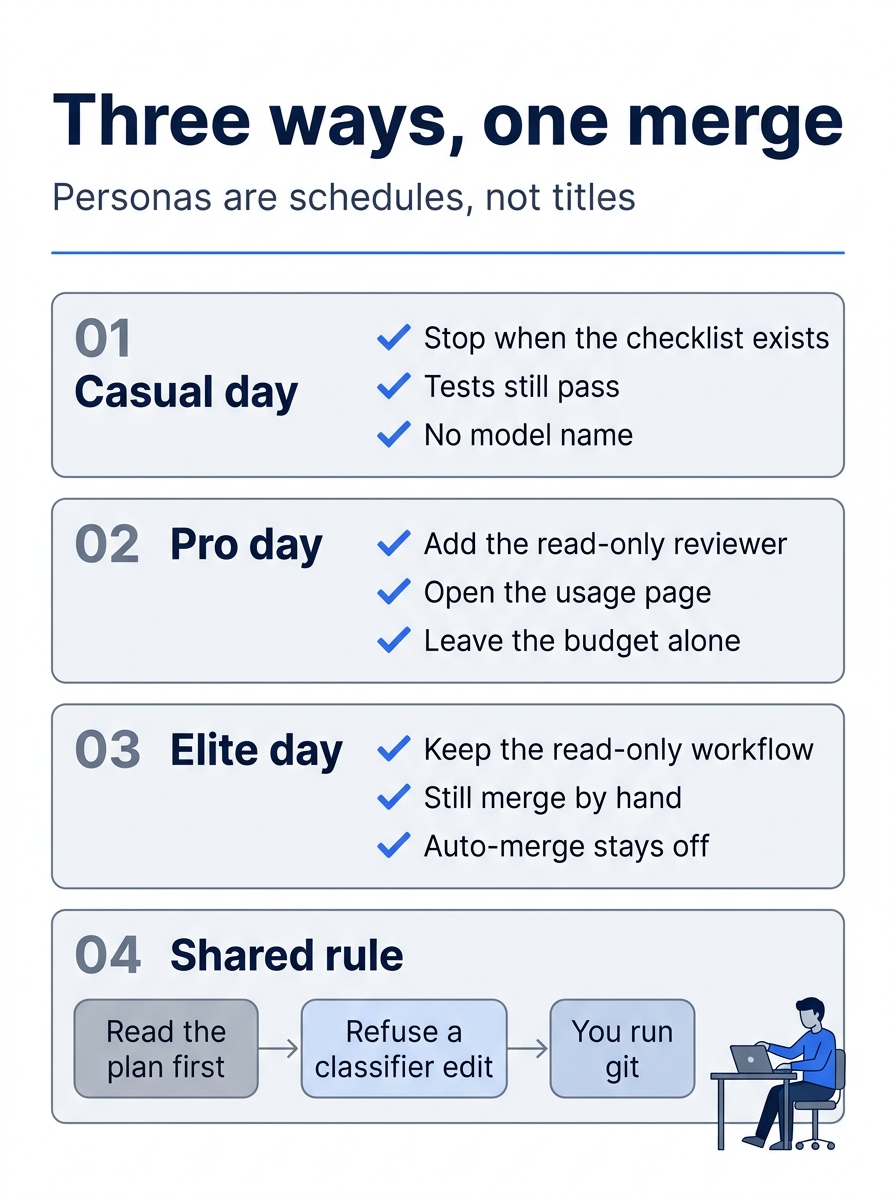
The three schedules share the same refusals. A casual day stops when the checklist exists, the tests still pass, and the note names no model. A pro day adds the read-only reviewer, opens the usage page, and leaves the budget alone. An elite day keeps the read-only workflow, still merges by hand, and leaves auto-merge off. In every schedule you read the plan first, you refuse a classifier edit, and you run git.
Do this today
Everyone
- The written checklist of commands you actually ran exists in your notes, and each Copilot command or flag is written next to the name today's steps already used. The check is that note. It is not a new file in the repo. A note that names a model, or that says auto-merge is on, fails.
npm testfinishes with zero failures. The check is# fail 0. You did not editsrc/classify.jstoday to force that line. The habit to keep: the session cap is--max-ai-credits, and the AI usage page is a different control.
If you read the glossary and the ledger
- Write three glossary terms you used today, in your own words, and match them to the meanings. The check is three sentences. None of them names a model, a per-review dollar amount, or a sandbox rate.
The merge still has your name on it
The quiet ending is the trap. A passing test and a tidy plan are not a merge. Casual, pro, and elite only change how much of the day you spend watching Copilot work. They do not change who is allowed to land the result.
On November 16, 2026, GitHub deprecated Claude Opus 4.8, Claude Opus 5, and GPT-5.6 Terra across most experiences. Those names are dated retirements, not a default you forgot to type. The day you just ran never needed one. The note in your own words, the empty classifier diff, and # fail 0 are the record.
If you commit, you type the commit. If you merge, you merge by hand. Auto-merge stays off.
This is Part 16 of "GitHub Copilot, Day-to-Day," a 16-part guide to using GitHub Copilot as a daily coding agent.