
The Second Window Was Not a GitHub Copilot App Worktree
Two GitHub Copilot app sessions are parallel only when each one has its own worktree, and you still refuse to let a cloud repair merge itself.
Two sessions are parallel only when each one has its own checkout, and a cloud repair still does not merge itself.
You opened a second GitHub Copilot session so two edits could run at once, and both of them were about to write into the folder you already had open. The second window is not a second checkout, and a mixed status is not two tasks.
In this article: You will run two sessions in the GitHub Copilot app, each in its own worktree, and prove they do not share a working tree. One session adds a sentence to the release checklist. The other adds a comment to the tests. You also learn why computer use stays off, why Projects are a different home, and why Agent Merge is never paired with auto-merge.
Preview: written November 16, 2026, before Microsoft Ignite. Some paid steps are not yet tested live; this guide will be updated November 21, 2026.
You open a second session in the GitHub Copilot app so two small edits can run at once. If both sessions use the folder you already have open, one status can list the release checklist and the test file together, and you cannot point at a directory and say which session owns which line. Two windows on one checkout are one working tree. They are not parallel work. Two app sessions were not run for this article on November 16, 2026, so there is no transcript to quote.
A worktree is a second checkout of the same repository. A GitHub Copilot app worktree gives each session its own folder and, when the branch is already checked out, its own branch. The product for this day is the GitHub Copilot app, GitHub's desktop app. It is not the Microsoft 365 Copilot app. Parallel means two sessions, each in its own worktree, each allowed one file.
Ticket Triage is the repository, and npm test is the only local check. One session may add a sentence to the release checklist. The other may add a comment to the tests. You check the two directories, then you commit or you stop. A cloud repair that merges itself is a different kind of parallel, and it stays off.
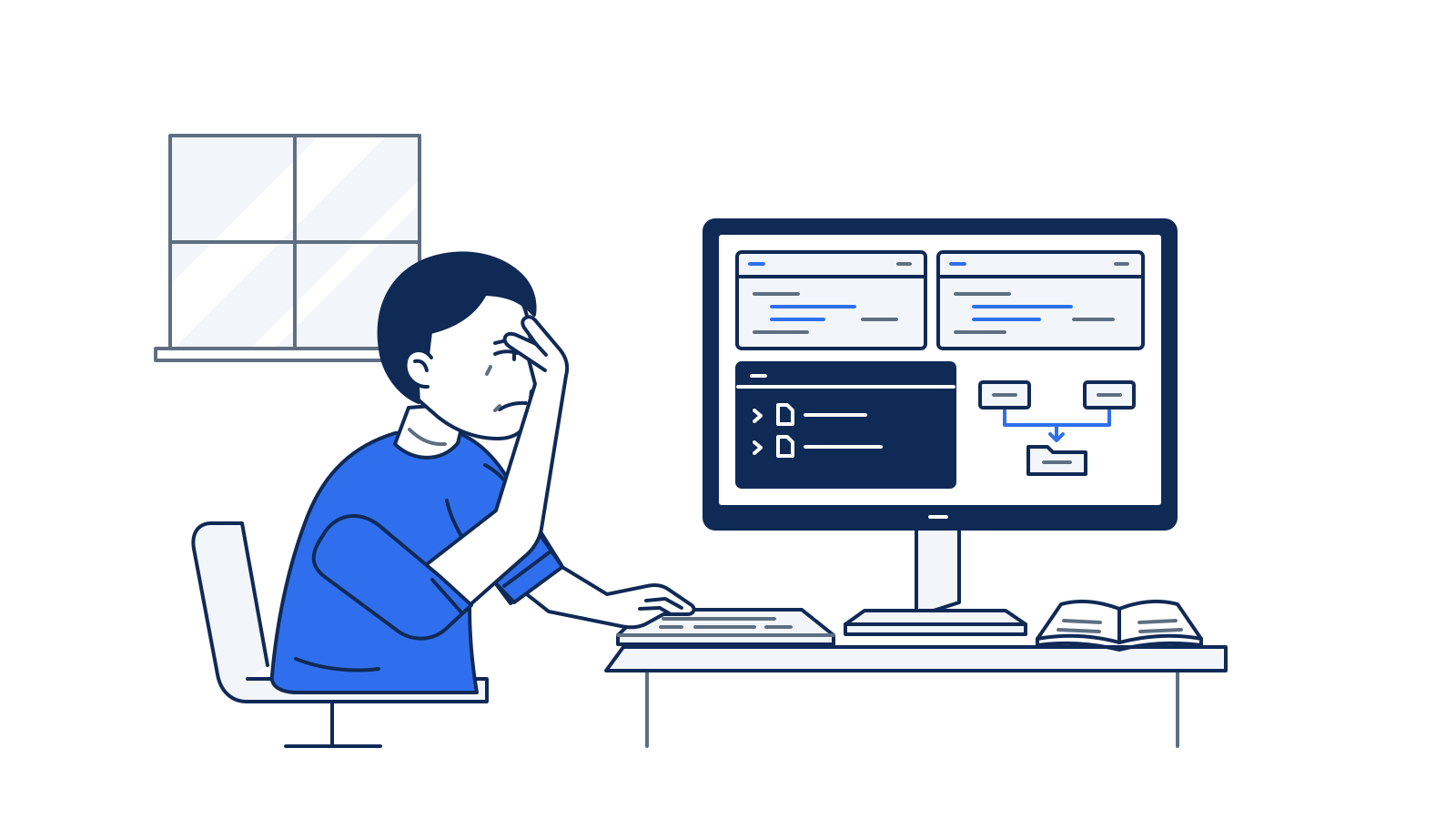
The illustration is that failure. Two windows are open, one status lists both files, and no second folder path is written down. Parallel work has not started.
Starting fresh or fell behind? Run git switch -C main copilot/day-13. This replaces your main with the end of Day 13; to keep your own work, run git branch my-backup first.
Confirm one clean checkout first
Work from the Ticket Triage clone. On macOS and Linux the path is ~/code/ticket-triage. On Windows, use C:\code\ticket-triage in Git Bash. npm test is the test command. src/classify.js is the classifier. You do not edit it. If a merge you already made is on the branch, leave it. Do not revert it, and do not re-break the classifier to match an older exercise.
Confirm the clone before you open a second checkout.
cd ~/code/ticket-triage
git diff -- src/classify.js
git status --short
git log -1 --oneline
npm test
The classifier diff prints nothing. Status prints nothing. Write down the one-line log so that you can tell later whether a session committed. npm test finishes with zero failures. If the diff prints a patch, stop. Do not restore, because a restore can drop a merge that you have not committed. If status prints anything, stop. Do not stash. If tests fail, stop. Do not edit src/classify.js to force a pass.
As of November 16, 2026, two app sessions were not run for this article. There is no screenshot and no session transcript. Re-run this on your account before you trust the wording. The checks that you run yourself are git status, git diff, and npm test.
Name the app before you open a second window
The GitHub Copilot app is GitHub's desktop app. It is not the Microsoft 365 Copilot app. If the app is not installed, install it from the GitHub Copilot app page linked in the June 17 general availability post. This article does not name an installer file. Install Git if the machine does not already have it, sign in to GitHub, and connect the Ticket Triage repository or the local folder. If you cannot install or sign in, stop. Do not open two CLI sessions and call them the app.
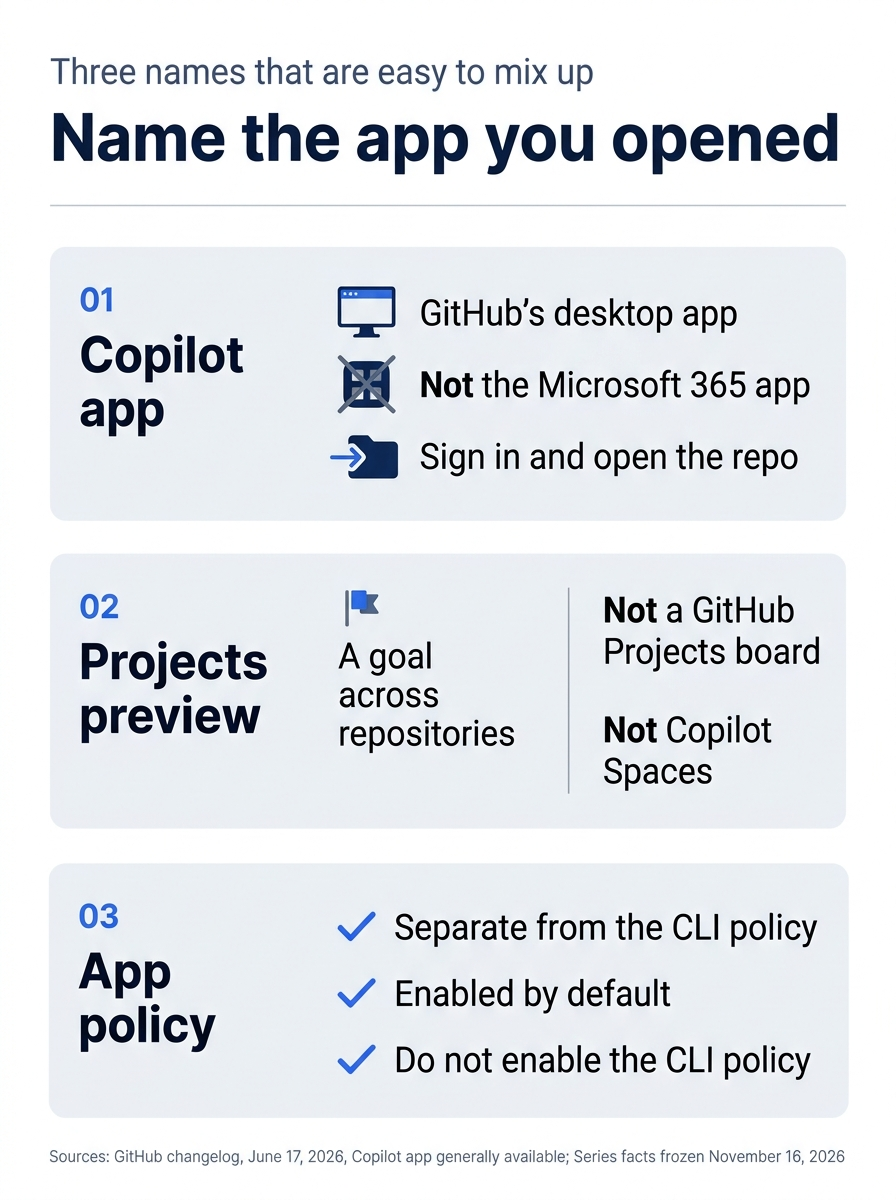
The poster keeps those names apart. The desktop app is the GitHub Copilot app, not the Microsoft 365 Copilot app. Projects are a goal across repositories, not a board and not Copilot Spaces. The app policy is its own switch, and it is not the CLI policy.
The app had a technical preview on May 14, 2026, in the technical preview post. It became generally available on macOS, Windows, and Linux on June 17, 2026. Every Copilot plan, including Free and Education, could use it on July 7, 2026, in the all-plans post. Call it the GitHub Copilot app that became generally available on June 17, 2026. Do not attach a build number.
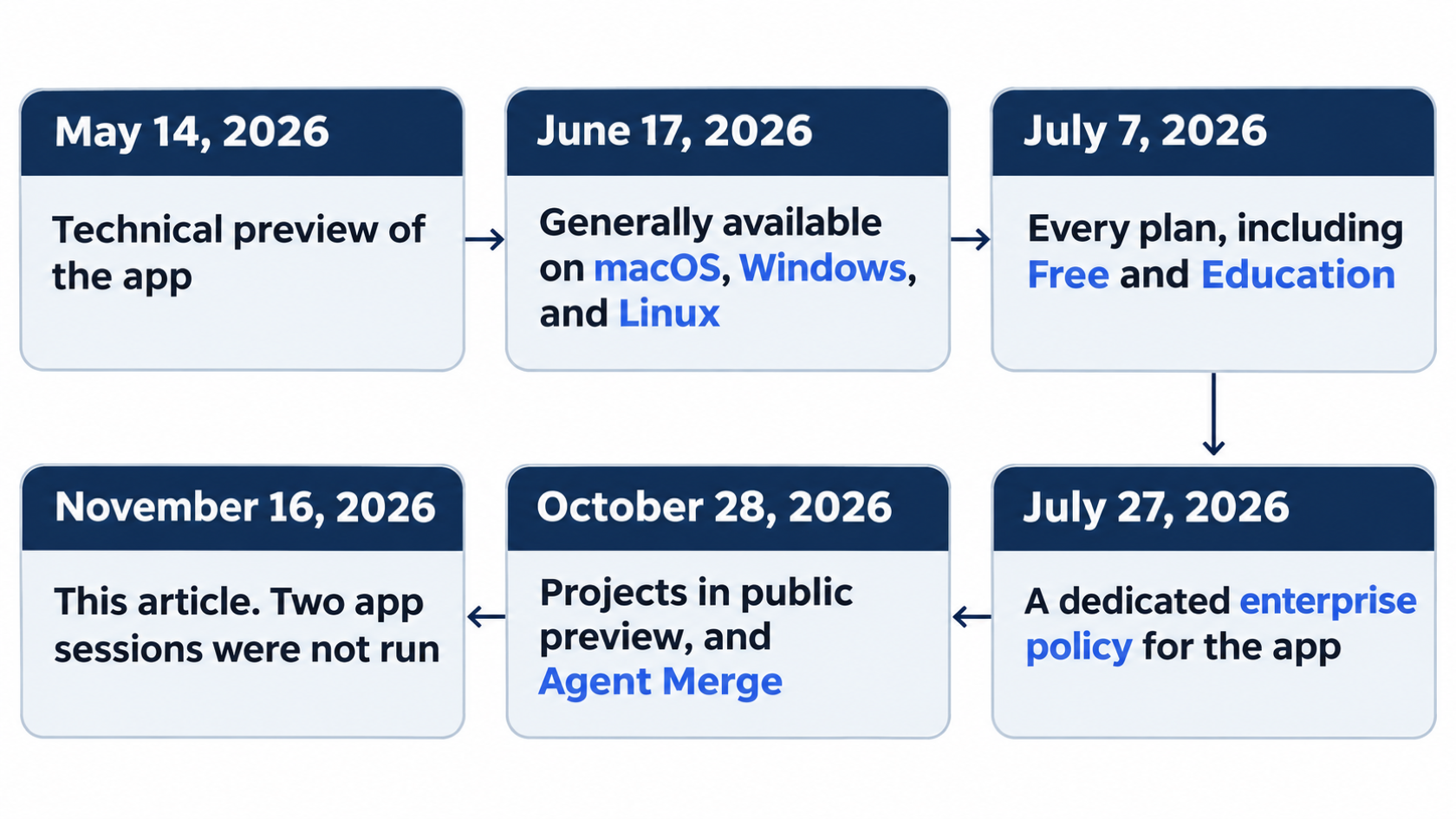
The timeline adds July 27, 2026, the dedicated app policy, and October 28, 2026, when Projects entered public preview and Agent Merge shipped. It ends on November 16, 2026, when two app sessions were not run. It is product history, not a session log.
Two sessions, two GitHub Copilot app worktrees
Open the GitHub Copilot app and start a session on Ticket Triage. If the app offers a new worktree or a separate checkout for the session, accept it. If it offers a new branch along with that checkout, accept the new branch. Git usually refuses a second checkout of a branch that is already checked out. If the only offer is the folder that you already have open, refuse it. Sharing that folder is the failure mode that this day exists to avoid.
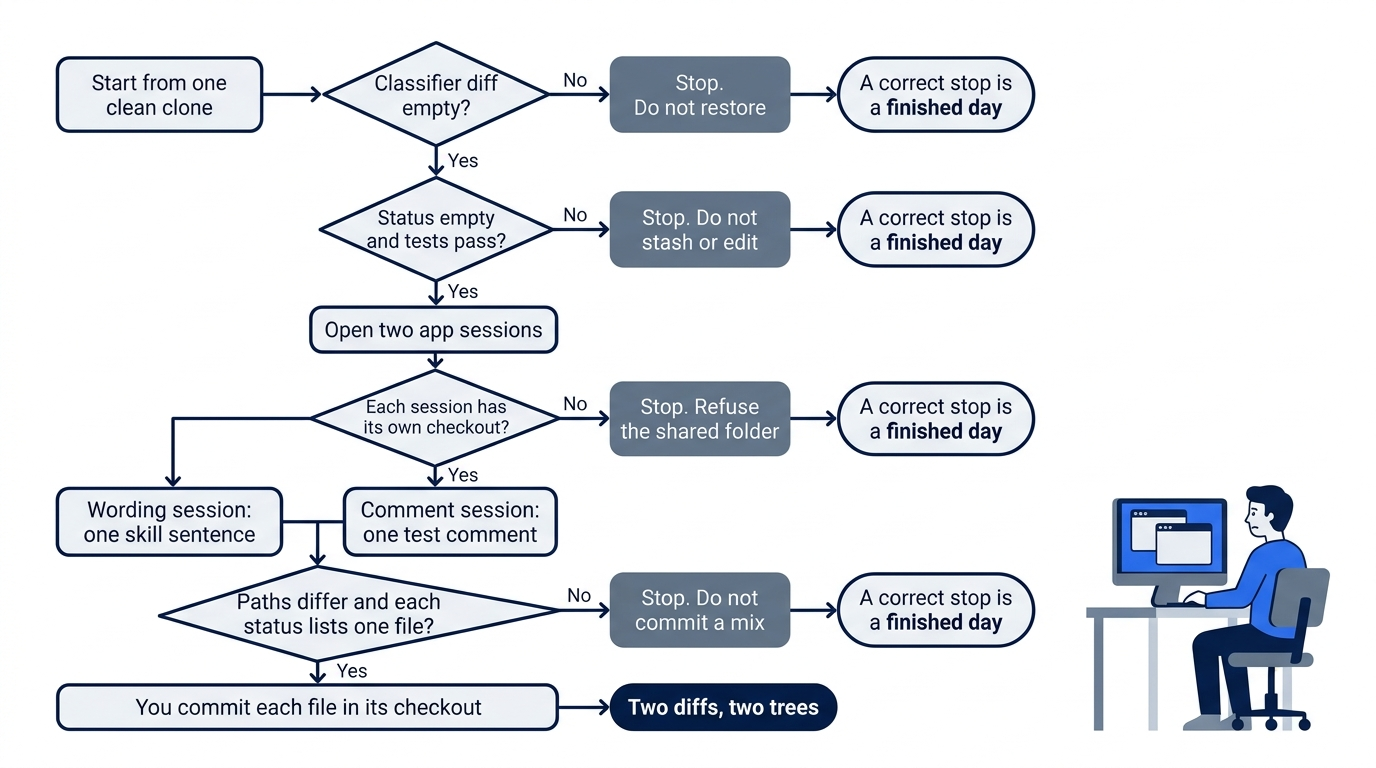
The flowchart is that gate. A dirty clone, a shared folder, or a mixed status is a stop. You commit only when the two toplevel paths differ and each status lists one file. A correct stop is a finished day.
The first session may only change wording in .agents/skills/release-checklist/SKILL.md. One sentence is enough. The file must still say that a person merges and that auto-merge stays off. Auto-merge would merge a pull request without a separate yes from you. You do not turn it on. Paste this.
Edit only .agents/skills/release-checklist/SKILL.md.
Add this one sentence at the end of the body, and change nothing else:
A person merges, and auto-merge stays off.
Do not edit src/classify.js.
Do not edit test/classify.test.js.
Do not enable auto-merge.
Do not create a pull request.
Do not run git.
Do not turn on computer use.
Computer use means the product controls the desktop. You leave it off. You are not grading a reply sentence. You are checking the file. If .agents/skills/release-checklist/SKILL.md is missing, stop. The file belongs to the release checklist you already wrote. You do not invent a replacement checklist in this sitting.
Start a second session in the same app. Accept a new worktree or a separate checkout again. This session may only add a comment to test/classify.test.js. It does not edit src/classify.js. It does not enable auto-merge. Paste this.
Edit only test/classify.test.js.
Add this one comment on its own line at the end of the file, and change nothing else:
// Parallel session: comment only. Do not change assertions.
Do not edit src/classify.js.
Do not edit .agents/skills/release-checklist/SKILL.md.
Do not enable auto-merge.
Do not create a pull request.
Do not run git.
Do not turn on computer use.
A comment is not an assertion. The tests keep the expectations they had before this line. This article does not name the on-screen label for a session folder, because the app was not run on November 16, 2026. Write down the folder that each session is using. If you cannot tell that the two sessions have different directories, stop.
The check is the two directories
git rev-parse --show-toplevel prints the top of the checkout that you are in. The two tops must differ. Run the next block in the wording checkout. Replace the cd path with the folder that you wrote down. Do not paste the placeholder if it is not a real directory.
cd /path/to/the/wording/checkout
git rev-parse --show-toplevel
git status --short
git diff -- src/classify.js
git diff -- .agents/skills/release-checklist/SKILL.md
git diff -- test/classify.test.js
npm test
Status lists only .agents/skills/release-checklist/SKILL.md. It does not list test/classify.test.js, and it does not list src/classify.js. The classifier diff prints nothing. The test diff prints nothing. You want a skill patch that adds that sentence and leaves the other lines in place. If it rewrites anything else, stop. npm test finishes with zero failures. If status lists any other path, stop. Do not commit a mixed tree.
Confirm that the merge rule is still in the file.
grep -n "person merges" .agents/skills/release-checklist/SKILL.md
grep -n "auto-merge" .agents/skills/release-checklist/SKILL.md
You want at least one matching line for each phrase. If either search prints nothing, the session removed the rule. Stop. Do not enable auto-merge to match a weaker file.
Run the same check in the comment checkout. Replace the cd path again.
cd /path/to/the/comment/checkout
git rev-parse --show-toplevel
git status --short
git diff -- src/classify.js
git diff -- test/classify.test.js
git diff -- .agents/skills/release-checklist/SKILL.md
npm test
Status lists only test/classify.test.js. It does not list the skill file, and it does not list src/classify.js. The classifier diff prints nothing. The skill diff prints nothing. You want a test patch that adds the comment and leaves every assertion in place. If it changes more, stop. npm test finishes with zero failures. If tests fail, delete only that comment, run npm test again, and stop if they still fail. Do not edit src/classify.js.
grep -n "Parallel session" test/classify.test.js
You want that comment on one line. A missing line means the session did not make the only edit that it was allowed to make. Stop, and do not widen the task.
Compare the two git rev-parse --show-toplevel lines. Different paths are required. The same path means one working tree, and you stop.
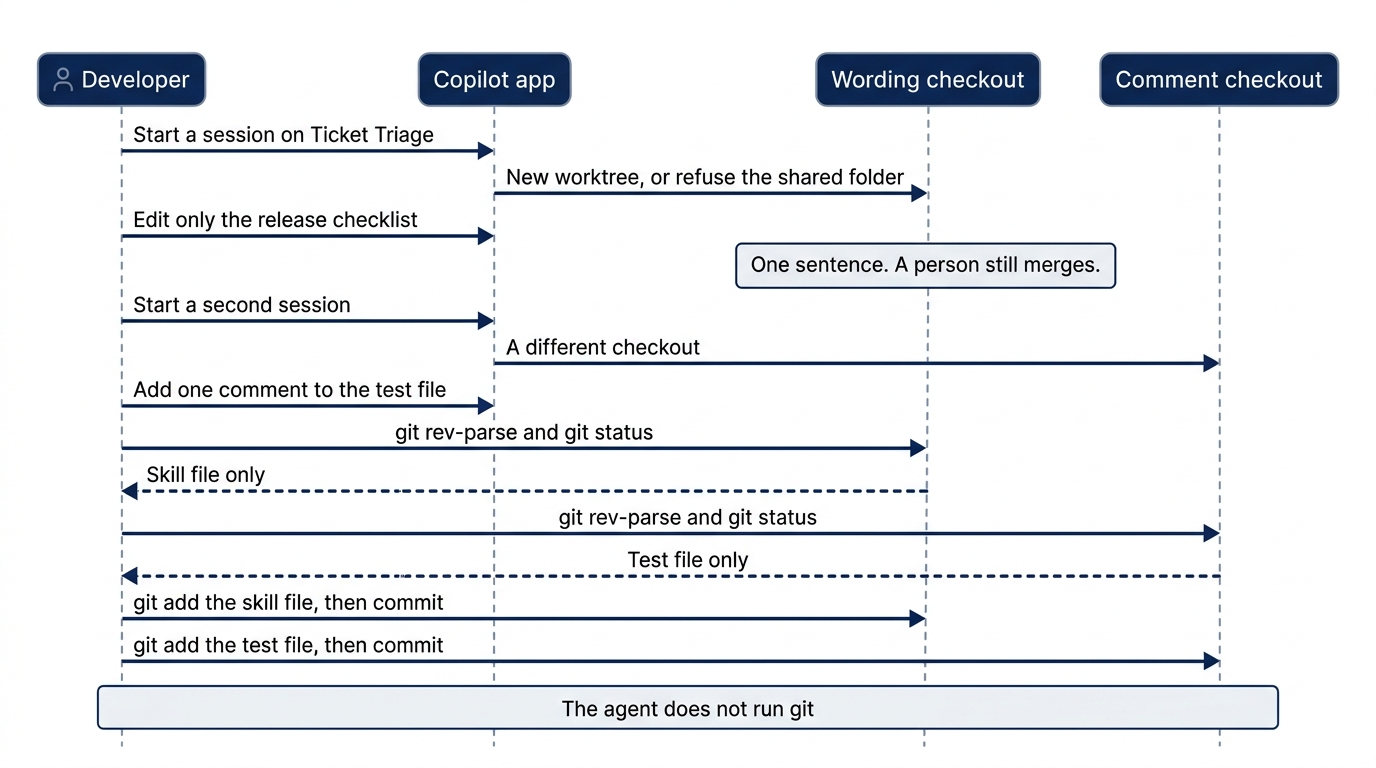
The sequence is the handoff you are aiming for, not a transcript. Two app sessions were not run on November 16, 2026. You place each session in its own checkout, check git rev-parse and git status yourself, and you commit. The agent does not run git.
From the original clone, you can list linked worktrees. Each line shows a path and a commit.
cd ~/code/ticket-triage
git worktree list
A separate folder that Git has not registered will not appear. The two tops that you already compared are the proof. If this list shows only the original clone, and your two session paths still differ, and each status showed only its own file, keep the result. If you cannot tie a session to a path, stop.
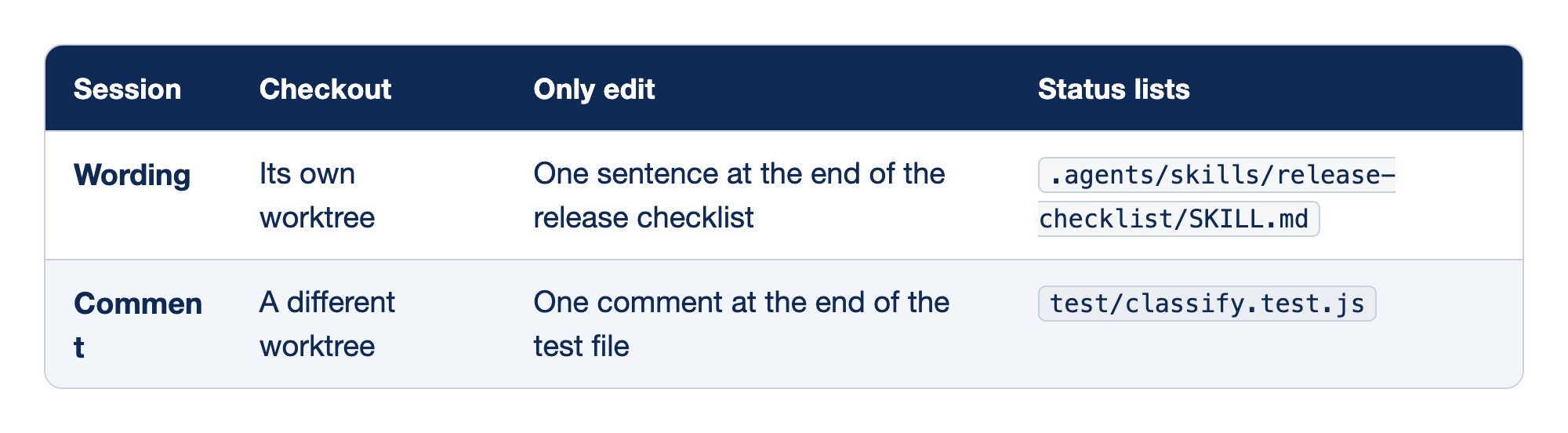
The rows are the two sessions, and the columns are how you tell them apart. The Session column names the task. The Checkout column says which working tree that task uses. The Only edit column is the single change that session may make. The Status lists column is the only path git status --short may print in that checkout.
- Wording uses its own worktree, may add only one sentence at the end of the release checklist, and must show only
.agents/skills/release-checklist/SKILL.mdin status. - Comment uses a different worktree, may add only one comment at the end of the test file, and must show only
test/classify.test.jsin status.
Neither status lists src/classify.js. Neither lists the other session's file.
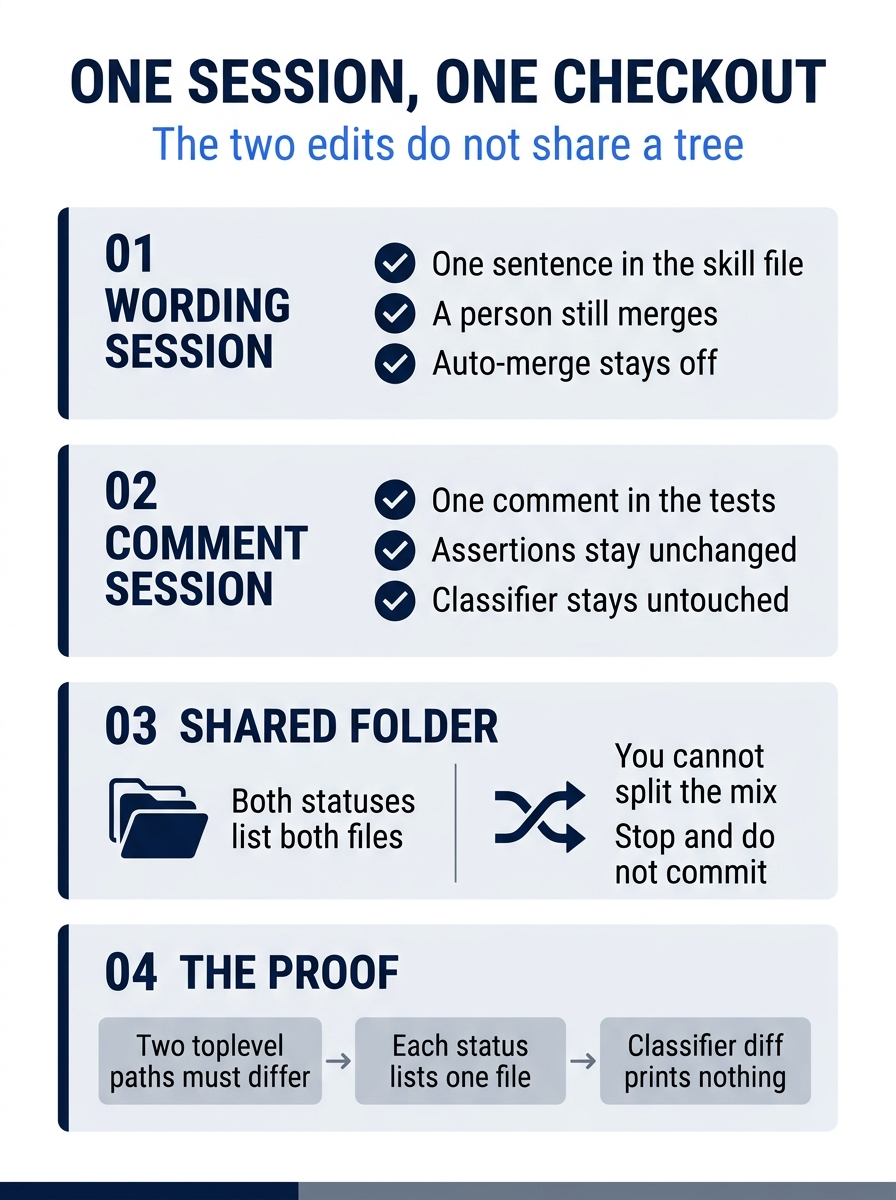
The poster is that split. One session owns the checklist sentence. The other owns the test comment. A shared folder is a stop, and the proof is two toplevel paths, one file in each status, and an empty classifier diff.
You commit, the agent does not
You may commit each change in its own worktree after those checks. The agent does not run git. In the wording checkout, add only the skill file.
git add .agents/skills/release-checklist/SKILL.md
git commit -m "State that a person still merges"
In the comment checkout, add only the test file.
git add test/classify.test.js
git commit -m "Comment the classify tests from a second checkout"
Do not use git add .. A broad add can sweep a file that the other session was supposed to own. Do not push. Do not create a pull request. After each commit, git status --short in that checkout prints nothing, and git diff -- src/classify.js still prints nothing. Run git log -1 --oneline in each checkout. The new line is a commit that you typed. If the line changed before you committed, the agent ran git. Stop, and do not push that commit.
The win is two diffs that do not share a working tree. The skill sentence is in one checkout. The test comment is in the other. src/classify.js is untouched in both. If you stop because the app is not installed, or because you have only one checkout, write that reason down. An empty git diff -- src/classify.js and a passing npm test in the original clone finish that stop. A correct stop is a finished day.
You can stop here. The rest explains why this works and where it breaks.
When one folder pretends to be two
If both git status --short runs list the skill file and the test file, the sessions share a working tree. You cannot split that mix by memory and call it two tasks. Do not commit it. Stop. Two app sessions were not run for this article on November 16, 2026, so a shared directory is a result that you might see on your machine. The remedy is a second checkout, not a second prompt in the folder that you already have.
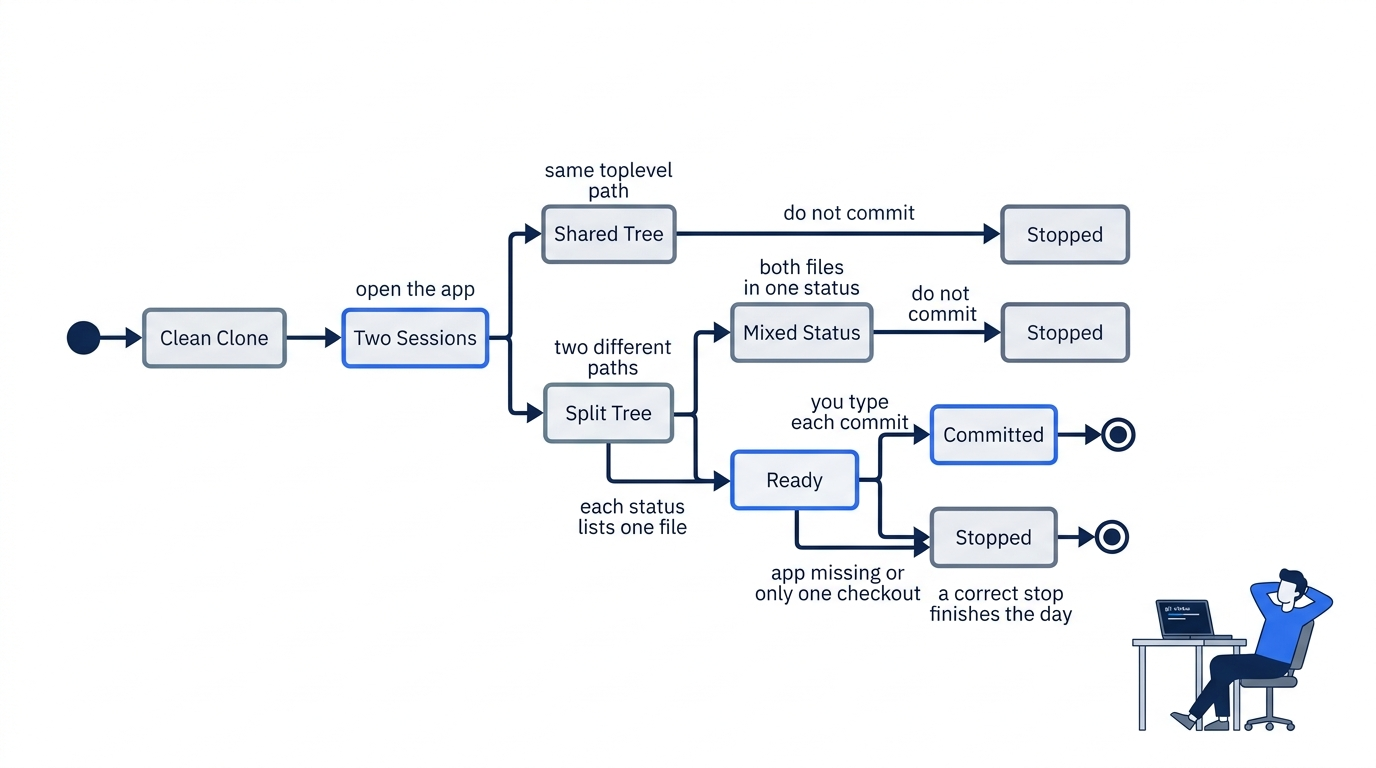
The diagram is the same choice as a lifecycle. A shared path or a mixed status is a stop. Two paths and one file each are ready for a commit you type, or for a stop when the app is missing or you have only one checkout. Both end the day.
A commit typed in the original clone does not record a file whose status appeared only in the other checkout. After the checks, you commit inside the checkout that listed the file. git add .agents/skills/release-checklist/SKILL.md in the comment checkout is the wrong tree, and it should have nothing to add. If that add stages a file, you are not where you think you are. Run git rev-parse --show-toplevel again before you commit.
Do not restore src/classify.js to clear a surprise patch. A restore can drop an uncommitted merge from an earlier sitting, and it can also hide an edit that you need to see. An empty git diff -- src/classify.js in both checkouts is the bar. Anything else is a stop.
Projects are a different home
Projects, in public preview as of October 28, 2026, are a goal-oriented home for more than one repository, or for work that does not start from a repository. They are not GitHub Projects boards, and they are not Copilot Spaces. Today's two sessions stay in the GitHub Copilot app, on two checkouts of Ticket Triage. They do not need a Project.
Computer use stays off
Computer use is in public preview on macOS and Windows, for the CLI and for the app. In the CLI, /computer on turns it on, /computer show displays the state, and /computer off turns it off. You do not run /computer on. The app uses Settings, then Computer Use. Re-run this on your account before you trust the wording. This article did not open the app on November 16, 2026, and it did not turn that control on.
The app has been generally available on Linux since June 17, 2026. Linux desktop control is not documented just because the app runs on Linux. You do not treat a Linux install as desktop control, and you do not turn computer use on to test that gap.
On macOS, the preview asks for Accessibility and Screen Recording. You do not grant those today. A saved per-application approval can apply across the CLI and the app on the same computer. Approval depends on the active permission mode. If computer use is already on from an earlier experiment, turn it off in the CLI with /computer off and turn off the app control before you treat these sessions as the narrow edits that you asked for.
Gotcha: /computer on lets the product drive the desktop, and a grant saved on this computer can show up in both the CLI and the app. You leave computer use off for both sessions.
Never pair Agent Merge with auto-merge
Agent Merge, also described as Watch and fix, is the October 28, 2026 control on a GitHub pull request. The source is the Agent Merge changelog. The control sits in the pull request merge box. The documented choices are failing GitHub Actions checks, merge conflicts, or both. Copilot can then repair the selected blockers in the cloud. It is available on paid plans. It also integrates with the app and with VS Code. The announcement says to "select Watch and fix in your pull request's merge box." You do not select it today. You did not open a pull request in the first half of this day.
The same announcement says "You can combine Agent Merge with auto-merge." This guide never turns that pair on. A repair is a new change that needs a human review.
Gotcha: Watch and fix plus auto-merge can land a cloud repair without you. Leave both off. A note that says that you enabled the pair only for conflicts still fails this article's rule.
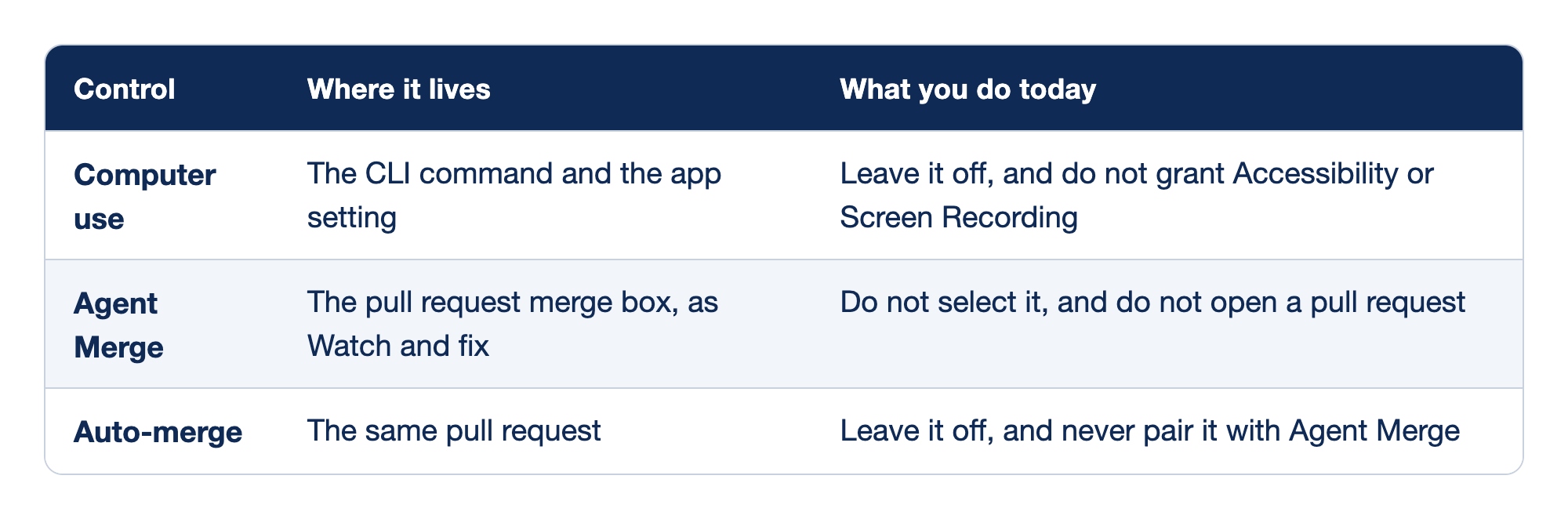
These three controls are the ones this day refuses. The Control column names the feature. The Where it lives column says which command or screen owns it. The What you do today column is the action you do not take.
- Computer use lives in the CLI command and in the app setting, and you leave it off, including Accessibility and Screen Recording.
- Agent Merge lives in the pull request merge box under Watch and fix, and you do not select it and do not open a pull request for this day.
- Auto-merge lives on that same pull request, and you leave it off and never pair it with Agent Merge.
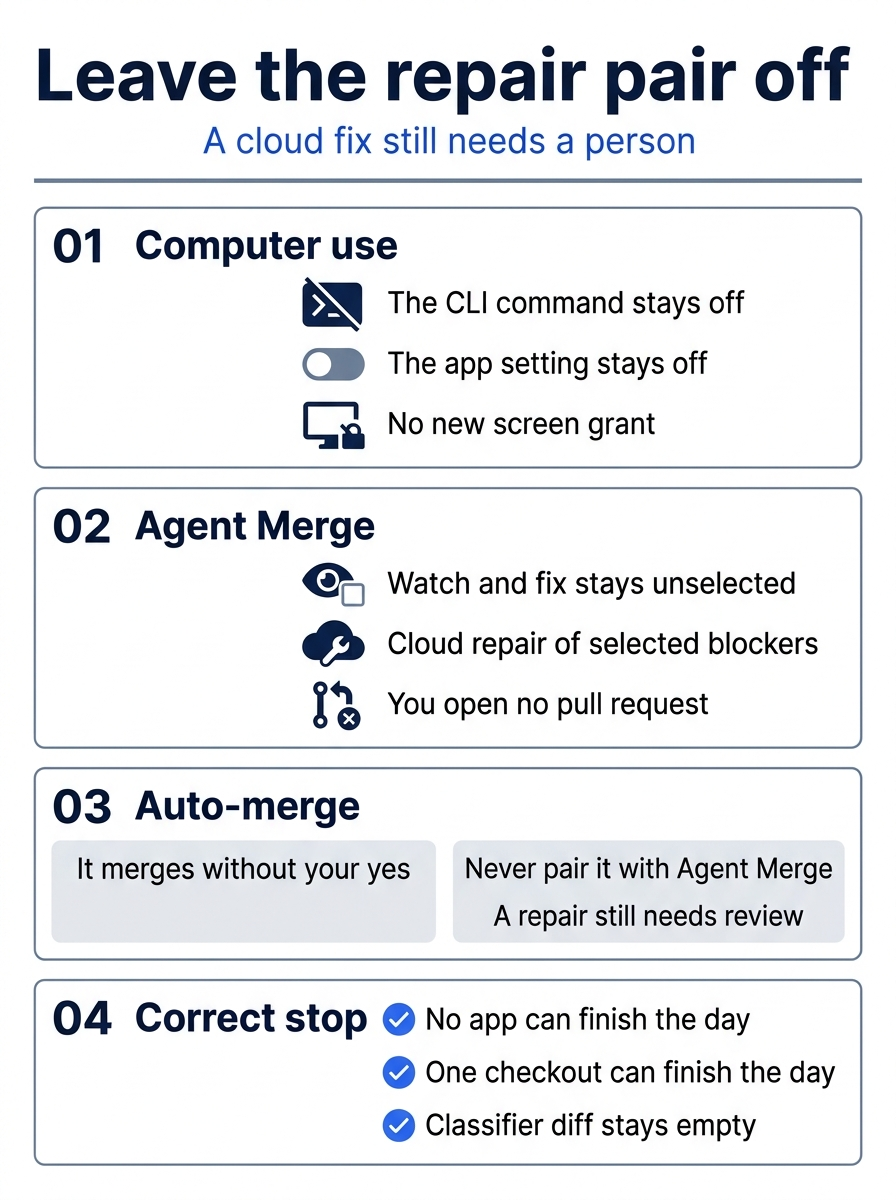
The poster is that boundary. Computer use stays off, Agent Merge stays unselected, and auto-merge is never paired with Watch and fix. A missing app or a single checkout can still finish the day when the classifier diff is empty.
The app policy is not the CLI policy
The app has its own enterprise policy. It is separate from the CLI policy, and it is enabled by default. Early June and July posts said that an organization had to allow the CLI policy before people could use the app. Both the setup guidance that is current as of November 16, 2026, and the July 27, 2026 dedicated-policy announcement supersede those posts. If the app is missing for an organization account, the admin looks at the app policy. You do not tell an admin to enable the CLI policy in order to enable the app. A personal login that can already open the app does not need a policy edit for today's two sessions.
If you have used Claude Code: a second checkout is the same idea as a git worktree in any tool.
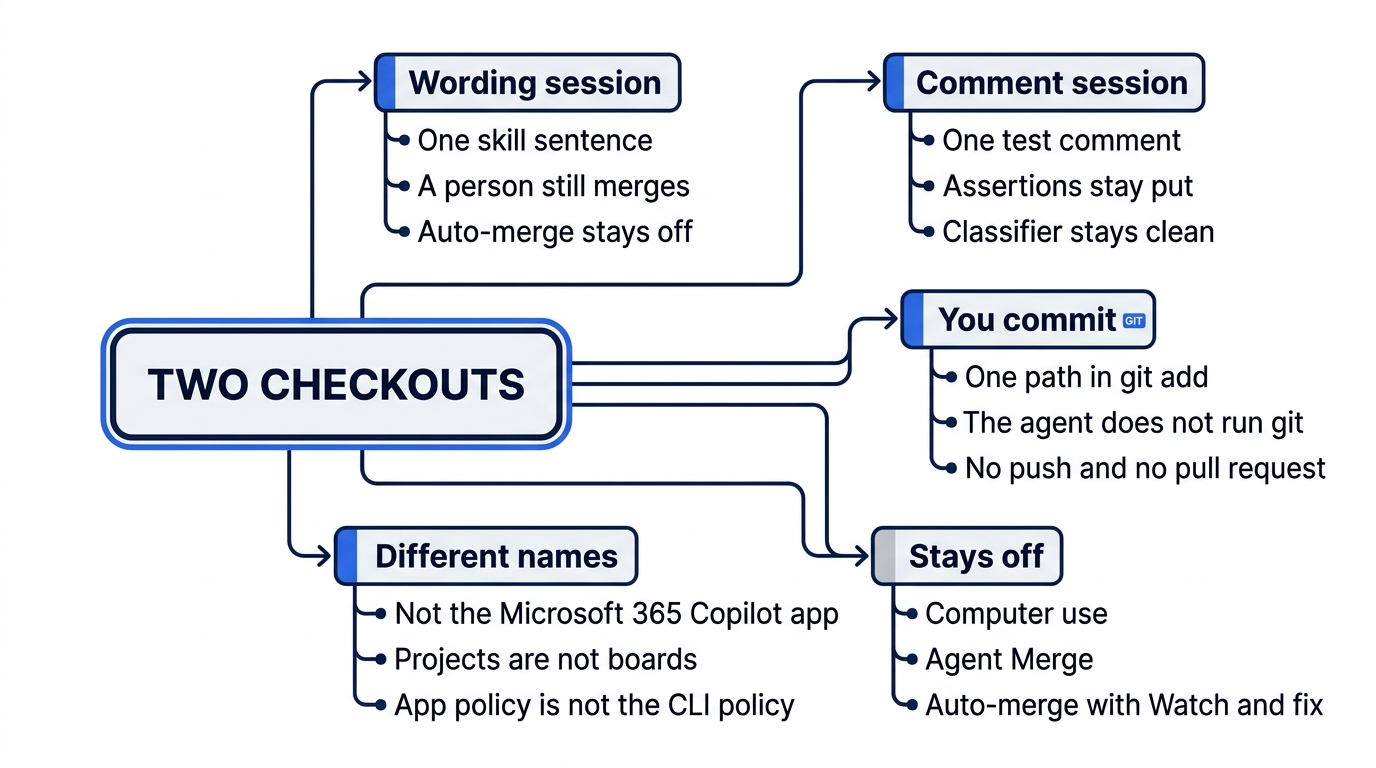
The map collects the boundaries. Each session owns one file, you commit that one path, and the agent does not run git. Computer use, Agent Merge, and auto-merge stay off. The Microsoft 365 Copilot app, a Projects board, and the CLI policy are different names.
Do this today
Everyone
- You have two session folders, and they are not the same directory. The check is
git rev-parse --show-toplevelin each folder: the two printed paths differ. If you cannot show two paths, stop. Do not count two CLI sessions as the GitHub Copilot app. Two app sessions were not run for this article on November 16, 2026. Re-run this on your account before you trust the wording. - Before you commit,
git status --shortin the wording checkout lists only.agents/skills/release-checklist/SKILL.md. In the comment checkout it lists onlytest/classify.test.js. Neither status lists the other session's file. Neither listssrc/classify.js. The habit to keep is one session, one checkout, and one file. git diff -- src/classify.jsprints nothing in both checkouts.npm testfinishes with zero failures in both. You did not revert a merge that had already landed, and you did not re-breaksrc/classify.js.- Any commit is one that you type, in the checkout that listed that file, with
git addof that one path. The agent does not run git. You do not push, you do not create a pull request, and you do not enable auto-merge. After a commit that you typed,git status --shortin that checkout prints nothing.
If you read the limits
- Write that computer use stayed off. You did not run
/computer on, and you did not enable computer use in the app. The check is that sentence in your notes. - Write that Agent Merge plus auto-merge stayed off. You did not select Watch and fix, and you did not enable auto-merge. The check is that sentence in your notes.
A correct stop is a finished day
The second window felt like parallel work. It was the same folder, with both edits mixed in one status, and no way to say which session owned which line. A GitHub Copilot app worktree is the missing piece: a second checkout, a second toplevel path, and one file in each status. The skill sentence lives in one tree. The test comment lives in the other. src/classify.js stays untouched in both.
You type the commits, or you stop. An empty classifier diff and a passing npm test finish a stop that you wrote down, whether the reason is a missing app or a single checkout. The repair that watches a pull request and then merges itself is a different kind of parallel, and it is the one you do not turn on.
Two sessions, two checkouts, and a merge that still waits for you.
This is Part 14 of "GitHub Copilot, Day-to-Day," a 16-part guide to using GitHub Copilot as a daily coding agent.