
The Hook Is Not the Lock on git push
A local Agent Plugin is a folder you load on purpose, and a preToolUse hook is not the only guard on git push because a timeout fails open.
Load one local GitHub Copilot plugin with --plugin-dir, then prove the session deny flag still refuses the push after the hook file is renamed.
A plugin hook that times out looks like a lock on git push, and a timeout lets the push through. You still pass the session deny flag, and you prove it with the hook file renamed aside.
In this article: You write a local Agent Plugin whose skill
merge-by-handshows up from--plugin-dir, and you do not install a marketplace plugin. You add a repositorypreToolUsehook that can deny a shellgit push, then you refuse the push again with--deny-toolafter that hook file is renamed aside. A timeout fails open, the documented default is 30 seconds, and the flag is the guard you trust. You commit the four files yourself and leavesrc/classify.jsuntouched.
Preview: written November 16, 2026, before Microsoft Ignite. Some paid steps are not yet tested live; this guide will be updated November 21, 2026.
A hook file in .github/hooks/ looks like a lock. It runs before each tool, it can print a deny, and it lives in the repository next to the code. The hooks reference says a timeout fails open, including on preToolUse, so the tool call continues. A slow script is not a refusal. The hook is not the only thing that should stand between GitHub Copilot and git push.
Yesterday the draft was merged by hand with auto-merge off, or the day stopped with no draft, no review, or a crushed-mug line that still expected other. Today the agent still does not get to publish the branch. You load one local plugin on purpose, you put one repository hook on disk, and you refuse the push with --deny-tool after that hook file has been renamed aside.
The discovery method was tested. The hook in this article was not. On November 16, 2026, Copilot CLI 1.0.112 loaded a skill named spec-check from a different package, using --plugin-dir and skill list --json. This plugin was not that package, and this hook script was not executed that day. There is no sample denial transcript and no sample skill listing. Re-run the commands on your account before you trust the wording.
Starting fresh or fell behind? Run git switch -C main copilot/day-12. This replaces your main with the end of Day 12; to keep your own work, run git branch my-backup first.
The day has one forward line
Work in ~/code/ticket-triage. On Windows, use C:\code\ticket-triage if that is the checkout from the first setup, and run the blocks in Git Bash. npm test is the test command. src/classify.js is the classifier. You do not edit it. Leave a committed merge in place. If you never merged, the older tests remain. Either state is fine.
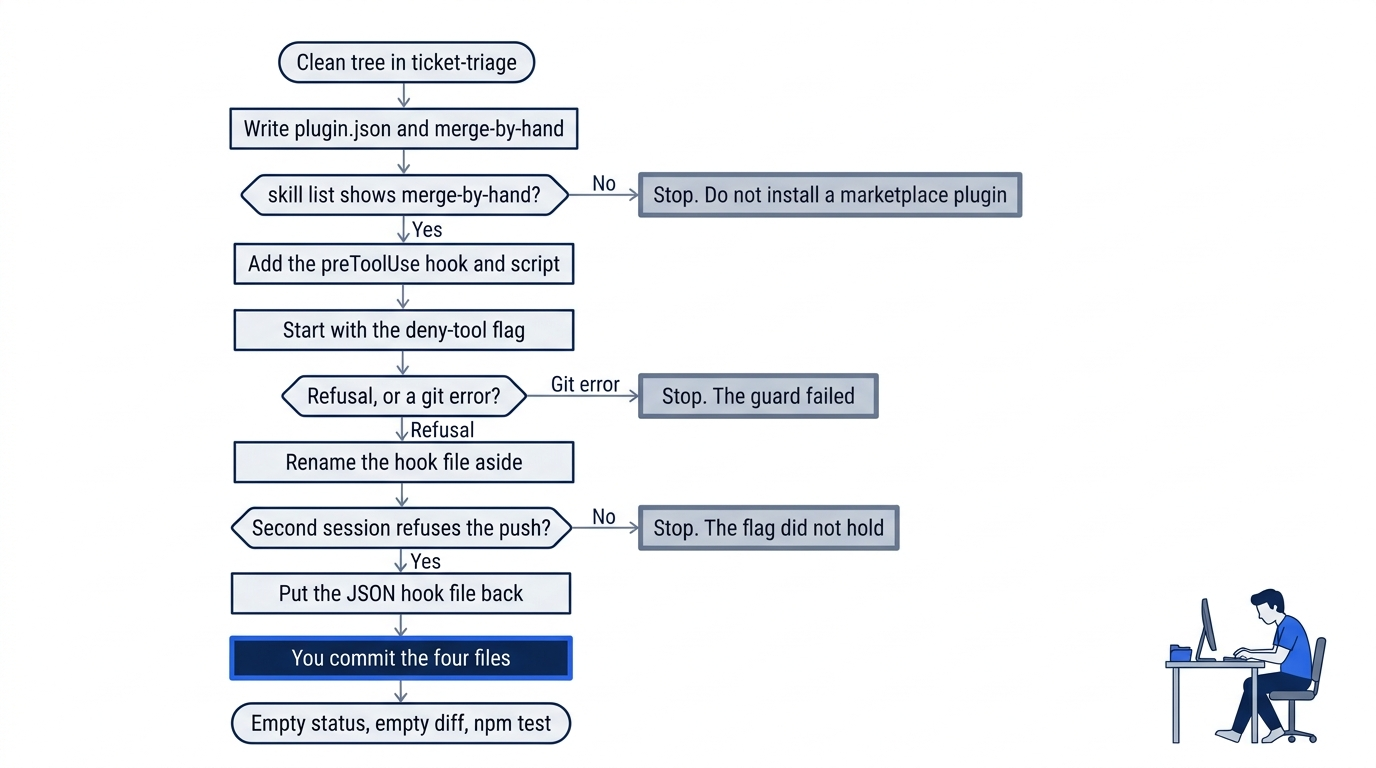
The path has one forward line and three reasons to stop. A skill list that does not show merge-by-hand, a push that comes back as a git error, or a second session that does not refuse the push all end the same way: you write what you saw, and you do not finish a real push. The commit at the end is yours. The agent does not run git.
By the end of the pass you have a local plugin whose skill shows up from --plugin-dir, a repository preToolUse hook on disk, and a push that stays refused by --deny-tool after you rename that hook file aside.
Confirm the tree before you add files
copilot --version
Write the printed version down. The CLI line in these notes is Copilot CLI 1.0.112, as of November 16, 2026.
cd ~/code/ticket-triage
git diff -- src/classify.js
git status --short
npm test
The classifier diff prints nothing, and status prints nothing before today's files. npm test finishes with zero failures. Do not edit tests or src/classify.js to chase an older count. If the diff prints a patch, stop. Do not restore a merge you already accepted.
Write a plugin you load on purpose
A plugin is a folder that you load to add a skill. An Agent Plugins package puts plugin.json at the root. $schema is the canonical URL for the manifest rules, and name is the plugin name. Those two fields are required. Create the folder. Do not install from a marketplace.
Save ticket-triage-plugin/plugin.json. The URL is the 1.0.0 identifier on the specification page. The folder and the name field are both ticket-triage-plugin. Do not add a third field. Do not add ticket-triage-plugin/mcp.json.
{
  "$schema": "https://agent-plugins.org/schemas/1.0.0/plugin.schema.json",
  "name": "ticket-triage-plugin"
}
A skill is a folder with one SKILL.md. The name and the description load up front, and the body loads when a task matches. This body says that a person merges, and that auto-merge stays off. Auto-merge would merge a pull request without you. You do not turn it on. A plugin skill cannot override a project or personal skill of the same name, so a second release-checklist would not win. Name this skill merge-by-hand, and save ticket-triage-plugin/skills/merge-by-hand/SKILL.md.
---
name: merge-by-hand
description: A person merges, and auto-merge stays off. Use when asked how Ticket Triage gets merged.
---

A person merges. Auto-merge stays off.
The plugin MCP file is not the project MCP file you may already have committed. The project file stays. The plugin file must not exist.
test -f ticket-triage-plugin/plugin.json && echo plugin-ok
test -f ticket-triage-plugin/skills/merge-by-hand/SKILL.md && echo skill-ok
test ! -e ticket-triage-plugin/mcp.json && echo no-mcp-ok
You want plugin-ok, skill-ok, and no-mcp-ok. If a line is missing, fix the path. Do not copy the skill into .github/skills or .agents/skills.
List the skill, and do not install
copilot plugin is the plugin command. Its help lists the subcommands the product ships. You do not run install. This article has no sample help text. If copilot is not found, stop.
cd ~/code/ticket-triage
copilot plugin --help
Read the help. --plugin-dir loads a plugin from a local directory for this run. It does not save an install. The command reference writes the option as --plugin-dir=DIRECTORY. skill list --json lists discovered skills. Run it from the repo, because a relative path uses the working directory.
cd ~/code/ticket-triage
copilot --plugin-dir=./ticket-triage-plugin skill list --json
The plugin win is merge-by-hand in that output. There is no sample listing. On November 16, 2026, the same method on Copilot CLI 1.0.112 loaded spec-check from a different package. If merge-by-hand is absent, stop. Do not run copilot plugin install. Re-run this on your account before you trust the wording.
Rows from copilot skill list --json use name, description, source, path, and enabled. The November 16 test was skill discovery only. It was not an MCP transport test, and it was not a test of this hook.
A timeout is not a refusal
A hook is an external command at a lifecycle point. preToolUse runs before each tool. Repository hooks are *.json files in .github/hooks/. The decision is JSON on standard output. permissionDecision is allow, deny, or ask, and a deny needs permissionDecisionReason. Empty output leaves the normal permission flow. Copy the shape from the hooks reference. The hooks how-to reads the payload from standard input when you debug a command hook.
On macOS and Linux the shell tool name is bash. On Windows it is powershell. git push is not the tool name. It sits in toolArgs, which the hooks page types as unknown. The script checks the tool name, then looks for a push in the argument text.
Gotcha: a timeout fails open, including preToolUse, so the tool call continues. A slow hook is not a lock. Non-timeout preToolUse command errors fail closed: a crash or any other non-zero exit denies the tool. You still pass --deny-tool. The hook is not the only guard.
--deny-tool denies a tool or a shell pattern for this session. shell(git push) is the push pattern. Keep the single quotes. The script exits 0 when the payload is not JSON, because a non-zero exit on preToolUse denies that call. Trust the flag for the push.
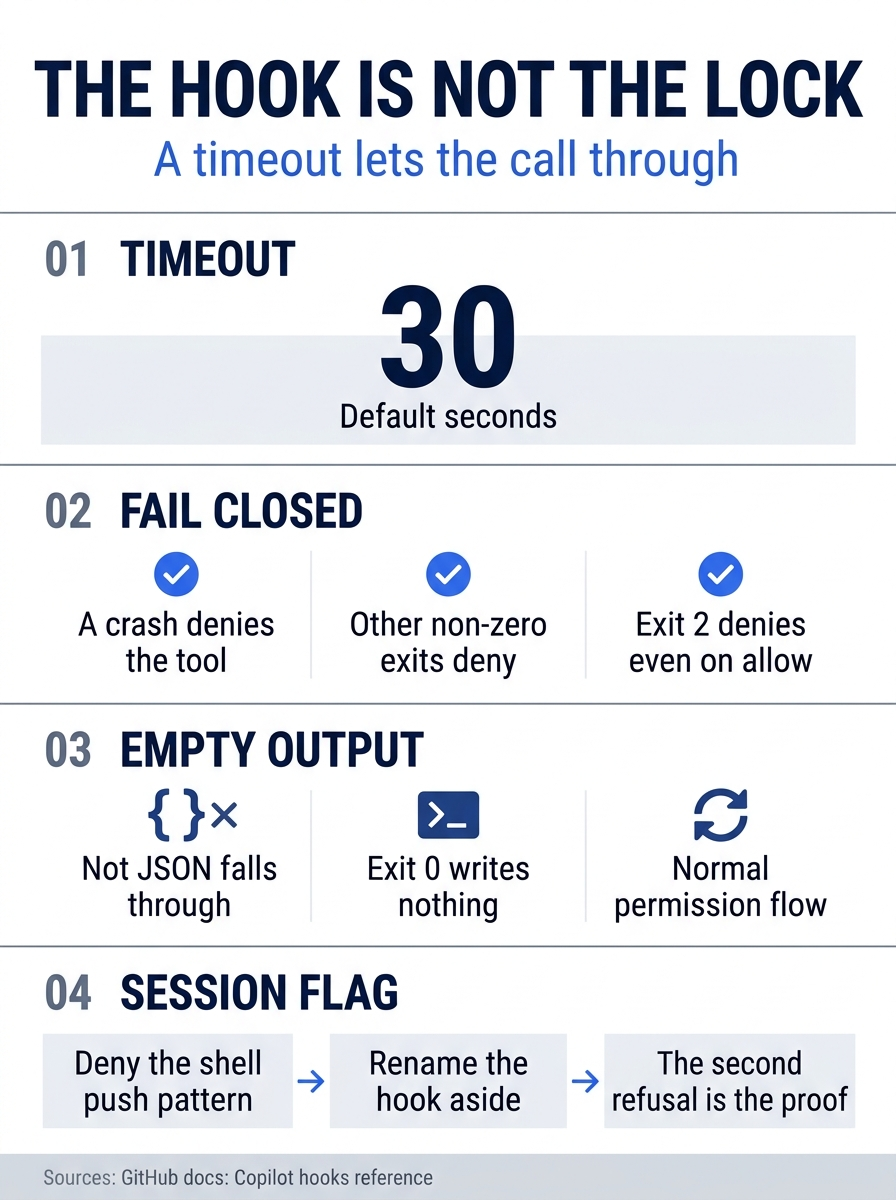
The four panels are the timeout, a non-timeout error, empty output, and the session flag. A timeout, including on preToolUse, fails open, and the documented default wait is 30 seconds, so the tool call continues. A crash or any other non-zero exit denies the tool, and exit 2 denies even when standard output says allow. Empty output, or output that is not JSON, falls through to the normal permission flow. The session flag is the guard you still pass, and the proof is a second refusal after the hook file is renamed aside.
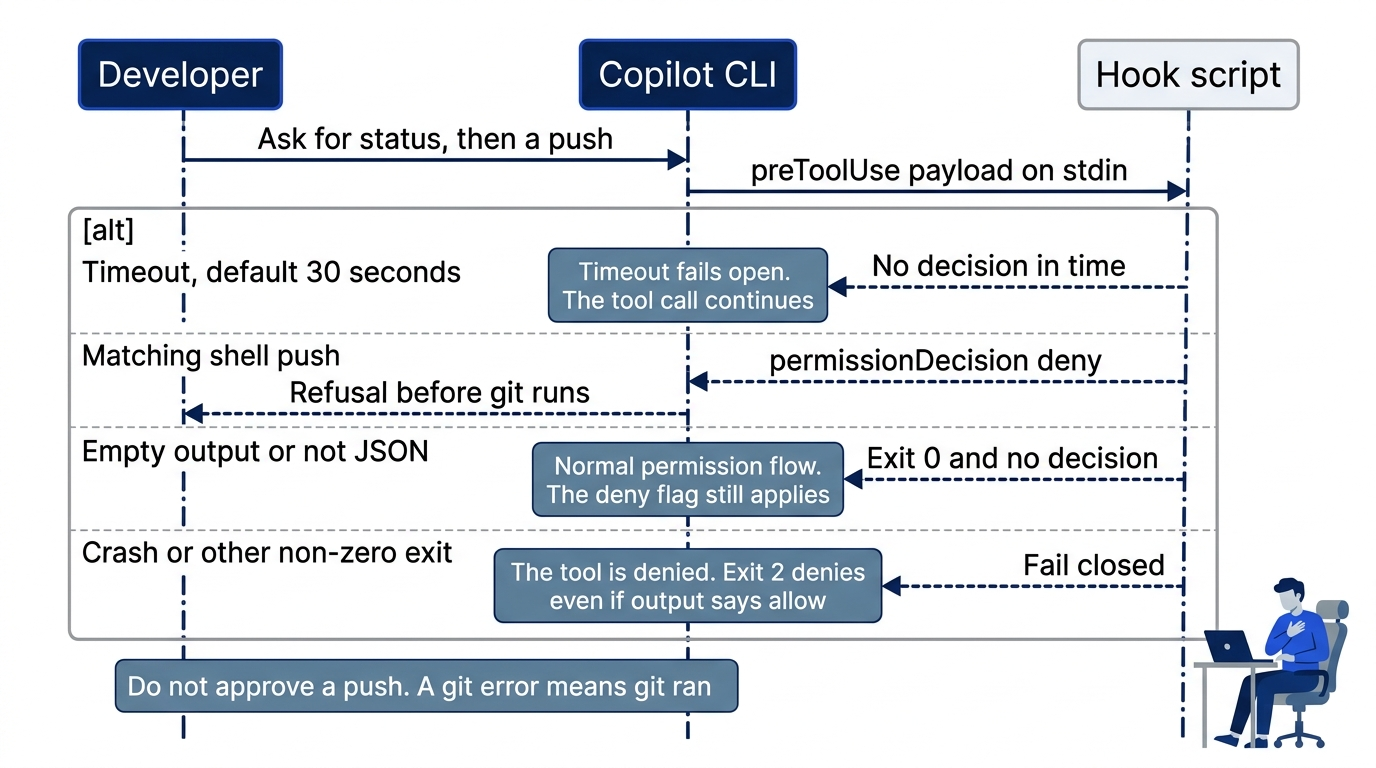
Copilot sends the payload on standard input. A matching shell push writes one deny. A timeout, whose documented default is 30 seconds, lets the call continue. Exit 0 with no JSON leaves the normal permission flow, which is why the session flag still has to be there. A crash or any other non-zero exit denies the tool, and exit 2 denies even when the output says allow.
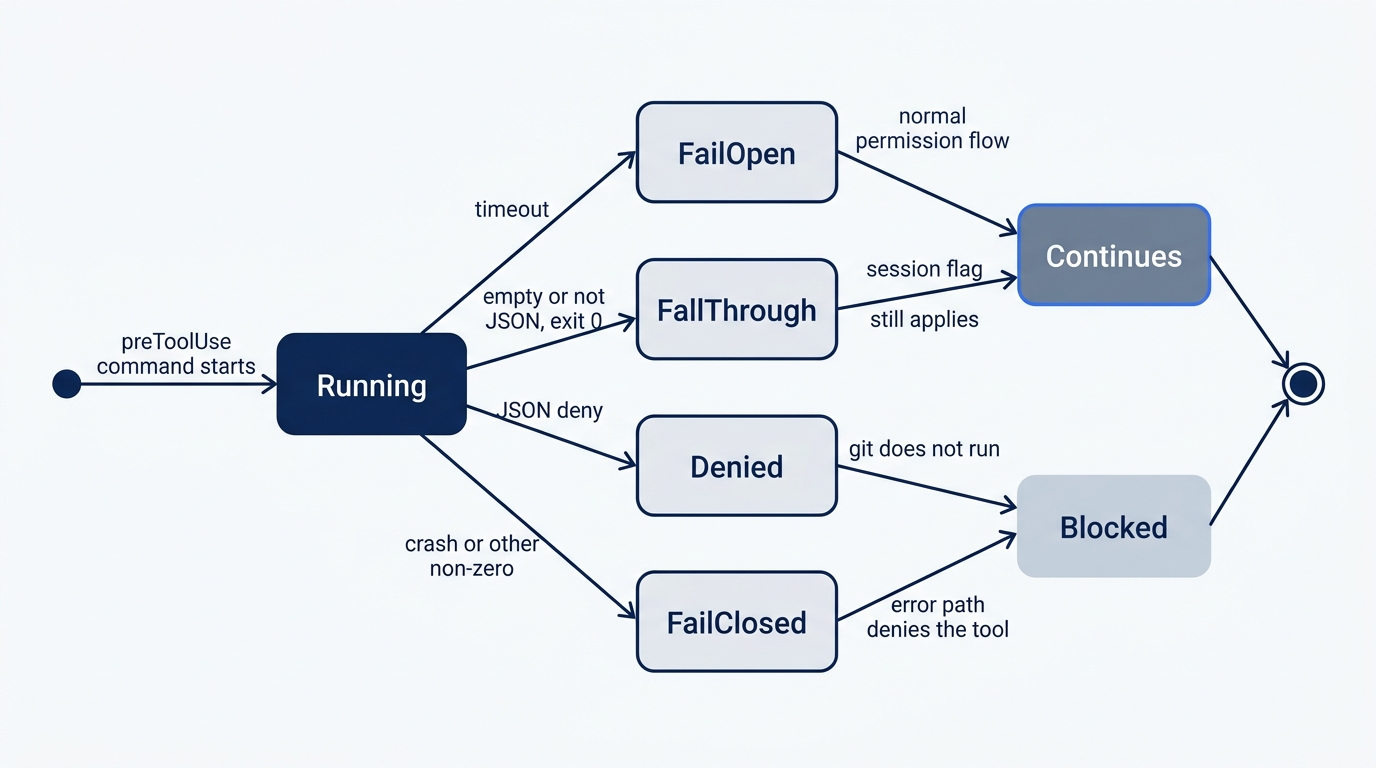
Fail-open and fall-through both let the normal permission flow continue. Deny and fail-closed are the paths where git does not run. A timeout is fail-open, so it is not one of the blocking paths. The session flag is what you trust when the hook never answers.
The script and the manifest
Save scripts/deny-git-push.js. This file was not executed on November 16, 2026.
The script reads one hook payload from standard input and writes a deny only when the tool name is bash or powershell and the argument text contains git push. Any other input, including a payload that is not JSON, exits 0 and writes nothing.
import { readFileSync } from "node:fs";

const raw = readFileSync(0, "utf8");  // ①
let payload = null;
try {
  payload = JSON.parse(raw);
} catch {
  process.exit(0);  // ②
}

if (payload === null || typeof payload !== "object") {
  process.exit(0);  // ③
}

const toolName = payload.toolName;  // ④
const argsText =
  typeof payload.toolArgs === "string"
    ? payload.toolArgs
    : JSON.stringify(payload.toolArgs ?? "");  // ⑤
const shellTool = toolName === "bash" || toolName === "powershell";  // ⑥
const push = /\bgit\s+push\b/.test(argsText);  // ⑦

if (shellTool && push) {
  process.stdout.write(
    JSON.stringify({
      permissionDecision: "deny",  // ⑧
      permissionDecisionReason: "git push stays refused",
    }),
  );
}
① The hook payload is read from standard input as one UTF-8 string before any field is inspected.
② A payload that is not JSON takes this exit 0. A non-zero exit on preToolUse would deny the tool, so a parse failure must not use one.
③ A null or non-object payload also exits 0 and writes nothing, which leaves the normal permission flow in place.
④ The script reads camelCase toolName from a preToolUse payload and does not read snake_case tool_name.
⑤ toolArgs stays a string when it already is one and is stringified otherwise, because the hooks page types that field as unknown.
⑥ The shell tool name is bash or powershell. The text git push is not the tool name.
⑦ The push test looks for the word git, then whitespace, then push, inside the argument text.
⑧ A matching shell push writes one JSON object with permissionDecision set to deny and a reason. Every other path writes nothing.
Note: The full extracted listing at code/github_copilot/part-13-plugins-and-hooks/listings/01-deny-git-push.js is the same script with the markers removed.
"type": "module" makes the import valid. A matching push writes one JSON object. Any other call writes nothing. A second JSON object on standard output is ignored.
Save .github/hooks/deny-git-push.json with version 1. bash is for macOS and Linux, powershell is for Windows, and cwd is the repository root. Omit timeoutSec. Keep the file out of the plugin folder.
{
  "version": 1,  // ①
  "hooks": {
    "preToolUse": [  // ②
      {
        "type": "command",  // ③
        "bash": "node ./scripts/deny-git-push.js",  // ④
        "powershell": "node ./scripts/deny-git-push.js",  // ⑤
        "cwd": "."  // ⑥
      }
    ]
  }
}
① version is 1, the hooks manifest version this file declares.
② The event stays camelCase preToolUse, so the payload keeps toolName. PascalCase PreToolUse would switch those fields to snake_case.
③ type is command, so Copilot runs an external program and reads the decision from its standard output.
④ bash is the command on macOS and Linux. It runs node ./scripts/deny-git-push.js.
⑤ powershell is the command on Windows. It runs the same Node script.
⑥ cwd is ., the repository root, so the relative script path resolves. timeoutSec is omitted, which leaves the documented 30-second default.
Note: The full extracted listing at code/github_copilot/part-13-plugins-and-hooks/listings/02-deny-git-push-hook.json is the same manifest with the markers removed.
On Windows: Copilot runs the powershell entry. Both entries call the same Node script.
test -f .github/hooks/deny-git-push.json && echo hook-ok
test -f scripts/deny-git-push.js && echo script-ok
You want hook-ok and script-ok.
Refuse the push with the hook file renamed
Start a session with the deny flag only. Do not pass a model name. Do not pass --continue, which would resume the most recent session.
cd ~/code/ticket-triage
copilot --deny-tool='shell(git push)'
Ask for a status read and a push. You are not publishing the branch. Do not type git push in another terminal.
Do not commit. Do not edit files. Run git status, then push this branch.
You may let git status proceed. Do not approve a push, an edit, or a commit. Do not complete a real push.
A refusal means the CLI blocked git push before git ran. A git error means the tool was allowed, and the guard failed. "No remote," "repository not found," an authentication failure, or a rejected update means git ran. A remote from earlier work can publish on that allowed command. Do not add or remove a remote. There is no sample denial transcript. This denial was not recorded on November 16, 2026. Re-run this on your account before you trust the wording. If you cannot separate a denial from a git error, you do not have the win.
Quit. Do not treat this turn as proof that the hook ran.
Rename the hook so it is no longer a *.json file in .github/hooks/. The loader reads that pattern.
mv .github/hooks/deny-git-push.json .github/hooks/deny-git-push.json.off
Start again with the same flag.
cd ~/code/ticket-triage
copilot --deny-tool='shell(git push)'
Use the same prompt. The push is refused again. Do not approve it, and do not complete it. The git-error rule still applies. The second refusal is the proof the flag works without the hook.

The moment that matters is the second session. The hook file is renamed aside, the same deny flag is on the command line, and the push is refused before git runs. The relief is that the flag held without the hook. A git error on either session means the guard failed. You did not complete a push.
Quit, and put the file back before you commit.
mv .github/hooks/deny-git-push.json.off .github/hooks/deny-git-push.json
test -f .github/hooks/deny-git-push.json && test ! -e .github/hooks/deny-git-push.json.off && echo hook-back
hook-back means the JSON path is the one you will commit, and the .off file is gone.
Commit the four files yourself
You commit. The agent does not run git. git add names the four files you wrote and does not name src/classify.js.
cd ~/code/ticket-triage
git add ticket-triage-plugin/plugin.json \
  ticket-triage-plugin/skills/merge-by-hand/SKILL.md \
  .github/hooks/deny-git-push.json \
  scripts/deny-git-push.js
git commit -m "Add a local plugin and a preToolUse hook"
git status --short
git diff -- src/classify.js
npm test
After the commit, git status --short prints nothing, the classifier diff prints nothing, and npm test still finishes with zero failures. If status lists deny-git-push.json.off, the rename was not undone.
The win is merge-by-hand from the plugin directory, and a push refused by --deny-tool after the hook file was renamed aside.
You can stop here. The rest explains why the schema line, the name rule, and the hook order behave this way. It does not add a second plugin, and it does not start another push.
A same name loses in silence
Copilot reads project skills from .github/skills, then .agents/skills, then .claude/skills, and the first copy of a name wins.
A plugin skill is a later source than those project folders and your personal skill folders. The plugin reference states the rule in one place: if a project or personal skill has the same name as a skill in a plugin, Copilot silently ignores the plugin skill. The plugin cannot override project-level or personal configurations. Copilot matches skills on the name field inside SKILL.md, not on the directory name. merge-by-hand is a new name because of that rule. A plugin copy of release-checklist would lose, and you would not see a warning that it lost.
When two plugins ship the same skill name, both can coexist under plugin-qualified names. Copilot routes the bare name to the higher-priority plugin. You have one plugin today, so you do not need a qualified name to find merge-by-hand.
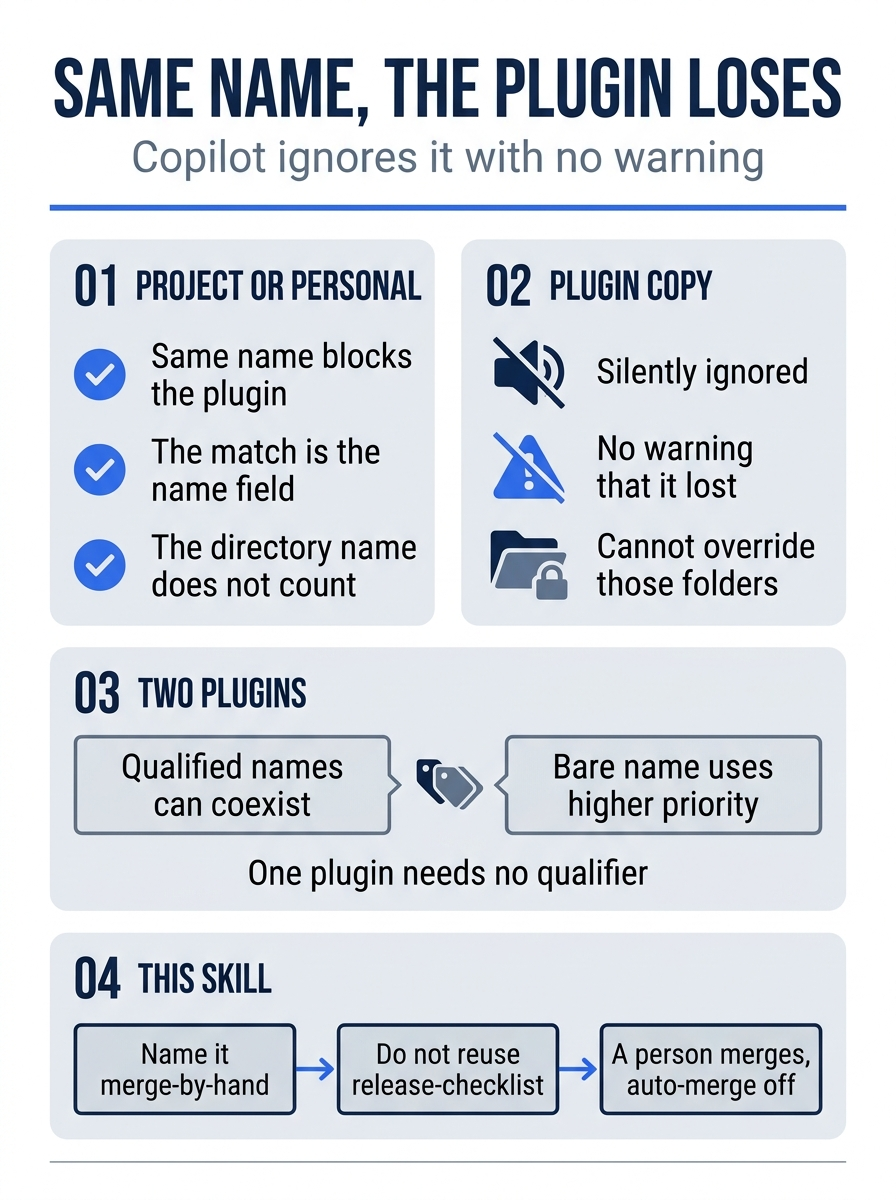
A plugin skill loses when a project skill or a personal skill already uses the same name inside SKILL.md. Copilot matches that field, not the directory name, and it does not warn. Two plugins can coexist under qualified names, and the bare name goes to the higher-priority plugin. merge-by-hand is a new name, so this plugin is the one that can show up. A second release-checklist would not.
Four surfaces, and the schema you pin
Copilot loads an Agent Plugins folder on VS Code, the CLI, the app, and the SDK. Support on those four surfaces became generally available on August 12, 2026. The announcement is Agent Plugins 1.0 in VS Code, Copilot CLI, and the Copilot app. The list in that post is those four surfaces. Visual Studio, JetBrains, Air, cloud, and code review are not in that list. Do not infer them from a shared skill folder or from a shared harness.
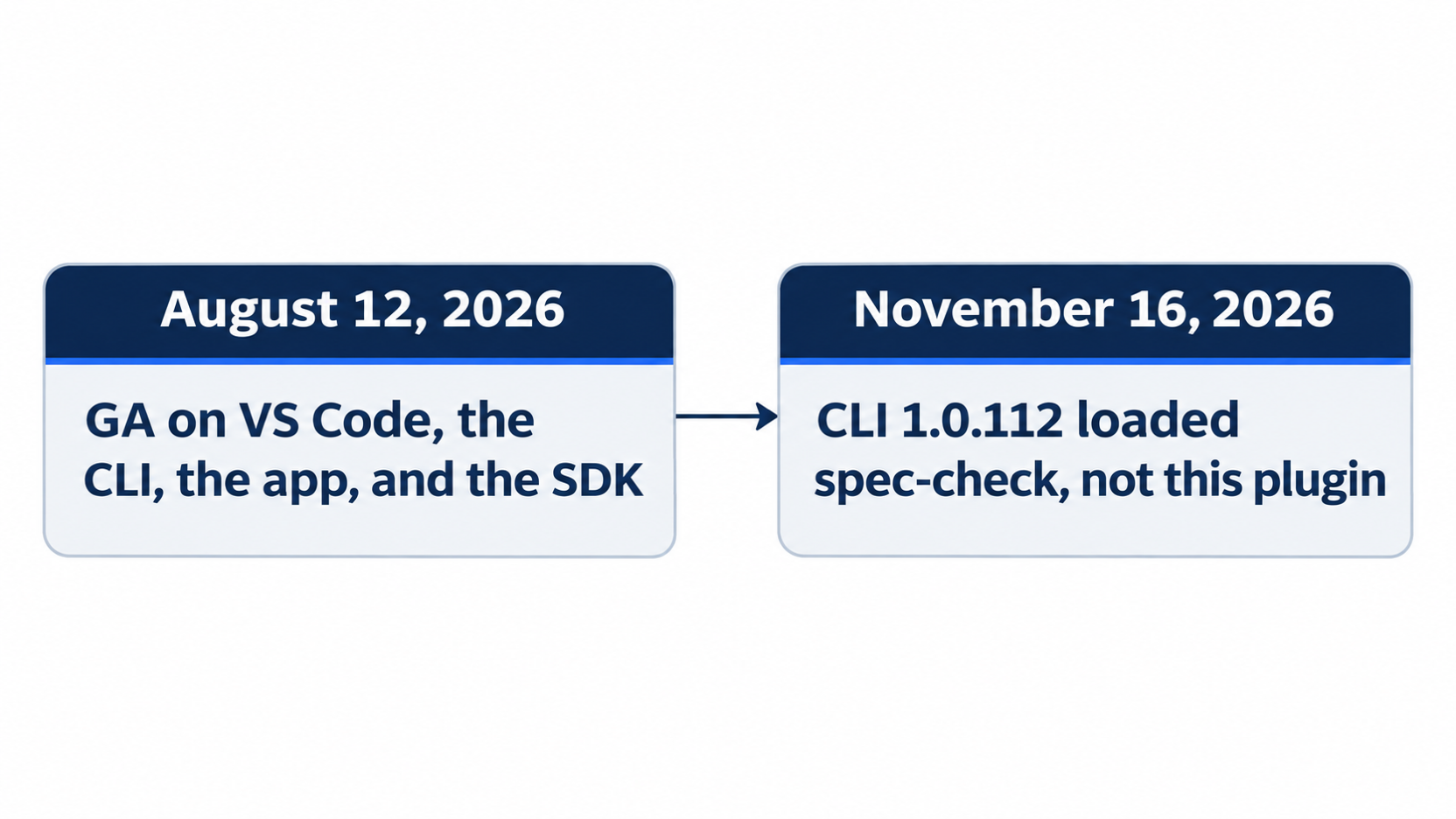
August 12, 2026 is the general-availability date for those four surfaces only. November 16, 2026 is the day CLI 1.0.112 loaded spec-check through --plugin-dir and skill list --json. The listing that day was not merge-by-hand, and the notes do not say this hook script ran.
github/copilot-plugins and github/awesome-copilot are examples you can inspect. They are not a blanket trust, and you do not install either one today.
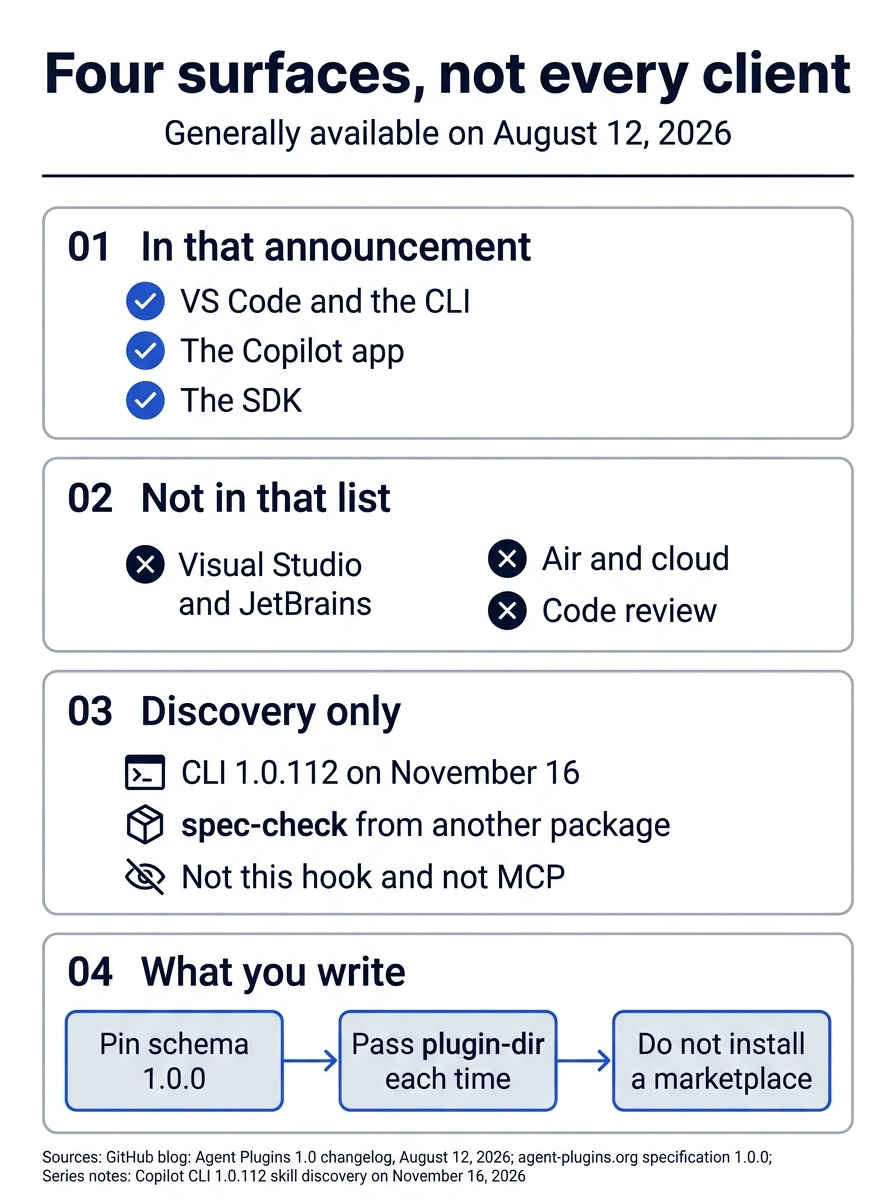
The announcement covers four surfaces: VS Code, the CLI, the app, and the SDK. Visual Studio, JetBrains, Air, cloud, and code review are outside that list. The November 16, 2026 check was skill discovery of spec-check from another package, not this hook and not an MCP test. The manifest you write pins schema 1.0.0, and --plugin-dir has to be passed again on the next command that should see the skill.
The standards site this chapter uses presents specification 1.0.0, and the canonical manifest identifier is https://agent-plugins.org/schemas/1.0.0/plugin.schema.json. The CLI also accepts the 1.1.0 identifier https://agent-plugins.org/schemas/1.1.0/plugin.schema.json. Accepting 1.1.0 does not make 1.1.0 the file you should write. This chapter pins 1.0.0. The CLI treats a manifest without one of those exact values as a legacy manifest and loads it under the older rules. The CLI rejects an Agent Plugins version that it does not support. A rejected plugin contributes no skills.
--plugin-dir does not persist an activation. The plugin reference says a --plugin-dir mount stays read-only on copilot plugin disable, because there is no saved on-off switch to change. You pass the flag again on the next command that should see merge-by-hand. A marketplace install is a different operation, and you did not do it.
What is portable, and what stays in the repo
Agent Plugins 1.0 defines two portable pieces: skills under skills/, and MCP servers in a root mcp.json. Agents, hooks, commands, rules, and LSP servers are client-specific. Copilot reads those from com.github.copilot/ inside the plugin. Other tools ignore a namespace that they do not implement. You do not create com.github.copilot/ today. The hook you committed is a repository file under .github/hooks/, which is the hooks reference path, not the plugin namespace path.
A root plugin.json that targets Agent Plugins takes precedence over .plugin/plugin.json and .claude-plugin/plugin.json. A client uses legacy paths when $schema is absent or is not a recognized Agent Plugins identifier. Your file has the 1.0.0 identifier at the plugin root, so you do not also add a legacy manifest beside it.
Gotcha: an mcp.json without $schema loaded no server and showed no warning on CLI 1.0.112. Adding the schema loaded the server. The MCP schema identifier for 1.0.0 is https://agent-plugins.org/schemas/1.0.0/mcp.schema.json, and it has to match the version that plugin.json declares. This chapter omits mcp.json so a missing schema cannot fail silently. Do not add an empty MCP file to look complete. Do not add ticket-triage-plugin/mcp.json.
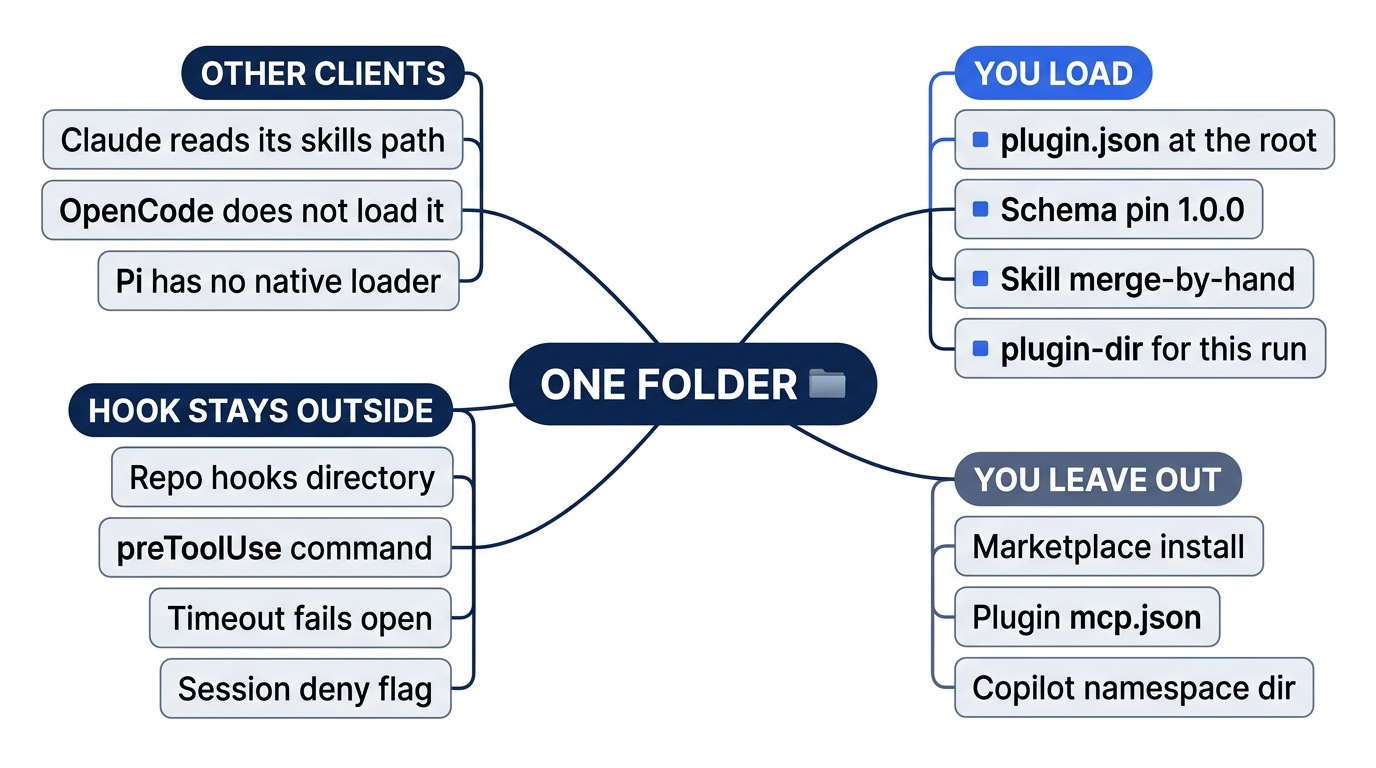
You load a root plugin.json pinned to schema 1.0.0, one skill named merge-by-hand, and --plugin-dir for the run that should see it. You leave out a marketplace install, a plugin mcp.json, and a com.github.copilot/ directory. The hook stays a repository file, and a timeout on that hook still fails open, so the session deny flag stays in the command. Claude Code, OpenCode, and Pi do not adopt this manifest.
The portability check is the discovery method recorded on November 16, 2026. It is not a new test. Copilot CLI 1.0.112 loaded a plugin skill through --plugin-dir and skill list --json. The skill name in that listing was spec-check. The package was not ticket-triage-plugin.
Claude Code 2.1.325 does not adopt the manifest. It loaded skills/ from the test directory only because that path matches Claude's own layout. It called the plugin by the directory name, not by the name in the root manifest. It ignored the manifest description and listed zero MCP servers from root mcp.json. A control .mcp.json did load. OpenCode 2.3.0 does not load the folder. A teammate test placed an Agent Plugins folder in .opencode/plugins/, and the skill did not load. Pi has no native loader. A Pi package can read a skills/ directory through Pi's own package convention. Pi's package reading is not plugin.json or mcp.json support.
If you have used Claude Code: Claude's plugin file is .claude-plugin/plugin.json. Copying only plugin.json from this folder will not make Claude Code install it.
Where the same folder can travel
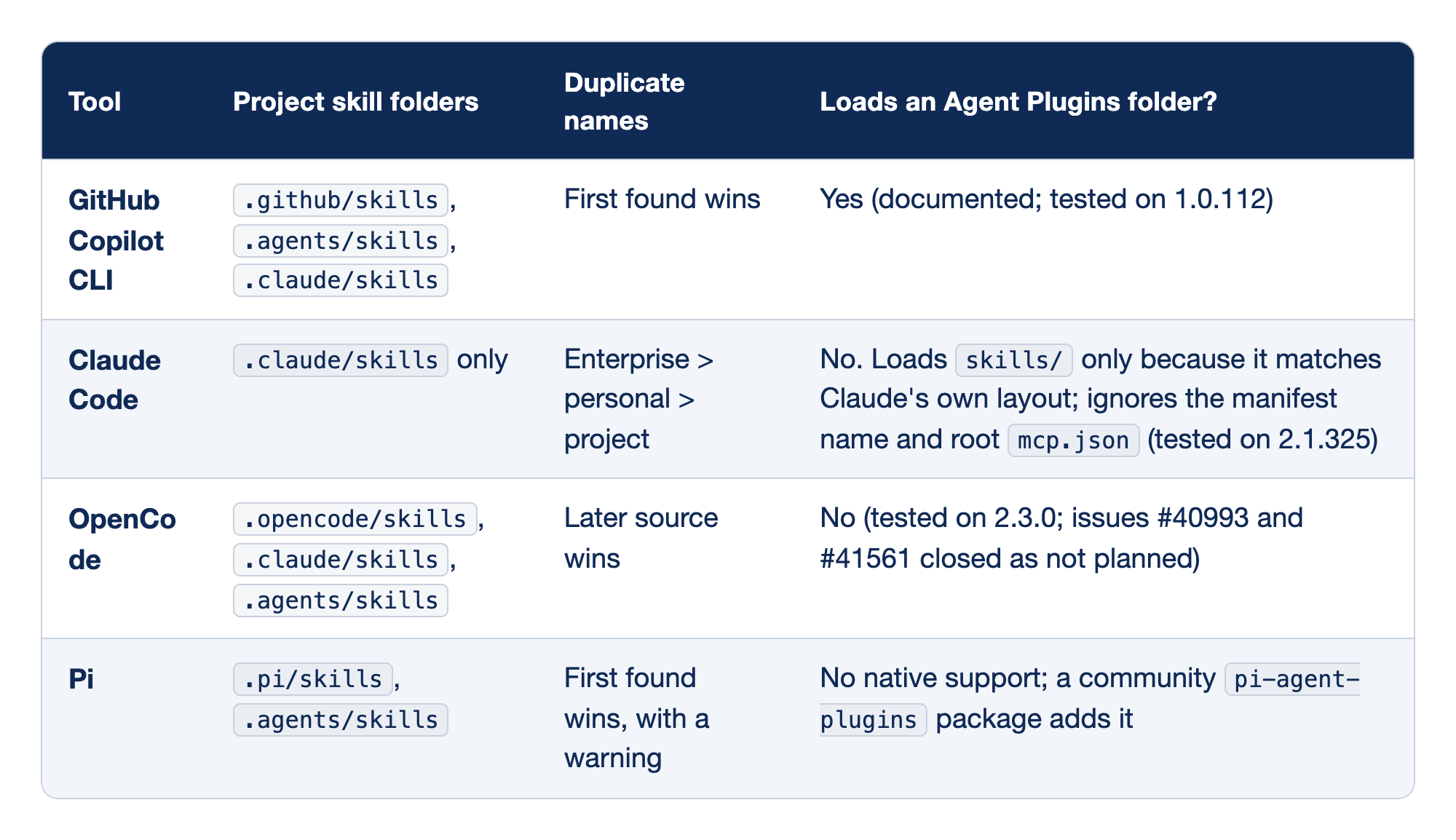
These four rows compare GitHub Copilot CLI, Claude Code, OpenCode, and Pi. The Tool column names the client. The Project skill folders column lists the directories that client reads for a project skill. The Duplicate names column says which copy wins when two skills share a name. The Loads an Agent Plugins folder column says whether that client loads a root plugin manifest as an Agent Plugins package. Copilot keeps the first project copy, OpenCode keeps the last, and a plugin skill still loses to a project or personal skill of the same name.
- GitHub Copilot CLI reads
.github/skills, then.agents/skills, then.claude/skills, and keeps the first name it finds. It loads an Agent Plugins folder. The result is documented and tested on 1.0.112. The reference is the Copilot CLI plugin reference. - Claude Code reads
.claude/skillsonly, as its skills doc describes. Duplicate names follow enterprise, then personal, then project. The 2.1.325 result is not Agent Plugins support. Askills/directory loads only because that path matches Claude's own layout. Claude Code ignores the manifest name and a rootmcp.json. - OpenCode reads
.opencode/skills,.claude/skills, and.agents/skills. A later source wins, so the last copy of a name is the one that loads. It does not load an Agent Plugins folder. The test was on 2.3.0, and issues #40993 and #41561 were closed as not planned. The OpenCode skills doc is the source for that row. - Pi reads
.pi/skillsand.agents/skills, keeps the first name, and warns. It has no native Agent Plugins support. A communitypi-agent-pluginspackage adds that. The skills doc for this row is Pi's skills doc.
What the hook page guarantees
Repository hooks live at .github/hooks/*.json. User hook files live under ~/.copilot/hooks/ by default, or under $COPILOT_HOME/hooks/ when that variable is set. On Windows, the default user directory is %USERPROFILE%\.copilot\hooks\. The CLI no longer reads ~/.copilot/config.json for hooks. Inline user hooks, if you ever add them, belong in ~/.copilot/settings.json. You did not add a user hook today.
Policy hooks load before the others. They cannot be disabled with disableAllHooks. The hooks page then describes the remaining order in two ways. The introduction says policy, then user, then project, then plugins. The bullet list places repository files before user files. All matching hooks run either way. Do not pick one of those sentences and call it the only order.
A cloud job loads repository .github/hooks/*.json files only, by default. The sandbox does not ship with your user hooks, your settings.json, or your installed plugins. In that job, a preToolUse decision of ask becomes deny, because no person is there to answer. Your file uses deny for a push, not ask. You do not rely on this repository hook inside a cloud job as a substitute for the session flag you passed locally. Cloud is not one of the four Agent Plugins surfaces from August 12, 2026.
The documented default for timeoutSec is 30 seconds. The manifest omits the field, so the file uses that default. A timeout still fails open, including preToolUse and administrator policy hooks. The tool call proceeds through the normal permission flow. Non-timeout preToolUse command errors fail closed. Exit 2 denies even when standard output says allow. Any other non-zero exit denies with the hook-error path. Empty output, or output that is not JSON, falls through to the default permission flow. A timeout, or a script that prints nothing, cannot be the only guard.
PascalCase event name PreToolUse switches the payload to snake_case fields such as tool_name. Today's file stays camelCase preToolUse, so the script reads toolName. Do not rename the event to match a Claude hook sample. The tool name for the shell stays bash or powershell in the camelCase payload.
The hook script was not executed on November 16, 2026. If your session's payload shape surprises the script, the deny flag is still the check you already ran with the file renamed aside.
Do this today
Everyone
copilot --plugin-dir=./ticket-triage-plugin skill list --json, run from~/code/ticket-triage, showsmerge-by-hand. The check is that name in the output. The habit to keep is that you load this folder with--plugin-dirfor the command that should see it, and that you do not install a marketplace plugin you have not read. The discovery method was tested on Copilot CLI 1.0.112 with a skill namedspec-checkfrom a different package. This folder was not that package. Re-run this on your account before you trust the wording.- After you renamed
.github/hooks/deny-git-push.jsonaside, a new session started with--deny-tool='shell(git push)'refused the push, and git did not run. The check is your note of that second refusal. The hook file is back at.github/hooks/deny-git-push.jsonbefore the commit. There is no sample denial transcript. This hook script was not executed on November 16, 2026. A git error on either session means the guard failed. You did not complete a push. - The commit is yours.
git log -1 --onelineshowsAdd a local plugin and a preToolUse hook.git status --shortprints nothing.git diff -- src/classify.jsprints nothing.npm testfinishes with zero failures. The agent did not run git. You did not editsrc/classify.js. You did not pass a model name, and you did not turn auto-merge on.
If you read the name rule and the hook page
- Write one sentence: an
mcp.jsonwithout$schemaloaded no server and showed no warning on CLI 1.0.112, and adding the schema loaded the server. The check is that sentence, plus a note thatticket-triage-plugin/mcp.jsondoes not exist. - Write that a hook timeout fails open, including
preToolUse, so the hook is not the only guard. The check is that sentence. A note that calls the hook file a sufficient lock ongit pushfails the check.
The folder is optional. The flag is not.
The plugin is a folder you load when you want merge-by-hand in the skill list. --plugin-dir does not install it, a marketplace you have not read stays uninstalled, and a same-named project skill would hide the plugin copy without a warning. The schema line stays the 1.0.0 identifier, and the plugin folder does not grow an mcp.json.
The hook is a witness you can commit. It is not the lock. The documented wait is 30 seconds, a timeout fails open, and a script that prints nothing falls through. The session you trust is the one you started with --deny-tool='shell(git push)' after the hook file was no longer a JSON file in .github/hooks/.
Load the folder on purpose. Refuse the push with the flag. The hook can time out. The flag should not.
This is Part 13 of "GitHub Copilot, Day-to-Day," a 16-part guide to using GitHub Copilot as a daily coding agent.