
Copilot Reviewed the Pull Request. You Still Have to Merge It.
Copilot code review is a second opinion on a draft you already have, and you merge by hand only after you have read it, with effort left at Balanced and auto-merge left off.
Leave the effort at Balanced, read every comment, keep auto-merge off, and merge yesterday's draft by hand only after the diff still holds.
Copilot's approval looks like permission to land the pull request, and it is not. You still read the review, keep auto-merge off, and merge by hand.
In this article: You request GitHub Copilot code review on a draft pull request you already have, or you stop when yesterday's note is a refusal. Effort stays at Balanced, the default since September 28, 2026. An approval, available since September 1, 2026, is not the merge. You read the review, keep auto-merge off, merge by hand, then update the local checkout with git pull and npm test.
Preview: written November 16, 2026, before Microsoft Ignite. Some paid steps are not yet tested live; this guide will be updated November 21, 2026.
Yesterday you wrote down a draft pull request URL, or a written refusal. Local src/classify.js was still unchanged. Copilot code review is GitHub's review of that pull request. It is not the same thing as asking the coding agent to read a diff, and it is not the merge.
An approval assessment looks official. An approval, available since September 1, 2026 and off by default, looks more official. Neither one lands the branch. Auto-merge is the switch that merges a pull request without you merging it by hand. It stays off. This review was not run on November 16, 2026. Re-run it on your account before you trust the wording.
Starting fresh or fell behind? Run git switch -C main copilot/day-11. This replaces your main with the end of Day 11; to keep your own work, run git branch my-backup first.
Stop, or request one review
By the end of this pass you have merged that pull request yourself, with a Copilot review on it and auto-merge still off, or you have stopped because you have no draft.
If yesterday's note is a written refusal and you do not have a draft URL, stop. You do not open a pull request, invent a URL, or merge. src/classify.js stays as it was. The rest of this article is only for a draft you already have. A draft is a pull request that is not ready to merge. Yesterday left it that way on purpose. Marking the pull request ready was not run on November 16, 2026, so that click is not today's default. If Request will not accept the pull request while it is still a draft, stop and write request control refused a draft. You still do not enable auto-merge. You still do not merge until you have read the review.
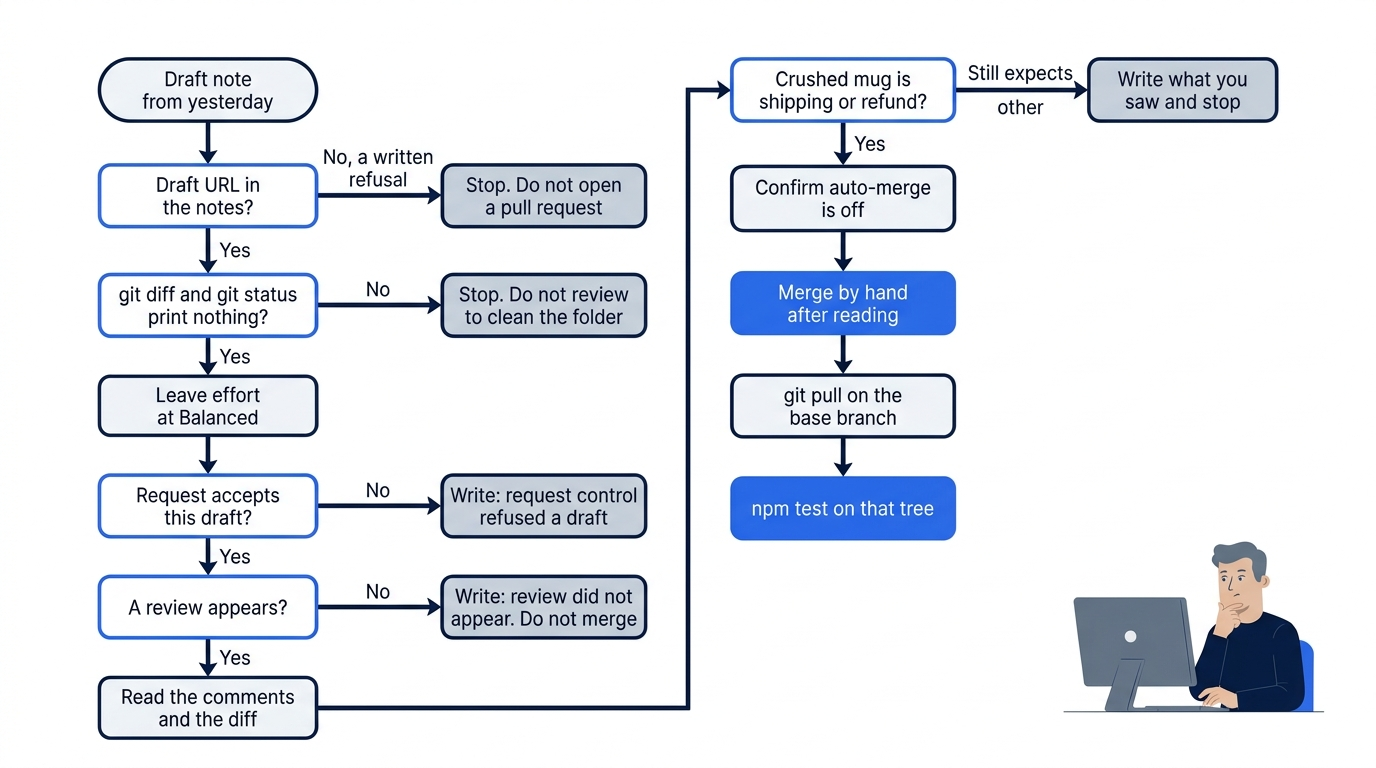
You work in ~/code/ticket-triage. The draft lives on GitHub. This folder is still the checkout from before that merge.
On Windows: use C:\code\ticket-triage if that is the path from the first setup, and run the blocks in Git Bash.
cd ~/code/ticket-triage
git diff -- src/classify.js
git status --short
Both commands print nothing. If either prints a patch or a path, stop. Do not request the review to clean the folder. Set that work aside until status is empty.
Open the draft URL. Under Reviewers, Copilot appears as a reviewer. Leave the effort at Balanced. Review effort is how thorough this review tries to be. Balanced is the default since September 28, 2026. The October 2, 2026 changelog confirms it. The August 28, 2026 changelog is the earlier notice that the default would change. As of November 16, 2026, you do not open a settings page to pick another effort.
Lite is the lower effort name. Max is the highest. You do not select either one. If this pull request's control shows Lite, set Balanced on this pull request only. If you do not see an effort control, leave it alone and write "effort control not seen." Do not open enterprise, organization, or personal Copilot settings to hunt.
The request is the control the code review how-to names. Under Reviewers, next to Copilot, click Request. Wait for the review. If none appears, write "review did not appear" and stop. Do not merge. Do not send a second request from another tool while you wait. You do not start a new cloud session, and you do not edit src/classify.js to help the review along.
Read it, then merge by hand
Scroll the comments. The how-to says Copilot labels each one High, Medium, or Low, and that the overview includes an approval assessment. This article has no sample review comment. Read the words on your pull request.
The September 1, 2026 post, Copilot code review can now approve pull requests, says the ability to approve is off by default. An approval assessment is not an approval. An approval is not your merge. By default, Copilot leaves a comment review rather than an approval. If it cannot approve, you still merge by hand after you have read the diff and the review. If it does approve, you still merge by hand.
Gotcha: treating the approval, or the approval assessment, as the merge, or turning auto-merge on while you are still reading. The review is a second opinion. It does not replace you.
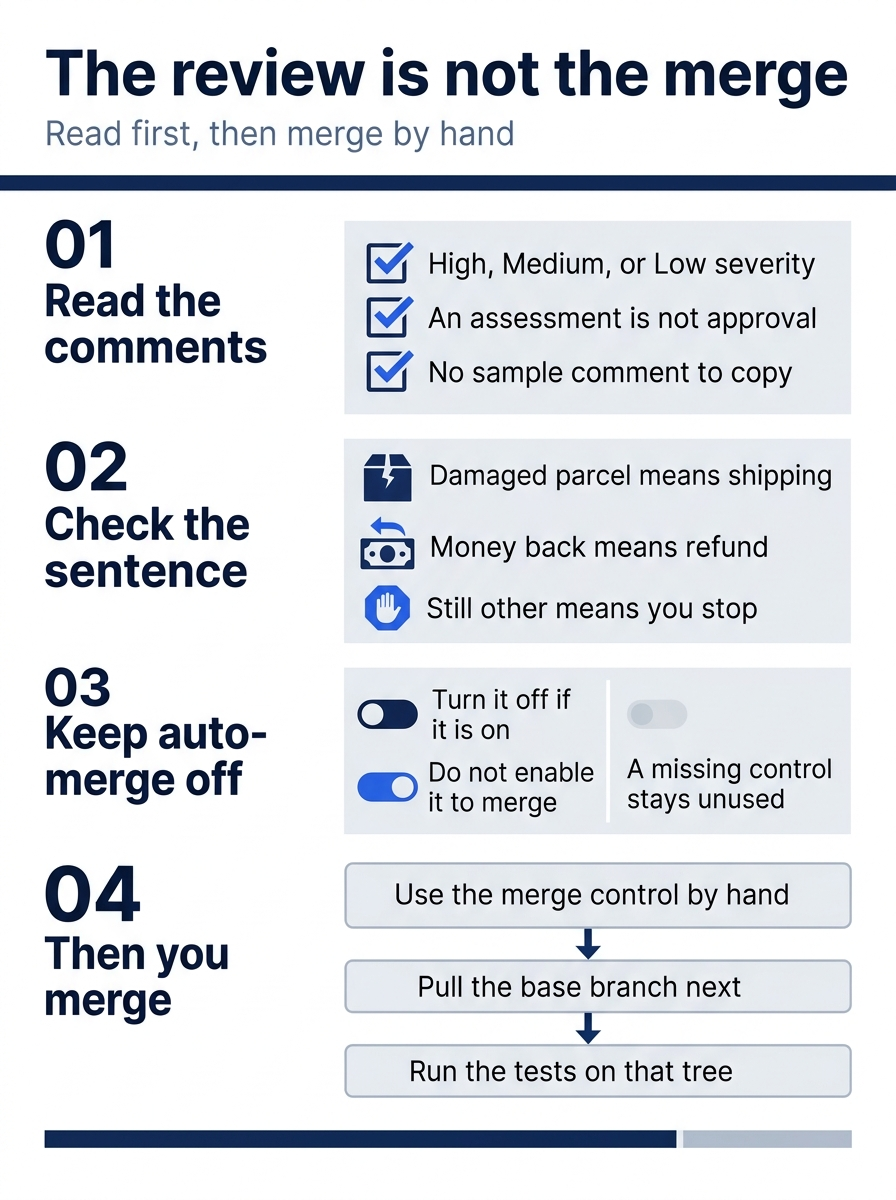
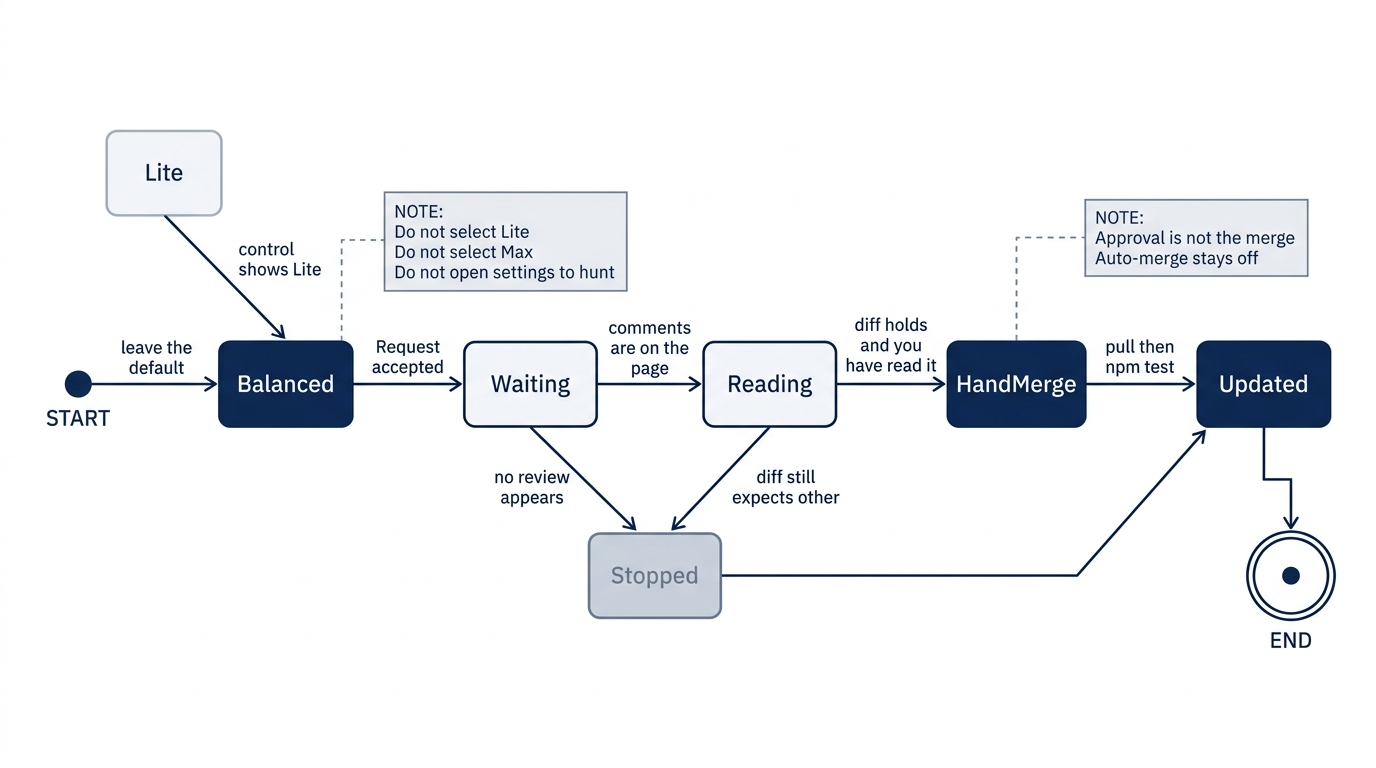
The four checks are the order of the merge. Read the severities, confirm the crushed-mug case, leave auto-merge off, and only then merge by hand and test the updated tree.

The picture is that pause. Relief is finishing the reading before the branch lands, not a badge that says the review is done.
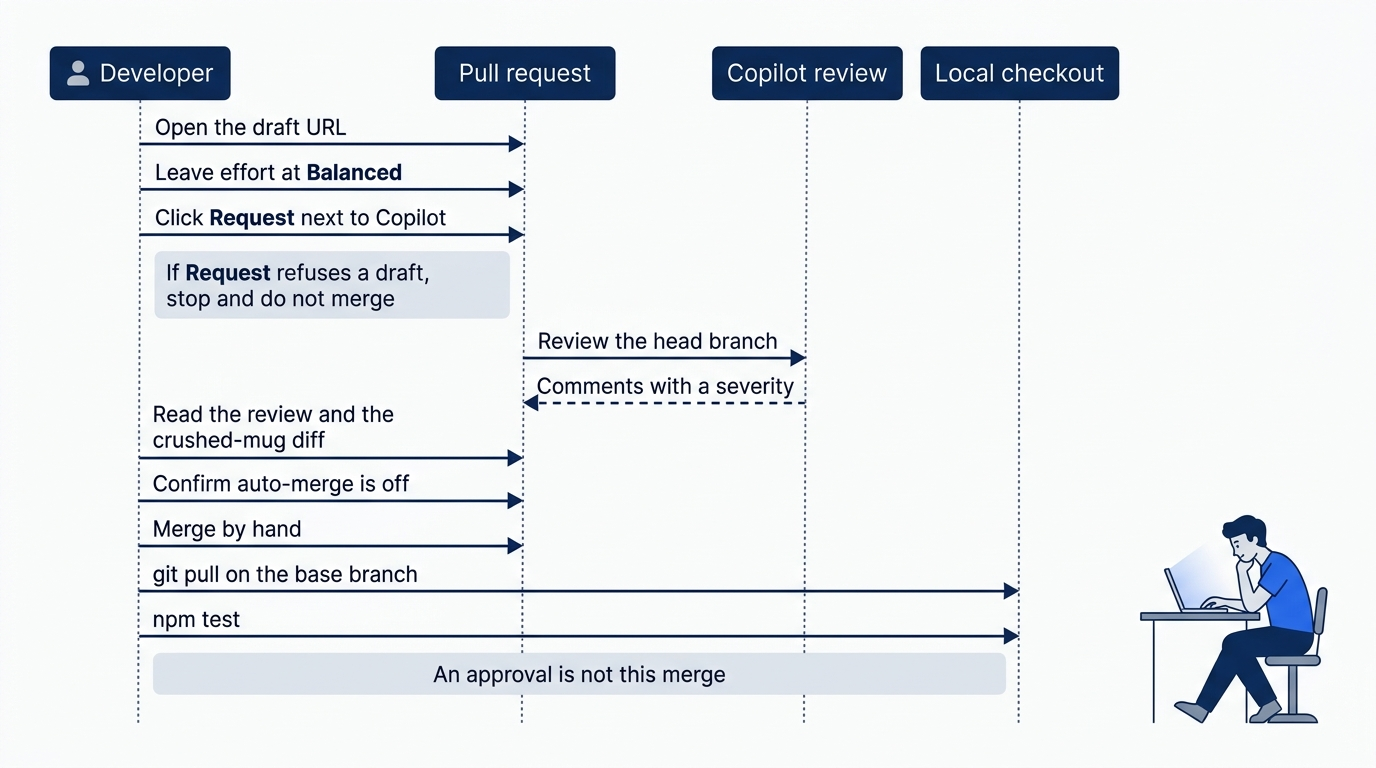
Before you merge, look at the diff for The box showed up crushed and the mug inside is in pieces. The test that expected other should have moved. A damaged parcel should return shipping. If the customer also wants money back, the result should be refund. If the diff still expects other and does not show shipping or refund for that case, do not merge. Write what you saw and stop. Do not repair the branch in this pass.
Do not apply a suggested edit. Do not click Fix with Copilot. The how-to names that control, and using it starts another change.
Confirm auto-merge is off. If it is on, turn it off. If you cannot find the control, write "no auto-merge control seen" and still do not enable it. Then merge with the pull request's merge control. If that control is unavailable, write the reason and stop. Do not enable auto-merge to get past a disabled merge button.
Pull the base branch and run the tests
The GitHub merge does not change ~/code/ticket-triage until you update it. Stay on the base branch, the branch the pull request merged into. Do not check out the cloud agent's head branch instead.
cd ~/code/ticket-triage
git status --short
git branch --show-current
git pull
npm test
git status --short must print nothing before git pull. If it prints a path, stop and do not pull. git branch --show-current must print the base branch named on the pull request. If it prints another name, check out that base branch, then pull there. If git pull stops with a conflict or a rejection, do not add flags. Write the first error line and stop.
npm test runs the merged tree. A green run shows # fail 0. In test/classify.test.js, the crushed-mug sentence should now expect shipping, or refund when the customer also wants money back. This article does not give you a replacement assertion to paste.
grep -n "crushed and the mug" test/classify.test.js
The command prints the matching line, or it prints nothing. Read the expected value. Do not change the line.
If npm test fails, stop. Write that the merge did not go green. Do not ask an agent to fix it, weaken the test, or change src/classify.js to force # fail 0. If the run passes and the expectation is still other, write that down too. A passing run does not rewrite a stale expectation, and you do not correct it today.
After a clean pull, git status --short prints nothing because the merged work is already committed. Do not restore src/classify.js. Write whether the merge went green. A written stop is the win when you did not merge.
You can stop here. The dates and the limits below do not start a second review, and they do not turn auto-merge on.
When Balanced became the default
Copilot code review was generally available on April 4, 2025 (announcement). The effort default is newer than that launch.
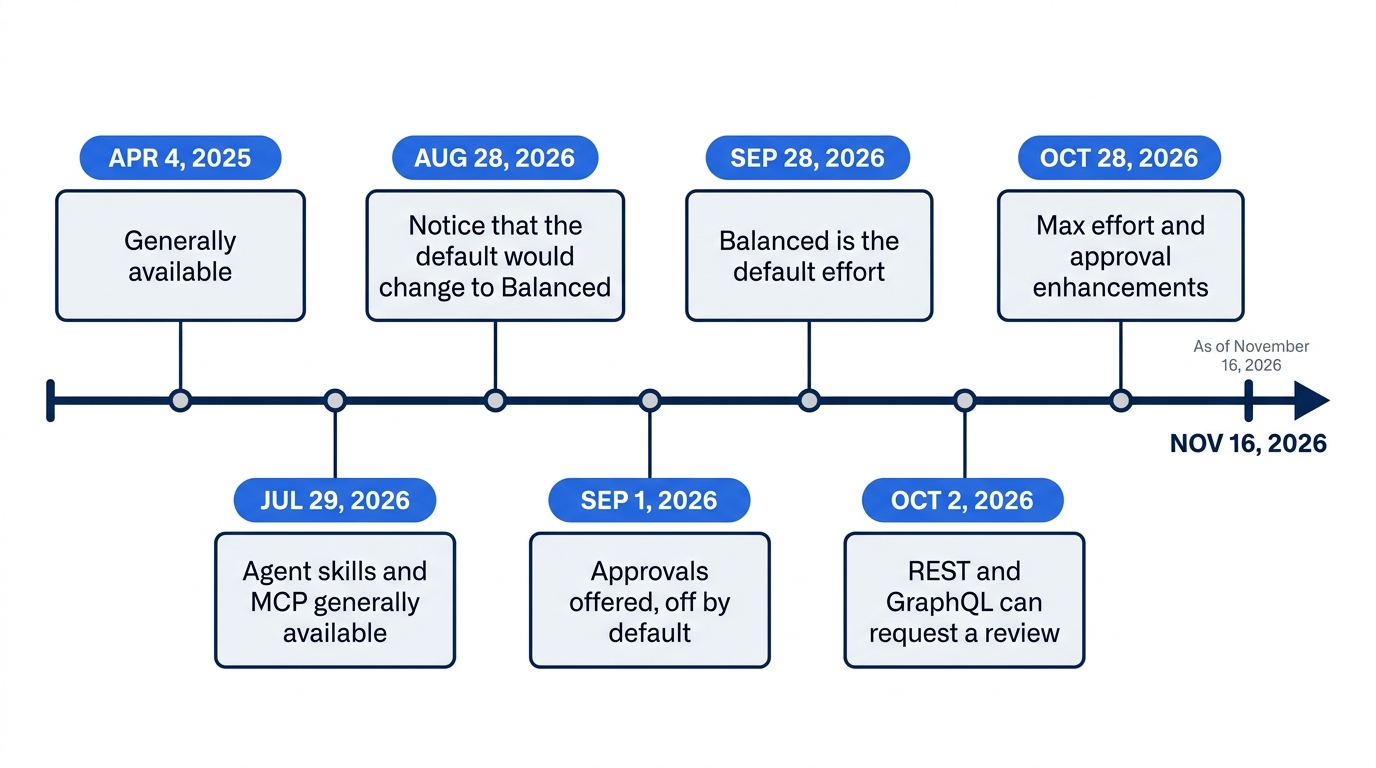
August 28, 2026 is the notice that the default would change to Balanced. October 2, 2026 says the change took effect on September 28, 2026, for repositories and organizations already using Copilot code review, and for new ones. An explicit Lite selection already saved in settings was left as Lite. You did not open those settings, and you did not select Max.
The October 2 post also says a review can be requested through the REST and GraphQL APIs, including an effort on that request. You do not call that API today. The Reviewers control is the request this article uses. Max review effort and approval enhancements date to October 28, 2026. This article does not describe those enhancements. You still do not switch to Max, and you still do not turn approvals on.
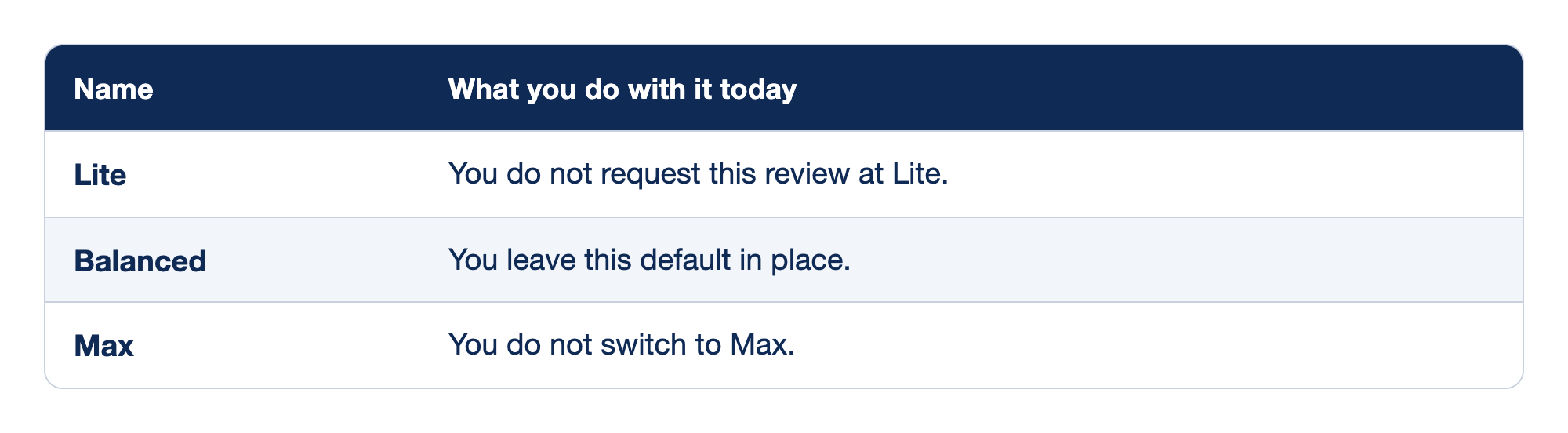
The two columns are Name and What you do with it today. Name is one of the three review effort names. What you do with it today is the choice for this pull request, not a price and not a setting you open elsewhere. As of November 16, 2026, this article states no dollar amount for Lite, Balanced, or Max.
- Lite is the lower effort name. An older explicit Lite setting can still be in force. You do not use Lite for this pull request.
- Balanced is the default review effort since September 28, 2026. The October 2, 2026 post confirms it. You leave Balanced in place.
- Max is the highest effort name. You do not select it. The how-to says that higher effort levels consume more AI credits. This article does not quote a price for that extra use.
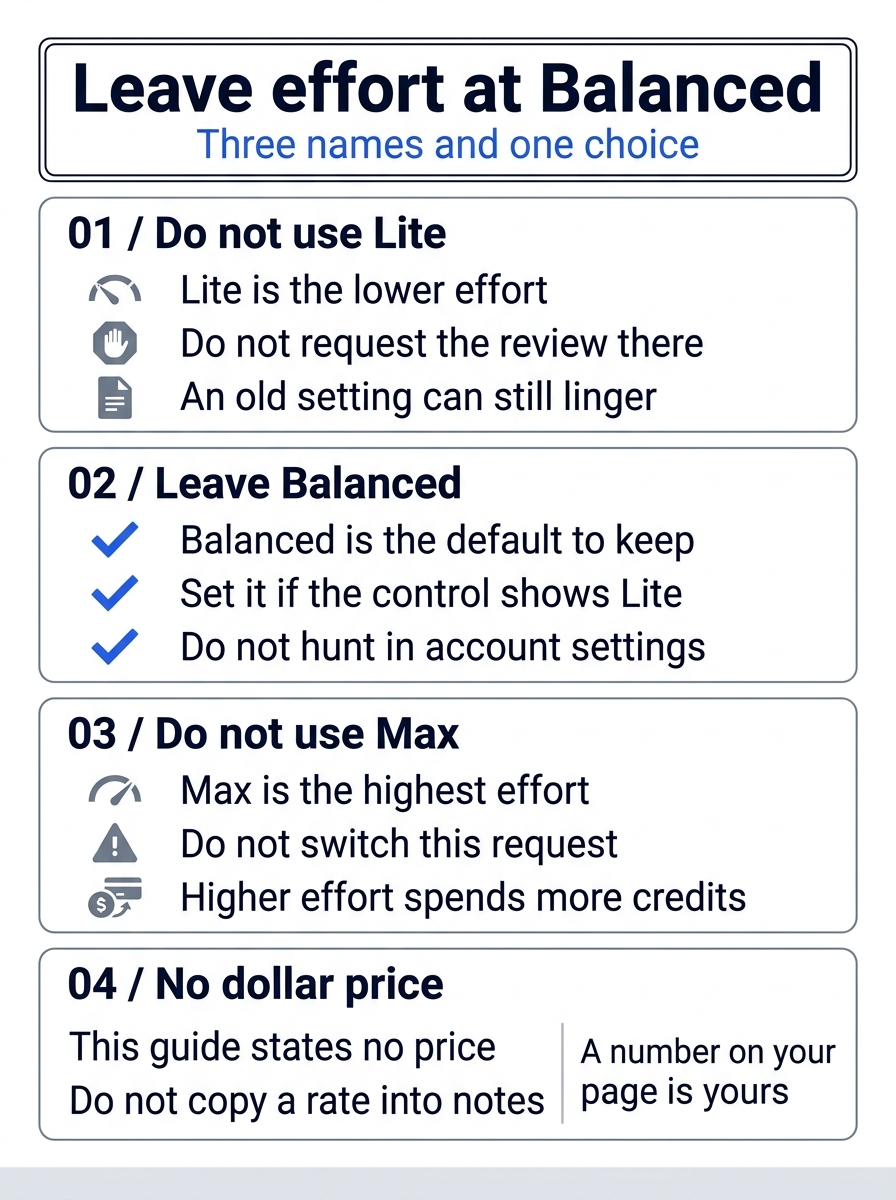
The three names are one choice. A number on your own billing page stays on that page.
What the review can spend, and what it can read
Each review can spend AI credits and Actions minutes. AI credits are Copilot's usage meter. Actions minutes are minutes a GitHub-hosted Actions runner spends for the review. The how-to says Copilot code review uses GitHub Actions for this work. A self-hosted runner does not consume Actions minutes. It still has hosting costs. This article states no per-minute rate and no dollar price per review. A number on your account page is yours to read. It is not a figure to copy into these notes.
Code review can read .github/skills from the head branch, the branch that holds the pull request's changes, not the base branch you merged into. Skills and MCP for review were generally available on July 29, 2026 (announcement). A review skill is a SKILL.md under a skill directory in .github/skills. MCP tool calls from code review stay read-only. The GitHub and Playwright MCP servers are on by default for review. You do not add a skill or an MCP server today.
A release-checklist skill may already sit under .agents/skills. This article does not claim the review loaded that folder.
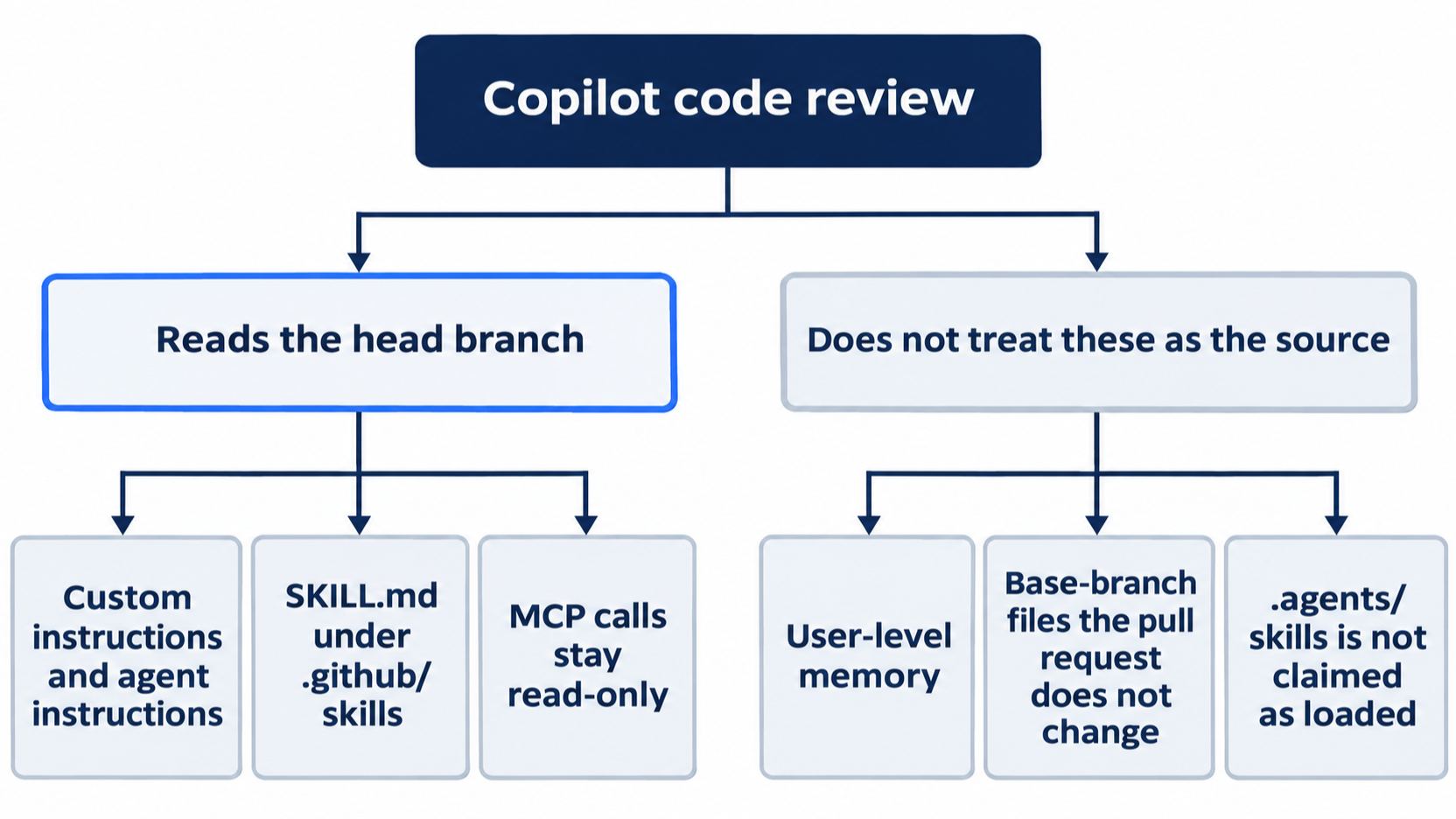
During a review, Copilot reads repository custom instructions, agent instructions, and agent skills from the head branch, not from the base branch. .github/copilot-instructions.md stays on the base branch unless the pull request changes it. You do not add a new instruction file after the review to steer a comment you already received. Code review does not apply user-level memory. Account preferences are not an input. Head-branch files are a different source, and account memory does not stand in for them.
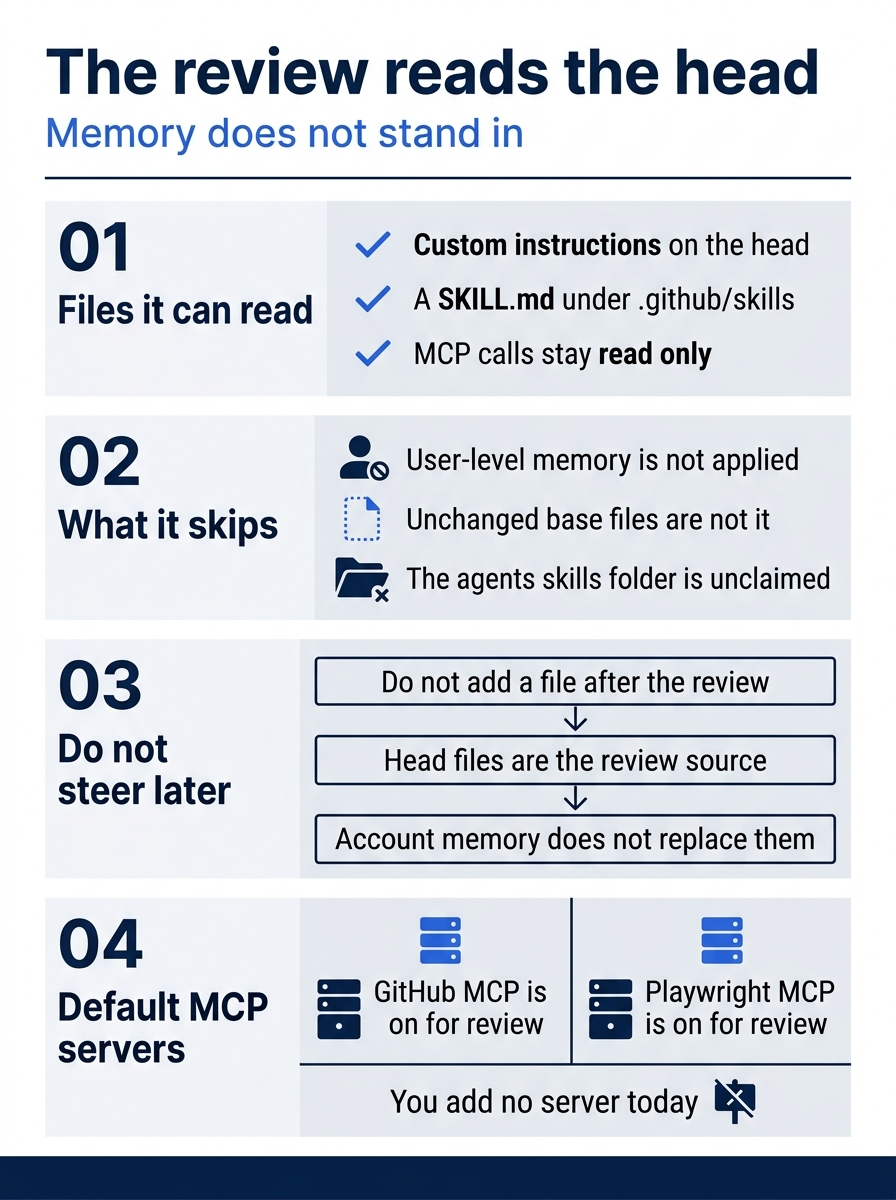
GitHub MCP and Playwright MCP already start on for review. The picture's last panel is that default, not a new server you install today.
Free's review access is narrower than pull-request review on a paid plan. The plans page puts only "Review selection" in VS Code in the Copilot Free cell. Broader pull-request review is not that switch. This article states no Free credit number. If yesterday's handoff was refused because the plan could not start a cloud session, you already stopped. Editor review selection does not create the missing pull request, and it is not today's review.
Gotcha: treating VS Code Review selection as a stand-in for the Reviewers request. You do not merge from the editor to skip a review that never appeared.
The how-to says a review usually takes less than 30 seconds. This review was not run on November 16, 2026, so that line is the page's wording, not a timer you measured. A longer wait is a reason to write down what the page shows. It is not a reason to merge without a review, and it is not a reason to click Fix with Copilot.
One terminal command, and it is optional
You already used the Reviewers control, or you stopped before a request. The how-to's GitHub CLI tab documents a command for an existing pull request. Do not run it if you already clicked Request. A second request is a different review.
gh pr edit PR-NUMBER --add-reviewer @copilot
PR-NUMBER is the pull request number, not the whole URL. The command adds Copilot as a reviewer. It does not set the effort. Balanced still has to be the effort on the pull request before you treat the review as the one you asked for. Do not run gh pr create. The pull request already exists.
Approvals stay a separate switch. The September 1, 2026 post calls the ability to approve a public preview and says it is off by default. Public preview, on that post, means the sign-off is offered and is not described as the finished form. An approval assessment does not, by itself, count toward required approvals. When an admin has enabled approvals, an approving review can satisfy a required-approval rule the way a teammate's approval would. New commits after that approval dismiss it. None of those outcomes is your merge. You still merge by hand, and only after you have read the review. You do not enable approvals in this pass.
If you have used Claude Code: a local second look is not this hosted review. The test suite remains the gate either way.
Do this today
Everyone
- If yesterday's note is a refusal and you have no draft URL, you stopped. The check is that written refusal. You did not open a pull request, and you did not merge.
git diff -- src/classify.jsstill prints nothing. - If you had a draft, a Copilot review is on that pull request, or your notes say that the review did not appear and you did not merge. The check is the review on the page, or that sentence. You did not click Fix with Copilot, and you did not apply a suggested edit. This article has no sample review comment. Re-run this on your account before you trust the wording. This review was not run on November 16, 2026.
- If you merged, auto-merge was off and you merged by hand. After
git pullon the base branch, you wrote down thenpm testresult on that updated tree. The check is the note:# fail 0, or the merge did not go green. You also wrote whether the crushed-mug sentence now expectsshipping, orrefundwhen the customer also wants money back, instead ofother. You did not change the test, and you did not changesrc/classify.js, to force a pass.
If you read the dates and the limits
- Write the three effort names, Lite, Balanced, and Max, and write that Balanced is the default you left in place. The check is those three names plus that sentence. A note that gives a dollar price for a review fails the check. As of November 16, 2026, this article does not have one.
- Write that each review can spend AI credits and Actions minutes, that a self-hosted runner does not consume Actions minutes and still has hosting costs, and that code review does not apply user-level memory. The check is those three clauses. A note that calls VS Code "Review selection" the same switch as the pull-request Reviewers request fails the check. A note that states a per-minute rate fails the check too.
A second opinion still needs your hand
The draft was already written. Copilot's job is a review of that draft at Balanced, or a stop when there is nothing to review. Your job is the reading, the crushed-mug check, and the merge control.
An approval since September 1, 2026 does not finish that job, and auto-merge does not either. After you merge by hand, the checkout is still the old tree until git pull, and the merged tree is unproven until npm test. If either one fails, you write that down and you leave the files alone.
The review is a second opinion. The merge is still yours.
This is Part 12 of "GitHub Copilot, Day-to-Day," a 16-part guide to using GitHub Copilot as a daily coding agent.