
Why the GitHub Copilot Context Window Makes the Agent Forget
The model sees only the text on this turn, so you record that window twice, compact once, and prove the instruction file is still the copy on disk.
The model sees only the text on this turn. Record that window twice, compact once, and keep the instruction file as the copy that has to stay correct.
The summary missed a rule you could still read in the file, and you almost changed the file to match the reply. The chat is what forgets; the instruction file is the copy that has to stay correct.
In this article: You will run one new Copilot CLI session, record two
/contextreadings, compact once, and prove.github/copilot-instructions.mdis still the copy on disk. You will see why a compact summary can drop a rule the file still holds, how Copilot Memory expires, and why you do not turn memory off to fix a forgetful chat. By the end, the file, the tests, and an empty git status are the proof, not the model's reply.
Preview: written November 16, 2026, before Microsoft Ignite. Some paid steps are not yet tested live; this guide will be updated November 21, 2026.
Ask Copilot CLI to summarize .github/copilot-instructions.md, and the reply can sound finished while missing a rule that is still on disk. The model did not become careless. It can see only the text on this turn. Older chat is not guaranteed to stay in that text, and a compact summary is not a second copy of the file.
The frustration in that picture is the whole problem. A summary can be confident and wrong. The file you can open in an editor is the copy that has to stay correct. You prove it with the shell, not with another prompt.
The GitHub Copilot context window is the text the model can see on this turn. It is not a folder, and it is not the git history. You do not measure it with a formula. You ask /context for a reading, write down that a reading appeared, and move on. This article does not paste a sample of the output. The /context session was not run as a paid turn on November 16, 2026. There is no transcript, no sample reading, and no sample summary. Re-run the drill on your account before you trust the wording. The file check does not depend on a reply.
The Copilot CLI command reference lists the slash commands you run. The Copilot CLI concept page documents /context for token use and /compact to compress history.
By the end of the drill you have one new Copilot CLI session, two /context readings, one /compact, and a summary checked against .github/copilot-instructions.md. You also have shell proof that the file is still present, with four tests passing and an empty git status --short. You do not commit, and you do not edit.
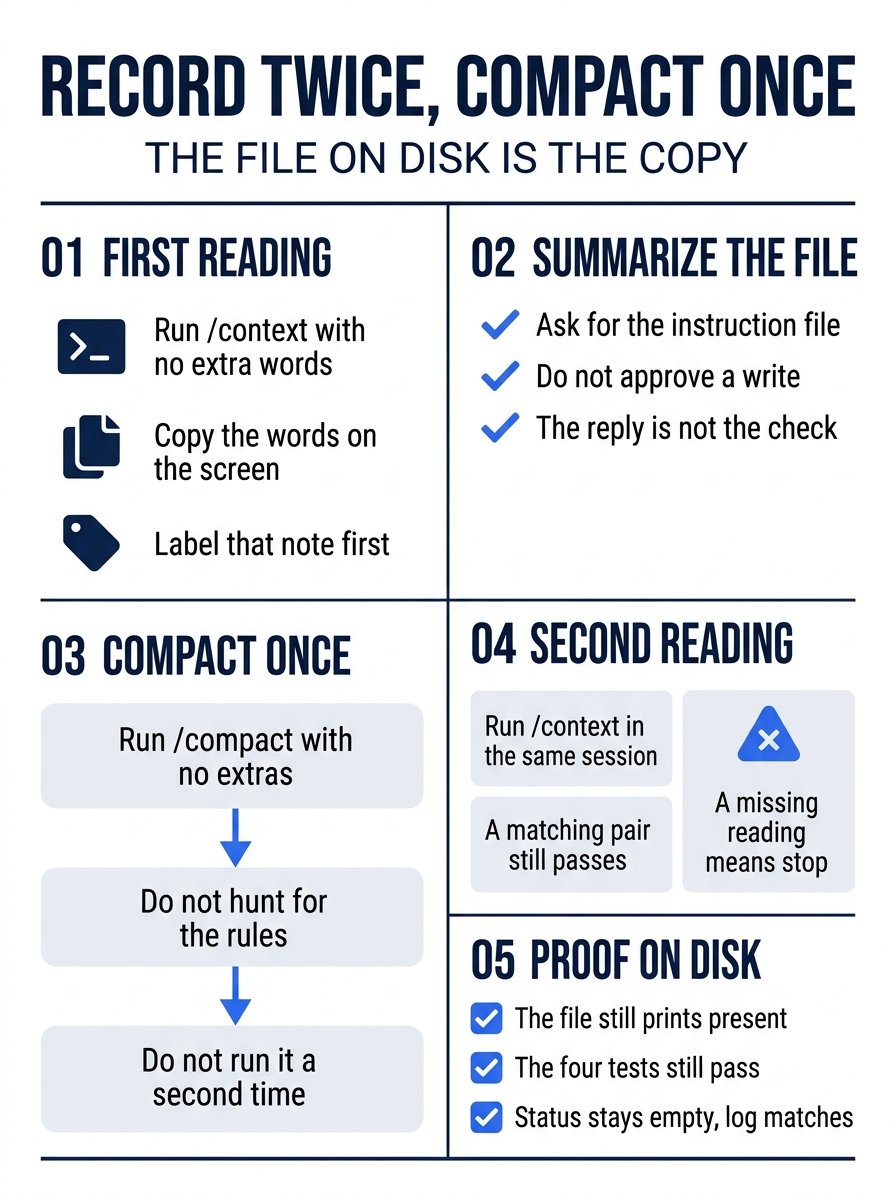
The poster is the whole drill in one pass. You copy a first reading, ask for a summary without approving a write, compact once, copy a second reading, and then let the file, the tests, and git prove that nothing changed. A second reading that matches the first still counts. A missing reading does not.
These steps use Copilot CLI 1.0.112, as of November 16, 2026. Another 1.0.x line is acceptable when you write it down. If the line is not 1.0, stop.
copilot --version
Write the line down if you did not keep it. Do not reinstall.
Starting fresh or fell behind? Run git switch -C main copilot/day-06. This replaces your main with the end of Day 6; to keep your own work, run git branch my-backup first.
Confirm the folder before you start
Work in ~/code/ticket-triage. Four tests already pass. src/classify.js is unchanged. .github/copilot-instructions.md and .github/instructions/tests.instructions.md are already on disk. You record that before the session, so a later empty status means this session added nothing.
On Windows: use the Ticket Triage folder you already use for this series. If you followed the Windows path, it is C:\code\ticket-triage. Git Bash is the Bash terminal that Git for Windows installs. Open it from the Start menu if the prompt is PowerShell, and run the blocks below in that shell. test -f is that shell's check.
cd ~/code/ticket-triage
test -f .github/copilot-instructions.md && echo present
test -f .github/instructions/tests.instructions.md && echo present
git diff -- src/classify.js
git log -1 --oneline
git status --short
npm test
Each test -f line prints present. git diff -- src/classify.js prints nothing. git log -1 --oneline prints one line. Copy that line. After the session it must match, which is how you know you did not commit. git status --short prints nothing. npm test reports four names: refund, shipping, other, and crushed mug in pieces is other, plus # tests 4, # pass 4, and # fail 0. Timings do not count.
If either present is missing, if status prints paths, if the classifier diff prints a patch, or if the pass count is not four with zero failures, stop. Do not ask a session to recreate files, clean the tree, or edit the classifier.
Print the instruction file before you start. You are checking the file you already have.
cat .github/copilot-instructions.md
The file has two lines: run npm test before you say a change is done, and do not edit src/classify.js until a crushed-mug issue says so. There is no such issue in this folder today. If the file prints any other rule, stop. Do not rewrite it to match a reply you have not asked for. You do not summarize or edit .github/instructions/tests.instructions.md in this drill.
Start a new capped session
Start a new session. Do not resume an earlier session. Each of those chats is a different window.
--max-ai-credits caps the credits this session may use. The cap is this session, not the account, and not the day-1 budget. The command shows 20 as a placeholder. Replace 20 with a small number you choose before you press Enter. The number in the command block is not a recommendation, and it is not that day-1 budget. You pass no model name.
cd ~/code/ticket-triage
copilot --max-ai-credits 20
You pass no other flag. You do not pass --yolo, --allow-all, or --allow-all-tools. If the shell history shows the placeholder 20 and you meant a different number, the check fails until the shell history shows the number you chose.
If a picker appears, select Copilot Fusion at Standard, and do not write a model name. Fusion is the router, not a model you pin. If the only way forward is to type a model name, stop and end the session.
If the session stops before two readings, write "stopped before the second reading." Do not drop --max-ai-credits and restart uncapped. Do not raise the number in a loop.
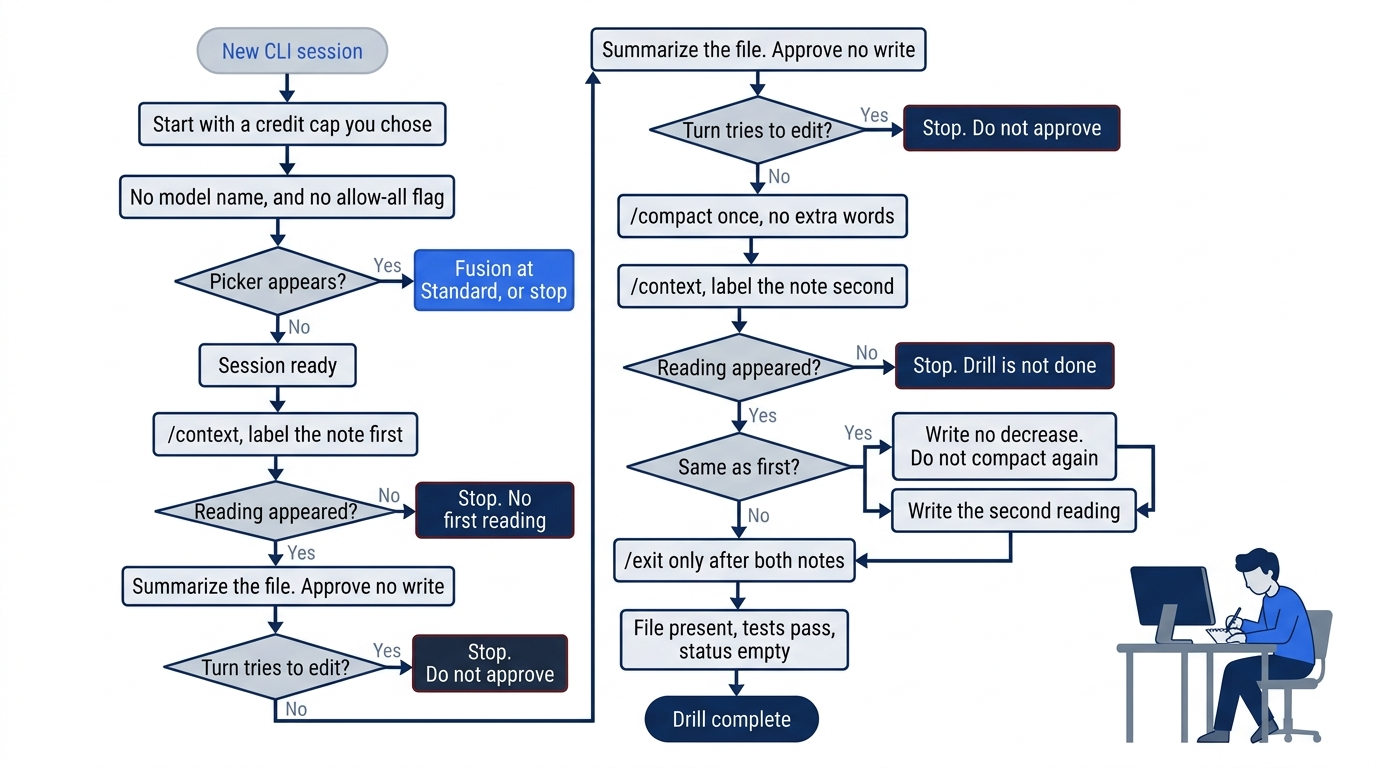
The path has three stops that end the drill early: no first reading, a turn that tries to edit, and no second reading. A second reading that matches the first is not a stop. You write "no decrease" and you still exit only after both notes exist. You do not compact a second time to manufacture a smaller number.
The first reading
When the session is ready, run the reading once, with no extra words.
/context
/context prints a reading of token use for the current session. Token use is that command's name for how much text this turn is counting. If a reading appears, copy the words on the screen into a note labeled first. If a percentage or a count is there, copy that too. Do not convert it into a number this article predicted. There is no sample percentage, because this session was not run as a paid turn on November 16, 2026.
If /context shows no reading, stop. Write "no first reading." Do not invent a number, and do not compact to manufacture a pair. You do not ask the session what the reading means. You do not convert the reading into a bill, and you do not look up a price per token for this drill.
The file wins the disagreement
Ask for a summary of one file. Do not ask for a code change, and do not approve an edit, a commit, or a push.
Summarize .github/copilot-instructions.md. Do not edit files.
Wait for the reply or a permission question. There is no sample summary. Re-run this on your account before you trust the wording. The reply is not the check.
Leave the session running. /exit closes this CLI session and returns you to the shell. Do not type it yet. In a second terminal, from ~/code/ticket-triage, print the file.
cat .github/copilot-instructions.md
Compare the reply to the two lines. The file wins if they disagree. Both rules have to match what you read before the session. If the reply misses a rule, adds a third rule, or says that the classifier may change, you do not edit the file to match it, and you do not create a crushed-mug issue.
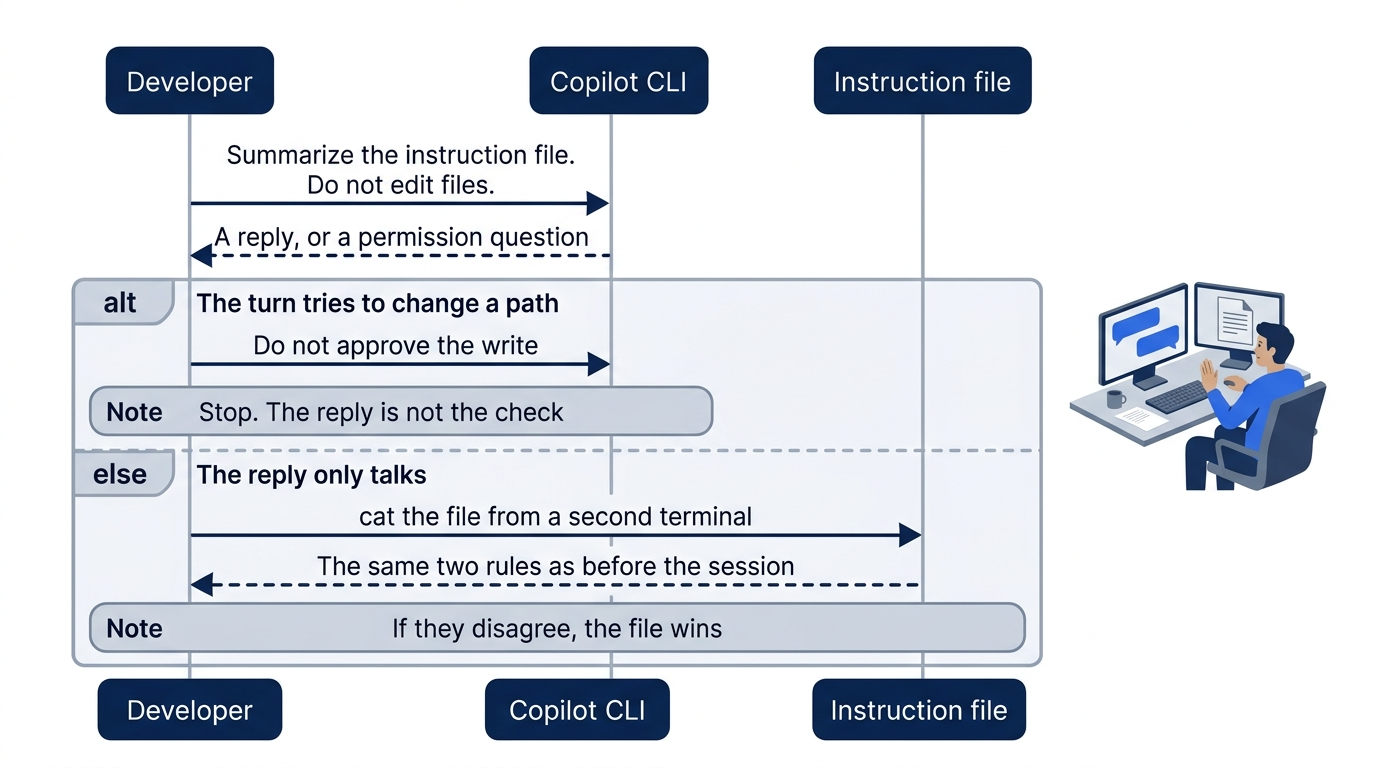
The sequence is short on purpose. You send one request that forbids edits. If the turn tries to change any path, you do not approve the write. If the reply only talks, you cat the file in another terminal and keep the two rules you already read. A reply that only talks about test names has not summarized the repository file. You still do not edit either instruction file.
Compact once
/compact summarizes a long chat. It can drop detail. A dropped detail is a fact that was in the chat and is absent from the summary. The summary is not a second copy of the instruction file. Run it once, with no extra words.
/compact
The command form allows optional focus instructions after /compact. This article does not define what those extra words change, and you do not add any. Do not hunt for the two rules in the reply, and do not run /compact again. This article has no sample compact summary. The file on disk is the copy that has to stay correct. If the compact turn tries to edit a file, stop it.
The second reading
Run the reading again in the same session.
/context
Copy the words into the same note and label them second. Compare first and second only as readings you saw. What counts is the pair, not a drop. This article does not claim that the second reading is smaller. Write down the second reading. If it matches the first, write "no decrease" beside them and do not run /compact again. A missing decrease is still a completed drill when you wrote first, you wrote second, and the instruction file is intact. If the second reading never appeared, the drill is not done. Do not type a lower number by hand, and do not compact again to force one.
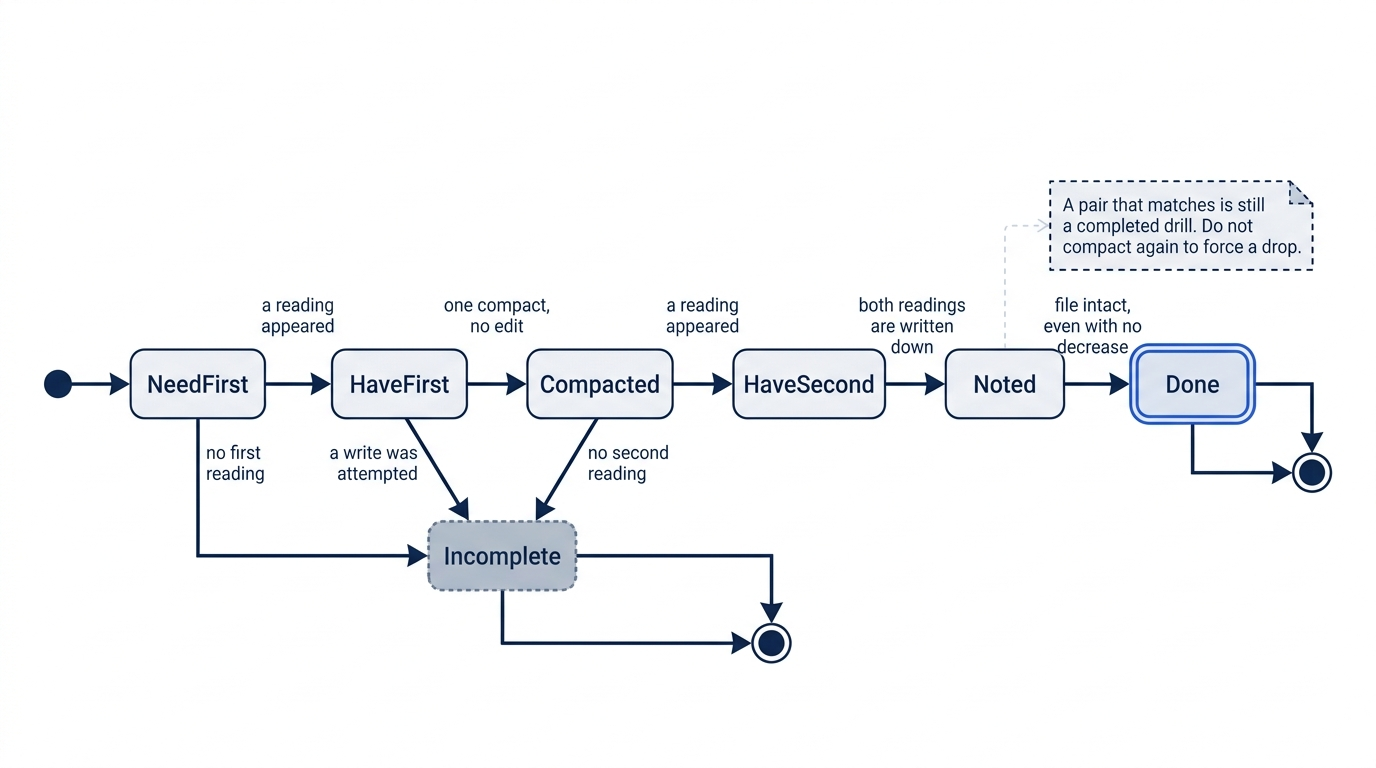
A missing first reading, an attempted write, or a missing second reading leaves the drill incomplete. Once both readings are written down, a pair that matches still reaches done, as long as the file is intact. Another compact is not a way to push the note from "no decrease" into a drop.
Prove the file survived
Use /exit only after both readings are written down.
/exit
Back in ~/code/ticket-triage, these commands are the proof. The reply is not.
test -f .github/copilot-instructions.md && echo present
npm test
git status --short
present prints. npm test still shows the four names, # tests 4, # pass 4, and # fail 0. git status --short prints nothing. You did not commit. You did not edit.
git log -1 --oneline
cat .github/copilot-instructions.md
The log line matches the line you copied. A commit of every path can leave status empty, so the log still has to match. cat still shows the same two rules. If a third line appeared, the check fails. Do not keep it because a summary suggested it. If status prints paths, do not commit them. If the log line changed, do not push and do not rewrite the git history. If present does not print, do not recreate the file from the model's summary.
You can stop here. The rest explains why this works and where it breaks.
What /compact can drop
Both readings are in your note, and present printed. The limits behind that drill are what a compact can drop, how stored memory expires, and why the file you just checked is a different thing from either one.
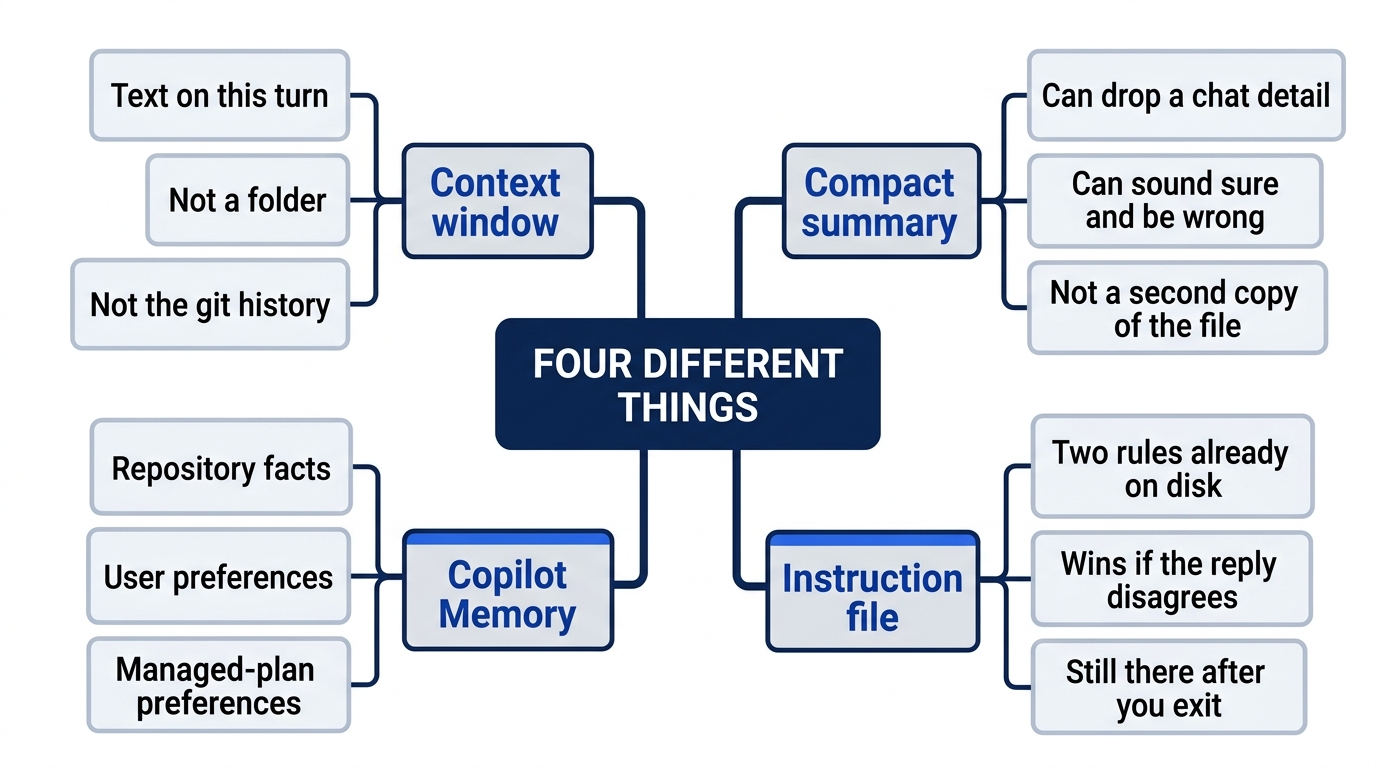
People fold these into one idea called memory. The window is only the text on this turn. A compact summary can omit a rule or sound sure about a rule the file does not contain. Copilot Memory is a stored layer with its own expiry. The instruction file is the copy you can open after the session ends. None of the first three replaces the fourth.
Compaction can lose detail whether or not you add focus words after /compact. You already ran it alone, once. The kinds of detail worth keeping are acceptance criteria, commands, important decisions, and verification evidence. Those belong in durable project files. .github/copilot-instructions.md is that kind of file for the two rules. You already treated the file as the winner. Keep doing that.
Do not promise that a compacted conversation has perfect recall. Survival, in this drill, means test -f prints present and the two lines are unchanged. It does not mean the model can recite the file after /compact.
Gotcha: running /compact again because second was not smaller than first. The drill is already complete when both readings are written down and the file is intact. Another compact can drop a detail you still wanted in the chat. The instruction file does not grow that detail back.
Copilot Memory is not your chat
Copilot Memory is a stored layer. It is not the context window, and it is not .github/copilot-instructions.md. This article does not say that /compact reinforces stored memory. Do not treat today's compact as a renewal. Memory does not stand in for the two lines in the file. The current description is the Copilot Memory page, as cited for November 16, 2026. The source list does not give that page a date. You do not treat an undated page as a promise that the rules never change. Re-read it before you trust a finer point than the ones below.
Memory has three stores. Repository facts stay with their repository, user preferences follow you across repositories, and managed-plan preferences belong to the active billing entity. None of them is a list of files in ~/code/ticket-triage, and none of them is a map of where a session transcript lives.
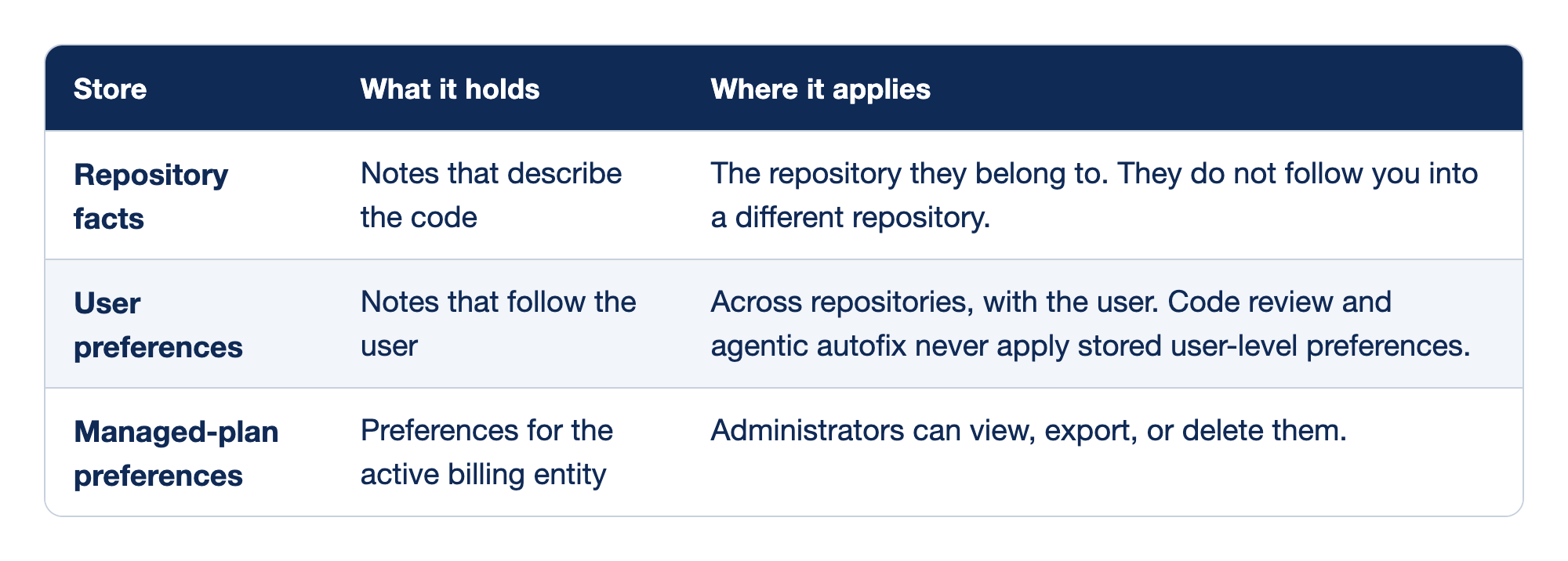
Three columns keep "memory" from collapsing into one private notebook. Store names the kind of memory. What it holds says what that store keeps. Where it applies says the boundary, including which Copilot surfaces never read it. None of the rows is the instruction file you already checked.
- Repository facts describe code and stay scoped to that repository. A fact saved for Ticket Triage is not a fact about the next repository you open. You do not paste the two instruction lines into a memory note and delete the file.
- User preferences follow the user across repositories. Code review and agentic autofix are other Copilot surfaces. Those surfaces never apply stored user-level preferences. This article does not describe how those surfaces run. A preference you rely on in the CLI is not a rule those surfaces will enforce.
- Managed-plan preferences belong to the active billing entity. Administrators can view, export, or delete them. A work billing entity holds its own managed-plan preferences. You do not assume that a preference is visible only to you.
Do not treat memory as a private, permanent, or infallible rules file. It can expire. An administrator can export or delete managed-plan preferences. Code review will not apply your user-level preferences. The two lines in .github/copilot-instructions.md are still the copy you can open in the editor after the session ends.
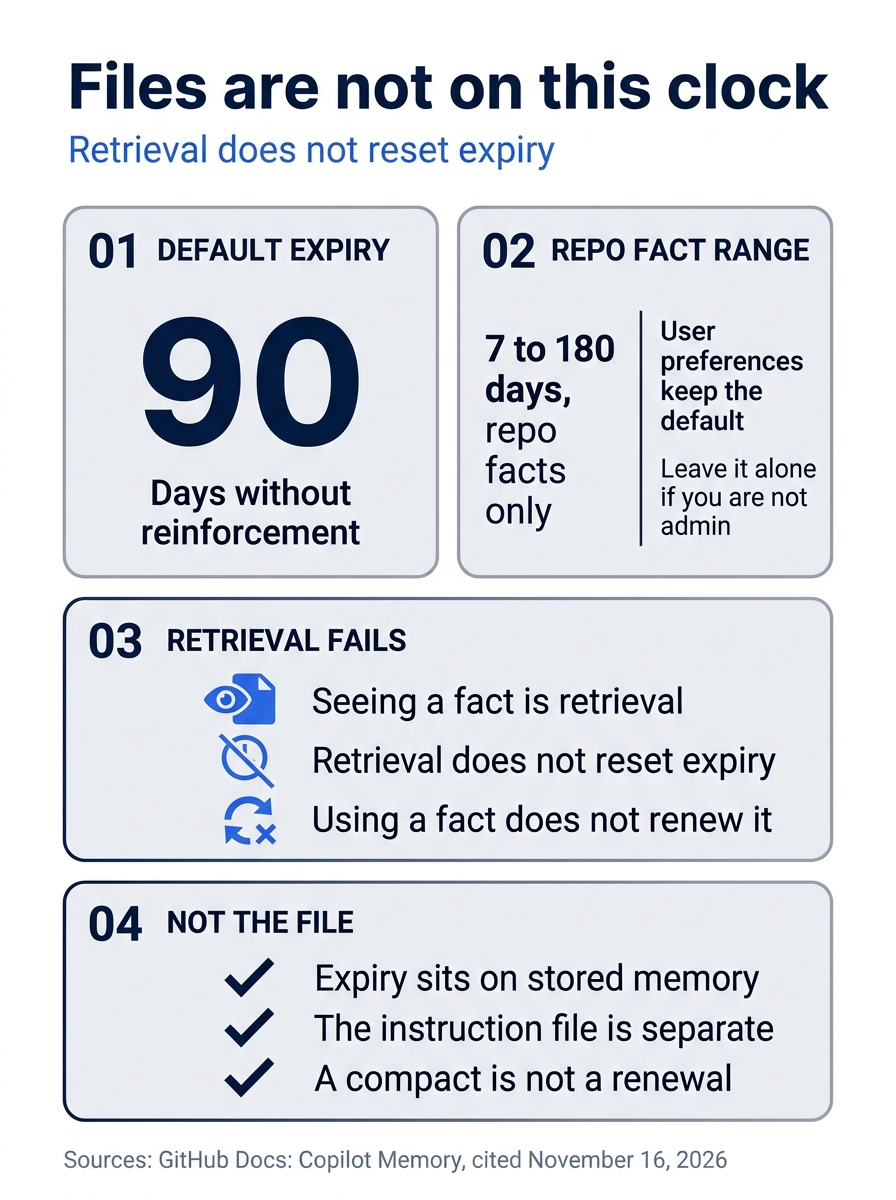
The poster separates the clock from the file. Ninety days is the default for a stored fact that nothing reinforces. Seeing the fact come back does not restart that clock. Only repository facts can be given a shorter or longer life, and only an administrator sets that range. The two rules in the instruction file do not depend on any of it.
Ninety days, and what does not reset them
As of November 16, 2026, the default expiry is 90 days without reinforcement. Reinforcement is the documentation's name for the event that resets that expiry. This article does not name the command or the click that counts as reinforcement. It does say what fails to reset the clock.
Retrieval alone does not reset expiry. Seeing a stored fact come back is retrieval. It is not reinforcement. You do not "use it so it stays" and call that done. If nothing reinforces a stored fact, the 90-day default is the clock this article gives you.
Administrators can choose a repository-fact lifetime from 7 to 180 days. The range is for repository facts. User preferences keep the default. You do not apply the 7-day floor or the 180-day ceiling to a user preference. If you are not an administrator for the repository, you do not change the lifetime today. You write down 90 days as the default that you are under unless an admin has told you otherwise.
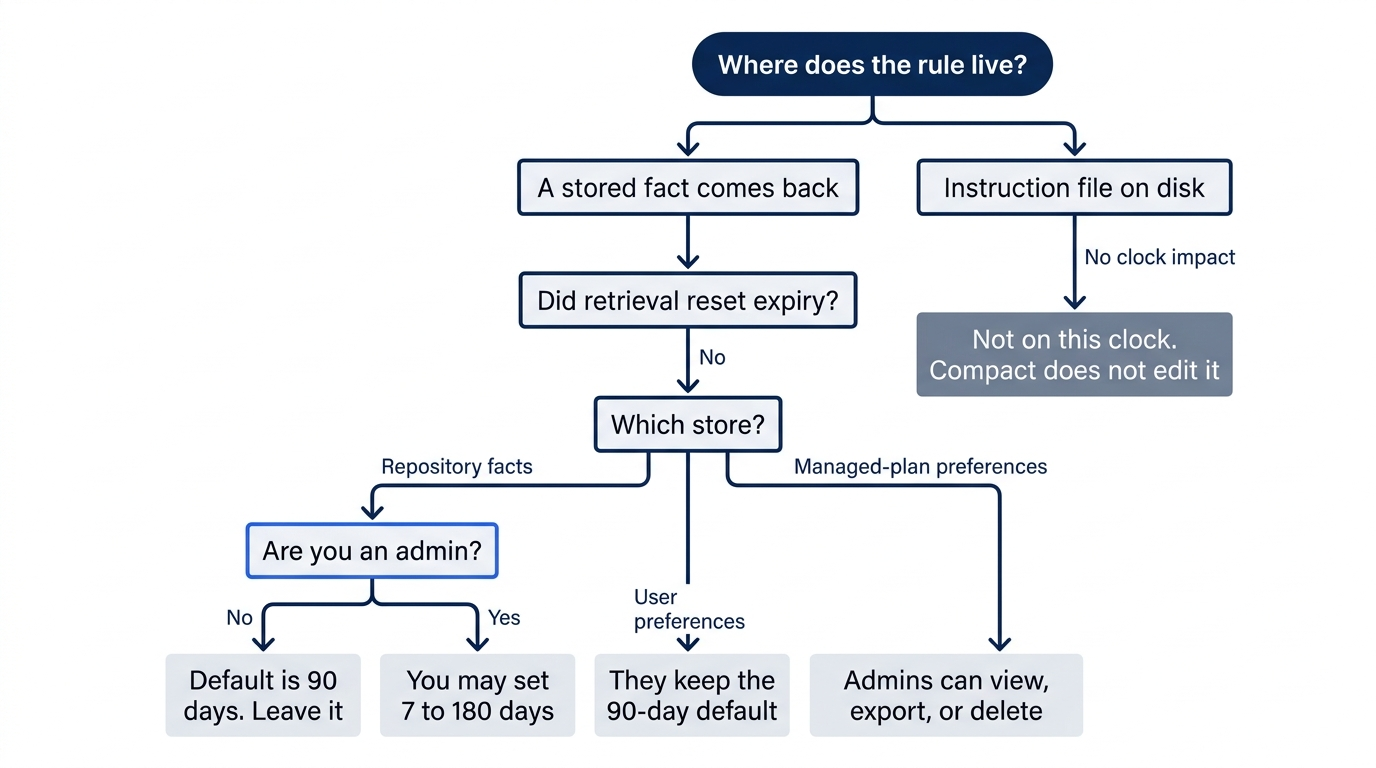
Follow a stored fact that comes back. Coming back is retrieval, and retrieval does not reset expiry. Repository facts then split by whether you are an administrator: the default stays 90 days unless an admin sets a lifetime from 7 to 180 days. User preferences stay on the default. Managed-plan preferences are a third store, and the fact you have for them is that administrators can view, export, or delete them. The instruction file never enters that clock. A 90-day expiry does not delete .github/copilot-instructions.md, and reinforcement does not rewrite it.
Do not present an older 28-day memory claim as a current universal limit. If a blog post or a cheat sheet still says 28 days for every store, do not copy that figure into your note. The figure in this article, as of November 16, 2026, is the 90-day default, with the admin range only on repository facts.
Your Ticket Triage rules do not depend on that clock. They are in a file. The expiry clock is on stored memory, not on files in the repository. The CLI custom instructions how-to is the page for .github/copilot-instructions.md. The memory page says to use custom instructions when a rule has to be stated consistently, because a stored fact is a judgment, not that guarantee. You still cat the file when a reply and the file disagree.
The switch you do not flip
In an interactive session, /memory off turns memory off, and that off state persists locally. The Copilot Memory page says that the command disables both repository facts and user preferences for later interactive sessions on this machine. The same page says that a non-interactive run needs --enable-memory separately. Persisting locally means the off choice remains in effect for later interactive use on this machine. This article does not give a path for that choice. Do not guess ~/.copilot. Do not invent a session-file path and delete it. There is no documented folder in this article for you to open, copy, or clean.
You do not run /memory off today. Turning it off is not how you protect Ticket Triage. The instruction file is already the durable copy. An off switch does not make /compact safer, and it does not change the two readings you already recorded.
Non-interactive runs need --enable-memory to turn memory on. Treat that flag as a separate switch from an interactive chat. You do not start a non-interactive run today, and you do not pass --enable-memory as a substitute for the file. The flag is a different door. This drill does not open it.
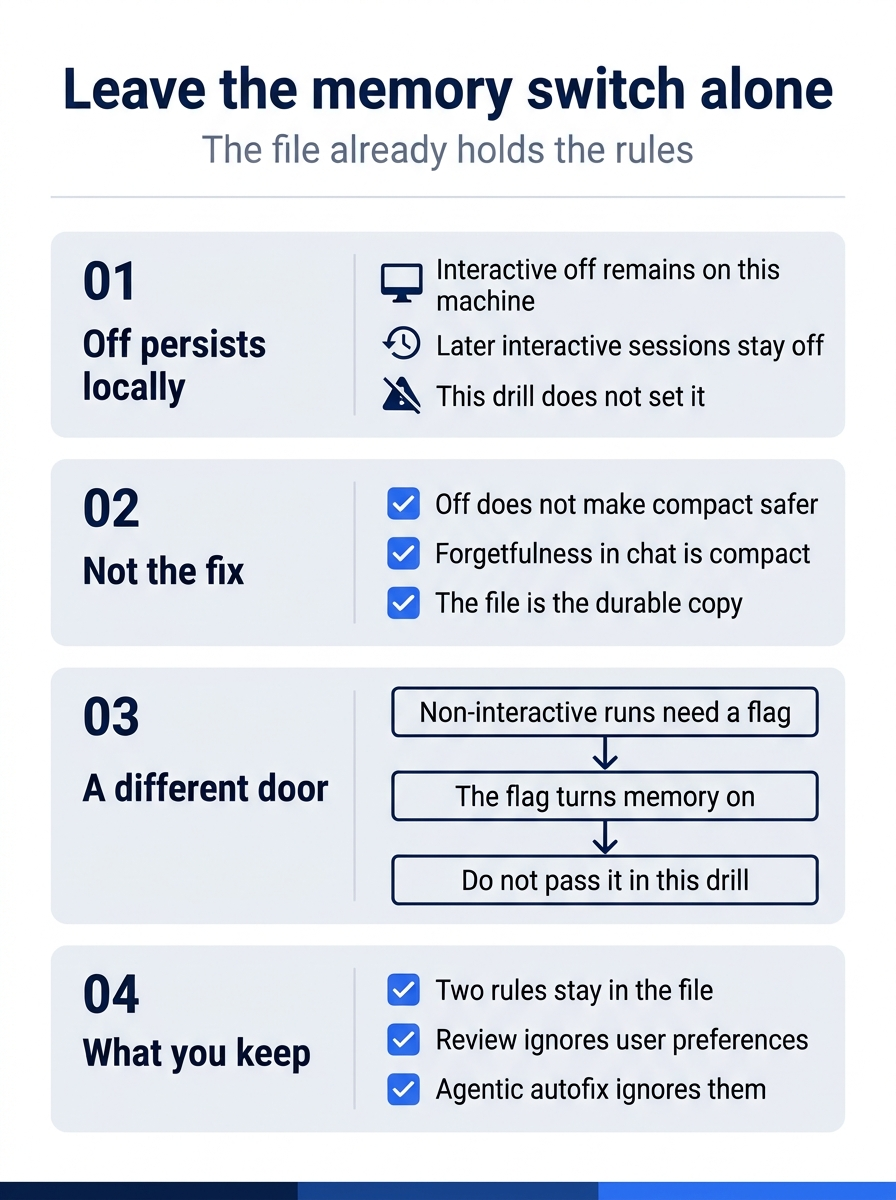
The poster is a warning, not a setup step. Interactive off sticks on this machine for later sessions, and this drill does not set it. Chat that forgets is a compact problem. Non-interactive runs are a different door: they need --enable-memory to turn memory on, and you do not pass that flag in place of the file. Code review and agentic autofix still never apply stored user-level preferences, whether or not you touch the switch.
Gotcha: running /memory off "so the agent forgets less," or so it forgets on purpose. The off state persists locally, and this drill did not ask you to set it. The fix you already have is the file on disk.
Resume does not restore a perfect chat
/resume continues a session from inside the CLI. --continue resumes the most recent session. --resume=SESSION-ID continues explicit work when you have an id. The CLI also supports names and prefixes. This article does not show a sample command for a name or a prefix. A made-up flag would be a guess. A bare picker needs an interactive terminal. In a non-interactive script, pass the identifier instead of relying on a picker.
You do not resume today's session to hunt for a lower /context reading. You do not resume an earlier Fusion session and call its window the first reading. Cloud snapshots and local CLI sessions have different persistence and environment rules. The October 28, 2026 connected cloud changelog is the source for the cloud side of that split. Do not treat a cloud session as the same store as this terminal session. This article does not list the differing rules beyond that split, so you do not invent them.
Do not promise perfect recall after /compact or /resume. A resumed session can continue the work. It is not a guarantee that every earlier sentence is still in view. Acceptance criteria, commands, decisions, and verification evidence stay in files. For Ticket Triage, that file is still .github/copilot-instructions.md, with the two lines you printed.
If you have used Claude Code: both tools forget chat that was never written to a file. The instruction file already on disk lets the rule survive this compact.
Do this today
Everyone
- From
~/code/ticket-triage, the command you ran contained--max-ai-creditsand the small number you chose. It did not contain a model name,--yolo,--allow-all, or--allow-all-tools. The check is that line in your shell history. The habit to keep: a CLI session that you are willing to spend on starts with--max-ai-creditsset to a number you picked. On Windows, use the same command from the Ticket Triage folder you have been using for this series. - Your note has two readings, labeled
firstandsecond, copied from your screen. The check is those two labels. The second reading does not have to be a smaller number. If the readings match, the note may say "no decrease," and the drill still passes. If either label is missing, or if you typed a number that this article never showed you, the check fails. Re-run this on your account before you trust the wording. There is no sample reading from November 16, 2026. - You compared the summary to
.github/copilot-instructions.mdand kept the file's two rules: runnpm testbefore you say a change is done, and do not editsrc/classify.jsuntil a crushed-mug issue says so. The check is the file, not a paste of the reply. You ran/compactonce, with no extra words, and you did not run it again to chase a smaller reading. test -f .github/copilot-instructions.md && echo presentprintspresent.npm teststill shows the four names,# tests 4,# pass 4, and# fail 0.git status --shortprints nothing.git log -1 --onelinematches the line you copied before the session.cat .github/copilot-instructions.mdis still those two lines. The check is that set of results. You did not commit, and you did not edit. On Windows, run thetest -fline in Git Bash.
If you read the limits
- Write the 90-day rule in one sentence, including that retrieval alone does not reset it. The check is that sentence in your note. A sentence that only says "memory lasts 90 days," and does not say that retrieval alone does not reset it, fails the check. As of November 16, 2026, also keep the admin range off that sentence: 7 to 180 days is for repository facts, and user preferences keep the default. You do not write 28 days.
- Write that you did not run
/memory offand did not pass--enable-memory. The check is that sentence. Also write one line that says that code review and agentic autofix never apply stored user-level preferences. You do not turn memory off to make that line true.
The copy that has to stay correct
The agent forgot, or it looked as if it forgot, because the model never had a lasting copy of the chat. It had the text on this turn. /context let you look at that text twice. /compact summarized the long chat once, and may have dropped a detail or invented a confident one. Neither reading was a bill, and neither one was permission to edit.
Copilot Memory does not close the gap. Repository facts default to 90 days, retrieval alone does not reset them, and an administrator can set 7 to 180 days for repository facts only. User preferences keep the default. /memory off persists locally, and you did not flip it. A non-interactive run would need --enable-memory, and you did not pass it. Resume continues a session. It does not put every earlier sentence back in view.
When the reply and the file disagree, cat the file. The two lines are still the copy that has to stay correct.
This is Part 7 of "GitHub Copilot, Day-to-Day," a 16-part guide to using GitHub Copilot as a daily coding agent.