
The Connected Badge Is Not a GitHub Copilot MCP Tool Call
Proof that GitHub Copilot called an MCP server is a visible tool call, not a connected badge, and the only server you add is local Playwright in project .mcp.json.
GitHub Copilot MCP is proven by a tool call you can see, from the built-in GitHub server and from one local Playwright server you commit with no secret.
The status badge says the server is connected, and the reply still only restates a file that was already on disk. You cannot tell whether the agent ever left the repository.
In this article: You will give GitHub Copilot CLI a remote you own, one open issue, and one local MCP server, then prove the agent called a tool that is not a file in the repo. The built-in GitHub server reads the issue. A project
.mcp.jsonstarts Playwright withnpxand@playwright/mcp@latest, and that file is the only server you add. By the end, both tool calls are visible, four tests still pass, andsrc/classify.jsis unchanged because you committed.mcp.jsonyourself, with no secret in it.
Preview: written November 16, 2026, before Microsoft Ignite. Some paid steps are not yet tested live; this guide will be updated November 21, 2026.
A connected badge is a comfort. It is also easy to mistake for work. GitHub Copilot MCP can list a server as available and still answer from src/classify.js, the file that was already on disk. The line you need is a tool call: a session line that names the tool the agent invoked.
Ticket Triage lives in ~/code/ticket-triage. The crushed-mug sentence still returns other. The test named crushed mug in pieces is other still expects other. You do not change the function. The agent does not run git. What you add is a remote named origin, an issue titled Crushed parcels should not stay other, and one local server that is not a file in the repo.
The CLI for this work is Copilot CLI 1.0.112, as of November 16, 2026. This MCP turn was not run that day. There is no sample transcript. Re-run both sessions on your account before you trust the wording of a reply.
copilot --version
Do not reinstall. If the printed line is not 1.0.112, write the real line down.
Starting fresh or fell behind? Run git switch -C main copilot/day-09. This replaces your main with the end of Day 9; to keep your own work, run git branch my-backup first.
Confirm the tree before any session
You work in ~/code/ticket-triage. On Windows, use C:\code\ticket-triage if that is where the project already lives, and run the blocks in Git Bash.
Four tests already pass. src/classify.js still returns other for the crushed-mug sentence. A remote is a GitHub repository that git pushes to and fetches from. If you followed Get Ticket Triage in Part 1, this folder already has one remote, upstream, the Spillwave copy at SpillwaveSolutions/ticket-triage-day-by-day. You fetch day tags from it, and you never push to it. Today you add a repository you own as origin. The name origin is free, because the Part 1 shortcut renamed the Spillwave copy to upstream, and the hand-build route added it under that name.
cd ~/code/ticket-triage
git diff -- src/classify.js
git status --short
npm test
git diff -- src/classify.js prints nothing. git status --short prints nothing. npm test reports four names (refund, shipping, other, and crushed mug in pieces is other), plus # tests 4, # pass 4, and # fail 0.
If a check fails, stop. Do not ask a session to edit the classifier.
The path has stops on purpose. An empty remote, a remote you do not recognize, a folder you do not trust, or a download you do not want are all reasons to quit before the next step. The agent does not create the repository, and it does not push.
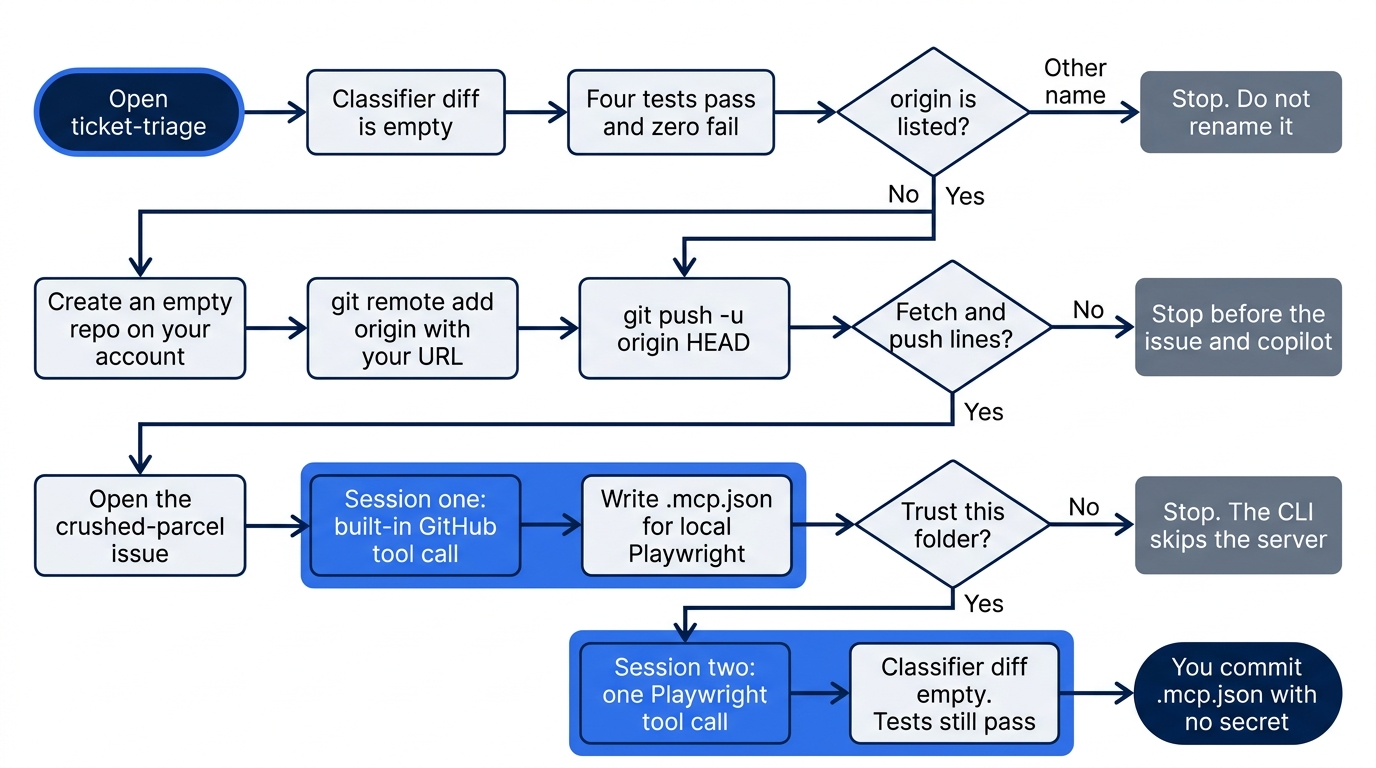
A correct run never edits src/classify.js. Session one only reads an issue. Session two only calls Playwright. Git stays in your hands.
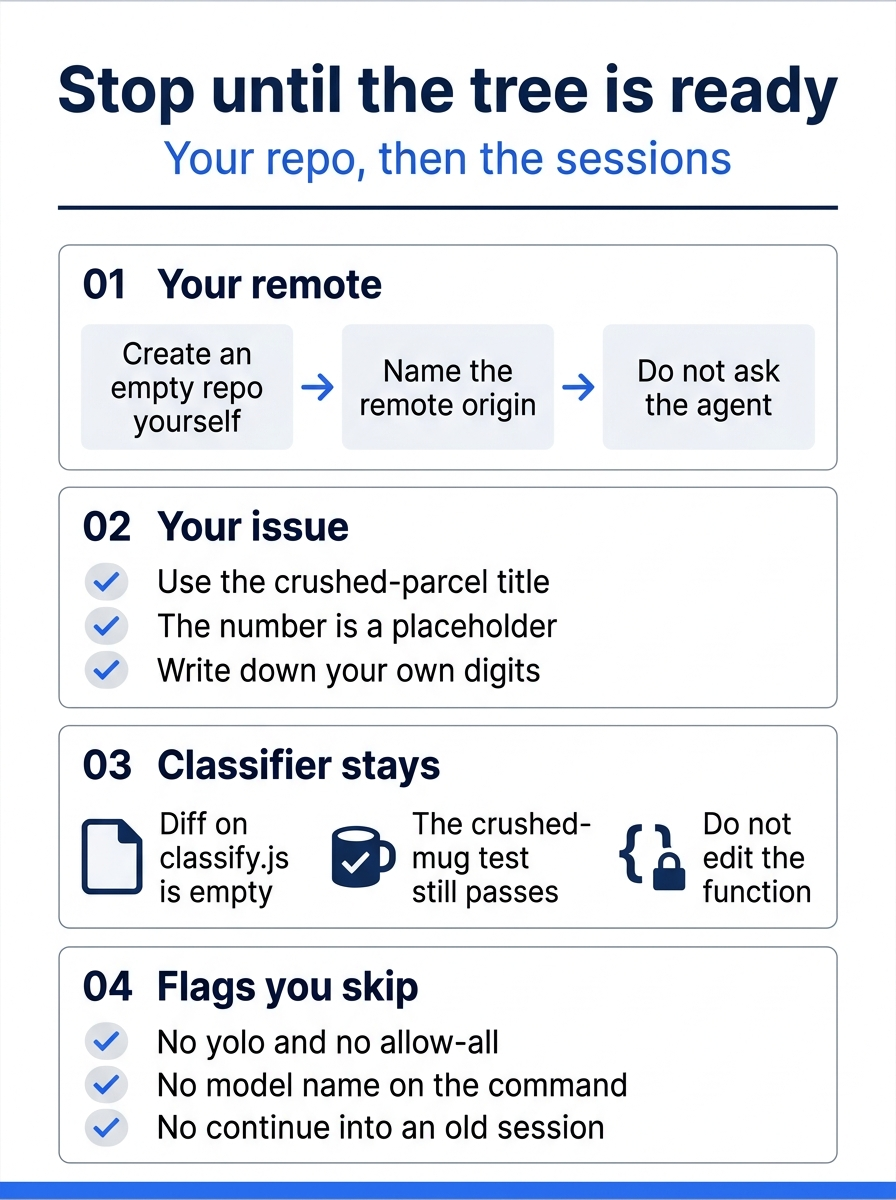
The poster is the gate, not the session. Create the empty repository yourself, name the remote origin, and leave the crushed-mug function alone. Skip --yolo, skip --allow-all, skip a model name, and do not continue an old session. The issue number in this article is a placeholder until you write down your own.
Add a remote you own
If the next command does not list origin, stop the MCP steps until you add it.
git remote -v
A listing with no origin, either empty or only the two upstream lines, means you have no GitHub repository of your own yet. Create an empty one in the browser on your own account, with no README, no .gitignore, and no license. Copy the URL from that page. This article does not contain a github.com URL. Do not ask the agent to create the repository or to push. Do not pass --yolo. The flag allows tools, paths, and URLs.
Replace PASTE_THE_URL_GITHUB_SHOWS with the URL you copied.
git remote add origin PASTE_THE_URL_GITHUB_SHOWS
git push -u origin HEAD
git remote -v
git remote -v now prints a fetch line and a push line for origin. If origin is still missing, stop before the issue and before copilot.
If origin was already listed, skip git remote add and run the push. If a remote other than origin and upstream is listed, stop. Do not rename a remote you do not recognize. If the push is rejected, stop. Do not force-push.
Open the crushed-parcel issue
Open one issue before any MCP command, unless the title Crushed parcels should not stay other is already open. Paste this body as written.
The sentence "The box showed up crushed and the mug inside is in pieces" currently returns other.
Damaged parcels should return shipping.
If the customer also asks for money back, return refund.
Do not change classify.js until this issue is the task.
The test "crushed mug in pieces is other" pins the current behavior.
gh is GitHub's command-line tool, and it must be authenticated. If gh is missing, or if the next command fails, paste the title and the body into a new issue on your own repository in the browser and write down the number. This article has no issue number. Call yours ISSUE_NUMBER.
gh auth status
If that command succeeds, tell gh that issues go to your own repository. Without this step, gh can pick upstream, the Spillwave copy.
gh repo set-default origin
Then create the issue from the repository. The command sends the same title and the same body.
gh issue create --title "Crushed parcels should not stay other" --body "$(cat <<'EOF'
The sentence "The box showed up crushed and the mug inside is in pieces" currently returns other.
Damaged parcels should return shipping.
If the customer also asks for money back, return refund.
Do not change classify.js until this issue is the task.
The test "crushed mug in pieces is other" pins the current behavior.
EOF
)"
The command prints a URL. The number at the end of that URL is your ISSUE_NUMBER. If this title is already open, do not open a second issue.
A GitHub Copilot MCP win is a tool call
MCP is a server the agent can call for tools that are not files in the repo. A tool call is a session line that names the tool the agent invoked. A connected badge is only a status label that shows the server is available. It is not the line you are looking for.
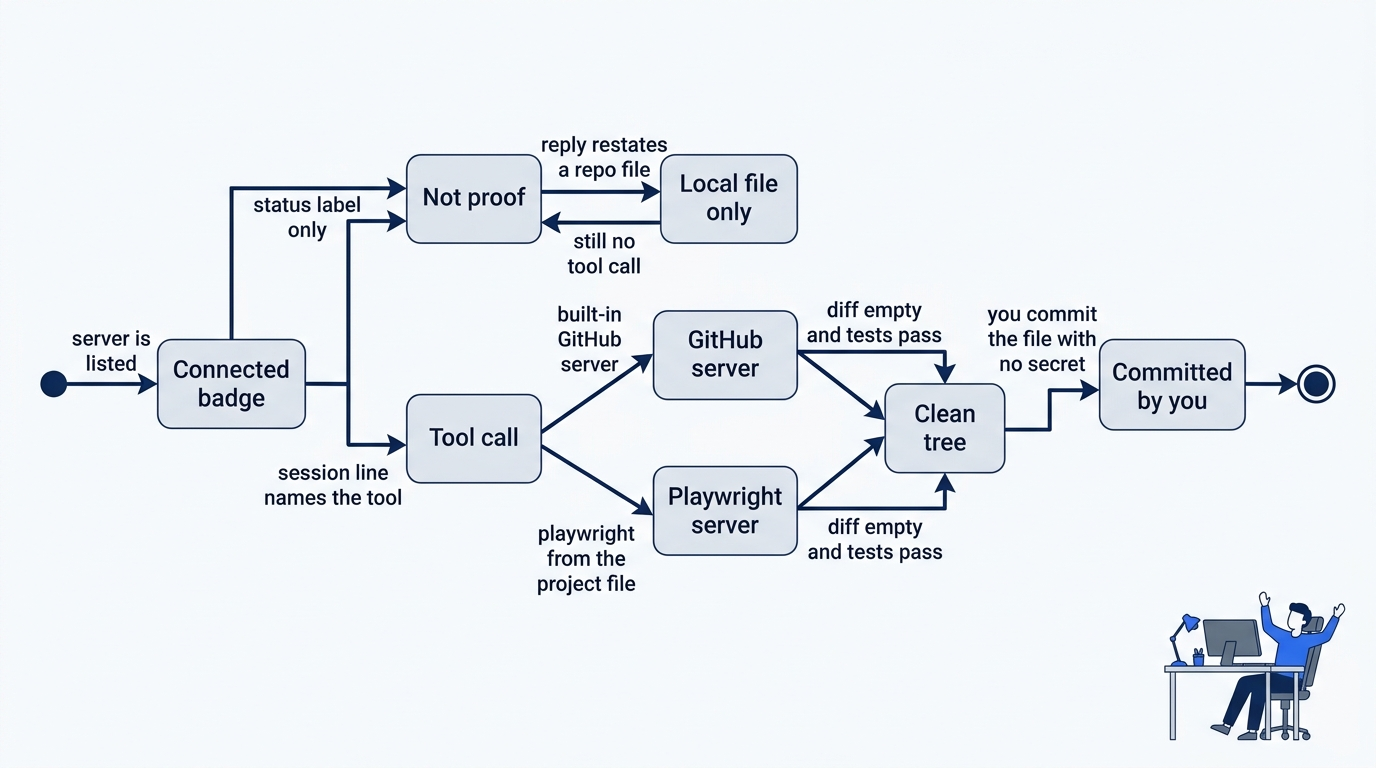
Two failures look like success. The badge says the server is available, and the reply repeats src/classify.js or the test file. Neither one is a tool call. The win is a session line that names the tool, first from the built-in GitHub server and then from Playwright. After both, the classifier diff is still empty and the four tests still pass. You commit the project file only when it holds no secret.
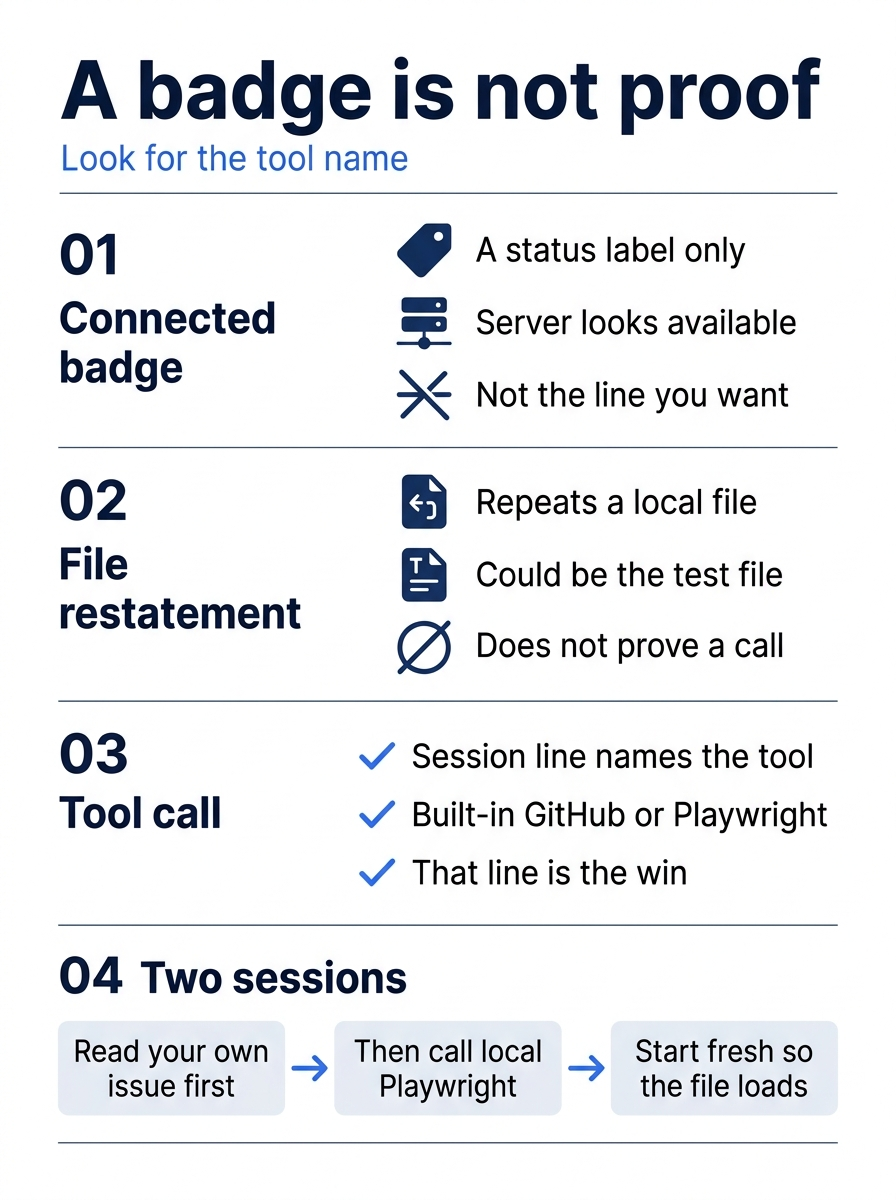
Read the poster as a filter for the two sessions. A status label, and a reply that could have come from a file already on disk, do not count. The first session reads your issue through the built-in GitHub server. The second session, started fresh so the new file loads, calls one tool from local Playwright. There is no sample transcript to compare against. The line on your screen is the check.
Read the issue with the built-in server
The Copilot CLI how-to for MCP servers says that the GitHub MCP server is built in. You do not add it to a file, and you do not paste a token into the prompt.
Start a new session in ~/code/ticket-triage. Pass no model name. Do not pass --continue, --yolo, --allow-all, or --allow-all-tools. Do not ask the session to push. If the only way forward is a model name, stop.
cd ~/code/ticket-triage
copilot
Replace ISSUE_NUMBER with the digits you wrote down, then send the prompt.
Read GitHub issue ISSUE_NUMBER in the repository that the origin remote points to. Do not edit any file. Do not change src/classify.js. Do not push.
The win for this half is a visible tool call from the built-in GitHub server. A connected badge is not the proof. If the reply only restates the local test file, it did not prove that the server was called. There is no sample transcript. Re-run this on your account before you trust the wording.
If the session asks to edit a file, to commit, or to push, refuse. /exit closes the session.
/exit
Add one server in .mcp.json
.mcp.json at the repository root is the project file the CLI reads. In the same directory, it wins over .github/mcp.json. Do not also write .github/mcp.json. The CLI does not read .vscode/mcp.json.
The how-to's project example is a local server named playwright. local means the CLI starts a program on your machine. Playwright here is a browser-automation server. The how-to lists no tool name inside it, so the prompt asks for one tool that the server provides. You do not invent a name. The file has no token. Save this file.
{
  "mcpServers": {
    "playwright": {
      "type": "local",
      "command": "npx",
      "args": ["@playwright/mcp@latest"]
    }
  }
}
Leave type set to local. Do not add a second server or a token.
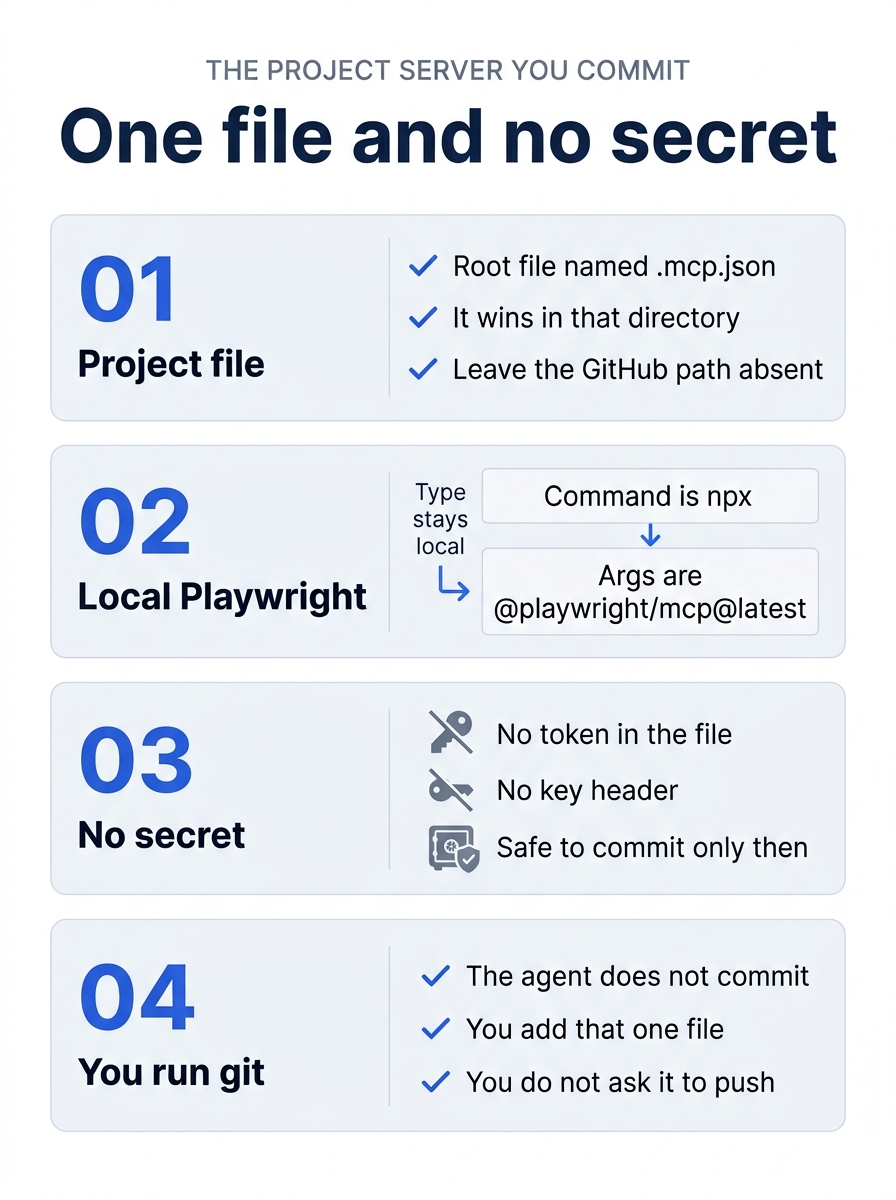
The file you commit is the root .mcp.json, and it is the only server you add. type stays local, the command is npx, and the args are @playwright/mcp@latest. Leave .github/mcp.json absent. Leave out every token and every key header. You run git. The agent does not commit, and you do not ask it to push.
test -f .mcp.json && echo ok
The command prints ok. If it prints nothing, fix the path. Do not add .github/mcp.json instead.
Ask a question only that server can answer
Start a second session so that the CLI reads the new file. Pass no model name, and do not pass --yolo.
cd ~/code/ticket-triage
copilot
If Copilot asks you to trust this folder, confirm it. The CLI skips a project server when the folder is not trusted. If you decline, stop.
The how-to does not list this server's tool names, and neither does this article. Name the server so that its tools get used.
Use the playwright MCP server from .mcp.json. Do not edit any file. Do not change src/classify.js. Do not push. Do not answer from files in this repository. Call one tool that server provides.
If a prompt asks to run npx with @playwright/mcp@latest, read it before you approve. This download was not run on November 16, 2026. If you do not want the download, deny it and stop.
The pause is the point. The prompt is asking to run npx with @playwright/mcp@latest. Read it. Approve only if you want that download. Deny it and stop if you do not. Passing --yolo to skip the question is not a win.
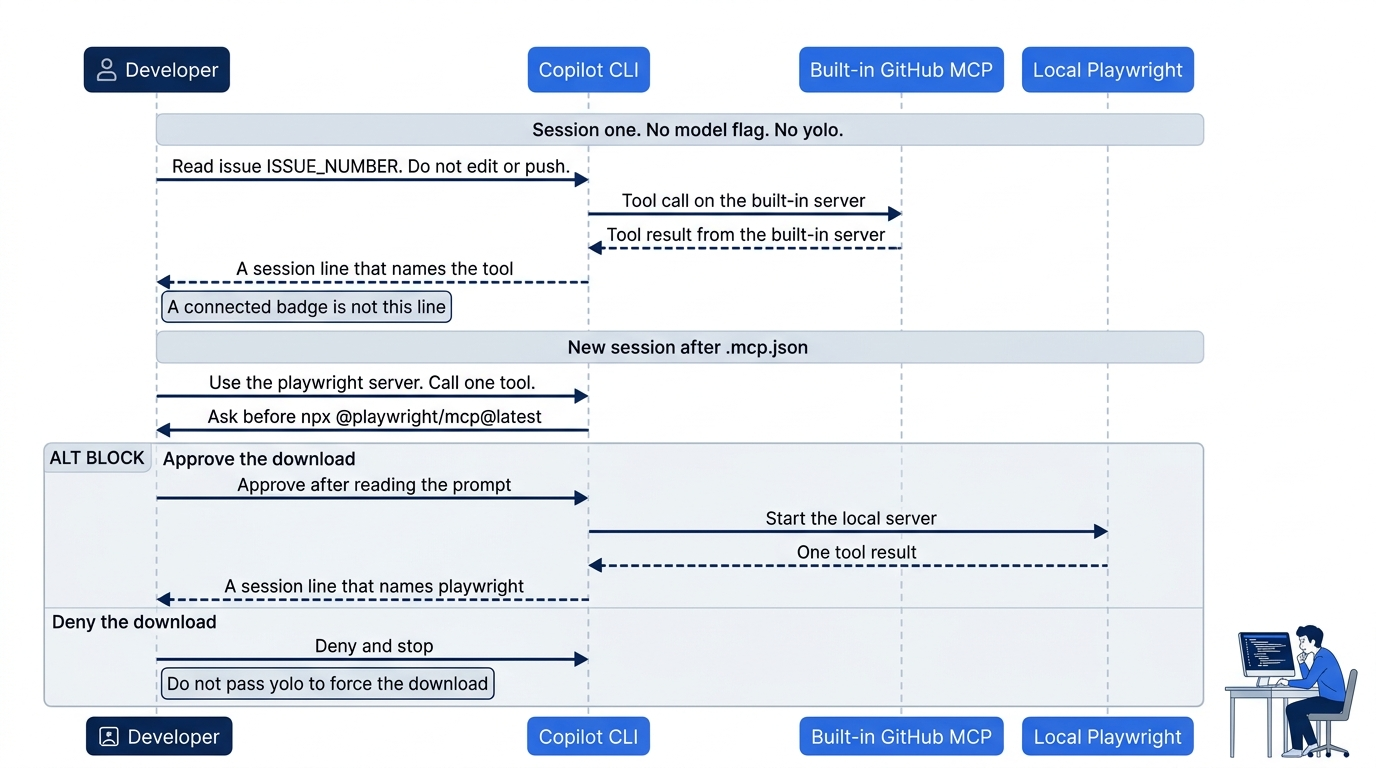
The two sessions are separate on purpose. The first asks the built-in GitHub server to read ISSUE_NUMBER and forbids edits and pushes. The second names the playwright server from .mcp.json and asks for one tool that server provides. A connected badge is not either line. If you deny the download, you stop. You do not force it.
The win is a tool call from playwright. A connected badge is not the proof. If the reply only restates src/classify.js or the test file, it did not prove that the server was called. There is no sample transcript. Re-run this on your account before you trust the wording.
Refuse an edit, a commit, or a push, then close the session.
/exit
Prove the tree, then commit the file
The agent does not run git.
cd ~/code/ticket-triage
git diff -- src/classify.js
git diff -- .mcp.json
git status --short
npm test
The classifier diff prints nothing. The .mcp.json diff shows the playwright block with no token. Status may list .mcp.json and must not list src/classify.js or test/classify.test.js. npm test still shows # pass 4 and # fail 0. If the classifier diff prints a patch, run git restore src/classify.js and do not commit that file.
Commit .mcp.json only because this copy has no secret. If you put a real token in the file, replace it locally and do not commit the secret.
git add .mcp.json
git commit -m "Add the Playwright MCP server for Ticket Triage"
git status --short
git diff -- src/classify.js
npm test
After the commit, status prints nothing, the classifier diff prints nothing, and npm test still shows four passes and zero failures.
The win is your issue number, both tool calls, four passing tests, and an empty diff on src/classify.js.
You can stop here. The rest explains which file wins, which how-to examples you leave alone, and where cloud MCP is a different surface. It does not add a second server, and it does not start another paid session.
Which file the CLI actually reads
Copilot CLI walks from your current directory up to the repository root and loads project MCP files along the way. A definition nearer your working directory overrides an ancestor with the same server name. Project definitions also override the personal file ~/.copilot/mcp-config.json. In one directory, .mcp.json wins over .github/mcp.json. The November 16, 2026 notes do not state one universal maximum number of MCP tools or servers. Do not copy an old "128 tools" limit. Tool search, model context, client configuration, and enterprise allowlists are separate constraints. What you can record is the client you used, Copilot CLI 1.0.112, and the one added server, playwright.
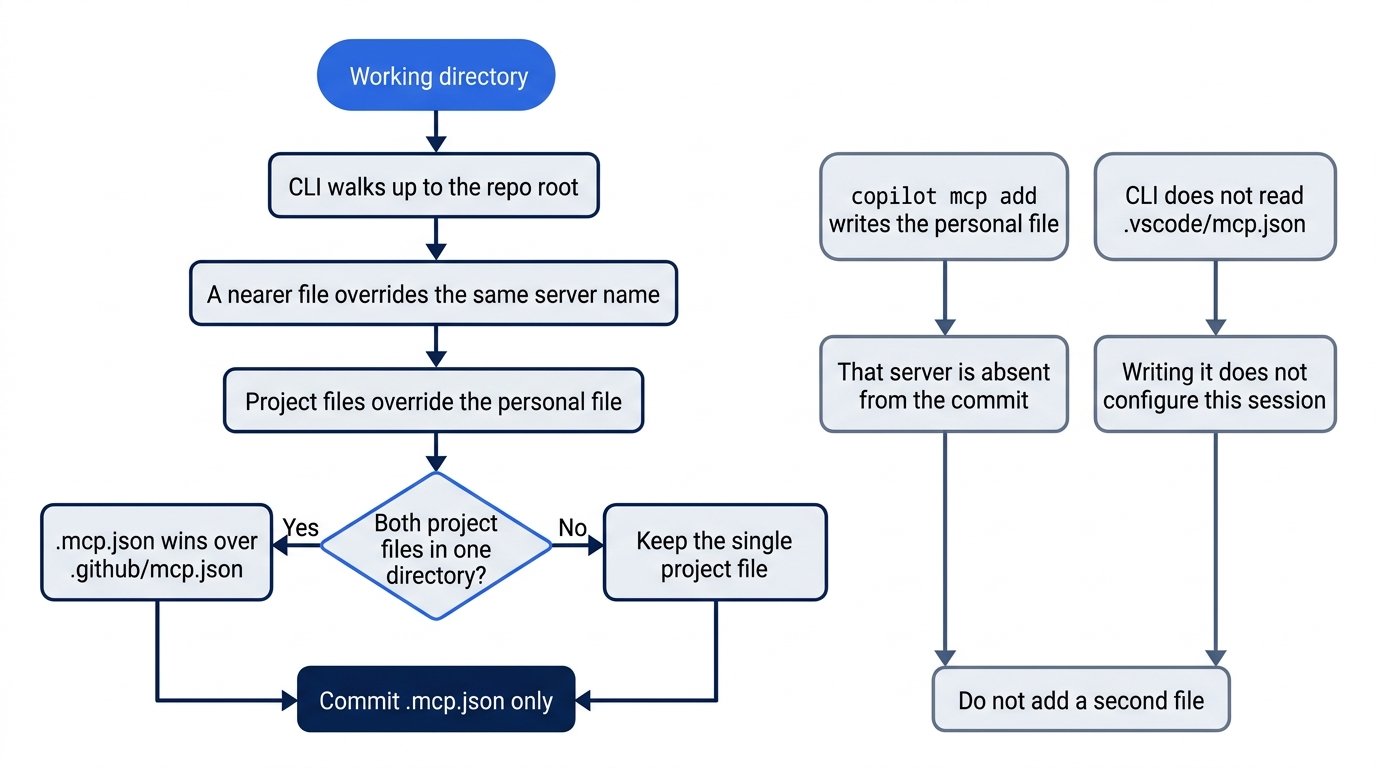
Same-directory precedence is why the other project file stays absent. copilot mcp add writes ~/.copilot/mcp-config.json, which the next clone will not have. .vscode/mcp.json is not read by this CLI, so writing it does not repair a missing project server.
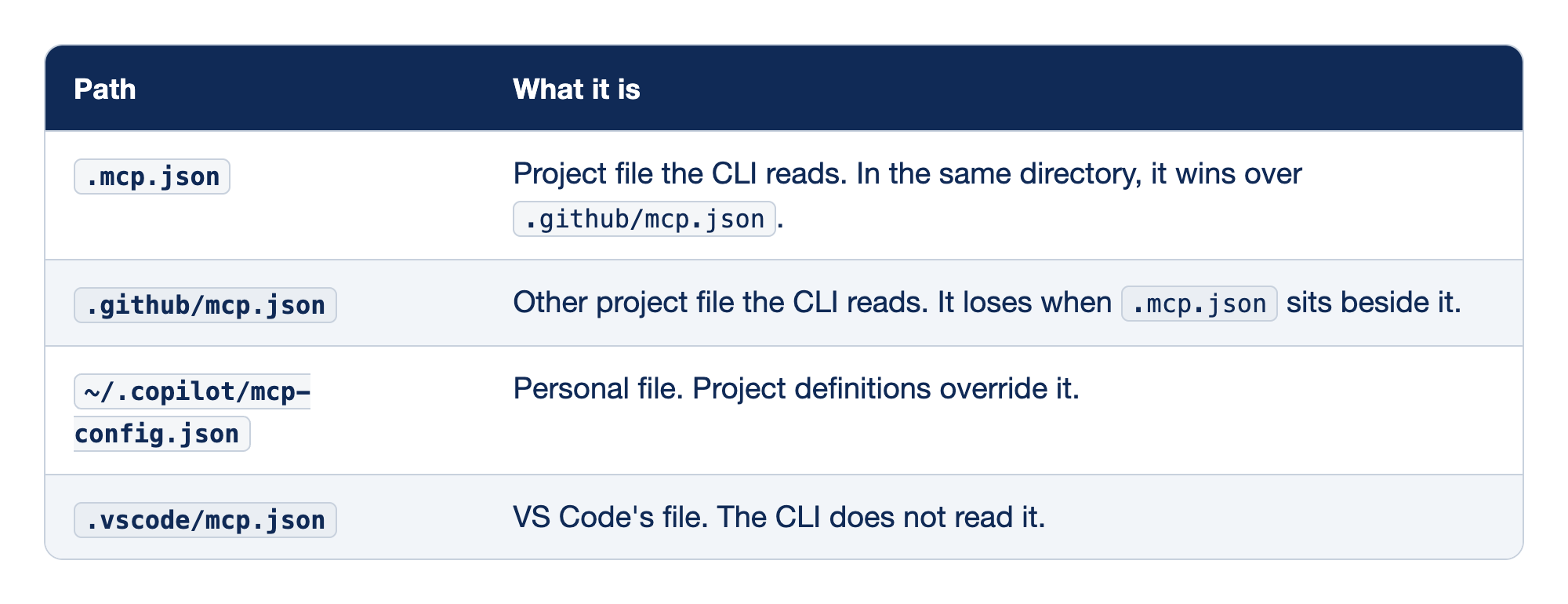
Path is the file location. What it is says whether Copilot CLI reads that file, and which copy wins when two definitions can apply.
.mcp.jsonis the project file you edit and commit, usually at the repository root. Same-directory precedence is why you did not also write.github/mcp.json..github/mcp.jsonis another project file the CLI will read. You leave it absent so that it cannot hide, or be hidden by, the root.mcp.json.~/.copilot/mcp-config.jsonis the personal file.copilot mcp addwrites there, not to.mcp.json. A server added only that way is on this machine and is not in the Ticket Triage commit..vscode/mcp.jsonis the editor file. The how-to says the CLI does not read it, and that this file uses the top-level keyservers, which the CLI does not accept. Writing it does not configure this session.
Gotcha: running copilot mcp add and then looking for a project diff. The subcommand updates ~/.copilot/mcp-config.json. Your commit stays empty, and the next clone does not get the server. The file you commit is .mcp.json.
Project servers load after you confirm folder trust. An untrusted directory skips them with no extra error that you can treat as success. Interactive copilot can ask. Prompt mode, copilot -p, skips untrusted workspace servers unless they are specifically admitted. The how-to's switch for that admission is the environment variable GITHUB_COPILOT_PROMPT_MODE_WORKSPACE_MCP set to true. You do not set it. You did not use prompt mode.
The interactive form calls a local process over STDIO. The project JSON uses "type": "local". Those are the same kind of server on this how-to, written two ways. Do not rewrite your file to say stdio.
What the how-to shows, and what you skip
The how-to's project file is the playwright block you committed. The same page also shows other servers. One local command is npx -y @upstash/context7-mcp, under the name context7. One remote URL is https://mcp.context7.com/mcp, and that JSON example sets a header named CONTEXT7_API_KEY. Another example runs a GitHub server in Docker and sets GITHUB_PERSONAL_ACCESS_TOKEN to YOUR_GITHUB_PAT. You did not add those. The built-in GitHub server is already present, and the Docker example takes a token.
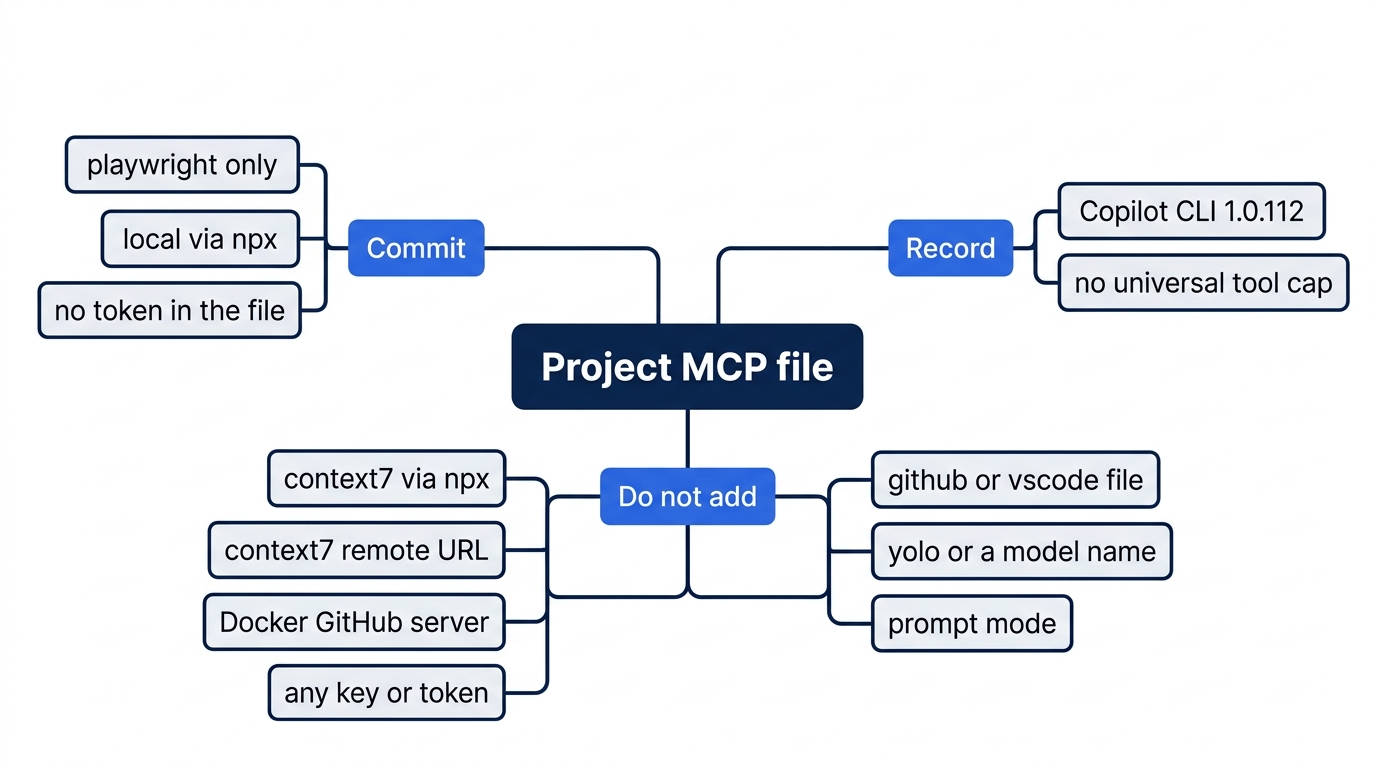
The map has three branches. Commit is the playwright block, local, with no token. The do-not-add branch holds Context7, the remote URL, the Docker GitHub server, any key or token, the GitHub and VS Code paths, yolo, a model name, and prompt mode. You also do not pass --allow-all. Record is Copilot CLI 1.0.112, and these sources state no universal tool cap.
Gotcha: copying either token example into .mcp.json and committing it. A placeholder in a doc is not a value you paste from a real account. If the file contains a real token, replace it locally and leave it uncommitted. The commit you made is safe only while the diff shows the playwright block and no secret.
Cloud MCP is a different surface
GitHub cloud and code review are a different surface from this CLI session. The November 16, 2026 notes say that you configure them under repository Settings, then Copilot, then MCP servers, or through a supported custom-agent configuration. The source those notes cite is Configure MCP servers for your repository.
On that surface, the exposed MCP features are tools only. MCP resources and MCP prompts are other things a server can publish. Cloud and code review do not expose them. This CLI session does not ask you to use resources or prompts either. GitHub's default server token is read-only and scoped to the current repository. The same notes say that repository and profile remote servers cannot use OAuth authentication on the current page. They also say that tools run on their own, so you allowlist specific read-only tools instead of turning on every tool the server offers.
None of that is a universal tool cap. A note that says Copilot allows 128 tools is not a limit that these sources state.
If you have used Claude Code, both tools can use a project .mcp.json. VS Code's own file is .vscode/mcp.json, and the Copilot CLI does not read that path. Do not point the CLI at the VS Code file, and do not assume every JSON field matches the other tool. This file is the Copilot CLI how-to's project example.
Do this today
- Your
ISSUE_NUMBERis written down, and it is a number from your repository, not a number copied from this article. The check is that number in your notes, and an open issue titledCrushed parcels should not stay other. Ifgit remote -vdoes not listorigin, you do not start the MCP steps. - One tool call from the built-in GitHub server is visible in the first session, and that turn did not edit files. The check is the call on your screen. A connected badge does not count. A reply that only restates the local test file does not count. There is no sample transcript. Re-run this on your account before you trust the wording. This MCP turn was not run on November 16, 2026.
- One tool call from the
playwrightserver in.mcp.jsonis visible in the second session. The check is that call. A connected badge does not count. If you denied thenpxdownload, you do not have this win, and you do not pass--yoloto force it. git diff -- src/classify.jsprints nothing.npm testshows the four names (refund,shipping,other, andcrushed mug in pieces is other), plus# tests 4,# pass 4, and# fail 0. The function still returnsotherfor the crushed-mug sentence.- The commit is yours.
git log -1 --onelineshowsAdd the Playwright MCP server for Ticket Triage..mcp.jsonhas no token. The agent did not run git, you did not tell it to push, you did not pass--yolo, and you did not name a model.
If you read the file and cloud sections, write two limits in a note. .vscode/mcp.json is not the CLI file, and the path you committed is .mcp.json. Cloud MCP is tools only, with a read-only repository token. A note that states a universal "128 tools" maximum fails that check.
A badge is a label
The badge was never the work. GitHub Copilot MCP earns its place when a session line names a tool the repository does not contain as a file. The first line comes from the built-in GitHub server, reading an issue you opened on a remote you created. The second comes from Playwright, started from the one project file you committed with no secret.
src/classify.js still returns other for the crushed mug. Four tests still pass. The diff on that file is empty because the agent was not allowed to touch it, and because you ran git yourself.
If the session never names the tool, the server was never in the work.
This is Part 10 of "GitHub Copilot, Day-to-Day," a 16-part guide to using GitHub Copilot as a daily coding agent.