
Start a Task From the Train, Read the Result at Your Desk
Mobile access cuts the cord between you and the desktop where Cowork runs: assign from your phone, the desktop does the work, the result comes to you.
Mobile access cuts the cord between you and the desktop where Cowork runs. One continuous thread, your phone or your computer, the work happening on your machine while you are anywhere.
In this article: You will learn how Dispatch, Cowork's mobile access feature, creates one continuous conversation thread reachable from your phone or your desktop, how work actually runs (on your desktop, not your phone), how to set it up in a few steps, and the distinct safety consideration that comes from giving mobile instructions that execute on your computer. This is the article where Cowork finally honors its original promise: describe an outcome, step away, come back to finished work.
You are on the train, or in a hallway between meetings, or walking to lunch, and the thought lands: I need the competitor brief pulled together before the 2pm call. Before mobile access, that thought has the same fate every time. You make a mental note, you forget it, and at 1:45 you scramble.
Mobile access ends that. You can now message Claude from your phone, have it do the work on your awake desktop using your real files and connectors, and get the finished result back, all from wherever you happen to be standing.
One continuous thread
The heart of the feature, which Cowork calls Dispatch, is that you have one continuous conversation with Claude that you can reach from your phone or your desktop. It is not a separate mobile app experience bolted onto the side. It is the same thread, and it does not reset between tasks. Claude retains context from previous tasks, so you genuinely pick up where you left off regardless of which device you are holding.
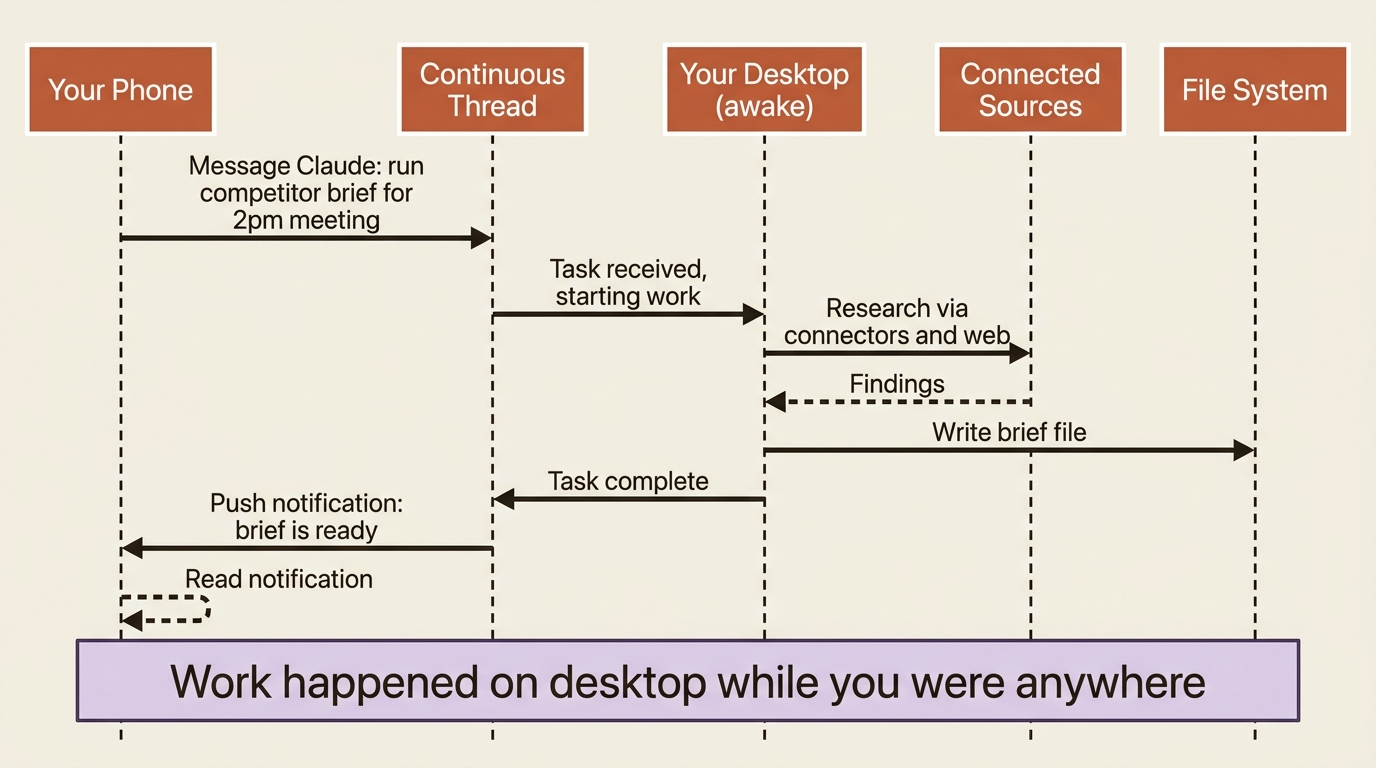
Picture the day this enables. You message Claude from your phone on the way to work, asking it to start the competitor brief. You follow up from your desktop when you sit down, refining a detail. It is the same conversation, the same context, and the same Claude, just reached from two places.
How the work actually happens
This is the mental model that makes everything else click. When you assign a task from your phone, the work does not run on your phone. It runs on your computer, with access to your local files, your connectors, your plugins, and your apps through computer use. Your phone is the remote control; your desktop is the machine doing the lifting.
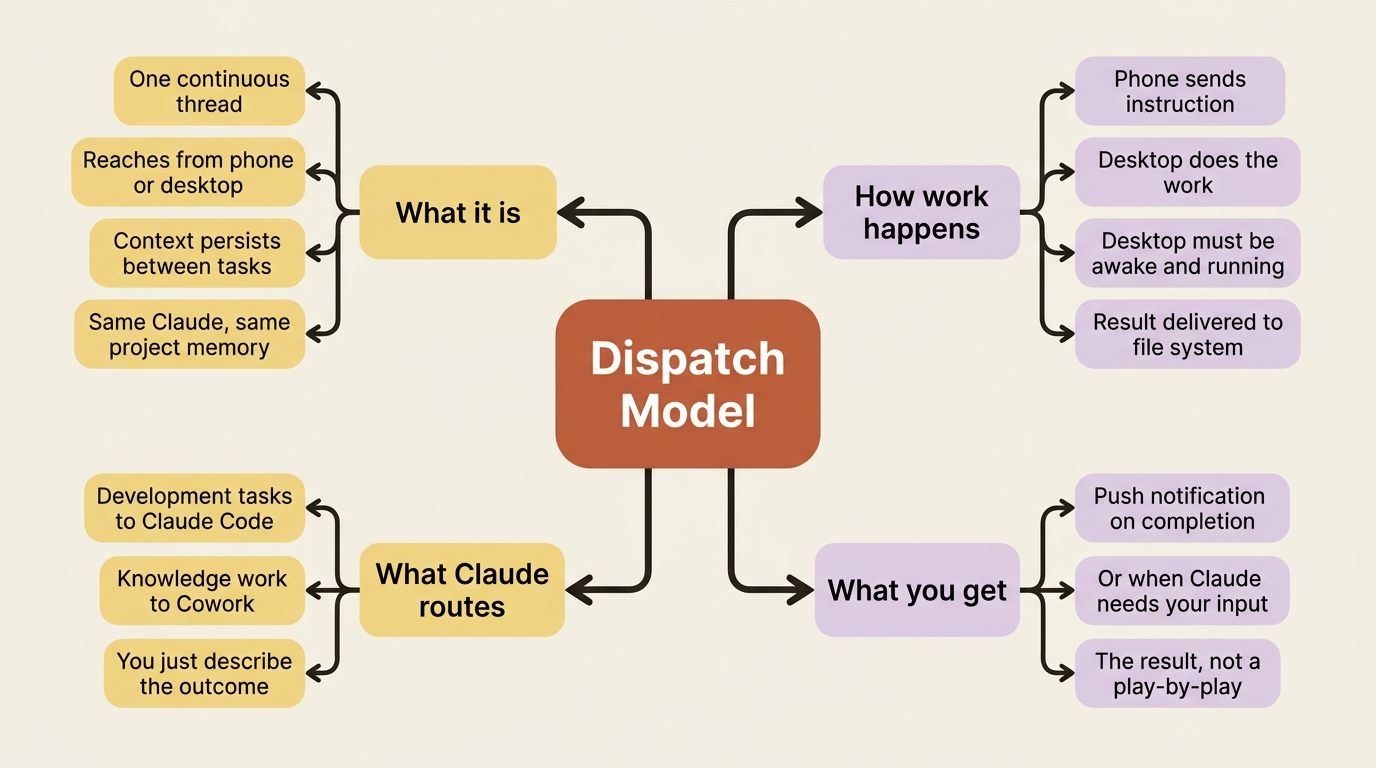
That has a hard requirement attached: your desktop must be awake and the Claude Desktop app must be open. If your computer is asleep or the app is closed, Claude cannot work, because there is nothing running to do the work. The setup includes a toggle to keep your computer awake for exactly this reason.
There is useful automatic intelligence in how tasks get handled. When you assign one, Claude figures out what kind of work it is and spins up the right session: development tasks run in Claude Code, knowledge work runs in Cowork. You do not route the work yourself. You describe the outcome, and Claude picks the right engine.
Rather than making you watch every step on a phone screen, Claude messages you the outcome when it is done. You get a push notification when a task finishes or when Claude needs your go-ahead to proceed.
Setting it up
The feature is in beta for Pro and Max plans, and it requires both the Claude Desktop app and the Claude mobile app, each updated to the latest version, with an active internet connection on both devices.
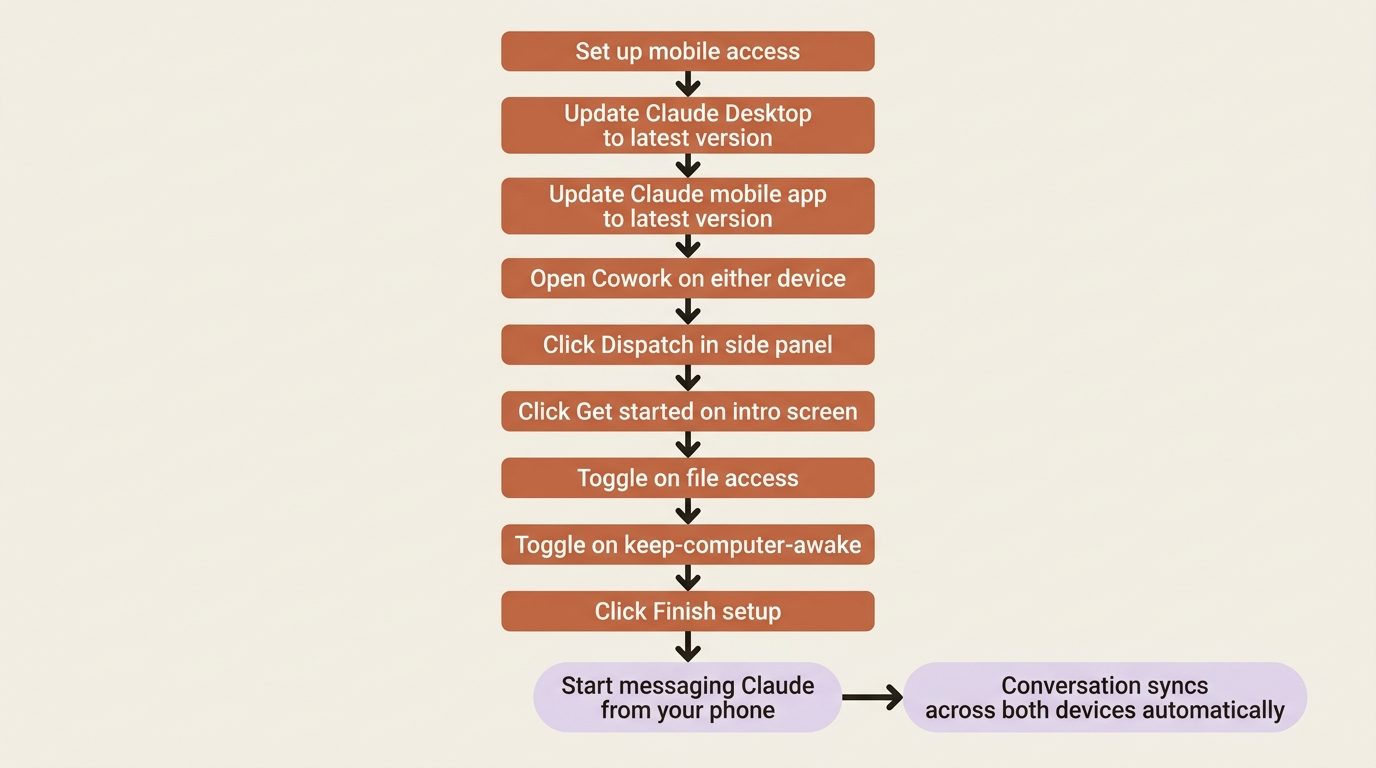
Once setup is complete, your continuous conversation syncs across both surfaces automatically. Everything you have already configured, the same connectors, plugins, and file access, all works from mobile, with nothing to reconfigure separately. The project with memory, the scheduled brief, and the plugins from previous articles are all now reachable from your phone.
The limits: desktop must be active, one thread only
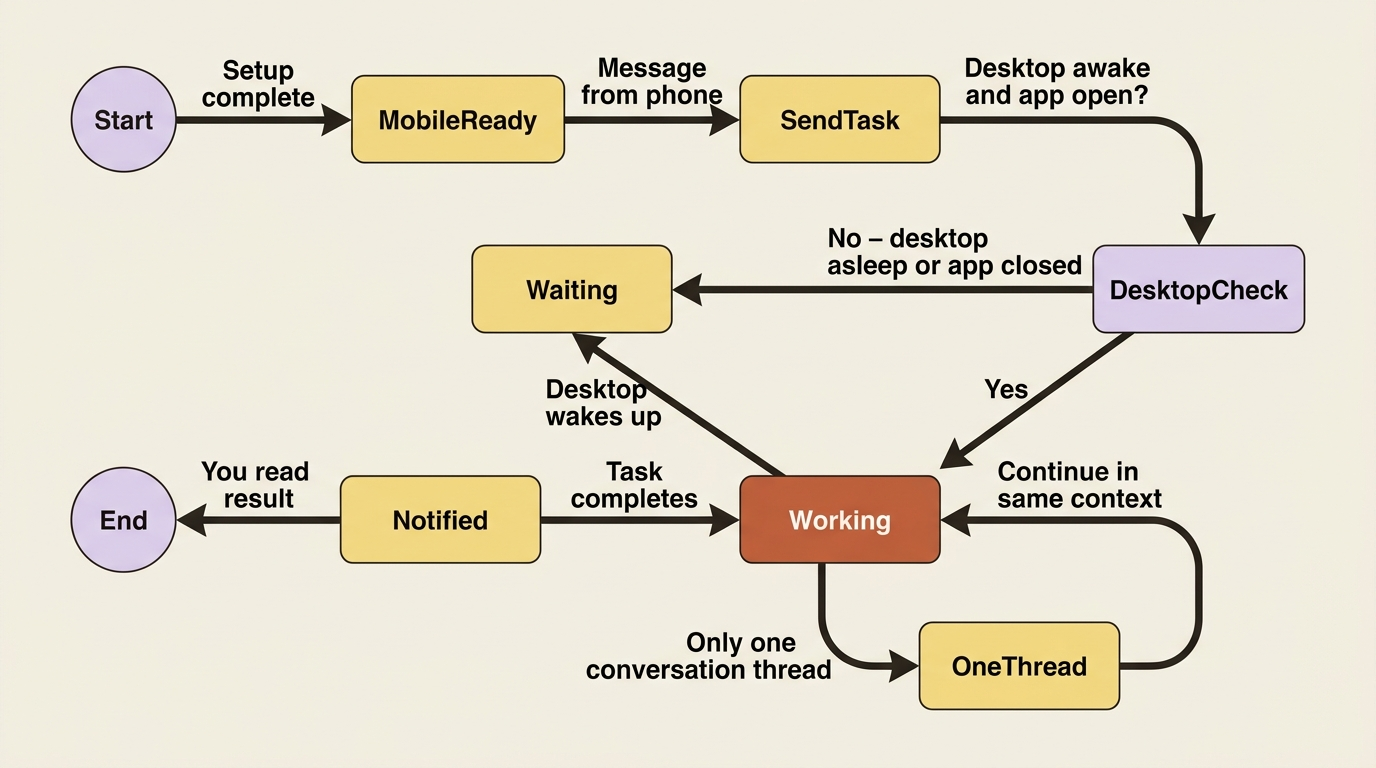
Three limitations round out the picture.
Your desktop must be active. A sleeping computer or a closed app means no work happens. This is the one that catches people.
One continuous thread, and only one. There is no way to start a second thread or juggle multiple conversations. Everything lives in a single thread.
Computer use carries its mobile-era caveats. When a phone-assigned task uses computer use, it is still Claude acting directly on your screen, now triggered remotely.
The safety consideration that is unique to mobile
Mobile access creates a chain where instructions from your phone can trigger real actions on your computer.
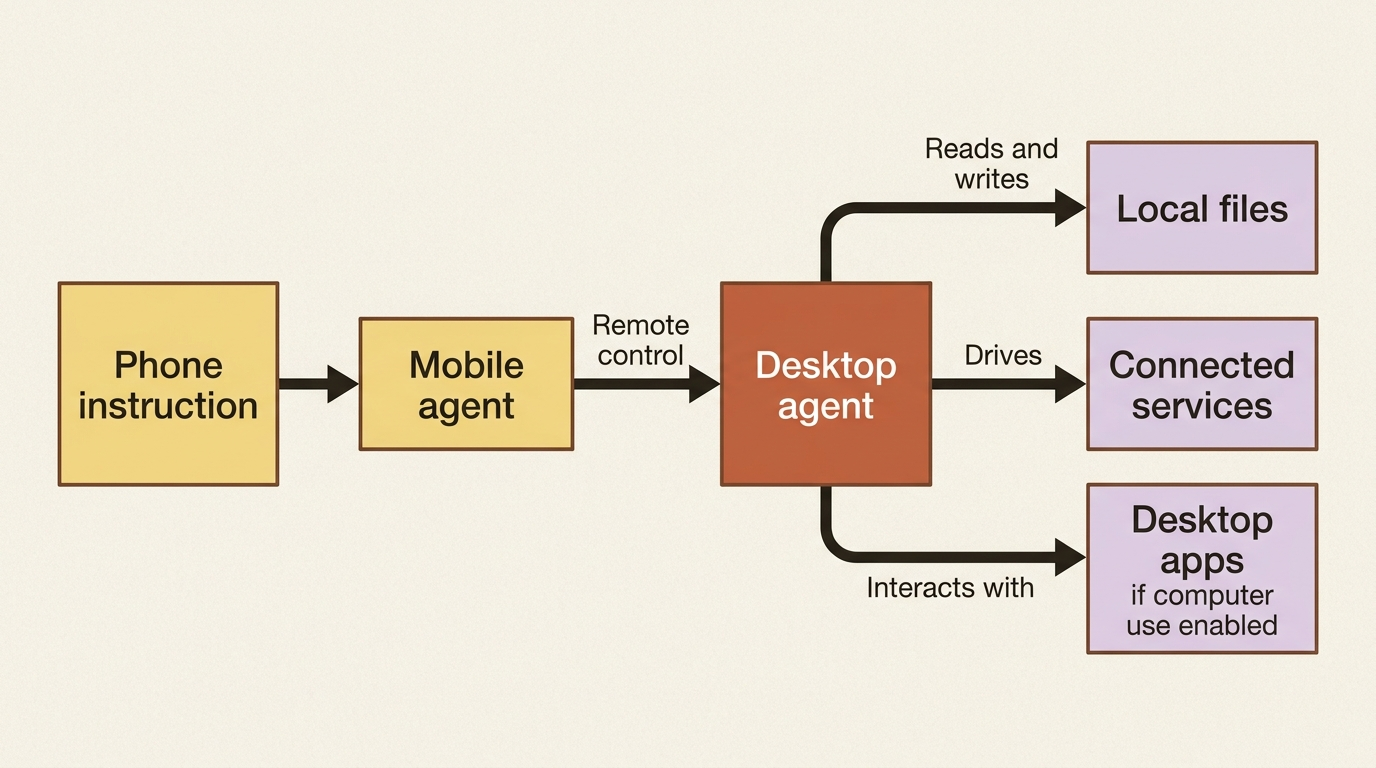
A phone instruction runs through a mobile agent, which controls your desktop agent, which can read and write local files, interact with connected services, and operate desktop apps through computer use. The power is the point, but it also means a mistake or a manipulated instruction could cascade into consequences that are hard or impossible to undo.
The defenses are the ones you already know from the safety article, applied with extra seriousness because the chain is longer. Before you enable this, the guidance is concrete: trust every app and service in the chain, understand exactly what files and accounts become accessible, and know how to quickly disconnect or revoke access if something goes wrong. Only connect these agents if you are comfortable with what they could do, not just what you intend them to do.
Do this today
- Update both apps, Claude Desktop and the Claude mobile app, to their latest versions before attempting setup.
- Open the Dispatch setup on your desktop and complete the five setup steps.
- Send a simple, low-stakes task from your phone, something like "summarize my Google Drive folder called Meeting Notes," and confirm you receive a push notification when it finishes.
- Check that your computer stays awake during the task. If it went to sleep, adjust your keep-awake settings.
- Identify the one task you most often think of away from your desk and set it up as the first real Dispatch task you delegate from your phone.
The desk, finally optional
Eleven articles ago, Cowork could do impressive work but only while you sat in front of it. Now the thought you have on the train becomes a finished document by the time you arrive. The competitive-intelligence setup you built across the whole series, the project, the memory, the connectors, the schedule, and the plugins, is reachable from your pocket, doing its work on your desktop while you are anywhere at all.
The desk became optional, which is the most complete form of "describe an outcome and step away" the series could offer.
This is Part 11 of "Getting Real Work Done with Claude Cowork," a 12-part guide to using Claude Cowork for real knowledge work.