
Rolling Cowork Out to a Whole Team
One person running Cowork is a productivity tool. A whole company running it is a fleet of agents, and that needs governance.
One person running Cowork is a productivity tool. A whole company running it is a fleet of agents touching real files and real services. Here is how admins govern that fleet, distribute trusted plugins, and get visibility into what every agent is doing.
In this article: You will learn the admin controls that turn Cowork on or off for an organization, the four plugin distribution levels that range from optional to mandatory, what data residency means for compliance (conversation data lives locally, not in a central admin console), and how to set up OpenTelemetry monitoring to stream a rich event feed to your existing security tools. If you are an individual user, this shows you what your admin sees. If you are the admin, this is your chapter.
Everything in this series so far has been about one person and their setup. But Cowork does not stay personal for long. The moment a company rolls it out, the picture changes: instead of one agent touching your files, you have dozens or hundreds of agents touching real files, real connectors, and real services across the organization. That is enormously productive, and it is something that has to be governed.
Admin controls: the on switch
The foundational control is simple. Cowork is on by default when the research preview launches, and an organization owner can disable it from Organization settings > Capabilities by toggling off the Cowork setting. That turns Cowork off for everyone in the organization.
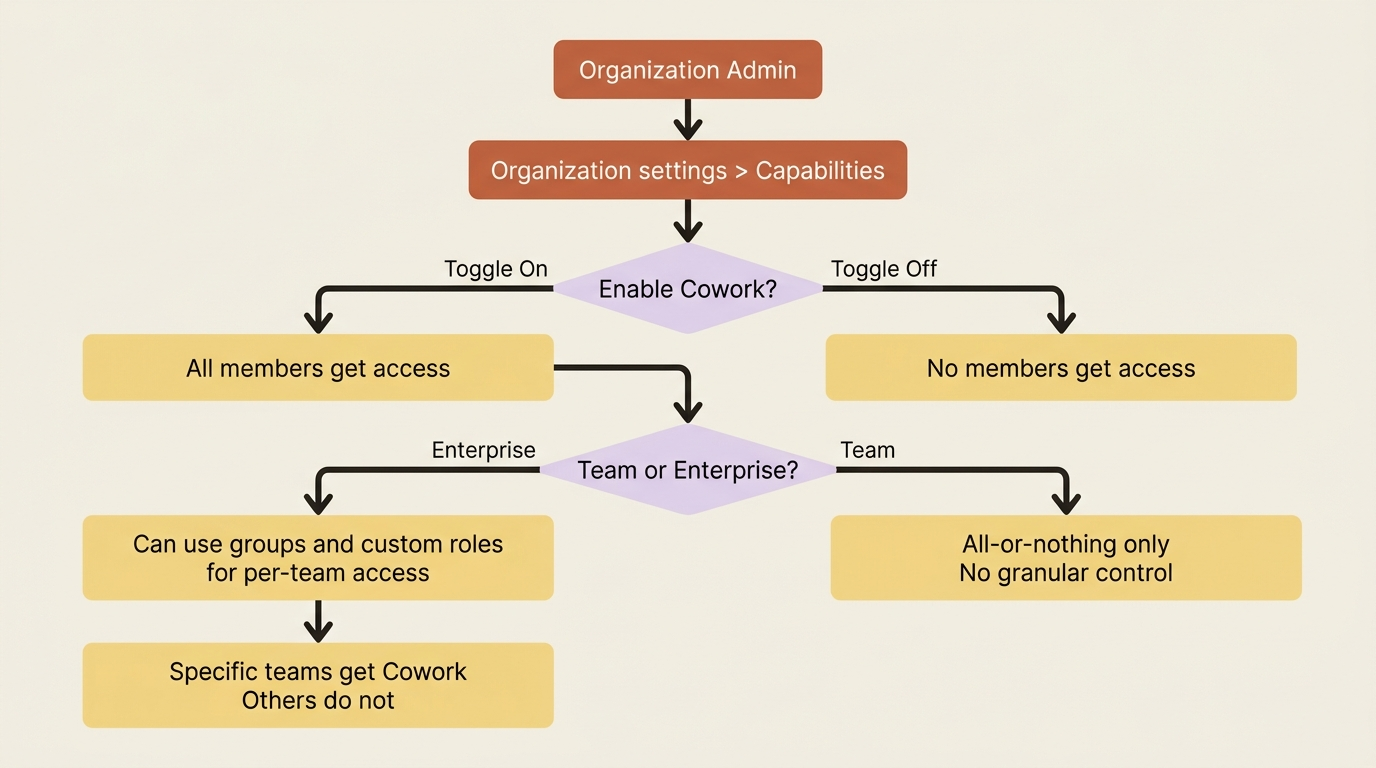
The bluntness is the point to understand. This is an organization-wide setting. Granular controls by user or role are not currently available through the toggle itself; it is all-or-nothing. There is one important exception for Enterprise plans: admins who need per-team control can use groups and custom roles to selectively enable Cowork for specific users or teams. Team plans do not have those controls.
Plugins ride the same switch. They are included with Cowork and governed by the same admin toggle. If Cowork is on, plugins are available; the control you have over plugins is about which ones, not whether the plugin system exists at all.
One more honest gap: projects have no org-level admin controls. Owners cannot restrict project creation across the organization at this time.
Distributing plugins at scale
Owners can create plugin marketplaces to distribute curated plugins across the company, controlling exactly what members see and can install.
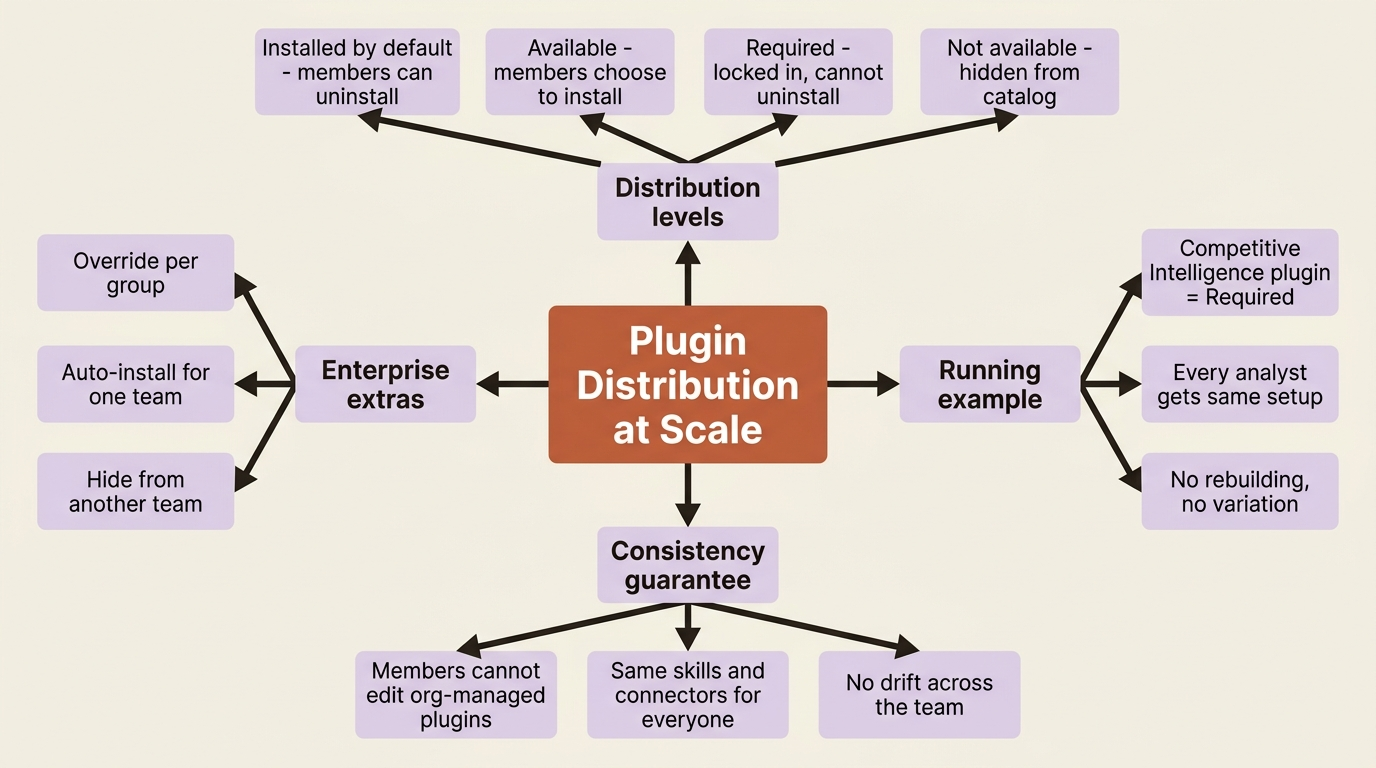
Each plugin gets a distribution level, and the four options form a clear spectrum.
Installed by default. Auto-added for everyone. Members can uninstall if they do not need it.
Available. Appears in the catalog. Members install themselves.
Required. Auto-installed for all members. Members cannot uninstall it. This is how you enforce consistent tooling.
Not available. Hidden from the catalog. Useful for staging a plugin before launch or deprecating one you are retiring.
On Enterprise plans, owners can override these preferences per group: auto-installing a plugin for one team while hiding it from everyone else. Members cannot edit organization-managed plugins, which keeps shared tooling identical across the team rather than drifting as each person tweaks it.
This is where the running example closes its arc. The Competitive Intelligence plugin you packaged in the previous article becomes a Required plugin for the competitive-intelligence team, so every analyst has the same skills, the same connectors, and the same report format from day one, with no setup and no drift.
Where the data lives, and why it shapes compliance
This is the part that compliance teams need to sit with carefully.
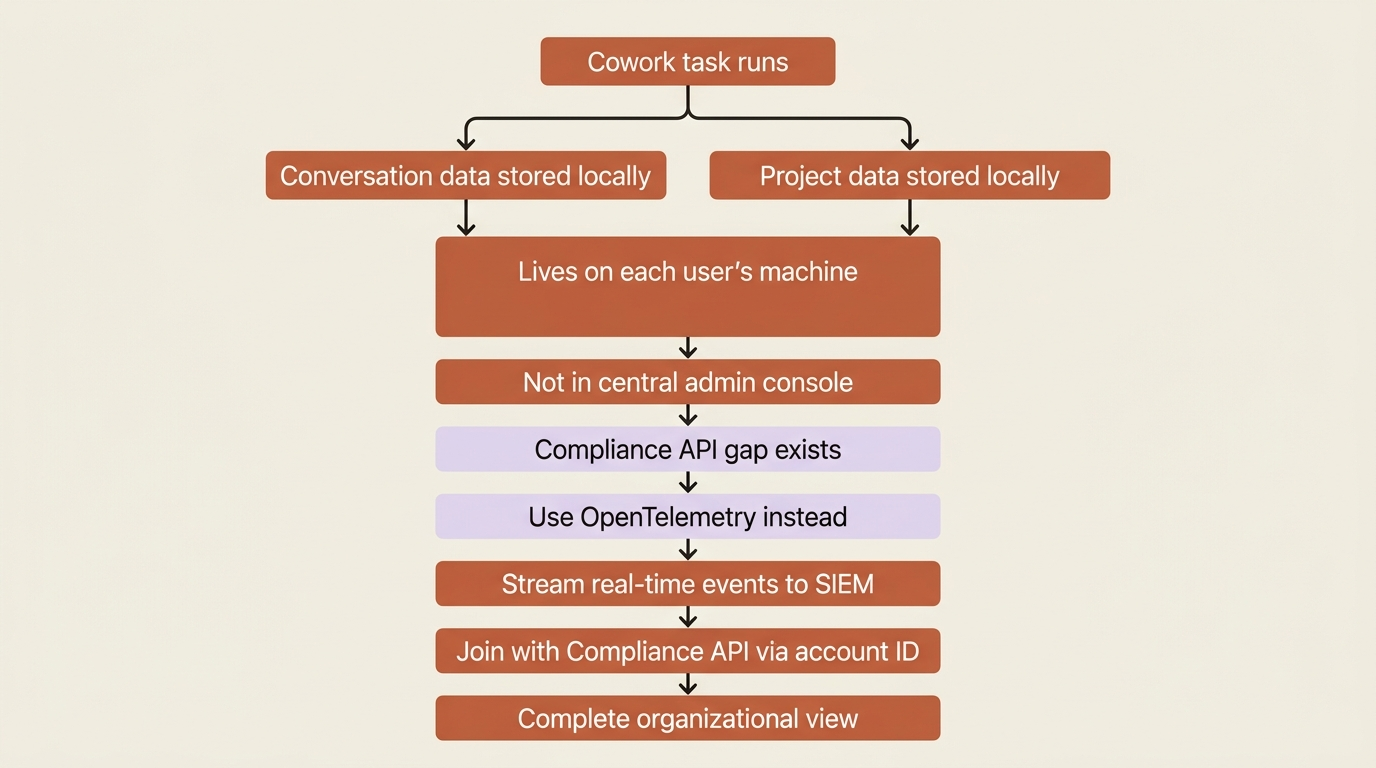
Cowork stores conversation history locally on each user's computer. The same is true of projects: project data, both tasks and memory, lives locally on each user's machine. That locally stored conversation data is not subject to Anthropic's standard data-retention policies, and it cannot be centrally managed or exported by admins.
If your compliance model assumes that everything employees do in a tool is centrally retained, searchable, and exportable from an admin console, Cowork breaks that assumption. The data is on the endpoints, not in a central store you can query.
This is not a flaw so much as a design choice with a tradeoff: local storage keeps the data on the user's machine rather than in the cloud, but it means your usual centralized-retention playbook does not directly apply.
Monitoring: seeing what the fleet actually does
Start with the gap, because it is the first thing a security team will ask about. Cowork activity is not captured in the Compliance API at this time.
The substantial answer to that gap is OpenTelemetry. On Team and Enterprise plans, owners can stream Cowork events into the SIEM and observability tools they already run.
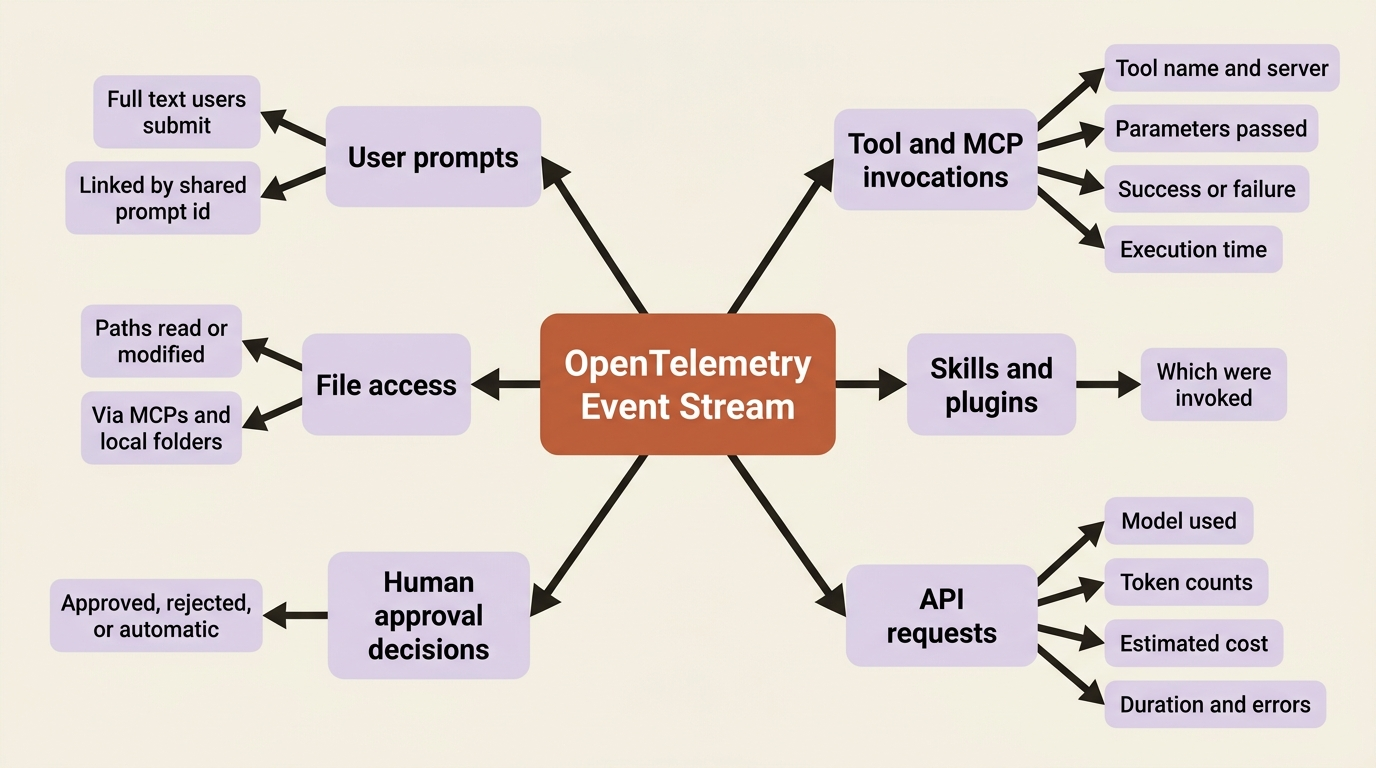
The event stream covers user prompts, tool and MCP invocations, file access, skills and plugins invoked, human approval decisions, and API requests with token counts and cost estimates. The detail that ties it together is a shared prompt.id attribute on every event triggered by a single user prompt. That means you can reconstruct the complete chain of everything Claude did in response to one input, which is precisely what you need when investigating an incident.
It works with any standard OpenTelemetry collector, so the destinations are the tools you likely already use: Splunk, Cribl, Elasticsearch, Loki, ClickHouse, Honeycomb, Datadog.
Setting up OpenTelemetry
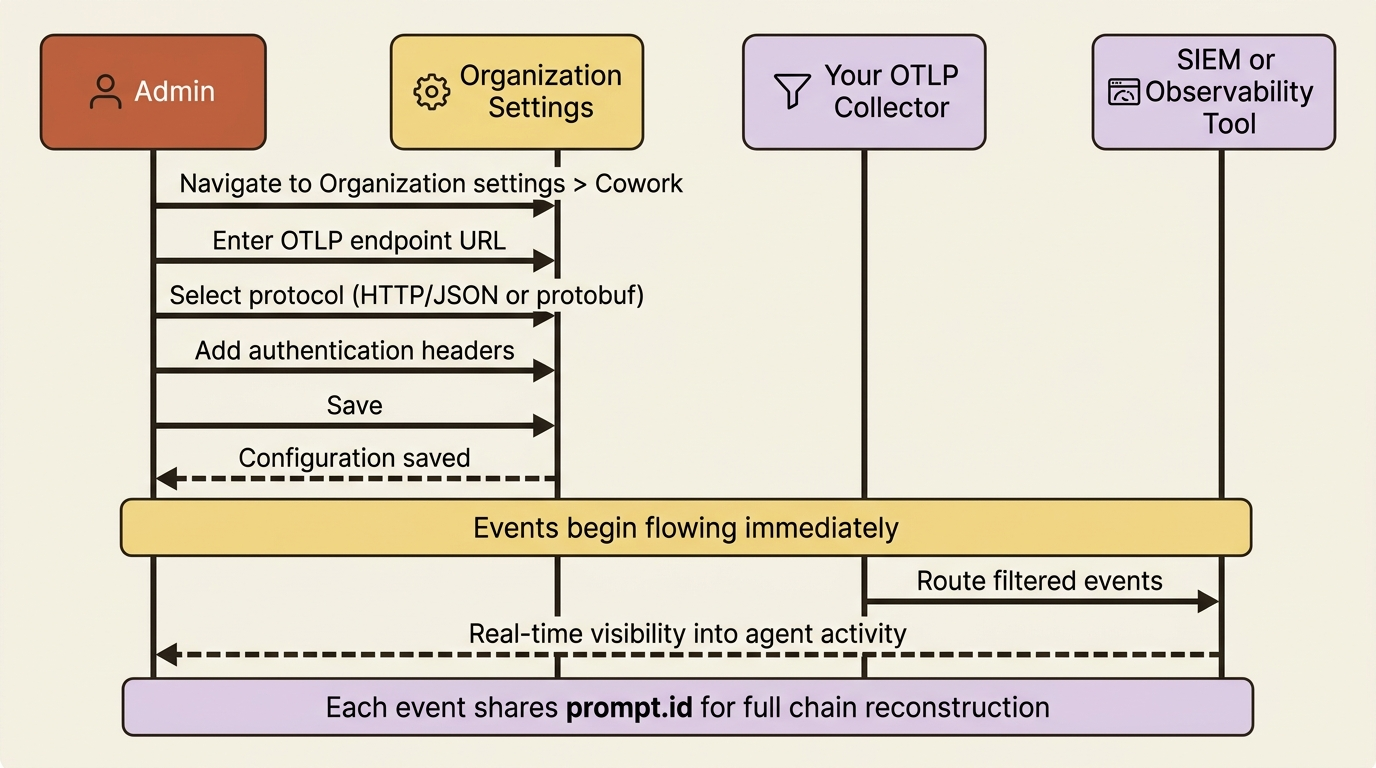
Configuration is a short form in Organization settings > Cowork: enter your OTLP endpoint (your collector's URL), select the protocol your collector uses (HTTP/JSON or HTTP/protobuf), add any authentication headers such as a bearer token, and save. Events begin flowing to your collector immediately. Nothing is exported until an admin configures an endpoint; monitoring is opt-in by deliberate action.
Safety note: User prompt content is included in events by default. Tool parameters can carry sensitive values like file paths and command arguments. User email addresses are included in event attributes. Configure filtering or redaction at your collector before routing events into long-term storage, and set retention and access policies that match the sensitivity of what you are capturing.
There is also a smart bridge to the Compliance API gap. Each Cowork OpenTelemetry event includes a shared user account identifier you can use to correlate Cowork telemetry with Compliance API records from other products, letting you build a unified view rather than treating Cowork as a blind spot.
Do this today (for admins)
- Verify your current Cowork access setting in
Organization settings > Capabilities. Confirm whether it is on, and decide whether that is intentional. - Inventory the plugins your team is using and decide which belong in each distribution level: Required, Installed by default, Available, or Not available.
- Set up an OTLP endpoint, even a simple logging destination, and stream Cowork events to it for one week. Audit what you see.
- Configure a privacy-sensitive collector that redacts prompt content and file paths before writing to long-term storage.
- Brief your compliance team on the local data-residency model so they can plan accordingly before you roll out to the full organization.
The end of the series
Step all the way back. Twelve articles ago, Cowork was a tab you had not opened. You learned to run a task, read the loop behind it, connect it to your real tools, keep it safely scoped, reuse and instruct and organize your work, automate it on a schedule, bring it alive as a dashboard, package it into a plugin, reach it from your phone, and finally, here, govern and monitor it across an entire organization.
The competitive-intelligence workflow grew the whole way: from a single one-off research prompt into a team-wide, scheduled, monitored standard distributed as a required plugin. Cowork is powerful precisely because it acts on real files, through real services, on your behalf and your team's behalf. Power like that is worth governing well.
This is Part 12 of "Getting Real Work Done with Claude Cowork," a 12-part guide to using Claude Cowork for real knowledge work.