
The Multi-Agent System You Keep Hand-Wiring, Already Built
The throwaway orchestration glue you keep rewriting every time two LLM calls have to cooperate is exactly the thing CrewAI was built to delete.
CrewAI hands you role-based agents, a task model, and a stateful orchestrator out of the box. You describe a team, and the framework runs the loop.
Stop rebuilding the same brittle agent loop on every project. There is a primitive for the team you keep hand-wiring.
In this article: You will learn what CrewAI actually replaces, the three primitives (Agent, Task, Crew) that do all the work, and the smallest runnable example, one agent and one task in about a dozen lines of Python. You will see why model-agnosticism via LiteLLM is more than a checkbox, where Crews end and Flows begin, and how the CLI scaffold takes you from inline script to the project shape you will actually ship.
You have done this before. Two model calls need to cooperate: one drafts, one reviews. So you write the glue. You pass the first output into the second prompt, parse the response, add a retry when the reviewer's JSON comes back malformed, and thread through a third call when the review says "redo it." Somewhere around the fourth if branch, you realize you have hand-built a small, brittle workflow engine that exists only to make two LLM calls behave like coworkers. The next project, you build it again.
That glue is the thing CrewAI deletes. Instead of orchestrating calls, you describe agents by their role, goal, and backstory, hand them tasks, and let the framework run the collaboration. This article is the first stop on a hands-on tour of CrewAI, the leading role-based multi-agent framework for Python. The goal here is narrow: understand what the framework actually gives you, then get a real crew running in about a dozen lines.
A quick note on setup before we go further. Everything here is Python. CrewAI requires Python 3.10 through 3.13, and we use the crewai command-line tool and uv for project setup. Both are installed below.
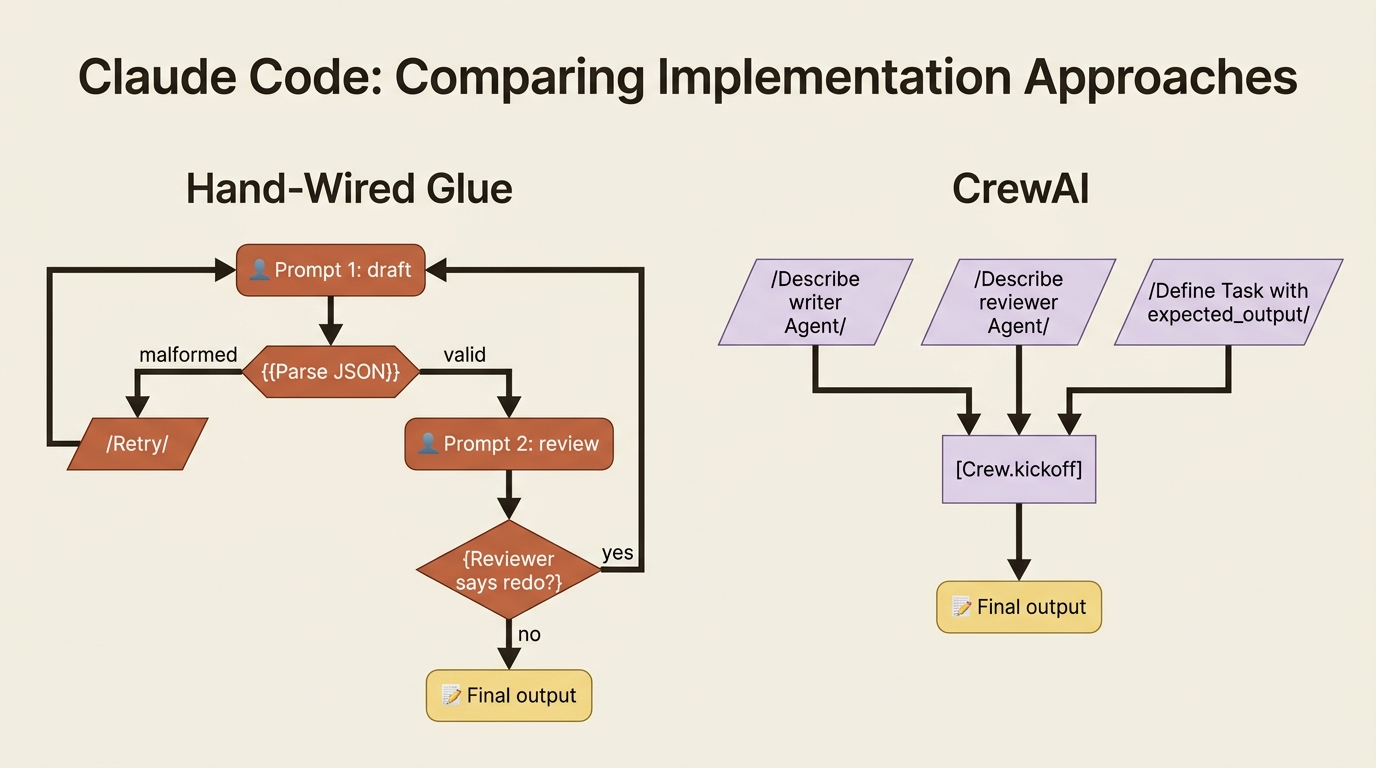
Three framings, because one is not enough
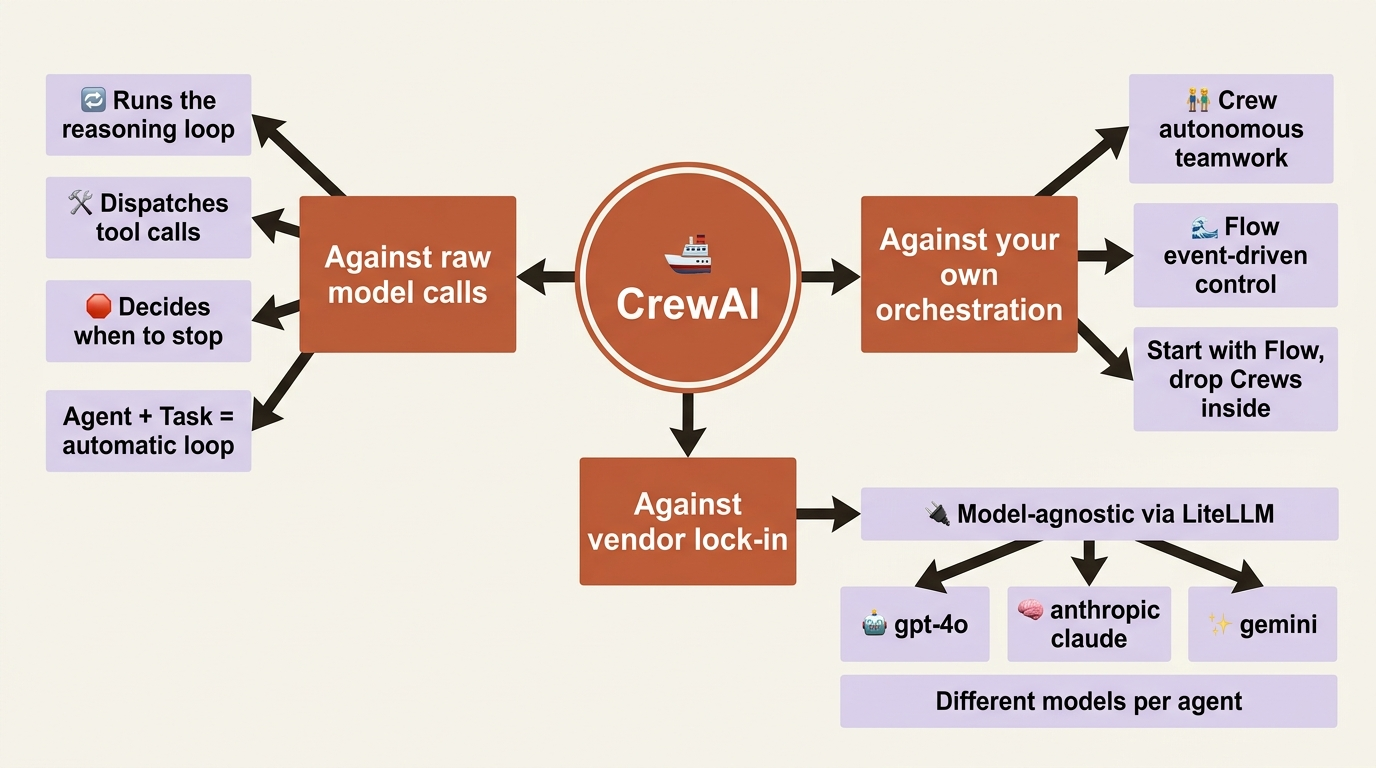
The fastest way to understand CrewAI is to see what it replaces.
Against raw model calls. A single LLM call is stateless and has no hands. It cannot search the web, run your tests, or decide that the draft needs another pass. The moment you want any of that, you start writing a loop: call the model, check whether it asked for a tool, run the tool, feed the result back, and loop again until it stops. CrewAI runs that loop for you. You configure an Agent with a role and some tools, give it a Task, and the framework handles the reasoning loop, the tool calls, and the stopping condition.
Against your own orchestration code. Maybe you already graduated from single calls and built the coordination layer: a state dict passed between functions, some branching, and a couple of retries. CrewAI splits that job into two clean primitives so you stop reinventing it. A Crew is a team of agents that collaborate autonomously on a set of tasks. A Flow is an event-driven, stateful orchestrator that controls execution with explicit steps and branches. The official guidance, which this series follows, is to start with a Flow for structure and drop a Crew inside it wherever you need genuine autonomy. We will build plain Crews first because they are the easier on-ramp, then bring in Flows once you can feel why you want them.
Against picking a vendor. CrewAI is model-agnostic. It routes through LiteLLM, so the llm field on an agent takes a plain string like "gpt-4o", "anthropic/claude-sonnet-4-20250514", or "gemini/gemini-2.0-flash", and you can give different agents different models in the same crew. That is the single sharpest thing to remember from this part: you configure a team, you do not write the loop, and you are not locked to one provider.
The running example: a crew that fixes a bug
To make the concepts compound instead of resetting, this series advances one system across every article. Ours is a code-maintenance crew working on a small, deliberately broken repository called buggy-shop: a handful of Python files and a pytest suite with a few failing tests. Across the series, this crew learns to read the repo, locate a bug, propose a fix, run the tests, ask a human before touching anything risky, remember what it decided last time, and eventually deploy as a service.
Today it does none of that. Today we just prove the wiring works with a single agent and a single task. You cannot build the interesting version until the boring version runs.
Install
CrewAI lives in two places: a global CLI you use to scaffold and run projects, and the library inside your project's environment. Install uv first if you do not have it, then the CLI.
On macOS or Linux:
curl -LsSf https://astral.sh/uv/install.sh | sh
uv tool install crewai
On Windows, install uv from PowerShell, then the CLI the same way:
powershell -ExecutionPolicy ByPass -c "irm https://astral.sh/uv/install.ps1 | iex"
uv tool install crewai
Confirm it landed:
crewai version
If your shell complains about PATH after the install, run uv tool update-shell and reopen the terminal.
A note on providers
Before the first run, CrewAI needs credentials for whatever model you point it at. Because it resolves models through LiteLLM, the pattern is always the same: set the provider's API key as an environment variable, then name the model as a string. For OpenAI, that is OPENAI_API_KEY and a model string like "gpt-4o-mini". For Anthropic, it is ANTHROPIC_API_KEY and "anthropic/claude-...". For Google, it is a Gemini key and "gemini/...". The examples below use "gpt-4o-mini" because it is cheap and fast for a first run, but any tool-calling model works, and you can swap the string without touching anything else.
export OPENAI_API_KEY="sk-..."
Hello, crew
Here is the smallest thing worth running: one agent, one task, one crew, one kickoff(). Read it top to bottom, because the shape is the whole lesson.
from crewai import Agent, Task, Crew

# 1. Describe the agent by who it is and what it is for.
researcher = Agent(
    role="AI Technology Researcher",  # ①
    goal="Explain recent AI developments clearly and accurately",
    backstory=(
        "You are a meticulous analyst who turns dense technical news "
        "into plain, trustworthy summaries for busy engineers."
    ),
    llm="gpt-4o-mini",  # ②
    verbose=True,  # ③
)

# 2. Describe the work, and what a finished result looks like.
research_task = Task(
    description="Summarize the three most important AI developments of the past year.",
    expected_output="A short briefing of three bullet points, one sentence each.",  # ④
    agent=researcher,  # ⑤
)

# 3. Assemble the team and run it.
crew = Crew(agents=[researcher], tasks=[research_task])  # ⑥
result = crew.kickoff()  # ⑦

print(result.raw)  # ⑧
① The agent is defined by language alone: role, goal, and backstory describe who it is and how it should behave, with no procedural code.
② The llm field is a plain LiteLLM string, so swapping providers means changing this one value and nothing else.
③ verbose=True prints the agent's reasoning as it runs, which is the clearest window into the loop CrewAI runs for you.
④ expected_output states what a good answer looks like; the agent treats it as acceptance criteria.
⑤ The task is bound to the agent that will execute it.
⑥ The Crew binds the list of agents to the list of tasks.
⑦ kickoff() runs the whole collaboration and returns a CrewOutput object.
⑧ result.raw is the final text the crew produced.
Note: The full extracted listing at code/crewai/part-1-what-crewai-is/listings/01-hello-crew.py is the complete runnable program.
Three objects do all the work here. The Agent is defined entirely by language: a role, a goal, and a backstory that shapes how it behaves, plus the model it runs on. The Task says what to do and, crucially, what a good answer looks like via expected_output, which the agent treats as its acceptance criteria. The Crew binds agents to tasks, and kickoff() runs the whole thing. When it finishes, result is a CrewOutput object, and result.raw is the final text. That is the entire mental model: you described a person and a job, and the framework did the rest.
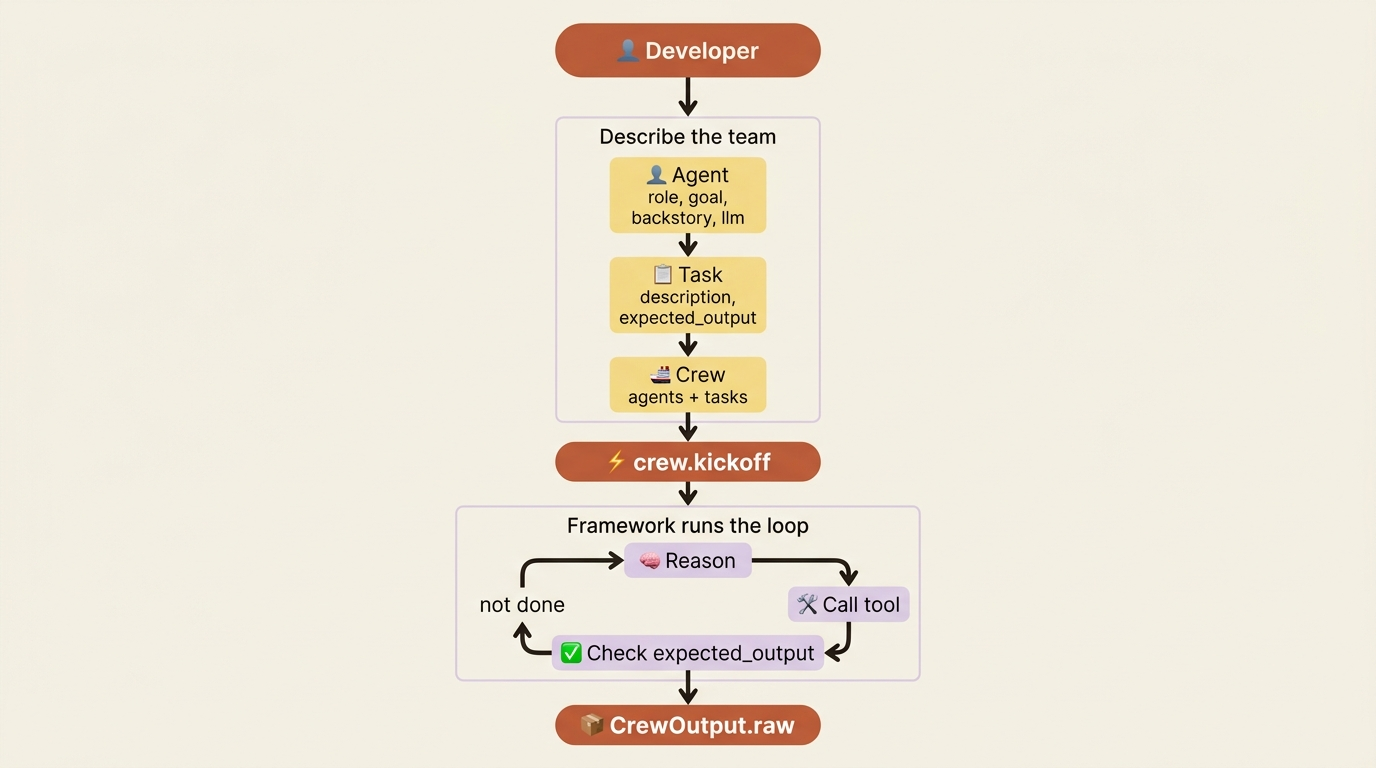
Notice what is absent. There is no loop, no tool-dispatch code, no retry logic, and no parsing of the model's intermediate steps. The verbose=True flag is the one thing worth keeping on while you learn, because it prints the agent's reasoning as it works, which is the clearest window into what "running the loop for you" actually means.
Gotcha: verbose is a boolean, not a log level. Older tutorials pass verbose=2, but an integer no longer toggles anything. Use True or False.
What kickoff() actually does
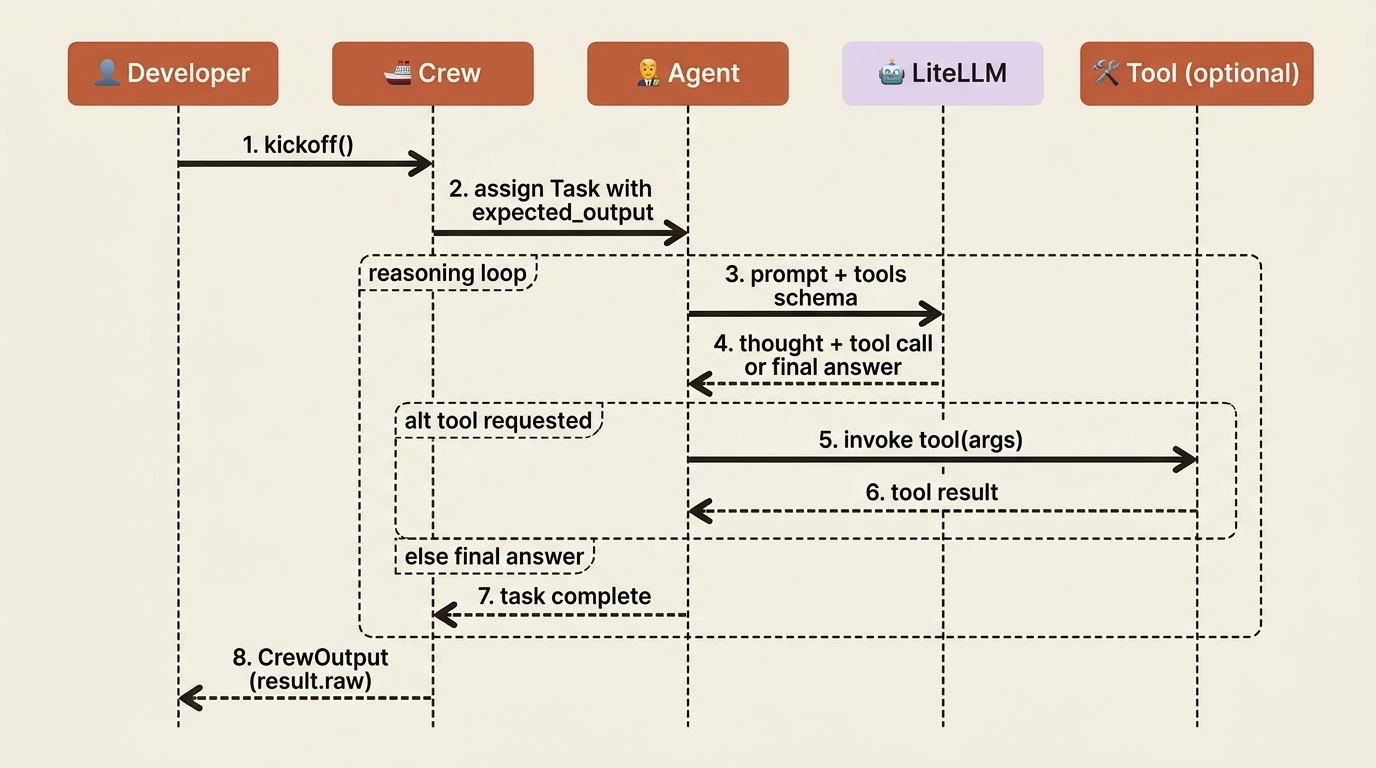
Calling crew.kickoff() looks like a single line, but a sequence of things happens inside. The Crew assigns the Task to its Agent, the Agent calls the model through LiteLLM with the role, goal, backstory, task description, and any available tools rolled into one prompt, and the model either returns a final answer or asks for a tool. If it asks for a tool, the framework runs the tool, feeds the result back into the next model call, and continues. When the model returns something that satisfies expected_output, the Agent hands the result back to the Crew, and the Crew returns it to you. The loop you would have written by hand never appears in your code.
The shape you will actually use
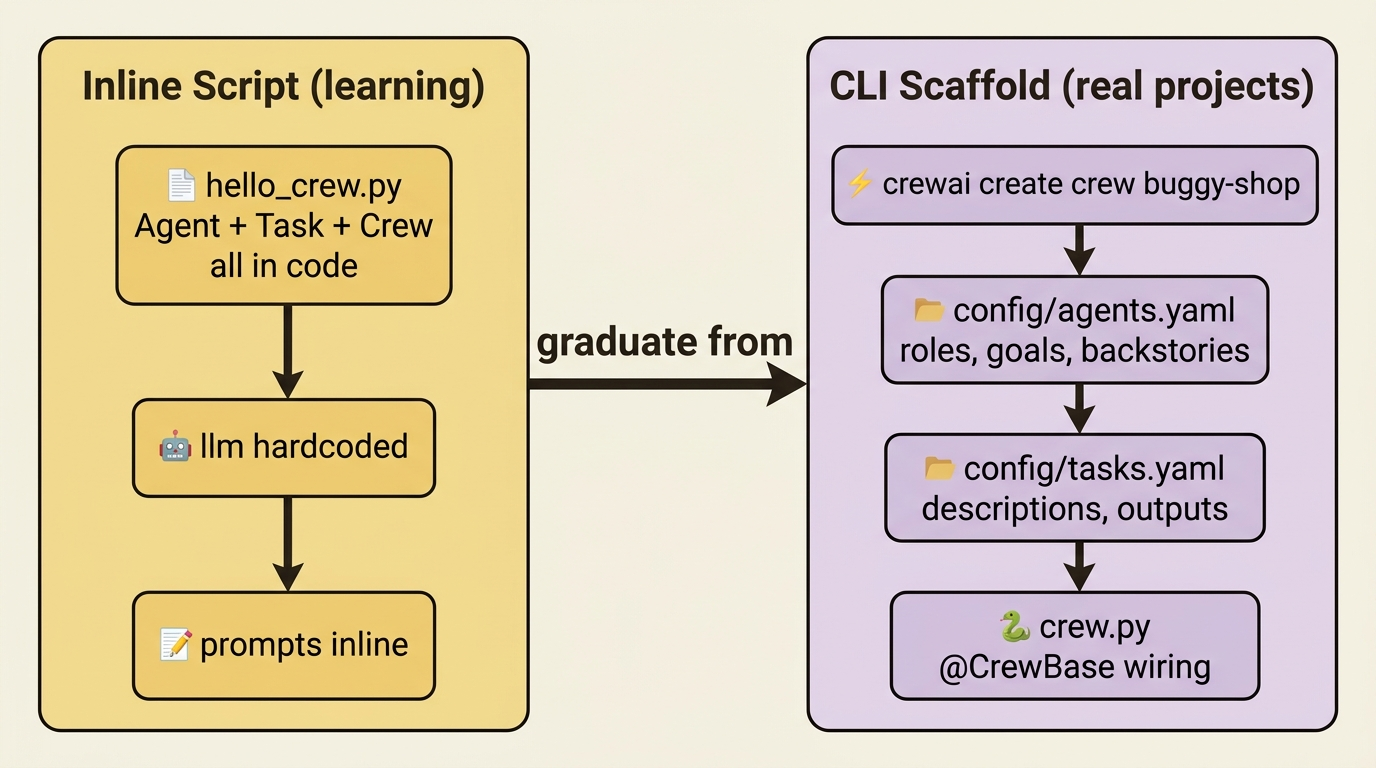
That inline script is the right way to meet CrewAI and the wrong way to build with it. Real projects use a scaffold the CLI generates for you:
crewai create crew buggy-shop
This produces a project where agents live in a config/agents.yaml file, tasks live in config/tasks.yaml, and a small Python class wires them together with the @CrewBase, @agent, @task, and @crew decorators. Defining the team in YAML keeps the prose descriptions out of your code and makes them easy to tweak without redeploying logic, which is exactly the separation you want once a crew grows past one agent. You do not need to understand the wiring yet. You just need to see where things go.
Do this today
Before you read further, get a crew running locally. Ten minutes, four steps.
- Install the CLI. Install
uvfrom the script above, thenuv tool install crewai. Runcrewai versionto confirm. - Set an API key. Export
OPENAI_API_KEY(or your provider of choice) in the shell where you will run the script. Anthropic and Gemini work just as well with their own keys and model strings. - Run the hello-crew snippet. Paste the dozen lines above into
hello_crew.py, runpython hello_crew.py, and watch the verbose output. The reasoning trace is where the lesson lands. - Scaffold the buggy-shop project. Run
crewai create crew buggy-shopand open the generatedconfig/agents.yaml,config/tasks.yaml, andcrew.py. You will live in this shape for the rest of the series, so it pays to know where things go.
Describe the team, not the control flow
You now have a working crew and the one idea the whole framework rests on: describe the team, not the control flow. That is genuinely most of the conceptual battle. A single agent answering a single question is not yet a system, but the primitives are not going to change. The same three objects, Agent, Task, Crew, are the vocabulary for everything else CrewAI does, from sequential pipelines to hierarchical managers to event-driven Flows wrapped around the whole thing.
Most agent frameworks ask you to draw a graph of states and transitions. CrewAI asks you to describe a team and write down what good work looks like. That difference is small in a hello-world script and enormous in a project that has to grow. The teams you describe today are the systems you ship tomorrow, and you did not have to write a single line of orchestration glue to get them there.
So delete that workflow engine you keep building. Someone already wrote it, and they made it model-agnostic on the way out.