
An Agent Is Just a Role, a Goal, and a Backstory
CrewAI turns the personality prompts you have been hand-tuning for years into three named fields, a task contract, and a crew object; then it runs the reasoning loop for you so you stop writing it by hand.
You have been hand-writing personality prompts for years. CrewAI turns that instinct into three structured fields, a task contract, and a crew object, then runs the reasoning loop on your behalf.
You have been hand-tuning a single sprawling system prompt for years, hoping the model finally behaves. Three named fields and a YAML file will get you further, faster, with less squinting.
In this article: You will learn the three CrewAI objects that everything else is built from, see exactly what the framework does on your behalf during a run, scaffold a project with the idiomatic YAML-plus-code split, and walk away with a real two-agent crew that finds and proposes a fix for a failing test. By the end you will know why prose belongs in YAML, wiring belongs in Python, and why the most common first-week mistake is a one-line typo.
You opened a multi-agent framework expecting an elaborate API and got something almost embarrassingly small instead. Three classes. One decorator pattern. A YAML file. That is the entire surface you need to build a real crew, and the smallness is the point.
Here is the idea worth holding onto before any code. A CrewAI agent is not a tangle of system prompts that you tune by feel. It is three plain-language fields: a role (who this agent is), a goal (what it is trying to achieve), and a backstory (the context that shapes how it behaves). You have almost certainly written all three before, scattered across a prompt string that you kept editing until the model stopped misbehaving. CrewAI's bet is that pulling those apart into named fields, and letting the framework assemble the actual prompt and run the reasoning loop, is both clearer to read and easier to change.
This article walks through that bet end to end. By the end you will have a real, multi-agent crew defined the way CrewAI is actually meant to be used, working on a tiny buggy-shop repo: one agent that hunts down a failing test and explains what is wrong, and a second that proposes a fix.
The three objects you will use constantly
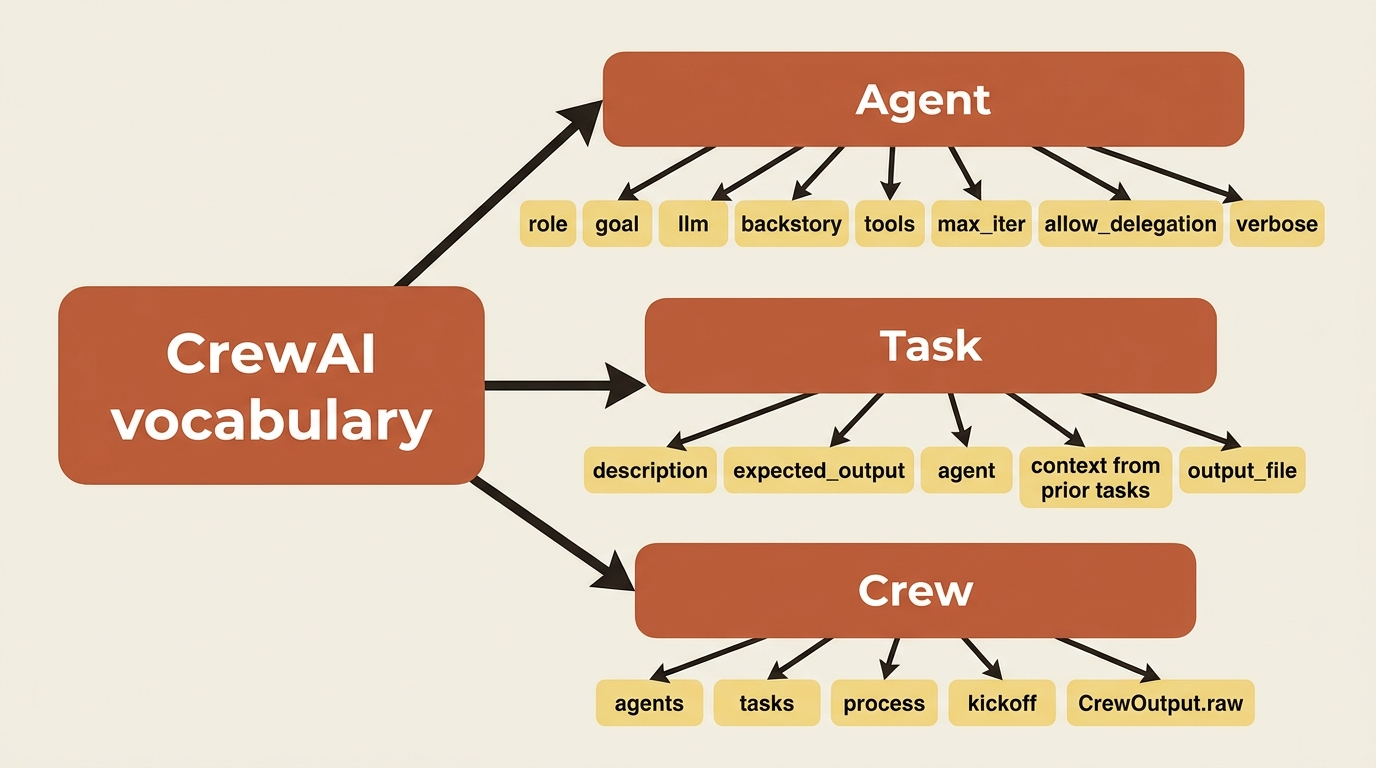
Everything in a crew is built from three classes. Learn these, and most of the framework follows.
The Agent is the worker. Its core is the role, goal, and backstory trio, plus the model it runs on (llm) and the tools it can reach for (tools). A handful of controls shape its behavior. max_iter caps how many reasoning-and-tool cycles it will run before it must answer, allow_delegation decides whether it can hand work to teammates, and verbose prints its thinking as it goes.
The Task is the unit of work. It has a description (what to do) and an expected_output (what a finished result looks like), and it is usually pinned to an agent. The expected_output is not decoration. The agent treats it as the acceptance criteria for its own work, so a vague one produces vague results. A task can also declare context, a list of earlier tasks whose outputs should be fed in, and output_file to write its result to disk.
The Crew binds agents and tasks together, picks a process for how the work is sequenced, and exposes kickoff() to run everything. When it finishes you get a CrewOutput, and result.raw holds the final text.
That is the entire vocabulary. Agents do work, tasks define work, and the crew runs it.
What actually happens during a run
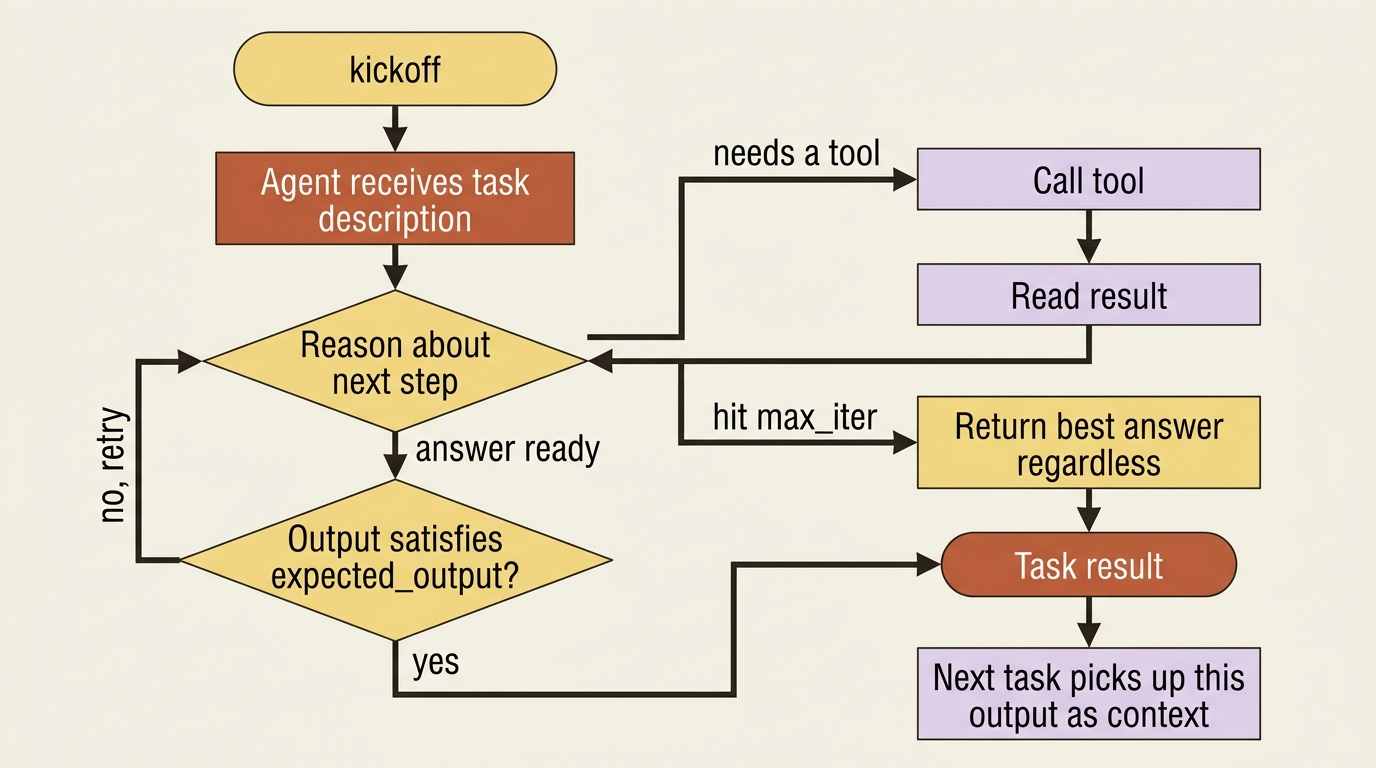
It is worth being concrete about the loop that CrewAI runs on your behalf, because it is the thing you are paying for and the thing that you will later want to control.
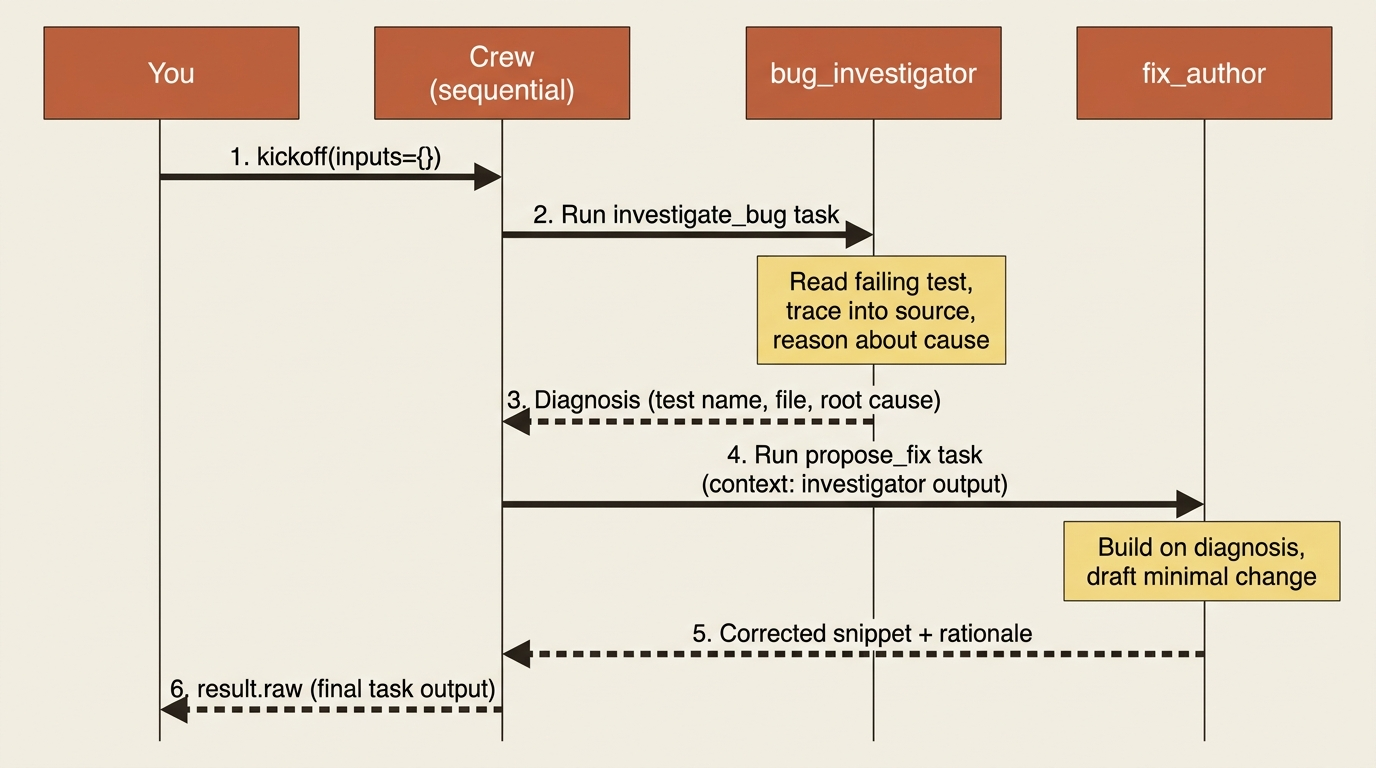
When the crew kicks off, the first task's agent receives its instructions and reasons about them. If it has tools and decides it needs one, it calls the tool, reads the result, and reasons again. It keeps cycling through think, act, observe, and think again, until it produces an output that satisfies the task's expected_output, or until it hits max_iter and has to give its best answer regardless. That output becomes the task's result. In a sequential crew, the next task can then pick up where the last left off, because each task's output flows forward as context for the ones after it.
You never write that loop. You never parse the model's intermediate steps or dispatch its tool calls by hand. That is the deletion CrewAI makes, and verbose=True is how you watch it happen, which is why it stays on while you are learning.
Gotcha: max_iter defaults have shifted between CrewAI releases, so set it explicitly rather than trusting the default. If an agent seems to quit after a single tool call and answer too early, a too-low max_iter is the usual culprit. And verbose is a boolean: verbose=2 does nothing useful anymore.
The shape CrewAI is actually built around
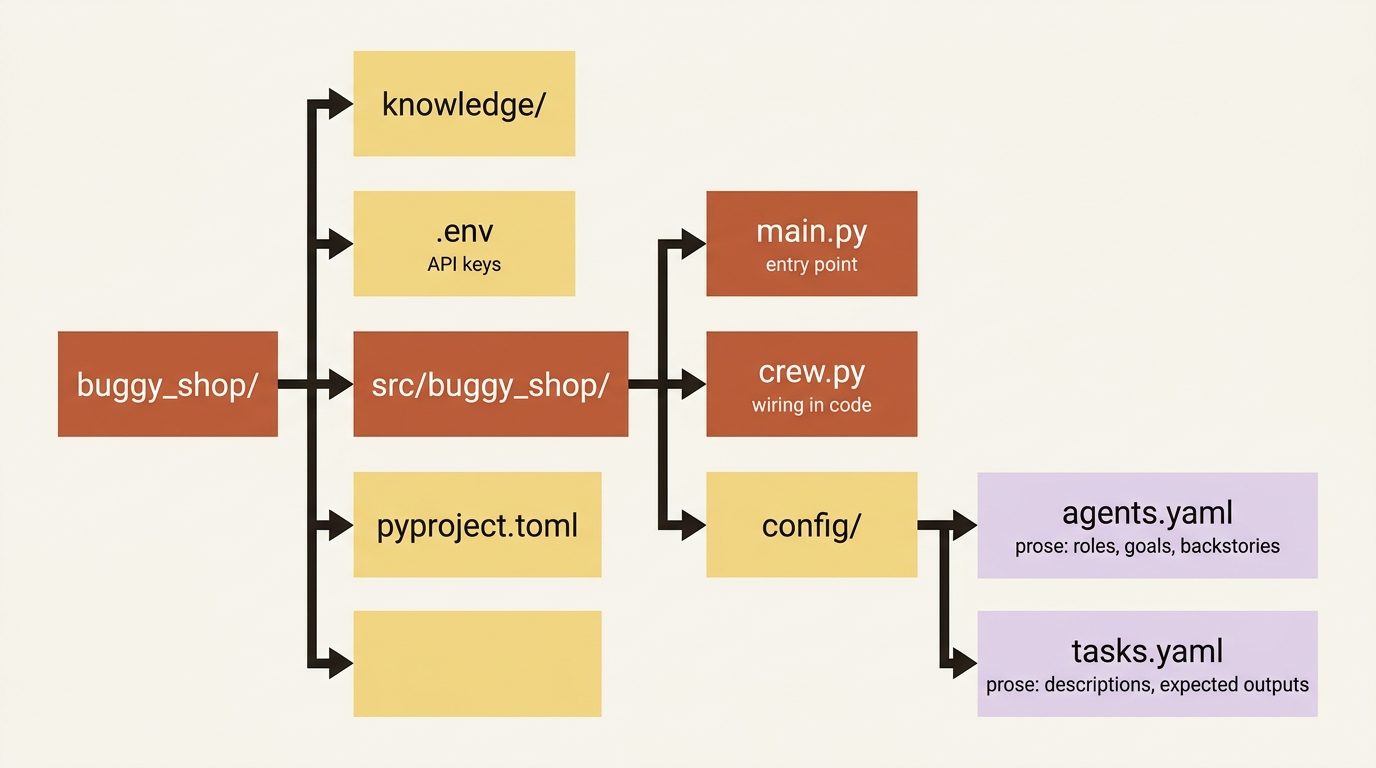
You can define all of this inline in a Python file, and plenty of tutorials do, but that is not how real projects are structured. The idiomatic shape separates the descriptions of your agents and tasks, which are prose and change often, from the wiring, which is code and changes rarely. Scaffold it with the CLI:
crewai create crew buggy_shop
cd buggy_shop
That generates a project with a specific layout. The pieces that matter for now:
buggy_shop/
├── .env
├── knowledge/
├── pyproject.toml
└── src/
    └── buggy_shop/
        ├── main.py
        ├── crew.py
        └── config/
            ├── agents.yaml
            └── tasks.yaml
Your agents live in config/agents.yaml, your tasks in config/tasks.yaml, the wiring in crew.py, and the entry point in main.py. API keys go in .env. The split is the point: a non-engineer can tune an agent's backstory in YAML without touching Python, and you can re-read what your crew does at a glance instead of squinting at string literals.
Describing the team in YAML
Our buggy-shop crew needs two agents to start: one that hunts down the failing test and explains what is wrong, and one that proposes a fix. Here is config/agents.yaml:
bug_investigator:           # ①
  role: >                   # ②
    Python Bug Investigator
  goal: >                   # ③
    Read the failing test and the code it exercises, then explain
    precisely what is broken and why
  backstory: >              # ④
    You are a careful debugger who never guesses. You read the test
    first, trace it into the source, and describe the root cause in
    plain language before anyone writes a fix.

fix_author:                 # ⑤
  role: >
    Python Fix Author
  goal: >
    Propose a minimal, correct code change that makes the failing
    test pass without breaking anything else
  backstory: >
    You are a disciplined engineer who writes the smallest change
    that solves the problem. You explain your fix and why it is safe.
① The top-level key is the agent's name; you reference it from crew.py and from tasks.yaml, so it has to match exactly later.
② role is who the agent is, the one-line identity that anchors its behavior.
③ goal is what it is trying to achieve, stated as an outcome rather than a procedure.
④ backstory is the context that shapes how it behaves, the room you have to encode habits and constraints.
⑤ The second agent follows the same three-field shape under its own top-level key, so the file scales by adding keys, not by restructuring.
Two things are worth noticing. First, each top-level key (bug_investigator, fix_author) is the name that you will reference from code in a moment, so it matters. Second, the > after each field is YAML's way of folding a multi-line block into a single string, which keeps long backstories readable.
Now config/tasks.yaml, where the work is described and pinned to those agents:
investigate_bug:            # ①
  description: >            # ②
    The repository has a failing pytest. Identify which test fails,
    read the code under test, and explain the root cause of the bug.
  expected_output: >        # ③
    A short diagnosis: the name of the failing test, the file and
    function at fault, and one paragraph explaining the root cause.
  agent: bug_investigator   # ④

propose_fix:
  description: >
    Using the diagnosis, propose the minimal code change that fixes
    the bug. Show the before and after of the changed lines.
  expected_output: >
    The corrected code snippet with a one-sentence explanation of
    why it resolves the failure.
  agent: propose_fix        # ⑤
① The top-level key is the task's name, referenced from the @task methods in crew.py.
② description is the instruction the agent reasons about: what to do.
③ expected_output is the acceptance criterion the agent holds itself to, so a vague one yields vague results.
④ agent pins the task to a key from agents.yaml, here the correctly named bug_investigator.
⑤ This agent line points at propose_fix, but no agent has that name; it is the planted mistake the prose below asks you to fix.
The agent: line on each task points at a key from agents.yaml. The diagnosis from the first task will flow into the second automatically once we sequence them, but you can also make the dependency explicit with a context: list as the crew grows.
Wiring it together
The YAML describes the team; crew.py connects it to code using four decorators. The CLI generates most of this, so you are filling in names rather than writing it from scratch:
from crewai import Agent, Crew, Process, Task
from crewai.project import CrewBase, agent, task, crew

@CrewBase                                                    # ①
class BuggyShop:
    """A crew that finds and fixes a bug in a small Python repo."""

    agents_config = "config/agents.yaml"                     # ②
    tasks_config = "config/tasks.yaml"

    @agent                                                   # ③
    def bug_investigator(self) -> Agent:
        return Agent(
            config=self.agents_config["bug_investigator"],   # ④
            llm="gpt-4o-mini",                               # ⑤
            max_iter=15,
            verbose=True,
        )

    @agent
    def fix_author(self) -> Agent:
        return Agent(
            config=self.agents_config["fix_author"],
            llm="gpt-4o-mini",
            max_iter=15,
            verbose=True,
        )

    @task                                                    # ⑥
    def investigate_bug(self) -> Task:
        return Task(config=self.tasks_config["investigate_bug"])

    @task
    def propose_fix(self) -> Task:
        return Task(config=self.tasks_config["propose_fix"])

    @crew                                                    # ⑦
    def crew(self) -> Crew:
        return Crew(
            agents=self.agents,                              # ⑧
            tasks=self.tasks,
            process=Process.sequential,                      # ⑨
            verbose=True,
        )
① @CrewBase marks the class and quietly loads both YAML files at startup.
② agents_config and tasks_config name the YAML files the decorators read from.
③ Each @agent method builds one agent and registers it with the crew base.
④ config=self.agents_config["bug_investigator"] pulls the matching YAML entry, so the method name and the YAML key must agree.
⑤ The wiring concerns (llm, max_iter, verbose) live in code here, not in the prose YAML.
⑥ Each @task method builds one task from its matching tasks.yaml entry the same way.
⑦ The @crew method assembles everything into the runnable Crew.
⑧ self.agents and self.tasks are collected automatically by @CrewBase, in declaration order, so you do not list the methods by hand.
⑨ process=Process.sequential runs the tasks top to bottom, the choice Part 3 revisits.
Note: The full runnable listing is at code/crewai/part-2-agents-tasks-crew/listings/03-buggy-shop-crew.py.
Read what the decorators are doing. @CrewBase marks the class and quietly loads both YAML files at startup. Each @agent and @task method builds one object from its matching YAML entry by passing config=self.agents_config[...]. The @crew method assembles the whole thing. Notice that it uses self.agents and self.tasks rather than listing the methods by hand: @CrewBase collects every decorated agent and task for you, in declaration order. The day-one controls (llm per agent, max_iter, and verbose) get set right here in code, because they are wiring concerns, not prose.
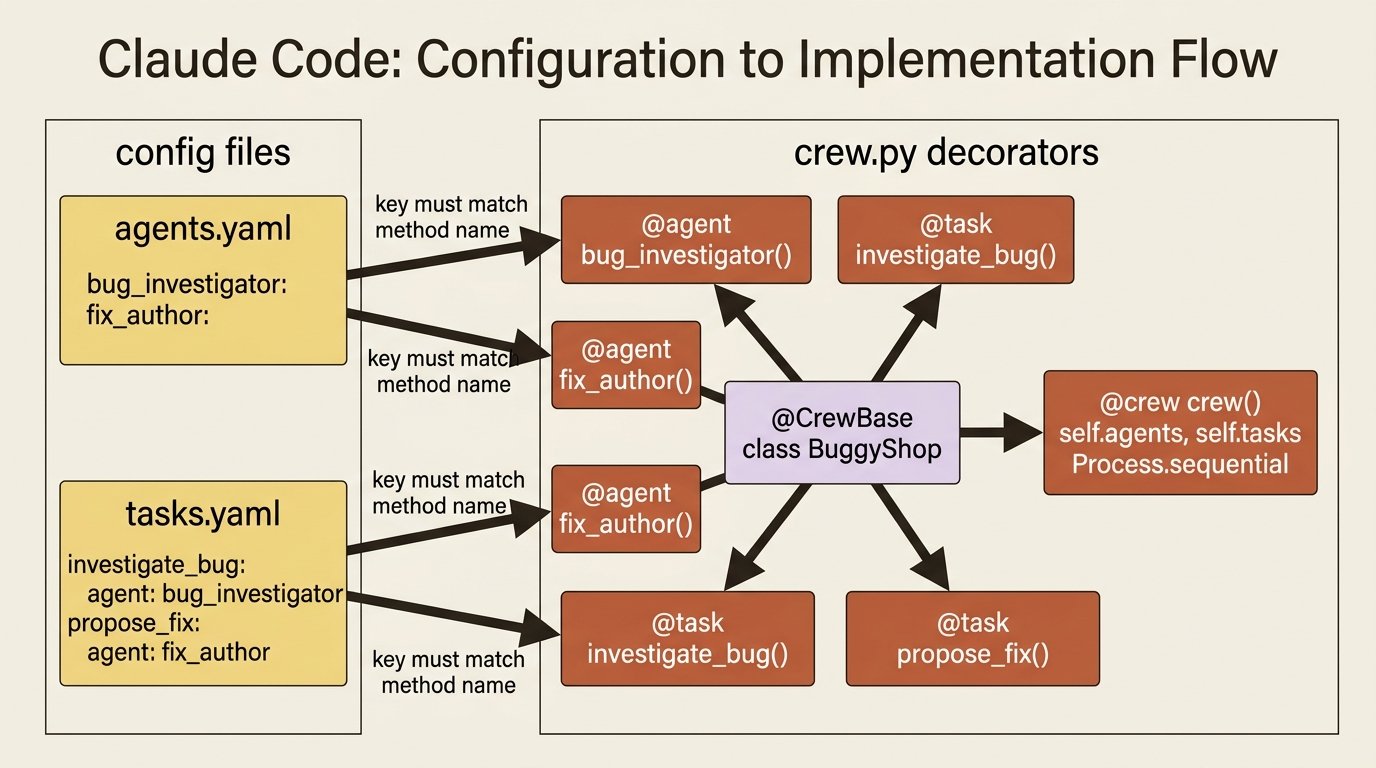
Gotcha: the YAML keys must match the method names exactly. bug_investigator in agents.yaml has to be the bug_investigator method, and investigate_bug in tasks.yaml has to be the investigate_bug method. Get one wrong and the wiring fails in a way that is annoying to trace, because nothing yells at you; the lookup simply comes back empty. This is the single most common first-week mistake in CrewAI, and you can spot the one above: the propose_fix task in the YAML points its agent: at propose_fix, but the agent is named fix_author. Fix that line to agent: fix_author before you run it.
Running it
The entry point in main.py calls the crew. Because the descriptions can carry {placeholders} filled from inputs, you pass any of those through kickoff:
from buggy_shop.crew import BuggyShop

def run():
    result = BuggyShop().crew().kickoff(inputs={})
    print(result.raw)

if __name__ == "__main__":
    run()
Install dependencies into the project environment and run it through the CLI, which knows how to find your crew:
crewai install
crewai run
With verbose=True you will watch the investigator reason through the failing test and hand its diagnosis forward, and you will see the fix author build on it to propose a change. result.raw holds the final task's output. You now have a two-agent crew doing real, sequenced work, defined the idiomatic way, with prose in YAML and wiring in code.
Do this today
- Scaffold a real project. Run
crewai create crew buggy_shopandcd buggy_shop. Resist the urge to define agents inline inmain.py; commit to the YAML-plus-code split before you write a single line of prose. - Write the two agents in YAML first. Open
config/agents.yamland draftbug_investigatorandfix_authorwith a realrole,goal, andbackstory. If you cannot write the backstory without checking your prompt template, that is a sign the field is doing its job. - Pin every task to an agent and check the names. In
config/tasks.yaml, every task'sagent:value has to match a key inagents.yaml, and every YAML key has to match a method name increw.py. Most first-day failures are a typo here. - Set
max_iterexplicitly and leaveverbose=Trueon. Do not trust the default. Read the transcript that scrolls by on the first run; it is the cheapest way to build intuition for what the reasoning loop actually does. - Run
crewai installthencrewai run. Readresult.raw. If anything surprises you, fix the YAML, rerun, and watch the diff in behavior. That tight loop is the whole point.
The framework that disappears
CrewAI's real trick is how little code you write. All of it lives behind a decorator and a YAML key: the agent's reasoning loop, the tool-call dispatch, the threading of one task's output into the next task's context, and the prompt assembly from the three structured fields. What you are left with is the part that actually matters: who is on the team, what each person is responsible for, and what the work looks like when it is done.
That is not a framework hiding complexity from you. That is a framework deleting work you used to do. Once you internalize the three objects and the YAML-plus-code split, you stop thinking about the loop and start thinking about the team. The agent is a role, a goal, and a backstory. The task is a description and an expected output. The crew runs it. Everything else in CrewAI is built on top of those three sentences.
So the next time you find yourself editing one giant system prompt and praying the model finally behaves, stop. Open a YAML file. Name the role. Write the goal. Tell the agent who it is. Then let the framework do the loop you have been writing by hand for years.