
Crews Are the Talent. CrewAI Flows Are the Project Manager.
A CrewAI Crew runs to completion and stops. A Flow is the event-driven, stateful brain that decides what runs, remembers where it is, and loops until the job is actually done.
A CrewAI Crew runs to completion and stops. A Flow is the event-driven, stateful brain that decides what runs, remembers where it is, and loops until the job is actually done.
Your crew finishes the task, hands you a result, and stops. The bug isn't fixed.
In this article: You will learn why a CrewAI Crew alone cannot loop, retry, or react to its own output, and how a Flow fixes that with three decorators, typed Pydantic state, and a routing primitive that reads like an
ifstatement. We walk an end-to-end bug-fixer that wraps a Crew inside a Flow, branches on whether the tests passed, and escalates when it runs out of attempts.
Your CrewAI crew runs beautifully. It reads the failing test, diagnoses the bug, proposes a fix in clean prose, and hands you back a CrewOutput. Then it stops. The bug is still in the repo, and you have no way, from inside the crew, to ask the obvious next question: did that actually work, and if not, what now?
That question is the wall every CrewAI developer hits the first time they try to ship something real. A Crew has no memory of being run before and no way to decide whether to run again. It is the talent. It is not the manager. The manager lives one level up, in a primitive called a Flow: an event-driven orchestrator with typed, persistent state that runs your crews as steps, holds data between them, branches on results, and loops when it needs to.
This is the article where a CrewAI prototype stops being a one-shot script and becomes a real system. It is also the architecture the official guidance points at when it says: start with a Flow, and put Crews inside it for the parts that need to be autonomous. Here is why that advice is correct, and what the wiring actually looks like.
Crew versus Flow, in one picture
The cleanest way to see why both primitives exist is to put them side by side. A Crew is a team of agents collaborating on a list of tasks. A Flow is a small state machine that decides what runs, when, and whether to do it again.
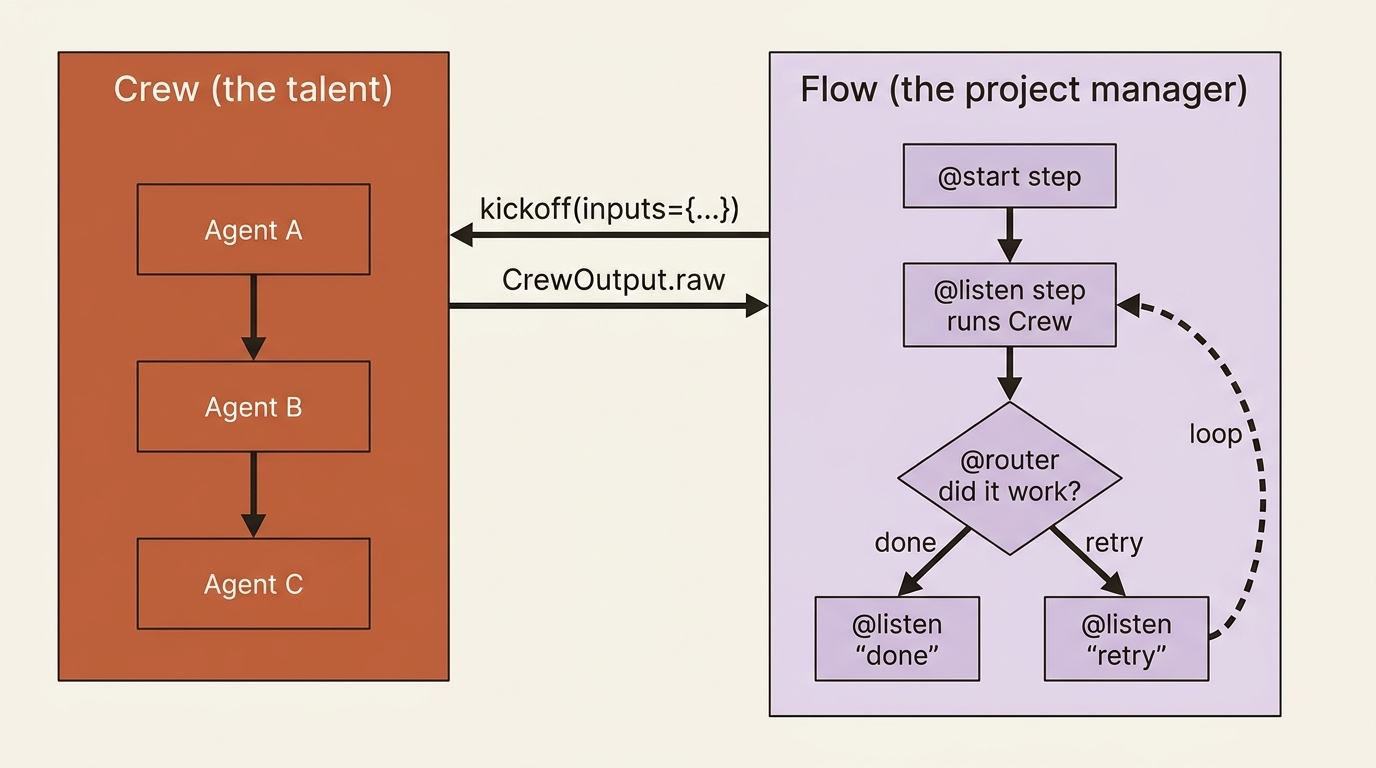
Read the picture once and the labor division is obvious: the Crew is autonomous work, the Flow is deterministic control. The Flow hands the Crew exactly the inputs it needs, takes the output back, writes the relevant facts to state, and decides what happens next. Neither primitive tries to do the other's job, which is precisely why the pattern composes.
The shape of a Flow
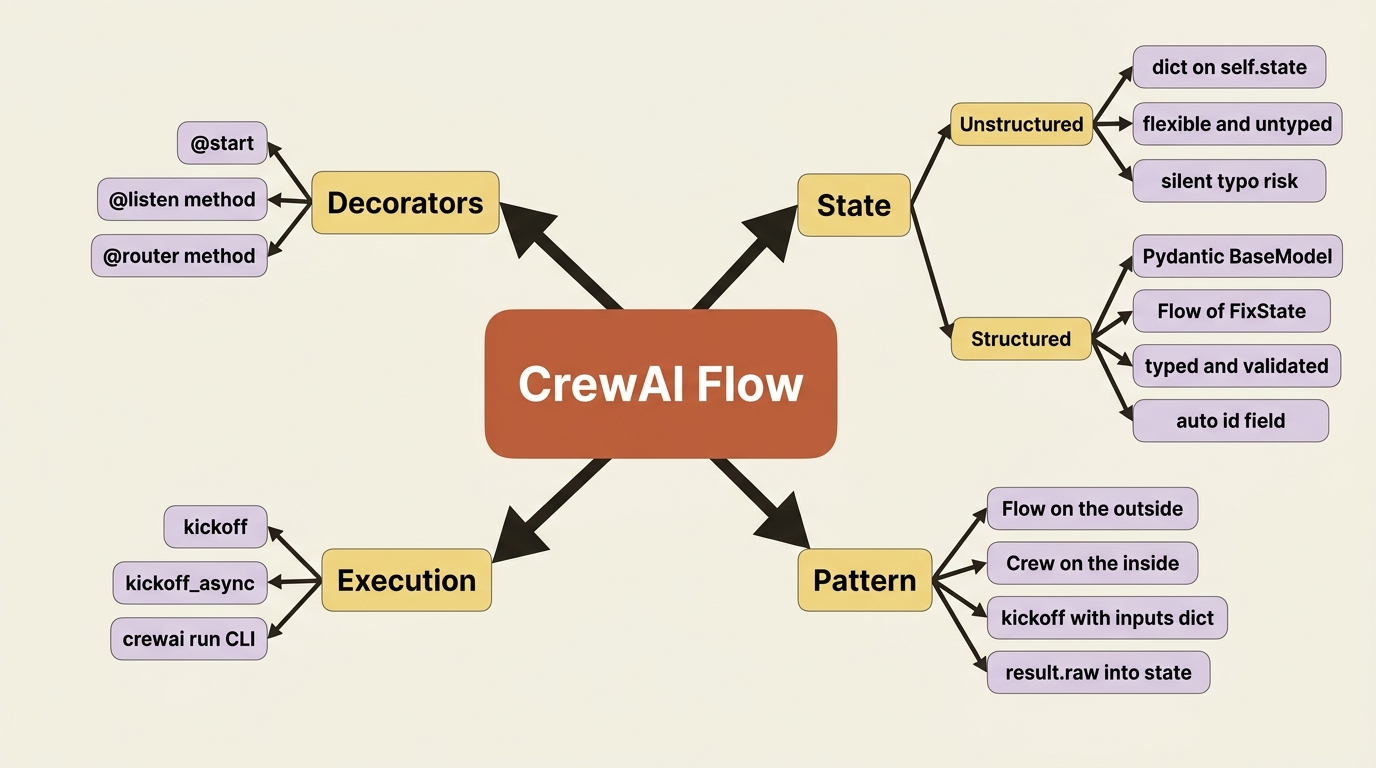
A Flow is a Python class with decorated methods, and three decorators do almost everything.
@start() marks where execution begins. @listen(some_method) marks a method that runs after another finishes, which is how you chain steps. @router(some_method) marks a decision point: the method returns a string, and whichever listener is waiting on that string runs next. That is the entire control vocabulary, and the nice part is that it reads like the workflow instead of describing it from a distance. There is no graph to construct, no edges to wire, and no compile step. You declare the order right where the logic lives.
Scaffold one the same way you scaffold a crew, with a different keyword:
crewai create flow buggy_shop_flow
cd buggy_shop_flow
That generates a Flow project with a starter crew already nested inside it, which is exactly the structure we want: a Flow on the outside, and a Crew on the inside.
State is the whole point, so make it typed
The reason a Flow can do what a crew cannot is state: a single object that persists across every step, so a later method can see what an earlier one decided. You get two ways to hold it, and the choice matters more than it looks.
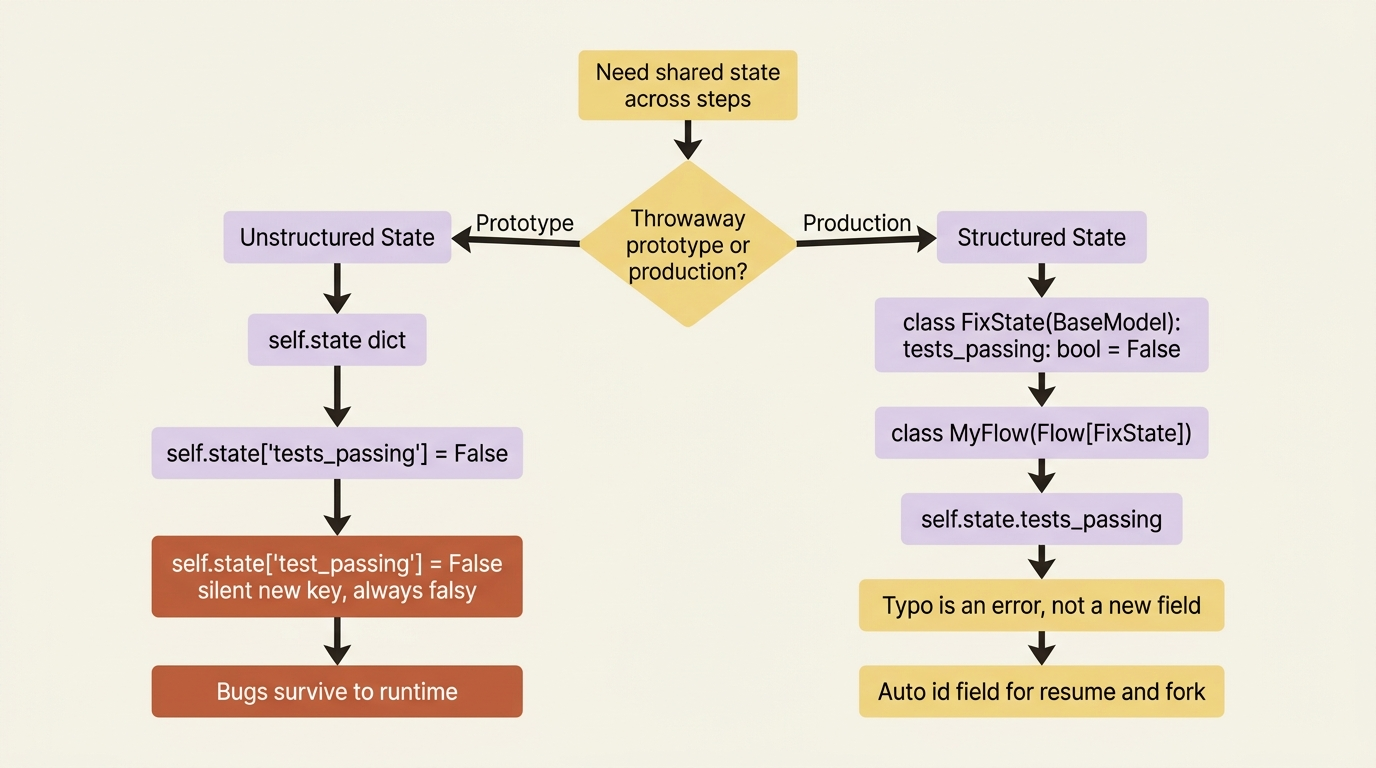
Unstructured state is a plain dictionary on self.state. You add keys whenever you like, with no schema and maximum flexibility, which is fine for a throwaway prototype:
self.state["tests_passing"] = False # works, but nothing checks it
Structured state is a Pydantic BaseModel that you declare up front and parameterize the Flow with. Now every field has a type; you get validation and auto-completion; and a typo becomes an error instead of a silent new key:
from pydantic import BaseModel
from crewai.flow.flow import Flow

class FixState(BaseModel):   # ①
    failing_test: str = ""
    diagnosis: str = ""
    proposed_fix: str = ""
    tests_passing: bool = False
    attempts: int = 0

class BuggyShopFlow(Flow[FixState]):   # ②
    ...
① The state model is a plain Pydantic BaseModel: each field has a type and a default, so validation and auto-completion come for free.
② The Flow is parameterized with the state type via Flow[FixState], which is what binds self.state to this schema and turns a misspelled field into an error instead of a silent new key.
Note: The full extracted listing at code/crewai/part-4-flows/listings/01-structured-state.py shows the parts elided here.
For anything you intend to ship, structured wins. The Flow's state is the spine of the whole run, so you want the spine to be type-checked, not a dictionary where self.state["test_passing"] (note the missing s) quietly becomes a brand-new field that is always falsy. CrewAI adds an automatic id field to the state either way, which is what later parts of any persistence story will use to resume and fork runs.
Gotcha: keep the state minimal and structured. It is shared mutable data that every step can read and write, and it gets persisted, so it is not a junk drawer for whatever a step happens to produce. Store the few facts that the next decision needs, not the entire transcript of everything that has happened.
Routing reads like an if, because it is one
The @router decorator is what turns a Flow from a straight line into something that can decide. A router method inspects the state and returns a string; listeners subscribed to that string run next. Here is the branch at the heart of our bug-fixer:
from crewai.flow.flow import Flow, start, listen, router

class BuggyShopFlow(Flow[FixState]):

    @router(run_fix_crew)   # ①
    def did_it_work(self):
        if self.state.tests_passing:   # ②
            return "done"
        return "retry"

    @listen("done")   # ③
    def report_success(self):
        print(f"Fixed in {self.state.attempts} attempt(s).")

    @listen("retry")   # ④
    def try_again(self):
        # loop back into the crew with what we learned
        ...
① @router runs after run_fix_crew finishes and turns this method into a decision point whose return string selects the next step.
② The branch reads the persisted state directly, so the routing decision is plain Python, not a separate config.
③ The listener subscribed to the "done" string runs when the router returns it; this is the success path.
④ The listener subscribed to "retry" is the loop edge that sends the Flow back around for another attempt.
Note: The full extracted listing at code/crewai/part-4-flows/listings/02-router-branch.py shows the parts elided here.
Read it as plain control flow, because that is what it is. After the fix crew runs, did_it_work checks the state and returns either "done" or "retry". Whichever string it returns picks the next step. There are no mapping dictionaries, and no separate routing config. The decision logic sits right where you would write an if, and it can send the Flow back around for another attempt, which is the looping that a bare crew could never do.
The integration that justifies all of this
Everything above is scaffolding for one move: a Flow step kicks off a Crew, takes the result, and stores it in state so the next step can act on it. That single pattern is why you bother wrapping a crew in a Flow at all.
Here is buggy-shop wired end to end. A start step records the failing test, a listener runs the fix crew and captures its output, a check updates the state, and the router we just saw decides whether to finish or loop.
from crewai.flow.flow import Flow, start, listen, router
from pydantic import BaseModel
from buggy_shop.crew import BuggyShop   # the sequential crew

class FixState(BaseModel):
    failing_test: str = ""
    proposed_fix: str = ""
    tests_passing: bool = False
    attempts: int = 0

class BuggyShopFlow(Flow[FixState]):

    @start()
    def find_failing_test(self):   # ①
        # in a real run this comes from the test runner; hard-coded for now
        self.state.failing_test = "test_discount_applies_correctly"

    @listen(find_failing_test)
    def run_fix_crew(self):
        self.state.attempts += 1   # ②
        result = BuggyShop().crew().kickoff(inputs={   # ③
            "failing_test": self.state.failing_test,
        })
        self.state.proposed_fix = result.raw   # ④
        # later we'll actually run pytest here; for now assume the crew reports
        self.state.tests_passing = "PASSED" in result.raw   # ⑤

    @router(run_fix_crew)
    def did_it_work(self):
        return "done" if self.state.tests_passing else "retry"   # ⑥

    @listen("done")
    def report_success(self):
        print(f"Fixed in {self.state.attempts} attempt(s).")
        return self.state.proposed_fix

    @listen("retry")
    def give_up_or_retry(self):
        if self.state.attempts >= 3:   # ⑦
            print("Three attempts, still failing. Escalating to a human.")
            return
        self.run_fix_crew()   # ⑧
① The @start() method runs first and seeds state; here it records which test is failing.
② Each crew run bumps the attempt counter in state, which the retry guard later reads.
③ The Flow step kicks off the Crew, passing only failing_test, the one input the crew needs, not the whole state.
④ The crew's raw output is pulled back into state so later steps can act on it.
⑤ The check that sets tests_passing is the fact the router will branch on (stubbed here until Part 5 adds a real pytest run).
⑥ The router collapses to a single conditional return of "done" or "retry".
⑦ The attempt cap is the loop budget that prevents an infinite retry, escalating to a human when it is hit.
⑧ Otherwise the retry path calls back into run_fix_crew, which is the loop a bare crew could never do.
Note: The full extracted listing at code/crewai/part-4-flows/listings/03-buggy-shop-flow.py shows the parts elided here.
Walk the data through it. We invoke the crew with kickoff(inputs={...}), and the value worth noticing is what we pass: only the failing_test, not the whole self.state. You hand a crew exactly what it needs to do its job, no more, because the crew does not need, and should not see, the Flow's bookkeeping. The crew runs autonomously, the way crews do, and returns a CrewOutput. We pull result.raw into state, the check sets tests_passing, and the router branches. The crew was the talent doing the focused work; the Flow was the manager deciding whether that work was good enough and what to do about it.
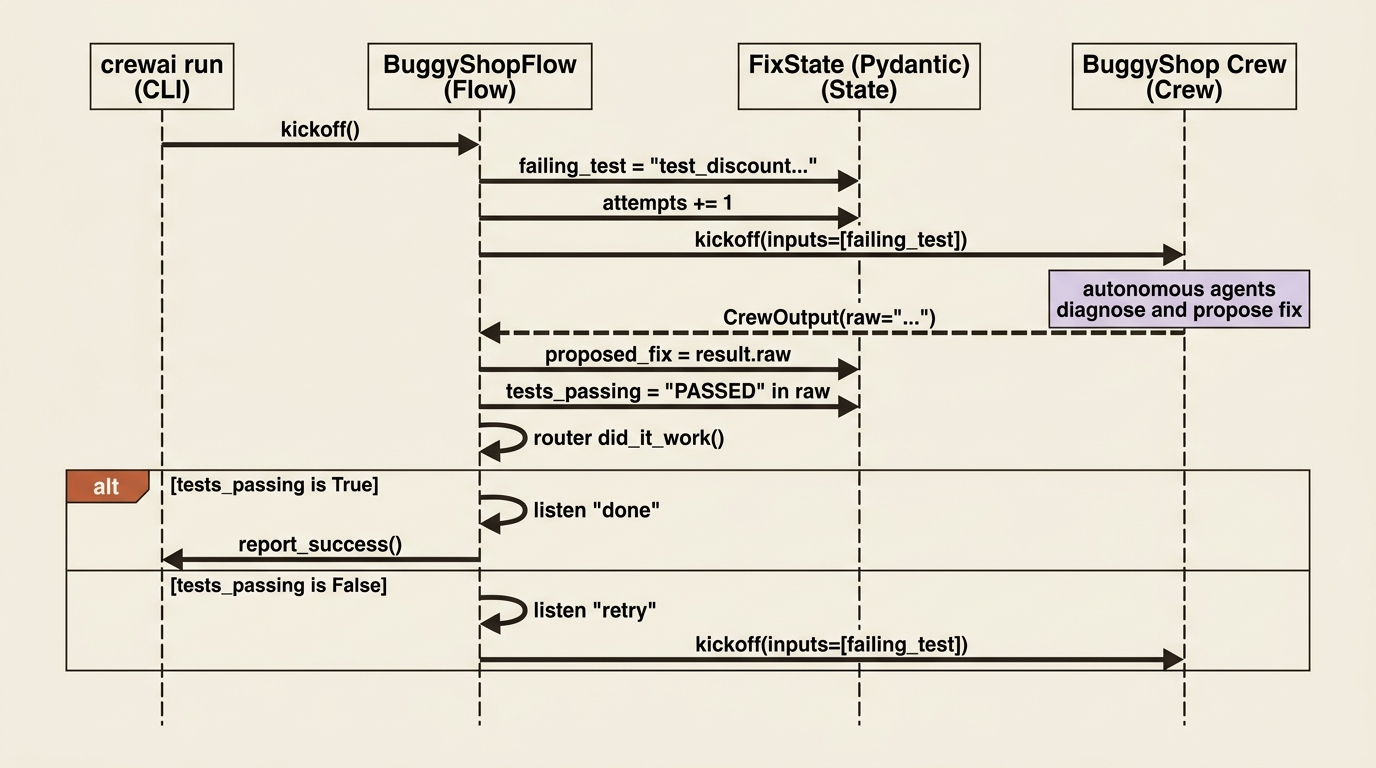
That division is the mental model to keep: Crews are autonomous and good at open-ended work; Flows are deterministic and good at control. Use each for what it is good at, and let the Flow own the state.
The retry loop, drawn as a state machine
Once you see the Flow as a state machine, the looping behavior is the whole point. The bug-fixer enters run_fix_crew, the router decides between done and retry, and a guard on the attempt count is the only thing preventing an infinite loop.
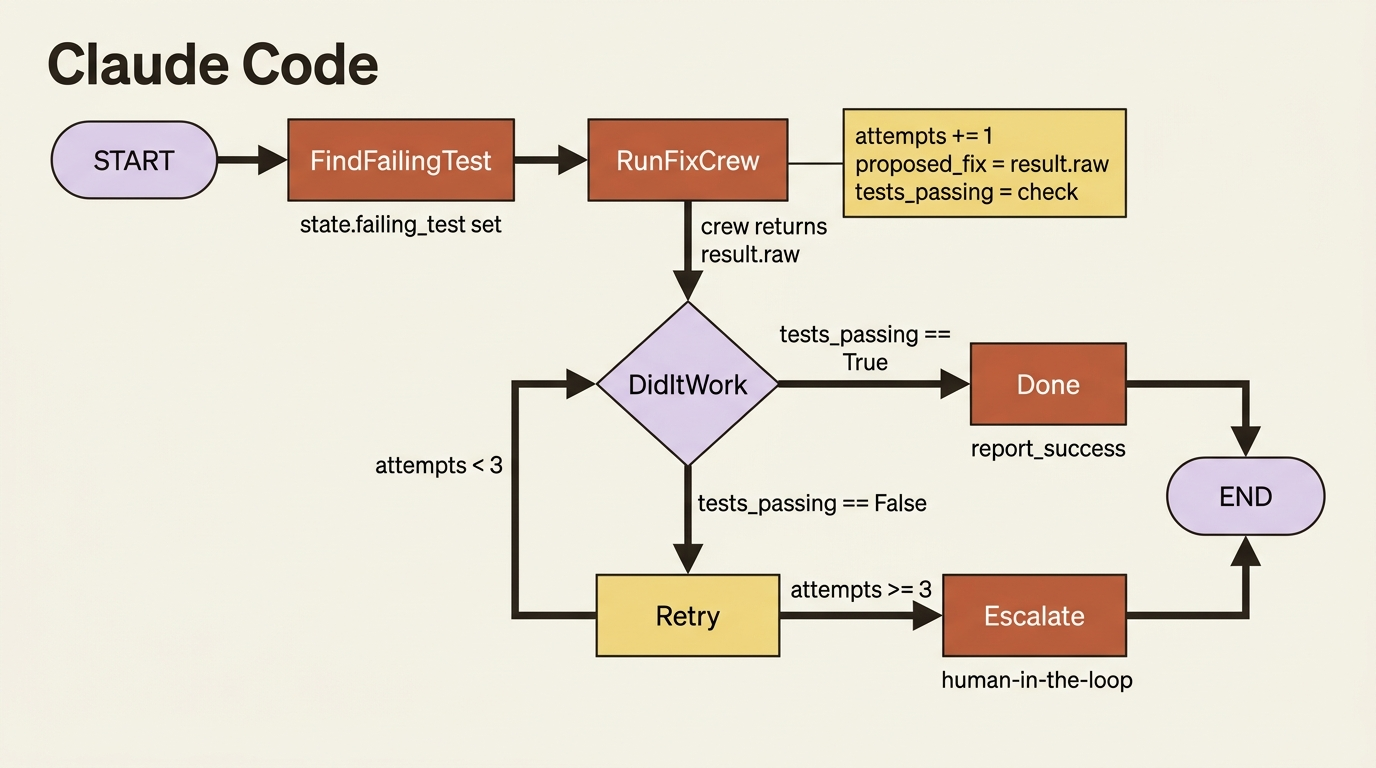
The interesting line in the code above is if self.state.attempts >= 3. That is the difference between a self-improving system and a runaway one. Every loop in a real Flow needs a budget: an attempt count, a wall-clock deadline, a token spend cap, something. Without it, a crew that confidently produces wrong code will burn through your API quota in minutes while reporting steady progress.
Running it, and a note on async
You run a Flow the same way you ran a crew, through the CLI, which finds the Flow's kickoff for you:
crewai install
crewai run
In code, flow.kickoff() runs it and returns the final method's output, and flow.state holds everything accumulated along the way. When a step does I/O-bound work that could happen concurrently, such as firing off several independent crews at once, there is an async path, kickoff_async, that lets those steps overlap instead of running one after another. We do not need it for a single-bug loop, but it is the lever you reach for when a Flow fans out into parallel work, and it is worth knowing it is there before you need it.
Do this today
If you have a CrewAI project sitting on your laptop that runs to completion and stops, give it a brain. Ten minutes of work.
- Scaffold a Flow next to your existing crew with
crewai create flow <name>. The generated project already nests a starter crew inside a Flow, so you have a working template to compare against. - Define a Pydantic
BaseModelfor your state with the three or four facts the next decision needs, not the whole transcript. Parameterize the Flow withFlow[YourState]so typos become errors at import time, not silent falsy fields at runtime. - Replace your top-level
kickoff()call with a Flow that has one@start(), one@listenstep that invokes your crew viaCrew().crew().kickoff(inputs={...}), and one@routerthat inspects the state and returns a label. - Add an attempts counter and a hard cap before you let the router loop back. Three attempts is a reasonable starting budget. Print or log the escalation path so you see it fire.
- Read the official Flows docs once end to end. The
@and_,@or_, and persistence decorators are the obvious next reaches once the basic loop feels natural.
The architecture that ships
A CrewAI Crew alone is a talented worker who cannot check their own homework. A Flow is the manager who asks the next question, holds the context, decides what to do with the answer, and loops until the job is actually done. Together they are the architecture CrewAI itself recommends for anything headed to production, and they earn that recommendation the moment your prototype stops being a script and starts being a system.
The mental shift is small but everything depends on it: stop thinking of kickoff as the top of your program. The top of your program is a Flow. kickoff is what happens to a Crew when the Flow needs the talent to do its thing. Once that flip happens, retries, branches, escalation, and parallel fan-out stop being things you wish CrewAI did, and become things you wrote in ten lines of decorated Python.
So the next time your crew runs to completion and hands you a result that is not quite right, do not edit the agents and try again. Wrap the crew in a Flow, write the four facts the next decision needs into typed state, and let the router ask the only question that matters: did it actually work?