
An Agent Without Tools Is Just a Chatbot With a Job Title
A CrewAI agent that cannot call tools is a very articulate intern who refuses to touch the keyboard. The fix is a tiny, well-named function and one Pydantic schema.
Your CrewAI agents reason brilliantly and then stop at the edge of the conversation. Tools are what let them read a file, hit an API, and actually run your tests instead of describing how they would.
Your agent reads beautifully, reasons cleanly, and still cannot run your tests. That gap is not the model's fault.
In this article: The one capability that turns a CrewAI agent from a clever chat into something that acts on your codebase. We cover the
crewai-toolsprebuilt catalog, where tools attach (agent versus task), the two ways to author your own (@tooldecorator andBaseToolwith a Pydanticargs_schema), why the description is the real user interface, and a full custom tool that runs pytest so the agent can verify its own fixes.
There is a humiliating moment in every multi-agent project, and it usually arrives the first time you brag about your crew. You ask the crew to fix a bug, and it produces a beautiful explanation of the fix. Then your harness asks the obvious question: did the tests pass? You realize the agent never ran them. It described running them. It said "PASSED" in its output. You wrote if "PASSED" in result.raw in your control flow, and the agent obliged by typing the word. It was a polite fiction the whole time.
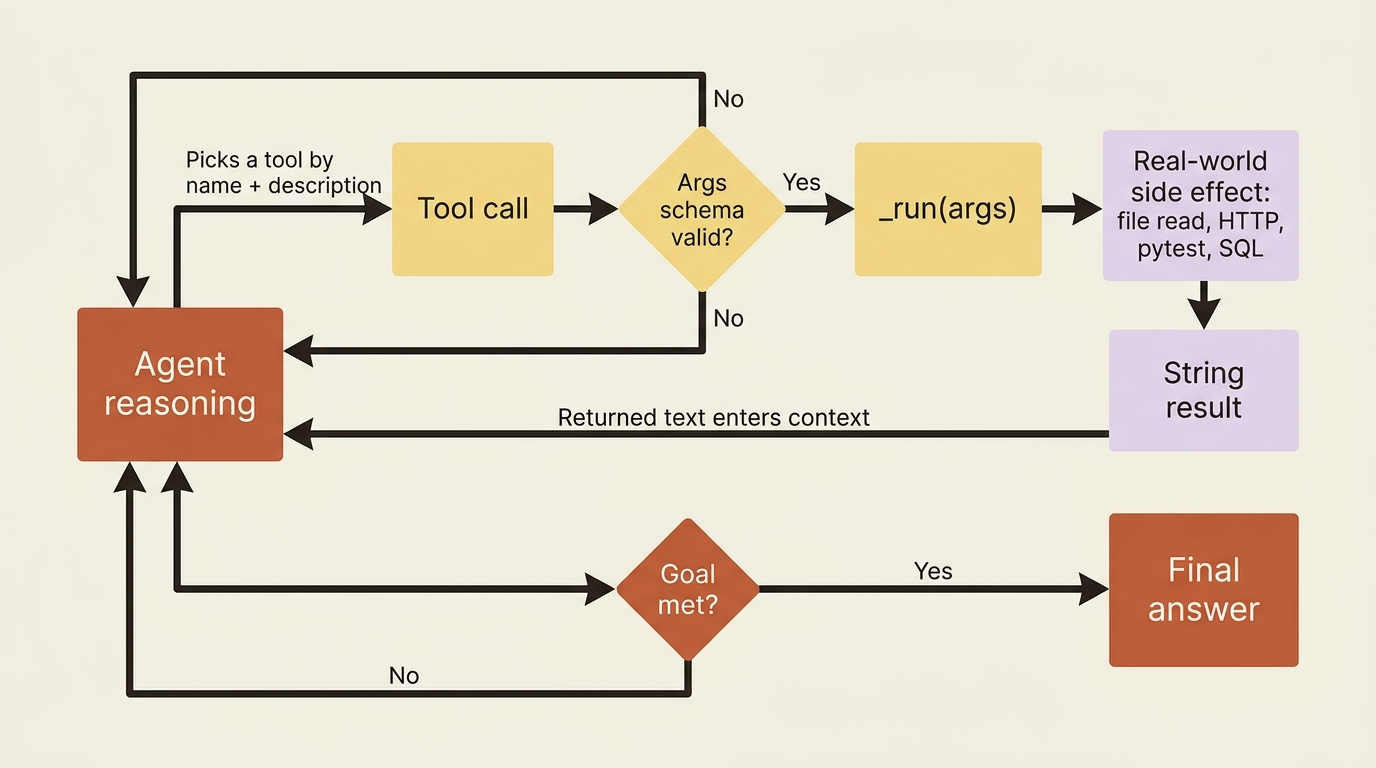
That is the gap every agentic system hits, and it is not a model problem. A language model on its own is a closed room: it can think, but it cannot reach out and read a file, call an API, query a database, or execute a command. CrewAI tools are the door. A tool is a function the agent can choose to call, with a name and a description that tell the agent what the function is for, and a body that does real work. Once your agents have tools, they stop describing the work and start doing it.
Start with the prebuilt catalog
Before you write a tool, check whether CrewAI already ships it. A lot of the obvious ones come in the crewai-tools package, which is the official catalog of pre-implemented integrations. Install it alongside the core library:
uv add crewai-tools
The catalog covers the categories you reach for most often: web search (SerperDevTool, BraveSearchTool), scraping (ScrapeWebsiteTool, ScrapeElementFromWebsiteTool), retrieval over your own data (RagTool, WebsiteSearchTool, PDFSearchTool, and friends), databases (PGSearchTool, MySQLSearchTool), file I/O (FileReadTool, FileWriterTool, DirectoryReadTool), and image work (VisionTool). You attach one by importing it and adding an instance to an agent's tools list:
from crewai import Agent
from crewai_tools import FileReadTool

investigator = Agent(
    role="Python Bug Investigator",
    goal="Read the failing test and the code it exercises",
    backstory="You read the test first, then trace it into the source.",
    tools=[FileReadTool()],
)
That one line is the difference between an agent that talks about your code and one that can open it.
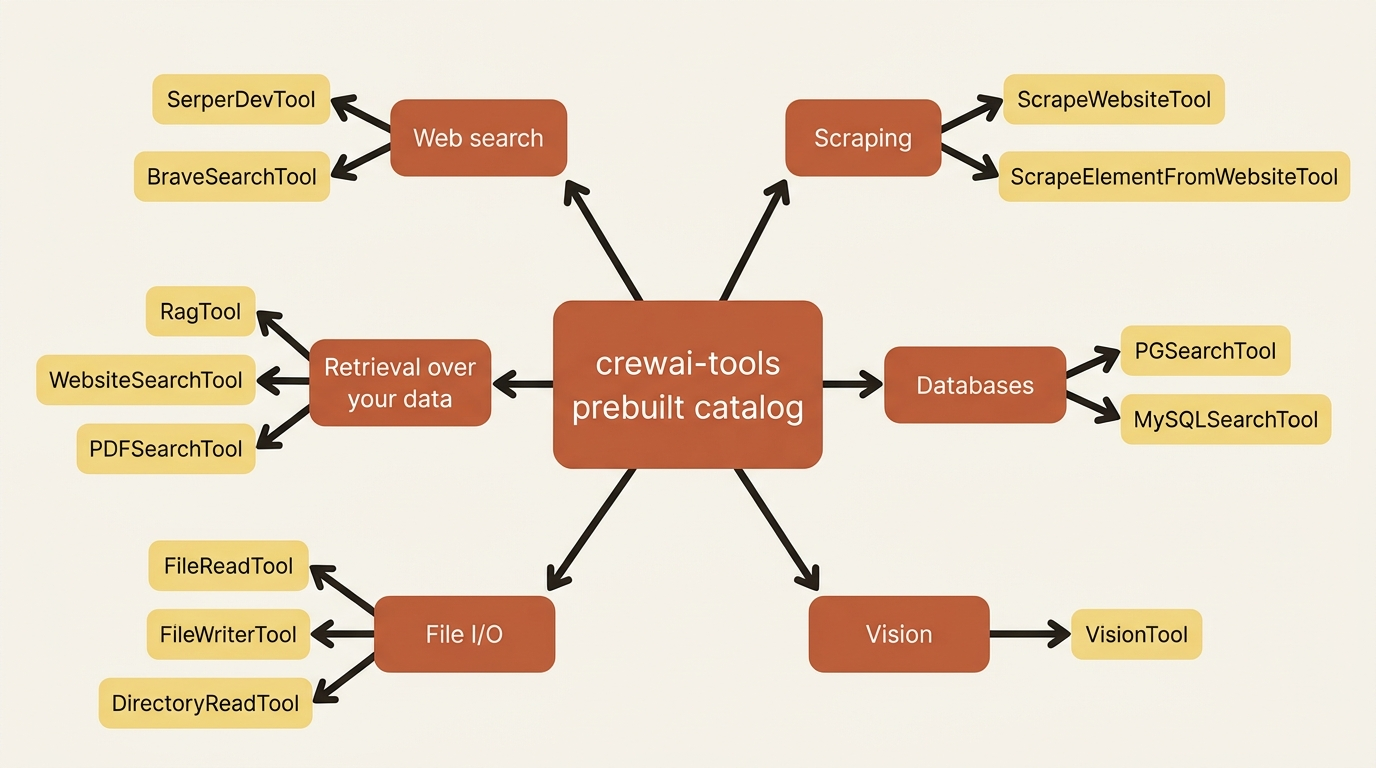
The catalog is wide but always runs out, because the most valuable tool for your project is usually the one specific to your domain. Learn the catalog to avoid reinventing common integrations, and learn to write your own for everything else.
Where tools attach: agent versus task
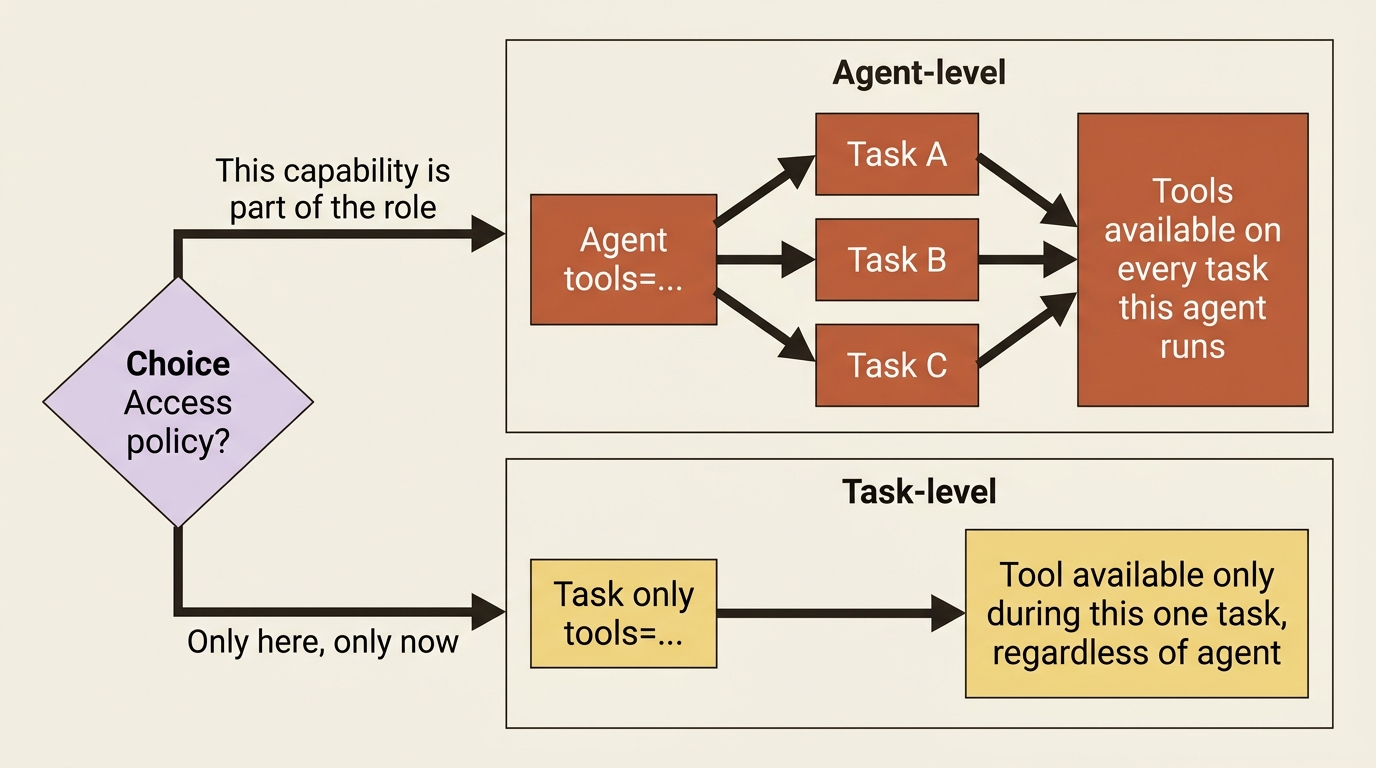
You can hand tools to an agent, in which case every task that agent runs can use them. You can also hand tools to a task, in which case only that task gets them, regardless of which agent runs it. Agent-level is the common case and reads naturally: this agent has these capabilities. Task-level is the precision tool, useful when one specific step needs access that you do not want available the rest of the time.
from crewai import Task
from crewai_tools import FileReadTool, DirectoryReadTool

# Agent-level: the investigator can always read files.
investigator = Agent(..., tools=[FileReadTool()])  # ①

# Task-level: only this task gets the directory listing,
# no matter who runs it.
survey_repo = Task(
    description="List the repository's Python files before diving in.",
    expected_output="A list of the .py files in the project.",
    tools=[DirectoryReadTool()],  # ②
)
① The FileReadTool is attached to the agent, so every task this investigator runs can read files.
② The DirectoryReadTool is attached to the task, so the directory listing is available only while this one task runs, no matter which agent executes it.
Note: The full extracted listing at code/crewai/part-5-tools/listings/01-agent-vs-task-tools.py shows the imports and full agent definition elided here.
The task-level list, when present, scopes what is available during that task. Reach for it when "only here, only now" is the access policy you want, and stick with agent-level otherwise.
Building your own, two ways
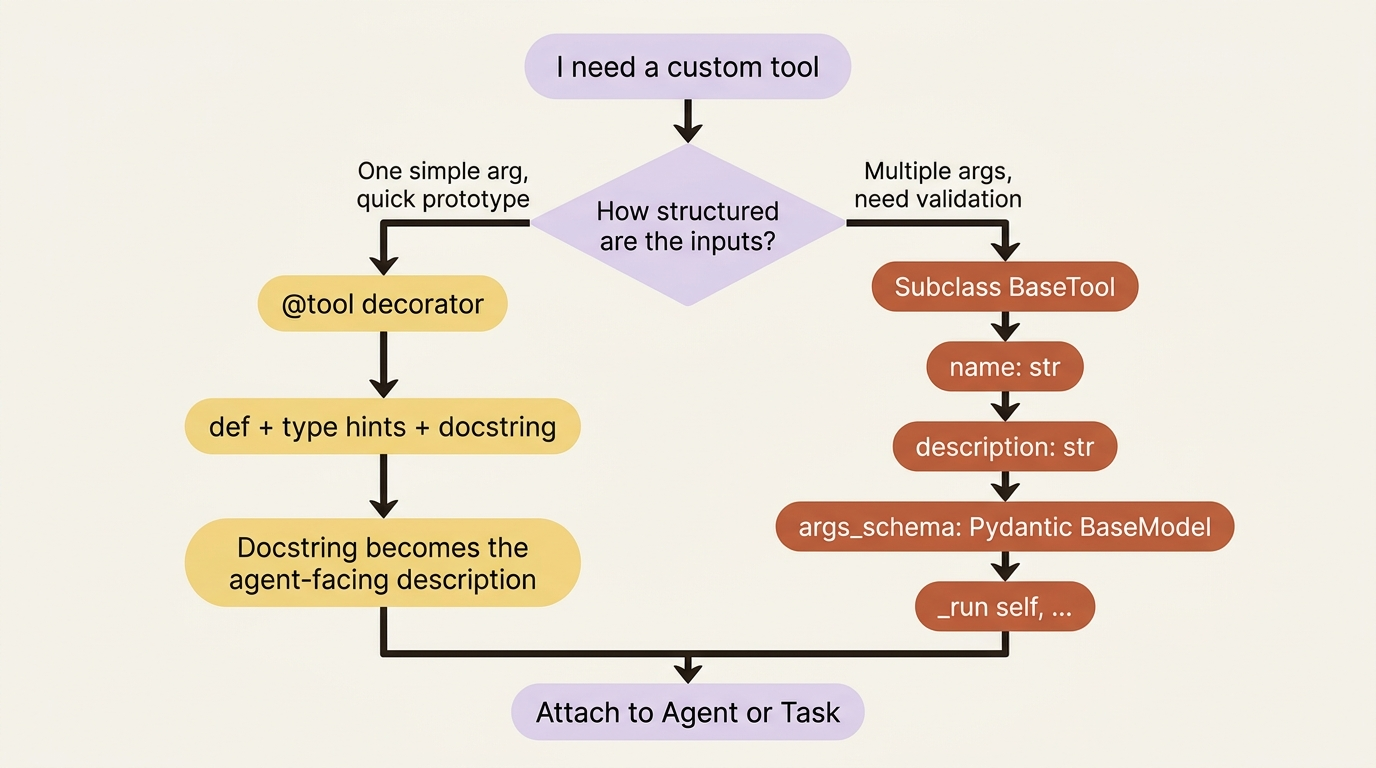
CrewAI gives you two ways to write a custom tool, and the right choice is mostly about how much structure you need in the inputs.
First, the canonical import, because this is the single thing stale tutorials get wrong:
from crewai.tools import BaseTool, tool
Gotcha: that import path matters. Older guides import BaseTool from crewai_tools, the catalog package, or from deeper internal paths, and those no longer work for custom tools. BaseTool and the @tool decorator both live in crewai.tools now. If you copy a tool from a year-old blog post and get an import error, this is almost always why.
The lightweight way is the @tool decorator. You write a function, add type annotations, and write a docstring, because the docstring becomes the description the agent reads. That is the whole tool:
from crewai.tools import tool

@tool("Run a single pytest test")
def run_pytest(test_name: str) -> str:
    """Run one pytest test by name and return whether it passed, with output."""
    ...
The structured way is subclassing BaseTool, which you want when the tool takes more than a trivial input and you care about validating it. You declare a name, a description, an args_schema that is a Pydantic model describing the inputs, and a _run method that does the work:
from crewai.tools import BaseTool
from pydantic import BaseModel, Field

class PytestInput(BaseModel):
    """Input schema for the pytest tool."""
    test_name: str = Field(..., description="The pytest node id or test name to run.")  # ①

class RunPytestTool(BaseTool):
    name: str = "Run a single pytest test"  # ②
    description: str = "Run one pytest test by name and report pass/fail plus the captured output."  # ③
    args_schema: type[BaseModel] = PytestInput  # ④

    def _run(self, test_name: str) -> str:  # ⑤
        ...
① The Pydantic field declares and validates the single input the tool takes, with a description the agent reads.
② The name is how the tool is identified to the agent.
③ The description is the prompt text the agent uses to decide when to call the tool.
④ The args_schema binds the Pydantic model as the tool's validated input contract.
⑤ The _run method holds the body that does the real work when the agent calls the tool.
Note: The full extracted listing at
code/crewai/part-5-tools/listings/02-run-pytest-tool-skeleton.py shows a runnable stub for the _run body elided here.
Both are valid. Use the decorator for quick, single-argument tools and the subclass when you want an explicit, validated input schema. CrewAI will otherwise infer the schema from your _run signature, but an explicit schema produces better agent behavior, because the model gets a clean, named contract instead of a guess.
The description is the user interface
Here is the rule that decides whether a tool gets used well: the description is not documentation for you. It is the prompt the agent reads to decide when to reach for the tool and what to pass it.
A vague description like "does stuff with tests" leaves the agent guessing, so it either ignores a tool it should use or calls it with garbage arguments. A sharp one like "Run one pytest test by name and report pass/fail plus the captured output" tells the agent exactly when this is the right move and what input shape to send. Treat the description as the tool's user interface, because to the agent, it is the entire interface.
A real tool: running the tests
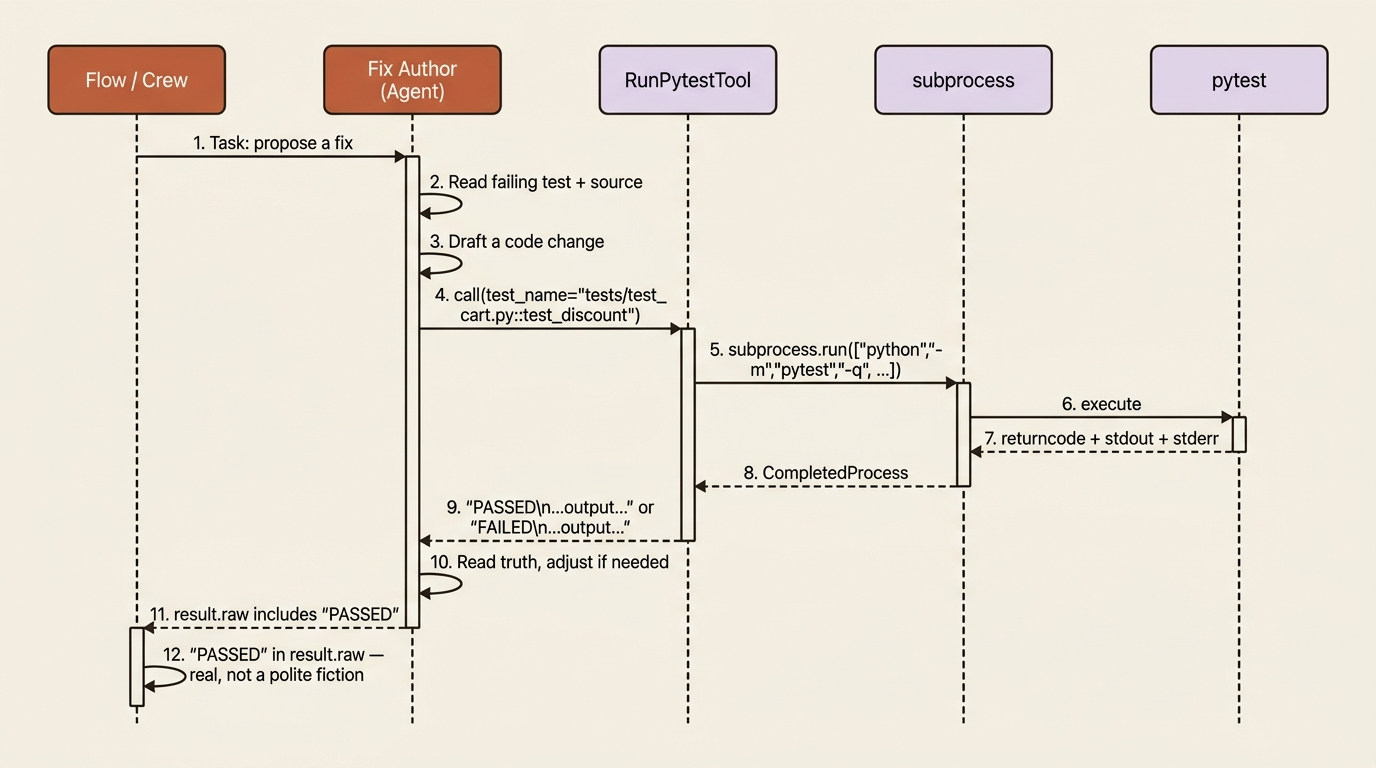
Time to close the gap from the opening. We will write a tool that runs a project's pytest suite, or a single test, and returns the result, so a fix-author agent can verify its own work instead of asserting it:
# src/buggy_shop/tools/custom_tool.py
import subprocess
from crewai.tools import BaseTool
from pydantic import BaseModel, Field

class PytestInput(BaseModel):
    """Input schema for the pytest runner."""
    test_name: str = Field(
        default="",
        description=(
            "Optional pytest node id, e.g. "
            "'tests/test_cart.py::test_discount'. "
            "Empty runs the whole suite."
        ),
    )  # ①

class RunPytestTool(BaseTool):
    name: str = "Run pytest"
    description: str = (
        "Run the project's pytest suite, or a single test if given a node id. "
        "Returns whether tests passed and the captured output, so you can verify a fix."
    )  # ②
    args_schema: type[BaseModel] = PytestInput

    def _run(self, test_name: str = "") -> str:
        cmd = ["python", "-m", "pytest", "-q"]  # ③
        if test_name:
            cmd.append(test_name)  # ④
        completed = subprocess.run(
            cmd, capture_output=True, text=True, timeout=120
        )  # ⑤
        status = "PASSED" if completed.returncode == 0 else "FAILED"  # ⑥
        return f"{status}\n\n{completed.stdout}\n{completed.stderr}"  # ⑦
① The input schema makes test_name optional: an empty string means run the whole suite, a node id means run one test.
② The description tells the agent exactly what the tool does and what it returns, so it knows when to verify a fix.
③ The base command runs pytest quietly via the current Python interpreter.
④ When a node id is supplied, it is appended so only that single test runs.
⑤ The subprocess call executes pytest, captures both stdout and stderr, and enforces a timeout.
⑥ The return code is translated into a human-readable PASSED or FAILED status.
⑦ The tool returns a string starting with the status and followed by the captured output, because the result goes back into the model's context as text.
Note: The full extracted listing at code/crewai/part-5-tools/listings/03-run-pytest-tool.py shows the complete runnable tool.
It shells out to pytest, captures both streams, and returns a string that starts with PASSED or FAILED followed by the real output. CrewAI tools return strings (or things that convert cleanly to one), because the result goes back into the model's context as text.
Wire the tool into the crew. The fix author can now propose a change and run the tests:
from crewai import Agent, Crew, Process, Task
from crewai.project import CrewBase, agent, task, crew
from crewai_tools import FileReadTool
from buggy_shop.tools.custom_tool import RunPytestTool  # ①

@CrewBase
class BuggyShop:
    agents_config = "config/agents.yaml"
    tasks_config = "config/tasks.yaml"

    @agent
    def fix_author(self) -> Agent:  # ②
        return Agent(
            config=self.agents_config["fix_author"],
            tools=[FileReadTool(), RunPytestTool()],  # ③
            llm="gpt-4o-mini",
            verbose=True,
        )
    # ... other agents and tasks ...
① The custom tool is imported from the project's tools package, the same place the generated stub lives.
② The fix_author agent is defined through the @agent-decorated factory method that @CrewBase collects.
③ Both FileReadTool and the new RunPytestTool are attached to this agent, so the fix author can read code and run the suite.
Note: The full extracted listing at code/crewai/part-5-tools/listings/04-wire-tool-into-crew.py shows the other agents, tasks, and crew method elided behind the comment here.
With RunPytestTool in hand, the fix author can propose a change, run the suite, read the real PASSED or FAILED, and adjust if it got it wrong. A Flow check like "PASSED" in result.raw is no longer a polite fiction, because now there is a real test run behind it. The expert can finally type.
Two refinements worth knowing
Two features you will not need on day one but will reach for soon. For I/O-bound work like HTTP requests or database calls, give the tool an async implementation so it does not block: an async def with @tool, or an _arun method alongside _run on a BaseTool subclass. For expensive tools called repeatedly with the same arguments, attach a cache_function that decides when a cached result is safe to reuse, saving both latency and tokens. Neither changes how the agent sees the tool; both change what happens when the agent calls one.
Do this today
Spend twenty minutes turning one of your agents into one that actually acts.
- Install the catalog:
uv add crewai-toolsand skim the prebuilt list at docs.crewai.com/tools/overview. Most of your first integrations probably already exist. - Attach one prebuilt tool to an existing agent.
FileReadTool()is the cheapest, most useful first step for any agent that reasons about a codebase. - Write one custom tool with the
@tooldecorator. Single argument, sharp docstring, returns a string. Pick the smallest real capability your agent is missing today. - Audit your tool descriptions. Read each one as if you were a stranger deciding when to call it. If you cannot tell from the description alone what input to send, rewrite it.
- Give one agent a verifier. A pytest runner, a type-check tool, a curl-on-the-staging-endpoint tool. Anything that returns real ground truth your agent can read.
The expert can finally type
A crew without tools is a roomful of experts who can describe everything and touch nothing. Add tools and the same crew starts acting on the world: reading files, running tests, hitting APIs, verifying its own fixes. The reasoning was always there. What was missing was the door from the closed room to the real one.
Use the prebuilt catalog as your first stop, the @tool decorator as your quick path to a custom capability, and BaseTool with a Pydantic args_schema for anything you would defend in code review. And remember the rule that decides whether any of it works: the description is the user interface. Write it for the agent, because the agent is the only reader that matters. The moment your fix author calls RunPytestTool, reads a real PASSED, and moves on, the crew stops being a chatbot with a job title and starts being a coworker who actually ships.