
Remembering Is Not the Same as Knowing: How CrewAI Memory and Knowledge Actually Differ
CrewAI ships two systems that sound interchangeable and are not. Memory is what your agents pick up across runs; Knowledge is what they walk in already knowing. The article makes the distinction concrete and shows when to reach for RagTool instead.
CrewAI ships two systems that sound interchangeable and are not. One is what your agents pick up across runs. The other is what they walk in already knowing. Confusing them is the most common mistake people make.
Watching a capable agent rediscover the same fact run after run, because nothing told it what it should already know. CrewAI ships two systems that sound interchangeable and are not. One is what your agents pick up across runs. The other is what they walk in already knowing. Confusing them is the most common mistake people make.
In this article: You will learn the difference between CrewAI memory and knowledge, when each one is the right tool, and why a third option,
RagTool, exists for the cases neither one fits. We cover the unifiedMemoryclass, the four places it plugs in, the one knob worth tuning early, the gotcha that breaks file-based knowledge sources for almost everyone the first time, and a worked mapping onto a real crew so the distinction stops being abstract.
Your crew can read files and run tests. It does real work. It also has the memory of a goldfish. Every run starts from absolute zero. If it fixed a nearly identical bug last week, it has no idea. If your repo follows a coding convention the rest of the team knows by heart, nobody told the agent, so it guesses, and sometimes guesses wrong. You watch it rediscover the same fact run after run, and it is maddening in the specific way that watching a smart person re-derive something they already figured out is maddening.
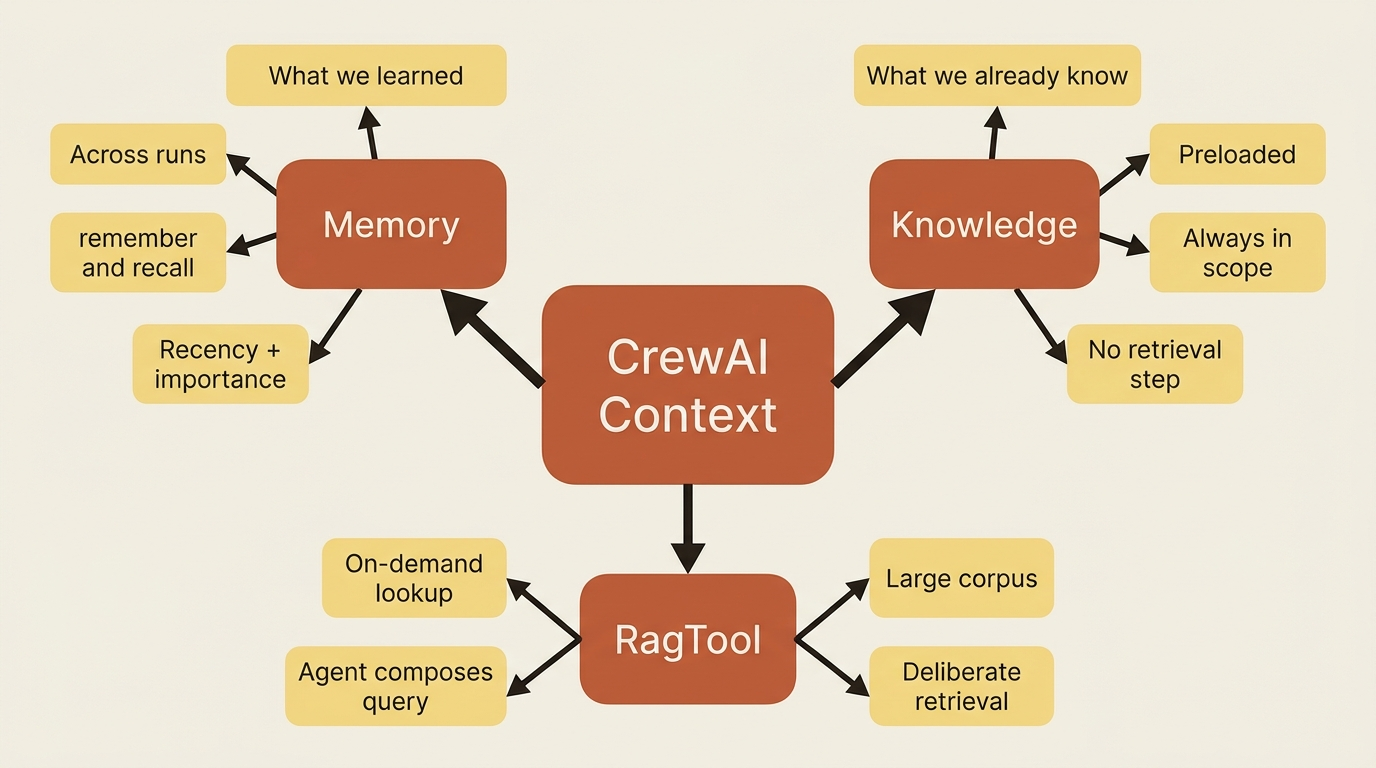
There are two different holes here, and CrewAI fills them with two different systems that developers constantly mix up. Memory is what the crew accumulates and carries forward across runs: the decisions it made, the things it learned. Knowledge is the reference material you hand it before it starts: the docs, the conventions, and the facts that are true regardless of what happened last time. Remembering versus knowing.
Reach for the wrong one, and you get an agent that either re-reads a manual it never needed or forgets the lessons that should have stuck. Reach for the right one, and the crew finally feels like a teammate that has been around for a while.
Memory: what the crew carries forward
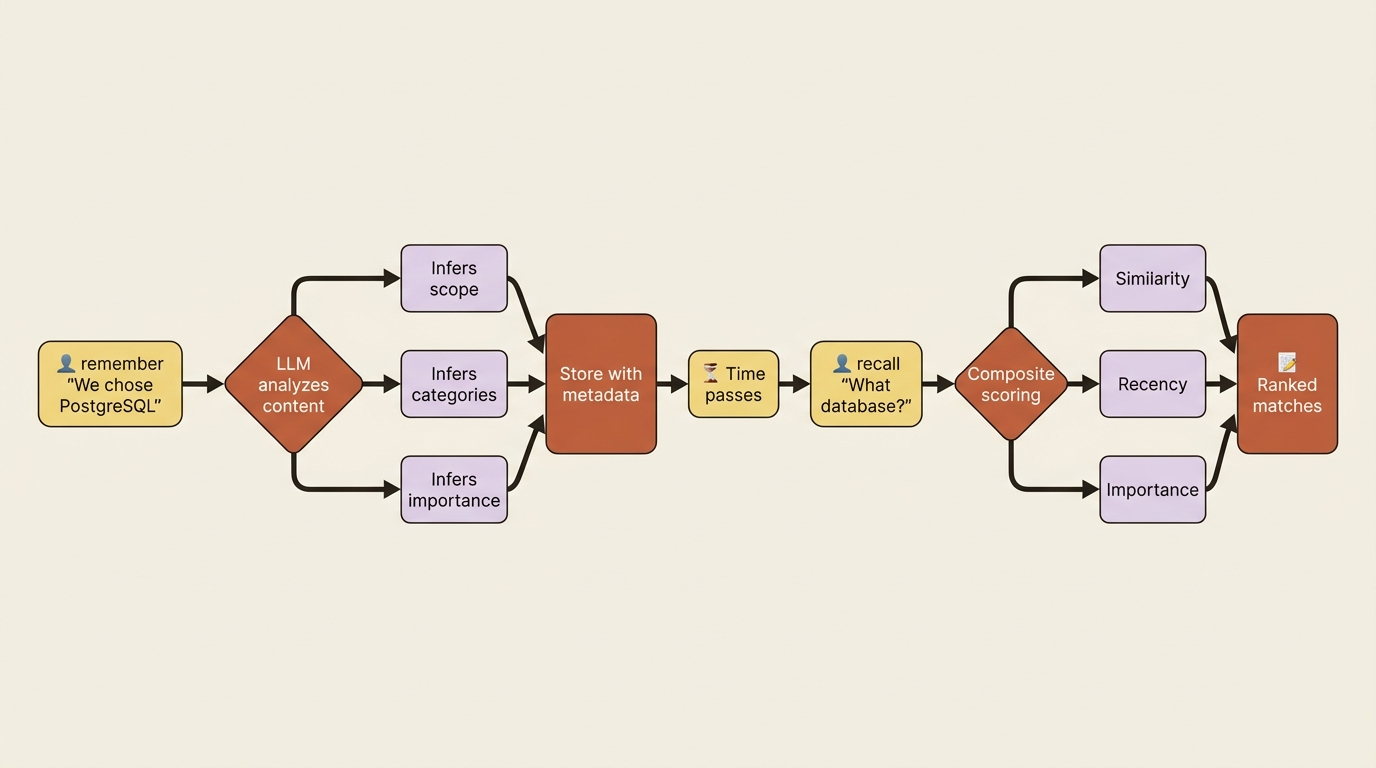
CrewAI memory is a single unified Memory class. It used to be several separate types, namely short-term, long-term, and entity, and you may still see those names in the CLI and older docs. The modern surface is one intelligent API. The idea is simple: you tell it something, and an LLM analyzes the content as it saves, inferring where it belongs, what categories it touches, and how important it is. Later you ask, and it returns matches ranked not just by semantic similarity but by a blend of similarity, recency, and importance. Recent, important, and relevant memories rise to the top.
At its simplest it reads like a notebook.
This snippet does both halves of the loop: it writes one fact in, then asks a question and prints the ranked answers back out.
from crewai import Memory

memory = Memory()
memory.remember("We decided to use PostgreSQL for the user database.")  # ①

matches = memory.recall("What database did we choose?")  # ②
for m in matches:
    print(f"[{m.score:.2f}] {m.record.content}")  # ③
① remember is the write side: the LLM analyzes the content as it saves, inferring scope, categories, and importance for you.
② recall is the read side: it returns matches ranked by a blend of similarity, recency, and importance, not raw similarity alone.
③ Each match carries a score and the stored record, so the best answer surfaces first.
Note: The full extracted listing at code/crewai/part-6-memory-and-knowledge/listings/01-memory-notebook.py shows the parts elided here.
You did not tell it a category, a scope, or an importance. The LLM inferred all three on the way in, and on the way out it scored the results so the best answer surfaces first.
Four ways to plug it in
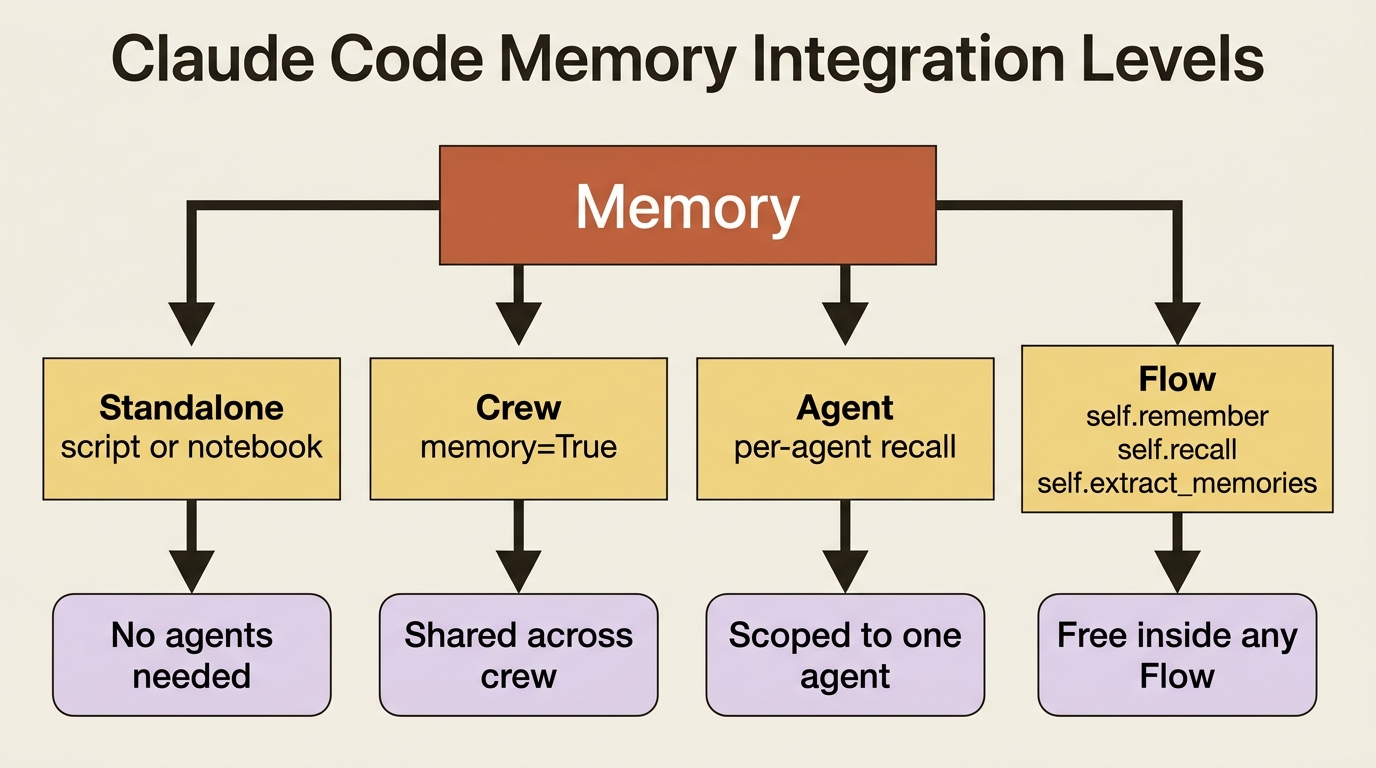
The same system attaches at four levels, and you pick based on how much wiring you want.
You can use it standalone, as above, in a script or notebook with no agents at all. You can use it with a Crew, by passing memory=True for sensible defaults or a configured Memory instance for control. You can use it with an Agent, when one specific agent should carry its own memory. And you can use it inside a Flow, where every Flow gets self.remember(), self.recall(), and self.extract_memories() for free.
The Crew case is the one you reach for most.
from crewai import Crew, Process

crew = Crew(
    agents=self.agents,
    tasks=self.tasks,
    process=Process.sequential,
    memory=True,   # the crew now remembers across runs
)
That one flag is the difference between a crew that starts fresh every time and one that builds on what it has seen.
The one knob worth knowing now
Recall ranks results by combining similarity, recency, and importance, and you can shift that balance on the Memory constructor. The lever you will actually touch is recency_weight. A fast-moving project, where last week's decision is probably stale, wants recency weighted heavily and a short half-life. A slow architecture knowledge base wants importance to dominate and recency to barely matter.
# A sprint that churns: favor what's recent.
memory = Memory(recency_weight=0.5, recency_half_life_days=7)

# An architecture reference: favor what's important, let age barely matter.
memory = Memory(recency_weight=0.1, recency_half_life_days=180)
You do not need to tune this on day one. It is enough to know that recall is not naive similarity search, and that when old memories crowd out fresh ones, or vice versa, this is the dial.
Knowledge: what the crew starts out knowing
Knowledge is the other system, and it answers a different question: not "what did we learn," but "what should the agent already know before it does anything." It is a reference library you preload. The agent consults it during work, grounded in your facts instead of its training-data guesses.
The smallest version is a string.
This listing has two moves: define a knowledge source from plain text, then attach it to an agent so the facts are present while that agent works.
from crewai import Agent
from crewai.knowledge.source.string_knowledge_source import StringKnowledgeSource  # ①

conventions = StringKnowledgeSource(
    content="This project uses snake_case for functions, type hints everywhere, and pytest for all tests.",  # ②
)

fix_author = Agent(
    role="Python Fix Author",
    goal="Propose a minimal fix that matches the project's conventions",
    backstory="You write changes that look like they belong in this codebase.",
    knowledge_sources=[conventions],  # ③
)
① StringKnowledgeSource is the simplest source type: knowledge backed by an inline string rather than a file.
② The content is the reference material itself, the facts you want the agent grounded in.
③ knowledge_sources attaches the source to the agent, so the material is ambiently available with no retrieval persona and no retrieval task.
Note: The full extracted listing at code/crewai/part-6-memory-and-knowledge/listings/02-string-knowledge-source.py shows the parts elided here.
The crucial thing, and the cleanest line in the whole distinction, comes straight from the docs: unlike retrieving from a vector database with a tool, an agent preloaded with knowledge needs no retrieval persona and no retrieval task. You do not write an agent whose job is to go look things up. You attach the sources, and the knowledge is simply available while the agent works. That is what makes Knowledge feel different from a search tool. There is no "search" step in the agent's reasoning. The relevant material is just present.
Files, and the directory that trips everyone
Most real knowledge lives in files, not strings: PDFs, text files, CSVs, and JSON. CrewAI supports all of those, but there is one rule that catches nearly everyone the first time.
Gotcha. File-based knowledge sources must live in a knowledge/ directory at the root of your project, and you reference them by their path relative to that directory, not an absolute path or a path from wherever your script runs. Put a file somewhere else and point at it, and it silently will not load. The generated project already has the knowledge/ folder waiting. Use it.
Agent level versus crew level
Knowledge attaches at two levels, and the rule is simple but worth stating because it is the other half of this gotcha. Crew-level knowledge, set as knowledge_sources on the Crew, reaches every agent in the crew. Agent-level knowledge, set as knowledge_sources on a single Agent, reaches only that agent.
So shared facts, such as the company style guide or the repo's conventions, go on the crew. Specialist material, such as the database internals only your DBA agent needs, goes on the agent. Get this backwards and either everyone drowns in one agent's niche docs, or the one agent who needed something never sees it.
The third option: RagTool, when you want to ask
There is a middle path worth naming so you recognize it when you need it. Knowledge makes material ambiently available. A search tool makes the agent go fetch. RagTool is the tool-shaped version of retrieval: you give the agent a RagTool over a data source, and now retrieval is an explicit action the agent chooses to take, with a query it composes, when it decides it needs to look something up.
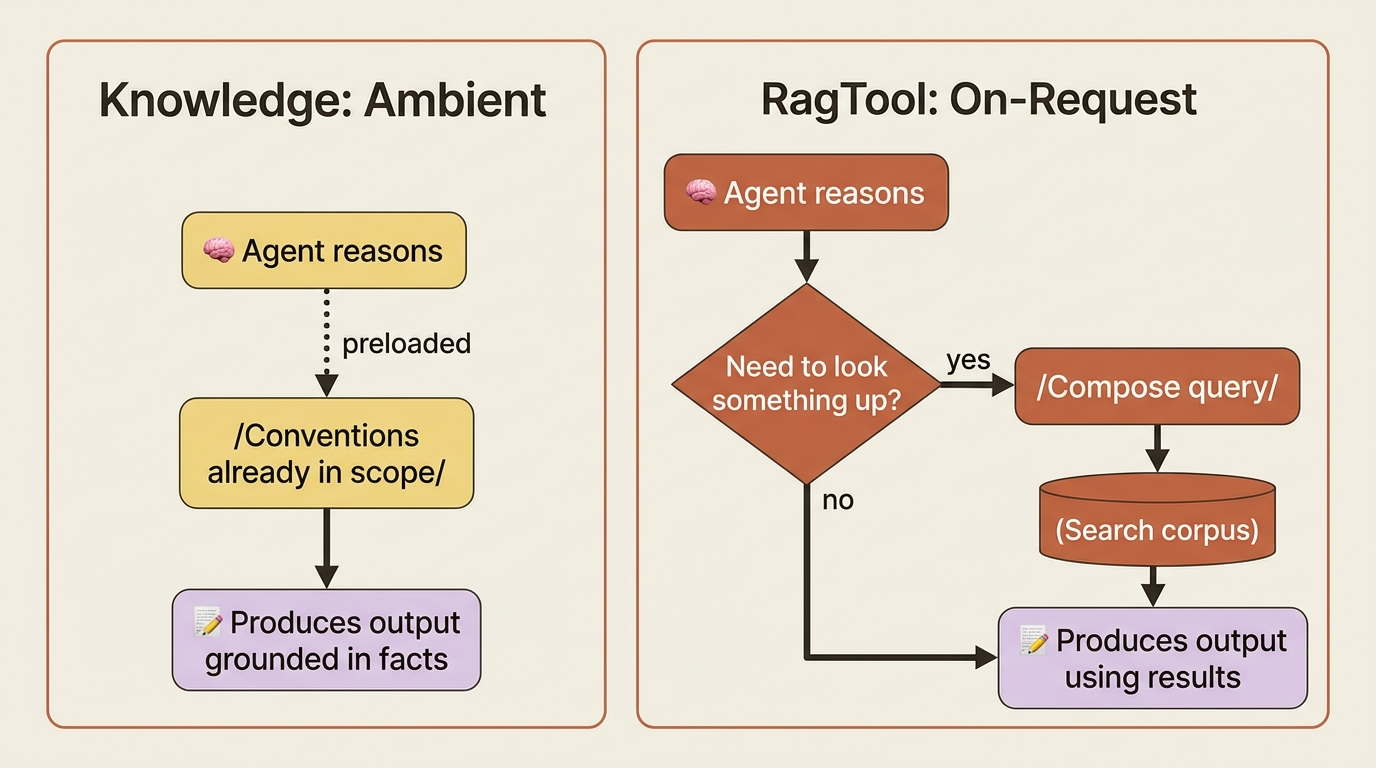
The choice between Knowledge and RagTool is really about control. Use Knowledge when the material should always be in scope and you want it present without the agent thinking about it. Use RagTool when retrieval should be deliberate, when the corpus is large and you only want the agent pulling from it on demand, or when you want the agent's query to drive what comes back. Same underlying retrieval idea, opposite ergonomics: ambient versus on-request.
All three, on a real crew
Map it to a real example and the distinction stops being abstract. Picture a buggy-shop crew whose job is to investigate failing tests and propose minimal fixes.
Knowledge is the repo's coding conventions: snake_case, type hints, pytest, and the import style the project favors. These are true at the start of every run, they do not change based on what the crew did yesterday, and we want the fix author to honor them without being told each time. Preload them as a crew-level knowledge source so both the investigator and the fix author share them.
Memory is everything the crew learns by working: that the discount bug last Tuesday came from an off-by-one in the date comparison, or that a particular module is fragile and changes there tend to break other tests. Turn on memory=True and the crew stops re-deriving its own history. The next time it meets a similar failure, recall surfaces what worked before.
RagTool is the option to reach for if the crew grew a large external corpus, say, ten years of internal engineering RFCs, that the agent should query only when a bug touches a documented design decision. Too big and too occasional to preload as ambient Knowledge, exactly right as an on-demand tool. You do not need it day one, but you can see the shape of when you would.
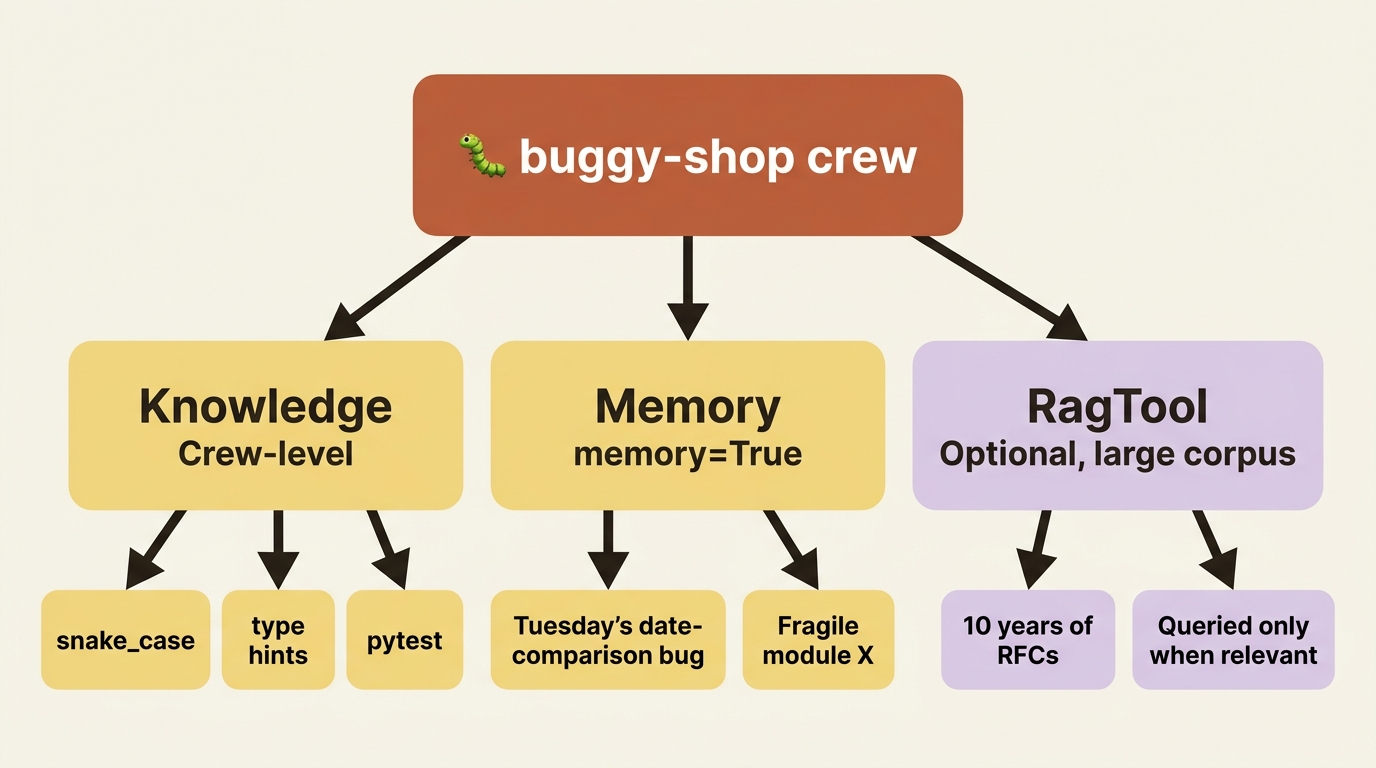
Three systems, three jobs: know the conventions going in, remember what you learn along the way, and look things up deliberately when the corpus is too big to carry.
Do this today
- Pick one persistent fact about your project that you keep re-explaining to your crew. Write it as a one-paragraph
StringKnowledgeSourceand attach it as a crew-levelknowledge_sources. Your style guide, your stack, your naming conventions. Stop re-explaining it. - Flip
memory=Trueon your Crew. That single flag is the difference between starting fresh and building on what the crew has seen. - If you have file-based knowledge, create a
knowledge/directory at the project root and put the files there. Reference them by paths relative to that directory. This is the gotcha that bites everyone the first time. - Audit your agents for retrieval personas. If you have an agent whose only job is to go look things up, ask whether the material should be ambient Knowledge instead. The cleanest fix is often deleting the agent.
- Save
recency_weightfor later. Default ranking is fine on day one. The dial matters only when stale memories crowd out fresh ones, or fresh ones bury what should still anchor decisions.
Remembering and knowing, side by side
The most common mistake with CrewAI's context systems is treating Memory and Knowledge as variations of the same thing and using whichever name comes to mind. They are different jobs, and the framework rewards you for naming them correctly.
Knowledge is reference material the agent walks in with. It is always in scope, it does not change based on yesterday's run, and it removes the need for an agent whose only job is to look things up. Memory is what the crew picks up by working. It is recall-ranked by similarity, recency, and importance, and a single memory=True flag closes the loop between runs. RagTool is the deliberate option for corpora too large to carry and too occasional to preload.
Wire those three correctly and the crew stops looking like a smart stranger who shows up every morning with no notes. It starts looking like a teammate who knows the rules, remembers last week, and asks the archive when it needs to.