
Your CrewAI Agent Works on Your Laptop. That Is Not the Same as Shipping It.
Why a CrewAI agent that works on your laptop is not actually shipped, and the two production moves (tracing and packaged deployment) that close the gap.
Production asks different questions than development: how do other systems call this, how do you see what it did at 3 a.m., how does it serve two users without one seeing the other's data, and how does a teammate run it without reconstructing your environment from memory?
Your crew works perfectly. Then it runs at 3 a.m. without you, and you have no idea what it did or who it did it for.
In this article: You will learn how to take a working CrewAI crew from your terminal to a deployed, observable, multi-tenant service. We cover built-in tracing with the right precedence ladder, structured Pydantic outputs that hold across model rephrasings, the
crewai deploylifecycle on the Agent Management Platform, the threat model that becomes load-bearing the moment you go multi-user, and the packaging discipline that lets a teammate clone and run.
You built something real. A crew that reads a repo, finds a bug, proposes a fix, runs the tests, asks a human before anything risky lands, remembers what it learned, and governs itself with hooks and guardrails. It is capable, governable, reliable, and runs in exactly one place: your terminal, watched by you.
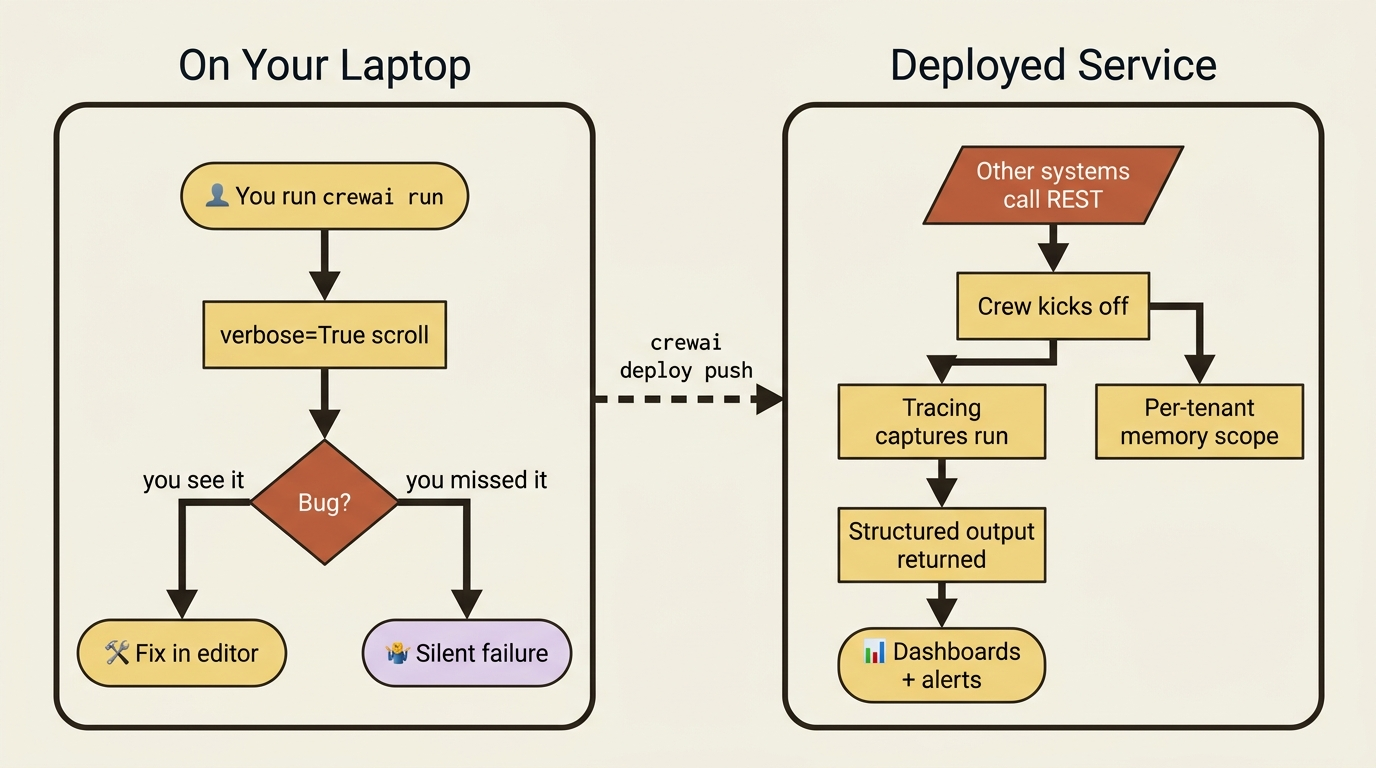
That last fact is the entire problem with stopping here. A crew that worked perfectly on your laptop has a way of misbehaving the moment it runs somewhere you are not looking, because nothing was tracing it and nothing was scoped. The script you ran is not yet a service anyone else can call. CrewAI deployment is the bridge across that gap, in two movements: observability, so the crew is not a black box, and packaging plus deployment, so it actually leaves the laptop.
Observability: stop flying blind
You cannot operate what you cannot see. In development you have verbose=True scrolling past, which is fine for one run you are watching and useless for a hundred runs you are not. The first thing production needs is real traces.
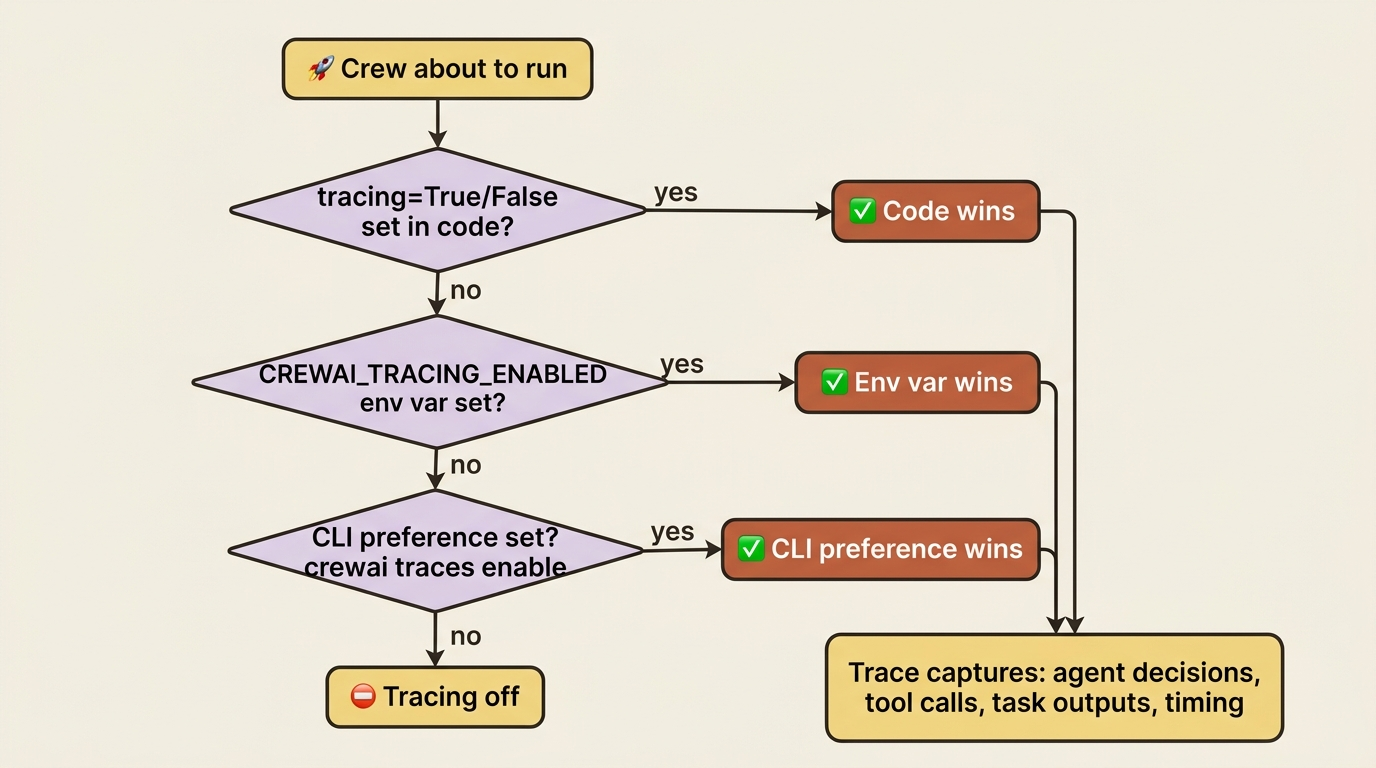
CrewAI ships built-in tracing that captures each run as a structured trace: the agent decisions, the tool calls, the task outputs, and the timing. You turn it on without writing any code. The simplest switch is the CLI:
crewai traces enable
Or set it explicitly where it matters most, in the crew itself, which overrides everything else:
crew = Crew(
    agents=self.agents,
    tasks=self.tasks,
    tracing=True,   # always trace this crew
)
There is a small precedence ladder worth knowing: an explicit tracing=True or tracing=False in code wins, then the CREWAI_TRACING_ENABLED environment variable, then your CLI preference. The practical upshot is that you can flip tracing on globally for development and force it on for a specific production crew regardless of the environment.
Tracing is the turnkey path. When you want programmatic control, you already have it: the CrewAI event bus. Listeners on events like CrewKickoffStartedEvent and AgentExecutionCompletedEvent are exactly how you push execution data into whatever monitoring you already run, so observability is not a separate system you bolt on but the event bus pointed at your dashboards.
Structured output makes a crew legible
One more piece makes a deployed crew legible to the systems calling it: structured output. A crew that returns prose forces every downstream consumer to parse English, which breaks the first time the model phrases something differently. Give the final task an output_pydantic model and the result comes back as typed, validated data instead.
from pydantic import BaseModel
from crewai import Task

class FixReport(BaseModel):  # ①
    bug_summary: str
    files_changed: list[str]
    tests_passing: bool  # ②

report_task = Task(  # ③
    description="Summarize the fix you applied.",
    expected_output="A structured fix report.",
    agent=fix_author,
    output_pydantic=FixReport,  # ④
)
① The Pydantic model declares the contract: the exact shape a caller can rely on, independent of how the model phrases its prose.
② Each field carries a concrete type, so tests_passing comes back as a real boolean rather than a sentence a caller would have to parse.
③ The final task is the one whose result the crew returns, so binding the schema here is what makes the crew output typed.
④ output_pydantic is the binding that swaps free-form prose for a validated FixReport instance.
Note: The full extracted listing at code/crewai/part-11-observability-deploying-shipping/listings/01-structured-output.py shows the parts elided here.
Now a caller gets result.tests_passing as a real boolean, not a sentence it has to interpret. In production, that is the difference between an integration that holds and one that breaks on a rephrase.
Telemetry is not tracing
A brief note on telemetry, since it is easy to confuse with tracing. CrewAI collects anonymous usage statistics by default: versions, process type, tool names, and agent roles, with no prompt content or personal data. You can opt into richer sharing with share_crew=True, which then includes goals, backstories, and outputs, so weigh that against privacy before enabling it. To turn telemetry off entirely, set CREWAI_DISABLE_TELEMETRY=true. This is separate from your own tracing, which you control independently.
Deploying: from a script you run to a service you operate
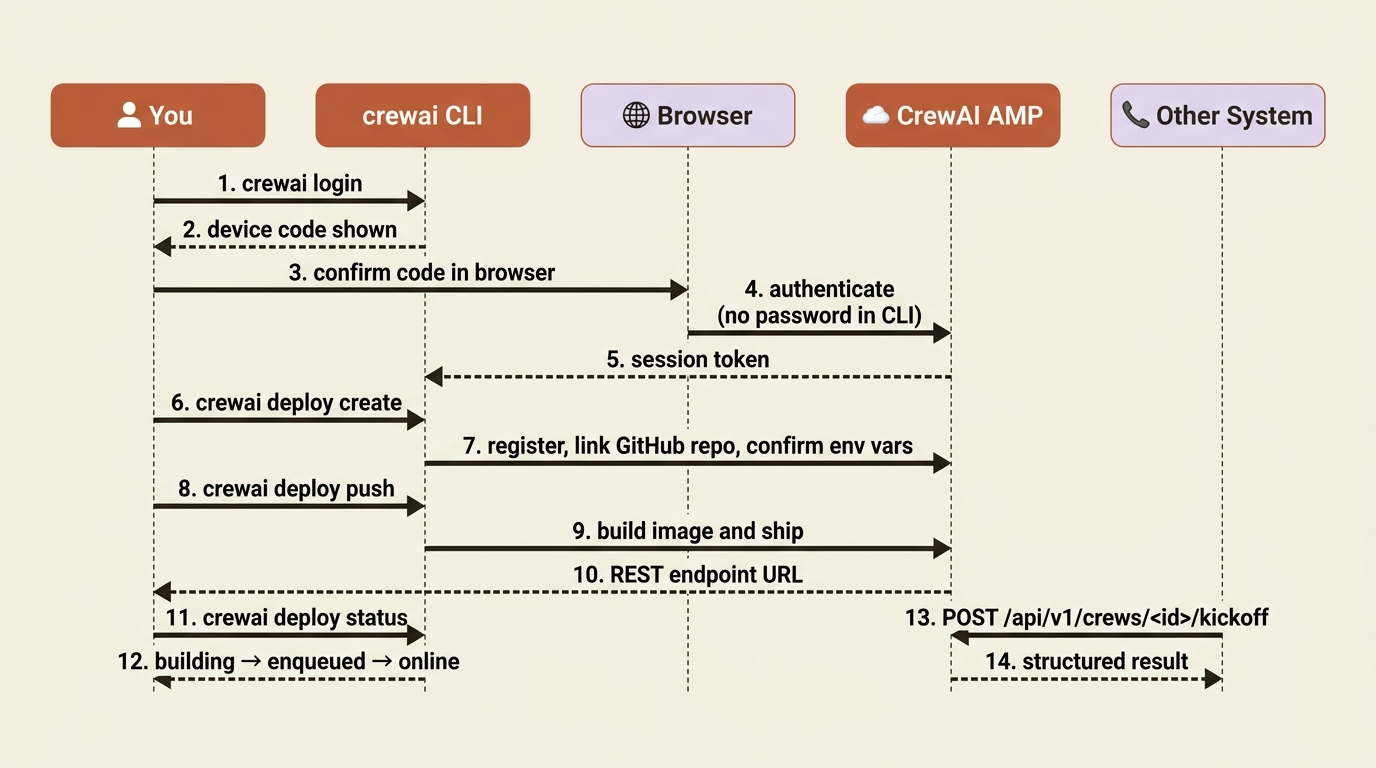
The native path to production is CrewAI AMP, the Agent Management Platform, and the CLI does the heavy lifting. First authenticate, which uses a device-code flow: a code appears in your terminal, you confirm it in the browser, and no password is typed into the CLI.
crewai login
Then, from your project root, create and push the deployment. AMP reads your project, confirms the environment variables it found locally so your keys travel securely with the deployment, and builds an image:
crewai deploy create     # register the deployment, link the GitHub repo
crewai deploy push       # build and ship it
What you get back is the thing that turns a script into a service: a REST endpoint. Other systems call your crew over HTTP, exactly like any API.
curl -X POST https://app.crewai.com/api/v1/crews/<crew-id>/kickoff \
  -H "Authorization: Bearer $CREWAI_API_KEY" \
  -H "Content-Type: application/json" \
  -d '{"inputs": {"failing_test": "test_discount_applies_correctly"}}'
Day-to-day operations run through the same CLI: crewai deploy status reports where a deployment is, whether building, enqueued, or online, and crewai deploy logs streams its logs to your terminal. AMP also brings the production features you would otherwise assemble yourself: observability, RBAC and SSO for team access, and webhook streaming to push run events into Slack or anywhere else.
You are not locked into the managed cloud. AMP offers three shapes: Cloud at app.crewai.com, the managed and fastest path; Factory, self-hosted on your own infrastructure for data residency and compliance; and hybrid, split by sensitivity. Pick by where your data is allowed to live.
A note on freshness: the exact crewai deploy subcommands and the AMP product surface move across releases, and the authentication flow has changed before. If a command here does not match what your CLI offers, run crewai deploy --help for the current subcommands and crewai login to re-authenticate. The shape stays constant even when the verbs shift: authenticate, create, push, then call the REST endpoint and watch with status and logs.
Multi-tenancy and the threat model
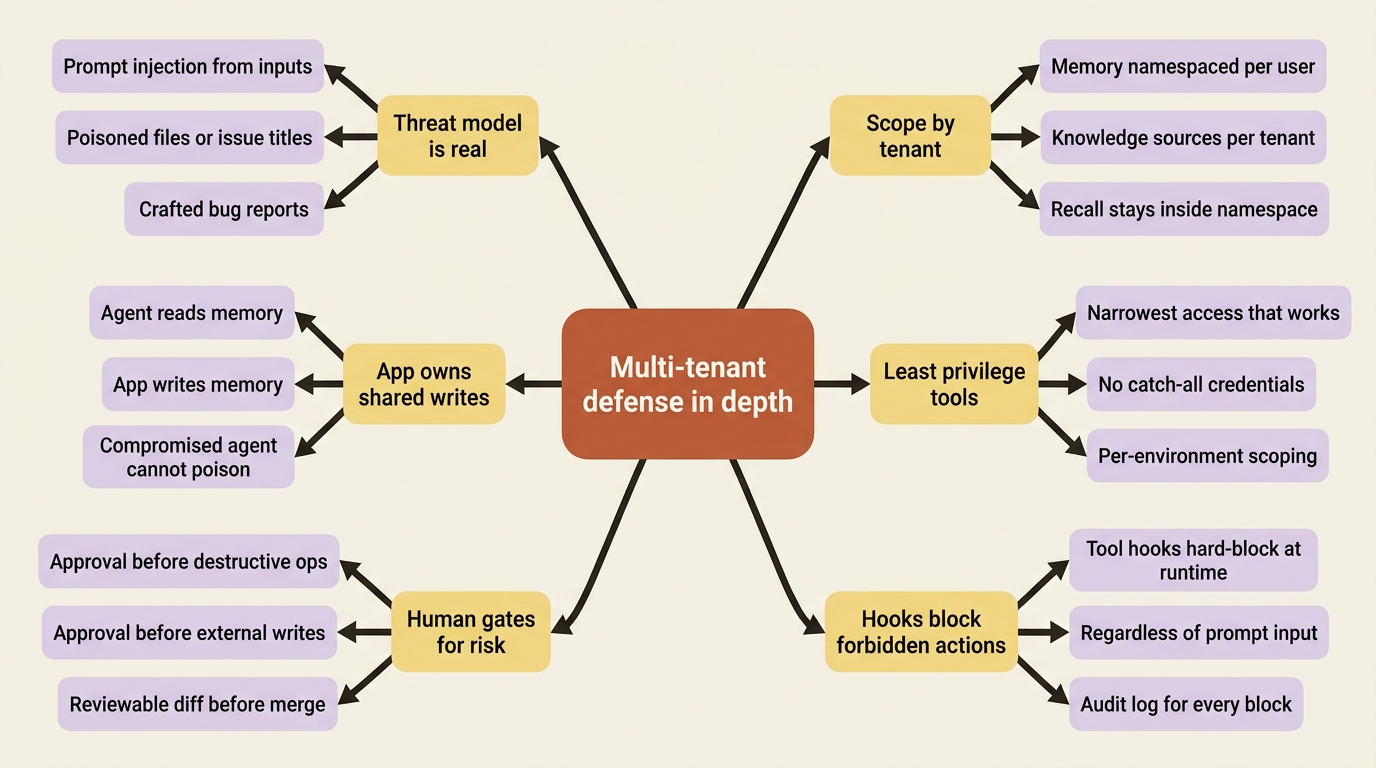
Running on your laptop, "who is this for" has one answer: you. The moment a deployed crew serves more than one user, the question gets sharp, and getting it wrong leaks one user's data into another's session. This is not an add-on; it is a requirement the instant you go multi-user.
The core move is scoping. Memory and Knowledge must be partitioned per tenant, so user A's remembered decisions never surface in user B's run. CrewAI's memory hierarchical scopes are built for exactly this: namespace each user's memories under their own path and recall within it. Knowledge sources, similarly, should be the right ones for the right tenant, not a shared pool. And tools follow least privilege: an agent gets the narrowest access that does the job, because a tool that can reach everything is a tool that can leak everything.
Then there is the threat model, which agents make genuinely real rather than theoretical. An agent takes dynamic actions based on dynamic input, which means prompt injection is not a hypothetical: a malicious bug report, a poisoned file, or a crafted issue title can all try to talk your agent into doing something it should not. The defenses are the ones already in your toolkit, now load-bearing rather than nice-to-have. Tool hooks hard-block forbidden actions regardless of what the input asks. Human gates put a person in front of anything destructive. Write access to shared memory belongs to your application code, not to the agent, so a compromised agent cannot poison what the next run trusts.
Defense in depth is the whole answer: isolation, least privilege, and scoped namespaces, because no single layer is sufficient against input you do not control.
Packaging the crew for reuse
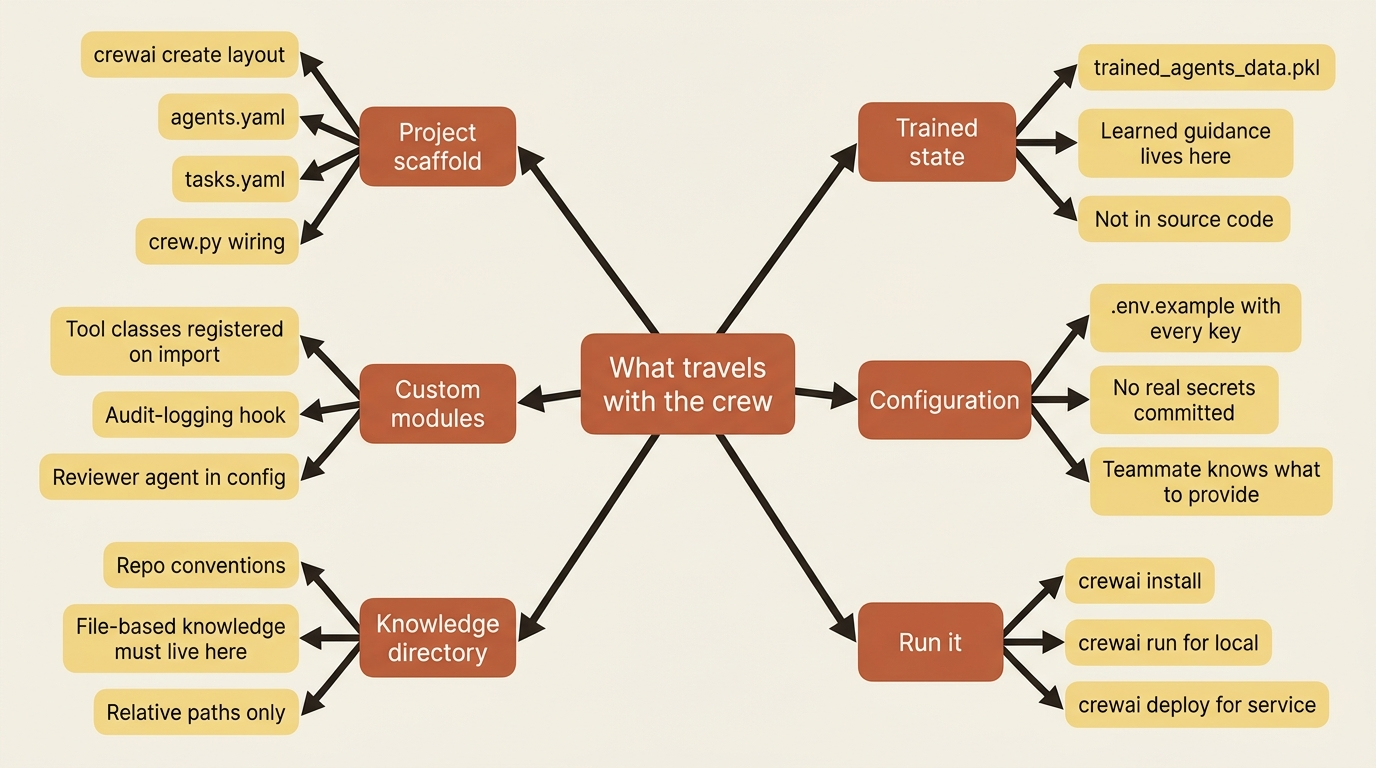
A crew a teammate cannot run is not shipped; it is stranded. The good news is that the idiomatic CrewAI project structure has been quietly doing the packaging work all along. Everything an agentic project accumulates lives in standard places: agents and tasks in YAML, wiring in crew.py, custom tools and hooks in their modules, the reviewer agent in the config, conventions in the knowledge/ directory, the Flow that orchestrates it, and any trained state alongside.
Pulling it together for handoff means making sure the whole kit travels:
- The project scaffold, that is, the
crewai createlayout, withagents.yaml,tasks.yaml, andcrew.py. - The custom tools and the audit-logging hook in their modules, imported where they register.
- The
knowledge/directory with the repo's conventions, since file-based knowledge must live there. - The trained
trained_agents_data.pkl, or your named file, since the agent's learned guidance lives in it, not in the code. - The
.env.examplelisting every key the crew needs, so a teammate knows what to provide without seeing your secrets.
With that in place, a teammate clones the repo, runs crewai install and crewai run, and gets the same crew you have. Or you run crewai deploy and it becomes a service. The packaging was not a final step bolted on. It was the payoff of building idiomatically from day one.
A troubleshooting checklist you will actually use
When something does not work, it is usually one of a handful of things. Keep this list:
- A tool never fires. Its
descriptionis probably vague or overlaps another tool, so the agent does not know when to reach for it. Sharpen the description. - Knowledge does not load. The file is almost certainly outside the
knowledge/directory, or referenced by an absolute path instead of one relative to it. - An event listener does nothing. It was defined but never instantiated and imported, so its handlers never registered. Add the instance and import the package.
- A hierarchical crew stalls or errors at kickoff. You set
Process.hierarchicalwithout amanager_llmormanager_agent. - Human input hangs forever. A task with
human_input=True, orcrewai train, is waiting for console input in a non-interactive environment. - A deploy is stuck building. Check
crewai deploy statusandcrewai deploy logs. Most often it is a missing environment variable that was not confirmed atcrewai deploy create.
Do this today
You do not need to deploy anything to start collecting the dividends from this article. Five concrete steps:
- Flip on tracing in code for your most important crew. Add
tracing=Trueto theCrew(...)constructor. The next ten runs become a record you can audit instead of terminal scrollback that has already disappeared. - Give your final task an
output_pydanticmodel. Even a three-field one. Run the crew and consumeresult.<field>from a caller. You just bought integration stability against the model rephrasing itself tomorrow. - Audit telemetry posture. Decide if
share_crew=Trueis something you actually want, and setCREWAI_DISABLE_TELEMETRY=trueif your project's policy requires it. Document the choice. - Write the
.env.example. Every key the crew reads, with empty values and a comment. Commit it. This is the single cheapest packaging move you can make. - Run
crewai loginandcrewai deploy --help. Even if you are not deploying today, get the device-code flow done and confirm what subcommands your installed CLI offers. The verbs shift; the shape (authenticate, create, push, status, logs) does not.
What "shipped" actually means
A crew that starts life as a single agent answering a single question becomes, layer by layer, a coordinated team: a second agent, a process choice, a stateful Flow, tools, memory and knowledge, human gates, hooks, MCP, training, replay. Each layer answers a question the previous one made you ask. CrewAI's real lesson is that you describe a team, not a control loop, and the framework runs the collaboration.
Now that crew is traced, deployed behind a REST endpoint, scoped for many users, and packaged so someone else can run it. That is the distance from a clever demo to something you operate. Go build the crew you actually need.