
The Four CrewAI Commands That Turn a Demo Into Something You Can Trust
Why most CrewAI tutorials skip the four CLI verbs that turn a flashy demo into a crew you can actually depend on, and how each one closes a specific reliability gap.
Training, testing, persistence, and replay are the CrewAI operational verbs most tutorials skip. They are the difference between a crew that worked once and a crew you can depend on.
Your crew worked beautifully once. Now nobody can say if it still works, recover when it crashes, or improve it without guessing.
In this article: You will learn the four reliability commands every CrewAI project eventually needs and almost no tutorial covers. We walk through
crewai trainfor human-in-the-loop improvement,crewai testfor measurable quality,@persistfor Flows that survive a crash, andcrewai replayfor debugging without paying twice. By the end, you will know which verb to reach for when a crew quietly stops being trustworthy.
Here is a moment every team building agents eventually has. The crew scored beautifully on your laptop. You tweaked a prompt to make one task a little sharper and shipped it. Now a teammate reports that it is producing worse results, and nobody can say by how much because nobody measured it. Or a long run crashed three tasks in, and the only way to see what went wrong is to run the whole thing from the top, paying for every task you already know works. Or an agent keeps making the same small mistake, and you keep editing its backstory hoping that this time the wording sticks.
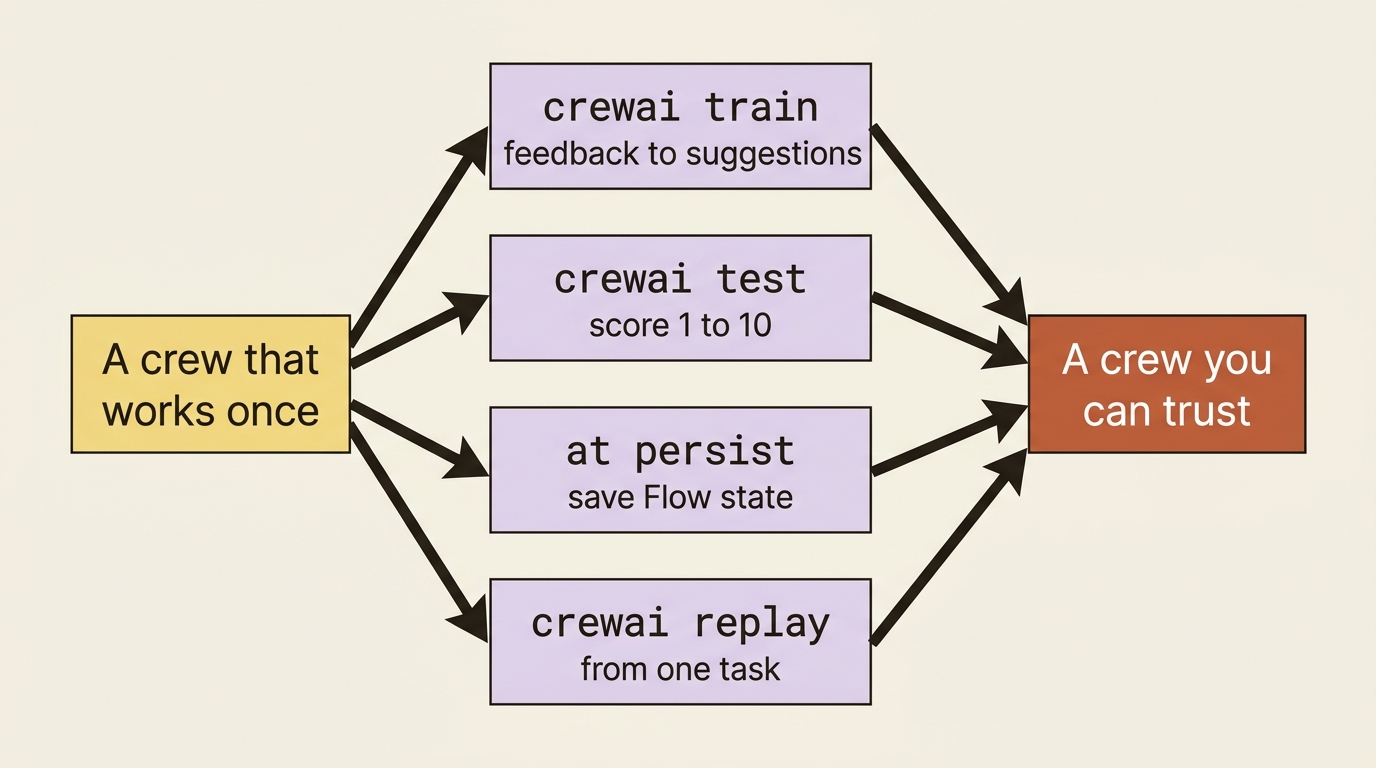
These are not capability problems. The crew is plenty capable by now. They are reliability problems, and CrewAI ships four operational verbs for them that are easy to overlook because they live in the CLI rather than in your code. Training improves an agent from human feedback. Testing puts a number on quality. Persistence lets a crashed run resume. Replay re-runs from a single task instead of the whole crew. None of them is glamorous. All of them are what separate a crew that works once from one you trust running unattended.
Training: improving an agent from feedback
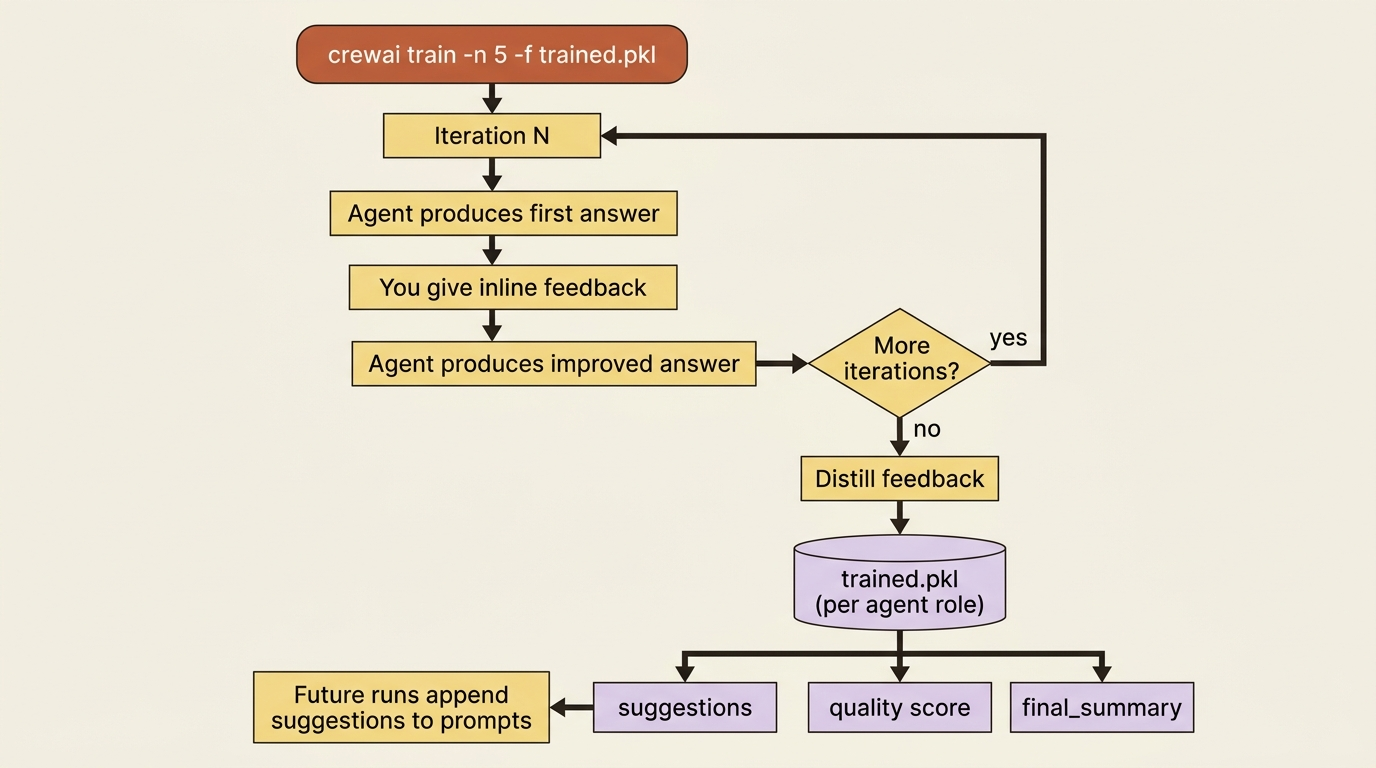
You have been editing backstories to fix agent behavior. CrewAI training is the structured version of that instinct. You run the crew for a set number of iterations. On each one, the agent produces output, you give it inline feedback, and it produces an improved answer. When the iterations finish, CrewAI does not just keep the transcript: it distills your feedback into consolidated guidance per agent.
crewai train -n 5 -f trained_fix_author.pkl
That command runs five iterations and writes the result to a .pkl file. The interesting part is what is in that file. For each agent, keyed by role, CrewAI stores three things: suggestions, which are actionable instructions distilled from your feedback and the gap between the agent's first and improved answers; a quality score capturing how much it improved; and a final_summary of action items for future tasks. Then, on every normal run afterward, each agent automatically loads its suggestions and appends them to its prompt as mandatory instructions. You trained the agent once; it carries the lesson forward without you touching its definition.
You can also drive training from code, which is the same thing in Python form:
BuggyShop().crew().train(
    n_iterations=5,
    inputs={"failing_test": "test_discount_applies_correctly"},
    filename="trained_fix_author.pkl",
)
Gotcha: training is interactive. Under the hood it sets human_input=True and prompts you for feedback on every iteration. Running crewai train in a non-interactive environment, such as a CI job or a scheduled task, will hang forever waiting for input that never comes. Train at your terminal, then ship the resulting .pkl. A second trap is worth knowing: the model doing the training evaluation needs to be reasonably capable. Models at or below roughly 7B parameters struggle to produce the structured JSON that the evaluation depends on, so they give unreliable, inconsistent guidance. Use a 7B-or-larger model for training, even if a smaller one is fine for the crew's everyday work.
One honest note on what training is not. It does not fine-tune a model or change your agent definitions. It appends learned instructions at prompt time. That makes it cheap and reversible. Delete the .pkl and the agent reverts. It also means the improvement lives in a file you have to keep alongside your project.
Testing: putting a number on quality
Training makes a crew better. Testing tells you whether it actually is. The crewai test command runs your crew for a number of iterations and scores every task, and the crew as a whole, on a 1-to-10 scale, then prints a table.
crewai test -n 5 -m gpt-4o
The output is a scorecard: each task gets a per-run score and an average, the crew gets an overall average, and you see execution time per run. That table is the thing you were missing in the laptop-versus-teammate story at the top. Before a prompt change, you have a baseline, such as the fix task averaging 9.2. After it, you run crewai test again and see whether you moved the number or quietly broke it. Reliability work is impossible without a measurement, and this is the measurement.
A small constraint to know going in: testing currently evaluates using OpenAI models, defaulting to gpt-4o-mini if you do not specify otherwise. Bump the iterations for a more stable average, since a single run is noisy.
Persistence: surviving a crash
Now the Flow side. A Flow holds state across its steps, but by default that state lives only in memory, so if the process dies, a long run is gone. The @persist decorator fixes that: applied to a Flow class, it automatically saves state after every step to a SQLite database, so a crashed or restarted run can pick up where it stopped.
from crewai.flow.flow import Flow, start
from crewai.flow.persistence import persist
from pydantic import BaseModel

class FixState(BaseModel):  # ①
    id: str = ""  # ②
    failing_test: str = ""
    tests_passing: bool = False
    attempts: int = 0

@persist  # ③
class BuggyShopFlow(Flow[FixState]):  # ④
    @start()  # ⑤
    def find_failing_test(self):
        self.state.failing_test = "test_discount_applies_correctly"  # ⑥
        print(f"State persisted under id={self.state.id}")
① FixState is the Pydantic model that defines exactly which fields get saved and restored across steps.
② The id field is the per-run handle CrewAI populates automatically and that you later pass to bring a run back.
③ The @persist decorator is the whole mechanism: it saves state to SQLite after every step with no other code change.
④ The Flow is typed on FixState, so self.state is the model whose fields persistence tracks.
⑤ The @start() step is the entry point, and its mutation to self.state is what gets snapshotted when it returns.
⑥ Writing to self.state.failing_test mutates the persisted model, so this assignment survives a crash and a restart.
Note: The full extracted listing at code/crewai/part-10-training-testing-persistence-replay/listings/01-persist-flow.py shows the parts elided here.
Every persisted state gets a unique id automatically, and that id is the handle you use to bring a run back. This is also where resuming and forking diverge, and the distinction matters more than it first appears. Resuming continues the same run, extending its history. Forking starts a new run seeded from an old one's state, so you can branch: try two different fixes from the same starting point without one clobbering the other's record.
# Fork: hydrate from a previous run's snapshot, but record this as a new lineage.
flow = BuggyShopFlow()
flow.kickoff(restore_from_state_id="<previous-run-state-id>")
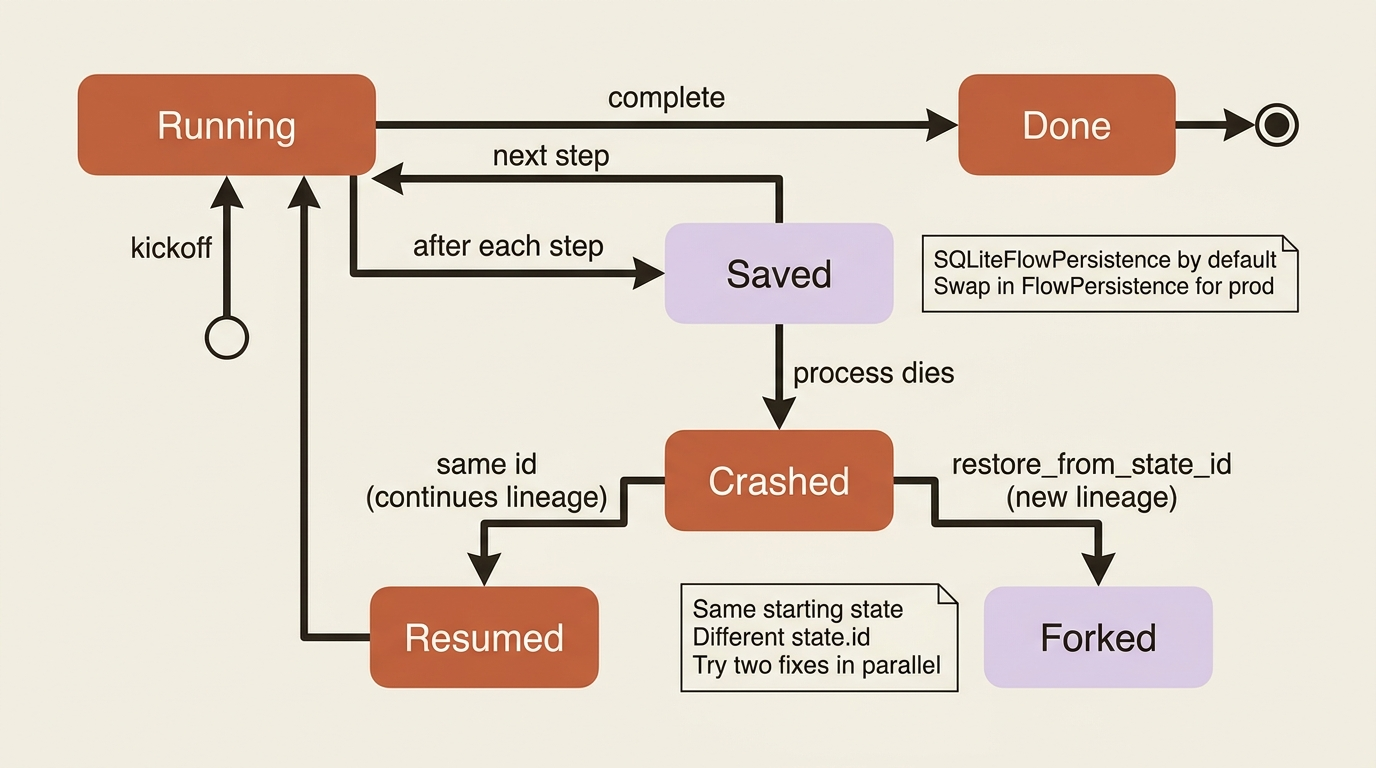
Freshness note: the older way to resume, passing inputs={"id": <uuid>}, is deprecated in favor of restore_from_state_id, which is available in CrewAI v1.14.5 and later. The reason is worth understanding. The old approach made one UUID do two jobs, selecting which snapshot to load and naming the new run, so two kickoffs with the same id were not two distinct runs. restore_from_state_id splits those responsibilities, which is exactly what you want when forking. If you are on an older version or following an older tutorial, you will see inputs={"id": ...}; switch it when you upgrade.
In production: which backend you persist to is a real decision, not a detail. The default SQLiteFlowPersistence is perfect for development, since it is a local file that survives a restart. For a deployed agent serving many runs, you want a durable, shared backend instead, and CrewAI lets you supply your own FlowPersistence implementation for that. The difference is between a Flow that forgets everything when the container recycles and one that resumes cleanly across deploys.
Replay: re-running from one task
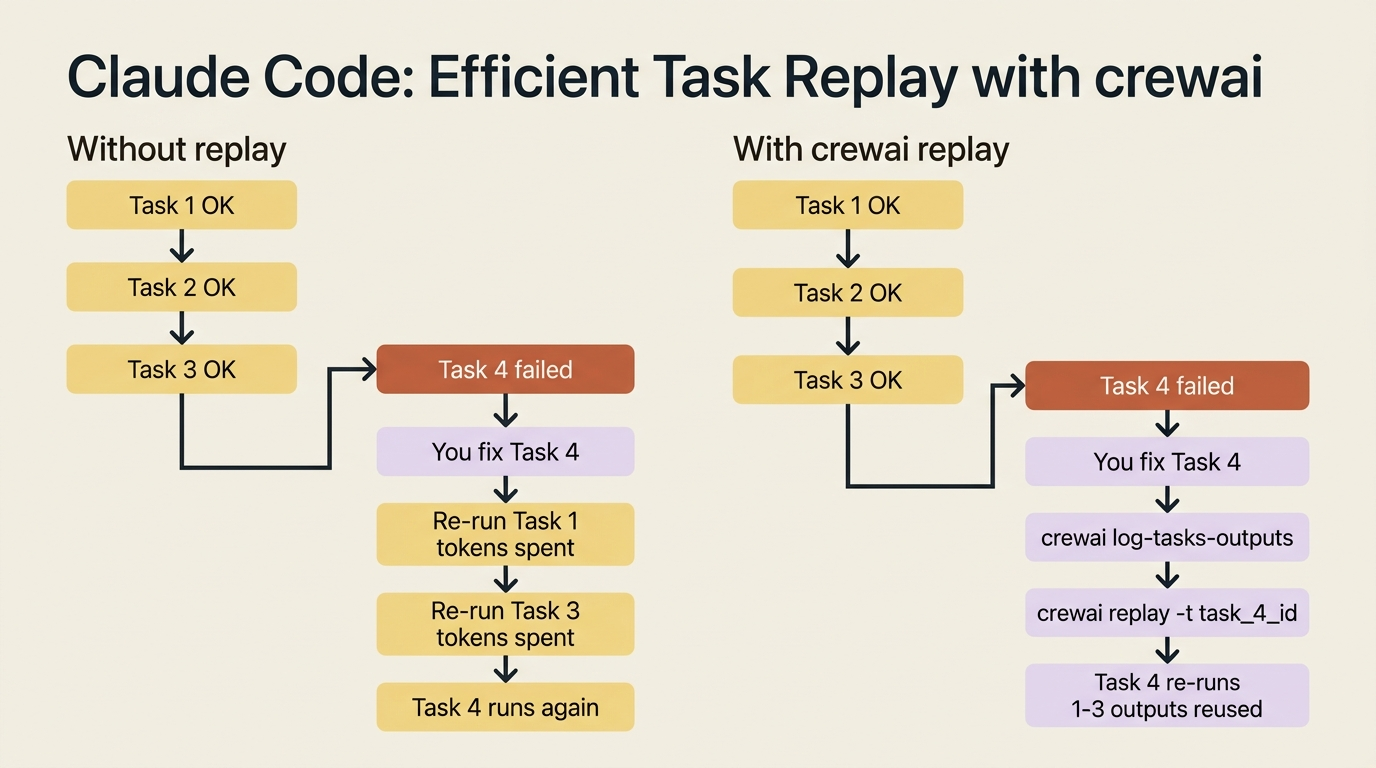
The last verb is the smallest, and it is the one you will use most while debugging. When a crew runs, CrewAI records each task's output. If task four went wrong and you fixed the cause, you do not want to re-run tasks one through three, which you already know are fine and which cost time and tokens. crewai replay re-runs from a specific task, using the recorded outputs of everything before it.
crewai log-tasks-outputs        # find the task ids from the last run
crewai replay -t task_123456    # re-run from that task onward
The workflow is straightforward. A run finishes or fails, you list the task outputs to get the id of the task you care about, you change something such as a task description, a tool, or an agent's instructions, and you replay from exactly that point. The investigation task's output is reused rather than recomputed. The debug loop turns from "re-run the whole crew and wait" into "re-run the one task I changed."
All four on one example
Put them together and you can see the reliability story for a real crew. You train the fix author on a handful of real bugs, giving feedback until its proposed fixes match how your team actually writes them, and you ship the resulting .pkl so every future run inherits that judgment. You test the crew before and after any change, so "I improved the prompt" becomes "the fix task went from 8.7 to 9.3" or, just as usefully, "it dropped to 7.1, revert." You wrap the Flow in @persist so a run that dies three attempts into a hard bug resumes instead of restarting. And when you are iterating on the fix task itself, you replay from it rather than re-running the investigation every time.
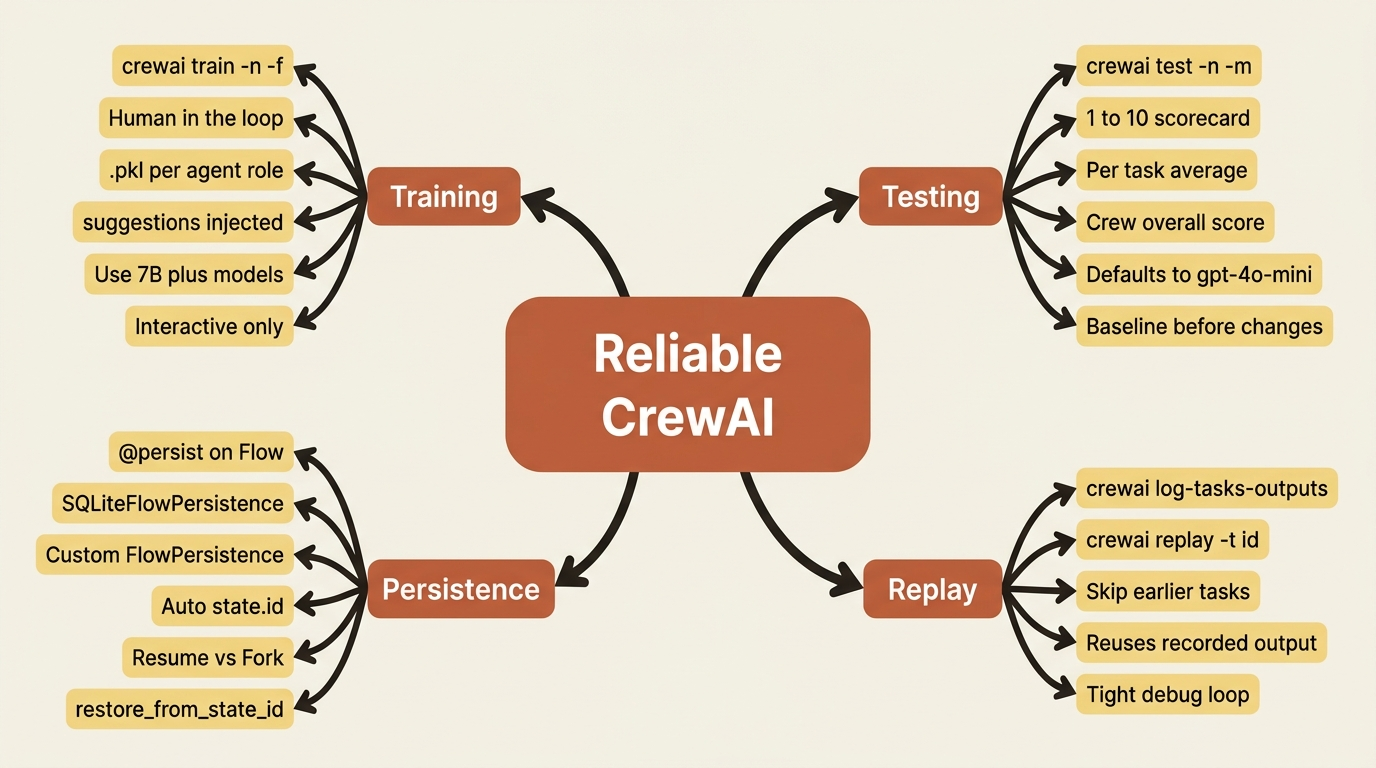
Capability is what gets a crew to where it can do the work. These four verbs are what let you trust it to keep doing the work, measurably, repeatably, and without losing progress to a crash.
Do this today
Pick the verb that closes your most painful gap and use it once this week.
- Run
crewai test -n 5on your crew right now and write down the per-task and overall scores. That number is your reliability baseline. Any future change either moves it up or down, and now you can see which. - Add
@persistto one Flow that does meaningful work, then deliberately kill the process partway through. Restart with the same id and confirm it resumes. Five minutes of practice now saves an hour of recovery later. - Try
crewai replayon the next failing run. Runcrewai log-tasks-outputs, find the task you want to start from, change one thing, and replay. Notice how much faster the debug loop feels. - Train one underperforming agent at your terminal with
crewai train -n 5 -f <agent>.pkl. Give honest feedback. Commit the resulting.pklnext to your crew code so every teammate inherits the same trained behavior. - If you deploy in production, sketch out which
FlowPersistencebackend you actually need. The default SQLite is local. A shared backend is the line between "Flow that forgets after a deploy" and "Flow that resumes cleanly."
The verbs that close the loop
A crew that runs once is a demo. A crew you can measure, recover, and improve is a system. The gap between the two is not a smarter model or a fancier framework. It is four small CLI verbs you can adopt in an afternoon.
Most teams skip them because they live outside the code, in commands and pickle files and SQLite databases. They feel like operations, not engineering. They are operations, and that is the point: reliability has always been an operational discipline, not a coding one. The teams that ship trustworthy agents are not the ones with the cleverest agent definitions. They are the ones who measured before they shipped, persisted before they scaled, and replayed instead of re-running.
The next time your crew quietly stops being trustworthy, do not edit another backstory and hope. Run crewai test, look at the number, and decide from there. The numbers will tell you the truth your tweaks never could.