
Configuration Ends Where Hooks Begin: Governing a CrewAI Crew at Runtime
Configuration is what you do before the run; hooks, events, and guardrails are how you govern the run itself.
Everything you set on an Agent, a Task, or a Crew happens before kickoff. CrewAI's hooks, event bus, and task guardrails are the surfaces you use to watch the run, shape it in flight, and make it safe to leave alone.
Your crew works on your laptop, but you cannot quite trust it. Configuration only gets you so far; you need to reach into the run itself.
In this article: You will learn the three CrewAI surfaces that exist specifically for runtime governance: tool hooks for intercepting actions, the event bus for observing them, and task guardrails for validating output. You will see the exact APIs, the gotchas that bite people in production, and a clear decision rule for choosing between the three. By the end you will know which surface to reach for, and which ones not to bend into the wrong shape.
There is a moment, after you have wired up your first real CrewAI project, when you notice a pattern in everything you have done. The agents, the tools, the process, the Flow, the memory, the human-in-the-loop gates: all of it was configuration. You set fields, you wired classes, you wrote YAML. Then you pressed kickoff and watched. That model takes you a long way, and for many crews it is enough.
But at some point you hit its ceiling. You want to block one specific tool call based on its arguments, not its name. You want to stamp the current date into every agent's context. You want every file change written to an audit log. You want to reject a fix that passes the test but forgot to include a test of its own. None of those are configuration. They are things you need to do during the run, while it is happening, in response to what the agents are actually doing.
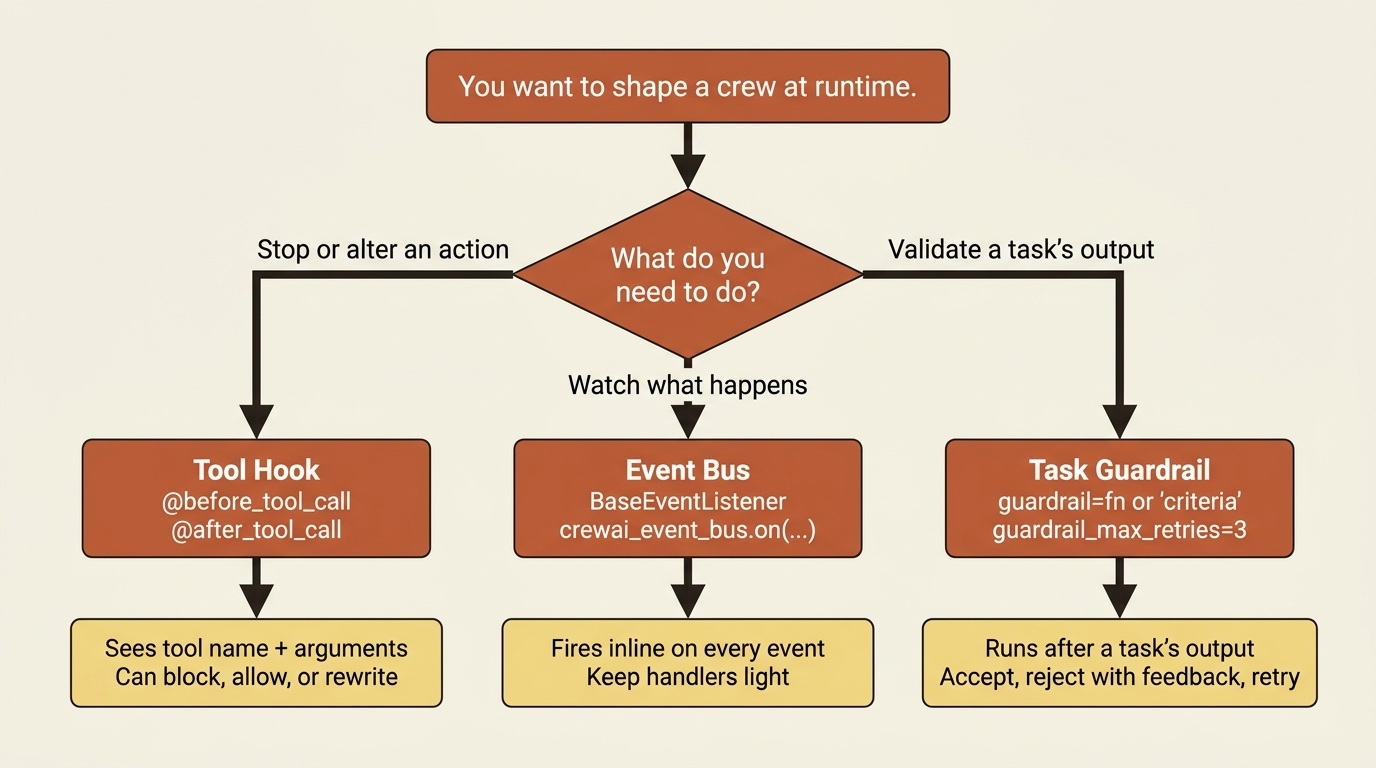
That is the difference between configuring a crew and governing one. CrewAI gives you three surfaces for governance, and they are genuinely three different mechanisms, not one abstraction wearing three hats. The useful thing is to learn what each is for and stop trying to force one to do another's job.
Surface one: tool hooks, for intercepting actions
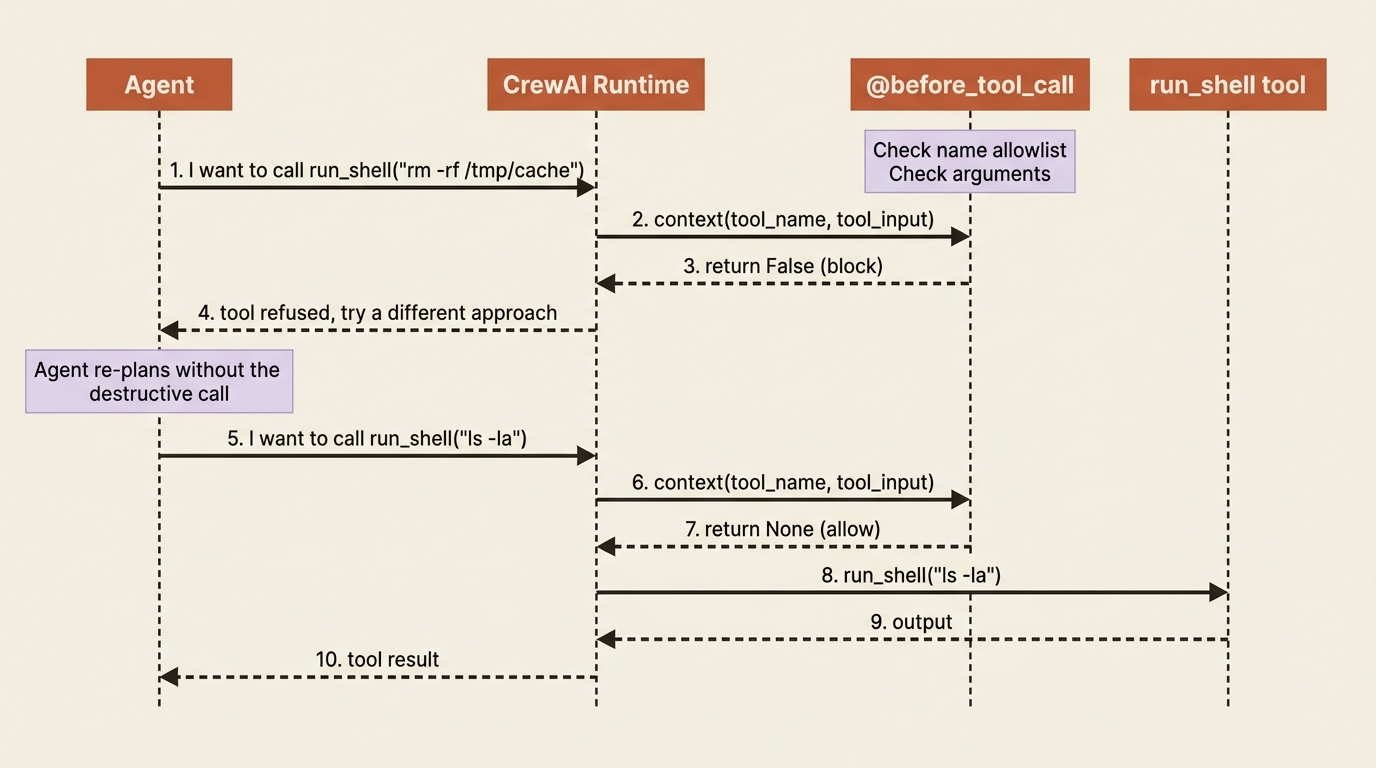
CrewAI fires a before_tool_call hook before any tool runs and an after_tool_call hook after it returns. Both receive a context object describing the call. For before_tool_call, the context exposes the tool name and the tool's input dictionary; for after_tool_call, it also carries the tool's result. The before hook is a gate: return False and the call never happens; return None (or True) and it proceeds. The after hook is a filter: return a modified result string and that replaces what the agent sees.
That gives you four jobs from two hooks: blocking, which refuses a dangerous call; sanitizing, which scrubs a secret out of a result before it reaches the model; timing, which records how long a tool took; and rate limiting, which counts calls and refuses past a threshold. The blocking pattern is the one you will reach for first:
from crewai.hooks import before_tool_call

@before_tool_call                                                    # ①
def block_dangerous_shell(context):
    dangerous = {"rm_rf", "drop_table", "force_push"}                # ②
    if context.tool_name in dangerous:                               # ③
        print(f"Blocked dangerous tool: {context.tool_name}")
        return False   # the call is refused                         # ④
    # inspect arguments, not just the name
    if context.tool_name == "run_shell" and "rm -rf" in str(context.tool_input):  # ⑤
        print("Blocked a destructive shell command by its arguments")
        return False
    return None        # everything else proceeds                    # ⑥
① The decorator registers this function as a global before_tool_call hook, so it fires ahead of every tool call in the process.
② A name-based denylist names the tools that are forbidden outright.
③ The first gate matches on the tool name alone, the coarse check.
④ Returning False refuses the call: the tool never runs.
⑤ The second gate inspects the arguments, so a generally allowed tool like run_shell can still be refused for one destructive invocation.
⑥ Returning None lets everything that passed both gates proceed normally.
Note: The full extracted listing at code/crewai/part-9-hooks-events-guardrails/listings/01-block-dangerous-shell.py shows the parts elided here.
The second check is where the power lives. A name-based block is coarse. The real value of a hook is that it sees the arguments, so you can allow run_shell in general and refuse the one invocation that would delete everything.
You register hooks three ways. Globally, with the @before_tool_call decorator, which covers every crew in the process. Programmatically, with register_before_tool_call_hook(...). Or scoped to one crew with the @before_tool_call_crew variant inside a @CrewBase class. Reach for crew-scoped when a rule belongs to one crew and would be wrong applied everywhere.
Surface two: the event bus, for observing everything
Hooks intercept actions. The event bus does something broader: it emits an event for nearly everything that happens during a run, and you subscribe to the ones you care about. A crew starting, an agent finishing a task, a tool being used, knowledge being retrieved, a test completing: each fires an event you can listen for. This is how you build logging, analytics, debugging, and integration with whatever monitoring you already run, without touching the crew's own code.
You build a listener by subclassing BaseEventListener and implementing setup_listeners, where you register one handler per event type:
from crewai.events import (
    BaseEventListener,
    CrewKickoffStartedEvent,
    AgentExecutionCompletedEvent,
)

class MonitoringListener(BaseEventListener):                          # ①
    def setup_listeners(self, crewai_event_bus):                     # ②
        @crewai_event_bus.on(CrewKickoffStartedEvent)               # ③
        def on_start(source, event):
            log_to_monitoring("crew_started", crew=event.crew_name)

        @crewai_event_bus.on(AgentExecutionCompletedEvent)          # ④
        def on_agent_done(source, event):
            log_to_monitoring(
                "agent_completed",
                role=event.agent.role,                              # ⑤
                output=event.output,
            )

monitoring_listener = MonitoringListener()                           # ⑥
① You build a listener by subclassing BaseEventListener.
② The setup_listeners override is where every handler gets registered against the bus.
③ @crewai_event_bus.on(...) subscribes a handler to one event type, here the crew starting.
④ A second subscription listens for each agent finishing its work.
⑤ Each handler reads typed fields off the event, whose shape depends on the event type.
⑥ Constructing an instance is mandatory: the handlers register only when __init__ runs, so without this line nothing fires.
Note: The full extracted listing at code/crewai/part-9-hooks-events-guardrails/listings/02-monitoring-listener.py shows the parts elided here.
Each handler takes source, which is what emitted the event, and event, which is the event data whose fields depend on the type. The catalog is wide: crew events such as CrewKickoffStartedEvent and CrewKickoffCompletedEvent, agent events such as AgentExecutionCompletedEvent, task events, and knowledge events such as KnowledgeRetrievalCompletedEvent. You subscribe only to the ones you need.
The gotcha that breaks every first listener
Defining the listener class is not enough to make it work. The handlers register only when an instance is created, and that instance has to be imported somewhere your application actually loads, or Python never runs the registration and the listener silently does nothing.
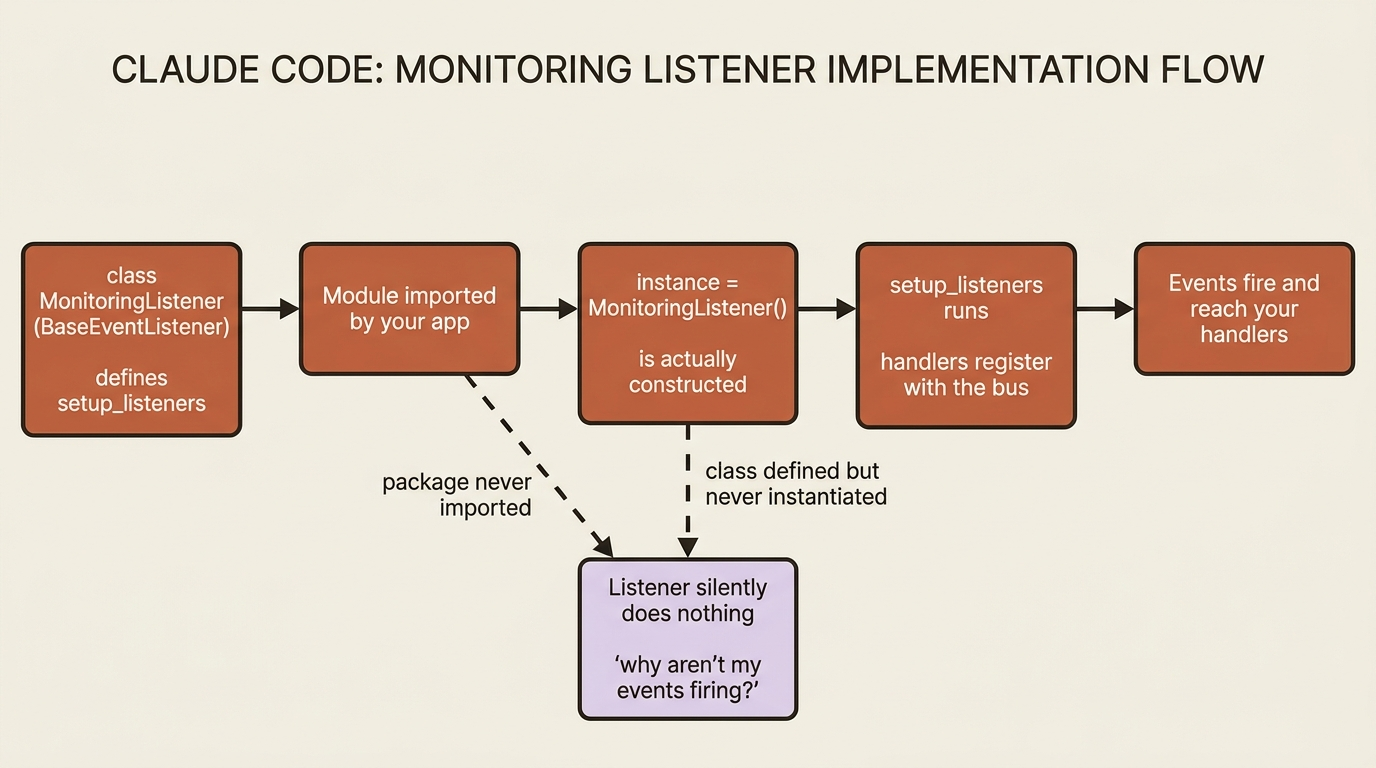
Notice the monitoring_listener = MonitoringListener() line at the bottom of the example. That instantiation is mandatory, not decorative. The clean pattern for several listeners is a listeners/ package whose __init__.py imports each instance, then importing that package once in your crew file. A listener that "isn't firing" is, nine times out of ten, a listener nobody imported.
There is one more rule the docs are firm about: keep handlers light. A handler runs inline as events fire, so a slow or blocking handler slows the whole run, and an exception in a handler can disrupt execution. Log, enqueue, fire-and-forget. Do not do real work in a handler; hand the work to something else.
Surface three: task guardrails, for validating output
The third surface guards the seam between tasks. A guardrail runs on a task's output before that output moves on, and it can accept, reject with feedback that sends the agent back to try again, or transform. CrewAI gives you two flavors that cover different needs.
Function-based guardrails are Python, for precise and deterministic checks. The function takes the task output and returns a tuple: (True, result) to accept, or (False, "what went wrong") to reject. The pattern that rejects a fix without a test looks like this:
from typing import Tuple, Any
from crewai import TaskOutput, Task

def must_include_a_test(result: TaskOutput) -> Tuple[bool, Any]:      # ①
    """Reject a proposed fix that doesn't add or change a test."""
    text = result.raw                                                # ②
    if "def test_" not in text and "assert" not in text:             # ③
        return (False, "The fix must include a test that exercises the bug. Add one and try again.")  # ④
    return (True, result.raw)                                        # ⑤

propose_fix = Task(
    description="Propose a fix for the failing test, and include a test that covers the bug.",
    expected_output="The corrected code plus a test.",
    agent=fix_author,
    guardrail=must_include_a_test,                                   # ⑥
    guardrail_max_retries=3,                                         # ⑦
)
① A function-based guardrail takes the task output and returns a (bool, value) tuple.
② The raw text of the agent's output is what the check inspects.
③ The deterministic condition looks for any test marker in the output.
④ Returning (False, feedback) rejects the output and sends the feedback string back to the agent.
⑤ Returning (True, value) accepts the output and passes the value forward.
⑥ The function is attached to the task through the guardrail parameter.
⑦ guardrail_max_retries caps how many times the reject-and-revise cycle repeats.
Note: The full extracted listing at code/crewai/part-9-hooks-events-guardrails/listings/03-must-include-a-test.py shows the parts elided here.
When the guardrail returns (False, ...), the feedback goes back to the agent, the agent revises, and the cycle repeats up to guardrail_max_retries, which defaults to 3. That turns "the fix should include a test" from a hope expressed in the task description into a requirement the output cannot skip.
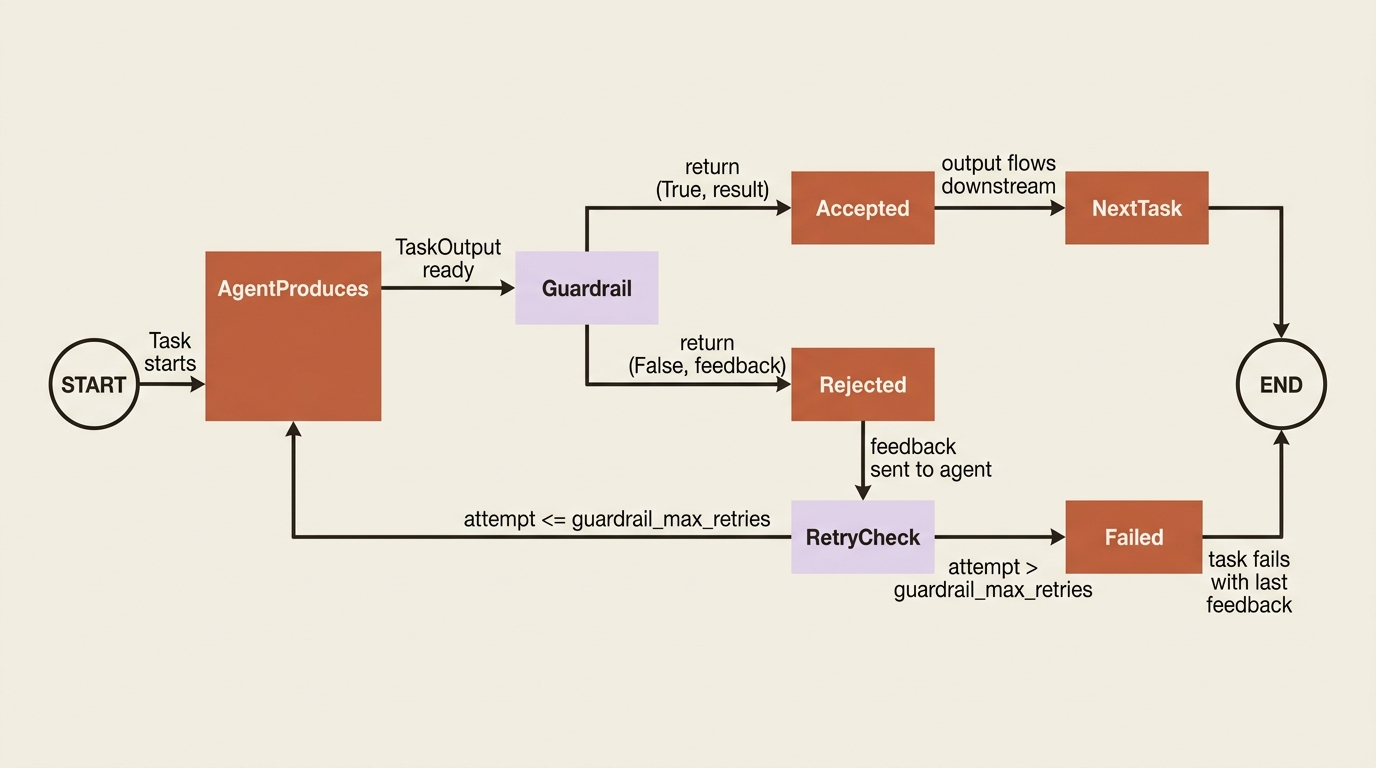
LLM-based guardrails are the other flavor. Instead of a function, you pass a plain-English string, and CrewAI uses the agent's own LLM to judge whether the output meets it. Use these for subjective criteria a function cannot express, such as "the explanation must be clear to a junior developer." You can also list several of either kind in the guardrails parameter (plural), and they run in sequence, each receiving the previous one's output. Validation and transformation chain naturally.
One sharp edge worth flagging: the old per-task max_retries attribute is deprecated in favor of guardrail_max_retries. If you are following an older tutorial that sets max_retries on a task, switch it, because the old name is slated for removal.
Which surface for which job
The three overlap enough to confuse, so here is the clean division. If you want to stop or alter an action the agent takes, that is a tool hook, because hooks sit on the tool-call boundary and see the arguments. If you want to watch what happens without changing it, that is the event bus, because events are observation by design and you are told firmly not to do heavy work in them. If you want to enforce something about a task's result before the next task sees it, that is a guardrail, because guardrails sit on the task-output boundary and can send work back.
Hooks govern actions. Events observe. Guardrails validate output. When you find yourself bending one to do another's job, such as trying to validate output inside an event handler or counting tool calls in a guardrail, that is the signal you have reached for the wrong surface.
Three surfaces on one running crew
Take a code-maintenance crew called buggy-shop. It clones a repository, reproduces a bug, proposes a fix, and runs the tests. Without governance, it is one rogue tool call away from rewriting your git history. Add one of each surface, and it tightens into something you could trust running unattended.
A tool hook hard-blocks any shell command that would delete or force-push, inspecting arguments rather than trusting the tool name, which closes the destructive-action hole. An event listener logs every agent execution and every tool call to your monitoring stack, so when a run goes sideways at 3 a.m. there is a trace to read. A guardrail on the fix task rejects any proposed fix that does not include a test, which kills the "delete the failing test" exploit at the structural level. The fix becomes required to add test coverage, not just required to survive review.
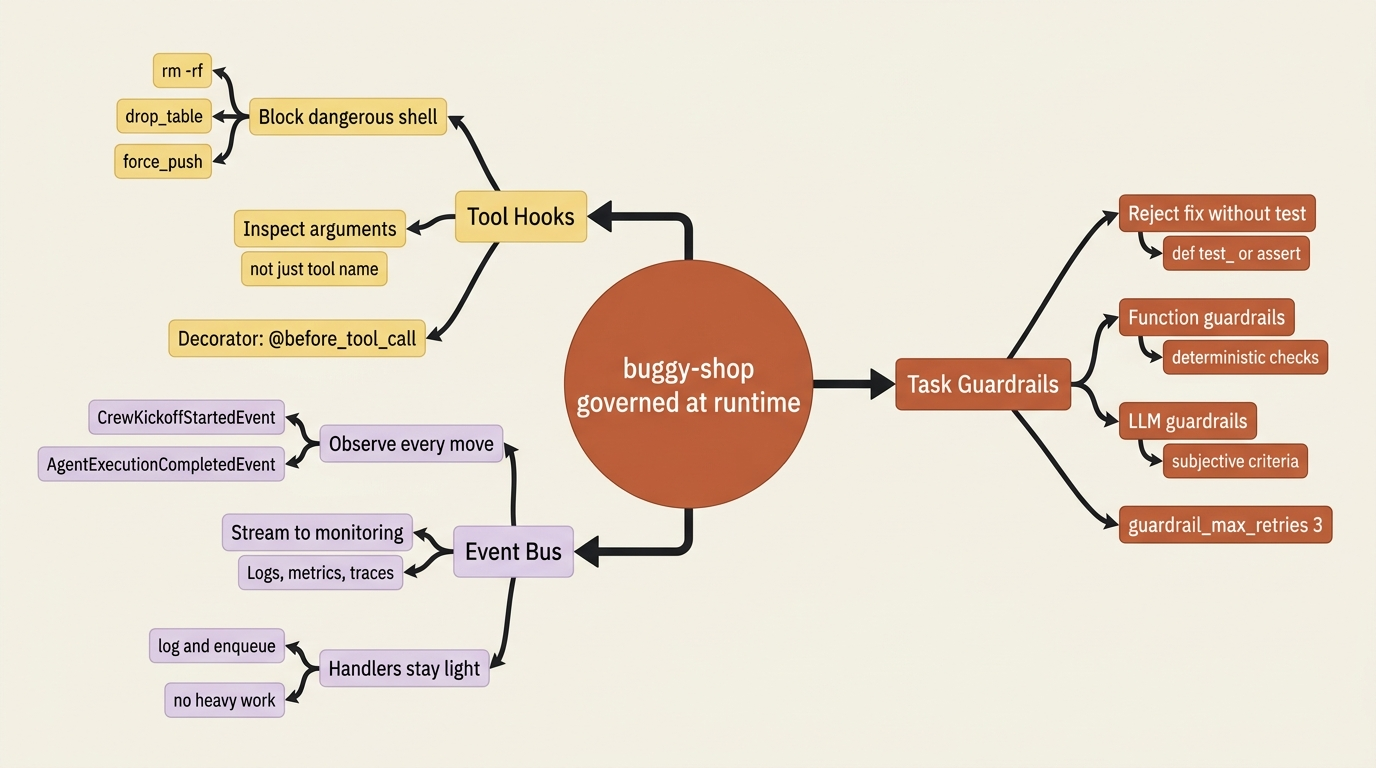
Notice that these compose. The hook stops the categorically forbidden, the guardrail enforces the structurally required, and the event listener records all of it. Three surfaces do three jobs, and none of them strains to be the others.
Do this today
Three concrete moves you can make to a real crew, today, in under an hour.
- Add one
before_tool_callhook that blocks one dangerous tool call by its arguments. Pick the call that scares you most (a shell tool, a file deleter, a force-push) and write the check. You will spend more time deciding what to block than writing the code. - Add a
BaseEventListenerthat logsCrewKickoffStartedEventandAgentExecutionCompletedEventto wherever your logs already go. Remember to actually construct the instance and import the module; otherwise nothing fires. Run a kickoff and confirm you see the events. - Pick one task whose output you currently inspect by hand and add a function-based guardrail with
guardrail_max_retries=3. Encode the check you have been doing manually. The next time the agent produces a sloppy output, it will be sent back to fix it before you ever see it.
From configurable to governable
buggy-shop is now governable, not just configurable. You can intercept its actions, observe its every move, and enforce standards on its output, in flight. That is most of what you need to run an agent responsibly. And it took three small pieces of code, not a rewrite.
The shift in mindset is the real takeaway. Configuration is what you do before kickoff. Governance is what runs alongside the agents while they work. Hooks, events, and guardrails are not advanced features for big teams. They are the surfaces that turn a crew you have to babysit into a crew you can leave alone. Reach for the right one for the right job, and stop forcing any single mechanism to carry the weight of all three.