
Stop Hand-Writing Every Tool: Three Ways to Grow a CrewAI Crew Without Drowning It
Hand-writing tools does not scale, and stuffing them all into one agent ruins its judgment. The fix is breadth via MCP, then depth via delegation, in that order.
Hand-writing every tool does not scale. Cramming them all into one agent ruins its judgment. CrewAI answers with MCP for breadth and delegation for depth, and the order you reach for them matters more than the syntax.
Your crew has hit the ceiling: too many tools to hand-write, one overloaded generalist agent, and no way to plug in services you don't own. There is a clean order to climb out.
In this article: You will learn the three moves that turn a small CrewAI crew into a real team with reach: keeping custom tools legible, connecting whole servers of capabilities through the Model Context Protocol with the
mcpsfield, and handing focused sub-problems to specialists withallow_delegation. We cover the trade-offs of each, the gotchas that bite at scale (silent MCP timeouts, leaked subprocesses, runaway delegation loops), and a concrete pattern for wiring a reviewer agent and an MCP-backed GitHub capability into a working crew.
A crew that started life with a handful of hand-written tools feels great. It acts, it remembers, it knows the rules, and it has a leash where the leash belongs. Then the scope grows. You need dozens of capabilities, connections to services your team does not own, and a way to hand off focused sub-problems without burying a generalist agent in detail it does not need. The crew that was capable at five tools is suddenly fragile at fifteen.
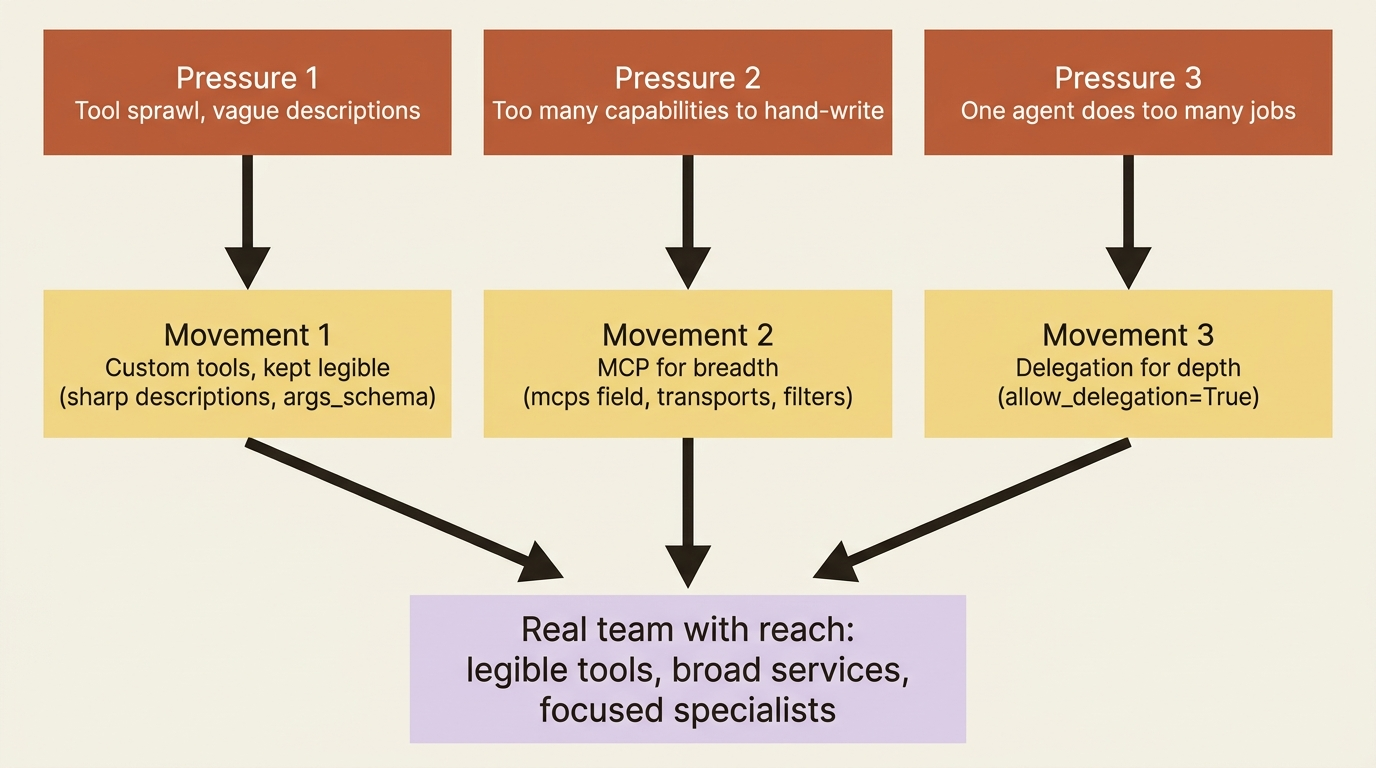
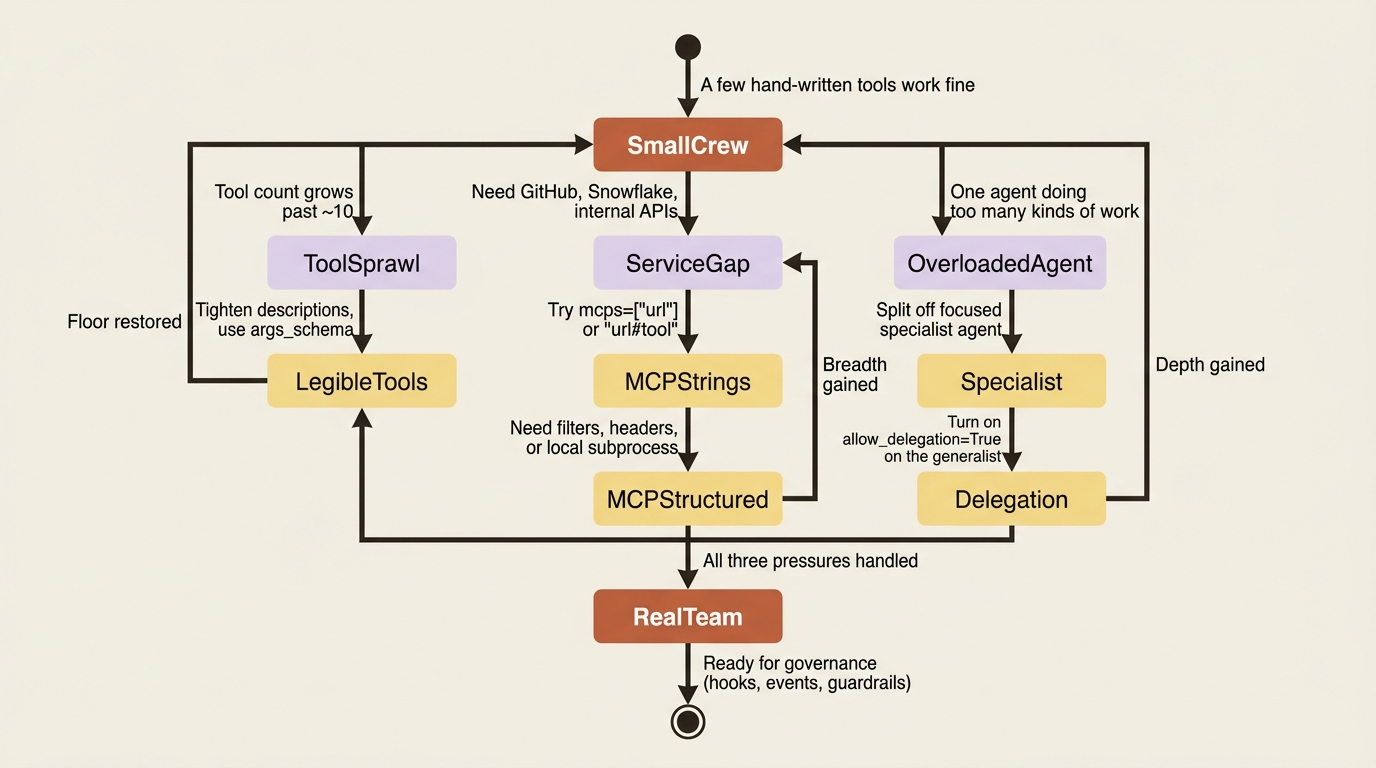
There are three moves that resolve this, and they answer three different pressures. The trick is taking them in the order you actually hit them. First, you organize the custom tools you are already writing. Then, when writing each tool by hand stops scaling, you reach for CrewAI MCP integration to plug into whole servers of tools at once. Finally, when one agent is doing too many kinds of thinking, you delegate to specialists. Breadth, then depth.
This article walks all three moves and shows where each one earns its keep.
Movement one: custom tools, kept legible
Building a tool is mechanical. Keeping ten of them legible is the part that goes wrong as a crew grows. Two habits matter more than any framework feature.
Keep each tool's description sharp and non-overlapping. The description is how the agent decides which tool to reach for, so two tools with fuzzy, similar descriptions ("works with files," "handles files") force the agent to guess, and it guesses wrong. With ten tools loaded, descriptions are doing real routing work. Vague ones quietly degrade every decision the agent makes, and the degradation is hard to attribute because nothing throws an error.
Give a tool only what it needs to do its job. A tool that reads a per-request value, such as a user ID or an API key for one specific call, should take it as an argument validated by its args_schema, not reach into global state. That keeps tools testable in isolation and safe to reuse across crews. None of this is new machinery. It is the discipline that keeps a growing toolbox from becoming a liability.
That covers the floor. The ceiling is what happens when you simply have too many capabilities to hand-write at all.
Movement two: MCP, for breadth without bloat
Eventually hand-writing tools stops scaling. You want your agent to talk to GitHub, query Snowflake, and hit an internal service, and each of those is a whole family of operations you do not want to reimplement as BaseTool subclasses. The Model Context Protocol exists for exactly this. An MCP server exposes a set of tools over a standard protocol, and CrewAI can connect to one and pull those tools into an agent automatically.
The easy path is the mcps field on an agent. Install the library, then list servers as plain strings:
uv add mcp
from crewai import Agent

analyst = Agent(
    role="Data Analyst",
    goal="Answer questions using internal data and external services",
    backstory="You reach for the right service for each question.",
    mcps=[
        "https://mcp.example.com/api",                     # whole server, all tools  ①
        "https://api.weather.com/mcp#get_current_weather", # one specific tool  ②
        "snowflake",                                       # a connected MCP from the catalog  ③
    ],
)
① A bare URL string pulls in every tool the server offers, namespaced so names do not collide.
② The #tool_name suffix narrows a rich server down to the single tool you actually want.
③ A plain slug references an MCP already connected in your CrewAI account, so no URL is needed.
Note: The full extracted listing at code/crewai/part-8-extending-the-crew/listings/01-mcps-strings.py shows the parts elided here.
Three things to notice. A bare URL pulls in every tool the server offers. The #tool_name suffix pulls in just one, which matters because a server might expose forty tools when you want three. And a plain slug like "snowflake" references an MCP you have connected in your CrewAI account, no URL needed. Tools from every listed server are discovered automatically and namespaced so their names do not collide.
When you need real control, use the structured configs instead of strings. Real control means a local server launched as a subprocess, authentication headers, or filtering which tools come through:
from crewai import Agent
from crewai.mcp import MCPServerStdio, MCPServerHTTP
from crewai.mcp.filters import create_static_tool_filter

analyst = Agent(
    role="Data Analyst",
    goal="Use a local filesystem server and a remote API",
    backstory="You work across local and remote tools.",
    mcps=[
        MCPServerStdio(
            command="npx",                                      # ①
            args=["-y", "@modelcontextprotocol/server-filesystem"],
            tool_filter=create_static_tool_filter(              # ②
                allowed_tool_names=["read_file", "list_directory"],
            ),
            cache_tools_list=True,                              # ③
        ),
        MCPServerHTTP(
            url="https://api.example.com/mcp",                  # ④
            headers={"Authorization": "Bearer your_token"},     # ⑤
            streamable=True,
        ),
    ],
)
① MCPServerStdio launches a local server as a subprocess, here via the npx command and its args.
② The tool_filter is how you let only a named slice of tools through from a server that offers many.
③ cache_tools_list=True avoids re-discovering the tool list on every connection to that server.
④ MCPServerHTTP connects to a remote server by URL rather than spawning a local process.
⑤ The headers field carries authentication, such as a bearer token, to the remote endpoint.
Note: The full extracted listing at code/crewai/part-8-extending-the-crew/listings/02-mcp-structured-configs.py shows the parts elided here.
MCPServerStdio launches a local server as a subprocess, MCPServerHTTP and MCPServerSSE connect to remote ones, and the tool_filter is how you let three tools through from a server that offers forty. That filtering is the whole point of MCP for breadth: you connect to a rich server but expose only the slice this agent should see, so the prompt does not balloon with tool descriptions the agent will never use.
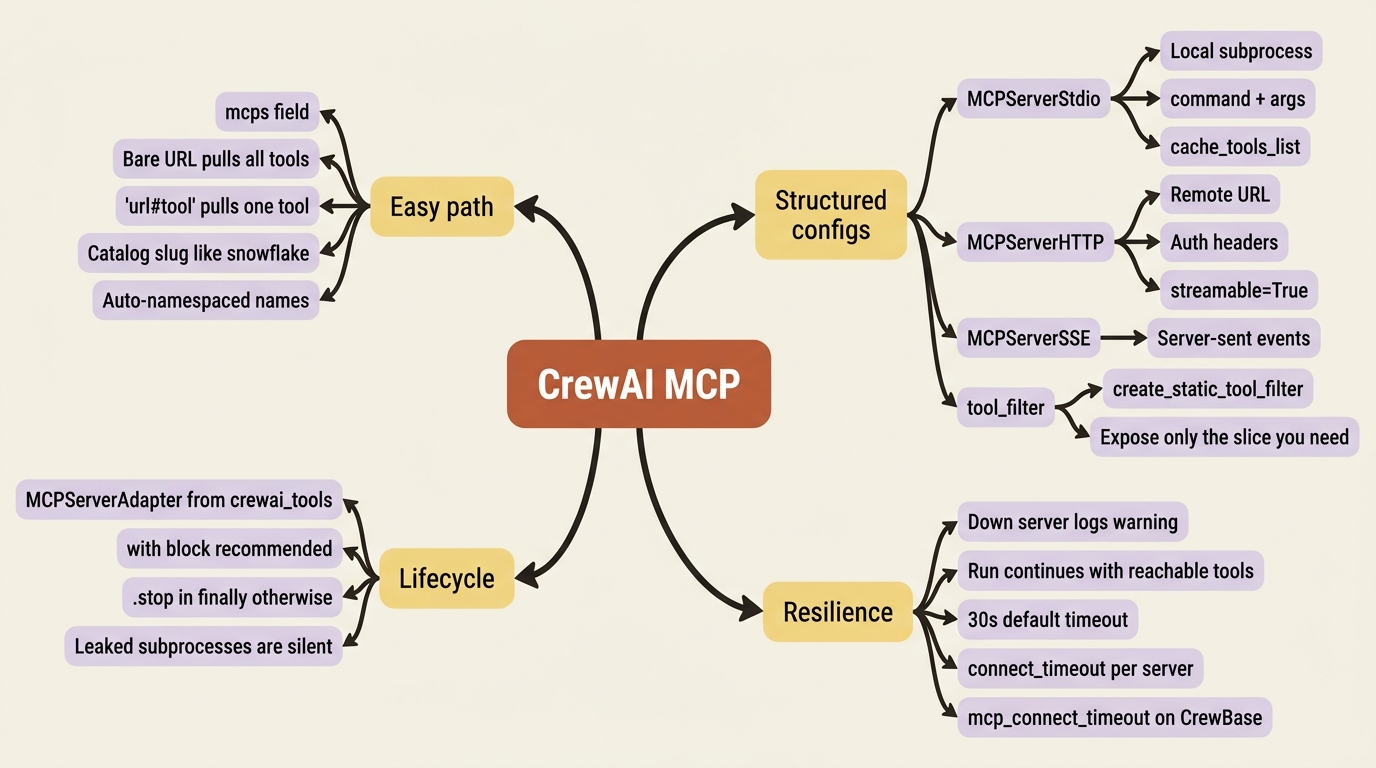
The DSL is resilient by design. List a server that is down and CrewAI logs a warning and carries on with the tools it could reach, rather than crashing the run. That matters in production, where one flaky third-party server should not cost you the whole crew.
For advanced cases where you want to manage the connection lifecycle yourself, the crewai-tools package provides MCPServerAdapter. The recommended way to use it is a context manager, which opens and closes the connection for you:
from crewai_tools import MCPServerAdapter
from mcp import StdioServerParameters

server_params = StdioServerParameters(
    command="python3",
    args=["servers/my_server.py"],
)

with MCPServerAdapter(server_params) as mcp_tools:
    analyst = Agent(role="...", goal="...", backstory="...", tools=mcp_tools)
    # build and run the crew inside the with-block
Two traps lurk here, and both have bitten real crews in production.
If you use MCPServerAdapter outside a context manager, you own the lifecycle and must call .stop() yourself, ideally in a try/finally, or the server connection and any subprocess behind it leaks. The with statement exists precisely so you do not have to remember this. Prefer it.
The second trap is more insidious. MCP connections time out after 30 seconds by default. A cold or slow server blows past that and the tools silently do not load. There is no exception thrown, no failed task, just an agent that never sees the capability it was supposed to have. Bump the timeout when you know a server is slow to wake: use connect_timeout on the adapter, or mcp_connect_timeout on a @CrewBase crew.
Breadth solved. Now what about the agent itself being overloaded?
Movement three: delegation, for depth
The third pressure is different in kind. It is not that you need more tools. It is that one agent is trying to do too many kinds of thinking. A "Python Engineer" agent that researches, writes code, reviews its own work, and writes the deploy notes is going to do all four jobs at roughly C+ quality. The fix is to let it hand work to specialists, which in CrewAI is delegation.
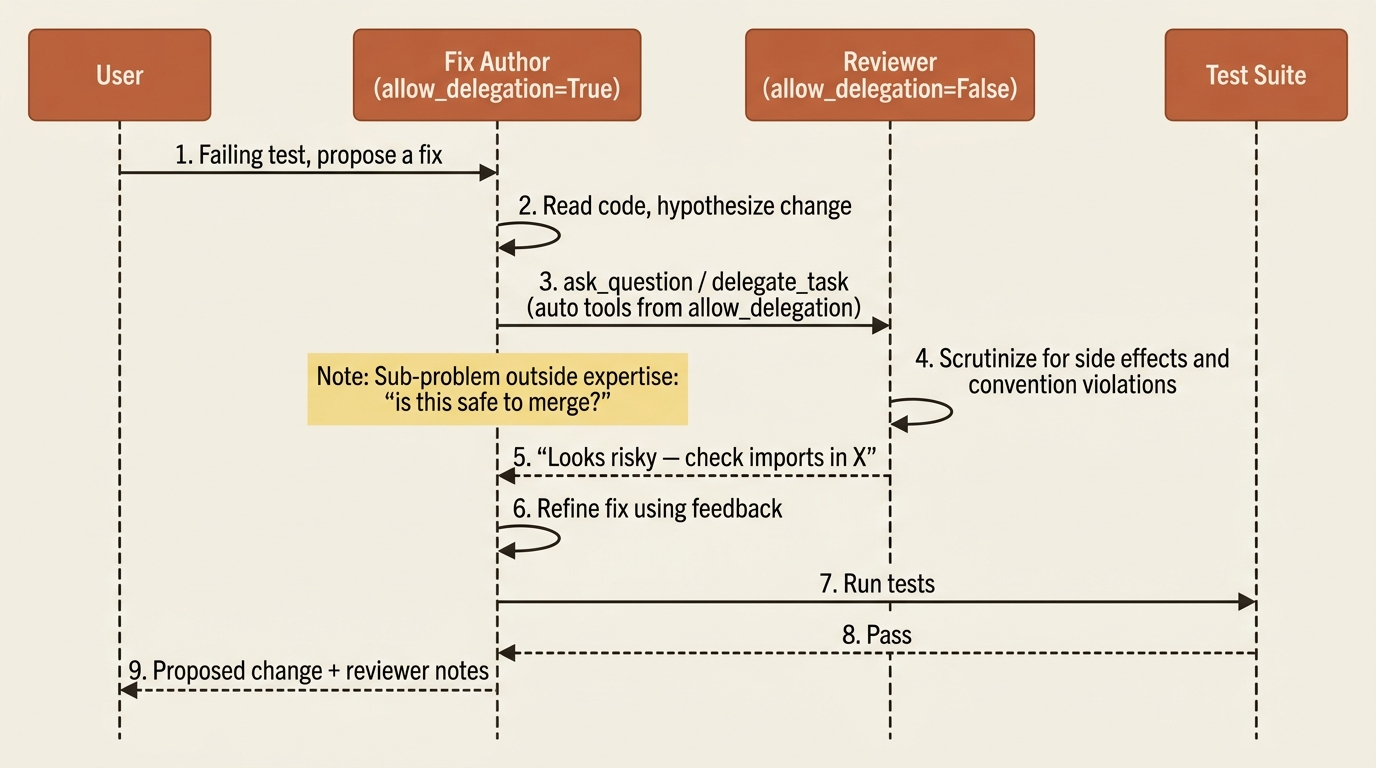
Turn on allow_delegation=True and an agent automatically gains two tools: one to delegate a task to a coworker, and one to ask a coworker a question. That is the whole mechanism. An agent that hits a sub-problem outside its expertise can route it to the teammate who owns that expertise, and incorporate the answer, without you wiring the handoff explicitly.
from crewai import Agent

fix_author = Agent(
    role="Python Fix Author",
    goal="Propose a fix, consulting specialists when the change is risky",
    backstory="You write the fix, but you ask the reviewer before trusting it.",
    allow_delegation=True,  # can now delegate to and question coworkers
)
A few honest cautions, because CrewAI agent delegation is powerful and easy to overdo.
Enable it on coordinators and generalists. Consider leaving it off on focused specialists. A specialist that can re-delegate is exactly how you get agents passing work back and forth in a loop, each one helpfully consulting the next, none of them finishing anything.
Keep roles distinct and non-overlapping so the delegating agent knows who to hand what. Two agents that could both plausibly handle "review code" will get equal probability mass and the delegation becomes noise. This is the same machinery the hierarchical process runs on, just expressed agent-to-agent rather than through a manager.
There is a fourth door worth knowing about, even though we will not wire it here. When the specialists you want live outside your codebase entirely, MergeAgentHandlerTool loads hundreds of pre-built connectors, such as Linear and Slack, as ready-made tools from a tool pack. So "give my agent the ability to create a Linear issue" does not mean writing a Linear tool. It is the bridge when your specialist is really a third-party service.
Wiring it into a real crew
Concrete is more useful than abstract. Take a code-maintenance crew whose job is to read failing tests, hypothesize a fix, propose it, and verify the change. Two additions make it noticeably deeper.
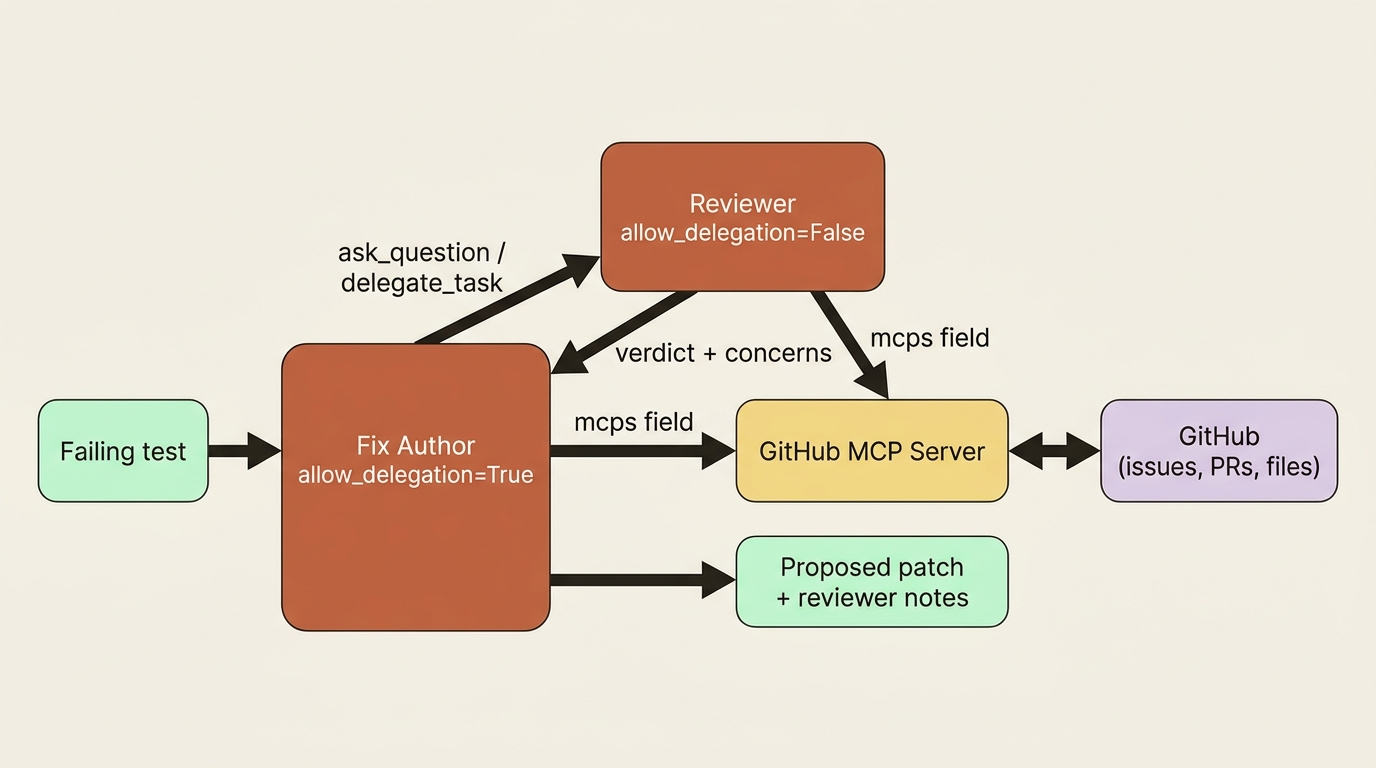
First, a reviewer agent: a specialist whose only job is to scrutinize a proposed fix for correctness and side effects. The fix author gets allow_delegation=True so it can ask the reviewer before committing to a change, and the reviewer stays focused with allow_delegation=False so it cannot bounce the work back.
reviewer = Agent(
    role="Code Reviewer",
    goal="Catch fixes that pass the test but break something else or violate conventions",
    backstory="You are the skeptical second pair of eyes that asks 'what else does this touch?'",
    allow_delegation=False,
)
Second, an MCP-backed capability: rather than hand-writing a GitHub tool, connect a GitHub MCP server through the mcps field so the crew can read related issues or check whether a file has open pull requests against it before proposing a change. The reviewer consults that context as part of its scrutiny.
The crew has not just gained tools. It has gained a division of labor, with the fix author proposing, the reviewer challenging, and external context flowing in through MCP rather than bespoke code. That shape is what distinguishes a team from a single agent with a lot of toys.
Do this today
- Audit your tool descriptions. Open every custom tool in your crew and re-read its
descriptionfield as if you were the agent picking between them. Any two that could plausibly describe the same job need to be rewritten or merged. - Pick one capability you have been about to hand-write and check for an MCP server instead. GitHub, Slack, Linear, Postgres, Snowflake all have well-maintained ones. Connect with a string in
mcps, then tighten withtool_filteronce it works. - For any remote MCP server, set
connect_timeoutexplicitly. The 30-second default fails silently. A cold serverless start can take 45 seconds, and you will spend an afternoon wondering why a tool "isn't being called." - Find the one agent in your crew that is doing too many kinds of work. Split off the most distinct sub-job into its own focused specialist with
allow_delegation=False, and turn onallow_delegation=Trueon the agent that should consult it. - Always wrap
MCPServerAdapterin awithblock. If you cannot, call.stop()in afinally. Leaked subprocesses do not show up in your tests; they show up in your bill.
Breadth, then depth, then control
The order matters more than the syntax. Custom tools are the floor: legible, sharp-described, no global-state reach. MCP is the breadth move that lets you connect to whole rich services without reimplementing them. Delegation is the depth move that keeps any single agent from trying to do four jobs at once. Take them in that order and a small crew turns into a real team with reach, without any one part of it collapsing under its own surface area.
But notice what every mechanism in this article shares: it is something you set up before the run. A tool, a server, a delegation rule. None of it lets you reach into the run itself, watch what the agents are doing as they do it, and shape behavior in flight. Block a specific tool call based on its arguments rather than its name. Inject the current date into every agent's context automatically. Log every file write to an audit trail. Trigger summarization when context gets long.
That is the next layer, and it is where a crew stops being something you assemble and becomes something you actively govern. Configuration buys you a team. Control is what makes that team safe to ship.