
Stop Clicking Run Once: Allow, Deny, and Sandbox the Cursor Agent
Approving the same safe command over and over is not safety; one small committed .cursor/cli.json that allows npm test, denies git push, and a sandbox that fences writes to the project replace the clicking with rules you can read.
Write one small .cursor/cli.json that lets npm test run without asking and refuses git push outright, then turn on the sandbox and watch a write outside your project fail.
You have pressed Run once on the same npm test a dozen times, and you still could not say what the agent would do if it decided to push.
In this article: Day 4 of an 18-day guide. Start here reads your Cursor CLI approval mode, writes a project allowlist and a deny rule, proves both in a new session, turns on the sandbox for one session, and commits the rules. Going deeper covers the five permission token types, the three approval modes, why a command that must never run belongs in allowlist mode, what the sandbox does and does not cover, where the editor keeps its own lists, and which mode a new account starts in.
Every approval prompt asks one question: should this command run? After a few days you answer it on reflex, mostly for npm test, and reflex approves the safe command and the dangerous one with the same keystroke.
The Cursor CLI lets you write the answer down once. An allow rule says which commands run without asking, a deny rule says which command never runs, and the sandbox limits where any command may write. Today you set up all three and check each one.
Tested on Cursor CLI 2026.11.13-eacade1. Key editor steps tested in the Cursor editor 3.30.14; other editor steps are written from the docs.
Yesterday you planned the damaged category before the agent built it, and six tests passed.
Start here
At the end of today, a new cursor-agent session runs npm test without asking you, refuses git push, and fails to write outside your project when the sandbox is on. You also commit the rules that do it.
Starting fresh or fell behind? Run git switch -C main cursor/day-03. This replaces your main with the end of Day 3; to keep your own work, run git branch my-backup first.
Check your starting state
Start where Day 3 ended, in the Ticket Triage project, a small support-ticket classifier.
cd ~/code/ticket-triage
git status --short
git log --oneline -1
npm test
git status --short prints nothing. git log --oneline -1 shows the newest commit, with your own hash:
464ec1e Add a damaged category
npm test ends with ℹ pass 6 and ℹ fail 0. If any check differs, finish Day 3 first.
Read your approval mode
On Days 1 to 3, the agent stopped to ask before every npm test. The reason is in the CLI's global settings file, ~/.cursor/cli-config.json. Read two lines of it without changing anything.
grep -E '"approvalMode"|Shell\(ls\)' ~/.cursor/cli-config.json
The command prints the two matching lines:
      "Shell(ls)"
  "approvalMode": "allowlist",
approvalMode picks the approval mode, and allowlist means commands on the allowlist run and every other command asks first. "Shell(ls)" is the only entry on the allowlist, so ls is the only command that runs without a prompt (CLI configuration). npm test was never on the list, which is why it asked. Choosing Run once each time never changed the file.
Write a project allowlist and a deny rule
A permission token is one entry in an allow or deny list. You use two forms today (CLI permissions):
Shell(npm:test)matches the commandnpmwith the argumenttest. The part before the colon is the command, and the part after it is the arguments.Shell(git:push*)matchesgitwith arguments that start withpush. The*matches anything afterpush, sogit push origin mainmatches too.
An allow rule lets a command run without a prompt. A deny rule blocks it. When both match, deny rules take precedence over allow rules (CLI permissions).
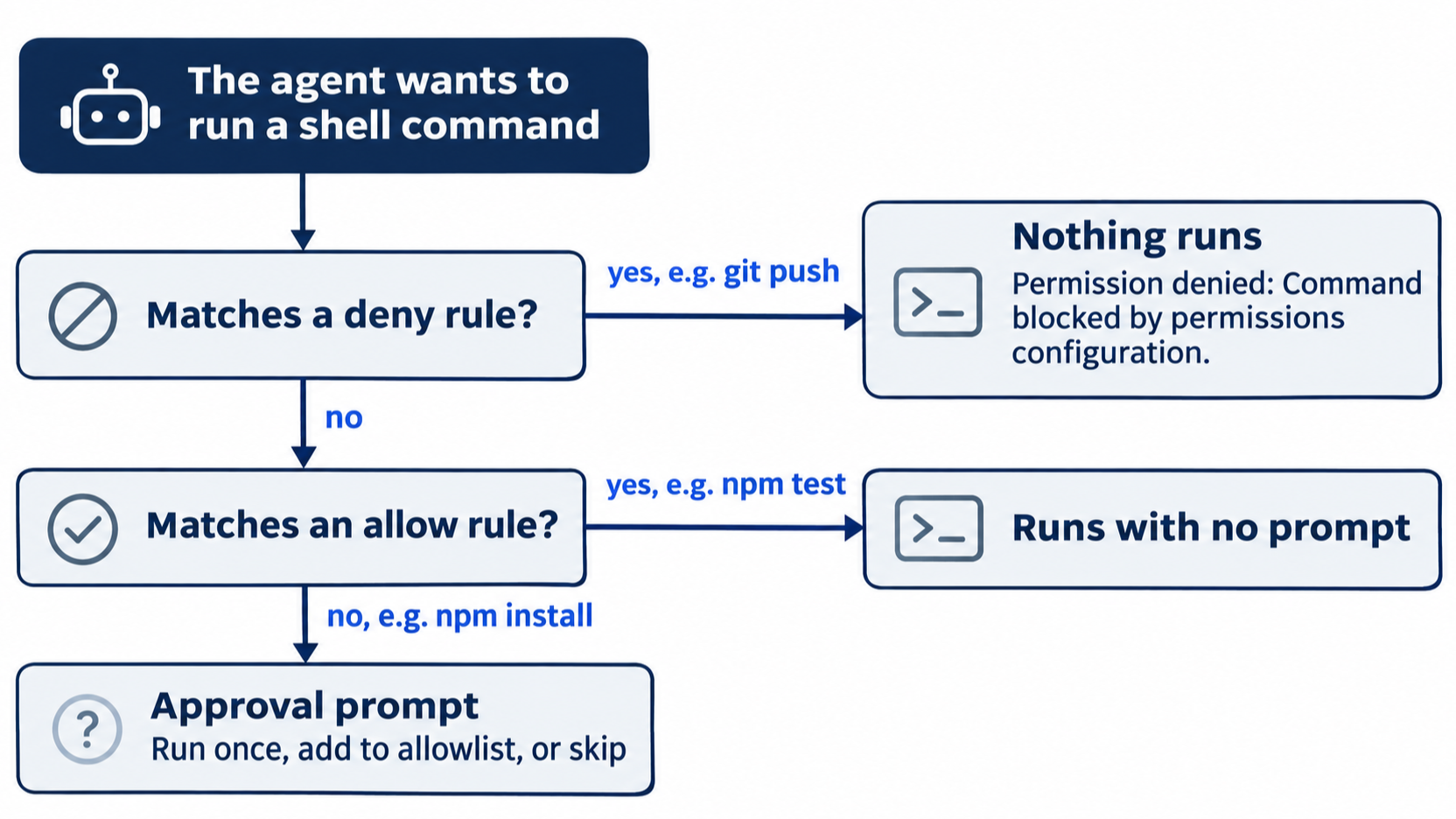
Put both rules in .cursor/cli.json at the root of the project. It is the one project file the CLI reads, and it holds only permissions; every other CLI setting stays in the global file. Once this file exists, the CLI uses its allow list instead of the global one, so ls asks too.
mkdir -p .cursor
cat > .cursor/cli.json <<'EOF'
{
  "permissions": {
    "allow": ["Shell(npm:test)"],
    "deny": ["Shell(git:push*)"]
  }
}
EOF
git status --short
git status --short shows ?? .cursor/. You may also create the file in any text editor, with the same contents.
Both entries are narrow on purpose. The allow rule names one command with one argument, so npm install still asks. The deny rule covers every push that starts with git push, to any branch or remote, while git status and git diff keep working as before.
Test the rules in a new session
Run the deny test in allowlist mode, the mode a new install starts in. If you started sessions with --auto-review on Day 2 or 3, leave the flag off for this test. After the session starts, look at the right end of the footer; if it shows Auto-review, type /quit and start again without the flag. Going deeper explains why.
The CLI reads the file when a session starts, so start a new one.
cursor-agent
Ask for the tests.
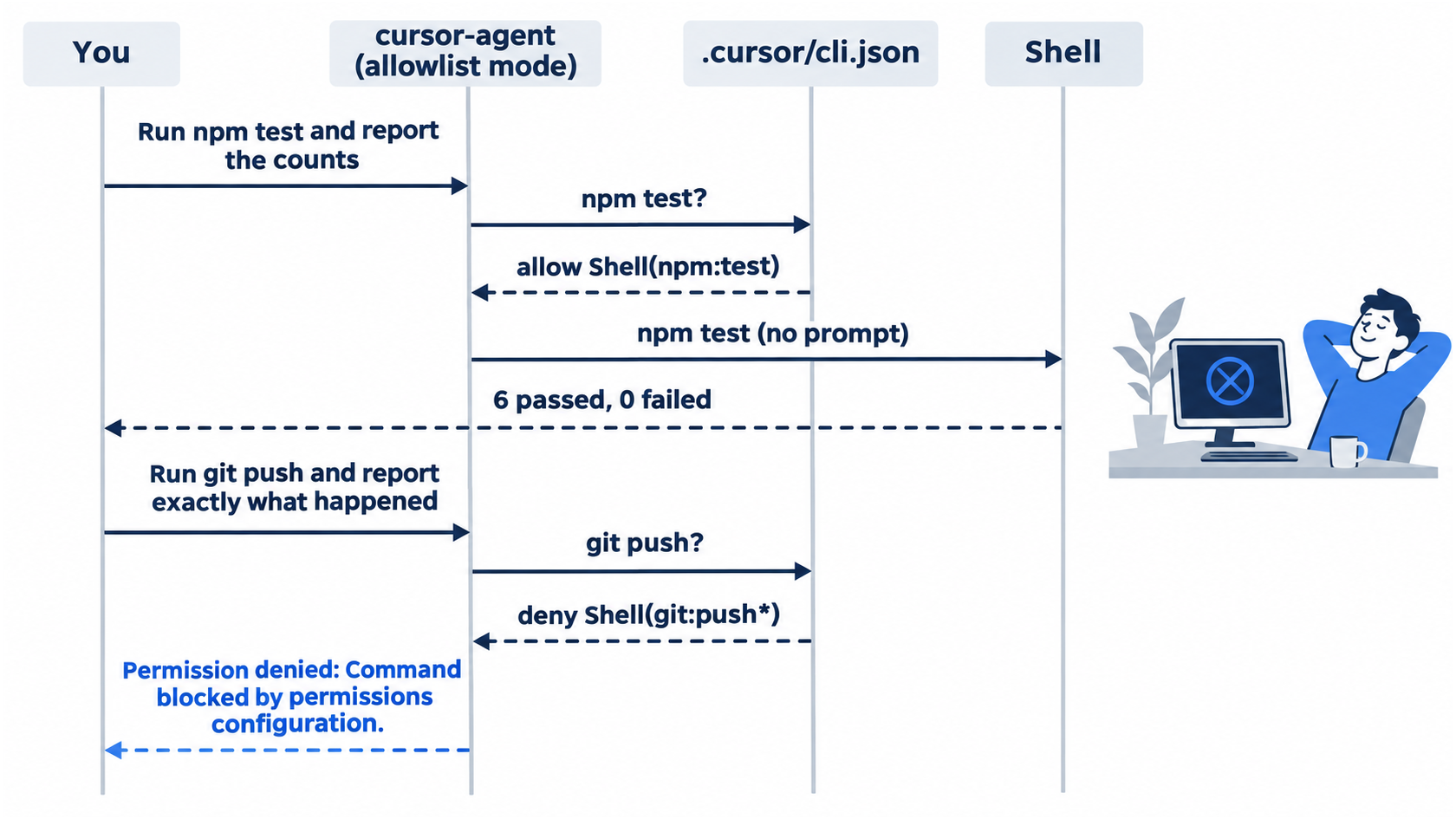
Run npm test and report the pass and fail counts.
The agent shows $ npm test and runs it with no approval prompt, then reports something like "6 passed, 0 failed". Now ask for the one command you denied.
Run git push and report exactly what happened.
The agent shows $ git push, and nothing runs. It passes on the shell's message:
Permission denied: Command blocked by permissions configuration.
In allowlist mode there are no prompts: npm test runs, and git push is blocked. This step is for allowlist mode only.
Use allowlist mode for any command that must never run. Auto-review sends commands to a classifier, and the docs say plainly that "Auto-review is not a security boundary. The classifier can make mistakes" (Run Modes). In our tests for this guide, we hit an issue with Auto-review and deny rules, reported it to Cursor, and will update this part when we hear back, because we may have it wrong. Leave the session with /quit.
Turn on the sandbox for one session
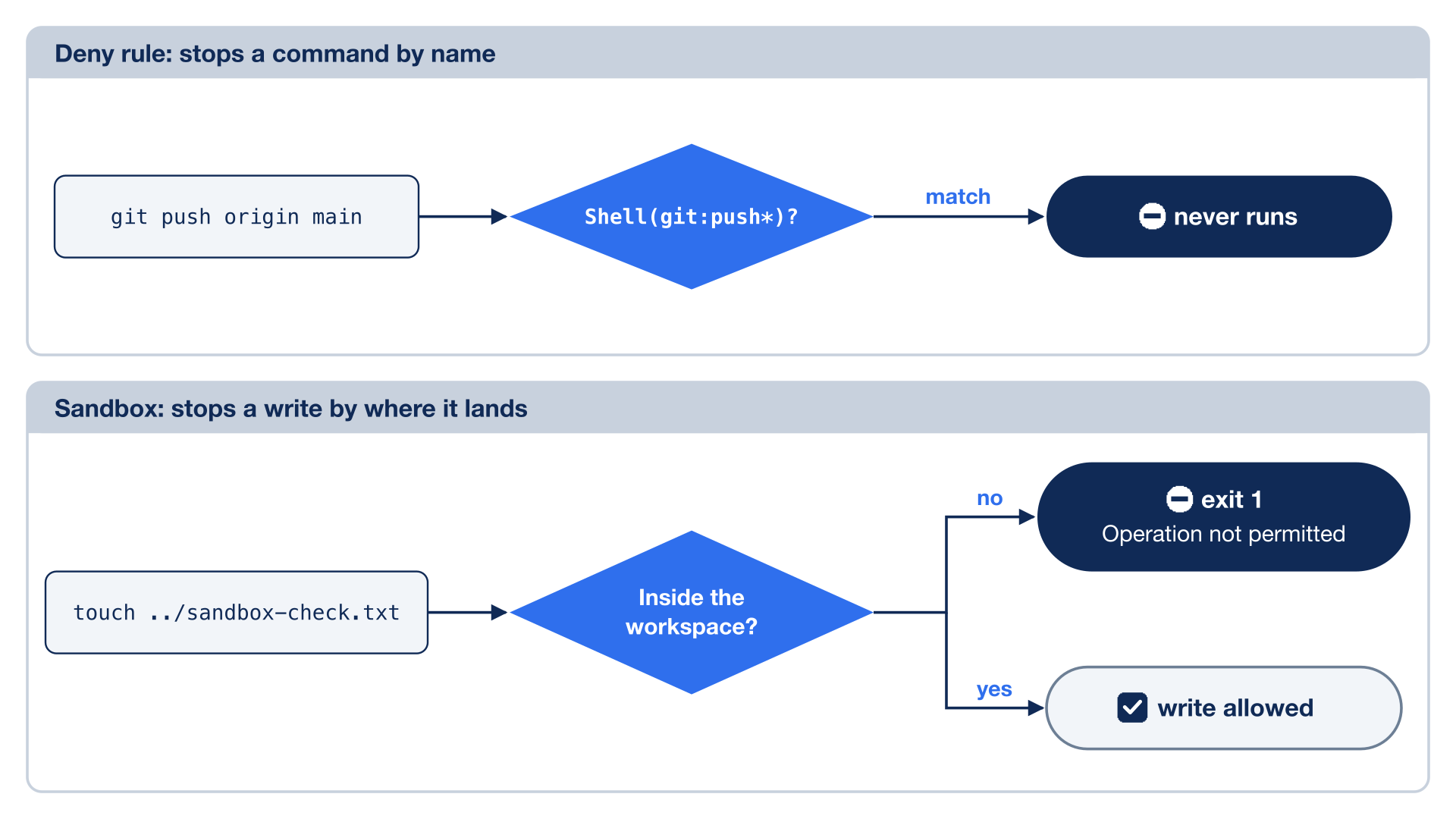
The sandbox runs the agent's shell commands with access limited to your project: a sandboxed command can read and write inside the project folder, but it cannot write outside approved paths (Run Modes). A deny rule stops one command by name. The sandbox does not care what the command is called, only what it tries to touch. The --sandbox enabled flag turns it on for the session it starts; the next cursor-agent without the flag starts with the sandbox off again.
cursor-agent --sandbox enabled
Ask for a command that writes one folder above the project.
Run this exact shell command and report what happened: touch ../sandbox-check.txt
The command runs and fails. The screen shows:
$ touch ../sandbox-check.txt exit 1
  touch: ../sandbox-check.txt: Operation not permitted
The agent explains it in a reply such as "The sandbox only allows writes inside the workspace, and ../sandbox-check.txt is outside it, so the write was blocked." No prompts appear. The same check also ran with cursor-agent --auto-review --sandbox enabled, with no prompts, and the write failed the same way.
Leave the session with /quit and check that the file does not exist.
ls ../sandbox-check.txt
ls reports No such file or directory.
Commit the rules
Commit the file by hand, so every later session in this project starts with the same rules. A committed .cursor/cli.json travels with the repository, and the CLI reads <project>/.cursor/cli.json in any copy of it.
git add .cursor/cli.json
git commit -m "Allow npm test and deny git push"
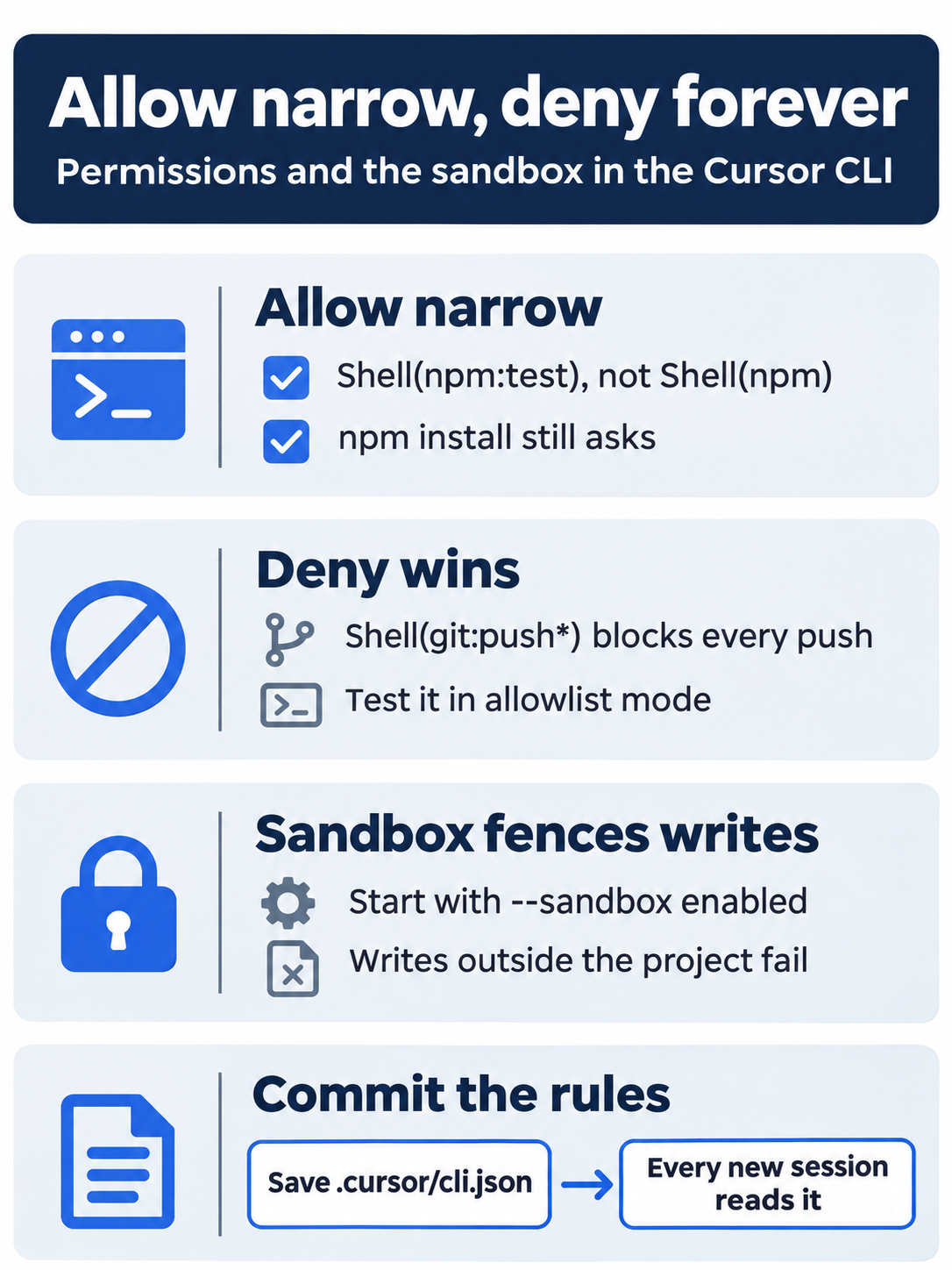
Write allow rules in the narrow command:args form, put a command that must never run in a deny rule because deny wins, let the sandbox block writes outside the project, and commit .cursor/cli.json so every session starts with the same rules.
The same steps in the editor
The editor sets its approvals in its own settings. Steps 1 and 4 were tested in the Cursor editor 3.30.14. Steps 2 and 3 are written from the docs, not yet run.
- (tested in the Cursor editor 3.30.14) Open Settings > Agents and scroll to the heading Execution and Approvals. In testing, before any change, Run Mode showed Allowlist (with Sandbox), and the Command Allowlist was empty. The test did not open the Run Mode menu. The docs name three Run Modes: Auto-review, Allowlist, and Run Everything (Run Modes). If your Run Mode is not an Allowlist mode, pick Allowlist to match the CLI.
- (written from the docs, not yet run) On the same page, add
npm testto the Command Allowlist. The editor keeps its own lists, separate from the CLI's (permissions.json reference), so.cursor/cli.jsonis for the CLI. - (written from the docs, not yet run) Create
.cursor/cli.jsononce, from either door, and commit it with the same message, so the CLI sessions in this guide use it. - (tested in the Cursor editor 3.30.14) Open a new agent and send
Run git push and report exactly what happened.In testing, with the Part 4.cursor/cli.jsonin the project and the editor's Command Allowlist empty, the editor asked beforegit pushand did not block it. A status check ran first with no prompt and printedfatal: no upstream configured for branch 'main'. Then a Pending approval card showedgit remote -v && echo "---" && git push, the mode Allowlist (with Sandbox), and three buttons: Skip, Always Run 'echo' + 2, and Run. In testing, Ctrl+C declined each approval (Skip was not clicked); choose Skip. The agent then asked a second time with a new command, Ctrl+C declined it, and the agent reported thatgit pushdid not run. The CLI'sCommand blocked by permissions configuration.message never appeared.
The editor asked before git push, and this guide does not show that the CLI deny file covers the editor. Going deeper explains why.
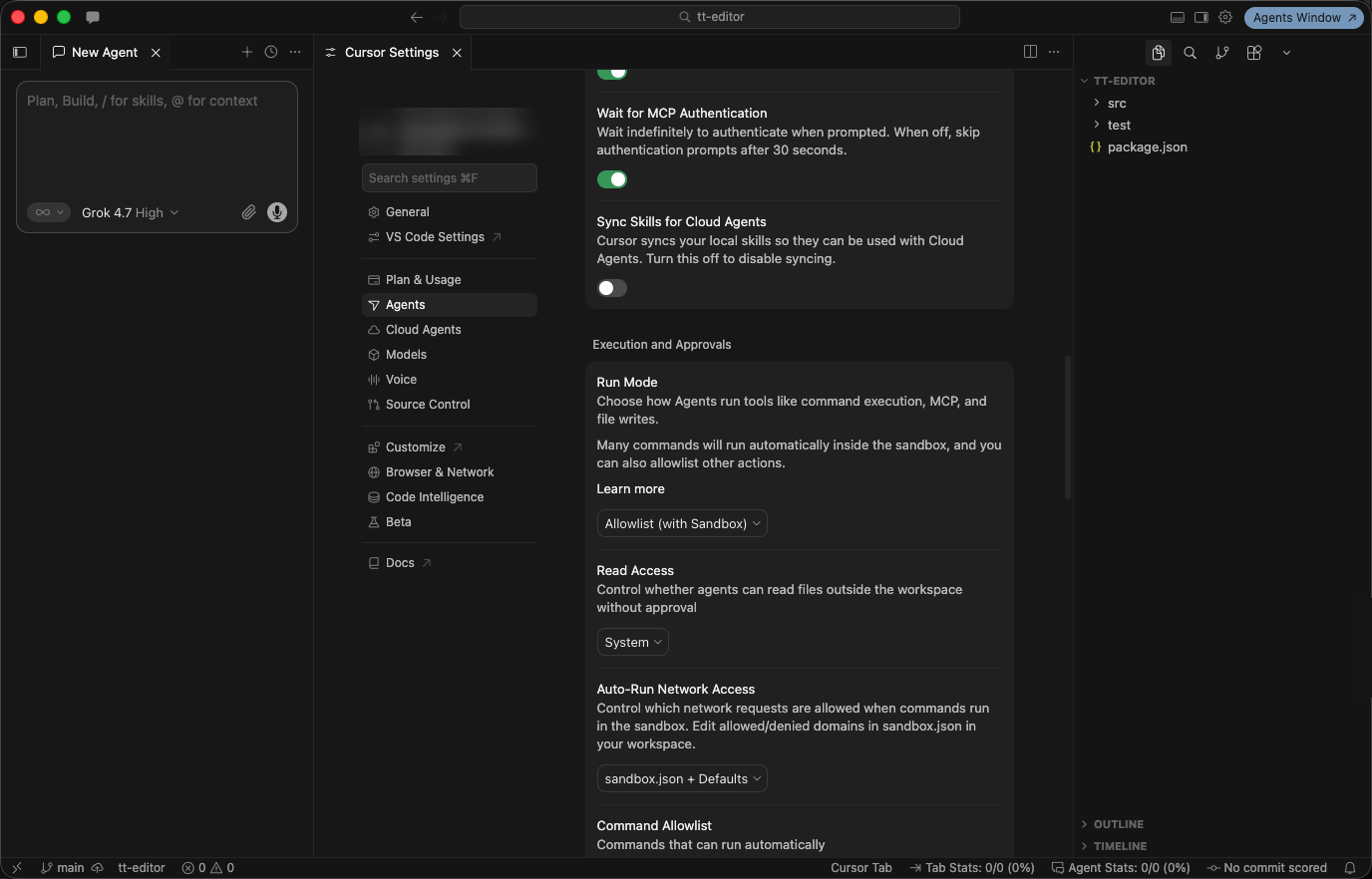
The Execution and Approvals settings before any change, with Run Mode set to Allowlist (with Sandbox), Cursor editor 3.30.14.
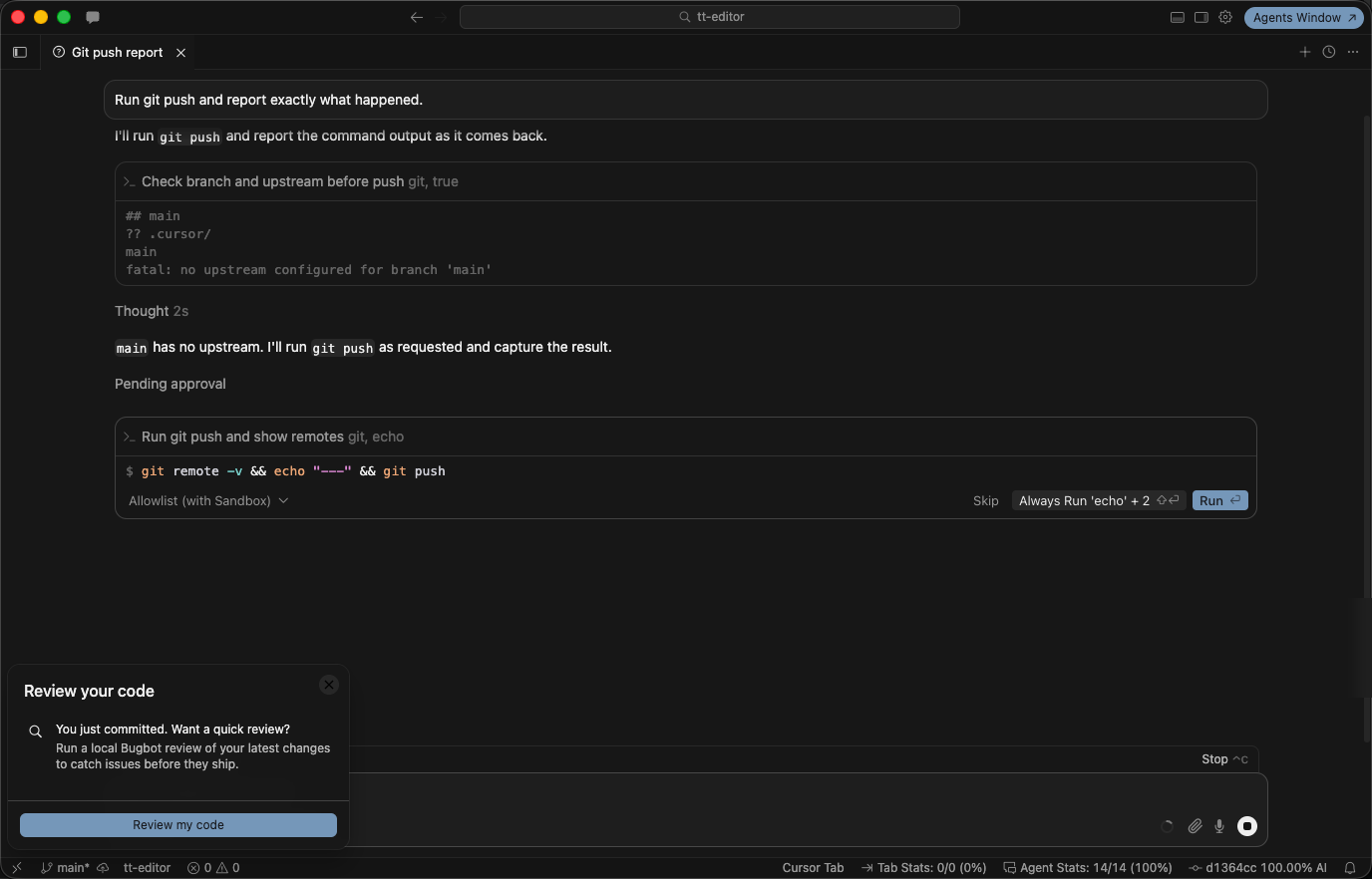
The editor asks before git push while .cursor/cli.json denies it, Cursor editor 3.30.14.
Your win
Start a new cursor-agent session, send Run npm test and report the pass and fail counts., then Run git push and report exactly what happened., then type /quit. npm test runs with no prompt, and git push is refused with Permission denied: Command blocked by permissions configuration. Then check the repository.
git status --short
git log --oneline -1
npm test
git status --short prints nothing. git log --oneline -1 shows Allow npm test and deny git push. npm test shows ℹ pass 6 and ℹ fail 0.
You can stop here. Going deeper explains why this works and where it breaks.
Going deeper
This section is for readers who want the full permission syntax, why deny rules belong in allowlist mode, and what the sandbox does and does not cover.
The five token types
The CLI permissions page lists five token types. Each one can go in allow or deny.
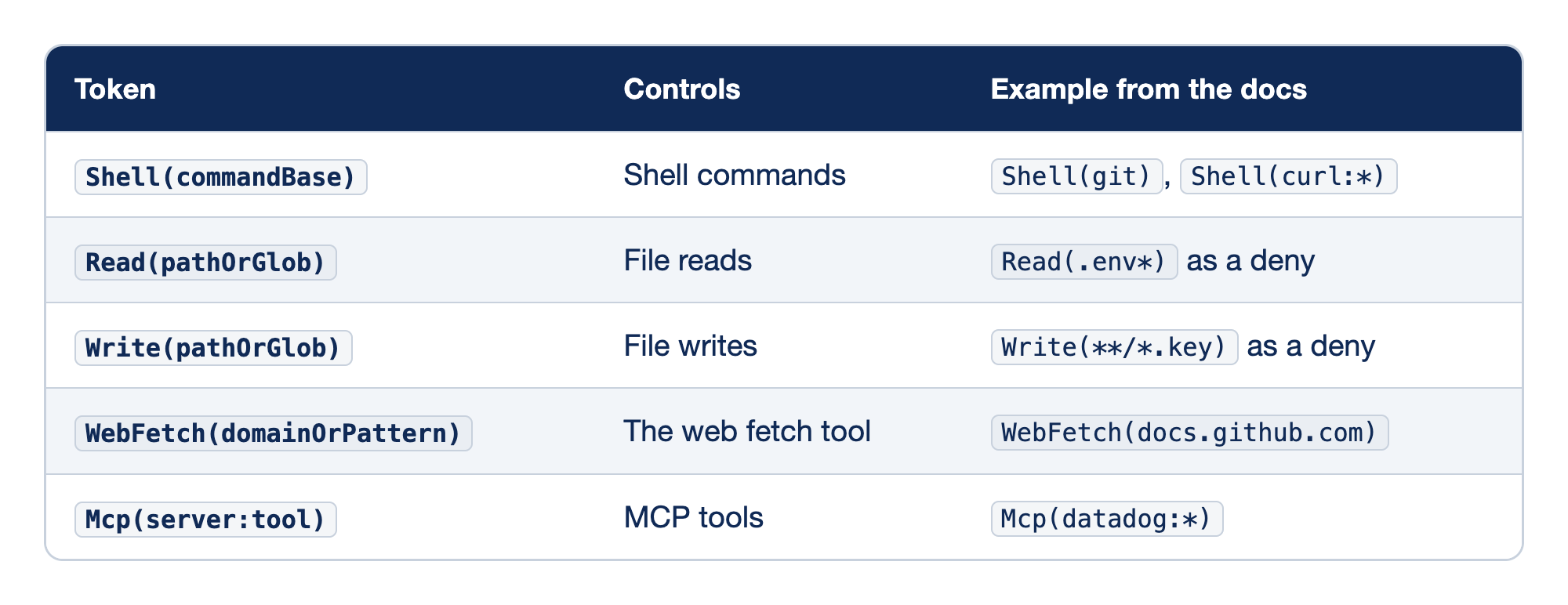
Each permission token governs one kind of tool call, so the right token depends on what the agent is doing. The Token column gives the token's form, the Controls column names the kind of call it governs, and the Example column gives an entry from the docs.
Shell(commandBase)controls shell commands and matches the first word of the command, thecommandBase, as inShell(git); add:argsto match the arguments too, as inShell(curl:*).Read(pathOrGlob)controls file and folder reads, and the docs show it mostly as a deny for secrets, as inRead(.env*).Write(pathOrGlob)controls file writes, withWrite(**/*.key)as the docs' deny example.WebFetch(domainOrPattern)controls the web fetch tool by domain:*.example.commatches subdomains,*matches every domain, and without an entry each fetch asks.Mcp(server:tool)controls MCP tools by the server name inmcp.json, with*as a wildcard, as inMcp(datadog:*).
The pattern rules are short. Globs use **, *, and ?. Relative paths are scoped to the workspace, and absolute paths can target files outside it. Deny rules win over allow rules.
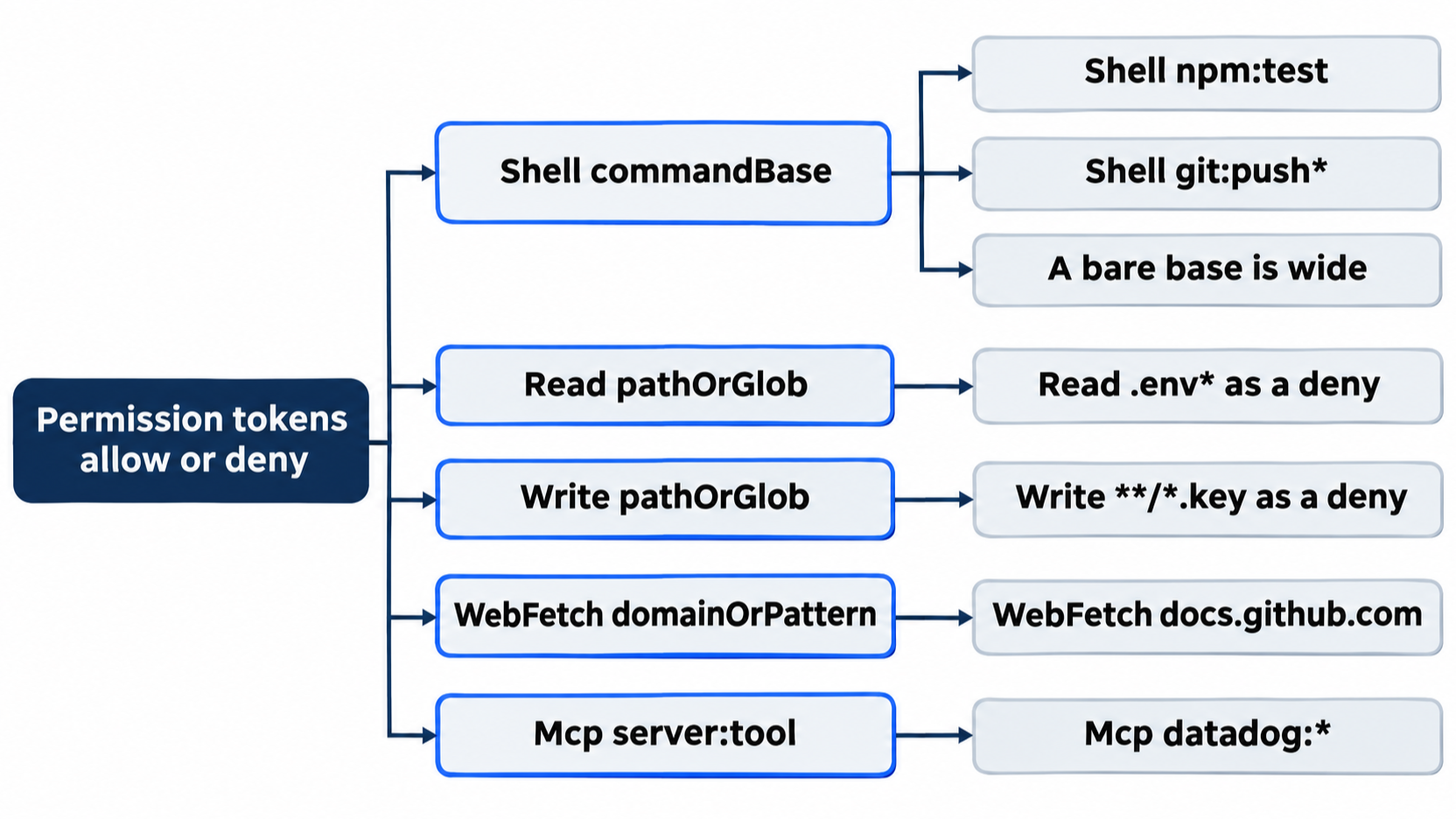
Gotcha: a bare command base is wider than it looks. The docs describe Shell(npm) as "Allow npm package manager commands", which covers npm install as well as npm test. The same goes for an Add Shell(node) to allowlist? choice at a prompt. Write command:args when you mean one command.
The Day 1 prompt offered Add Shell(npm test) to allowlist?, with a space instead of a colon. This guide writes the colon form, because it is the one the permissions page documents. In this guide's tests, the tab choice at an MCP tool prompt wrote the entry to the global file, ~/.cursor/cli-config.json. The shell prompt's tab choice was not tested, so assume it writes to the same file. While the project had its own .cursor/cli.json, the global file's allow entries did not apply, Shell(ls) included. No docs page describes this, so in a project with a .cursor/cli.json, put new allow entries in that file. Patterns match the arguments as written; this guide also did not test whether a different spelling of the same command, such as git -C . push, slips past Shell(git:push*).
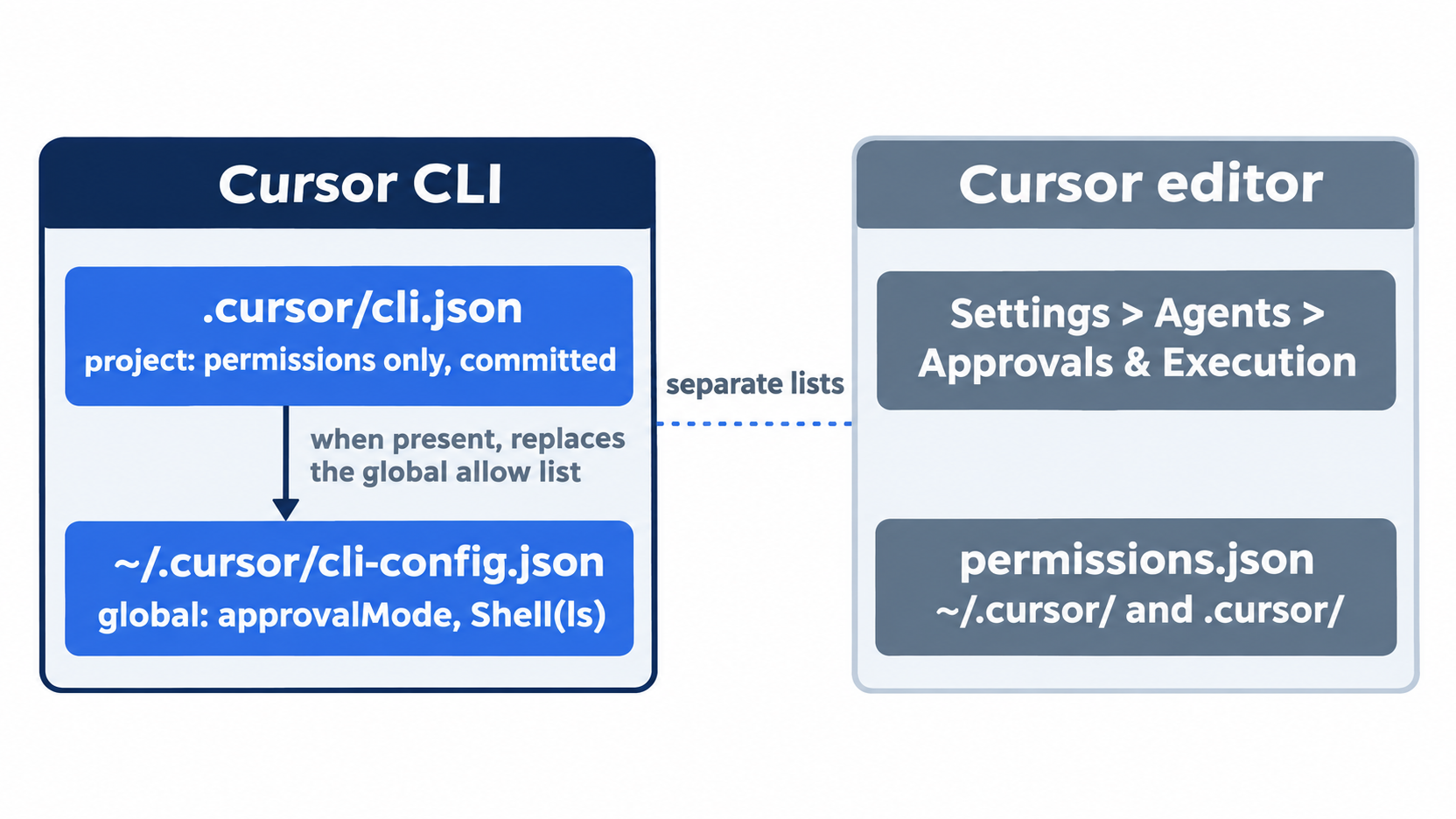
Approval modes in the CLI
approvalMode takes allowlist, auto-review, or unrestricted (CLI configuration). The page does not describe unrestricted, and this guide did not set it. A new install of the tested version held allowlist.
To use Auto-review for one session, start with --auto-review. Inside a session, /auto-review or /config turns it on (CLI changelog, v2026.06.22). The flag is missing from the CLI parameters table, as is --add-dir.
Run Everything is the third mode. In the CLI, -f or --force "Force allow commands unless explicitly denied," with --yolo as an alias; inside a session, /run-everything [on|off|status] toggles it (CLI slash commands). The words "unless explicitly denied" say that your deny rule still wins under --force. This guide did not test it.
Why deny rules belong in allowlist mode
In allowlist mode, the CLI checks each command against your allow and deny lists before it runs. Auto-review adds a classifier on Cursor's servers, and the docs state its limit: "Auto-review is not a security boundary. The classifier can make mistakes" (Run Modes).
You can steer the classifier with a .cursor/permissions.json file in the format from Configuring Auto-review:
{
  "autoRun": {
    "allow_instructions": [],
    "block_instructions": ["Every git push should go through approval first."]
  }
}
Run Modes says block_instructions describe actions the classifier "should lean toward blocking," and the permissions.json reference says to "Treat both as steering, not enforcement." No docs page says how Auto-review treats the CLI deny list, so this guide does not rely on it.
A command that must never run belongs in a deny rule, and you start the sessions that could run it in allowlist mode. Read the CLI changelog when you move to a new version.
What the sandbox covers
Sandboxing is a layer on top of the approval mode for shell commands; it controls where a supported command runs. In allowlist mode with the sandbox on, supported shell commands can run in the sandbox (Run Modes), which is why touch ran without a prompt and then hit the wall. The page adds that a sandboxed command that fails on a sandbox restriction can be rerun outside the sandbox, with the classifier reviewing the rerun. In both tested runs, the agent reported the failure and did not try again.
The defaults for a sandboxed command (Run Modes):
- Workspace files: read and write inside the workspace.
- Protected paths:
.git/config,.git/hooks,.vscode,.cursorignore, and sensitive Cursor config files. - Network: blocked by default, then opened by your network mode and
sandbox.json. - Temporary files:
/tmpand platform temp folders are writable.
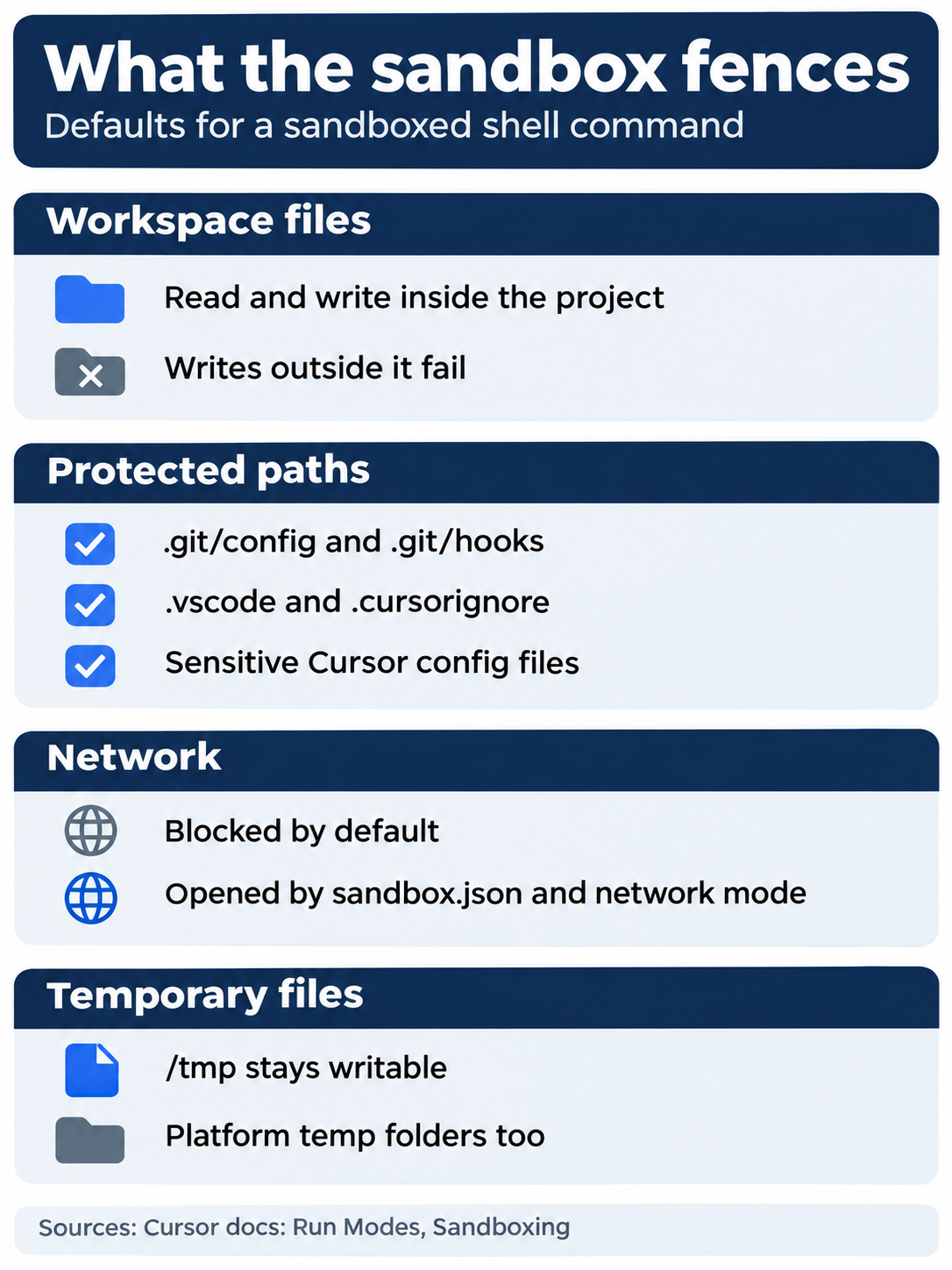
A sandboxed command reads and writes inside the workspace, cannot change protected paths such as .git/config and .git/hooks, has the network blocked until a network mode or sandbox.json opens it, and may write to /tmp.
The network has three modes: sandbox.json Only, sandbox.json + Defaults (the default, which adds Cursor's list of package-manager and language-tool domains), and Allow All. A sandbox.json file in ~/.cursor/ or the project's .cursor/ folder sets network domains and extra paths, and the project file wins when both exist (sandbox.json reference). Read Access, added in 3.23, decides whether the agent may read outside the workspace without asking: System (the default) or Workspace. In the CLI, the key is sandbox.readBoundary. In testing, the editor's Execution and Approvals settings showed Read Access System and Auto-Run Network Access sandbox.json + Defaults before any change. This guide did not change or test these settings.
Beyond the start flag, the CLI has /sandbox inside a session and a hidden sandbox subcommand with enable, disable, reset, and run (CLI parameters). This guide tested none of them. On the tested install, the global config held the sandbox mode disabled, which is why the sandbox is off unless you pass the flag.
On Linux, WSL, and Windows: macOS uses Seatbelt through sandbox-exec with no setup. Linux uses Landlock and seccomp, and needs kernel 6.2 or later with Landlock v3 and unprivileged user namespaces; on an older kernel, Cursor falls back to asking for approval. The standalone CLI does not ship the AppArmor profile some distributions need (Run Modes). The page names no Windows engine. This guide tested macOS only.
Other protections
Three more protections can require approval even when a mode would run a call (Run Modes): Browser Protection stops browser tools from running on their own, File-Deletion Protection stops automatic deletes, including rm, and External-File Protection stops automatic changes outside the workspace. Every MCP connection needs approval, and each MCP tool call does too unless it is allowlisted (Agent security).
The editor's allowlist lives somewhere else
The editor keeps its allowlists in Settings > Agents, under Execution and Approvals, or in ~/.cursor/permissions.json and <project>/.cursor/permissions.json (permissions.json reference). The file has three fields, terminalAllowlist, mcpAllowlist, and autoRun, and no deny field; a field defined in either file replaces the matching list in Settings. The same reference says "CLI permissions are separate," so treat .cursor/cli.json as the CLI's file and Settings as the editor's. This guide did not test whether the CLI also reads a terminalAllowlist from permissions.json.
Does the CLI deny file cover the editor? This guide cannot show that it does. In testing, with the Part 4 .cursor/cli.json denying Shell(git:push*), the Cursor editor 3.30.14 asked before git push with a Pending approval card. It did not show Command blocked by permissions configuration. The editor's own Command Allowlist was empty, so the test does not show whether the editor reads .cursor/cli.json at all. Until a test shows the editor blocking a denied command, treat the deny rule as a CLI rule. In testing, Ctrl+C declined each approval (Skip was not clicked); choose Skip when the editor asks to run a command you denied.
Which mode you start in
The docs disagree. Run Modes says Auto-review shipped in Cursor 3.6 on May 29, 2026, "as the recommended default." Agent security says "By default, terminal commands need your approval." The CLI on a new install started in allowlist, as you read today. No page says which Run Mode a new editor account shows. In testing, the Cursor editor 3.30.14 showed Allowlist (with Sandbox) before any change. This guide did not test a second account. Cursor 3.5 deprecated Ask Every Time; the page suggests Allowlist with an empty allowlist for the same behavior.
Team controls and Cloud Agents
Team admins can override which modes members may use, the sandbox network rules, and the read policy, and team settings take precedence over individual and project configuration (Run Modes). A team Auto-review configuration also makes Cursor ignore the user and project permissions.json files. If your settings look different from this article, ask whether an admin set them. Cloud Agents run on their own machine and never ask for approval (Run Modes).
The scene shows the payoff: a developer watching Permission denied appear where a push would have gone, a rule that held without a click.
If you already use Claude Code: in Claude Code's Manual mode, a file edit waits for your yes. Cursor never waits for edits; only commands, MCP calls, and fetches ask. In Cursor, start in allowlist mode when a deny rule must hold, because the docs say Auto-review "is not a security boundary."
Do this today
Everyone
- Repeat the win. In
~/code/ticket-triage, run the two prompts from Your win in a newcursor-agentsession, then/quit,git status --short,git log --oneline -1, andnpm test. The result: the tests ran with no prompt, the push showedPermission denied, the tree is clean, the last commit isAllow npm test and deny git push, andnpm testshowsℹ pass 6. - Start one habit: when you choose Run once for the same safe command for the third time, add it to
.cursor/cli.jsonin thecommand:argsform and commit it. The result: the next new session runs that command without a prompt, andgit log --oneline -1shows the commit.
If you read Going deeper
- Watch for a rerun outside the sandbox. Start
cursor-agent --auto-review --sandbox enabled, sendRun this exact shell command and report what happened: touch ../sandbox-check.txt, and read every line the agent shows before you type/quit. Then runls ../sandbox-check.txt. The result, in testing:touch: ../sandbox-check.txt: Operation not permitted, the agent reported the failure and did not try again outside the sandbox, andlsreportsNo such file or directory. If your agent does try again outside the sandbox, the classifier reviews that rerun. Reset:git status --shortprints nothing andnpm testshowsℹ pass 6. - Check that a deny rule holds under
--force(not tested in this guide). Startcursor-agent --force, sendRun git push and report exactly what happened., then type/quit. The expected result, from the parameters page's "unless explicitly denied":Permission denied: Command blocked by permissions configuration.If you see output from git itself instead, the deny rule did not hold in that mode, so keep allowlist mode for that command. Reset:git status --shortprints nothing andnpm testshowsℹ pass 6.
Write the answer down once
The opening problem was never the prompt. It was that every answer you gave lived only in your reflexes, so the hundredth npm test and the first git push got the same keystroke. A prompt you answer on reflex protects nothing.
One small file fixes it. .cursor/cli.json lets the safe command run, refuses the dangerous one, and travels with the repository. The sandbox catches what no rule named. Both checks are a command away: npm test runs silently, and git push prints Permission denied.
Decide once, commit it, and spend your attention on the commands that are actually new.
This is Part 4 of "Cursor, Day-to-Day," an 18-part guide to using Cursor's agent every day, from the CLI and the editor.