
Stop Repeating Yourself to Cursor: Three Lines in AGENTS.md That Load Every Session
Anything you type in a Cursor chat dies with that session, but three plain lines in AGENTS.md load into every new session, and a tested run shows the agent writing a test and running the suite because the file said so.
Write a rule once, watch a brand-new Cursor CLI session quote it back without opening the file, and see the agent add a test you never asked for.
You told the agent to add a test with every change on Monday, and on Tuesday a fresh session shipped a change with no test at all.
In this article: Day 5 of an 18-day guide. Start here writes a three-line
AGENTS.md, proves that a newcursor-agentsession receives it before you type anything, and asks for a one-word change that comes back with a test and a test run you never requested. Going deeper covers the four kinds of Cursor rules,.mdcfrontmatter, nestedAGENTS.md,CLAUDE.md, and why a plain.mdfile in.cursor/rulesis ignored.
You tell the agent to add a test with every change, and it does, for the rest of that session. The next morning a new session makes a small change with no test. The agent did not get worse overnight. Your instruction lived in a chat, and a chat belongs to one session.
Cursor's answer is a rule: a standing instruction that Cursor hands the agent at the start of every session, in the CLI and in the editor. Today you write three lines of one and watch them change what the agent does.
Tested on Cursor CLI 2026.11.13-eacade1. Editor steps: written from the docs, not yet run.
Day 4 allowed npm test, denied git push, and committed both entries in .cursor/cli.json.
Start here
At the end of today, you have a three-line AGENTS.md in Ticket Triage, a new session that quotes it back to you, and a dented keyword with a test that the agent wrote without being asked, as your rule says.
Starting fresh or fell behind? Run git switch -C main cursor/day-04. This replaces your main with the end of Day 4; to keep your own work, run git branch my-backup first.
Check your starting state
Start where Day 4 ended. Run three checks in ~/code/ticket-triage, the small support-ticket classifier this guide builds on.
cd ~/code/ticket-triage
git status --short
git log --oneline -1
npm test
git status --short prints nothing. git log --oneline -1 shows the newest commit, with your own hash:
33bbe67 Allow npm test and deny git push
npm test ends with ℹ pass 6 and ℹ fail 0. If any check differs, finish Day 4 first.
What a rule is
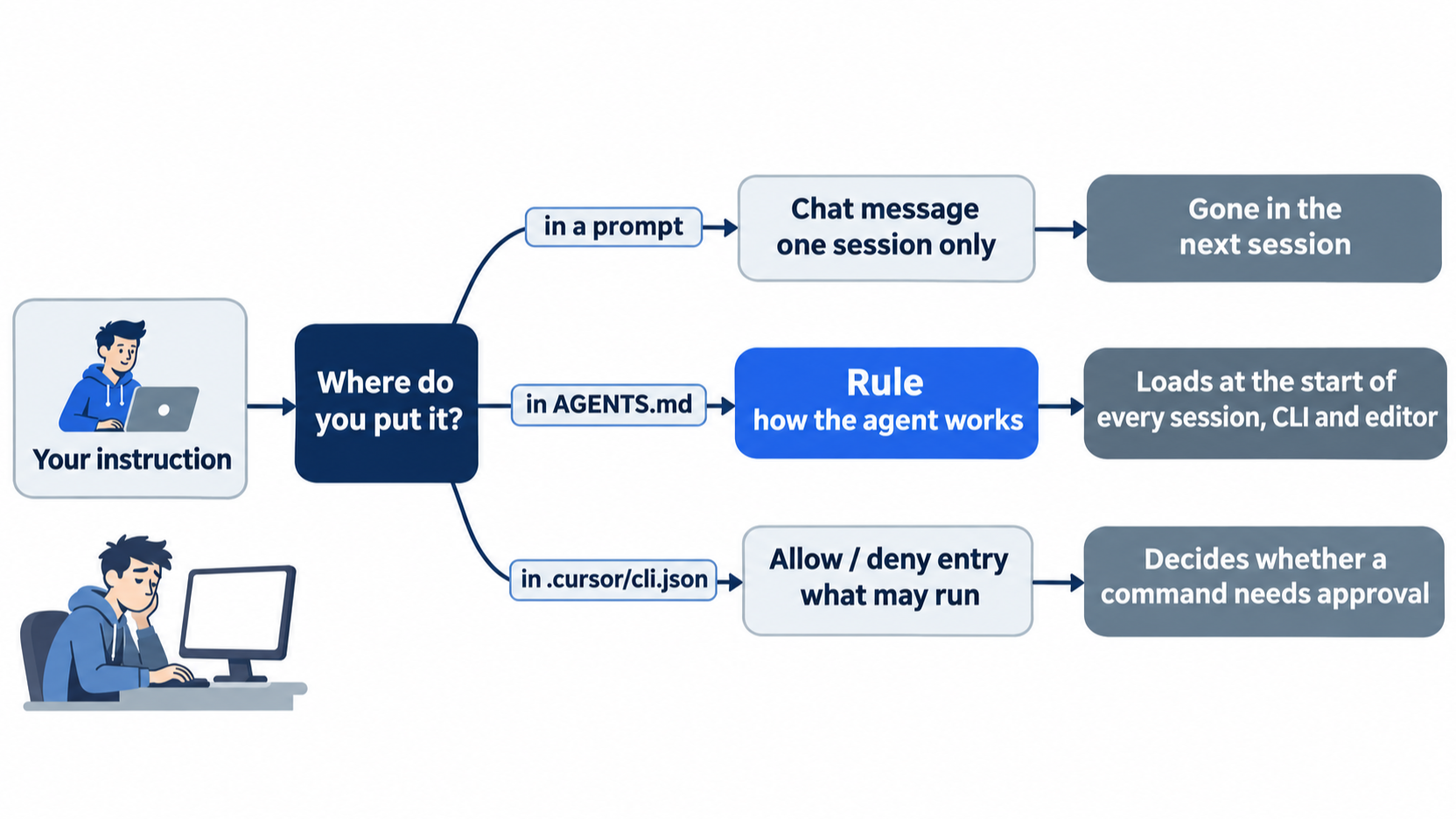
Until now, every instruction went into the prompt, and each new session needed it again. A rule is written once. The Rules page says rule contents "are included at the start of the model context."
The simplest rule file is AGENTS.md at the project root: plain Markdown, with no special format. The CLI reads it there and applies it as a rule (Using Agent in CLI), and the editor picks it up too (Rules help).
A rule is a different thing from the allow and deny entries in .cursor/cli.json. Those entries decide what may run. A rule tells the agent how to work.
Write three lines
Create AGENTS.md in the project root with exactly these three lines. Use your editor, or paste this command into the terminal.
cat > AGENTS.md <<'EOF'
- Run `npm test` before you say a change is done.
- Source code is in `src/`. Tests are in `test/`.
- Every new keyword gets its own test, named after the keyword.
EOF
Show the file and the tree to check the result.
cat AGENTS.md
git status --short
- Run `npm test` before you say a change is done.
- Source code is in `src/`. Tests are in `test/`.
- Every new keyword gets its own test, named after the keyword.
?? AGENTS.md
The ?? means git sees a new, untracked file. Each line has one job. The first makes the agent prove a change with the project's own test command before it reports success. The second tells the agent where code and tests live, so it does not have to guess. The third asks for one test per keyword, with a name you can search for.
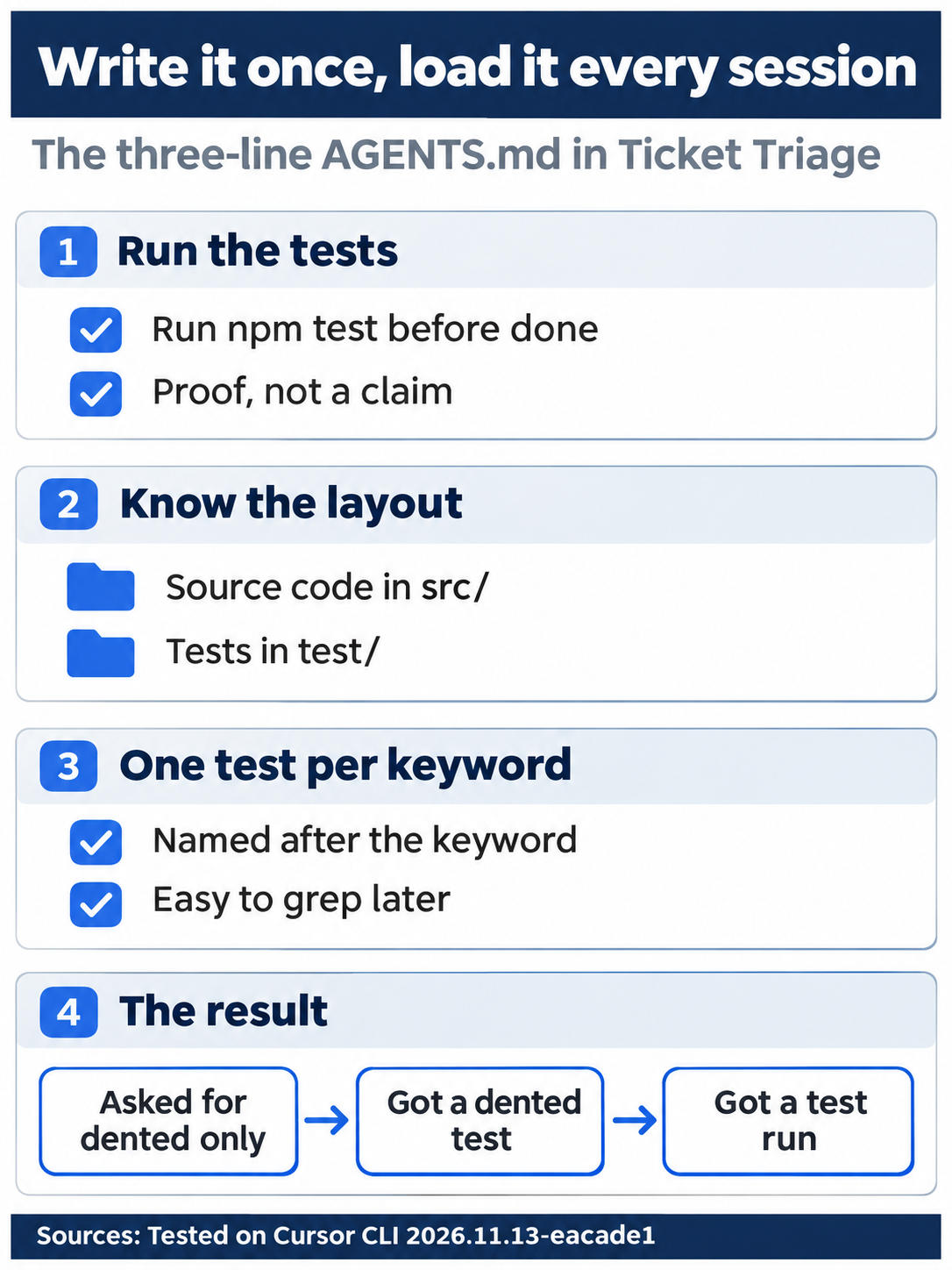
The three lines held up in testing: asked only for dented, the agent also wrote a dented test and ran the suite.
Commit it by hand, so the rule travels with the code for anyone who clones the repository.
git add AGENTS.md
git commit -m "Add project rules"
Ask a new session for the rules
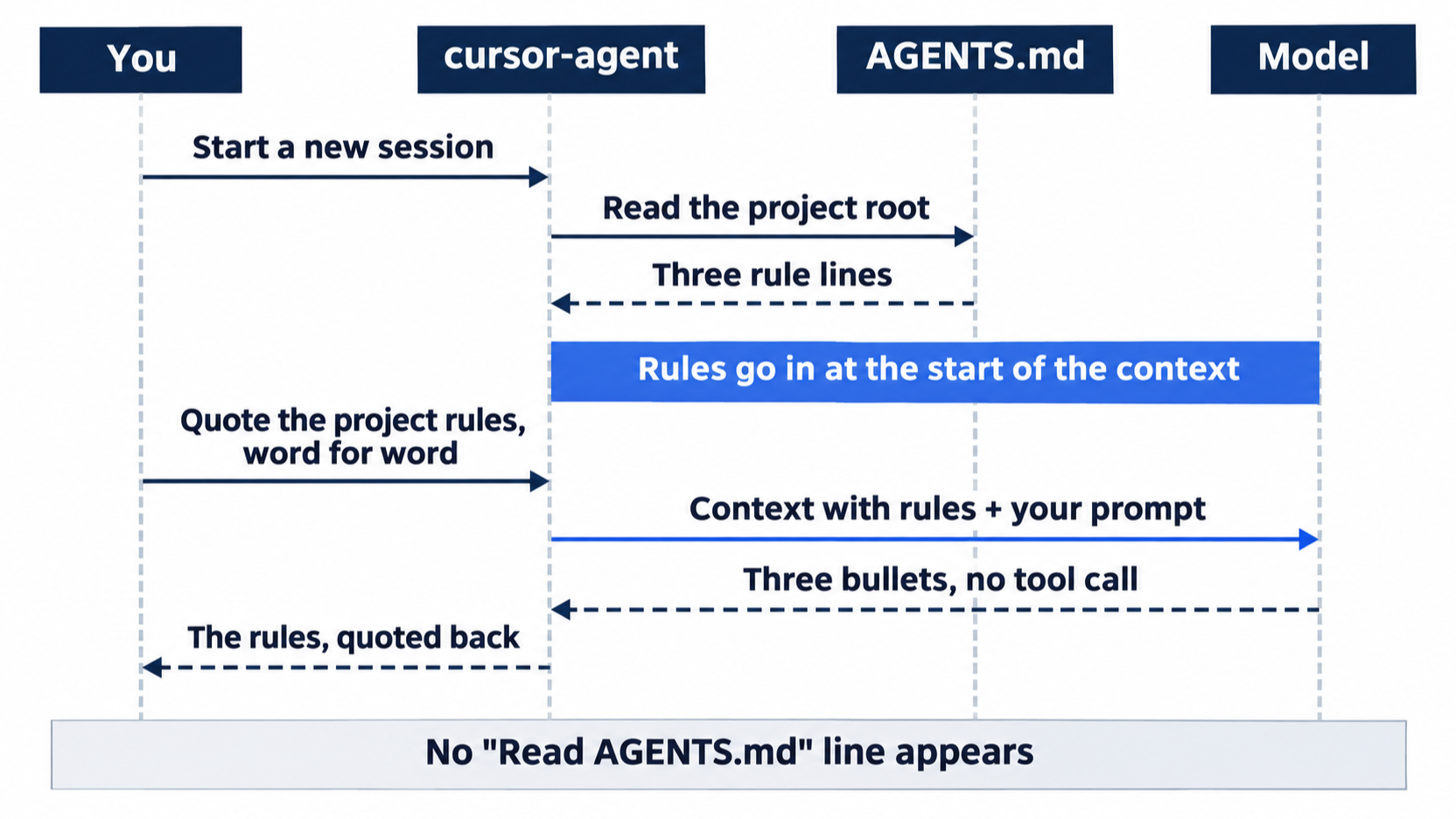
Start a new session. A new session is the real test, because nothing you typed on earlier days is in it.
cursor-agent
Send this prompt.
Quote the project rules you were given, word for word.
The agent answers with the three lines as bullets, such as:
• Run npm test before you say a change is done.
• Source code is in src/. Tests are in test/.
• Every new keyword gets its own test, named after the keyword.
The words match your file, with the backticks dropped. Look at what is missing: no Read AGENTS.md line and no tool call of any kind. The agent did not go and open the file. Cursor gave it the rules when the session started.
Allowlist: no prompts. Auto-review: no prompts.
Ask for a keyword, and say nothing about tests
Stay in the same session. Ask for a change the way you would on a busy day, without mentioning tests.
Add the keyword "dented" to the damaged check.
The agent searches and reads, shown as a line such as Grepped, globbed, read 1 grep, 1 glob, 2 files, with Read src/classify.js and Read test/classify.test.js under it. Then it edits both files. Edited classify.js +1 -1 adds dented to the damaged check, and Edited classify.test.js +2 adds a test:
+ test("dented", () =>
+   assert.equal(classify("The can arrived dented"), "damaged"))
Next, a $ npm test line appears, and the agent reports the result in its own words, such as "All 7 tests pass."
You asked for one keyword and got two things you did not ask for: a test named dented, which line 3 of your rule asks for, and a test run, which line 1 asks for. The agent still searched the project before it edited, so do not read line 2 as a shortcut; it tells the agent where code and tests belong. In a control run with no AGENTS.md, the same prompt changed only src/classify.js: no test and no test run. No approval prompt appeared for npm test, because the Shell(npm:test) allow entry from Day 4's .cursor/cli.json lets that one command run without asking.
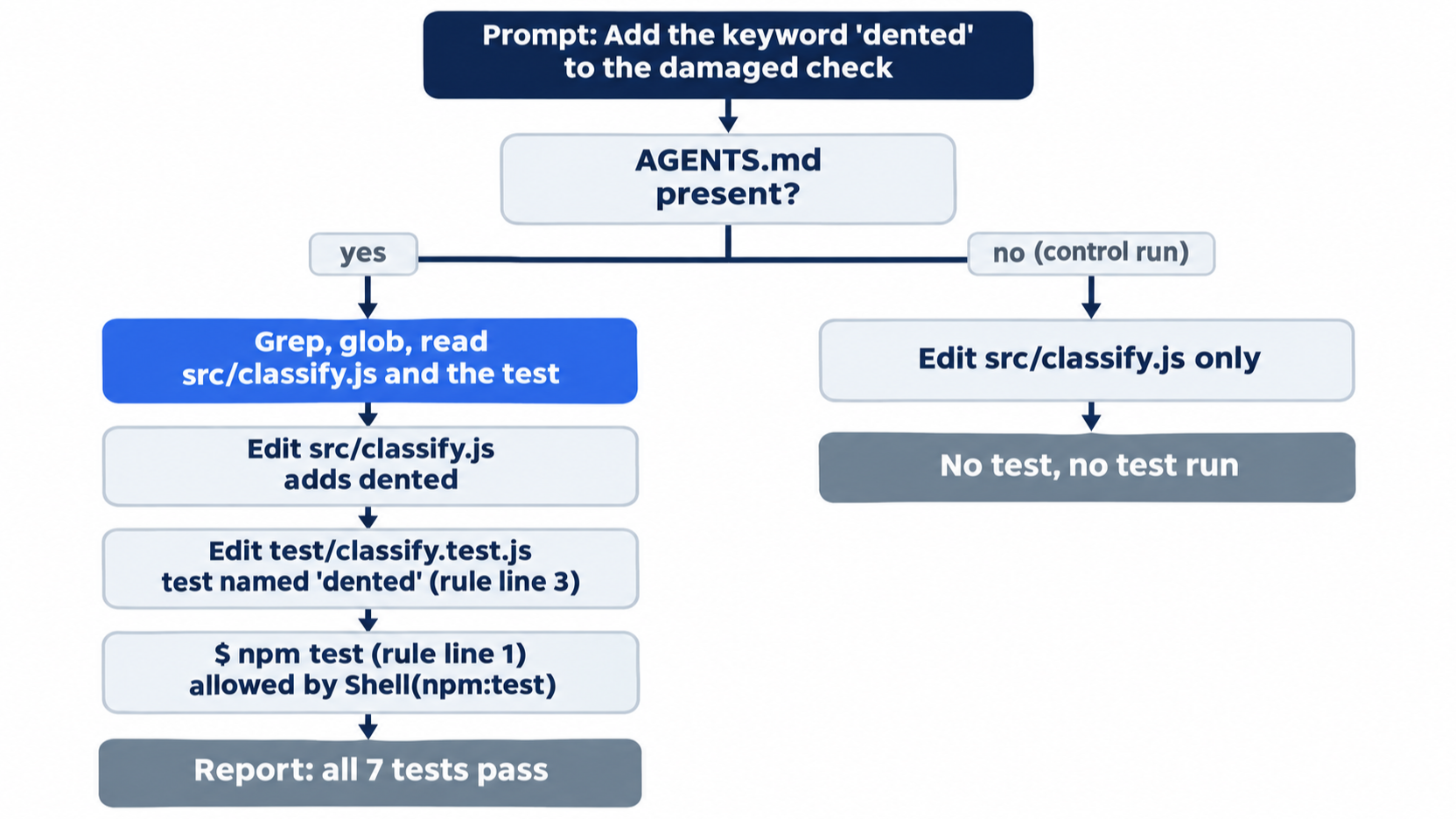
Allowlist: no prompts. .cursor/cli.json allows npm test.
Auto-review: no prompts.
Leave the session.
/quit
Check the work yourself
The agent's report is a claim. Find the test and run the suite.
grep -n dented test/classify.test.js
npm test
grep -n prints each matching line with its line number:
21:test("dented", () =>
22:  assert.equal(classify("The can arrived dented"), "damaged"))
The agent lays out the test its own way, so your line numbers can differ. npm test ends with ℹ pass 7 and ℹ fail 0. Commit the change by hand.
git add -A
git commit -m "Add dented to the damaged keywords"
The same steps in the editor
The editor reads the same AGENTS.md. The quote question only reads, so ask it in both; make the dented change in one door only. Every step here is written from the docs, not yet run.
- (written from the docs, not yet run) Open
~/code/ticket-triagein Cursor, open the Agent panel withCmd+Ion macOS orCtrl+Ion Windows and Linux, and sendQuote the project rules you were given, word for word.in a new chat. The expected answer is your three lines. - (written from the docs, not yet run) Open Customize in the sidebar and choose Rules. The Rules page says this view shows all rules and their status.
- (written from the docs, not yet run) In Agent mode, send
Add the keyword "dented" to the damaged check.Approve the test command if the panel asks. Then run the samegrepandnpm testchecks in the terminal and commit with the same message.
Your win
A new cursor-agent session quotes your three rules, grep -n dented test/classify.test.js finds the dented test, npm test shows ℹ pass 7 and ℹ fail 0, and git log --oneline -1 shows Add dented to the damaged keywords. You wrote three lines once, and the agent followed them in a session that had never seen your prompts.
You can stop here. Going deeper explains why this works and where it breaks.
Going deeper
This section is for readers who want the other kinds of rules, the file format that scopes a rule to some files, and the ways rules fail to load. It assumes you finished Start here.
Four kinds of rules
The Rules page names four kinds. Project Rules are .mdc files in .cursor/rules, committed with the code and scopable to some files. User Rules are your own preferences, global to your Cursor setup. Team Rules are set by a team admin from the dashboard. AGENTS.md is the plain Markdown file you wrote today, "a simple alternative to .cursor/rules."
Cursor merges every rule that applies. On a conflict, Team Rules win over Project Rules, which win over User Rules (Rules); the page does not say where AGENTS.md falls. Rules apply in all four editor modes, Agent, Ask, Plan, and Debug (Agent mode help), but not to Tab completions or Bugbot pull-request reviews (Rules help).
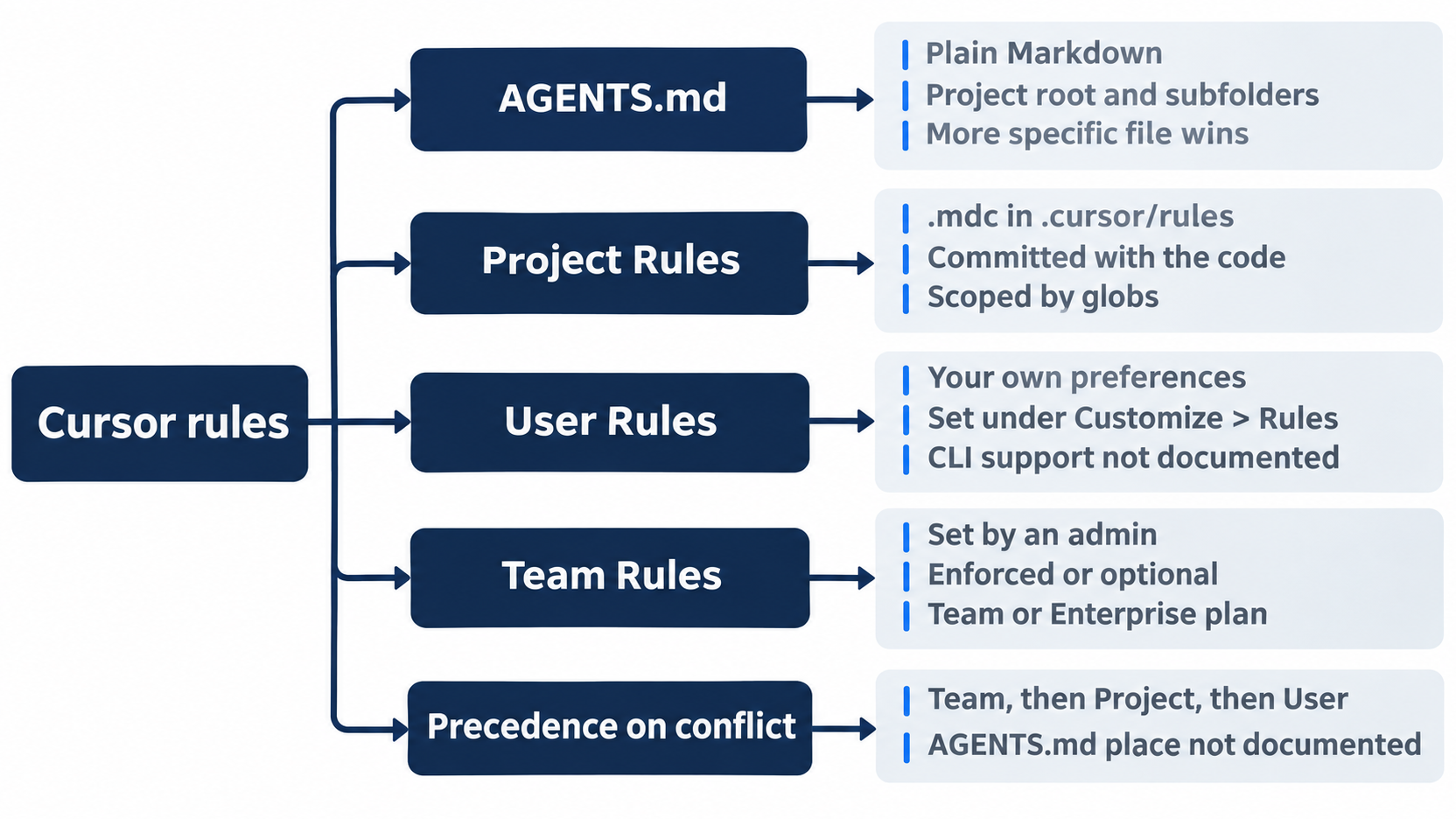
Project rules are .mdc files with frontmatter
A project rule starts with a short block of settings between --- lines, called frontmatter. Three fields decide when it loads: alwaysApply, description, and globs (Rules).
Gotcha: Cursor ignores a plain .md file in .cursor/rules, because it "has no frontmatter to specify description, globs, and alwaysApply" (Rules). For plain Markdown, use AGENTS.md.
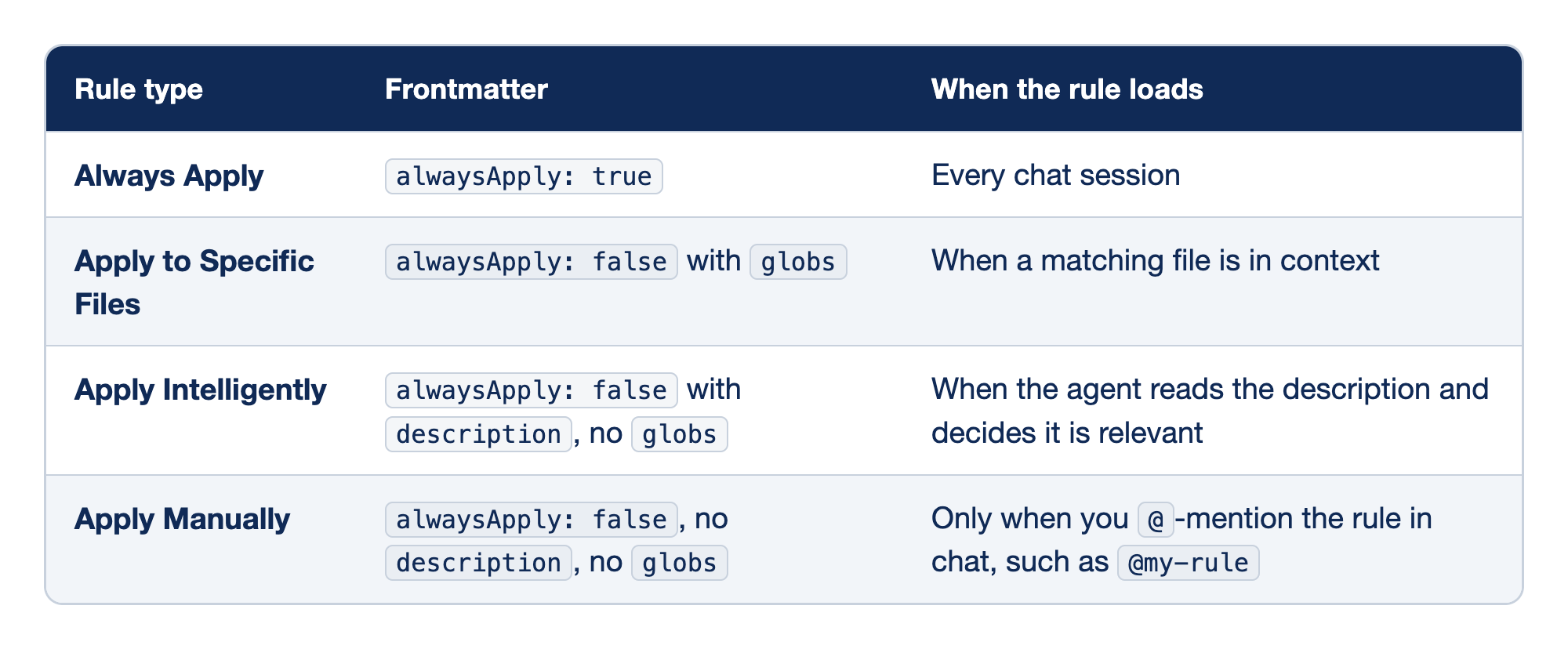
The editor's dropdown offers four rule types, and the Rules page maps each one to its frontmatter. The "Rule type" column holds the dropdown name, the "Frontmatter" column holds the fields that produce it, and the "When the rule loads" column says when the agent receives it.
- Always Apply is
alwaysApply: true; it behaves like yourAGENTS.md, loading in every chat session and ignoringglobsanddescription. - Apply to Specific Files is
alwaysApply: falsewithglobs; it loads only when a matching file is in context, such astest/**for every file undertest/. - Apply Intelligently is
alwaysApply: falsewith adescriptionand noglobs; the agent decides, so the description must say clearly when the rule matters. - Apply Manually is
alwaysApply: falsewith neither field; it loads only when you name it in a prompt, such as@my-rule.
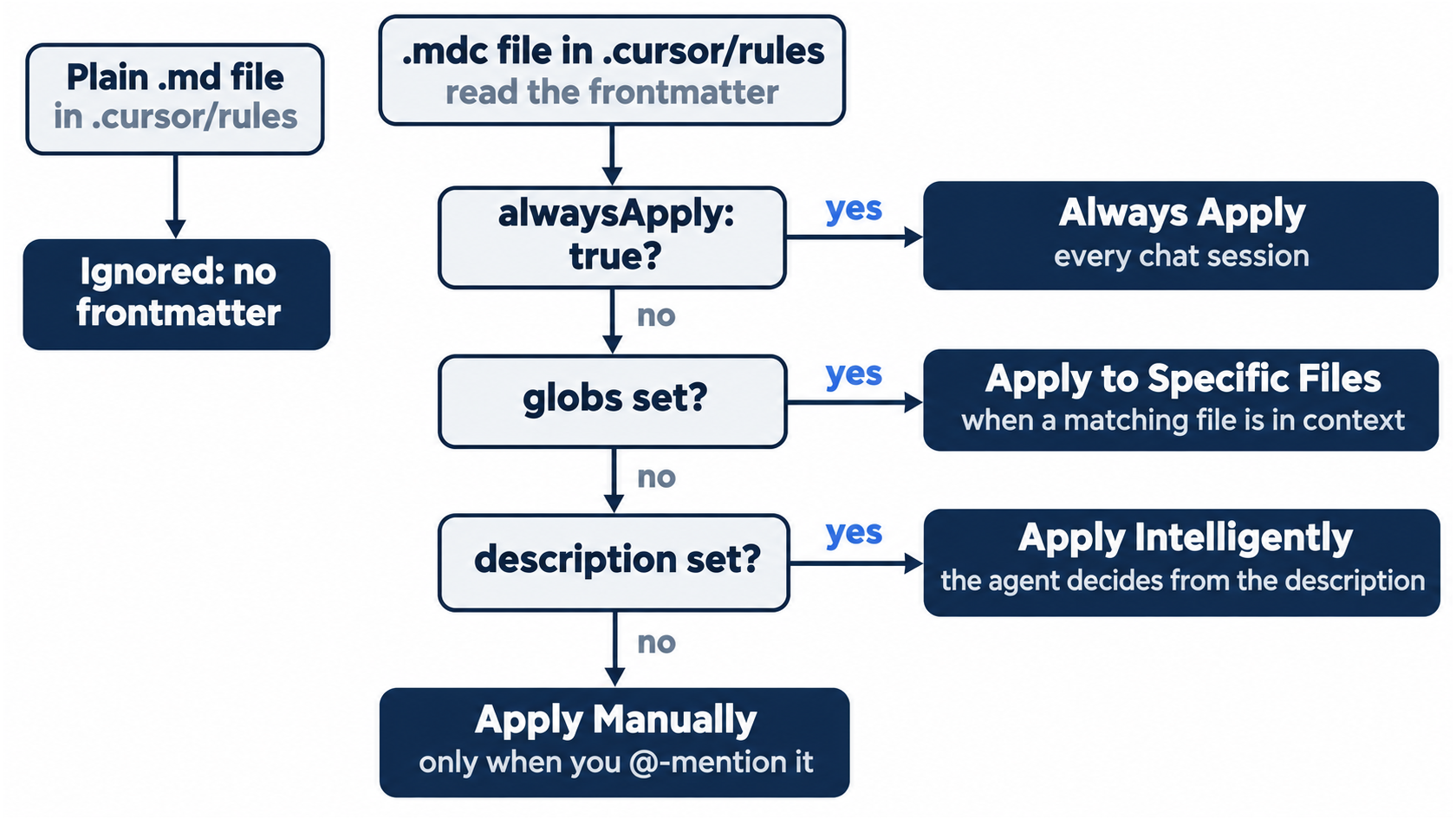
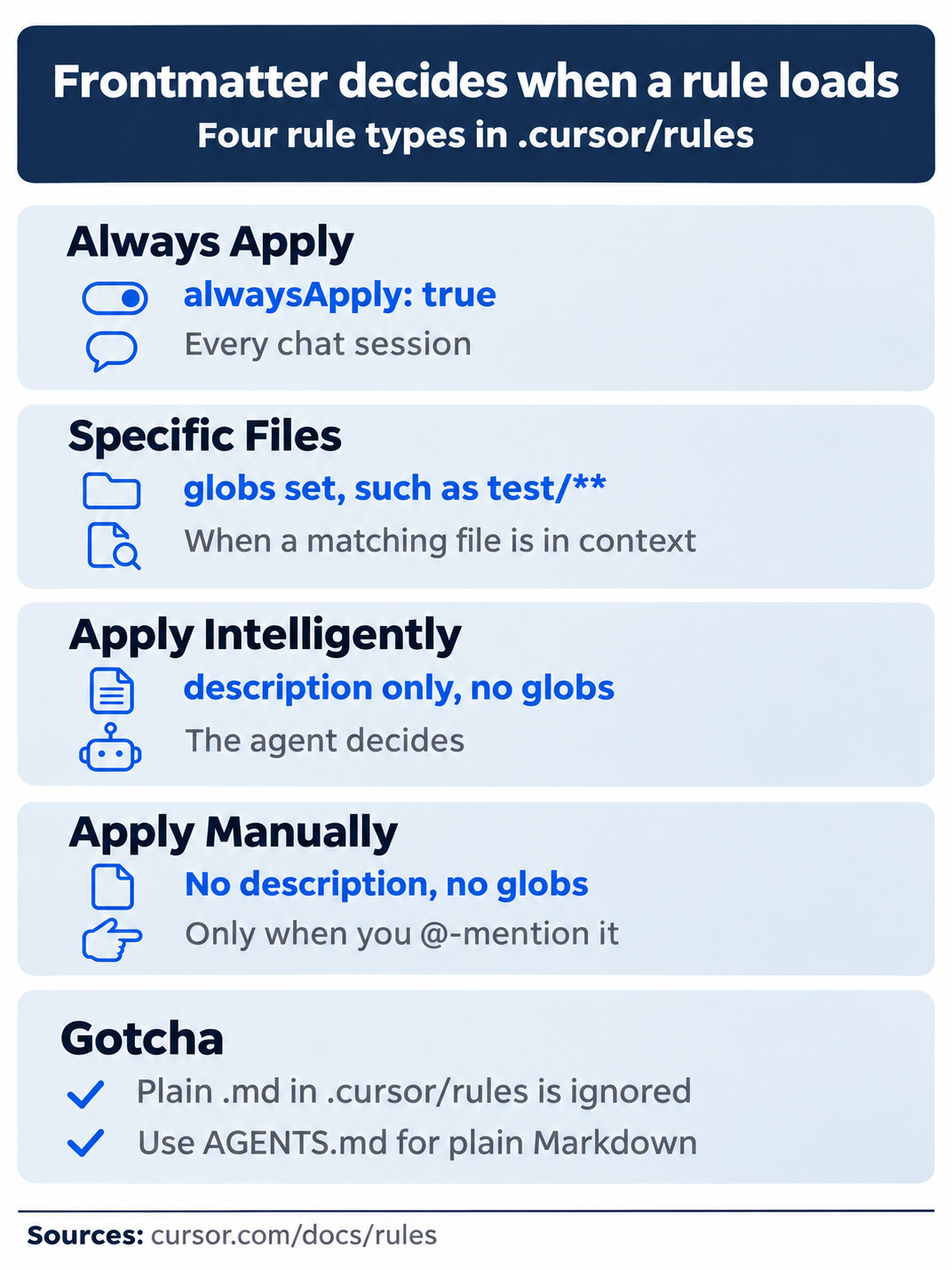
Each of the four types has its own frontmatter and its own loading moment, and the gotcha still applies: plain Markdown belongs in AGENTS.md, not in .cursor/rules.
A file that a rule mentions, such as @service-template.ts, is not pasted into the rule; the agent reads it with its tools when it needs it (Rules). Anything that must always reach the agent belongs in the rule body.
Exercise: a rule only for test files (not tested in this guide)
Create one scoped rule.
mkdir -p .cursor/rules
cat > .cursor/rules/tests.mdc <<'EOF'
---
globs: test/**
alwaysApply: false
---

- Import assert from `node:assert/strict` in every test file.
EOF
Start cursor-agent and send Read test/classify.test.js, then quote every project rule you were given, word for word. The expected answer, from the Rules page, is your three AGENTS.md lines plus the node:assert/strict line, because reading the test file puts a matching file in context. Type /quit.
Reset. Remove only the rules folder, because .cursor/ also holds your cli.json.
rm -r .cursor/rules
git status --short
npm test
git status --short prints nothing, and npm test shows ℹ pass 7.
Nested AGENTS.md, User Rules, and Team Rules
Cursor also reads AGENTS.md in subfolders. A nested file combines with the ones above it, and the more specific file wins (Rules). Since CLI v2026.10.22, when the agent edits or creates a file in a subfolder, it sees that folder's AGENTS.md and nested always-apply rules "even if it never read a file there first" (CLI changelog). This guide did not test a nested AGENTS.md.
User Rules are set in the editor under Customize > Rules; account rules sync across machines, while files in ~/.cursor/rules (on Windows, %USERPROFILE%\.cursor\rules) stay on one machine (Rules help). No docs page says whether the CLI applies account User Rules, so treat them as editor-only until you have checked. Team Rules are free-form text an admin writes on the Cursor dashboard, enforced or optional, with glob support, and they need a Team or Enterprise plan (Rules).
Let the agent write the rule (not tested in this guide)
Cursor documents three ways to have a rule written for you, and this guide tested none of them: the built-in /create-rule skill (Agent Skills), Customize > Rules > Add Rule or the "New Cursor Rule" palette entry in the editor (Rules), and cursor-agent generate-rule, alias cursor-agent rule (CLI parameters). A generated rule is a file like any other. Read it before you commit it.
Keep rules short
The docs say to keep each rule under 500 lines, to skip whole style guides and rare edge cases, and to "Add rules only when you notice Agent making the same mistake repeatedly" (Rules). This guide is stricter: an always-applied rule goes to every session, whether or not the task needs it, so every line should earn its place. An old .cursorrules file is legacy and "will be deprecated"; copy its text into a project rule set to Always Apply and delete it (Rules help).
CLAUDE.md loads too
Cursor reads CLAUDE.md like AGENTS.md and applies it to every conversation "regardless of any alwaysApply frontmatter setting" (Rules help); the CLI reads both at the project root (Using Agent in CLI). Since IDE 3.26, a CLAUDE.md that is a symlink, hard link, or identical copy of AGENTS.md reaches the agent once instead of twice (IDE release notes). The Include Third-Party Plugins, Skills, and Other Configs setting under Settings > Agents > Third-Party Imports is tied in the docs to Claude Code hooks, plugins, and skills (Third Party Hooks). In testing, in a new data folder of the Cursor editor 3.30.14, it was on, and Customize listed user rules and plugins imported from other tools. No page says whether it controls CLAUDE.md, and this guide did not test that.
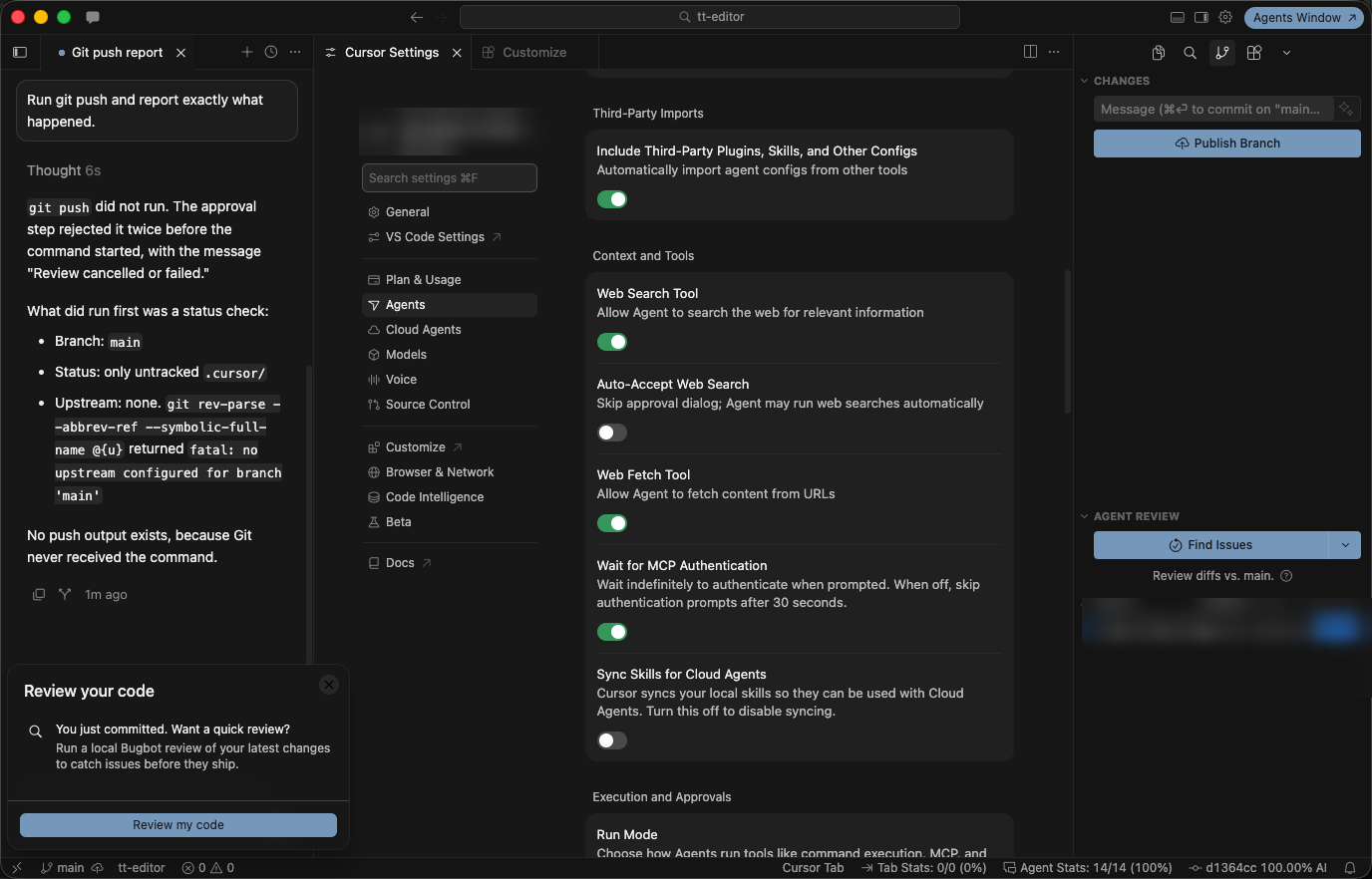
The Third-Party Imports toggle, on in a new data folder, Cursor editor 3.30.14.
If you already use Claude Code: Claude Code reads CLAUDE.md and, when a project has both files, skips AGENTS.md by default. Cursor reads both, so two different files send both sets of instructions, and conflicting lines become your problem. Keep the shared rules in AGENTS.md and make CLAUDE.md a symlink to it. Cursor then sends the text once.
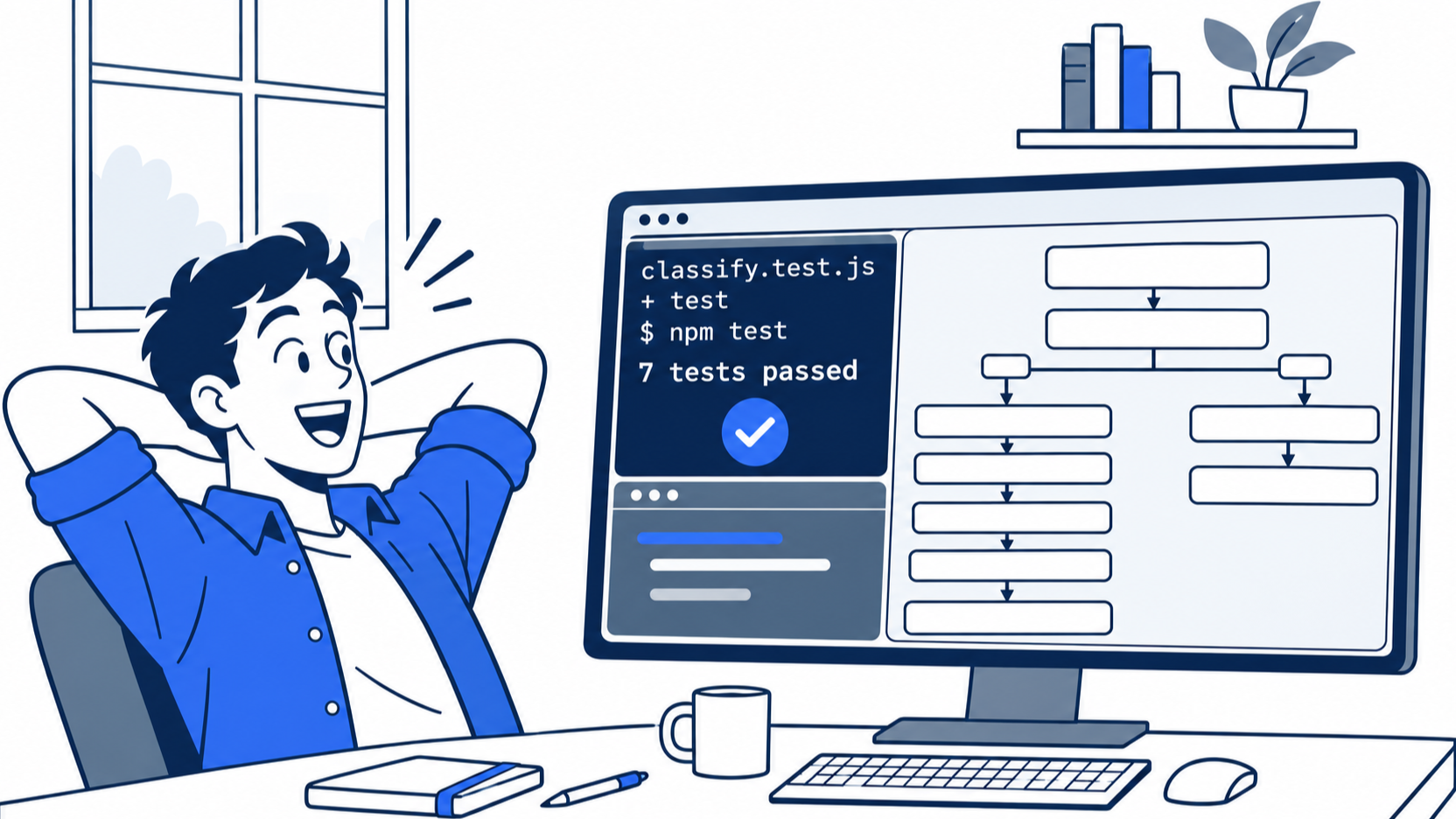
The scene captures the payoff of Start here: the prompt asked only for a keyword, and the three-line file supplied the test and the test run.
Do this today
Everyone
- Repeat the win. Start
cursor-agent, sendQuote the project rules you were given, word for word., check for your three lines, and type/quit. Then rungrep -n dented test/classify.test.js,npm test, andgit log --oneline -1. The result: two lines withdented,ℹ pass 7andℹ fail 0, andAdd dented to the damaged keywords. - Start one habit: when you type the same instruction into a prompt twice, move it into
AGENTS.mdand commit it. The result:git log --oneline -- AGENTS.mdlists a commit for each rule, starting withAdd project rules.
If you read Going deeper
Reset after each step: git status --short prints nothing and npm test shows ℹ pass 7.
- See that a plain
.mdrule is ignored (not tested in this guide). Runmkdir -p .cursor/rulesandecho '- Every test name starts with "check".' > .cursor/rules/names.md, then ask a new sessionQuote every project rule you were given, word for word.Expected, from the Rules page: your three lines and no "check" line. Reset withrm -r .cursor/rules. - Write a rule for test files only (not tested in this guide). Do the exercise above. Expected: the
node:assert/strictline appears after the agent reads the test file. Reset withrm -r .cursor/rules. - Link
CLAUDE.mdtoAGENTS.md(not tested in this guide). Runln -s AGENTS.md CLAUDE.mdand ask a new session for the rules. Expected, from the IDE release notes: the three lines appear once, not twice. Reset withrm CLAUDE.md. - Find out whether your User Rules reach the CLI. If you have a User Rule under Customize > Rules, ask a new
cursor-agentsessionQuote every rule you were given, word for word, and say where each came from.The result: you can say whether your User Rule appeared, which no docs page states. The step only reads.
Say it once, in a file
The developer in the opening did nothing wrong on Monday. They gave a good instruction in the one place that forgets it. A chat is a conversation with one session, and the next session starts without it.
AGENTS.md moves the instruction to a place that every session reads before your first prompt. The tested run proves it twice: a new session quoted the rules without a single tool call, and a one-line request came back with a named test and a passing suite. The control run without the file did neither.
Keep the file short, commit it with the code, and add a line only when you catch yourself typing the same instruction twice. Every line you move out of chat is one you never have to say again.
This is Part 5 of "Cursor, Day-to-Day," an 18-part guide to using Cursor's agent every day, from the CLI and the editor.