
The Agent Loop You Keep Rewriting Is Already Built
The model-call-then-tool-call-then-repeat loop you keep rewriting by hand is already built, battle-tested, and shipped by Google as ADK. Here is what it replaces and how to get a working agent running in five minutes.
Google's Agent Development Kit hands you the runtime, the tools, and the multi-agent orchestration you have been wiring by hand. Here is why you would reach for it, and how to get a working agent running in about five minutes.
In this article: You will learn what Google's Agent Development Kit (ADK) actually is, defined by the three things it replaces rather than by the vague label "agent framework." You will install it, scaffold a project, define a real agent with a tool, point it at a model, and run it two different ways. By the end you will have a working Google ADK agent on your machine, and a clear sense of why the framework took over the plumbing you used to write yourself.
You have written this loop before. Call the model. Read its response. Notice it wants to call a tool. Parse the arguments out of the JSON. Run the tool. Feed the result back. Call the model again. Check whether it is done yet. Repeat. Somewhere in there you bolt on conversation history, then a way to remember things between turns, then a second agent, then a way for the two agents to hand work back and forth. By the third project you are maintaining a small framework you never meant to write.
Google's Agent Development Kit, ADK, is that framework, written once and properly. You define your agents and your tools. ADK runs the loop, commits the state, manages the sessions, and orchestrates the agents. This article is orientation: what ADK is, the three things it replaces, and a working agent on your machine fast.
One note before we start. This series is Python throughout. ADK also ships TypeScript, Go, Java, and Kotlin SDKs, but Python leads on feature coverage and is the only language some pieces support today, such as the managed Agent Runtime deployment path. So we are staying where the surface area is complete. You will not be waiting thirty paragraphs for a snippet in another language. There are none coming.
Three contrasts, because "it is an agent framework" tells you nothing
"Agent framework" is a crowded, vague category. The useful way to understand ADK is by what it sits above, so here are the three comparisons that actually clarify it.
Against a hand-written tool loop
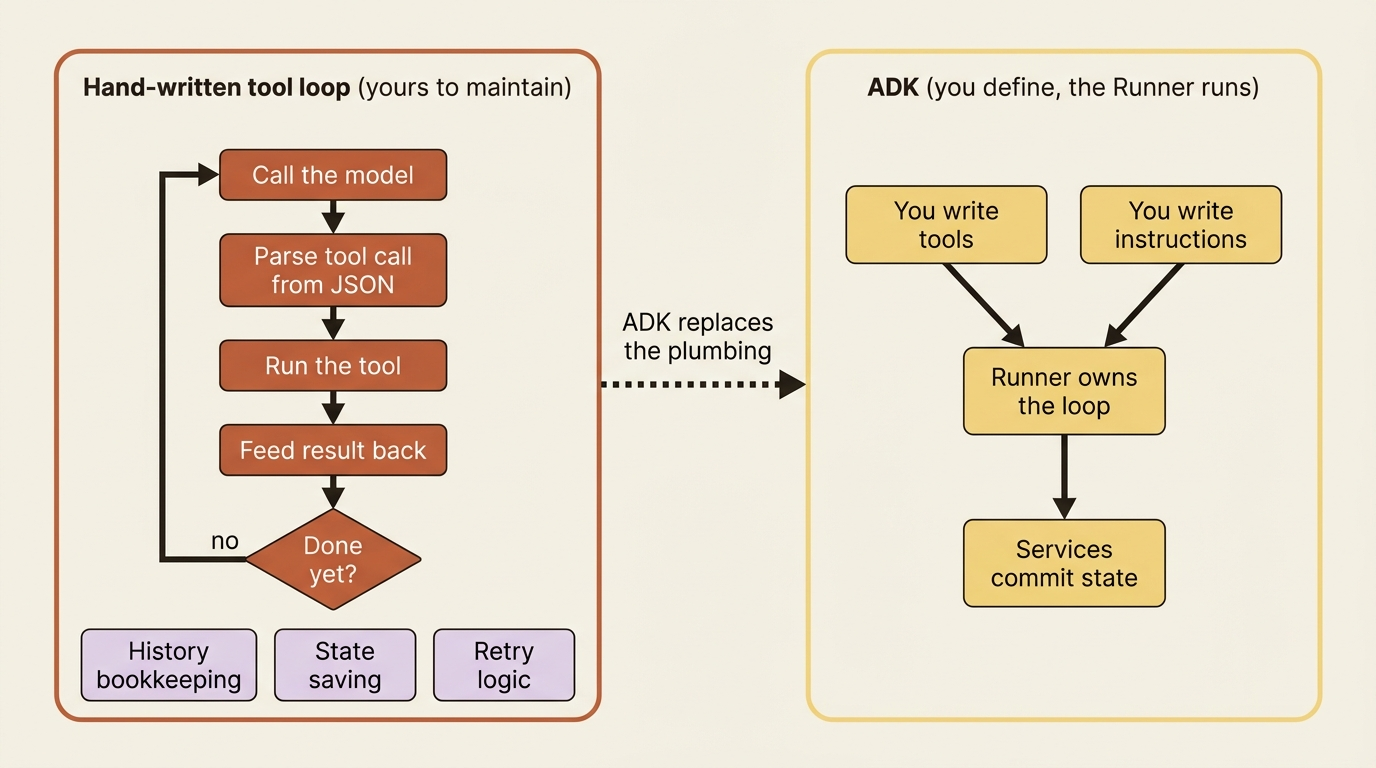
The do-it-yourself version of an agent is a while loop wrapped around a model call. It works, right up until it does not. You own the tool-call parsing, the history management, the retry logic, the place where state gets saved, and the bug where state gets saved in the wrong place. ADK gives you a Runner that owns that loop. You hand it an agent, it drives the turn-by-turn cycle, and it commits state and tool results through proper services as it goes. You stop writing the plumbing and start writing the parts that are actually yours: the tools and the instructions.
Against a thin LLM wrapper
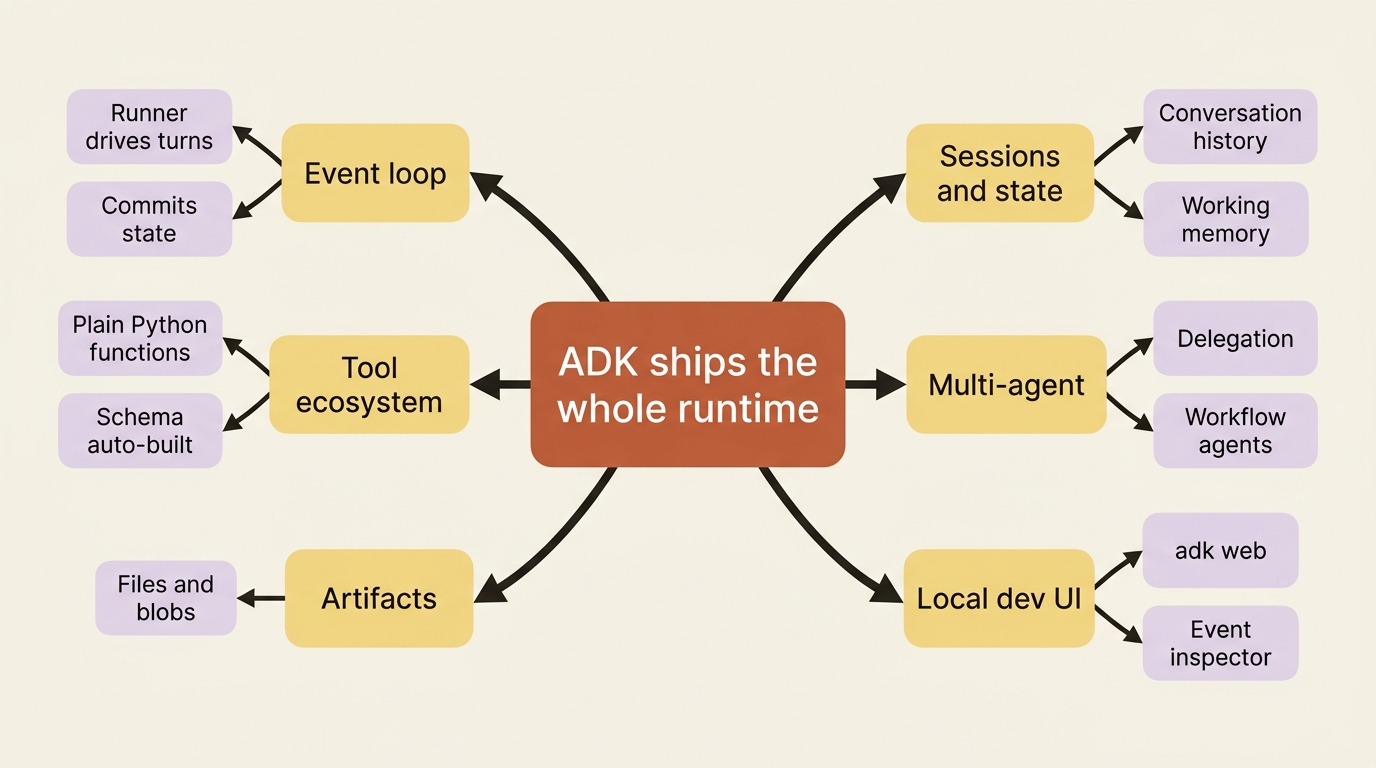
Plenty of libraries give you a nicer model.generate() call. That is not what ADK is. ADK ships the whole agent runtime: an explicit event loop, session and state management, a tool ecosystem, multi-agent orchestration, artifact handling, and a local development UI you run with one command. The difference is the difference between a better fetch call and an application server. You are not assembling these pieces from parts. They come in the box, and they are designed to work together.
Against the other agent frameworks
If you are arriving from LangChain, LangGraph, or the Claude Agent SDK, here is the single sharpest difference to anchor on. ADK is Google's framework. It is Gemini-first but genuinely model-flexible. And it is built from the ground up for multi-agent systems, with a first-class command-line tool and a managed deployment path on Google Cloud. Other frameworks can do multi-agent work. ADK treats a team of cooperating agents as the normal case rather than an advanced topic, and it gives you deterministic workflow agents and dynamic delegation as core primitives.
The running example: an agent that fixes a broken repo
This series advances one agent so the capabilities accumulate into something real instead of evaporating between disconnected demos. Our agent is a code-maintenance agent, and it works on a small Python project called buggy-shop: a tiny shopping-cart module with a deliberately planted bug and a pytest suite that fails because of it. Eventually the agent will read the repo, run the tests, find the bug, propose a fix, hand that fix to a second agent for review, and do it all on a deployed, observable, tested service.
Today it does none of that. Today we just get it breathing. But everything built from here bolts onto this same agent, so it is worth meeting now.
Installing ADK
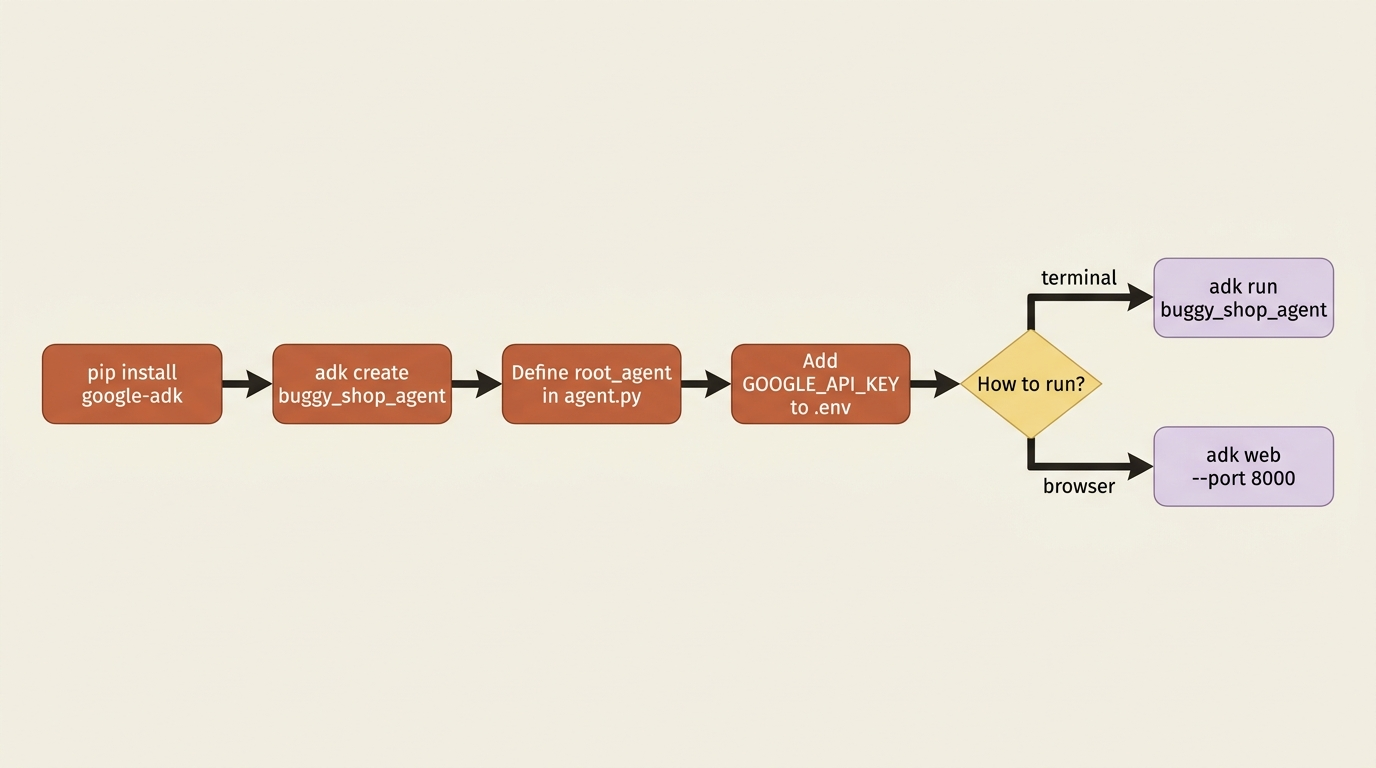
ADK is a pip package and needs Python 3.10 or later. Create a virtual environment first so this project's dependencies stay isolated from everything else on your machine, then install:
python3 -m venv .venv
source .venv/bin/activate   # Windows PowerShell: .venv\Scripts\Activate.ps1
pip install google-adk
That single package gives you the library, the Runner, the services, and the adk command-line tool you are about to use.
Scaffolding your first agent
ADK ships a project scaffolder, so you do not start from a blank file. Run adk create with a project name:
adk create buggy_shop_agent
This generates a small, opinionated structure:
buggy_shop_agent/
    agent.py        # your agent lives here
    .env            # API keys or cloud project IDs
    __init__.py
The shape matters, and the tooling depends on it. The agent.py file must define a variable named root_agent, which is the one thing every ADK agent project requires. The __init__.py exposes that module to the adk tooling. Keep this convention and the CLI and Dev UI find your agent automatically. Fight it and you will spend an afternoon wondering why nothing loads.
Defining the agent
Open agent.py and replace its contents. An agent in ADK is mostly a clear description of a job plus the tools to do it. Here is the smallest version that does something real: a single tool and an Agent that knows when to use it.
from google.adk.agents import Agent


def run_tests(path: str) -> dict:
    """Runs the pytest suite for the project at the given path.

    Args:
        path: The filesystem path to the project to test.

    Returns:
        A dict with the test status and a summary of the results.
    """
    # A stand-in for now. Later this actually shells out to pytest.
    return {
        "status": "failed",
        "summary": "1 failed, 4 passed: test_cart_total expected 42, got 0",
    }


root_agent = Agent(
    model="gemini-flash-latest",
    name="buggy_shop_agent",
    description="Inspects a Python repo and reports on its failing tests.",
    instruction=(
        "You are a code-maintenance assistant. When the user asks about the "
        "state of a project, use the 'run_tests' tool to check its test suite, "
        "then explain what is failing in plain language."
    ),
    tools=[run_tests],
)
Look at three things in that snippet. The instruction is the agent's standing brief: who it is and when to reach for its tool. The tools list is just a plain Python function passed in directly. ADK reads the function's name, signature, and docstring to build the schema the model sees, which is why that docstring is written for the model rather than for a human skimming the file. And the description is a one-line summary of what this agent does, which looks pointless with one agent but becomes load-bearing the moment you have several and need them to delegate to each other.
That is the entire agent. No loop, no parser, no history bookkeeping. The run_tests function is a stand-in that returns canned output. Later in the series it gets wired up to a real pytest run.
Pointing it at a model
The model="gemini-flash-latest" line selects a Gemini model, and Gemini needs credentials. You have two routes, and the choice is governed by one environment variable.
For getting started, use a Google AI Studio API key. Grab a key from AI Studio, then write it into the .env file the scaffolder created:
echo 'GOOGLE_API_KEY="YOUR_API_KEY"' > buggy_shop_agent/.env
echo 'GOOGLE_GENAI_USE_VERTEXAI=FALSE' >> buggy_shop_agent/.env
ADK loads that .env automatically. The GOOGLE_GENAI_USE_VERTEXAI=FALSE line tells the library to authenticate with your API key directly. Set it to TRUE instead and ADK routes through Google Cloud's Agent Platform, which uses your cloud project credentials and is the path you want for production. That single flag is the switch between the two worlds. It is worth knowing now even though we stay on the API-key path for a while.
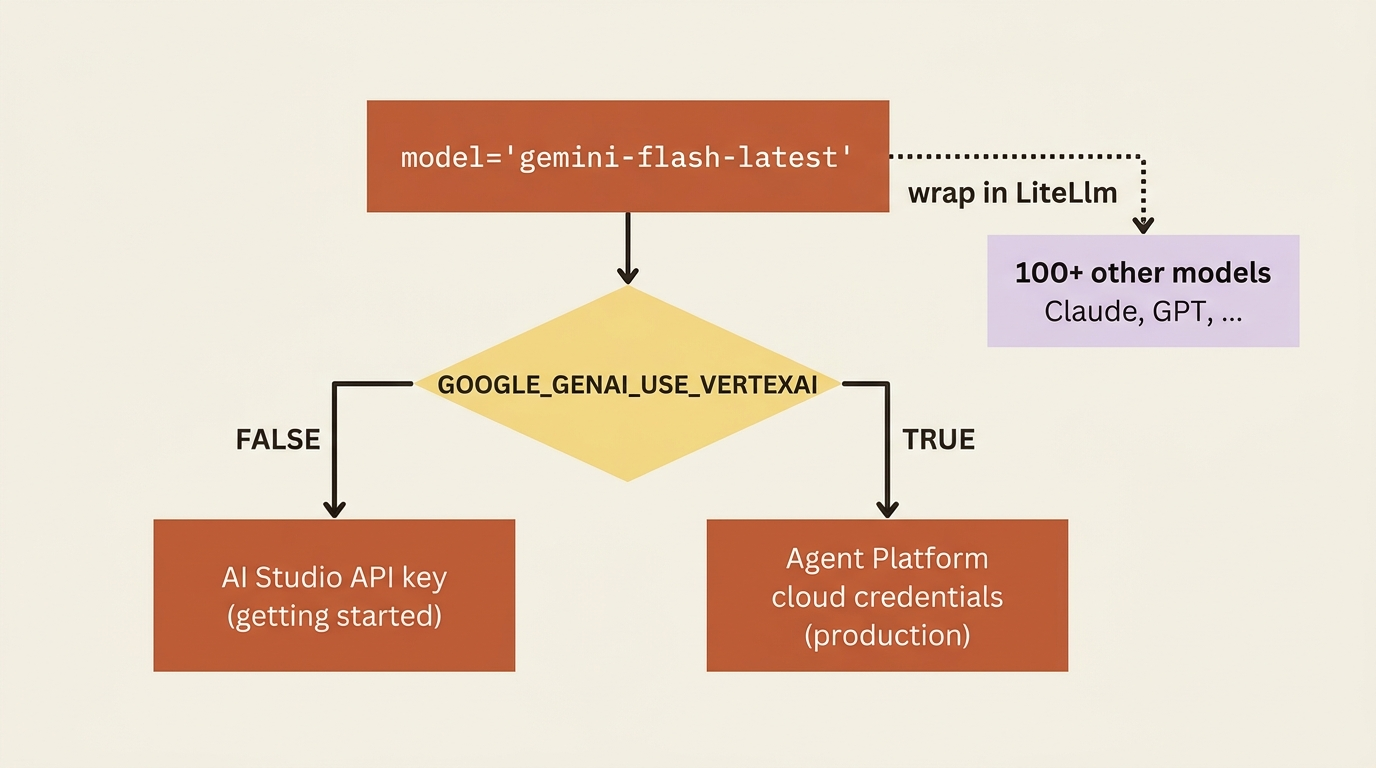
ADK is Gemini-first but not Gemini-only. If you want to run the same agent on another provider, you wrap the model string in the LiteLlm connector, which routes through the LiteLLM library to over a hundred models. Swapping our agent onto Claude or GPT looks like this:
from google.adk.models.lite_llm import LiteLlm

# model=LiteLlm(model="anthropic/claude-3-haiku-20240307")  # needs ANTHROPIC_API_KEY
# model=LiteLlm(model="openai/gpt-4o")                       # needs OPENAI_API_KEY
That is the whole change: a different value for the model parameter and the matching provider API key in your environment. Everything else in the agent stays identical. We use Gemini for consistency, but the door is open.
Running it
Two commands let you talk to the agent, and you will use both constantly. The first is a terminal chat:
adk run buggy_shop_agent
Type a message like "what is the state of the buggy-shop project?" and watch the agent decide to call run_tests, read the result, and explain the failure back to you in prose. That decision, the part where it chooses the tool and threads the result into its answer, is the loop you did not have to write.
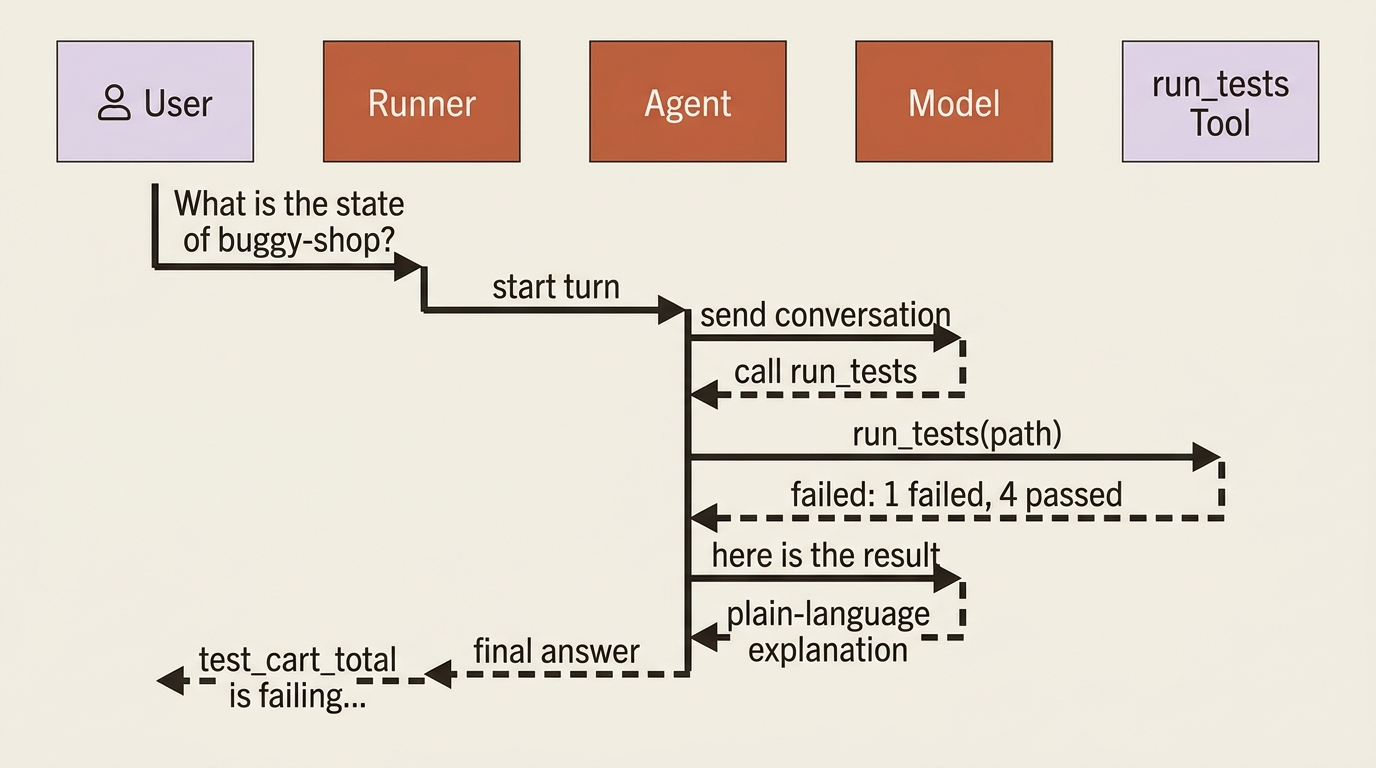
The second command is the Developer UI, a browser-based chat with a panel that shows you every event, tool call, and state change as it happens:
adk web --port 8000
Open http://localhost:8000, pick your agent from the selector in the top left, and chat. The event inspector is worth opening early. It is the clearest window into the runtime, and it is where you will debug almost everything.
Gotcha. Run
adk webfrom the parent directory that containsbuggy_shop_agent/, not from inside the agent folder. From inside, the tool has nothing to discover and shows you an empty selector. This trips up nearly everyone on the first try.
In production. The Dev UI and
adk webare development tools only. They are not a production server, and you should never expose them as one. The real service is built a different way. For now,adk webis purely for building and debugging on your own machine.
Do this today
- Install and scaffold. Run
pip install google-adkin a fresh virtual environment, thenadk create buggy_shop_agentto get the project structure for free. - Define one real agent. Paste the
root_agentabove intoagent.py, keeping therun_testsstub. Notice that the docstring is the schema the model sees. - Wire up credentials. Drop a
GOOGLE_API_KEYandGOOGLE_GENAI_USE_VERTEXAI=FALSEinto.env, and remember that flipping that flag toTRUEis the production switch. - Run it both ways. Talk to the agent with
adk run buggy_shop_agent, then launchadk web --port 8000from the parent directory and open the event inspector. - Watch the loop you did not write. Ask "what is the state of the buggy-shop project?" and follow the tool call and the answer it weaves back.
The framework took the plumbing; you kept the parts that are yours
You installed ADK, scaffolded a project, defined an agent with a tool, pointed it at a model, and ran it two different ways, all without writing a single line of loop, parser, or history-management code. That absence is the entire pitch. The framework took the plumbing. You kept the parts that are actually yours.
What you have not seen yet is what is happening underneath when the agent decides to call that tool and weave the result into its reply. It looks like magic right now, and magic is a bad thing to deploy. The next step is to pull the cover off: the Runner, the event loop, and the single timing rule about state that confuses every ADK developer exactly once. Once you can see the loop, the rest of the framework stops being mysterious and starts being obvious.
This is Part 1 of "Building with Google's Agent Development Kit (ADK)," an eleven-part guide that takes a developer from zero to a hardened, observable, production-deployed agent.