
Your Agent Worked in the Demo and Silently Regressed Three Commits Later
An agent that worked in the demo can silently regress three commits later. Observability, evaluation, and packaging are the three disciplines that turn a working agent into one you can trust and hand to a teammate.
Nothing was traced, so you could not see it. Nothing was tested, so you could not catch it. Here are the three disciplines that turn a working Google ADK agent into one you can trust over time: observability, evaluation, and packaging.
In this article: You will learn the three things that separate an agent that works once from an agent you can maintain. First, observability: how to see what your agent actually does, from the free Dev UI trace to production-grade OpenTelemetry. Second, ADK evaluation: how to prove the agent still works after every change and catch silent regressions before users do. Third, packaging: how to bundle the whole accumulated system so a teammate can clone it and run it tomorrow. By the end you will know how to make an ADK agent observable, testable, and shareable.
You have built a real system. A simple code-fixing agent grew, over time, into a fixer-and-reviewer pipeline with a real test-running tool, an audit-logging Plugin, persistent sessions, memory across runs, resumability, and a deployment. It works.
And "it works" is exactly the trap. An agent that worked in the demo can silently break three commits later, and you will not know until a user tells you. The model output drifted. A refactor broke the reviewer. A prompt tweak made the fixer worse. Nothing failed loudly. Quality just quietly slid.
This is the difference between an agent that runs once and one you trust over time. It comes down to three questions, in the order you need them. How do you see what the agent is actually doing? How do you prove it still works after every change? And how do you bundle the whole system so a teammate can run it tomorrow? Observability, evaluation, and packaging. Get all three, and you have not just an agent but an agent you can maintain.
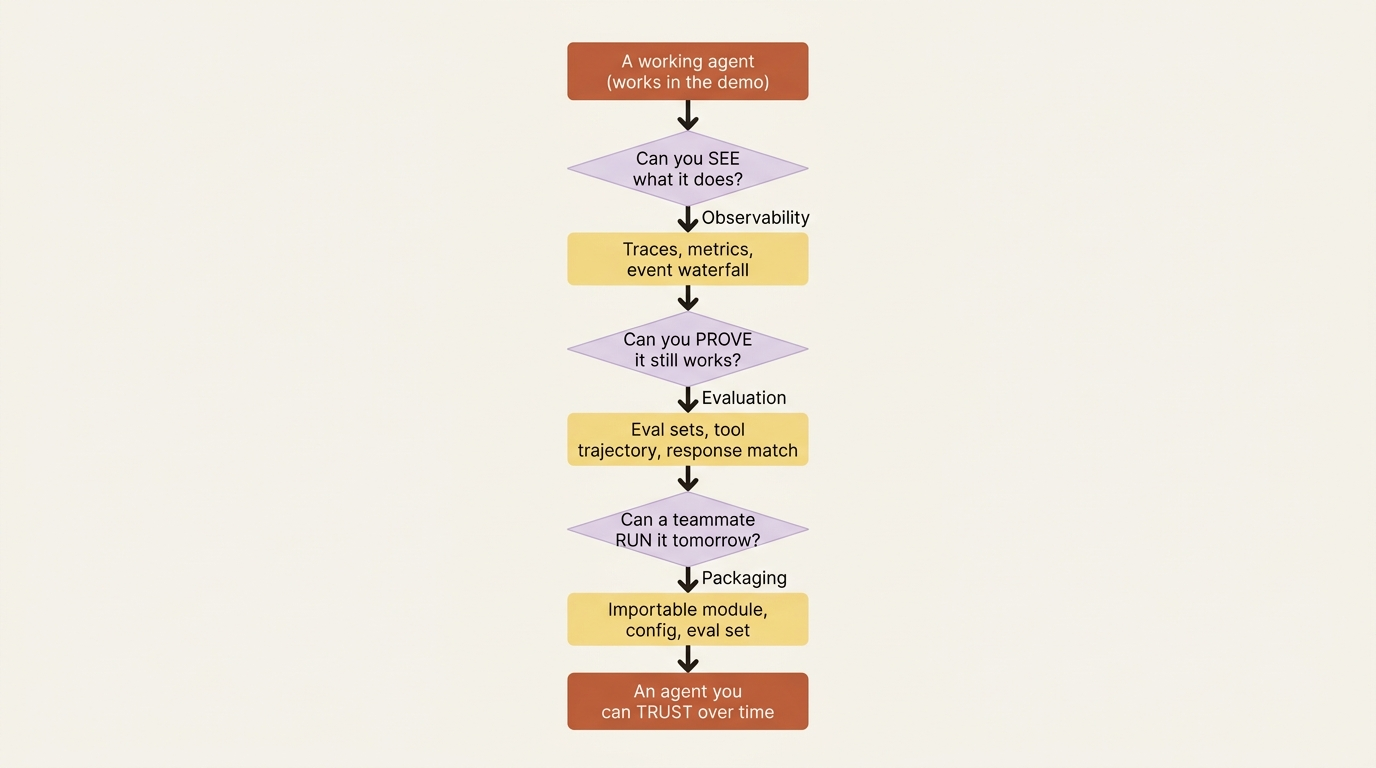
Observability: seeing what the agent actually does
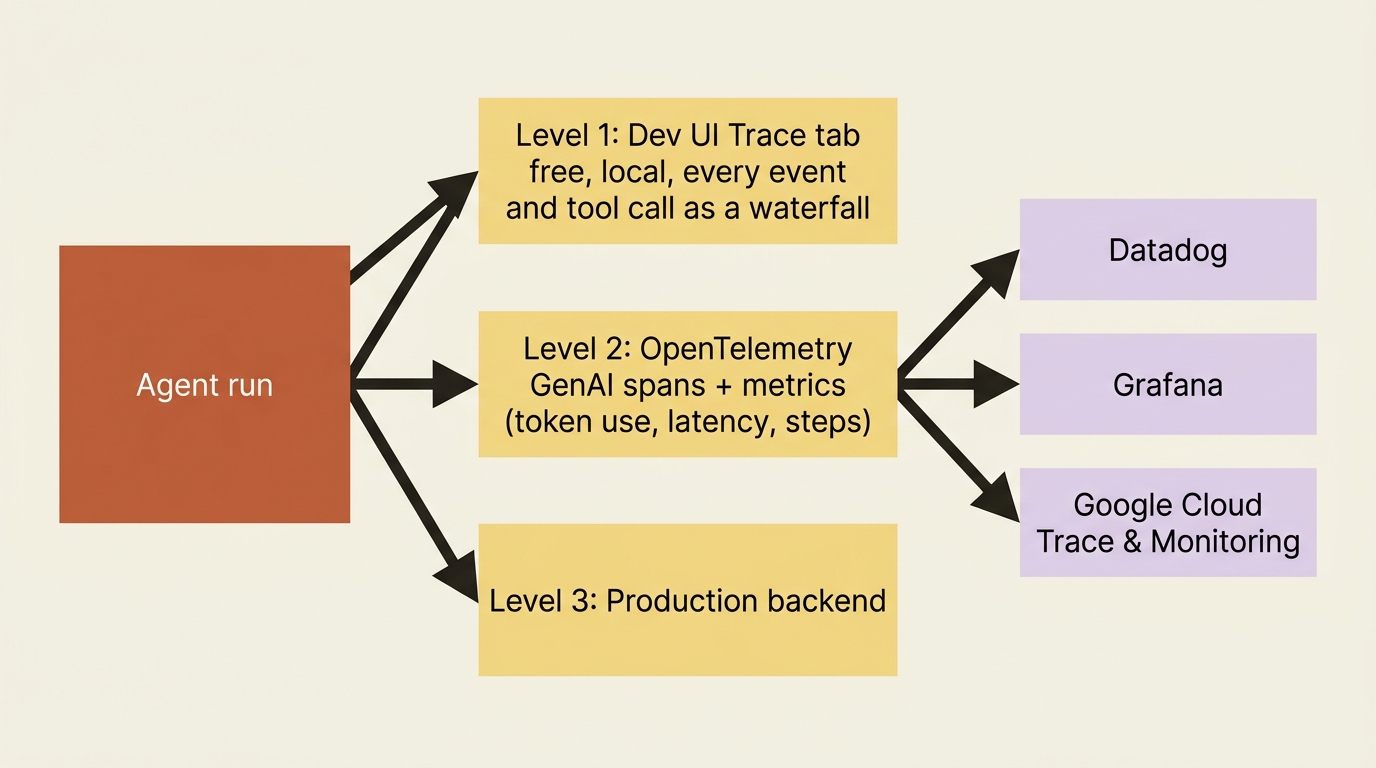
You need to see before you can trust, so observability comes first. An agent's behavior is a chain of decisions: which tool to call, what to pass it, when to delegate, and how to phrase the answer. If all you see is the final response, you are debugging blind. ADK gives you visibility at three levels, from free-during-development to production-grade.
Level one: the Dev UI trace, free
The first level you already have. The adk web Dev UI includes a Trace tab that shows the full execution flow of any session: every event, tool call, state change, and model round-trip, grouped by user message and laid out as a waterfall. Open it after a run and you can watch the fixer call run_tests, see the result land in state, and follow the proposed fix into the reviewer. For local debugging, this is often all you need, and it costs nothing to turn on.
Level two: structured telemetry with OpenTelemetry
The second level is structured telemetry, and this is where ADK's design pays off. Tracing and metrics are built on OpenTelemetry, using its standard GenAI semantic conventions and wire format. That means ADK does not lock you into a proprietary backend.
Traces organize an agent run as a hierarchy of spans: an invoke_agent root span containing model and tool spans beneath it. You get the same waterfall the Dev UI shows, exported to whatever observability stack you already run. Metrics track the signals that matter for an LLM app: invocation duration, tool execution latency, token consumption, and workflow step counts.
Because it is all OpenTelemetry, exporting is a matter of pointing at a collector with standard environment variables, or sending straight to Google Cloud with a single flag:
# Export traces and metrics to any OTel-compatible backend.
export OTEL_EXPORTER_OTLP_ENDPOINT="http://your-collector:4318"
adk web path/to/buggy_shop

# Or send straight to Google Cloud Trace and Monitoring.
adk web --otel_to_cloud path/to/buggy_shop
That OpenTelemetry foundation is the quiet hero here. The same agent you traced in the Dev UI on your laptop streams its spans into Datadog, Grafana, or Google Cloud in production without changing a line of agent code. Structured telemetry is the thing that would have caught the silent regression, by showing token use spiking or a tool latency climbing where nothing used to.
Evaluation: proving it still works
Tracing shows you what happened. Evaluation tells you whether it was right, and, crucially, whether it is still right after your latest change. This is the real answer to the silent-regression problem: you do not catch a quality slide by watching, you catch it by testing, automatically, on every change.
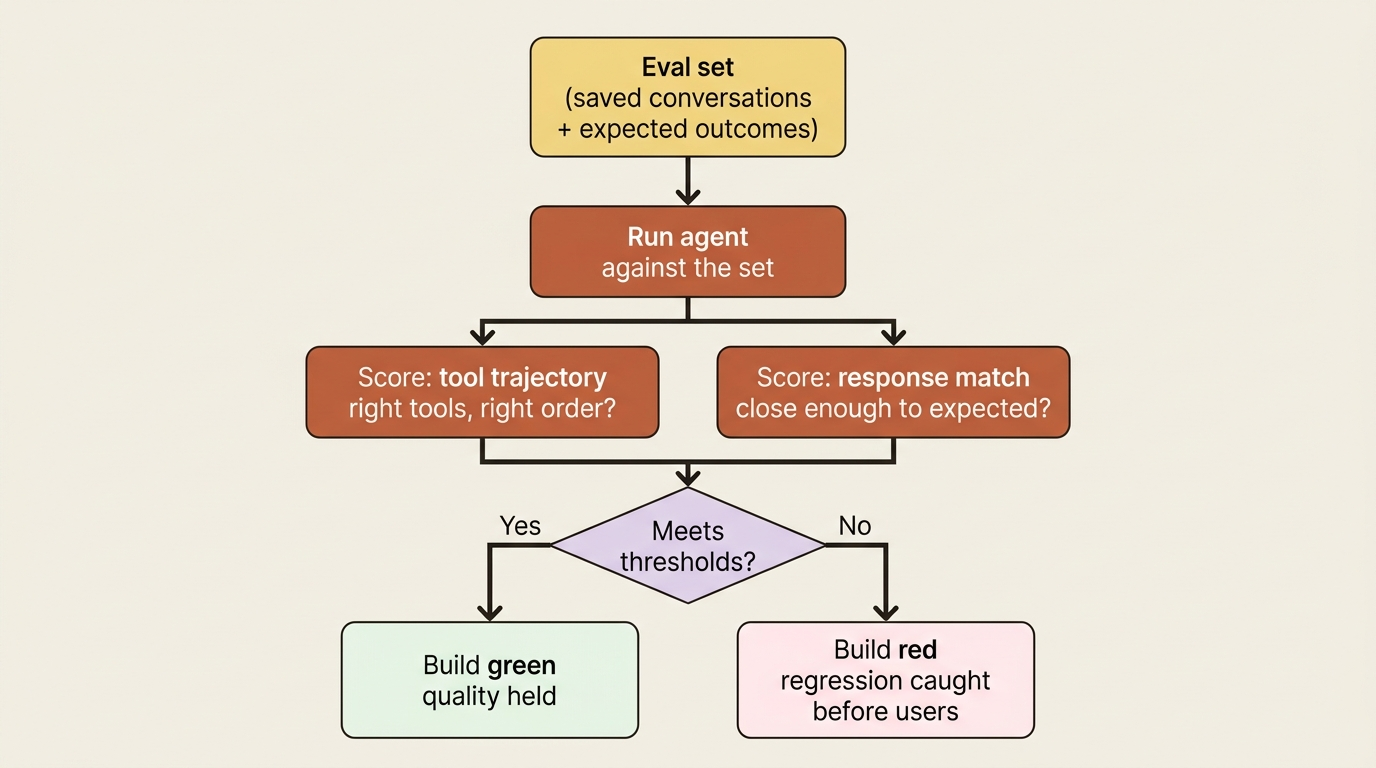
ADK ships evaluation as a first-class feature rather than something you bolt on. The mental model is a test suite for agent behavior. You build an evaluation set, a collection of saved conversations with their expected outcomes, then run your agent against it and measure how well it matches.
ADK scores two things that matter for agents specifically. Tool trajectory asks whether the agent called the right tools in the right order. Response match asks whether the final answer is close enough to expected. An agent can produce a plausible answer the wrong way, and tool-trajectory scoring is what catches that.
Three ways to run it
You have three ways to run evaluation, matching three moments in your workflow.
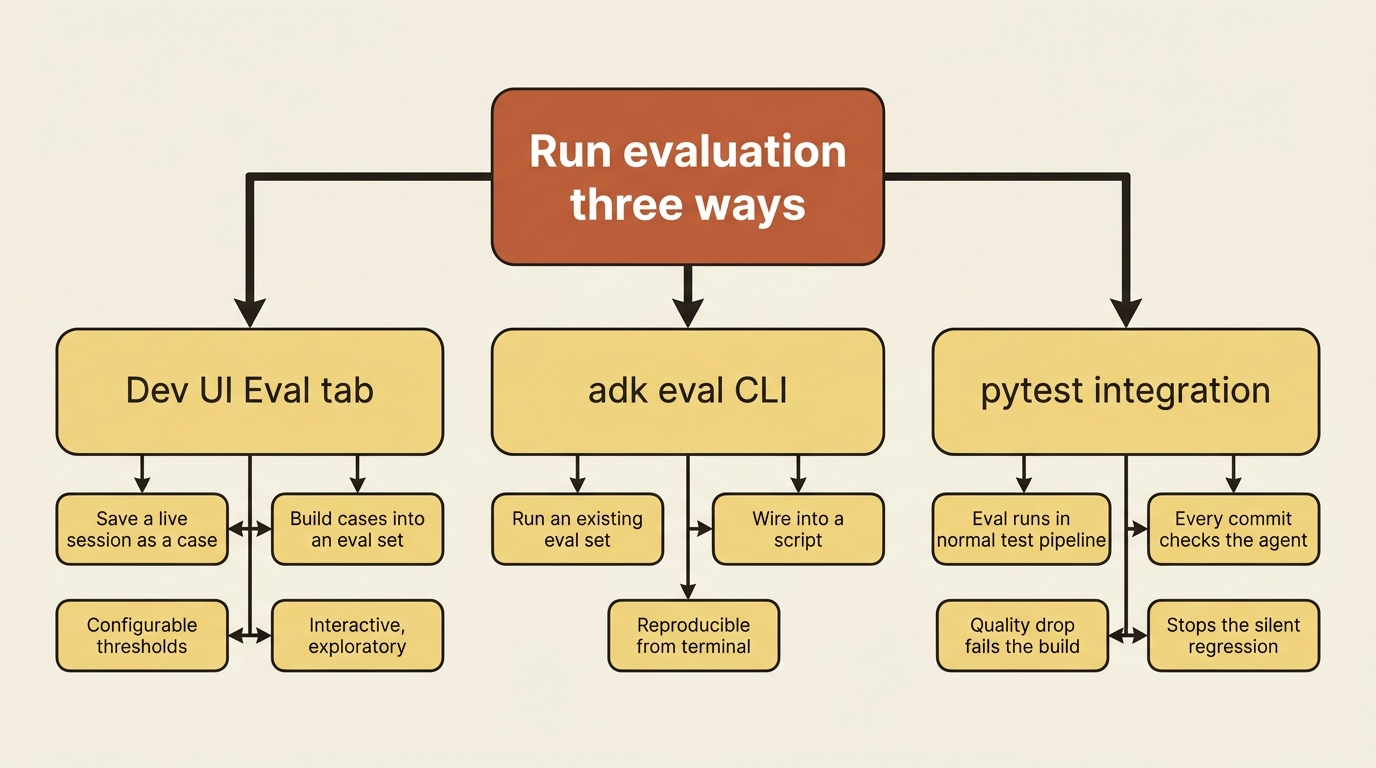
In the adk web Dev UI, an Eval tab lets you save a live session as a test case, build it into an eval set, and run with configurable thresholds. This is how you create cases interactively. From the command line, adk eval runs an existing eval set, which is what you wire into a script. And through pytest, you integrate agent evaluation directly into your normal test pipeline. That last one saves you from the regression in the title, because now every commit runs the agent against its eval set, and a quality drop fails the build instead of reaching a user.
The eval set for a code-fixing agent is obvious and powerful: a few cases where a known broken repo should produce a known fix, with the expected tool trajectory being "call run_tests, then propose a fix, then review it." Run that on every change. The day a prompt tweak makes the fixer skip the test step, or the reviewer rubber-stamp a bad patch, the build goes red and you find out before your users do.
Structured output makes evaluation reliable
One related capability is worth naming: structured output. An LlmAgent can take an output_schema, a Pydantic model that forces its final response into a typed JSON shape instead of free prose. That makes both evaluation and downstream consumption far more reliable, because you are checking and parsing structured fields rather than fuzzy text. Use it when an agent's output feeds code or a test rather than a human.
Packaging: handing it to a teammate
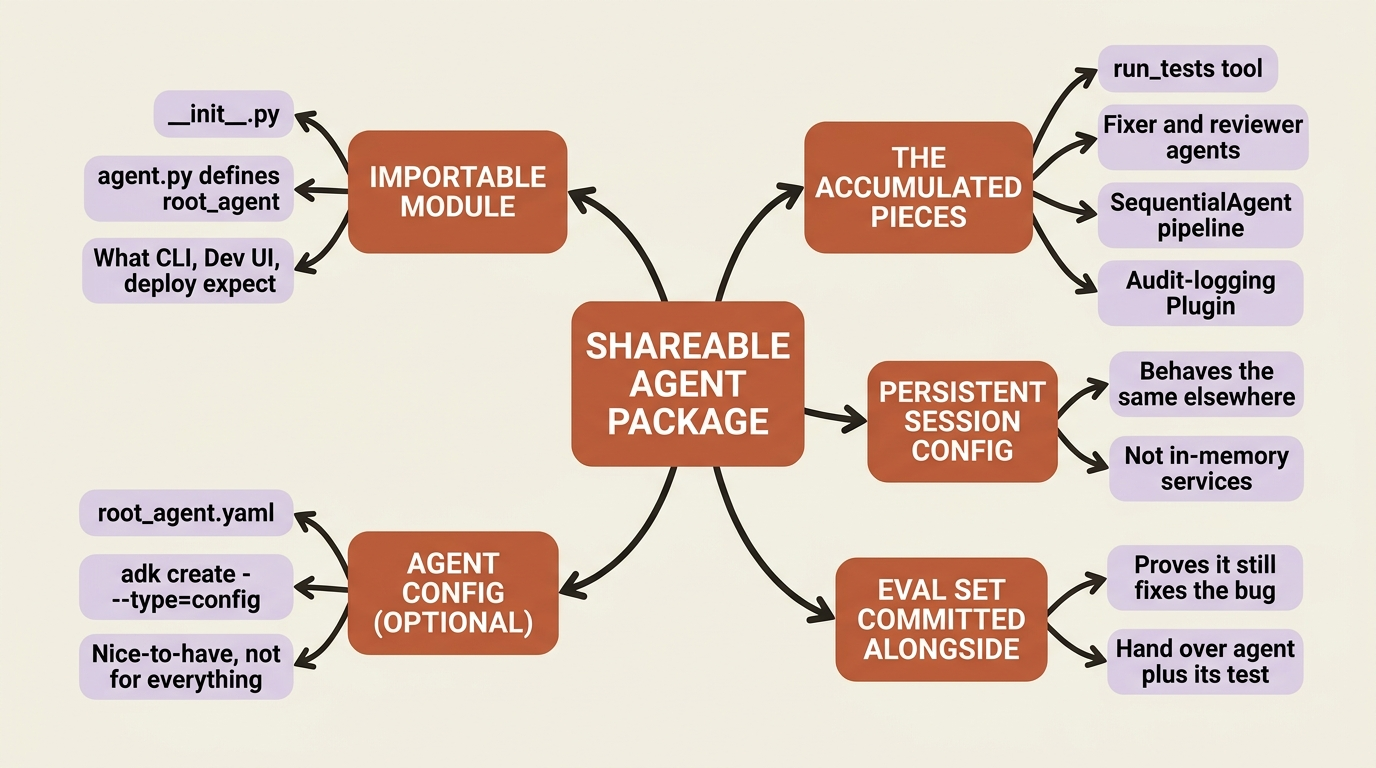
The third question is reuse. Right now the agent's pieces are spread across your code: the run_tests tool, the fixer and reviewer agents, the SequentialAgent that wires them, the audit Plugin on the runner, and the persistent session config. It runs on your machine because you assembled it there. Packaging is making it run on someone else's.
The importable module is the foundation
The foundation is a convention you should follow from day one. An ADK agent is a directory with an __init__.py and an agent.py that defines root_agent. That structure is exactly what the CLI, the Dev UI, and every deployment path expect.
Honor it and your agent is already a portable module. Collect the tool, the two agents, the pipeline, and the runner configuration into one clean package, and a teammate can clone it, set their API key, and run adk web against it with no further explanation. The discipline that felt like ceremony at the start is what makes the agent shareable now.
Agent Config, with a caveat
There is also a declarative packaging option worth knowing about, with a caveat. ADK supports Agent Config: defining an agent in a root_agent.yaml file instead of Python, created with adk create --type=config. A simple agent becomes a few lines of YAML: a name, a model, a description, an instruction, and a list of tools. It is an appealing way to share and version agent definitions without code.
Freshness check. Agent Config is experimental and evolving, and it has real limits today. It currently supports only Gemini models, it supports Python and Java for tools, and not every agent type and tool is supported in YAML yet. Some advanced agent types are explicitly not covered. Verify the current Agent Config syntax and its supported feature set against the live docs before committing to it as your packaging story. Treat it as a nice-to-have declarative layer for the agents it supports, not as a replacement for the importable-module approach, which works for everything. If Agent Config does not yet cover a piece of your system, the Python module is the answer that always works.
Putting it together, the shareable package is the importable-module structure, the persistent session configuration so it behaves the same on a teammate's setup, and an eval set committed alongside the code so whoever picks it up can prove it works before they change anything. That last piece matters. You are not just handing over an agent, you are handing over the agent plus the test that says it is correct.
A troubleshooting checklist for the road
Before the send-off, here is the short list of things that will actually go wrong, with where to look:
- A tool the model ignores or misuses is almost always a docstring problem, not a code problem: the name, signature, and docstring are all the model sees.
- State that did not persist is the commit-on-event rule, or a direct mutation that bypassed it: write through
output_key, a context object, orstate_delta, never a retrieved session's dict. - A session that forgot everything on restart is an in-memory service in a place that needed a persistent one.
- A callback that throws a baffling
TypeErroris a renamed parameter: use the exact documented names. - An agent callback that "isn't running" is a Plugin short-circuiting it first.
- Memory that recalls nothing is usually unshared service instances across runners.
Almost every real bug in an ADK agent traces back to one of these, and now you know each one by name.
Do this today
- Open the Trace tab. Run
adk web, do one full agent run, and read the waterfall: every event, tool call, and model round-trip, grouped by user message. - Export one trace. Set
OTEL_EXPORTER_OTLP_ENDPOINTto a collector you already run, or pass--otel_to_cloud, and confirm the spans show up downstream. - Build one eval case. In the Dev UI Eval tab, save a known broken-repo-to-known-fix session as a test case, with the expected tool trajectory "run tests, propose fix, review."
- Wire eval into pytest. Add the eval set to your test pipeline so every commit runs the agent and a quality drop fails the build.
- Package it. Collect the tool, the agents, the pipeline, and the persistent session config into one
__init__.pyplusagent.pymodule, and commit the eval set alongside it.
The whole arc, in one breath
Step back and look at what you built. You started with one agent and a stub, and you learned the loop underneath it. You gave it real tools, then split it into a cooperating team. You taught it to remember, to stream its work, to be intercepted by callbacks and extended by Plugins and MCP, to survive interruption, to deploy safely to real users, and finally to be observed, tested, and packaged. Each capability answered a problem the previous one created, and the same small agent carried all of it, from a fake test result to a traced, evaluated, shareable system.
That progression was the point. ADK is large, but it is not arbitrary. Every piece exists to solve a problem you feel the moment you outgrow the piece before it. You do not need all of it on day one. You reach for the loop when the magic confuses you, for multi-agent when one prompt buckles, for persistence when the agent forgets, for callbacks when configuration runs out, for deployment when the laptop is not enough, and for observability and evaluation when "it works" stops being good enough. Learn it in that order, the order of your own growing needs, and the framework stops being a wall of features and becomes what it is: a well-built harness that hands you the agent you would otherwise keep rebuilding by hand.
Your agent is traced, tested, and ready to hand to a teammate. Go build the one you actually need.
This is Part 11 of "Building with Google's Agent Development Kit (ADK)," an eleven-part guide that takes a developer from zero to a hardened, observable, production-deployed agent.