
You Cannot Ship a Stateful Agent Like a Stateless Lambda
You cannot ship a stateful ADK agent the way you ship a stateless Lambda. The one prerequisite that makes deployment possible, the three Google Cloud paths to host the result, and the threat model that strangers force on you.
Deploying a Google ADK agent is not deploying a function. Here are the three Google Cloud paths that host one, and the single mistake that quietly breaks all three.
In this article: You will learn why a deployed ADK agent is a stateful system, not a stateless function, and the one change that makes production possible before any deploy command runs. We compare the three Google Cloud hosting paths, namely Agent Runtime, Cloud Run, and GKE, by the tradeoffs that actually decide which one you pick. Then we cover keeping tenants isolated, handling stateful tool connections inside a container, and the layered threat model you need once strangers can reach your agent and steer its actions.
You have a real agent now. It fixes bugs, reviews its own work, remembers projects across sessions, and refuses dangerous requests. It runs beautifully on your laptop. And your laptop is exactly where it will stay until you do the uncomfortable thing: get it off your machine and in front of real users, safely, without it falling over the first time something restarts.
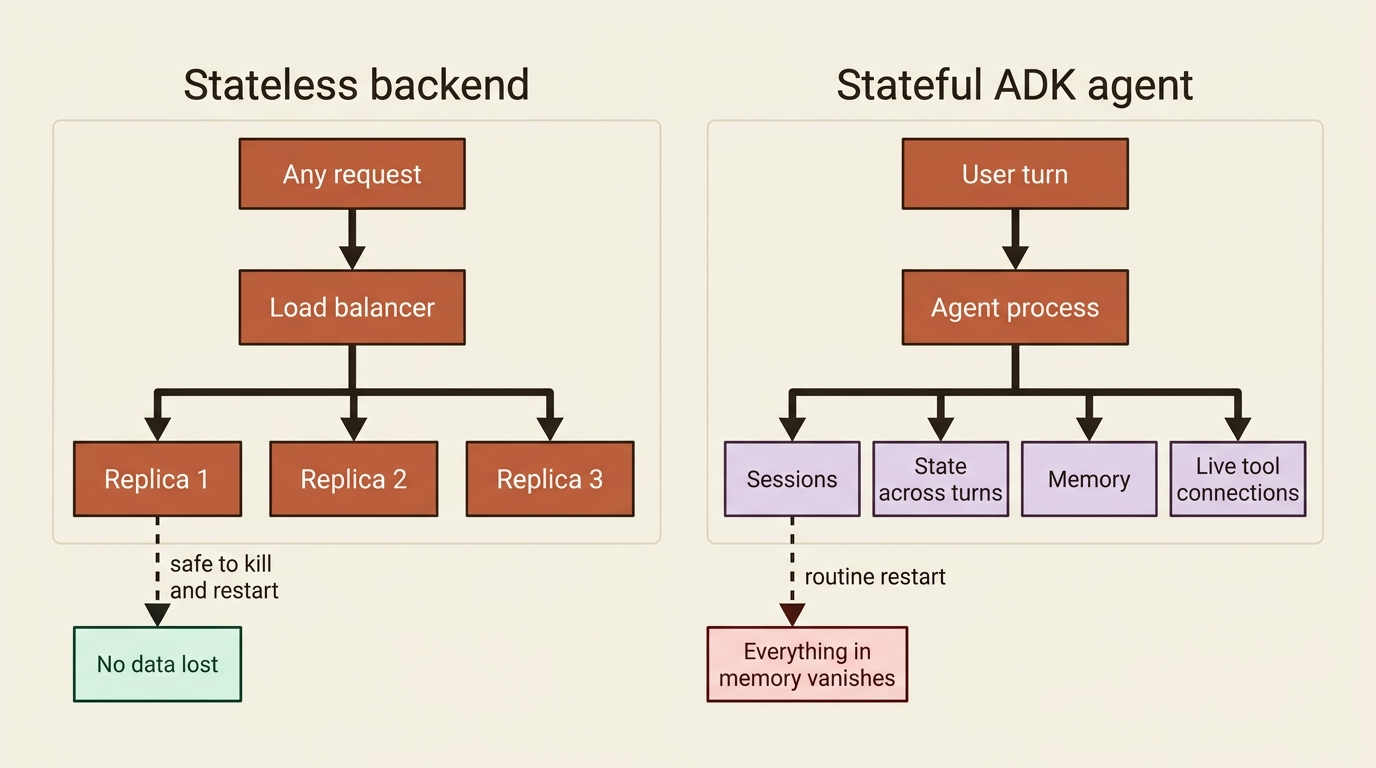
Deployment is where a lot of agent projects quietly die, and the cause is a category error. A traditional web backend is stateless. Each request is self-contained, you can kill and restart the server between any two requests, and you can run a hundred identical copies behind a load balancer without a second thought. An ADK agent is none of those things. It has sessions that hold conversation history, state that persists across turns, memory that spans conversations, possibly live connections to tool servers, and long-running flows you might resume hours later. Treat that like a stateless function and you earn the 3 a.m. page: a routine restart wipes everything in memory, and every user's conversation evaporates at once.
So this article has two halves. First, the non-negotiable change that makes deployment possible at all. Then the three genuinely different paths Google Cloud gives you to host the result, and the threat model you must hold in your head once untrusted input reaches your agent.
A note on a moving target
One honest caveat before the commands. Deployment surfaces evolve faster than almost anything else in a framework. Service names get rebranded, CLI flags change, and managed offerings move from preview to general availability and back. The commands below are correct as a shape, but verify the exact flags, the current service name, and the language support against the live docs before you run a production deploy. Where possible, hold onto the durable principle underneath the specific command, because the principle outlasts the syntax. If a managed path has changed by the time you read this, the fallback never does: containerize your agent and run it on a general-purpose platform.
The one change you cannot skip: persistent services
Before any deployment path, there is a single prerequisite that breaks everything if you forget it. Through development you used InMemorySessionService, which keeps every session in the process's memory. That was correct for development and catastrophic for production, because the moment the process restarts, for a deploy, a crash, or an autoscaler scaling down, every session is gone.
Swapping to a persistent SessionService is the first thing you do, not the last. A DatabaseSessionService backed by a real database, or a VertexAiSessionService backed by Google Cloud, turns your sessions durable. It is also the precondition for any resume feature, which literally cannot work without a persistent record to resume from. If you remember one thing from this article, make it this: in-memory services are a development convenience, and shipping them to production is the bug that pages you.
In production. This is not a tuning knob; it is a correctness requirement. An agent on
InMemorySessionServicein production is not "less scalable," it is broken, and it will look fine in every test until the first restart under load. Make the persistent-service swap the first line of your deployment checklist.
Three paths, three sets of tradeoffs
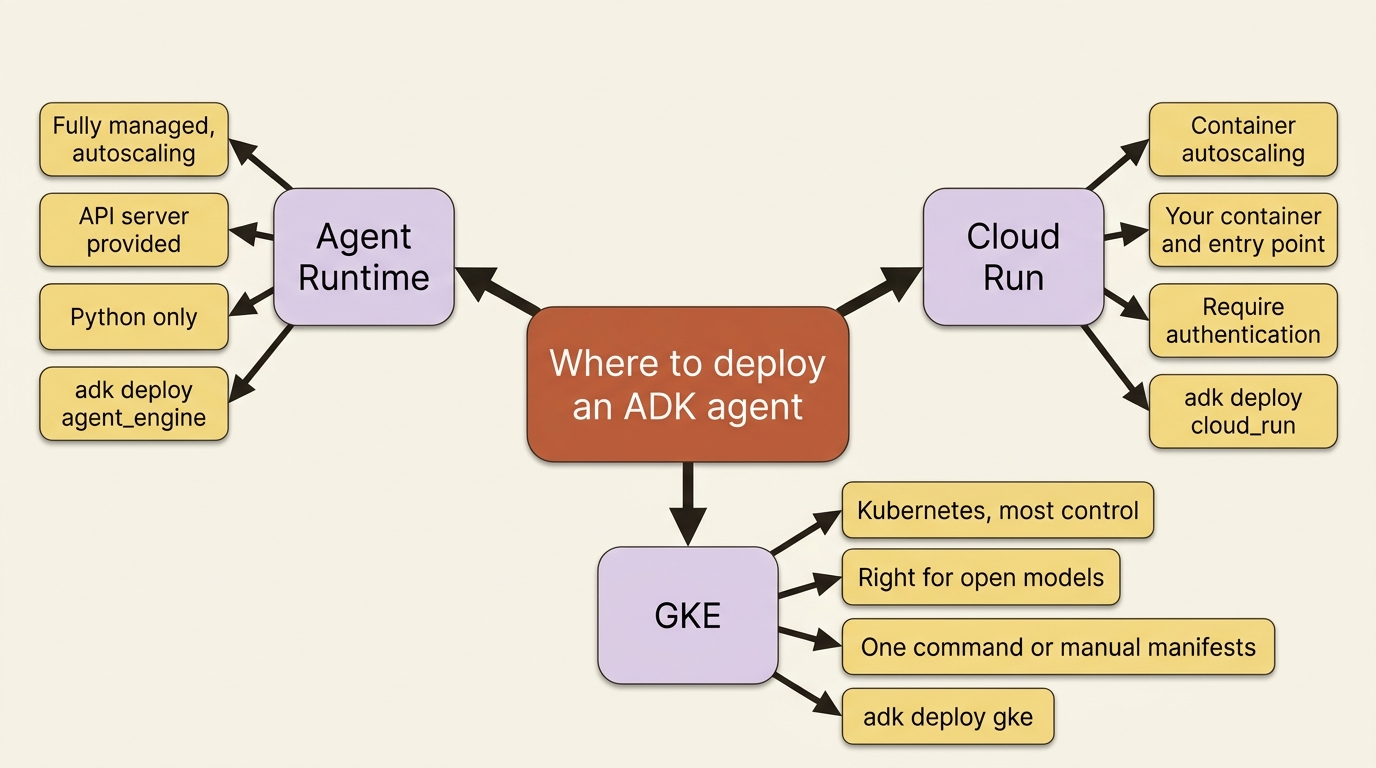
With persistence handled, you choose where to run. Google Cloud gives ADK three real options, and they are not ranked best to worst. They are different tools for different situations. The right question is how much you want managed for you versus how much control you need.
Agent Runtime: fully managed
Agent Runtime on Agent Platform (formerly Vertex AI Agent Engine, which is why the CLI subcommand below is still agent_engine) is the most hands-off path. It is a fully managed, autoscaling service built specifically for hosting agents, and it provides the ADK API server machinery for you, so you ship your agent code and dependencies and little else. You deploy with the adk deploy agent_engine command:
adk deploy agent_engine \
  --project=$GOOGLE_CLOUD_PROJECT \
  --region=$GOOGLE_CLOUD_LOCATION \
  --display_name="Buggy Shop Agent" \
  ./buggy_shop
It packages your code, builds a container, and deploys it to the managed runtime, handing back a resource ID you use to query the agent afterward. For teams that want the infrastructure to disappear, this is the path, and there is an accelerated variant through the Agents CLI that scaffolds CI/CD, infrastructure-as-code, and deployment pipelines around it for a full production setup.
One constraint to know up front, because it can decide your whole approach: Agent Runtime currently supports Python only. If your agent is in another language, this path is closed and you want one of the next two. It is also a paid service beyond a no-cost tier, so factor cost in.
Cloud Run: container autoscaling with more control
Cloud Run runs your agent as a container on a managed, autoscaling platform. You get more control than Agent Runtime, since it is your container, your dependencies, and your entry point, while Google still handles the scaling and the servers. ADK gives you a one-command deploy:
adk deploy cloud_run \
  --project=$GOOGLE_CLOUD_PROJECT \
  --region=$GOOGLE_CLOUD_LOCATION \
  --service_name=buggy-shop-service \
  ./buggy_shop
That builds the image, pushes it, and deploys the service, returning a URL. By default it deploys just the API server. Add --with_ui if you want the dev interface alongside it, though you rarely want that exposed in production. During deploy you are asked whether to allow unauthenticated access, and the answer for a real service is almost always no: require authentication and gate access deliberately. If you need full control, you can skip the adk command and write your own Dockerfile around a FastAPI entry point, which is also the route for running the container anywhere that takes a container image, including offline or off Google Cloud entirely.
GKE: Kubernetes, the most control
Google Kubernetes Engine is the path when you need real control over the runtime, when you are running open models yourself, or when the agent has to live inside an existing Kubernetes estate. ADK supports it both ways: a one-command adk deploy gke that builds the image, generates the Kubernetes manifests, and applies them to your cluster, or a fully manual route with your own manifests and kubectl for teams that want to own every layer. It is the most setup and the most flexibility, and most teams do not need it until they do.
The honest summary: start with Agent Runtime if you want managed and you are on Python, reach for Cloud Run when you want container control without Kubernetes overhead, and use GKE when you need maximum control or open models. There is no single right answer, only a right answer for your constraints.
The container catch: stateful tool connections
One thing about tools follows you into deployment and surprises people. If your agent uses MCP tools over stdio, each connection spawns a server process, and that has to work inside whatever container you ship. The fix is a deployment-friendly pattern: define your agent synchronously rather than with an async factory, and package the MCP server into the container. For npm-based servers, that means installing Node in your image. Then filter the tools you expose, and configure timeouts and cleanup so connections do not leak. Stateful tool connections are the part of an agent that least resembles a stateless function, so they need the most deliberate handling in a deployed, scaled environment. For remote MCP servers, prefer SSE connections over stdio, since they scale across instances in a way spawned subprocesses do not.
Multi-tenancy: many users, one agent
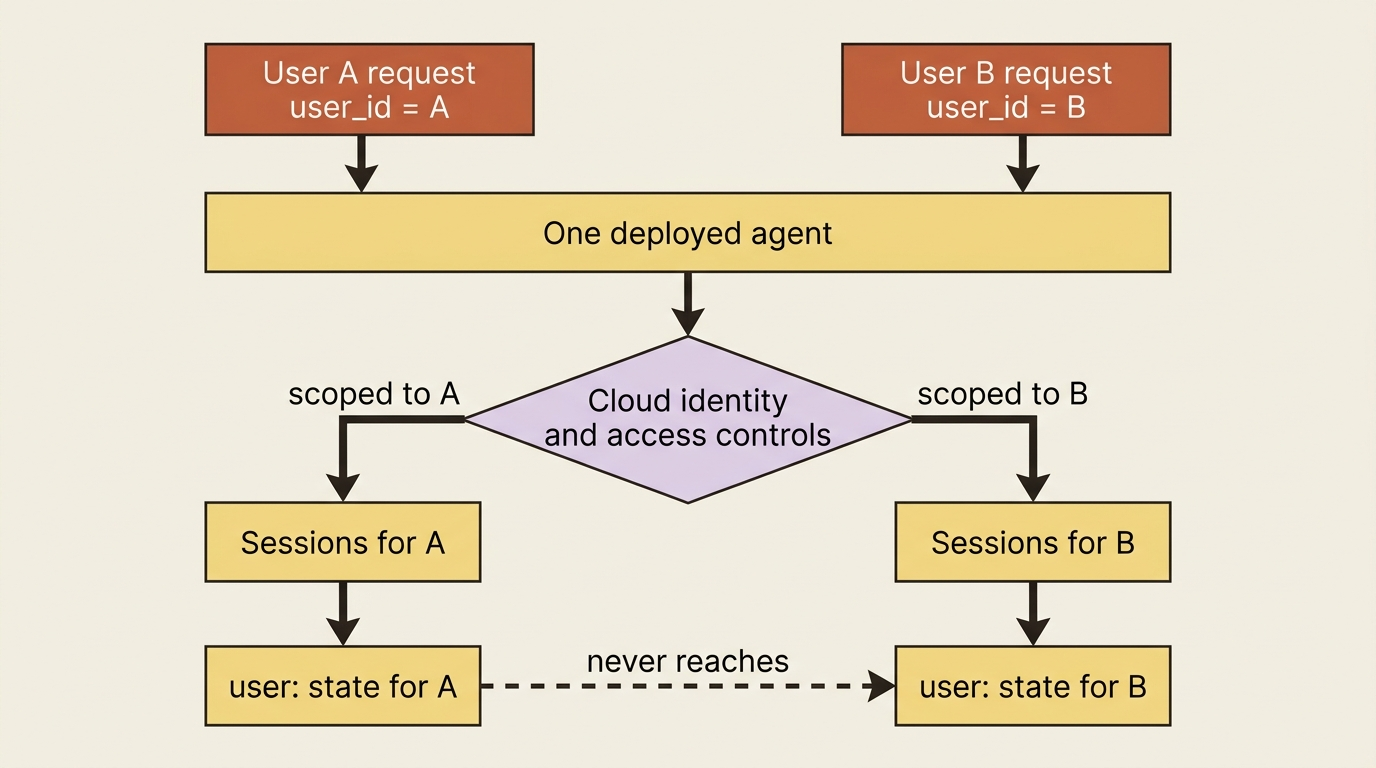
A deployed agent usually serves many users, and they must not see each other's data. ADK's primitives are exactly the tools for this. The session hierarchy of app, user, and session keeps each person's conversations isolated by user_id. State prefixes do real work here: as long as your application passes a verified user_id from your auth layer, user:-scoped state is automatically scoped to the user the session was created for, so one user's preferences never bleed into another's session. The prefix gives you scope-based visibility within one user's view; the isolation between users still depends on your application supplying that verified user_id, because the prefix does not enforce tenant isolation on its own. Scope threads per user, use the namespacing the prefixes give you, and lean on your cloud platform's identity and access controls so a request can only ever touch its own user's data. Multi-tenancy is not a feature you add. It is a discipline you maintain, built on primitives you already have.
The threat model: your agent now takes real actions on untrusted input
Here is the part that changes how you think once the agent is public. An agent is not a passive question-answering box. It takes dynamic actions, calling tools, running code, and writing to memory, based on dynamic input that now comes from people you do not control. That combination is a genuine attack surface, and prompt injection is not hypothetical. An adversarial user, or a malicious payload smuggled in through a tool's output, can try to steer your agent into doing something it should not.
ADK gives you a layered defense, and the right posture is defense in depth rather than any single wall.
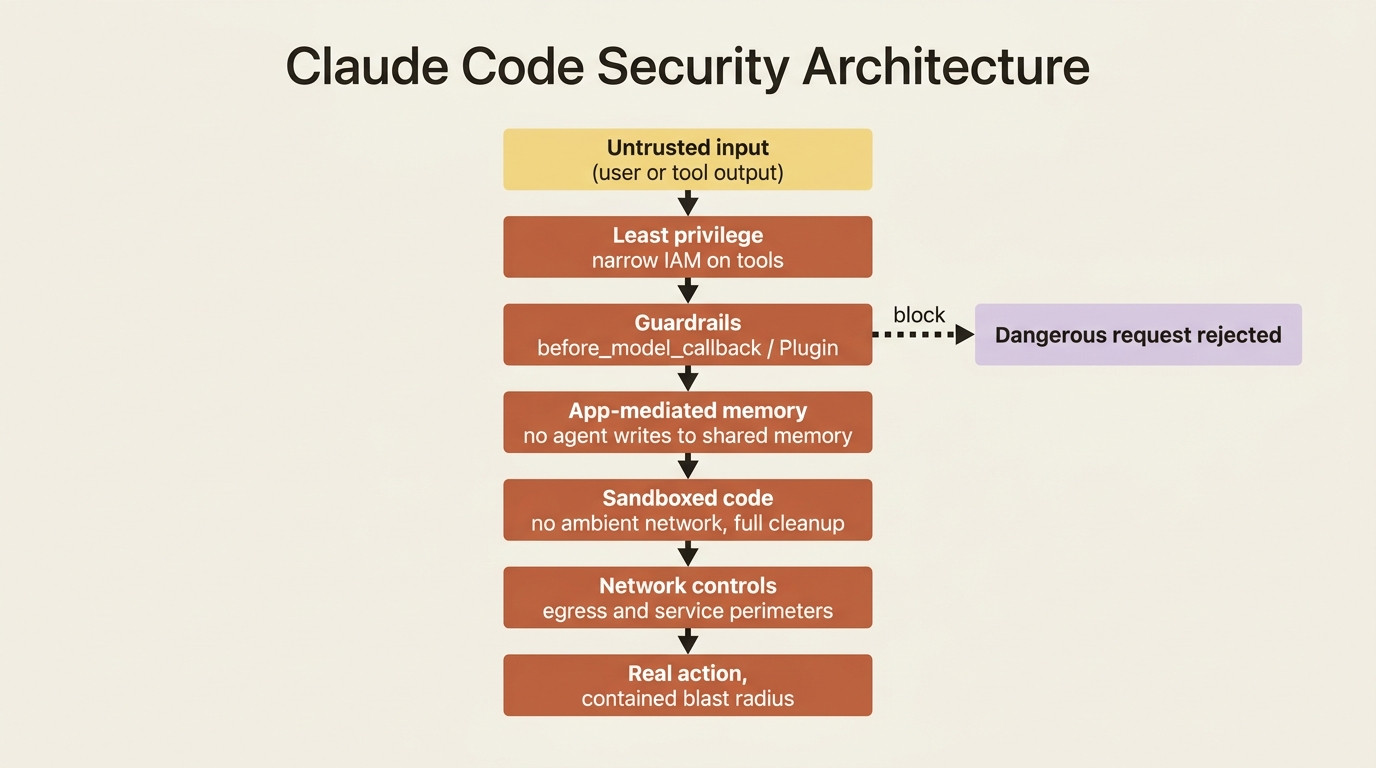
Least privilege starts at identity. Give the agent's tools the narrowest permissions that let them do their job. If a tool only needs to read a database, grant it read-only access at the IAM level, so that no matter what the model is talked into, the tool physically cannot write. This is the single highest-leverage control, because it constrains the agent below the level the model can reason about.
Guardrails screen inputs and outputs. A before_model_callback, or better for system-wide policy, a security Plugin, can inspect requests and tool calls and block the dangerous ones. ADK and Google Cloud offer ready-made versions of this idea, including plugins that use a fast, cheap model as a safety judge to screen for injection and harmful content, and PII-redaction plugins that strip sensitive data before it reaches a tool. Plugin precedence is what makes these reliable: register once on the runner, applies everywhere, and runs first.
Write access to shared memory belongs to your application code, not to the agent acting on user input. If the agent can be talked into writing arbitrary things into a memory that other turns or other users will later read, prompt injection becomes persistent. Keep the agent's path to durable, shared memory mediated by code you control, so a poisoned input cannot quietly plant something that surfaces later.
Sandboxing matters the moment the agent runs code. Model-generated code must execute in an isolated environment with no ambient network access and full cleanup between runs, so a generated snippet cannot exfiltrate data or reach across users. Use a sandboxed code execution option rather than running generated code in your own process.
Network controls draw the outer perimeter. Confining the agent inside a secure boundary, with egress controls and service perimeters, limits how far a compromise can reach and is the standard answer to data exfiltration. The principle under all of it is the same: assume the input is adversarial, give every component the least power it can do its job with, and put independent layers between a bad input and real damage.
Do this today
- Make the persistent swap line one. Replace
InMemorySessionServicewith aDatabaseSessionServiceorVertexAiSessionServicebefore you write a single deploy command. This is a correctness requirement, not an optimization. - Pick a path by constraint. Choose Agent Runtime for fully managed Python, Cloud Run for container control without Kubernetes, and GKE for maximum control or self-hosted open models.
- Refuse unauthenticated access. When
adk deploy cloud_runasks, say no, then gate access with real authentication and identity controls. - Scope every tenant. Isolate users with the app, user, and session hierarchy and
user:-prefixed state, and back it with cloud IAM so a request can only touch its own data. - Apply least privilege to tools. Grant each tool the narrowest IAM permission that does its job, add a guardrail Plugin for injection and PII, and sandbox any model-generated code.
Your agent is in production. Now you have to be able to trust it.
You can deploy. You know the category error that kills agent projects, a stateful agent shipped like a stateless function, and you know the first fix is swapping in a persistent SessionService before anything else. You can choose among three real paths, Agent Runtime for fully managed Python, Cloud Run for container control, and GKE for maximum control or open models, by matching the path to your constraints rather than chasing a single best answer. You know how to keep tenants isolated, how to handle stateful tool connections in a container, and how to think about a threat model where your agent takes real actions on input from strangers.
The lesson underneath all of it is the one from the opening. A deployed agent is a stateful system, so deploy it like one. Make it durable first, choose the host that matches your constraints second, and assume the input is adversarial throughout. Do those three things and the 3 a.m. page stops being inevitable and becomes the failure mode you designed around.
This is Part 10 of "Building with Google's Agent Development Kit (ADK)," an eleven-part guide that takes a developer from zero to a hardened, observable, production-deployed agent.