
Your Forty-Minute Agent Died at Minute Thirty-Nine. One Config Flag Would Have Saved the Other Thirty-Eight.
Stop letting a single interruption throw away a long agent run. ADK's Resume feature records progress as the workflow goes and picks up from the exact step that died, not from zero, with a handful of sharp edges around side-effecting tools that you have to respect.
Real agents get interrupted: dropped connections, killed processes, step limits, an approval that takes a human an hour. Google ADK's Resume feature lets a stopped workflow pick up exactly where it left off instead of starting over. Here is how it works, and the sharp edges to watch.
In this article: You will learn how to make a Google ADK workflow survive interruption with the ADK resume agent feature. We cover the single
ResumabilityConfigflag that turns it on, how resuming works under the hood, why it only works with a persistent session, the at-least-once tool guarantee that forces you to make side-effecting tools idempotent, and the surprising fact that human-in-the-loop approval is the same resume mechanism wearing a different hat.
Most tutorials quietly assume the happy path. The agent runs, the tools return, and the conversation finishes. Reality is less polite. A network blip drops the connection mid-fix. The process gets killed during a deploy. The workflow hits a step limit. Or, most ordinary of all, your agent asks a human to approve something and the human goes to lunch.
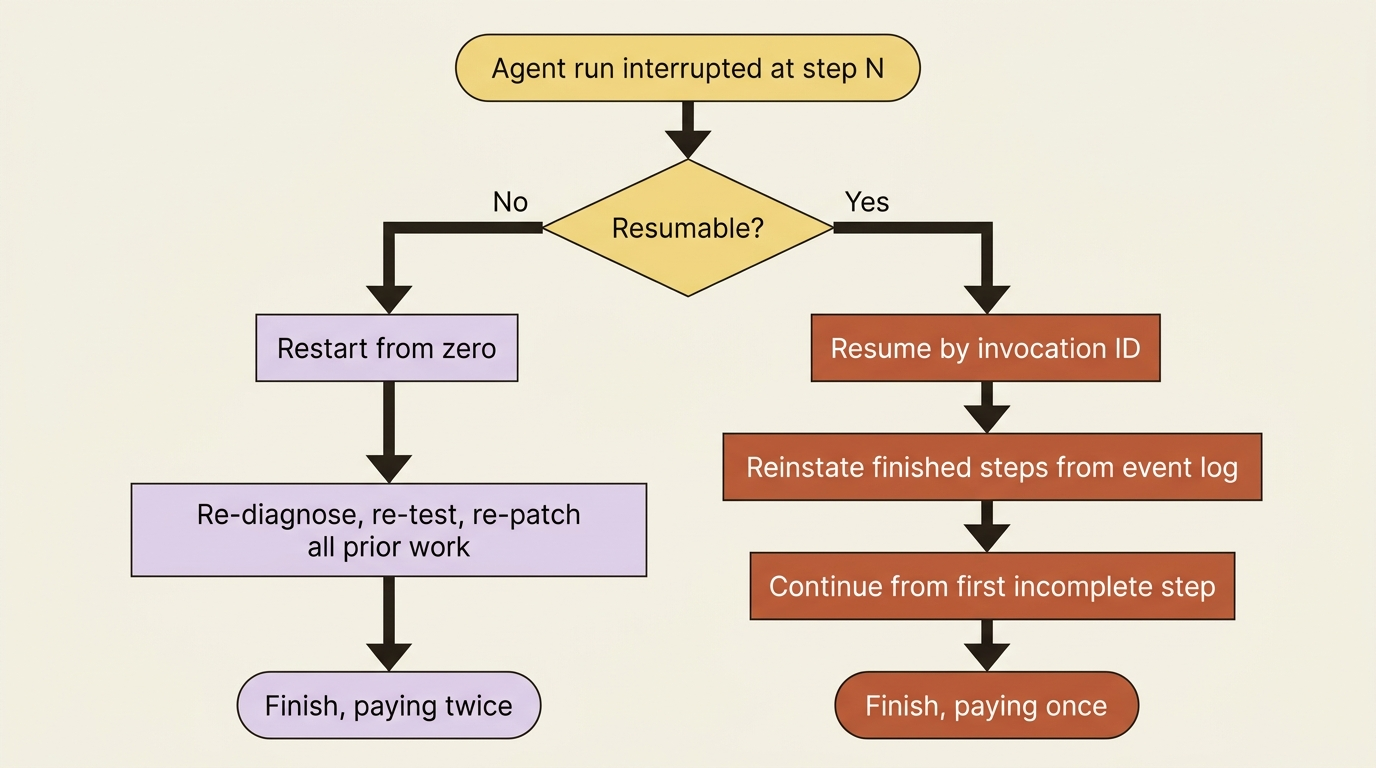
In every one of those cases, a naive agent throws away everything it had done and starts from zero the next time you run it. The fixer that already diagnosed the bug, ran the tests, and drafted a patch reruns all of it because the connection died one step before the finish.
That waste is avoidable. ADK has a Resume feature that records a workflow's progress as it goes and lets you pick it back up from where it stopped, not from the beginning. This article shows how to turn it on, how resuming actually works under the hood, and the handful of sharp edges, especially around tools, that you must respect for it to be safe.
A reality check before the mechanics
Resume is one of the newer ADK features, so set expectations honestly. It is available in Python and Kotlin, it is gated by version (resumable workflow tracking landed in Python ADK 1.14, with workflow-level resumability configuration arriving in 1.16 and later, so you want a recent ADK), and a couple of its behaviors are version-sensitive. None of that makes it unusable, but it does make it the kind of feature to verify against the current docs before you lean on it in production. Treat the code below as the shape of the thing, and confirm the exact API and version when you wire it for real.
If Resume is not available or not appropriate for your case, one fallback principle still serves you well: design your workflow so that retrying it is safe. An agent built around idempotent steps survives interruption even without a formal resume mechanism, because rerunning it does no harm. Resume is the better answer when you have it. Idempotent design is the floor you should build on regardless.
Turning it on
Enabling Resume is a single configuration flag, set on the App object that wraps your agent. You opt a whole workflow into resumability with a ResumabilityConfig:
from google.adk.apps import App
from google.adk.apps.resumability_config import ResumabilityConfig

app = App(
    name="buggy_shop",
    root_agent=root_agent,   # the fixer-and-reviewer pipeline
    resumability_config=ResumabilityConfig(
        is_resumable=True,
    ),
)
That is the whole opt-in. With is_resumable=True, ADK begins tracking the workflow's progress through its events as it runs, so that a stopped run leaves behind enough of a trail to continue from.
One thing to flag immediately: resume is only meaningful with a persistent session. The progress trail lives in session state and event history. If you are running on InMemorySessionService, a process restart wipes exactly the record you would need to resume from. Resume and a durable SessionService are a package deal. This is the deeper reason a persistent session is load-bearing, not just convenient.
Resuming a stopped run
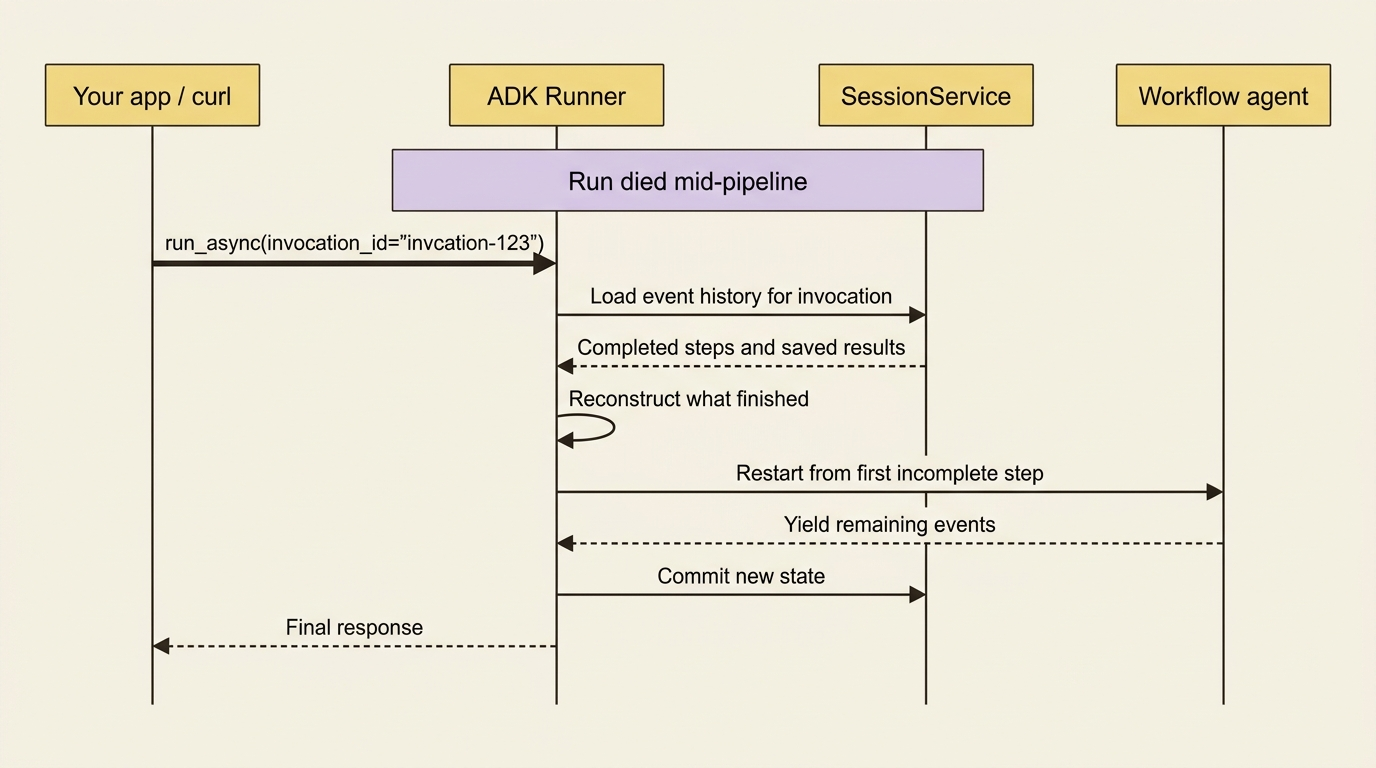
When a workflow stops, you resume it by pointing at the specific run you want to continue, identified by its invocation ID, the same invocation_id that ties each turn's events together. You find it in the event history of the stopped workflow.
There are two ways to send the resume request. Against a running API server, you POST the invocation ID to the run endpoint:
# Restart the API server if the interruption took it down too.
adk api_server buggy_shop/

# Resume the specific stopped run by its invocation ID.
curl -X POST http://localhost:8000/run_sse \
  -H "Content-Type: application/json" \
  -d '{
    "app_name": "buggy_shop",
    "user_id": "u_123",
    "session_id": "s_abc",
    "invocation_id": "invocation-123"
  }'
Or directly through the runner, by passing the invocation_id to run_async:
runner.run_async(
    user_id="u_123",
    session_id="s_abc",
    invocation_id="invocation-123",
)
In both cases you are not starting a new conversation. You are telling ADK to continue the existing one from where it died. One practical limit worth knowing: resuming from the Dev UI or the adk CLI is not currently supported, so resume is an API-and-runner operation, not something you trigger by clicking around the web interface.
How resume actually works, and why your pipeline benefits
The mechanism is worth understanding because it explains both the power and the caveats. As a resumable workflow runs, ADK logs the completion of each step through events and event actions. When you resume, it reads that log, reconstructs which agents and steps already finished, reinstates their results, and restarts execution from the first thing that did not complete.
For multi-agent workflows, this is concrete and satisfying. A SequentialAgent records which sub-agent it was on, so on resume it skips the ones that finished and continues from the next. A LoopAgent remembers both its current sub-agent and how many times it has looped, so it picks up mid-iteration rather than restarting the loop. A ParallelAgent tracks which branches completed and reruns only the ones that did not. A fixer-and-reviewer pipeline, interrupted after the fixer finished but before the reviewer ran, resumes straight into the reviewer with the proposed fix already in state, exactly as if nothing had gone wrong.
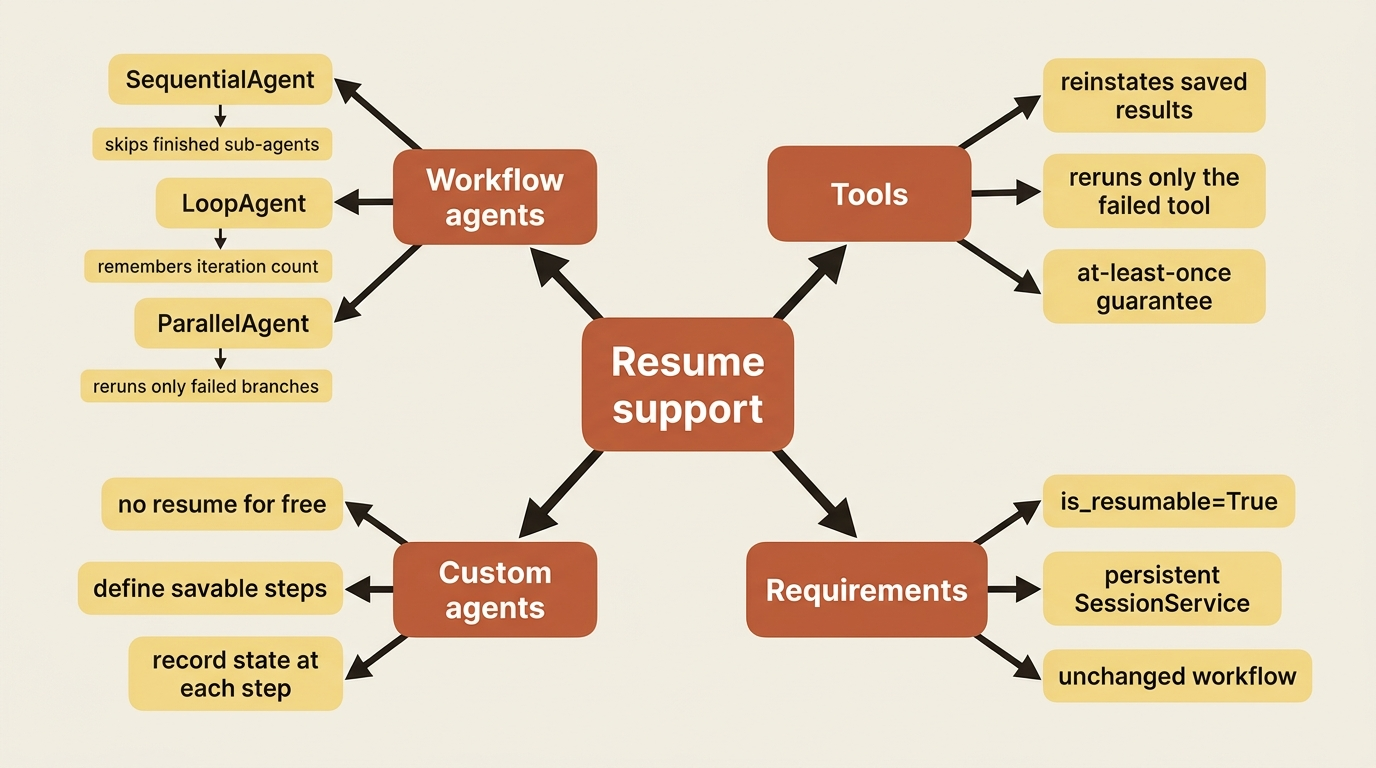
The same logging applies to tools. If an agent successfully ran tools A and B and then failed during tool C, resume reinstates the saved results of A and B and re-runs only C. You do not pay to redo the work that succeeded. That fact leads directly to the most important caveat in this article.
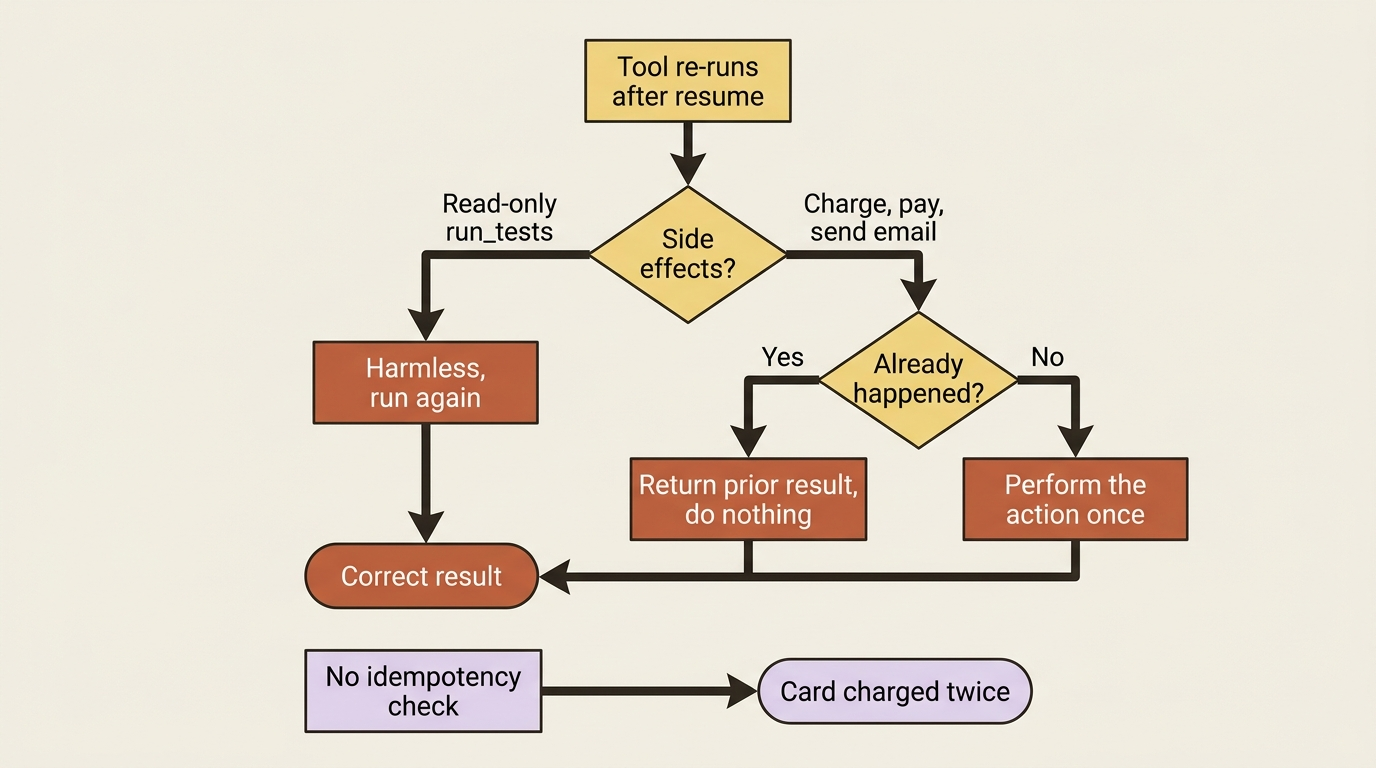
Gotcha. Resume guarantees tools run at least once, which means a tool can run more than once across an interruption and resume. For read-only tools like
run_tests, that is harmless. For tools with side effects (a purchase, a payment, or a sent email), a duplicate run is a real bug: you could charge a card twice. If a tool's duplicate execution would cause harm, you must make it idempotent yourself, typically by having it check whether the action already happened before doing it again. ADK promises at-least-once, not exactly-once. Closing that gap on side-effecting tools is your job.
There is a second, simpler rule that trips people up: do not change the workflow between stopping and resuming.
Gotcha. Resuming a workflow you have modified is not supported. If you stop a run, then add or remove an agent, change the pipeline order, or restructure the team, and then try to resume, the saved progress no longer matches the workflow and resume cannot reconcile them. Resume continues the workflow that was running, not a new one. If you have changed the structure, start fresh rather than resume.
The plot twist: human-in-the-loop is resume in disguise
Here is the connection most readers miss. When you wrap a function as a LongRunningFunctionTool to get human approval, what actually happens is that the agent run pauses after the tool returns its "pending" status, and later continues when your application sends back the human's decision. Pause, wait for an external input, and continue: that is precisely a resume.
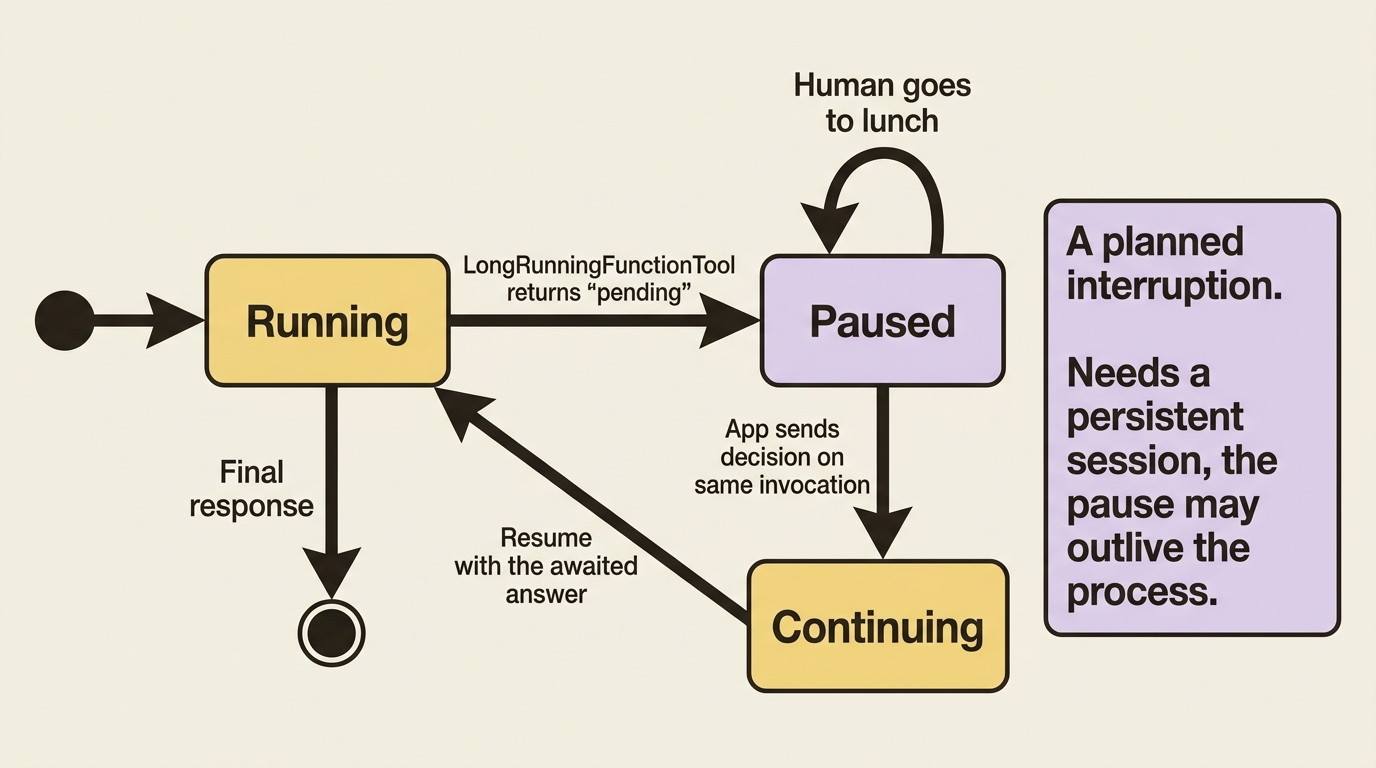
This is why the resume documentation explicitly flags long-running functions, confirmations, and authentication as features that interact with resumability. They are all built on the same pause-and-continue spine. An approval that takes a human an hour is, mechanically, an interruption you planned for. Resuming a long-running function works by passing the function's response back as the new message on the same invocation, continuing the paused run with the answer it was waiting for.
So a human approval tool is not a separate feature bolted on beside resume. It is resume, used deliberately. Understanding one gives you the other, and it means the same durability requirements apply: a human-gated agent needs a persistent session just as much as a crash-recoverable one does, because the pause might outlive the process.
Gotcha. Because long-running functions, confirmations, and authentication all lean on the resume machinery, enabling resumability changes how those features behave. If your agent already uses an approval pause and you turn on
is_resumable, test that path specifically. The interaction is intended, but it is exactly the kind of thing that behaves differently than it did before, and you want to discover that in testing, not in production.
A note on custom agents
Everything above works automatically for the built-in workflow agents, because ADK knows how to checkpoint a SequentialAgent, a LoopAgent, or a ParallelAgent. Custom agents, the ones you build by subclassing the base agent for bespoke orchestration, do not get resume for free. You have to teach them how to checkpoint by defining their savable steps and recording state at each one. That is more involved, and most readers will not need it, but it is worth knowing the line: lean on the standard workflow agents and resume is nearly free; roll your own orchestration and resilience becomes your responsibility to wire in.
Do this today
- Flip the flag. Wrap your agent in an
Appwithresumability_config=ResumabilityConfig(is_resumable=True)and confirm runs still complete normally. - Make the session durable. Swap
InMemorySessionServicefor a persistentSessionService, because resume reads its progress trail from session state and event history. - Audit your tools. List every side-effecting tool (payments, emails, writes) and add an idempotency check so a duplicate run after resume does no harm.
- Resume a real run. Interrupt a workflow, grab its
invocation_idfrom the event history, and resume it through the API server or the runner. Watch it skip the finished steps. - Re-test your approval paths. If your agent uses a
LongRunningFunctionToolfor human approval, turn onis_resumableand verify the pause-and-continue path still behaves as you expect.
Your agent can now survive the real world
You can mark a workflow resumable with a single ResumabilityConfig flag, resume a stopped run by its invocation ID through the API server or the runner, and rely on ADK to skip the work that already finished and continue from where it died. You understand why this only works with a persistent session, the at-least-once tool guarantee that forces you to make side-effecting tools idempotent, and the rule against modifying a stopped workflow before resuming.
You also saw the quiet payoff: human-in-the-loop approval is not a separate feature but the same pause-and-continue mechanism, which is why it carries the same requirements. Once you see resume as the spine under both crash recovery and planned human pauses, the whole feature stops looking like an edge case and starts looking like the default posture for any agent that runs long enough to matter.
So the next time a forty-minute run dies at minute thirty-nine, it picks up at minute thirty-nine. That is the difference one flag, and a little idempotent discipline, buys you.
This is Part 9 of "Building with Google's Agent Development Kit (ADK)," an eleven-part guide that takes a developer from zero to a hardened, observable, production-deployed agent.