
Three Ways to Give Your ADK Agent New Powers, in the Order You Will Want Them
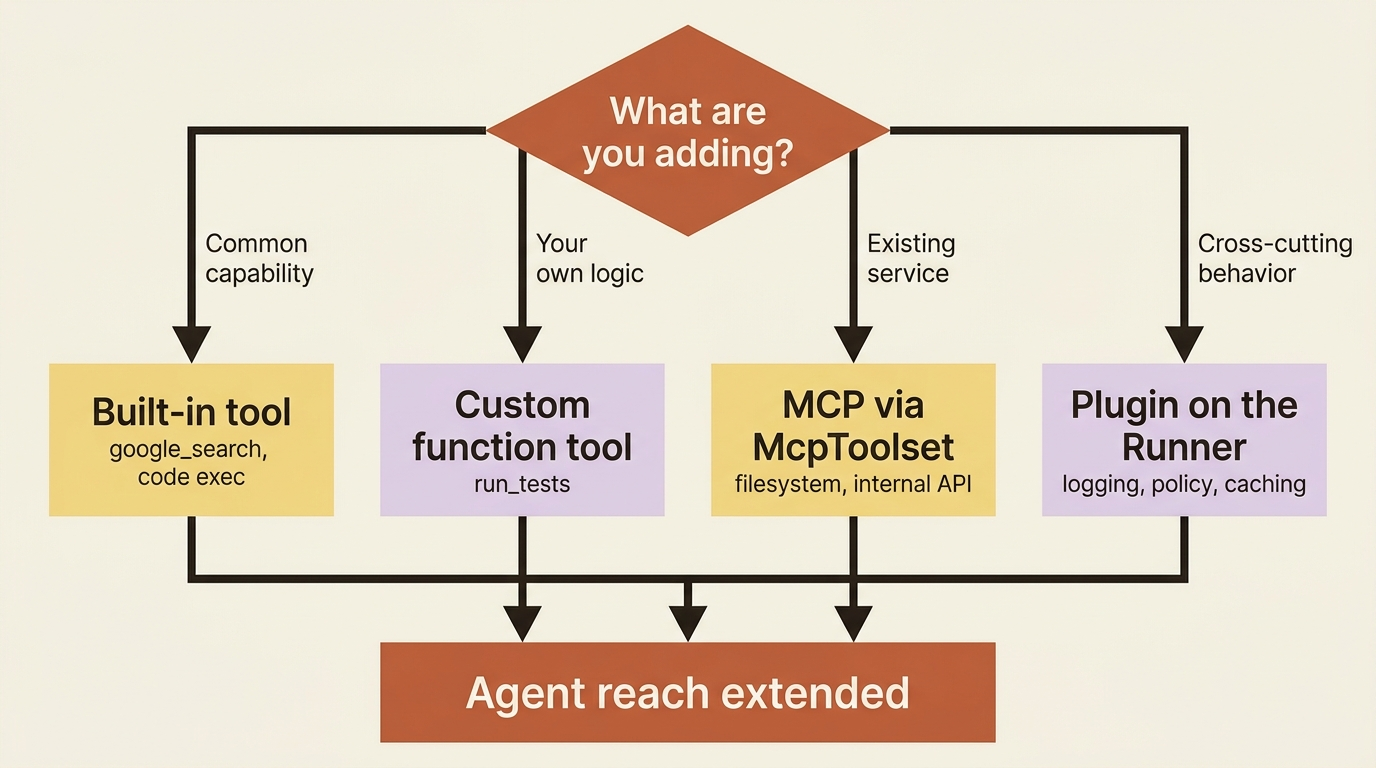
There are three ways to extend an ADK agent without bloating its prompt, and they line up in the order you will actually reach for them: Plugins for global behavior, MCP for external tool servers, and built-in tools for the common cases.
Plugins for global behavior, MCP for external tool servers, and built-in tools for the common cases. Here is how to extend a Google ADK agent without drowning its prompt, and exactly when to reach for which.
In this article: You will learn the three mechanisms ADK gives you for extending an agent's reach: Plugins, which apply a callback to every agent in a runner at once; MCP, which connects your agent to external tool servers through
McpToolset; and built-in tools likegoogle_search, which hand you common capabilities for almost nothing. You will see the precedence trap that lets a Plugin silently override a local callback, the connection-lifecycle obligation that comes with ADK MCP tools, and a clear rule for choosing among all four ways to add capability. By the end you will know how to grow an agent without bloating its prompt.
You attach a callback to one agent and make it refuse destructive prompts. That is local control: this rule, this agent. Agents do not stay small, though. You want the same audit log on every agent, not just one. You want to plug in an external service your company already runs without rewriting it as a Python function. You want web search without building a search tool from scratch.
As you add capability, a quieter problem surfaces. Cram thirty tool definitions into one agent and the prompt bloats, the model gets confused, and quality drops. Extension is not about accumulation. It is about reach.
This article is about extending an agent's reach without that bloat, and it arrives in three movements, ordered by how often you will reach for each. Plugins give you global, system-wide hooks. MCP connects you to external tool servers. Built-in tools hand you common capabilities for free. Take them in order.
Movement one: Plugins, callbacks that apply everywhere
You already know callbacks. A Plugin is the same idea aimed at the whole system instead of one agent. A callback is configured on a single agent for a specific task. A Plugin is registered once on the Runner, and its hooks fire for every agent, every model call, and every tool in that runner. It is the right tool the moment a concern stops being about one agent and becomes about all of them.
The decision between the two is clean. Use a callback when the behavior belongs to one agent: this reviewer logs its verdict, that fixer refuses destructive prompts. Use a Plugin when the concern cuts across everything: log every tool call anywhere in the system, enforce one security policy uniformly, or cache universally. Cross-cutting concerns are exactly what Plugins exist for, and configuring the same callback on every agent by hand is the anti-pattern they replace.
A Plugin is a class extending BasePlugin with one or more of the same callback methods you would put on an agent. An audit log that records every tool call across a fixer, a reviewer, and anything you add later is a natural fit:
from google.adk.plugins.base_plugin import BasePlugin


class ToolAuditPlugin(BasePlugin):
    """Logs every tool call made by any agent in the system."""

    def __init__(self) -> None:
        super().__init__(name="tool_audit")

    async def before_tool_callback(self, *, tool, tool_args, tool_context):
        # Fires for every tool, in every agent, managed by this runner.
        print(f"[AUDIT] {tool_context.agent_name} -> {tool.name} args={tool_args}")
        return None   # passthrough: same return contract as callbacks
You register it once at the application level, by constructing an App with your root agent and a plugins list, then handing that app to the runner:
from google.adk.apps.app import App
from google.adk.runners import InMemoryRunner

app = App(
    name="buggy_shop",
    root_agent=root_agent,            # your fixer-and-reviewer pipeline
    plugins=[ToolAuditPlugin()],      # applies to every agent and tool under this app
)

runner = InMemoryRunner(app=app)
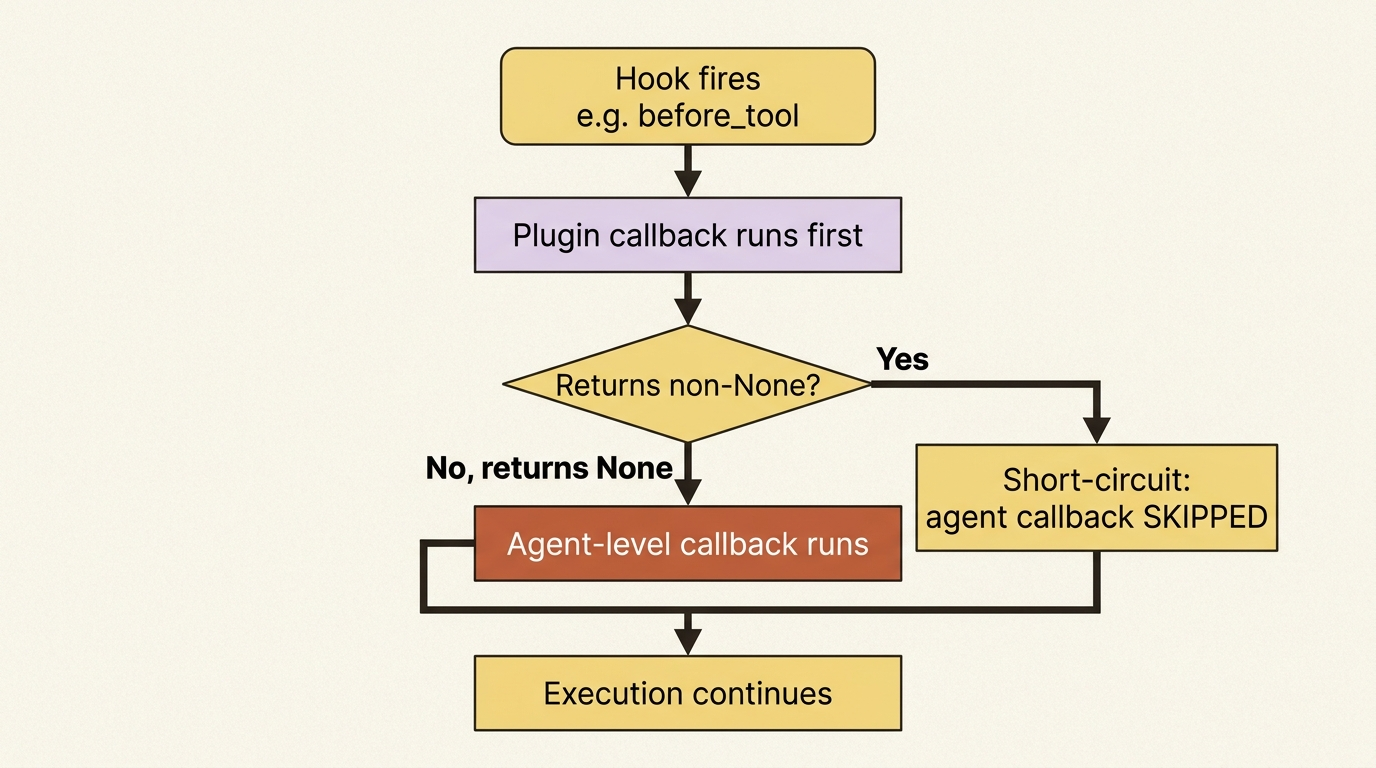
Passing plugins=[...] directly to the runner still works, but it is the deprecated convenience path. The supported path is App(plugins=[...]), which is why we wire it through the app. That is the whole change. Every tool call anywhere in the pipeline now flows through your audit log, with no per-agent wiring. The return contract is identical to a regular callback: return None to observe and continue, or return a value to short-circuit. That second option leads straight to the trap.
Gotcha. Plugins take precedence over agent callbacks. For any given hook, the Plugin runs first, and if a Plugin callback returns anything other than
None, the matching agent-level callback is skipped entirely. A Plugin that returns a value to block or replace a step silently overrides the local callback you carefully wrote on an agent. When an agent callback is not running, suspect that a Plugin short-circuited it before the agent ever got the chance. This precedence is by design, which is what makes Plugins the right place for system-wide policy, but it is easy to misdiagnose.
Movement two: MCP, plugging in external tool servers
Plugins are about behavior. MCP is about capability. The Model Context Protocol is a standard way for tools to be exposed by a server and consumed by a client, and ADK speaks it. Through McpToolset, your agent connects to an external MCP server, discovers the tools it exposes, and presents them to the model as if they were native ADK tools. The agent does not know or care that the tool lives in another process or on another machine.
This matters for two reasons. First, it lets you reuse things you did not write. A filesystem server, a database connector, or an internal company API that already speaks MCP all become tools your agent can call without you reimplementing them as Python functions. Second, and this is the subtler win, it is how you scale to many tools without drowning the prompt, because you can filter which of a server's tools the model actually sees.
Connecting to a local MCP server, here the standard filesystem server, which lets an agent read project files through a vetted interface, looks like this:
from google.adk.agents import LlmAgent
from google.adk.tools.mcp_tool import McpToolset, StdioConnectionParams
from mcp import StdioServerParameters

agent = LlmAgent(
    model="gemini-flash-latest",
    name="repo_reader",
    instruction="Help the user inspect their project files.",
    tools=[
        McpToolset(
            connection_params=StdioConnectionParams(
                server_params=StdioServerParameters(
                    command="npx",
                    args=["-y", "@modelcontextprotocol/server-filesystem", "/path/to/project"],
                ),
            ),
            tool_filter=["read_file", "list_directory"],  # only expose what you need
        )
    ],
)
StdioConnectionParams runs a local server as a subprocess and talks to it over standard input and output. For a remote server you would use SseConnectionParams with a URL instead.
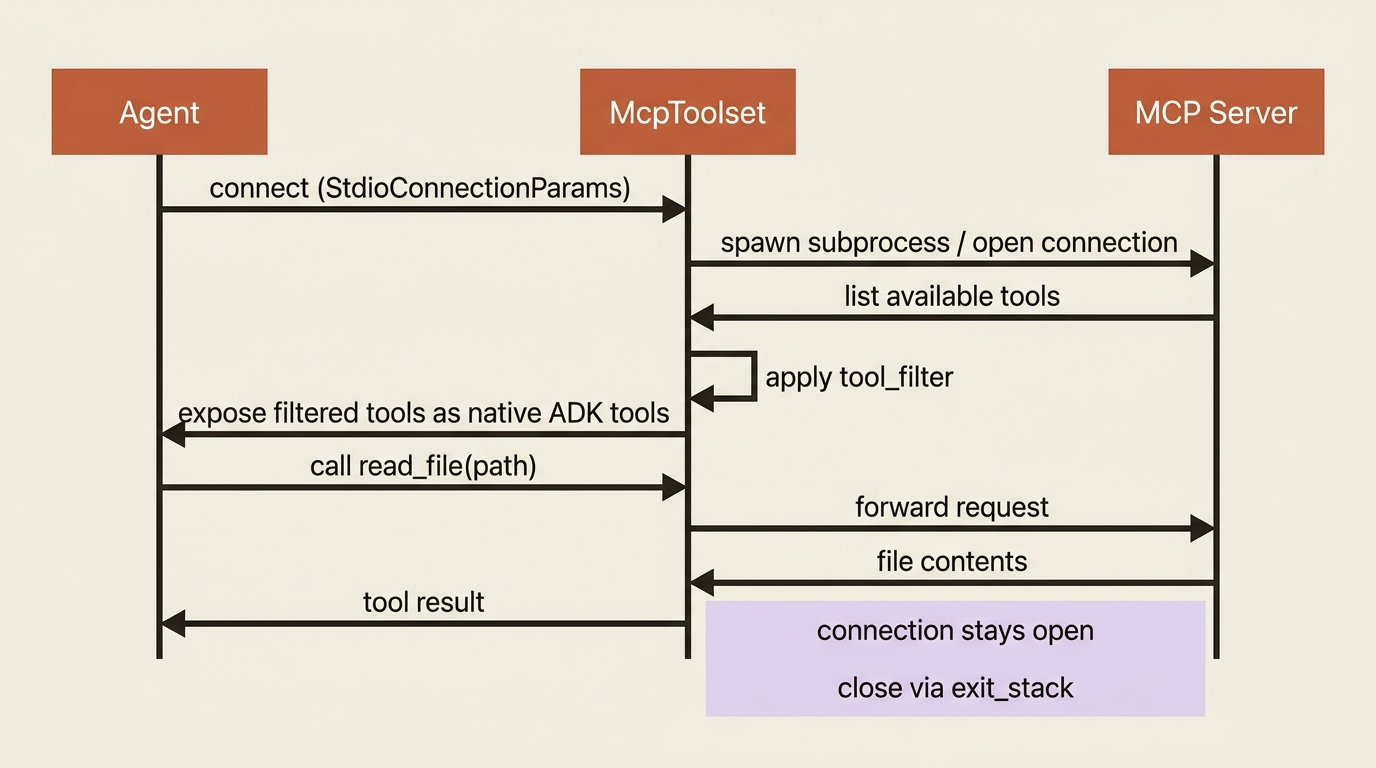
The line that earns its keep is tool_filter. A filesystem server exposes around ten operations, but your agent might only need to read and list. Filtering to just those keeps the prompt lean and, in production, narrows what the agent is even capable of doing, which is a security win as much as a clarity one.
MCP's power comes with a real operational cost, and it is worth naming plainly.
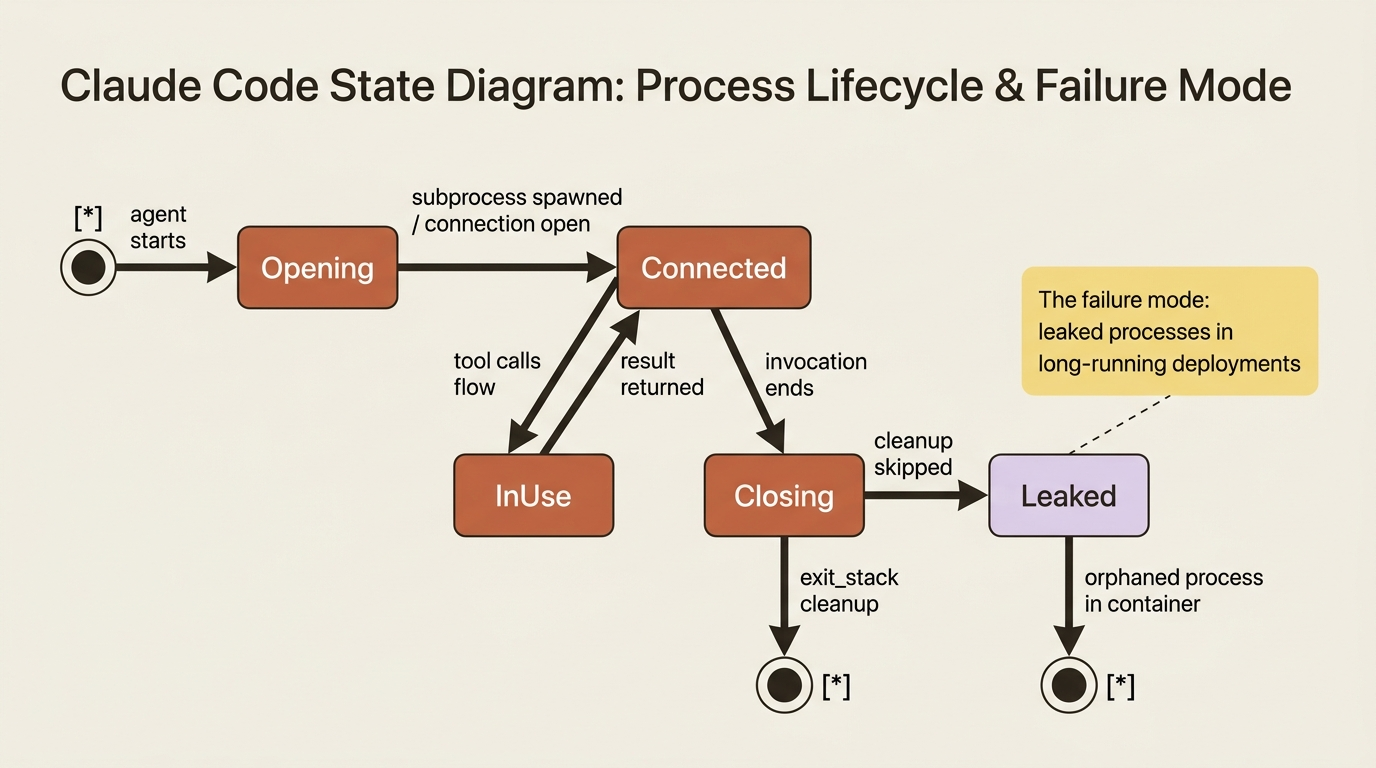
Gotcha. MCP connections are stateful and persistent, unlike a stateless function call. A connection, and often a spawned server process, has to be opened and then properly closed, which is why ADK examples lean on the
exit_stackpattern to guarantee cleanup. Get this wrong and you leak processes or connections, which bites hardest in containers and long-running deployments where stdio servers each spawn a process. When you deploy MCP-backed agents, treat connection lifecycle, timeouts, and cleanup as first-class concerns, not afterthoughts.
Movement three: built-in tools, the common cases for free
Not everything needs a custom function or an MCP server. ADK ships built-in tools for capabilities so common that writing them yourself would be wasted effort. The headline one is Google Search grounding: add it and your agent can answer questions about current events, fresh data, and anything past the model's training cutoff, deciding on its own when to search and citing its sources.
from google.adk.agents import Agent
from google.adk.tools import google_search

researcher = Agent(
    name="researcher",
    model="gemini-flash-latest",
    instruction="Answer questions using Google Search when needed, and cite sources.",
    tools=[google_search],
)
That is the entire integration: import it, drop it in the tools list, and you are done. Code execution is built in too, but it is wired differently: rather than going in the tools list, you attach a code executor through the agent's code_executor parameter, for example BuiltInCodeExecutor from google.adk.code_executors, or VertexAiCodeExecutor for the sandboxed Vertex path. These built-ins are the first thing to check before you reach for a custom tool, because the common need is often already solved and tested.
Gotcha.
google_searchis Gemini-only and raises aValueErroron non-Gemini models, so an agent backed byLiteLlm(...), the bridge for Anthropic, OpenAI, and the rest, cannot use it. On Gemini 1.x it also cannot be combined with other tools in the same agent. If you want search-style grounding behind a non-Gemini model, wrap a custom function tool around your search provider of choice instead.
Choosing among the four
You now have four ways to give an agent capability, counting custom function tools, so a quick decision guide helps.
- Built-in tool first when the capability is common, such as search or code execution. It is the least work and the best tested.
- Custom function tool when the logic is specific to you and lives naturally in your codebase, like a
run_teststool. - MCP when the capability already exists as a service, or when you want to reuse a standard server without reimplementing it.
- Plugin when the thing you are adding is not a capability at all but a cross-cutting behavior, like logging or policy, that should apply everywhere at once.
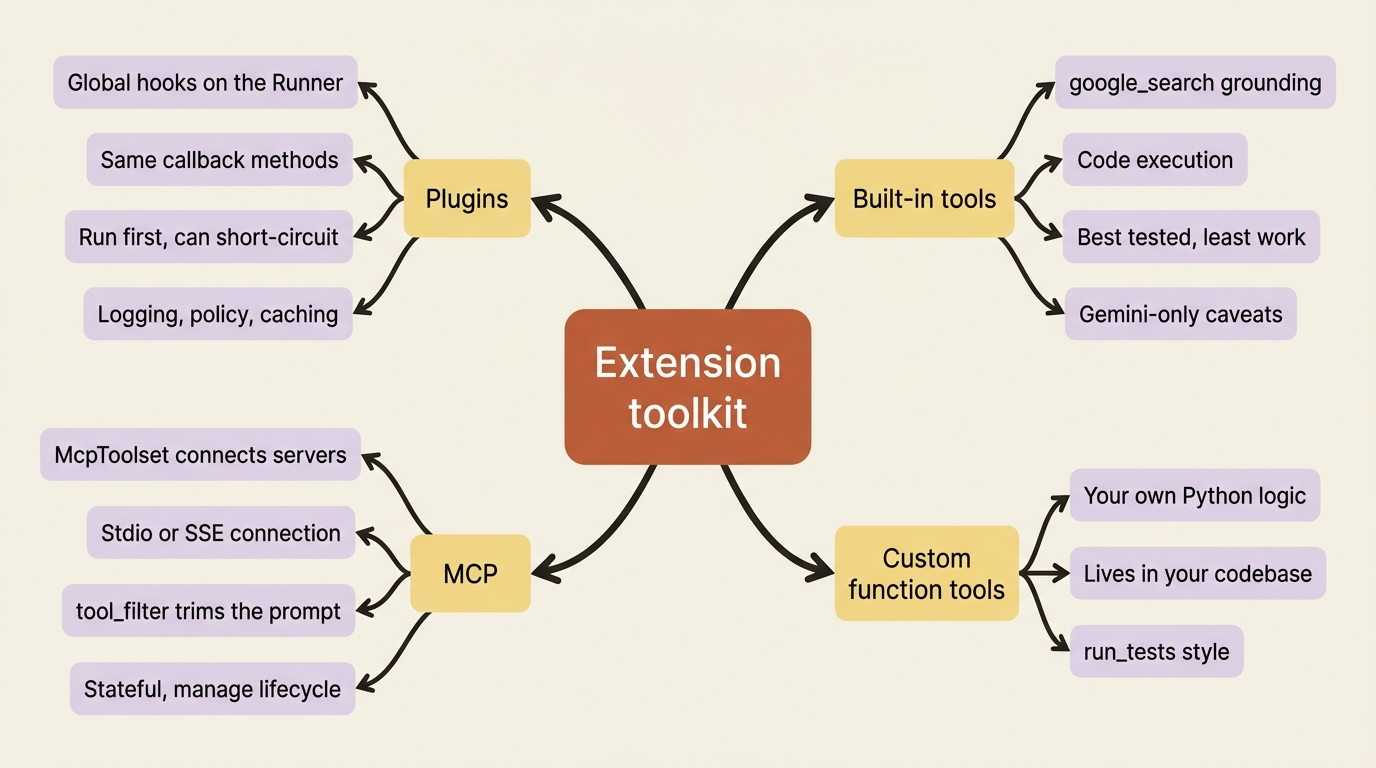
The bloat problem from the opening resolves through this same lens. You do not pile every possible tool onto one agent. You filter MCP tools to what is needed, delegate specialized work to subagents, and reserve the agent's prompt for the tools it actually uses in its job. Extension is about reach, not accumulation.
One more direction is worth knowing exists. Everything so far extends a single agent or system: your tools, your Plugins, and your MCP servers, all under your control. Agents increasingly need to call other agents that live in entirely separate systems, owned by other teams or vendors. That is what the A2A protocol addresses: a standard for exposing an ADK agent so other agents can call it, and for consuming a remote agent as part of your own. It is the cross-system cousin of multi-agent orchestration.
Do this today
- Register an audit Plugin. Extend
BasePlugin, add abefore_tool_callbackthat prints the agent name, tool name, andtool_args, and pass it to theRunnerthroughplugins=[...]. Watch every tool call across every agent flow through it. - Connect one MCP server. Wire
McpToolsetwithStdioConnectionParamsto the filesystem server, and settool_filterto just the operations you need. - Add
google_searchto a Gemini agent. Import it, drop it in thetoolslist, and ask a question that needs fresh data. - Audit your biggest agent's prompt. Count its tool definitions. Anything that could be a filtered MCP server, a built-in, or a subagent's job is bloat you can remove.
- Check the precedence trap. If an agent callback is not firing, look for a Plugin returning a non-
Nonevalue on the same hook.
Your agent is no longer a closed system
You have the full extension toolkit. Plugins give you global hooks that apply across every agent in a runner, with the precedence rule that they run first and can short-circuit local callbacks. MCP connects your agent to external tool servers through McpToolset, with tool_filter to keep the prompt lean and a real obligation to manage stateful connection lifecycle. Built-in tools like google_search hand you common capabilities for nearly free. And you have a clear rule for choosing among built-ins, custom tools, MCP, and Plugins.
Your agent reaches out to the world now, on your terms, without its prompt collapsing under the weight of thirty tool definitions. The discipline is the lesson: extend for reach, filter for clarity, and let each mechanism do the one job it is good at.
So far everything has assumed the happy path. The agent runs, the tools work, and the conversation completes. Real deployments are not so kind. Connections drop, processes die, step limits hit, and external systems go offline mid-task. The next step is resilience: how a stopped agent picks up exactly where it left off instead of starting over, and why the human-in-the-loop approval pause turns out to be the same mechanism wearing a different hat.
This is Part 8 of "Building with Google's Agent Development Kit (ADK)," an eleven-part guide that takes a developer from zero to a hardened, observable, production-deployed agent.