
You've Already Built This Agent Three Times. LangChain Deep Agents Is the One You Keep Rebuilding.
Why the agent loop you keep hand-rolling is a solved problem, and how LangChain Deep Agents hands it to you pre-assembled on a LangGraph runtime you can still reach into.
A working developer's introduction to the Deep Agents harness: what it is, how it differs from raw LangChain, and your first running agent in about fifteen lines of Python.
In this article: You will learn what LangChain Deep Agents actually is, an agent harness rather than a model or a framework. We cover where it sits relative to LangChain and LangGraph, how it compares to Anthropic's Claude Agent SDK, and how to get a real agent running on your machine. By the end you will have a working "hello agent" and a clear mental model for everything that follows.
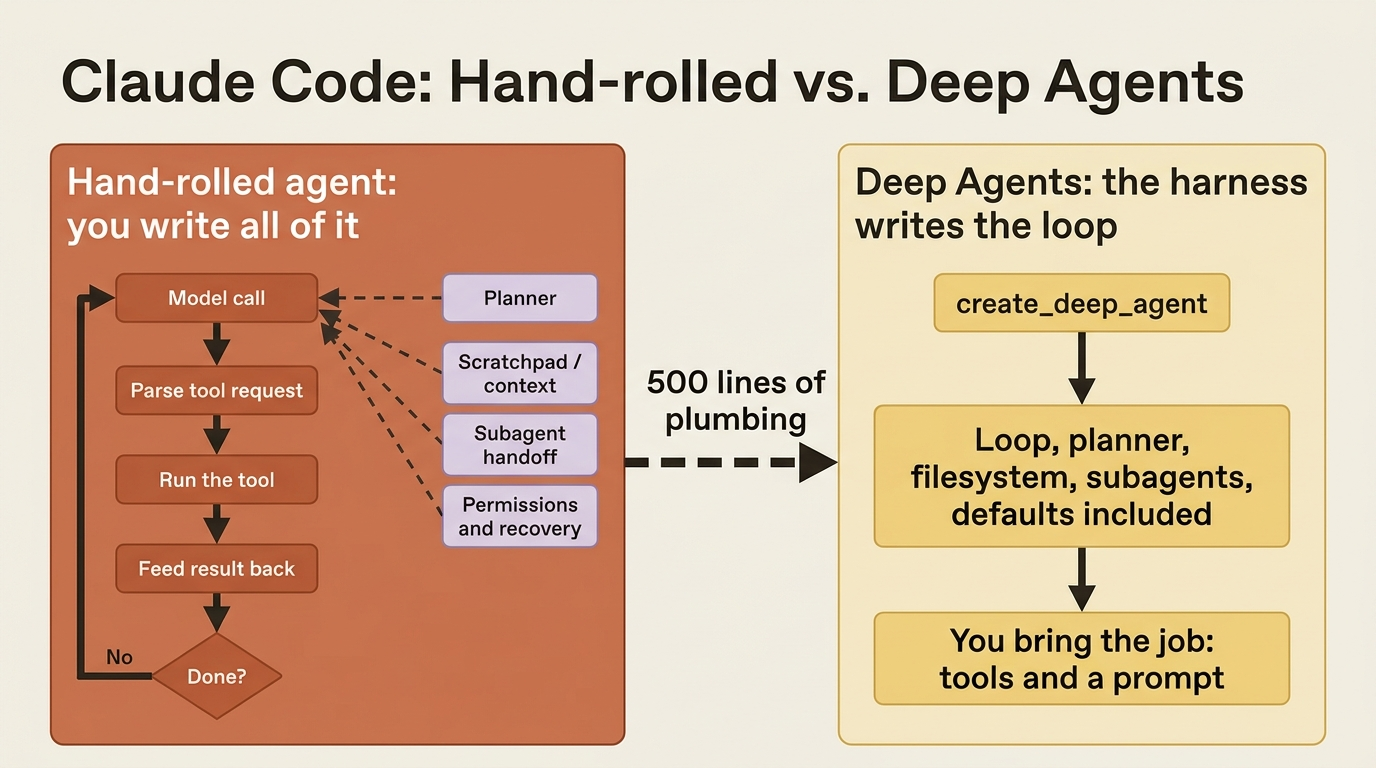
You know the shape of it by now. A model call. A tool the model can ask for. A loop that runs the tool and feeds the result back. A planner so the thing does not wander. A scratchpad so it does not forget what it found two steps ago. And some way to hand a messy subtask off to a fresh context before it poisons the main one.
You have written that scaffold. Probably more than once. And every time, the interesting part of your agent, the actual job you wanted it to do, ended up buried under five hundred lines of plumbing you would rather not maintain.
LangChain Deep Agents is that plumbing, already written. It is what LangChain calls an agent harness: the same core tool-calling loop everyone hand-rolls, but with the planner, the filesystem, the subagents, and the sensible defaults built in. You bring the job. It brings the loop.
This article sets the framing. By the end you will know what Deep Agents actually is, where it sits relative to plain LangChain and LangGraph, and how it compares to Anthropic's Claude Agent SDK if you are coming from that world. You will also have a real agent running on your machine.
One note before we start. This work is Python throughout. The JavaScript package exists, but it trails the Python one in coverage and is still moving quickly. We are staying where the surface area is complete and the code you copy will still run next month.
What "agent harness" actually means
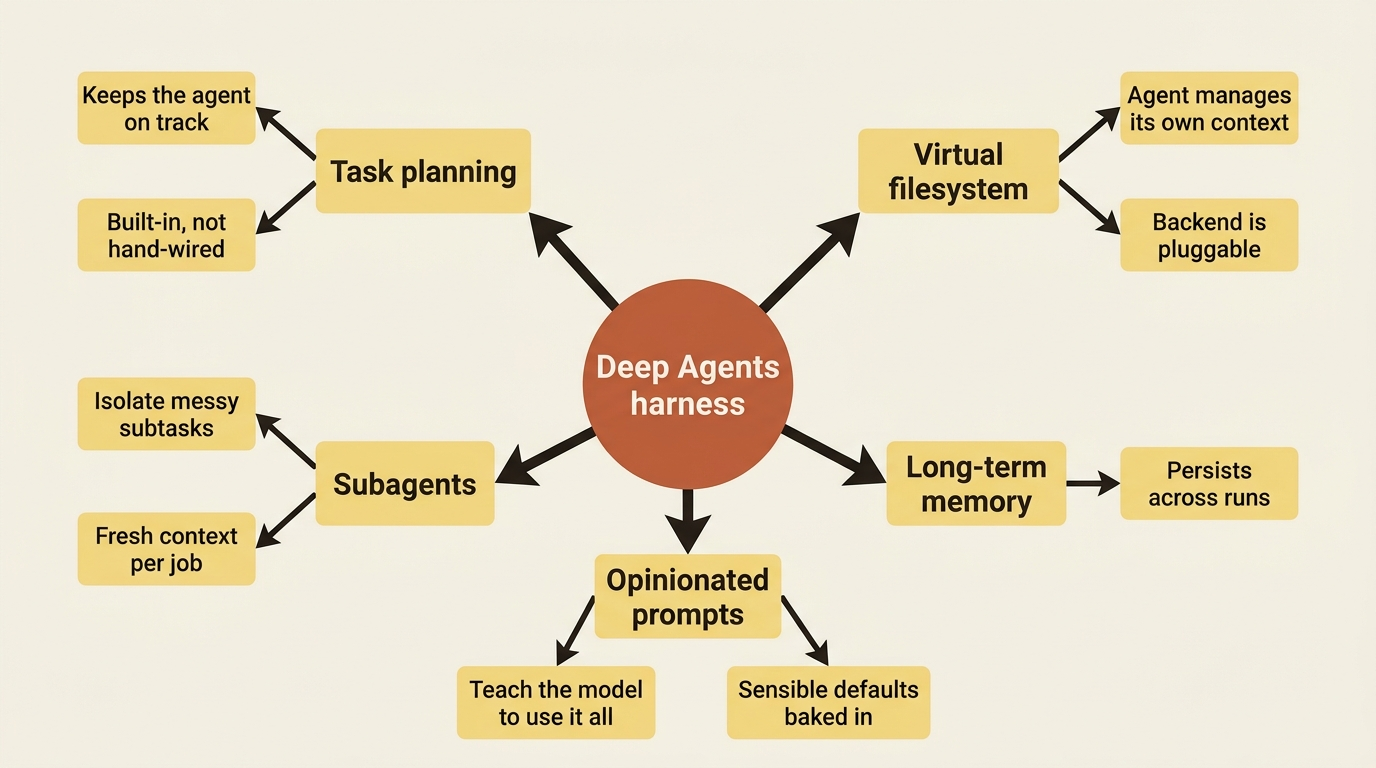
Here is the one-line takeaway: a harness is the runtime scaffolding around a model that turns "answer this" into "go do this." Deep Agents is a harness, not a model and not a framework.
That distinction matters because the word "agent" has been stretched to mean everything from a single function call to a multi-week autonomous system. When people say they built an agent, they usually mean they wrote the loop: prompt the model, see if it wants a tool, run the tool, send the result back, and repeat until the model says it is done.
That loop is genuinely simple to write once. It is annoying to write well, and miserable to write well repeatedly. "Well" means adding planning, context management, delegation, permissions, and recovery, and those are the parts that take real work.
A harness hands you that loop with the hard parts already handled. Deep Agents specifically ships with task planning, a virtual filesystem the agent uses to manage its own context, the ability to spawn subagents for isolated work, long-term memory, and a set of opinionated default prompts that teach the model how to use all of it. You configure those capabilities. You do not assemble them.
Where Deep Agents sits relative to LangChain and LangGraph
The takeaway: Deep Agents is a thin, opinionated library on top of LangGraph, which means you get its conveniences without giving up the runtime underneath.
This trips people up, so it is worth being precise.
- LangChain is the framework that provides the building blocks: models, tools, and message types.
- LangGraph is the runtime that executes stateful, multi-step workflows. It is what gives you durable execution, streaming, and human-in-the-loop pauses.
- Deep Agents is a standalone library built on LangChain's pieces. It runs on the LangGraph runtime and packages the whole thing into one opinionated agent.
So the honest comparison is not "Deep Agents versus LangGraph." It is "assemble the agent yourself on LangGraph, or let Deep Agents assemble it for you."
If you have ever wired a LangGraph graph by hand for an agent, defining the nodes, the edges, the state, the tool-execution step, and the planning step, then Deep Agents is that graph, pre-wired, with good defaults baked in.
The payoff arrives later, and it is concrete. Because the loop is a LangGraph graph underneath, you get streaming, checkpointing, resumption, time travel, and interrupt-based approvals without building any of them. You did not write the loop, so you also did not have to write everything the loop makes possible.
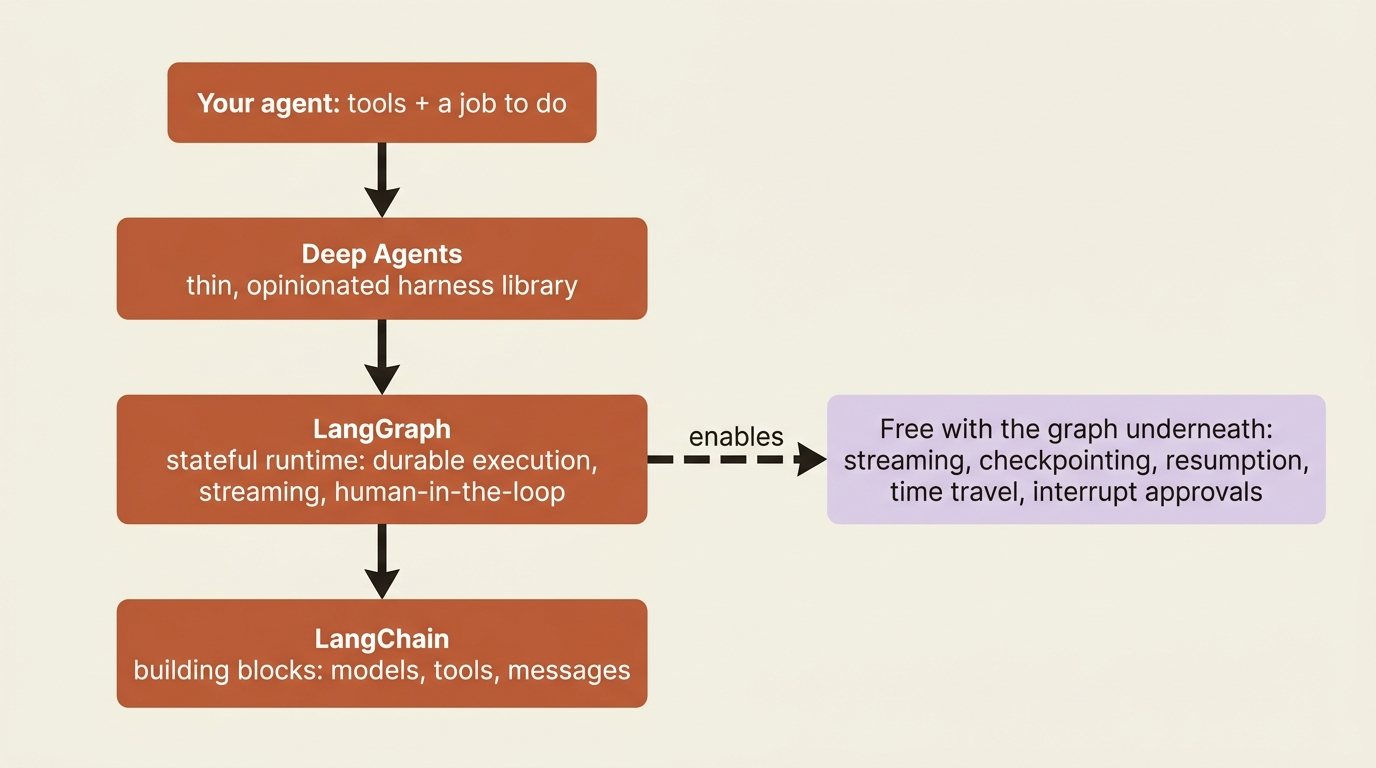
You do not lose access to the runtime by using the harness. When you need to reach past the defaults, the LangGraph machinery is right there. Most of the time you will not need to.
If you are coming from the Claude Agent SDK
Here is a quick orientation for readers arriving from Anthropic's harness. The two look similar, and they differ in one way that shapes everything downstream.
Both Deep Agents and the Claude Agent SDK are harnesses, and both free you from writing the tool loop. The sharpest difference is this: Deep Agents is model-agnostic and backend-pluggable, while the Claude Agent SDK runs on Claude and executes against the local filesystem of the sandbox it runs in.
With Deep Agents you pick the model from Anthropic, OpenAI, Google, and a hundred or more other providers. You also pick where the agent's filesystem actually lives: in-memory state, real disk, cross-thread storage, a remote sandbox, or a mix, all through a swappable backend.
That second choice, the backend, is the single biggest structural difference between the two. For now, just hold the headline: with Deep Agents, neither the model nor the execution environment is fixed for you.
Setup: one install, any model
The takeaway: installation is one line, and choosing a model is a string.
Install the library:
pip install deepagents
You also need credentials for whichever model provider you want to use, set as the usual environment variable for that provider, for example ANTHROPIC_API_KEY, OPENAI_API_KEY, or GOOGLE_API_KEY. Deep Agents needs a model that supports tool calling, which every current frontier model does.
You select the model with a provider:model string. That string is the one knob you turn to switch vendors, and the rest of your code stays identical:
# Anthropic
model = "anthropic:claude-sonnet-4-6"

# OpenAI
model = "openai:gpt-5.4"

# Google
model = "google_genai:gemini-3.1-pro-preview"
Pick one. The agent you write next does not care which.
Your first agent
Here is the whole thing. We give the agent one trivial tool so you can see a tool call happen, hand it a model string, and run it. This is the "hello agent," and it is deliberately boring.
from deepagents import create_deep_agent


def get_weather(city: str) -> str:
    """Get the weather for a given city."""  # ①
    return f"It's always sunny in {city}!"


agent = create_deep_agent(  # ②
    model="anthropic:claude-sonnet-4-6",  # ③
    tools=[get_weather],  # ④
    system_prompt="You are a helpful assistant.",
)

result = agent.invoke(  # ⑤
    {"messages": [{"role": "user", "content": "What's the weather in Austin?"}]}  # ⑥
)

print(result["messages"][-1].content)  # ⑦
① The docstring is what the model reads to decide when to call the tool, so it is doing real work, not decoration.
② create_deep_agent assembles the whole harness, the planner, the virtual filesystem, and subagent capability, in a single call.
③ The model is selected with a provider:model string; switching vendors means changing only this line.
④ Your tools are passed as a plain list of Python functions, with no wrapper class required.
⑤ invoke runs the agent loop until the model produces a final answer; you never write the loop yourself.
⑥ The input is a messages list, the same shape you already know from chat APIs.
⑦ The result is a state dictionary; result["messages"] is the full transcript and the last message is the agent's answer.
Note: The full extracted listing at code/langchain_deepagents/part-1-what-deep-agents-is/listings/01-hello-agent.py is the complete runnable program.
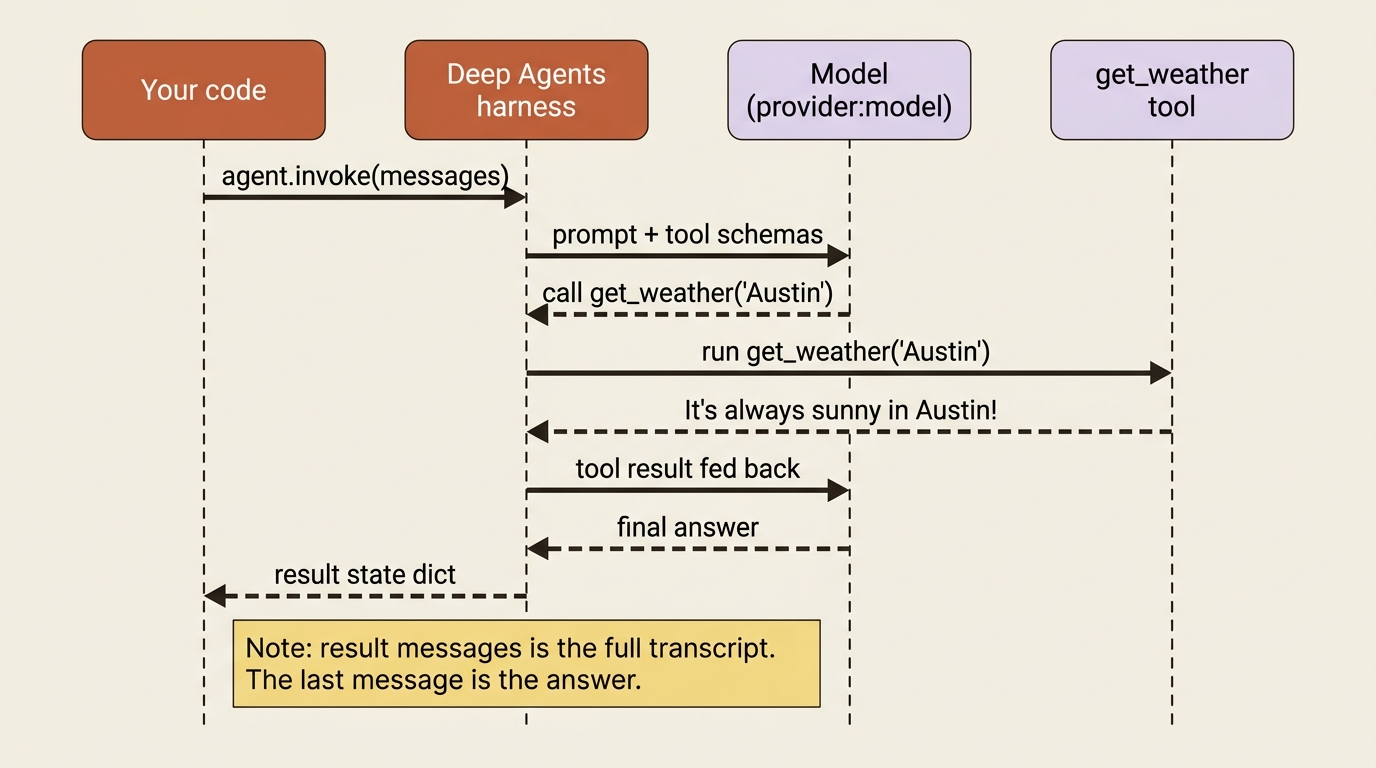
Here is what just happened. The call to create_deep_agent built a fully formed agent, complete with a planner, a virtual filesystem, and subagent capability, and invoke ran the loop until the model produced a final answer.
Along the way the model decided on its own to call get_weather, read the result, and folded it into its reply. You did not write a loop, you did not parse a tool request, and you did not feed the tool result back by hand. The harness did all of it.
A few things are worth noticing in that small block.
The tool is just a plain Python function with a docstring. The docstring is what the model reads to decide when to call the tool, so it is doing real work, not decoration.
The input is a messages list, the same shape you already know from chat APIs.
The result is a state dictionary, which is your first hint that there is a stateful graph underneath. The value at result["messages"] is the full transcript of the run, and the last message is the agent's answer.
Gotcha: if invoke raises an authentication error, the cause is almost always the provider credential, not the library. The provider:model string tells Deep Agents which provider to call, but it still expects that provider's API key in the environment. Set the right variable for the provider in your model string and the error goes away.
Meet buggy-shop, the agent we will actually build
A single running example advances throughout this work, rather than a parade of toys, so the capabilities stack into something you could ship.
The running example is a code-maintenance agent. It works on a small Python repository called buggy-shop, a deliberately broken little project with a failing pytest suite. The agent's job, by the end, is to read the repo, find the bug, fix it, and prove the fix by getting the tests to pass.
Today's weather toy already shows the mechanics. From here on, every new capability gets wired into buggy-shop. It gains the built-in tools to read files, then permissions, the ability to resume and rewind, project-specific skills, a reviewer subagent, audit logging, and finally a production deployment. It is the same agent, growing one layer at a time.
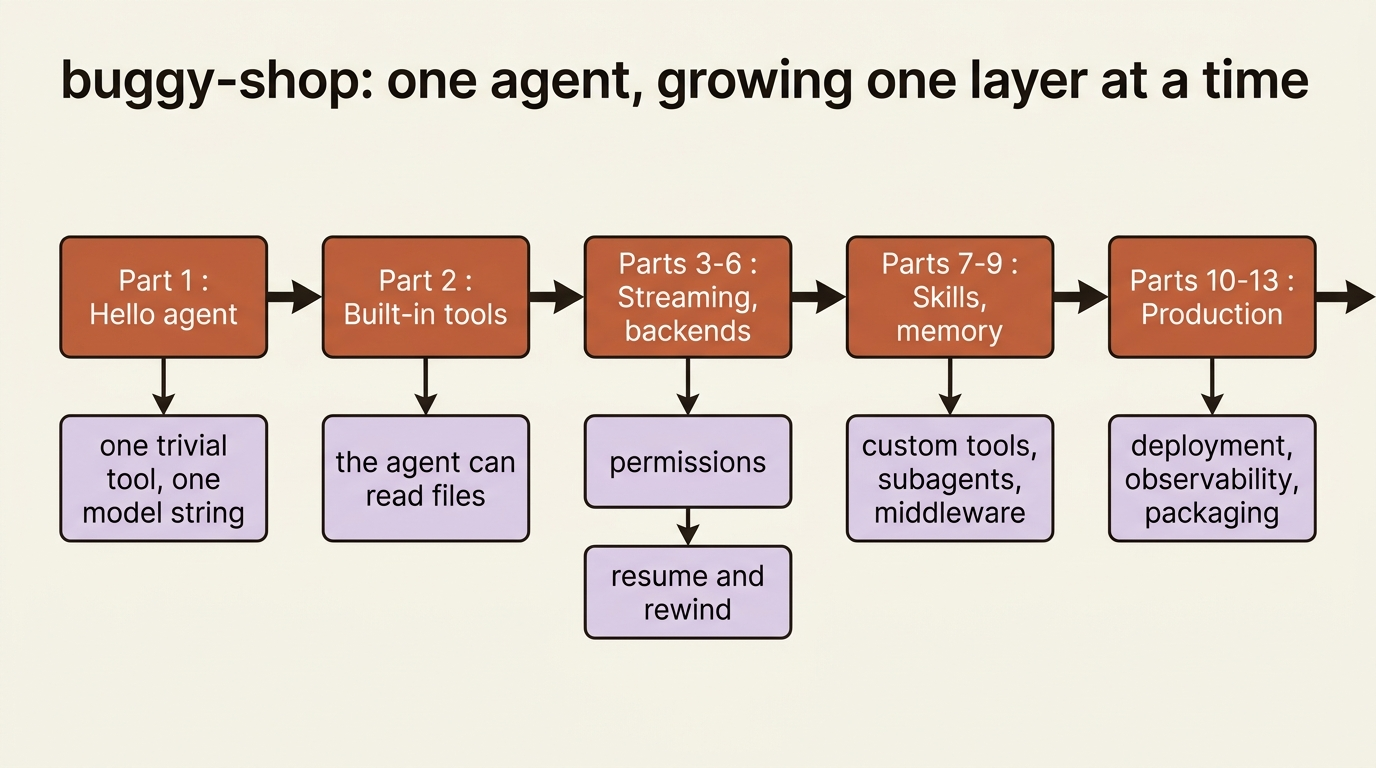
The reason to keep one example is the same reason you would keep one codebase: continuity is where the real lessons live. Anyone can make a feature work in isolation. Making the eighth feature work without breaking the previous seven is the actual job, and that is what a single growing example forces us to confront.
Do this today
- Install the library: run
pip install deepagentsand set the API key for whichever provider you plan to use. - Run the hello agent. Copy the fifteen-line example, swap in your
provider:modelstring, and confirm you get a final answer back. - Inspect the result. Print
result["messages"]in full and watch the tool call appear in the transcript. That is the loop you no longer have to write. - Try a second provider. Change only the model string, leave the rest of the code untouched, and confirm it still runs. That is model-agnostic in practice.
- Read your tool's docstring as the model would. If it does not clearly say when to call the function, the model will not call it well.
Where this leaves you
You now have the framing and a running agent. The mental model to carry forward is small enough to state in a sentence. Deep Agents is the agent loop you keep rebuilding, handed to you pre-assembled on top of a LangGraph runtime you can still reach into, with the model and the filesystem both left as your choice.
That last clause is doing a lot of quiet work, and it is where most of the surprises come from. The loop you did not have to write is a graph, and that graph is what makes everything else possible later: streaming, resumption, approvals, and time travel.
That raises the obvious question. If you did not write the loop, what is the loop actually doing on your behalf between the moment you call invoke and the moment you get an answer back? Open it up and watch it run.
This is Part 1 of "Building with LangChain Deep Agents," a 13-part guide to building production-ready AI agents.