
The Agent Loop Is Just a While Loop You Did Not Have to Write
The agent loop sounds like a research topic, but it is a while loop. Once you can name what the loop does and what the runtime adds, you can debug your agent instead of fearing it.
What actually happens between agent.invoke(...) and the answer you get back: the turns, the tools, the plan-first habit, and the two completely different ways a run can go wrong.
In this article: You will learn what the AI agent loop actually is, and it is far simpler than its reputation. We trace one real run turn by turn, explain why running the loop as a LangGraph graph pays off, tour the tools a deep agent ships with before you add any, and settle the single most expensive confusion in agent development: telling an expensive run apart from a stuck one. By the end you can narrate, out loud, exactly what your agent does.
You can run a Deep Agent in about fifteen lines of Python and watch it call a tool you never explicitly told it to call. That is the magic trick. It is also where most developers stop, and stopping there is a mistake. The trick stays magic only as long as you do not understand it. A thing you understand is a thing you can debug at 2 a.m.
Here is the reassuring truth up front. The famous agent loop, the thing that sounds like it should be a research topic, is a while loop. Prompt the model, check whether it asked for a tool, run the tool if it did, feed the result back, and repeat until the model has nothing left to ask for. That is the entire loop. LangChain Deep Agents did not invent it, and neither did anyone else.
What Deep Agents did was write that loop for you, wire it onto a real runtime, and bolt on the good habits you would otherwise have had to add yourself. Understanding those two facts, what the loop does and what the runtime adds, is the whole job here. This series is Python throughout, so every example below is Python you can run.
One turn at a time
A turn is one round trip to the model. An agent run is just turns, repeated until the model stops asking for tools. That is the unit you need.
Walk through a small example step by step. Imagine an agent with one tool, get_weather, and you ask it about the weather in Austin.
You call invoke with a single user message. The harness sends that message, plus the system prompt and the descriptions of every available tool, to the model. The model looks at the question, decides that it needs the weather, and instead of answering it emits a tool request: call get_weather with city="Austin". That is the end of turn one. The model did not run anything. It only asked.
Now the harness takes over. It sees the request, runs your actual get_weather function with the argument the model chose, gets back a string, and appends that result to the conversation as a tool message. Then it sends the whole updated conversation back to the model. That is the start of turn two. This time the model has the weather in hand, decides that it has everything it needs, and writes a normal text reply. No tool request. The loop sees that there is nothing left to do and stops. The last message is your answer.
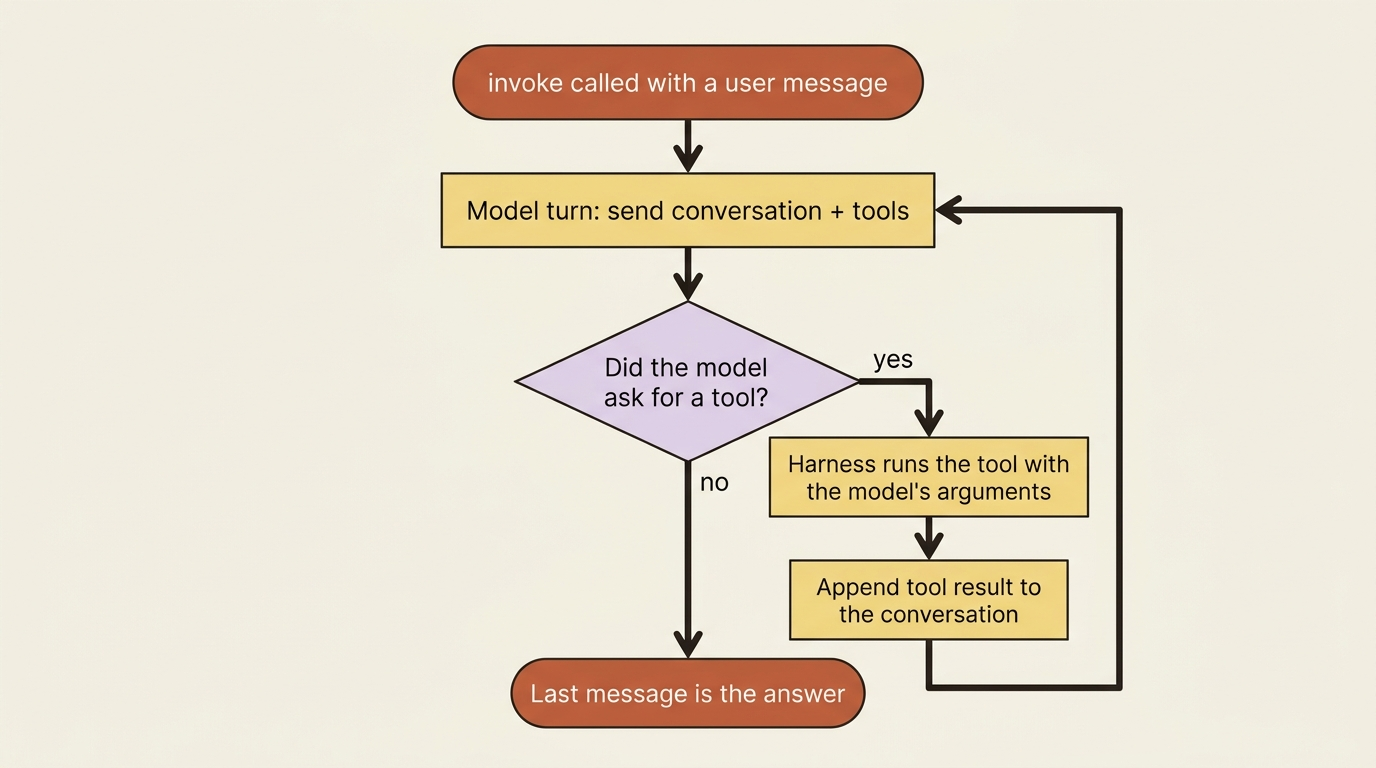
That back-and-forth is the loop:
model turn   ->  "call get_weather(city='Austin')"
tool run     ->  "It's always sunny in Austin!"
model turn   ->  "It's sunny and warm in Austin today."
(no tool requested -> stop)
Two turns, one tool call, done. The same shape, drawn as an interaction between you, the harness, the model, and the tool, makes the division of labor obvious.
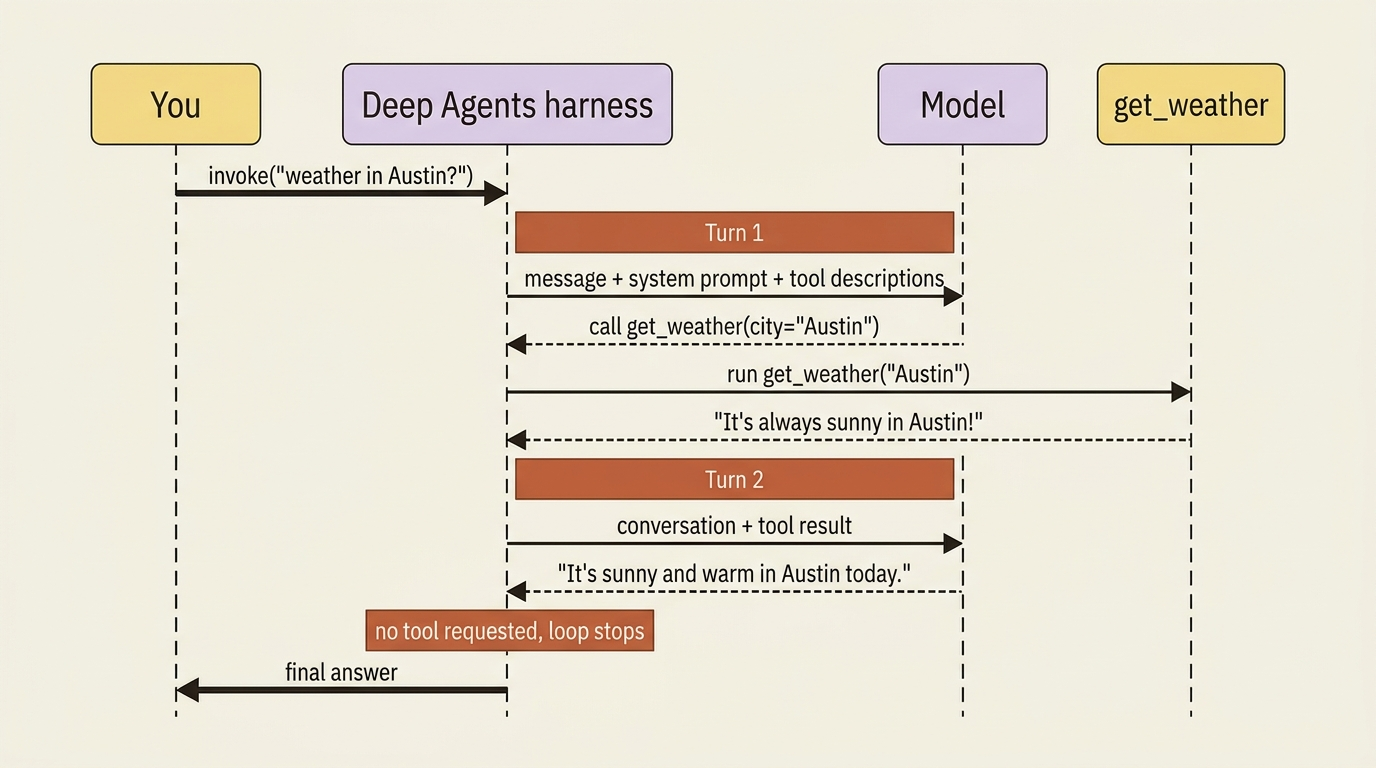
A harder task is the same shape with more iterations: read a file, then grep for a function, then edit it, then run the tests, each one a turn, each tool result feeding the next decision. The agent is not following a script that you wrote. It is deciding, one turn at a time, what to do next based on what it has learned so far. That is what makes it an agent rather than a pipeline.
The loop is a graph, and that is the good news
It would be easy to imagine the loop as a literal Python while True: somewhere in the library, and conceptually that picture is fine. Mechanically it is something more useful: a graph on the LangGraph runtime. There are nodes for the model call and the tool execution, edges that route from one to the other, and a state object that carries the conversation between them.
You will never have to draw that graph or name its nodes. It matters that it is one, though, because a graph that checkpoints its state at every step is a graph you can pause, inspect, resume, and rewind.
Hold onto that, because it reframes a lot of what comes next in any agent project. Streaming partial output is reading state off the graph as it updates. Pausing to ask a human for approval is interrupting the graph between nodes. Resuming a run that hit a limit, or rewinding a bad edit, is replaying from a saved checkpoint. None of those are separate features bolted onto the agent. They are the same fact, the loop is a durable graph, viewed from different angles. Because you did not write the loop, you also inherited everything a well-built loop makes possible.
The tools your agent already has
Even before you add a single tool of your own, a deep agent ships with a working toolbox. It is never actually empty-handed. The harness gives every agent a set of built-in tools, packaged automatically, each with its own instructions baked into the system prompt so the model knows when to reach for it.
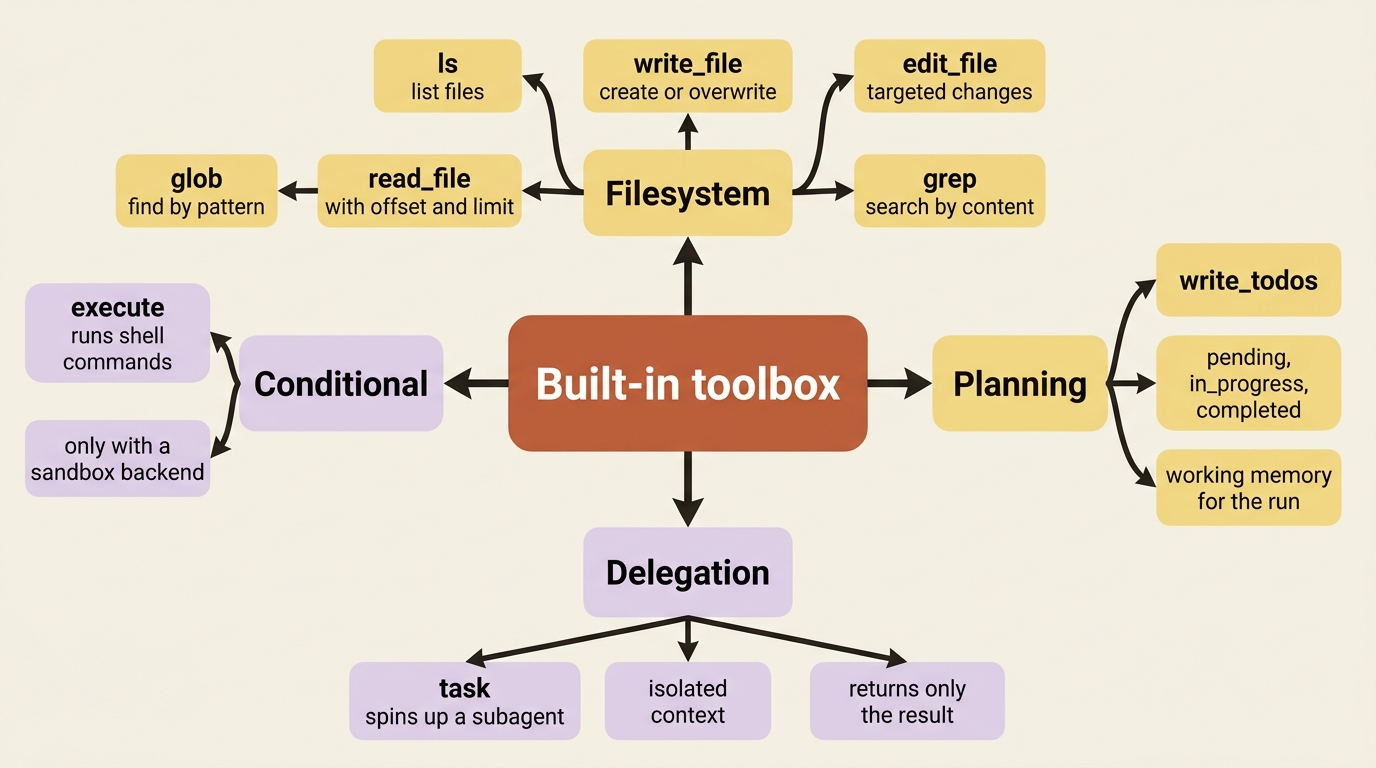
The filesystem tools are the workhorses:
lslists files.read_filereads one, with line numbers, and with offset and limit for large files.write_filecreates or overwrites.edit_filemakes targeted changes.globfinds files by pattern.grepsearches across them by content.
These operate on a virtual filesystem whose actual storage you choose, so for now just know that the agent can read and write files without you wiring up a single thing.
Two more built-ins matter from day one. write_todos is the planning tool. It lets the agent keep a structured task list with pending, in_progress, and completed statuses, persisted in the agent's state. The task tool is the delegation tool. It lets the agent spin up a subagent for an isolated piece of work and get back only the result, which is how a deep agent keeps a big job from drowning its own context.
One tool is conditional. When you attach a sandbox backend, the kind that gives the agent a real shell, the harness adds an execute tool for running commands. Without a sandbox there is no execute. An agent that needs to run pytest cannot do so until you give it somewhere safe to run.
Why your agent plans before it acts
The first time you give a deep agent a real multi-step task and watch the trace, you may be surprised that its opening move is not to do anything at all. It calls write_todos and lays out a plan.
This is deliberate. The harness ships with opinionated default prompts, and one of the strongest nudges in them is to decompose a complex task into a tracked list before diving in. The model breaks the work into steps, marks them off as it goes, and revises the list when reality disagrees with the plan.
This matters more than it looks. An agent that plans first tends to stay on task across a long run, because the todo list is a form of working memory that survives the back-and-forth. It is also a gift to you as the operator. When something goes wrong, the agent's own plan is the first place to look to see where its understanding diverged from yours.
If you find the planning step genuinely unhelpful for a particular use case, you can steer or suppress it through the system prompt. Reach for that knob deliberately, though. The default exists because, for the multi-step work deep agents are built for, planning earns its keep.
Parallel when it can, sequential when it must
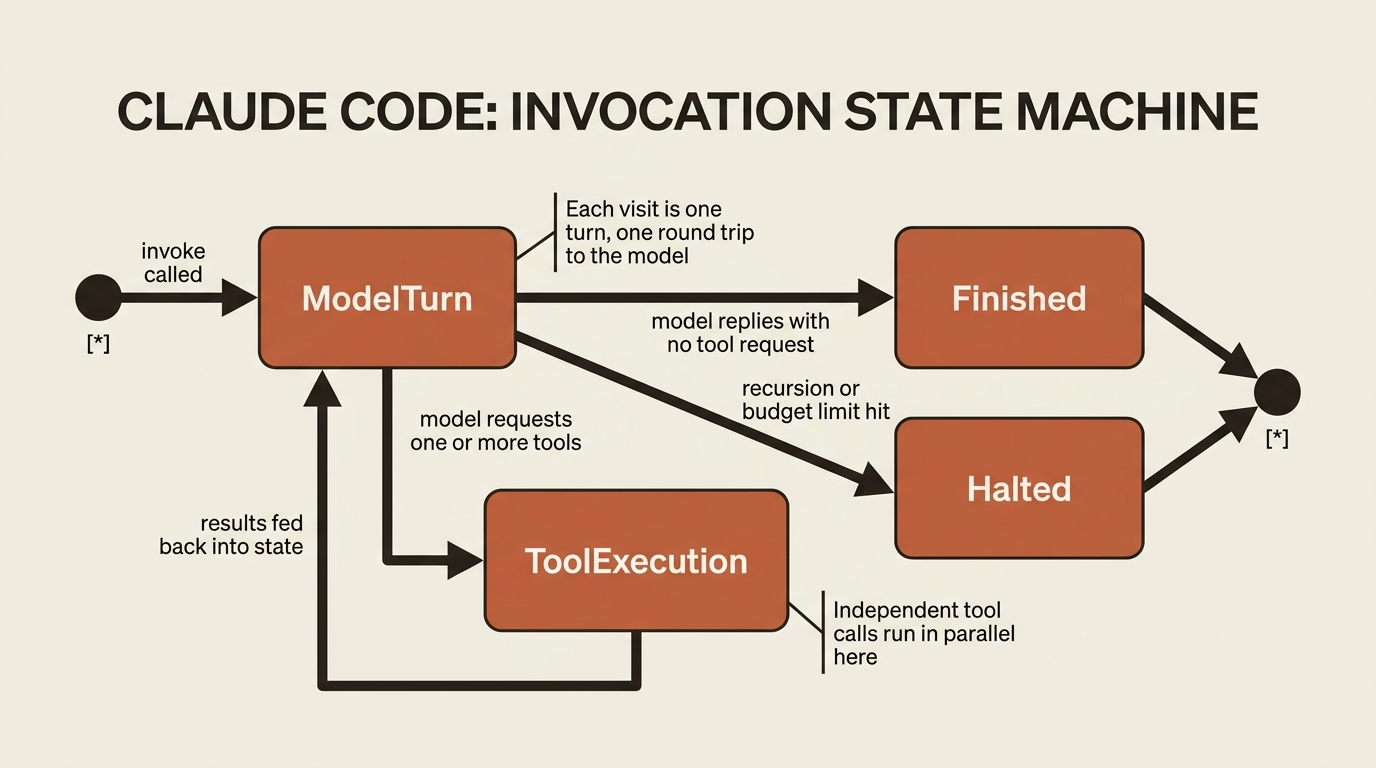
A single model turn is not limited to one tool request. When the model wants three independent things, say, read three different files, it can ask for all three in one turn, and the harness runs them together rather than marching through them one at a time. That is a real speedup on the kind of fan-out work agents do constantly.
The constraint is dependency, not preference. The model cannot read a file and then grep the thing it just read inside the same turn, because it has not seen the read result yet. It has to take the read result back, think, and ask for the grep on the next turn.
So the rhythm of a run is bursts of parallel tool calls punctuated by the sequential turns where the agent decides what to do with what it learned. You do not orchestrate any of this. The model proposes, the harness schedules, and independent work overlaps on its own.
Expensive is not the same as stuck
This is the distinction that bites new agent developers hardest, so let us be blunt about it. When a run misbehaves, people tend to say the agent "ran away," as if there were one failure mode. There are two, and they call for opposite responses.
The first is expensive. The agent is making real, varied progress, but the task is large, so it makes many model calls and burns real money doing genuine work. Nothing is broken. The fix, when you want one, is a budget, not an intervention.
The second is stuck. The agent is looping, repeating the same tool call, re-reading the same file, circling a problem it cannot solve, generating cost without progress. Here the model calls are not buying you anything, and the fix is a hard stop that breaks the loop regardless of budget.
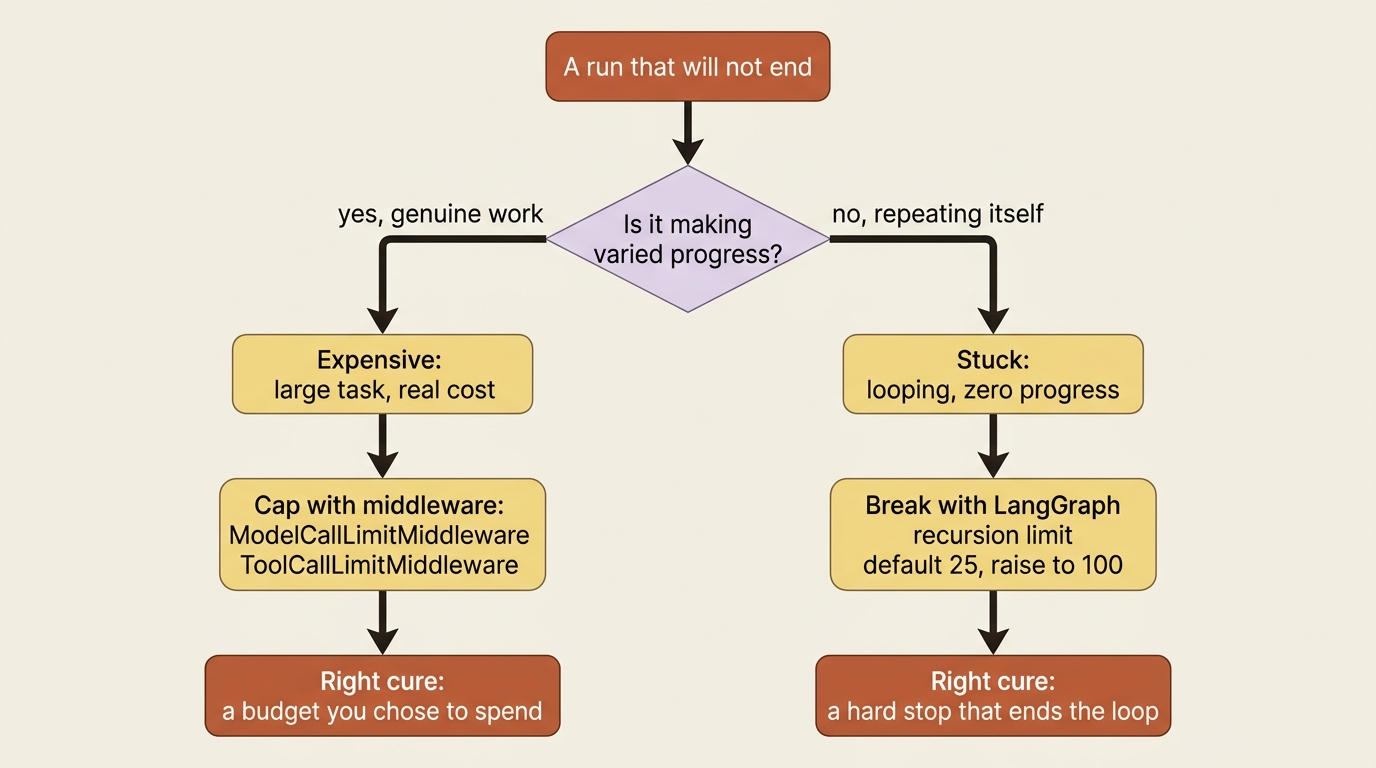
The runtime gives you a control for each.
For the stuck case, LangGraph enforces a recursion limit on how many steps a single run may take. The default is 25, which is fine for simple agents and too low for deep agents that spawn subagents and nested work. A starting point of 100 is reasonable for subagent-heavy runs. When a run exceeds the limit, the graph stops itself and raises rather than spinning forever. That is your loop breaker.
For the expensive case, you cap the work directly with middleware:
from deepagents import create_deep_agent
from langchain.agents.middleware import (
    ModelCallLimitMiddleware,
    ToolCallLimitMiddleware,
)

agent = create_deep_agent(
    model="anthropic:claude-sonnet-4-6",
    middleware=[                                  # ①
        ModelCallLimitMiddleware(run_limit=50),   # ②
        ToolCallLimitMiddleware(run_limit=200),   # ③
    ],
)
① The caps are passed as a middleware list to create_deep_agent, so the limits wrap the same loop you already had without touching its logic.
② ModelCallLimitMiddleware bounds how many model calls one run may make, which is the lever for the expensive case.
③ ToolCallLimitMiddleware bounds tool executions in the same run, capping the other side of the cost.
Note: The full runnable listing is at code/langchain_deepagents/part-2-the-agent-loop/listings/01-budget-caps-middleware.py.
That puts a ceiling on how many model calls and tool executions a single invoke is allowed to make, so a task that would otherwise quietly cost ten dollars stops at the ceiling you set instead. The run_limit value resets each invocation. There is also a thread_limit that caps calls across an entire conversation, though that one needs a checkpointer.
These two controls are not interchangeable, and using the wrong one hides the real problem. A budget cap on a stuck agent just makes it fail more cheaply while still making zero progress; you wanted the recursion limit to break the loop. A recursion limit on a legitimately big task just truncates good work halfway; you wanted a budget you were willing to spend. Diagnose which failure you have, is it repeating itself or is it genuinely advancing, before you reach for a knob. The same symptom, a run that will not end, has two opposite cures.
Do this today
- Add a single tool to a deep agent and read the full trace. Watch where turn one ends and turn two begins. Once you can point at the boundary, the loop stops being a black box.
- Give your agent a real multi-step task and confirm that its first move is a
write_todoscall. That plan is your debugging window for the rest of the run. - Set both limits before you run anything expensive. Add
ModelCallLimitMiddlewareandToolCallLimitMiddlewarefor budget, and pass a higher recursion limit if your agent spawns subagents. - Practice the diagnosis. The next time a run will not end, ask one question before touching any knob: is it making varied progress, or repeating itself? Expensive needs a budget. Stuck needs a loop breaker.
The actual machine
You can now narrate, out loud, what your agent does between invoke and the answer. It takes turns. Each turn is one model call that either asks for tools or finishes. The harness runs the requested tools and feeds results back. Independent tools run together. The model plans before it acts. The whole thing is a durable graph with a step limit, so it cannot spin forever.
That is not a simplification you will outgrow. That is the actual machine. The agent loop was never a research mystery. It was a while loop you did not have to write, running on a runtime that quietly hands you streaming, resumption, and time travel for free.
So the next time your agent misbehaves, do not say it "ran away" and restart out of superstition. Read the trace, name the turn, and decide which of the two cures you need. The loop was never magic. It was just a machine you had not looked at yet.
This is Part 2 of "Building with LangChain Deep Agents," a 13-part guide to building production-ready AI agents.