
Your AI Agent Is Not Frozen. It Just Cannot Tell You It Is Working.
Why a deep agent looks frozen during long runs, and how streaming turns a blocking call into a live, attributable feed of the agent's work.
Trade the single blocking call for a live feed. Here is how LangChain Deep Agents streaming works, what the three modes give you, how to tell the main agent apart from its subagents, and a small terminal UI that shows the work as it happens.
In this article: You will learn why
invokemakes a deep agent look dead during long runs, and how to swap it for a stream that surfaces the plan, the tool calls, and the tokens in real time. We cover the threestream_modealtitudes, how the namespace field attributes every event to the agent that produced it, the one stray token class you have to filter out, and a twenty-line console that turns an opaque agent into one you can watch think.
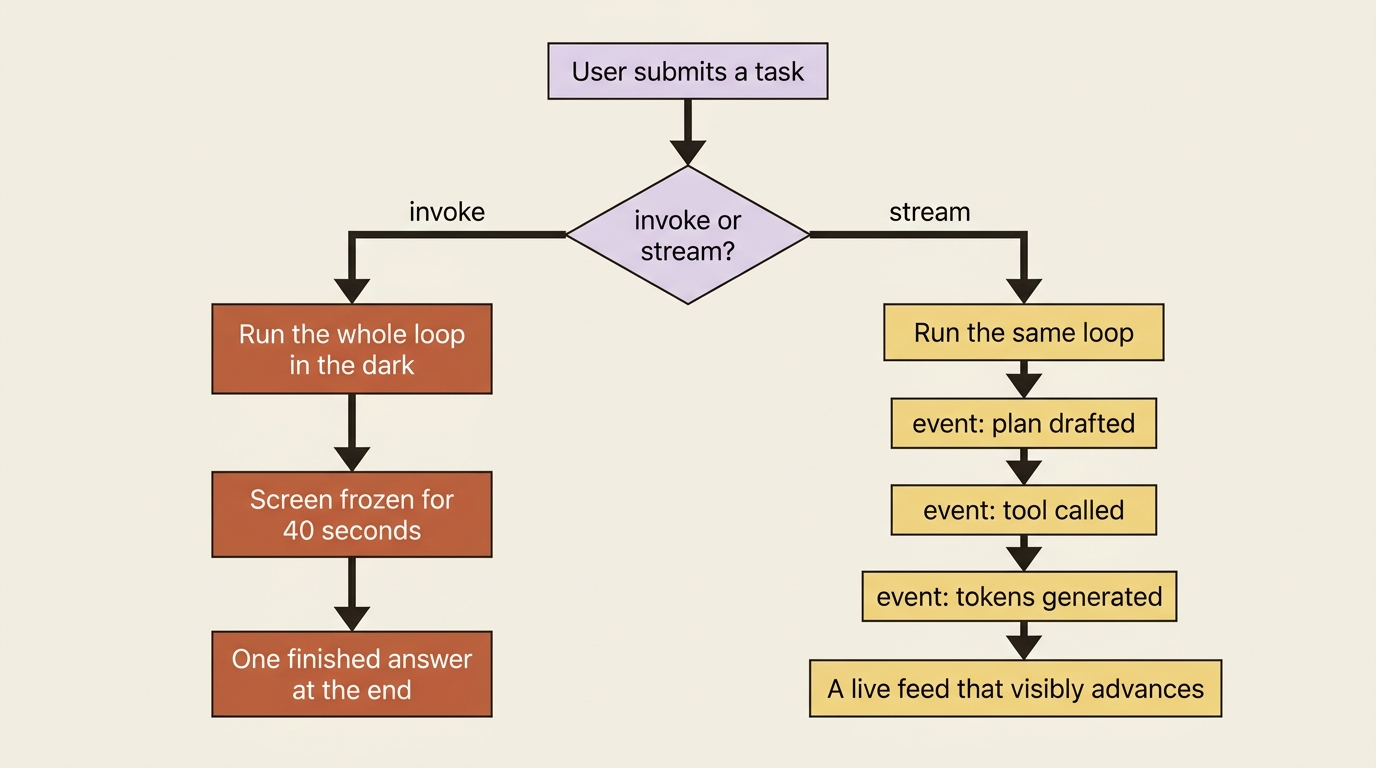
Run a deep agent on a real task and watch a user watch it. You call invoke, the screen goes still, and for the next forty seconds nothing moves. The agent is reading files, drafting a plan, running a tool, and thinking. The user sees a frozen rectangle and a spinner that could mean "working hard" or "died quietly." There is no way to tell from the outside, so people assume the worst, refresh the page, and file a bug that says "it hangs."
The agent was never hung. It just had no channel to narrate itself. invoke is a blocking call by design: it runs the whole loop in the dark and hands you one finished answer at the end. That is the right tool for a script or a cron job, where nobody is watching. It is the wrong tool the moment a human is on the other side.
This article swaps the blocking call for a stream, so the plan, the tool calls, and the tokens all surface in real time. Same agent loop you already have. Now you can see it run.
From invoke to stream
You already know invoke. Streaming is its sibling. Instead of waiting for the final state, you iterate over agent.stream(...) and receive a chunk every time something happens inside the loop. There is an async version, agent.astream(...), with the same shape for async applications, which is what you will actually use behind a web server.
The mental model is simple. The durable LangGraph that backs a deep agent emits an event at each step, and streaming hands you those events as they fire. You are not getting a different agent or a different loop. You are getting a window into the same loop you already understand.
One detail to fix in place now, because every example depends on it. These examples use the v2 stream format, set with version="v2". In that format every chunk is a small dictionary with three keys:
typetells you which kind of event this is.ns, the namespace, tells you who produced it.datais the payload.
The same three keys appear regardless of what you are streaming, which is what makes the code below readable instead of a nest of tuple unpacking.
Three modes, three altitudes
Streaming is not one firehose. You choose what kind of events you want with stream_mode, and the three you will reach for map cleanly onto three altitudes of detail.
updates is the step view. You get one event each time a node in the graph finishes, which in practice means "the model just took a turn" or "a tool just ran." This is the altitude for a progress log: enough to show the user that the agent is moving through its work, without drowning them in tokens. It is the right default when you want a tidy "here is what the agent is doing" feed.
messages is the token view. You get the model's output token by token as it generates, the same drip-feed you see in a chat UI when the assistant is typing. This is what you want when a human is reading the agent's prose as it appears. It is also where streaming tool calls show up, so you can announce "calling read_file" the instant the model commits to it rather than after it finishes.
values is the snapshot view. You get the entire agent state after each step, not just the delta. It is heavier and you reach for it less often, but it is the right tool when you genuinely need the whole picture at each point, for example to render a live view of the agent's todo list or its working files.
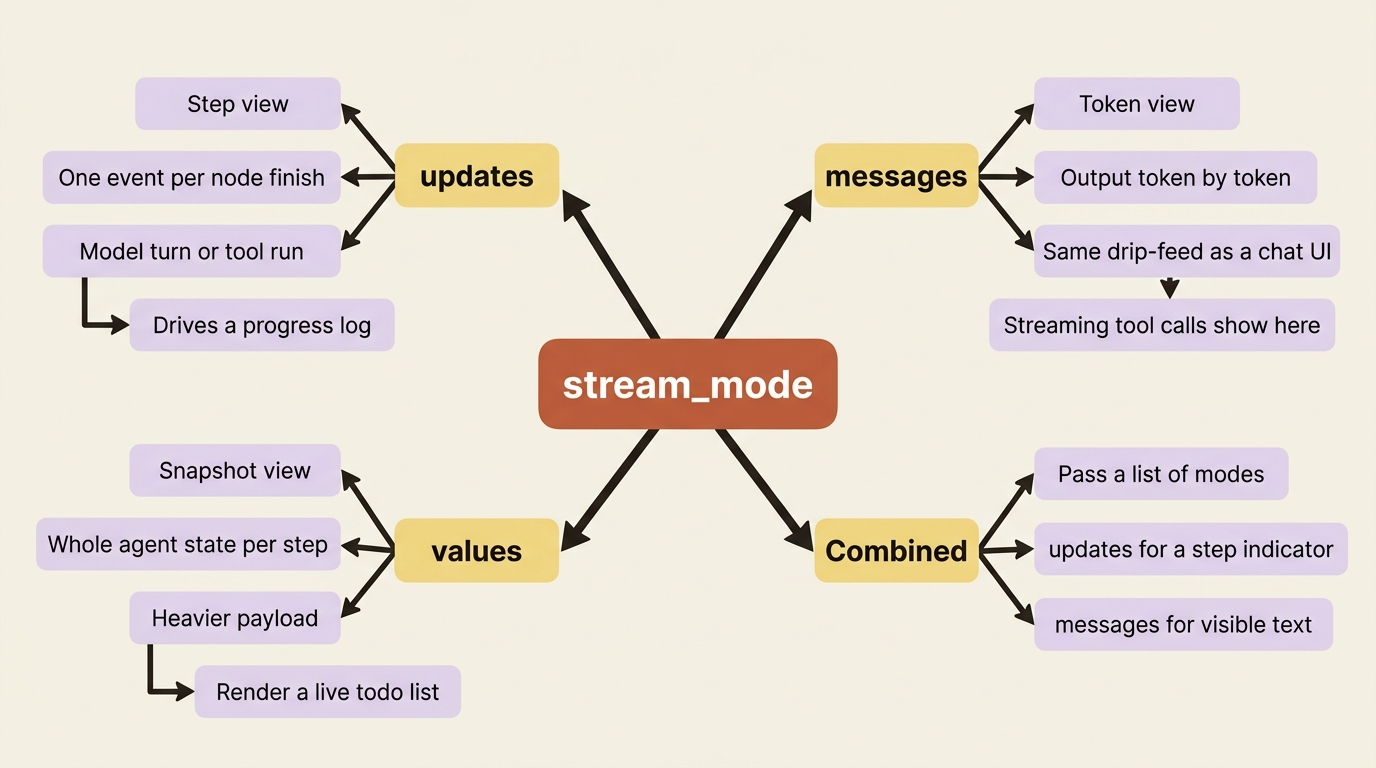
You can also pass a list of modes to get several at once, which is exactly how a polished UI works: updates to drive a step indicator, and messages to stream the visible text. Here is the coarse end, a clean progress log from updates:
for chunk in agent.stream(
    {"messages": [{"role": "user", "content": "Summarize the repo's failing tests"}]},
    stream_mode="updates",
    version="v2",
):
    if chunk["type"] == "updates":
        for node_name in chunk["data"]:
            print(f"step: {node_name}")
What that prints: a running list of graph steps as they complete, one line per model turn and per tool run. It is the difference between a frozen screen and a feed that visibly advances. Swap stream_mode to "messages" and the same loop would instead hand you tokens to print as the agent writes them.
Telling the main agent apart from its subagents
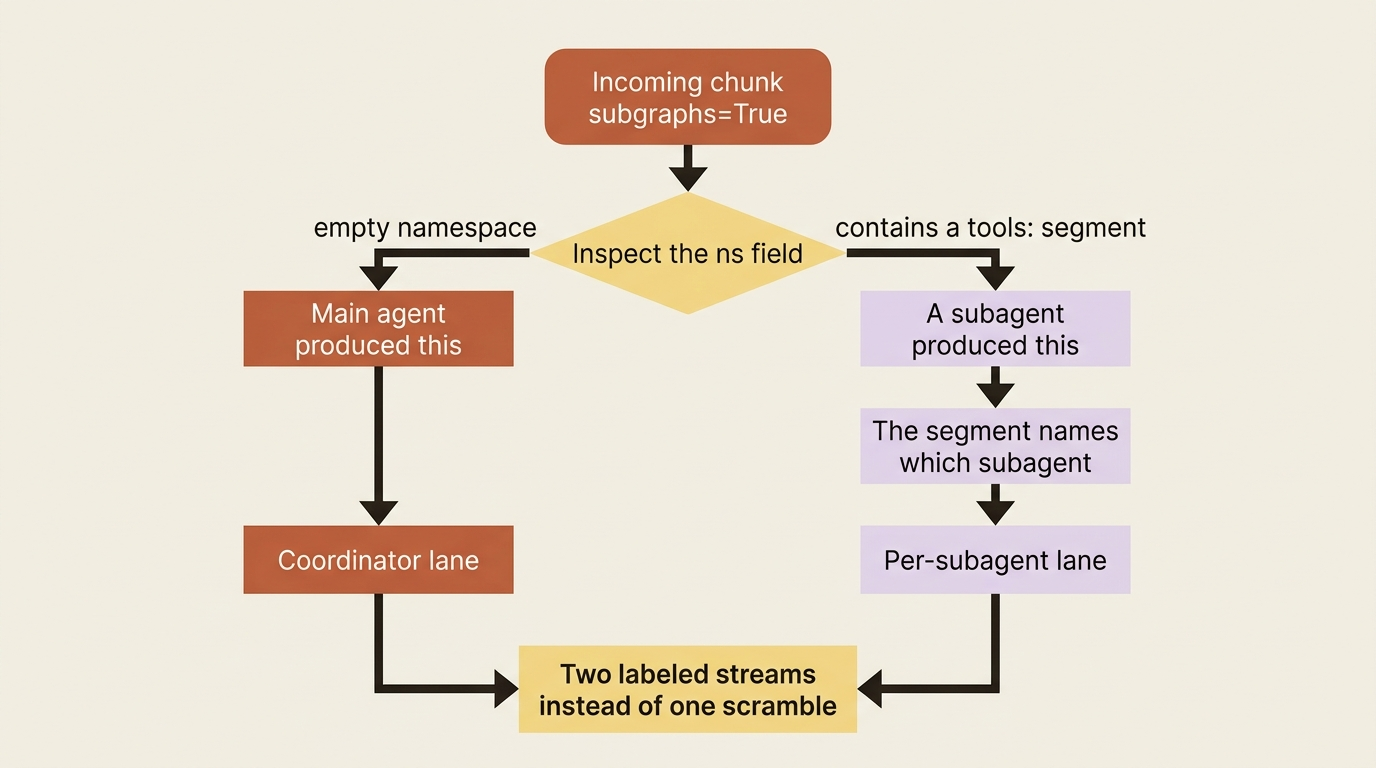
A deep agent does not work alone for long. The moment it delegates a subtask to a subagent, you have two or more agents generating output at once. If you print it all to one stream, it becomes an unreadable interleave: half a sentence from the coordinator, three tokens from a researcher, and a tool call from somewhere. The fix is the ns (namespace) field, which every chunk carries when you enable subgraph streaming with subgraphs=True.
The rule is easy to read off a chunk. An empty namespace means the main agent produced this event. A namespace containing a tools: segment means a subagent produced it, and that segment identifies which one. So you can route output by source: coordinator text in one place, and each subagent's work attributed to its own lane.
for chunk in agent.stream(
    {"messages": [{"role": "user", "content": "Research and summarize quantum computing"}]},
    stream_mode="messages",
    subgraphs=True,  # ①
    version="v2",
):
    if chunk["type"] == "messages":  # ②
        token, metadata = chunk["data"]  # ③
        is_subagent = any(s.startswith("tools:") for s in chunk["ns"])  # ④
        source = "subagent" if is_subagent else "main"  # ⑤
        if token.content:
            print(f"[{source}] {token.content}", end="", flush=True)  # ⑥
① subgraphs=True is what makes the ns field meaningful; without it, subagent events would not carry a distinguishing namespace.
② The branch keeps only messages events, since this loop is routing tokens, not steps.
③ Each messages chunk's payload unpacks into the token and its metadata.
④ The namespace test is the whole trick: any tools: segment in ns means a subagent produced this token.
⑤ The boolean becomes a human-readable source label for the lane the token belongs to.
⑥ Printing with the source prefix is what turns one scrambled stream into two attributed lanes.
What that does: it tags every token with the agent that produced it before printing, so a coordinator delegating to a researcher reads as two labeled streams instead of one scrambled one. Building an actual web UI on top of this is a larger project, but the underlying signal, the namespace on each chunk, is the same one a React UI consumes.
The token that is not the agent talking
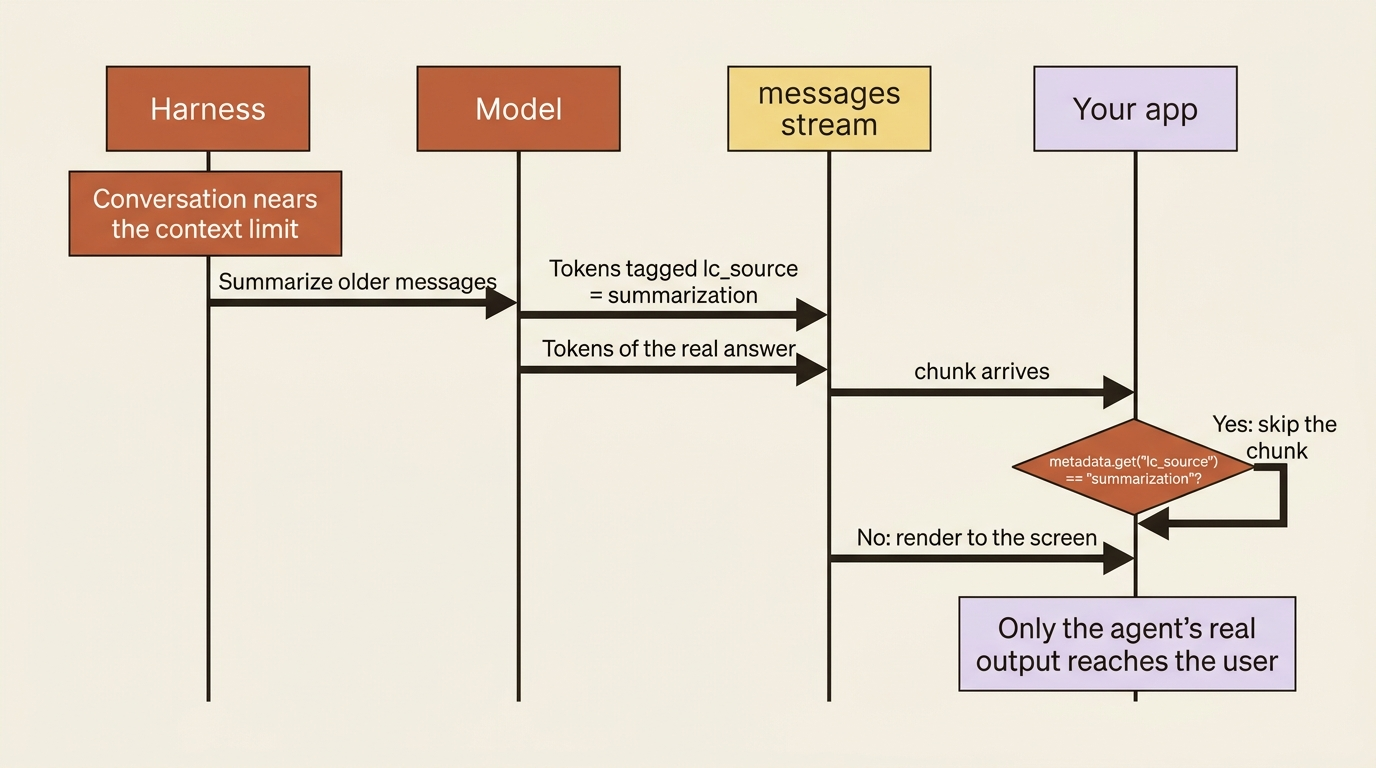
Here is a surprise that catches people the first time they stream a long-running agent. The harness manages its own context, and when the conversation grows close to the model's limit it summarizes older messages to make room. That summarization is itself a model call, which means it produces tokens, which means those tokens show up in your messages stream right alongside the agent's real output. If you are piping the stream straight to a user, they will suddenly see the agent narrating a summary of its own history, which is confusing and looks broken.
The tokens are tagged, so you can drop them. Each messages event carries metadata, and summarization tokens are marked with an lc_source of "summarization". Skip those and keep the rest.
for chunk in agent.stream(
    {"messages": [{"role": "user", "content": "..."}]},
    stream_mode="messages",
    version="v2",
):
    token, metadata = chunk["data"]
    if metadata.get("lc_source") == "summarization":
        continue
    # ... handle real agent tokens here
What just happened: one metadata check separates "the agent talking to the user" from "the harness talking to itself," so only the former reaches the screen. This is a small thing that makes a large difference in how finished your agent feels.
One-shot calls versus an open conversation
It is worth drawing a line here, because streaming and conversation get conflated. Everything above is about watching a single run unfold. Each stream call, like each invoke call, is still one-shot by default: the agent runs the task, finishes, and forgets. Ask a follow-up in a fresh call and it has no memory of what came before.
Keeping a conversation open across turns, where "fix the other test too" works because the agent remembers the first fix, is a different mechanism. It depends on threads and a checkpointer, the persistence layer that the durable graph writes its state into. The thing to hold onto is the distinction: streaming is about visibility within a run, and threads are about continuity across runs. They are independent, and you will often want both.
A small terminal UI that shows the work
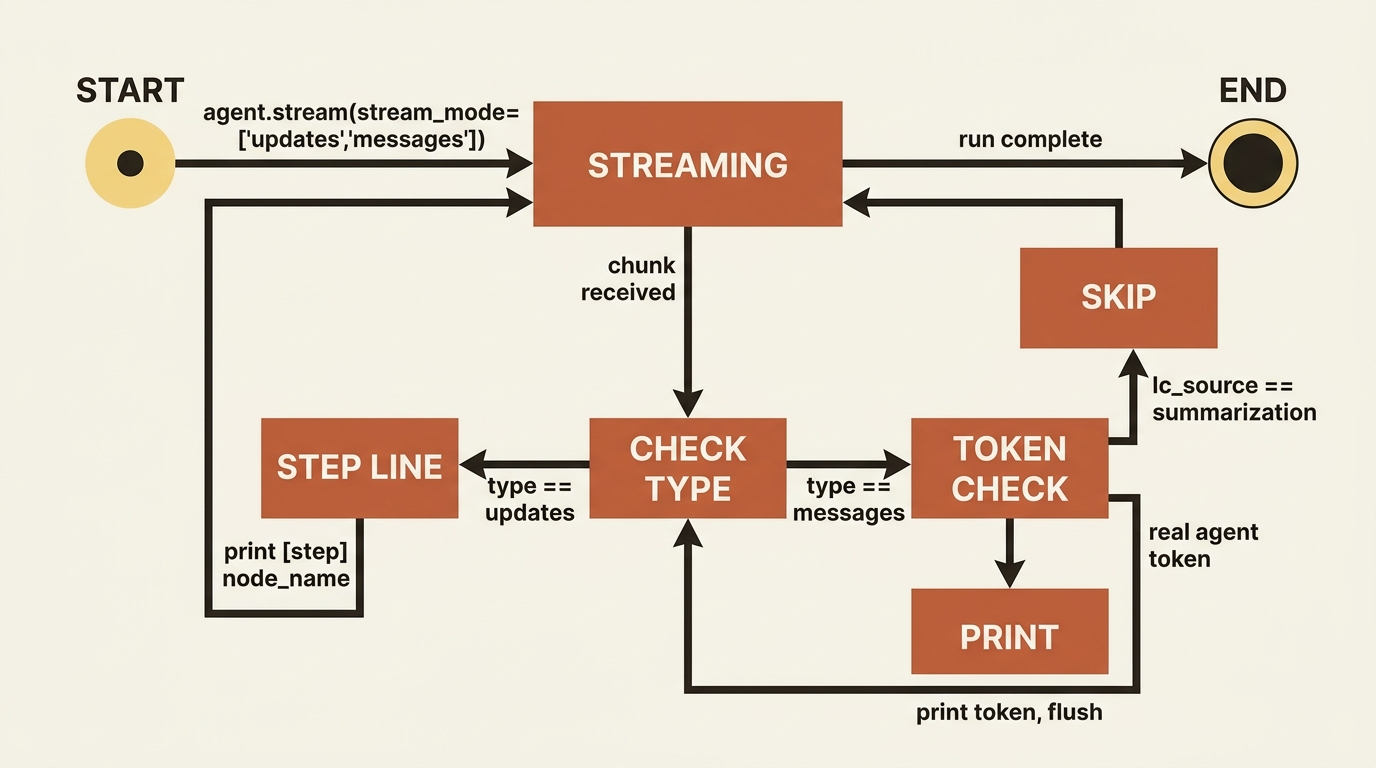
Let us put the pieces together into something you would actually run. We want a console that prints each step as the agent moves through it and streams the agent's text as it writes, which means asking for two modes at once and branching on the chunk type.
from deepagents import create_deep_agent

agent = create_deep_agent(
    model="anthropic:claude-sonnet-4-6",
    system_prompt="You are a code-maintenance assistant for a small Python repo.",
)  # ①

prompt = "List the files you'd look at first to find a failing test, and explain why."

for chunk in agent.stream(
    {"messages": [{"role": "user", "content": prompt}]},
    stream_mode=["updates", "messages"],  # ②
    version="v2",
):
    if chunk["type"] == "updates":  # ③
        for node_name in chunk["data"]:
            print(f"\n[step] {node_name}")
    elif chunk["type"] == "messages":  # ④
        token, metadata = chunk["data"]
        if metadata.get("lc_source") == "summarization":  # ⑤
            continue
        if token.content:
            print(token.content, end="", flush=True)  # ⑥
① The agent is the same create_deep_agent you have built all along; nothing about streaming changes how it is constructed.
② Asking for both updates and messages in one call is what lets a single loop drive the step indicator and the token feed together.
③ The updates branch handles coarse progress, printing one [step] line per node the graph completes.
④ The messages branch handles the fine-grained token feed, the agent's prose as it is generated.
⑤ The summarization filter from earlier rides along here, dropping the harness's own bookkeeping tokens before they reach the screen.
⑥ Only real, non-empty token content is printed inline, character by character.
Note: The full extracted listing at code/langchain_deepagents/part-3-streaming/listings/01-terminal-ui.py shows the runnable form.
What this gives you: a [step] line every time the agent advances a node, interleaved with the agent's prose streaming in character by character, and the summarization filter from earlier already in place so nothing leaks. It is not pretty, but it is honest. The user can see that the agent is alive and watch it think.
Gotcha: the newest Deep Agents releases add a higher-level event-streaming API (agent.stream_events(...) with typed projections like stream.subagents, on version="v3") that the docs now recommend for new applications, because it hands you a clean per-projection iterator instead of making you branch on stream_mode and parse namespaces yourself. The stream_mode approach in this article is the foundation worth understanding, since the projections are built on exactly these events. Check the current docs before you build a large UI: you may want the typed API rather than hand-rolling chunk parsing.
Do this today
- Find every
invokecall that a human waits on and swap it foragent.stream(...)withstream_mode="updates". Even a coarse step log beats a frozen screen. - Print the chunk shape once. Run a stream with
version="v2"and inspect a chunk'stype,ns, anddatakeys so the structure stops being abstract. - Add the summarization filter before you ship to users: skip any
messageschunk whose metadata haslc_source == "summarization". - Turn on
subgraphs=Trueif your agent delegates, and route output by namespace so coordinator and subagent text land in separate lanes. - Build the twenty-line console above and keep it. It is the cheapest way to watch every future capability actually happen rather than infer it from a final answer.
Where this leaves you
You have turned a blocking call into a live feed. You can choose your altitude with stream_mode, attribute every event to the agent that produced it with ns, filter out the harness's own bookkeeping tokens, and you understand that watching a run and remembering a run are two different problems.
The agent never changed. The loop is the same loop. All you did was open a window into it, and that window is the difference between a tool people trust and a tool people refresh in a panic. An agent that shows its work is an agent users believe is working.
So the next time someone tells you the agent "hangs," do not reach for a profiler. Reach for a stream. The agent was talking the whole time. It just needed a channel.
This is Part 3 of "Building with LangChain Deep Agents," a 13-part guide to building production-ready AI agents.