
You Have Built This Agent Loop Three Times. Microsoft Just Ended That.
Position Microsoft Agent Framework as the direct successor to Semantic Kernel and AutoGen, built by the same teams to end the pattern of every project reinventing its own agent loop, then show the three-way split (agent, harness, workflow) that organizes the whole framework and get a real agent running in minutes.
Microsoft Agent Framework merges Semantic Kernel's enterprise plumbing and AutoGen's simplicity, then adds the harness and workflow engine neither one had.
You have built the same agent loop three times, in three different frameworks. This one is built to be the last time.
In this article: You will learn what Microsoft Agent Framework actually is, how it relates to Semantic Kernel and AutoGen, and the three-way split (agent, harness, workflow) that organizes everything the framework does. You will install it, run a real "hello agent" call in C# or Python, and know exactly when to reach for an agent versus a workflow.
You have called a model directly before. You send a prompt, you get a response, and the moment you want the model to look something up or take an action, you write the loop yourself: check whether the response asked for a tool, run the tool, stuff the result back in, call again. It works. It also means every project you touch grows its own slightly different agent loop, its own slightly different retry logic, and its own slightly different idea of what "conversation state" even means.
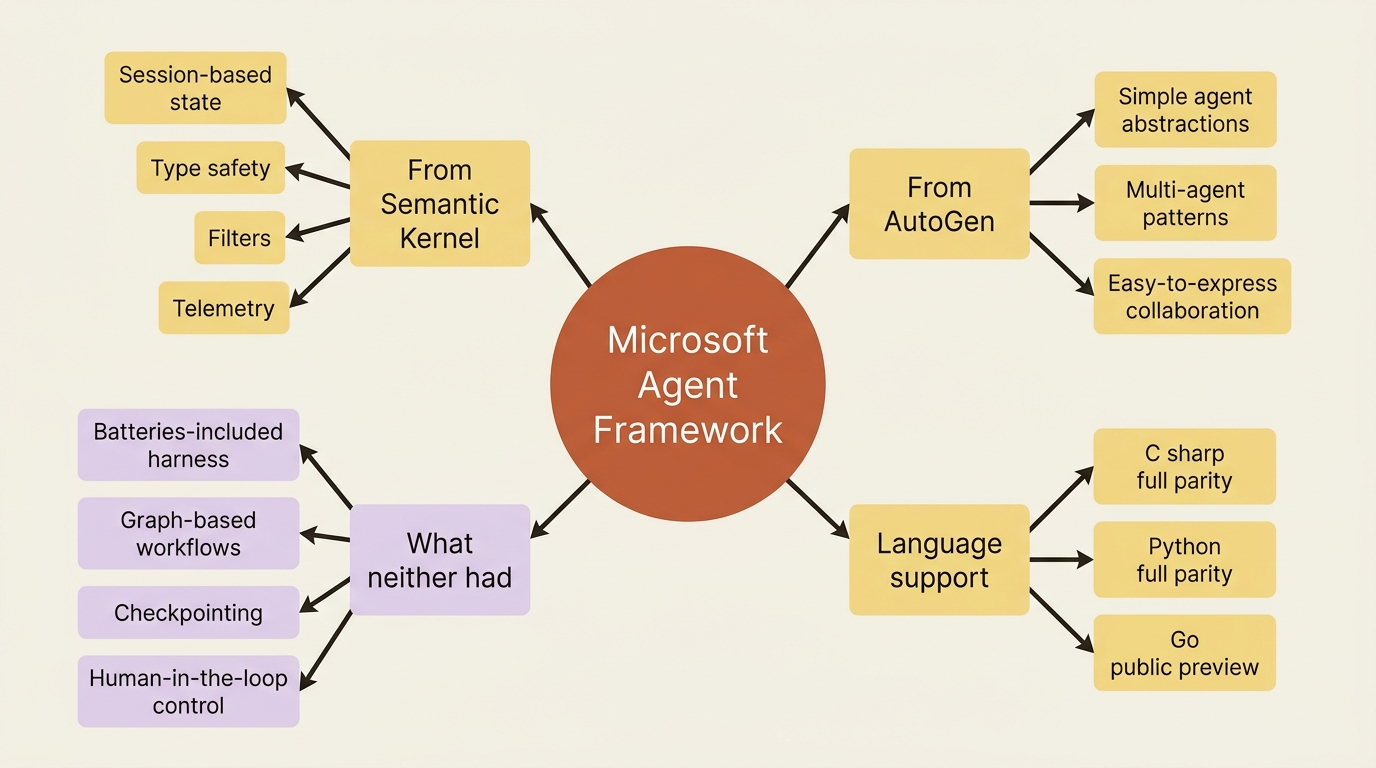
Microsoft built two frameworks to solve that problem before this one. Semantic Kernel brought enterprise plumbing, sessions, type safety, and telemetry, to LLM applications. AutoGen made multi-agent collaboration simple to express. Microsoft Agent Framework is the successor to both, built by the same teams, and it is genuinely both things at once: AutoGen's simple agent abstractions plus Semantic Kernel's session-based state, type safety, and telemetry. Then it adds two capabilities neither predecessor had. This article sets up that framing, gets the framework installed, and ends with a working agent you can run right now.
Three capabilities, not one grab-bag of features
Agent Framework organizes everything it does into three categories, and understanding the boundary between them will save you from reaching for the wrong tool later.
An agent is an individual LLM wrapper: it processes input, calls tools and MCP servers, and generates a response. This is the layer most projects live in day to day. The harness is an opinionated, batteries-included agent tuned for long, multi-step tasks: planning, todo tracking, context compaction, file memory, and standing tool approval, all wired together instead of hand-assembled. A workflow is graph-based orchestration that connects agents and functions with type-safe routing, checkpointing, and human-in-the-loop support, for when a process needs explicit control over execution order rather than an LLM deciding the next step on its own.
| Capability | What it is |
|---|---|
| Agents | An LLM wrapper that calls tools and generates responses |
| Harness | An opinionated, batteries-included agent for long-running work |
| Workflows | Graph-based orchestration across agents and functions |
In flat terms: an agent answers and acts, a harness plans and persists across a long task, and a workflow enforces a graph of steps across one or more agents.
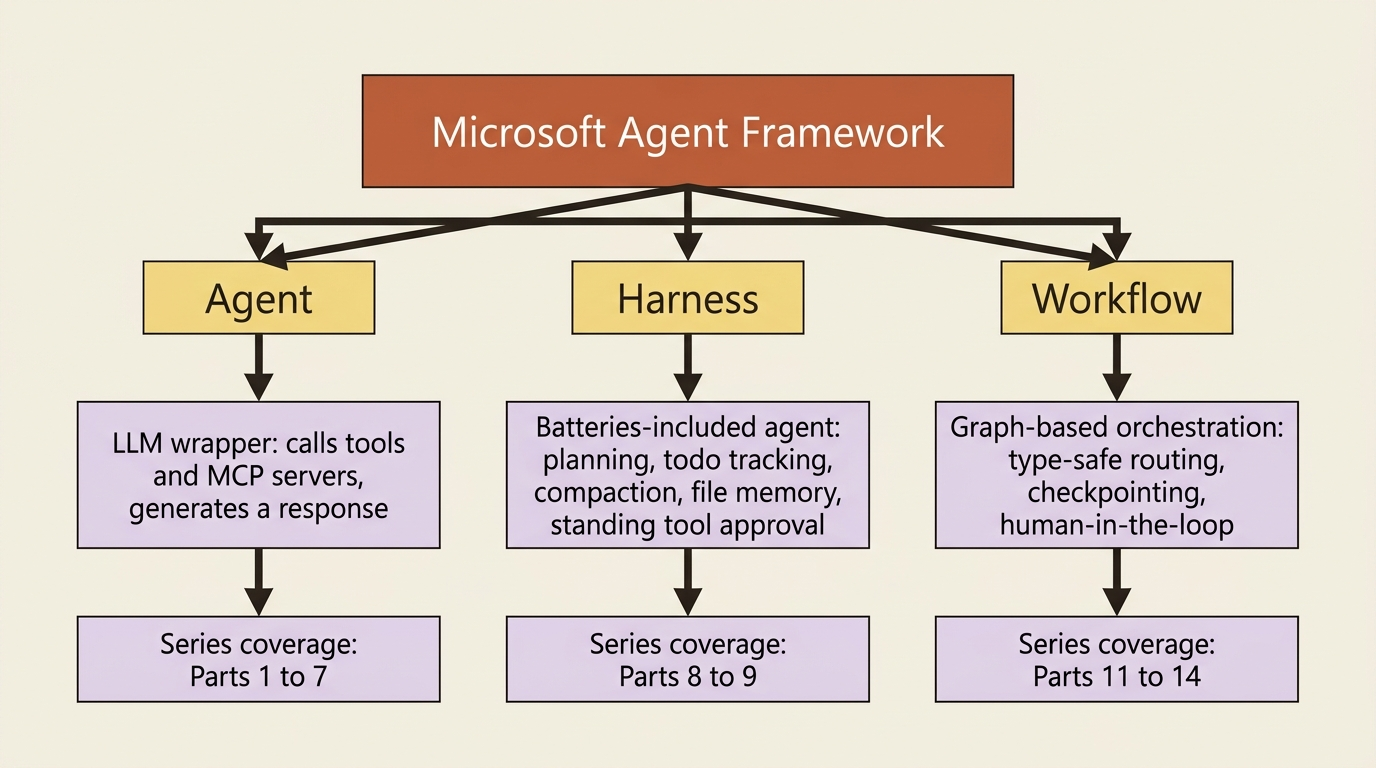
The framework also ships foundational pieces that cut across all three: model clients for chat completions and responses, an agent session for state management, context providers for memory, and middleware for intercepting agent actions.
Why this exists: the direct successor to Semantic Kernel and AutoGen
Semantic Kernel and AutoGen pioneered the concepts this framework is built on: AI agents and multi-agent orchestration. Agent Framework is their direct successor, created by the same teams, and it combines AutoGen's simple abstractions for single- and multi-agent patterns with Semantic Kernel's enterprise-grade features, such as session-based state management, type safety, filters, and telemetry. Beyond merging the two, it introduces workflows for explicit control over multi-agent execution paths and a state management system built for long-running, human-in-the-loop scenarios.
If you are arriving from either predecessor, the framework is not a lateral move. It is meant to be the next generation of both. You do not need that background to follow along, but if you have it, most of what carries over will feel immediately familiar.
When you reach for an agent versus a workflow
You will make this call constantly once you are past the basics, so it is worth seeing the decision early.
| Use an agent when | Use a workflow when |
|---|---|
| The task is open-ended or conversational | The process has well-defined steps |
| You need autonomous tool use and planning | You need explicit control over execution order |
| A single LLM call, possibly with tools, suffices | Multiple agents or functions must coordinate |
The table in prose: reach for an agent when the task benefits from the model deciding what to do next, and reach for a workflow when you already know the steps and want them enforced. One rule applies before either: if you can write a plain function to handle the task, do that instead of reaching for an AI agent at all.
Two languages, and a third one worth knowing about
Agent Framework ships full-parity SDKs for C# and Python. That parity is a deliberate choice on Microsoft's part, not an accident of documentation effort, and it means you can build with the framework in whichever language your team already lives in.
There is also a Go SDK, currently in public preview. It is worth knowing about, but it is missing real capability that C# and Python already have: no declarative agents, no RAG, no CodeAct, no functional workflows, and as of this writing, no agent harness at all. If you are betting on Go today, know that gap before you commit.
Install it
Both languages install in a couple of commands. Pick the one you are using.
dotnet add package Microsoft.Agents.AI.OpenAI --prerelease
pip install agent-framework agent-framework-openai
The C# package plugs an OpenAIClient into AIAgent. The Python package adds the agent_framework.openai module, where OpenAIChatClient lives. Either one is all you need for the first agent below; provider-specific packages for Foundry, Azure OpenAI, and Anthropic come later, once you are past the quickstart.
Gotcha: Agent Framework does not automatically load .env files. If you are used to a framework that quietly picks up OPENAI_API_KEY from a .env file, this one will not, in either language. In Python, call load_dotenv() yourself before you construct a client. In C#, set the environment variable directly in your shell, your IDE's run configuration, or launchSettings.json. Skip this and your first run fails with an auth error that has nothing obviously to do with .env files.
Hello, agent
Here is the smallest thing worth running: one agent, one instruction, one call. This is also the first appearance of a market-research agent, the running example that grows in capability from here.
using Microsoft.Agents.AI;
using OpenAI;

OpenAIClient client = new OpenAIClient("<your_api_key>");
var chatClient = client.GetChatClient("gpt-4o-mini");

AIAgent agent = chatClient.AsAIAgent(
    instructions: "You are a market research analyst who gives clear, concise answers.",
    name: "MarketResearcher");

Console.WriteLine(await agent.RunAsync("What is Microsoft Agent Framework?"));
import asyncio
from agent_framework.openai import OpenAIChatClient


async def main():
    agent = OpenAIChatClient().as_agent(
        name="MarketResearcher",
        instructions="You are a market research analyst who gives clear, concise answers.",
    )
    result = await agent.run("What is Microsoft Agent Framework?")
    print(result)


asyncio.run(main())
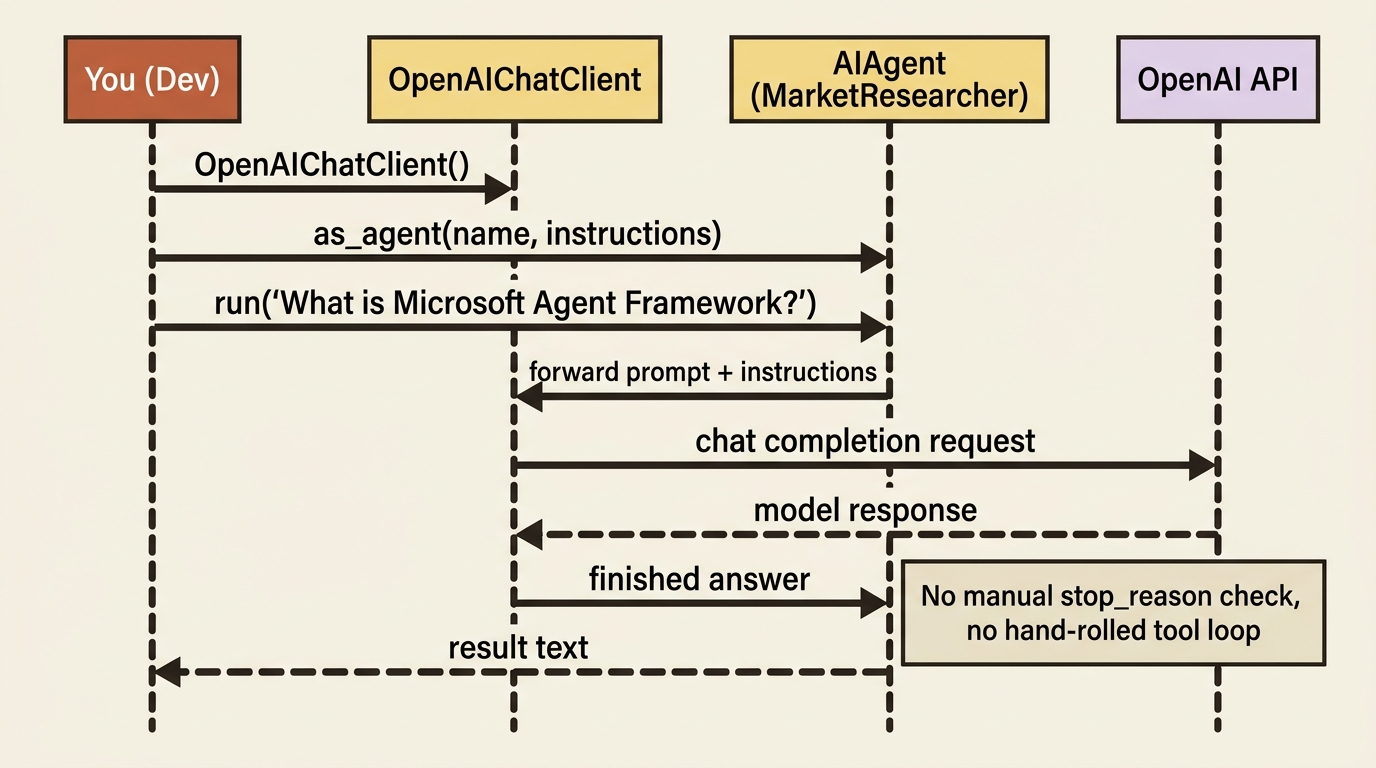
Read what each one actually does. In C#, you build an OpenAIClient, pull a chat client off it, and call AsAIAgent to get back an AIAgent, the common base type every agent in the framework shares regardless of provider. In Python, OpenAIChatClient().as_agent(...) does the same job in one step, handing you an Agent. Both read OPENAI_API_KEY from the environment by default; the C# sample passes a key explicitly here just to make the source obvious. Neither snippet builds a tool loop, checks a stop_reason, or parses an intermediate step. RunAsync and run do that internally and hand you back a finished answer.
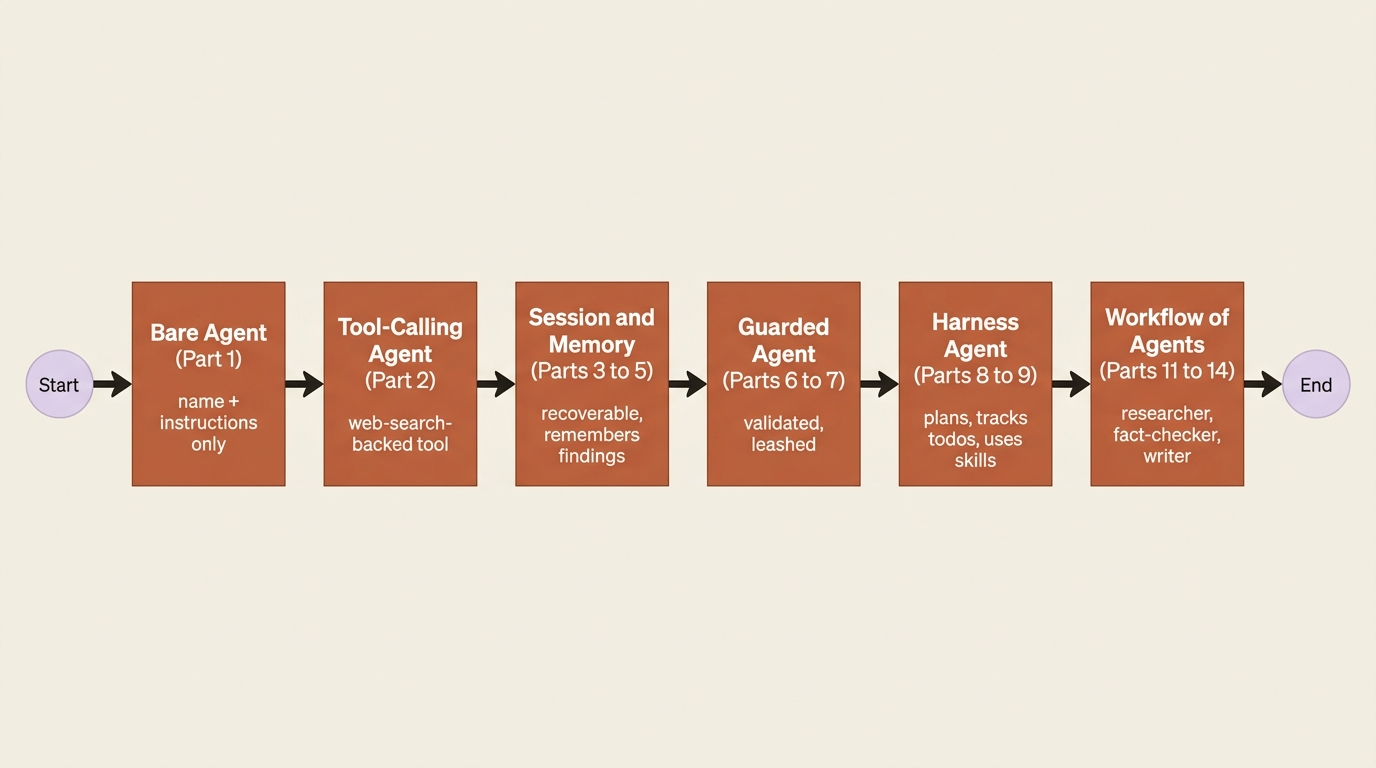
What you have, and what is still missing
You now have an agent with a name, an instruction, and nothing else: no memory of past turns, no tools, no plan. That is deliberate. Capabilities get added one at a time, each one wired into this same market-research agent rather than starting over, so by the time you reach workflows you have watched every piece get built into a system you actually understand end to end.
In production: the constructor calls above are the whole story for a demo, but a real deployment pulls the model name and endpoint from configuration, not a literal string, and never puts an API key inline in source the way the C# sample does here for clarity.
Do this today
- Install the framework for whichever language you use:
pip install agent-framework agent-framework-openaiordotnet add package Microsoft.Agents.AI.OpenAI --prerelease. - Set
OPENAI_API_KEYin your shell or IDE run configuration; do not rely on a.envfile loading automatically. - Run the hello-agent snippet above with your own key and confirm you get a real answer back.
- Look at the agent-versus-workflow table and name one task in your own backlog that clearly belongs in each column.
- Note which language you will follow going forward; both C# and Python get full coverage from here.
The takeaway
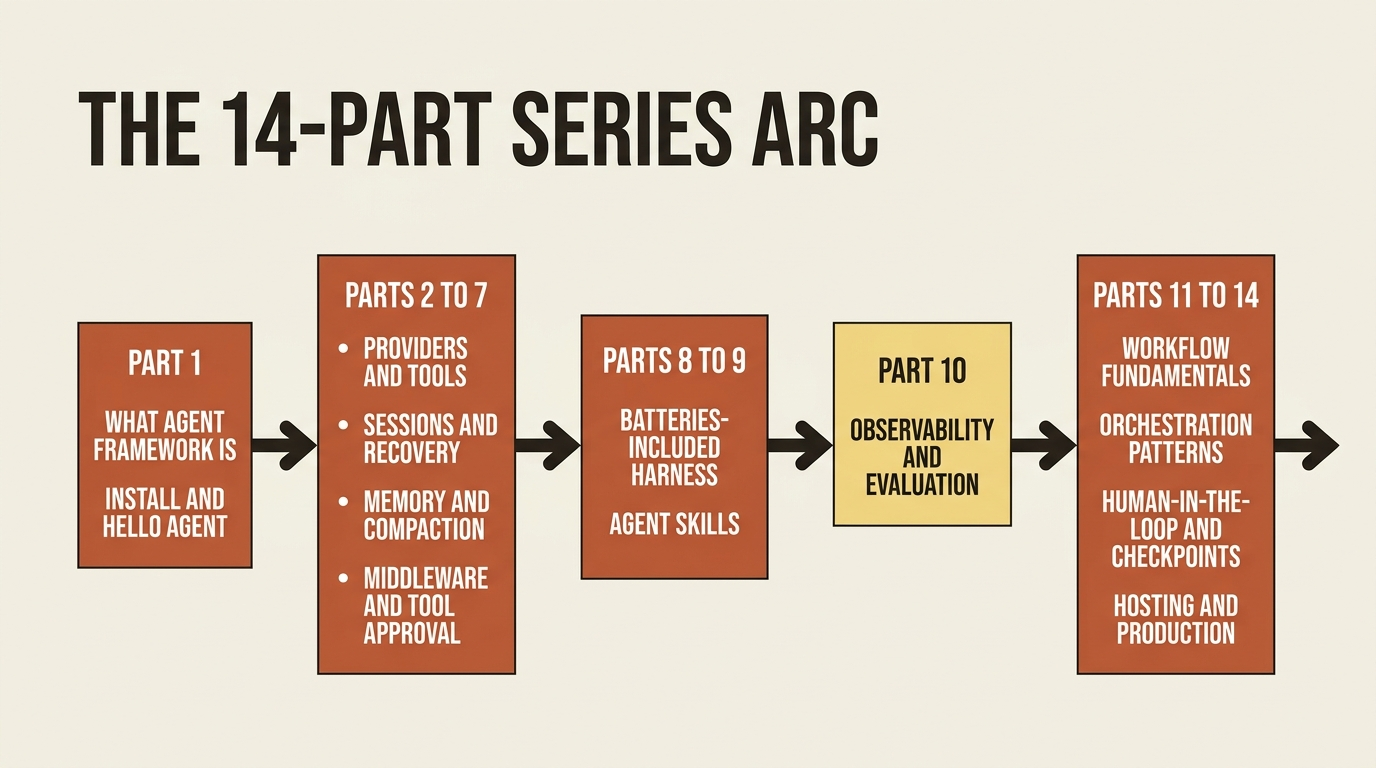
Microsoft Agent Framework's pitch is not "yet another agent SDK." It is "the plumbing you already built twice, in Semantic Kernel and in AutoGen, done once, plus the two things you would have built next anyway." You have now seen the three-way split, agents, harness, workflows, installed the framework, and run a real call through it. That is the whole foundation everything else builds on.
Go run the hello-agent snippet with your own API key before you do anything else. Once you have watched it answer a real question, the rest is just deciding what to hand it next.