
Your AI Agent Can Talk. Here Is How to Give It Hands.
A survey of what actually turns an LLM wrapper into a working agent: picking a provider with your eyes open, giving the agent a tool it decides on its own when to call, reaching for the tools you do not have to build, and shipping a response surface a real caller can use.
Microsoft Agent Framework's provider landscape, function tools, the built-in tools you do not have to build yourself, and the response surface a production caller actually needs.
You gave your agent instructions and it still cannot do anything real. Here is the moment your provider choice quietly caps what you can build, and how to give the agent a tool it decides on its own when to reach for.
In this article: You will learn how to pick a Microsoft Agent Framework provider based on what it actually supports, wire a function tool into an agent so it decides on its own when to call it, tour the built-in tools (MCP, code interpreter, file search, web search) that save you from building an integration from scratch, and ship the four things a real caller needs from a response: streaming, structured output, multimodal input, and background responses.
An agent that answers questions from training data is a chatbot with a name. Ask it what happened in the market this morning, or to check a document you just uploaded, or to hand back a result another program can parse instead of a human reading it, and it has nothing. Instructions alone do not make an agent useful. Tools do.
This is where Microsoft Agent Framework earns the "agent" in its name. You pick a chat client with intent instead of defaulting to whatever showed up in a tutorial, give that agent a function tool it can call on its own, tour the built-in tools that save you from building an MCP client or a code sandbox from scratch, and learn the response surface a real caller needs. By the end, a market-research agent has its first real capability: a tool for looking up a topic.
Picking a provider decides more than you think
Every agent in the framework is built on a chat client, and which chat client you pick decides which capabilities are actually available to you. The framework exposes a consistent interface across providers, AIAgent in .NET and BaseAgent in Python, so switching providers later does not mean rewriting your agent logic. It does mean checking what that provider actually supports before you build around a feature it does not have.
Here is the comparison across the providers Agent Framework ships support for:
| Provider | Function Tools | Structured Outputs | Code Interpreter | File Search | MCP Tools | Background Responses |
|---|---|---|---|---|---|---|
| Azure OpenAI | Yes | Yes | Yes | Yes | Yes | Yes |
| OpenAI | Yes | Yes | Yes | Yes | Yes | Yes |
| Microsoft Foundry | Yes | Yes | Yes | Yes | Yes | Yes |
| Anthropic | Yes | Yes | Yes | No | Yes | No |
| Ollama | Yes | Yes | No | No | No | No |
| Foundry Local | Yes | No | No | No | No | No |
| GitHub Copilot | Yes | No | No | No | Yes | No |
| Copilot Studio | No | No | No | No | No | No |
Medium does not render tables cleanly on every device, so here is the same comparison as a flat list: Azure OpenAI supports function tools, structured outputs, code interpreter, file search, MCP tools, and background responses, all yes. OpenAI: all yes. Microsoft Foundry: all yes. Anthropic: function tools, structured outputs, code interpreter, and MCP tools are yes; file search and background responses are no. Ollama: function tools and structured outputs are yes; code interpreter, file search, MCP tools, and background responses are no. Foundry Local: function tools only. GitHub Copilot: function tools and MCP tools only. Copilot Studio: none of the six, because it runs as a remote agent rather than a client you configure directly.
Read this comparison before you commit to a provider for anything beyond a demo. If you are building an agent that leans on code execution or file search, Anthropic and Ollama are off the table for that piece, function tools or not. If you need background responses for long-running calls, right now that means the OpenAI or Azure OpenAI Responses API, or Foundry. The provider you pick in week one quietly caps what you can reach for in week four.
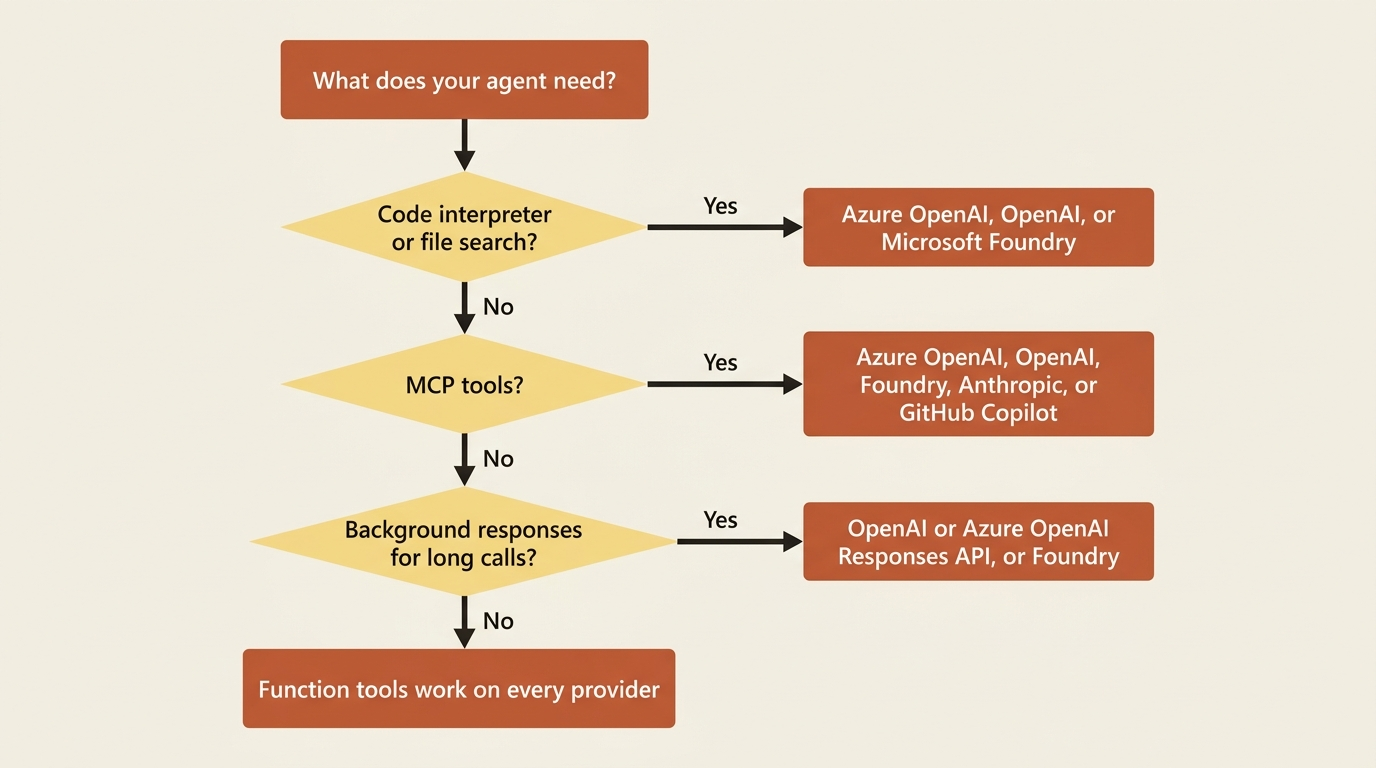
Azure OpenAI, OpenAI, and Microsoft Foundry give you the widest surface. Anthropic and Ollama are real options when a team already standardizes on Claude models or wants to run entirely local; you just budget for the gaps. Copilot Studio and A2A agents run on a remote service, so their capabilities live on that remote agent rather than in your client code. They are not really "providers" in the same sense as the others.
Gotcha: the OpenAI and Azure OpenAI providers each ship two client types, Chat Completion and Responses, and they do not support the same tool set. Web search and background responses need the Responses API. Code interpreter and file search need it too; in the Chat Completion client, they are simply unavailable. If a tool call silently does nothing, check which client type you actually constructed before you assume the tool itself is broken.
Give the agent a function tool
A function tool is just code you already have, exposed to the model with a description good enough that it knows when to call it. You do not hand-write a JSON schema. The framework builds it from your method signature and whatever description you attach.
Here is the market-research agent's first real capability: a tool for looking up a topic. For now it is a stand-in; a later part wires it to a real search backend or the framework's built-in web search tool, but the pattern is identical either way.
using System.ComponentModel;

[Description("Search the web for a concise, current summary of a research topic.")]
static string LookUpTopic([Description("The topic to research.")] string topic)
    => $"Search results for '{topic}': [placeholder web search integration].";
from typing import Annotated
from pydantic import Field
from agent_framework import tool


@tool(name="look_up_topic", description="Search the web for a concise, current summary of a research topic.")
def look_up_topic(
    topic: Annotated[str, Field(description="The topic to research.")],
) -> str:
    return f"Search results for '{topic}': [placeholder web search integration]."
The [Description] attribute in C# and the Annotated/Field pair in Python do the same job: they tell the model what the function does and what its parameter means, which is exactly what it uses to decide whether and how to call the tool. Skip the descriptions and the model still technically has the tool; it is just guessing at when to reach for it.
Wire the tool into the market-research agent by passing it to tools:
AIAgent agent = chatClient.AsAIAgent(
    instructions: "You are a market research analyst who gives clear, concise answers.",
    name: "MarketResearcher",
    tools: [AIFunctionFactory.Create(LookUpTopic)]);

Console.WriteLine(await agent.RunAsync("What's the latest on quantum computing funding?"));
agent = OpenAIChatClient().as_agent(
    name="MarketResearcher",
    instructions="You are a market research analyst who gives clear, concise answers.",
    tools=[look_up_topic],
)

result = await agent.run("What's the latest on quantum computing funding?")
print(result)
AIFunctionFactory.Create wraps the C# method as an AIFunction, the same type any provider-native tool uses internally. In Python, tools accepts a plain callable and normalizes it for you; the @tool decorator is only there when you want to override the name or description the framework would otherwise infer from the function's own name and docstring. Run either agent with a question that needs current information, and it now decides on its own whether to call look_up_topic before answering, instead of guessing from training data.
If several tools need to share state, a service client, a rate limiter, or a cache, wrap them in a class and pass bound methods instead of loose functions. That keeps the shared dependency out of the model's view while still giving every tool access to it.
The tools you do not have to build yourself
Function tools cover the case where you own the logic. For a lot of common capability, you do not need to own the logic: the framework or the provider already built it.
| Built-in tool | What it does |
|---|---|
| Function Tools | Custom code you provide, called during a conversation |
| Code Interpreter | Executes code in a sandboxed environment, useful for data analysis and math |
| File Search | Searches uploaded files through a provider-managed vector store |
| Web Search | Searches the web for information beyond the model's training data |
| Hosted MCP Tools | MCP servers invoked by the provider's own runtime, no client-side connection to manage |
| Local MCP Tools | MCP servers you connect to directly, running locally or on a host you control |
As a flat list: Function Tools are custom code you provide, called during a conversation. Code Interpreter executes code in a sandboxed environment, useful for data analysis and math. File Search searches uploaded files through a provider-managed vector store. Web Search searches the web for information beyond the model's training data. Hosted MCP Tools are MCP servers invoked by the provider's own runtime, with no client-side connection to manage. Local MCP Tools are MCP servers you connect to directly, running locally or on a host you control.
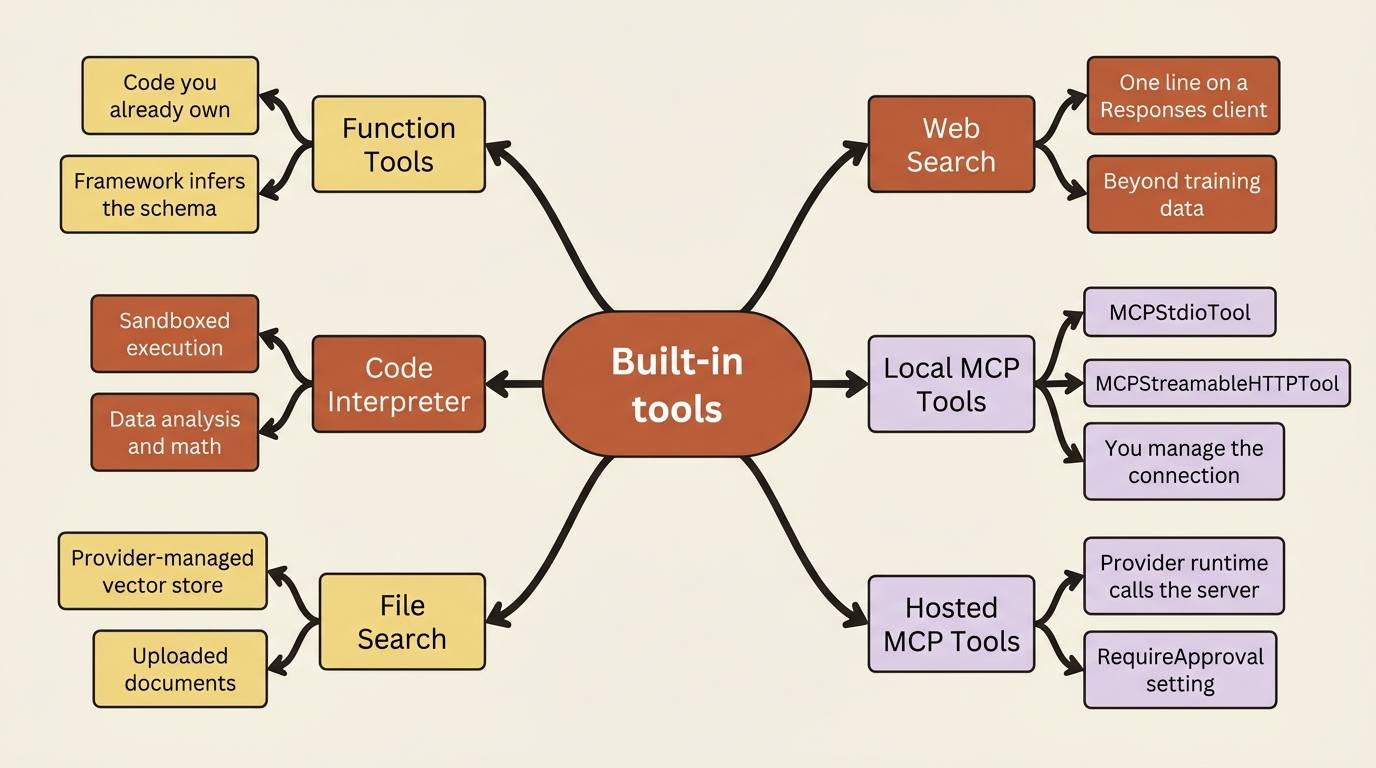
Local MCP tools are the ones you will reach for most often early on, because they let you plug in an existing MCP server (GitHub, a filesystem, a calculator) without writing any tool code at all. In Python, that is MCPStdioTool for a server that runs as a local process:
import asyncio
from agent_framework import Agent, MCPStdioTool
from agent_framework.openai import OpenAIChatClient


async def main():
    async with (
        MCPStdioTool(name="calculator", command="uvx", args=["mcp-server-calculator"]) as mcp_server,  # ①
        Agent(
            client=OpenAIChatClient(),
            name="MathAgent",
            instructions="You are a helpful math assistant.",
        ) as agent,  # ②
    ):
        result = await agent.run("What is 15 * 23 + 45?", tools=mcp_server)  # ③
        print(result)


asyncio.run(main())
① MCPStdioTool launches the calculator server as a local subprocess and hands back a connected client, the "plug in an existing server" part of the pattern.
② The agent is built independently of the MCP server; the two only meet by being opened together in the same async with.
③ The MCP server's tools are handed to run, not to the agent's constructor, so the model can reach for them on this one call.
Note: The full extracted listing at code/microsoft_agent_framework/part-2-building-and-running-an-agent/listings/01-mcp-stdio-calculator.py is this same complete program, markers removed.
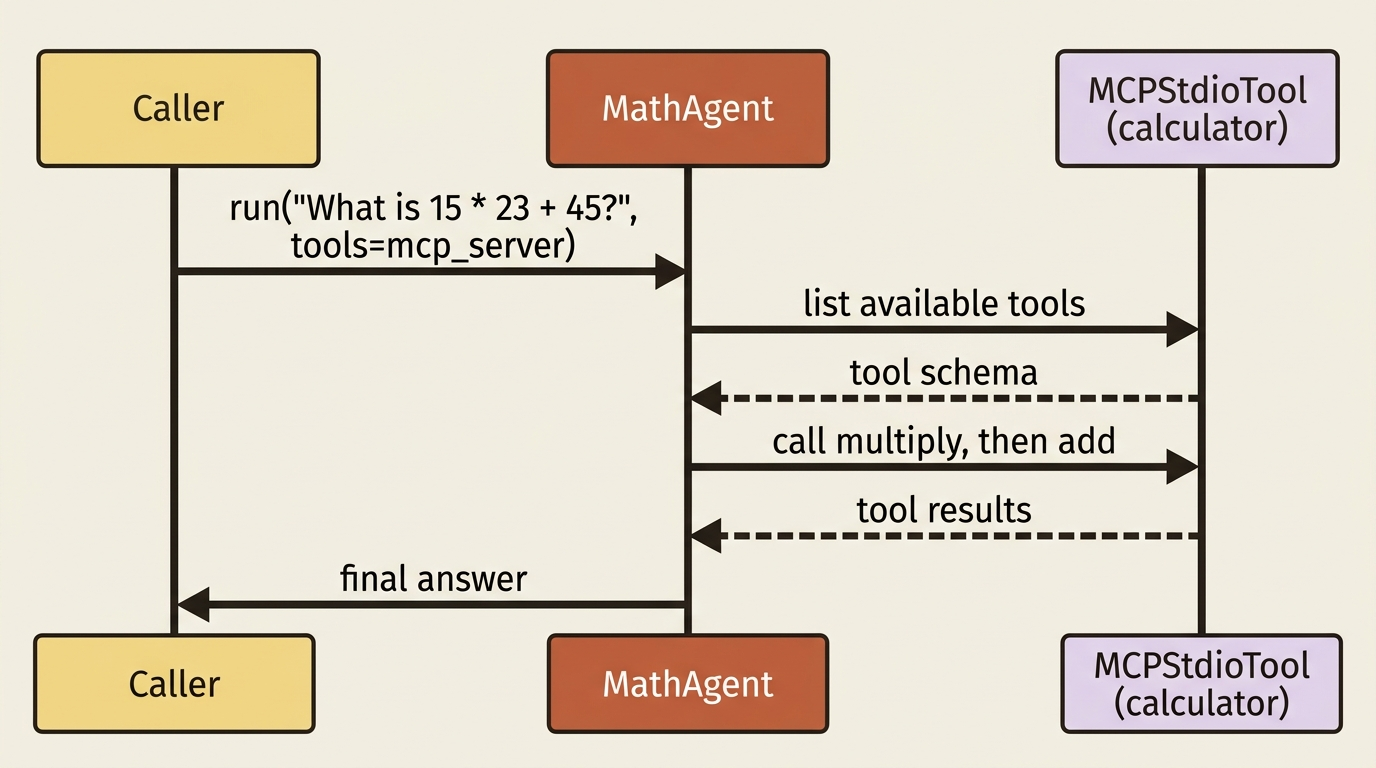
The MCP client connects, lists whatever tools the server exposes, and the agent can call any of them the same way it would call a function tool you wrote yourself. C# does the same thing through the official MCP C# SDK: create an McpClientFactory client, call ListToolsAsync(), and pass the results straight into the agent's tools list. MCPStreamableHTTPTool covers the remote-server case in Python, for MCP servers reachable over HTTP instead of a local process.
Hosted MCP tools are a different shape entirely: instead of your process connecting to the MCP server, you tell the provider (typically Foundry) about the server, and the provider's own runtime calls it. You get a RequireApproval setting, never or always, that controls whether a human has to sign off before each hosted MCP call fires. That approval mechanism gets a full part later in this series; for now, know that hosted and local MCP tools solve the same problem at different layers of trust.
Code interpreter, file search, and web search follow the same "declare it, do not build it" pattern. Web search, for instance, is one line once you have a Responses-capable client:
web_search_tool = client.get_web_search_tool(user_location={"city": "Seattle", "country": "US"})
agent = Agent(client=client, instructions="...", tools=[web_search_tool])
That is the built-in alternative to the look_up_topic function tool from earlier: same job, but the search itself runs on the provider's infrastructure instead of yours.
In production: third-party MCP servers are not vetted by Microsoft, and connecting one means some of your prompt content flows to that server. Stick to servers hosted by trusted providers, review what data crosses that boundary, and log it for auditing. This is exactly the kind of thing that seems fine in a demo and becomes a real question the moment a research agent starts calling a stranger's MCP endpoint with your users' queries in it.
The response surface a caller actually needs
Everything so far has been about what the agent can do. This last stretch is about what you get back, because "print the response" only survives contact with a real caller for about a day.
Streaming versus non-streaming. For a one-shot answer, RunAsync (C#) or run (Python) gives you the whole thing at once. For anything a user is watching in real time, stream it instead:
await foreach (var update in agent.RunStreamingAsync("Summarize today's market movers."))
{
    Console.Write(update);
}
async for update in agent.run("Summarize today's market movers.", stream=True):
    if update.text:
        print(update.text, end="", flush=True)
Both return the same kind of content either way, text, tool calls, and tool results, just delivered incrementally instead of all at once. In Python, the object run(..., stream=True) hands back also supports skipping iteration entirely and calling get_final_response() when you do not actually need the incremental updates, just the finished result.
Structured outputs. When a caller needs to parse the answer instead of read it, ask the agent for a typed result. In C#, RunAsync<T> does the work end to end:
AgentResponse<TopicBrief> response = await agent.RunAsync<TopicBrief>(
    "Summarize the current state of quantum computing funding.");

Console.WriteLine(response.Result.Summary);
Python takes the same idea through response_format in the run options, with a Pydantic model as the schema:
from pydantic import BaseModel


class TopicBrief(BaseModel):  # ①
    topic: str
    summary: str


response = await agent.run(
    "Summarize the current state of quantum computing funding.",
    options={"response_format": TopicBrief},  # ②
)

if response.value:
    print(response.value.summary)  # ③
① TopicBrief is a plain Pydantic model; its fields are the schema the answer gets forced into.
② Passing the class through response_format is what turns a free-text answer into a validated instance of that schema.
③ response.value carries the parsed TopicBrief, not a string, so the caller reads a field instead of parsing text.
Note: The full extracted listing at
code/microsoft_agent_framework/part-2-building-and-running-an-agent/listings/02-structured-output-topic-brief.py
wraps this excerpt with the agent construction and asyncio.run call elided here.
response.value holds the parsed TopicBrief instance instead of raw text. This is the shape you want once the market-research agent starts handing its findings to another agent or a report template rather than a human reading a console.
Multimodal input. An agent built on a vision-capable model can take an image alongside text in the same message. In Python, that means building a Message with both a text Content and a Content.from_uri() (or Content.from_data() for a local file) pointing at the image:
from agent_framework import Message, Content

message = Message(
    role="user",
    contents=[
        Content.from_text(text="What trend does this chart show?"),
        Content.from_uri(uri="https://example.com/chart.png", media_type="image/png"),
    ],
)

result = await agent.run(message)
print(result.text)
C# does the same thing with a ChatMessage built from TextContent and UriContent. The shape does not change between languages, just the constructor names.
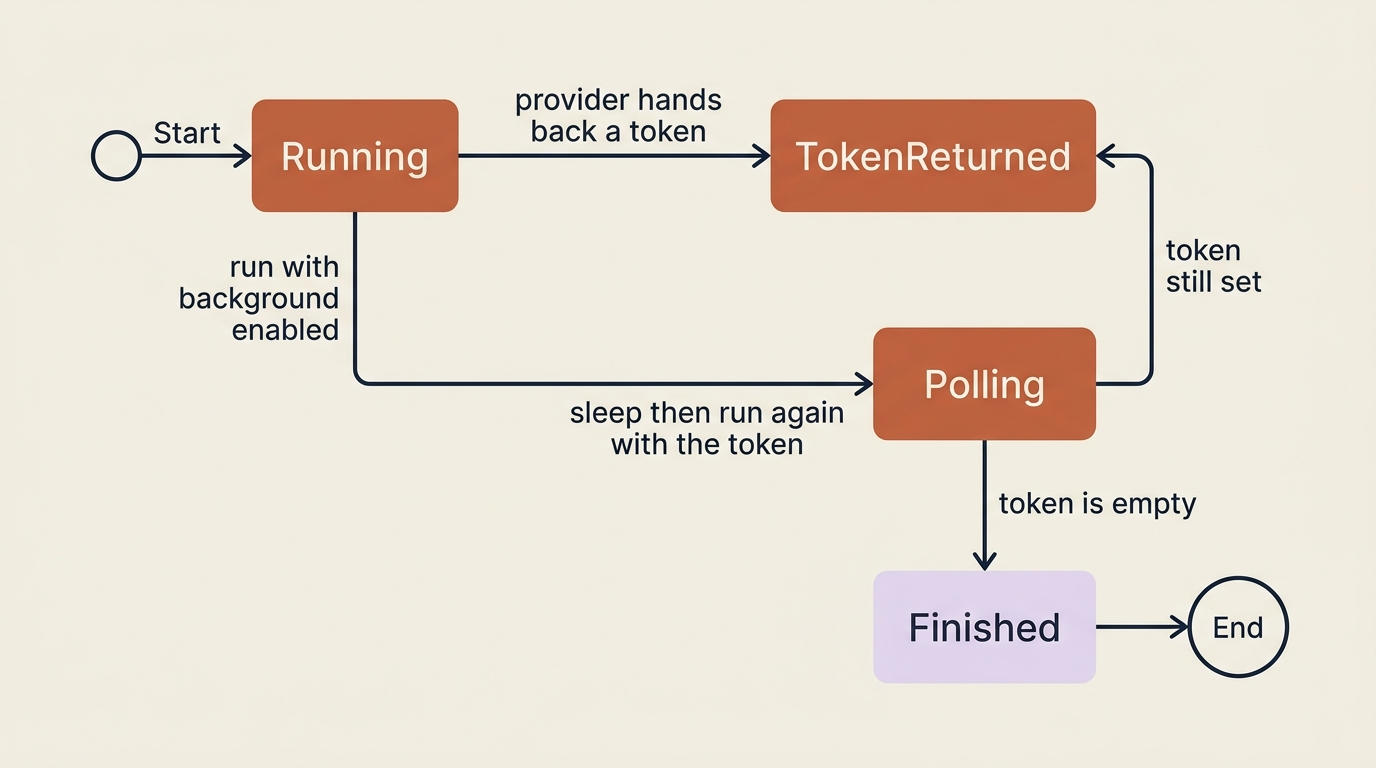
Background responses. Some calls are too slow to hold a connection open for: a long reasoning task or a large document synthesis. Background responses solve that with a continuation token: the agent starts the work, hands you back a token instead of a finished answer, and you poll until the token comes back None.
session = agent.create_session()
response = await agent.run(
    messages="Write a detailed competitive landscape report on quantum computing startups.",
    session=session,
    options={"background": True},  # ①
)

while response.continuation_token is not None:  # ②
    await asyncio.sleep(2)
    response = await agent.run(session=session, options={"continuation_token": response.continuation_token})  # ③

print(response.text)
① Setting background to True is what tells the provider not to block the call until the work finishes.
② The loop's condition is the continuation token itself; it keeps polling as long as the provider keeps handing one back.
③ Each poll sends the previous token back in, and the response it gets may carry a new token or the finished result.
Note: The full extracted listing at
code/microsoft_agent_framework/part-2-building-and-running-an-agent/listings/03-background-response-polling.py
wraps this excerpt with the agent construction and asyncio.run call elided here.
Gotcha: background responses currently only work with agents built on the OpenAI Responses API, OpenAI, or Azure OpenAI. Enable background on an agent built on a Chat Completion client and you will not get an error; you will just never get a continuation token back, because that client does not know what one is.
Do this today
- Read the provider capability table before you commit to a provider for anything beyond a demo, especially if code interpreter, file search, or background responses matter to what you are building.
- Add one function tool to an agent, with a real description on both the function and its parameters, and watch it decide on its own when to call it.
- Reach for
MCPStdioTool(Python) or the MCP C# SDK before you hand-write a wrapper around an existing service like GitHub or a filesystem. - Add
response_format(Python) orRunAsync<T>(C#) to any response another program needs to parse instead of a human reading it. - Check which client type, Chat Completion or Responses, your OpenAI or Azure OpenAI agent actually uses before you build around web search, code interpreter, file search, or background responses.
What the market-research agent has now
The agent could talk. Now it can act: it has a function tool for looking up a topic, and you have seen the built-in tools, MCP, code interpreter, file search, and web search, it can reach for once the placeholder search gets replaced with something real. You also know the four things a production caller actually needs from a response: streaming for anything a user watches live, structured output for anything another system parses, multimodal input for anything visual, and background responses for anything too slow to block on.
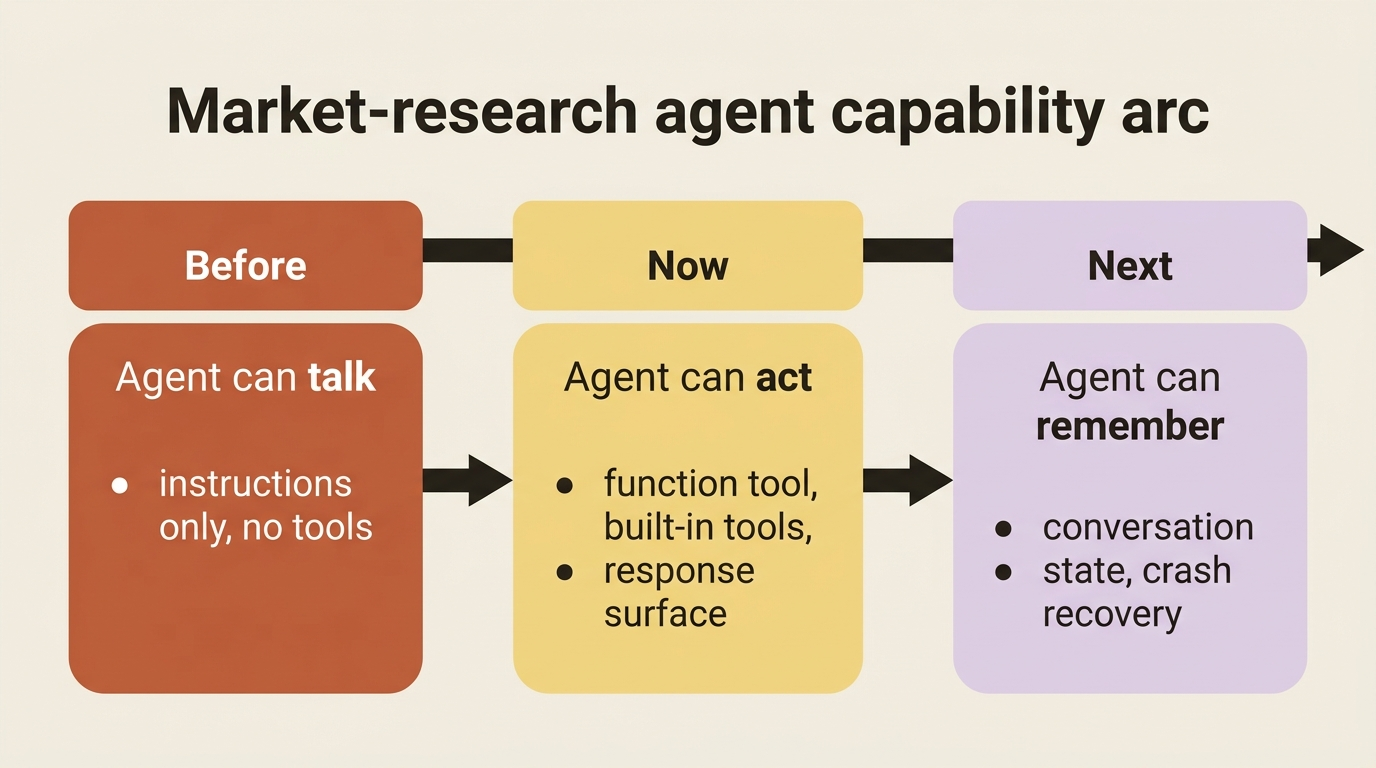
What it still does not have is memory. Ask it about a topic today and ask again tomorrow, and it starts from zero both times, because nothing about a RunAsync or run call persists a conversation on its own.
The takeaway
An agent with tools and no response discipline is still a toy; it just happens to be a toy that can call functions. You have now picked a provider with your eyes open, given an agent a tool it decides on its own when to use, toured the built-in tools that save you from reinventing MCP clients and code sandboxes, and learned the response surface that separates a demo from something a real caller can build on. The agent can look things up now. Next, it needs to remember what it found.