
Your AI Agent Has a Session. That Does Not Mean It Can Survive a Crash.
A session gets your agent continuity, not crash recovery, and the gap between those two guarantees is one boolean flag most developers never find until an outage forces the question.
Microsoft Agent Framework gives every agent a memory container called AgentSession. Here is the one setting most people never flip, and the outage that teaches them why they should have.
Your agent looks like it remembers everything, right up until the process dies mid-task and you discover it never actually saved anything. Microsoft Agent Framework gives every agent a memory container called AgentSession. Here is the one setting most people never flip, and the outage that teaches them why they should have.
In this article: You will learn how
AgentSessiongives a Microsoft Agent Framework agent multi-turn memory, the two different places that memory can actually live, and the single configuration flag that decides whether a tool-calling run that crashes halfway through loses everything or leaves you a trail you can recover from. By the end, you will know exactly which guarantee your agent currently has, and which one it does not.
Ask an AI agent about quantum computing funding today, then ask again tomorrow, and by default it starts from zero both times. Nothing about a plain model call remembers anything on its own. That is fine for a one-off question and useless for a research agent that is supposed to build on what it already found.
Microsoft Agent Framework fixes that with AgentSession, an object you create once and reuse across every call so the agent has somewhere to hang state between turns. Add a session and multi-turn memory works exactly the way you would hope. Then a tool-calling run crashes three steps into a five-step loop, and you discover that "the agent remembers" and "the agent survives a crash" were never the same promise. A session buys you continuity. It does not automatically buy you resilience, and the difference is one setting you either know about or you do not.
AgentSession: the conversation-state container
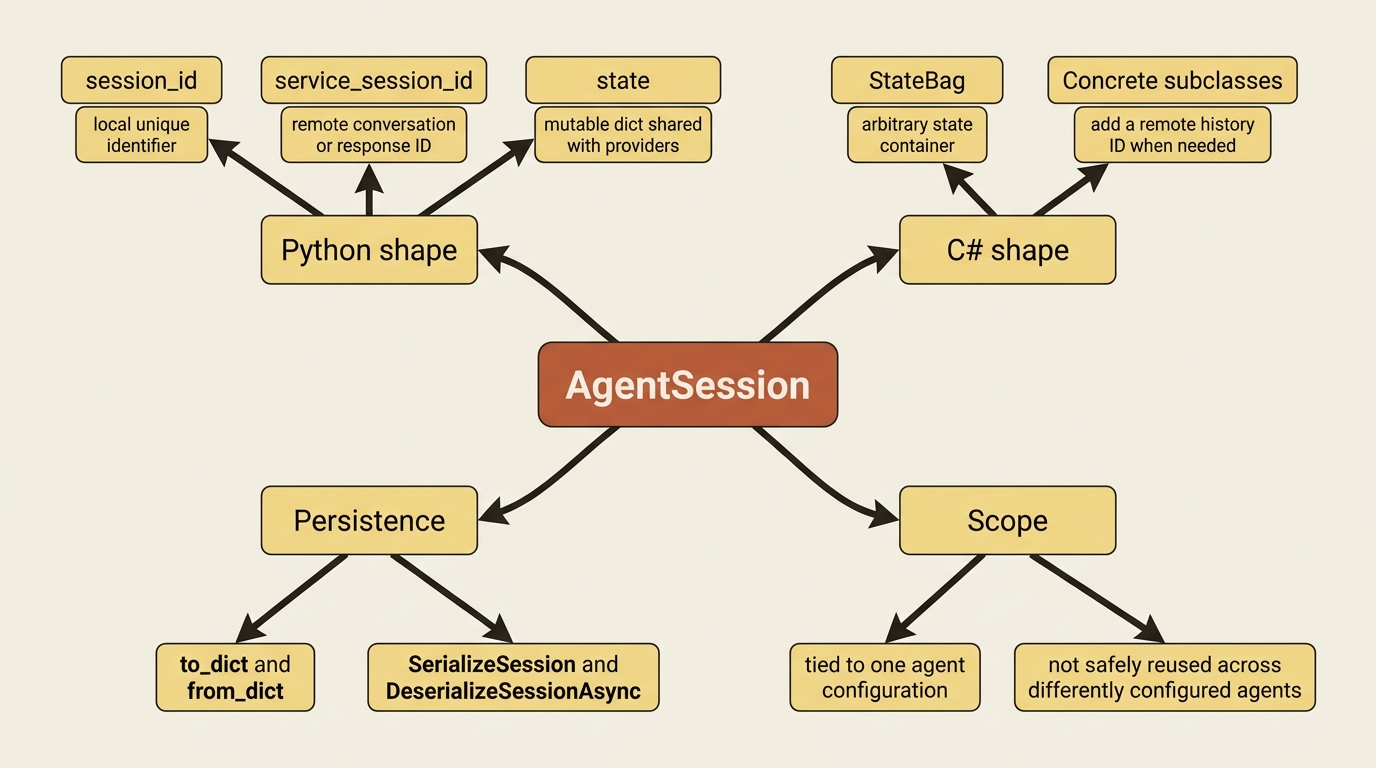
AgentSession is not the conversation history itself. It is the container that either holds that history directly or points at wherever the history actually lives, and you pass the same instance into every subsequent run that should share context.
In C#, AgentSession is an abstract base class with one field guaranteed to exist: StateBag, an arbitrary state container. Concrete implementations returned by CreateSessionAsync() add whatever else they need, such as an ID for remote chat history storage when a provider manages history server-side. In Python, the shape is explicit: session_id is a local unique identifier, service_session_id holds a remote conversation or response ID when service-managed history is in play, and state is a mutable dictionary shared with whatever context or history providers are attached.
Here is the pattern in both languages: create a session, pass it into every run that should share context, and the agent handles the rest.
session = agent.create_session()

first = await agent.run("My name is Alice.", session=session)
second = await agent.run("What is my name?", session=session)
AgentSession session = await agent.CreateSessionAsync();

var first = await agent.RunAsync("My name is Alice.", session);
var second = await agent.RunAsync("What is my name?", session);
The second call in each snippet answers correctly because the session carried the first turn forward, the way this sequence shows:
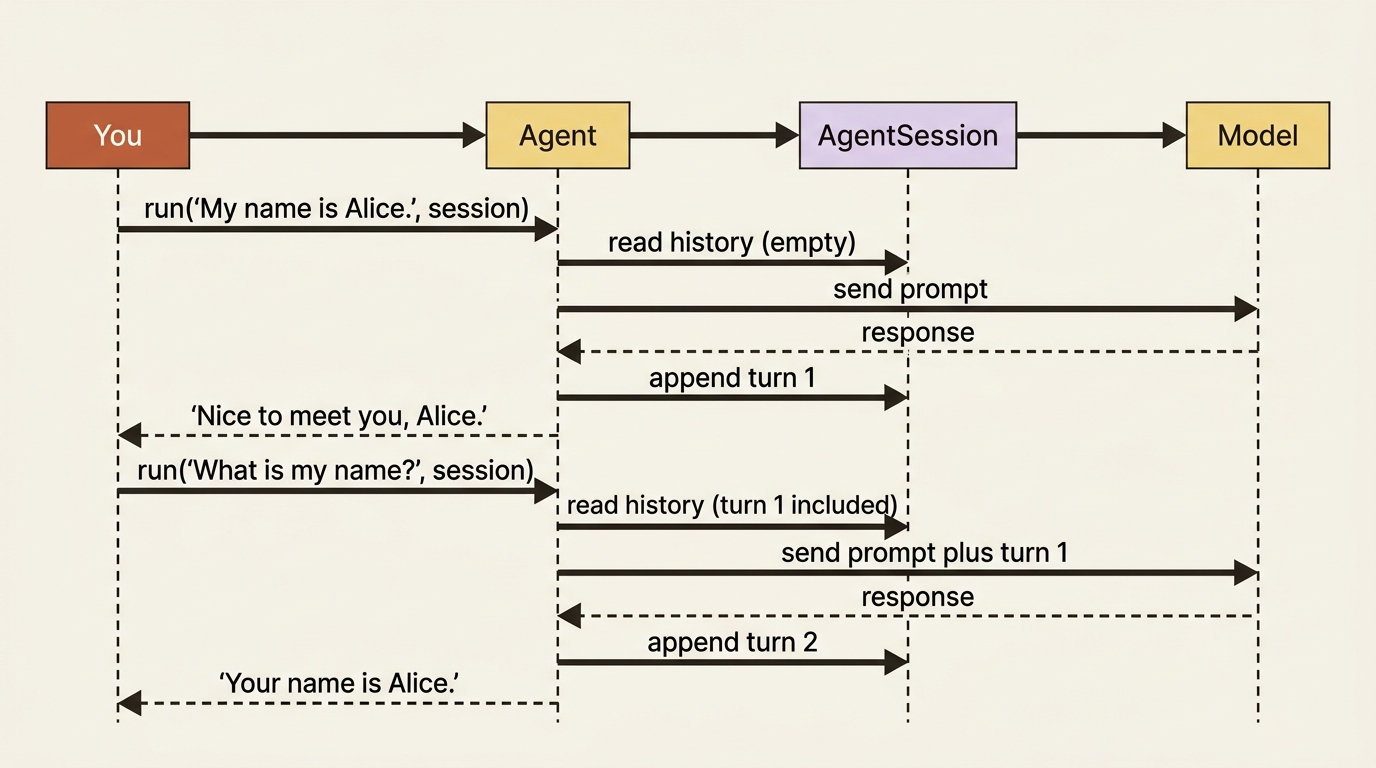
Swap agent.CreateSessionAsync() for a version pinned to an existing service-side conversation, chatClientAgent.CreateSessionAsync(conversationId) in C# or agent.get_session(service_session_id="<service-conversation-id>") in Python, and you resume a conversation the service already knows about instead of starting one.
Gotcha: sessions are agent-specific and provider-specific. Reusing a session created by one agent configuration with a different one can produce invalid context, so treat a serialized session as tied to the setup that created it.
Two storage modes: local versus service-managed
Where does that conversation history actually live? Agent Framework gives you exactly two answers, and which one you are on is not always obvious until you go looking.
| Mode | What is stored | Typical fit |
|---|---|---|
| Local session state | Full chat history inside AgentSession.state, usually via InMemoryHistoryProvider |
Providers without native server-side conversation persistence |
| Service-managed storage | Conversation state lives in the provider's service; the session just holds a pointer (service_session_id) |
Providers with a native persistent conversation, like OpenAI Responses or Conversations |
A quick way to hold that table in your head:
- Local session state: stores the full chat history inside
AgentSession.state, typically throughInMemoryHistoryProvider, and fits providers without server-side conversation persistence. - Service-managed storage: keeps the conversation in the provider's own service, with the session holding only a pointer, and fits providers that already support persistent conversations natively.
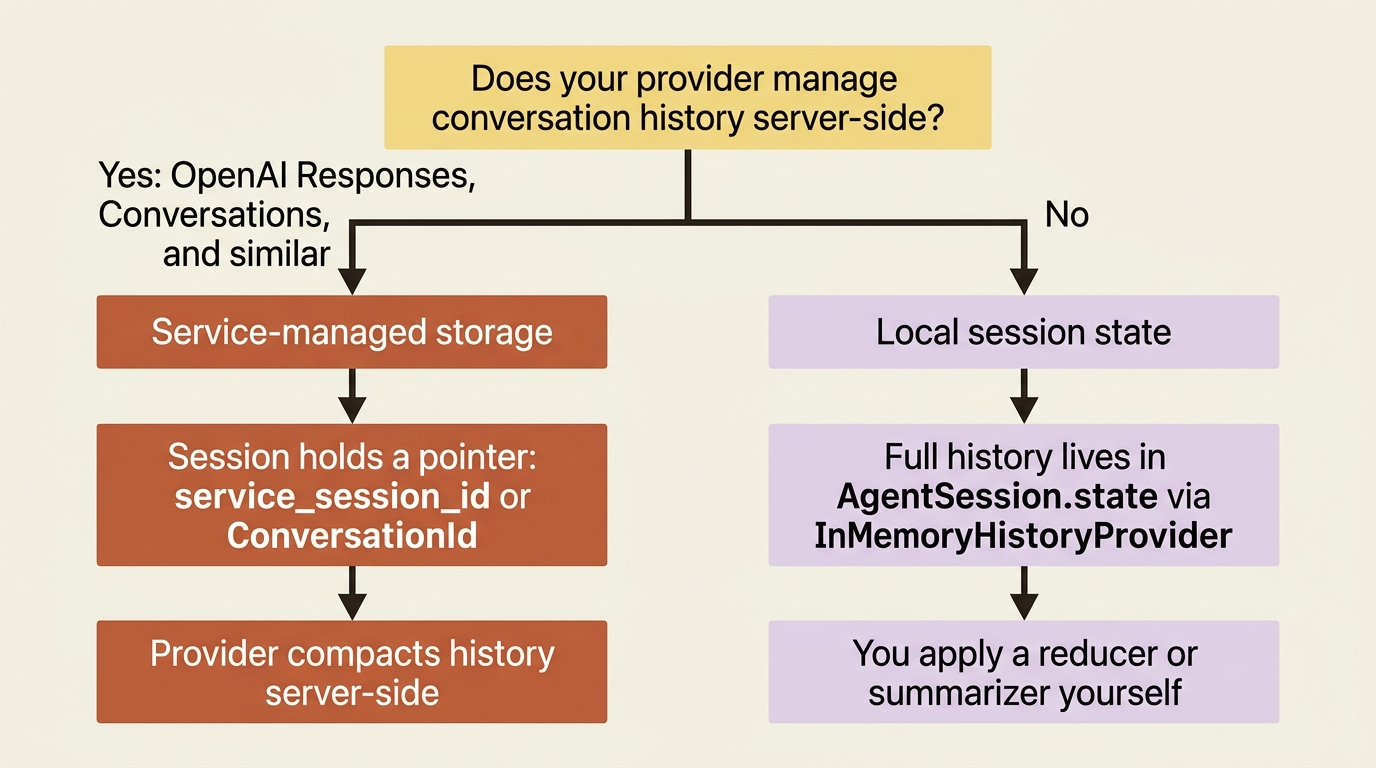
With local storage, the framework keeps history in the session and resends the relevant messages on every call. Attach an InMemoryHistoryProvider explicitly if you want to inspect what it is holding:
from agent_framework import InMemoryHistoryProvider
from agent_framework.openai import OpenAIChatClient

agent = OpenAIChatClient().as_agent(
    name="StorageAgent",
    instructions="You are a helpful assistant.",
    context_providers=[InMemoryHistoryProvider("memory", load_messages=True)],
)

session = agent.create_session()
await agent.run("Remember that I like Italian food.", session=session)
With service-managed storage, there is no local history to inspect. The session just carries the provider's own conversation ID forward: build the agent on a client that talks to a Responses-style API, and the session picks up a service_session_id automatically, no extra provider required. If local history grows too large for the model's context window, you apply a reducer instead of letting every message flow to every call. A message-count reducer is a blunt instrument, capping the count without judging what matters, and it is worth knowing that a service-managed agent already handles this compaction problem on the provider's side, one more reason it matters which mode you are actually on.
Serializing and restoring a session
A session that only lives in a process's memory does not survive that process restarting, so persisting it means serializing the whole object, not just scraping out the message text.
serialized = session.to_dict()
resumed = AgentSession.from_dict(serialized)
var serialized = agent.SerializeSession(session);
AgentSession resumed = await agent.DeserializeSessionAsync(serialized);
Store the serialized payload wherever your durable storage lives: a database row, a blob, a file. Then rehydrate it the next time that user or that research thread comes back, using the same agent configuration that created it. Treat an AgentSession as opaque state, not something you hand-edit or move between differently configured agents.
That is continuity solved. It is not the same thing as crash recovery, and that is where these two ideas split apart.
What a session does not buy you: per-service-call persistence
Here is the assumption that trips up almost everyone the first time they build something that has to survive a restart: "I have a session, so I have crash recovery." You do not, not by default, and the gap is specific enough to name.
A single call to run or RunAsync is not always a single call to the model. When the agent uses a tool, it might call the model, get a tool-call request back, execute the tool, call the model again with the result, and repeat that loop several times before producing a final answer. All of that happens inside one call. By default, a local history provider persists once, after the entire run finishes, not after each of those individual model calls.
That default is fine as long as nothing goes wrong mid-run. The moment your process crashes, gets OOM-killed, or loses power three model calls into a five-call tool loop, the local history provider never got to persist anything, because it was waiting for the whole run to finish first. Everything that run did is gone. If one of those model calls already triggered a tool with a real side effect, a file write, a paid API call, an email sent, that side effect happened, and nothing in your local history remembers that it did.
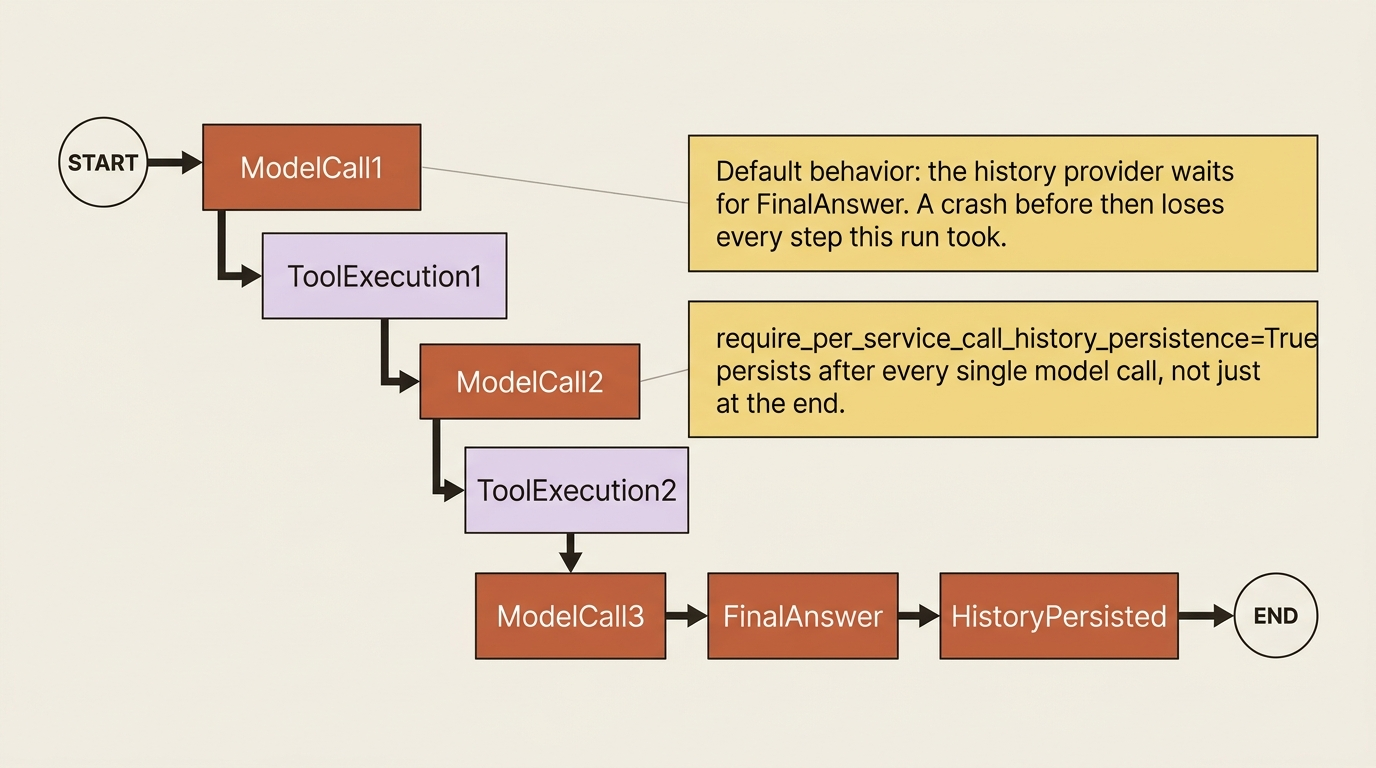
Setting require_per_service_call_history_persistence=True closes that gap by making the history provider run around each individual model call instead of waiting for the whole thing to finish:
from agent_framework import Agent, InMemoryHistoryProvider
from agent_framework.openai import OpenAIChatClient

agent = Agent(
    client=OpenAIChatClient(),
    name="StorageAgent",
    instructions="You are a helpful assistant.",
    context_providers=[InMemoryHistoryProvider("memory", load_messages=True)],
    require_per_service_call_history_persistence=True,
)
That one flag is the practical difference between a session that merely resumes a conversation and one that gives you a real recovery story. With it enabled, a crash mid-loop leaves you a local history that mirrors what a service-managed conversation already gives you for free: you can tell which step completed, what already made it into memory, and whether resuming the run would call a tool that already succeeded, duplicating the side effect, versus one that never got a chance to run at all. Without it, you are guessing.
The reference material documents this flag for Python's Agent constructor. It does not show an equivalent option on the C# ChatClientAgentOptions surface, so if you are building on C# and this recovery gap matters to your run, check the history provider options for the SDK version you are on before assuming parity.
Gotcha: this mode is specifically for framework-managed local history. If the run is already bound to a service-managed conversation, through session.service_session_id or an explicit conversation_id option, Agent Framework raises an error rather than silently mixing the two persistence models. Turn it on only where you are actually using local storage; a service-managed conversation already gives you the finer-grained persistence you are trying to recreate.
A session ID is not an authorization boundary
One more thing worth knowing before you wire a session into anything a real user touches. When a provider like OpenAI Responses or Conversations manages history for you, the service-side ID it hands back (resp_*, conv_*) is opaque and scoped to whatever API key or project created it, not to an individual end user.
That is fine for a single-tenant app where the key already maps one-to-one with your application boundary. It stops being fine the moment you are hosting an agent for multiple end users behind one shared backing key or project. In that shape, do not treat service_session_id, previous_response_id, or a conversation ID as proof that the caller in front of you owns that conversation. Store the service-side ID in trusted server-side storage, map it from your own application-issued session ID, and verify the authenticated user or tenant before you let anyone resume it. Echoing a raw service-side ID back to a client and accepting it again later, unchecked, is the exact hosted pattern that turns an opaque ID into an accidental authorization bypass.
Wiring a research agent's session
Here is what all three pieces look like wired onto one agent: a tool it can call, a local history provider it can inspect, and per-service-call persistence turned on, so a research thread that gets interrupted partway through does not lose the tool calls it already made.
from agent_framework import Agent, InMemoryHistoryProvider
from agent_framework.openai import OpenAIChatClient

agent = Agent(
    client=OpenAIChatClient(),
    name="MarketResearcher",
    instructions="You are a market research analyst who gives clear, concise answers.",
    tools=[look_up_topic],  # ①
    context_providers=[InMemoryHistoryProvider("memory", load_messages=True)],  # ②
    require_per_service_call_history_persistence=True,  # ③
)

session = agent.create_session()  # ④
await agent.run("Start researching quantum computing funding trends.", session=session)  # ⑤

# Persist the session so the thread survives a restart.
serialized = session.to_dict()  # ⑥
store_durable(serialized)  # your own database, blob store, or file
① Wires the market-research lookup tool onto the agent.
② Attaches the local, in-process history store this run relies on.
③ Turns on per-call persistence, so the flag from the previous section is actually active on this agent.
④ Creates the session container the research thread hangs its state on.
⑤ Runs the research call inside that session, using the tool and provider wired above.
⑥ Serializes the whole session, not just the message text, so the result can be handed to durable storage.
Note: The full extracted listing at
code/microsoft_agent_framework/part-3-multi-turn-conversations-and-the-recovery-model/listings/01-market-research-session.py
shows the look_up_topic and store_durable helpers referenced but not
defined inline here.
The C# version wires the same three pieces: the tool, the session, and the durable serialization step.
AIAgent agent = chatClient.AsAIAgent(
    instructions: "You are a market research analyst who gives clear, concise answers.",
    name: "MarketResearcher",
    tools: [AIFunctionFactory.Create(LookUpTopic)]);  // ①

AgentSession session = await agent.CreateSessionAsync();  // ②
await agent.RunAsync("Start researching quantum computing funding trends.", session);  // ③

// Persist the session so the thread survives a restart.
var serialized = agent.SerializeSession(session);  // ④
StoreDurable(serialized); // your own database, blob store, or file
① Wires the same market-research lookup tool onto the agent.
② Creates the session container the research thread hangs its state on.
③ Runs the research call inside that session.
④ Serializes the whole session so the result can be handed to durable storage.
Note: The full extracted listing at
code/microsoft_agent_framework/part-3-multi-turn-conversations-and-the-recovery-model/listings/02-market-research-session.cs
shows the LookUpTopic and StoreDurable helpers referenced but not defined
inline here.
The next time this research thread needs to continue, whether that is the same process resuming after a restart or a different process picking up the work, you rehydrate the stored session with AgentSession.from_dict (or DeserializeSessionAsync in C#) and pass it back into run. The agent picks up exactly where it left off, including whatever the lookup tool already found.
Do this today
- Find out which storage mode your agent is actually on. If you built on a Responses-style client, you are probably service-managed. If not, you are local, and you own the compaction problem too.
- Add a session to one agent that currently has none, using the two-language pattern above, and confirm a follow-up question actually uses the earlier turn.
- Turn on
require_per_service_call_history_persistence=Truefor any local-history agent that calls tools with side effects, file writes, paid API calls, anything that should not silently repeat after a crash. - Write the serialize step now, before you need it.
session.to_dict()orSerializeSessionplus wherever your durable storage already lives is a five-minute change today and a saved incident later. - If more than one end user can reach the same backing API key, audit how you map service-side conversation IDs to authenticated users. An unchecked ID is an authorization bug waiting to be found.
The takeaway
A session gets you continuity. Per-service-call persistence gets you recovery. Those are different guarantees, and the default configuration only gives you the first one, which is exactly the kind of thing that looks fine in a demo and turns into a 3 a.m. incident the day a tool-calling run dies halfway through and nobody can tell what actually happened.
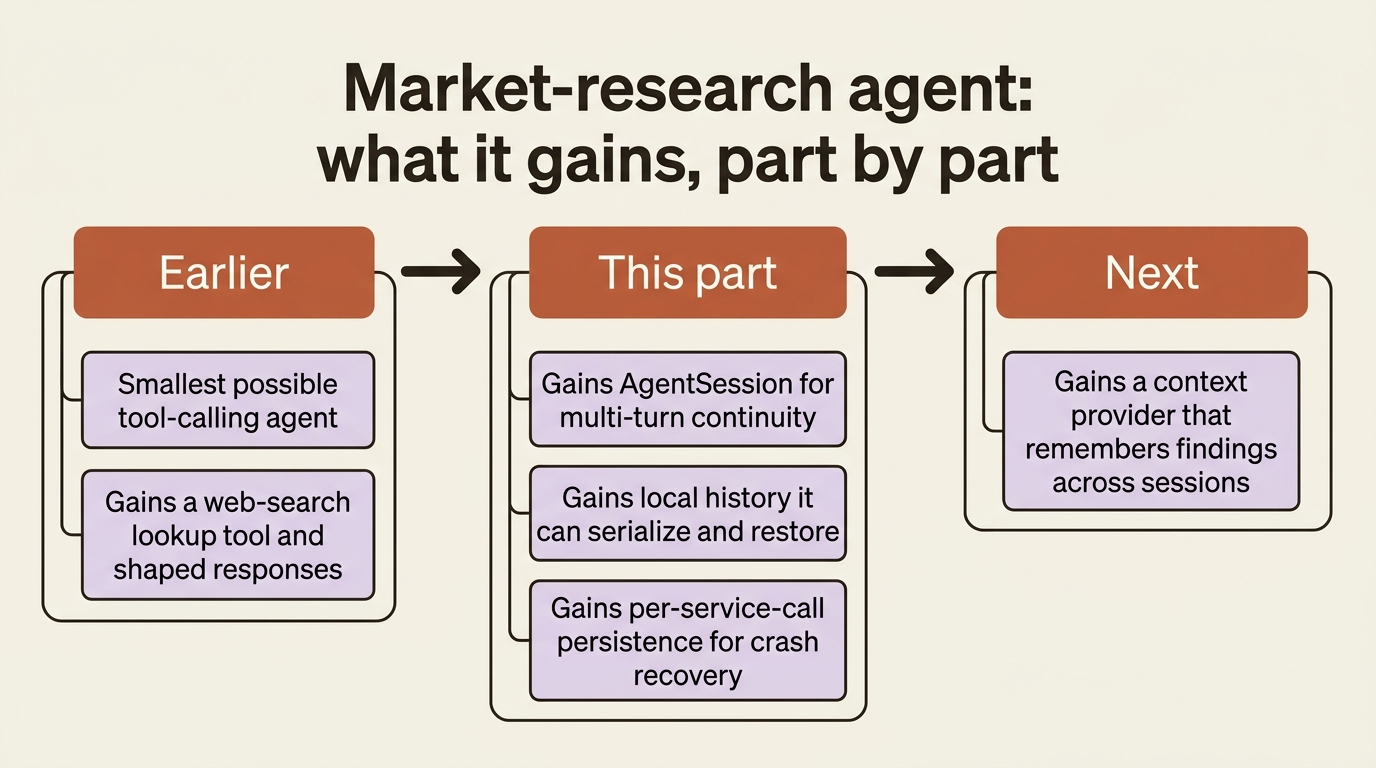
Wire AgentSession onto your agent, know which storage mode it is running on, and flip the one flag standing between "it forgot" and "it can tell you exactly what it already did." Continuity is the easy half. Recovery is the half that only shows up when something breaks, which is exactly when you need it most.