
Your Agent Remembers the Conversation. It Still Forgets Everything It Learned
Session memory and topic memory are not the same thing, and the gap between them is exactly what context providers exist to close.
Microsoft Agent Framework's context providers are the hook that turns a session that survives a restart into an agent that actually remembers what it already knows.
You built a session that survives a restart. It still can't remember anything past the conversation it started in.
In this article: you will learn what a context provider actually is in Microsoft Agent Framework, how to build one by hand in Python and C#, and the three patterns built on top of the same hook: dynamic tool selection, retrieval, and third-party memory integrations. By the end, a market-research agent remembers what it found on a topic across separate sessions, not just within one conversation.
Ask an agent about quantum computing funding today. Serialize the session, come back tomorrow, resume it, and the agent picks up exactly where it left off. Now start a brand-new session tomorrow and ask a follow-up question on the same topic. The agent has no idea it already spent an afternoon researching this.
A session remembers a conversation. It does not remember a topic. That gap between session memory and durable, cross-session memory is one of the first walls a developer hits while building on Microsoft Agent Framework, and it is exactly what context providers exist to close.
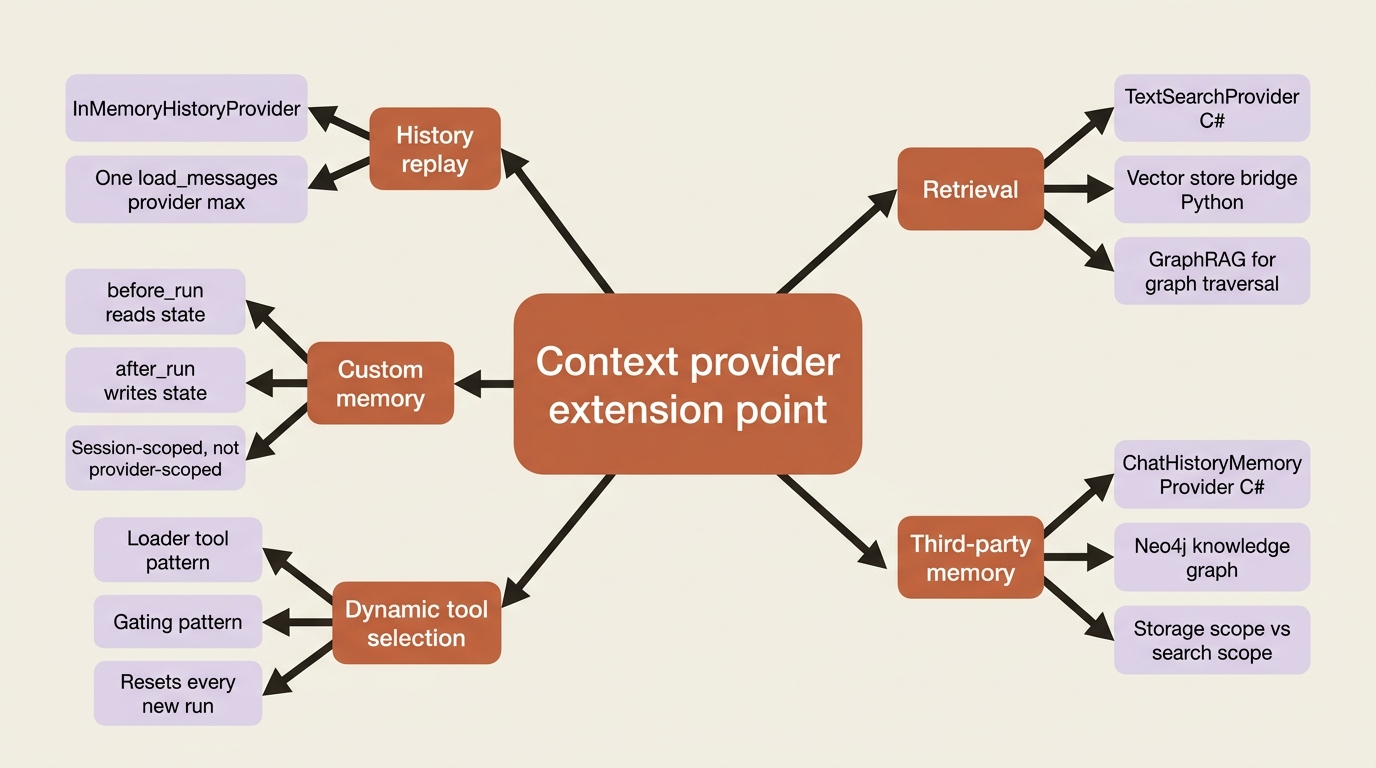
InMemoryHistoryProvider, the component quietly replaying prior messages inside a session, turns out to be one specific instance of a much more general mechanism. This article covers that mechanism directly: how to build a context provider by hand, the patterns built on top of it (keeping a large tool surface from overwhelming the model, and pulling in retrieved knowledge), and how to wire real cross-session memory onto an agent.
Context providers: the general extension point
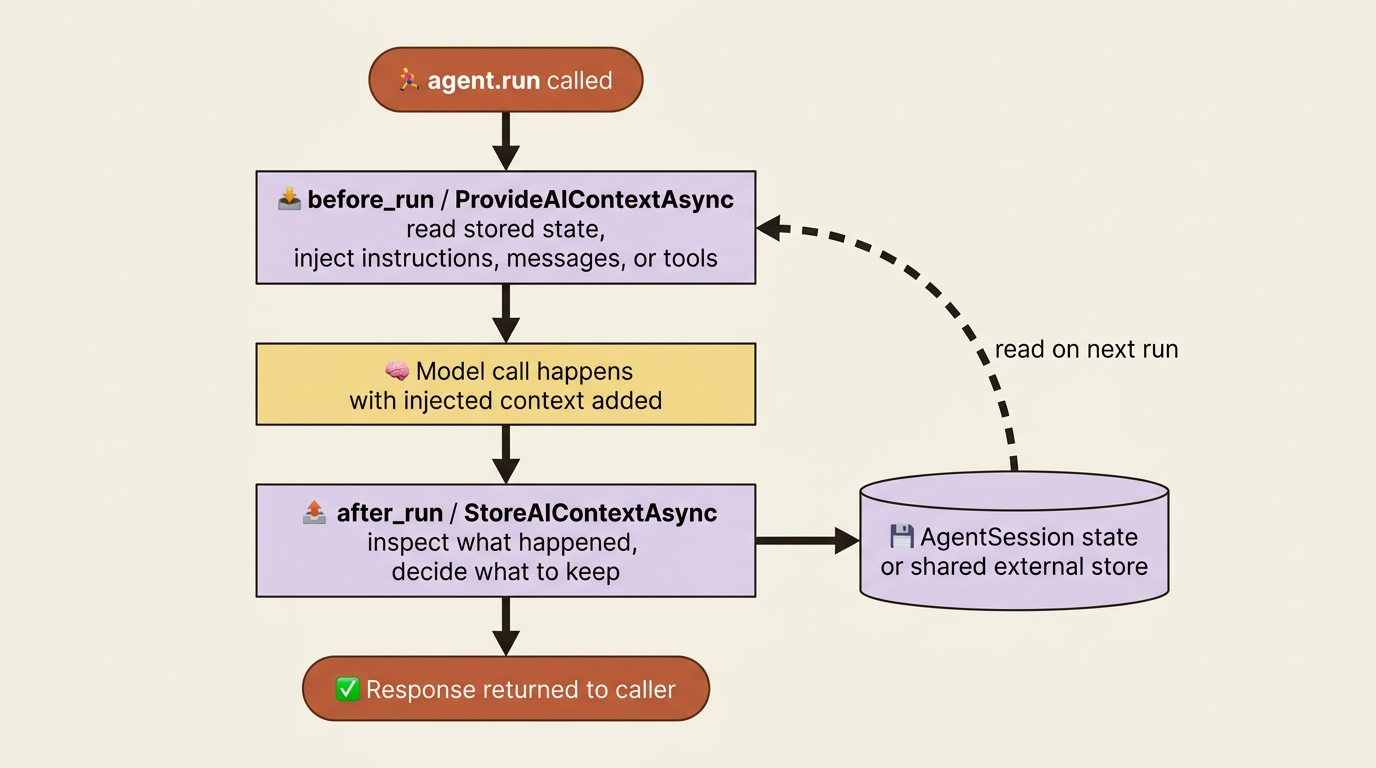
A context provider runs around every agent invocation. Before the model gets called, it can add instructions, messages, or tools to what the agent sends. After the model responds, it can inspect what happened and store whatever is worth keeping. InMemoryHistoryProvider uses exactly this hook to replay prior messages and record new ones, and nothing stops you from using the same hook for anything else you want injected into a run: a user's stated preferences, a retrieved document, a fact your agent already looked up last week.
You attach providers the same way regardless of what they do. In Python, pass a list to context_providers when you build the agent:
agent = OpenAIChatClient().as_agent(
    name="MemoryBot",
    instructions="You are a helpful assistant.",
    context_providers=[InMemoryHistoryProvider("memory", load_messages=True)],
)
In C#, the equivalent option is AIContextProviders, and AIContextProvider is the base class every built-in and custom provider extends:
AIAgent agent = new OpenAIClient("<your_api_key>")
    .GetChatClient(modelName)
    .AsAIAgent(new ChatClientAgentOptions()
    {
        ChatOptions = new() { Instructions = "You are a helpful assistant." },
        AIContextProviders = [new MyCustomMemoryProvider()],
    });
Both snippets register something that runs before and after every call to run or RunAsync. What that something does is entirely up to you, which is why context providers are the extension point the rest of this article builds on.
Building a custom context provider by hand
The simplest shape a context provider takes is two methods: one that runs before the call and returns what to add, one that runs after and decides what to keep. Python's ContextProvider base class names them before_run and after_run.
class UserPreferenceProvider(ContextProvider):
    def __init__(self) -> None:
        super().__init__("user-preferences")  # ①

    async def before_run(self, *, agent, session, context, state) -> None:
        if favorite := state.get("favorite_food"):  # ②
            context.extend_instructions(self.source_id, f"User's favorite food is {favorite}.")  # ③

    async def after_run(self, *, agent, session, context, state) -> None:
        for message in context.input_messages:  # ④
            text = (message.text or "") if hasattr(message, "text") else ""
            if "favorite food is" in text.lower():
                state["favorite_food"] = text.split("favorite food is", 1)[1].strip().rstrip(".")  # ⑤
① Registering the source id in __init__ gives every instruction this provider injects a stable attribution.
② before_run reads whatever state already knows before deciding whether there is anything to add.
③ extend_instructions is the call that actually injects the fact into the run, tagged with the provider's source id.
④ after_run walks the messages that were part of the run, looking for something worth remembering.
⑤ The extracted fact is written back into state, so the next before_run on this session sees it.
Note: The full extracted listing at code/microsoft_agent_framework/part-4-memory-and-context-providers/listings/01-user-preference-provider.py shows the imports and a wired-up agent that were elided here.
before_run reads whatever it already knows and injects it into the run. after_run looks at what just happened and decides what is worth remembering. That is the whole contract, and C#'s equivalent names, ProvideAIContextAsync and StoreAIContextAsync, follow the same shape: read state, return an AIContext; extract state, save it.
Gotcha: a context provider instance is shared across every session an agent runs, so do not stash session-specific data (a memory ID, a topic, a set of prior findings) as a field on the provider itself. Store it in AgentSession instead, in C# through the ProviderSessionState<T> helper, in Python through the state dictionary passed into before_run and after_run. The provider can hold a reference to a shared client or store, but the data specific to one conversation belongs to the session, not to you.
If the simple shape does not give you enough control, both languages expose advanced override points that hand you the full request and response message lists instead of a pre-filtered subset, useful when you need to exclude messages that came from other context providers to avoid a feedback loop (a memory provider re-storing its own injected memories as if they were new facts). One constraint worth remembering: you can attach more than one history provider, but only one should have load_messages=True, or the same history gets replayed into the run twice.
Dynamic tool selection: keeping the tool surface small
A different problem context providers and middleware both solve: what happens when an agent has thirty tools and only needs three of them on any given turn? Every tool in the schema costs tokens and hurts tool-selection accuracy, so the framework lets you expose tools progressively instead of registering everything up front. ctx.add_tools and ctx.remove_tools on FunctionInvocationContext are Python-only for now; the reference docs do not show a C# equivalent yet.
The loader-tool pattern starts an agent with almost nothing and lets it pull in capability on demand:
@tool(approval_mode="never_require")  # ①
def load_math_tools(ctx: FunctionInvocationContext) -> str:
    """Load additional math tools (factorial, fibonacci) so they can be used."""
    ctx.add_tools([factorial, fibonacci])  # ②
    return "Loaded math tools: factorial, fibonacci. You can now call them."

agent = Agent(
    client=OpenAIChatClient(),
    name="MathAgent",
    instructions="If you need math capabilities that aren't available yet, call load_math_tools first.",  # ③
    tools=[load_math_tools],  # agent starts with only the loader  ④
)
① The loader itself never needs human approval to fire, since it only expands what the model can call next.
② ctx.add_tools is the call that actually widens the tool surface, adding factorial and fibonacci for the next iteration of the loop.
③ The system prompt is what tells the model to reach for the loader instead of assuming the math tools are already there.
④ Registering only load_math_tools up front is what keeps the initial tool schema small; everything else arrives on demand.
Note: The full extracted listing at
code/microsoft_agent_framework/part-4-memory-and-context-providers/listings/02-loader-tool-pattern.py
shows the factorial and fibonacci definitions elided here.
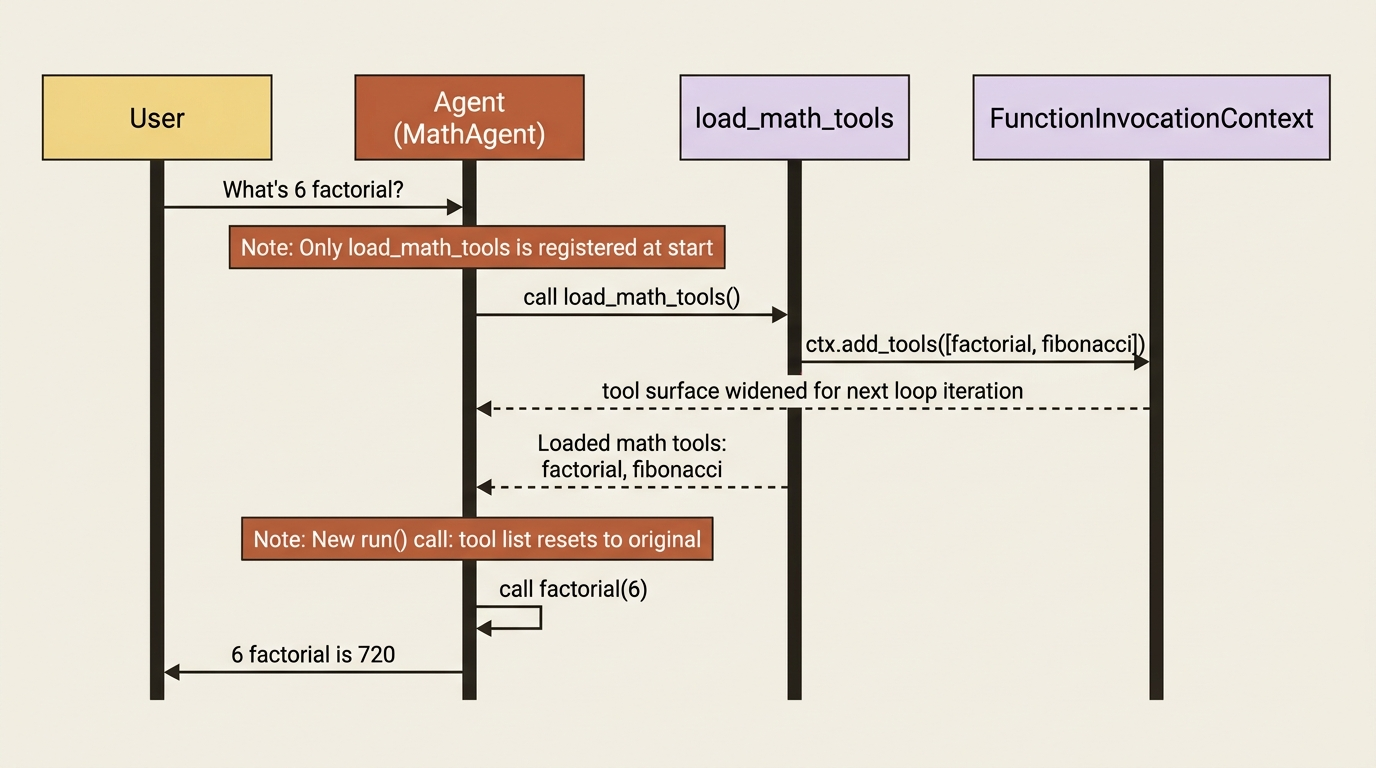
The gating variant flips this around for ordering instead of scale: register only a read tool, and have it call ctx.add_tools to unlock a write tool once it succeeds, so the model physically cannot call update_record before it has called get_record in the same run. Both helpers only take effect on the next iteration of the function-calling loop, so a tool call already dispatched in the current batch still runs, and the tool list resets to its original set at the start of every new run() call.
In production: both add_tools and remove_tools are marked experimental and emit a warning the first time you call them in a process. Treat this pattern as stable enough to build on, but watch the changelog before you lean on it for something load-bearing.
Retrieval as a context-provider pattern
Retrieval-augmented generation is not a separate feature bolted onto agents. It is the same context-provider hook, pointed at a search index instead of a memory store. In C#, TextSearchProvider is the built-in implementation: hand it a function that turns a query into search results, and it either runs that search before every invocation or exposes it as an on-demand tool the model calls when it decides it needs more context.
TextSearchProviderOptions textSearchOptions = new()
{
    SearchTime = TextSearchProviderOptions.TextSearchBehavior.BeforeAIInvoke,  // ①
};

AIAgent agent = azureOpenAIClient
    .GetChatClient(deploymentName)
    .AsAIAgent(new ChatClientAgentOptions  // ②
    {
        ChatOptions = new() { Instructions = "Answer using the provided context and cite sources." },
        AIContextProviders = [new TextSearchProvider(SearchAdapter, textSearchOptions)]  // ③
    });
① BeforeAIInvoke picks the "search runs automatically before every call" behavior over exposing search as an on-demand tool.
② AsAIAgent wires the provider into the agent the same way ChatClientAgentOptions wires in anything else.
③ SearchAdapter paired with the options built above is what actually becomes the registered TextSearchProvider instance.
Note: The full extracted listing at
code/microsoft_agent_framework/part-4-memory-and-context-providers/listings/03-text-search-provider.cs
shows SearchAdapter and the surrounding usings elided here.
SearchAdapter can call anything: a vector store, Azure AI Search, or a plain web search function. Set SourceName and SourceLink on each result and the agent will cite them.
Python takes a different path to the same outcome: it bridges a Semantic Kernel VectorStore collection's search function into an Agent Framework tool with .as_agent_framework_tool(), rather than shipping its own TextSearchProvider equivalent.
search_function = collection.create_search_function(  # ①
    function_name="search_knowledge_base",
    description="Search the knowledge base for support articles.",
    search_type="keyword_hybrid",  # ②
)
search_tool = search_function.as_agent_framework_tool()  # ③

agent = OpenAIChatClient(model="gpt-4o").as_agent(
    instructions="Use the search tool to find relevant information before answering. Cite your sources.",
    tools=search_tool,  # ④
)
① The search function starts from the vector store collection's own search capability, not a new one built for the agent.
② search_type="keyword_hybrid" picks the retrieval strategy the underlying collection runs.
③ as_agent_framework_tool() is the bridge call that turns a Semantic Kernel search function into something the agent can hold as a tool.
④ The bridged tool attaches to tools= exactly like a hand-written function, so the agent cannot tell the difference.
Note: The full extracted listing at code/microsoft_agent_framework/part-4-memory-and-context-providers/listings/04-vector-store-search-bridge.py shows the vector store collection setup elided here.
This works with any Semantic Kernel vector store connector: Azure AI Search, Qdrant, Pinecone, Redis, Weaviate, and more, so swapping the backing store does not change how the agent calls it. If your retrieval needs graph traversal instead of flat vector similarity, GraphRAG is the same idea one level up: the Neo4j GraphRAG provider runs Cypher queries against an existing knowledge graph and returns results through the same context-provider hook.
The third-party memory-provider ecosystem
Everything above is retrieval from a knowledge base you built. Sometimes what you want is memory of the agent's own past conversations, and the framework's integrations catalog has drop-in providers for that instead of building one from scratch.
ChatHistoryMemoryProvider, currently a C#-only integration, stores every message in a vector store and searches it by semantic similarity before each invocation. The part that matters for cross-session memory is scope: you configure a storageScope and a searchScope separately, tagging each stored message with both a UserId and a SessionId, then searching by UserId alone.
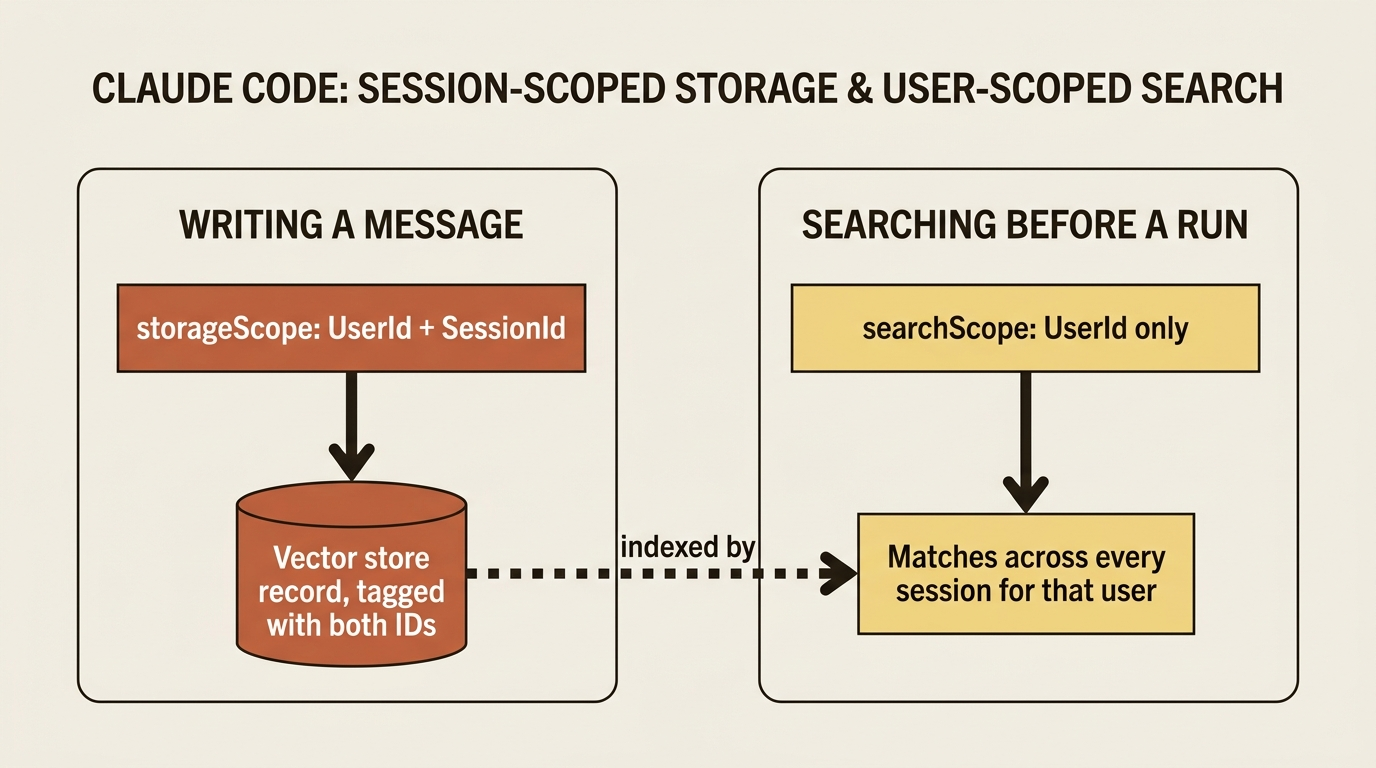
Leaving SessionId out of the search scope is what lets the agent recall a preference stated in one session while answering a question in a brand-new one. Neo4j's memory provider takes a different storage model: instead of flat vector records, it extracts entities and relationships from conversations automatically and builds a knowledge graph over time. Python support is not listed for either integration as of this writing, so if you are building on Python, plan on a custom ContextProvider until that changes.
In production: anything a memory provider retrieves gets injected straight into the model's context, unvalidated. The ChatHistoryMemoryProvider docs call this out explicitly: a compromised or poisoned vector store is an indirect prompt-injection vector, and stored messages may carry PII that needs access controls and encryption at rest. Treat retrieved memory the same way you would treat any other untrusted input reaching the model.
Wiring real memory onto a research agent
Here is where the mechanism becomes useful. A market-research agent needs to remember prior findings on a topic across sessions, not replay a whole transcript, just recall what it already learned so it does not research the same ground twice. A custom context provider, holding a reference to a simple findings store keyed by topic, does exactly this without pulling in a vector database.
class ResearchMemoryProvider(ContextProvider):
    def __init__(self, topic: str, store: dict[str, list[str]]) -> None:
        super().__init__("research-memory")
        self._topic = topic
        self._store = store  # shared across sessions, not session state  ①

    async def before_run(self, *, agent, session, context, state) -> None:
        findings = self._store.get(self._topic, [])  # ②
        if findings:
            context.extend_instructions(  # ③
                self.source_id,
                "Prior findings on this topic, do not re-research these: " + "; ".join(findings),
            )

    async def after_run(self, *, agent, session, context, state) -> None:
        for message in context.input_messages:
            if getattr(message, "role", None) == "tool":  # ④
                self._store.setdefault(self._topic, []).append(message.text or "")  # ⑤


findings_store: dict[str, list[str]] = {}  # ⑥
agent = Agent(
    client=OpenAIChatClient(),
    name="MarketResearcher",
    instructions="You are a market research analyst who gives clear, concise answers.",
    tools=[look_up_topic],
    context_providers=[
        InMemoryHistoryProvider("memory", load_messages=True),
        ResearchMemoryProvider("quantum computing funding trends", findings_store),  # ⑦
    ],
    require_per_service_call_history_persistence=True,
)
① The store is held by reference, not copied, and it lives outside any single session, which is what lets findings persist past one conversation.
② before_run looks up whatever this topic already has recorded before deciding whether to inject anything.
③ extend_instructions is the call that tells the model what not to re-research, keyed by the provider's own source id.
④ after_run only reacts to tool-role messages, treating a completed lookup as the signal that a new finding exists.
⑤ The new finding is appended to the shared store under this topic's key, not stored on the session.
⑥ findings_store is created once, outside the agent, so it survives across every AgentSession built against it.
⑦ The provider is constructed with a fixed topic string, which is what makes lookups and writes key off topic instead of session id.
Note: The full extracted listing at
code/microsoft_agent_framework/part-4-memory-and-context-providers/listings/06-research-memory-provider.py
shows look_up_topic and the other imports elided here.
findings_store lives outside any single AgentSession, so it is what actually crosses the session boundary. ResearchMemoryProvider reads from it before every run and appends to it after every run, and because it is keyed by topic rather than by session ID, a brand-new session on the same topic tomorrow starts with everything this one already found. The C# shape follows the same pattern, using ProvideAIContextAsync and StoreAIContextAsync against a shared findings store instead of session state, since the findings need to outlive any one AgentSession.

A session that survives a restart is one kind of continuity. A context provider keyed by topic instead of session ID is another kind entirely, and the two now stack: the agent recovers mid-run if it crashes, and it recognizes a topic it has already spent time on, whether that was five minutes ago or five sessions ago.
It is deliberately minimal. There is no ranking of what is stale versus fresh, and no retrieval from an actual knowledge base, just a running list of findings the agent will not repeat. The point is the mechanism, and it is the same hook that TextSearchProvider and ChatHistoryMemoryProvider build on if you want to reach for either later.
Do this today
- Attach
context_providers(Python) orAIContextProviders(C#) to an existing agent and confirm you can inject a single static instruction before checking anything more complex. - Write a minimal
ContextProviderwithbefore_runandafter_runthat reads and writes a value instate, then verify it survives a second call in the same session. - Move any session-specific data off the provider instance and into session state or a keyed external store, per the gotcha above, before you build anything that runs concurrently across sessions.
- If your agent has more than a handful of tools, prototype the loader-tool pattern on one low-risk tool group before rolling it out everywhere.
- Decide now whether cross-session memory should key off session ID, user ID, or topic, since that single design choice determines whether your agent ever recognizes work it already did.
The takeaway
A session gives you continuity within one conversation. A context provider is what gives you memory that survives past it, and it is a general enough hook that the framework's own history provider, its retrieval provider, and its third-party memory integrations are all built from the same two-method shape you just used by hand. What that gap looks like in practice is simple: an agent that remembers the words you exchanged but forgets what it actually learned, until you give it somewhere to keep that knowledge that is not scoped to one conversation.
Next up is the problem that memory itself creates: nothing so far limits how long a findings list, or the raw conversation history sitting underneath it, is allowed to grow. A multi-day research thread that keeps appending findings and replaying history on every call is exactly the shape that blows through a model's context window, and closing that gap is a chapter of its own.