
Your AI Agent's Memory Is Growing. So Is Its Context Window Bill.
A working agent's memory is a liability the moment it stops having a ceiling: compaction is Agent Framework's built-in answer, walked from the message-group model through a composable strategy pipeline.
Microsoft Agent Framework's compaction system trims conversation history on purpose, before the model's own limit forces the issue. Here's the message-group model, the trigger-versus-target contract, and the strategy pipeline that make it work.
Your long-running agent works fine for days, until the one session where it silently gets slower, pricier, and then just fails, because nothing was ever watching how big its own memory had grown. Microsoft Agent Framework's compaction system trims conversation history on purpose, before the model's own limit forces the issue. Here's the message-group model, the trigger-versus-target contract, and the strategy.
In this article: You will learn why giving an agent memory without a ceiling is a countdown, not a feature, and how Microsoft Agent Framework's compaction system defuses it. We cover the message-group model that keeps tool calls intact, the trigger-versus-target contract every strategy answers, the ladder of strategies from gentle tool-result collapse to emergency truncation, and how to compose them into a pipeline you register on a real agent.
Give an agent memory and you have solved one problem and created another. A research agent that remembers what it found last week is genuinely more useful than one that starts from zero every session. But every fact it remembers gets replayed into the model's context on every single call, stacked on top of the full conversation history the session is already carrying, and nothing about that has a ceiling by default. Left running, an agent that keeps digging into the same topic for a week eventually hands the model a prompt too large to accept, or one so large it is slow and expensive long before it hits the hard limit.
Compaction is Microsoft Agent Framework's answer: a family of strategies that shrink an agent's in-memory history on purpose, before the model's own context limit forces the issue. This article walks the model compaction operates on, the two questions every strategy has to answer, the ladder of strategies from gentlest to most aggressive, and how to compose them into a pipeline you can register on a live agent.
Does compaction even apply to your agent?
Before reaching for any strategy, check whether compaction does anything for your setup at all. It only matters for agents that manage conversation history themselves and pass the full message list to the model on every call, which is exactly what an in-memory history provider does.
If your agent instead relies on service-managed context, a hosted agent service, an API with server-side conversation storage enabled, or a low-code agent builder, the service already manages that history on its own infrastructure. Configuring a compaction strategy there has no effect, because there is no local message list for it to trim. It is the same local-history-versus-service-managed split that shows up anywhere an agent's state lives outside your process; one distinction determines what survives a crash, this one determines what fits in the next model call.
The message-group model
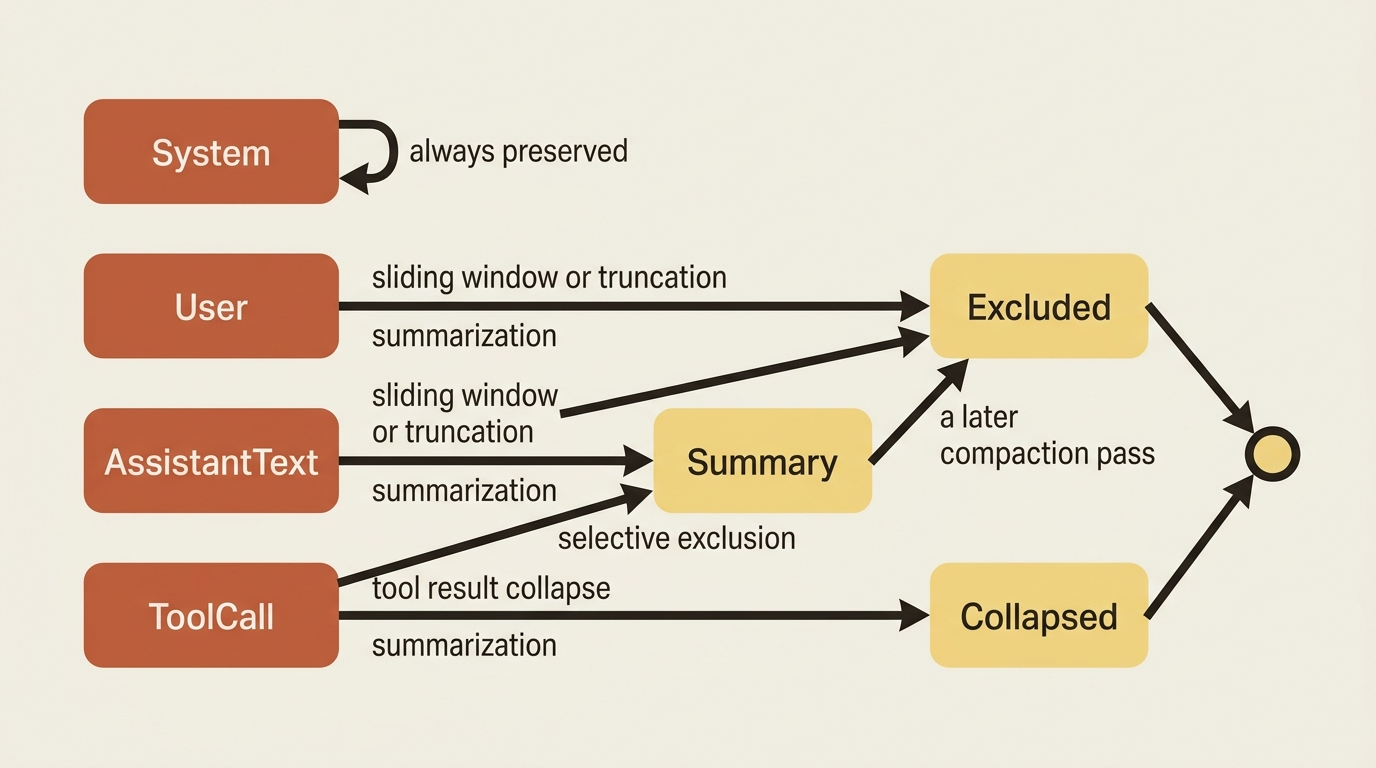
Compaction does not remove individual messages one at a time. It removes groups, because some messages only make sense together. An assistant message that calls a tool and the tool result that answers it have to be kept or dropped as a unit. Keeping the call but dropping the result, or the reverse, produces a malformed request the model API will reject.
| Group kind | What it covers |
|---|---|
| System | System messages. Always preserved. |
| User | A single user message that starts a turn. |
| Assistant text | A plain assistant response with no tool calls. |
| Tool call | An assistant tool-call message plus its tool result messages, treated as one atomic unit. |
| Summary | A condensed message that a summarization strategy produced to replace older groups. |
The table is useful for skimming, but the diagram below is what to internalize when debugging why a compaction pass behaved the way it did: system messages never move, tool calls move as a pair or not at all, and a summary is just another group a later pass can itself remove if the conversation keeps growing.
Trigger versus target: the two questions every strategy answers
Every compaction strategy answers two separate questions. When should it start removing anything, and how far should it go once it starts? The framework names these explicitly: a trigger decides whether compaction runs at all, and a target decides when it can stop. A strategy excludes groups one at a time and re-checks the target after each removal, stopping the moment the target is satisfied.
// Compact only when there are tool calls AND tokens exceed 2000
CompactionTrigger trigger = CompactionTriggers.All(
    CompactionTriggers.HasToolCalls(),
    CompactionTriggers.TokensExceed(2000));
Common triggers cover token count, message count, turn count, and group count, combined with a logical AND or OR. Expressed this way, "when to start" stays fully separate from the strategy itself, so the same collapse logic can run under different conditions depending on the agent.
A lighter-weight implementation folds trigger and target into the strategy's own constructor parameters, for example a token ceiling and a compaction target on a truncation strategy:
from agent_framework import CharacterEstimatorTokenizer, TruncationStrategy

# Exclude oldest groups when tokens exceed 32,000, trimming to 16,000
truncation = TruncationStrategy(
    max_n=32_000,
    compact_to=16_000,
    tokenizer=CharacterEstimatorTokenizer(),
)
max_n is the trigger: the threshold that has to be crossed before anything happens. compact_to is the target: the point where removal stops. It is functionally the same trigger-versus-target contract, just expressed as two numbers on the strategy instead of a composable object.
The strategy ladder, gentlest to most aggressive
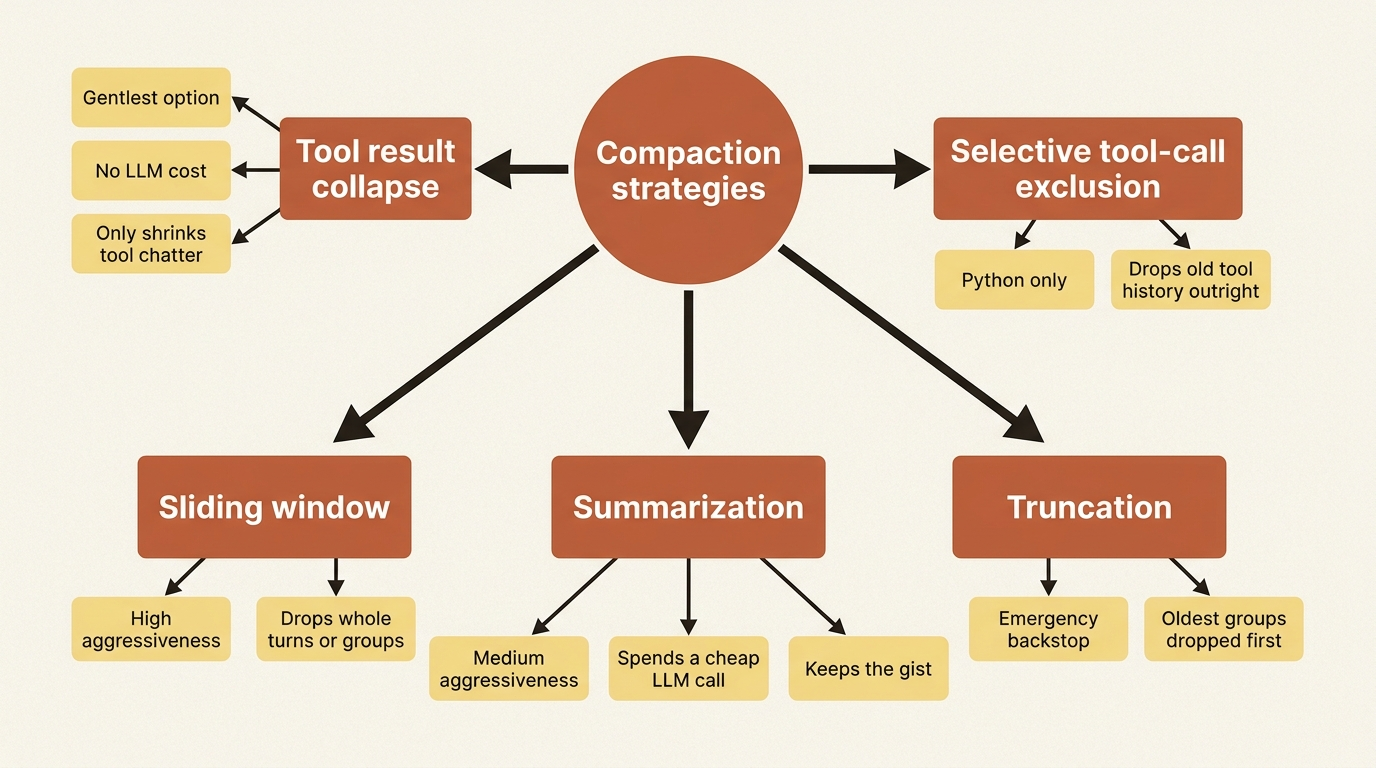
With the trigger-versus-target contract in hand, the strategies themselves are mostly a question of how much context they are willing to sacrifice to hit that target.
Tool result collapse is the gentlest option and a reasonable default first pass. It replaces old tool-call groups with a short summary line like [Tool results: get_weather: sunny, 18°C] instead of the full call-and-response, keeping the newest tool-call groups untouched.
from agent_framework import ToolResultCompactionStrategy

# Collapse all but the newest tool-call group
tool_result = ToolResultCompactionStrategy(keep_last_tool_call_groups=1)
It never touches a user message or a plain assistant response, so the shape of the conversation stays intact; only the verbose tool chatter shrinks. Both implementations default to protecting a small window of the most recent tool-call groups, so the current turn's tool interaction stays visible even after older ones collapse.
Summarization goes further: it hands the older span of the conversation to a separate LLM call and replaces it with a single summary message, keeping the gist of what happened without the token cost of the original exchange.
from agent_framework import SummarizationStrategy

# Summarize when non-system message count exceeds 6, retaining the 4 newest
summarization = SummarizationStrategy(
    client=summarizer_client,
    target_count=4,
    threshold=2,
)
The client here is deliberately a separate chat client from the one answering the user, not the agent's own model. A smaller, cheaper model is the usual choice, since summarizing "what happened three tool calls ago" does not need your best model. You can swap in a custom prompt if the default, preserving key facts, decisions, user preferences, and tool outcomes, is too generic for what your agent needs kept.
Sliding window stops trying to preserve content at all and just bounds how much history exists. It keeps only the most recent window of turns or groups and drops everything older, whole and unsummarized. Draw a line a fixed distance back from "now," and drop everything on the far side of it.
Truncation is the backstop, not a strategy you tune for quality but one you keep around for when the others did not get you under budget in time. It drops the oldest non-system groups, respecting the atomic tool-call boundary, until the target is met, full stop.
compacted = await apply_compaction(
    messages,
    strategy=TruncationStrategy(
        max_n=8_000,
        compact_to=4_000,
        tokenizer=CharacterEstimatorTokenizer(),
    ),
    tokenizer=CharacterEstimatorTokenizer(),
)
That function runs a strategy over an arbitrary message list outside of any active agent run, useful for a one-off cleanup job or a migration script. It is not something you will reach for often once a pipeline is registered on the agent itself, which is the more common path.
One more rung is worth knowing: selective tool-call exclusion, which fully drops older tool-call groups instead of collapsing them into a summary line the way tool result collapse does. It is the harder-edged sibling of that first strategy, useful when the tool history genuinely is not needed anymore rather than just needing to be shorter.
from agent_framework import SelectiveToolCallCompactionStrategy

# Keep only the most recent tool-call group
selective_tool = SelectiveToolCallCompactionStrategy(keep_last_tool_call_groups=1)
Composing a pipeline
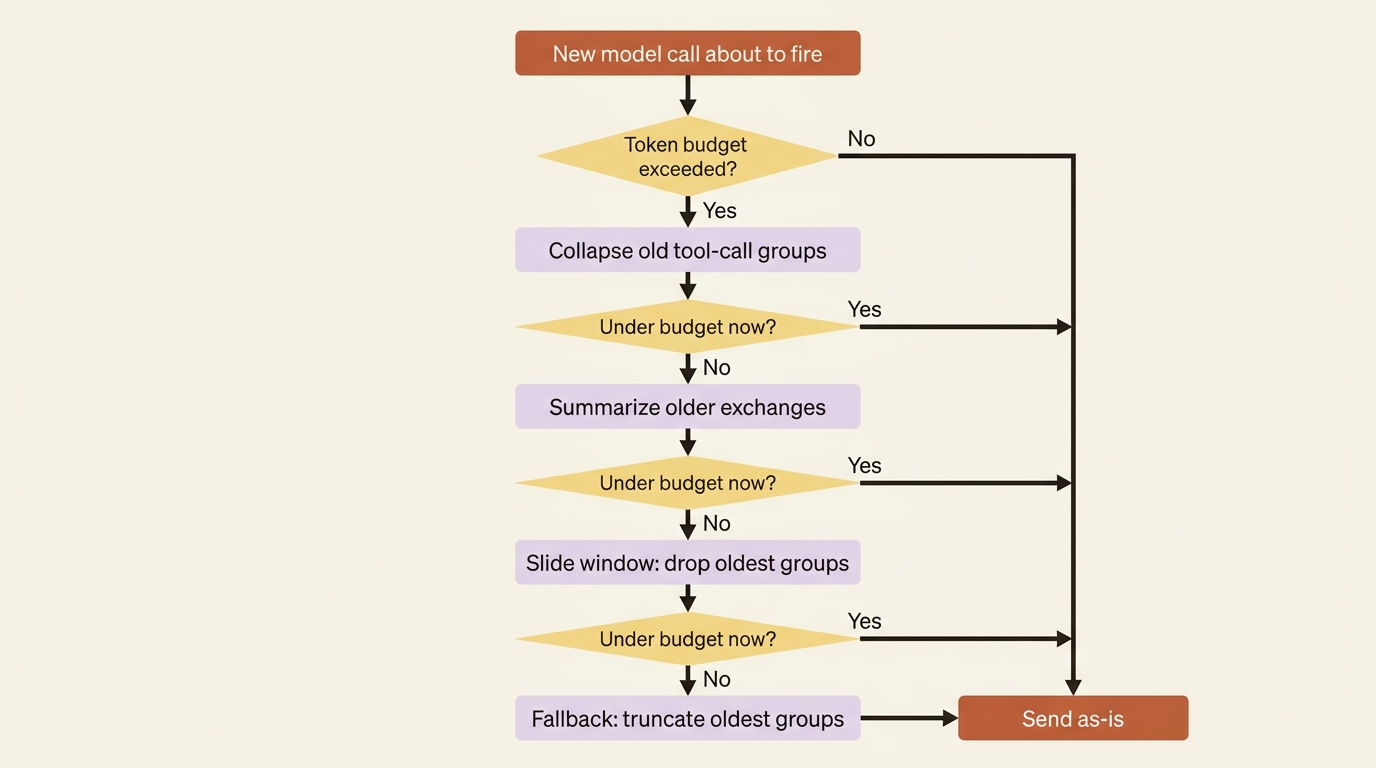
One strategy rarely covers the whole range from "nudge the token count down a little" to "we are about to exceed the context window." You can chain strategies into a pipeline that tries the gentle ones first and only escalates if they are not enough.
The listing below is a token-budget-composed pipeline: it runs each child strategy in the order given against a single token budget and stops as soon as that budget is met.
from agent_framework import (
    CharacterEstimatorTokenizer,
    SlidingWindowStrategy,
    SummarizationStrategy,
    TokenBudgetComposedStrategy,
    ToolResultCompactionStrategy,
)

pipeline = TokenBudgetComposedStrategy(
    token_budget=16_000,  # ①
    tokenizer=CharacterEstimatorTokenizer(),
    strategies=[
        ToolResultCompactionStrategy(keep_last_tool_call_groups=1),  # ②
        SummarizationStrategy(client=summarizer_client, target_count=4, threshold=2),  # ③
        SlidingWindowStrategy(keep_last_groups=20),  # ④
    ],
)
① token_budget is the single target every child strategy tries to satisfy; the pipeline stops the moment it is met.
② The gentlest strategy runs first, collapsing old tool-call groups before anything more aggressive fires.
③ Summarization only runs if collapsing tool results was not enough, spending an LLM call to compress older exchanges.
④ The sliding window is last in the list, one step short of the pipeline's own implicit oldest-first fallback.
Note: The full extracted listing at
code/microsoft_agent_framework/part-5-compaction/listings/01-compaction-pipeline.py
is this same pipeline, markers removed, with a stand-in for summarizer_client.
It runs each child strategy in order against a single token budget, stopping as soon as the budget is satisfied, and falls back to plain oldest-first exclusion if the listed strategies together still cannot hit the target. Order matters: put the gentlest strategy first, so the pipeline only reaches for summarization or the sliding window when collapsing tool results was not enough on its own.
A four-stage version of the same idea adds an explicit rung for the emergency case: collapse old tool results, summarize what is left if still too big, keep only the last few turns if summarization was not enough, and truncate outright as the last resort. Each child strategy evaluates its own trigger independently, so a step not yet needed simply does nothing that pass.
Registering compaction on an agent
A strategy or pipeline does nothing until it is wrapped in a compaction provider and attached the same way you would attach any other context provider.
Add it to the same context-providers list as your history provider, and point it at that provider's source ID:
from agent_framework import Agent, CompactionProvider, InMemoryHistoryProvider

history = InMemoryHistoryProvider()
compaction = CompactionProvider(before_strategy=pipeline, history_source_id=history.source_id)

agent = Agent(
    client=client,
    name="ShoppingAssistant",
    instructions="You are a helpful shopping assistant.",
    context_providers=[history, compaction],
)
before_strategy compacts the messages already loaded into context, right before the model call, without touching what is actually stored. If you also want the persisted history itself to shrink so the next turn starts smaller, add an after_strategy and configure the history provider to skip reloading the originals a later pass already excluded.
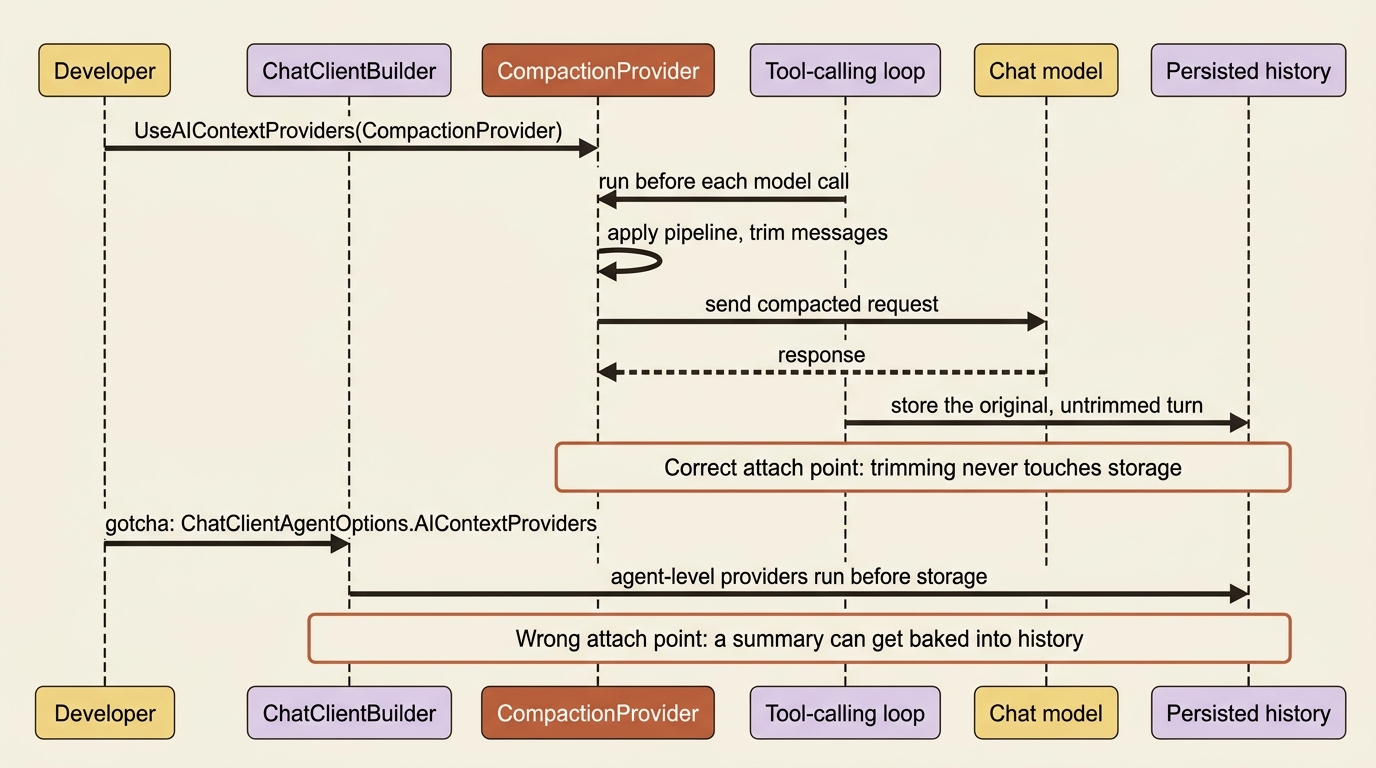
Where you attach the provider changes what it is allowed to touch. Attaching it at the chat-client-builder level runs it inside the tool-calling loop, compacting before each individual model call.
Gotcha: you can also pass the same compaction provider directly on the agent's own options object, and it will compile and run. What it will not do is engage during the tool-calling loop, because agent-level context providers run before chat history gets stored. Any synthetic summary message the provider produces can end up baked permanently into persisted history, instead of staying a temporary trim of the in-flight request. If you want compaction to shrink what goes to the model without silently rewriting what you have stored, register it at the builder level, not on the agent options.
Wiring compaction onto a real agent
A market-research agent built earlier in this series carries two context providers: a history provider for the raw conversation, and a memory provider for findings that cross session boundaries. Neither one has a ceiling. A compaction provider sitting alongside them gives the agent one, without touching how either of the other two works.
from agent_framework import (
    Agent,
    CharacterEstimatorTokenizer,
    CompactionProvider,
    InMemoryHistoryProvider,
    SlidingWindowStrategy,
    SummarizationStrategy,
    TokenBudgetComposedStrategy,
    ToolResultCompactionStrategy,
)

history = InMemoryHistoryProvider("memory", load_messages=True)  # ①

compaction_pipeline = TokenBudgetComposedStrategy(  # ②
    token_budget=16_000,
    tokenizer=CharacterEstimatorTokenizer(),
    strategies=[
        ToolResultCompactionStrategy(keep_last_tool_call_groups=1),
        SummarizationStrategy(client=summarizer_client, target_count=4, threshold=2),
        SlidingWindowStrategy(keep_last_groups=20),
    ],
)
compaction = CompactionProvider(before_strategy=compaction_pipeline, history_source_id=history.source_id)  # ③

agent = Agent(
    client=OpenAIChatClient(),
    name="MarketResearcher",
    instructions="You are a market research analyst who gives clear, concise answers.",
    tools=[look_up_topic],
    context_providers=[
        history,
        ResearchMemoryProvider("quantum computing funding trends", findings_store),
        compaction,
    ],  # ④
    require_per_service_call_history_persistence=True,  # ⑤
)
① InMemoryHistoryProvider("memory", load_messages=True) is the raw conversation store; compaction operates on exactly this list.
② The pipeline is the same ladder built earlier in this article: collapse tool results first, summarize if that isn't enough, then fall back to a sliding window.
③ history_source_id=history.source_id ties the compaction pass to this specific history instance instead of some other message list.
④ history, the ResearchMemoryProvider, and compaction all sit in the same context_providers list; nothing about compaction changes how the other two behave.
⑤ require_per_service_call_history_persistence=True is a crash-recovery flag, unaffected by adding a compaction pass alongside it.
Note: The full extracted listing at
code/microsoft_agent_framework/part-5-compaction/listings/02-market-research-agent-compaction.py
shows this call in context, with the tool, memory provider, and findings store it depends on.
summarizer_client is a second, cheaper chat-client instance, not the one answering the research question. That keeps the summarization pass off the model doing the actual work and off its bill. With this in place, a research session that keeps calling its lookup tool collapses its own tool chatter first, summarizes older exchanges if collapsing was not enough, and only falls back to dropping whole groups if the conversation is still over budget after both. The memory provider's findings list is untouched either way, since compaction only ever operates on the session's message history, not on the separate findings store.
Choosing a strategy
| Strategy | Aggressiveness | Preserves context | Requires an LLM | Best for |
|---|---|---|---|---|
| Tool result collapse | Low | High, only shrinks tool output | No | Reclaiming space from verbose tool results first |
| Selective tool-call exclusion | Low to medium | Medium, drops tool history outright | No | Tool history that is no longer needed at all |
| Summarization | Medium | Medium, replaces detail with a summary | Yes | Long conversations where the gist still matters |
| Sliding window | High | Low, drops whole turns or groups | No | Hard, predictable limits on conversation length |
| Truncation | High | Low, drops oldest groups outright | No | Emergency token-budget backstops |
| Pipeline / token-budget composition | Configurable | Depends on the child strategies | Depends | Layered compaction with fallbacks |
Read it as a progression: tool result collapse costs nothing and preserves the most, so it is what you reach for first. Selective tool-call exclusion drops tool history rather than summarizing it, still at no LLM cost, for a slightly harder edge. Summarization spends an LLM call to keep the gist of conversations that still need to make sense. Sliding window and truncation both sacrifice context for a hard, predictable ceiling. A pipeline is configurable on every axis, because it is built from whichever rows above you choose to chain together.
What a compacted agent has that an uncompacted one does not
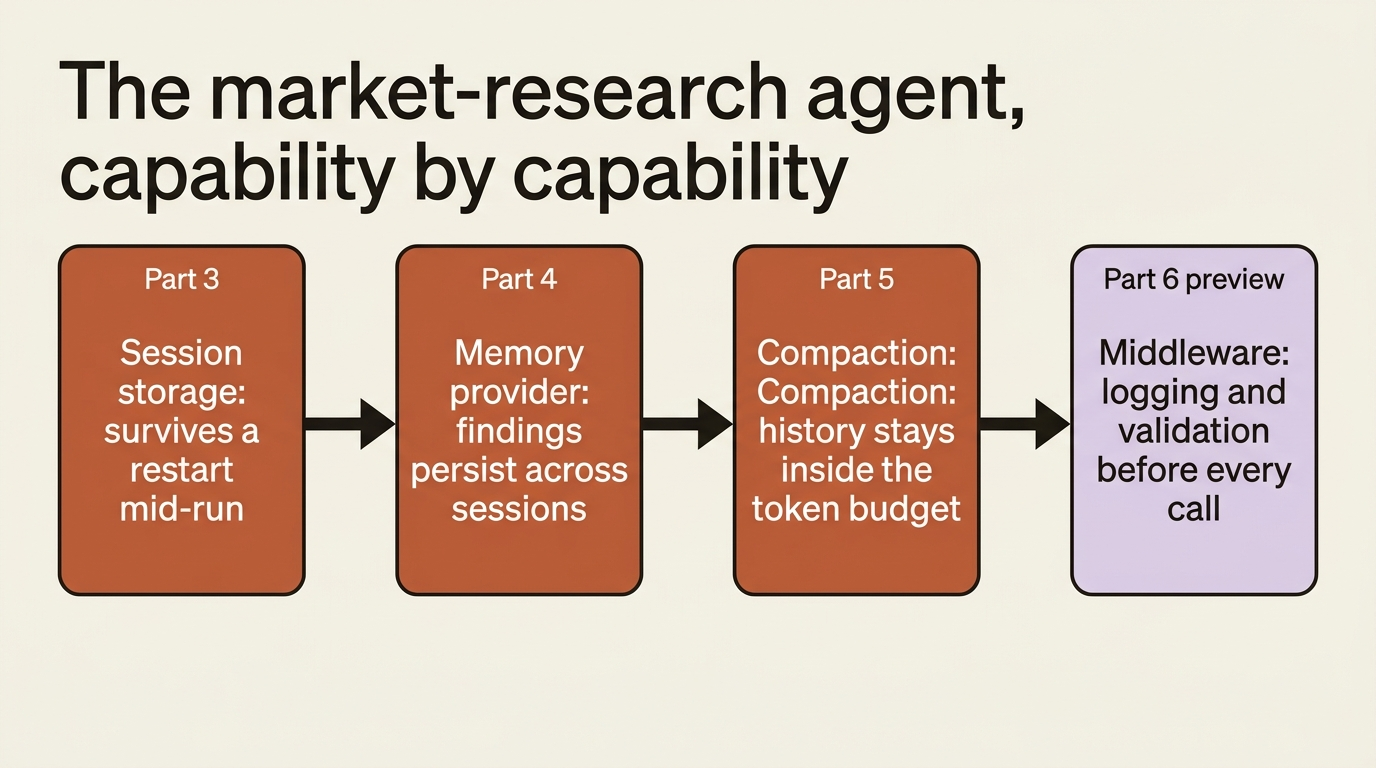
Stack compaction on top of session storage and a memory provider and the agent gets a shape worth naming: it survives a restart mid-run, remembers findings across separate sessions, and keeps its own conversation history from growing without bound while it does either. That is a single agent that can run for a long time without either losing state or blowing its context budget.
Do this today
- Check whether compaction even applies. If your agent uses a service-managed history store, skip this entirely; there is no local message list to trim.
- Start with tool result collapse. It is the gentlest strategy, costs nothing extra, and is a reasonable default on any agent whose context is dominated by verbose tool output.
- Add summarization only when collapse is not enough, and point it at a cheaper model than the one answering the user.
- Compose a pipeline instead of picking one strategy. Order the gentle strategies first and let the aggressive ones act as a fallback, not a default.
- Register the provider at the builder level, not the agent-options level, so a compaction pass never gets silently baked into persisted history.
The takeaway
Compaction is the ceiling that makes a stateful agent actually safe to run for a long time. It only matters for an agent holding its own history in memory, it operates on atomic message groups rather than individual messages, and every strategy answers the same two questions: when to start, and when to stop.
The ladder runs from gentle tool-result collapse, through summarization and sliding windows, to truncation as the last resort, and the real payoff comes from composing them into a pipeline that tries the cheap option first. Wire one onto any agent that is going to run for more than a handful of turns, and a long conversation trims itself instead of surprising you with a context-window error mid-task.