
Your AI Agent Wants to Write a File. Make It Ask First.
Tool approval is the human-in-the-loop gate that pauses a risky call before it runs, but the convenience feature that turns it off, don't ask again, is scoped to a tool rather than a task, and that mismatch is where trust in an autonomous agent quietly erodes.
Inside Microsoft Agent Framework's tool approval system: the pause-and-confirm gate that stops a risky call before it runs, and the "don't ask again" shortcut that can quietly hand your agent more authority than you meant to grant.
You approved one file write last week for one report. Your agent just reused that same yes for something you never saw coming.
In this article: You will learn how Microsoft Agent Framework's tool approval mechanism pauses a run before a risky call executes, how to inspect and resolve a pending approval request in both Python and C#, and which tools actually deserve that gate. Then you will see the sharper problem: how a harness's standing "don't ask again" rule is scoped to a tool rather than a task, and how that quietly turns one approval into permanent authority.
A research agent that can search the web is convenient. A research agent that can also write files to disk and spend real money calling a paid API is a different kind of tool entirely. The moment an agent's output stops being just text and starts being an action with a consequence, "it seemed like a good idea to the model" stops being good enough. Somebody needs to say yes first.
That is what tool approval is for. It is a small mechanism with an outsized job: it makes an agent stop and ask before it does something a human might regret. This article walks through how it works end to end in Microsoft Agent Framework, in both Python and C#, then widens into the harder question the mechanism raises once you let an agent run unattended: what exactly are you agreeing to when you tell it not to ask again?
Wrapping a function so it cannot run without you
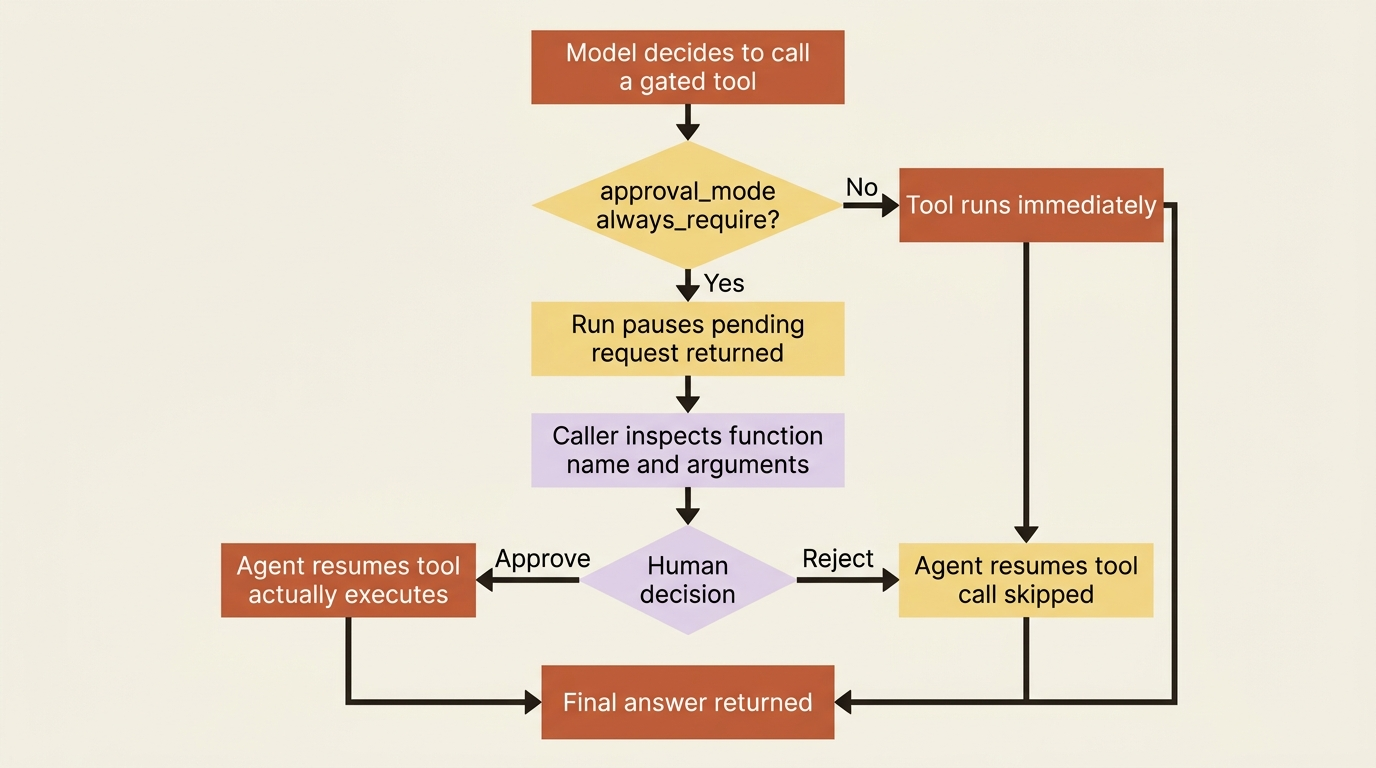
By default, every tool you hand an agent runs the moment the model decides to call it. Tool approval flips that default for one function at a time. The framework intercepts the call, and instead of executing it, the run pauses and hands you a pending request.
In Python, you opt a function into approval with the approval_mode argument on the @tool decorator:
from typing import Annotated
from agent_framework import tool

@tool(approval_mode="always_require")
def write_report_file(
    path: Annotated[str, "Where to write the finished report"],
    contents: Annotated[str, "The report text"],
) -> str:
    """Write the finished research report to disk."""
    with open(path, "w") as f:
        f.write(contents)
    return f"Wrote {len(contents)} characters to {path}"
Everything about the function stays the same. It still declares its parameters, still returns a plain string, still gets called the same way by the tool-calling loop. The only difference is that approval_mode="always_require" tells the agent to stop and ask before it actually invokes write_report_file, instead of running it and reporting the result.
C# reaches the same outcome by wrapping an already-built AIFunction in an ApprovalRequiredAIFunction, rather than annotating the function itself:
AIFunction writeReportFunction = AIFunctionFactory.Create(WriteReportFile);
AIFunction approvalRequiredWriteReport = new ApprovalRequiredAIFunction(writeReportFunction);
Either way, the function you pass to the agent is the one that requires approval. You do not write separate approval logic inside write_report_file itself. The framework handles the interception before your code ever runs.
The run that pauses instead of answering
Once a tool is wrapped for approval, a run that would have called it does not fail and does not skip the tool. It completes with a pending request instead of a final answer, and it is the caller's job to notice that and act on it.
In Python, check result.user_input_requests after every run:
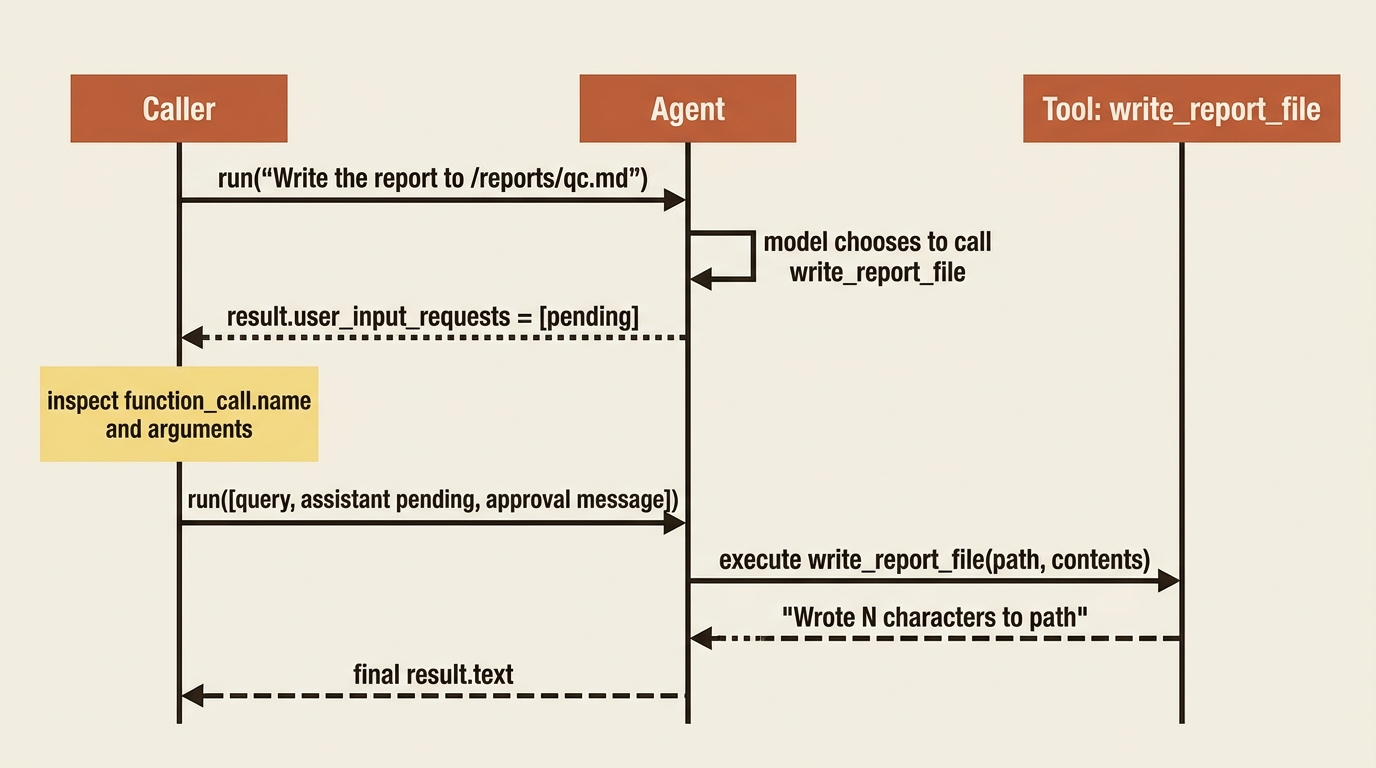
result = await agent.run("Write the quantum computing report to /reports/qc.md")

if result.user_input_requests:
    for pending in result.user_input_requests:
        if pending.function_call is None:
            continue
        print(f"Approval needed: {pending.function_call.name}")
        print(f"Arguments: {pending.function_call.arguments}")
function_call on each pending request carries the name of the function the model wants to call and the exact arguments it chose. That is what you would show a human before they decide. C# surfaces the same information through FunctionApprovalRequestContent, found by filtering the response's message contents.
Neither language throws an exception here or returns an error. A pending approval is a normal, successful run result. It just is not the answer you asked for yet.
Resuming with an approval or a rejection
Once you have a decision, either from a human or from your own policy code, you send it back to the agent as a new message and continue the same run. Python builds the response with to_function_approval_response:
from agent_framework import Message

approval_message = Message(
    role="user",
    contents=[pending[0].to_function_approval_response(True)],  # False rejects  ①
)

final_result = await agent.run([
    "Write the quantum computing report to /reports/qc.md",  # ②
    Message(role="assistant", contents=[pending[0]]),  # ③
    approval_message,  # ④
])
① to_function_approval_response(True) turns the human's decision into the content type the agent expects; passing False here would reject the call instead.
② The original user request has to be resent verbatim; without a session, the agent has no memory of what it was asked.
③ The assistant's pending request is replayed too, so the agent sees the exact call it is now being told to approve.
④ The approval message closes out the three-part exchange and lets agent.run continue past the paused call.
Note: The full extracted listing at code/microsoft_agent_framework/part-7-tool-approval-safety/listings/01-resume-with-approval.py shows this same exchange wrapped in a runnable function.
C# does the equivalent with CreateResponse on the request content, and passes it back through the same AgentSession used for the original call:
var approvalMessage = new ChatMessage(ChatRole.User, [pending[0].CreateResponse(true)]);
AgentResponse finalResponse = await agent.RunAsync(approvalMessage, session);
Gotcha: the C# example works in three lines because session carries the prior conversation state, so the approval response alone is enough context. The Python example above has to manually rebuild the exchange, the original query, the assistant's pending request, and your approval, because it is not using a session. Skip that reconstruction without a session and the agent has no idea what it is approving. Always keep a session in the loop for multi-step approval flows, or be deliberate about resending full context if you do not.
Handling more than one pending call at once
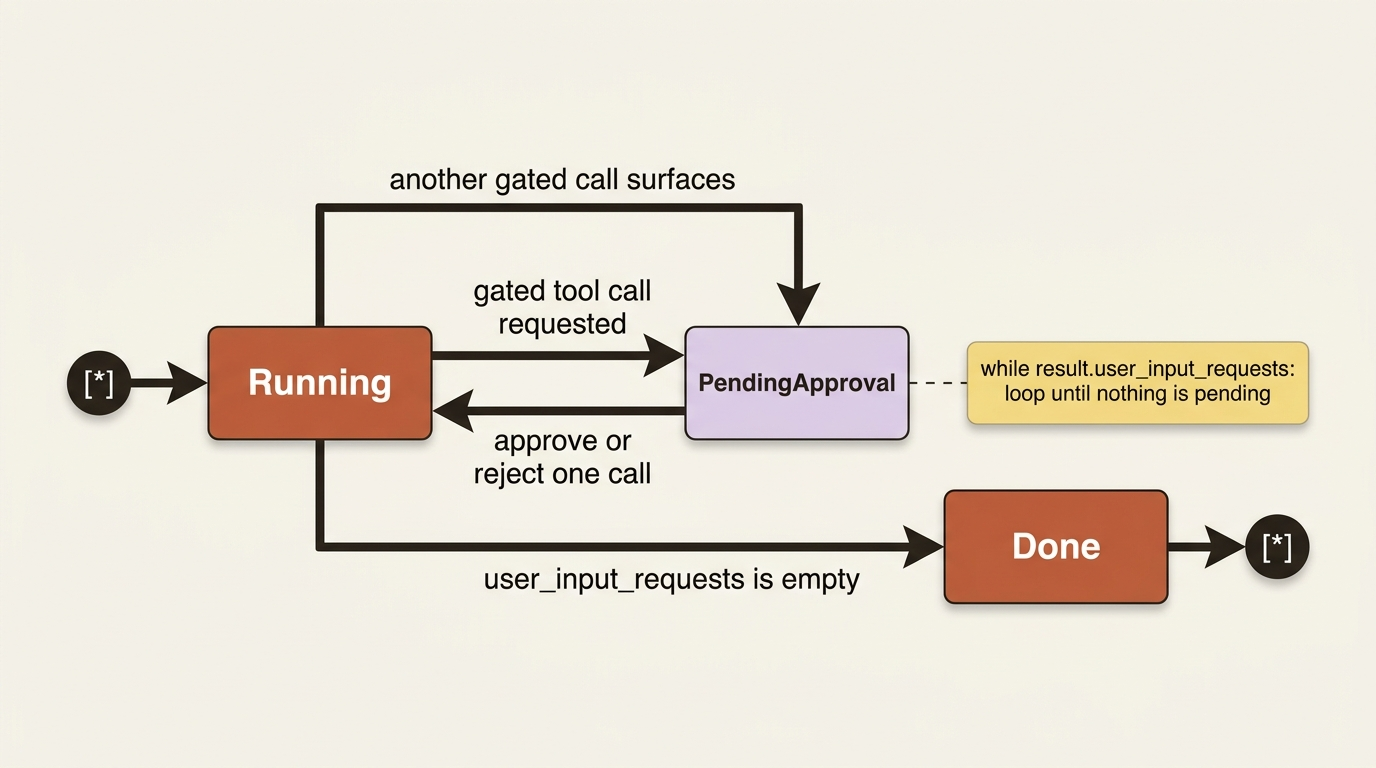
A single run can produce several pending approval requests at the same time, one write and one paid API call in the same turn, for instance. Resolving them is not a single request-response pair. It is a loop that keeps running the agent until nothing is pending anymore:
async def handle_approvals(query: str, agent) -> str:
    result = await agent.run(query)  # ①

    while result.user_input_requests:  # ②
        new_inputs = [query]
        for pending in result.user_input_requests:
            if pending.function_call is None:
                continue
            print(f"Approval needed: {pending.function_call.name} {pending.function_call.arguments}")
            new_inputs.append(Message(role="assistant", contents=[pending]))  # ③
            approved = input("Approve? (y/n): ").lower() == "y"  # ④
            new_inputs.append(Message(role="user", contents=[pending.to_function_approval_response(approved)]))  # ⑤
        result = await agent.run(new_inputs)  # ⑥

    return result.text
① The first call to agent.run may already surface pending approvals for the initial request.
② The loop condition is the real work here: it keeps re-running the agent until user_input_requests comes back empty instead of assuming one round trip clears everything.
③ Each pending call is replayed as an assistant message so the agent has the full exchange when its approval response arrives.
④ The actual decision comes from a human, one prompt per pending call.
⑤ The decision is wrapped into a user message using the same to_function_approval_response helper as the single-approval case.
⑥ The agent runs again with every rebuilt message at once, which can itself return a fresh batch of pending requests, keeping the loop going.
Note: The full extracted listing at code/microsoft_agent_framework/part-7-tool-approval-safety/listings/02-handle-approvals-loop.py is this same complete function, markers removed.
Approving one pending call can surface another. The model might ask for the file write, get approval, and then, in the same logical task, ask for the paid lookup next, each producing its own pending request. Loop until user_input_requests comes back empty rather than assuming one round trip clears everything.
Which tools actually warrant approval
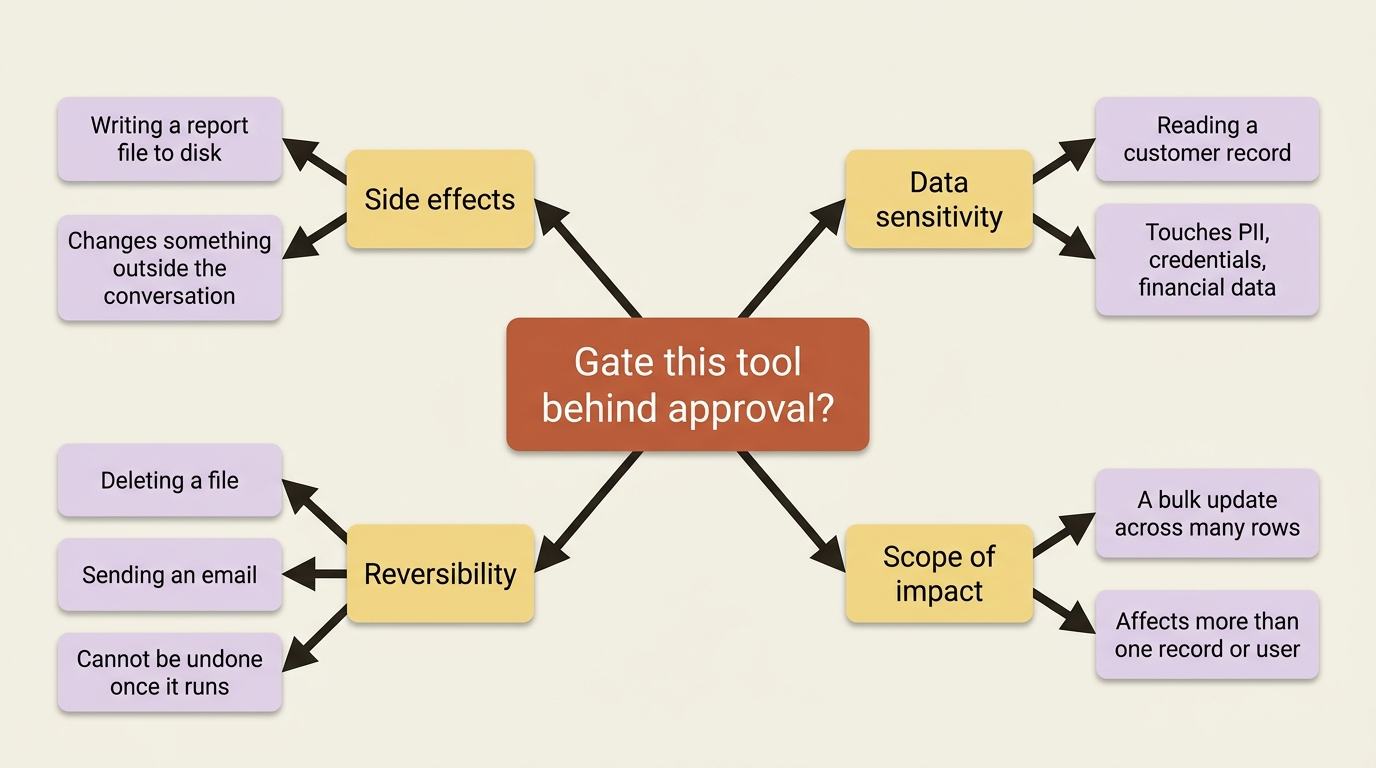
Not every tool needs this. A read-only lookup that costs nothing and cannot be undone does not earn the friction of a confirmation prompt on every call. The general guidance is to gate a tool behind approval when it crosses one of a few lines.
| Signal | Why it matters | Example |
|---|---|---|
| Side effects | The call changes something outside the conversation | Writing a report file to disk |
| Data sensitivity | The call touches PII, credentials, or financial data | Reading a customer record |
| Reversibility | The call cannot be undone once it runs | Deleting a file, sending an email |
| Scope of impact | The call affects more than one record or user | A bulk update across many rows |
In prose: gate a tool for its side effects when it changes something outside the conversation, such as writing a file. Gate it for data sensitivity when it touches PII, credentials, or financial data. Gate it for reversibility when the action cannot be undone, like a deletion or a sent email. And gate it for scope of impact when one call can affect more than a single record or user, such as a bulk update.
A file write and a paid API call both hit the side-effects signal outright, and the paid call adds a cost dimension: every invocation spends real money whether the answer turns out useful or not. That combination is exactly what approval is for.
FIDES: the deterministic complement to a human saying yes
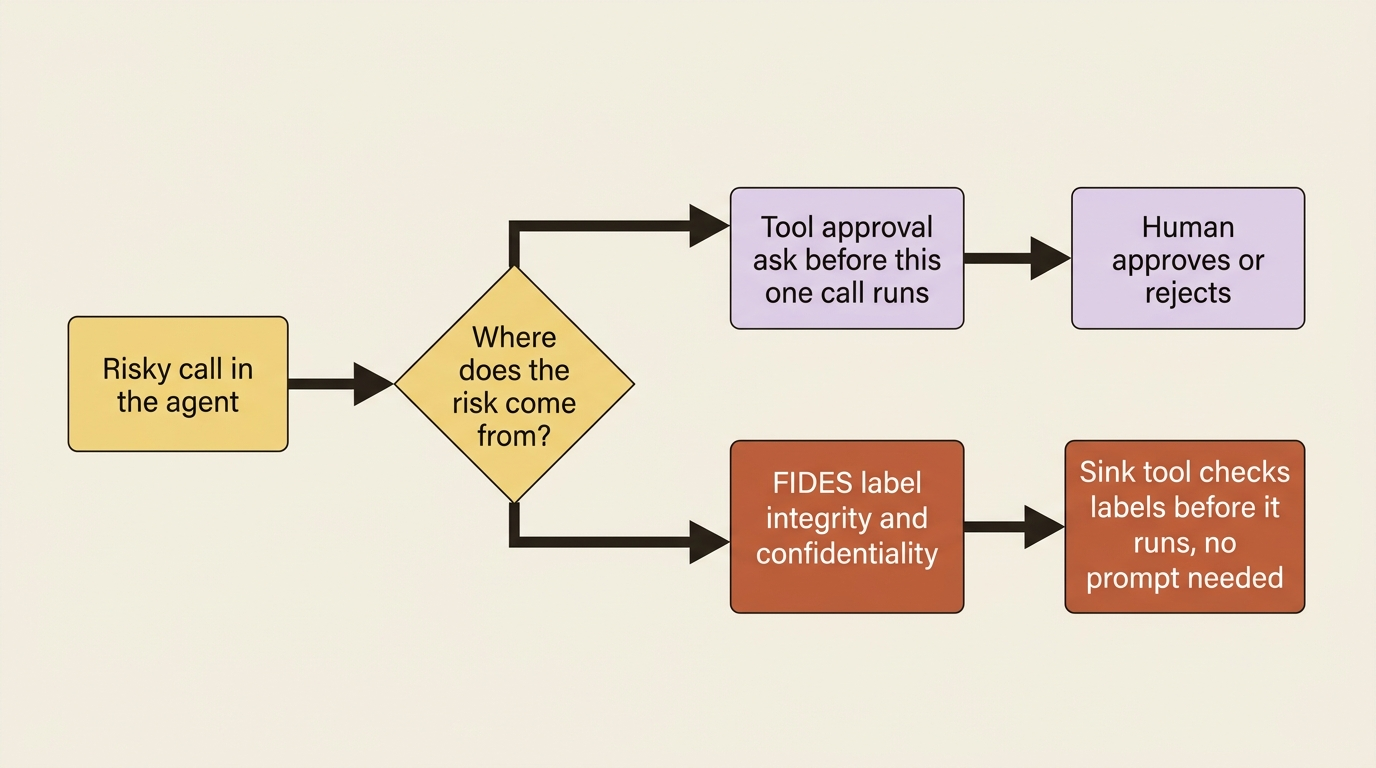
Tool approval and the safety guidance above are both heuristic. A human decides case by case, or a developer decides in advance which tool names deserve a prompt. That works well for the small number of genuinely dangerous calls an agent makes directly, but it does not automatically protect against a subtler problem: an agent that reads untrusted content, gets fooled by instructions hidden inside it, and then calls a tool that was never flagged for approval because nobody expected it to be reachable from that data.
FIDES (Flow Integrity Deterministic Enforcement System) closes that gap with labels instead of prompts. Content coming back from a tool carries an integrity label, trusted or untrusted, and a confidentiality label, public, private, or user-identity. Labels propagate automatically as that content flows through the agent, and a sink tool can declare that it refuses to run at all under untrusted context, or that it caps how confidential the data reaching it is allowed to be. The check happens before the sink runs, deterministically, whether or not anyone remembered to wrap that particular tool in an approval gate.
The two mechanisms are not competitors. Approval is the right tool when a human genuinely needs to look at a specific call before it happens, writing a report, spending money on a paid lookup. FIDES is the right tool when the risk is data flow you cannot enumerate in advance, an agent that ingests scraped pages or third-party API responses and might get talked into misusing a tool nobody thought to gate. FIDES is Python-only and currently marked experimental: worth knowing the shape of, not yet the default posture for every agent.
The "don't ask again" risk
Everything so far asks a human every single time a gated tool is about to run. That is correct for a chat session where a person is present to answer, but it breaks down the moment you want an agent to work unattended for any length of time. Some harnesses answer that with a standing-approval mechanism: heuristic auto-approval combined with remembered decisions, so a tool that has already been approved does not have to interrupt the agent again for the same kind of call.
That convenience is also the risk this article is named for. A "don't ask again" decision is not scoped to the one task you were looking at when you granted it. It is scoped to the tool. Approve write_report_file once while reviewing today's quantum-computing report, and an unattended agent can call write_report_file again next week, for a completely different task, on a completely different topic, with nobody in the room to notice. The permission you thought you were granting for one report quietly became standing authority over every future call to that function.
In production: harnesses that ship this convenience turn it on by default. A DisableToolAutoApproval flag (or its equivalent) turns it back off, and it is worth treating as the setting you reconsider deliberately for any unattended agent that touches something you would regret automating, rather than the one nobody looks at because the default already works.
The discipline that keeps this from biting you is not complicated. It is just easy to skip under deadline pressure.
- Scope approval rules as narrowly as the tool allows: a function that only writes to one directory is safer to auto-approve than one that takes an arbitrary path.
- Prefer per-tool overrides over a single blanket "always allow" setting that covers every gated call an agent might ever make.
- Treat standing approval as something you grant per tool with eyes open, not something that accumulates silently because nobody said no.
Wiring approval into a real agent
Here is the pattern applied to a research agent that has just gained two new capabilities: writing a finished report to disk, and calling a paid market-data API for numbers a free web search cannot supply. Both go on the agent, both wrapped for approval.
from agent_framework import Agent, Message, OpenAIChatClient, tool


@tool(approval_mode="always_require")  # ①
def write_report_file(
    path: Annotated[str, "Where to write the finished report"],
    contents: Annotated[str, "The report text"],
) -> str:
    """Write the finished research report to disk."""
    with open(path, "w") as f:
        f.write(contents)
    return f"Wrote {len(contents)} characters to {path}"


@tool(approval_mode="always_require")
def premium_market_data_lookup(
    query: Annotated[str, "The market data question to ask the paid provider"],
) -> str:
    """Call the paid market-data API for figures the free web search can't provide."""
    return paid_data_client.query(query)  # bills the account on every call  ②


agent = Agent(
    client=OpenAIChatClient(),
    name="MarketResearcher",
    instructions="You are a market research analyst who gives clear, concise answers.",
    tools=[look_up_topic, write_report_file, premium_market_data_lookup],  # ③
    middleware=[RunLoggingMiddleware(), InsiderInfoGuardMiddleware()],  # ④
    context_providers=[  # ⑤
        history,
        ResearchMemoryProvider("quantum computing funding trends", findings_store),
        compaction,
    ],
    require_per_service_call_history_persistence=True,  # ⑥
)
① Both new tools declare approval_mode="always_require" right on the decorator, the same pattern used for the single-tool example earlier in the article, applied here to both the file write and the paid lookup.
② The paid lookup's approval gate matters doubly: it protects against an unwanted write and against spending money the agent has no way to undo.
③ The tools list keeps the existing look_up_topic search tool untouched and appends the two newly gated tools alongside it.
④ Existing middleware stays registered exactly as before; approval is a second gate layered on top, not a replacement for whatever request-time checks already run.
⑤ The context-provider stack of history, memory, and compaction is unchanged; nothing about approval changes how the agent remembers.
⑥ Per-service-call history persistence still runs unmodified alongside the two new approval-gated tools.
Note: The full extracted listing at code/microsoft_agent_framework/part-7-tool-approval-safety/listings/03-market-research-agent-wiring.py shows this same wiring with the carried-over names noted.
An insider-information query, blocked by the middleware before it reaches the model, never gets far enough to trigger a write or a paid lookup in the first place. Approval is a second, independent gate that sits after the model decides to act, not a replacement for whatever runs before it.
C# wires the same pair of tools by wrapping each AIFunction in ApprovalRequiredAIFunction before handing it to the agent:
AIFunction writeReportFunction = AIFunctionFactory.Create(WriteReportFile);  // ①
AIFunction premiumLookupFunction = AIFunctionFactory.Create(PremiumMarketDataLookup);

AIAgent agent = agentChatClient
    .AsBuilder()
        .Use(runFunc: RunLoggingMiddleware, runStreamingFunc: null)
        .Use(runFunc: InsiderInfoGuard, runStreamingFunc: null)  // ②
    .BuildAIAgent(new ChatClientAgentOptions
    {
        Name = "MarketResearcher",
        ChatOptions = new()
        {
            Instructions = "You are a market research analyst who gives clear, concise answers.",
            Tools =
            [
                lookUpTopicFunction,  // ③
                new ApprovalRequiredAIFunction(writeReportFunction),  // ④
                new ApprovalRequiredAIFunction(premiumLookupFunction),  // ⑤
            ],
        },
    });
① Both new tools start as plain AIFunction instances, built with the same AIFunctionFactory.Create call used for any ungated tool.
② The existing middleware chain stays registered unchanged; approval is layered on top of it, not instead of it.
③ The existing lookUpTopicFunction is passed through untouched; it never required approval and still does not.
④ ApprovalRequiredAIFunction wraps the report-writing function so the framework intercepts the call instead of running it.
⑤ The same wrapper gates the paid lookup, the tool that spends real money on every invocation.
Note: The full extracted listing at code/microsoft_agent_framework/part-7-tool-approval-safety/listings/04-market-research-agent-wiring.cs shows this same wiring with the carried-over names noted.
A caller driving this agent now has to handle the pending-approval loop from earlier in this article any time a research session ends in "write the report" or "look up a figure the free search does not have." That friction is the point. The agent can research freely on its own, but it cannot touch disk or spend money without someone explicitly saying yes.
Do this today
- Audit your existing tools against the four signals. Side effects, data sensitivity, reversibility, and scope of impact. Anything that hits one of those and is not gated yet is a gap worth closing now.
- Write the pending-approval loop once, as a reusable function. Do not hand-roll a single request-response check per call site; the
while result.user_input_requestspattern belongs in one place your whole codebase calls. - Find your "don't ask again" flag and read its default. If standing approval ships on, decide deliberately which tools it should cover instead of inheriting whatever the framework picked for you.
- Scope any auto-approved tool as narrowly as its signature allows. A function that writes to one fixed directory is a safer thing to auto-approve than one that accepts an arbitrary path.
- If you route on untrusted content (scraped pages, third-party API responses), look into a deterministic labeling approach like FIDES rather than trying to enumerate every risky tool by hand.
The takeaway
Tool approval pauses a run instead of executing a risky call, hands you back a pending request with the function name and arguments, and resumes cleanly once you approve or reject it, looping when more than one call is pending at once. That mechanic is straightforward once you have seen it in both languages.
The sharper lesson is the standing-approval one. "Don't ask again" is a decision scoped to a tool, not a task, and the discipline of scoping it narrowly is what keeps convenience from turning into authority you never meant to grant. The next time you flip that switch, ask yourself what you are actually authorizing: one report, or every future call that function will ever make.