
Stop Hand-Assembling Your AI Agent. The Harness Already Does It.
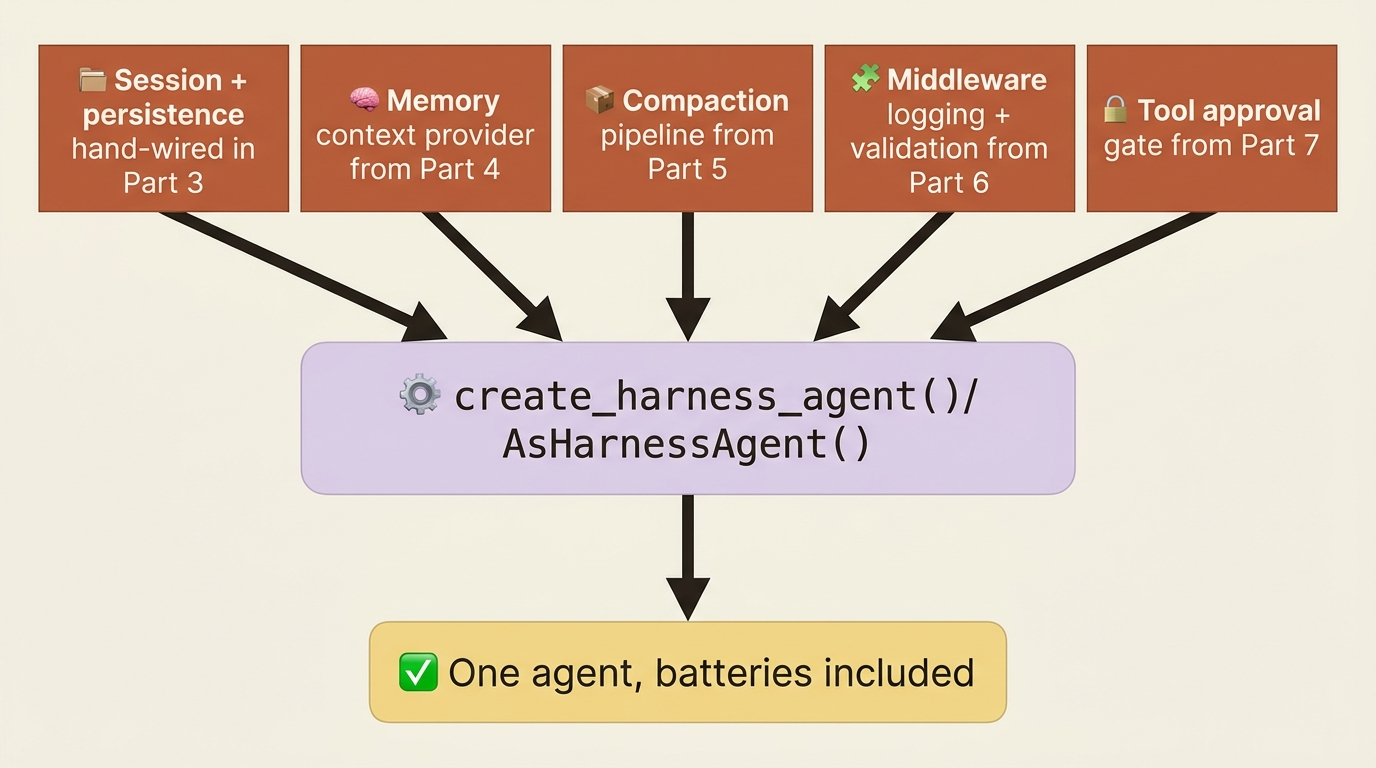
The Microsoft Agent Framework agent harness collapses five parts' worth of hand-wired scaffolding, sessions, memory, compaction, middleware, and tool approval, into one constructor call, and this article walks exactly what is inside it and when to keep the pieces you would rather build yourself.

Session persistence, memory, compaction, middleware, and tool approval: five separate pieces of scaffolding you would otherwise wire by hand, bundled into one opinionated Microsoft Agent Framework runtime.
You already spent five chapters hand-wiring scaffolding just to get an agent you could trust unattended. There is a single constructor call that does the same job.
In this article: You will learn what the Microsoft Agent Framework agent harness actually bundles, how to create one in Python and C#, its signature plan-and-execute working style, how to tune compaction and looping, and when to reach for optional extensions like a sandboxed shell, background agents, or CodeAct instead of the default tool-calling loop.
Picture what it takes to get a tool-calling agent to the point where you would trust it unattended for an hour. It needs a session that survives a crash. A memory that recalls what it learned last time. A compaction strategy so a long research run does not blow past the model's context window. Middleware to log and validate what it does. And an approval gate so it cannot write a file or spend money without a human saying yes. That is five separate systems, each with its own configuration surface, each wired in by hand.
Microsoft Agent Framework ships all of it as one thing: the agent harness, an opinionated, batteries-included runtime tuned for long, multi-step tasks. Function invocation, per-service-call persistence, compaction, a todo list, file memory, and tool approval arrive wired together instead of assembled piece by piece. This article walks what is in the harness, how to create one in both Python and C#, its plan-and-execute working style, and where to draw the line between what the harness gives you for free and what you still build by hand.
What a harness actually is
A language model on its own only generates text. To have it call tools, work through a multi-step task, remember what it has already done, and keep going until the job is finished, you need a runtime wrapped around the model. That runtime is the harness. It runs the loop that calls the model and executes the tools it asks for, manages history and context so the model stays within its limits, applies approval and safety policy before an action runs, and keeps the agent moving toward the task instead of stalling after one reply.
Under the hood, the Agent Framework harness is not a separate kind of object. It is a chat-client-based agent (Agent in Python, ChatClientAgent in C#) with a curated set of Agent Framework features layered on top. Every one of those features is also available standalone, which is why a reader coming from the framework's building blocks will recognize most of the list below on sight. You still supply your own chat client, and you only configure the parts you want to change.
What makes up the harness
The table below is the harness's actual bill of materials. Every capability is on by default unless the table says optional, and every one has a disable flag if you do not want it.
| Capability | What it does |
|---|---|
| Function invocation | Automatic tool-calling loop with a configurable iteration limit |
| Per-service-call history persistence | History persists after every model call, enabling crash recovery mid-run |
| Compaction | Keeps a long tool-calling loop from overflowing the context window |
| Todo provider | A persistent todo list the agent uses to track a multi-step plan |
| Agent mode provider | Plan and execute mode tracking that structures how the agent works |
| File memory provider | File-based session memory for notes and artifacts across turns |
| File access provider | Read and write tools scoped to a working directory |
| Tool approval | Standing "do not ask again" rules plus heuristic auto-approval |
| OpenTelemetry | Built-in tracing on the GenAI semantic conventions |
| Web search | A hosted web search tool, on by default |
| Skills provider (optional) | Discovers and progressively loads Agent Skills from disk |
| Background agents (optional) | Delegates parallel sub-tasks to background agents |
| Shell environment (optional) | Shell command execution plus environment probing |
| Looping (optional) | Re-invokes the agent until a completion condition is met |
Medium does not render tables, so here is the same list, flat: function invocation is an automatic tool-calling loop with a configurable iteration limit. Per-service-call history persistence saves history after every model call, so a crash mid-run does not erase what already happened. Compaction keeps a long tool-calling loop inside the context window. The todo provider is a persistent list for tracking a multi-step plan. The agent mode provider tracks plan and execute mode, the structure covered below. The file memory provider gives file-based session memory across turns. The file access provider is scoped read and write tools. Tool approval layers standing rules on top of heuristic auto-approval. OpenTelemetry gives built-in tracing. Web search is a hosted tool, on by default. Three more are optional: a skills provider for discovering Agent Skills from disk, background agents for delegating parallel sub-tasks, a shell environment for sandboxed command execution, and looping to re-invoke the agent until a condition is met.
Nothing in that list is a new concept to learn from scratch. Most of it is the framework's individual building blocks (sessions, context providers, compaction pipelines, middleware, and approval gates) with the wiring already done.
Creating a harness agent
In Python, the harness is a factory function, create_harness_agent, that assembles a fully configured Agent from a chat client. The simplest form needs nothing but the client:
from agent_framework import create_harness_agent
from agent_framework.openai import OpenAIChatClient

agent = create_harness_agent(
    OpenAIChatClient(model="gpt-4o"),
)

session = agent.create_session()
response = await agent.run("Plan a weekend trip to Seattle.", session=session)
print(response.text)
That call alone gets you function invocation, per-service-call persistence, a todo list, plan and execute modes, file memory, file access, tool approval, tracing, and web search, every one of them defaulted on. In C#, the equivalent is an extension method on any IChatClient:
using Microsoft.Agents.AI;
using Microsoft.Extensions.AI;

// chatClient is any IChatClient implementation (Foundry, Azure OpenAI, OpenAI, Anthropic, ...).
AIAgent agent = chatClient.AsHarnessAgent();

AgentResponse response = await agent.RunAsync("Plan a weekend trip to Seattle.");
Console.WriteLine(response.Text);
AsHarnessAgent returns a plain AIAgent, so everything you already know about running and streaming an agent still applies. You can also construct HarnessAgent directly if you would rather skip the extension method.
Two levels of instructions
A harness agent takes instructions at two levels, and mixing them up is an easy way to get behavior you did not ask for. Harness-level instructions describe general operating guidelines that apply no matter what task you hand it. Task-level instructions describe what this particular agent is for. Python keeps them as two separate arguments, harness_instructions and agent_instructions:
agent = create_harness_agent(
    client=client,
    name="research-agent",
    agent_instructions="You are a research assistant focused on academic sources.",
    tools=get_stock_price,
)
C# splits them the same way: HarnessInstructions on HarnessAgentOptions and Instructions on the nested ChatOptions.
If you do not set harness_instructions, the harness does not run with no operating guidelines. It runs with a built-in default that teaches the model to use the todo list and respect plan mode in the first place. Override it only if you actually want different operating behavior, not just a different task description; put task specifics on agent_instructions instead.
The plan-and-execute workflow
This is the harness's signature working style, and it is the part that turns "an agent that can call tools" into "an agent you would trust to work unattended for an hour." The agent mode provider gives the agent two phases.
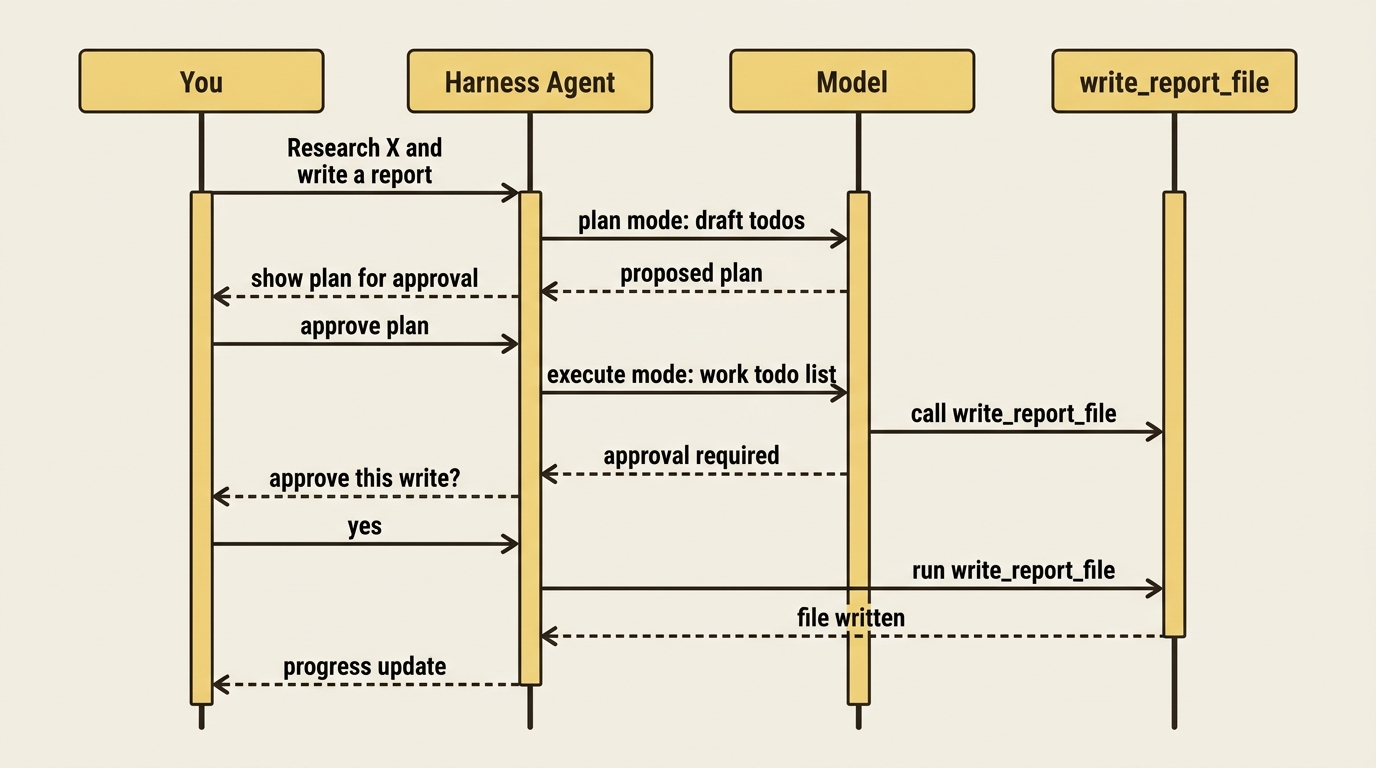
Plan mode is interactive: the agent asks clarifying questions, drafts a todo list and a plan, and waits for your approval before doing anything substantial. Execute mode is autonomous: once you approve the plan, the agent works through the todo list on its own, reporting progress as it goes. Default modes cover most cases, but you can swap in custom modes and instructions if plan-then-execute is not the shape your task needs.
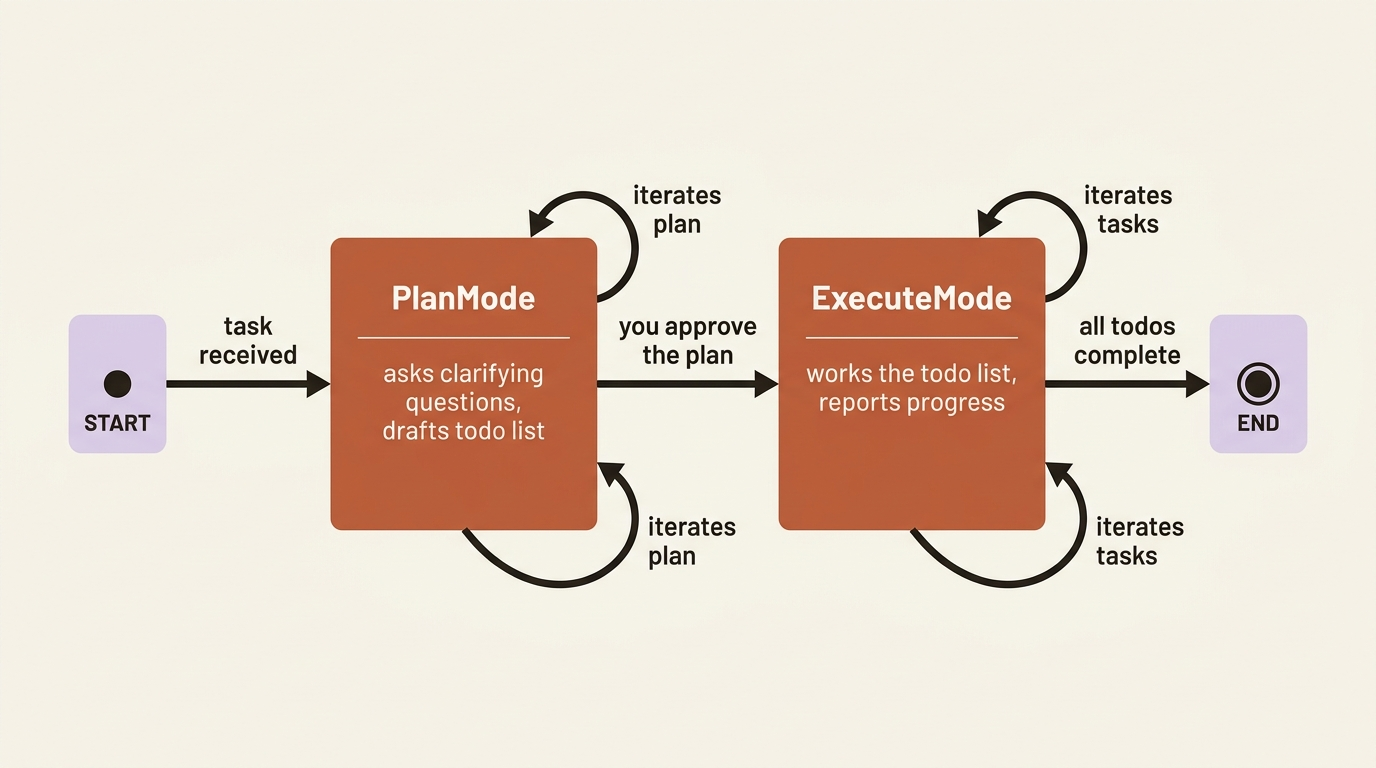
For a research agent, this is the difference between a single paragraph of output and a plan to research five subtopics, a todo list tracking each one, and a final report that cites what it found. You approve the plan once, then let it run.
Tuning compaction and looping
A hand-built compaction pipeline folds into two numbers here. Supply the model's context-window size and a max output size to turn on the default token-budget-aware strategy:
agent = create_harness_agent(
    client=client,
    max_context_window_tokens=128_000,
    max_output_tokens=16_384,
)
If you supply neither a token budget nor a custom strategy, compaction is off by default, so a harness agent never compacts silently until you give it the numbers that make compaction meaningful. C# takes the same two numbers on HarnessAgentOptions. To reach for a specific compaction strategy instead of the default, pass it as before_compaction_strategy / after_compaction_strategy in Python or CompactionStrategy in C#. To turn compaction off outright, set disable_compaction=True.
By default a harness agent runs once per invocation, same as any agent. To have it keep going on its own until a condition is met, Python takes a predicate:
from agent_framework import create_harness_agent, todos_remaining

agent = create_harness_agent(
    client=client,
    loop_should_continue=todos_remaining(),
    loop_max_iterations=10,
)
todos_remaining() re-invokes the agent while its own todo list still has open items, which pairs naturally with plan and execute mode: approve the plan once, and the loop keeps calling the agent until every todo is checked off or the iteration cap is hit. C# supplies one or more LoopEvaluator instances instead. The loop wraps the agent as its outermost layer, so each iteration is still a complete, independently tool-approved and traced run, not a shortcut around anything else you have built.
Customizing and disabling features
Every default capability has a matching flag, so a harness agent is not all-or-nothing. Python uses keyword arguments prefixed disable_:
agent = create_harness_agent(
    client=client,
    harness_instructions="Custom operating guidelines here.",
    disable_todo=True,         # No todo list
    disable_mode=True,         # No plan/execute modes
    disable_web_search=True,   # No hosted web search tool
    disable_file_memory=True,  # No file-based session memory
)
C# uses boolean properties on HarnessAgentOptions with the same names in PascalCase, DisableTodoProvider, DisableAgentModeProvider, DisableWebSearch, DisableFileMemory. disable_file_access, disable_tool_auto_approval, and DisableOpenTelemetry round out the list. You can also add your own context providers through context_providers / AIContextProviders and point the skills provider at custom paths, which is exactly the hook you would reach for to give a harness agent domain-specific skills.
Delegating work: shell and background agents
Two optional pieces extend what a harness agent can reach beyond its own tool calls. A shell_executor gives the agent an approval-gated shell tool plus a provider that injects OS, shell, and working-directory context. Python confines it to a directory and a deny list:
from agent_framework_tools.shell import LocalShellTool, ShellPolicy

# A shell confined to a working directory. Commands require approval by default;
# the deny-list is a UX pre-filter, not a security boundary.
async with LocalShellTool(
    workdir="./working",
    confine_workdir=True,
    policy=ShellPolicy(denylist=[r"\brm\s+-rf\b", r"\bsudo\b"]),
) as shell:
    agent = create_harness_agent(client=client, shell_executor=shell)
Read that comment twice. The deny list stops the model from typing an obviously destructive command; it does not stop a determined actor from working around it. Treat it as a UX guard, not a security boundary, and keep the shell tool behind approval, which the harness already does by default.
Background agents are the other delegation path. Pass a set of already-built agents and the harness hands off sub-tasks to them for concurrent execution. Both pieces are optional for a reason: most tasks do not need a shell or parallel sub-agents, and turning them on widens what the agent can do without you watching. Reach for them when the task genuinely calls for it, not by default.
The harness gives you a capable agent, but it does not hand you a UI to drive it. Agent Framework includes a sample terminal console (a Harness.Shared.Console project in .NET, a Textual-based console package in Python) that streams output, renders the todo list and current mode, and surfaces approval prompts through slash commands. It is genuinely useful for exploring a harness agent interactively, and it is explicitly a sample: self-contained enough to run as-is, meant to be copied and adapted rather than depended on as a shipped product.
CodeAct: an alternative to one tool call at a time
Everything above still calls one tool at a time: the model picks a function, the harness runs it, the result comes back, and the model decides what is next. For a task that chains many small tool calls together, that model-to-tool-to-model loop adds a full model turn per step, which costs both latency and tokens.
CodeAct is the alternative: instead of a tool-calling loop, the agent gets one execute_code tool and writes a short program against a curated set of tools, combining loops, branching, and data transformation into a single execution step instead of scattering it across several turns. It is exposed through backend-specific connectors rather than a built-in core type; the documented one today is Hyperlight, available for both languages and still in preview on the .NET side.
CodeAct is worth reaching for when a task chains several tool calls with real control flow, transforms results before returning an answer, or needs a curated sandbox where only some tools are reachable. It is the wrong trade when a task only needs one or two tool calls, when each call's side effect needs to stay individually visible for a per-call approval prompt, or when you need to approve operations one at a time rather than approving the whole execute_code run as one unit. That last point is decisive for any agent whose tools include a file write or a paid lookup that each need their own individual approval: exactly what CodeAct's single all-or-nothing approval does not give you.
Reframing a hand-assembled agent as a harness agent
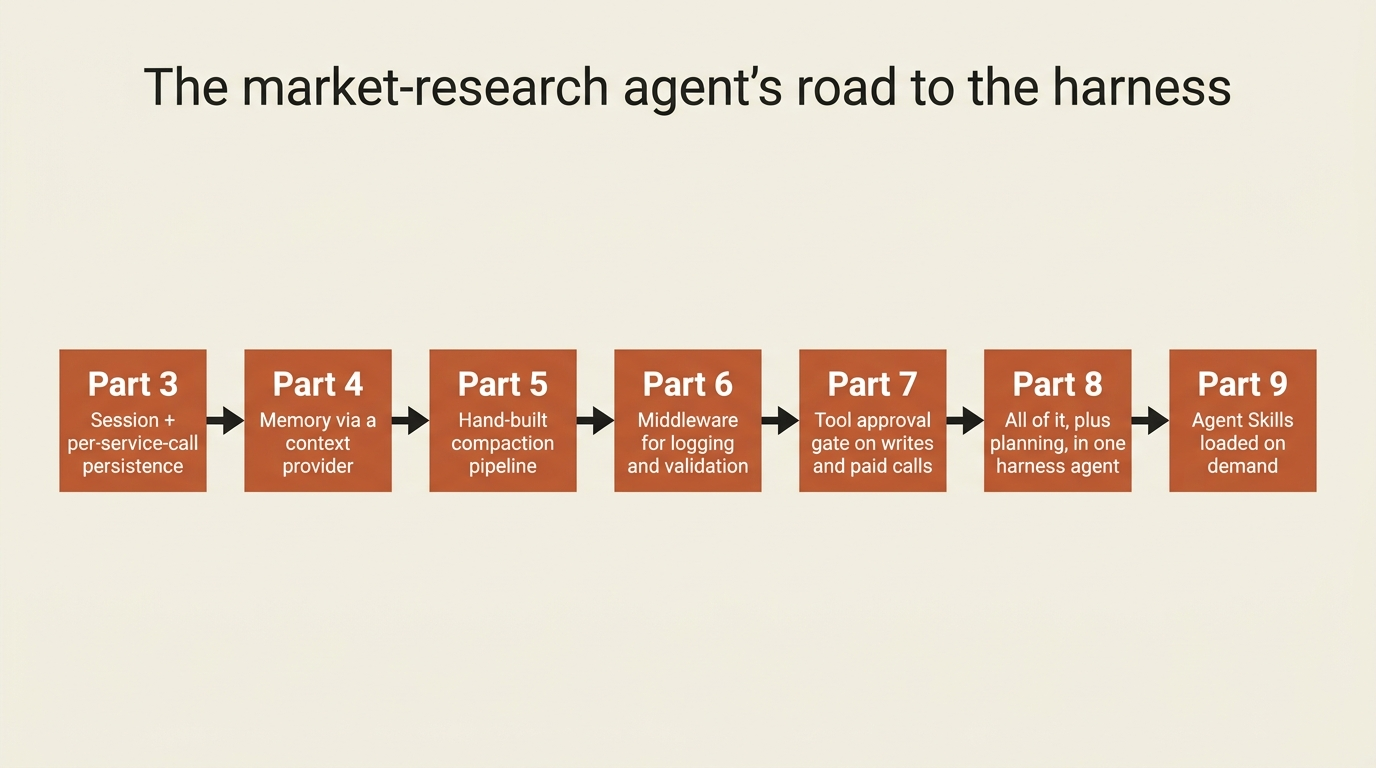
Here is where the payoff lands. Picture a market-research agent that hand-assembled a session, memory, compaction, middleware, and approval-gated tools, five separate pieces wired one at a time. As a harness agent, most of that comes from the constructor call itself. What is left, a custom memory provider, a domain-specific safety guard, and two tools that must ask before they run, layers on top exactly the way the harness's extension points expect.
from agent_framework import create_harness_agent, tool

agent = create_harness_agent(
    client=OpenAIChatClient(),
    name="MarketResearcher",
    harness_instructions="Plan before researching. Track subtopics as todos. "  # ①
                          "Never skip approval for a write or a paid lookup.",
    agent_instructions="You are a market research analyst who gives clear, concise answers.",  # ②
    tools=[look_up_topic, write_report_file, premium_market_data_lookup],  # ③
    context_providers=[ResearchMemoryProvider("quantum computing funding trends", findings_store)],  # ④
    max_context_window_tokens=128_000,  # ⑤
    max_output_tokens=16_384,
    disable_tool_auto_approval=True,  # every write and every paid call asks, every time  ⑥
)

session = agent.create_session()
response = await agent.run(  # ⑦
    "Research quantum computing funding trends and write a report.",
    session=session,
)
① Harness-level instructions set the operating guideline that persists across every task, the harness-level half of the two-level split covered earlier.
② Task-level instructions describe what this particular agent is for, kept separate from the harness-level guideline in ①.
③ The tool list still includes an approval-gated write_report_file and premium_market_data_lookup alongside the plain look_up_topic.
④ A custom ResearchMemoryProvider attaches through the harness's context_providers extension point instead of being wired by hand.
⑤ The context-window and output-token budget are supplied as two numbers, turning on the harness's default compaction strategy in place of a hand-built pipeline.
⑥ Disabling tool auto-approval keeps every write and every paid lookup asking every time, so the harness's standing "do not ask again" convenience never quietly covers these two tools.
⑦ The agent runs inside a session, so the harness's plan, todo list, and history all persist across the run.
Note: The full extracted listing at
code/microsoft_agent_framework/part-8-agent-harness/listings/01-market-researcher-harness-agent.py
shows the tool, context-provider, and findings-store definitions elided here.
C# wires the same shape through HarnessAgentOptions:
AIAgent agent = chatClient
    .AsBuilder()
        .Use(runFunc: RunLoggingMiddleware, runStreamingFunc: null)  // ①
        .Use(runFunc: InsiderInfoGuard, runStreamingFunc: null)
    .AsHarnessAgent(new HarnessAgentOptions
    {
        Name = "MarketResearcher",
        HarnessInstructions = "Plan before researching. Track subtopics as todos. "
                             + "Never skip approval for a write or a paid lookup.",  // ②
        MaxContextWindowTokens = 128_000,  // ③
        MaxOutputTokens = 16_384,
        DisableToolAutoApproval = true, // every write and every paid call asks, every time  ④
        ChatOptions = new ChatOptions
        {
            Instructions = "You are a market research analyst who gives clear, concise answers.",  // ⑤
            Tools =
            [
                lookUpTopicFunction,
                new ApprovalRequiredAIFunction(writeReportFunction),
                new ApprovalRequiredAIFunction(premiumLookupFunction),
            ],  // ⑥
        },
    });
① The middleware chain attaches a run-logging middleware and an insider-information guard through AsBuilder() before the harness wraps the client, the same middleware pipeline any Agent accepts.
② HarnessInstructions sets the harness-level operating guideline, the C# side of the two-level instruction split covered earlier.
③ MaxContextWindowTokens and MaxOutputTokens supply the compaction budget as two numbers, turning on the harness's default strategy in place of a hand-built pipeline.
④ DisableToolAutoApproval keeps every write and every paid lookup asking every time, so the harness's standing "do not ask again" convenience never quietly covers these two tools.
⑤ Instructions on the nested ChatOptions is the task-level instruction, kept separate from the harness-level guideline in ②.
⑥ The Tools array still wraps writeReportFunction and premiumLookupFunction in ApprovalRequiredAIFunction, the approval gate, alongside the plain lookUpTopicFunction.
Note: The full extracted listing at
code/microsoft_agent_framework/part-8-agent-harness/listings/02-market-researcher-harness-agent.cs
shows the tool, middleware, and client definitions elided here.
Because a harness agent works through a task over many turns, drive it from a conversation loop rather than a single run call: create a session once, then feed it the user's next instruction and stream the output as the agent plans, asks for approval, and works the todo list.
session = agent.create_session()
print("Harness agent ready. Type 'exit' to quit.")
while True:
    user_input = input("> ")
    if user_input.strip().lower() in {"exit", "quit"}:
        break
    async for chunk in agent.run(user_input, session=session, stream=True):
        if chunk.text:
            print(chunk.text, end="", flush=True)
    print()
The session carries the harness's plan, todo list, and history across every turn of that loop, now scoped to a harness that has more state to carry.
In production: disable_tool_auto_approval=True is a flag worth reconsidering deliberately rather than leaving on the default. For an agent that writes files and spends money, that reconsideration is easy: turn it on. For a harness agent whose tools are all read-only and reversible, the default convenience is a reasonable trade, but make that call on purpose, per agent, not by inheriting whatever the constructor happened to default to.
Do this today
- Start with the bare constructor. Call
create_harness_agent(client)orchatClient.AsHarnessAgent()with nothing else and run one task. See what plan mode, the todo list, and web search do before you configure anything. - Set the two compaction numbers. Pass
max_context_window_tokensandmax_output_tokensfor your model. Compaction stays off until you do, so a long-running agent will not silently start dropping history without them. - Decide
disable_tool_auto_approvalon purpose. If any tool writes data or spends money, flip it on and watch the harness ask every time. If every tool is read-only, leave the default and note why. - Run the sample console. It is the fastest way to see the todo list, the current mode, and an approval prompt without writing a UI yourself.
- Map your existing scaffolding to the capability list. If you have hand-built a session, a compaction pipeline, or an approval gate, find its harness equivalent and see how much of it collapses into a constructor argument.
The takeaway
The harness is not a new concept. It is the same handful of ideas, persistence, memory, compaction, and approval, that most agent-building tutorials teach one at a time, now shipped as one opinionated runtime with a disable flag for anything you would rather assemble yourself. You have walked what is in it, how to create one in both languages, the plan-and-execute style that is its signature move, tuning compaction and looping, the shell and background-agent extensions, and CodeAct as the alternative worth knowing about even when per-call approval keeps an agent off that path.
The next time you catch yourself hand-wiring a fifth piece of scaffolding just to get an agent you would trust unattended, check whether the harness already built it. Chances are it did.