
Your Agent Does Not Need Every Skill Memorized. It Needs to Know Where to Look.
Skills solve a token-cost problem tools never did: how a harness agent can carry deep, domain-specific knowledge without paying for all of it on every single turn.
Agent Skills are portable, progressively disclosed packages of instructions, scripts, and resources that let a harness agent load specialized domain knowledge only when a task actually calls for it.
You want your agent to carry a dozen specialized domains of knowledge without every one of them taxing every single prompt. Agent Skills are portable, progressively disclosed packages of instructions, scripts, and resources that let a harness agent load specialized domain knowledge only when a task actually calls for it.
In this article: You will learn what an Agent Skill is and how it differs from a tool, the four-stage progressive disclosure pattern that keeps a skill library from bloating the system prompt, the four ways to source a skill (file-based, code-defined, class-based, and MCP-based), and how to combine them into one provider with deduplication and caching. A worked example wires two specialist skills into a Microsoft Agent Framework harness agent and walks the runtime discovery order end to end.
Give an agent ten specialized domains of knowledge, expense policy, a research convention, a report format, a compliance checklist, and a naive implementation stuffs all of it into the system prompt. Ten skills at a few thousand tokens each, and the model is paying real money reading content that is relevant to maybe one task in ten. That is the tax every tool-based approach to domain knowledge pays, because a tool's full schema sits in the prompt on every turn whether the task needs it or not.
Agent Skills, a specification the Microsoft Agent Framework implements alongside other Agent Skills-compatible tools, solve this differently. A skill is a package of domain expertise, instructions, reference documents, and executable scripts, that stays dormant until a task actually matches its domain. The agent pays roughly 100 tokens to know a skill exists. It pays the full cost only when it decides to use one.
This article walks the full shape of Agent Skills: what one looks like on disk, the four-stage loading pattern that keeps costs proportional to use, the four ways to source a skill, and a worked example that gives a harness-based research agent two specialist skills, one for a research domain's conventions and one for report formatting, and shows it discovering and loading both mid-task.
A skill is not a bigger tool
A tool is one callable action with a name, a description, and a parameter schema. The model calls it, the harness runs it, the result comes back. A skill is a different shape of thing entirely: a package of domain expertise that can include step-by-step instructions, reference documents, and executable scripts, bundled together so an agent picks up an entire domain's worth of know-how instead of one action.
| Tool | Skill | |
|---|---|---|
| What it provides | A single callable action | Instructions, reference material, and optional scripts |
| Context cost | The full schema sits in the prompt on every turn | Only the name and description sit in the prompt; full content loads on demand |
| Portability | Tied to the agent that registers it | A self-contained package any compatible agent can discover |
| Best for | One action: query a database, send an email | A domain: research conventions, expense policy, report formatting |
That table covers what Medium will not render as a table, so here it is flat: what it provides, a tool gives a single callable action while a skill gives instructions, reference material, and optional scripts. Context cost, a tool's full schema sits in the prompt every turn while a skill costs only its name and description until loaded. Portability, a tool is tied to the agent that registers it while a skill is a self-contained package any compatible agent can discover. Best for, tools handle one action, like querying a database, while skills handle a domain, like research conventions or report formatting.
Think of tools as verbs and skills as expertise. The agent uses a tool to act and a skill to know how to act. Skills follow an open specification, agentskills.io, so the same skill package works across any agent product that implements it, not just Agent Framework.
What a skill looks like on disk
A skill is a directory with one required file. SKILL.md carries YAML frontmatter followed by markdown instructions, and everything else in the directory is optional supporting material:
tech-market-research/
├── SKILL.md                # Required: frontmatter + instructions
├── scripts/
│   └── check_citations.py  # Executable code the agent can run
└── references/
    └── source-tiers.md     # Reference material loaded on demand
The frontmatter has a small set of fields, two of them required:
| Field | Required | What it does |
|---|---|---|
name |
Yes | Max 64 characters, lowercase letters, numbers, and hyphens, must match the parent directory name |
description |
Yes | What the skill does and when to use it, max 1024 characters, this is what the agent reads to decide whether the skill is relevant |
license, compatibility, metadata |
No | License, environment requirements, and arbitrary key-value metadata |
allowed-tools |
No | A space-delimited pre-approval list, experimental and support varies by implementation |
As a flat list: name, required, matches the parent directory name and stays under 64 characters. description, required, tells the agent what the skill does and when to reach for it. license, compatibility, and metadata, optional, cover licensing, environment requirements, and arbitrary key-value data. allowed-tools, optional and experimental, pre-approves specific tools for the skill's use.
Keep SKILL.md itself under 500 lines. Anything longer belongs in a references/ file the agent loads only when it needs that level of detail.
Four stages, not one system-prompt dump
Agent Skills avoid the system-prompt-dump tax with a four-stage progressive disclosure pattern:
Advertise. Every skill's name and description, roughly 100 tokens per skill, gets injected into the system prompt at the start of every run. This is the only always-on cost.
Load. When a task matches a skill's domain, the agent calls load_skill to retrieve the full SKILL.md body, recommended to stay under 5,000 tokens.
Read resources. The agent calls read_skill_resource to fetch a specific supplementary file, a reference document, a template, an asset, only when the loaded instructions point it there.
Run scripts. The agent calls run_skill_script to execute a bundled script, only when the task calls for it.
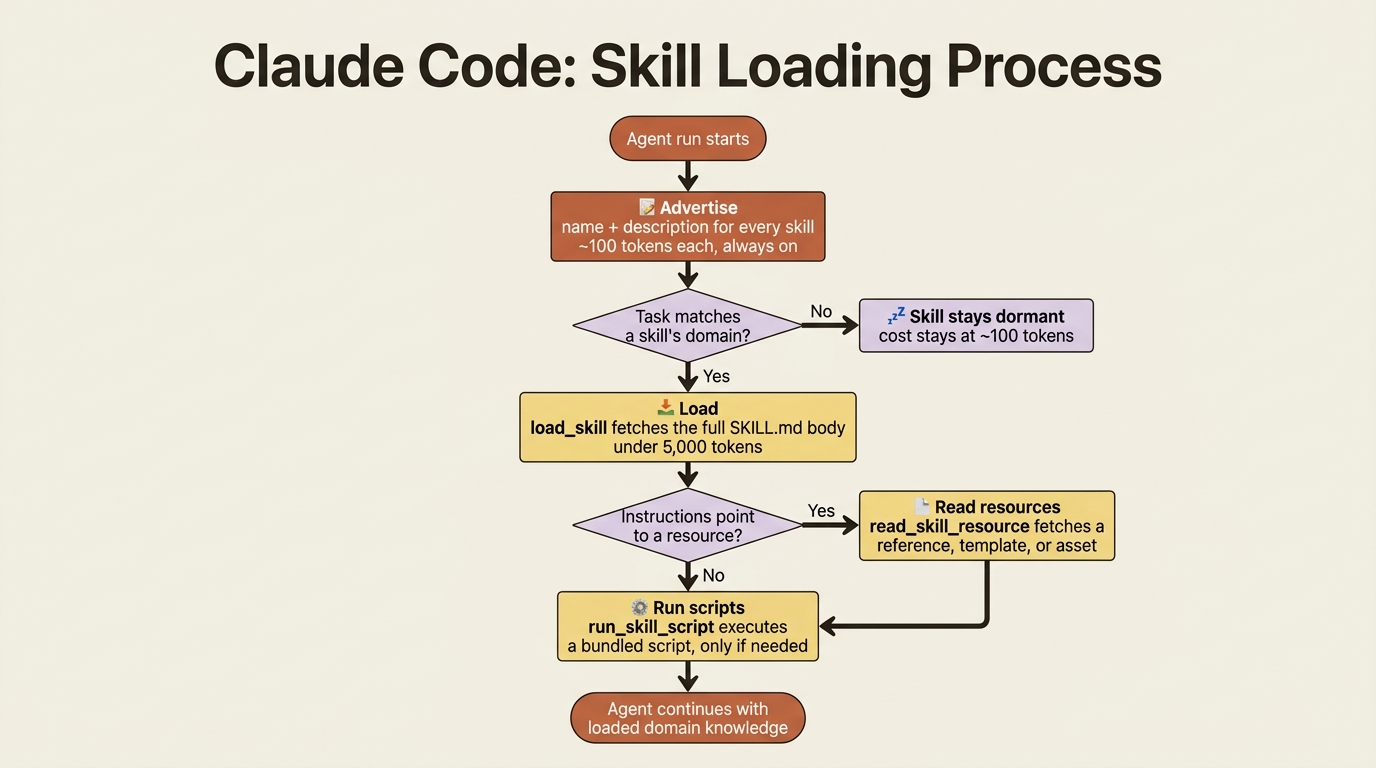
An agent with ten registered skills pays roughly 1,000 tokens of overhead, not 50,000. load_skill is always advertised once any skill exists, but read_skill_resource and run_skill_script only show up in the tool list when at least one skill actually has resources or scripts to offer, so an agent with purely instructional skills never sees a script tool it cannot use.
Four ways to supply a skill
The provider that exposes skills to an agent, SkillsProvider in Python and AgentSkillsProvider in C#, pulls skills from one or more sources. Four source types cover practically everything you will reach for, and each solves a different problem.
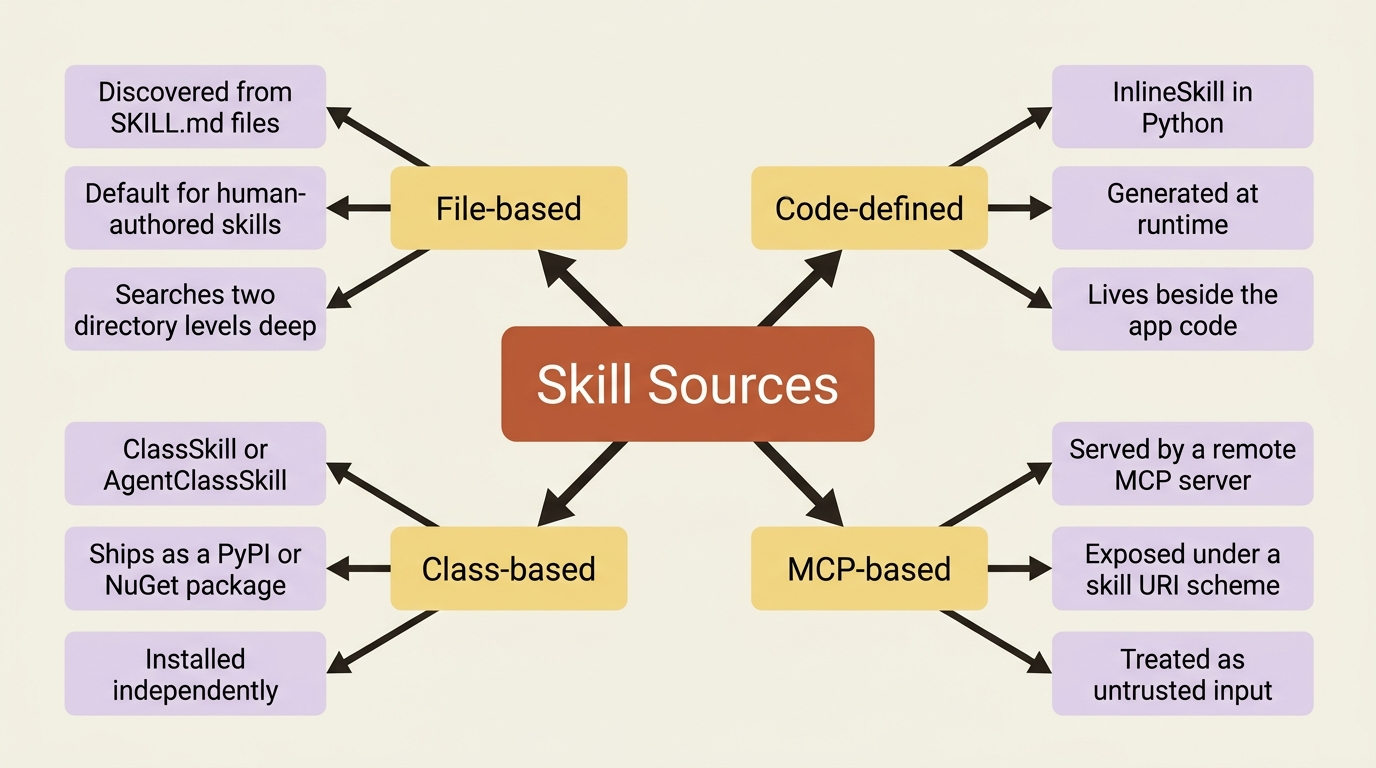
File-based skills, discovered from SKILL.md files on disk, are the default for anything a human authored and checked into a repository. In Python, point SkillsProvider.from_paths() at a directory:
from pathlib import Path
from agent_framework import SkillsProvider

skills_provider = SkillsProvider.from_paths(
    skill_paths=Path(__file__).parent / "skills",
)
Point it at a parent directory, and it automatically discovers every subdirectory containing a SKILL.md, searching up to two levels deep. To run any scripts a file-based skill ships, pass a script runner (script_runner in Python, SubprocessScriptRunner.RunAsync in C#), which the framework runs as a local subprocess. Both languages flag that runner as demonstration-only: production use wants sandboxing, resource limits, and input validation around it, not a bare subprocess call.
Code-defined skills exist entirely in code instead of on disk, useful when a skill's content is generated at runtime, say from a database or per-user permissions, or when you want a skill's definition to live next to the code that uses it. Python calls this InlineSkill:
The frontmatter and instructions define the skill's identity and guidance, while the @resource decorator registers a function whose return value becomes a resource the agent can fetch on demand.
from agent_framework import InlineSkill, SkillFrontmatter

report_template_skill = InlineSkill(
    frontmatter=SkillFrontmatter(  # ①
        name="report-template",
        description="The market-research report format: sections, ordering, "
                     "and citation style. Use before writing the final report.",
    ),
    instructions="Load the template resource, fill in each section, "  # ②
                 "then call write_report_file with the result.",
)

@report_template_skill.resource(name="template")  # ③
def report_template() -> str:  # ④
    return (
        "# {topic}\n\n## Executive Summary\n\n"
        "## Findings by Subtopic\n\n## Sources\n\n## Methodology\n"
    )
① SkillFrontmatter carries the skill's name and description, the only two required fields and the only ones advertised in the system prompt before the skill loads.
② instructions is the guidance body that only reaches the agent's context once it calls load_skill.
③ The @resource decorator registers a named resource the agent can fetch later with read_skill_resource.
④ The decorated function runs on every read, so the resource can return current data instead of a fixed string.
Note: The full extracted listing at
code/microsoft_agent_framework/part-9-agent-skills/listings/01-report-template-skill.py
shows this skill definition as a complete, standalone module.
C# does the same with AgentInlineSkill and .AddResource(), and a resource factory delegate is invoked the same way, on each read rather than once at registration.
Class-based skills bundle name, description, instructions, resources, and scripts into one class, which is what you reach for when a skill needs to ship as its own package: a PyPI package in Python, a NuGet package in C#, installed with one line and one SkillsProvider(...) or .UseSkill() call. Python subclasses ClassSkill and decorates methods with @ClassSkill.resource and @ClassSkill.script; C# subclasses AgentClassSkill<T> and annotates properties and methods with [AgentSkillResource] and [AgentSkillScript]. Reach for this over a code-defined skill the moment you want to distribute the skill independently of the application that uses it.
MCP-based skills come from a remote MCP server that exposes skills under a skill:// URI scheme instead of your own filesystem or codebase. Python wraps an MCP ClientSession in MCPSkillsSource:
from agent_framework import MCPSkillsSource, SkillsProvider

skills_provider = SkillsProvider(MCPSkillsSource(client=session))
Gotcha: an MCP skills source hands an external server control over what content, including instructions and any scripts, reaches your agent's context. Skill instructions get injected the same as a file-based skill's, and scripts execute the same as a file-based skill's. Only point MCPSkillsSource at servers you have vetted, and treat every response from one as untrusted input, the same discipline you would apply to any other external data crossing into an agent's context.
Combining sources into one provider
Real agents rarely draw from a single source type. A research agent that needs both a file-based skill and a code-defined one has to aggregate, deduplicate, and cache the results, which is exactly what the "Mixed skill types" pattern does. In Python, compose the source classes directly:
from pathlib import Path
from agent_framework import (
    AggregatingSkillsSource,
    DeduplicatingSkillsSource,
    FileSkillsSource,
    InMemorySkillsSource,
    SkillsProvider,
)

market_research_skills = SkillsProvider(
    DeduplicatingSkillsSource(  # ①
        AggregatingSkillsSource([  # ②
            FileSkillsSource(Path(__file__).parent / "skills"),  # ③
            InMemorySkillsSource([report_template_skill]),  # ④
        ])
    )
)
① DeduplicatingSkillsSource wraps the aggregated list and drops any repeated skill name before the provider sees it.
② AggregatingSkillsSource merges the two sources below in registration order, with no deduplication of its own.
③ FileSkillsSource contributes the skills discovered from SKILL.md files on disk.
④ InMemorySkillsSource contributes the code-defined report_template_skill defined earlier.
Note: The full extracted listing at
code/microsoft_agent_framework/part-9-agent-skills/listings/02-aggregated-deduplicated-skills-source.py
shows this composition alongside the report_template_skill it depends on.
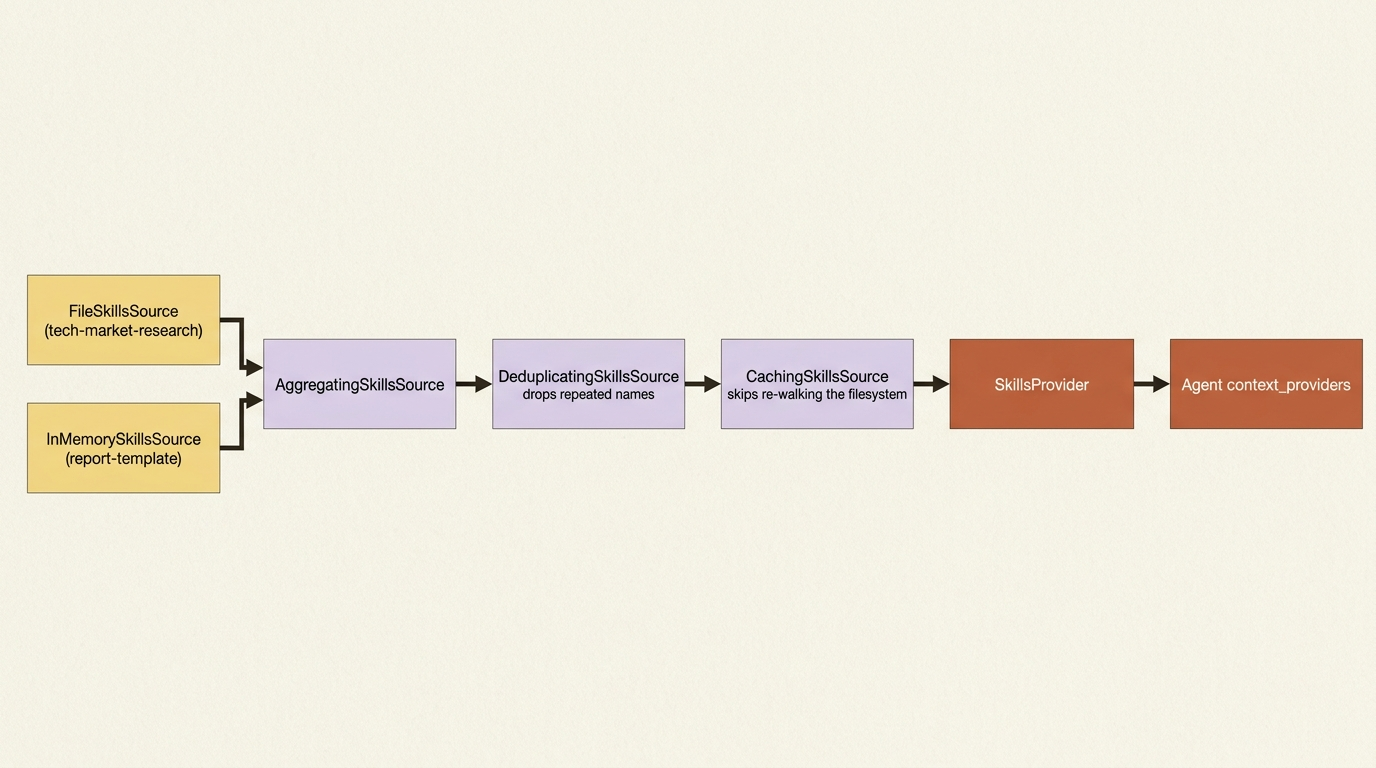
AggregatingSkillsSource combines the two sources in registration order with no deduplication of its own, which is why DeduplicatingSkillsSource wraps it, dropping any repeated skill name (case-insensitive, first one wins) and logging a warning if it finds one. C# reaches for AgentSkillsProviderBuilder instead, which applies the same aggregation, deduplication, and caching automatically as you chain sources onto it, through .UseFileSkill() and .UseSkill() calls ending in .Build().
A FilteringSkillsSource (Python) or .UseFilter() (C#) slots into the same pipeline when you need to include or exclude specific skills by name, useful for hiding an experimental skill from a shared directory without moving it out of that directory. And a CachingSkillsSource wraps the whole thing so the skill list is not re-resolved on every run; both languages cache by default when you go through the convenience constructors, and both expose a refresh_interval / RefreshInterval for sources like an MCP server whose skill list can actually change during the process's lifetime.
In production: when you compose sources by hand like the example above, caching and deduplication are not automatic the way they are with SkillsProvider.from_paths() or a single skill instance. Wrap your composed pipeline in DeduplicatingSkillsSource and CachingSkillsSource yourself, or every run re-walks the filesystem and re-runs any MCP discovery call.
Approval still applies to skill tools
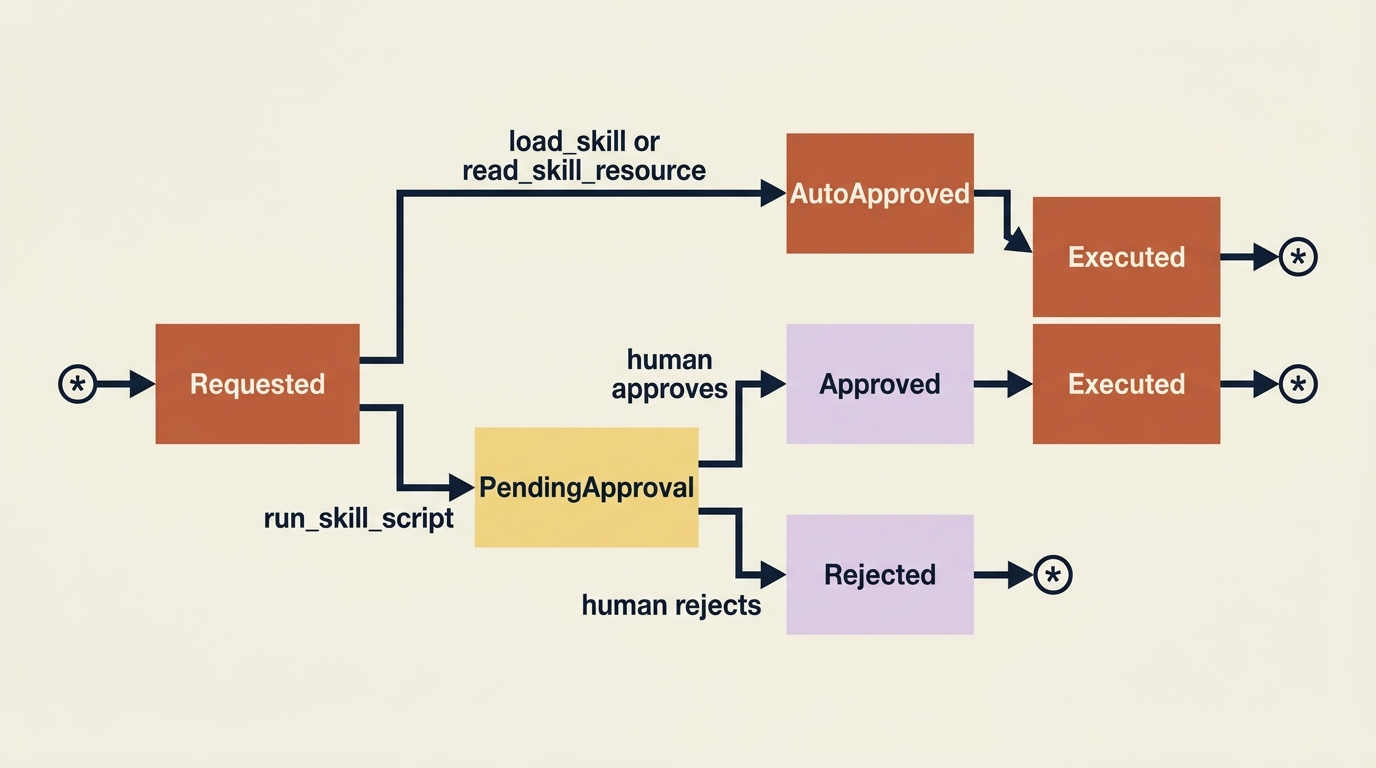
Every tool a SkillsProvider registers, load_skill, read_skill_resource, and run_skill_script, requires approval by default, the same pending-request pattern that gates a file write or a paid API call in a properly leashed agent. A run that triggers run_skill_script pauses with a user_input_requests entry instead of executing, and you resume it the standard way: collect a response for each pending request, approve or reject, and send them back in one message so the run makes progress.
Reading a template or a reference document is low risk, and asking for approval on every single load_skill call gets old fast. SkillsProvider exposes two static auto-approval rules for exactly this trade-off: read_only_tools_auto_approval_rule clears load_skill and read_skill_resource automatically while still gating run_skill_script, and all_tools_auto_approval_rule clears everything including script execution. Both rules refuse to match any call carrying a server_label, so they stay scoped to this provider's own tools and never accidentally wave through a same-named hosted tool.
For skills you trust enough to skip the approval step outright rather than auto-approve it at request time, SkillsProvider takes three matching disable flags, disable_load_skill_approval, disable_read_skill_resource_approval, and disable_run_skill_script_approval, that remove a tool from the approval flow entirely rather than approving it at runtime.
A worked example: two specialist skills on a harness agent
Here is where the pieces come together. Picture a harness-based market-research agent, the kind that already plans before researching, tracks a todo list of subtopics, and asks before writing a file or spending money on a paid lookup. Give it two skills: tech-market-research, a file-based skill carrying the domain's research conventions (source hierarchy, citation format, and a scripts/check_citations.py the agent can run against a draft), and report-template, the code-defined skill from earlier, wrapping the report's section structure. Combine them the way the previous section showed, and let the two low-risk read tools skip approval while the citation-checking script still asks:
market_research_skills = SkillsProvider(
    DeduplicatingSkillsSource(
        AggregatingSkillsSource([
            FileSkillsSource(Path(__file__).parent / "skills"),
            InMemorySkillsSource([report_template_skill]),
        ])
    ),
    disable_load_skill_approval=True,  # ①
    disable_read_skill_resource_approval=True,  # ②
    # run_skill_script (check_citations.py) still asks, every time  ③
)
① disable_load_skill_approval removes load_skill from the approval flow entirely, since discovering a skill's existence is low risk.
② disable_read_skill_resource_approval does the same for reading a resource, like the citation source-tier reference.
③ run_skill_script is left out of the disable flags on purpose, so check_citations.py still pauses for approval every time it runs.
Note: The full extracted listing at
code/microsoft_agent_framework/part-9-agent-skills/listings/03-market-research-skills-provider.py
shows this provider alongside the report_template_skill it depends on.
Wire that provider into the harness agent the same way any other context provider is wired in, through context_providers:
agent = create_harness_agent(
    client=OpenAIChatClient(),
    name="MarketResearcher",
    harness_instructions="Plan before researching. Track subtopics as todos. "
                          "Never skip approval for a write, a paid lookup, or a script run.",
    agent_instructions="You are a market research analyst who gives clear, concise answers.",
    tools=[look_up_topic, write_report_file, premium_market_data_lookup],  # ①
    context_providers=[
        ResearchMemoryProvider("quantum computing funding trends", findings_store),
        market_research_skills,
    ],  # ②
    max_context_window_tokens=128_000,  # ③
    max_output_tokens=16_384,
    disable_tool_auto_approval=True,  # every write and every paid call still asks  ④
)
① The agent's function tools carry over unchanged; skills add knowledge, not new callable actions.
② market_research_skills takes its place in context_providers right alongside ResearchMemoryProvider, the two providers the harness reads context from on every turn.
③ The context-window and output-token ceilings are ordinary budget guardrails, unaffected by adding a skills provider.
④ disable_tool_auto_approval still forces every write and every paid lookup to ask, exactly as it did before skills existed.
Note: The full extracted listing at
code/microsoft_agent_framework/part-9-agent-skills/listings/04-harness-agent-with-skills.py
shows this call in context, with the tool and provider references it depends on.
C# wires the same provider onto HarnessAgentOptions.AIContextProviders, alongside whatever other context providers the agent already has, using the AgentSkillsProviderBuilder shown earlier.
Notice a harness's own built-in, optional skills provider (configured through a simple skills_paths / AgentSkillsSource shortcut) never enters the picture here. That shortcut is for the common case of one directory and nothing else to combine. The moment you need a file-based skill and a code-defined skill living side by side, deduplicated and cached together, you build the provider yourself and hand it to context_providers instead, exactly as shown above.
Run the agent on a fresh research task and watch the discovery order play out:
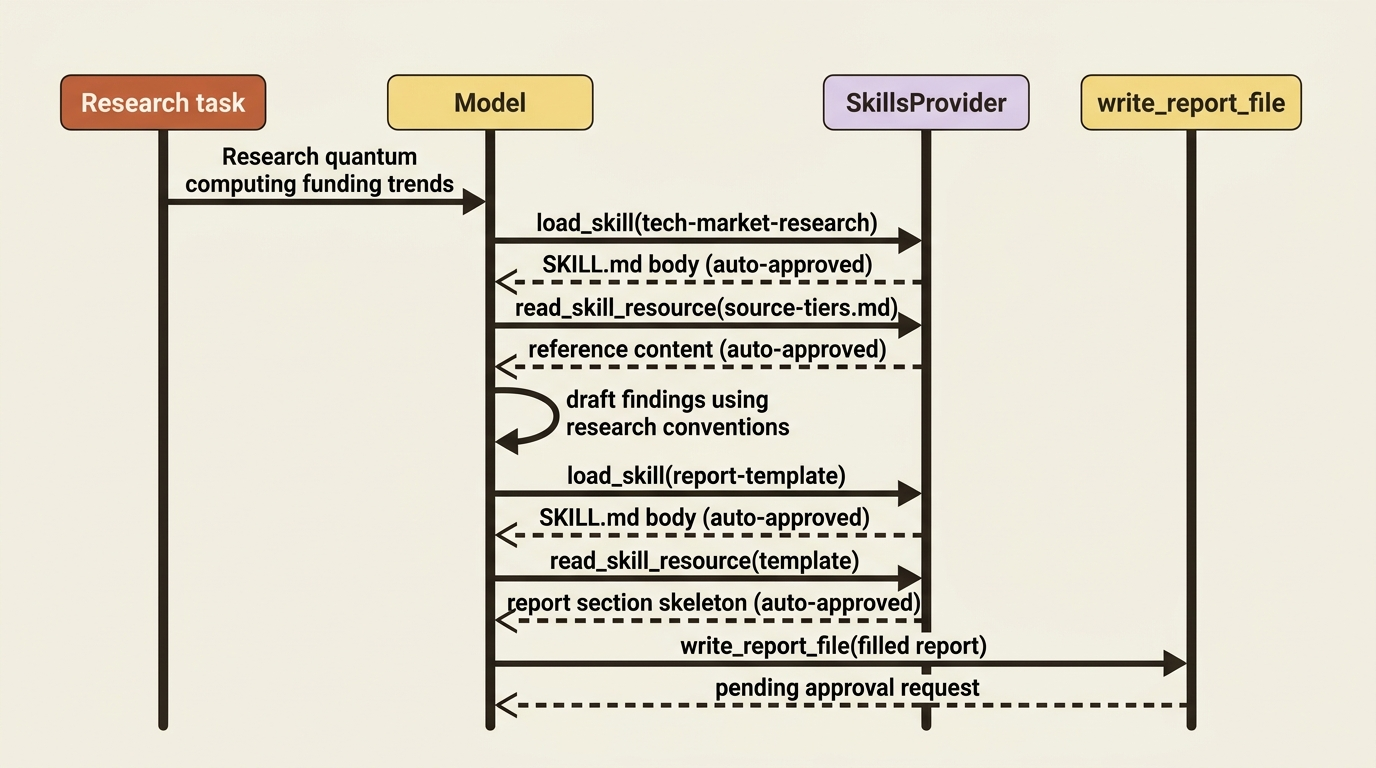
The system prompt carries two skill descriptions at roughly 100 tokens each. The model reads the task, recognizes it is a market-research question, and calls load_skill for tech-market-research, which clears instantly under the auto-approval rule. It reads source-tiers.md through read_skill_resource, also auto-approved. Later, once it has a draft, it calls load_skill for report-template, reads the template resource to get the section skeleton, and fills it in before handing the result to write_report_file, which still pauses for approval exactly as any file write would. Nothing about the file-write or paid-lookup approval story changed. What changed is that the agent now carries two domains' worth of specialized knowledge without those 5,000-plus tokens sitting in every single prompt whether the task needs them or not.
Treat skills like any other dependency
A skill's instructions get injected into the agent's context, and a skill's scripts execute code, which makes a skill exactly as trustworthy as any other third-party dependency you would pull into a project, no more and no less. Review SKILL.md, every script, and every resource before deploying a skill you did not author, and check that a script's actual behavior matches what it claims to do. Only install skills from authors or internal teams you actually trust, and watch for a skill name that is one hyphen off from a popular one. Run any skill with executable scripts in a sandboxed environment with the narrowest filesystem and network access it needs, the same demonstration-only warning a bare subprocess script runner carries. And log which skills load, which resources get read, and which scripts run, so a bad outcome traces back to specific skill content instead of a shrug.
Skills or a workflow
One more distinction is worth having: a skill and a workflow both extend what an agent can do, but they hand control to different places. With a skill, the model decides how to follow the instructions, which is what you want when the task benefits from judgment. With a workflow, you define the execution path explicitly, which is what you want when you need a guaranteed order of operations or resilience through checkpointing rather than a full retry. Reading a citation convention and filling in a report template both benefit from a model using judgment about specifics, not a fixed sequence of steps, which is why they fit the skill side of that line.
Do this today
- Write your first
SKILL.md. Name it after the directory it lives in, write a description specific enough that the agent knows when to reach for it, and keep the body under 500 lines. - Push depth into
references/. Anything longer than the core instructions belongs in a resource file the agent loads only when the instructions point it there. - Auto-approve the read-only skill tools, not the script runner. Set
disable_load_skill_approvalanddisable_read_skill_resource_approval, and leaverun_skill_scriptgated behind approval. - Wrap hand-composed sources in
DeduplicatingSkillsSourceandCachingSkillsSource. These are automatic throughfrom_paths()or a single skill instance, but not when you compose sources by hand. - Sandbox any script a skill ships. A bare subprocess runner is a demo convenience, not a production posture; give scripts the narrowest filesystem and network access they need.
The takeaway
Skills answer a context-management problem tools never solved: how an agent carries deep, domain-specific knowledge without paying for all of it on every single turn. The SKILL.md format, the four-stage progressive disclosure pattern, the four ways to source a skill, and the deduplication and caching discipline for combining them all serve one goal, keeping cost proportional to what a task actually uses.
A harness agent built this way can carry a research convention and a report template, or a dozen other specialized domains, and load each only when a task calls for it, all while still asking before it writes a file, spends money, or runs a script. That is the real payoff: not a bigger system prompt, but an agent that knows where to look.