
The Harness Trusted the Model's Plan. A Workflow Graph Does Not Have To.
A single agent's plan is a strong suggestion the model follows almost every time. A workflow graph replaces 'almost every time' with 'every time' by taking the ordering decision away from the model entirely.
Microsoft Agent Framework workflows turn a single agent's implicit plan into an explicit graph of executors and edges, so a step that has to happen stops depending on a model remembering to do it.
You trusted the model's plan, and it worked almost every time. This is what to do about the runs where it didn't.
In this article: You will learn how Microsoft Agent Framework workflows replace a single agent's plan/execute loop with a deterministic graph of executors and edges, when to reach for the graph
WorkflowBuilderAPI instead of the functional@workflowshortcut, how direct, fan-in, and conditional edges route messages, why the underlying superstep model guarantees the same execution order on every run, and how to split one agent into a researcher, a fact-checker, and a writer that a graph, not a prompt, keeps honest.
A capable agent with a todo list follows its own plan almost every time. It researches, then fact-checks, then writes, in that order, because that is the order that makes sense and the model is good at following sensible orders. Almost every time is the catch. Nothing stops the model from writing the report before it finishes checking the sources, or from skipping the citation check entirely when the todo list runs long and it decides to wrap up early. A report that ships without a fact-check because the model deprioritized a step is exactly the kind of failure a trace only explains after the fact, once the damage is already public.
Microsoft Agent Framework workflows exist for the moment a step has to happen, not just usually happen. Instead of one agent choosing its own next move, you define a graph: a fixed set of executors connected by edges, and the framework runs it the same way every time. This article builds that graph, using the same running example the rest of the series has followed: a market-research agent that has, until now, been one agent making one kind of promise.
Why a plan cannot guarantee an order
A skill hands judgment to the model. A workflow hands the execution path to you. That distinction becomes concrete the moment you actually need it. A harness agent's plan/execute loop is a strong suggestion, backed by a capable model that follows it almost all the time, but "almost all the time" is not "always."
A workflow removes the ordering decision from the model entirely. You define the graph, the framework runs it deterministically, and research always happens before fact-checking, which always happens before writing. The model still decides what to say inside each step. It never decides whether that step happens or what happens next. A useful side effect: a failing workflow report points at the researcher, the fact-checker, or the writer specifically, instead of collapsing into one aggregate score for a single agent's entire run.
Two ways to build a workflow
Agent Framework gives you two APIs for building a graph, and the trade-off is the familiar one: plain code versus an explicit structure the framework can validate and reason about.
Functional (@workflow) |
Graph (WorkflowBuilder) |
|
|---|---|---|
| Control flow | Native Python (if, loops, asyncio.gather) |
Edges and conditions |
| Best for | Sequential pipelines, custom loops, ad hoc parallelism | Fixed graphs, fan-out and fan-in, type-validated message routing |
| Parallelism | asyncio.gather |
Parallel edge groups, superstep execution |
| Human-in-the-loop | ctx.request_info() |
RequestInfoExecutor |
| Checkpointing | Per-step result caching | Superstep-boundary checkpoints |
The functional API decorates a plain async function and lets you write the pipeline as ordinary code:
from agent_framework import workflow

@workflow
async def research_pipeline(topic: str) -> str:
    findings = await research(topic)
    return await write_report(findings)
That reads like the function it is, and for a straight-line pipeline it is often the fastest way to get something running. It is marked experimental in Python, and it does not exist at all in C# or Go, which is why this chapter, and the rest of the series' advanced track, builds on the graph API instead. WorkflowBuilder is the one with full language parity and the type-validated routing a conditional branch actually needs. Keep the functional API in your back pocket for a quick, throwaway pipeline; reach for WorkflowBuilder for anything you intend to keep running.
Executors: the graph's processing units
An executor is the graph's unit of work. It receives a typed message, does something with it, and either sends a message downstream or yields an output back to the caller. In Python, you subclass Executor and mark a method with @handler:
from agent_framework import Executor, WorkflowContext, handler

class UpperCase(Executor):
    @handler
    async def to_upper_case(self, text: str, ctx: WorkflowContext[str]) -> None:
        await ctx.send_message(text.upper())
C# uses a [MessageHandler] attribute on a method inside a partial class deriving from Executor instead, compiled with source generation for performance and Native AOT compatibility. For a one-off transformation, both languages skip the class entirely: Python's @executor decorator and C#'s BindExecutor extension method turn a plain function into an executor with no boilerplate.
Every handler receives a WorkflowContext (IWorkflowContext in C#), and that object is the two-way door into the graph. send_message forwards a message to whatever is connected downstream. yield_output produces a result the caller actually sees. None of this needs to be written by hand for an AI agent. The moment you pass a plain agent to WorkflowBuilder, the framework wraps it in an AgentExecutor automatically, forwarding its response downstream and, in Python, including the full upstream conversation by default, so nothing gets lost when a message crosses from one agent to the next.
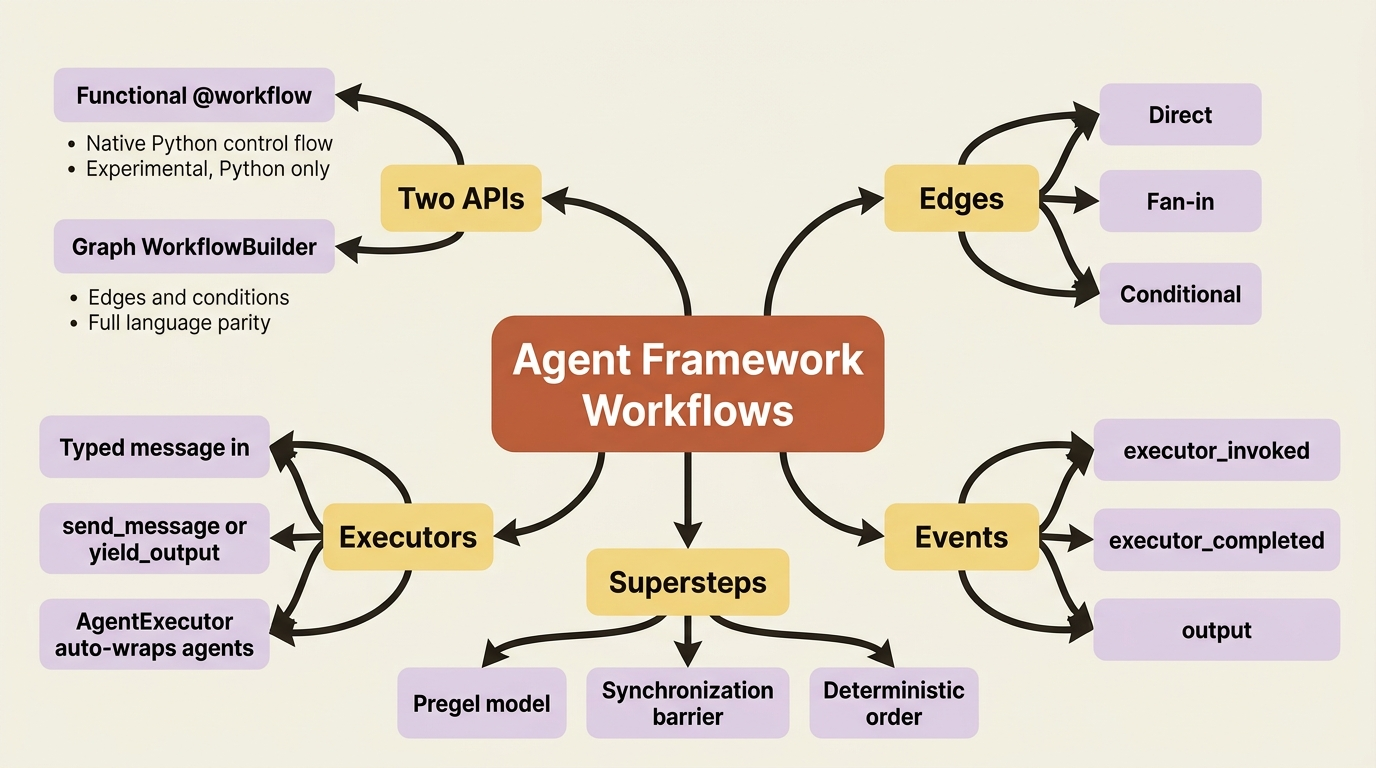
Edges: direct, fan-in, and conditional routing
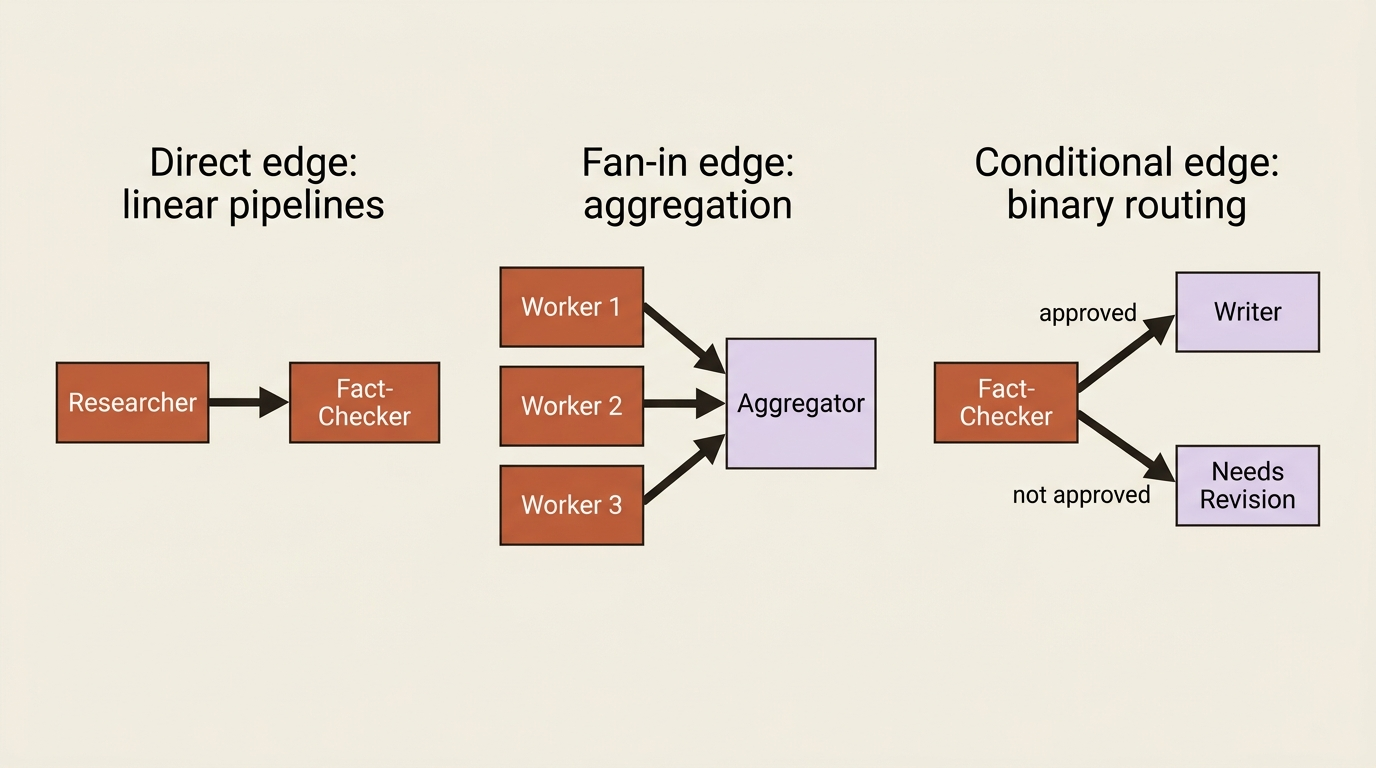
Edges are the graph's wiring. The framework supports several patterns, but three cover almost everything you will reach for.
| Type | Description | Use case |
|---|---|---|
| Direct | Simple one-to-one connection | Linear pipelines |
| Fan-in | Multiple executors sending to a single target | Aggregation |
| Conditional | Routes based on message content | Binary routing (if/else) |
A direct edge is the one you will use most, and it looks like exactly what it is:
builder = WorkflowBuilder(start_executor=researcher)
builder.add_edge(researcher, fact_checker)
Fan-in edges collect from several sources into one target. You reach for one the moment two agents research independent subtopics in parallel and need their findings combined before a single writer sees them:
builder.add_fan_in_edges([worker1, worker2, worker3], aggregator_executor)
A conditional edge carries a predicate, a plain function that inspects a message and returns True or False, and the edge fires only when the predicate passes. That is the piece a fact-checker needs: route to the writer when the check passes, route somewhere else when it does not.
Events and supersteps: watching a deterministic run happen
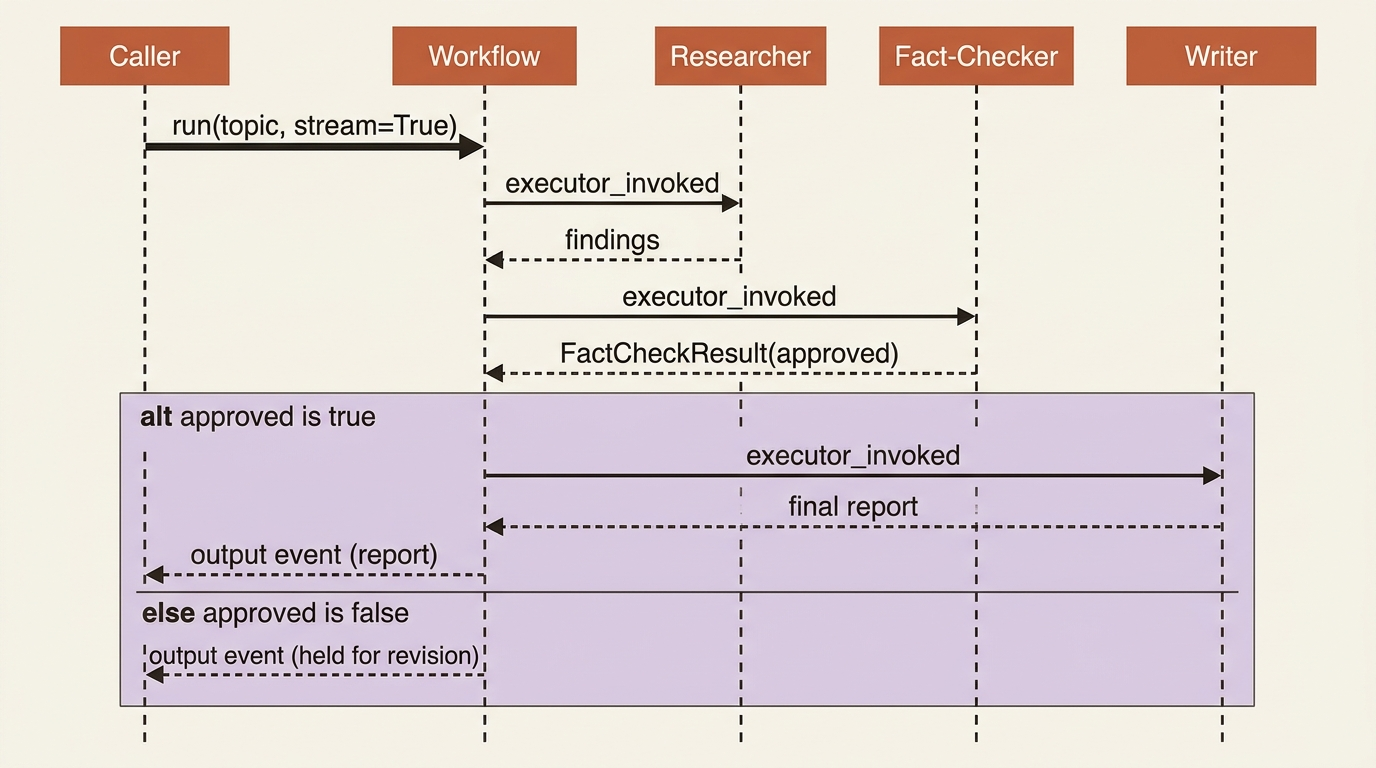
Every workflow run streams events as it executes. C# gives distinct event types you pattern-match against, ExecutorInvokedEvent, ExecutorCompletedEvent, WorkflowOutputEvent, and more. Python collapses these into one WorkflowEvent class with a type string discriminator, so you check event.type == "output" instead of an isinstance check:
async for event in workflow.run(input_message, stream=True):
    if event.type == "executor_invoked":
        print(f"Starting {event.executor_id}")
    elif event.type == "output":
        print(f"Terminal output: {event.data}")
Under the hood, a workflow runs on a modified Pregel model, a Bulk Synchronous Parallel approach organized into discrete supersteps. Each superstep collects every pending message, routes it to the right executor by edge and type, runs every targeted executor concurrently, and then waits at a synchronization barrier until all of them finish before the next superstep starts. That barrier is what makes execution deterministic: given the same input, the graph always processes messages in the same order, which is exactly the property that makes checkpointing at a superstep boundary reliable rather than a guess about what state was mid-flight.
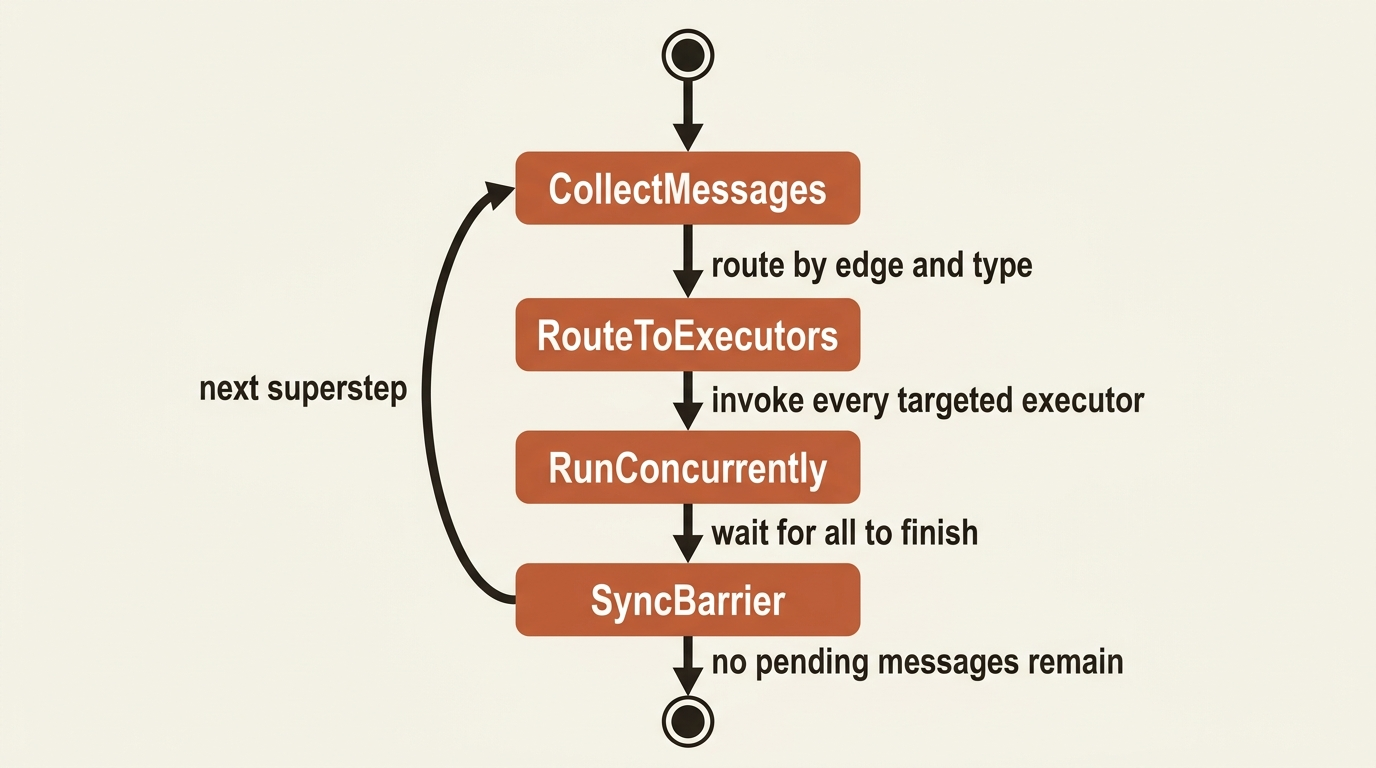
Gotcha: the synchronization barrier applies even when a fan-out splits work across paths of very different lengths. If one path is a single long-running executor and another is a chain of three quick ones, the whole superstep waits for the slow path before either advances further. A workflow with wildly uneven parallel branches is slower than it looks, and the fix, when it matters, is consolidating a chain into one executor rather than three chained ones.
Splitting the market-research agent into three
The market-research agent's job has always had three distinct concerns: gather findings, verify them, and write them up. A citation-check script already existed as a self-check the agent ran against its own draft, gated behind the same approval discipline as every other script. That self-check was always a slightly odd fit for a single agent: the researcher and the fact-checker were the same model context, so "check your own work" carried less weight than a second, independent pass would.
A workflow fixes that fit exactly. Instead of one agent plodding through plan, research, self-check, and write, the graph splits those concerns into three focused agents: a researcher that gathers findings, a fact-checker whose entire job is running the citation check against those findings, and a writer that turns an approved set of findings into the final report. None of them need to be harness agents. The plan/execute loop existed to give a single agent an implicit sense of order. The workflow graph gives three agents an explicit one, so each agent only needs the pieces its own job actually requires.
The researcher keeps the tools and memory built for it earlier in the series: a general-purpose lookup tool, a premium data lookup gated behind approval_mode="always_require", and a memory provider so it remembers prior findings on the same topic:
from agent_framework import Agent
from agent_framework.openai import OpenAIChatClient

researcher = Agent(
    client=OpenAIChatClient(),
    name="Researcher",
    instructions=(
        "Research the given topic using look_up_topic for general findings. "
        "Use premium_market_data_lookup only when free sources are insufficient."
    ),
    tools=[look_up_topic, premium_market_data_lookup],
    context_providers=[ResearchMemoryProvider("quantum computing funding trends", findings_store)],
)
The fact-checker is new, and its instructions point directly at the existing citation-check script. It returns a small structured verdict instead of prose, which is what lets the graph route on its answer:
from pydantic import BaseModel

class FactCheckResult(BaseModel):  # ①
    approved: bool
    notes: str

fact_checker = Agent(
    client=OpenAIChatClient(),
    name="FactChecker",
    instructions=(
        "Load the tech-market-research skill and run check_citations.py against the "  # ②
        "researcher's findings. Return JSON with 'approved' and 'notes'."
    ),
    context_providers=[market_research_skills],  # ③
    default_options={"response_format": FactCheckResult},  # ④
)
① FactCheckResult is a small Pydantic model, not prose, so it gives the graph a machine-checkable verdict, approved, instead of free text a router would have to parse.
② The instructions point at the exact script already written, check_citations.py, so the fact-checker's whole job is running that check, not judging the research itself.
③ market_research_skills is the same SkillsProvider built earlier in the series, which is how the fact-checker finds check_citations.py in the first place.
④ response_format=FactCheckResult forces the model to answer in the schema from ①, which is what lets the routing condition below parse result.approved without guessing at free text.
Note: The full extracted listing at
code/microsoft_agent_framework/part-11-workflows-fundamentals/listings/01-fact-checker-verdict.py
shows the imports elided here.
The writer reuses the same market_research_skills provider for a report-template skill and keeps the approval-gated file-writing tool built earlier:
writer = Agent(
    client=OpenAIChatClient(),
    name="Writer",
    instructions=(
        "Load the report-template skill and write the final report from the researcher's "
        "findings and the fact-checker's notes, then save it with write_report_file."
    ),
    tools=[write_report_file],
    context_providers=[market_research_skills],
)
market_research_skills here is the exact SkillsProvider built earlier, load and read auto-approved, run_skill_script still gated. Nothing about that provider changes for either agent using it.
Wiring them into a first graph
The condition that routes around the fact-checker's verdict follows a common shape: a predicate that checks the upstream AgentExecutorResponse, parses its structured output, and compares it against the expected value.
from typing import Any

def get_condition(expected_approval: bool):  # ①
    def condition(message: Any) -> bool:
        if not isinstance(message, AgentExecutorResponse):  # ②
            return True
        try:
            result = FactCheckResult.model_validate_json(message.agent_response.text)  # ③
            return result.approved == expected_approval
        except Exception:  # ④
            return False
    return condition
① get_condition is a factory: calling it with True builds the writer's edge condition and calling it with False builds the revision edge's condition, from the same logic.
② A message that is not a fact-checker response passes through unblocked, so the condition never accidentally stalls an unrelated message type.
③ The message text is parsed back into the FactCheckResult schema from the fact-checker's response_format, giving the condition a typed approved field to compare against.
④ A parse failure returns False rather than raising, so a malformed verdict fails closed and routes toward needs_revision instead of silently reaching the writer.
Note: The full extracted listing at
code/microsoft_agent_framework/part-11-workflows-fundamentals/listings/02-routing-condition.py
shows the surrounding imports elided here.
A report that fails the check needs somewhere to go besides the writer, so a small function-based executor yields an output that flags the report for a human instead of silently dropping it:
from typing_extensions import Never
from agent_framework import executor, WorkflowContext, AgentExecutorResponse

@executor(id="needs_revision")
async def needs_revision(response: AgentExecutorResponse, ctx: WorkflowContext[Never, str]) -> None:
    result = FactCheckResult.model_validate_json(response.agent_response.text)
    await ctx.yield_output(f"Report held for revision: {result.notes}")
With the agents, the condition, and the revision handler in place, building the graph is three edges:
from agent_framework import WorkflowBuilder

workflow = (
    WorkflowBuilder(start_executor=researcher)  # ①
    .add_edge(researcher, fact_checker)  # ②
    .add_edge(fact_checker, writer, condition=get_condition(True))  # ③
    .add_edge(fact_checker, needs_revision, condition=get_condition(False))  # ④
    .build()
)

result = await workflow.run("Research quantum computing funding trends and write the report.")  # ⑤
print(result.text)
① start_executor=researcher fixes the graph's single entry point, so the researcher runs first every run, with no model choosing to skip ahead.
② The direct edge to fact_checker fires unconditionally after the researcher's turn.
③ This conditional edge only fires when get_condition(True) finds approved on the verdict, sending approved findings on to the writer.
④ This conditional edge only fires when get_condition(False) finds the opposite verdict, routing a failed check to needs_revision instead of the writer; together with
③ the two conditions are mutually exclusive because they compare against opposite expected values.
⑤ Running the built graph starts the superstep loop described earlier; the model never decides which edge to take, the condition functions already resolved that.
Note: The full extracted listing at
code/microsoft_agent_framework/part-11-workflows-fundamentals/listings/03-wire-workflow-graph.py
ties this wiring together with the researcher, fact-checker, and writer agents
built earlier in the chapter.
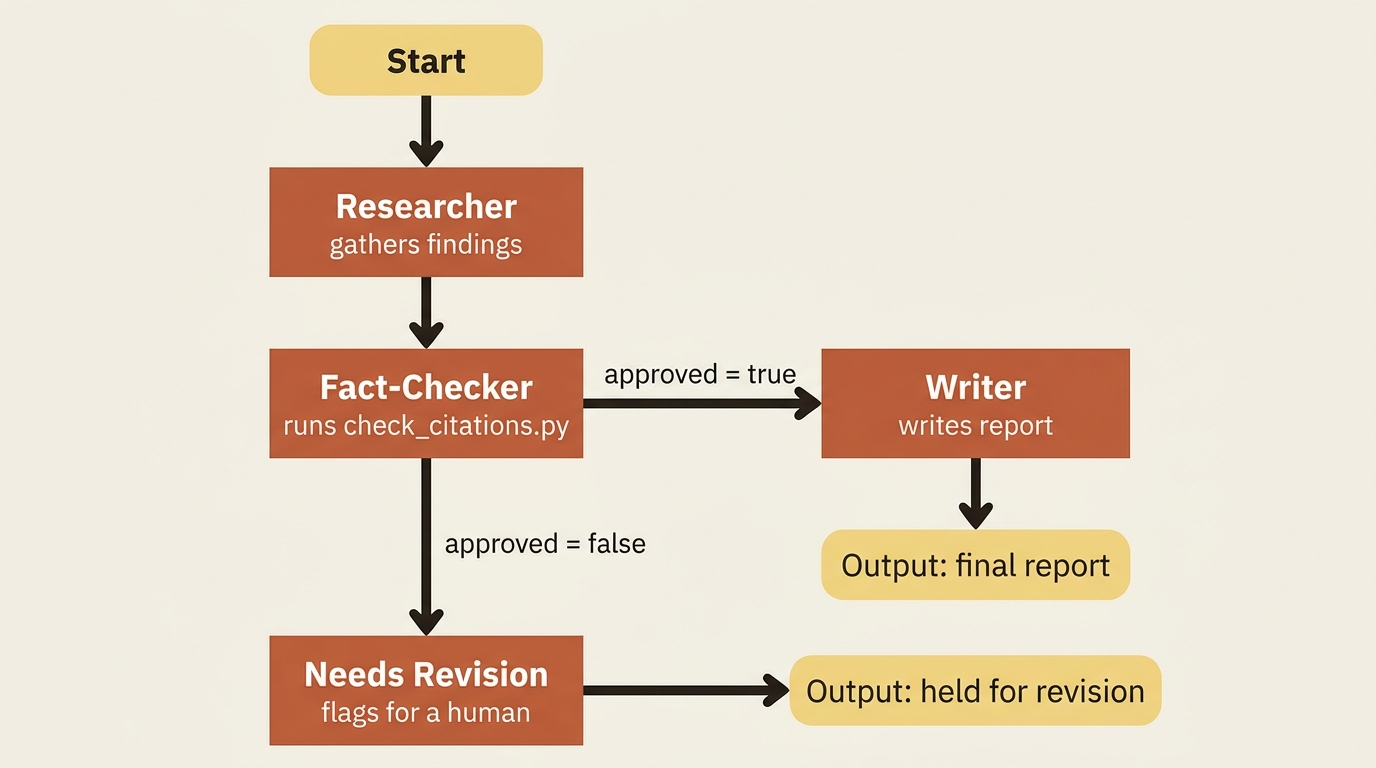
Run that, and the researcher goes first, always. The fact-checker runs next, always, and it is the one and only agent deciding whether the writer ever sees the findings at all. Nothing about this graph depends on the model remembering to check its own work, because the model writing the report is a different agent context from the model that approved it. Streamed as events, one run looks like this: an executor_invoked event when the researcher starts, another when the fact-checker starts, and a final output event once the writer, or on a failed check, the revision handler, yields its result.
Tool approval still applies inside a graph exactly as it did for a single agent. run_skill_script still requires approval, so the fact-checker's turn pauses mid-workflow the first time it calls check_citations.py, the same way a standalone agent's turn used to pause for a file-writing tool. A workflow does not bypass tool approval. It just means the pending request now belongs to one executor's turn inside a graph instead of one agent's whole run.
One thing does not carry over automatically: any middleware attached earlier in the series, an insider-information guard and a run-logging wrapper, was middleware on a single Agent. Splitting into three separate agents means each one needs middleware attached individually to keep the same protection, and the researcher, fact-checker, and writer built above do not have it yet. That is a deliberate simplification for this chapter, not a framework limitation: middleware attaches at agent construction the same way it always has, so restoring the guard means wrapping each of the three agents with it again, three times instead of once. Treat this graph as currently missing the guard it had as a single agent, not as having quietly kept it.
Do this today
- Draw the graph before you write the code. List the concerns your single agent currently juggles, and circle the ones that must happen in a fixed order. That circled list is your executor set.
- Reach for
WorkflowBuilder, not the functional API, for anything you intend to keep running. Reserve@workflowfor a quick, throwaway pipeline you will not maintain. - Give a routing agent a structured response format. A Pydantic model with a boolean verdict is what makes a conditional edge's predicate reliable instead of a guess at free text.
- Fail closed in your condition functions. A parse failure or unexpected message type should return
Falseand route toward a safe fallback, not raise or default toward approval. - Re-attach any middleware you had on the single agent. Splitting one agent into a graph of specialists does not carry guardrails over automatically. Wrap each new agent the same way you wrapped the original.
The takeaway
A workflow trades a model's judgment about ordering for a graph you defined yourself, and that trade is worth making the moment a step has to happen, not just usually happen. Executors are the processing units, edges are the wiring, and the superstep model underneath both guarantees the same deterministic order on every run. That determinism is what makes checkpointing a long-running graph trustworthy in the first place, rather than a guess about what state was mid-flight when it crashed.
The market-research agent is no longer one agent. It is a graph: a researcher that gathers findings with the same memory and tools it always had, a fact-checker whose only job is running the citation check and returning a verdict, and a writer that only ever sees findings the fact-checker actually approved. The plan/execute loop that used to hold this together implicitly is gone, replaced by three edges that hold it together explicitly. A failed fact-check now produces a visible, routed output instead of a report that might have skipped its own citation check and shipped anyway.