
Your AI Workflow Crashed Right Before a Human Approved It. Now What?
A multi-agent workflow earns trust the same way a single agent's session does: by making every pause reconstructable. This part shows the request/response mechanism behind every human-in-the-loop gate, how checkpoints capture a superstep completely enough to resume from, and the state-isolation trap that leaks one run's findings into another's.
Microsoft Agent Framework gives a multi-agent workflow the same durability a single agent's session gets: a pause it can resume from, a human veto it never forgets, and state that never leaks between runs.
Your multi-hour research workflow crashes the moment a human is about to approve the final report. Does it start over, or does it pick up exactly where it left off?
In this article: You will learn the one mechanism,
ctx.request_info(), behind every pause a workflow can take, then wire a human approval gate onto a report a researcher-fact-checker-writer trio produced. From there you will see what a checkpoint actually captures, when it is captured, and how to resume a crashed run from exactly where it stopped, pending questions included. You will also see the isolation trap that lets one workflow run leak findings into another, and the fix.
A workflow that coordinates three agents against real tools and real spend cannot afford to lose its place. Ask it to research a topic, fact-check the findings, and write a report, and somewhere in that chain a human needs to sign off before anything ships. That approval might come back in thirty seconds. It might come back in six hours, after the process that started the run has been restarted twice.
Most demos never test that gap. They run start to finish in one process, on one machine, without interruption, and the human-in-the-loop step is a print() and an input() call away from the model that generated it. Production does not work that way. A workflow needs to survive the pause itself: the graph has to remember not just what the agents said, but exactly where execution stopped and what it was waiting to hear back.
Here is how Microsoft Agent Framework builds that durability into a workflow: one request/response mechanism, one checkpoint model, and one discipline for keeping shared state from crossing between runs that have nothing to do with each other.
Every pause is the same mechanism
Every tool-approval pause you have ever handled is a specific case of something more general. An executor in a workflow can send a request to anything outside the graph and wait for a response before continuing, and a human approving a risky action is just the most common reason to do it.
In Python, an executor calls ctx.request_info() to send the request, and a method decorated with @response_handler picks up the answer once it arrives:
from dataclasses import dataclass
from agent_framework import Executor, WorkflowContext, handler, response_handler


@dataclass
class NumberSignal:
    hint: str  # "above" or "below"


class JudgeExecutor(Executor):
    @handler
    async def handle_guess(self, guess: int, ctx: WorkflowContext[int, str]) -> None:
        if guess < self.target:
            await ctx.request_info(request_data=NumberSignal(hint="below"), response_type=int)  # ①

    @response_handler  # ②
    async def on_human_response(
        self, original_request: NumberSignal, response: int, ctx: WorkflowContext[int, str]
    ) -> None:
        await self.handle_guess(response, ctx)  # ③
① ctx.request_info() sends the request and pauses this executor until a matching response arrives from outside the graph.
② @response_handler marks the method the framework calls once a response of the matching type comes back in.
③ The response feeds straight back into the same guess-handling logic, closing the loop between the request and its answer.
Note: The full extracted listing at code/microsoft_agent_framework/part-13-human-in-the-loop-checkpoints-and-state/listings/01-judge-executor.py shows the complete module with imports.
Calling ctx.request_info() emits a WorkflowEvent with type == "request_info", and the framework matches the response you send back to the correct @response_handler method by type. Tool approval already uses this exact mechanism under the hood. When an agent calls a tool wrapped with approval_mode="always_require", the pause arrives as a request_info event too, just carrying a function_approval_request payload instead of a request type you defined yourself.
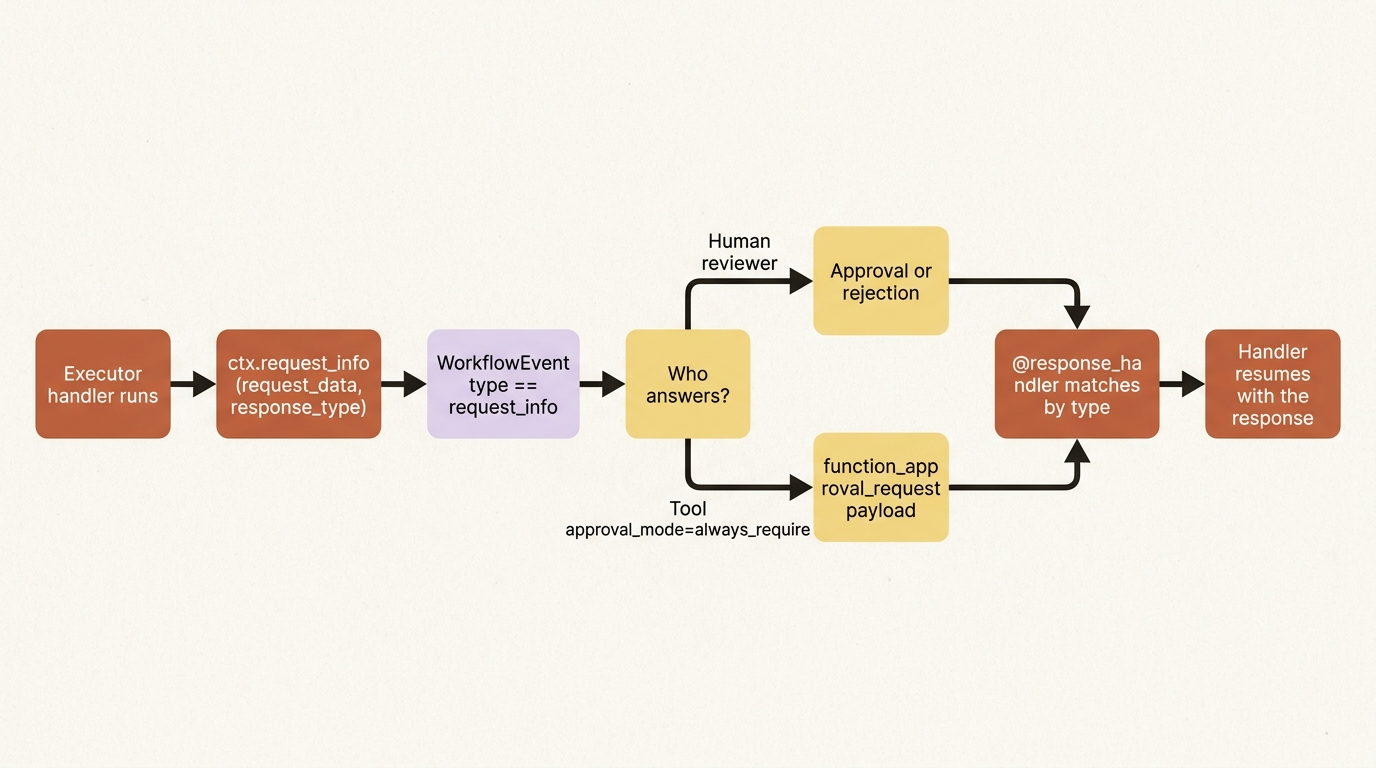
Tool approval gates one function call. A ReportApprovalGate gates the whole report.
Wiring a human approval gate onto the final report
Tool approval already covers the writer's write_report_file call, but that only asks "is it safe to run this function," not "is this report actually good enough to ship." Those are different questions, and the fact-checker's own approval does not answer the second one either: it verifies citations, not whether a human wants this specific report out the door.
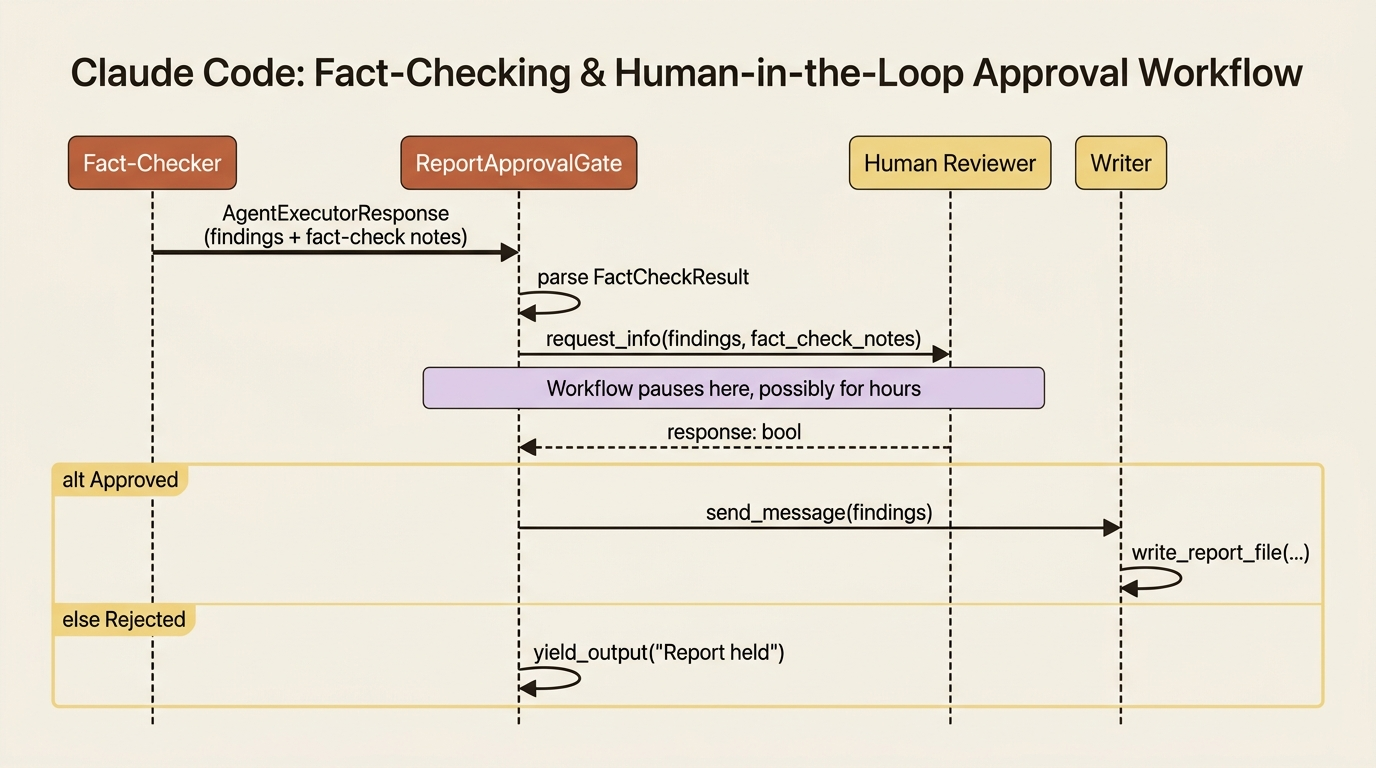
A ReportApprovalGate executor sits between the fact-checker and the writer and asks that question directly:
from dataclasses import dataclass
from agent_framework import AgentExecutorResponse, Executor, WorkflowContext, handler, response_handler


@dataclass
class ReportReadyForReview:
    findings: str
    fact_check_notes: str


class ReportApprovalGate(Executor):
    def __init__(self):
        super().__init__(id="report_approval_gate")

    @handler
    async def request_approval(self, response: AgentExecutorResponse, ctx: WorkflowContext[str, str]) -> None:
        result = FactCheckResult.model_validate_json(response.agent_response.text)  # ①
        await ctx.request_info(
            request_data=ReportReadyForReview(findings=response.agent_response.text, fact_check_notes=result.notes),
            response_type=bool,
        )  # ②

    @response_handler
    async def on_decision(
        self, original_request: ReportReadyForReview, response: bool, ctx: WorkflowContext[str, str]
    ) -> None:
        if response:
            await ctx.send_message(original_request.findings)  # ③
        else:
            await ctx.yield_output("Report held: a human reviewer declined to approve publishing.")  # ④
① The fact-checker's structured verdict is parsed back out of the upstream agent response before the gate asks anything.
② The gate pauses here, sending the findings and the fact-check notes and waiting on a boolean approval from outside the graph.
③ An approval forwards the findings to whatever is wired downstream, which is the writer.
④ A rejection ends the run right here, so an unapproved report never reaches a step that could save it to disk.
Note: The full extracted listing at code/microsoft_agent_framework/part-13-human-in-the-loop-checkpoints-and-state/listings/02-report-approval-gate.py shows the complete module with imports.
Driving that gate looks like the request-response loop behind every human-in-the-loop workflow: run the graph, collect any request_info events, get an answer, and resume with the responses.
async def drain_requests(stream) -> dict[str, bool] | None:
    requests: list[tuple[str, ReportReadyForReview]] = []
    async for event in stream:
        if event.type == "request_info":
            requests.append((event.request_id, event.data))  # ①
        elif event.type == "output":
            print(event.data)  # ②
    if not requests:
        return None  # ③
    return {
        request_id: input(f"Fact-checker notes: {req.fact_check_notes}\nApprove for publishing? [y/N] ").lower() == "y"
        for request_id, req in requests
    }  # ④
① Every pending request_info event is collected by its request ID so a response can be routed back to the right one.
② An output event means the workflow reached a terminal state, so its payload gets printed instead of collected.
③ No pending requests means the run finished on its own, and the caller's while loop can stop.
④ Each pending request gets its own prompt, and the resulting dict, keyed by request ID, is exactly the shape workflow.run(responses=...) expects back.
Note: The full extracted listing at code/microsoft_agent_framework/part-13-human-in-the-loop-checkpoints-and-state/listings/03-drain-requests.py shows the complete module.
stream = workflow.run("Research quantum computing funding trends and write the report.", stream=True)
pending = await drain_requests(stream)
while pending is not None:
    stream = workflow.run(stream=True, responses=pending)
    pending = await drain_requests(stream)
A False response short-circuits the whole run without ever invoking the writer, so an unapproved report never reaches a step that could save it to disk. Approve it, and the gate forwards the findings to the writer exactly as if the fact-checker had connected to it directly.
Checkpoints: what gets captured, and when
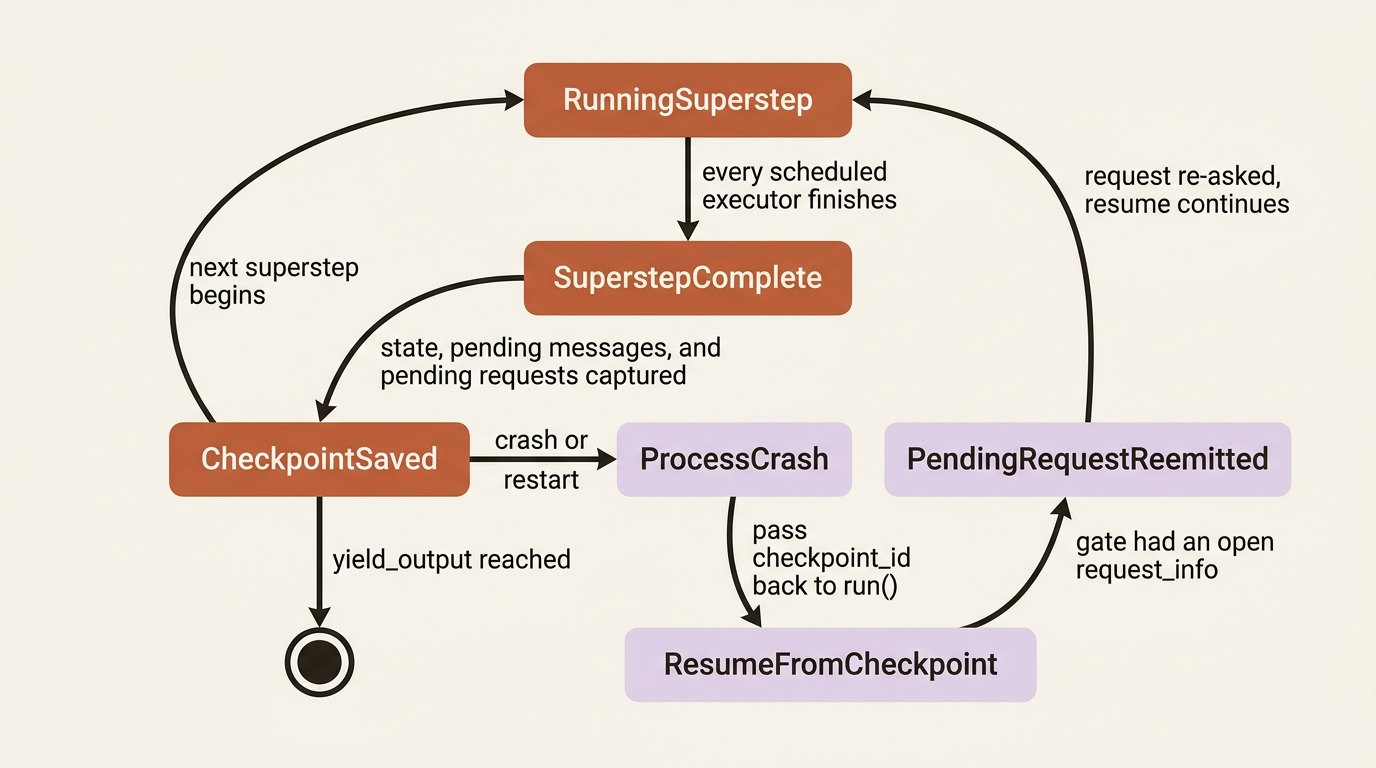
Workflows run in supersteps, and a checkpoint is captured at the end of each one, once every executor scheduled for that superstep has finished. A checkpoint captures the entire state of the graph at that boundary: the current state of every executor, all pending messages queued for the next superstep, any pending requests and responses (including the approval gate's pending question), and shared state. That is what makes resuming from a checkpoint meaningful instead of a guess: the framework only ever hands you back a point where every in-flight step had actually completed.
Enabling checkpointing means handing the builder a storage backend. Agent Framework ships three:
| Provider | Package | Durability | Best for |
|---|---|---|---|
InMemoryCheckpointStorage |
agent-framework |
In-process only | Tests, demos, short-lived workflows |
FileCheckpointStorage |
agent-framework |
Local disk | Single-machine workflows, local development |
CosmosCheckpointStorage |
agent-framework-azure-cosmos |
Azure Cosmos DB | Production, distributed, cross-process workflows |
The table breaks down to three concrete choices. InMemoryCheckpointStorage ships in the base package, keeps checkpoints in process memory, and fits tests, demos, and short-lived workflows where durability across a restart does not matter. FileCheckpointStorage also ships in the base package, persists checkpoints to local disk, and fits single-machine workflows and local development that need to survive a process restart. CosmosCheckpointStorage ships in the separate agent-framework-azure-cosmos package, persists to Azure Cosmos DB, and fits production and distributed workflows that need durable, cross-process checkpointing. All three implement the same protocol, so swapping one for another never touches workflow or executor code:
from agent_framework import FileCheckpointStorage, WorkflowBuilder

checkpoint_storage = FileCheckpointStorage("/var/lib/agent-framework/checkpoints")  # ①

workflow = (
    WorkflowBuilder(start_executor=researcher, checkpoint_storage=checkpoint_storage)  # ②
    .add_edge(researcher, fact_checker)
    .add_edge(fact_checker, report_gate, condition=get_condition(True))  # ③
    .add_edge(fact_checker, needs_revision, condition=get_condition(False))
    .add_edge(report_gate, writer)  # ④
    .build()
)
① The storage backend is a plain object; nothing about the graph below needs to know which of the three providers it is.
② Passing checkpoint_storage to the builder is the only change needed to make every superstep boundary in this graph checkpointed.
③ Only a report the fact-checker approved reaches the new report_gate, the same conditional edge shape used for the writer earlier in the series.
④ The gate's own approval or rejection, not the fact-checker's, decides whether the writer ever runs.
Note: The full extracted listing at code/microsoft_agent_framework/part-13-human-in-the-loop-checkpoints-and-state/listings/04-checkpoint-storage-workflow.py shows the complete module.
Resuming picks up on the same workflow instance by passing the checkpoint you want back in:
checkpoints = await checkpoint_storage.list_checkpoints(workflow_name=workflow.name)
async for event in workflow.run(checkpoint_id=checkpoints[-1].checkpoint_id, stream=True):
    ...
Or rehydrate into a brand-new instance built from the same graph, which is what you need after a process restart, when the original workflow object no longer exists:
new_workflow = builder.build()
async for event in new_workflow.run(
    checkpoint_id=checkpoints[-1].checkpoint_id,
    checkpoint_storage=checkpoint_storage,
    stream=True,
):
    ...
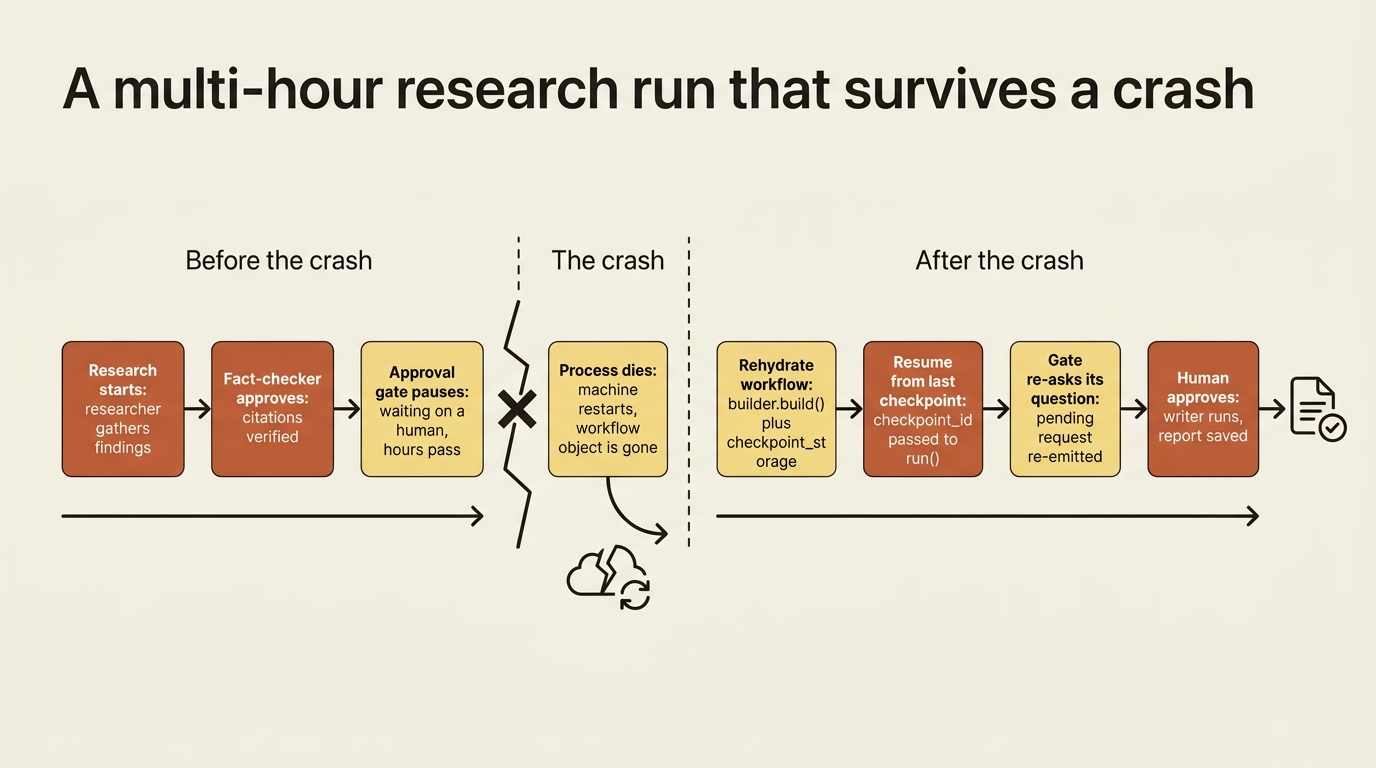
If a checkpoint is restored while ReportApprovalGate had a pending request, that request is re-emitted as a request_info event on the next run, exactly like the first time it fired. You can also resume and answer in the same call by passing both checkpoint_id and responses to workflow.run(), skipping the extra round trip when you already know the answer.
That is the concrete payoff of this whole chapter: a multi-hour research run can crash after the fact-checker approves but before a human signs off on the final report, and restarting the process does not lose the approval gate's pending question. It re-asks it.
In production: checkpoint storage is a trust boundary, not just a durability knob. FileCheckpointStorage and CosmosCheckpointStorage use Python's pickle module to serialize non-JSON-native state, and both restrict deserialization to a built-in safe-type allowlist plus anything you explicitly add through allowed_checkpoint_types. Never point either at storage an untrusted process can write to, and never load a checkpoint from a source you do not control. If your threat model rules out pickle entirely, InMemoryCheckpointStorage sidesteps the question, or you write a custom CheckpointStorage with your own serialization.
C# and Go readers get a third lever Python does not expose: an explicit execution mode. InProcessExecution.OffThread, the default, streams events as they are raised on a background thread. InProcessExecution.Lockstep runs supersteps on the caller's thread and batches events per superstep, which is what you would reach for in a test that needs deterministic event ordering. Python's single execution model already behaves like Lockstep; steps do not advance until you are actively pulling events from the stream, so there is no separate mode to choose.
Where a checkpoint boundary comes from
A checkpoint is only trustworthy because of what a superstep guarantees: every executor scheduled for that step has run to completion before the boundary closes. That guarantee is also what makes workflow state safe to read, most of the time.
Beyond messages passed along edges, executors can share data through workflow state. In Python, ctx.set_state() writes a value and ctx.get_state() reads it back, keyed by whatever name you pick, consistently, across the executors that need to see it:
ctx.set_state("response", blanket_response)
final_response = ctx.get_state("response")
Visibility follows the same superstep rules as everything else in the graph: the executor that writes a value can read it back immediately, in the same handler call, but any other executor only sees that update starting in the next superstep. That is not a bug to work around. It is the same synchronization barrier that makes the whole graph deterministic.
The isolation trap: a shared builder, a shared workflow instance
Gotcha: a WorkflowBuilder is mutable, but the Workflow it produces is not, and that distinction has a sharp edge. Reusing a single built workflow instance across multiple concurrent runs shares state and executor instances between those runs. That is a whole graph's worth of findings crossing between unrelated tasks, not a session leaking a stray message. If your executors were created once and captured by a builder, those same instances are shared by every workflow that builder produces.
The fix is a helper method that builds a fresh set of executors and a fresh workflow on every call:
def create_workflow() -> "Workflow":
    """Each call produces independent executor instances and an independent workflow."""
    researcher = Agent(client=OpenAIChatClient(), name="Researcher", tools=[look_up_topic])  # ①
    fact_checker = Agent(client=OpenAIChatClient(), name="FactChecker", default_options={"response_format": FactCheckResult})
    return (
        WorkflowBuilder(start_executor=researcher)
        .add_edge(researcher, fact_checker)
        .build()
    )  # ②

workflow_a = create_workflow()  # ③
workflow_b = create_workflow()
① Both agents are constructed inside the function body, so a call never reuses an object another call already built.
② The graph is built fresh and returned rather than cached on the function or on some shared instance.
③ Two calls to the same helper give workflow_a and workflow_b completely independent executors and state, the fix for the reuse trap described above.
Note: The full extracted listing at code/microsoft_agent_framework/part-13-human-in-the-loop-checkpoints-and-state/listings/05-create-workflow.py shows the complete module with imports.
Agent state has the same trap. Each agent in a workflow gets its own thread by default, and that thread persists across runs of the same workflow instance, which is exactly what you want within one task and exactly what you do not want across two unrelated ones. Wrap agent creation in the same helper method as the workflow that uses them, and every call gets agents with fresh threads instead of ones still carrying the last task's conversation.
C# and Go readers have a second option Python does not: implementing IResettableExecutor (ResetFunc in Go) so a shared, expensive-to-construct executor instance can be cleared between runs instead of rebuilt from scratch every time. That interface does not exist in Python. If you need to reuse executor instances across runs in Python, for example because a workflow gets wrapped as a reusable agent, the helper-method pattern above is the whole answer: build fresh instances per call rather than resetting shared ones.
Three composition tools worth knowing
Chaining a concurrent research stage into the same pipeline that runs the fact-checker and writer is a composition question, and Agent Framework gives you three tools for it.
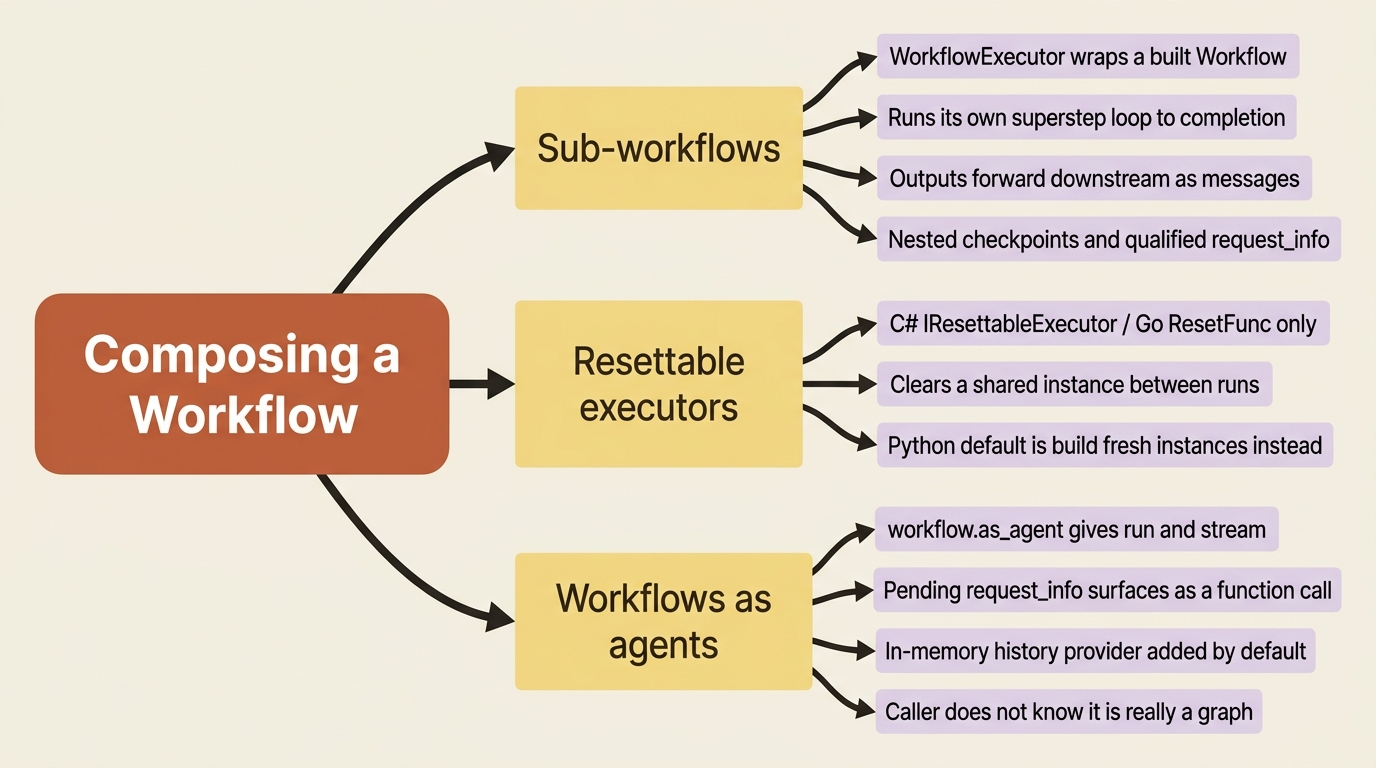
Sub-workflows. Wrap a built Workflow in a WorkflowExecutor and it behaves like any other executor in a parent graph: it takes input, runs its own internal superstep loop to completion, and forwards its output downstream. That is exactly the shape needed to fold a concurrent-subtopics research stage, several subtopic researchers fanned out and aggregated into one response, into the sequential pipeline that already runs the fact-checker and writer:
from agent_framework import WorkflowExecutor

concurrent_research_executor = WorkflowExecutor(workflow=concurrent_research, id="concurrent_research")  # ①

workflow = (
    WorkflowBuilder(start_executor=concurrent_research_executor, checkpoint_storage=checkpoint_storage)  # ②
    .add_edge(concurrent_research_executor, fact_checker)  # ③
    .add_edge(fact_checker, report_gate, condition=get_condition(True))
    .add_edge(fact_checker, needs_revision, condition=get_condition(False))
    .add_edge(report_gate, writer)
    .build()
)
① Wrapping the already-built concurrent_research workflow in a WorkflowExecutor makes the whole sub-graph behave like any other single executor to its parent.
② The wrapped sub-workflow becomes the parent graph's start node, exactly where a single researcher agent would sit in a simpler graph.
③ The fact-checker receives the sub-workflow's aggregated output the same way it would receive a single researcher's response, with no special-case wiring needed.
Note: The full extracted listing at code/microsoft_agent_framework/part-13-human-in-the-loop-checkpoints-and-state/listings/06-workflow-executor-subworkflow.py shows the complete module.
By default, a sub-workflow's outputs are forwarded as messages to whatever is connected downstream, not yielded straight to the caller, which is exactly what lets aggregated concurrent research feed the fact-checker without extra glue code. The sub-workflow's internal state, several researcher agents each with their own thread, stays fully isolated from the parent graph. Sub-workflows also carry pending requests through the same request_info mechanism, qualified with the sub-workflow's ID so a response routes back to the right nested instance, and they support checkpointing the same way the parent graph does.
Resettable executors. The C#/Go-only complement to Python's helper-method pattern, described above. Reach for it only when sharing a stateful executor instance across runs is a deliberate choice, not the default.
Workflows as agents. The whole graph, sub-workflow and all, can be wrapped so it looks like any other agent to its caller. workflow.as_agent() gives it the same run() and streaming interface a single agent already has, which means a workflow can be handed to something else, another orchestration pattern, an API layer, a future caller, without that caller needing to know it is talking to three agents and a sub-workflow instead of one:
market_research_agent = workflow.as_agent(name="Market Research Agent")

async for update in market_research_agent.run(
    "Research quantum computing funding trends and write the report.",
    stream=True,
):
    if update.text:
        print(update.text, end="", flush=True)
A pending request_info event, the approval gate's question included, surfaces through this interface as a function call in the agent response instead of a raw workflow event, so a caller that only knows the standard agent API can still see and answer it. If you do not pass context_providers explicitly, as_agent() adds an in-memory history provider by default, so multi-turn history works without extra setup.
Declarative, YAML-defined workflows carry the same checkpoint and human-in-the-loop mechanics forward too, through Question and RequestExternalInput action kinds, an alternative to hand-written graphs worth knowing about once your design stabilizes.
Do this today
- Add
checkpoint_storageto yourWorkflowBuilderbefore you need it.FileCheckpointStoragecosts one constructor call and turns every superstep boundary into a resumable point, long before a real crash forces the question. - Put a
ReportApprovalGate-style executor in front of any step that has real consequences. A file write, a paid API call, or a customer-facing send deserves an explicit human sign-off, separate from and in addition to tool approval. - Wrap workflow and agent construction in a factory function. If your executors are built once and captured by a builder, every workflow that builder produces shares their state. A
create_workflow()helper that builds everything fresh per call is the whole fix. - Treat checkpoint storage as a trust boundary, not just a durability setting. Confirm nothing untrusted can write to your
FileCheckpointStorageorCosmosCheckpointStoragepath, and know thatInMemoryCheckpointStorageis the answer when your threat model rules out pickle entirely. - Test the crash, not just the happy path. Kill the process after the fact-checker approves but before a human responds to the gate, then rehydrate from the last checkpoint and confirm the pending question comes back exactly as it was.
The takeaway
A workflow earns trust the same way a single agent's session does: by making every pause reconstructable. ctx.request_info() is the one mechanism behind tool approval, a custom approval gate, and any other reason an executor needs to wait on something outside the graph. A checkpoint captures a superstep boundary completely enough that resuming from it, or rehydrating a fresh instance from it, picks up exactly where the run left off, pending requests included. And state, both workflow state and the agent threads riding inside it, is only safe to share across runs when you have deliberately chosen to share it, never by accident because a builder or an executor got reused.
A researcher-fact-checker-writer trio that can pause for a human, survive a restart, and fold a whole sub-workflow into itself without losing track of any of it is no longer a demo. It is a system you could actually put a human's real approval authority behind, and trust to still be waiting for that answer whenever it comes back.