
Your Multi-Agent Workflow Works. Now Give It an Address.
Every agent in this guide has run somewhere you started by hand. This closing part gives a multi-agent workflow an address other callers can actually reach, and closes with a migration map for developers arriving from Semantic Kernel or AutoGen.
A working researcher-fact-checker-writer team is still just a script until something outside your terminal can call it. Here is every door Microsoft Agent Framework opens, and how to pick the right one.
You built something real. It only matters once someone else can reach it.
In this article: You will learn the six ways Microsoft Agent Framework exposes an agent or a multi-agent workflow to the outside world: the A2A protocol for agent-to-agent calls, OpenAI-compatible endpoints, the Durable Extension, AG-UI for browser frontends, Foundry hosted agents for managed infrastructure, and DevUI for fast local testing. We also cover declarative YAML configuration and close with a practical map for developers arriving from Semantic Kernel or AutoGen.
Every capability a multi-agent system needs, memory, tool approval, a graph that survives a restart, has to run somewhere. Usually that somewhere is a terminal, a notebook, or a python command you typed yourself. That works fine for building. It stops working the moment someone else, another agent, a web frontend, a teammate's script, needs to call what you built without SSHing into your laptop.
Microsoft Agent Framework solves that with a trick worth understanding first: a workflow, however many agents and sub-workflows run inside it, can be wrapped so it looks like any other agent to whatever calls it. One call, workflow.as_agent(), turns a whole graph into something with a plain run() method and a streaming interface. Every hosting option below, A2A, OpenAI-compatible endpoints, Foundry hosted agents, DevUI, works because the thing being hosted behaves like a single agent no matter how many executors run behind it.
This part walks those options against a running example: a market-research workflow of a researcher, a fact-checker, and a writer agent, already wired with memory, a tool-approval leash, checkpoints, and a human approval gate on its final report. None of that internal logic changes here. What changes is who can reach it.
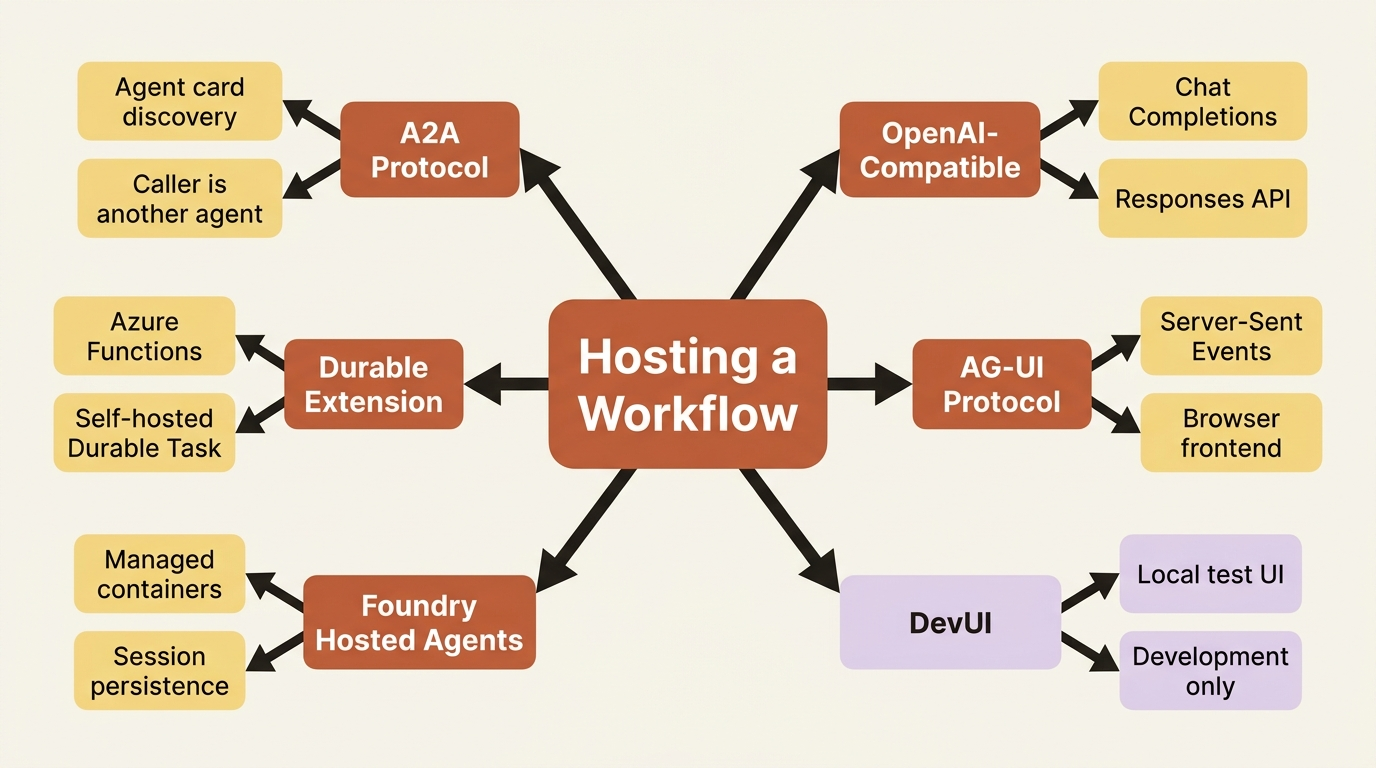
The hosting options, at a glance
Agent Framework does not force one deployment shape. Each option below answers a different "who is calling, and how" question, and a real deployment typically uses more than one.
| Option | What it gives you | Reach for it when |
|---|---|---|
| A2A Protocol | Exposes an agent or workflow as an endpoint other agents can discover and call, via an agent card | The caller is itself another agent, possibly built on a different framework |
| OpenAI-Compatible Endpoints | Exposes an agent behind the Chat Completions or Responses API | Callers already speak the OpenAI SDK and you want drop-in compatibility |
| Durable Extension | Makes agents and workflows durable on Azure Functions or self-hosted Durable Task infrastructure | The run needs to survive worker restarts, scale across distributed hosts, or pause for days at near-zero compute cost |
| AG-UI Protocol | Streams responses, approvals, and state to a web frontend over Server-Sent Events | The caller is a browser-based UI, not another agent or API client |
| Foundry Hosted Agents | Deploys the agent as a managed, containerized service with built-in session persistence and identity | You want managed infrastructure instead of standing up and operating your own host |
| DevUI | A local web UI and OpenAI-compatible API for interactively testing an agent or workflow | You are still developing and want to see a run without writing a client |
What the table covers: six ways to expose an agent or workflow, each suited to a different kind of caller.
- A2A: agent discovery and calls, even across frameworks.
- OpenAI-Compatible: drop-in for clients that speak the OpenAI SDK.
- Durable Extension: restart-proof execution across distributed workers.
- AG-UI: streaming responses and approvals to a browser.
- Foundry Hosted Agents: managed infrastructure instead of a self-run host.
- DevUI: a local test surface, development only.
The rest of this article walks each option against the market-research workflow.
Hosting the workflow behind A2A
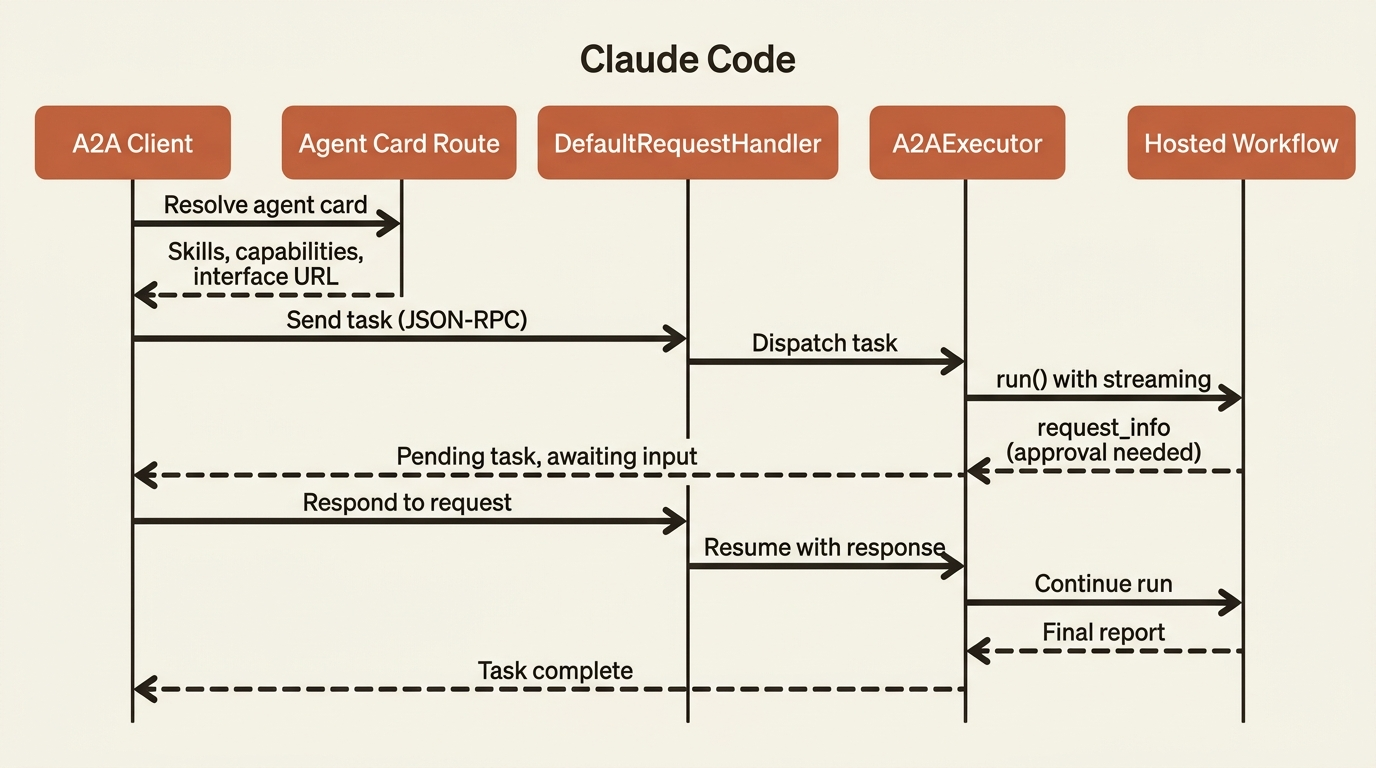
A2A is a standardized protocol for agent-to-agent communication: agent discovery through agent cards, message-based communication, and long-running tasks that survive longer than one HTTP request. It is the natural fit for a workflow built as a team of specialists, because the whole point of that design is a caller, human or agent, handing over a topic and waiting for a report.
A2AExecutor adapts any object with a standard run() interface to the A2A server-side protocol. Because workflow.as_agent() gives a whole graph that same run() and streaming interface, A2AExecutor does not care that three agents and a sub-workflow are running behind it:
import uvicorn
from a2a.server.request_handlers import DefaultRequestHandler
from a2a.server.routes import create_agent_card_routes, create_jsonrpc_routes
from a2a.server.tasks import InMemoryTaskStore
from a2a.types import AgentCapabilities, AgentCard, AgentInterface, AgentSkill
from agent_framework.a2a import A2AExecutor
from starlette.applications import Starlette

research_skill = AgentSkill(  # ①
    id="market_research",
    name="Market Research",
    description="Researches a topic, fact-checks the findings, and writes a report.",
    tags=["research", "reports"],
    examples=["Research quantum computing funding trends and write the report."],
)

public_agent_card = AgentCard(  # ②
    name="Market Research Agent",
    description="A researcher, fact-checker, and writer team behind one endpoint.",
    version="1.0.0",
    default_input_modes=["text"],
    default_output_modes=["text"],
    capabilities=AgentCapabilities(streaming=True),
    supported_interfaces=[AgentInterface(url="http://localhost:9999/", protocol_binding="JSONRPC")],
    skills=[research_skill],
)

request_handler = DefaultRequestHandler(
    agent_executor=A2AExecutor(market_research_agent),  # ③
    task_store=InMemoryTaskStore(),  # ④
    agent_card=public_agent_card,
)

server = Starlette(  # ⑤
    routes=[
        *create_agent_card_routes(public_agent_card),
        *create_jsonrpc_routes(request_handler, "/"),
    ]
)

uvicorn.run(server, host="0.0.0.0", port=9999)  # ⑥
① research_skill declares the capability advertised in the agent card, the thing a caller resolves before deciding to send a task.
② public_agent_card bundles that skill with the endpoint's identity and interface URL, the payload an A2AAgent client discovers.
③ A2AExecutor(market_research_agent) is the hinge: it adapts the whole three-agent graph to the A2A protocol because workflow.as_agent() already gave it a plain run() interface.
④ InMemoryTaskStore tracks each task's state across the protocol's async lifecycle, since an A2A task can outlive a single HTTP request.
⑤ Starlette wires both route groups together: agent card discovery and the JSON-RPC endpoint the request handler serves.
⑥ uvicorn.run starts the server on the port the agent card's supported_interfaces URL advertises.
Note: The full extracted listing at
code/microsoft_agent_framework/part-14-hosting-integrations-and-shipping-to-production/listings/01-a2a-server.py
shows the market_research_agent construction elided here.
Run that, and any A2A-compliant client, another Agent Framework agent wrapping the endpoint with A2AAgent, or an agent built on an entirely different framework, can resolve the agent card, see the market_research skill advertised, and send a task. A2AExecutor streams updates as A2A artifacts when the underlying agent supports streaming, and it propagates the A2A context_id as the session's service_session_id, so a caller that reuses a context_id across calls gets real conversation continuity. A pending approval request, the report-approval gate's question included, surfaces to an A2A caller the same way it surfaces to any caller of an as_agent()-wrapped workflow: as something the caller has to answer before the task finishes, not a silent hang.
Gotcha: A2AAgent, the client-side wrapper for calling a remote A2A agent, derives its context_id from a session's service_session_id when you pass one in. If a message already carries an explicit context_id in its additional_properties, that value wins instead. Mixing the two without noticing which one is active is a classic session-identity trap: know which ID is actually scoping the conversation before you rely on it for continuity.
OpenAI-compatible endpoints and the Durable Extension
Two more doors are worth knowing even without a full code walkthrough.
OpenAI-compatible endpoints expose an agent behind the Chat Completions or Responses API, so any client speaking the OpenAI SDK, including tools that only know how to call OpenAI, can call your agent without knowing it is built on Agent Framework. The Responses API is the modern, stateful option, with a conversation parameter, structured streaming events, and server-managed history. In production: OpenAI's resp_* and conv_* IDs are opaque and scoped to the backing API key or project, not automatically to your own end users. Sharing one backing key across end users while echoing raw IDs back without checking ownership recreates a multi-tenant session-scoping trap one layer higher in the stack. Store IDs server-side, map them to your own client session IDs, and verify the caller before trusting one back.
The Durable Extension complements file-based and database-backed checkpoint storage, which lets the same process, or a fresh instance of the same graph, resume a run. Durable is a different tier: it runs the orchestration on Durable Task infrastructure so progress is checkpointed across distributed, stateless workers, not just within one process's lifecycle. That matters most for a human-approval gate: a durable orchestration waiting on a sign-off can sit for hours or days at near-zero compute, because the host can scale to zero during the wait, something in-process checkpoint storage was never designed to do.
AG-UI: when the caller is a web frontend
Every hosting option so far assumes the caller speaks a backend protocol. AG-UI exists for the case where the caller is a browser. It streams agent responses over Server-Sent Events, synchronizes state bidirectionally between client and server, and turns a tool-approval pause into a UI confirmation prompt instead of a raw event a backend has to interpret. A frontend where someone types a topic and watches the report take shape needs exactly that: streaming text, the report-approval request, and the final output, without anyone hand-rolling an SSE format. CopilotKit builds ready-made UI components on top of AG-UI so nobody has to write that frontend from scratch either.
Microsoft Foundry hosted agents: the managed alternative
Everything so far assumes you are running the host. Foundry hosted agents flip that: hand Foundry a container, and the platform handles scaling, session persistence, and a dedicated identity for the agent. The Responses protocol is the fast path, an OpenAI-compatible /responses endpoint where the platform manages conversation history and streaming:
from agent_framework_foundry_hosting import ResponsesHostServer

server = ResponsesHostServer(market_research_agent)
server.run()
That is the same workflow-as-agent object from the A2A section; ResponsesHostServer only needs something with a run() method, so wrapping the whole graph costs nothing extra. One setting worth knowing: when building an agent directly against a Foundry-backed chat client for hosted deployment, set default_options={"store": False}. The hosting infrastructure already persists conversation history platform-side, and leaving store on duplicates it. The Invocations protocol is the alternative when full control over the request and response shape matters more than an OpenAI-compatible surface, useful for non-conversational payloads or custom streaming formats Responses does not cover.
DevUI: inspecting a run without writing a UI
Before any of the above, DevUI is worth reaching for constantly during development. It is a local web app plus an OpenAI-compatible API that registers an agent or workflow in-memory and lets you test it in a browser immediately, tracing included:
from agent_framework.devui import serve

serve(entities=[market_research_agent], auto_open=True)
# Opens browser to http://localhost:8080
DevUI introspects a workflow's first executor to build the right input form automatically, so testing a multi-agent workflow through DevUI looks the same as testing a single agent. Gotcha: DevUI is explicitly a sample app for visualizing and debugging during development, not a production surface. Reach for one of the hosting options above once you are ready to ship; reach for DevUI every time you want to see what a run actually did before you get there.
Declarative configuration: config over code once the design stabilizes
Building an agent as Python code is only one option. Declarative agents define the same configuration in YAML instead, which makes an agent easier to version, review, and hand to someone who is not touching the codebase. Loading one from a file looks like this, using a definition close to a researcher agent's own instructions:
import asyncio
from pathlib import Path

from agent_framework.declarative import AgentFactory
from azure.identity.aio import AzureCliCredential


async def main():
    yaml_path = Path(__file__).parent / "researcher-agent.yaml"  # ①

    async with (
        AzureCliCredential() as credential,  # ②
        AgentFactory(client_kwargs={"credential": credential}).create_agent_from_yaml_path(yaml_path) as agent,  # ③
    ):
        response = await agent.run("Research quantum computing funding trends.")  # ④
        print("Agent response:", response.text)


if __name__ == "__main__":
    asyncio.run(main())
① yaml_path points at the declarative definition on disk, the file that replaces Python constructor arguments with config.
② The credential is scoped to the same async with block as the agent it authenticates, so both close together when the block exits.
③ AgentFactory(...).create_agent_from_yaml_path(yaml_path) is the one call that turns the YAML file into a live Agent, no different in shape from building an agent directly from a chat client.
④ Once built, the declarative agent runs through the same run() call as every other agent in this framework; nothing about the caller changes.
Note: The full extracted listing at
code/microsoft_agent_framework/part-14-hosting-integrations-and-shipping-to-production/listings/02-declarative-agent-loader.py
shows this complete program.
The YAML file itself declares the kind, name, instructions, and model connection instead of Python constructor arguments:
kind: Prompt
name: Researcher
displayName: Market Research: Researcher
instructions: Research the given topic using look_up_topic for general findings.
description: Gathers findings on a market-research topic.

model:
  id: =Env.AZURE_OPENAI_MODEL
  connection:
    kind: remote
    endpoint: =Env.FOUNDRY_PROJECT_ENDPOINT
This is the config-over-code path a team reaches for once an agent's design has stabilized and the remaining changes are tuning, not structure. Declarative workflows carry the same checkpoint and human-in-the-loop mechanics forward too, through their own action kinds for pausing on a question or an external input, so a stabilized version of a whole multi-agent graph, not just one agent in it, can eventually live in config as well.
Arriving from Semantic Kernel or AutoGen
For a developer coming from one of Agent Framework's two predecessors, most of this is not new territory. It is the same ideas with less ceremony and, in AutoGen's case, capabilities that did not exist before.
From Semantic Kernel, the biggest change is that agent creation no longer depends on a Kernel. ChatCompletionAgent, AzureAIAgent, and OpenAIAssistantAgent consolidate into a single Agent type, built directly from a chat client instead of a kernel that owns plugins and services. Tool registration drops a layer too: a @kernel_function-decorated method wrapped in a plugin class becomes Agent Framework's @tool decorator, or just a plain function with a docstring. Thread creation goes from "the caller picks the right thread class for the provider" to a single agent.create_session() call. Existing KernelFunction instances do not need a rewrite: .as_agent_framework_tool() converts one directly into a tool, so a gradual migration replaces an all-at-once rewrite.
From AutoGen, the foundations transfer directly: build an agent around a model client, give it instructions, attach tools, and AssistantAgent(model_client=client, tools=[...]) maps almost one-to-one onto Agent(client=client, tools=[...]). What is genuinely new is everything a production-shaped deployment needs beyond that. AutoGen's Team runs continuously once started, with no built-in way to pause for human input; Agent Framework's request-response pattern, ctx.request_info() paired with a @response_handler, is what a report-approval gate is built from, with no AutoGen equivalent. AutoGen also has no middleware layer, no tool-approval leash, no harness, and no checkpointing: capability Agent Framework adds outright, not capability it renames. The multi-agent model changes shape too: AutoGen's GraphFlow broadcasts messages to nodes with conditional transitions, while Agent Framework's Workflow routes typed messages along specific edges to specific executors, agents, functions, or sub-workflows alike, the type-safe, composable version of the same idea.
Do this today
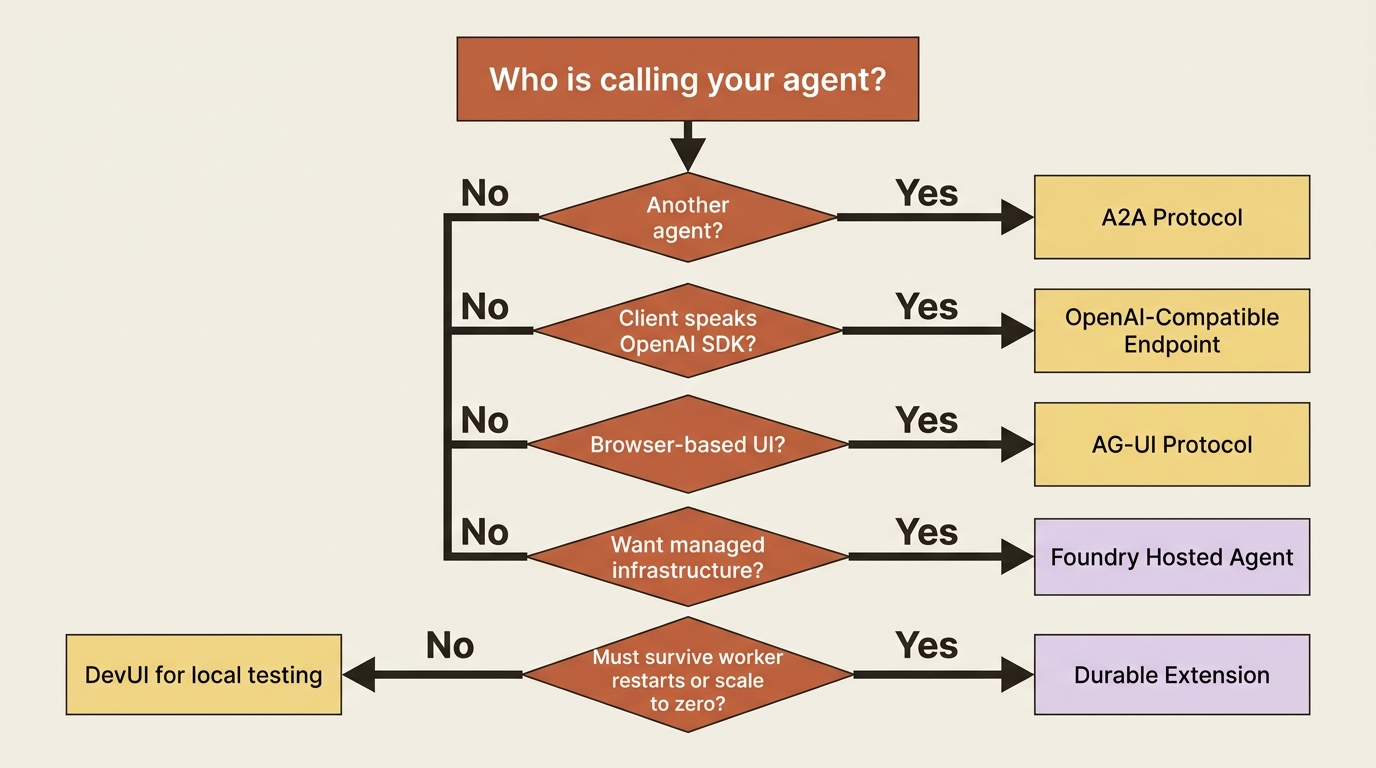
- Pick the caller before picking the protocol. If it is another agent, start with A2A. If it is a browser, start with AG-UI. If it is an existing OpenAI-SDK client, start with an OpenAI-compatible endpoint.
- Run DevUI before writing a client.
serve(entities=[your_agent], auto_open=True)shows a real run in a browser in under a minute, tracing included. - Wrap the whole graph once, not per caller. Call
workflow.as_agent()once and reuse that single object across A2A, Foundry, and DevUI instead of hand-adapting the graph for each protocol. - If migrating from Semantic Kernel, start with
.as_agent_framework_tool()on existingKernelFunctioninstances instead of rewriting tools from scratch. - Before shipping to a multi-tenant deployment, map opaque provider IDs (
resp_*,conv_*,context_id) to your own client session IDs server-side, and verify caller ownership before trusting one back.
The whole guide, one decision table
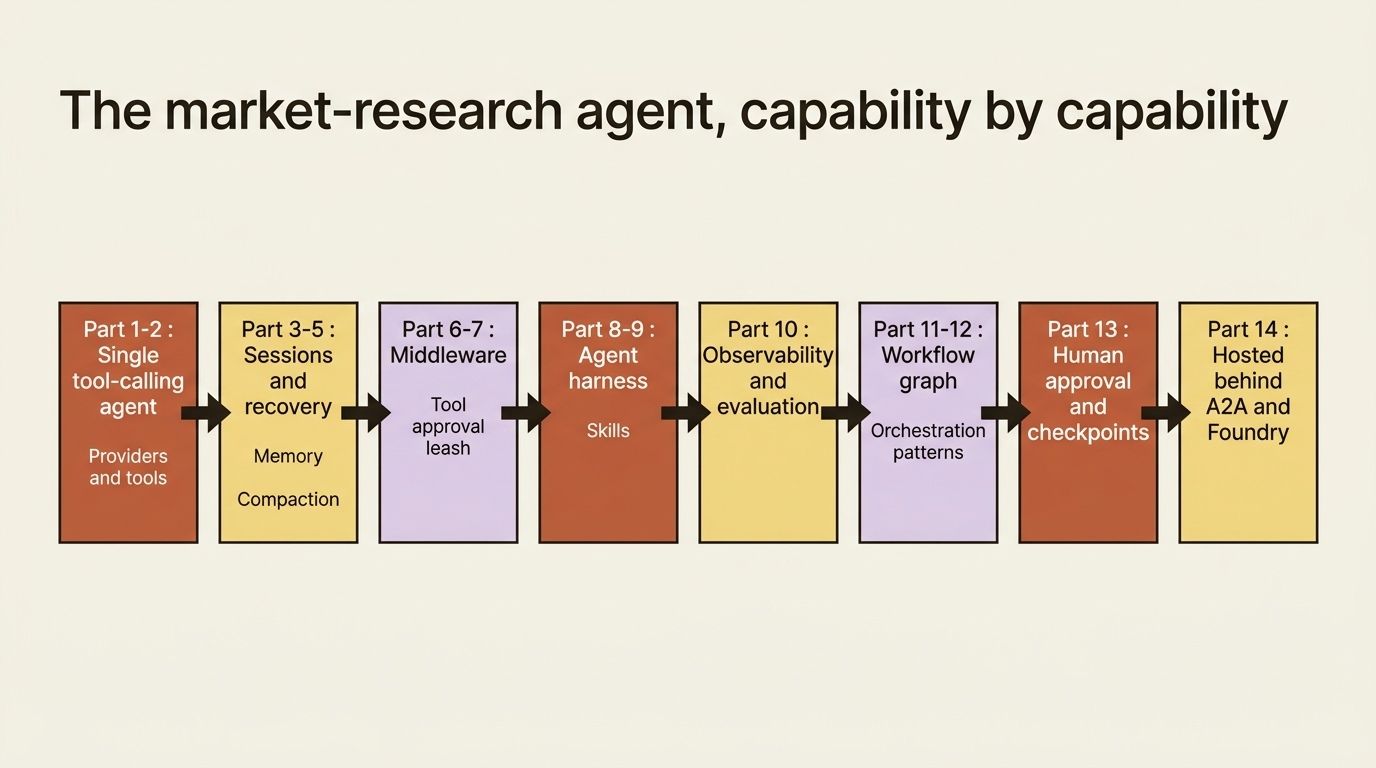
Fourteen parts, one question running under all of them: what do you actually reach for, and when.
| Part | What it gives you | Reach for it when |
|---|---|---|
| 1 | A working agent against a chat client | Validating the model-and-tool loop for the first time |
| 2 | Providers, function tools, and the response surface | Picking a provider or wiring an agent's first real tool |
| 3 | Sessions and the per-service-call recovery model | A conversation, or a tool-calling run, has to survive a crash |
| 4 | Context providers and memory | The agent needs to remember across sessions, or manage a large tool surface dynamically |
| 5 | Compaction | A long-running, self-managed history threatens to overflow the context window |
| 6 | Middleware | Cross-cutting logging, validation, or control flow around every run |
| 7 | Tool approval and safety | Before any tool can write a file, spend money, or touch sensitive data |
| 8 | The agent harness | Long-running autonomous work needs planning, a todo list, and every earlier safeguard bundled together |
| 9 | Agent Skills | Portable, progressively disclosed domain packages instead of a bloated system prompt |
| 10 | Observability and evaluation | Proving, not just claiming, that the agent behaves |
| 11 | Workflow fundamentals | A process needs a guaranteed execution order, or has to coordinate more than one agent |
| 12 | Orchestration patterns | A workflow is decided and needs the right coordination shape: sequential, concurrent, handoff, group chat, or magentic |
| 13 | Human-in-the-loop, checkpoints, and state | A workflow needs to pause safely on human input and resume across a restart |
| 14 | Hosting and integrations | Something else, human or agent, needs to call what you built |
What the table covers: the fourteen-part arc of building a production-shaped multi-agent system, and the trigger for reaching for each part.
- Parts 1 to 2: the model-and-tool loop and picking a provider or first tool.
- Parts 3 to 5: surviving a crash, remembering across sessions, and staying inside the context window.
- Parts 6 to 7: cross-cutting middleware and gating any tool that writes, spends, or touches sensitive data.
- Parts 8 to 9: planned, todo-driven autonomous work and portable Agent Skills.
- Part 10: proving, not just claiming, that the agent behaves.
- Parts 11 to 12: guaranteed execution order and the right multi-agent coordination shape.
- Part 13: pausing safely on human input and resuming after a restart.
- Part 14: exposing the finished system to a caller outside your terminal.
The takeaway
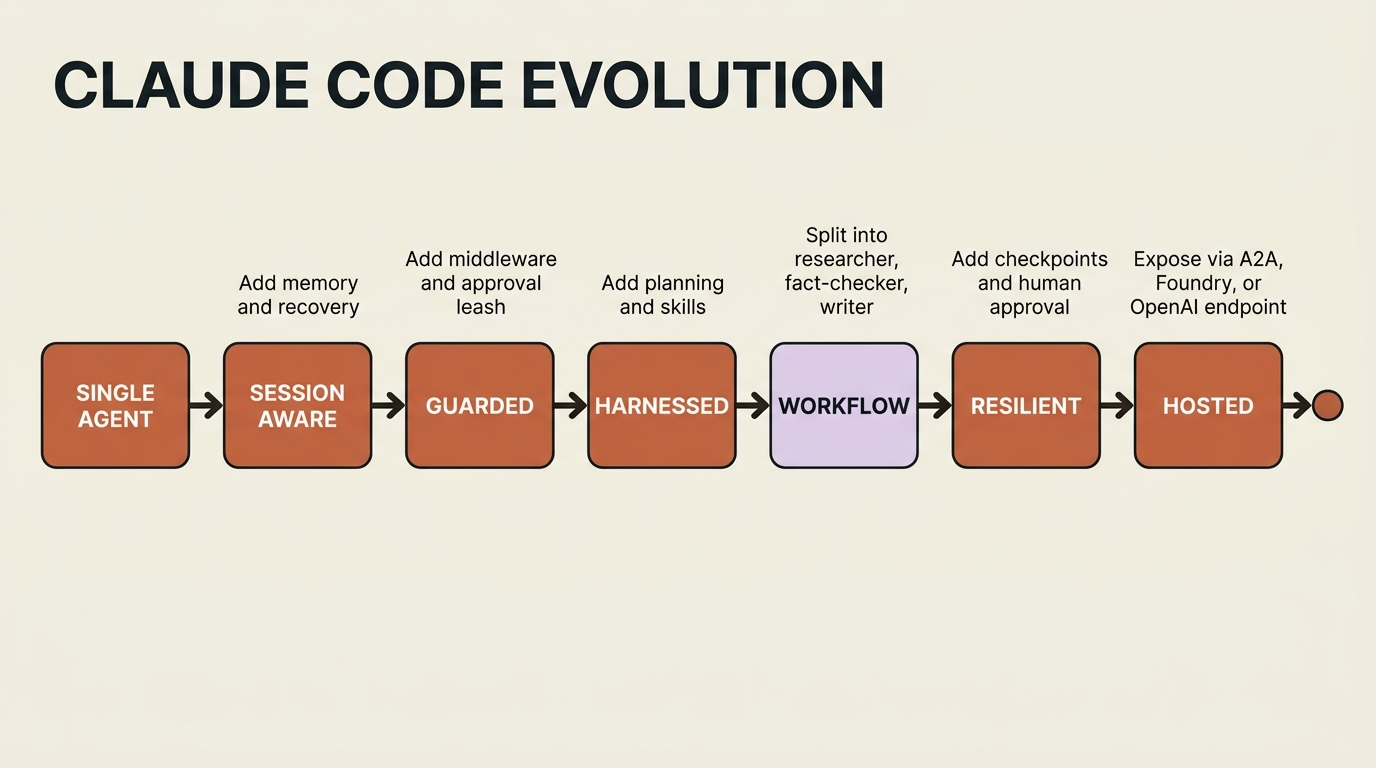
A market-research agent that starts as the smallest possible tool-calling agent can end as a graph of specialists with memory, a leash on what it can spend and write, a plan it follows, checkpoints it can resume from, a human who can veto its final output, and now a door other callers can knock on without knowing any of that machinery is behind it. That last part is the point of building it at all: every capability along the way exists to be trusted with less supervision, and hosting is where that trust finally gets tested by someone other than you.
Whichever protocol comes first, A2A for another agent, Foundry hosted agents for managed infrastructure, or a plain OpenAI-compatible endpoint for a client that already knows how to talk to one, the agent behind it is the same one built one capability at a time. It earned the address it just got.