
Your Claude Code Habits Branch the Wrong Way in Pi
Claude Code users type /fork or /rewind into Pi out of habit and get a different job; once you can picture Pi's session as a tree of entries in one file, the three branching commands make sense, and a Git commit becomes the file checkpoint Pi does not have.
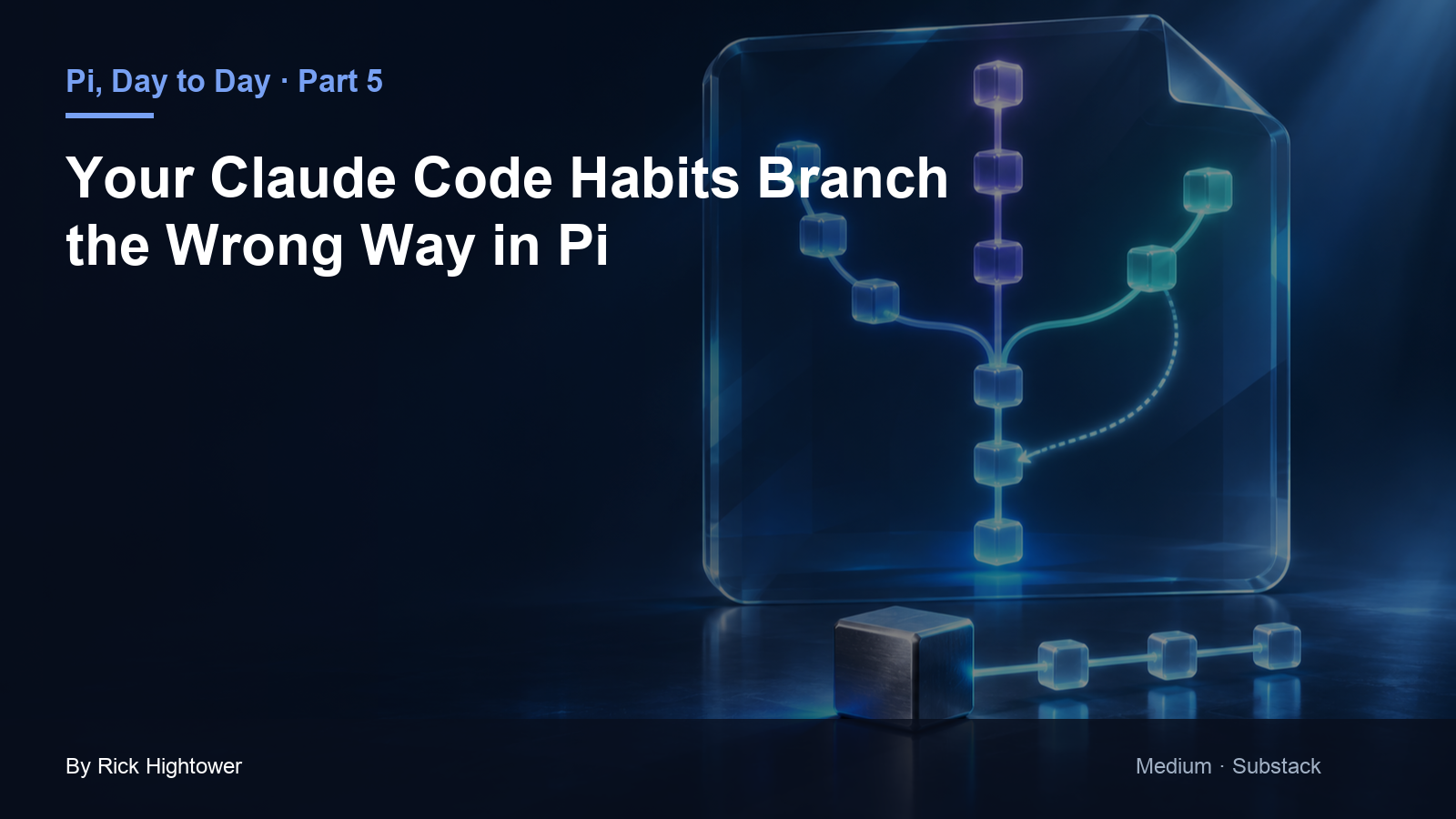
Pi keeps every attempt in one session tree. The tree remembers the conversation, never your files, which is why the most useful branching habit in Pi starts with a Git commit.
Your Claude Code muscle memory just typed /fork into Pi, and you landed somewhere you did not mean to go, with the files you thought you rolled back still changed on disk.
In this article: Day 5 of a day-by-day guide to Pi. Start here: you try two ways to hold the damage words from the same point in one session, put the files back with Git between them, and keep the winner in a session of its own with
/clone. Going deeper: the session tree behind Pi's branching commands, the rename map from Claude Code, and when a branch summary is worth its cost.
Tested on Pi 1.5.2.
Part 4 ended with the damage rule committed, five tests passing, and a clean tree.
Start here
By the end of today you have tried two ways to hold the damage words in the same session, put the files back with Git between them, and kept the winner in a session of its own with /clone.
Starting fresh or fell behind? Run git switch -C main pi/day-04. This replaces your main with the end of Day 4; to keep your own work, run git branch my-backup first.
Check where you start
Start in the project folder with a clean tree.
cd ~/code/ticket-triage
git status --short
npm test
git log --oneline -1
git status --short prints nothing, npm test ends with tests 5, pass 5, and fail 0, and the last commit is Add the damage rule. The clean tree matters today. Every experiment below starts from that commit, because Git can always put the files back to it.
Two words for today
Pi saves a session as a tree. Every prompt, answer, and tool call is an entry, and each entry points to the one before it, its parent. The active branch is the path from the first entry to where you are now, and only the active branch goes to the model.
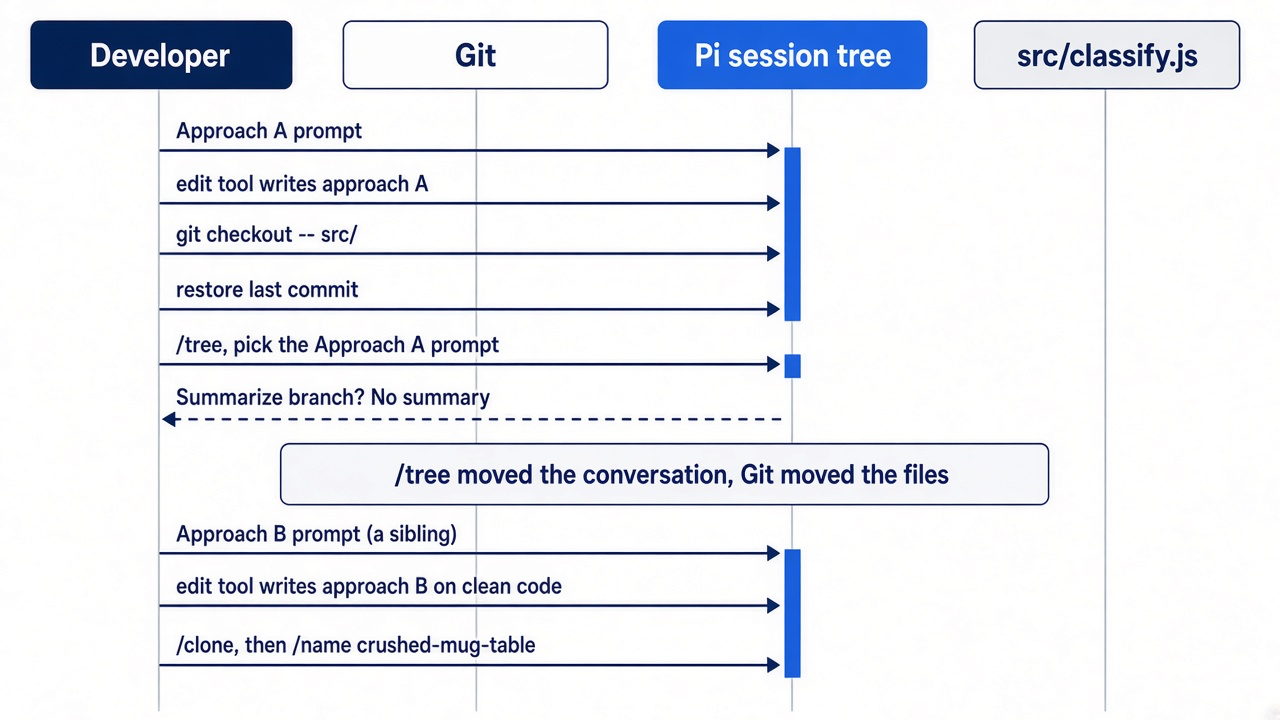
/tree opens a navigator for that tree. When you pick an earlier prompt and send a new version of it, the new prompt starts a second branch from the same point: a second path in the conversation, not a Git branch. Two prompts with the same parent are siblings. The first branch stays in the file. /tree moves the conversation only. It never changes a file on disk.
Approach A: a list inside the function
Reopen the work session.
pi --continue
The footer ends with • crushed-mug. Ask for the first approach.
Approach A: move the damage words into an array inside classify() and check them with some(). Keep the other checks as they are. Do not change any test. Then run npm test.
In this guide's test run, the model put const damageWords = ["crushed", "broken", "in pieces"] inside classify(), checked it with damageWords.some((w) => t.includes(w)), and reported that all five tests pass. Pi edits the classifier and runs the tests through its own bash tool. The bash tool is the one the model uses to run commands. When the run ends, check the whole suite and the diff yourself, out of the window.
!!npm test
!!git diff --stat
The suite should pass, and the diff should touch src/classify.js only. Approach A works.
Put the files back, then move the conversation
Approach A is on disk. Before you try approach B, give the files back to Git. git checkout -- src/ restores every file under src/ to the last commit.
!!git checkout -- src/ && git status --short
The command prints nothing: the tree is clean again. This was the Git half of the switch. Now do the conversation half: move the conversation back to the point before approach A.
/tree
Pi shows the Session Tree navigator, with every entry of the session and the search line Type to search:. Type Approach A. The list narrows to one entry, user: Approach A: move the damage words.... If the model's answer repeats those words, the list also shows an assistant: entry, and the cursor can start on it. Move the cursor to the user: entry with the arrow keys, then press Enter.
Pi offers to summarize the branch you are leaving: it asks Summarize branch? and offers No summary, Summarize, and Summarize with custom prompt. Decline for this experiment: press Enter on No summary. Write approach B from the same starting point as approach A, not from a summary of how approach A turned out. Otherwise, the comparison leans toward whatever A already did. Pi prints Navigated to selected point. The approach A prompt is now back in the editor. Going deeper covers when to accept a summary.
Approach B: a table at the top of the file
You could edit the middle of that prompt so that it asks for approach B and leave the constraint and the test command alone. Pasting is easier: press Ctrl+C once to clear the editor, then send approach B.
Approach B: put the damage words in a DAMAGE_WORDS constant at the top of src/classify.js and check them with some() inside classify(). Keep the other checks as they are. Do not change any test. Then run npm test.
The new user message joins the tree as a sibling of the approach A prompt, both pointing at the same parent. The model sees the shared history up to the Part 4 fix, then this message, and nothing from approach A. Pi edits the classifier again, this time starting from the committed file, because Git put it back. In the test run, the model added const DAMAGE_WORDS = ["crushed", "broken", "in pieces"] at the top of the file. The whole file after approach B, as the pi/day-05 tag holds it, keeps the Part 3 comment above the new check:
// src/classify.js
// Classifies a support ticket as refund, shipping, or other.
const DAMAGE_WORDS = ["crushed", "broken", "in pieces"]

export function classify(text) {
  const t = text.toLowerCase()
  if (t.includes("refund") || t.includes("money back")) return "refund"
  // Damage words mean the item arrived damaged, a shipping problem.
  if (DAMAGE_WORDS.some((w) => t.includes(w))) return "shipping"
  if (t.includes("shipping") || t.includes("delivery") || t.includes("package")) return "shipping"
  return "other"
}
Check the result the same way.
!!npm test
The suite passes. Open the navigator again to see both branches.
/tree
Near the bottom, the tree splits. In the test run it showed ├⊟ • user: Approach B: ... above └⊟ user: Approach A: ..., each with its own tool calls below it. The • marks the entries on the active branch, and a ⊟ sits on the first entry of each branch. Press Escape to close the navigator without moving.
Keep the winner with /clone
The table at the top of the file wins: a new damage word is one more string in one obvious place. Give the winning branch a session of its own. /clone copies the active branch into a new session and switches you into it. Then name the copy.
/clone
/name crushed-mug-table
Pi prints Cloned to new session and Session name set: crushed-mug-table, and the footer ends with • crushed-mug-table. The original crushed-mug session is unchanged, with both branches in it.
Commit and check
Commit the winning code with !!, because the model does not need the output.
!!git add -A && git commit -q -m "Keep damage words in a table" && git log --oneline
The log lists four commits, newest first: Keep damage words in a table, Add the damage rule, Add CLAUDE.md, and Start Ticket Triage. Type /quit, press Enter, and check the tree.
git status --short
npm test
git status --short prints nothing, and npm test shows five passing tests. This result is today's win: two approaches tried from the same point in one session, the files put back by Git between them, and the winner kept in crushed-mug-table and in a commit.
The scene captures the end of the walkthrough: both attempts still sit in one session, side by side, and the tests pass on the one you kept.
You can stop here. Going deeper explains why this works and where it breaks.
Going deeper
This section is for readers who want the data structure behind the tree, the rename map from Claude Code, the three ways to branch, branch summaries, and the command-line versions. It assumes you finished Start here in this part and in every earlier part.
The command your fingers type first
Part 4 ended with Ticket Triage in good shape. The classifier pulls out the damage phrase, and a crushed mug with "I want my money back" comes back as refund. Every test passes, including the two crushed-mug tests, and git status --short prints nothing. The classifier's damage checks have grown one fix at a time, though, and you want to try two cleaner shapes for them before you settle: a plain keyword list, or a word table whose name says what each phrase means. In Claude Code you know the move. You duplicate the conversation and try the second idea in the copy.
/fork
Pi does not duplicate anything. It asks you to pick one of your earlier messages, and when you do, you land in a new session whose history starts from that old point. Whatever came after the message you picked is not in it. The original session still exists, but you are no longer in it, and the command you typed out of habit did a different job than the one you meant.
Nothing broke. Pi has three branching commands where Claude Code has one habit, and the names cross over. This section teaches the data structure first, because all three commands make sense once you can picture it. Then it runs the two classifier approaches as sibling branches on Ticket Triage, after a commit, and shows where /clone and /fork each belong.
The rename map comes first
Learn the renames before the commands, because the old names fire before you think.
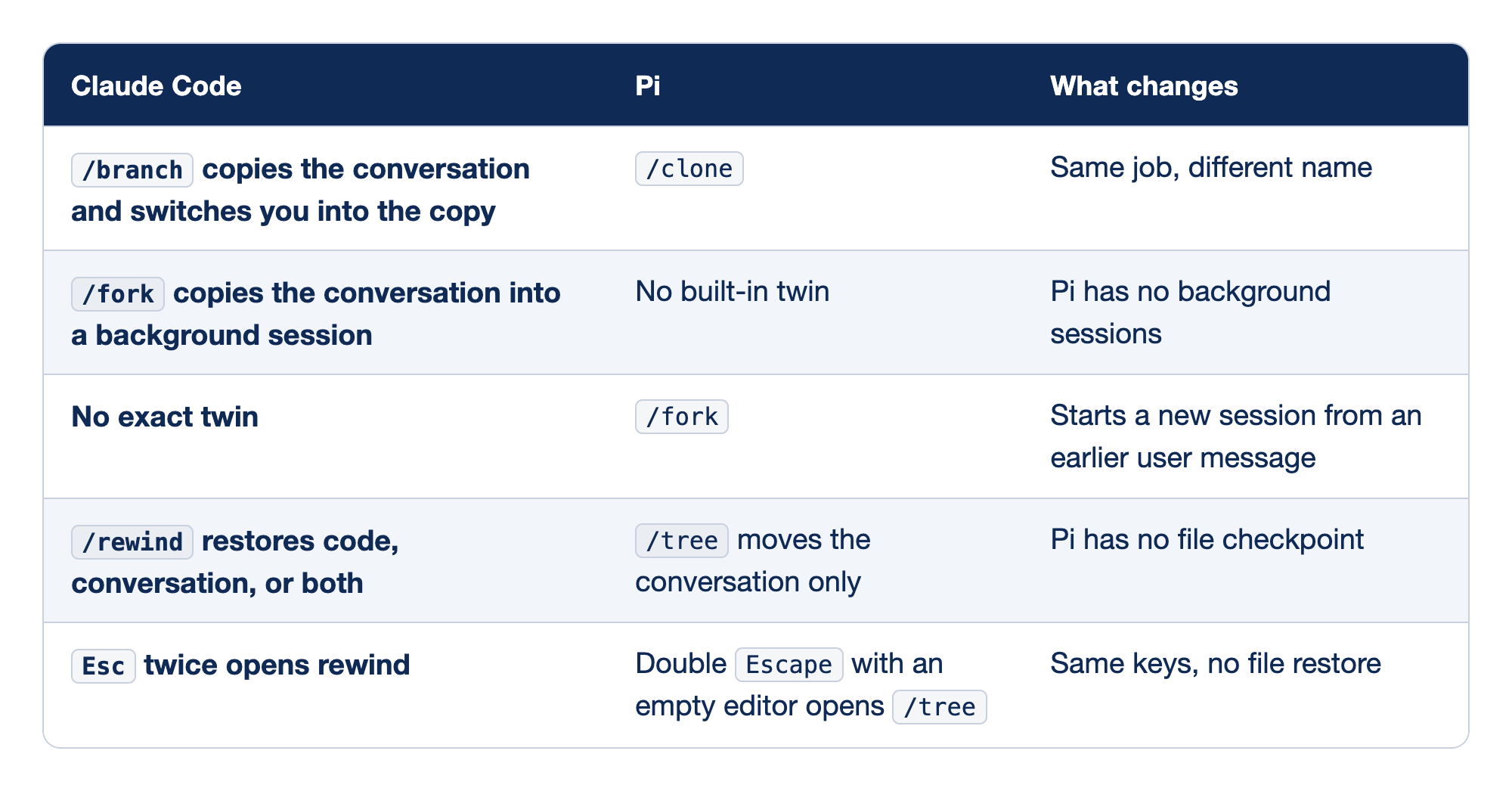
The table is for the moment your fingers type a Claude Code command into Pi. Read each row as "if I meant this, I type that."
/branchto/clone. Claude Code's/branchcreates a branch of the conversation and "Switches you into the branch and preserves the original." Pi's/clonecopies the active branch into a new session, which is the same move. It also switches you into the copy. In Start here it printedCloned to new session.- Claude Code's
/fork. In Claude Code,/forkduplicates the current conversation into a new session, and you keep working in the original while the copy runs as its own session. The commands page says it copies the conversation "into a new background session and keep working here." Pi has no built-in background session, so the habit has no one-command twin. A second terminal with its ownpisession is the closest match. - Pi's
/fork. Pi's/forkcreates a new session from an earlier user message, and the original session stays unchanged. Claude Code has nothing that does exactly this, which is why the name catches people. This is the rename that misfires most. /rewindto/tree. Claude Code checkpoints your code at every prompt you send, so its rewind can restore Claude's file edits. Pi's/treemoves you to an earlier point in the conversation and restores no files at all. Git does that job in Pi.- Double
Escape. Part 3 covered this: thedoubleEscapeActionsetting defaults to"tree", so a doubleEscapewith an empty editor opens the/treenavigator. It looks like Claude Code's rewind shortcut and does only half of it.
If you already use Claude Code: retrain one word. When you mean "copy this conversation and keep going in the copy," type /clone. Every other row follows from the data structure in the next section.
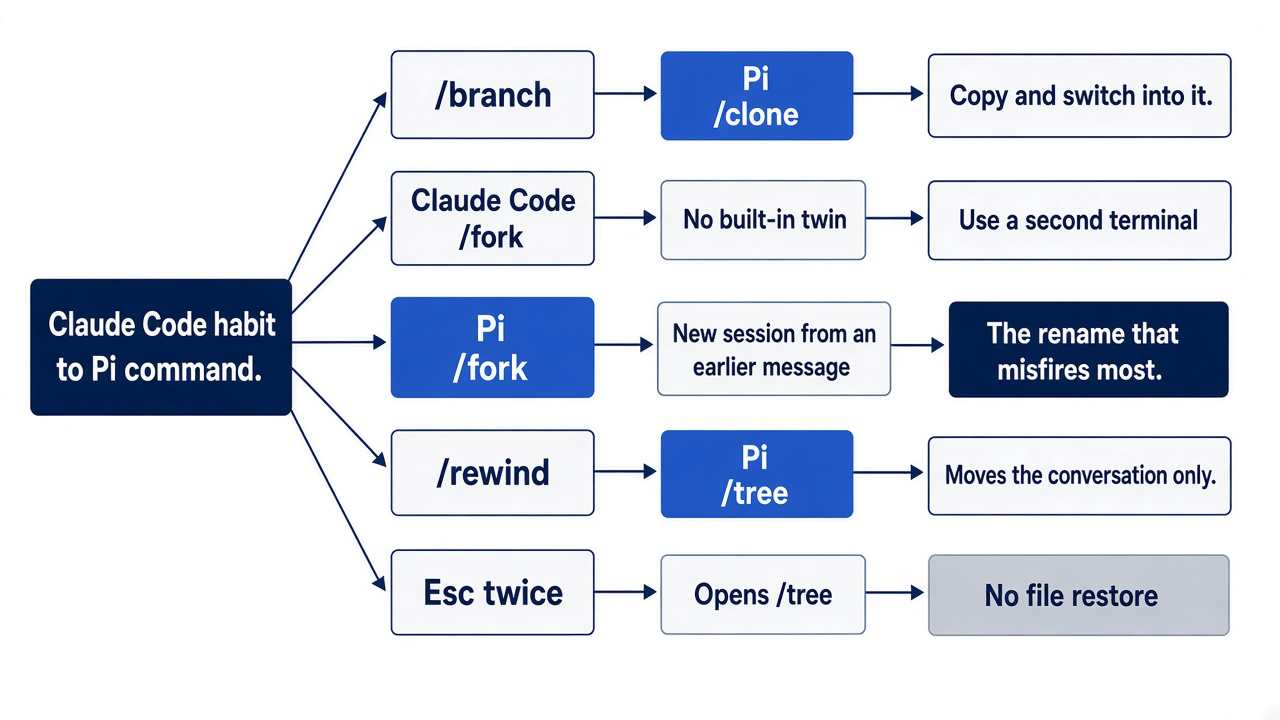
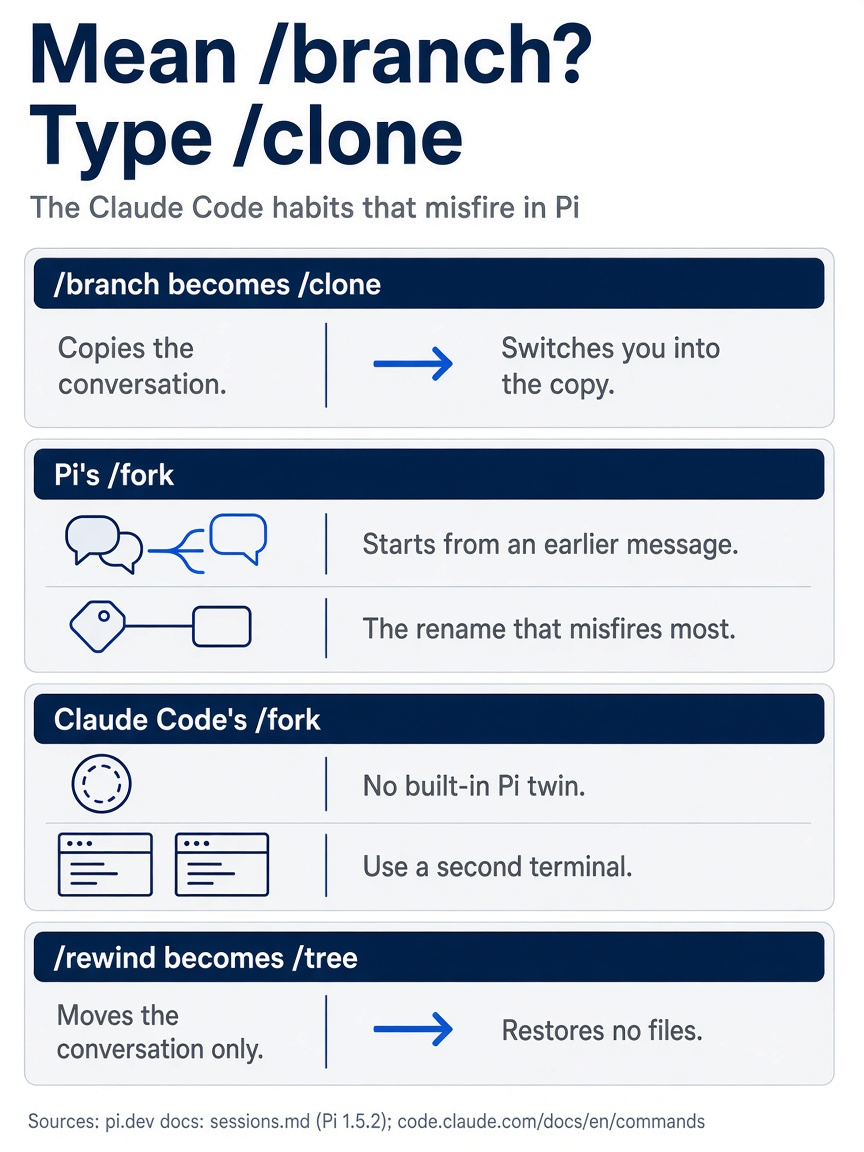
Four rows of the rename map change what you type. One habit is worth retraining: when you mean /branch, type /clone. Each of Pi's other names does a different job than its Claude Code namesake.
A session is a tree in one file
A Pi session is one JSONL file of entries, each with an ID and a parent ID, and the model sees only the path that ends where you are.
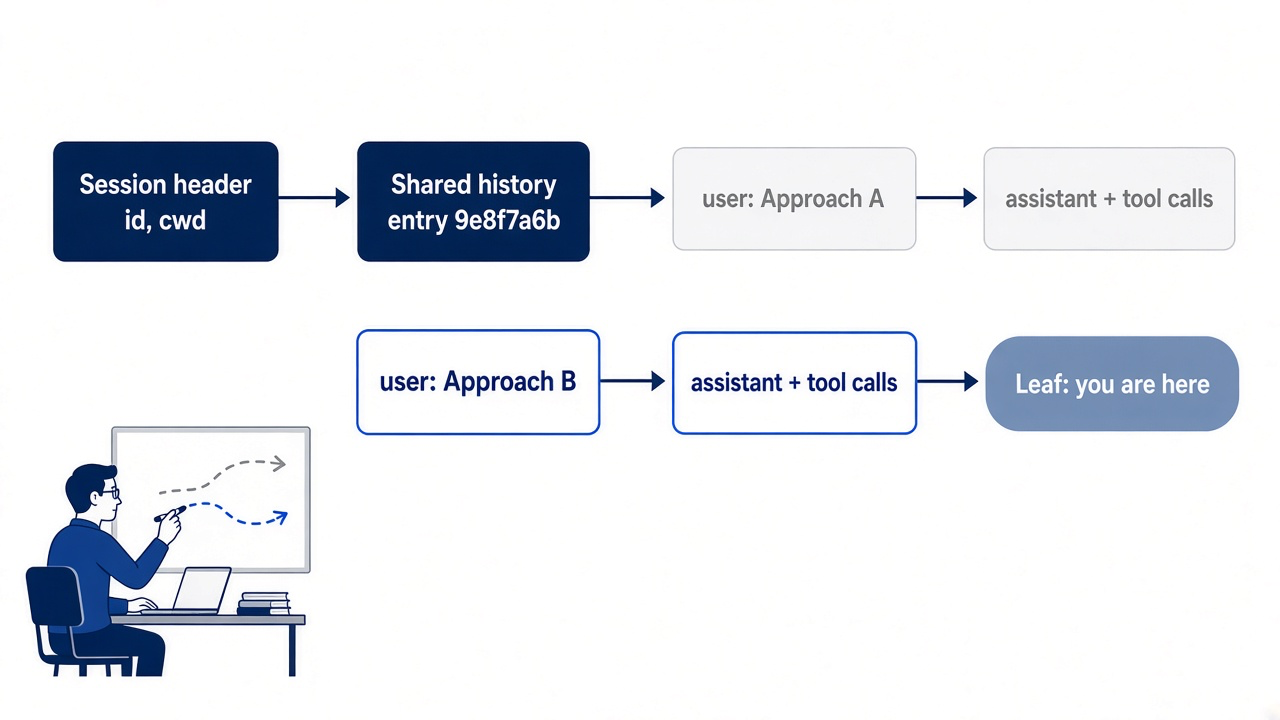
Pi's architecture page says it plainly: each path through the tree is a branch, and the branch ending at the current entry is the active branch, which supplies the history for the next model request. The session format page fills in the mechanics. The first line of the file is a header that records the session ID and the working directory. Every line after it is an entry with an id, usually an eight-character hex string, and a parentId that points to the entry before it.
The lines below are trimmed to the fields that make the tree, with made-up IDs. They sketch what the crushed-mug file looks like once today's two branches exist.
{"type":"session","version":3,"id":"…","cwd":"/Users/you/code/ticket-triage"}
{"type":"message","id":"9e8f7a6b","parentId":"…","message":{…}}
{"type":"message","id":"a1b2c3d4","parentId":"9e8f7a6b","message":{"role":"user","content":"Approach A: …"}}
{"type":"message","id":"b2c3d4e5","parentId":"a1b2c3d4","message":{"role":"assistant",…}}
{"type":"message","id":"c9d8e7f6","parentId":"9e8f7a6b","message":{"role":"user","content":"Approach B: …"}}
Two user messages share the parent 9e8f7a6b, and the shared parent is the whole trick: a branch is nothing more than two entries that point to the same earlier entry. Nothing is copied and nothing is erased. Both attempts sit in the same file.
The current position in the tree is called the leaf. To build the next request, Pi walks from the leaf back to the root and collects the entries on that path. Every entry on the other branch is still in the file, still visible in /tree, and absent from the request. A clone holds the active branch only, so its cost in the footer is lower: $0.186 against $0.204 in the Start here test run. A gotcha follows from this: the footer's context number counts the active branch, so a session with two long branches can show a modest number. Accumulated usage and cost, by contrast, count everything you spent on both. In the test run, moving back to the approach A prompt took the context number from 0.9% to 0.8%.
Model changes, compaction summaries, branch summaries, labels, and the /name you set are entries in the same tree. A label is a bookmark on one entry, and the walkthrough later in this section uses two.
Picture the shape as a sketch rather than Pi's screen. The * marks the active branch.
… ─ [shared history] ─┬─ [user: Approach A] ─ [assistant] ─ …
                      │
                      └─ [user: Approach B] ─ [assistant] ─ … *
Everything left of the split is shared history. Everything right of it belongs to one attempt.
Three ways to branch
/tree stays in the file, /fork starts new work from an earlier message, and /clone copies where you are now.
Pi's sessions page gives the three commands in one table, and the table is worth memorizing as written.
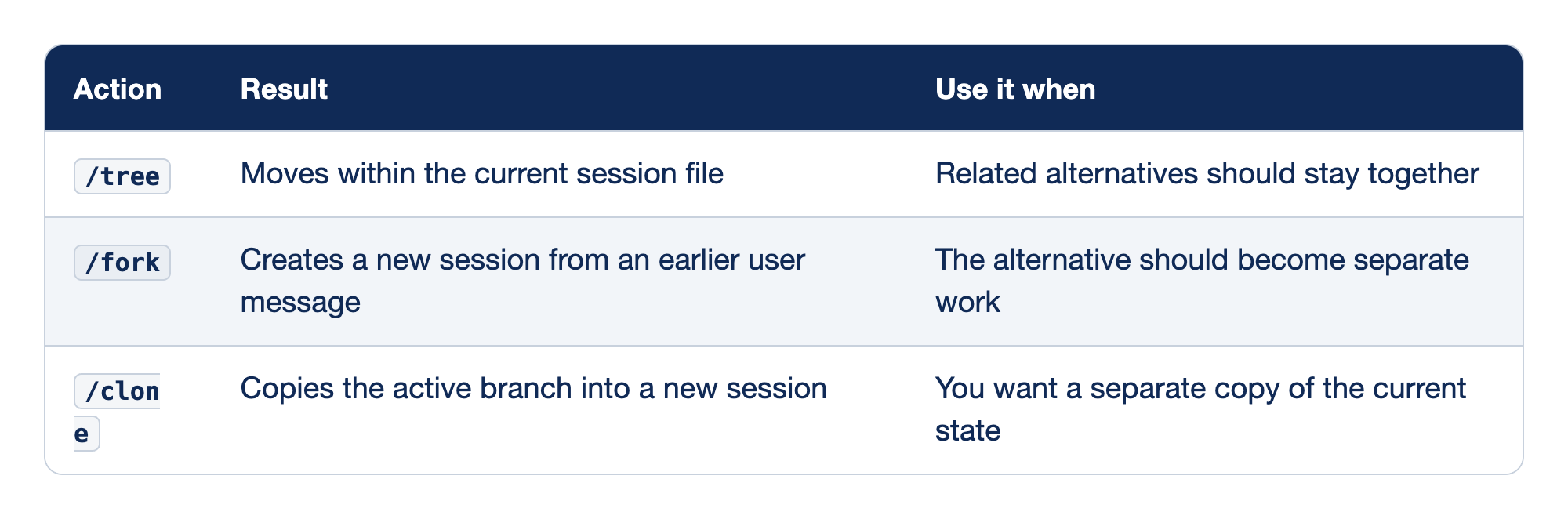
The rows differ in two ways: whether you get a new file, and where in the history the new work starts. Ask both questions before you pick.
/tree. No new file. You pick any earlier entry and continue from it, and the branch you leave stays in the same session. Use it for alternatives you want to compare side by side, such as the two approaches in Start here./fork. A new file that starts from an earlier user message, with the original left alone. The new session's header records aparentSessionfield that points back to the file it came from. Use it when an old point in the conversation is a good starting place for a different job./clone. A new file that copies the active branch at its current position, also recordingparentSession. Use it when the work you are doing should continue in its own session, with its own name, while the original stays as the record. In the test run,pi --resumethen listedcrushed-mug-tableindented undercrushed-mug.
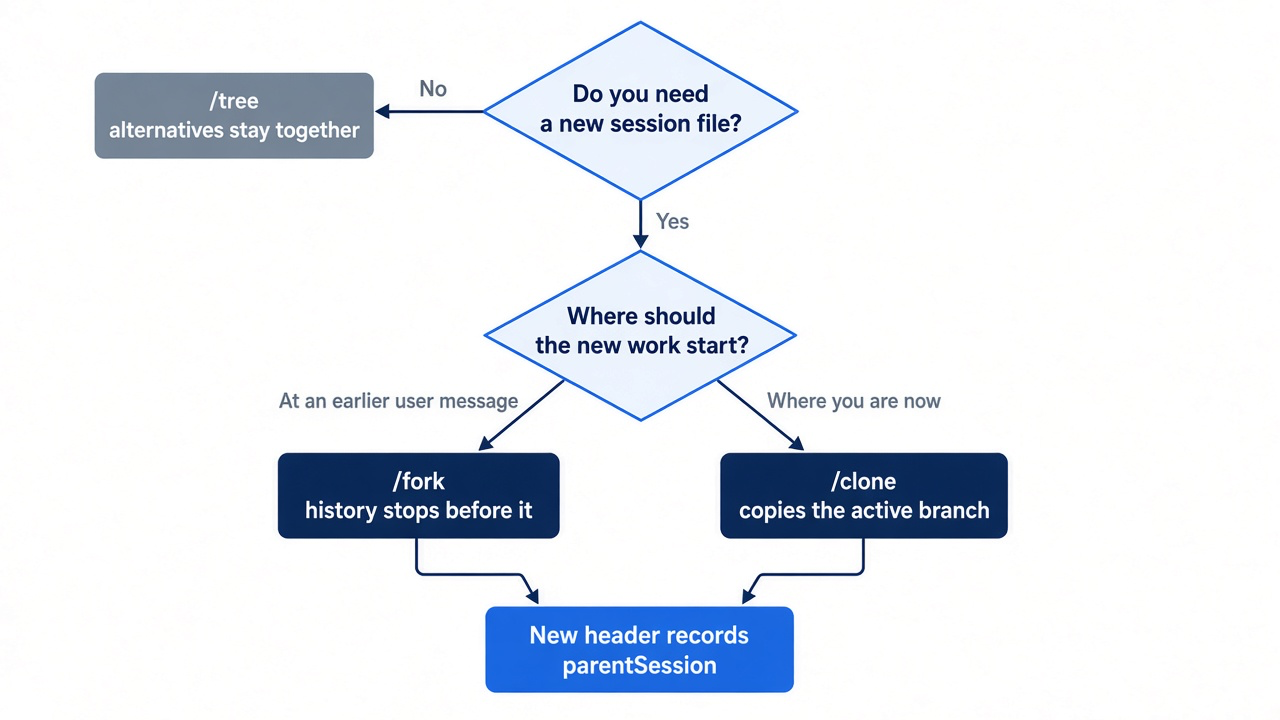
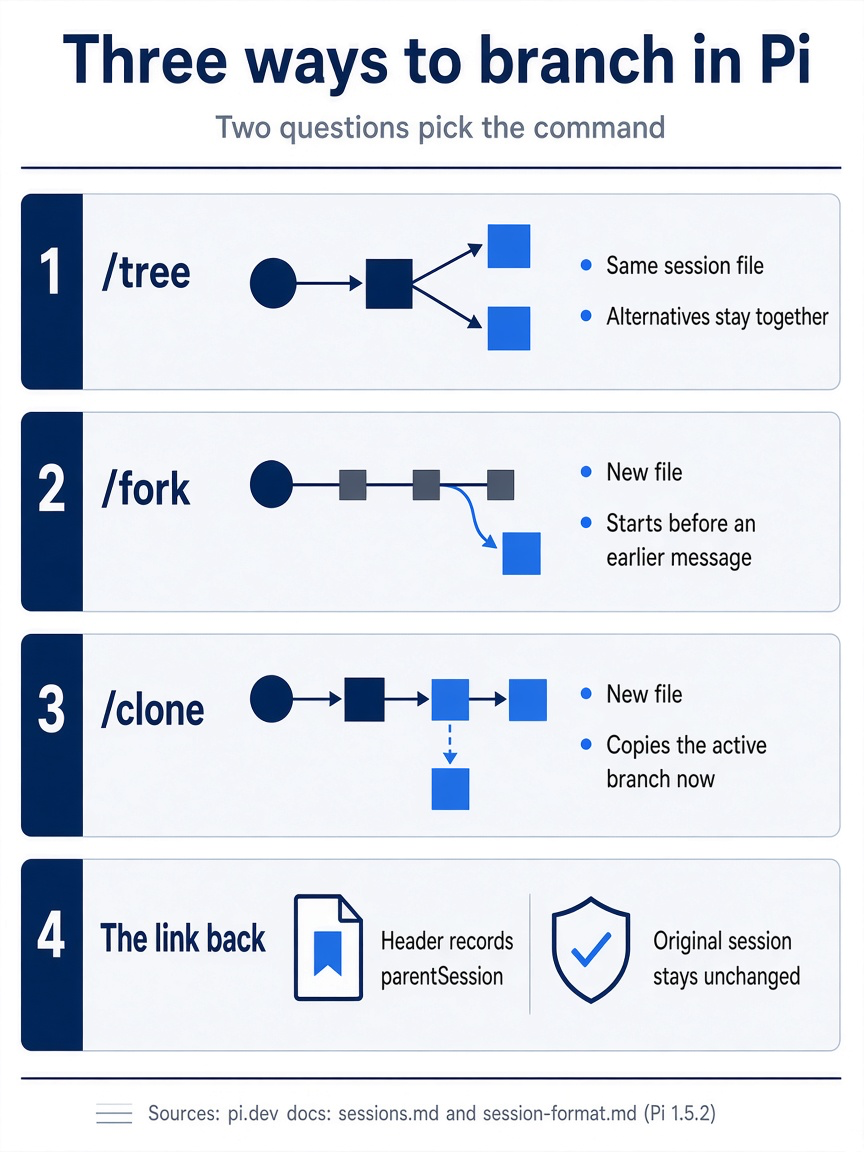
The three commands differ in the file they produce and where its history starts. /tree makes no new file, /fork starts a new file at an earlier user message, and /clone starts a new file where you are now. Both new files record a parentSession link that ties the new session back to the one it came from.
Inside /tree, what you select decides what happens next. Select a user message, and Pi puts its text back in the editor; edit it and submit it, and you have created another branch. Select an assistant response or another entry, and Pi continues after that entry with an empty editor, ready for a new prompt.
The navigator has its own keys. Arrow keys move the selection, and Enter confirms it. Typing searches, as Start here did. Ctrl+U toggles a filter that shows only user messages, which is another fast way to find the prompt you want to edit. Shift+L edits the label on the selected entry. Ctrl+Left and Ctrl+Right, or Alt+Left and Alt+Right, fold and unfold branch segments. Escape cancels and leaves you where you were; with a search typed, the first Escape clears the search and the second closes the navigator. The key line in 1.5.2 reads ↑/↓ move · ←/→ page · option+←/→ branch · ctrl+x copy · shift+l label · shift+t label time · filters ctrl+d/t/u/l/a · cycle ctrl+o/shift+ctrl+o. This guide's tests used search, Enter, and Escape only.
Gotcha: several keys mean something else inside /tree. Ctrl+O cycles the tree filter instead of collapsing tool output, Ctrl+L shows only labeled entries instead of opening the model selector, and Ctrl+D resets the filter. In the /resume picker, Ctrl+D deletes a session. Read which screen you are on before you press it.
Commit before you branch
/tree is not git checkout: it moves the conversation and leaves every file exactly as the last edit wrote it.
The model's edits land on disk the moment the edit or write tool runs. The session records that the tool ran, with its arguments and result, but moving to another branch replays nothing and reverts nothing. If approach A rewrote src/classify.js, the file still holds approach A after you move to the branch where approach B starts. Approach B then edits approach A's code, and the comparison you wanted never happens.
The fix is a commit before the experiment, so that Git owns the files and Pi owns the conversation. Part 4's commit of the damage rule was that commit. On another task, run it from Pi's editor with !!, because the model does not need the commit output.
!!git add -A && git commit -m "wip: before classifier experiment"
Both ! and !! run in Bash, as Part 4 showed, so && works the way it does in a terminal. Confirm the tree is clean.
!!git status --short
The output should be empty. From here on, every switch between branches has two halves, and you do both every time: Git puts the files back, and /tree moves the conversation.
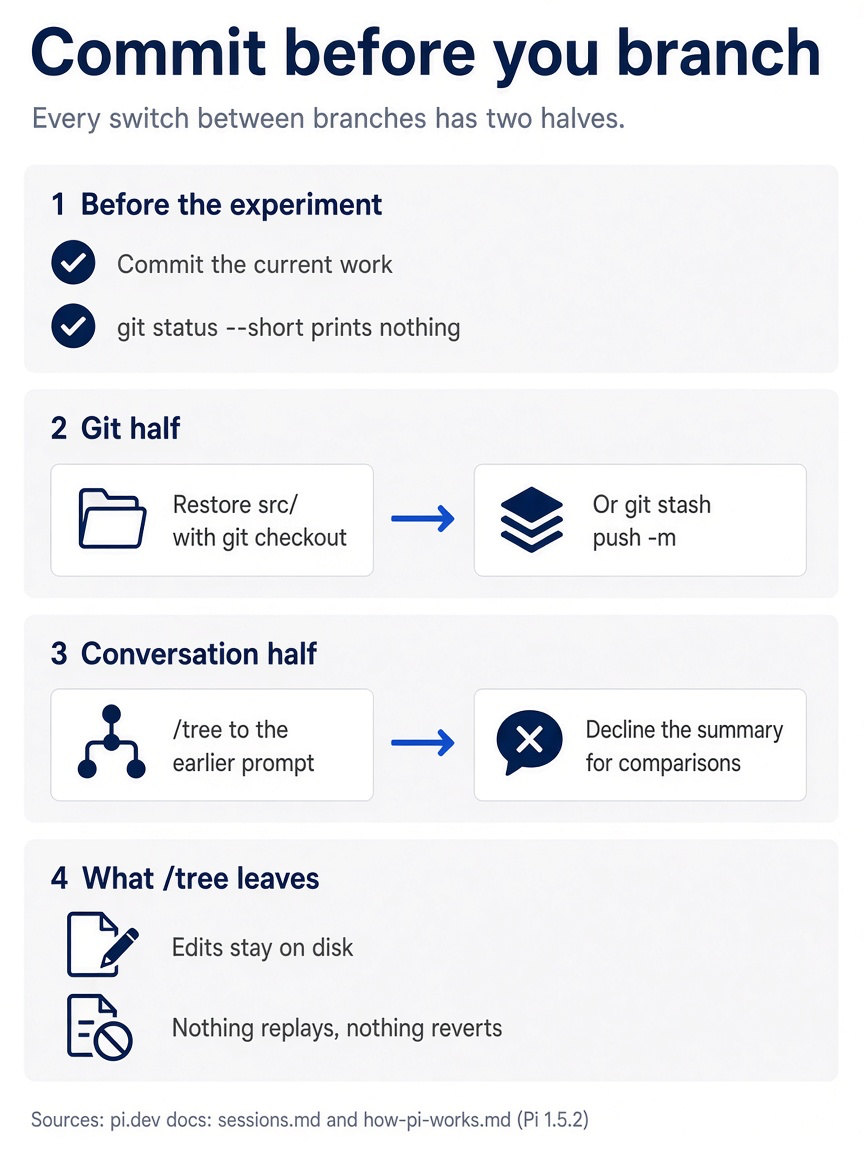
A commit comes first and leaves git status --short empty. The Git half restores the files with git checkout or a stash, and the conversation half moves back with /tree. The reason for the habit is simple: /tree leaves every edit on disk.
If you already use Claude Code: /rewind let you skip this step, because Claude Code's checkpoints could restore Claude's file edits. Pi has no file checkpoint, so a commit is the checkpoint. Part 11 turns "commit, then branch" into a daily habit.
Keep both approaches as code, not only as conversation
Start here threw approach A's code away with git checkout -- src/, because the conversation that built it stays in the tree. On another task, when you want to compare two approaches as code, stash approach A instead. The walkthrough builds two sibling branches from one prompt, puts the files back between them with Git, and keeps the winner. It was not run for this guide.
Start approach A on the current branch. Put the constraint first, as Part 3 taught, name the classifier so that the model reads the committed file, and ask for the narrow test run from Part 4. When the run ends, check the whole suite and the diff yourself, out of the window. The suite should pass, and the diff should touch src/classify.js only.
Before you leave approach A, mark the spot so you can find it later. Open the navigator.
/tree
Select the newest entry on the active branch, press Shift+L, type keyword-list, and confirm. Then press Escape to close the navigator without moving.
Now do the Git half of the switch. Stash approach A's edits with a message, which saves them and returns the files to the commit.
!!git stash push -m "keyword-list"
!!git status --short
The status output should be empty again. The -m message lets you find approach A later. Add -u if an approach ever creates new files, because a plain stash leaves untracked files behind.
Now the conversation half. Open the navigator and filter to your own messages. Press Ctrl+U to show only user messages, select the approach A prompt you typed above, and press Enter. Decline the summary; the next section covers when to accept. Send approach B as Start here did. Check the result the same way: every test passes, and the diff again touches only src/classify.js. Label this branch too: open /tree, press Shift+L on the newest entry, type word-table, and close the navigator with Escape. With Ctrl+L inside the navigator, you can now see just the two labeled tips.
Compare the two approaches as code, outside the window. Approach B is in the working tree, and approach A is in the stash.
!!git stash list
!!git diff stash@{0} -- src/classify.js
The first command shows the keyword-list entry and its index; use that index in the second command if you have other stashes. For Ticket Triage, the word table wins: a new phrase is one row in a table whose name says what it means, while the keyword list needs each word dropped into the array inside classify(). Commit approach B.
Keep the keyword-list stash until you are sure. The conversation that built approach A stays in the session tree either way. When you are done, git stash drop removes the stash, and git status --short should print nothing. This reset was not run for this guide.
Gotcha: if you jump back to the approach A branch to ask a follow-up question, the files on disk still hold the word table. The model on that branch remembers editing a keyword list and will read code that no longer matches its memory. Restore the files first, or name the file with @ so that the model reads what is actually there.
What the branch summary carries
When you leave a branch with /tree, Pi can write a short summary of it into the branch you enter, so a lesson learned on the abandoned path is not lost.
Pi's compaction reference describes the steps. Pi finds the deepest entry that the old and new positions share, collects the entries from the old leaf back to that ancestor, and asks the model to summarize them within a token budget, newest first. It saves the result as a branch_summary entry at the point where the new branch continues, and the model receives that entry as part of the new branch's context. The summary uses a structured format: goal, constraints and preferences, progress, key decisions, and next steps, plus lists of the files the branch read and modified.
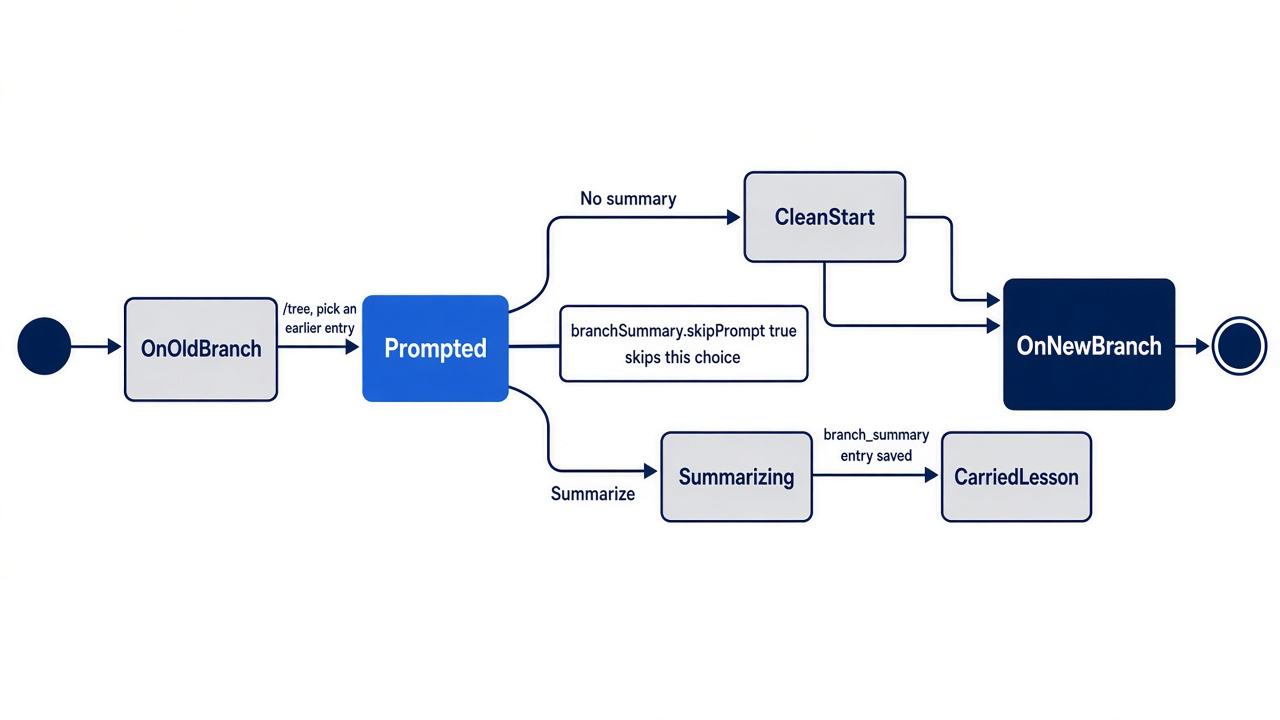
Accept the summary when the old branch discovered something the new one needs. Suppose approach A had turned up a ticket where "broken" appears in a sentence about a broken promise, not a broken mug. Approach B should know about that trap, and a summary carries it across without the hundred lines of transcript that found it. Decline when you want a clean comparison, as in Start here, or when the old branch taught nothing worth paying for. A summary costs a model call, and its usage counts toward the session's totals. This guide's tests chose No summary only.
Two settings control it, both under branchSummary in ~/.pi/agent/settings.json.
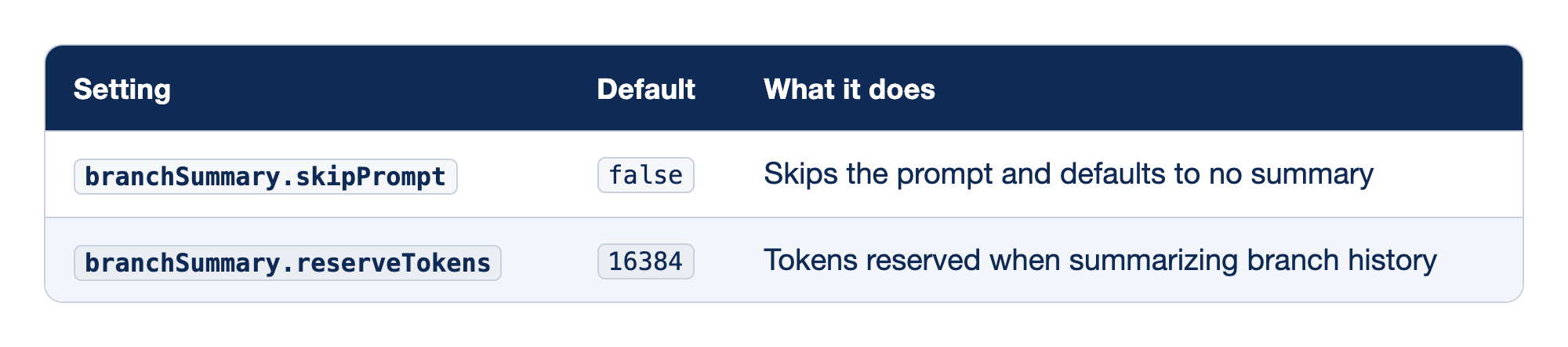
Most readers leave both alone, because the prompt is a useful reminder to decide.
branchSummary.skipPrompt. Set it totrueif you almost never want a summary. Pi then moves between branches without asking.branchSummary.reserveTokens. This reserves room when Pi summarizes branch history. The docs give no daily reason to change it, so leave it at the default.
The setting looks like this if you change it.
{
  "branchSummary": {
    "skipPrompt": true
  }
}
Run /reload after editing the file. This setting change was not run for this guide. The summary lives only on the branch you entered, so moving back to the old branch shows it exactly as you left it.
/clone the winner, /fork an earlier idea
/clone gives the work you are keeping its own session, and /fork turns an old point in the conversation into a new job.
The crushed-mug session now holds the rule question from Part 2, the steering from Part 3, the test work from Part 4, and two classifier experiments. The word table is the path forward, and the keyword list is history. Start here copied the winning branch into a session of its own and named it. On another task, commit the winning approach, then give it a session of its own with /clone and /name.
You are now in the new session. It holds the active branch, from the first message through the word-table work, and none of the keyword-list branch. Its header points back to crushed-mug through parentSession, and the original session is unchanged, with both branches. Run /session to confirm which file you are in.
/session
The file path and ID should belong to the new session, and tomorrow pi --resume lists both names.
/fork is for a different moment. Suppose you want to ask how src/classify.js handles the other category, a question that needs the Part 2 CLAUDE.md question but none of the damage work. Run /fork and pick the first user message after that question, the Part 3 request that started the damage change.
/fork
In the test run, /fork listed the session's user messages with Message 7 of 10 style counters, and Escape closed the list without creating anything. Pi creates a new session whose history stops before the message you pick. Pi's extension reference calls this point before for /fork and at for /clone. The Part 2 question is there, the damage work is not, and your original session is untouched. Name the new one at once with /name, so that the picker does not show it under a guessed title. The fork is now your newest session, so reopen crushed-mug-table with pi --resume before Do this today. Picking a message was not tested for this guide.
If you already use Claude Code: Claude Code's /branch leaves you with two linear sessions. Pi gives you the choice: keep alternatives together in one tree with /tree, or split them into files with /clone and /fork. Use the tree for comparisons and new files for work that will continue on its own.
Sessions from the command line
The same moves work at launch, and the folder you launch from decides where the new session lives.
Part 2 introduced the session flags. Pi's sessions page adds the detail that matters for branching: which working directory each entry point uses.
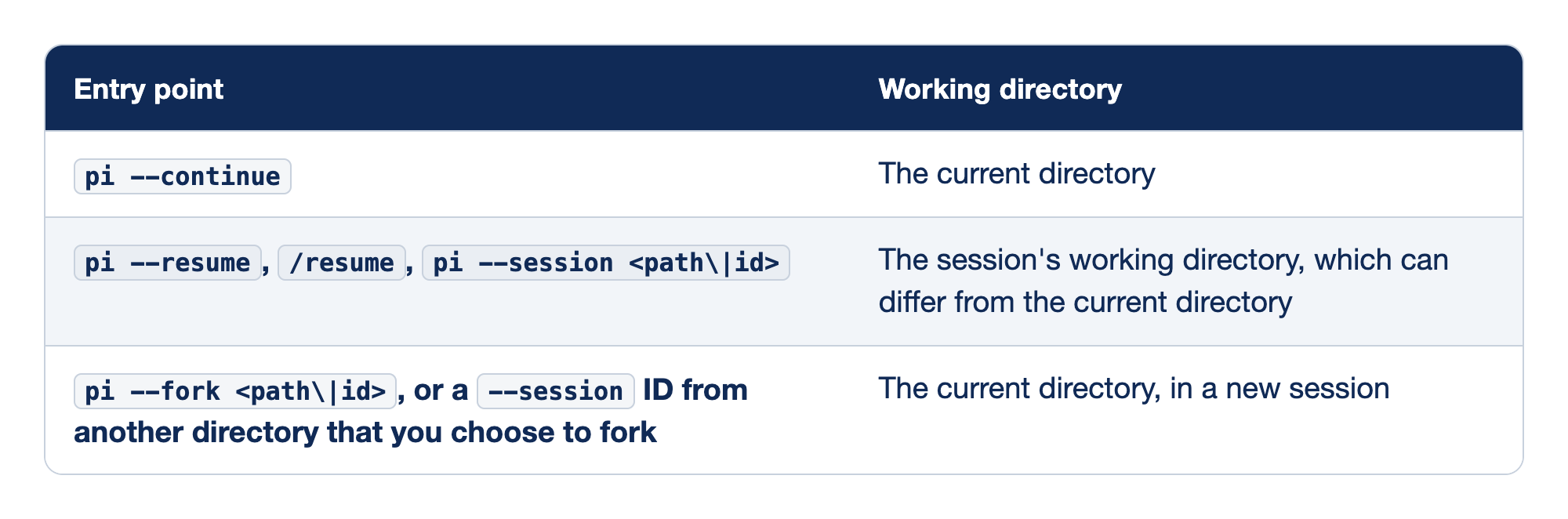
The rows split on one question: does Pi reopen a session where it was created, or make a new one where you stand?
pi --continue. Opens the most recent session for the folder you are in.pi --resumeandpi --session. Reopen a session in the folder where it was created, even if you launch from somewhere else.--sessiontakes a file path or a full or partial ID, which you can read from/session. A file path always resumes in place. An ID that matches only a session from another directory makes Pi offer to fork it into the current directory instead.pi --fork. Copies a session, chosen by file path or ID, into a new session in the current directory. The original stays unchanged.
A fork from the command line looks like this, run from the project folder, with an ID prefix copied from /session.
cd ~/code/ticket-triage
pi --fork 7f3c
Pi opens a new session that copies the chosen one, stored under Ticket Triage's sessions folder. You cannot combine --fork with --session, --continue, --resume, or --no-session. Pair it with --session-id if you want to choose the new ID yourself. The command-line fork was not run for this guide.
Gotcha: a fork records the directory it is created in. Run pi --fork from $HOME and the copy belongs to $HOME: its tools, @path lookups, and context files resolve there, and Part 2's wrong-folder problem comes back in a new file. cd into the project first.
The files themselves live where Part 2 found them: under ~/.pi/agent/sessions/, in one folder per working directory, each named <timestamp>_<session-id>.jsonl. The /resume picker renames a session with Ctrl+R and deletes one with Ctrl+D after you confirm, using the trash command when it is available. Neither key was tested for this guide.
Gotcha: deleting a session deletes conversation history, not code. Removing crushed-mug from the picker loses both classifier branches as conversations, but src/classify.js, your commits, and your stash are untouched. The reverse is also true: deleting the stash loses approach A's code, and the session tree cannot give it back.
Guards for later
The commit-before-you-branch habit can be enforced by code, and Pi's extension examples already do it.
Three of Pi's extension examples target this part's mistakes. dirty-repo-guard.ts warns about, and can block, session changes while the repository has uncommitted changes. git-checkpoint.ts creates git stash checkpoints at each turn, for code restoration when you fork. confirm-destructive.ts asks for confirmation before destructive session actions such as clearing, switching, and forking. Extensions can hook these moments because Pi fires a session_before_tree event before /tree navigation and a session_before_fork event before /fork and /clone, and either can cancel the action. Part 9 shows where the examples live and builds your first extension.
Do this today
Everyone
-
Find the misfire before it finds you. Run
pi --continue, which openscrushed-mug-table. Pi's/forkstarts a new session from an earlier message. It does not copy this one, as Claude Code's/forkdoes. Type/forkonce on purpose, look at the message list it offers, and pressEscape. Nothing is created, and the footer still ends with• crushed-mug-table. Type/quitto leave. The next time your Claude Code habit fires, you will recognize the screen.pi --continue/fork -
See both sessions in the picker. Run
pi --resume, which opens the session picker, and pressCtrl+Nto show named sessions. The list showscrushed-mugwithcrushed-mug-tableunder it. PressEscapeto leave.pi --resume -
Check the tree.
git status --shortprints nothing, and the last commit isKeep damage words in a table.git status --short git log --oneline -1
If you read Going deeper
-
Commit before your next experiment. Pick a real task with two plausible approaches, and give Git the files before you give Pi the choice.
git status --shortprints nothing afterward.!!git add -A && git commit -m "wip: before experiment" -
Make two branches with
/treeand keep both as code. Run approach A, label its tip withShift+L, and stash its files. Then open the navigator, find your approach A prompt, decline the summary, edit the prompt into approach B, and submit./treeshows two sibling prompts.!!git stash push -m "approach-a" /tree -
Compare as code. Diff the working tree against the stash, outside the window. The diff shows only the lines where the approaches differ.
!!git stash list
!!git diff stash@{0}
These three steps use your own repository, so they were not run for this guide.
The tree remembers talk, Git remembers code
The /fork that surprised you at the start was never a bug. It was a different command wearing a familiar name, and it made sense the moment you could picture the session as a tree: entries pointing at parents, one active path to the model, every abandoned attempt still in the file.
The tree gives you something Claude Code's linear sessions do not: two attempts from the same point, side by side, in one place you can search and label. It also takes something away. No Pi command puts your files back. Commit first, let Git move the files, let /tree move the conversation, and keep the winner with /clone.
Type /clone when you mean /branch, and commit before you branch. Everything else follows from the tree.
This is Part 5 of "Pi, Day to Day," a twelve-part guide to running the Pi coding agent with the same daily discipline you bring to Claude Code.