
Your Coding Agent Did Not Forget Your Rule. It Was Outvoted.
Pi is a smaller kernel than Claude Code, but its context window fills the same way, and four short prompts prove exactly what a session, a new session, and a context file carry to the model.
Four short prompts show what the Pi coding agent remembers, what it drops, and why the context window is still the operating system when you move from Claude Code to Pi.
Your coding agent did not ignore the rule you set this morning. It was outvoted by everything you added since, and you can see it happen.
In this article: Day 6 of a day-by-day guide to Pi. Start here: read the footer gauge, then prove with four short prompts what a session, a new session, and a context file carry to the model. Going deeper: what Pi sends on every request, how one turn fills the window, and which Claude Code habits change in Pi.
Tested on Pi 1.5.2.
Part 5 ended with a clean tree, four commits, and the word-table approach kept in its own session with /clone.
Start here
By the end of today you can read what Pi sends to the model, and you have proved with four short prompts what a session remembers, what a new session does not, and what a file carries into every session.
Starting fresh or fell behind? Run git switch -C main pi/day-05. This replaces your main with the end of Day 5; to keep your own work, run git branch my-backup first.
Check where you start
Start in the project folder with a clean tree.
cd ~/code/ticket-triage
git status --short
npm test
git status --short prints nothing, and npm test shows the same passing count as at the end of Part 5, with fail 0. In this guide's test run that count was 5.
Read the gauge
Open your work session from Part 5. pi --resume opens the session picker. Type table to filter the list, and press Enter on crushed-mug-table.
pi --resume
Look at the footer, the two lines at the bottom of the screen. The first line shows the folder, the git branch, and the session name. The second line shows numbers like these:
↑58 ↓3.4k R97k W20k CH94.9% $0.186 1.0%/1.0M (auto) claude-opus-5-5 • medium
One number matters today: 1.0%/1.0M. Two words explain it.
A request is one call from Pi to the model. Pi does not send only your last message. On every request it sends the whole text the model needs to answer: Pi's instructions, the tools the model may use, any context files, and the conversation so far.
The context window is the limit on how much text one request can hold. The model knows only what is in the request. It keeps nothing between requests.
The last request filled 1.0 percent of a window of one million tokens. A second test run read 0.8%, so expect about 1 percent. Going deeper explains the other numbers.
For the same numbers in more detail, type /session in the input box at the bottom of the screen, which Pi calls the editor, and press Enter.
/session
Pi shows the session file, its ID, the message count, the token totals, and the cost. Your numbers differ from the guide's. What matters is that they exist and that you know where to look. Type /quit and press Enter. Pi prints the command that resumes this exact session.
Four checks
Each check is one print-mode prompt. Run them in order, from the project folder. Each one takes a few seconds. Every pi -p run is saved as a session, and --continue opens the newest session in the folder, so check 2 continues check 1. Checks 3 and 4 are side questions, so they use --no-session from Part 2 and save nothing.
Check 1: tell a new session a fact.
pi -p 'The release code word is BLUE-HERON-7. Reply OK.'
The answer is OK. The fact is now in that session's conversation, and nowhere else.
Check 2: continue that session and ask.
pi --continue -p 'What is the release code word? If you do not know, reply UNKNOWN.'
The answer names BLUE-HERON-7. --continue reopened the session from check 1, so its conversation, fact included, went out again with the new request.
Check 3: start a new session and ask.
pi --no-session -p 'What is the release code word? If you do not know, reply UNKNOWN.'
The answer starts with UNKNOWN. In the test run the model also searched the project files first and said it found nothing. A new session starts with an empty conversation, so the fact was not in the request.
Check 4: put the fact in a context file and ask a new session.
A context file is a file named AGENTS.md or CLAUDE.md that Pi adds to every request. You met one in Part 2, when the startup header listed CLAUDE.md.
printf 'The release code word is BLUE-HERON-7.\n' > AGENTS.md
pi --no-session -p 'What is the release code word? If you do not know, reply UNKNOWN.'
The answer names BLUE-HERON-7 and says it came from AGENTS.md. The session was new, so the fact came from the file, which Pi added to the request.
The four answers, side by side:
tell a session a fact            -> OK
--continue, ask                  -> BLUE-HERON-7
new session, ask                 -> UNKNOWN
fact in AGENTS.md, new session   -> BLUE-HERON-7
This pattern is today's lesson. The model remembers only what is in the request. A conversation reaches the request only while you stay in that session. A context file reaches every request in the folder.
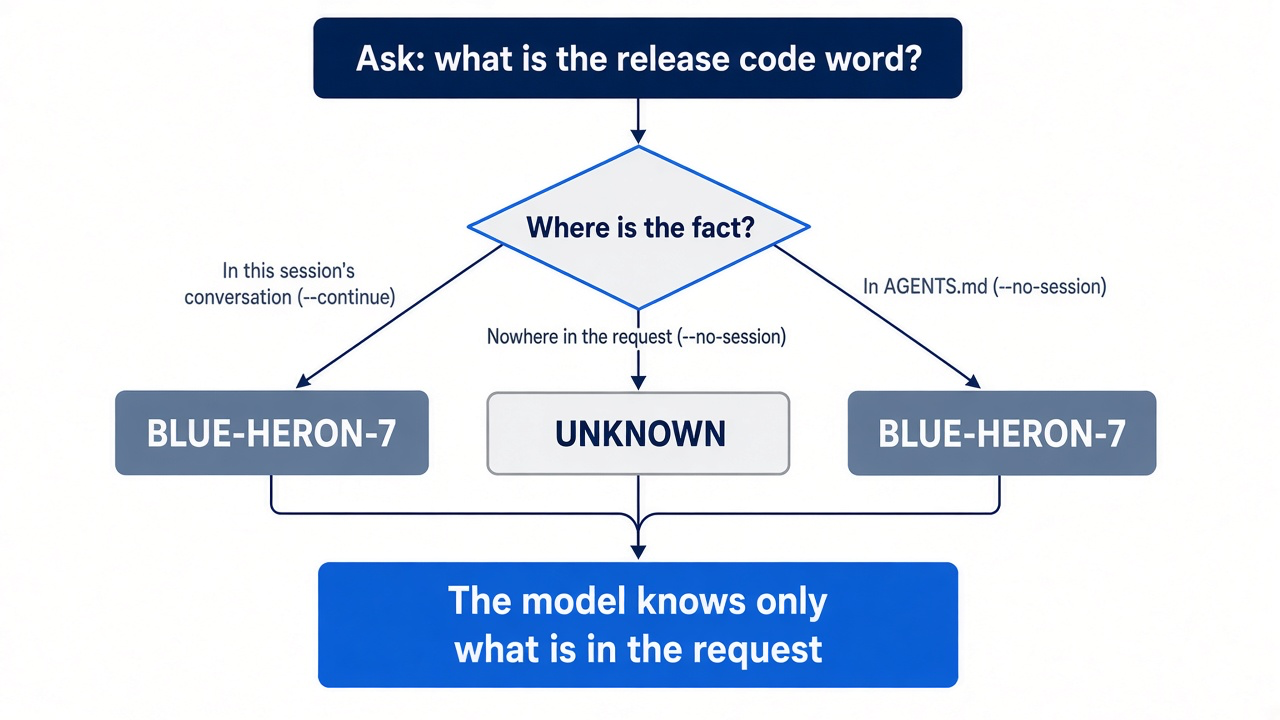
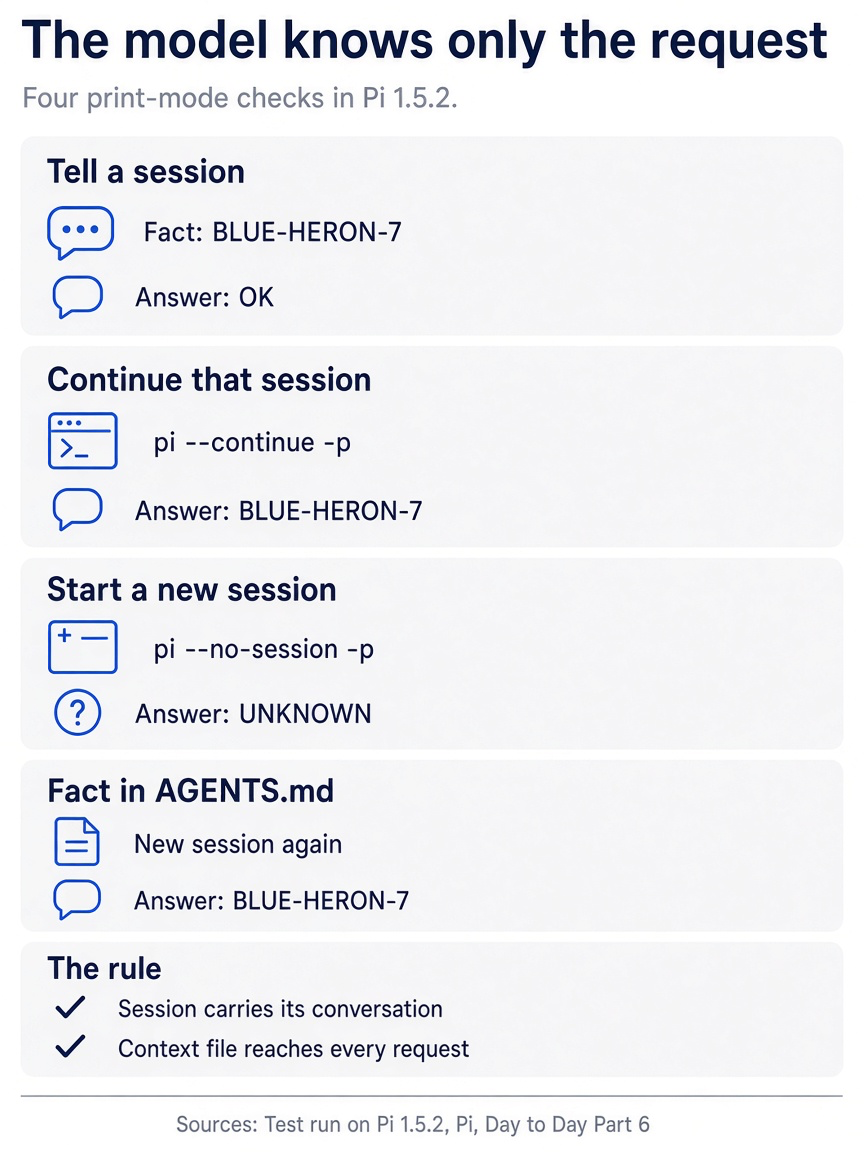
The four answers, OK, BLUE-HERON-7, UNKNOWN, and BLUE-HERON-7, add up to one rule: the session carries its own conversation, and only a context file reaches a brand-new session.
See which context file loaded
Start Pi once and read the header at the top of the screen.
pi
Under [Context] the header lists AGENTS.md, and only AGENTS.md. The CLAUDE.md from Part 2 is not listed. Pi loads one context file per folder, and when both are present, it uses AGENTS.md. Type /quit and press Enter.
Put the folder back
The test file has done its job. Delete it so that CLAUDE.md loads again, and then check the tree.
rm AGENTS.md
git status --short
The second command prints nothing. This empty result, after four answers that matched the table, is today's win: you read the gauge, you proved what a session and a file carry, and the repository is exactly as Part 5 left it.
You can stop here. Going deeper explains why this works and where it breaks.
Going deeper
This section is for readers who want the model behind the four checks: what Pi builds on every request, how one turn fills the window, and which Claude Code habits change. It assumes you finished Start here in this part and in every earlier part.
The afternoon the window filled
At ten in the morning you and Pi agree on a plan for Ticket Triage: teach src/classify.js to spot the damage phrase in a ticket, and leave the refund check alone. By noon the classifier has one approach that half works. By two you have tried a second one, run the test suite four times, and pasted a stack trace. At three you ask for one small fix, and Pi rewrites the classifier a third way, including a change to the refund check that you ruled out before lunch.
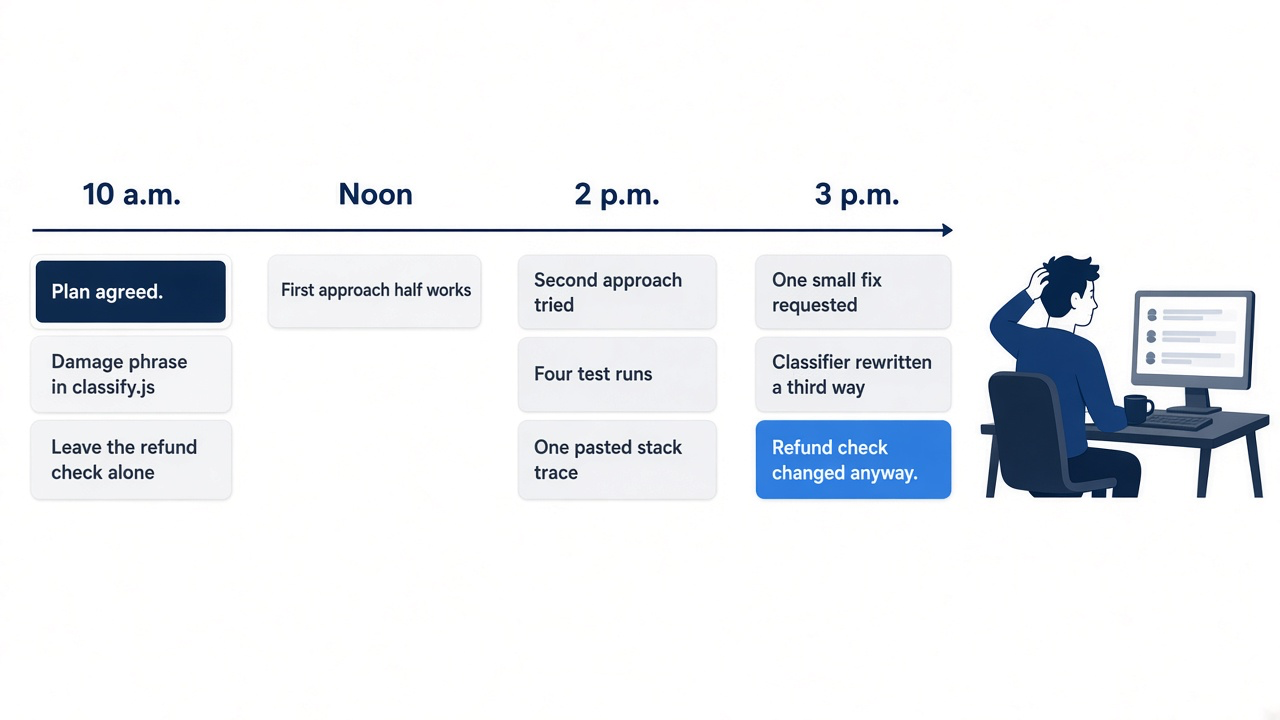
The model did not get tired, and it did not ignore you on purpose. The window filled with the wrong things. Your ten o'clock decision is still in there, one sentence long, buried under two abandoned approaches, four test runs, and a stack trace for a bug that you already fixed. On every request the model reads all of it, and the newest, loudest material wins.
The scene captures the moment the problem becomes visible: a diff that touches the one thing you ruled out hours ago. Nothing deleted the rule. Newer material drowned it.
You shipped the crushed-mug change in Parts 3 to 5. The change is small enough to finish in a day and messy enough to fill a context window on the way. The later parts either advance it or set up the tools around it.
This series teaches Pi's levers for that problem, in the order you meet them on a real day. It assumes you already ship with Claude Code: you know context windows, CLAUDE.md, and /compact. You do not know Pi's names yet, and some of your muscle memory will misfire. This part builds the model the later days rely on. It also names the model behind the habits you already used.
What Pi sends on every request
Every model request is rebuilt from five inputs, and only one of them grows while you work.
Pi builds the system prompt from its base instructions and the context files it discovered, adds tool definitions and skill descriptions, and then adds the active branch of the session as the conversation history (how Pi works). The table breaks that assembly into its parts.
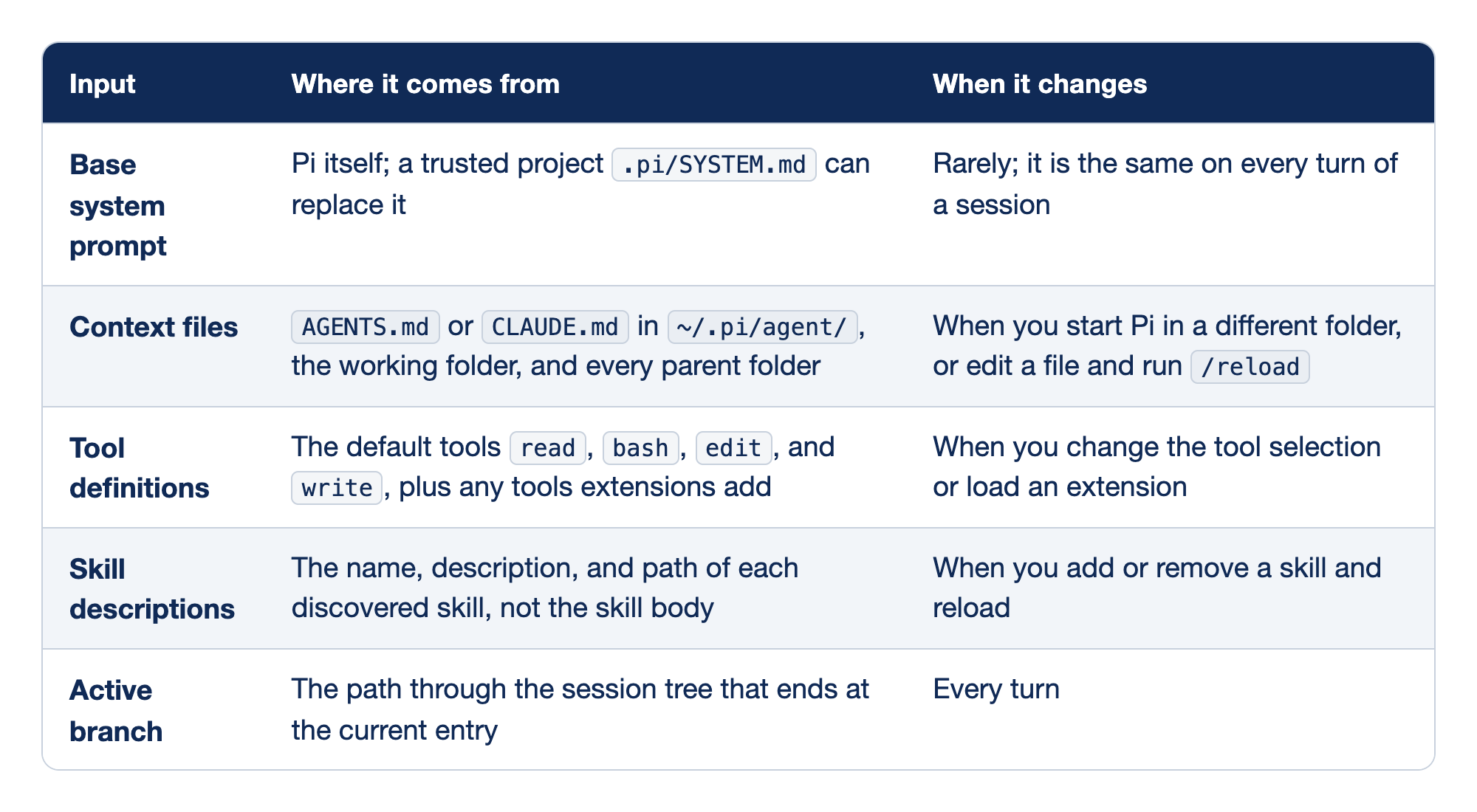
Pi's request has five inputs, and each one has a source and a moment when it changes. The first column names the input, the second says which file or feature supplies it, and the third says what event makes it different on the next request.
- The base system prompt comes from Pi itself, a trusted project
.pi/SYSTEM.mdcan replace it, and it rarely changes during a session. - Context files come from
AGENTS.mdorCLAUDE.mdin~/.pi/agent/, the working folder, and each parent folder, and they change when you start Pi in a different folder or edit a file and run/reload. - Tool definitions come from the default tools
read,bash,edit, andwriteplus any extension tools, and they change when you change the tool selection or load an extension. - Skill descriptions carry the name, description, and path of each skill but not its body, and they change when you add or remove a skill and reload.
- The active branch is the path through the session tree to the current entry, and it changes on every turn.
These five inputs split into the budget you spend before you type and the part you spend while you type. The first four are set when Pi starts and stay put unless you reload or change tools. The last is the conversation itself, and it is the one that buries a ten o'clock decision.
- Base system prompt. These are Pi's standing instructions to the model. You almost never touch them. A project can replace them with
.pi/SYSTEM.md, but that file is trust-protected, and Part 7 treats it as the heavy tool it is. - Context files. Pi looks in the agent directory,
~/.pi/agent/, then in the working folder and each of its parents, and loads theAGENTS.mdorCLAUDE.mdit finds at each level (configuration). One file per folder loads, and the header step in Start here showed thatAGENTS.mdwins when both are present. Ticket Triage's existingCLAUDE.mdalready counts. In your own repository,CLAUDE.mdholds the rules you wrote during your Claude Code days. Each line in these files costs context on every request, which is why Part 7 keeps Ticket Triage's rule file to three lines. - Tool definitions. The model sees a description of each tool it may call. By default those are
read,bash,edit, andwrite. Extensions can add more, and each one adds its own definition to every request. - Skill descriptions. Pi advertises each skill by name, description, and path. The full
SKILL.mdloads only when the model decides a task needs it. Twenty skills cost twenty short descriptions, not twenty manuals. - Active branch. A Pi session is a tree of entries stored in one JSONL file, and the active branch is the path from the root to where you are now. Every prompt, every tool call, and every tool result that you add lands here. This row grows from a few lines at ten to a crowded transcript at three.
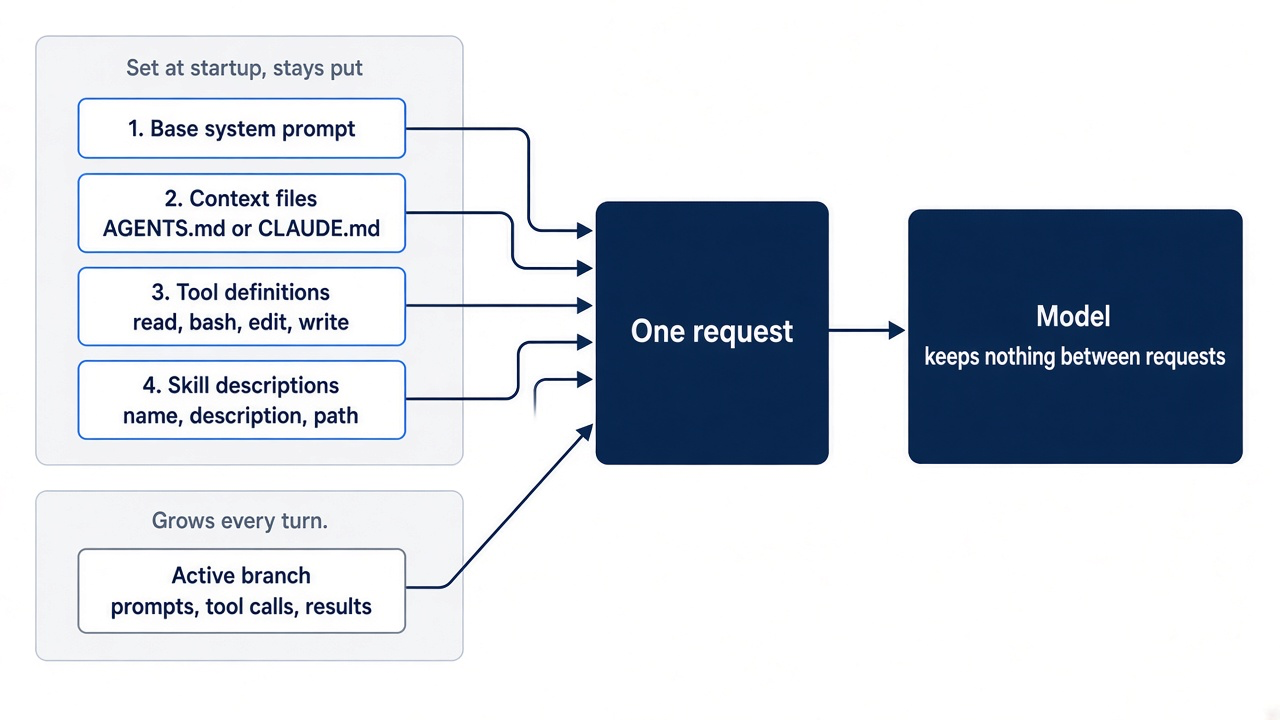
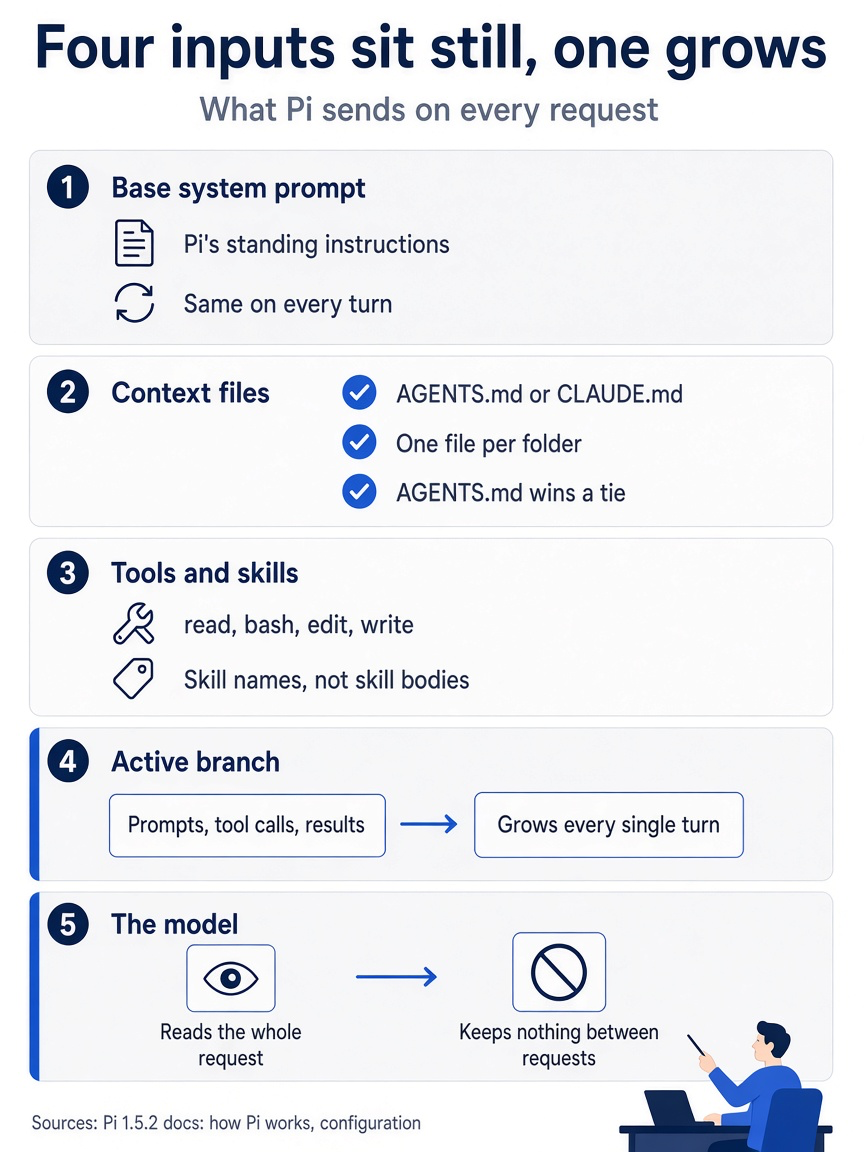
Put simply, four inputs sit still, and the active branch grows on every turn until it dominates what the model reads.
Two details in that last row matter more than they look. First, the model receives the active branch, not every branch in the file, so an approach that you abandoned on another branch no longer costs you its full transcript. At most, Pi attaches a short summary of it to the branch you enter. Second, a lot of what lands in the branch is not your typing. A file attached with @ on the command line, the output of a shell command run with !, and the expanded text of a prompt template all become message content. A file the model reads after you name it with @ in the editor becomes message content too. Parts 4 and 8 are about choosing which of those enter on purpose.
If you already use Claude Code: the shape matches what /context shows you there: a fixed startup load plus a conversation that grows. In both tools, the conversation is the part that crowds out your decisions.
One turn, from the window's point of view
A turn is one model response plus the tool calls it makes, and every tool result stays in the active branch.
Pi's agent loop is short. You submit a message, and Pi adds it to the active branch. Pi builds a request from the system prompt, the branch, the tools, and the model settings, and the provider streams back a response that can contain text and tool calls. Pi records the response, runs each tool call, and records each result. Those steps complete one turn. If the results call for another model request, Pi starts another turn; otherwise the run ends.
Walk one Ticket Triage turn through that loop. You type a prompt:
Add a damage check to @src/classify.js so "crushed" returns shipping. Do not change the refund check.
On the command line, the @ reference puts the classifier's contents into your message. In Pi's editor it inserts the path, and the model calls read on the file, as Part 4's test showed. The model calls read on test/classify.test.js to see the existing cases, then edit on the classifier, then bash with npm test. Each of those calls and each result, including the full test output, is now an entry in the active branch. The model answers with a summary, and the turn ends.
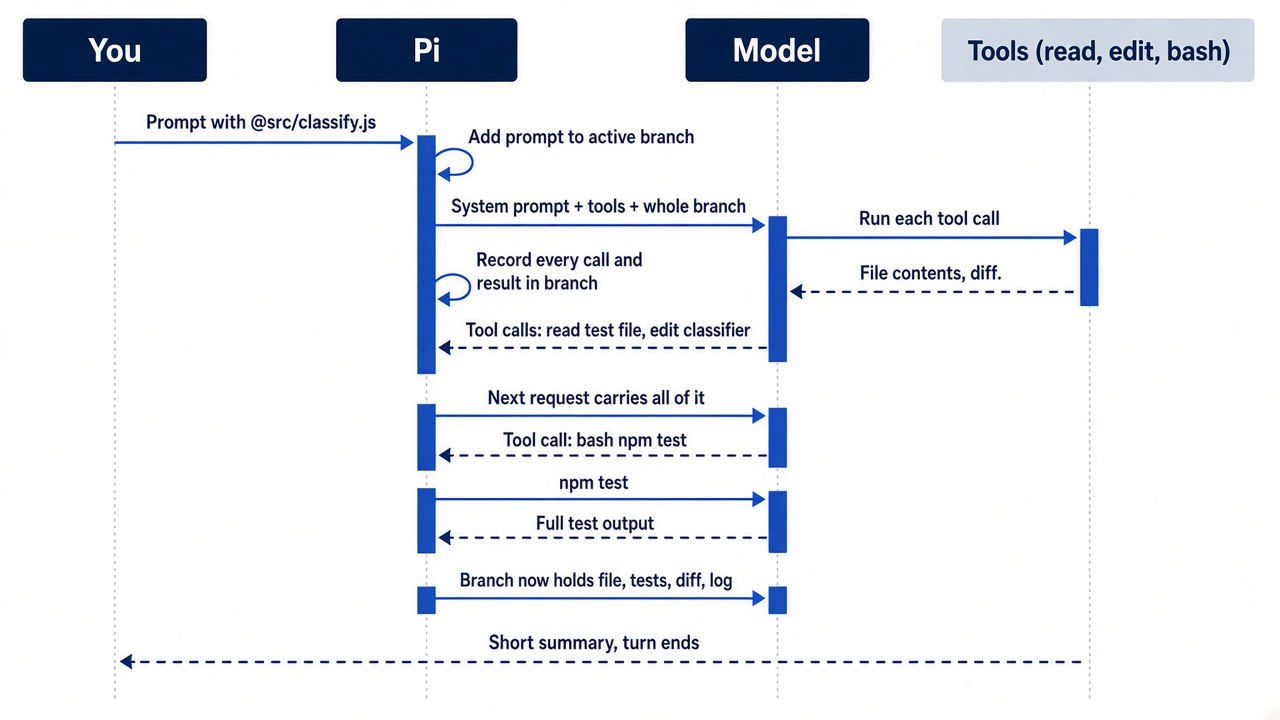
On screen that turn looks like four short lines and a reply. In the window it is your prompt, a whole source file, a whole test file, a diff, and every line npm test printed. Do it ten times with two false starts, and the "do not change the refund check" sentence is a small fraction of what the model reads. Nothing removed it. It was outvoted. The fix is never "phrase the prompt better." It is one of this series' levers: keep output that you only need to see out of the branch (!! from Part 4), leave a failed approach on its own branch (Part 5), and summarize on purpose and keep the rule in a file (Part 7).
The footer is your gauge
You do not need a command to know how full the window is; the footer shows it the whole time.
Pi's interactive screen has a transcript, an editor where you type, and a footer. The footer shows the current folder, the session, the model, context usage, and accumulated usage and cost, and it updates as the model works (usage). The docs do not name the symbols. Read the second footer line from left to right. ↑ is input tokens and ↓ is output tokens for the session. R and W are tokens read from and written to the provider's prompt cache, and CH is the share of the latest request that came from the cache. The dollar amount is the session's cost so far. Then comes the context percent and the window size. (auto) means Pi compacts the conversation on its own when the window gets full. The model name and thinking level are on the right. These meanings come from Pi's installed source, the file footer.js under dist/modes/interactive/components/ in the 1.5.2 package.
Read the footer the way you read a fuel gauge. At ten in the morning, the context number on a fresh session is mostly the startup load from the first four inputs. By three it is mostly the active branch. When the number climbs fast after a single command, something verbose entered the branch, usually tool output. When it approaches the model's limit, Pi normally compacts older history on its own, which Part 7 covers in full.
Gotcha: the context number changes only after a request. In this guide's Part 4 test run, four !npm test runs left the footer at 0.6%. It moved to 0.7% only after the next prompt sent their output to the model. On a window of one million tokens, a short test log moves the number by about a tenth of a percent.
For more detail than the footer gives, run /session in the editor.
/session
Pi shows the current session file, its ID, the message count, token usage, and cost. Use it when you want to compare before and after, for example around a /compact.
The other gauge is the startup header. When Pi launches, the header lists the instructions and resources it loaded. If Ticket Triage's context file does not appear there, the model never saw it, and no amount of re-prompting fixes that. Part 2 reads this header on the first launch.
If you already use Claude Code: Pi has no /context command and no category-by-category breakdown of the window. The footer gives you the running total, /session gives you the numbers for the session, and the startup header plays the role that /context plays in Claude Code. It tells you which instruction files actually loaded, like the Memory files list there. Claude Code's memory page says to "run /context all in a session and check the list under Memory files." The command /context all is /context with every list expanded. Claude Code's /memory is different: it lists memory file locations, including files that do not exist yet.
Gotcha: the footer's context number measures what goes to the model: the startup load plus the active branch, not the whole session file. A session can hold several long branches and still show a modest context number. Accumulated usage and cost, by contrast, count everything you have spent. A /clone copies only the active branch, so its cost reads lower than the original's: $0.186 against $0.204 in this guide's Part 5 test.
What changes when you come from Claude Code
The disease is the same; the levers have different names, and one of them is missing on purpose.
Most Claude Code habits carry over. The six below do something different in Pi, and each one can cost an afternoon.
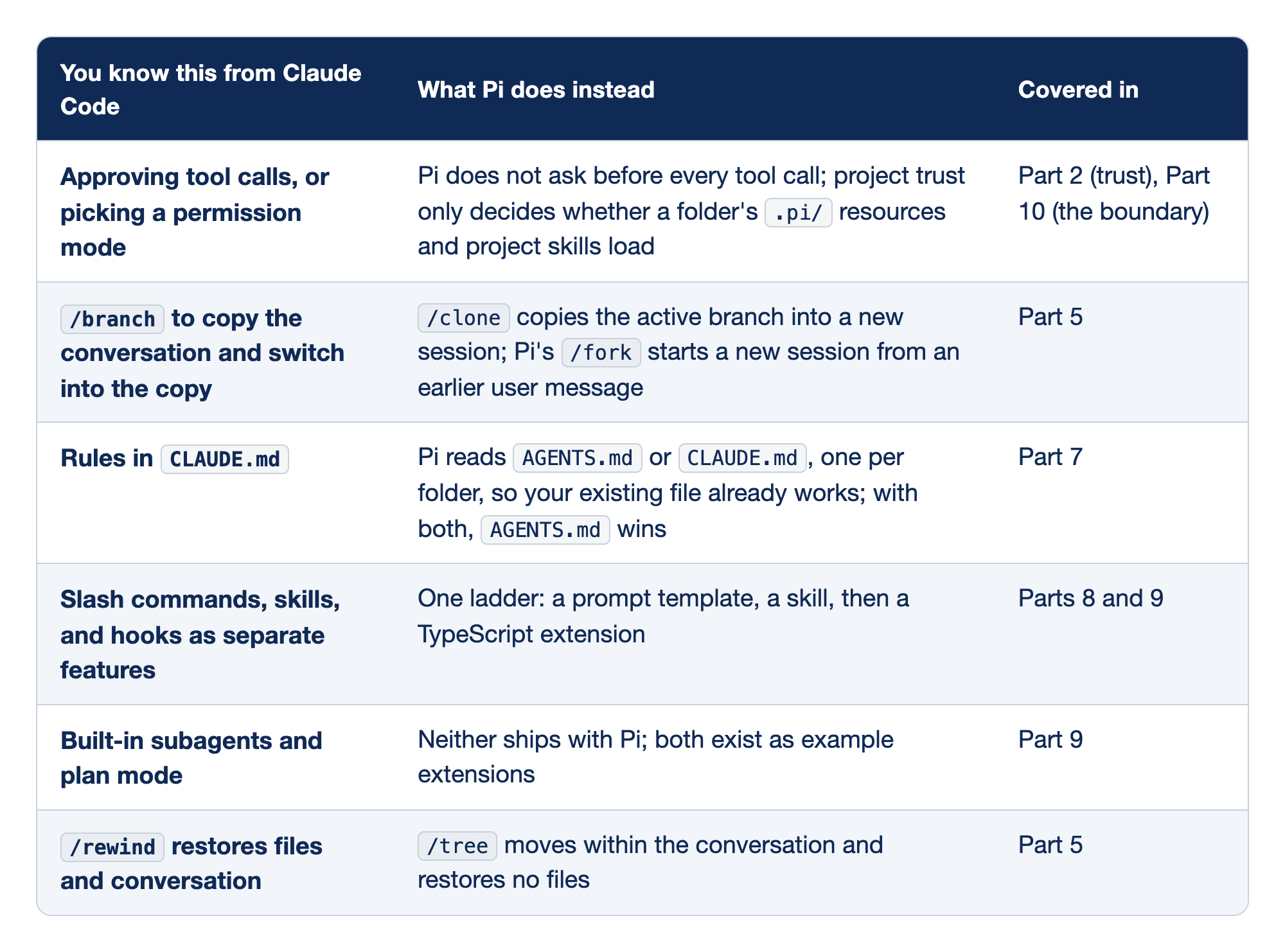
Six Claude Code habits work differently in Pi. The first column names the habit, the second says what Pi does instead, and the third names the part of this guide that settles it.
- Pi does not ask for approval before each tool call, and project trust only controls which
.pi/resources load, as Part 2 and Part 10 explain. - Claude Code's
/branchbecomes Pi's/clone, and Pi's/forkstarts a new session from an earlier user message, as Part 5 shows. - Rules in
CLAUDE.mdkeep working, because Pi readsAGENTS.mdorCLAUDE.mdone per folder and prefersAGENTS.md, as Part 7 covers. - Separate slash commands, skills, and hooks become one ladder of prompt template, skill, and TypeScript extension, as Parts 8 and 9 build.
- Built-in subagents and plan mode do not ship with Pi and exist only as example extensions, as Part 9 shows.
- Claude Code's
/rewindhas only a conversation counterpart in Pi's/tree, which restores no files, as Part 5 explains.
Read the table as a list of places your fingers will move before your head catches up. Each row is a rename or a missing feature, with the part that settles it.
- No per-call approval. Pi's security page is blunt: Pi can read, change, and execute files with the permissions of the account that started it, and it does not ask for approval before every tool call. Project trust exists, but it controls whether a folder's
.pi/settings, extensions, skills, prompts, and similar resources load. It does not limit what a tool call can reach. The boundary that replaces a permission prompt is an isolated environment, and Part 10 spends a full chapter on Docker Sandboxes. /branchand/forkversus/clone. Claude Code's/branchcreates a branch of the conversation and "Switches you into the branch and preserves the original." In Pi, that job belongs to/clone, which copies the active branch into a new session and switches you into it./forkmeans different things in the two tools. Claude Code's/forkcopies the conversation "into a new background session and keep working here," and Pi has no built-in background session. Pi's/forkdoes something else: it starts a new session from an earlier user message. Part 5 keeps all of these names straight.- Rules in a file. Pi loads an
AGENTS.mdor aCLAUDE.mdas a context file, so Ticket Triage's rules reach Pi on the first launch with no conversion. Claude Code also reads a repository'sAGENTS.md"in place of CLAUDE.md," per its memory page. Part 7 cuts the rules to a three-lineAGENTS.mdand keeps one context file per folder. - One customization ladder. Pi's quickstart tells you to start with the least powerful mechanism that meets the need:
AGENTS.mdfor standing instructions, a prompt template for a reusable prompt, a skill for task-specific instructions and files, and an extension for executable tools, commands, or event handlers. Parts 8 and 9 build one of each. - No built-in subagents or plan mode. Pi's extension examples include a
subagent/extension that delegates tasks to subagents with isolated context windows, and aplan-mode/extension that adds a Claude Code-style read-only/plancommand. Neither is part of Pi out of the box. Part 9 shows where to find them. - No file checkpoint. Claude Code's
/rewindcan restore code, the conversation, or both. Pi's session tree records the conversation: messages, tool calls, and results. Moving to an earlier point with/treechanges what the model sees next; your files stay exactly as the last edit left them. Part 5 made "commit, then branch" a habit for that reason.
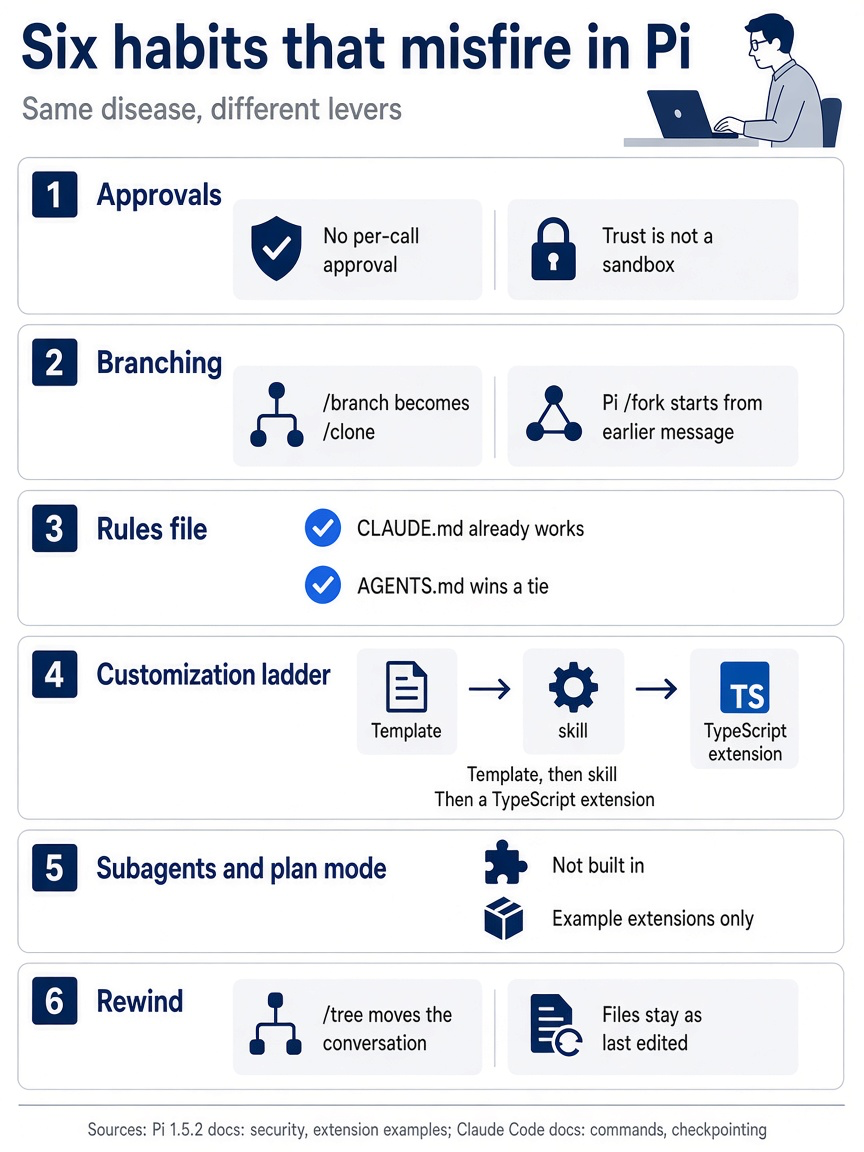
Six Claude Code habits misfire in Pi: approvals, branching, the rules file, the customization ladder, subagents and plan mode, and rewind. Keep them beside your keyboard as a checklist during your first week in Pi.
Gotcha: the most expensive misread in this table is the first row. Your AGENTS.md and CLAUDE.md load even when you decline project trust, and Pi's docs treat instructions in a folder as untrusted input. Trust is not a sandbox, and a quiet startup does not mean a safe one.
Four ideas the rest of the series pays rent on
Strip the commands away, and the series comes down to four habits, each one a way to keep the right things in the window.
Start in the folder. Pi uses the folder you launch from to discover files, to find context files, to decide whether project trust applies, and to group saved sessions. A session records its working directory when it is created and never changes it. Launch from $HOME instead of ~/code/ticket-triage, and the wrong rules load, @ searches the wrong tree, and the session files away under the wrong folder. Part 2 made the first launch deliberate.
Steer while it works. Do not wait for Pi to finish when it heads somewhere you ruled out. Enter sends a correction that the model reads after the current response and its tool calls finish. Alt+Enter queues a follow-up for after the whole task. Escape stops the run and puts queued messages back in the editor. A correction that lands early is a few words in the branch; a wrong refactor that lands is hundreds of lines of diff, plus the conversation about undoing it. Part 3 covered the keys and the terminals that swallow them.
Commit, then branch. Pi keeps every session as a tree, so you can return to an earlier message, try a second approach, and keep the first one on its own branch. Because the tree restores conversation and not files, the files on disk still hold whatever the last approach wrote. A commit before the experiment is what makes the branch safe to try. Part 5 ran the keyword-list approach and the word-table approach for Ticket Triage side by side.
Compact on purpose, and keep rules in files. When the window fills, Pi summarizes older history and keeps recent messages. The originals stay in the session file; they stop going to the model. A summary keeps the gist, and a gist is where the "do not change the refund check" sentence gets lost. Run /compact with instructions before Pi does it for you, and move anything you have said twice into AGENTS.md, where it loads on every request and no summary can drop it. Part 7 does both.
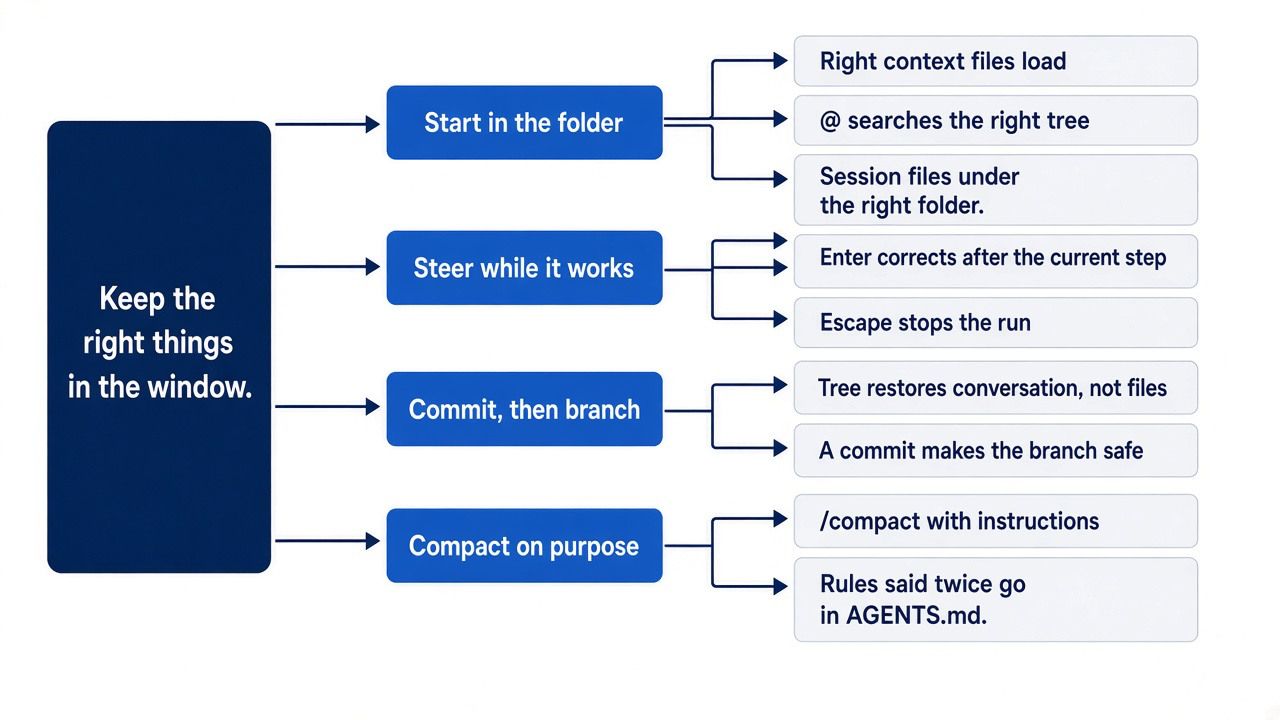
If you already use Claude Code: these are the same habits Claude Code rewards, with different keys. The difference is how much Pi leaves to you. With no permission prompt, no built-in plan mode, and no file checkpoint, the habits are not optional polish. They are the controls.
Do this today
Everyone
-
Run the four checks again and compare. The answers are
OK,BLUE-HERON-7, a line that starts withUNKNOWN, andBLUE-HERON-7.pi -p 'The release code word is BLUE-HERON-7. Reply OK.' pi --continue -p 'What is the release code word? If you do not know, reply UNKNOWN.' pi --no-session -p 'What is the release code word? If you do not know, reply UNKNOWN.' printf 'The release code word is BLUE-HERON-7.\n' > AGENTS.md pi --no-session -p 'What is the release code word? If you do not know, reply UNKNOWN.' -
Put the folder back. The last command prints nothing.
rm AGENTS.md git status --short -
Start one habit: read the footer before you send a long prompt. The checks made a newer session, so
pi --continueno longer opens your work session. Open it by name instead: runpi --resume, typetable, and pressEnter. The footer showscrushed-mug-table. Write down the context percent, and then run/quit. Your note holds one number, and tomorrow you compare against it.pi --resume
If you read Going deeper
These steps prepare the two things Pi inherits from your Claude Code days: your sense of what fills a window, and your rules. Each step needs Claude Code.
-
Find what filled your longest Claude Code session. Open it, then run
/contextand name the biggest category besides the system prompt. Write it down; Parts 4, 5, and 7 give you the Pi lever for it.claude --resume/context -
Measure the rules you will carry over. In the root folder of your own repository, count the lines in your project and global
CLAUDE.mdfiles. Pi reads the project file as-is, and every line costs context on every request. Your global~/.claude/CLAUDE.mdis not in Pi's search path, so note which of its rules you will want in~/.pi/agent/AGENTS.mdlater. If one of the two files does not exist,wcprintsNo such file or directoryfor it and exits with1. This is fine.wc -l CLAUDE.md ~/.claude/CLAUDE.md -
Mark the rules Pi must inherit. List the lines that name a check command or a hard limit. Those are the candidates for the short
AGENTS.mdyou write in Part 7. If your repository has noCLAUDE.md, skip this step.grep -n -i -E "test|lint|build|never|always" CLAUDE.md
These three steps read your own Claude Code files and change nothing. In this guide's test run, /context in a resumed session listed its categories by token count, and Messages was the largest one. The wc and grep steps ran in a real repository.
The window decides, so you decide the window
The three o'clock rewrite was never a mystery. The model read a request in which your rule was one sentence among thousands of lines of files, diffs, and test logs, and it answered the request it was given. Pi makes that easy to see: a footer that tracks the window, a header that lists what loaded, and four prompts that prove the model knows only what you send.
Pi is a smaller kernel than Claude Code, and it leaves more to you. No approval prompt, no built-in plan mode, no file checkpoint. What remains is the one skill that mattered all along: deciding what the agent sees right now.
Put the rule in a file. Keep the noise out of the branch. Watch the gauge. Your agent will stop forgetting, because it never forgot in the first place.
This is Part 6 of "Pi, Day to Day," a 12-part guide to running the Pi coding agent with the same daily discipline you bring to Claude Code.